light MINI Countryman 2016 Owner's Manual (Mini Connected)
[x] Cancel search | Manufacturer: MINI, Model Year: 2016, Model line: Countryman, Model: MINI Countryman 2016Pages: 282, PDF Size: 6.79 MB
Page 247 of 282

Indicator/warning lightsLights up red: the vehicle battery is nolonger being charged. Alternator mal‐function.
Switch off all unnecessary electrical consumers.
Have the battery checked immediately.
Lights up yellow: the battery charge
level is very low, the battery is old, or it
is not securely connected.
Charge the battery by taking a long drive or us‐
ing an external charger. If the indicators appear
again, have the battery checked as soon as
possible.
Disposing of old batteries After they are replaced, have old bat‐
teries disposed of by a dealer’s service
center or another qualified service cen‐
ter or repair shop or take them to a collection
point.
Maintain the battery in an upright position for
transport and storage. Secure the battery so
that it does not tip over during transport.
Fuses WARNING
Incorrect and repaired fuses can overload
electrical lines and components. There is risk of
fire. Never attempt to repair a blown fuse and
do not replace a nonworking fuse with a substi‐
tute of another color or amperage rating. ◀
Have the fuses replaced by a dealer’s service
center or another qualified service center or re‐
pair shop.
Information on the fuses can be found on the
inside of the covers.In the engine compartment
Opening the cover
Press the snap lock.
In interior
On the right side of the footwell.
Opening the cover
Push out at the recess.
Seite 247Replacing componentsMOBILITY247
Online Edition for Part no. 01 40 2 964 459 - VI/15
Page 250 of 282

or body ground of the vehicle providing as‐
sistance.6.Attach the second clamp of the negative
jumper cable to the negative terminal of
the battery, or to the engine or body
ground of the vehicle to be started.
Body ground:
Starting the engine
Never use spray fluids to start the engine.
1.Start the engine of the assisting vehicle and
let it run for several minutes at a slightly in‐
creased idle speed.2.Start the engine of the vehicle being started
in the usual way.
If the first starting attempt is not successful,
wait a few minutes before making another
attempt in order to allow the discharged
battery to recharge.3.Let both engines run for several minutes.4.Disconnect the jumper cables in the reverse
order.
Check the battery and recharge if necessary.
Tow-starting and towing
Information Warning
There is an increased danger of accidents
when towing vehicles. There is a risk of per‐
sonal injury. Do not transport any passengers
other than the driver in a vehicle that is being
towed. ◀
Using a tow fitting The screw-in tow fitting must always be carried
in the vehicle. It can be screwed in at the front
or rear of the MINI.
The tow fitting is stowed in the following loca‐
tion, depending on the equipment:▷Under the right or left front seat.▷In the pouch of the wheel change set in the
cargo area.
CAUTION
If the tow fitting is not used as intended,
there can be damage to the vehicle or to the
tow fitting. There is risk of property damage.
Observe the notes on using the tow fitting. ◀
Use of the tow fitting:
▷Use only the tow fitting provided with the
vehicle and screw it all the way in.▷Use the tow fitting for towing on paved
roads only.▷Avoid lateral loading of the tow fitting, e.g.,
do not lift the vehicle by the tow fitting.
Access to the screw thread
Push out the tow fitting cover at the appropri‐
ate recess in the bumper.
Front
Seite 250MOBILITYBreakdown assistance250
Online Edition for Part no. 01 40 2 964 459 - VI/15
Page 251 of 282
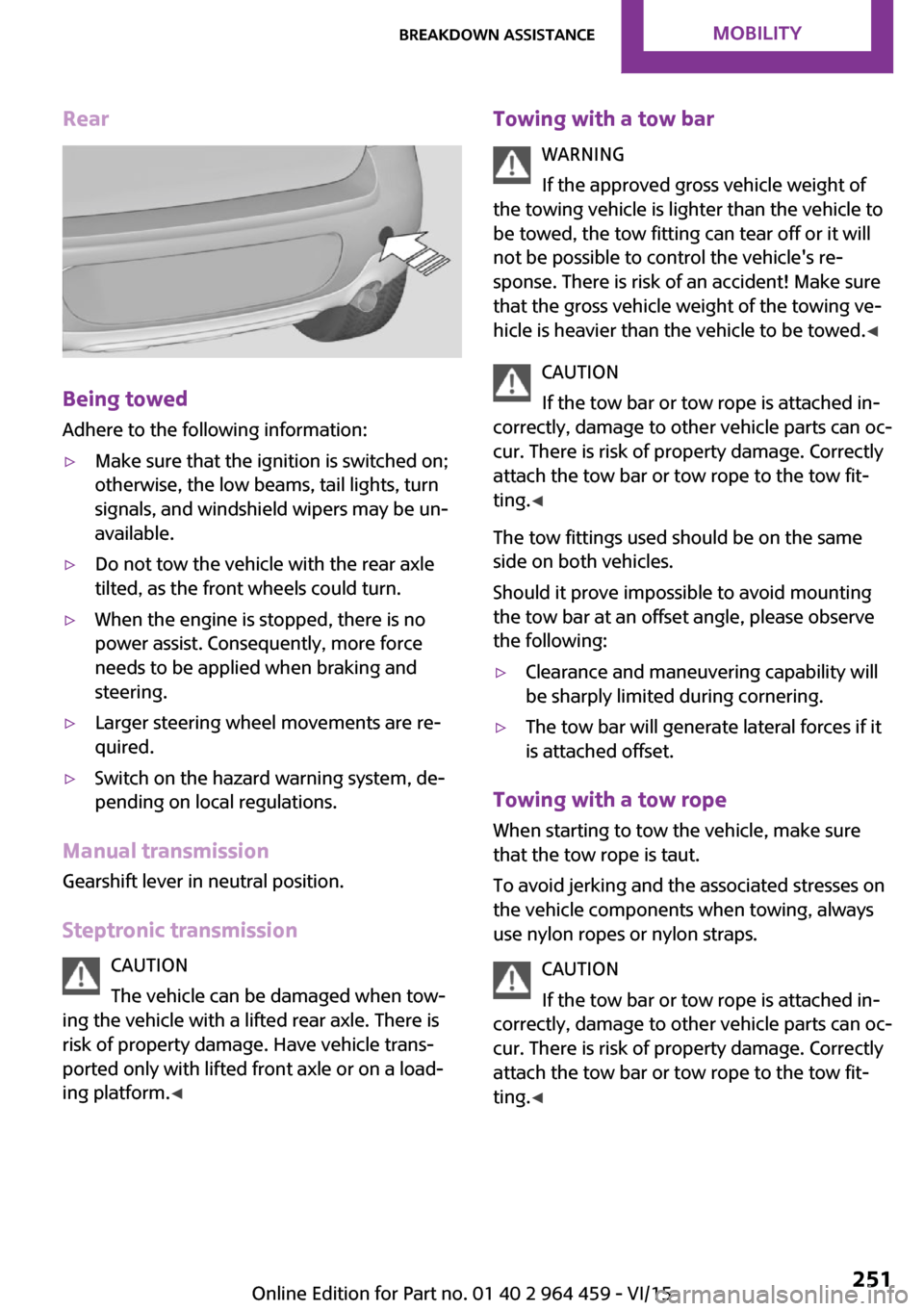
Rear
Being towed
Adhere to the following information:
▷Make sure that the ignition is switched on;
otherwise, the low beams, tail lights, turn
signals, and windshield wipers may be un‐
available.▷Do not tow the vehicle with the rear axle
tilted, as the front wheels could turn.▷When the engine is stopped, there is no
power assist. Consequently, more force
needs to be applied when braking and
steering.▷Larger steering wheel movements are re‐
quired.▷Switch on the hazard warning system, de‐
pending on local regulations.
Manual transmission
Gearshift lever in neutral position.
Steptronic transmission CAUTION
The vehicle can be damaged when tow‐
ing the vehicle with a lifted rear axle. There is
risk of property damage. Have vehicle trans‐
ported only with lifted front axle or on a load‐
ing platform. ◀
Towing with a tow bar
WARNING
If the approved gross vehicle weight of
the towing vehicle is lighter than the vehicle to
be towed, the tow fitting can tear off or it will
not be possible to control the vehicle's re‐
sponse. There is risk of an accident! Make sure
that the gross vehicle weight of the towing ve‐
hicle is heavier than the vehicle to be towed. ◀
CAUTION
If the tow bar or tow rope is attached in‐
correctly, damage to other vehicle parts can oc‐
cur. There is risk of property damage. Correctly
attach the tow bar or tow rope to the tow fit‐
ting. ◀
The tow fittings used should be on the same
side on both vehicles.
Should it prove impossible to avoid mounting
the tow bar at an offset angle, please observe
the following:▷Clearance and maneuvering capability will
be sharply limited during cornering.▷The tow bar will generate lateral forces if it
is attached offset.
Towing with a tow rope
When starting to tow the vehicle, make sure
that the tow rope is taut.
To avoid jerking and the associated stresses on
the vehicle components when towing, always
use nylon ropes or nylon straps.
CAUTION
If the tow bar or tow rope is attached in‐
correctly, damage to other vehicle parts can oc‐ cur. There is risk of property damage. Correctly
attach the tow bar or tow rope to the tow fit‐ ting. ◀
Seite 251Breakdown assistanceMOBILITY251
Online Edition for Part no. 01 40 2 964 459 - VI/15
Page 255 of 282

▷Insert the remote control into the ignition
lock.
Steptronic transmission
Before driving into the car wash, note the fol‐
lowing to ensure that the vehicle can roll:
1.Insert the remote control into the ignition
lock, even with Comfort Access.2.Move the selector lever to position N.3.Release the parking brake.4.Switch the engine off.5.Leave the remote control in the ignition
lock so that the vehicle can roll.
Hand car wash
If washing the vehicle by hand, use copious
quantities of water and car shampoo if neces‐
sary. Clean the vehicle with a sponge or a
washing brush by applying gentle pressure.
Before cleaning the windshield, deactivate the
rain sensor to avoid unintentional wiper activa‐
tion or switch off the ignition.
Adhere to the local regulations regarding
washing cars by hand.
Headlights Do not rub dry and do not use abrasive or caus‐
tic cleansers. Soak areas that have been soiled,
e.g., due to insects, with shampoo and rinse off
with copious quantities of water.
Thaw ice with a window deicer; do not use an
ice scraper.
Windows
Clean the outside and inside surfaces of the
windows and the mirror glasses with window
cleaner.
Do not clean mirror glass with cleaners contain‐
ing quartz.
Wiper blades
Clean with soapy water and replace regularly to
avoid streaking.
Wax and preservative residue and soiling on
the windows cause streaking during window
wiping and lead to premature wear on the
wiper blades and malfunctions of the rain sen‐
sor.
Vehicle care
Car care products
Regular cleaning and care contributes signifi‐
cantly to vehicle value retention.
The manufacturer of your vehicle recommends using car care and cleaning products from
MINI.
WARNING
Cleansers can contain substances that are
dangerous and harmful to your health. There is
risk of injuries. When cleaning the interior, open
the doors or windows. Only use products in‐
tended for cleaning vehicles. Follow the instruc‐
tions on the container. ◀
Vehicle paint Regular care contributes to vehicle value reten‐
tion and protects the paintwork against the
long-term effects of paint-damaging substan‐
ces.
Environmental influences in areas with higher
air pollution or natural contaminants, such as
tree resin or pollen, can have an impact on the
vehicle paint. Therefore, it is important to tailor
the frequency and extent of your car care to
these influences.
Immediately remove especially aggressive sub‐
stances, such as spilled fuel, oil, grease, or bird
droppings, to prevent damage to the paint‐
work.Seite 255CareMOBILITY255
Online Edition for Part no. 01 40 2 964 459 - VI/15
Page 256 of 282

Correcting paint damage
Depending on the severity of the damage, re‐
pair stone impact damage or scratches imme‐
diately to prevent rust formation.
The manufacturer recommends having paint
damage corrected with a professional repair
paint job according to factory specifications us‐
ing original MINI paint materials.
Preservation Preservation is needed when water no longer
beads off of the clean paint surfaces. Only use
paint preservation products that contain car‐
nauba or synthetic waxes.
Caring for matte finishes
Only use cleaning and care products suitable
for vehicles with matte finish. These are availa‐
ble from a dealer’s service center or another
qualified service center or repair shop.
Leather care
The leather processed by the manufacturer is a
high quality natural product. Light graininess is
a typical feature of natural leather.
Particles of dust and road grime chafe in pores
and folds, and lead to increased wear and pre‐
mature degradation of the leather surface.
Therefore, remove dust from the leather regu‐
larly, using a cloth or vacuum cleaner.
Make especially sure that light-colored leather
is cleaned regularly as it is more susceptible to
soiling.
Twice a year, treat the leather with a leather lo‐
tion as dirt and grease will attack the protective
layer of the leather.
Upholstery material care
Vacuum regularly with a vacuum cleaner to re‐
move superficial soiling.
In case of heavy soiling, e.g., beverage stains,
use a soft sponge or lint-free microfiber cloth incombination with a suitable interior cleaner.
Follow the instructions on the container.
Clean the upholstery material down to the
seams using large sweeping motions. Avoid
rubbing the material vigorously.
CAUTION
Open Velcro® fasteners on articles of
clothing can damage the seat covers. There is risk of property damage. Ensure that any Vel‐
cro® fasteners are closed. ◀
Caring for special components Interior plastic parts
These include:▷Imitation leather surfaces▷Lamp lenses▷Indicator covers▷Matte components
Clean with water and a solvent-free plastic
cleaner if necessary.
Rubber seals
Only treat with water or a rubber care product.
When cleaning rubber seals, do not use silicone
sprays or other care products containing sili‐
cone; otherwise, noise and damage may result.
Chrome surfaces Carefully clean components such as the radia‐
tor grille or door handles with an ample supply
of water, possibly with shampoo added, partic‐
ularly when they have been exposed to road
salt. For additional treatment, use a chrome
polish.
Light-alloy wheels
When cleaning the wheels on the vehicle, only
use a neutral wheel rim cleaner with a pH value
of 5 to 9.
Seite 256MOBILITYCare256
Online Edition for Part no. 01 40 2 964 459 - VI/15
Page 264 of 282

Short commands for voice
activationVehicle features and op‐ tions
This chapter describes all standard, country-
specific and optional features offered with the
series. It also describes features that are not
necessarily available in your car, e. g., due to
the selected options or country versions. This
also applies to safety-related functions and sys‐
tems.
When using the features and systems described
here, adhere to local regulations.General information
Instructions for voice activation system, refer to
page 24.
To have the available spoken instructions read
out loud: ›Voice commands‹
The following short commands apply to vehi‐
cles equipped with a voice activation system.
They have no function in vehicles in which only
the mobile phone is operated using the voice.
Adjusting
Vehicle
FunctionCommandOpen the main menu.›Main menu‹Open the options.›Options‹Open the settings.›Settings‹Settings on the Control Display.›Control display‹Open the time and date.›Time and date‹Open the language and units.›Language and units‹Open the speed limit.›Speed‹Open the light.›Lighting‹Open the door lock.›Door locks‹Seite 264REFERENCEShort commands for voice activation264
Online Edition for Part no. 01 40 2 964 459 - VI/15
Page 270 of 282
Everything from A to ZIndexA
ABS, Antilock Brake Sys‐ tem 93
Acoustic signal, refer to Check Control 75
Activated charcoal filter with automatic climate con‐
trol 104
Adaptive Light Control 80
Additional telephone 188
Additives, engine oil 233
Airbags 82
Airbags, indicator/warning light 85
Air circulation, refer to Recir‐ culated air mode, air condi‐
tioner 101
Air circulation, refer to Recir‐ culated air mode, automatic
climate control 103
Air conditioning 100
Air conditioning mode, air conditioner 100
Air conditioning mode, auto‐ matic climate control 102
Air distribution, air condi‐ tioner, manual 101
Air distribution, auto‐ matic 103
Air distribution, automatic cli‐ mate control, manual 103
Air distribution, individual 101
Air drying, refer to Cooling function 104
Air flow rate for air condi‐ tioner 100
Air flow rate with automatic climate control 103
Air pressure, refer to Tire infla‐ tion pressure 218 Air supply, air conditioner 100
Air supply, automatic climate control 102
Alarm system 39
Alarm system, avoiding unin‐ tentional alarms 40
Alarm system, ending an alarm 39
Alarm system, interior motion sensor 40
Alarm system, tilt alarm sen‐ sor 40
ALL4 all-wheel system 95
All-wheel drive, refer to ALL4 95
Alternating-code hand-held transmitter 106
AM/FM station 156
Ambient lighting 81
Announcement, navigation, see Spoken instructions 145
Antifreeze, washer fluid 64
Antilock Brake System, ABS 93
Anti-slip control, refer to Dy‐ namic Stability Control
DSC 93
Anti-theft protection 31
Appointments 204
Approved engine oils 233
Ashtray 109
Assistance, roadside 248
Assistance when driving off, refer to Hill drive-off assis‐
tant 95
Assistance with starting en‐ gine, refer to Jump-start‐
ing 248
Audio playback 165
Audio playback, Blue‐ tooth 171 Automatic air distribution 103
Automatic air flow 103
Automatic car wash 254
Automatic climate con‐ trol 102
Automatic climate control, au‐ tomatic air distribution 103
Automatic, cruise control 97
Automatic headlight con‐ trol 78
Automatic transmission with Steptronic 65
AUTO program with auto‐ matic climate control 103
AUX-IN port 167
Average fuel consumption 70
Average speed 70
Average speed, refer to Com‐ puter 69
B Backrest curvature, refer to Lumbar support 45
Backrests, refer to Seats 44
Backup lights, bulb replace‐ ment 243
Balance 154
Bass 154
Battery disposal 39
Battery, refer to Vehicle bat‐ tery 246
Battery, remote control 30
Battery replacement, remote control 39
Belts, refer to Safety belts 46
Belt tensioners, refer to Safety belts 46
Bi-xenon headlights 239
Black and white map dis‐ play 148 Seite 270REFERENCEEverything from A to Z270
Online Edition for Part no. 01 40 2 964 459 - VI/15
Page 271 of 282

Bluetooth audio 171
Bluetooth connection, activat‐ ing/deactivating, hands-free
system 179
Bluetooth connection, activat‐ ing/deactivating, mobile
phone preparation 189
Bluetooth hands-free sys‐ tem 178
Brake assistant 93
Brake discs, breaking in 120
Brake fluid, refer to Service re‐ quirements 74
Brake force distribution, elec‐ tronic 93
Brake pads, breaking in 120
Brake, refer to Parking brake 60
Brakes, MINI maintenance system 236
Brakes, service require‐ ments 74
Brake system, MINI mainte‐ nance system 236
Braking, notes 121
Braking, parking brake 60
Breakdown assistance, Road‐ side Assistance 248
Breaking in 120
Brightness on the Control Dis‐ play 74
Buckle tongues height adjust‐ ment 47
Button for starting the engine, refer to Start/Stop button 58
C
Calendar 204
California Proposition 65 Warning 7
Car battery, refer to Vehicle battery 246
Car care products 255
Care, displays 257
Care, vehicle 255 Cargo area, Comfort Ac‐
cess 37
Cargo area door, refer to Tail‐ gate 35
Cargo area, enlarging, cargo cover 111
Cargo area, flat loading floor 113
Cargo area light, refer to Inte‐ rior lights 81
Cargo area, multi-function hook 114
Cargo area, opening from the outside 35
Cargo area, partition net 113
Car horn, refer to Horn 12
Carpet, care 257
Car phone, refer to Tele‐ phone 178
Car phone, refer to Telephone, mobile phone prepara‐
tion 188
Car wash 254
CBC, Cornering Brake Con‐ trol 93
CBS Condition Based Serv‐ ice 236
CD 164
CD/DVD drives, care 257
CD player 164
Center armrest 116
Center console, refer to Around the center con‐
sole 16
Center rail 116
Center rail, refer to Storage compartments 116
Central locking, Comfort Ac‐ cess 37
Central locking from the in‐ side 34
Central locking system, con‐ cept 31
Central locking system, from the outside 31 Central screen, see Control
Display 18
Changes, technical, refer to Own Safety 6
Changing wheels/tires 224
Check Control 75
Children, transporting 53
Child restraint fixing system LATCH 55
Child restraint fixing sys‐ tems 53
Child restraint fixing systems, mounting 54
Child seat, mounting 54
Child seats, refer to Transport‐ ing children safely 53
Chrome parts, care 256
Circulation of air, refer to Re‐ circulated air mode, air con‐
ditioner 101
Circulation of air, refer to Re‐ circulated air mode, auto‐
matic climate control 103
Cleaning, displays 257
Cleaning, refer to Care 254
Climate 100
Climate mode, ventila‐ tion 104
Clock 68
Clock, 12h/24h format 72
Clock, setting the time and date 72
Clock, setting the time zone 73
Closing from the inside 34
Closing from the outside 32
Clutch, breaking in 120
Cockpit 12
Cold start, refer to Starting the engine 59
Combination instrument, refer to Displays 14
Combination switch, refer to Turn signal/high-beams/
headlight flasher 61 Seite 271Everything from A to ZREFERENCE271
Online Edition for Part no. 01 40 2 964 459 - VI/15
Page 272 of 282
Combination switch, refer toWasher/wiper system 61
Comfort Access 37
Comfort Access, in the car wash 38
Comfort Access, replacing the battery 39
Comfort area, refer to Around the center console 16
Compartment for remote con‐ trol, refer to Ignition lock 58
Compass, digital 107
Computer 69
Computer, displaying informa‐ tion 69
Condition Based Service CBS 236
Confirmation signals for vehi‐ cle locking/unlocking 33
Connecting, mobile phone, re‐ fer to Mobile phone, pairing,
hands-free system 179
Connecting, mobile phone, re‐ fer to Pairing the mobile
phone 189
Consumption, refer to Aver‐ age fuel consumption 70
Contacts for hands-free sys‐ tem 185
Contacts, Office 201
Control Display 18
Control Display, care 257
Control Display, settings 73
Controls and displays 12
Control systems, driving stabil‐ ity 93
Convenient operation, win‐ dow 32
Coolant temperature 69
Cooling function, switching on and off 104
Cooling, maximum 103
Cornering Brake Control, CBC 93
Corrosion on brake discs 122 Cradle for telephone or mobile
phone, refer to Snap-in
adapter 198
Cruise control 97
Cupholders 109
Current fuel consumption 70
Current location, storing 136
Curve lights, refer to Adaptive Light Control 80
D Dashboard lighting, refer to Instrument lighting 80
Dashboard, refer to Cock‐ pit 12
Dashboard, refer to Dis‐ plays 14
Date, date format 73
Date, setting 73
Daytime running lights 79
Decorative trim, care 257
Defogging windows 101
Defroster, rear window, auto‐ matic climate control 104
Defroster, rear window, with air conditioner 101
Defrosting windows 101
Defrost setting, refer to De‐ frosting windows 101
Destination entry via the ad‐ dress book 136
Destination guidance with in‐ termediate destinations 141
Destination input, naviga‐ tion 134
Digital compass 107
Digital radio 158
Dip stick, engine oil 232
Directional indicators, refer to Turn signals 61
Display lighting, refer to In‐ strument lighting 80
Displays 14
Displays and controls 12
Displays, care 257 Displays, cleaning 257
Displays, refer to Instrument cluster 14
Disposal, remote control bat‐ tery 39
Distance warning, refer to Park Distance Control
PDC 99
Door key, refer to Remote control with integrated
key 30
Door lock 34
Door lock, confirmation sig‐ nals 33
Doors, manual operation 34
Doors, unlocking and locking, confirmation signals 33
Doors, unlocking and locking from the inside 34
Doors, unlocking and locking, from the outside 32
DOT Quality Grades 222
Drive-off assistant, refer to Hill drive-off assistant 95
Driving notes, breaking in 120
Driving off on hills, refer to Hill drive-off assistant 95
Driving on poor roads 122
Driving stability control sys‐ tems 93
Driving tips, refer to Driving notes 120
Dry air, refer to Cooling func‐ tion 104
DSC Dynamic Stability Con‐ trol 93
DTC Dynamic Traction Con‐ trol 94
DTMF suffix dialing, hands- free system 181
DTMF suffix dialing, mobile phone preparation 193
Dynamic destination guid‐ ance 150 Seite 272REFERENCEEverything from A to Z272
Online Edition for Part no. 01 40 2 964 459 - VI/15
Page 273 of 282
Dynamic Stability ControlDSC 93
Dynamic Traction Control DTC 94
E Electrical malfunction, door lock 34
Electrical malfunction, fuel filler flap 214
Electronic brake-force distri‐ bution 93
Electronic Stability Program ESP, refer to Dynamic Stabil‐
ity Control DSC 93
Emergency operation, fuel filler flap, unlocking man‐
ually 214
Emergency operation, refer to Manual operation 34
Emergency operation, Step‐ tronic transmission, refer to
Selector lever lock, overrid‐
ing 67
Energy, saving, refer to Saving fuel 128
Engine, breaking in 120
Engine compartment 230
Engine oil, adding 232
Engine oil, additives, refer to Approved engine oils 233
Engine oil, alternative oil types 233
Engine oil change intervals, refer to Service require‐
ments 74
Engine oil, dip stick 232
Engine oil, filling capacity 263
Engine oil, MINI maintenance system 236
Engine oil types, alterna‐ tive 233
Engine oil types, ap‐ proved 233 Engine, overheating, refer to
Coolant temperature 69
Engine start, assistance 248
Engine, starting 59
Engine, starting, Comfort Ac‐ cess 37
Engine, starting, Start/Stop button 58
Engine, stopping, Start/Stop button 58
Engine, switching off 60
Equipment, interior 105
ESP Electronic Stability Pro‐ gram, refer to Dynamic Sta‐
bility Control DSC 93
Exchanging wheels/tires 224
Exterior mirrors 50
Exterior mirrors, adjusting 50
Exterior mirrors, folding in and out 51
Exterior sensors, care 257
External devices 167
External temperature dis‐ play 68
External temperature display, changing the unit of meas‐
ure 72
External temperature display, on onboard computer 72
External temperature warn‐ ing 68
F Fader 154
Failure messages, refer to Check Control 75
False alarm, refer to Avoiding unintentional alarms 40
Fan, refer to Air flow rate for air conditioner 100
Fan, refer to Air flow rate with automatic climate con‐
trol 103
Fastening safety belts, refer to Safety belts 46 Fault messages, refer to Check
Control 75
Filling capacities 263
Filter, refer to Activated-char‐ coal filter 102
Filter, refer to Microfilter 102
Filter, refer to Microfilter/acti‐ vated-charcoal filter with au‐
tomatic climate control 104
First aid kit 248
First aid, refer to First aid kit 248
Flashing when locking/unlock‐ ing 33
Flat tire, Flat Tire Monitor 86
Flat tire, indicator/warning lamp 86
Flat Tire Monitor FTM 85
Flat Tire Monitor FTM, flat tire message 86
Flat Tire Monitor FTM, initializ‐ ing the system 86
Flat Tire Monitor FTM, snow chains 85
Flat Tire Monitor FTM, system limits 85
Flat tire, run-flat tire 87
Flat tire, Tire Pressure Moni‐ tor 87
Flat tire, Tire Pressure Monitor TPM 87
Flat tire, wheel change 245
Floor mats, care 257
FM/AM station 156
Fog lights 80
Foot brake 121
Footwell lights, refer to Inte‐ rior lights 81
Four-wheel drive, refer to ALL4 95
Front airbags 82
Front fog light, bulb replace‐ ment 241
Front fog lights 80
Front lights, bulb replace‐ ment 240 Seite 273Everything from A to ZREFERENCE273
Online Edition for Part no. 01 40 2 964 459 - VI/15