belt MINI Countryman 2016 (Mini Connected) User Guide
[x] Cancel search | Manufacturer: MINI, Model Year: 2016, Model line: Countryman, Model: MINI Countryman 2016Pages: 282, PDF Size: 6.79 MB
Page 85 of 282

Operational readiness of airbag system
Information WARNING
Individual components can be hot after
triggering of the airbag system. There is risk of
injuries. Do not touch individual components. ◀
WARNING
Improperly executed work can lead to
failure, malfunction or unintentional triggering of the airbag system. In the case of a malfunc‐
tion, the airbag system could not trigger as in‐ tended in the event of an accident despite re‐
spective accident severity. There is risk of
injuries or danger to life. Have the airbag sys‐
tem checked, repaired, dismantled and scrap‐
ped by a dealer’s service center or another
qualified service center or repair shop. ◀
Correct function
In the radio ready state and beyond, re‐
fer to page 58, the warning light lights
up briefly to indicate that the entire air‐
bag system and the belt tensioners are opera‐
tional.
Airbag system malfunction
▷Warning light does not light up in the radio
ready state.▷Warning light remains permanently on.
The airbag restraint system and belt tensioner
are not working. Have the vehicle checked im‐
mediately by a dealer’s service center or an‐
other qualified service center or repair shop.
FTM Flat Tire Monitor
The concept
The system does not measure the actual infla‐
tion pressure in the tires.
The system detects a pressure loss in a tire by
comparing the rotational speeds of the individ‐
ual wheels while moving.
In the event of a pressure loss, the diameter
and therefore the rotational speed of the corre‐
sponding wheel change. This is detected and
reported as a flat tire.
Functional requirements
The system must have been initialized when
the tire inflation pressure was correct; other‐ wise, reliable signaling of a flat tire is not en‐
sured.
Initialize the system after each correction of the
tire inflation pressure and after every tire or
wheel change.
System limits
A natural, even pressure loss in all four tires
cannot be detected. Therefore, check the tire
inflation pressure regularly.
Sudden serious tire damage caused by external
influences cannot be indicated in advance.
The system could be delayed or malfunction in
the following situations:▷When the system has not been initialized.▷When driving on a snowy or slippery road
surface.▷Sporty driving style: slip in the drive wheels,
high lateral acceleration.▷When driving with snow chains.Seite 85SafetyCONTROLS85
Online Edition for Part no. 01 40 2 964 459 - VI/15
Page 111 of 282

MINI Paceman
Take out the cover.
Cargo area Cargo cover WARNING
Loose objects in the car's interior can be
thrown into the car's interior while driving, e.g.
in the event of an accident or during braking
and evasive maneuvers. There is risk of injuries.
Secure loose objects in the car's interior. ◀
When the tailgate is opened, the cargo cover is
raised.
When closing, ensure that the cargo cover is
resting on the rubber buffers of the securing
straps; otherwise, damage may occur when
closing the tailgate.
To load bulky luggage, the cover can be re‐
moved.
1.Detach the securing straps from the tail‐
gate.2.Lift the cover slightly, arrow 1, and pull it
back and out of the bracket, arrow 2.
MINI Countryman:
MINI Paceman:
MINI Countryman: rear seat backrests
Observe the instructions concerning the safety
belt, refer to page 46. Otherwise, personal pro‐
tection may be compromised.
WARNING
Danger of jamming with folding down the
backrests. There is risk of injuries or risk of property damage. Make sure that the area of
movement of the rear backrest is clear prior to
folding down. ◀
The rear seat backrest is divided at a ratio of
40-20-40.
When the outer rear seat backrests are folded down, it is not permissible for a person to travel
on the center seat.
Remove the third head restraint, refer to
page 50, if necessary.
Open the center safety belt and insert it in the
belt holder on the headliner, refer to page 48.
Enlarge the cargo area by adjusting the rear
seat backrests to a more upright position.
Seite 111Interior equipmentCONTROLS111
Online Edition for Part no. 01 40 2 964 459 - VI/15
Page 112 of 282
The backrests can be adjusted to 10 different
positions between the comfort and transport
positions and they can be folded down.
In the comfort position, the backrests are tilted
back to the greatest possible angle and in the
transport position they are nearly vertical.
Before beginning with the mounting of a child
restraint fixing system, note the instructions,
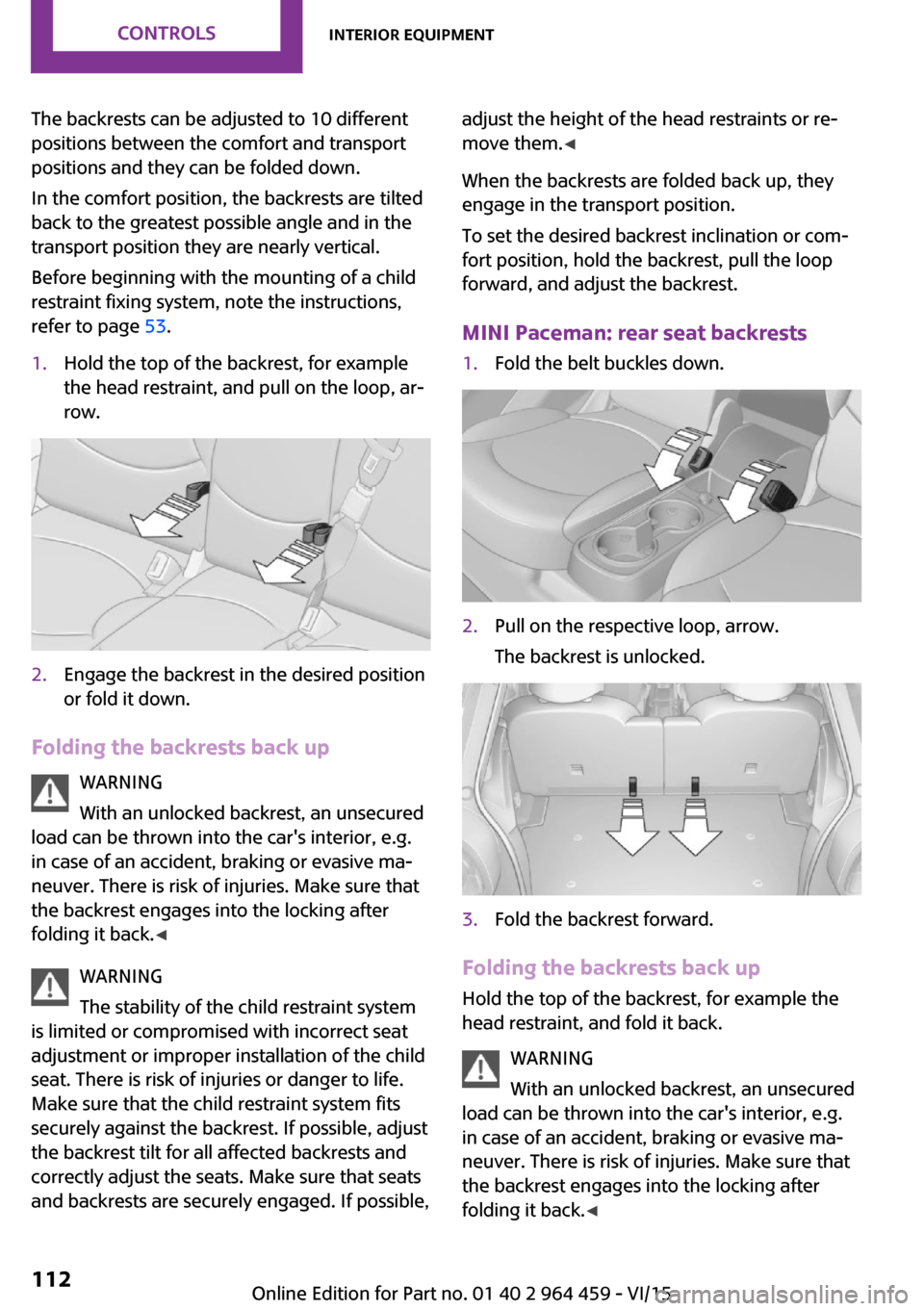
refer to page 53.1.Hold the top of the backrest, for example
the head restraint, and pull on the loop, ar‐
row.2.Engage the backrest in the desired position
or fold it down.
Folding the backrests back up
WARNING
With an unlocked backrest, an unsecured
load can be thrown into the car's interior, e.g.
in case of an accident, braking or evasive ma‐
neuver. There is risk of injuries. Make sure that
the backrest engages into the locking after
folding it back. ◀
WARNING
The stability of the child restraint system
is limited or compromised with incorrect seat
adjustment or improper installation of the child
seat. There is risk of injuries or danger to life.
Make sure that the child restraint system fits
securely against the backrest. If possible, adjust
the backrest tilt for all affected backrests and
correctly adjust the seats. Make sure that seats
and backrests are securely engaged. If possible,
adjust the height of the head restraints or re‐
move them. ◀
When the backrests are folded back up, they
engage in the transport position.
To set the desired backrest inclination or com‐
fort position, hold the backrest, pull the loop
forward, and adjust the backrest.
MINI Paceman: rear seat backrests1.Fold the belt buckles down.2.Pull on the respective loop, arrow.
The backrest is unlocked.3.Fold the backrest forward.
Folding the backrests back up Hold the top of the backrest, for example the
head restraint, and fold it back.
WARNING
With an unlocked backrest, an unsecured
load can be thrown into the car's interior, e.g.
in case of an accident, braking or evasive ma‐
neuver. There is risk of injuries. Make sure that
the backrest engages into the locking after
folding it back. ◀
Seite 112CONTROLSInterior equipment112
Online Edition for Part no. 01 40 2 964 459 - VI/15
Page 125 of 282
available cargo and luggage load capacity
calculated in Step 4.6.If your vehicle will be towing a trailer, load
from your trailer will be transfered to your
vehicle. Consult the manual for transporting
a trailer to determine how this may reduce
the available cargo and luggage load ca‐
pacity of your vehicle.
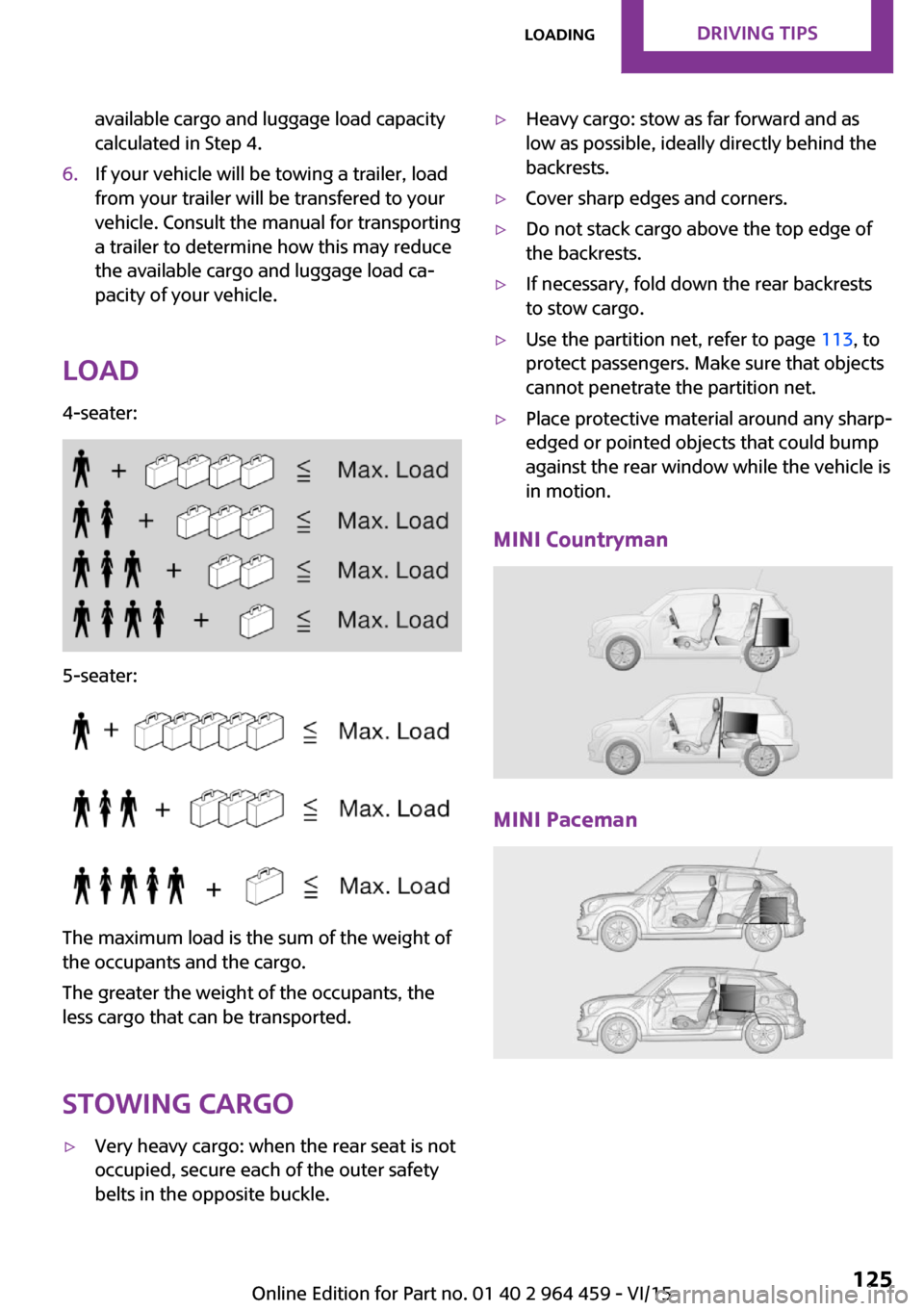
Load
4-seater:
5-seater:
The maximum load is the sum of the weight of
the occupants and the cargo.
The greater the weight of the occupants, the
less cargo that can be transported.
Stowing cargo
▷Very heavy cargo: when the rear seat is not
occupied, secure each of the outer safety
belts in the opposite buckle.▷Heavy cargo: stow as far forward and as
low as possible, ideally directly behind the
backrests.▷Cover sharp edges and corners.▷Do not stack cargo above the top edge of
the backrests.▷If necessary, fold down the rear backrests
to stow cargo.▷Use the partition net, refer to page 113, to
protect passengers. Make sure that objects
cannot penetrate the partition net.▷Place protective material around any sharp-
edged or pointed objects that could bump
against the rear window while the vehicle is
in motion.
MINI Countryman
MINI Paceman
Seite 125LoadingDRIVING TIPS125
Online Edition for Part no. 01 40 2 964 459 - VI/15
Page 126 of 282
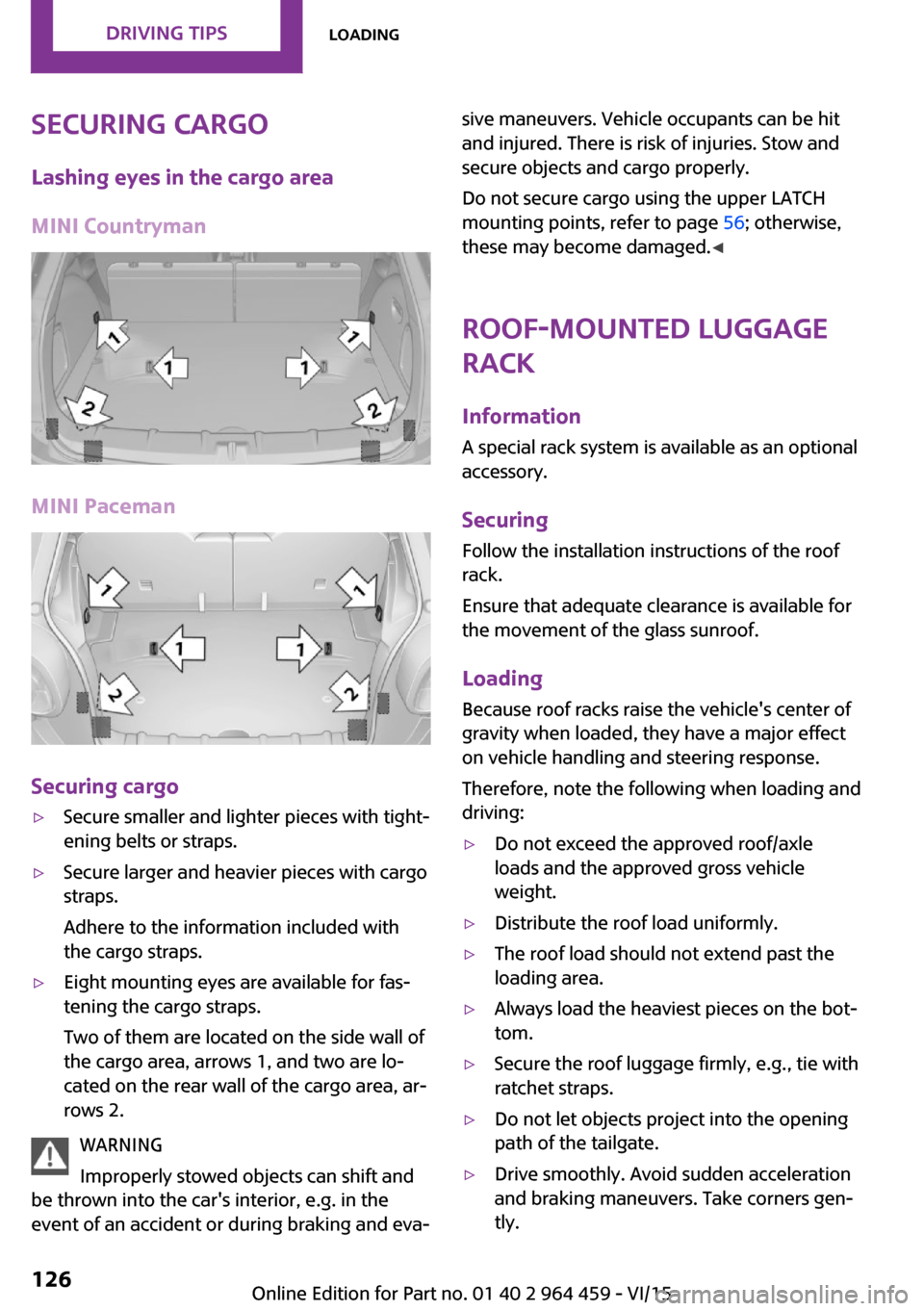
Securing cargoLashing eyes in the cargo area
MINI Countryman
MINI Paceman
Securing cargo
▷Secure smaller and lighter pieces with tight‐
ening belts or straps.▷Secure larger and heavier pieces with cargo
straps.
Adhere to the information included with
the cargo straps.▷Eight mounting eyes are available for fas‐
tening the cargo straps.
Two of them are located on the side wall of
the cargo area, arrows 1, and two are lo‐
cated on the rear wall of the cargo area, ar‐
rows 2.
WARNING
Improperly stowed objects can shift and
be thrown into the car's interior, e.g. in the
event of an accident or during braking and eva‐
sive maneuvers. Vehicle occupants can be hit
and injured. There is risk of injuries. Stow and
secure objects and cargo properly.
Do not secure cargo using the upper LATCH
mounting points, refer to page 56; otherwise,
these may become damaged. ◀
Roof-mounted luggage
rack
InformationA special rack system is available as an optional
accessory.
Securing
Follow the installation instructions of the roof
rack.
Ensure that adequate clearance is available for
the movement of the glass sunroof.
Loading Because roof racks raise the vehicle's center ofgravity when loaded, they have a major effect
on vehicle handling and steering response.
Therefore, note the following when loading and driving:▷Do not exceed the approved roof/axle
loads and the approved gross vehicle
weight.▷Distribute the roof load uniformly.▷The roof load should not extend past the
loading area.▷Always load the heaviest pieces on the bot‐
tom.▷Secure the roof luggage firmly, e.g., tie with
ratchet straps.▷Do not let objects project into the opening
path of the tailgate.▷Drive smoothly. Avoid sudden acceleration
and braking maneuvers. Take corners gen‐
tly.Seite 126DRIVING TIPSLoading126
Online Edition for Part no. 01 40 2 964 459 - VI/15
Page 154 of 282
ToneVehicle features and op‐
tions
This chapter describes all standard, country-
specific and optional features offered with the
series. It also describes features that are not
necessarily available in your car, e. g., due to
the selected options or country versions. This
also applies to safety-related functions and sys‐
tems.
When using the features and systems described
here, adhere to local regulations.
General information The sound settings are stored for the remote
control currently in use.
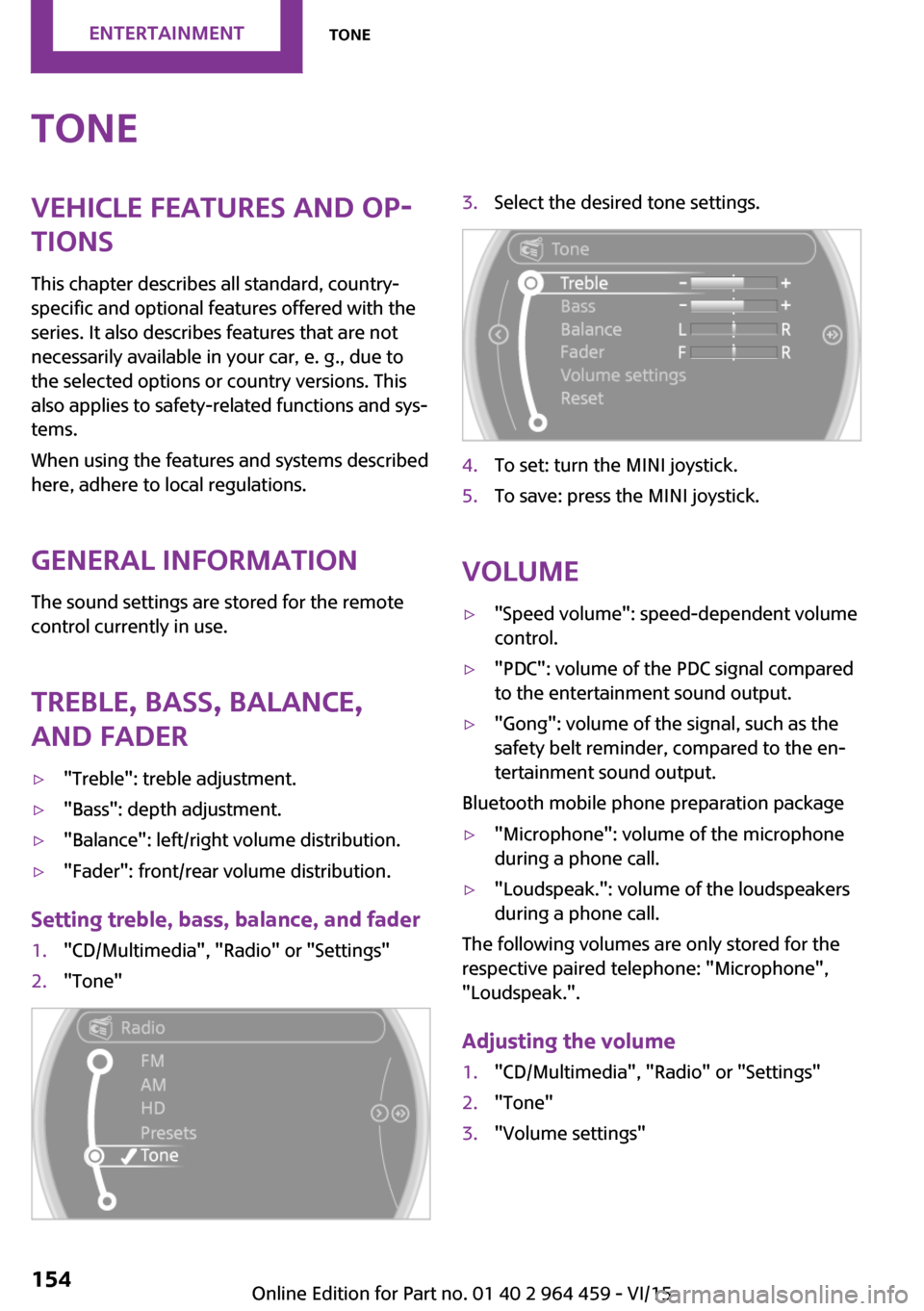
Treble, bass, balance,
and fader▷"Treble": treble adjustment.▷"Bass": depth adjustment.▷"Balance": left/right volume distribution.▷"Fader": front/rear volume distribution.
Setting treble, bass, balance, and fader
1."CD/Multimedia", "Radio" or "Settings"2."Tone"3.Select the desired tone settings.4.To set: turn the MINI joystick.5.To save: press the MINI joystick.
Volume
▷"Speed volume": speed-dependent volume
control.▷"PDC": volume of the PDC signal compared
to the entertainment sound output.▷"Gong": volume of the signal, such as the
safety belt reminder, compared to the en‐
tertainment sound output.
Bluetooth mobile phone preparation package
▷"Microphone": volume of the microphone
during a phone call.▷"Loudspeak.": volume of the loudspeakers
during a phone call.
The following volumes are only stored for the
respective paired telephone: "Microphone",
"Loudspeak.".
Adjusting the volume
1."CD/Multimedia", "Radio" or "Settings"2."Tone"3."Volume settings"Seite 154ENTERTAINMENTTone154
Online Edition for Part no. 01 40 2 964 459 - VI/15
Page 257 of 282

Do not use abrasive cleaners or a steam jet hot‐
ter than 140 ℉/60 ℃; otherwise, damage may
result. Adhere to the manufacturer instructions.
Aggressive, acidic, or alkaline cleaners may de‐
stroy the protective coating of neighboring
components such as the brake disc.
Exterior sensors The sensors on the outside of the vehicle, such
as for Park Distance Control, must be kept clean
and free of ice to ensure that they remain fully
functional.
Decorative trim
Clean decorative trims and fine wood compo‐
nents with a moist cloth only. Then dry with a
soft cloth.
Safety belts Dirty belt straps impede the reeling action and
thus have a negative impact on safety.
WARNING
Chemical cleansers can destroy the safety
belt webbing. Missing protective effect of the
safety belts. There is risk of injuries or danger to
life. Use only a mild soapy solution for cleaning
the safety belts. ◀
Carpets/floor mats WARNING
Objects in the driver's floor area can limit
the pedal distance or block a depressed pedal.
There is risk of an accident. Stow objects in the
vehicle such that they are secured and cannot
enter into the driver's floor area. Use floor mats
that are suitable for the vehicle and can be
safely attached to the floor. Do not use loose
floor mats and do not layer several floor mats.
Make sure that there is sufficient clearance for
the pedals. Ensure that the floor mats are se‐
curely fastened again after they were removed,
e.g. for cleaning. ◀
Floor mats can be removed for cleaning.If they are very dirty, clean with a microfiber
cloth and water or an interior cleaner. To pre‐
vent matting of the carpet, rub back and forth
in the direction of travel only.
Displays
To clean the displays, such as the radio or dis‐
play elements, use an antistatic microfiber
cloth.
CAUTION
Chemical cleansers, moisture or fluids of
any kind can damage the surface of displays
and screens. There is risk of property damage.
Clean with a clean, antistatic microfiber cloth. ◀
CD/DVD drives CAUTION
The use of cleaning CDs may damage
parts of the drive. There is risk of property dam‐
age. Do not use cleaning CDs. ◀
Long-term vehicle storage
A dealer's service center or another qualified
service center or repair shop can advise you on
what to consider when storing the vehicle for
longer than three months.Seite 257CareMOBILITY257
Online Edition for Part no. 01 40 2 964 459 - VI/15
Page 270 of 282
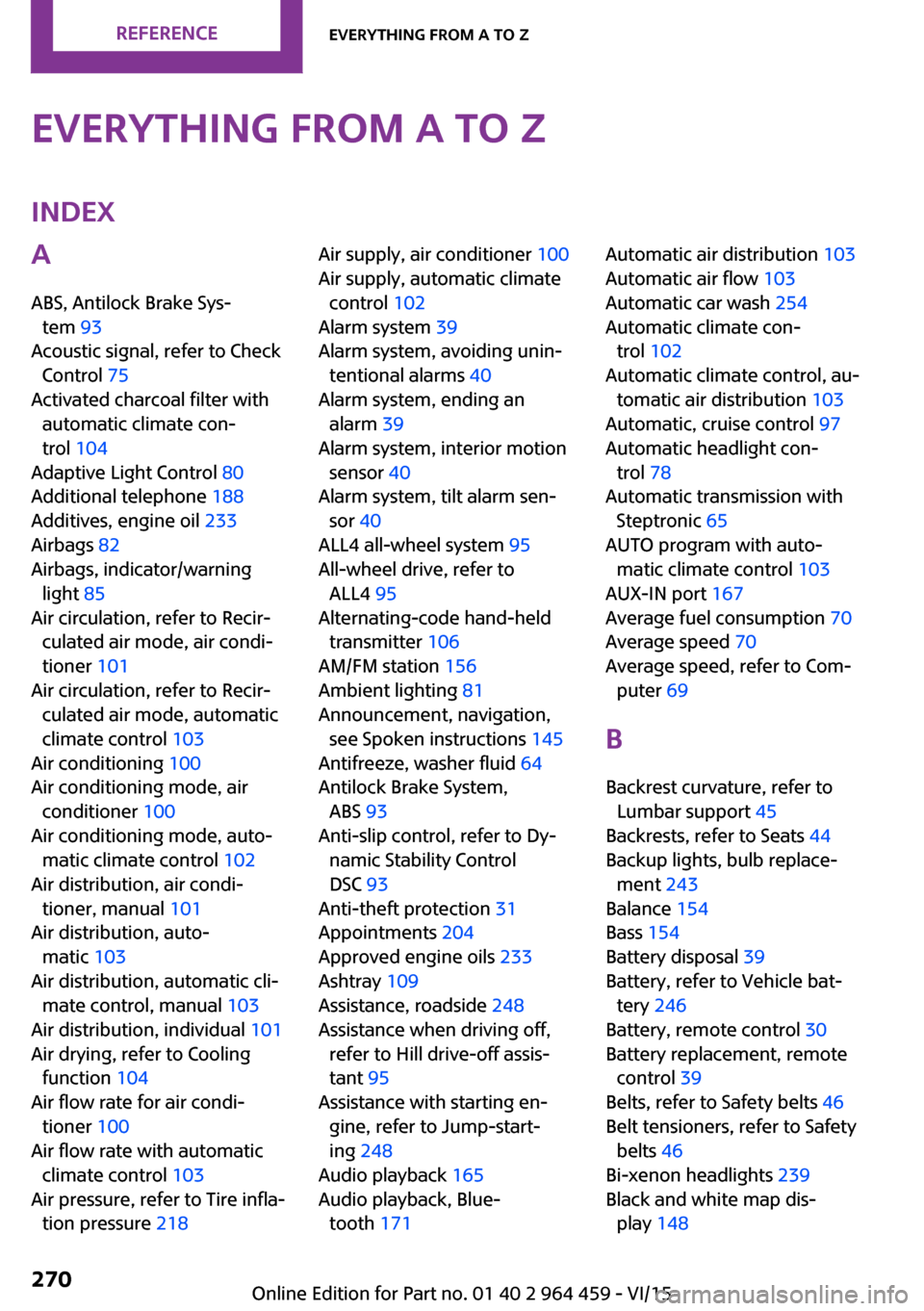
Everything from A to ZIndexA
ABS, Antilock Brake Sys‐ tem 93
Acoustic signal, refer to Check Control 75
Activated charcoal filter with automatic climate con‐
trol 104
Adaptive Light Control 80
Additional telephone 188
Additives, engine oil 233
Airbags 82
Airbags, indicator/warning light 85
Air circulation, refer to Recir‐ culated air mode, air condi‐
tioner 101
Air circulation, refer to Recir‐ culated air mode, automatic
climate control 103
Air conditioning 100
Air conditioning mode, air conditioner 100
Air conditioning mode, auto‐ matic climate control 102
Air distribution, air condi‐ tioner, manual 101
Air distribution, auto‐ matic 103
Air distribution, automatic cli‐ mate control, manual 103
Air distribution, individual 101
Air drying, refer to Cooling function 104
Air flow rate for air condi‐ tioner 100
Air flow rate with automatic climate control 103
Air pressure, refer to Tire infla‐ tion pressure 218 Air supply, air conditioner 100
Air supply, automatic climate control 102
Alarm system 39
Alarm system, avoiding unin‐ tentional alarms 40
Alarm system, ending an alarm 39
Alarm system, interior motion sensor 40
Alarm system, tilt alarm sen‐ sor 40
ALL4 all-wheel system 95
All-wheel drive, refer to ALL4 95
Alternating-code hand-held transmitter 106
AM/FM station 156
Ambient lighting 81
Announcement, navigation, see Spoken instructions 145
Antifreeze, washer fluid 64
Antilock Brake System, ABS 93
Anti-slip control, refer to Dy‐ namic Stability Control
DSC 93
Anti-theft protection 31
Appointments 204
Approved engine oils 233
Ashtray 109
Assistance, roadside 248
Assistance when driving off, refer to Hill drive-off assis‐
tant 95
Assistance with starting en‐ gine, refer to Jump-start‐
ing 248
Audio playback 165
Audio playback, Blue‐ tooth 171 Automatic air distribution 103
Automatic air flow 103
Automatic car wash 254
Automatic climate con‐ trol 102
Automatic climate control, au‐ tomatic air distribution 103
Automatic, cruise control 97
Automatic headlight con‐ trol 78
Automatic transmission with Steptronic 65
AUTO program with auto‐ matic climate control 103
AUX-IN port 167
Average fuel consumption 70
Average speed 70
Average speed, refer to Com‐ puter 69
B Backrest curvature, refer to Lumbar support 45
Backrests, refer to Seats 44
Backup lights, bulb replace‐ ment 243
Balance 154
Bass 154
Battery disposal 39
Battery, refer to Vehicle bat‐ tery 246
Battery, remote control 30
Battery replacement, remote control 39
Belts, refer to Safety belts 46
Belt tensioners, refer to Safety belts 46
Bi-xenon headlights 239
Black and white map dis‐ play 148 Seite 270REFERENCEEverything from A to Z270
Online Edition for Part no. 01 40 2 964 459 - VI/15
Page 273 of 282
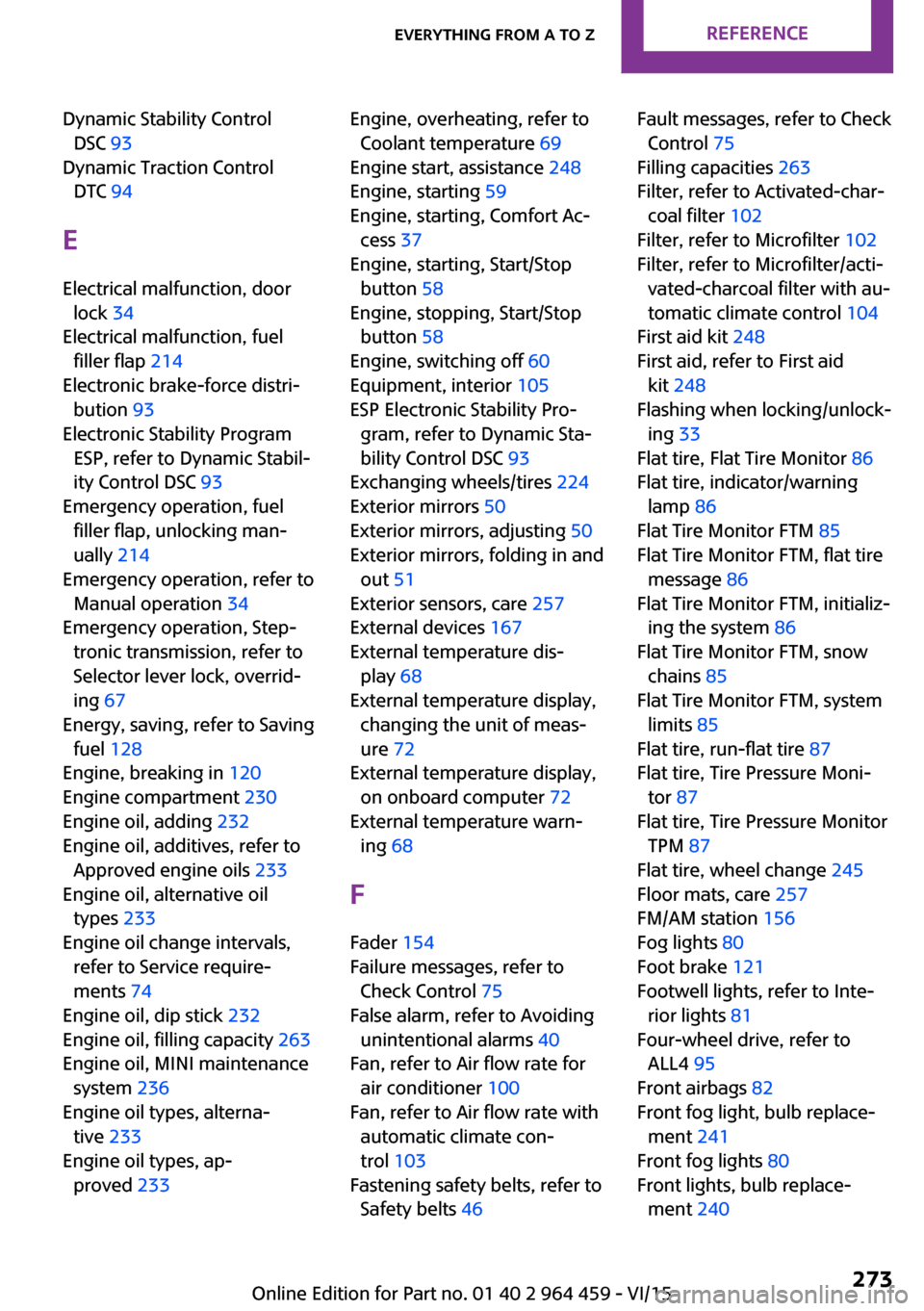
Dynamic Stability ControlDSC 93
Dynamic Traction Control DTC 94
E Electrical malfunction, door lock 34
Electrical malfunction, fuel filler flap 214
Electronic brake-force distri‐ bution 93
Electronic Stability Program ESP, refer to Dynamic Stabil‐
ity Control DSC 93
Emergency operation, fuel filler flap, unlocking man‐
ually 214
Emergency operation, refer to Manual operation 34
Emergency operation, Step‐ tronic transmission, refer to
Selector lever lock, overrid‐
ing 67
Energy, saving, refer to Saving fuel 128
Engine, breaking in 120
Engine compartment 230
Engine oil, adding 232
Engine oil, additives, refer to Approved engine oils 233
Engine oil, alternative oil types 233
Engine oil change intervals, refer to Service require‐
ments 74
Engine oil, dip stick 232
Engine oil, filling capacity 263
Engine oil, MINI maintenance system 236
Engine oil types, alterna‐ tive 233
Engine oil types, ap‐ proved 233 Engine, overheating, refer to
Coolant temperature 69
Engine start, assistance 248
Engine, starting 59
Engine, starting, Comfort Ac‐ cess 37
Engine, starting, Start/Stop button 58
Engine, stopping, Start/Stop button 58
Engine, switching off 60
Equipment, interior 105
ESP Electronic Stability Pro‐ gram, refer to Dynamic Sta‐
bility Control DSC 93
Exchanging wheels/tires 224
Exterior mirrors 50
Exterior mirrors, adjusting 50
Exterior mirrors, folding in and out 51
Exterior sensors, care 257
External devices 167
External temperature dis‐ play 68
External temperature display, changing the unit of meas‐
ure 72
External temperature display, on onboard computer 72
External temperature warn‐ ing 68
F Fader 154
Failure messages, refer to Check Control 75
False alarm, refer to Avoiding unintentional alarms 40
Fan, refer to Air flow rate for air conditioner 100
Fan, refer to Air flow rate with automatic climate con‐
trol 103
Fastening safety belts, refer to Safety belts 46 Fault messages, refer to Check
Control 75
Filling capacities 263
Filter, refer to Activated-char‐ coal filter 102
Filter, refer to Microfilter 102
Filter, refer to Microfilter/acti‐ vated-charcoal filter with au‐
tomatic climate control 104
First aid kit 248
First aid, refer to First aid kit 248
Flashing when locking/unlock‐ ing 33
Flat tire, Flat Tire Monitor 86
Flat tire, indicator/warning lamp 86
Flat Tire Monitor FTM 85
Flat Tire Monitor FTM, flat tire message 86
Flat Tire Monitor FTM, initializ‐ ing the system 86
Flat Tire Monitor FTM, snow chains 85
Flat Tire Monitor FTM, system limits 85
Flat tire, run-flat tire 87
Flat tire, Tire Pressure Moni‐ tor 87
Flat tire, Tire Pressure Monitor TPM 87
Flat tire, wheel change 245
Floor mats, care 257
FM/AM station 156
Fog lights 80
Foot brake 121
Footwell lights, refer to Inte‐ rior lights 81
Four-wheel drive, refer to ALL4 95
Front airbags 82
Front fog light, bulb replace‐ ment 241
Front fog lights 80
Front lights, bulb replace‐ ment 240 Seite 273Everything from A to ZREFERENCE273
Online Edition for Part no. 01 40 2 964 459 - VI/15
Page 275 of 282
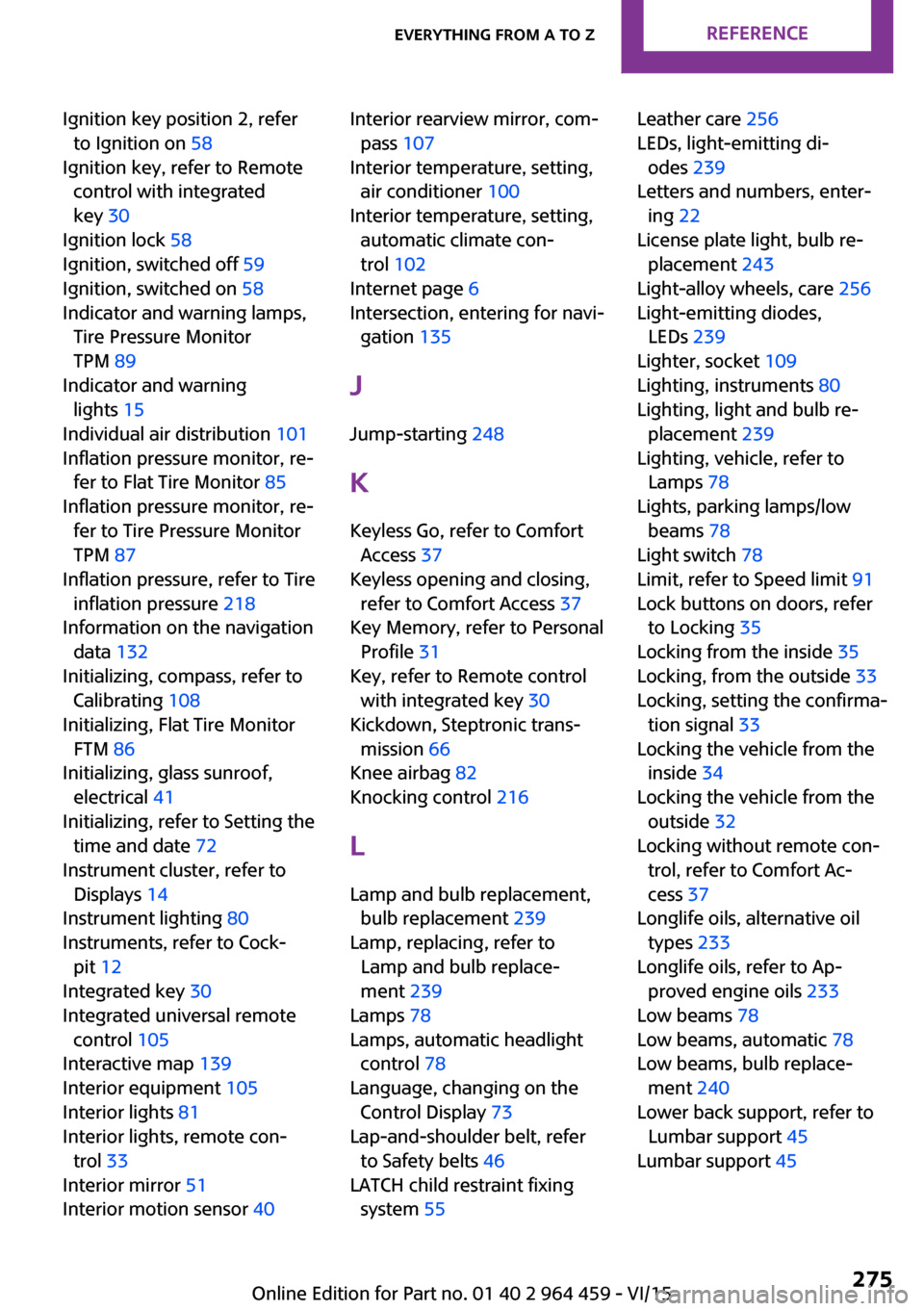
Ignition key position 2, referto Ignition on 58
Ignition key, refer to Remote control with integrated
key 30
Ignition lock 58
Ignition, switched off 59
Ignition, switched on 58
Indicator and warning lamps, Tire Pressure Monitor
TPM 89
Indicator and warning lights 15
Individual air distribution 101
Inflation pressure monitor, re‐ fer to Flat Tire Monitor 85
Inflation pressure monitor, re‐ fer to Tire Pressure Monitor
TPM 87
Inflation pressure, refer to Tire inflation pressure 218
Information on the navigation data 132
Initializing, compass, refer to Calibrating 108
Initializing, Flat Tire Monitor FTM 86
Initializing, glass sunroof, electrical 41
Initializing, refer to Setting the time and date 72
Instrument cluster, refer to Displays 14
Instrument lighting 80
Instruments, refer to Cock‐ pit 12
Integrated key 30
Integrated universal remote control 105
Interactive map 139
Interior equipment 105
Interior lights 81
Interior lights, remote con‐ trol 33
Interior mirror 51
Interior motion sensor 40 Interior rearview mirror, com‐
pass 107
Interior temperature, setting, air conditioner 100
Interior temperature, setting, automatic climate con‐
trol 102
Internet page 6
Intersection, entering for navi‐ gation 135
J
Jump-starting 248
K Keyless Go, refer to Comfort Access 37
Keyless opening and closing, refer to Comfort Access 37
Key Memory, refer to Personal Profile 31
Key, refer to Remote control with integrated key 30
Kickdown, Steptronic trans‐ mission 66
Knee airbag 82
Knocking control 216
L Lamp and bulb replacement, bulb replacement 239
Lamp, replacing, refer to Lamp and bulb replace‐
ment 239
Lamps 78
Lamps, automatic headlight control 78
Language, changing on the Control Display 73
Lap-and-shoulder belt, refer to Safety belts 46
LATCH child restraint fixing system 55 Leather care 256
LEDs, light-emitting di‐ odes 239
Letters and numbers, enter‐ ing 22
License plate light, bulb re‐ placement 243
Light-alloy wheels, care 256
Light-emitting diodes, LEDs 239
Lighter, socket 109
Lighting, instruments 80
Lighting, light and bulb re‐ placement 239
Lighting, vehicle, refer to Lamps 78
Lights, parking lamps/low beams 78
Light switch 78
Limit, refer to Speed limit 91
Lock buttons on doors, refer to Locking 35
Locking from the inside 35
Locking, from the outside 33
Locking, setting the confirma‐ tion signal 33
Locking the vehicle from the inside 34
Locking the vehicle from the outside 32
Locking without remote con‐ trol, refer to Comfort Ac‐
cess 37
Longlife oils, alternative oil types 233
Longlife oils, refer to Ap‐ proved engine oils 233
Low beams 78
Low beams, automatic 78
Low beams, bulb replace‐ ment 240
Lower back support, refer to Lumbar support 45
Lumbar support 45 Seite 275Everything from A to ZREFERENCE275
Online Edition for Part no. 01 40 2 964 459 - VI/15