fuel MINI Countryman 2016 (Mini Connected) Owner's Guide
[x] Cancel search | Manufacturer: MINI, Model Year: 2016, Model line: Countryman, Model: MINI Countryman 2016Pages: 282, PDF Size: 6.79 MB
Page 226 of 282

Run-flat tiresWhen mounting new tires or changing fromsummer to winter tires or vice versa, use run-
flat tires for your own safety. Also, a compact
wheel is not available in case of a flat tire. A
dealer’s service center will be glad to answer
any questions you may have.
Rotating wheels between axles
Different wear patterns occur on the front and
rear axles, depending on the individual condi‐
tions of use.
To ensure even wear on the tires, the wheels
can be rotated between the axles. A dealer’s
service center will be glad to answer any ques‐
tions you may have.
After changing the tires, check the tire inflation
pressure and correct it if necessary.
Storage
Store wheels and tires in a cool, dry place with
as little exposure to light as possible.
Always protect tires against all contact with oil,
grease and fuels.
Do not exceed the maximum tire inflation pres‐
sure indicated on the side wall of the tire.
Run-flat tires
Label
The symbol identifying run-flat tires is a circle
with the letters RSC on the sidewall.
Run-flat tires are tires that support themselves
for a limited period of time, and they may also
come with special rims. The sidewall reinforce‐
ment ensures that the tire can continue to be
used to a limited extent if it has lost pressure
and even if it has become completely depres‐
surized.
For continued driving in the event of a flat tire,
refer to page 86.
Correcting a flat tire
Safety measures▷Park the vehicle as far as possible from
passing traffic and on solid ground. Switch
on the hazard warning system.▷Let the steering wheel lock engage with the
wheels in the straight-ahead position, set
the parking brake, and engage first gear or
reverse, or engage selector lever position P.▷Have all vehicle occupants get out of the
vehicle and ensure that they remain out‐
side the immediate area in a safe place,
such as behind a guardrail.▷If a warning triangle or portable hazard
warning lamp is required, set it up on the
roadside at an appropriate distance from
the rear of the vehicle. Comply with all
safety guidelines and regulations.
The procedure to correct a flat tire depends on
the equipment in the vehicle:
▷Run-flat tires, refer to page 226.▷MINI Mobility System, refer to page 226.
MINI Mobility System
Information
▷Follow the instructions on using the Mobi‐
lity System found on the compressor and
sealant bottle.Seite 226MOBILITYWheels and tires226
Online Edition for Part no. 01 40 2 964 459 - VI/15
Page 232 of 282

Engine oilEngine oil
Vehicle features and options This chapter describes all standard, country-
specific and optional features offered with the series. It also describes features that are notnecessarily available in your car, e. g., due to
the selected options or country versions. This
also applies to safety-related functions and sys‐
tems.
When using the features and systems described
here, adhere to local regulations.
General information
Engine oil consumption depends on the driving
style and the conditions of use. A highly sporty
driving style, for example, results in considera‐
bly higher engine oil consumption.
Therefore, regularly check the engine oil level
after refueling.
Checking the oil level with a dip stick1.Park the vehicle on level ground when the
engine is at operating temperature, i.e., af‐
ter driving continuously for at least
6 2 miles/10 km.2.Switch the engine off.3.After approx. 5 minutes, pull out the dip
stick and wipe it off with a lint-free cloth,
paper towel, etc.4.Carefully insert the dip stick all the way into
the measuring tube and pull it out again.The oil level must be between the two
marks on the dip stick.
The oil quantity between the two marks on the
dip stick equals approx. 1 US quart/1 liter.
Do not exceed the high mark of the dip stick.
Adding engine oil
Filler neck
Add a maximum quantity of 1 US quart/1 liter
of oil only after the corresponding message ap‐
pears on the Control Display or, in diesel en‐
gines, after the oil level is just above the low
mark of the dip stick, refer to page 232.
CAUTION
A too low engine oil level causes engine
damage. There is risk of property damage.
Add engine oil within the next
30 miles/50 km. ◀
Seite 232MOBILITYEngine oil232
Online Edition for Part no. 01 40 2 964 459 - VI/15
Page 233 of 282

CAUTION
Too much engine oil can damage the en‐
gine or the catalytic converter. There is risk of
property damage. Do not add too much engine
oil. Have excess engine oil suctioned off by a
dealer’s service center or another qualified
service center or repair shop. ◀
WARNING
Operating materials, e.g. oils, greases,
coolants, fuels, can contain harmful ingredi‐
ents. There is risk of injuries or danger to life.
Observe the instructions on the containers.
Avoid the contact of articles of clothing, skin or
eyes with operating materials. Do not refill op‐
erating materials into different bottles. Store
operating materials out of reach of children. ◀
Engine oil types to add
Information CAUTION
Oil additives can damage the engine.
There is risk of property damage. Do not use oil
additives. ◀
CAUTION
Incorrect engine oil can cause malfunc‐
tions in the engine or damage it. There is risk of
property damage. When selecting an engine
oil, make sure that the engine oil has the cor‐ rect viscosity grade. ◀
The engine oil quality is critical for the life of the
engine.
Viscosity grades
When selecting an engine oil, ensure that the engine oil belongs to one of the viscosity
grades SAE 0W-40, SAE 0W-30, SAE 5W-40, and
SAE 5W-30.
Suitable engine oil types Add engine oils that meet the following oil rat‐
ing standards:Gasoline engineBMW Longlife-01BMW Longlife-01 FE
Further information regarding suitable engine
oil ratings and viscosities can be obtained from
a dealer’s service center or another qualified
service center or repair shop.
Alternative engine oil types If an engine oil suitable for continuous use is
not available, up to 1 US quart/liter of an en‐
gine oil with the following oil rating can be
added:
Gasoline engineAPI SL or superior oil rating
Engine oil change
The vehicle manufacturer recommends that
you let the dealer’s service center or another
qualified service center or repair shop change
the engine oil.
Seite 233Engine oilMOBILITY233
Online Edition for Part no. 01 40 2 964 459 - VI/15
Page 237 of 282

and Service Guide Booklet for Canadian models
for additional information on service require‐
ments.
The manufacturer of your vehicle recommends
that maintenance and repair be performed by a
dealer’s service center or another qualified
service center or repair shop. Records of regu‐
lar maintenance and repair work should be re‐
tained.
Socket for OBD Onboard
Diagnosis
CAUTION
The socket for Onboard Diagnosis is an
intricate component intended to be used in
conjunction with specialized equipment to
check the vehicle’s primary emissions system.
Improper use of the socket for Onboard Diag‐
nosis, or contact with the socket for Onboard
Diagnosis for other than its intended purpose,
can cause vehicle malfunctions and creates
risks of personal and property damage. Given
the foregoing, the manufacture of your vehicle
strongly recommends that access to the socket
for Onboard Diagnosis be limited to a dealer's
service center or another qualified service cen‐
ter or repair shop or other persons that have
the specialized training and equipment for pur‐
poses of properly utilizing the socket for On‐
board Diagnosis. ◀
Primary components in the vehicle emissions
can be checked via the OBD socket using a de‐
vice.
Emissions
The warning lamps light up. The vehicle
is producing higher emissions. Further
driving at a moderate pace is possible.
Have the vehicle checked as soon as possible.
Under certain circumstances, one of the lamps
flashes or lights up continuously. This indicates
that there is excessive misfiring or a malfunc‐
tion in the engine. In this situation, decrease
the vehicle speed and immediately drive to a
dealer’s service center or another qualified
service center or repair shop. Serious engine
misfiring within a brief period can seriously
damage emission control components, in par‐
ticular the catalytic converter. In addition, the
mechanical engine components may become
damaged.
If the fuel filler cap is not properly tight‐
ened, the OBD system may conclude
that fuel vapor is escaping; this will
cause a display to light up. If the filler cap is
then tightened, the display should go out in a
few days.Seite 237MaintenanceMOBILITY237
Online Edition for Part no. 01 40 2 964 459 - VI/15
Page 243 of 282

Side marker lights
To replace these bulbs, contact a dealer’s serv‐
ice center or another qualified service center or
repair shop.
Tail lights, bulb replacement
Follow the general instructions on lamps and
bulbs, refer to page 239.
Turn signal: 21-watt bulb, PY 21 W
MINI Countryman1Brake/tail light2Turn signal3Brake/tail light4Backup light
MINI Paceman
1Brake light2Tail light3Turn signal4Backup lightReplacing
All bulbs are integrated in a central bulb holder.
MINI Countryman1.Switch off the lights and take the remote
control out of the ignition lock.2.Open the tailgate.3.Press the cover out of the cargo area side
panel at the rear and remove it.4.Detach the emergency release of the fuel
filler flap, refer to page 214, and push it
aside with the foam insert.
Ensure that the emergency release is not
damaged.5.Disengage the bulb holder by pushing
down the clip, arrow 1.6.Take out the bulb holder and detach the
cable, arrow 2.7.Apply gentle pressure to the bulb while
turning it to the left and remove it.8.Insert the new bulb and mount the bulb
holder in reverse order. Ensure that the
bulb holder engages in all fasteners.Seite 243Replacing componentsMOBILITY243
Online Edition for Part no. 01 40 2 964 459 - VI/15
Page 244 of 282
9.Return the foam insert to its original posi‐
tion and reattach the emergency release of
the fuel filler flap.10.Reattach the cover.
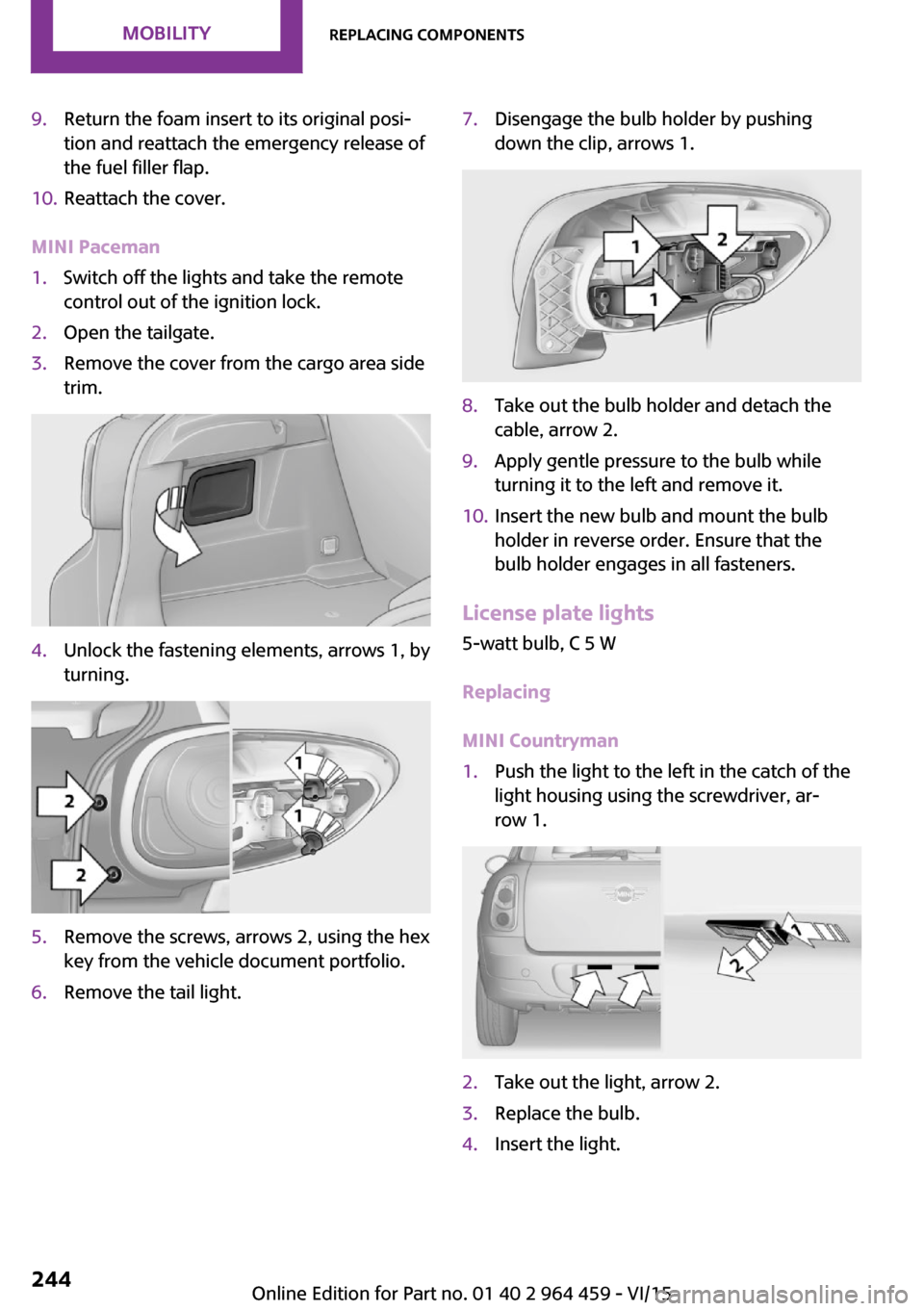
MINI Paceman
1.Switch off the lights and take the remote
control out of the ignition lock.2.Open the tailgate.3.Remove the cover from the cargo area side
trim.4.Unlock the fastening elements, arrows 1, by
turning.5.Remove the screws, arrows 2, using the hex
key from the vehicle document portfolio.6.Remove the tail light.7.Disengage the bulb holder by pushing
down the clip, arrows 1.8.Take out the bulb holder and detach the
cable, arrow 2.9.Apply gentle pressure to the bulb while
turning it to the left and remove it.10.Insert the new bulb and mount the bulb
holder in reverse order. Ensure that the
bulb holder engages in all fasteners.
License plate lights
5-watt bulb, C 5 W
Replacing
MINI Countryman
1.Push the light to the left in the catch of the
light housing using the screwdriver, ar‐
row 1.2.Take out the light, arrow 2.3.Replace the bulb.4.Insert the light.Seite 244MOBILITYReplacing components244
Online Edition for Part no. 01 40 2 964 459 - VI/15
Page 255 of 282

▷Insert the remote control into the ignition
lock.
Steptronic transmission
Before driving into the car wash, note the fol‐
lowing to ensure that the vehicle can roll:
1.Insert the remote control into the ignition
lock, even with Comfort Access.2.Move the selector lever to position N.3.Release the parking brake.4.Switch the engine off.5.Leave the remote control in the ignition
lock so that the vehicle can roll.
Hand car wash
If washing the vehicle by hand, use copious
quantities of water and car shampoo if neces‐
sary. Clean the vehicle with a sponge or a
washing brush by applying gentle pressure.
Before cleaning the windshield, deactivate the
rain sensor to avoid unintentional wiper activa‐
tion or switch off the ignition.
Adhere to the local regulations regarding
washing cars by hand.
Headlights Do not rub dry and do not use abrasive or caus‐
tic cleansers. Soak areas that have been soiled,
e.g., due to insects, with shampoo and rinse off
with copious quantities of water.
Thaw ice with a window deicer; do not use an
ice scraper.
Windows
Clean the outside and inside surfaces of the
windows and the mirror glasses with window
cleaner.
Do not clean mirror glass with cleaners contain‐
ing quartz.
Wiper blades
Clean with soapy water and replace regularly to
avoid streaking.
Wax and preservative residue and soiling on
the windows cause streaking during window
wiping and lead to premature wear on the
wiper blades and malfunctions of the rain sen‐
sor.
Vehicle care
Car care products
Regular cleaning and care contributes signifi‐
cantly to vehicle value retention.
The manufacturer of your vehicle recommends using car care and cleaning products from
MINI.
WARNING
Cleansers can contain substances that are
dangerous and harmful to your health. There is
risk of injuries. When cleaning the interior, open
the doors or windows. Only use products in‐
tended for cleaning vehicles. Follow the instruc‐
tions on the container. ◀
Vehicle paint Regular care contributes to vehicle value reten‐
tion and protects the paintwork against the
long-term effects of paint-damaging substan‐
ces.
Environmental influences in areas with higher
air pollution or natural contaminants, such as
tree resin or pollen, can have an impact on the
vehicle paint. Therefore, it is important to tailor
the frequency and extent of your car care to
these influences.
Immediately remove especially aggressive sub‐
stances, such as spilled fuel, oil, grease, or bird
droppings, to prevent damage to the paint‐
work.Seite 255CareMOBILITY255
Online Edition for Part no. 01 40 2 964 459 - VI/15
Page 263 of 282

Capacities
NotesFuel tank, approx.US gal/liters12.4/47Fuel quality, refer to
page 216Seite 263Technical dataREFERENCE263
Online Edition for Part no. 01 40 2 964 459 - VI/15
Page 270 of 282
Everything from A to ZIndexA
ABS, Antilock Brake Sys‐ tem 93
Acoustic signal, refer to Check Control 75
Activated charcoal filter with automatic climate con‐
trol 104
Adaptive Light Control 80
Additional telephone 188
Additives, engine oil 233
Airbags 82
Airbags, indicator/warning light 85
Air circulation, refer to Recir‐ culated air mode, air condi‐
tioner 101
Air circulation, refer to Recir‐ culated air mode, automatic
climate control 103
Air conditioning 100
Air conditioning mode, air conditioner 100
Air conditioning mode, auto‐ matic climate control 102
Air distribution, air condi‐ tioner, manual 101
Air distribution, auto‐ matic 103
Air distribution, automatic cli‐ mate control, manual 103
Air distribution, individual 101
Air drying, refer to Cooling function 104
Air flow rate for air condi‐ tioner 100
Air flow rate with automatic climate control 103
Air pressure, refer to Tire infla‐ tion pressure 218 Air supply, air conditioner 100
Air supply, automatic climate control 102
Alarm system 39
Alarm system, avoiding unin‐ tentional alarms 40
Alarm system, ending an alarm 39
Alarm system, interior motion sensor 40
Alarm system, tilt alarm sen‐ sor 40
ALL4 all-wheel system 95
All-wheel drive, refer to ALL4 95
Alternating-code hand-held transmitter 106
AM/FM station 156
Ambient lighting 81
Announcement, navigation, see Spoken instructions 145
Antifreeze, washer fluid 64
Antilock Brake System, ABS 93
Anti-slip control, refer to Dy‐ namic Stability Control
DSC 93
Anti-theft protection 31
Appointments 204
Approved engine oils 233
Ashtray 109
Assistance, roadside 248
Assistance when driving off, refer to Hill drive-off assis‐
tant 95
Assistance with starting en‐ gine, refer to Jump-start‐
ing 248
Audio playback 165
Audio playback, Blue‐ tooth 171 Automatic air distribution 103
Automatic air flow 103
Automatic car wash 254
Automatic climate con‐ trol 102
Automatic climate control, au‐ tomatic air distribution 103
Automatic, cruise control 97
Automatic headlight con‐ trol 78
Automatic transmission with Steptronic 65
AUTO program with auto‐ matic climate control 103
AUX-IN port 167
Average fuel consumption 70
Average speed 70
Average speed, refer to Com‐ puter 69
B Backrest curvature, refer to Lumbar support 45
Backrests, refer to Seats 44
Backup lights, bulb replace‐ ment 243
Balance 154
Bass 154
Battery disposal 39
Battery, refer to Vehicle bat‐ tery 246
Battery, remote control 30
Battery replacement, remote control 39
Belts, refer to Safety belts 46
Belt tensioners, refer to Safety belts 46
Bi-xenon headlights 239
Black and white map dis‐ play 148 Seite 270REFERENCEEverything from A to Z270
Online Edition for Part no. 01 40 2 964 459 - VI/15
Page 272 of 282
Combination switch, refer toWasher/wiper system 61
Comfort Access 37
Comfort Access, in the car wash 38
Comfort Access, replacing the battery 39
Comfort area, refer to Around the center console 16
Compartment for remote con‐ trol, refer to Ignition lock 58
Compass, digital 107
Computer 69
Computer, displaying informa‐ tion 69
Condition Based Service CBS 236
Confirmation signals for vehi‐ cle locking/unlocking 33
Connecting, mobile phone, re‐ fer to Mobile phone, pairing,
hands-free system 179
Connecting, mobile phone, re‐ fer to Pairing the mobile
phone 189
Consumption, refer to Aver‐ age fuel consumption 70
Contacts for hands-free sys‐ tem 185
Contacts, Office 201
Control Display 18
Control Display, care 257
Control Display, settings 73
Controls and displays 12
Control systems, driving stabil‐ ity 93
Convenient operation, win‐ dow 32
Coolant temperature 69
Cooling function, switching on and off 104
Cooling, maximum 103
Cornering Brake Control, CBC 93
Corrosion on brake discs 122 Cradle for telephone or mobile
phone, refer to Snap-in
adapter 198
Cruise control 97
Cupholders 109
Current fuel consumption 70
Current location, storing 136
Curve lights, refer to Adaptive Light Control 80
D Dashboard lighting, refer to Instrument lighting 80
Dashboard, refer to Cock‐ pit 12
Dashboard, refer to Dis‐ plays 14
Date, date format 73
Date, setting 73
Daytime running lights 79
Decorative trim, care 257
Defogging windows 101
Defroster, rear window, auto‐ matic climate control 104
Defroster, rear window, with air conditioner 101
Defrosting windows 101
Defrost setting, refer to De‐ frosting windows 101
Destination entry via the ad‐ dress book 136
Destination guidance with in‐ termediate destinations 141
Destination input, naviga‐ tion 134
Digital compass 107
Digital radio 158
Dip stick, engine oil 232
Directional indicators, refer to Turn signals 61
Display lighting, refer to In‐ strument lighting 80
Displays 14
Displays and controls 12
Displays, care 257 Displays, cleaning 257
Displays, refer to Instrument cluster 14
Disposal, remote control bat‐ tery 39
Distance warning, refer to Park Distance Control
PDC 99
Door key, refer to Remote control with integrated
key 30
Door lock 34
Door lock, confirmation sig‐ nals 33
Doors, manual operation 34
Doors, unlocking and locking, confirmation signals 33
Doors, unlocking and locking from the inside 34
Doors, unlocking and locking, from the outside 32
DOT Quality Grades 222
Drive-off assistant, refer to Hill drive-off assistant 95
Driving notes, breaking in 120
Driving off on hills, refer to Hill drive-off assistant 95
Driving on poor roads 122
Driving stability control sys‐ tems 93
Driving tips, refer to Driving notes 120
Dry air, refer to Cooling func‐ tion 104
DSC Dynamic Stability Con‐ trol 93
DTC Dynamic Traction Con‐ trol 94
DTMF suffix dialing, hands- free system 181
DTMF suffix dialing, mobile phone preparation 193
Dynamic destination guid‐ ance 150 Seite 272REFERENCEEverything from A to Z272
Online Edition for Part no. 01 40 2 964 459 - VI/15