battery MINI Countryman 2016 Owner's Guide
[x] Cancel search | Manufacturer: MINI, Model Year: 2016, Model line: Countryman, Model: MINI Countryman 2016Pages: 223, PDF Size: 5.52 MB
Page 185 of 223

two jumper cables. In the same way, you can
help jump-start another vehicle. Only use
jumper cables with fully insulated clamp han‐
dles.
To prevent personal injury or damage to both
vehicles, adhere strictly to the following proce‐
dure.
DANGER
Contact with live components can lead to
an electric shock. There is risk of injuries or
danger to life. Do not touch any components
that are under voltage. ◀
Preparation1.Check whether the battery of the other ve‐
hicle has a voltage of 12 volts and approxi‐
mately the same capacitance in Ah. This in‐
formation can be found on the battery.2.Switch off the engine of the assisting vehi‐
cle.3.Switch off any electronic systems/power
consumers in both vehicles.
CAUTION
In the case of body contact between the
two vehicles, a short circuit can occur during
jump-starting. There is risk of property damage.
Make sure that no body contact occurs. ◀
Connecting jumper cables
WARNING
If the jumper cables are connected in the
incorrect order, sparks formation can occur.
There is risk of injuries. Pay attention to the cor‐
rect order during connection. ◀1.Open the battery cover in the engine com‐
partment to access the positive terminal.2.Unlock the tabs of the positive terminal
cover on the left and right, arrows 1, and
raise the cover, arrow 2.3.Attach one terminal clamp of the positive
jumper cable to the positive terminal of the
battery or to a starting aid terminal of the
vehicle providing assistance.4.Attach the second clamp of the positive
jumper cable to the positive terminal of the
battery of the vehicle to be started.5.Attach one terminal clamp of the negative
jumper cable to the negative terminal of
the battery, or to the corresponding engineSeite 185Breakdown assistanceMOBILITY185
Online Edition for Part no. 01 40 2 964 433 - VI/15
Page 186 of 223
or body ground of the vehicle providing as‐
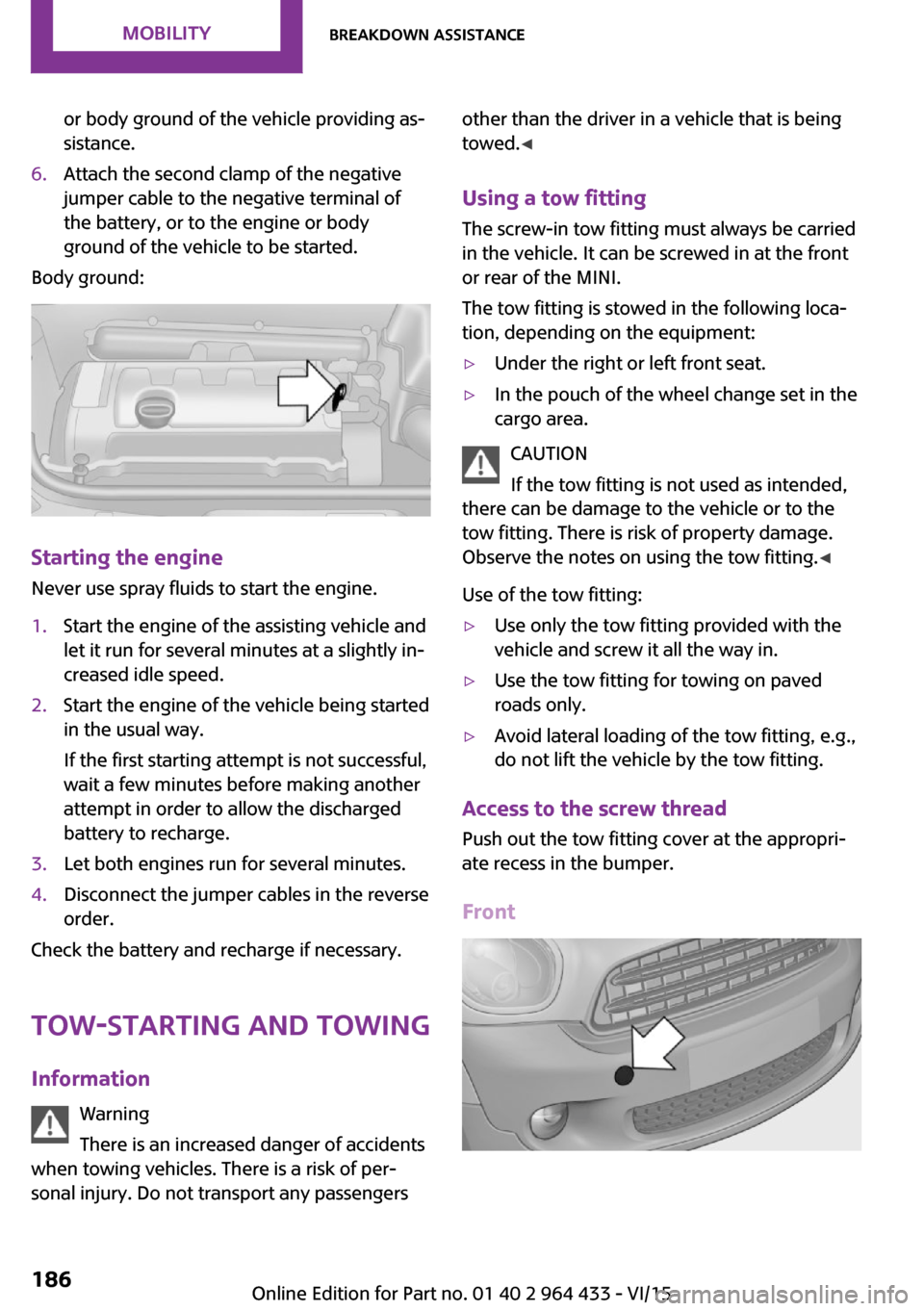
sistance.6.Attach the second clamp of the negative
jumper cable to the negative terminal of
the battery, or to the engine or body
ground of the vehicle to be started.
Body ground:
Starting the engine
Never use spray fluids to start the engine.
1.Start the engine of the assisting vehicle and
let it run for several minutes at a slightly in‐
creased idle speed.2.Start the engine of the vehicle being started
in the usual way.
If the first starting attempt is not successful,
wait a few minutes before making another
attempt in order to allow the discharged
battery to recharge.3.Let both engines run for several minutes.4.Disconnect the jumper cables in the reverse
order.
Check the battery and recharge if necessary.
Tow-starting and towing
Information Warning
There is an increased danger of accidents
when towing vehicles. There is a risk of per‐
sonal injury. Do not transport any passengers
other than the driver in a vehicle that is being
towed. ◀
Using a tow fitting The screw-in tow fitting must always be carried
in the vehicle. It can be screwed in at the front
or rear of the MINI.
The tow fitting is stowed in the following loca‐
tion, depending on the equipment:▷Under the right or left front seat.▷In the pouch of the wheel change set in the
cargo area.
CAUTION
If the tow fitting is not used as intended,
there can be damage to the vehicle or to the
tow fitting. There is risk of property damage.
Observe the notes on using the tow fitting. ◀
Use of the tow fitting:
▷Use only the tow fitting provided with the
vehicle and screw it all the way in.▷Use the tow fitting for towing on paved
roads only.▷Avoid lateral loading of the tow fitting, e.g.,
do not lift the vehicle by the tow fitting.
Access to the screw thread
Push out the tow fitting cover at the appropri‐
ate recess in the bumper.
Front
Seite 186MOBILITYBreakdown assistance186
Online Edition for Part no. 01 40 2 964 433 - VI/15
Page 196 of 223

12CauseHow to respondLights up in yellow:The engine will start the next time the Start/
Stop button is touched, possibly without the
brake or clutch being depressed.The remote control is malfunctioning or, in
cars with Comfort Access, was not detected.The engine cannot be started. Have
the remote control checked, if nec‐
essary.The battery in the remote control is dis‐
charged.Use the remote control for a longer
journey or, in cars with Comfort Ac‐
cess, replace the battery.The belt tensioners and/or airbag system
has failed.Have the system checked immedi‐
ately.
Fasten the safety belts anyway.Steering assistance has failed.You can continue your journey, but
moderate your speed and exercise
due caution. Markedly different
steering response. Have the system
checked as soon as possible.Lights up in red:Engine malfunctionStop the car and switch off the en‐
gine. You cannot continue your
journey. Contact a dealer’s service
center or another qualified service
center or repair shop.Lights up in yellow:Full engine power is no longer available.Further driving at a moderate pace
is possible. Have the engine
checked as soon as possible.Indicator lamp 1 flashes:Engine malfunction under high load. High
engine load will result in damage to the cat‐
alytic converter.Further driving at a moderate pace
is possible. Have the vehicle
checked immediately.Indicator lamp 1 lights up:Seite 196MOBILITYIndicator/warning lamps196
Online Edition for Part no. 01 40 2 964 433 - VI/15
Page 197 of 223

12CauseHow to respondEngine malfunction with adverse effect on
emissions.Further driving at a moderate pace
is possible. Have the vehicle
checked as soon as possible.Lights up in red:The engine is overheating.Carefully bring the car to a stop,
switch off the engine and allow it to
cool down. Do not open the hood;
otherwise, there would be a risk of
injury due to scalding. Contact a
dealer’s service center or another
qualified service center or repair
shop.Lights up in yellow:The engine is too hot.Continue driving at more moderate
speed so that the engine can cool
down. Have the engine checked
without delay if the situation reoc‐
curs.Lights up in red:Battery is no longer being charged. Alterna‐
tor malfunction.Switch off all unnecessary electrical
consumers. Have the power supply
system checked without delay.Lights up in yellow:The battery charge level is very low, the bat‐
tery is old or is not securely connected.Charge the battery by taking a long
drive or using an external charger.
If necessary, switch off automatic
power consumers. Have the battery
checked as soon as possible.Indication in US models
The parking brake is set.Indication in Canadian models
The parking brake is set.Seite 197Indicator/warning lampsMOBILITY197
Online Edition for Part no. 01 40 2 964 433 - VI/15
Page 212 of 223
Everything from A to ZIndexA
ABS, Antilock Brake Sys‐ tem 84
Acoustic signal, refer to Check Control 67
Activated charcoal filter with automatic climate con‐
trol 95
Adaptive Light Control 71
Additives, engine oil 169
Airbags 74
Airbags, indicator/warning light 77
Air circulation, refer to Recir‐ culated air mode, air condi‐
tioner 92
Air circulation, refer to Recir‐ culated air mode, automatic
climate control 94
Air conditioning 91
Air conditioning mode, air conditioner 91
Air conditioning mode, auto‐ matic climate control 93
Air distribution, air condi‐ tioner, manual 92
Air distribution, automatic 94
Air distribution, automatic cli‐ mate control, manual 94
Air distribution, individual 92
Air drying, refer to Cooling function 95
Air flow rate for air condi‐ tioner 91
Air flow rate with automatic climate control 94
Air pressure, refer to Tire infla‐ tion pressure 154
Air supply, air conditioner 91 Air supply, automatic climate
control 93
Alarm system 30
Alarm system, avoiding unin‐ tentional alarms 32
Alarm system, ending an alarm 31
Alarm system, interior motion sensor 32
Alarm system, tilt alarm sen‐ sor 31
ALL4 all-wheel system 86
All-wheel drive, refer to ALL4 86
Alternating-code hand-held transmitter 97
Ambient lighting 73
Antifreeze, washer fluid 56
Antilock Brake System, ABS 84
Anti-slip control, refer to Dy‐ namic Stability Control
DSC 84
Anti-theft protection 21
Approved engine oils 169
Ashtray 100
Assistance, roadside 184
Assistance when driving off, refer to Hill drive-off assis‐
tant 86
Assistance with starting en‐ gine, refer to Jump-start‐
ing 184
Automatic air distribution 94
Automatic air flow 94
Automatic car wash 190
Automatic climate control 93
Automatic climate control, au‐ tomatic air distribution 94
Automatic, cruise control 88 Automatic headlight con‐
trol 69
Automatic transmission with Steptronic 57
AUTO program with auto‐ matic climate control 94
AUX-IN port 132
Average fuel consumption 63
Average fuel consumption, setting the unit 64
Average speed 63
Average speed, refer to Com‐ puter 62
B Backrest curvature, refer to Lumbar support 37
Backrests, refer to Seats 36
Backup lights, bulb replace‐ ment 179
Battery disposal 30
Battery, refer to Vehicle bat‐ tery 182
Battery, remote control 20
Battery replacement, remote control 30
Belts, refer to Safety belts 38
Belt tensioners, refer to Safety belts 38
Bi-xenon headlights 175
Brake assistant 84
Brake discs, breaking in 112
Brake fluid, refer to Service re‐ quirements 66
Brake force distribution, elec‐ tronic 84
Brake pads, breaking in 112
Brake, refer to Parking brake 52 Seite 212REFERENCEEverything from A to Z212
Online Edition for Part no. 01 40 2 964 433 - VI/15
Page 213 of 223
Brakes, MINI maintenancesystem 172
Brakes, service require‐ ments 66
Brake system, MINI mainte‐ nance system 172
Braking, notes 113
Braking, parking brake 52
Breakdown assistance, Road‐ side Assistance 184
Breaking in 112
Buckle tongues height adjust‐ ment 39
Button for starting the engine, refer to Start/Stop button 50
C
California Proposition 65 Warning 7
Car battery, refer to Vehicle battery 182
Car care products 191
Care, displays 193
Care, vehicle 191
Cargo area, Comfort Ac‐ cess 29
Cargo area door, refer to Tail‐ gate 27
Cargo area, enlarging, cargo cover 102
Cargo area, flat loading floor 104
Cargo area light, refer to Inte‐ rior lights 72
Cargo area, multi-function hook 105
Cargo area, opening from the outside 27
Cargo area, partition net 104
Car horn, refer to Horn 12
Carpet, care 193
Car phone, refer to Tele‐ phone 138
Car wash 190 CBC, Cornering Brake Con‐
trol 84
CBS Condition Based Serv‐ ice 172
CD/DVD drives, care 193
Center armrest 107
Center console, refer to Around the center con‐
sole 15
Center rail 107
Center rail, refer to Storage compartments 107
Central locking, Comfort Ac‐ cess 28
Central locking from the in‐ side 25
Central locking system, con‐ cept 21
Central locking system, from the outside 21
Changes, technical, refer to Own Safety 6
Changing wheels/tires 160
Check Control 67
Children, transporting 45
Child restraint fixing system LATCH 47
Child restraint fixing sys‐ tems 45
Child restraint fixing systems, mounting 46
Child seat, mounting 46
Child seats, refer to Transport‐ ing children safely 45
Chrome parts, care 192
Circulation of air, refer to Re‐ circulated air mode, air con‐
ditioner 92
Circulation of air, refer to Re‐ circulated air mode, auto‐
matic climate control 94
Cleaning, displays 193
Cleaning, refer to Care 190
Climate 91
Climate mode, ventilation 95
Clock 61 Clock, 12h/24h mode 64
Closing from the inside 25
Closing from the outside 22
Clutch, breaking in 112
Cockpit 12
Cold start, refer to Starting the engine 51
Combination instrument, refer to Displays 14
Combination switch, refer to Turn signal/high-beams/
headlight flasher 53
Combination switch, refer to Washer/wiper system 54
Comfort Access 28
Comfort Access, in the car wash 29
Comfort Access, replacing the battery 30
Comfort area, refer to Around the center console 15
Compartment for remote con‐ trol, refer to Ignition lock 50
Compass, digital 98
Computer 62
Computer, displaying informa‐ tion 62
Condition Based Service CBS 172
Confirmation signals for vehi‐ cle locking/unlocking 23
Consumption, refer to Aver‐ age fuel consumption 63
Control Display, care 193
Controls and displays 12
Control systems, driving stabil‐ ity 84
Convenient operation, win‐ dow 23
Coolant temperature 62
Cooling function, switching on and off 95
Cooling, maximum 94
Cornering Brake Control, CBC 84
Corrosion on brake discs 114 Seite 213Everything from A to ZREFERENCE213
Online Edition for Part no. 01 40 2 964 433 - VI/15
Page 218 of 223
Opening and closing from theoutside 22
Opening and closing, using the door lock 25
Opening and closing, via the remote control 22
Opening and unlocking from the inside 26
Outside air mode, automatic climate control 94
Outside air, refer to Recircu‐ lated air mode, air condi‐
tioner 92
Outside air, refer to Recircu‐ lated air mode, automatic
climate control 94
Overheating of engine, refer to Coolant temperature 62
Own safety 6
P
Park Distance Control PDC 90
Parking aid, refer to Park Dis‐ tance Control PDC 90
Parking assistant, refer to Park Distance Control PDC 90
Parking brake 52
Parking light, bulb replace‐ ment 177
Parking lights 69
Parking lights/low beams 69
PDC Park Distance Control 90
Personal Profile 21
Pinch protection, windows 34
Pivoting sun visor 98
Plastic, care 192
Pollen, refer to Microfilter 93
Pollen, refer to Microfilter/ activated-charcoal filter 93
Pollen, refer to Microfilter/ activated-charcoal filter with
automatic climate con‐
trol 95
Poor road operation 114
Power windows 33 Power windows, refer to Win‐
dows 33
Prescribed engine oils, refer to Approved engine oils 169
Pressure monitoring of tires, refer to Tire Pressure Monitor
TPM 79
Pressure, tires 154
Pressure warning, tires 77
Profile depth, refer to Mini‐ mum tread depth 160
Profile, tires 159
Protective function, refer to Pinch protection system,
windows 34
R
Radio MINI Boost CD 124
Radio-operated key, refer to Remote control with
integrated key 20
Radio ready state 50
Radio ready state, switched off 51
Radio ready state, switched on 50
Radio setting, refer to Radio ready state 50
Rain sensor 55
Range 63
Rear 37
Rear fog light, bulb replace‐ ment 179
Rear lights, refer to Tail lights 179
Rear seat backrests, foldable, MINI Countryman 102
Rear seat backrests, foldable, MINI Paceman 103
Rearview mirror, refer to Mir‐ rors 42
Rear window defroster with air conditioner 92 Rear window defroster with
automatic climate con‐
trol 95
Rear window, washing 56
Rear window wiper 56
Recirculated air mode, air conditioner 92
Recirculated air mode, auto‐ matic climate control 94
Recommended fuel grade 152
Recommended tire brands 161
Releasing, refer to Unlock‐ ing 29
Remaining range for service, refer to Service require‐
ments 66
Remaining range, refer to Range 63
Remote control 20
Remote control, battery re‐ placement 30
Remote control, Comfort Ac‐ cess 28
Remote control, Comfort Ac‐ cess, malfunctions 29
Remote control, garage door opener 96
Remote control, radio interfer‐ ence 24
Remote control, removing from the ignition lock 50
Remote control, service data 172
Remote control, universal 96
Replacement remote con‐ trol 20
Replacing wheels/tires 160
Reporting safety malfunc‐ tions 9
Reserve warning, refer to Fuel gauge 62
Reservoir for washer fluid, re‐ fer to Washer fluid reser‐
voir 57 Seite 218REFERENCEEverything from A to Z218
Online Edition for Part no. 01 40 2 964 433 - VI/15
Page 220 of 223

Tank gauge, refer to Fuelgauge 62
Technical changes, refer to Own Safety 6
Telephone 138
Temperature, air condi‐ tioner 92
Temperature, automatic cli‐ mate control 94
Temperature, coolant, refer to Coolant temperature 62
Temperature display, external temperature 61
Temperature display, external temperature warning 61
Temperature display, setting the units 64
Temperature warning 61
Theft alarm system, refer to Alarm system 30
Tilt alarm sensor 31
Time, setting the time 65
Tire age 160
Tire, flat tire 78
Tire identification marks 158
Tire inflation pressure 154
Tire inflation pressure, pres‐ sure loss, FTM 78
Tire pressure loss, RDC 80
Tire, pressure monitoring, re‐ fer to Tire Pressure Monitor
TPM 79
Tire pressure monitor, refer to Flat Tire Monitor 77
Tire Pressure Monitor TPM 79
Tire Pressure Monitor TPM, system limits 82
Tire Pressure Monitor TPM, system reset 80
Tire Pressure Monitor TPM, warning lamp 80
Tire Quality Grading 158
Tires, breaking in 112
Tires, changing 160
Tires, condition 159
Tires, damage 160 Tire size 158
Tires, minimum tread 160
Tires, retreaded tires 161
Tires, storage 162
Tire tread 159
Towing another vehicle 186
Towing, being towed 186
Tow-starting 186
TPM, refer to Tire Pressure Monitor 79
Traction control 85
Transmission lock, refer to Changing the selector lever
positions 58
Transmission, overriding the selector lever lock with Step‐
tronic transmission 59
Transmission, refer to Manual transmission 57
Transmission, see Steptronic transmission 57
Transporting children safely 45
Trip-distance counter, refer to Trip odometer 61
Triple turn signal activa‐ tion 53
Trip odometer 61
Trunk lid, refer to Tailgate 27
Trunk, refer to Cargo area 27
Turning lights, refer to Adap‐ tive Light Control 71
Turn signal, bulb replace‐ ment 177
Turn signal indicator lamp 14
Turn signals 53
Turn signals, triple turn signal activation 53
U
Uniform Tire Quality Grading/ UTQG 158
Unintentional alarms, avoid‐ ing 32 Units, average fuel consump‐
tion 64
Units, temperature 64
Universal remote control 96
Unlocking from the inside 26
Unlocking, from the out‐ side 22
Unlocking, tailgate 29
Unlocking, without remote control, refer to Comfort Ac‐
cess 28
Upholstery care 192
Upholstery material care 192
USB audio interface 133
V Vanity mirror 98
Vehicle battery 182
Vehicle, breaking in 112
Vehicle care 191
Vehicle care, refer to Care 190
Vehicle equipment 6
Vehicle paintwork, care 191
Vehicle storage 193
Vehicle, switching off 52
Vehicle wash 190
Ventilation, air condition‐ ing 95
W Warning and indicator lamps 15
Warning and indicator lamps, overview 194
Warning messages, refer to Check Control 67
Warning triangle 184
Washer/wiper system 54
Washer/wiper system, rain sensor 55
Washer/wiper system, washer fluid 56
Washer fluid 56 Seite 220REFERENCEEverything from A to Z220
Online Edition for Part no. 01 40 2 964 433 - VI/15