door lock MINI Coupe 2013 User Guide
[x] Cancel search | Manufacturer: MINI, Model Year: 2013, Model line: Coupe, Model: MINI Coupe 2013Pages: 292, PDF Size: 7.02 MB
Page 44 of 292

Pay close attention to the traffic
When operating the convertible top while
driving, pay extra attention to the traffic to
avoid an accident. If possible, do not move the
convertible top while driving in reverse because
your view to the rear is severely limited during
the procedure. Do not operate the convertible
top while the vehicle is moving through curves,
on uneven road surfaces, or in wind. ◀
For better control▷The LED lights up while the convertible top
is activated until the top is fully opened or
closed.▷The LED flashes after the switch is released.
The opening or closing procedure is not yet
fully completed. The sequence can be con‐
tinued in the desired direction by pushing
or pulling the switch.▷The "convertible top not locked" indicator
lamp lights up and a message appears on
the Control Display.
Interruption
Danger
A convertible top that is not fully opened
or closed is a source of danger. ◀
The automatic sequence of movements is inter‐
rupted immediately if the switch for convertible
top operation is released. The sequence can be
continued in the desired direction by pushing
or pulling the switch.
When the opening or closing procedure is inter‐
rupted because the switch is released, the
convertible top remains in the position in which
it stopped for a few seconds before it slowly
moves to a stable position. The sequence can
be continued using the switch.
The opening or closing procedure is also inter‐
rupted when it is blocked mechanically. To be
able to reactivate the convertible top in this
case:1.Switch the ignition off and on again.2.Press the switch to continue the sequence
in the desired direction.
Opening and closing procedure
Do not interrupt the closing procedure
Do not interrupt and resume the closing
procedure several times in close succession as
this could damage the convertible top mecha‐
nism. ◀
If, after having been activated a number of
times in close succession, the convertible top
can only be moved in one direction, the
convertible top system is overheated. Let the
system cool for approx. 4 minutes.
If the battery was disconnected, for example to
change the battery or to put the vehicle into
storage, reinitialize, refer to page 41, the power
windows; otherwise, the windows will not be
lowered, and it will not be possible to open the
convertible top.
Convenient opening and closing Convenient operation is possible via the remote
control, refer to page 32, and the door lock, re‐
fer to page 34.
Manual closing in case of electrical
malfunction
Only close the convertible top manually if
there is an electrical malfunction
Only close the convertible top manually if this is
absolutely necessary; never open it manually.
Damage may occur if incorrectly operated. The
closing procedure must be fully completed;
otherwise, there is a risk of injury or damage. ◀
Before closing
1.Take the hex key and screwdriver out of the
onboard vehicle tool kit, refer to page 243.Seite 44ControlsOpening and closing44
Online Edition for Part no. 01 40 2 919 017 - II/13
Page 64 of 292
DrivingVehicle equipmentThis chapter describes all series equipment as
well as country-specific and special equipment
offered for this model series.Therefore, it also
describes equipment that may not be found in
your vehicle, for instance due to the selected
special equipment or the country version. This
also applies to safety-related functions and sys‐
tems.
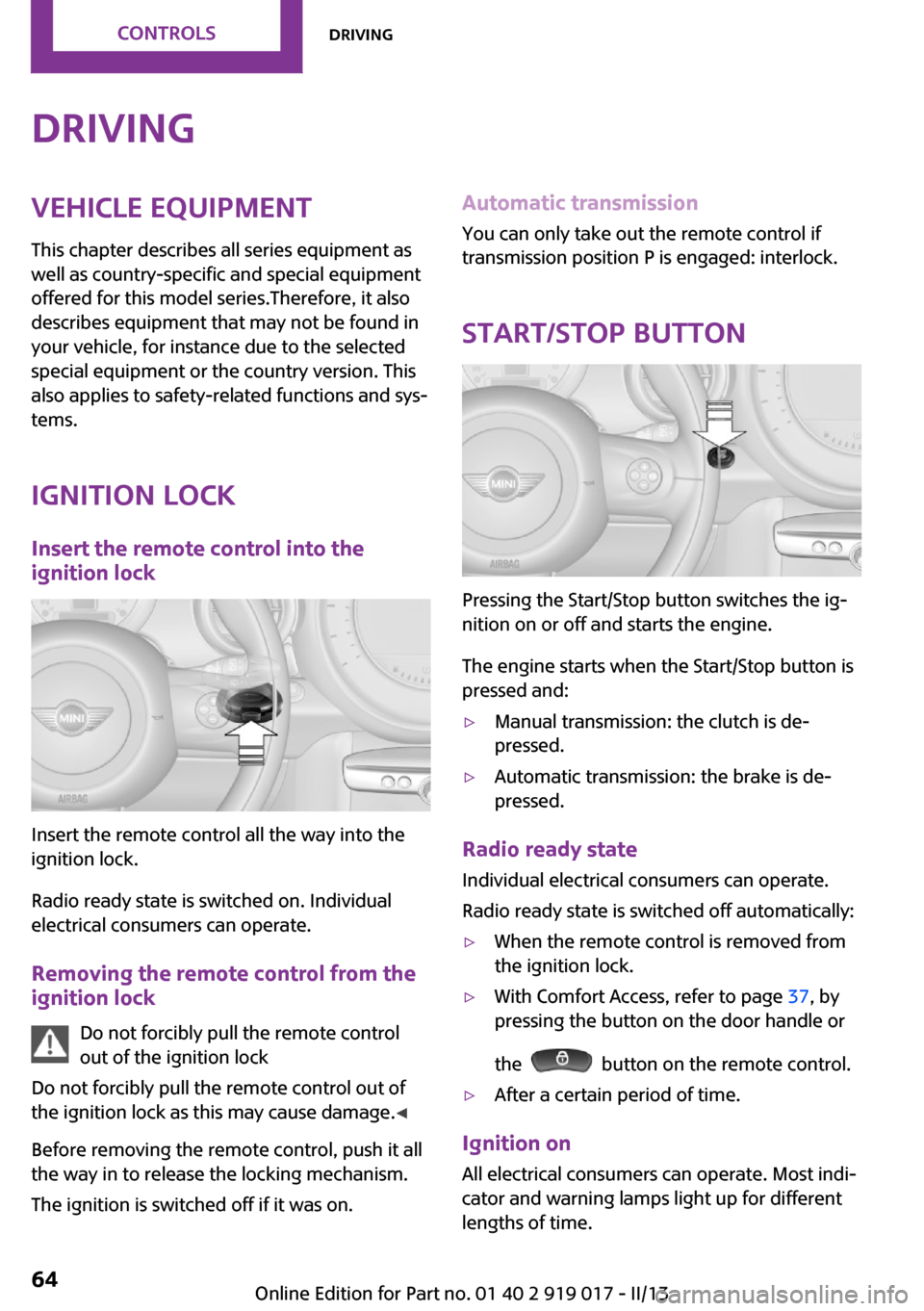
Ignition lock Insert the remote control into the
ignition lock
Insert the remote control all the way into the
ignition lock.
Radio ready state is switched on. Individual
electrical consumers can operate.
Removing the remote control from the
ignition lock
Do not forcibly pull the remote control
out of the ignition lock
Do not forcibly pull the remote control out of
the ignition lock as this may cause damage. ◀
Before removing the remote control, push it all
the way in to release the locking mechanism.
The ignition is switched off if it was on.
Automatic transmission
You can only take out the remote control if
transmission position P is engaged: interlock.
Start/Stop button
Pressing the Start/Stop button switches the ig‐
nition on or off and starts the engine.
The engine starts when the Start/Stop button is
pressed and:
▷Manual transmission: the clutch is de‐
pressed.▷Automatic transmission: the brake is de‐
pressed.
Radio ready state
Individual electrical consumers can operate.
Radio ready state is switched off automatically:
▷When the remote control is removed from
the ignition lock.▷With Comfort Access, refer to page 37, by
pressing the button on the door handle or
the
button on the remote control.
▷After a certain period of time.
Ignition on All electrical consumers can operate. Most indi‐
cator and warning lamps light up for different
lengths of time.
Seite 64ControlsDriving64
Online Edition for Part no. 01 40 2 919 017 - II/13
Page 65 of 292
To save battery power when the engine is off,
switch off the ignition and any unnecessary
electronic systems/power consumers.
Radio ready state and ignition off All indicator and warning lamps in the displays
go out.
The ignition switches off automatically when
the driver's door is opened. Pressing the Start/
Stop button again switches the ignition back
on.
For example, the ignition is not switched off in
the following situations:▷Depress the clutch or brake pedal.▷The low beams are switched on
Starting the engine
General information Enclosed areas
Do not let the engine run in enclosed
areas; otherwise, breathing of exhaust fumes
may lead to loss of consciousness and death.
The exhaust gases contain carbon monoxide,
an odorless and colorless but highly toxic gas. ◀
Unattended vehicle
Do not leave the car unattended with the
engine running; otherwise, it presents a poten‐
tial source of danger.
Before leaving the car with the engine running,
shift to neutral or engage transmission posi‐
tion P and set the handbrake firmly; otherwise,
the vehicle may begin to roll. ◀
Frequent starting in quick succession
Avoid repeated futile attempts at starting
the car and avoid starting the car frequently in
quick succession. Otherwise, the fuel is not
burned or is inadequately burned, and there is
the danger of overheating and damaging the
catalytic converter. ◀
Do not wait for the engine to warm-up while
the vehicle remains stationary; start driving
right away, but at moderate engine speeds.
Do not depress the accelerator when starting
the engine.
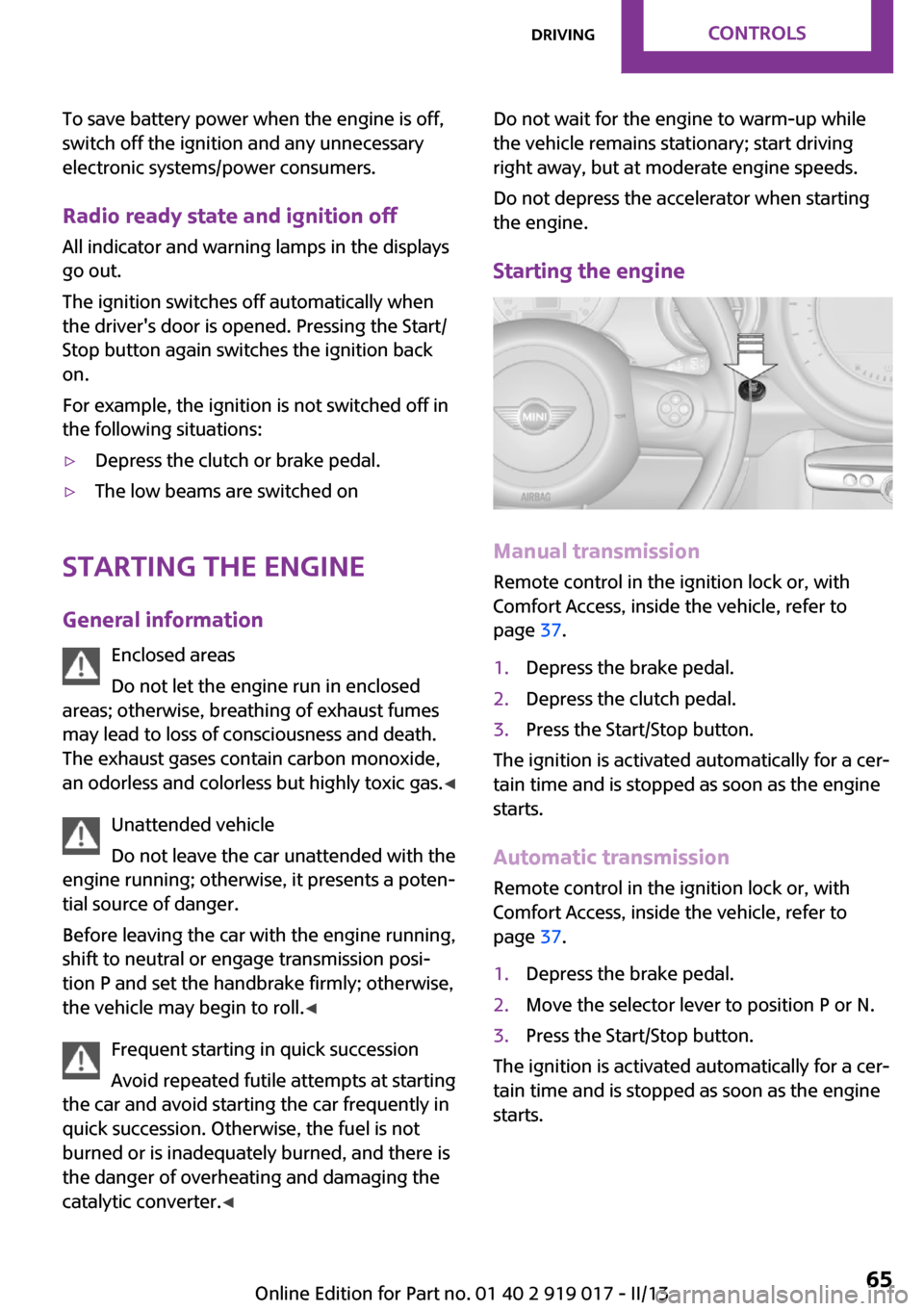
Starting the engine
Manual transmission
Remote control in the ignition lock or, with
Comfort Access, inside the vehicle, refer to
page 37.
1.Depress the brake pedal.2.Depress the clutch pedal.3.Press the Start/Stop button.
The ignition is activated automatically for a cer‐
tain time and is stopped as soon as the engine
starts.
Automatic transmission
Remote control in the ignition lock or, with
Comfort Access, inside the vehicle, refer to
page 37.
1.Depress the brake pedal.2.Move the selector lever to position P or N.3.Press the Start/Stop button.
The ignition is activated automatically for a cer‐
tain time and is stopped as soon as the engine
starts.
Seite 65DrivingControls65
Online Edition for Part no. 01 40 2 919 017 - II/13
Page 260 of 292

Automatic transmission
Before driving into the car wash, note the fol‐
lowing to ensure that the vehicle can roll:1.Insert the remote control into the ignition
lock, even with Comfort Access.2.Move the selector lever to position N.3.Release the handbrake.4.Switch the engine off.5.Leave the remote control in the ignition
lock so that the vehicle can roll.
Hand car wash
If washing the vehicle by hand, use copious
quantities of water and car shampoo if neces‐
sary. Clean the vehicle with a sponge or a
washing brush by applying gentle pressure.
Before cleaning the windshield, deactivate the
rain sensor to avoid unintentional wiper activa‐
tion or switch off the ignition.
Adhere to the local regulations regarding
washing cars by hand.
Headlamps
Do not rub dry and do not use abrasive or caus‐
tic cleansers. Soak areas that have been soiled,
e.g., due to insects, with shampoo and rinse off
with copious quantities of water.
Thaw ice with a window deicer; do not use an
ice scraper.
Windows Clean the outside and inside surfaces of the
windows and the mirror glasses with window
cleaner.
Do not clean mirror glass with cleaners contain‐
ing quartz.
Wiper blades
Clean with soapy water and replace regularly to
avoid streaking.
Wax and preservative residue and soiling on
the windows cause streaking during window
wiping and lead to premature wear on the
wiper blades and malfunctions of the rain sen‐
sor.
Vehicle care
Car care products
Regular cleaning and care contributes signifi‐
cantly to vehicle value retention.
The manufacturer recommends using cleaning
and care products from MINI, since these have
been tested and approved.
Original MINI CareProducts have been tested
on materials, in the laboratory, and in the field,
and offer optimum care and protection for MINI
vehicles.
Do not use cleansers that contain alcohol
or solvents
Do not use cleansers that contain alcohol or
solvents, such as lacquer thinners, heavy-duty
grease removers, fuel, or such; this could lead
to surface damage. ◀
Car care and cleaning products
Follow the instructions on the container.
When cleaning the interior, open the doors or
windows.
Only use products intended for cleaning vehi‐
cles.
Cleansers can contain substances that are dan‐
gerous and harmful to your health. ◀
Caring for the convertible top The appearance and life of the convertible top
depend on proper care and operation.
Adhere to the following instructions:▷Do not fold the convertible top and stow it
in the convertible top box while it is wet orSeite 260MobilityCare260
Online Edition for Part no. 01 40 2 919 017 - II/13
Page 274 of 292

Short commands for voice
activation systemVehicle equipment
This chapter describes all series equipment as
well as country-specific and special equipment
offered for this model series.Therefore, it also
describes equipment that may not be found in
your vehicle, for instance due to the selected
special equipment or the country version. This
also applies to safety-related functions and sys‐
tems.
General information Instructions for voice activation system, refer to
page 24.To have the available spoken instructions read
out loud: ›Voice commands‹
The following short commands apply to vehi‐
cles equipped with a voice activation system.
They have no function in vehicles in which only
the mobile phone is operated using the voice.
Adjusting
Vehicle
FunctionCommandOpens the main menu.›Main menu‹Open the options.›Options‹Open the settings.›Settings‹Settings on the Control Display.›Control display‹Open the time and date.›Time and date‹Open the language and units.›Language and units‹Open the speed limit.›Speed‹Open the light.›Lighting‹Open the door lock.›Door locks‹Seite 274ReferenceShort commands for voice activation system274
Online Edition for Part no. 01 40 2 919 017 - II/13
Page 282 of 292
Cooling function, switching onand off 112
Cooling, maximum 111
Cornering Brake Control, CBC 101
Corrosion on brake discs 126
Cradle for telephone or mobile phone, refer to Snap-in
adapter 202
Cruise control 105
Cupholders 114
Current fuel consumption 76
Current location, storing 140
Curve lights, refer to Adaptive Light Control 87
Cylinders, number of, refer to Engine data 266
D
Dashboard lighting, refer to Instrument lighting 88
Dashboard, refer to Cock‐ pit 12
Dashboard, refer to Dis‐ plays 14
Data, technical 266
Date– Date format 80– Setting 79
Daytime running lights 86
Decorative trim, care 262
Defogging windows 109
Defroster
– Rear window 109, 112
Defrosting windows 109
Defrost setting, refer to De‐ frosting windows 109
Destination entry via the ad‐ dress book 140
Destination guidance with in‐ termediate destinations 145
Destination input, naviga‐ tion 138
Digital radio 161
Dip stick, engine oil 238
Directional indicators, refer to
Turn signals 67
Displacement, refer to Engine data 266
Display lighting, refer to In‐ strument lighting 88
Displays 14
Displays and controls 12
Displays, care 263
Displays, cleaning 263
Displays, refer to Instrument cluster 14
Disposal– Remote control battery 39
Distance warning, refer to
Park Distance Control
PDC 106
Door key, refer to Remote control with integrated
key 30
Door lock 34
Door lock, confirmation sig‐ nals 33
Doors, manual operation 35
Doors, unlocking and locking
– Confirmation signals 33– From the inside 35– From the outside 32
DOT Quality Grades 228
Drive-off assistant, refer to Hill drive-off assistant 103
Driving notes, breaking in 124
Driving off on hills, refer to Hill drive-off assistant 103
Driving stability control sys‐ tems 101
Driving tips, refer to Driving notes 124
Dry air, refer to Cooling func‐ tion 112
DSC Dynamic Stability Con‐ trol 101
DTC Dynamic Traction Con‐ trol 102
DTMF suffix dialing 187, 199
Dynamic destination guid‐
ance 154
Dynamic Stability Control DSC 101
Dynamic Traction Control DTC 102
E
Electrical convertible top 42
Electrical malfunction– Convertible top 44, 51– Door lock 35– Fuel filler flap 218– Tailgate 36
Electronic brake-force distri‐
bution 101
Electronic Stability Program ESP, refer to Dynamic Stabil‐
ity Control DSC 101
Emergency activation
– Automatic transmission, re‐
fer to Overriding selector
lever lock 72
Emergency activation, refer to
Manual activation
– Tailgate 36
Emergency operation, fuel
filler flap, unlocking man‐
ually 218
Emergency operation, refer to
Manual operation
– Convertible top 44, 51– Door lock 35
Energy, saving, refer to Saving
fuel 131
Engine, breaking in 124
Engine compartment 236
Engine oil, adding 238
Engine oil, additives, refer to Approved engine oils 239
Engine oil, alternative oil types 239
Engine oil change intervals, refer to Service require‐
ments 81
Engine oil, dip stick 238
Seite 282ReferenceEverything from A to Z282
Online Edition for Part no. 01 40 2 919 017 - II/13
Page 285 of 292
Lamp, replacing, refer toLamp and bulb replace‐
ment 244
Lamps 85
Lamps, automatic headlamp control 85
Lamps, parking lamps/low beams 85
Language, changing on the Control Display 80
Lap-and-shoulder belt, refer to Safety belts 55
LATCH child restraint fixing system 61
Leather, care 261
Leather care 261
LEDs, light-emitting di‐ odes 245
Letters and numbers, enter‐ ing 22
License plate lamp, bulb re‐ placement 247
Light-alloy wheels, care 262
Light-emitting diodes, LEDs 245
Lighter– Socket 114
Lighting
– Instruments 88
Lighting, lamp and bulb re‐
placement 244
Lighting, vehicle, refer to Lamps 85
Light switch 85
Limit, refer to Speed limit 99
Lock buttons on doors, refer to Locking 35
Locking
– From the inside 35– From the outside 33– Setting the confirmation sig‐
nal 33– Without remote control, re‐
fer to Comfort Access 37
Locking, vehicle
– From the inside 35– From the outside 32Longlife oils, alternative oil
types 239
Longlife oils, refer to Ap‐ proved engine oils 239
Low beams 85
Low beams– Automatic 85
Low beams, automatic 85
Low beams, bulb replace‐ ment 245
Lower back support, refer to Lumbar support 54
Lumbar support 54
M
Main inspection, refer to Serv‐ ice requirements 81
Maintenance, refer to Service booklet
Maintenance, refer to Service requirements 81
Maintenance require‐ ments 241
Maintenance system MINI 241
Malfunction
– Automatic transmission with
Steptronic 72– Convertible top 44, 51– Door lock 35– Fuel filler flap 218– Tailgate 36
Malfunction warnings, refer to
Check Control 82
Manual activation
– Tailgate 36
Manual air distribu‐
tion 109, 112
Manual convertible top 47
Manual mode, automatic transmission with Step‐
tronic 71
Manual operation– Door lock 35– Electrical convertible
top 44, 51– Selector lever lock, auto‐
matic transmission 72
Manual operation, fuel filler
flap 218
Manual transmission 70
Map, destination entry 143
Map display in black and white 152
Map view 150
Marking on approved tires 231
Master key, refer to Remote control with integrated
key 30
Maximum cooling 111
Maximum speed, winter tires 232
Mechanical convertible top 47
Menu operation, onboard monitor 18
Menus, refer to Onboard monitor operating con‐
cept 19
Message list, traffic bulle‐ tins 151
Messages 207
Microfilter 110
Microfilter
– With automatic climate con‐
trol 112
MINI Connected 212
MINI Homepage 6
MINI Internet page 6
MINI maintenance sys‐ tem 241
MINI Mobility System 233
Minimum tread, tires 230
Mirrors 57
Mirrors, folding in and out 57
Mirrors, interior mirror 57
Mobile communication devi‐ ces in the vehicle 125
Seite 285Everything from A to ZReference285
Online Edition for Part no. 01 40 2 919 017 - II/13
Page 286 of 292
Mobile phone, refer to Tele‐phone 182, 192
Mobility System 233
Modifications, technical, refer to Safety 7
Monitor, see Control Dis‐ play 18
Mounting of child restraint fix‐ ing systems 59
MP3 player 171
N
Navigation 136
Navigation data 136
Navigation data, updat‐ ing 136
Navigation system– Destination entry by
voice 144
Neck restraints, refer to Head
restraints 56
New wheels and tires 231
Notes 6, 209
Nozzles, refer to Ventila‐ tion 113
O
OBD Onboard Diagnos‐ tics 242
OBD socket, refer to Socket for OBD Onboard Diagno‐
sis 242
Octane number, refer to Fuel quality 220
Octane rating, refer to Gaso‐ line quality 220
Odometer 74
Office 204
Oil additives 239
Oil level 238
Oil types, alternative 239
Oil types, approved 239
Onboard Diagnostics OBD 242
Onboard monitor 18
Onboard vehicle tool kit 243
Opening and closing– Comfort Access 37– From the inside 35– From the outside 32– Using the door lock 34– Via the remote control 32
Opening and unlocking
– From the inside 35
Operating concept of the on‐
board monitor 18
Outside air mode
– Automatic climate con‐
trol 111
Outside air, refer to Recircu‐
lated air mode 109, 111
Overheating of engine, refer to Coolant temperature 75
P Pairing, mobile phone 182, 193
Park Distance Control PDC 106
Parking aid, refer to Park Dis‐ tance Control PDC 106
Parking assistant, refer to Park Distance Control PDC 106
Parking brake, refer to Hand‐ brake 66
Parking lamp, bulb replace‐ ment 246
Parking lamps 85
Parking lamps/low beams 85
PDC Park Distance Con‐ trol 106
Personal information 204
Personal Profile 31
Plastic, care 262
Pollen
– Refer to Microfilter 110– Refer to Microfilter/acti‐
vated-charcoal filter 110– Refer to Microfilter/acti‐
vated-charcoal filter withautomatic climate con‐
trol 112
Position, storing 140
Postal code, entering in navi‐ gation 139
Power, refer to Engine data 266
Power windows 41
Power windows
– Initializing 41
Power windows, refer to Win‐
dows 41
Prescribed engine oils, refer to Approved engine oils 239
Pressure monitoring of tires, refer to Tire Pressure Monitor
TPM 95
Pressure, tires 222
Pressure warning, tires 93
Profile depth, refer to Mini‐ mum tread depth 230
Profile, tires 229
R
Radio 160
Radio-operated key, refer to Remote control with
integrated key 30
Radio ready state 64
Radio ready state, switched off 65
Radio ready state, switched on 64
Radio setting, refer to Radio ready state 64
Rain sensor 68
Random 169
Random playback 169
Range 76
RDS 161
Reading out loud 210
Rear fog lamp 88
Rear fog lamp, bulb replace‐ ment 247
Seite 286ReferenceEverything from A to Z286
Online Edition for Part no. 01 40 2 919 017 - II/13