flat tire MINI Coupe 2013 Owner's Guide
[x] Cancel search | Manufacturer: MINI, Model Year: 2013, Model line: Coupe, Model: MINI Coupe 2013Pages: 292, PDF Size: 7.02 MB
Page 233 of 292

▷If a warning triangle or portable hazard
warning lamp is required, set it up on the
roadside at an appropriate distance from
the rear of the vehicle. Comply with all
safety guidelines and regulations. ◀
The procedure to correct a flat tire depends on
the equipment in the vehicle:
▷Run-flat tires, refer to page 232.▷MINI Mobility System, refer to page 233.▷Wheel change with a compact wheel, refer
to page 249.
MINI Mobility System
Notes
▷Follow the instructions on using the Mobi‐
lity System found on the compressor and
sealant bottle.▷Use of the Mobility System may be ineffec‐
tive if tire damage is greater than approx.
1/8 in/4 mm in size.▷Contact the nearest service center if the tire
cannot be made drivable.▷If possible, do not remove foreign bodies
that have penetrated the tire.▷Pull the speed limit sticker off the sealant
bottle and apply it to the steering wheel.
Sealant and compressor
1Sealant bottle and speed limit sticker2Filling hose
Note the use-by date on the sealant bottle.3Holder for the sealant bottle4Compressor5Connector and cable for the lighter socket/
socket in passenger compartment 114.6Connection hose for connecting the com‐
pressor and sealant bottle or the compres‐
sor and wheel7On/off switch8Pressure gauge for displaying the tire infla‐
tion pressure9Release button for reducing the tire infla‐
tion pressure
The connector, cable, and connecting hose are
stowed in the compressor housing.
Using the Mobility System
To repair a flat tire with the Mobility System,
proceed as follows:
▷Filling the tire with sealant▷Distributing the sealant▷Correcting the tire inflation pressure
Filling the tire with sealant
Adhere to the specified sequence
Adhere to the specified sequence of the
steps; otherwise, sealant may escape under
high pressure. ◀
1.Shake the sealant bottle.2.Pull the connection hose 6 fully out of the
compressor housing and screw it onto the
sealant bottle connection. Ensure that the
connection hose is not kinked.Seite 233Wheels and tiresMobility233
Online Edition for Part no. 01 40 2 919 017 - II/13
Page 234 of 292
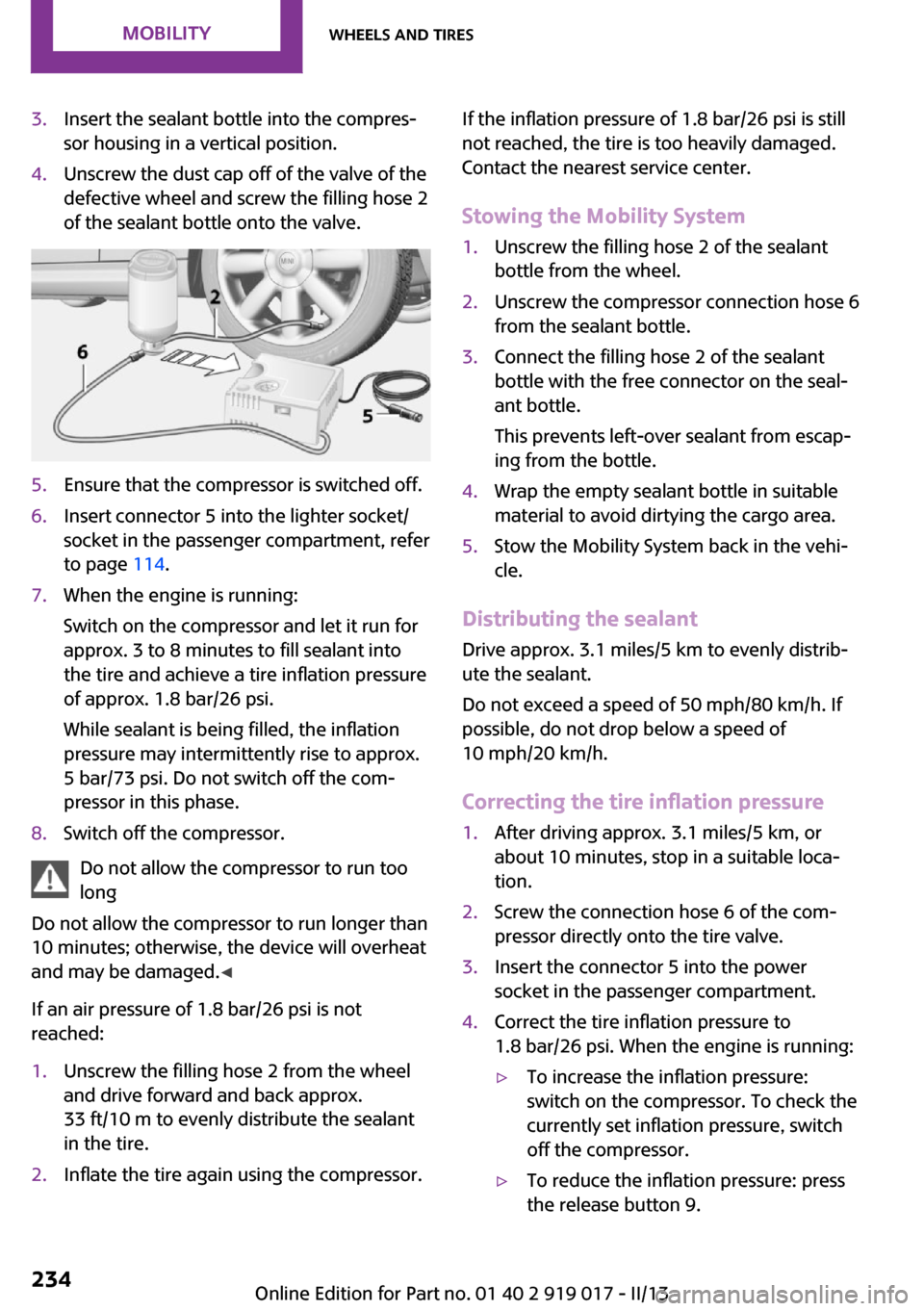
3.Insert the sealant bottle into the compres‐
sor housing in a vertical position.4.Unscrew the dust cap off of the valve of the
defective wheel and screw the filling hose 2
of the sealant bottle onto the valve.5.Ensure that the compressor is switched off.6.Insert connector 5 into the lighter socket/
socket in the passenger compartment, refer
to page 114.7.When the engine is running:
Switch on the compressor and let it run for
approx. 3 to 8 minutes to fill sealant into
the tire and achieve a tire inflation pressure
of approx. 1.8 bar/26 psi.
While sealant is being filled, the inflation
pressure may intermittently rise to approx.
5 bar/73 psi. Do not switch off the com‐
pressor in this phase.8.Switch off the compressor.
Do not allow the compressor to run too
long
Do not allow the compressor to run longer than
10 minutes; otherwise, the device will overheat
and may be damaged. ◀
If an air pressure of 1.8 bar/26 psi is not
reached:
1.Unscrew the filling hose 2 from the wheel
and drive forward and back approx.
33 ft/10 m to evenly distribute the sealant
in the tire.2.Inflate the tire again using the compressor.If the inflation pressure of 1.8 bar/26 psi is still
not reached, the tire is too heavily damaged.
Contact the nearest service center.
Stowing the Mobility System1.Unscrew the filling hose 2 of the sealant
bottle from the wheel.2.Unscrew the compressor connection hose 6
from the sealant bottle.3.Connect the filling hose 2 of the sealant
bottle with the free connector on the seal‐
ant bottle.
This prevents left-over sealant from escap‐
ing from the bottle.4.Wrap the empty sealant bottle in suitable
material to avoid dirtying the cargo area.5.Stow the Mobility System back in the vehi‐
cle.
Distributing the sealant
Drive approx. 3.1 miles/5 km to evenly distrib‐
ute the sealant.
Do not exceed a speed of 50 mph/80 km/h. If
possible, do not drop below a speed of
10 mph/20 km/h.
Correcting the tire inflation pressure
1.After driving approx. 3.1 miles/5 km, or
about 10 minutes, stop in a suitable loca‐
tion.2.Screw the connection hose 6 of the com‐
pressor directly onto the tire valve.3.Insert the connector 5 into the power
socket in the passenger compartment.4.Correct the tire inflation pressure to
1.8 bar/26 psi. When the engine is running:▷To increase the inflation pressure:
switch on the compressor. To check the
currently set inflation pressure, switch
off the compressor.▷To reduce the inflation pressure: press
the release button 9.Seite 234MobilityWheels and tires234
Online Edition for Part no. 01 40 2 919 017 - II/13
Page 235 of 292

Do not allow the compressor to run too
long
Do not allow the compressor to run longer than
10 minutes; otherwise, the device will overheat
and may be damaged. ◀
If the inflation pressure is not maintained, take
the vehicle on another drive, distributing the
sealant, refer to page 234. Then repeat steps
1 to 4 once.
If the inflation pressure of 1.8 bar/26 psi is still
not reached, the tire is too heavily damaged.
Contact the nearest service center.
Continuing the trip Note the maximum speed
Do not exceed the maximum speed of
50 mph/80 km/h; otherwise, accidents can oc‐
cur. ◀
Replace the defective tire as soon as possible
and have the wheel balanced.
Have the Mobility System refilled.
Snow chains
Only certain fine-link snow chains have been
tested by MINI, classified as safe for use, and
recommended. Consult your service center for more information.
Use only in pairs on the front wheels, equipped
with tires of the following size:▷175/65 R 15 M+S▷175/60 R 16 M+S
John Cooper Works:
▷185/50 R 17 86 H M+S XL RSC
Observe the manufacturer's instructions when
mounting snow chains. Do not exceed a speed
of 30 mph or 50 km/h when using snow chains.
Do not initialize the Flat Tire Monitor if snow
chains are mounted; otherwise, the instrument
might issue an incorrect reading. When driving
with snow chains, it may be useful to tempora‐
rily deactivate DSC or activate DTC, refer to
page 101.Seite 235Wheels and tiresMobility235
Online Edition for Part no. 01 40 2 919 017 - II/13
Page 243 of 292

Replacing componentsVehicle equipmentThis chapter describes all series equipment as
well as country-specific and special equipment
offered for this model series.Therefore, it also
describes equipment that may not be found in
your vehicle, for instance due to the selected
special equipment or the country version. This
also applies to safety-related functions and sys‐
tems.
Tool kit Depending on the vehicle equipment, your ve‐
hicle contains a special onboard vehicle tool kit
that is stowed under the flat loading floor in the
cargo area.
With Mobility System1Sealant bottle2Hex key3Pulling hook4Vehicle jack5Lug bolts wrench6Screwdriver/cross-head, tow fitting7CompressorWith run-flat tires or compact wheel
The onboard vehicle tool kit contains a pouch
holding a plastic bag in which you can stow the
defective wheel.1Folding wheel chock and cover for the de‐
fective wheel2Pulling hook3Lug bolts wrench4Vehicle jack5Special wrench for releasing the compact
wheel6Screwdriver/cross-head7Tow fitting8Lifting handle
Wiper blade replacement
General information Do not fold down the wipers withoutwiper blades
Do not fold down the wipers if wiper blades
have not been installed; this may damage the
windshield. ◀
Seite 243Replacing componentsMobility243
Online Edition for Part no. 01 40 2 919 017 - II/13
Page 249 of 292

1.Squeeze the clips, arrows, and remove the
bulb holder.2.Pull off the bulb and replace it.3.Insert the new bulb and bulb holder in re‐
verse order.4.Re-engage the bulb holder so that it audi‐
bly clicks into place.
John Cooper Works: aerodynamic bumper
The lamps are accessed via the rear side or the
underside of the bumper.
1.Remove the bulb holder by turning it coun‐
terclockwise, arrow.2.Pull off the bulb and replace it.3.Insert the new bulb and bulb holder in re‐
verse order.License plate lamps
5-watt bulb, C 5 W1.Push the lamp to the left in the catch of the
lamp housing using the screwdriver, ar‐
row 1.2.Take out the lamp, arrow 2.3.Replace the bulb.4.Insert the lamp.
Center brake lamp
This lamp uses LED technology for operation.
Contact your service center in the event of a
malfunction.
Changing wheels Notes
Wheel change for run-flat tires:
▷Prepare for the wheel change, refer to
page 251.▷Jack up the vehicle, refer to page 251.▷Tighten the lug bolts, refer to page 252.
Compact wheel
Wheel change with a compact wheel:
▷Remove the compact wheel, refer to
page 250.▷Prepare for the wheel change, refer to
page 251.▷Jack up the vehicle, refer to page 251.Seite 249Replacing componentsMobility249
Online Edition for Part no. 01 40 2 919 017 - II/13
Page 251 of 292

reduced track stability on braking, extended
braking distance, and altered self-steering
characteristics in the limit range. In conjunction
with winter tires, these characteristics are more
pronounced. ◀
Only mount one compact wheel
Only one compact wheel may be
mounted. Restore the wheels and tires to their
original size as quickly as possible. Failure to do
so is a safety risk. ◀
Check the tire inflation pressure at the next op‐
portunity and correct it if necessary. Replace
the defective tire as soon as possible and have
the new wheel balanced.
Preparing wheel change
Observe the safety precautions regarding flat
tires, refer to page 232.
Additional safety precautions in the event
of a wheel change
Change the wheel only on a level, firm surface
which is not slippery.
The vehicle or the jack could slip to the side if
you attempt to raise the vehicle on a soft or
slippery surface, snow, ice, tiles, etc. Do not use
a wooden block or similar object as a support
base for the jack, as this would prevent it from
extending to its full support height and reduce
its load-carrying capacity.
To avoid serious or fatal injury: never lie under
the vehicle, and never start the engine while it
is supported by the jack. ◀1.Place the folding wheel chock behind the
front wheel of the other vehicle side; if the
vehicle is on an incline, place it in front of
this wheel. If the vehicle is parked on a
steep incline, additionally secure the vehi‐
cle against rolling.2.Expose the lug bolts if necessary.3.Loosen the lug bolts a half turn.Jacking up vehicle
The vehicle jack is designed for changing
wheels only.
The vehicle jack is designed for changing
wheels only. Do not attempt to raise another
vehicle model with it or to raise any load of any
kind. To do so could cause accidents and per‐
sonal injury. ◀
1.Position the vehicle jack at the jacking point
closest to the wheel.
The entire surface of the jack base must
rest on the ground vertically beneath the
jacking point.2.Guide the jack head into the rectangular re‐
cess of the jacking point when cranking up.3.Jack the vehicle up until the wheel you are
changing is raised from the ground.
Mounting the compact wheel
1.Unscrew the lug bolts and remove the
wheel.2.Remove accumulations of mud or dirt from
the mounting surfaces of the wheel and
hub. Also clean the lug bolts.Seite 251Replacing componentsMobility251
Online Edition for Part no. 01 40 2 919 017 - II/13
Page 281 of 292
Brake force distribution, elec‐tronic 101
Brake pads, breaking in 124
Brakes– Handbrake 66
Brakes, MINI maintenance
system 241
Brakes, service require‐ ments 81
Brake system, MINI mainte‐ nance system 241
Braking, notes 126
Breakdown assistance, Road‐ side Assistance 254
Breaking in 124
Brightness on the Control Dis‐ play 80
Button for starting the engine, refer to Start/Stop button 64
C
Calendar 208
California Proposition 65 Warning 7
Car battery, refer to Vehicle battery 252
Car care products 260
Care, displays 263
Care, vehicle 260
Cargo area
– Comfort Access 38– Emergency activation, refer
to Unlocking manually 36– Emergency unlocking 37– Opening from the out‐
side 35
Cargo area lamp, refer to Inte‐
rior lamps 88
Cargo area tailgate, refer to Tailgate 35
Carpet, care 262
Car phone, refer to Tele‐ phone 182, 192
Car wash 259
CBC, Cornering Brake Con‐ trol 101
CBS Condition Based Serv‐
ice 241
CD 168
CD/DVD drives, care 263
CD player 168
Center console, refer to Around the center con‐
sole 16
Central locking– Comfort Access 37– From the inside 35– From the outside 32
Central locking system
– Concept 31– From the outside 31
Central screen, see Control
Display 18
Changes, technical, refer to Safety 7
Changing wheels/tires 231
Check Control 82
Children, transporting 59
Child restraint fixing system LATCH 61
Child restraint fixing sys‐ tems 59
Child restraint fixing systems, mounting 59
Child seat, mounting 59
Child seats, refer to Transport‐ ing children safely 59
Chrome parts, care 262
Circulation of air, refer to Re‐ circulated air
mode 109, 111
Cleaning, displays 263
Cleaning, refer to Care 259
Climate 108
Climate mode
– Ventilation 113
Clock 74
Clock
– 12h/24h format 79– Setting the time and date 79
Closing
– From the inside 35– From the outside 32Clutch, breaking in 124
Cockpit 12
Cold start, refer to Starting the engine 65
Combination instrument, refer to Displays 14
Combination switch, refer to Turn signal/high beams/
headlamp flasher 67
Combination switch, refer to Washer/wiper system 67
Comfort Access– In the car wash 39– Replacing the battery 39
Comfort area, refer to Around
the center console 16
Compact wheel, inflation pres‐ sure 226
Compartment for remote con‐ trol, refer to Ignition lock 64
Computer 75
Computer, displaying informa‐ tion 75
Condition Based Service CBS 241
Confirmation signals for vehi‐ cle locking/unlocking 33
Connecting, mobile phone, re‐ fer to Pairing the mobile
phone 182, 193
Consumption, refer to Aver‐ age fuel consumption 76
Contacts 189, 205
Control Display 18
Control Display, care 263
Control Display, settings 80
Controls and displays 12
Control systems, driving stabil‐ ity 101
Convenient operation
– Windows 32
Convertible top 42
Convertible top
– Manual 47– Mechanical 47
Coolant temperature 75
Seite 281Everything from A to ZReference281
Online Edition for Part no. 01 40 2 919 017 - II/13
Page 283 of 292
Engine oil, filling capacity 273
Engine oil, MINI maintenance system 241
Engine oil types, alterna‐ tive 239
Engine oil types, ap‐ proved 239
Engine, overheating, refer to Coolant temperature 75
Engine power, refer to Engine data 266
Engine, RPM 266
Engine start, assistance 254
Engine, starting 65
Engine, starting– Comfort Access 37
Engine, starting, Start/Stop
button 64
Engine, stopping, Start/Stop button 64
Engine, switching off 66
ESP Electronic Stability Pro‐ gram, refer to Dynamic Sta‐
bility Control DSC 101
Exchanging wheels/tires 231
Exterior mirrors 57
Exterior mirrors, adjusting 57
Exterior mirrors, folding in and out 57
Exterior sensors, care 262
External devices 171
External temperature dis‐ play 74
External temperature display
– Changing the unit of meas‐
ure 78– On computer 78
External temperature warn‐
ing 74
Externel temperature dis‐ play 74
F
Fader 158
Failure messages, refer to Check Control 82
Fastening safety belts, refer to
Safety belts 55
Fault messages, refer to Check Control 82
Filling capacities 273
Filter– Refer to Activated-charcoal
filter 110– Refer to Microfilter 110– Refer to Microfilter/acti‐
vated-charcoal filter with
automatic climate con‐
trol 112
First aid kit 254
First aid, refer to First aid kit 254
Flashing when locking/unlock‐ ing 33
Flat tire
– Flat Tire Monitor 94– Indicator/warning lamp 94– Run-flat tire 95– Tire Pressure Monitor
TPM 95
Flat Tire Monitor FTM 93
Flat Tire Monitor FTM
– Flat tire message 94– Initializing the system 94– Limits of the system 93– Snow chains 93
Flat tire, wheel change 249
Floor mats, care 262
FM/AM station 160
Fog lamps 87
Folding roof, refer to Convertible top with
integrated sliding sun‐
roof 42
Foot brake 126
Footwell lamps, refer to Inte‐ rior lamps 88
Front airbags 90
Front fog lamp, bulb replace‐ ment 246
Front fog lamps 87
Front lamps, bulb replace‐ ment 245
Front passenger airbags, de‐
activating 91
FTM Flat Tire Monitor 93
Fuel 220
Fuel– Refer to Average fuel con‐
sumption 76
Fuel, additives 220
Fuel, average consump‐ tion 76
Fuel cap, closing 218
Fuel consumption display
– Average fuel consump‐
tion 76
Fuel filler flap, closing 218
Fuel filler flap, opening 218
Fuel filler flap, unlocking in case of an electrical malfunc‐
tion 218
Fuel gauge 75
Fuel, saving 131
Fuel tank capacity, refer to Filling capacities 273
Fuel tank contents, refer to Filling capacities 273
Fuel tank, refer to Filling ca‐ pacities 273
Fuse 253
G Gasoline 220
Gasoline gauge, refer to Fuel gauge 75
Gasoline quality 220
Gas station recommenda‐ tion 149
Gear change
– Automatic transmission with
Steptronic 71
Gear display, automatic trans‐
mission with Steptronic 70
Glass sunroof, electrical
– Convenient operation 32– Remote control 32
GPS navigation, refer to Navi‐
gation system 136
Seite 283Everything from A to ZReference283
Online Edition for Part no. 01 40 2 919 017 - II/13
Page 284 of 292
HHalogen headlamps, bulb re‐ placement 245
Hand car wash, care 260
Hands-free microphone 16
Hazard warning system 16
HD Radio 161
Head airbags 90
Headlamp control, auto‐ matic 85
Headlamp courtesy delay fea‐ ture 86
Headlamp flasher 67, 86
Headlamp flasher, indicator lamp 15
Headlamps 85
Headlamps, care 260
Headlamps, cleaning, washer fluid 69
Head restraints 56
Head restraints– Adjusting the height 56– Removing 56
Heatable
– Windshield 112
Heating
– Rear window 109, 112– Seats 55– Windshield 112
Height adjustment
– Seats 53
High beams 86
High beams, bulb replace‐ ment 245
High beams, indicator lamp 15
Hill drive-off assistant 103
Hills 126
Holder for remote control, re‐ fer to Ignition lock 64
Homepage 6
Hood 236
Hood, closing 237
Hood, opening 237
Hood, unlocking 237
Horn 12
House number, entering for
navigation 139
Hydraulic brake assistant 101
I
Ice warning, refer to External temperature warning 74
Icy roads, refer to External temperature warning 74
Identification marks, run-flat tires 232
Identification marks, tires 228
iDrive– Changing settings 80– Changing the date and
time 79– Changing the language 80– Changing the units of meas‐
ure and display format 78– Setting the brightness 80
Ignition 64
Ignition key position 1, refer to Radio ready state 64
Ignition key position 2, refer to Ignition on 64
Ignition key, refer to Remote control with integrated
key 30
Ignition lock 64
Ignition, switched off 65
Ignition, switched on 64
Indicator and warning lamps 15
Indicator and warning lamps
– Tire Pressure Monitor
TPM 97
Individual air distribution 109
Inflation pressure monitor, re‐ fer to Flat Tire Monitor 93
Inflation pressure monitor, re‐ fer to Tire Pressure Monitor
TPM 95
Inflation pressure, refer to Tire inflation pressure 222
Information on the navigation data 136
Initializing– Refer to Setting the time and
date 79
Initializing, Flat Tire Monitor
FTM 94
Instrument cluster, refer to Displays 14
Instrument lighting 88
Instruments, refer to Cock‐ pit 12
Integrated key 30
Interactive map 143
Interior lamps 88
Interior lamps
– Remote control 33
Interior mirror 57
Interior temperature, setting
– Air conditioner 108– Automatic climate con‐
trol 110
Internet page 6
Intersection, entering for navi‐ gation 139
J
Jump-starting 254
K Keyless Go, refer to Comfort Access 37
Keyless opening and closing, refer to Comfort Access 37
Key Memory, refer to Personal Profile 31
Key, refer to Remote control with integrated key 30
Kickdown
– Automatic transmission with
Steptronic 71
Knocking control 220
L Lamp and bulb replacement, bulb replacement 244
Seite 284ReferenceEverything from A to Z284
Online Edition for Part no. 01 40 2 919 017 - II/13
Page 287 of 292
Rear fog lamps, indicatorlamp 15
Rear lamps, refer to Tail lamps 247
Rear spoiler 103
Rearview mirror, refer to Mir‐ rors 57
Rear window de‐ froster 109, 112
Recirculated air mode 109, 111
Recommended tire brands 231
Redialing 188, 200
Releasing, refer to Unlock‐ ing 38
Remaining range for service, refer to Service require‐
ments 81
Remaining range, refer to Range 76
Reminders 210
Remote control– Battery replacement 39– Comfort Access 37– Malfunctions 33, 39– Tailgate 33
Remote control, removing
from the ignition lock 64
Remote control, service data 241
Remote inquiry 187, 199
Replacement remote con‐ trol 30
Replacing wheels/tires 231
Reporting safety defects 9
Reserve warning, refer to Fuel gauge 75
Reservoir for washer fluid, re‐ fer to Washer fluid reser‐
voir 69
Restraining systems
– Refer to Safety belts 55
Restraint systems for chil‐
dren 59
Retreaded tires 231
Reverse gear, manual trans‐
mission 70
Road, avoiding 147
Road detour 147
Roadside Assistance 254
Roadside parking lamp, bulb replacement 246
Roadside parking lamps 86
RON gasoline quality 220
RON, refer to Fuel quality 220
Route 148
Route criteria, route 147
Route, displaying 148
Route section, bypassing 148
RPM, refer to Engine data 266
Rubber seals, care 262
Run-flat tires 232
Run-flat tires– Flat tire 94
Run-flat tires, tire inflation
pressure 222
Running lights, refer to Park‐ ing lamps/low beams 85
S Safe braking 126
Safety 7
Safety belts 55
Safety belts
– Damage 56
Safety belts, care 262
Safety belts, indicator/warning lamp 56
Safety belts, reminder 56
Safety systems
– Safety belts 55
Safety systems, airbags 90
Satellite radio 162
Saving fuel 131
Scale, changing during navi‐ gation 151
Screen, see Control Display 18
Seat adjustment
– Manual 53
Seat belts
– Refer to Safety belts 55Seat heating 55
Seats– Adjusting 53– Heating 55– Sitting safely 53
Selector lever, automatic
transmission with Step‐
tronic 71
Selector lever lock, overrid‐ ing 72
Selector lever lock, refer to Changing selector lever posi‐
tions, Shiftlock 71
Selector lever positions, auto‐ matic transmission with
Steptronic 71
Service and warranty 7
Service data in the remote control 241
Service interval display, refer to Condition Based Service
CBS 241
Service interval display, refer to Service requirements 81
Service requirements 81
Service requirements, CBS Condition Based Service 241
Settings
– Changing on the Control Dis‐
play 80– Language 80
Settings and information 77
Settings, configuring, refer to Personal Profile 31
Setting the clock, 12h/24h for‐ mat 79
Shifting
– Automatic transmission with
Steptronic 71
Shifting, manual transmis‐
sion 70
Shift lever
– Automatic transmission with
Steptronic 71
Shift paddles on the steering
wheel 72
Seite 287Everything from A to ZReference287
Online Edition for Part no. 01 40 2 919 017 - II/13