child restraint MINI COUPE ROADSTER CONVERTIBLE 2012 Owners Manual
[x] Cancel search | Manufacturer: MINI, Model Year: 2012, Model line: COUPE ROADSTER CONVERTIBLE, Model: MINI COUPE ROADSTER CONVERTIBLE 2012Pages: 283, PDF Size: 9.38 MB
Page 51 of 283
CONTROLSAdjustments
50
Adjustments
Vehicle equipment
In this chapter, all production, country, and
optional equipment that is offered in the model
range is described. Equipment is also described
that is not available because of, for example,
selected options or coun try version. This also
applies to safety relate d functions and systems.
Sitting safely
The ideal sitting position can make a vital contri-
bution to relaxed, fatigu e-free driving. In con-
junction with the safety belts, the head restraints
and the airbags, the seated position has a major
influence on your safety in the event of an acci-
dent. To ensure that th e safety systems operate
with optimal efficiency, we strongly urge you to
observe the instructions contained in the follow-
ing section.
For additional information on transporting
children safely, refer to page 56.
Airbags
Always maintain an adequate distance
between yourself and the airbags. Always
grip the steering wheel on the rim, with your
hands in the 3 o'clock and 9 o'clock positions, to
minimize the risk of inju ry to the hands or arms
in the event of the airbag being deployed.
No one and nothing should come between the
airbags and the seat occupant.
Do not use the cover of the front airbag on the
front passenger side as a storage area. Ensure
that the front passenger is correctly seated, e.g.
that no feet or legs are propped against the
dashboard. Otherwise, leg injury could result if
the front airbag suddenly deployed.
Make sure that passeng ers keep their heads
away from the side/head airbag; otherwise inju-
ries can occur when airbags are deployed.
fully excluded, depending on the circumstances.
The ignition and inflation noise may provoke a
mild hearing loss in extremely sensitive individ-
uals. This effect is usually only temporary.
For airbag locations as well as additional infor-
mation, refer to page
93.
Head restraint
A correctly adjusted head restraint reduces the
risk of neck injury in the event of an accident.
Adjust the head restraint in such a way
that its center is at approx. ear level.
Otherwise, there is an increased risk of injury in
the event of an accident. <
Head restraints, refer to page 52.
Safety belt
Before every drive, make sure that all occupants
wear their safety belts. Airbags complement the
safety belt as an additional safety device, but
they do not represent a substitute.
Number of safety belts
Never allow more than one person to
wear a single safety belt. Never allow
infants or small children to ride in a passenger's
lap.
Make sure that the belt in the lap area sits low
across the hips and does not press against the
abdomen. The safety belt must not rest against
the throat, run across sh arp edges, pass over
hard or fragile objects or be pinched. Fasten the
safety belt so that it is pulled taut across the lap
and shoulder, fitting the body snugly without
any twists. Otherwise, the belt could slide over
the hips in the event of a frontal collision and
00320051004F004C00510048000300280047004C0057004C005200510003
Page 57 of 283
CONTROLSTransporting children safely
56
Transporting children safely
Vehicle equipment
In this chapter, all production, country, and
optional equipment that is offered in the model
range is described. Equipment is also described
that is not available because of, for example,
selected options or coun try version. This also
applies to safety relate d functions and systems.
The right place for
children
Do not leave children unattended in the
vehicle; otherwise, they could endanger
themselves and/or other persons by opening the
doors, for example. <
MINI Convertible: children should
always sit in the rear
Accident research has shown that the safest
place for children is on the rear seat.
Only transport children under the age of
13 or smaller than 5 ft/150 cm in the rear
in a child restraint system suitable for their age,
weight and size. Otherwise, there is an
increased risk of injury in the event of an
accident. <
Children 13 years of age or older must be
buckled in with a safety belt as soon as there
no longer is any child restraint system that is
appropriate for their age, size and weight.
Only install child seats in the rear when the
rear seat backrest is folded all the way
back and engaged. Otherwise, there is an
increased risk of injury in the event of an
accident. <
Exception for front passenger seat
Front passenger airbags
Should it be necessary to use a child
restraint system on the front passenger
seat, the front and side airbags must be deacti-
vated. Otherwise, there is an increased risk of
injury to the child if th e airbags deploy, even if
the child is seated in a child restraint system. <
For more information on automatic deactivation
of the front passenger airbags, refer to page 93.
Child restraint systems,
installation
Observe the child restraint system manu-
facturer's instructions when selecting,
installing and using child restraint systems.
Otherwise, the protective effect may be
diminished. <
On the front passenger seat
After installing a chil d restraint system on
the front passenger se at, make sure that
the front and side airbags for the front passen-
ger are deactivated; otherwise, there is an
increased risk of injury if the airbags deploy. <
Seat position
Before installing a child restraint system, move
the front passenger seat as far back and up as
possible to obtain the be st possible position for
the belt. Do not change the seat position after
this.
00320051004F004C00510048000300280047004C0057004C005200510003
Page 58 of 283
Transporting children safelyCONTROLS
57
Child seat security
MINI Coupe, MINI Roadster
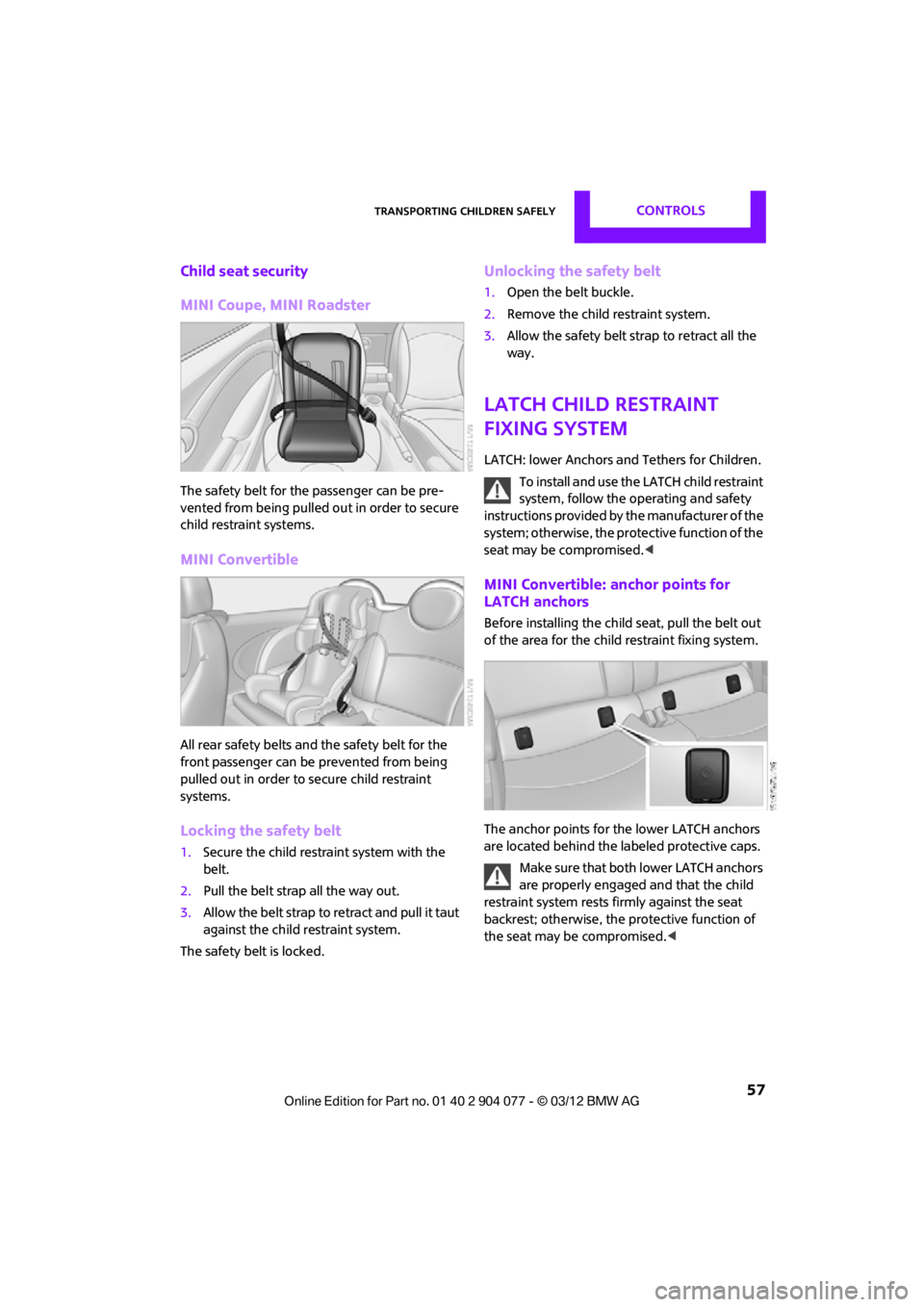
The safety belt for the passenger can be pre-
vented from being pulled out in order to secure
child restraint systems.
MINI Convertible
All rear safety belts and the safety belt for the
front passenger can be prevented from being
pulled out in order to secure child restraint
systems.
Locking the safety belt
1.Secure the child restraint system with the
belt.
2. Pull the belt strap all the way out.
3. Allow the belt strap to retract and pull it taut
against the child restraint system.
The safety belt is locked.
Unlocking the safety belt
1. Open the belt buckle.
2. Remove the child restraint system.
3. Allow the safety belt strap to retract all the
way.
LATCH child restraint
fixing system
LATCH: lower Anchors and Tethers for Children.
To install and use the LATCH child restraint
system, follow the operating and safety
instructions provided by the manufacturer of the
system; otherwise, the protective function of the
seat may be compromised. <
MINI Convertible: anchor points for
LATCH anchors
Before installing the child seat, pull the belt out
of the area for the child restraint fixing system.
The anchor points for the lower LATCH anchors
are located behind the labeled protective caps.
Make sure that both lower LATCH anchors
are properly engaged and that the child
restraint system rests fi rmly against the seat
backrest; otherwise, the protective function of
the seat may be compromised. <
00320051004F004C00510048000300280047004C0057004C005200510003
Page 59 of 283
CONTROLSTransporting children safely
58
Child restraint system with tether strap
Use the tether strap anchors to secure
child restraint systems only; otherwise, the
anchors could be damaged. <
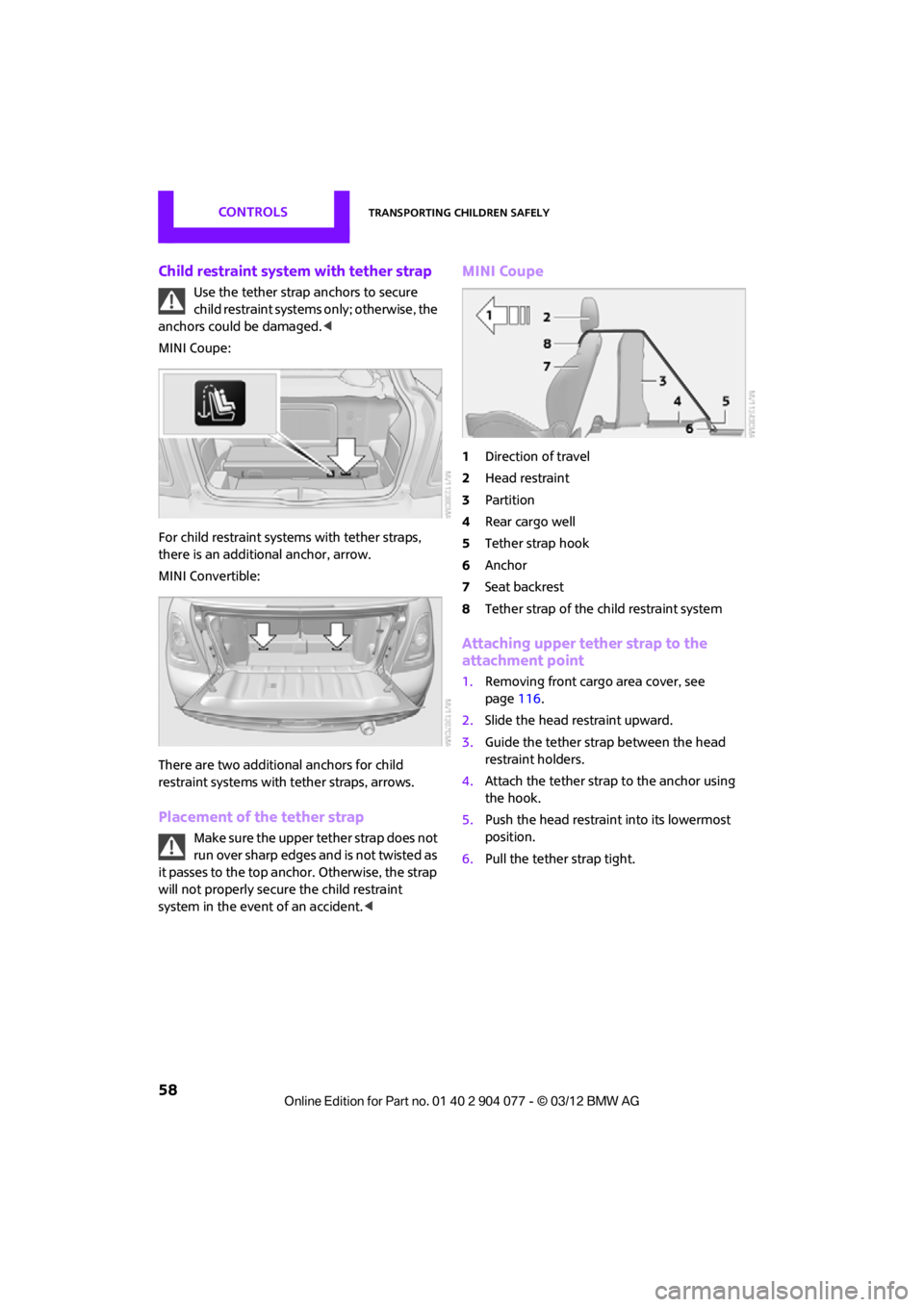
MINI Coupe:
For child restraint system s with tether straps,
there is an additional anchor, arrow.
MINI Convertible:
There are two additional anchors for child
restraint systems with tether straps, arrows.
Placement of the tether strap
Make sure the upper tether strap does not
run over sharp edges and is not twisted as
it passes to the top anchor. Otherwise, the strap
will not properly secure the child restraint
system in the event of an accident. <
MINI Coupe
1Direction of travel
2 Head restraint
3 Partition
4 Rear cargo well
5 Tether strap hook
6 Anchor
7 Seat backrest
8 Tether strap of the child restraint system
Attaching upper tether strap to the
attachment point
1.Removing front cargo area cover, see
page 116.
2. Slide the head restraint upward.
3. Guide the tether strap between the head
restraint holders.
4. Attach the tether strap to the anchor using
the hook.
5. Push the head restraint into its lowermost
position.
6. Pull the tether strap tight.
00320051004F004C00510048000300280047004C0057004C005200510003
Page 60 of 283
Transporting children safelyCONTROLS
59
MINI Convertible
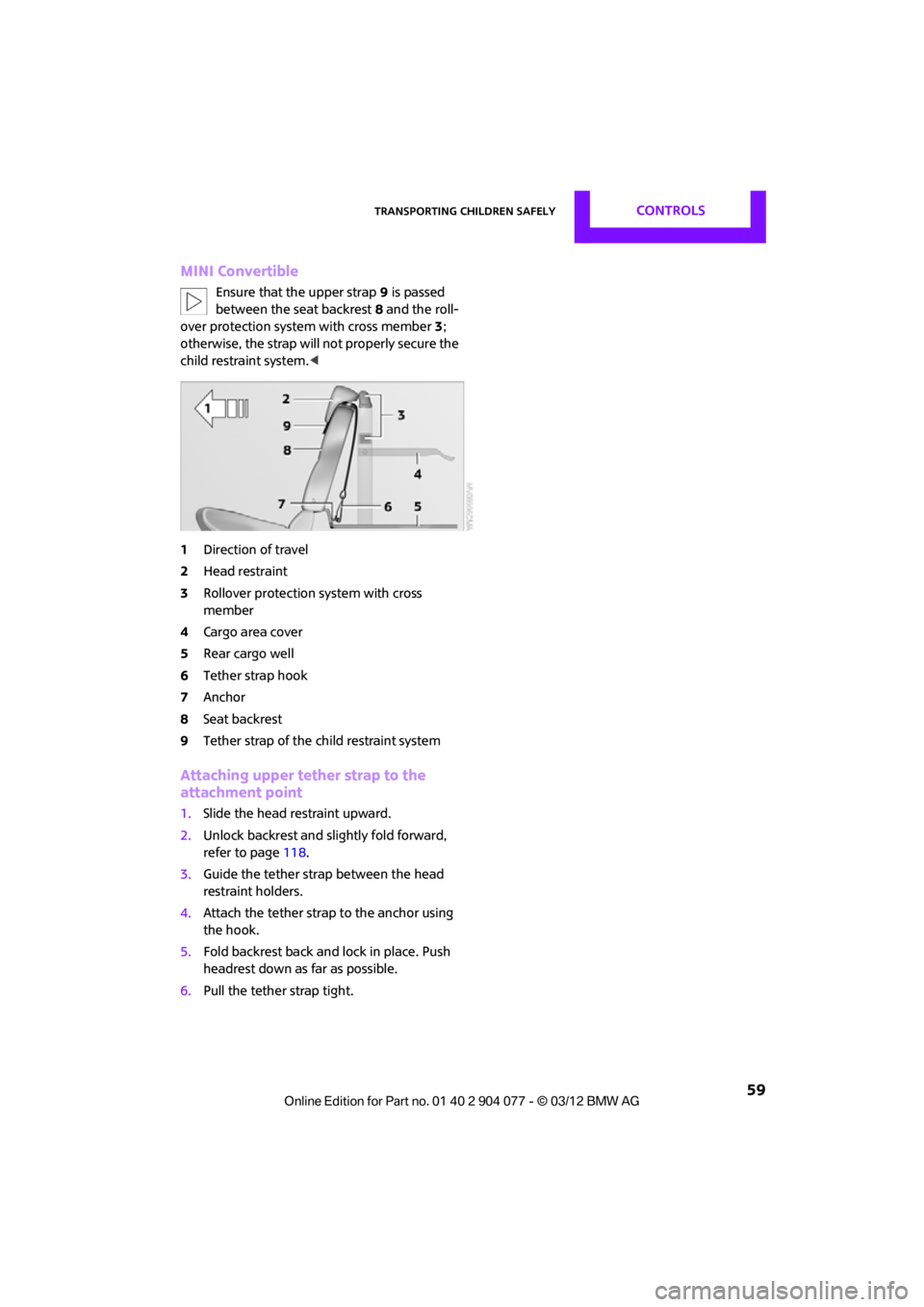
Ensure that the upper strap9 is passed
between the seat backrest 8 and the roll-
over protection syst em with cross member 3;
otherwise, the strap will not properly secure the
child restraint system.<
1 Direction of travel
2 Head restraint
3 Rollover protection system with cross
member
4 Cargo area cover
5 Rear cargo well
6 Tether strap hook
7 Anchor
8 Seat backrest
9 Tether strap of the child restraint system
Attaching upper tether strap to the
attachment point
1.Slide the head restraint upward.
2. Unlock backrest and slightly fold forward,
refer to page 118.
3. Guide the tether strap between the head
restraint holders.
4. Attach the tether strap to the anchor using
the hook.
5. Fold backrest back and lock in place. Push
headrest down as far as possible.
6. Pull the tether strap tight.
00320051004F004C00510048000300280047004C0057004C005200510003
Page 94 of 283
Technology for driving comfort and safetyCONTROLS
93
Airbags
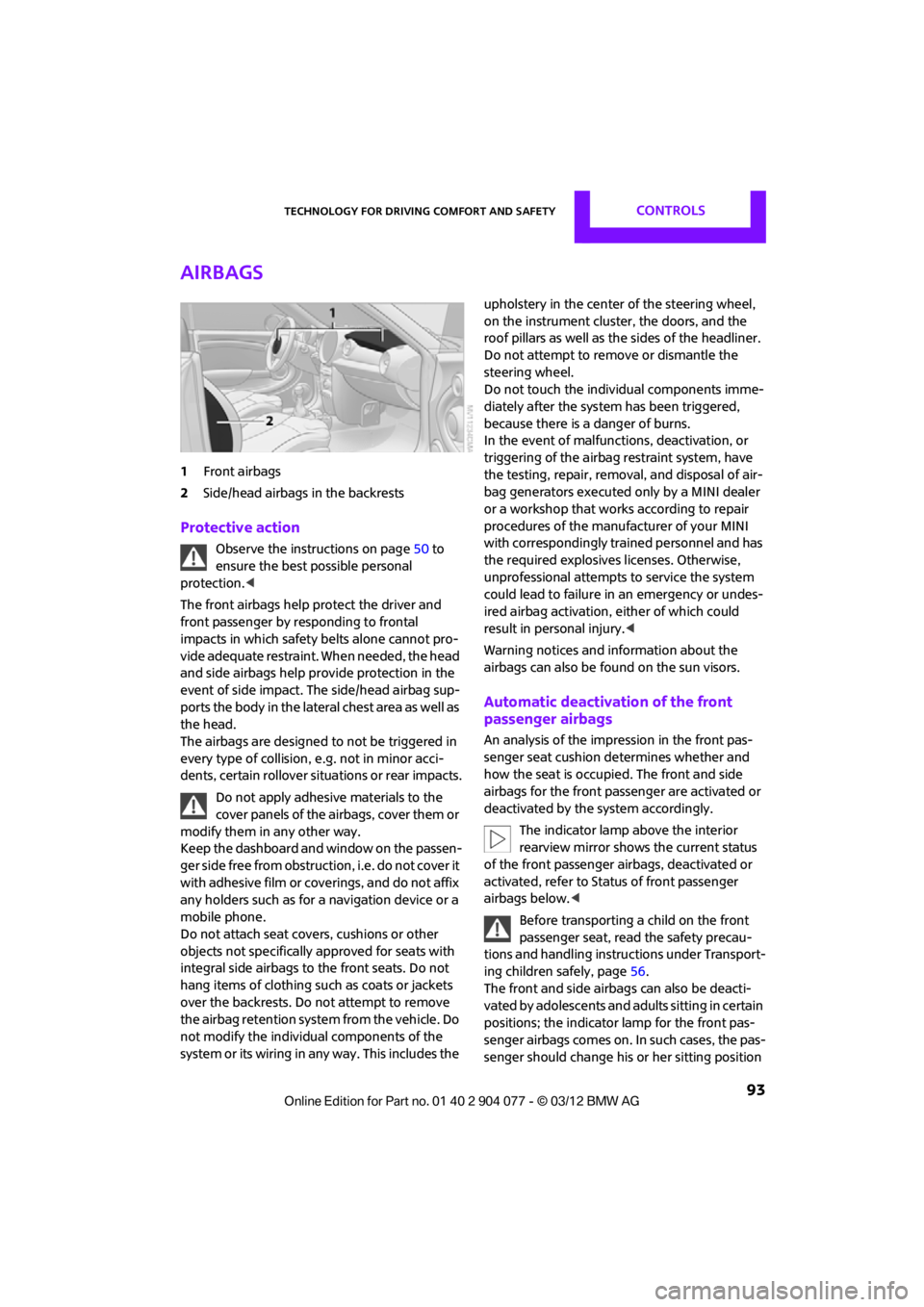
1Front airbags
2 Side/head airbags in the backrests
Protective action
Observe the instructions on page 50 to
ensure the best possible personal
protection.<
The front airbags help protect the driver and
front passenger by responding to frontal
impacts in which safety belts alone cannot pro-
vide adequate restraint. When needed, the head
and side airbags help provide protection in the
event of side impact. The side/head airbag sup-
ports the body in the lateral chest area as well as
the head.
The airbags are designed to not be triggered in
every type of collision, e.g. not in minor acci-
dents, certain rollover si tuations or rear impacts.
Do not apply adhesive materials to the
cover panels of the airbags, cover them or
modify them in any other way.
Keep the dashboard and window on the passen-
g e r s i d e f r e e f r o m o b s t r u c t i o n , i . e . d o n o t c o v e r i t
with adhesive film or coverings, and do not affix
any holders such as for a navigation device or a
mobile phone.
Do not attach seat covers, cushions or other
objects not specifically approved for seats with
integral side airbags to the front seats. Do not
hang items of clothing such as coats or jackets
over the backrests. Do not attempt to remove
the airbag retention system from the vehicle. Do
not modify the individual components of the
system or its wiring in any way. This includes the upholstery in the center of the steering wheel,
on the instrument cluster, the doors, and the
roof pillars as well as the sides of the headliner.
Do not attempt to remove or dismantle the
steering wheel.
Do not touch the individual components imme-
diately after the system has been triggered,
because there is a danger of burns.
In the event of malfuncti
ons, deactivation, or
triggering of the airbag restraint system, have
the testing, repair, remova l, and disposal of air-
bag generators executed only by a MINI dealer
or a workshop that work s according to repair
procedures of the manufacturer of your MINI
with correspondingly trained personnel and has
the required explosives licenses. Otherwise,
unprofessional attempts to service the system
could lead to failure in an emergency or undes-
ired airbag activation, either of which could
result in personal injury.<
Warning notices and in formation about the
airbags can also be found on the sun visors.
Automatic deactivation of the front
passenger airbags
An analysis of the impression in the front pas-
senger seat cushion determines whether and
how the seat is occupied. The front and side
airbags for the front passenger are activated or
deactivated by the system accordingly.
The indicator lamp above the interior
rearview mirror shows the current status
of the front passenger airbags, deactivated or
activated, refer to Status of front passenger
airbags below. <
Before transporting a child on the front
passenger seat, read the safety precau-
tions and handling instructions under Transport-
ing children safely, page 56.
The front and side airbag s can also be deacti-
vated by adolescents and adults sitting in certain
positions; the indicator lamp for the front pas-
senger airbags comes on. In such cases, the pas-
senger should change his or her sitting position
00320051004F004C00510048000300280047004C0057004C005200510003
Page 95 of 283
CONTROLSTechnology for driving comfort and safety
94
so that the front passenger airbags are activated
and the indicator lamp goes out. If the desired
airbag status cannot be achieved by changing
the sitting position, transport the relevant pas-
senger on a rear seat. Do not attach covers,
cushions, ball mats or other items to the front
passenger seat unless they are specifically rec-
ommended by the manufacturer of your MINI.
Do not place items unde r the seat which could
press against the seat from below. Otherwise, a
correct analysis of th e seat cushion is not
ensured. <
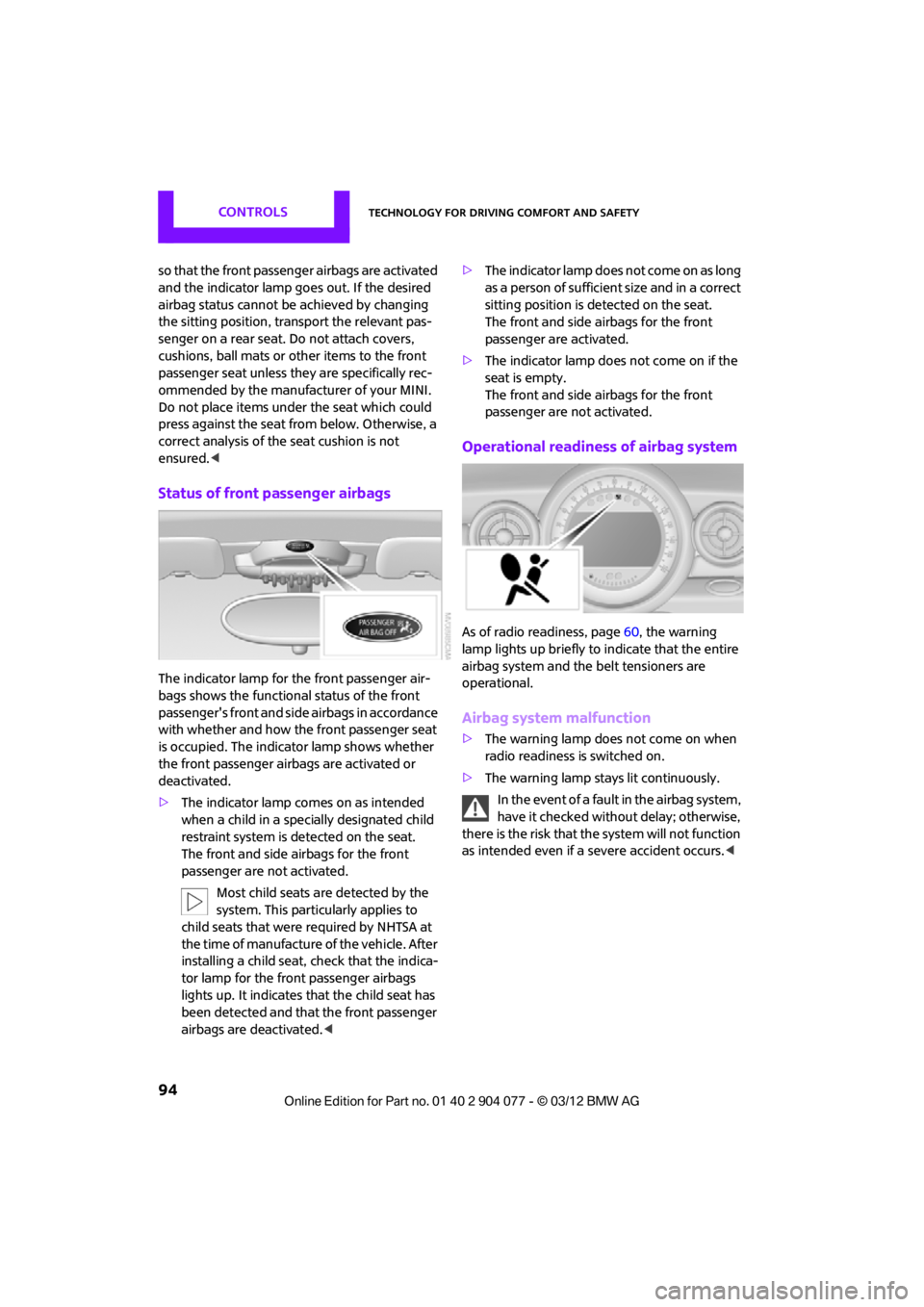
Status of front passenger airbags
The indicator lamp for the front passenger air-
bags shows the functional status of the front
passenger's front and side airbags in accordance
with whether and how the front passenger seat
is occupied. The indica tor lamp shows whether
the front passenger airbags are activated or
deactivated.
> The indicator lamp co mes on as intended
when a child in a spec ially designated child
restraint system is detected on the seat.
The front and side airbags for the front
passenger are not activated.
Most child seats are detected by the
system. This particularly applies to
child seats that were required by NHTSA at
the time of manufacture of the vehicle. After
installing a child seat, check that the indica-
tor lamp for the front passenger airbags
lights up. It indicates that the child seat has
been detected and that the front passenger
airbags are deactivated. <>
T h e i n d i c a t o r l a m p d o e s n o t c o m e o n a s l o n g
as a person of sufficient size and in a correct
sitting position is detected on the seat.
The front and side airbags for the front
passenger are activated.
> The indicator lamp does not come on if the
seat is empty.
The front and side airbags for the front
passenger are not activated.
Operational readines s of airbag system
As of radio readiness, page 60, the warning
lamp lights up briefly to indicate that the entire
airbag system and the belt tensioners are
operational.
Airbag system malfunction
> The warning lamp does not come on when
radio readiness is switched on.
> The warning lamp stays lit continuously.
In the event of a fault in the airbag system,
have it checked without delay; otherwise,
there is the risk that the system will not function
as intended even if a severe accident occurs. <
00320051004F004C00510048000300280047004C0057004C005200510003
Page 271 of 283

REFERENCEEverything from A to Z
270
Carpets, care230
Car phone
– installation location, refer to Center armrest 108
– refer to Telephone 108
Car phone, refer to Telephone 170,180
Car radio, refer to Radio 149
Car wash, care 227
Car washes 227
Catalytic conver ter, refer to
Hot exhaust system 115
CD, audio playback 157
CD player 157
– controls 146
– fast forward/reverse 158
– random order 158
– selecting a track 157
– switching on/off 146
– tone control 147
– volume 147
Center armrest 108
Center brake lamp 236
Center console, refer to Around the center
console 14
Central locking system 29
– Comfort Access 36
– from inside 32
– from outside 29
Changing bulbs 232
Changing the language on the Control Display 80
Changing the measurement units on the Control
Display 74
Changing wheels 239
Charging the battery 241
Chassis number, refer to
Engine compartment 221
Check Control 77
Child restraint fixing system
LATCH 57
Child restraint systems 56
Child seats 56 Chrome parts, care
229
Chrome parts, refer to Care 227
Cigarette lighter 109
Cleaning headlamps 67
– washer fluid 67
Clock
– setting time 76
– 12 h/24 h mode 76
Closing
– from inside 32
– from outside 29
Cl ot
hes hooks 108
Cockpit 10
Cold start, refer to Starting the engine 61
Comfort Access 36
– replacing the battery 38
– what to observe before
entering a car wash 37
Comfort area, refer to Around the center console 14
Compartment for remote control, refer to Ignition
lock 60
Computer 71
– displays on Control Display 73
Condensation, refer to When the vehicle is parked 116
Condition Based Service CBS 225
Configuring settings, refer to
Personal Profile 28
Connecting vacuum cleaner, refer to Connecting electrical
appliances 110
Consumption, refer to Average fuel consumption 72
Contact editing 178
Contacts 177,194
– new contact 195
Continuing route guidance 135
Control Display
– settings 73 Control Display, refer to iDrive
– switching on/off
17
Control Display, refer to Onboard computer 17
Controls and displays 10
Control stick, refer to Onboard computer 17
Control unit, refer to Onboard computer 17
Convenience operation
– convertible top 32
– windows 30
Convenient access, refer to
Comfort Access 36
Convenient star t, refer to
Starting the engine 61
Convertible top 39
– manual 44
– mechanical 44
Coolant 224
– checking level 224
– filling 224
Coolant temperature 224
Cooling, maximum 104
Cooling fluid, refer to
Coolant 224
Copyright 2
Corneri n
g li
ght, refer to
Adaptive Light Control 97
Criteria for route 135
Cruise control
– indicator lamp 13
Cruising range 71
Cupholders 109
Curb weight, refer to Weights 257
Current fuel consumption 72
Current playback
– external devices 162
D
Dashboard, refer to Cockpit 10
Dashboard instruments, refer to Displays 12
Dashboard lighting, refer to Instrument lighting 99
00320051004F004C00510048000300280047004C0057004C005200510003
Page 275 of 283

REFERENCEEverything from A to Z
274
Instrument panel, refer to Displays 12
Integrated key 28
Interactive map 132
Interesting destination for navigation 130
Interior lamps 99
– remote control 31
Interior rearview mirror 55
– automatic dimming
feature 55
Interlock 63
Intermittent mode of the
wipers 66
Internal care 229
Internet page 4
J
Jacking points 241
Jets, refer to Window washer nozzles 67
Joystick, refer to Onboard computer 17
Jumpering, refer to Jump-
starting 243
Jump-starting 243
K
Key, refer to Keys/remote
controls 28
Keyless-Go, refer to Comfort
Access 36
Keyless opening and closing, refer to Comfort Access 36
Key Memory, refer to Personal Profile 28
Keypad dialing 175,187
Kickdown 63
– automatic transmission with Steptronic 63
Knock control 207
L
Lamps, refer to Parking lamps/
Low beams 96
Lamps and bulbs, replacing bulbs 232
Lashing eyes, refe r to Securing
cargo 119
Last destinations 129
LATCH child restraint fixing
system 57
Leather care 230
LEDs light-emitting diodes 233
Length, refer to Dimensions 251
License plate lamp
– bulb replacement 236
Light alloy wheels, care 229
Light-emitting diodes
LEDs 233
Lighter 109
– socket 110
Lighting
– lamps and bulbs 232
– of the instruments 99
– of vehicle, refer to Lamps 96
Light switch 96
Limit, refer to Speed limit 79
Load 118
Load securing equipment,
refer to Securing cargo 119
Lock buttons of doors, refer to Locking 32
Locking
– adjusting confirmation signal 30
– from inside 32
– from outside 30
– without remote control, refer
to Comfort Access 36
Locking and unlocking doors
– confirmation signals 30
– from inside 32
– from outside 30 Longlife oils
– approved motor oils
223
Low beams 96
– automatic 96
– replacing bulb 233
Lower back support, refer to Lumbar support 51
Luggage compartment
– emergency operation, refer to Manual unlocking 33
– emergency unlocking 34
– increasing the capacity 117
– opening from the inside 33
Luggage compartment, refer to Cargo area 33
Luggage compartment lid,
refer to Tailgate 33
Lumbar support 51
M
M+S tires, refer to Winter
tires 220
Main menu 18
Maintenance, refer to Service
and Warranty Information
Booklet for US models and
Service Guide Booklet for
Canadian models
Maintenance system 225
Malfunction
– convertible top 41,48
– tailgate 33
Malfunction warnings, refer to Check Control 77
Manual air distribution 103
Manual convertible top 44
Manually operated convertible top 44
Manual mode
– automatic transmission with Steptronic 64
00320051004F004C00510048000300280047004C0057004C005200510003
Page 278 of 283

Everything from A to ZREFERENCE
277
Reserve warning, refer to Fuel gauge 70
Reservoir for washer systems 67
Reset, refer to Resetting tone settings 148
Restraint systems
– for children 56
– refer to Safety belts 53
Reverse
– CD player 158
Reverse gear
– automatic transmission with
Steptronic 63
– manual transmission 62
Road map 137
Roadside Assistance 243
Roadside parking lamps 98
– replacing bulb 234
Road worthiness test, refer to Service requirements 75
Roof load capacity 257
Rope, refer to Tow-starting, towing away 246
Route 135,136
– bypassing sections 136
– changing 135,136
– changing criteria 135
– displaying arrow view 136
– displaying map view 137
– displaying streets or towns/ cities 136
– selecting 135
Route guidance 135
– bypassing a route section 136
– changing specified route 135
– distance and arrival 135
– voice instructions 139
– volume of voice instructions 139
Route section, changing 136
Route selection 135
RSC Run-flat System Component, refer to Run-flat
tires 218 Rubber parts, care
229
Run-flat System Component RSC, refer to Run-flat
tires 218
Run-flat tires 218
– flat tire 88
– tire inflation pressure 209
– tire replacement 219
– winter tires 220
S
Safety belt
– number50
Safety Belt Reminder 54
Safety belts 53
– damage 54
– indicator lamp 54
– reminder 54
– sitting safely 50
Safety belts, care 230
Safety systems
– airbags 93
– Antilock Brake System ABS 83
– Dynamic Stability Control DSC 83
– safety belts 53
Safety tires, refer to Run-flat tires 218
Satellite radio 151
– channel, activating or deactivating 152
– channel, selecting 152
– channel, storing 153
– favorites 154
– time shift 153
– Traffic Jump 155
Screen, refer to Onboard
computer controls 17
Screw thread for tow fitting 245
SDARS, refer to Satellite radio 151
Seat adjustment
– mechanical 51 Seats
51
– adjusting the seats 51
– heating 53
– sitting safely 50
Securing the vehicle
– from inside 32
– from outside 29
Selecting navigation system 124
Selecting new scale for
navigation 138
Selector lever
– automatic transmission with
Steptronic 63
Selector lever lock
– automatic transmission with
Steptronic, refer to
Shiftlock 63
– overriding manually 64
Selector lever positions
– automatic transmission with Steptronic 63
Service, refer to Roadside Assistance 243
Service car, refer to Roadside
Assistance 243
Service data in the remote control 225
Service Interval Display, refer to Condition Based Service
CBS 225
Service requ irem
ent
display,
refer to Condition Based
Service CBS 225
Service requirements 75
Settings
– clock, 12 h/24 h mode 76
– date format 77
Setting time and date 77
Setting time zone, time, and date 77
Shifting gears
– automatic transmission with Steptronic 64
– manual transmission 62
00320051004F004C00510048000300280047004C0057004C005200510003