belt MINI COUPE ROADSTER CONVERTIBLE 2015 User Guide
[x] Cancel search | Manufacturer: MINI, Model Year: 2015, Model line: COUPE ROADSTER CONVERTIBLE, Model: MINI COUPE ROADSTER CONVERTIBLE 2015Pages: 231, PDF Size: 5.56 MB
Page 85 of 231
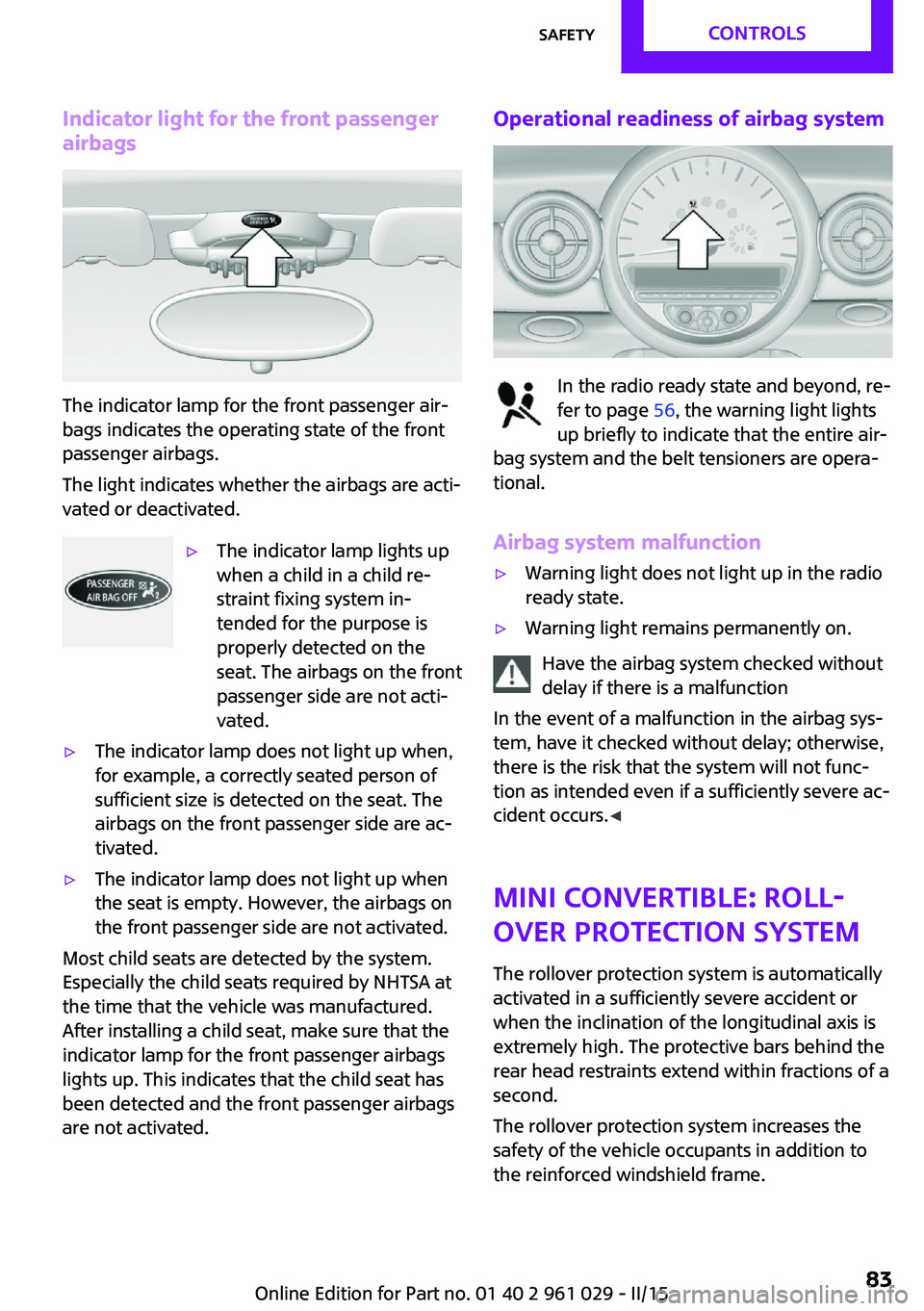
Indicator light for the front passengerairbags
The indicator lamp for the front passenger air‐
bags indicates the operating state of the front
passenger airbags.
The light indicates whether the airbags are acti‐
vated or deactivated.
▷The indicator lamp lights up
when a child in a child re‐
straint fixing system in‐
tended for the purpose is
properly detected on the
seat. The airbags on the front
passenger side are not acti‐
vated.▷The indicator lamp does not light up when,
for example, a correctly seated person of
sufficient size is detected on the seat. The
airbags on the front passenger side are ac‐
tivated.▷The indicator lamp does not light up when
the seat is empty. However, the airbags on
the front passenger side are not activated.
Most child seats are detected by the system.
Especially the child seats required by NHTSA at
the time that the vehicle was manufactured.
After installing a child seat, make sure that the
indicator lamp for the front passenger airbags
lights up. This indicates that the child seat has
been detected and the front passenger airbags
are not activated.
Operational readiness of airbag system
In the radio ready state and beyond, re‐
fer to page 56, the warning light lights
up briefly to indicate that the entire air‐
bag system and the belt tensioners are opera‐
tional.
Airbag system malfunction
▷Warning light does not light up in the radio
ready state.▷Warning light remains permanently on.
Have the airbag system checked without
delay if there is a malfunction
In the event of a malfunction in the airbag sys‐
tem, have it checked without delay; otherwise,
there is the risk that the system will not func‐
tion as intended even if a sufficiently severe ac‐
cident occurs. ◀
MINI Convertible: roll‐
over protection system
The rollover protection system is automatically
activated in a sufficiently severe accident or
when the inclination of the longitudinal axis is
extremely high. The protective bars behind the
rear head restraints extend within fractions of a
second.
The rollover protection system increases the
safety of the vehicle occupants in addition to
the reinforced windshield frame.
Seite 83SafetyCONTROLS83
Online Edition for Part no. 01 40 2 961 029 - II/15
Page 86 of 231
Do not obstruct the area of movement
Always keep the area of movement of the
rollover protection system clear. In light acci‐
dents, you are protected by the fastened safety
belt and, depending on the severity of the acci‐
dent, the belt tightener and the multi-level air
bag restraint system. ◀
Lowering
Have the service center check the rollover pro‐
tection system after it is deployed unexpect‐
edly.
General instructions on the rollover pro‐
tection system
When the rollover protection system is ex‐
tended, do not move the convertible top under
any circumstances.
Do not modify the individual components of
the rollover protection system or the wiring in
any way.
Work on the rollover protection system should only be performed by a MINI service center.
Non-professional work on the system could
lead to failure or a malfunction.
To check the system and to ensure that the sys‐
tem will operate properly over the long-term, it
is imperative that you adhere to the specified
service intervals. ◀
FTM Flat Tire Monitor
The concept
The system does not measure the actual infla‐
tion pressure in the tires.
The system detects a pressure loss in a tire by
comparing the rotational speeds of the individ‐
ual wheels while moving.
In the event of a pressure loss, the diameter
and therefore the rotational speed of the corre‐
sponding wheel change. This is detected and
reported as a flat tire.Functional requirements
The system must have been initialized when
the tire inflation pressure was correct; other‐
wise, reliable signaling of a flat tire is not en‐
sured.
Initialize the system after each correction of the
tire inflation pressure and after every tire or
wheel change.
System limits Sudden tire damage
Sudden serious tire damage caused by
external influences cannot be indicated in ad‐
vance. ◀
A natural, even pressure loss in all four tires
cannot be detected. Therefore, check the tire
inflation pressure regularly.
The system could be delayed or malfunction in
the following situations:▷When the system has not been initialized.▷When driving on a snowy or slippery road
surface.▷Sporty driving style: slip in the drive wheels,
high lateral acceleration.▷When driving with snow chains.
When the vehicle is driven with a compact
wheel, refer to page 185, the Flat Tire Monitor
is not functional.
InitializationThe initialization process adopts the set infla‐
tion tire pressures as reference values for the
detection of a flat tire. Initialization is started by
confirming the inflation pressures.
Seite 84CONTROLSSafety84
Online Edition for Part no. 01 40 2 961 029 - II/15
Page 110 of 231
MINI Convertible: cargo areaDo not place objects on the cargo cover
Do not place objects on the cargo cover;
otherwise, the cover or the convertible top
could be damaged. ◀
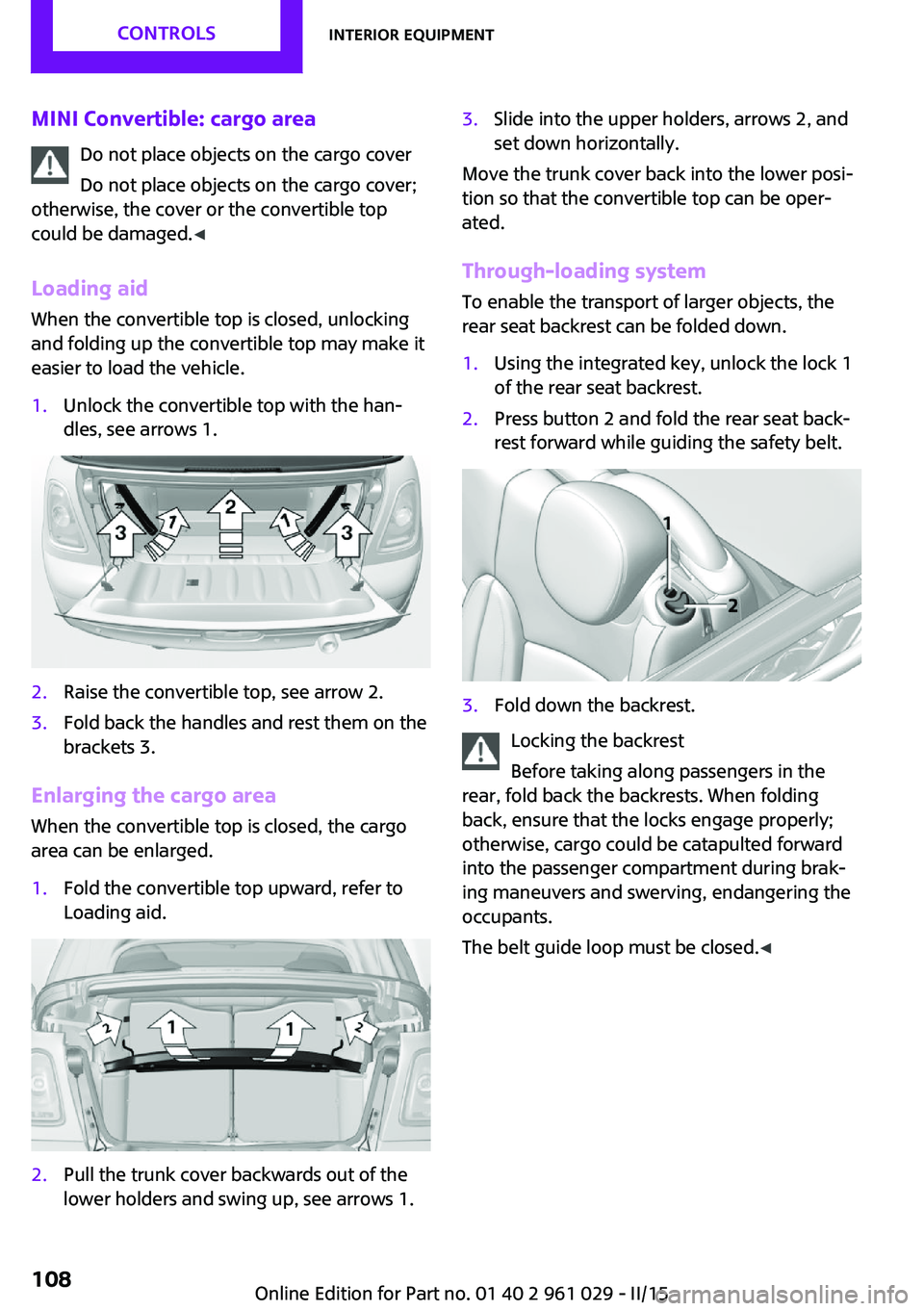
Loading aid When the convertible top is closed, unlocking
and folding up the convertible top may make it
easier to load the vehicle.1.Unlock the convertible top with the han‐
dles, see arrows 1.2.Raise the convertible top, see arrow 2.3.Fold back the handles and rest them on the
brackets 3.
Enlarging the cargo area
When the convertible top is closed, the cargo
area can be enlarged.
1.Fold the convertible top upward, refer to
Loading aid.2.Pull the trunk cover backwards out of the
lower holders and swing up, see arrows 1.3.Slide into the upper holders, arrows 2, and
set down horizontally.
Move the trunk cover back into the lower posi‐
tion so that the convertible top can be oper‐
ated.
Through-loading system
To enable the transport of larger objects, the
rear seat backrest can be folded down.
1.Using the integrated key, unlock the lock 1
of the rear seat backrest.2.Press button 2 and fold the rear seat back‐
rest forward while guiding the safety belt.3.Fold down the backrest.
Locking the backrest
Before taking along passengers in the
rear, fold back the backrests. When folding
back, ensure that the locks engage properly;
otherwise, cargo could be catapulted forward
into the passenger compartment during brak‐
ing maneuvers and swerving, endangering the
occupants.
The belt guide loop must be closed. ◀
Seite 108CONTROLSInterior equipment108
Online Edition for Part no. 01 40 2 961 029 - II/15
Page 121 of 231
available cargo and luggage load capacity
calculated in Step 4.6.If your vehicle will be towing a trailer, load
from your trailer will be transfered to your
vehicle. Consult the manual for transporting
a trailer to determine how this may reduce
the available cargo and luggage load ca‐
pacity of your vehicle.
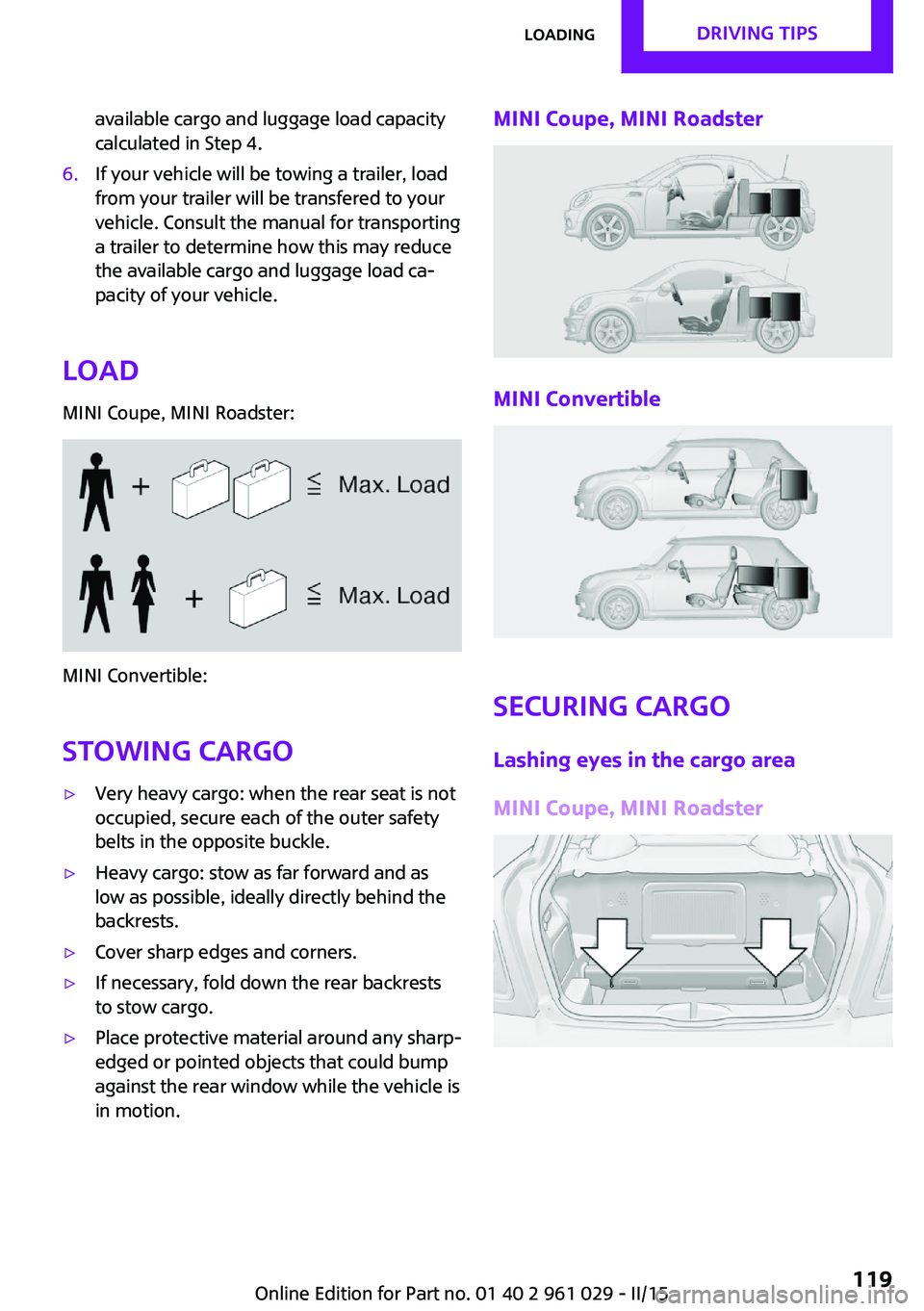
Load
MINI Coupe, MINI Roadster:
MINI Convertible:
Stowing cargo
▷Very heavy cargo: when the rear seat is not
occupied, secure each of the outer safety
belts in the opposite buckle.▷Heavy cargo: stow as far forward and as
low as possible, ideally directly behind the
backrests.▷Cover sharp edges and corners.▷If necessary, fold down the rear backrests
to stow cargo.▷Place protective material around any sharp-
edged or pointed objects that could bump
against the rear window while the vehicle is
in motion.MINI Coupe, MINI Roadster
MINI Convertible
Securing cargo
Lashing eyes in the cargo area
MINI Coupe, MINI Roadster
Seite 119LoadingDRIVING TIPS119
Online Edition for Part no. 01 40 2 961 029 - II/15
Page 122 of 231
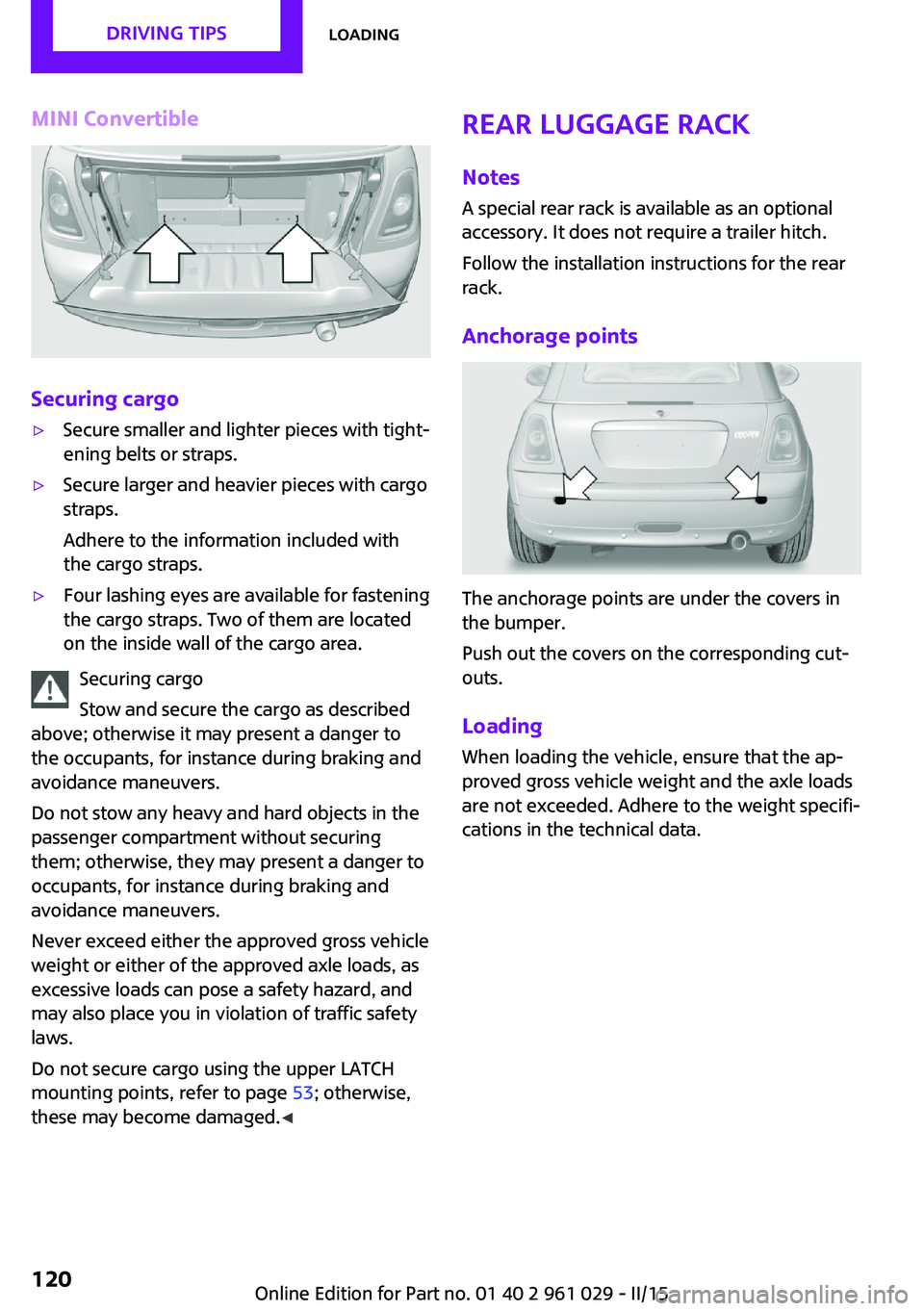
MINI Convertible
Securing cargo
▷Secure smaller and lighter pieces with tight‐
ening belts or straps.▷Secure larger and heavier pieces with cargo
straps.
Adhere to the information included with
the cargo straps.▷Four lashing eyes are available for fastening
the cargo straps. Two of them are located
on the inside wall of the cargo area.
Securing cargo
Stow and secure the cargo as described
above; otherwise it may present a danger to
the occupants, for instance during braking and
avoidance maneuvers.
Do not stow any heavy and hard objects in the
passenger compartment without securing
them; otherwise, they may present a danger to
occupants, for instance during braking and
avoidance maneuvers.
Never exceed either the approved gross vehicle
weight or either of the approved axle loads, as
excessive loads can pose a safety hazard, and
may also place you in violation of traffic safety
laws.
Do not secure cargo using the upper LATCH
mounting points, refer to page 53; otherwise,
these may become damaged. ◀
Rear luggage rack
Notes A special rear rack is available as an optional
accessory. It does not require a trailer hitch.
Follow the installation instructions for the rear
rack.
Anchorage points
The anchorage points are under the covers in
the bumper.
Push out the covers on the corresponding cut‐
outs.
Loading
When loading the vehicle, ensure that the ap‐
proved gross vehicle weight and the axle loads
are not exceeded. Adhere to the weight specifi‐
cations in the technical data.
Seite 120DRIVING TIPSLoading120
Online Edition for Part no. 01 40 2 961 029 - II/15
Page 199 of 231
Make especially sure that light-colored leather
is cleaned regularly as it is more susceptible to
soiling.
Twice a year, treat the leather with a leather lo‐
tion as dirt and grease will attack the protective
layer of the leather.
Upholstery material care
Vacuum regularly with a vacuum cleaner to re‐
move superficial soiling.
In case of heavy soiling, e.g., beverage stains,
use a soft sponge or lint-free microfiber cloth in
combination with a suitable interior cleaner.
Follow the instructions on the container.
Clean the upholstery material down to the
seams using large sweeping motions. Avoid
rubbing the material vigorously.
Damage from Velcro® fasteners
Open Velcro® fasteners on pants or other
articles of clothing can damage the seat covers.
Ensure that any Velcro® fasteners are closed. ◀
Caring for special components
Interior plastic parts These include:▷Imitation leather surfaces▷Lamp lenses▷Indicator covers▷Matte components
Clean with water and a solvent-free plastic
cleaner if necessary.
Do not use cleansers that contain alcohol
or solvents
Do not use cleansers that contain alcohol or
solvents, such as lacquer thinners, heavy-duty
grease removers, fuel, or such; this could lead
to surface damage. ◀
Rubber seals Only treat with water or a rubber care product.
When cleaning rubber seals, do not use silicone
sprays or other care products containing sili‐
cone; otherwise, noise and damage may result.
Chrome surfaces Carefully clean components such as the radia‐
tor grille or door handles with an ample supply
of water, possibly with shampoo added, partic‐
ularly when they have been exposed to road
salt. For additional treatment, use a chrome
polish.
Light-alloy wheels When cleaning the wheels on the vehicle, only
use a neutral wheel rim cleaner with a pH value
of 5 to 9.
Do not use abrasive cleaners or a steam jet hot‐
ter than 140 ℉/60 ℃; otherwise, damage may
result. Adhere to the manufacturer instructions.
Aggressive, acidic, or alkaline cleaners may de‐
stroy the protective coating of neighboring
components such as the brake disc.
Exterior sensors The sensors on the outside of the vehicle, such
as for Park Distance Control, must be kept clean
and free of ice to ensure that they remain fully
functional.
Decorative trim Clean decorative trims and fine wood compo‐
nents with a moist cloth only. Then dry with a
soft cloth.
Safety belts Dirty belt straps impede the reeling action and
thus have a negative impact on safety.
No chemical cleaning
Do not clean chemically; this can destroy
the webbing. ◀Seite 197CareMOBILITY197
Online Edition for Part no. 01 40 2 961 029 - II/15
Page 201 of 231
Indicator/warning lampsVehicle equipment
This chapter describes all series equipment as
well as country-specific and special equipment
offered for this model series. Therefore, it also
describes equipment that may not be found in
your vehicle, for instance due to the selectedspecial equipment or the country version. This
also applies to safety-related functions and sys‐
tems.
When using the features and systems described
here, adhere to local regulations.
Overview
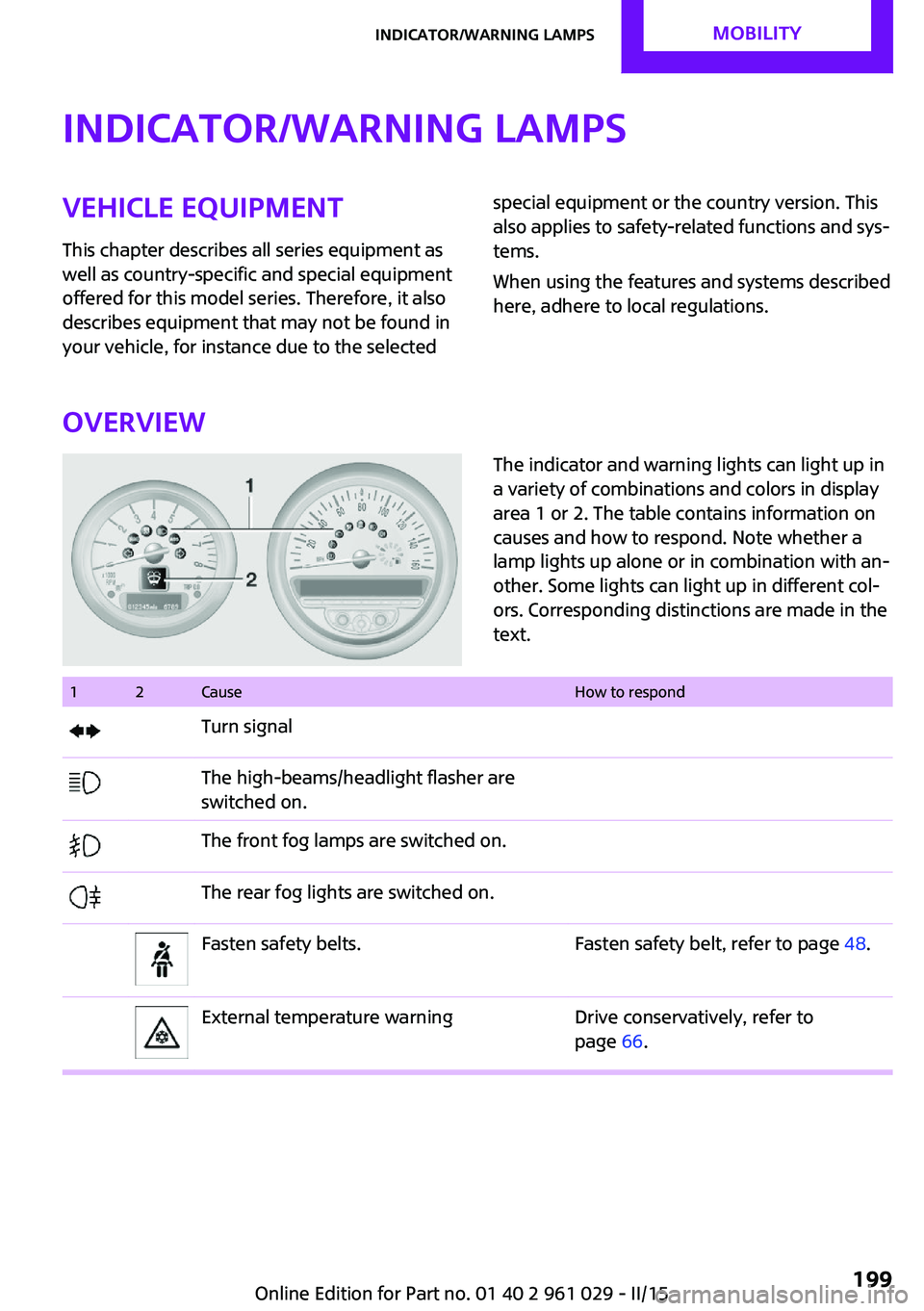
The indicator and warning lights can light up in
a variety of combinations and colors in display
area 1 or 2. The table contains information on
causes and how to respond. Note whether a
lamp lights up alone or in combination with an‐
other. Some lights can light up in different col‐
ors. Corresponding distinctions are made in the
text. 12CauseHow to respondTurn signalThe high-beams/headlight flasher are
switched on.The front fog lamps are switched on.The rear fog lights are switched on.Fasten safety belts.Fasten safety belt, refer to page 48.External temperature warningDrive conservatively, refer to
page 66.Seite 199Indicator/warning lampsMOBILITY199
Online Edition for Part no. 01 40 2 961 029 - II/15
Page 204 of 231
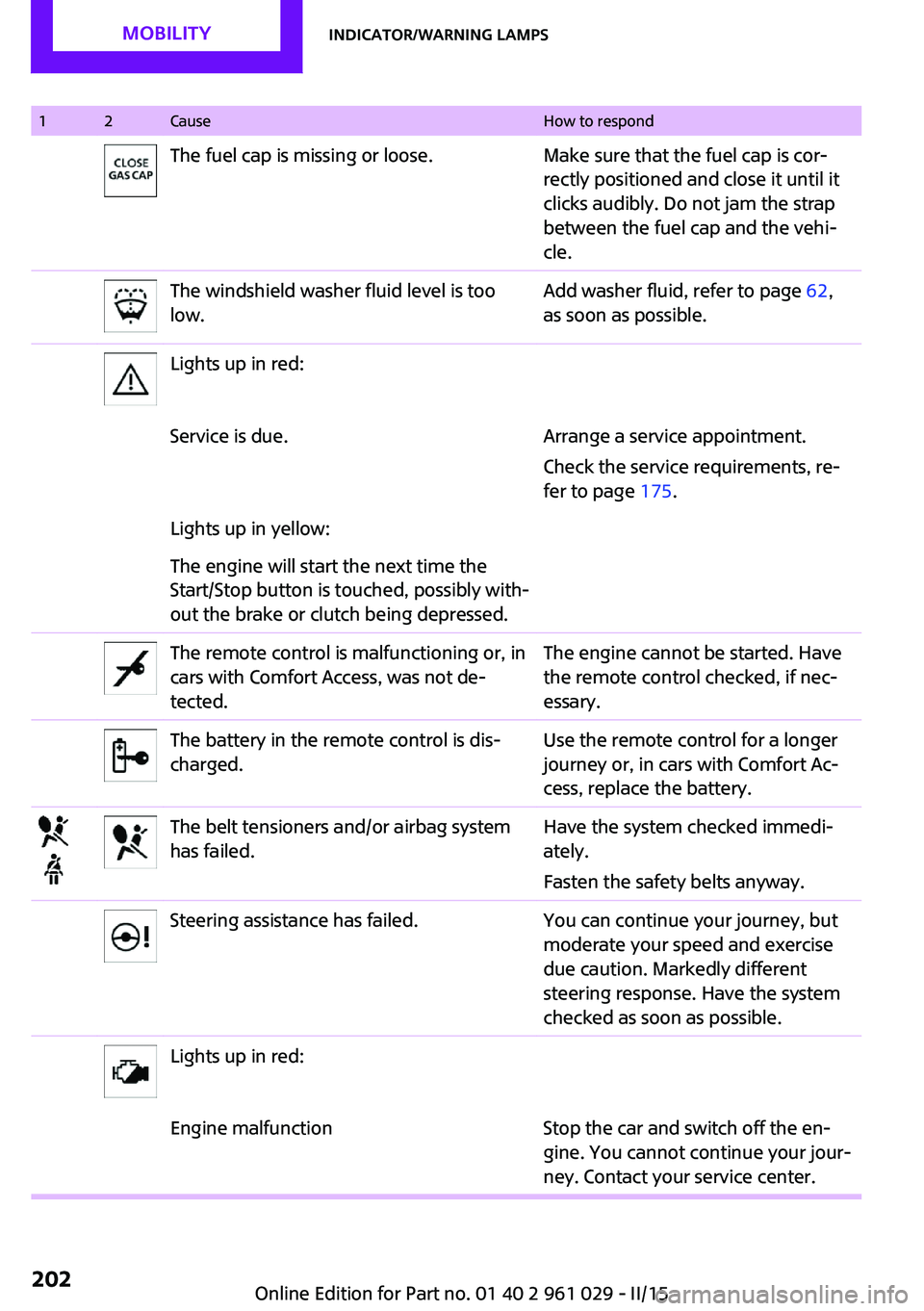
12CauseHow to respondThe fuel cap is missing or loose.Make sure that the fuel cap is cor‐
rectly positioned and close it until it
clicks audibly. Do not jam the strap
between the fuel cap and the vehi‐
cle.The windshield washer fluid level is too
low.Add washer fluid, refer to page 62,
as soon as possible.Lights up in red:Service is due.Arrange a service appointment.
Check the service requirements, re‐
fer to page 175.Lights up in yellow:The engine will start the next time the
Start/Stop button is touched, possibly with‐
out the brake or clutch being depressed.The remote control is malfunctioning or, in
cars with Comfort Access, was not de‐
tected.The engine cannot be started. Have
the remote control checked, if nec‐
essary.The battery in the remote control is dis‐
charged.Use the remote control for a longer
journey or, in cars with Comfort Ac‐
cess, replace the battery.The belt tensioners and/or airbag system
has failed.Have the system checked immedi‐
ately.
Fasten the safety belts anyway.Steering assistance has failed.You can continue your journey, but
moderate your speed and exercise
due caution. Markedly different
steering response. Have the system
checked as soon as possible.Lights up in red:Engine malfunctionStop the car and switch off the en‐
gine. You cannot continue your jour‐
ney. Contact your service center.Seite 202MOBILITYIndicator/warning lamps202
Online Edition for Part no. 01 40 2 961 029 - II/15
Page 220 of 231

Everything from A to ZIndexA
ABS, Antilock Brake Sys‐ tem 91
Acoustic signal, refer to Check Control 73
Activated charcoal filter with automatic climate con‐
trol 103
Adaptive Light Control 77
Additives, engine oil 173
Airbags 81
Airbags, indicator/warning light 83
Air circulation, refer to Recir‐ culated air mode, air condi‐
tioner 100
Air circulation, refer to Recir‐ culated air mode, automatic
climate control 102
Air conditioning 99
Air conditioning mode, air conditioner 99
Air conditioning mode, auto‐ matic climate control 101
Air distribution, air condi‐ tioner, manual 100
Air distribution, auto‐ matic 102
Air distribution, automatic cli‐ mate control, manual 103
Air distribution, individual 100
Air drying, refer to Cooling function 103
Air flow rate for air condi‐ tioner 100
Air flow rate with automatic climate control 102
Air pressure, refer to Tire infla‐ tion pressure 156
Air supply, air conditioner 99 Air supply, automatic climate
control 101
Alarm system 31
Alarm system, avoiding unin‐ tentional alarms 32
Alarm system, ending an alarm 31
Alarm system, interior motion sensor 32
Alarm system, tilt alarm sen‐ sor 32
Always Open Timer 68
Ambient lighting 79
Antifreeze, washer fluid 62
Antilock Brake System, ABS 91
Anti-slip control, refer to Dy‐ namic Stability Control
DSC 91
Anti-theft protection 21
Approved engine oils 173
Ashtray 105
Assistance, roadside 189
Assistance when driving off, refer to Hill drive-off assis‐
tant 93
Assistance with starting en‐ gine, refer to Jump-start‐
ing 189
Automatic air distribution 102
Automatic air flow 102
Automatic car wash 194
Automatic climate con‐ trol 101
Automatic climate control, au‐ tomatic air distribution 102
Automatic, cruise control 96
Automatic headlight con‐ trol 75
Automatic rear spoiler 93 Automatic transmission with
Steptronic 63
AUTO program with auto‐ matic climate control 102
AUX-IN port 134
Average fuel consumption 68
Average fuel consumption, setting the units 70
Average speed 68
Average speed, refer to Com‐ puter 67
B Backrest curvature, refer to Lumbar support 46
Backrests, refer to Seats 45
Backup lights, bulb replace‐ ment 182
Battery disposal 31
Battery, refer to Vehicle bat‐ tery 187
Battery, remote control 20
Battery replacement, remote control 31
Belts, refer to Safety belts 47
Belt tensioners, refer to Safety belts 47
Bi-xenon headlights 179
Brake assistant 91
Brake discs, breaking in 114
Brake fluid, refer to Service re‐ quirements 71
Brake force distribution, elec‐ tronic 91
Brake pads, breaking in 114
Brake, refer to Parking brake 58
Brakes, MINI maintenance system 175 Seite 218REFERENCEEverything from A to Z218
Online Edition for Part no. 01 40 2 961 029 - II/15
Page 223 of 231
Engine, starting, Comfort Ac‐cess 29
Engine, starting, Start/Stop button 56
Engine, stopping, Start/Stop button 56
Engine, switching off 58
ESP Electronic Stability Pro‐ gram, refer to Dynamic Sta‐
bility Control DSC 91
Exchanging wheels/tires 165
Exterior mirrors 49
Exterior mirrors, adjusting 49
Exterior mirrors, folding in and out 49
Exterior sensors, care 197
External temperature dis‐ play 66
External temperature display, changing the units 70
External temperature warn‐ ing 66
F Failure messages, refer to Check Control 73
False alarm, refer to Avoiding unintentional alarms 32
Fan, refer to Air flow rate for air conditioner 100
Fan, refer to Air flow rate with automatic climate con‐
trol 102
Fastening safety belts, refer to Safety belts 47
Fault messages, refer to Check Control 73
Filling capacities 217
Filter, refer to Activated-char‐ coal filter 101
Filter, refer to Microfilter 101
Filter, refer to Microfilter/acti‐ vated-charcoal filter with au‐
tomatic climate control 103
First aid kit 189 First aid, refer to First aid
kit 189
Flashing when locking/unlock‐ ing 24
Flat tire, Flat Tire Monitor 85
Flat tire, indicator/warning lamp 85
Flat Tire Monitor FTM 84
Flat Tire Monitor FTM, flat tire message 85
Flat Tire Monitor FTM, initializ‐ ing the system 84
Flat Tire Monitor FTM, snow chains 84
Flat Tire Monitor FTM, system limits 84
Flat tire, run-flat tire 85
Flat tire, Tire Pressure Moni‐ tor 86
Flat tire, Tire Pressure Monitor TPM 86
Flat tire, wheel change 184
Floor mats, care 198
Fog lights 78
Folding roof, refer to Convertible top with
integrated sliding sun‐
roof 34
Foot brake 116
Footwell lights, refer to Inte‐ rior lights 79
Front airbags 81
Front fog light, bulb replace‐ ment 181
Front fog lights 78
Front lights, bulb replace‐ ment 179
Front passenger airbags, de‐ activating 82
FTM Flat Tire Monitor 84
Fuel 154
Fuel, additives 154
Fuel, average consump‐ tion 68
Fuel cap, closing 152 Fuel consumption display,
average fuel consump‐
tion 68
Fuel filler flap, closing 152
Fuel filler flap, opening 152
Fuel filler flap, unlocking in case of an electrical malfunc‐
tion 152
Fuel gauge 67
Fuel, refer to Average fuel consumption 68
Fuel, saving 121
Fuel tank capacity, refer to Filling capacities 217
Fuel tank contents, refer to Filling capacities 217
Fuel tank, refer to Filling ca‐ pacities 217
Fuse 188
G
Gasoline 154
Gasoline gauge, refer to Fuel gauge 67
Gear change, manual trans‐ mission 62
Gear change, Steptronic trans‐ mission 63
Gear display, Steptronic trans‐ mission 63
Glare protection 105
H
Halogen headlights, bulb re‐ placement 180
Handbrake, refer to Parking brake 58
Hand car wash, care 195
Hands-free microphone 15
Hazard warning system 15
Head airbags 81
Headlamp control, refer to Parking lamps/low
beams 75 Seite 221Everything from A to ZREFERENCE221
Online Edition for Part no. 01 40 2 961 029 - II/15