inflation pressure MINI Hardtop 2 Door 2010 (Mini Connected) User Guide
[x] Cancel search | Manufacturer: MINI, Model Year: 2010, Model line: Hardtop 2 Door, Model: MINI Hardtop 2 Door 2010Pages: 230, PDF Size: 4.02 MB
Page 170 of 230
Wheels and tires
168
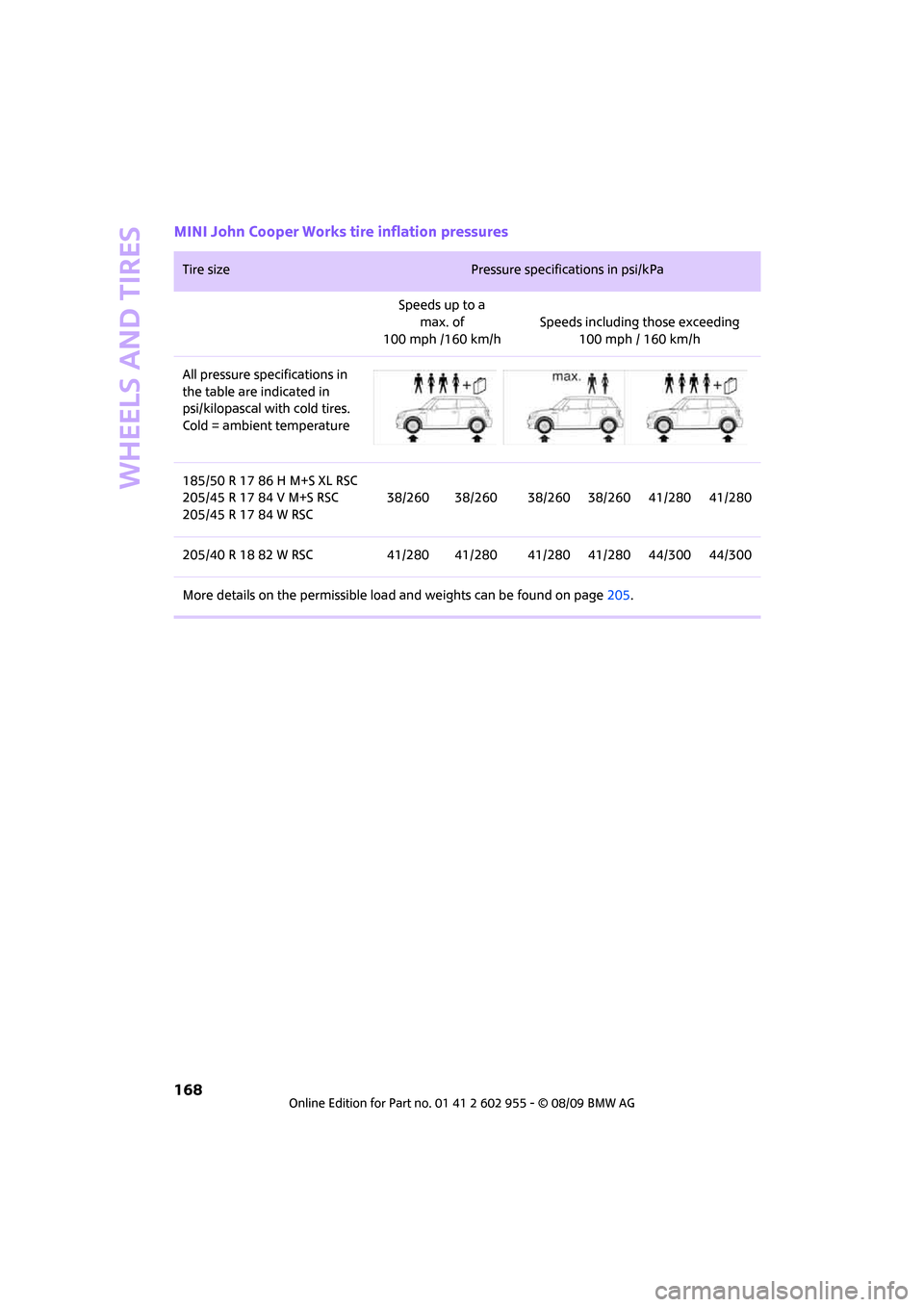
MINI John Cooper Works tire inflation pressures
Tire size Pressure specifications in psi/kPa
Speeds up to a
max. of
100 mph /160 km/hSpeeds including those exceeding
100 mph / 160 km/h
All pressure specifications in
the table are indicated in
psi/kilopascal with cold tires.
Cold = ambient temperature
185/50 R 17 86 H M+S XL RSC
205/45 R 17 84 V M+S RSC
205/45 R 17 84 W RSC38/260 38/260 38/260 38/260 41/280 41/280
205/40 R 18 82 W RSC 41/280 41/280 41/280 41/280 44/300 44/300
More details on the permissible load and weights can be found on page205.
Page 171 of 230
MOBILITYAT A GLANCE CONTROLS DRIVING TIPS ENTERTAINMENT
169
NAVIGATION REFERENCE
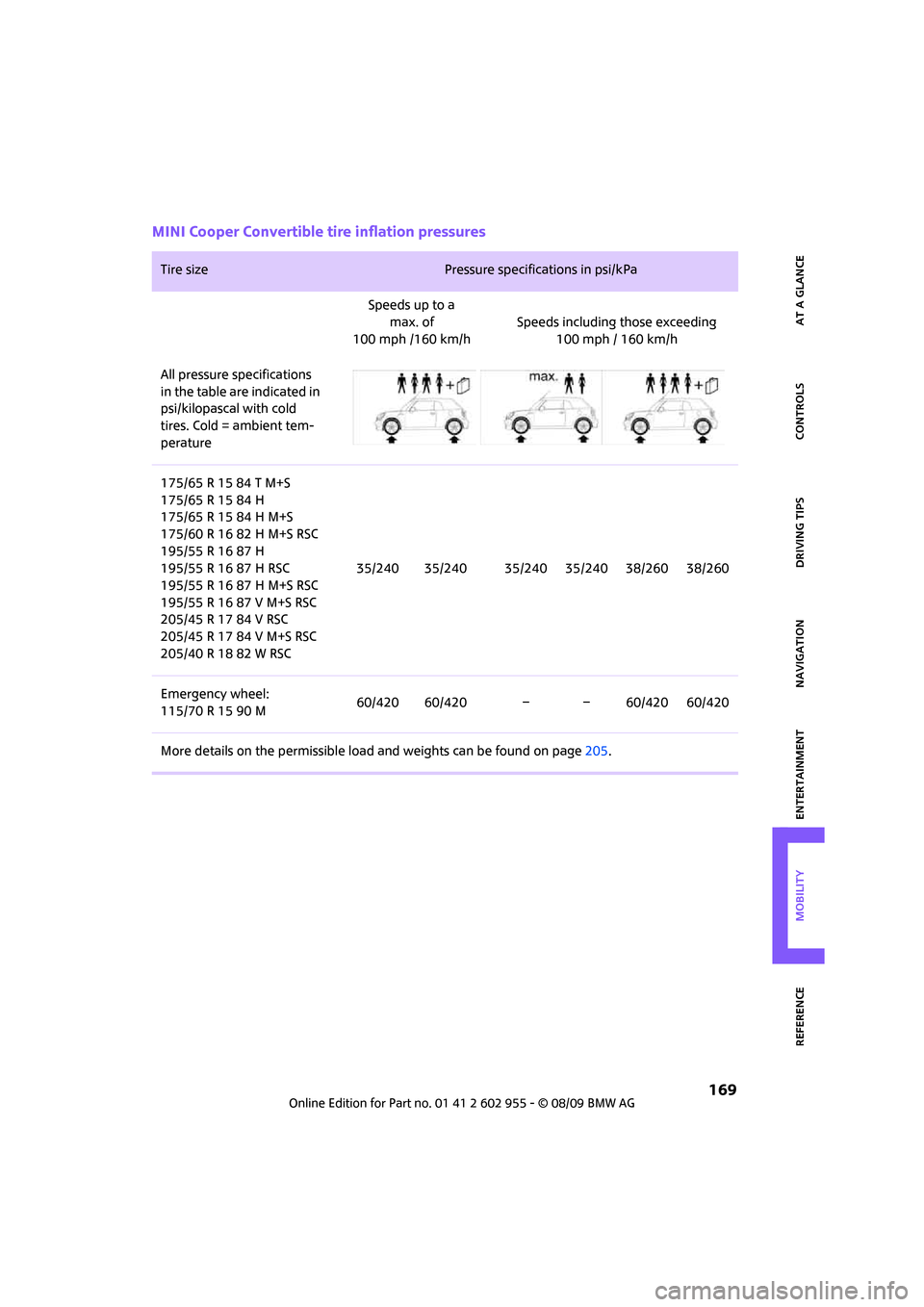
MINI Cooper Convertible tire inflation pressures
Tire size Pressure specifications in psi/kPa
Speeds up to a
max. of
100 mph /160 km/hSpeeds including those exceeding
100 mph / 160 km/h
All pressure specifications
in the table are indicated in
psi/kilopascal with cold
tires. Cold = ambient tem-
perature
175/65 R 15 84 T M+S
175/65 R 15 84 H
175/65 R 15 84 H M+S
175/60 R 16 82 H M+S RSC
195/55 R 16 87 H
195/55 R 16 87 H RSC
195/55 R 16 87 H M+S RSC
195/55 R 16 87 V M+S RSC
205/45 R 17 84 V RSC
205/45 R 17 84 V M+S RSC
205/40 R 18 82 W RSC35/240 35/240 35/240 35/240 38/260 38/260
Emergency wheel:
115/70 R 15 90 M60/420 60/420 – – 60/420 60/420
More details on the permissible load and weights can be found on page205.
Page 172 of 230
Wheels and tires
170
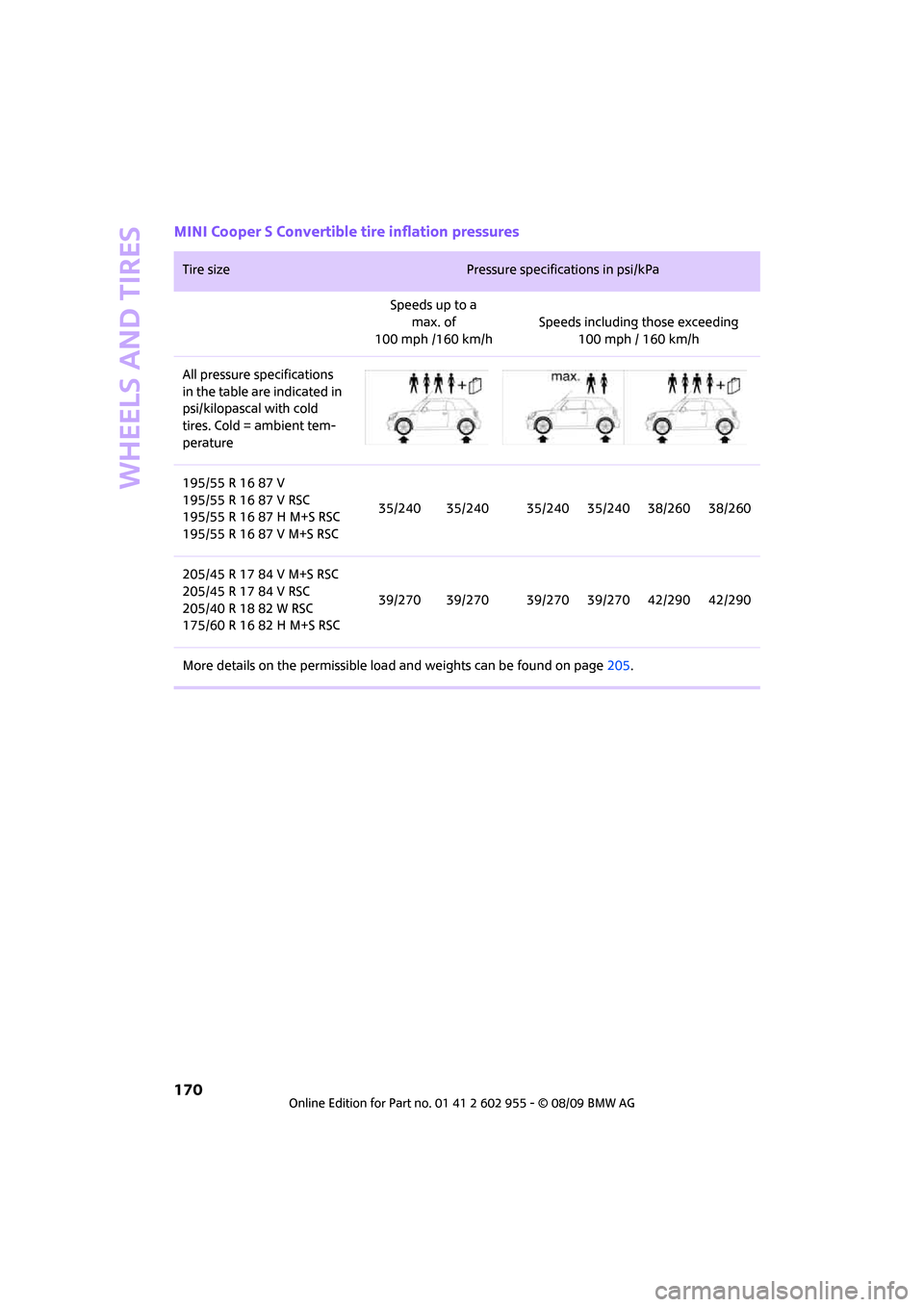
MINI Cooper S Convertible tire inflation pressures
Tire size Pressure specifications in psi/kPa
Speeds up to a
max. of
100 mph /160 km/hSpeeds including those exceeding
100 mph / 160 km/h
All pressure specifications
in the table are indicated in
psi/kilopascal with cold
tires. Cold = ambient tem-
perature
195/55 R 16 87 V
195/55 R 16 87 V RSC
195/55 R 16 87 H M+S RSC
195/55 R 16 87 V M+S RSC35/240 35/240 35/240 35/240 38/260 38/260
205/45 R 17 84 V M+S RSC
205/45 R 17 84 V RSC
205/40 R 18 82 W RSC
175/60 R 16 82 H M+S RSC39/270 39/270 39/270 39/270 42/290 42/290
More details on the permissible load and weights can be found on page205.
Page 173 of 230
MOBILITYAT A GLANCE CONTROLS DRIVING TIPS ENTERTAINMENT
171
NAVIGATION REFERENCE
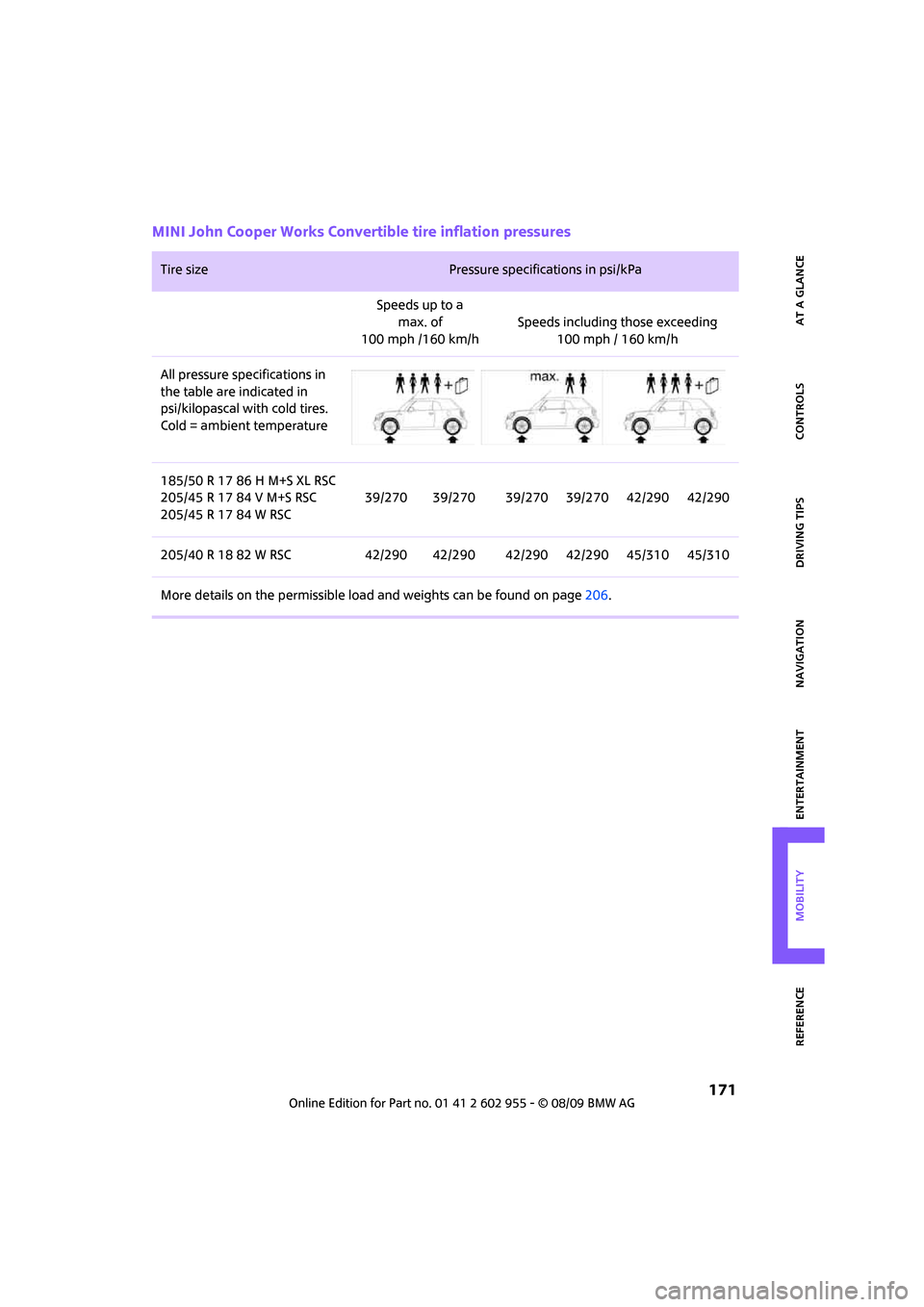
MINI John Cooper Works Convertible tire inflation pressures
Tire size Pressure specifications in psi/kPa
Speeds up to a
max. of
100 mph /160 km/hSpeeds including those exceeding
100 mph / 160 km/h
All pressure specifications in
the table are indicated in
psi/kilopascal with cold tires.
Cold = ambient temperature
185/50 R 17 86 H M+S XL RSC
205/45 R 17 84 V M+S RSC
205/45 R 17 84 W RSC39/270 39/270 39/270 39/270 42/290 42/290
205/40 R 18 82 W RSC 42/290 42/290 42/290 42/290 45/310 45/310
More details on the permissible load and weights can be found on page206.
Page 177 of 230

MOBILITYAT A GLANCE CONTROLS DRIVING TIPS ENTERTAINMENT
175
NAVIGATION REFERENCE
Recommended tire brands
For each tire size, the manufacturer of your MINI
recommends certain tire brands. They are
marked with a clearly visible MINI designation
on the sidewall of the tire.
When properly used, these tires meet the high-
est standards in terms of safety and handling
characteristics.
Run-flat tires*
When mounting new tires or changing over from
summer to winter tires and vice versa, mount
run-flat tires for your own safety. Keep in mind
that no space-saver spare tire is available in the
event of a flat. Your MINI dealer will be glad to
advise you.
Special characteristics of winter tires
The manufacturer of MINI recommends the use
of winter tires on snowy roads or if temperatures
drop below 457/ +76. Although all-season
M+S tires provide better winter traction than
summer tires, they generally fail to provide the
same levels of cold-weather performance as
winter tires.
Pay attention to speed
Always comply with the speed limit for the
winter tires mounted on your car; failure
to do so could result in tire damage and acci-
dents.<
If the car is capable of speeds higher than that
permitted for the winter tires, a label stating the
maximum permitted speed for the mounted
tires must be displayed in your field of view. Spe-
cialist tire dealers and your MINI dealer can sup-
ply these labels.
Storage
Always store wheels and tires in a cool, dry place
with as little exposure to light as possible.
Always protect tires against all contact with oil,
grease and fuels.
Do not exceed the maximum tire inflation pres-
sure indicated on the sidewall of the tire.
Swapping wheels among the axles
Depending on the individual use, front and rear
tires may exhibit different wear and tear.
In order to maintain an even wear and tear, the
wheels may be rotated between the axles. Your
MINI dealer will be glad to advise you.
Always check the inflation pressure after the tire
rotation, if necessary change the pressure.
Snow chains*
Only certain types of fine-link snow chains have
been tested by the manufacturer of your MINI,
classified as road-safe and recommended. Con-
tact your MINI dealer for more details.
Only attach snow chains in pairs to the front
wheels with the following tires.
>175/65 R 15 M+S
>175/60 R 16 M+S
John Cooper Works:
>185/50 R 17 86 H M+S XL RSC
Observe the manufacturer's instructions when
mounting snow chains. Do not exceed a speed
of 30 mph or 50 km/h.
Do not initialize the Flat Tire Monitor if
snow chains are mounted; otherwise, the
instrument might issue an incorrect reading.
When driving with snow chains, it can be useful
to briefly deactivate the DSC or activate the DTC,
refer to page77.<
Page 193 of 230

MOBILITYAT A GLANCE CONTROLS DRIVING TIPS ENTERTAINMENT
191
NAVIGATION REFERENCE
3Plug and cable for the socket in the vehicle
interior, page98
4Holder for the sealant bottle
5Compressor
6Pressure gauge for indicating the tire infla-
tion pressure
7On/off switch
8Release button for reducing the tire inflation
pressure
9Connection hose to connect the compressor
and sealant bottle or the compressor and
wheel
Connector, cable and connection hose are
stored in the compressor housing.
Using the Mobility System
To repair a tire puncture with the Mobility Sys-
tem, proceed as follows:
>Fill the tire with sealant
>Distribute the sealant
>Correct the tire inflation pressure
Filling the tire with sealant
Proceed in the specified order; otherwise,
sealant may emerge under high
pressure.<
1.Shake the sealant bottle.
2.Pull the connection hose9 out of the com-
pressor housing fully and screw it onto the
connector of the sealant bottle. Make sure
that the hose is not kinked.
3.Insert the sealant bottle on the compressor
housing in an upright position.4.Unscrew the dust cap from the valve of the
defective wheel and screw the filling hose 2
of the sealant bottle onto the valve.
5.Ensure that the compressor is switched off.
6.Insert the plug 3 into the lighter socket/
power socket in the vehicle interior,
page98.
7.With the engine running:
Switch on the compressor and let is run for
approx. 3 to 8 minutes to fill the tire with
sealant and achieve a tire inflation pressure
of approx. 26 psi/180 kPa.
When the tire is being filled with seal-
ant, the inflation pressure may spo-
radically reach approx. 73 psi/500 kPa. Do
not switch off the compressor in this
phase.<
Do not run the compressor for longer
than 10 minutes; otherwise, the
device will overheat and possibly be
damaged.<
8.Switch off the compressor.
If an air pressure of 26 psi/180 kPa is not
reached:
1.Unscrew the filling hose 2 from the wheel
and drive the vehicle forward and backward
approx. 33 ft/10 m to distribute the liquid
sealant in the tire evenly.
2.Inflate the tire again with the compressor.
If an inflation pressure of 26 psi/180 kPa
still cannot be reached, the tire is too
heavily damaged. Please contact the nearest
MINI dealer.<
Detach the connection hose 9 and filling hose 2
from the sealant bottle connection and tire
valve.
Page 194 of 230
Replacing components
192
Wrap the empty sealant bottle in suitable mate-
rial to avoid dirtying the cargo bay. Stow the
Mobility System back in the vehicle.
Distributing the sealant
Immediately drive approx. 3 mls/5 km to evenly
distribute the sealant.
Do not exceed speeds of 50 mph/
80 km/h.
If possible, do not drop below 10 mph/
20 km/h.<
Correcting the tire inflation pressure
1.After driving approx. 3 mls/5 km or ten min-
utes, stop at a suitable location.
2.Screw the connection hose 2 of the com-
pressor directly onto the tire valve.
3.Insert the plug 3 into the power socket in the
vehicle interior.
4.Correct the inflation pressure to 26 psi/
180 kPa. With the engine running:
>To increase the inflation pressure: switch on
the compressor. To check the current infla-
tion pressure, switch off the compressor.
Do not run the compressor for longer
than 10 minutes; otherwise, the
device will overheat and possibly be
damaged.<
>To decrease the inflation pressure: press the
release button 5.
If the tire cannot maintain the inflation
pressure, drive the vehicle again, refer to
Distributing the sealant. Then repeat steps
1to4.
If an inflation pressure of 26 psi/180 kPa still
cannot be reached, the tire is too heavily dam-
aged. Contact the nearest MINI dealer.<
Driving on
Do not exceed the permitted maximum
speed of 50 mph/80 km/h; doing so may
result in an accident.<
Replace the defective tire as soon as possible
and have the new wheel/tire assembly bal-
anced.Have the Mobility System refilled.
Changing wheels
Space-saver spare tire*
To change a space-saver spare tire, proceed as
follows:
>Remove the space-saver spare tire,
page193
>Prepare for tire change, page193
>Jack up vehicle, page194
>Mount space-saver spare tire, page194
>Tighten lug bolts, page194
>Drive with space-saver spare tire, page193
Tire change set for a space-saver
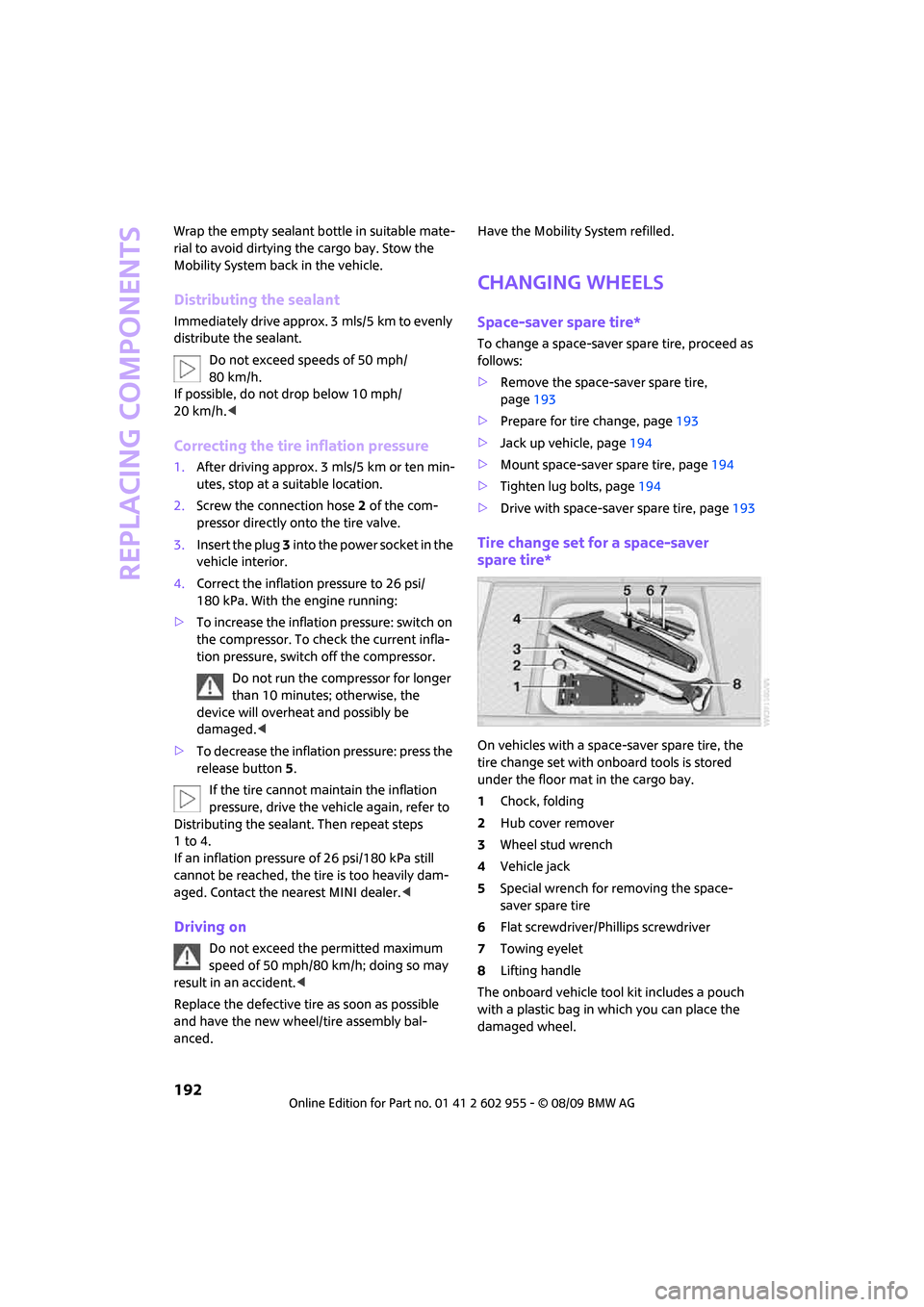
spare tire*
On vehicles with a space-saver spare tire, the
tire change set with onboard tools is stored
under the floor mat in the cargo bay.
1Chock, folding
2Hub cover remover
3Wheel stud wrench
4Vehicle jack
5Special wrench for removing the space-
saver spare tire
6Flat screwdriver/Phillips screwdriver
7Towing eyelet
8Lifting handle
The onboard vehicle tool kit includes a pouch
with a plastic bag in which you can place the
damaged wheel.
Page 195 of 230

MOBILITYAT A GLANCE CONTROLS DRIVING TIPS ENTERTAINMENT
193
NAVIGATION REFERENCE
Removing the space-saver spare tire
The screw connection of the space-saver spare
tire is under the floor mat in the cargo bay, on
the base of the storage compartment for the tire
change set.
1.Unscrew the screw connection with the spe-
cial wrench.
2.Take out the cover panel.
3.Screw the lifting handle from the onboard
vehicle tool kit onto the thread.
4.Raise the lifting handle slightly.
5.Squeeze the securing spring.
6.The space-saver spare tire is released and
must be held by the lifting handle.
7.Lower the space-saver spare tire with the
lifting handle.
8.Unscrew the lifting handle.9.Pull the space-saver spare tire underneath
the vehicle out towards the rear.
10.Position the space-saver spare tire with the
valve facing upward.
11.Unscrew the valve extension from the valve
of the space-saver spare tire.
12.Unscrew the dust cap from the extension
and place it on the valve of the space-saver
spare tire.
Due to its different dimensions, the dam-
aged wheel cannot be placed in the recess
for the space-saver spare tire.<
Driving with the space-saver spare tire
Drive cautiously and do not exceed a
speed of 50 mph/80 km/h. Changes may
occur in vehicle handling such as lower track sta-
bility during braking, longer braking distances
and changes in self-steering properties when
close to the handling limit. These properties are
more noticeable with winter tires.<
Only one space-saver spare tire may be
mounted at one time. Mount a wheel and
tire of the original size as soon as possible, to
avoid any safety risks.<
Check the tire inflation pressure at the ear-
liest opportunity and correct it if neces-
sary. Replace the defective tire as soon as possi-
ble and have the new wheel/tire assembly
balanced.<
Preparing for a tire change
Observe the safety precautions regarding
flat tires on page190.<
Additional safety measures when chang-
ing tires:
Page 214 of 230
From A to Z
212
From A to Z
INDEX
"..." Identifies Control Display
texts used to select
individual functions and
refers you to the page where
these texts can be found.
A
Accessories, refer to Your
individual vehicle4
Activated-charcoal filter for
automatic climate control93
"Add to destination
list"117,119
Additives
– coolant178
– engine oil178
Address for navigation
– deleting123
– entering114,117,122
– selecting122
– storing122
– storing current position122
Adjusting temperature inside
the car, refer to Automatic
climate control92
Adjusting the sound during
audio playback, refer to Tone
control139
Air conditioning mode
– automatic climate control92
– ventilation93
Air distribution
– automatic92
Air flow rate92
– automatic climate control92
Air pressure, checking, refer to
Tire inflation pressure164
Air recirculation, refer to
Recirculated-air mode92Air supply
– automatic climate control92
– ventilation93
Air vents91
Airbags84
– sitting safely42
– warning lamp86
Airing, refer to Ventilation93
AKI, refer to Fuel
specifications163
Alarm system32
"All channels"147
"All stations" on the radio141
All-season tires, refer to Winter
tires175
Always Open Timer62
"AM", waveband138
Ambient air, refer to
Recirculated-air mode92
Ambient lighting90
Antenna, care181
Antifreeze
– coolant178
– washer fluid57
Antilock Brake System ABS76
Anti-theft alarm system, refer
to Alarm system
32
Anti-theft system27
Approved axle loads, refer to
Weights205
Approved engine oils178
Approved gross vehicle
weight, refer to Weights205
Armrest, refer to Center
armrest96
Arrival time
– computer62,63
– destination guidance126
"Arrow display" in
navigation127
Ashtray97Assistant systems, refer to
– Dynamic Stability Control
DSC76
Audio138
– controls138
– switching on/off138
– tone control139
– volume139
Audio device, external96
AUTO program for automatic
climate control92
Automatic
– air distribution92
– air flow rate92
– cruise control58
– headlamp control87
– storing of stations142
Automatic climate control91
– automatic air distribution92
Automatic station search142
Automatic transmission with
Steptronic53
– interlock53
– overriding selector lever
lock55
– shiftlock53
– sport program54
"Autostore"
– on the radio143
"AUX"155,157
– AUX-IN port155
– USB audio interface156
AUX-IN port155
AUX-IN, refer to External audio
device96
Average fuel consumption61
– setting the units65
Average speed62
"Avoid ferries" in
navigation124
Page 219 of 230
217
MOBILITYAT A GLANCE CONTROLS DRIVING TIPS ENTERTAINMENT NAVIGATION REFERENCE
Front seat adjustment42
Frost on windows, refer to
Defrosting windows93
"FTM"81
FTM, refer to Flat Tire
Monitor78
Fuel163
– gauge61
– high-quality brands163
– quality163
– specifications163
– tank capacity206
Fuel clock, refer to Fuel
gauge61
Fuel display, refer to Fuel
gauge61
Fuel filler flap162
– releasing in the event of
electrical malfunction162
Fuses195
G
Garage door opener, refer to
Integrated universal remote
control94
Gasoline
– refer to Average
consumption61
Gasoline display, refer to Fuel
gauge61
Gasoline, refer to Required
fuel163
Gear indicator
– automatic transmission with
Steptronic53
Gear shifting
– automatic transmission53
– manual transmission53
Gearshift lever
– automatic transmission with
Steptronic53
– manual transmission53
General driving notes102
Glass sunroof, electric35
– convenient operation28,30
– opening, closing35
– raising35
– remote control28Glove compartment95
GPS navigation, refer to
Navigation system112
Grills91
Gross vehicle weight, refer to
Weights205
H
Halogen lamps
– replacing bulb186
Handbrake, refer to Parking
brake52
Hands-free system14
Hazard warning flashers14
"HD radio"144
HD radio, refer to High
Definition Radio144
Head airbags84
Head restraints44
– sitting safely42
Headlamp control,
automatic87
Headlamp flasher55
– indicator lamp11,13
Headlamps
– replacing bulb186
Headlamps, care182
Heated
– mirrors46
– rear window93
– seats45
Heating
– mirrors46
– rear window93
– seats45
Heavy loads, refer to Stowing
cargo106
Height adjustment
– seats43
– steering wheel47
Height, refer to
Dimensions203
High beams88
– headlamp flasher88
– indicator lamp13
– replacing bulb186
High Definition Radio, refer to
HD Radio144High water, refer to Driving
through water103
Highways, refer to Route
criteria124
Hill Assist78
Hills103
Holders for cups97
Home address123
"Home address" in
navigation124
Homepage4
Horn10
Hot exhaust system102
"Hour memo"69
"House number" in
destination entry117
Hydroplaning102
I
IBOC, refer to HD Radio144
Ice warning60
Icy roads, refer to Outside
temperature warning60
ID3 tag, refer to Information
about the track150
Ignition51
– switched off51
– switched on51
Ignition key position 1, refer to
Radio readiness51
Ignition key position 2, refer to
Ignition on51
Ignition key, refer to
Integrated key/remote
control26
Ignition lock51
Imprint2
Indicator and warning
lamps13
– Tire Pressure Monitor TPM82
Indicator lighting, refer to
Instrument lighting89
Individual settings, refer to
Personal Profile26
Inflation pressure monitoring,
refer to Tire Pressure Monitor
TPM80