phone MINI Hardtop 2 Door 2010 (Mini Connected) User Guide
[x] Cancel search | Manufacturer: MINI, Model Year: 2010, Model line: Hardtop 2 Door, Model: MINI Hardtop 2 Door 2010Pages: 230, PDF Size: 4.02 MB
Page 148 of 230

Radio
146
Satellite radio*
You can receive over 100 different channels
with high sound quality.
The channels are offered to you in predefined
packages. To receive the channels of your
choice, you must have the corresponding pack-
ages enabled.
With this new technology, signal losses
can occur from time to time and result in
audio interruptions.<
Enabling or disabling channels
Onboard monitor, for operating principle refer
to page16.
1.Press the button.
This opens the start menu.
2.Move the MINI joystick to highlight "Enter-
tainment" and press the MINI joystick.
3.Select "SAT".
4.Press the MINI joystick.
The channels are displayed.
These channels are enabled.
Enabling
1.Select a channel that has not yet been
enabled.
A phone number and the electronic serial
number, ESN, are displayed.
The electronic serial number is
required to enable or disable a
channel.<
2.To enable the channel:
Dial the phone number.
Disabling
1.Select an enabled channel.
2.Select "ESN".
The electronic serial number, ESN, is dis-
played.
The electronic serial number is
required to disable a channel.<
3.To disable the channel:
Dial the phone number.
Selecting and storing a channel
1.Select "SAT".
Channels are shown on the Control Display,
sorted on the basis of selection criteria.
Page 158 of 230

USB audio interface
156
USB audio interface
Connections for external
devices
An external audio device or USB device can
be connected to the USB audio interface, for
example:
>MP3 player
>USB memory stick
>iPod/iPhone
>Suitable mobile phone
If they are supported by the USB audio interface,
these devices can be controlled using the
onboard monitor.
If the mobile phone has a music player connec-
tion, connect the mobile phone using the snap-
in adapter, refer to the separate Owner's Man-
ual. Audio playback is only possible if there is no
device connected to the USB audio interface.
The standard audio formats, e.g. MP3, WMA,
WAV (PCM) and AAC, and playlists in the M3U
format can be played.
Due the variety of audio devices and iPods on
the market, it cannot be guaranteed that every
device will be operable on the vehicle.
Ask your MINI Service which audio devices,
mobile phones or USB devices are suitable.
Connecting via the USB audio interface
1Connection for audio playback:
TRS connector 1/8 in/3.5 mm
2USB interface
Apple iPod/iPhone
To connect the device, use the special cable
adapter for the Apple iPod/iPhone, available
from your dealer. The cable adapter is required
for a flawless connection.
For additional information, contact your
MINI dealer or visit the Internet at
www.MINI.com/usb
To play audio tracks over the vehicle's loud-
speaker system, connect the iPod/ /iPhone to
ports 1 and 2.
The iPod/iPhone's menu structure is supported
by the USB audio interface.
USB device
To play audio tracks over the vehicle's loud-
speaker system, connect the USB device to
port2.
After the device is connected for the first time,
the track information (e. g. artist, type of music)
and the playlists are transferred from the USB
device to the vehicle. This procedure may take
some time. The duration depends on the USB
device and the number of tracks.
During transfer, you can call up the tracks using
the directories and file names.
After transfer, you can also call up the tracks
using the information and playlists.
Track information from up to four USB devices or
for approx. 16,000 tracks can be stored on the
vehicle.
If a fifth USB device is connected or if more than
16,000 tracks are to be stored, the information
on existing tracks is deleted.
Music tracks with integrated Digital Rights
Management (DRM) cannot be played.<
*
Page 159 of 230
MOBILITYAT A GLANCE CONTROLS DRIVING TIPS ENTERTAINMENT
157
NAVIGATION REFERENCE
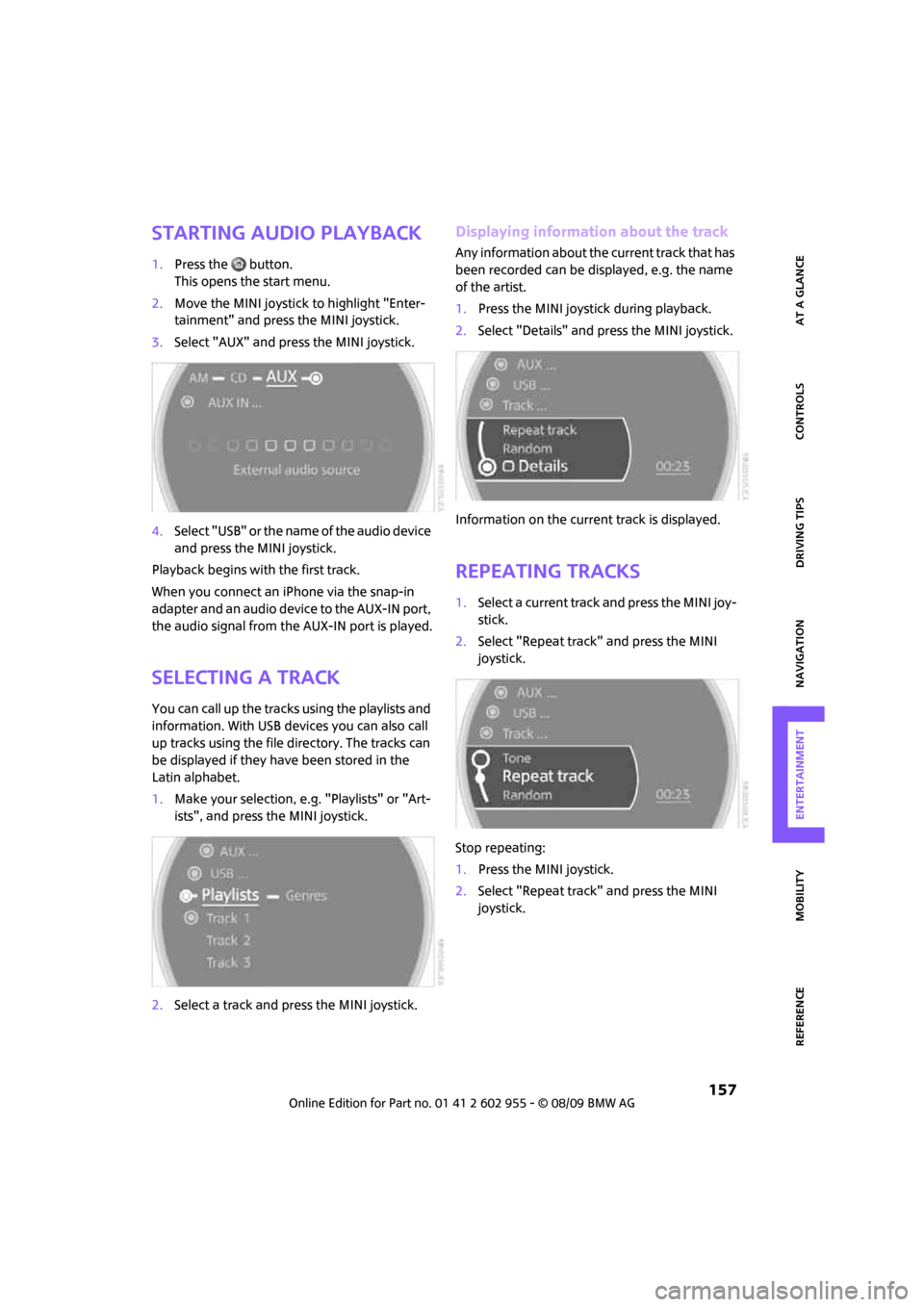
Starting audio playback
1.Press the button.
This opens the start menu.
2.Move the MINI joystick to highlight "Enter-
tainment" and press the MINI joystick.
3.Select "AUX" and press the MINI joystick.
4.Select "USB" or the name of the audio device
and press the MINI joystick.
Playback begins with the first track.
When you connect an iPhone via the snap-in
adapter and an audio device to the AUX-IN port,
the audio signal from the AUX-IN port is played.
Selecting a track
You can call up the tracks using the playlists and
information. With USB devices you can also call
up tracks using the file directory. The tracks can
be displayed if they have been stored in the
Latin alphabet.
1.Make your selection, e.g. "Playlists" or "Art-
ists", and press the MINI joystick.
2.Select a track and press the MINI joystick.
Displaying information about the track
Any information about the current track that has
been recorded can be displayed, e.g. the name
of the artist.
1.Press the MINI joystick during playback.
2.Select "Details" and press the MINI joystick.
Information on the current track is displayed.
Repeating tracks
1.Select a current track and press the MINI joy-
stick.
2.Select "Repeat track" and press the MINI
joystick.
Stop repeating:
1.Press the MINI joystick.
2.Select "Repeat track" and press the MINI
joystick.
Page 183 of 230

MOBILITYAT A GLANCE CONTROLS DRIVING TIPS ENTERTAINMENT
181
NAVIGATION REFERENCE
Care
Car-care products
Regular cleaning and care helps to maintain the
value of your MINI.
The manufacturer of your MINI recommends
using manufacturer-approved products to clean
and care for your vehicle.
MINI Service would be pleased to advise you
on cleaning and care products and services for
your MINI.
The ingredients of original MINI CareProd-
ucts have been tested, and the products
have been tested in the laboratory and in prac-
tice. They offer optimum care and protection for
your vehicle.<
Do not use any cleansers containing
alcohol or solvents as these may cause
damage.<
Cleaning agents may contain hazardous
or health-damaging substances. Follow
the warning and hazard instructions on the
packaging. For interior cleaning, always open
the doors or windows of the vehicle.
Do not use any products that are not intended
for cleaning the vehicle.<
External care
Washing your vehicle
Especially during the winter months the
vehicle should be frequently washed. Dirt
and road salt can damage the vehicle.<
After washing the vehicle, apply the
brakes briefly to dry them; otherwise,
water can reduce braking efficiency over the
short term and the brake rotors can corrode.<
Car washes
Preference should be given to cloth car washes.
Do not use automatic high-pressure car
washes; otherwise, water may drip into
the vehicle around the windows.<
Before driving into the car wash, check if the sys-
tem is suitable for your MINI. Observe the fol-
lowing points:
>Dimensions of the vehicle, page203
>If necessary: Fold in the outside mirrors,
page 46.
>Maximum permissible tire width
Avoid car washes with tracks higher than
4 in/10 cm; otherwise, the chassis could
be damaged.<
Preparations for driving into the car wash:
>Unscrew the rod antenna.
>Deactivate the rain sensor
* to prevent unin-
tentional wiping.
>Deactivate the rear window wiper
* and pro-
tect it from damage. Ask the car wash oper-
ator about measures that can be taken to
protect the wipers.
>Remove additional attachments, e.g. spoil-
ers or telephone antennas, if there is a pos-
sibility that they could be damaged.
Automatic transmission
Before driving into the car wash, make sure that
the vehicle can roll:
1.Place the remote control, even with Comfort
Access, in the ignition lock.
2.Move the selector lever to position N.
3.Release the parking brake.
4.Switch off the engine.
5.Insert the remote control in the ignition lock
so that the vehicle can roll.
Page 198 of 230

Giving and receiving assistance
196
Giving and receiving assistance
Roadside Assistance
The Roadside Assistance service is there to assist
you around the clock in the event of a break-
down, including on weekends and public
holidays.
The phone numbers of the Roadside Assistance
in your home country can be found in the Con-
tact brochure.
First aid pouch*
Some of the articles contained in the first aid
pouch have a limited service life. Therefore,
check the expiration dates of the contents regu-
larly and replace any items in good time, if nec-
essary.
By way of example, the illustration shows the
cargo bay in the MINI.
The first aid pouch is located on the cargo bay
floor by the left side trim panel.
Warning triangle*
MINI
On the inside of the tailgate.
Press the tab to take it out.
MINI Convertible
The warning triangle is located at the bottom of
the luggage compartment floor.
Jump-starting
If the car's own battery is flat, your MINI's engine
can be started by connecting two jumper cables
to another vehicle's battery. You can also use
the same method to help start another vehicle.
Only use jumper cables with fully-insulated
clamp handles.
Do not touch any electrically live parts
when the engine is running, or a fatal acci-
dent may occur. Carefully adhere to the follow-
ing sequence, both to prevent damage to one or
both vehicles, and to guard against possible per-
sonal injuries.<
Preparation
1.Check whether the battery of the other vehi-
cle has a voltage of 12 volts and approxi-
mately the same capacitance in Ah. This
information can be found on the battery.
2.Switch off the engine of the support vehicle.
3.Switch off any consumers in both vehicles.
Page 209 of 230

MOBILITYAT A GLANCE CONTROLS DRIVING TIPS ENTERTAINMENT
207
NAVIGATION REFERENCE
Short commands for the voice
activation system
With short commands you can carry out certain
functions directly, regardless of which menu item is selected. Here are the important short
commands for the voice activation system.
Communication
Navigation
*
FunctionCommand
For additional information, refer to the separate Owner's Manual.
To open phone{Phone}
To dial phone number{Dial number}
To display phone book{A to Z}
To select from phone book{Call ...} or
{Dial name}
To display "Top 8"{Top 8}
Redialing{Redial}
To display "Received calls"{Received calls}
To display "Missed calls"{Missed calls}
To display "Bluetooth"{Bluetooth}
To open "MINI Contact"{MINI Contact}
To open "MINI Contact Numbers"{MINI Contact numbers}
To open "Nearest MINI dealer"{Nearest MINI dealer}
FunctionCommand
To open navigation120{Navigation}
To display current position134{Current position}
To open "Enter address"114{Enter address}
To open "New destination"114{New destination}
Page 215 of 230
213
MOBILITYAT A GLANCE CONTROLS DRIVING TIPS ENTERTAINMENT NAVIGATION REFERENCE
"Avoid highways" in
navigation124
Avoid highways in
navigation124
"Avoid tollroads" in
navigation124
Axle loads, refer to
Weights205
B
Background lighting, refer to
Ambient lighting90
Backrests, refer to Seats42
Backup lamps
– replacing bulb188,189
Balance, tone control139
Band-aids, refer to First aid
pouch196
Bar, refer to Tow-starting,
towing away198
Bass sounds, refer to Tone
control139
Bass sounds, refer to Treble
and bass139
Bass, tone control139
Battery195
– charging195
– disposal35,195
– jump-starting196
– temporary power failure195
Battery renewal
– remote control35
Being towed198
Belt tensioner, refer to Safety
belts45
Belts, refer to Safety belts45
Beverage holders, refer to
Cupholders97
Blower, refer to Air flow rate92
Bonnet176
Bottle holders, refer to
Cupholders97
Brake Assist76
Brake fluid, refer to Service
requirements65Brake lamps
– replacing bulbs189
Brake pads, breaking in102
Brake rotors103
– brakes102
– breaking in102
Brake system102
– breaking in102
– disc brakes103
– MINI Maintenance
System179
Brakes
– ABS76
– breaking in102
– MINI Maintenance
System179
– parking brake52
– service requirements65
Brakes, refer to Braking
safely103
Breakdown service, refer to
Roadside Assistance196
Break-in period
102
Breaking in the clutch102
"Brightness"on the Control
Display74
Bulb changing, refer to Lamps
and bulbs185
Button for starting the
engine51
Buttons on the steering
wheel11
C
California Proposition 65
warning5
Can holders, refer to
Cupholders97
Capacities206
Car battery, refer to Vehicle
battery195
Car care181
"Car Data"63
Car key, refer to Keys/remote
controls26Car phone
– installation location, refer to
Center armrest96
– refer to separate Owner's
Manual
Car radio, refer to Radio141
Car wash, care181
Car washes181
Care181
– car washes181
– car-care products181
– CD/DVD drives184
– external181
– high-pressure washers182
– internal183
– leather183
– manual washing182
– upholstery and fabrics183
– windows182
– wiper blades182
Cargo area
– capacity205
Cargo bay104
– Comfort Access34
– cover104
– lamp89
– opening from outside31
Cargo bay, expanding104
Cargo bay lamp89
Cargo bay lid, refer to
Tailgate31
Cargo loading105
– securing cargo106
– stowing cargo106
– vehicle104
Cargo, securing106
Carpets, care183
Catalytic converter, refer to
Hot exhaust system102
"Categories"147
"CD"138,149
Page 221 of 230
219
MOBILITYAT A GLANCE CONTROLS DRIVING TIPS ENTERTAINMENT NAVIGATION REFERENCE
M
M+S tires, refer to Winter
tires175
Maintenance, refer to Service
Booklet
Maintenance system179
Malfunction
– convertible top39
– trunk lid31
Malfunction warnings, refer to
Check Control70
Manual mode
– automatic transmission with
Steptronic54
"Manual" on the radio142
Manual operation
– door lock30
– fuel filler flap162
– power convertible top39
– transmission lock, automatic
transmission55
– trunk lid31
Manual transmission53
Manual washing182
Map
– changing scale128
– destination entry119
"Map direction of travel"128
"Map facing north"128
Master key, refer to Integrated
key/remote control26
Maximum cooling92
Maximum speed
– with winter tires175
Medical assistance, refer to
First aid pouch196
MENU button16
Menus, refer to Onboard
monitor16
Microfilter
– for automatic climate
control93
– MINI Maintenance
System179Microfilter/activated-charcoal
filter
– MINI Maintenance
System179
Microphone for telephone14
MINI Internet page4
MINI joystick, refer to Onboard
monitor16
MINI Maintenance System179
Mirror dimming feature47
Mirrors46
– exterior mirrors46
– heating46
– interior rearview mirror46
Mobile phone
– installation location, refer to
Center armrest96
– refer to separate Owner's
Manual
Mobile phone, installation
location, refer to Center
armrest96
Mobile phone, refer to the
separate Owner's Manual
Mobility System190
Modifications, technical, refer
to For your own safety5
Monitor, refer to MINI controls
with navigation16
Monitoring system for tire
pressures, refer to Flat Tire
Monitor78
MP3, refer to Compressed
audio files149
Multifunction switch
– refer to Turn signals/
headlamp flasher55
– refer to Wiper system56
Multifunctional steering
wheel, refer to Buttons on
the steering wheel11
Music track
– playback, scan151
– random order152
– search151
Muting TV138
N
Navigation announcements,
refer to Switching voice
instructions on/off129
Navigation drive, location112
Navigation DVD112
Navigation system112
– address book121
– changing a route130
– destination entry114
– destination list121
– displaying current
position134
– entering a destination
manually114,117
– last destinations121
– opening114
– route display127
– route list129
– searching for a special
destination120
– selecting destination using
information120
– selecting destination via
map119
– selecting route criteria124
– starting destination
guidance126
– switching off, refer to
Terminating/continuing
destination guidance126
– terminating/continuing
destination guidance126
– voice instructions129
– volume adjustment129
"Navigation voice
instructions"112
Neck support, refer to Head
restraints44
Nets, refer to Storage
compartments96
"New address" in
navigation122
"New destination"114,119
"New route"130
New tires174
North-facing map127
Nozzles91
Page 223 of 230
221
MOBILITYAT A GLANCE CONTROLS DRIVING TIPS ENTERTAINMENT NAVIGATION REFERENCE
Rear fog lamp89
– indicator lamp13
– replacing bulb189
Rear lamps
– bulb replacement189
Rear lamps, refer to Tail
lamps188
Rear luggage rack107
Rear seat backrest, folding104
Rear seats
– folding the backrests104
Rear window heating93
Rearview mirror, refer to
Mirrors46
Receiving level of mobile
phone, refer to Status
information20
Reception
– radio station144
Recirculated-air mode92
Recirculation of air, refer to
Recirculated-air mode92
Reclining seat, refer to
Backrest43
Recording times, refer to
Stopwatch73
Refueling162
Releasing
– bonnet176
Remote control26
– battery renewal35
– Comfort Access33
– garage door opener94
– malfunctions29,34
– service data179
– tailgate29
"Repeat directory" for audio
mode152
"Repeat track" for audio
mode152
Replacement remote
control26
Replacing bulbs, refer to
Lamps and bulbs185
Replacing tires, refer to New
wheels and tires174
Reporting safety defects6Reserve warning, refer to Fuel
gauge61
Reservoir for washer
systems58
"Reset"79
"Reset" for stopwatch73
"Reset" for tone settings140
Reset, refer to Resetting tone
settings140
Restraint systems
– for children48
– refer to Safety belts45
Reverse
– CD changer152
– CD player152
Reverse gear
– automatic transmission with
Steptronic54
– manual transmission53
Road map127
Roadside Assistance196
Roadside parking lamps88
– replacing bulb187
Roadworthiness test, refer to
Service requirements65
Roof load capacity205
Roof-mounted luggage
rack107
Rope, refer to Tow-starting,
towing away198
Route124
– changing124,130
– display127
– displaying arrow view127
– displaying map view127
– displaying town129
– list129
– selecting124
– selecting criteria124
– taking detours130
Route selection124
RSC Runflat System
Component, refer to Run-flat
tires174
Rubber parts, care183
Runflat System Component
RSC, refer to Run-flat
tires174Run-flat tires174
– flat tire79
– new tires174
– tire inflation pressure164
– winter tires175
Runflat Tyres, refer to Run-flat
tires174
S
Safety belts45
– damage46
– indicator lamp46
– reminder46
– sitting safely42
Safety belts, care184
Safety systems
– airbags84
– Antilock Brake System
ABS76
– Dynamic Stability Control
DSC76
– safety belts45
Safety tires, refer to Run-flat
tires174
"SAT" on the radio138,146
Satellite radio146
– enabling channel146
– selecting channel146
– storing channel146
Scale for navigation,
changing128
"Scan"
– sampling radio stations142
Scan
– CD changer151
– CD player151
– radio142
"Scan all" for audio mode151
"Scan directory" for audio
mode151
Screen, refer to Onboard
monitor controls16
Screw thread for tow
fitting198
SDARS, refer to Satellite
radio146
Seat adjustment
– mechanical43
Page 225 of 230
223
MOBILITYAT A GLANCE CONTROLS DRIVING TIPS ENTERTAINMENT NAVIGATION REFERENCE
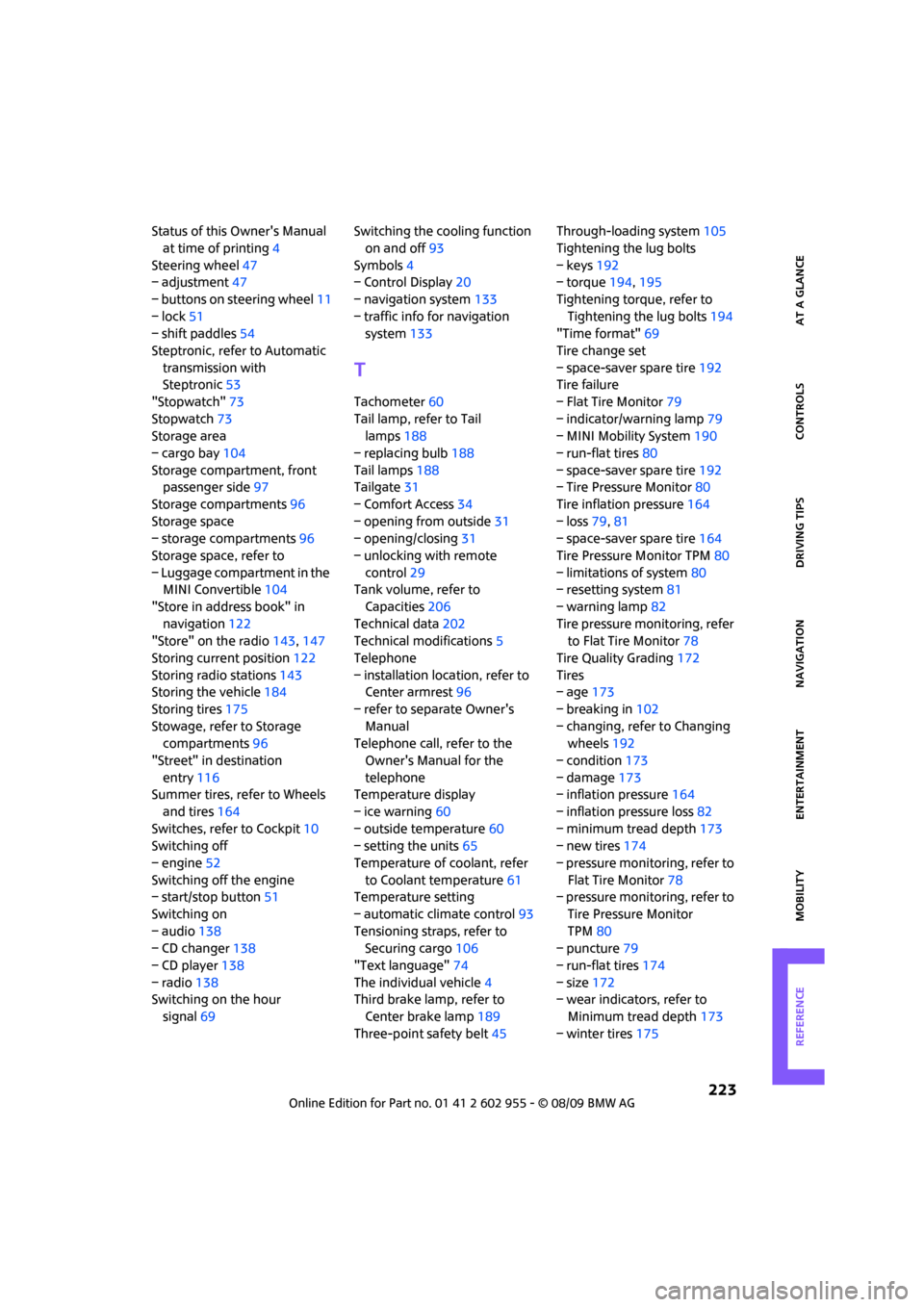
Status of this Owner's Manual
at time of printing4
Steering wheel47
– adjustment47
– buttons on steering wheel11
– lock51
– shift paddles54
Steptronic, refer to Automatic
transmission with
Steptronic53
"Stopwatch"73
Stopwatch73
Storage area
– cargo bay104
Storage compartment, front
passenger side97
Storage compartments96
Storage space
– storage compartments96
Storage space, refer to
– Luggage compartment in the
MINI Convertible104
"Store in address book" in
navigation122
"Store" on the radio143,147
Storing current position122
Storing radio stations143
Storing the vehicle184
Storing tires175
Stowage, refer to Storage
compartments96
"Street" in destination
entry116
Summer tires, refer to Wheels
and tires164
Switches, refer to Cockpit10
Switching off
– engine52
Switching off the engine
– start/stop button51
Switching on
– audio138
– CD changer138
– CD player138
– radio138
Switching on the hour
signal69Switching the cooling function
on and off93
Symbols4
– Control Display20
– navigation system133
– traffic info for navigation
system133
T
Tachometer60
Tail lamp, refer to Tail
lamps188
– replacing bulb188
Tail lamps188
Tailgate31
– Comfort Access34
– opening from outside31
– opening/closing31
– unlocking with remote
control29
Tank volume, refer to
Capacities206
Technical data202
Technical modifications5
Telephone
– installation location, refer to
Center armrest96
– refer to separate Owner's
Manual
Telephone call, refer to the
Owner's Manual for the
telephone
Temperature display
– ice warning60
– outside temperature60
– setting the units65
Temperature of coolant, refer
to Coolant temperature61
Temperature setting
– automatic climate control93
Tensioning straps, refer to
Securing cargo106
"Text language"74
The individual vehicle4
Third brake lamp, refer to
Center brake lamp189
Three-point safety belt45Through-loading system105
Tightening the lug bolts
– keys192
– torque194,195
Tightening torque, refer to
Tightening the lug bolts194
"Time format"69
Tire change set
– space-saver spare tire192
Tire failure
– Flat Tire Monitor79
– indicator/warning lamp79
– MINI Mobility System190
– run-flat tires80
– space-saver spare tire192
– Tire Pressure Monitor80
Tire inflation pressure164
– loss79,81
– space-saver spare tire164
Tire Pressure Monitor TPM80
– limitations of system80
– resetting system81
– warning lamp82
Tire pressure monitoring, refer
to Flat Tire Monitor78
Tire Quality Grading172
Tires
– age173
– breaking in102
– changing, refer to Changing
wheels192
– condition173
– damage173
– inflation pressure164
– inflation pressure loss82
– minimum tread depth173
– new tires174
– pressure monitoring, refer to
Flat Tire Monitor78
– pressure monitoring, refer to
Tire Pressure Monitor
TPM80
– puncture79
– run-flat tires174
– size172
– wear indicators, refer to
Minimum tread depth173
– winter tires175