change time MINI Hardtop 2 Door 2010 (Mini Connected) Owner's Guide
[x] Cancel search | Manufacturer: MINI, Model Year: 2010, Model line: Hardtop 2 Door, Model: MINI Hardtop 2 Door 2010Pages: 230, PDF Size: 4.02 MB
Page 130 of 230
Destination guidance
128
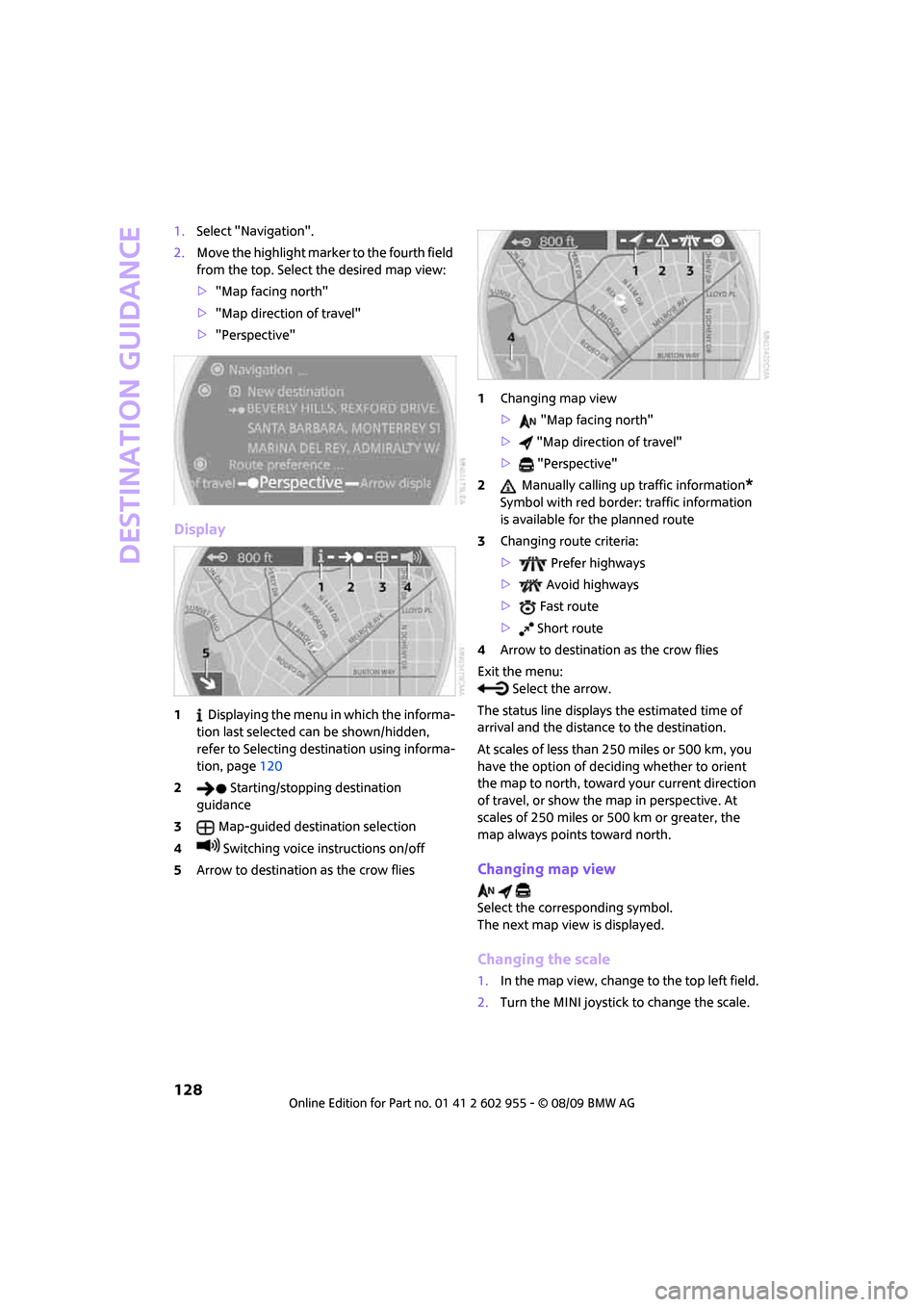
1.Select "Navigation".
2.Move the highlight marker to the fourth field
from the top. Select the desired map view:
>"Map facing north"
>"Map direction of travel"
>"Perspective"
Display
1 Displaying the menu in which the informa-
tion last selected can be shown/hidden,
refer to Selecting destination using informa-
tion, page120
2 Starting/stopping destination
guidance
3Map-guided destination selection
4 Switching voice instructions on/off
5Arrow to destination as the crow flies1Changing map view
> "Map facing north"
> "Map direction of travel"
> "Perspective"
2 Manually calling up traffic information
*
Symbol with red border: traffic information
is available for the planned route
3Changing route criteria:
> Prefer highways
> Avoid highways
> Fast route
> Short route
4Arrow to destination as the crow flies
Exit the menu:
Select the arrow.
The status line displays the estimated time of
arrival and the distance to the destination.
At scales of less than 250 miles or 500 km, you
have the option of deciding whether to orient
the map to north, toward your current direction
of travel, or show the map in perspective. At
scales of 250 miles or 500 km or greater, the
map always points toward north.
Changing map view
Select the corresponding symbol.
The next map view is displayed.
Changing the scale
1.In the map view, change to the top left field.
2.Turn the MINI joystick to change the scale.
Page 131 of 230
MOBILITYAT A GLANCE CONTROLS DRIVING TIPS ENTERTAINMENT
129
NAVIGATION REFERENCE
Displaying towns/cities and streets
along the route
You can have the roads and towns along the
route displayed during destination guidance.
The distances remaining to be traveled within
each section of the route are also shown.
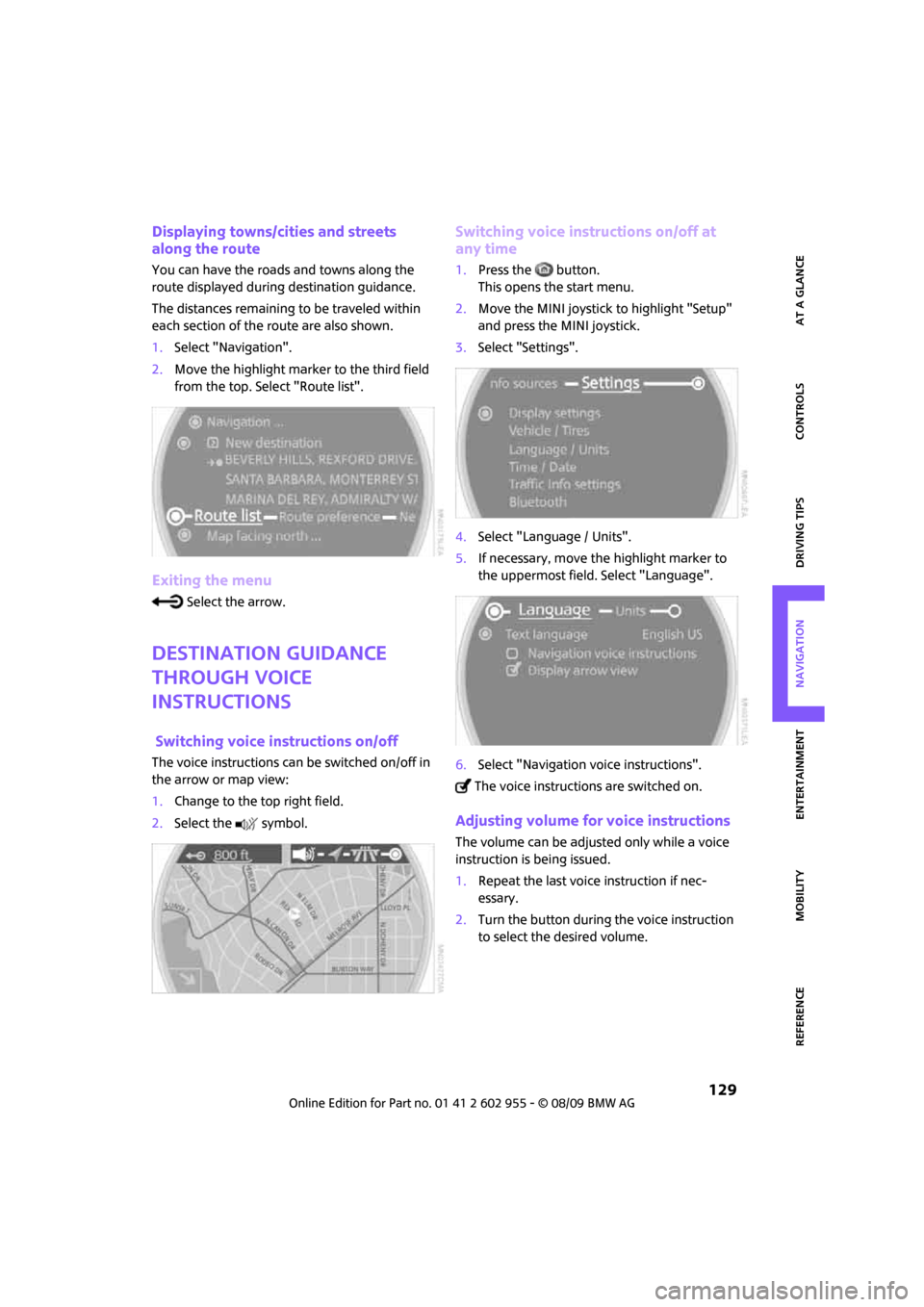
1.Select "Navigation".
2.Move the highlight marker to the third field
from the top. Select "Route list".
Exiting the menu
Select the arrow.
Destination guidance
through voice
instructions
Switching voice instructions on/off
The voice instructions can be switched on/off in
the arrow or map view:
1.Change to the top right field.
2.Select the symbol.
Switching voice instructions on/off at
any time
1.Press the button.
This opens the start menu.
2.Move the MINI joystick to highlight "Setup"
and press the MINI joystick.
3.Select "Settings".
4.Select "Language / Units".
5.If necessary, move the highlight marker to
the uppermost field. Select "Language".
6.Select "Navigation voice instructions".
The voice instructions are switched on.
Adjusting volume for voice instructions
The volume can be adjusted only while a voice
instruction is being issued.
1.Repeat the last voice instruction if nec-
essary.
2.Turn the button during the voice instruction
to select the desired volume.
Page 146 of 230
Radio
144
Radio Data System RDS
Radio stations in the FM waveband can broad-
cast additional information, e. g. the station
name, using RDS. If the reception conditions are
good, the station names are shown on the Con-
trol Display. Where reception is poor or in the
event of interference, it may take some time
before the station names will appear in the
display.
Switching RDS on/off*
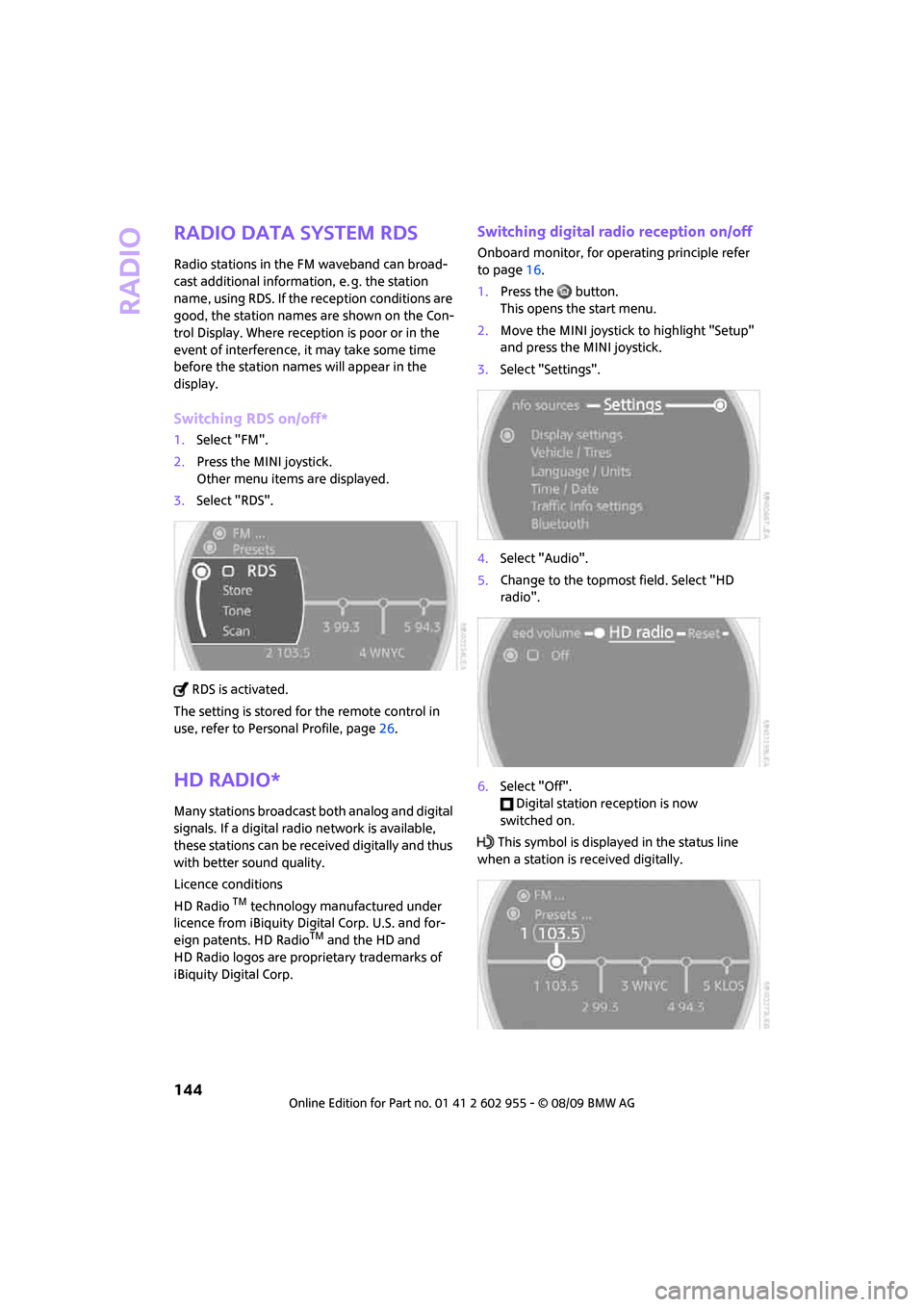
1.Select "FM".
2.Press the MINI joystick.
Other menu items are displayed.
3.Select "RDS".
RDS is activated.
The setting is stored for the remote control in
use, refer to Personal Profile, page26.
HD Radio*
Many stations broadcast both analog and digital
signals. If a digital radio network is available,
these stations can be received digitally and thus
with better sound quality.
Licence conditions
HD Radio
TM technology manufactured under
licence from iBiquity Digital Corp. U.S. and for-
eign patents. HD Radio
TM and the HD and
HD Radio logos are proprietary trademarks of
iBiquity Digital Corp.
Switching digital radio reception on/off
Onboard monitor, for operating principle refer
to page16.
1.Press the button.
This opens the start menu.
2.Move the MINI joystick to highlight "Setup"
and press the MINI joystick.
3.Select "Settings".
4.Select "Audio".
5.Change to the topmost field. Select "HD
radio".
6.Select "Off".
Digital station reception is now
switched on.
This symbol is displayed in the status line
when a station is received digitally.
Page 184 of 230

Care
182
Steam jets/high-pressure washers
When using steam jets or high-pressure
washers, ensure that you maintain suffi-
cient clearance to the vehicle and do not exceed
a temperature of 1407/606.
If the distance is too close, the pressure too high,
or the temperature too high, parts of the vehicle
can be damaged, or water can penetrate.
Observe the operating instructions for high-
pressure washers.<
Do not spray sensors such as Park Dis-
tance Control with high-pressure washers
for a long time or at a distance of less than
1 ft/30 cm.<
Manual washing
Use a great deal of water and, if necessary, car
shampoo when washing your car by hand. Clean
the vehicle with a sponge or a washing brush
applying a slight amount of pressure.
Before cleaning the windshield, deacti-
vate the rain sensor or turn off the ignition
to prevent unintentional wiping.<
Observe local regulations regarding wash-
ing vehicles by hand.<
Headlamps
Do not wipe dry and do not use abrasive or cor-
rosive cleaning agents. Remove dirt and con-
tamination, such as insects, by soaking with
shampoo and then washing with plenty of
water.
Do not remove accumulated ice and snow with
an ice scraper; use window deicers instead.
Windows
Clean the outside and inside of the windows and
mirrors with a window cleaner.
Do not clean the mirrors with cleaners
containing quartz.<
Wiper blades
Clean with soapy water and change regularly to
prevent the formation of streaks.Wax, preservatives and dirt on the win-
dows cause streaks when the windshield
wipers are on, and can cause premature wear
of the wiper blades and interfere with the rain
sensor.<
Care of the convertible top
The appearance and service life of the convert-
ible top largely depends on its proper care and
operation.
Please follow these instructions:
>Never attempt to fold and stow the convert-
ible top in the convertible compartment
when the top is wet or frozen. Otherwise,
water stains, mildew, and chafe marks may
occur.
>If water spots occur on the inside headliner
despite precautions, remove them using a
microfiber cloth and interior cleaner.
>If the vehicle is parked in an enclosed area
for a longer period of time, make sure that
there is sufficient ventilation.
>Remove any bird droppings immediately,
since they have corrosive properties which
will corrode the convertible top and damage
the rubber seals.
When attempting to remove stains from
the convertible top, do not use spot
removers, paint thinners, solvents, gasoline, or
similar fluids. These cleaners may damage the
rubber seals. The improper care or cleaning
methods may cause the convertible top and its
seams to leak.<
Use special convertible top cleaning agents if
attempting to remove heavy stains.
Always read and follow the manufacturer's
instructions.
Use an impregnating agent to treat the convert-
ible top once a year.
Paintwork, care
Regular care helps your vehicle retain its value
and protects the paint from the long-term
effects of aggressive substances.
Page 188 of 230

Replacing components
186
When working on electrical systems,
always begin by switching off the con-
sumer in question; otherwise, short circuits
could result. To avoid possible injury or equip-
ment damage when replacing bulbs, observe
any instructions provided by the bulb manufac-
turer.<
Caring for headlamps, refer to page182.
For any bulb replacement not described
below, contact a MINI dealer or a work-
shop that has specially trained personnel work-
ing in accordance with the specifications of the
MINI manufacturer.<
For checking and adjusting headlamp aim,
please contact your MINI dealer.<
Light-emitting diodes LEDs
Light-emitting diodes installed behind translu-
cent lenses serve as the light sources for many of
the controls and displays in your vehicle. These
light-emitting diodes are related to conven-
tional laser diodes, and legislation defines them
as Class 1 light-emitting diodes.
Do not remove the covers or expose the
eyes directly to the unfiltered light source
for several hours; otherwise, this could cause
irritation of the retina.<
Xenon lamps*
The service life of these bulbs is very long and
the probability of failure very low, provided that
they are not switched on and off an excessive
number of times. If a xenon lamp fails neverthe-
less, switch on the fog lamps and continue the
journey with great care, provided that local leg-
islation does not prohibit this.
Have any work on the xenon lamp system,
including bulb replacement, carried out
only by a MINI dealer or a workshop that has
specially trained personnel working in accor-
dance with the specifications of the MINI manu-
facturer. Due to high voltage, there is a risk of
fatal injury if work on the xenon lamps is carried
out improperly.<
Halogen low beams and high beams
H13 bulb, 60/55 watts
The H13 bulb is pressurized. Therefore,
wear safety glasses and protective gloves.
Otherwise, there is a risk of injury if the bulb is
damaged.<
Be careful when installing the cover; oth-
erwise, leaks could occur and cause dam-
age to the headlamp system.<
Accessing the lamp from the engine
compartment
The low-beam/high-beam bulb can be changed
from the engine compartment.
Removing the cover:
1.Press the tab.
2.Flip open the cover and take it out of the
holder.
Follow the same steps in reverse order to reat-
tach the cover.
Be careful when installing the cover; oth-
erwise, leaks could occur and cause dam-
age to the headlamp system.<
Page 195 of 230

MOBILITYAT A GLANCE CONTROLS DRIVING TIPS ENTERTAINMENT
193
NAVIGATION REFERENCE
Removing the space-saver spare tire
The screw connection of the space-saver spare
tire is under the floor mat in the cargo bay, on
the base of the storage compartment for the tire
change set.
1.Unscrew the screw connection with the spe-
cial wrench.
2.Take out the cover panel.
3.Screw the lifting handle from the onboard
vehicle tool kit onto the thread.
4.Raise the lifting handle slightly.
5.Squeeze the securing spring.
6.The space-saver spare tire is released and
must be held by the lifting handle.
7.Lower the space-saver spare tire with the
lifting handle.
8.Unscrew the lifting handle.9.Pull the space-saver spare tire underneath
the vehicle out towards the rear.
10.Position the space-saver spare tire with the
valve facing upward.
11.Unscrew the valve extension from the valve
of the space-saver spare tire.
12.Unscrew the dust cap from the extension
and place it on the valve of the space-saver
spare tire.
Due to its different dimensions, the dam-
aged wheel cannot be placed in the recess
for the space-saver spare tire.<
Driving with the space-saver spare tire
Drive cautiously and do not exceed a
speed of 50 mph/80 km/h. Changes may
occur in vehicle handling such as lower track sta-
bility during braking, longer braking distances
and changes in self-steering properties when
close to the handling limit. These properties are
more noticeable with winter tires.<
Only one space-saver spare tire may be
mounted at one time. Mount a wheel and
tire of the original size as soon as possible, to
avoid any safety risks.<
Check the tire inflation pressure at the ear-
liest opportunity and correct it if neces-
sary. Replace the defective tire as soon as possi-
ble and have the new wheel/tire assembly
balanced.<
Preparing for a tire change
Observe the safety precautions regarding
flat tires on page190.<
Additional safety measures when chang-
ing tires:
Page 197 of 230
MOBILITYAT A GLANCE CONTROLS DRIVING TIPS ENTERTAINMENT
195
NAVIGATION REFERENCE
Vehicle battery
Maintenance
The battery is 100 % maintenance-free, the
electrolyte will last for the life of the battery
when the vehicle is operated in a temperate
climate.
Battery replacement
Only use vehicle batteries that have been
approved for your vehicle by the manu-
facturer; otherwise, the vehicle could be dam-
aged and systems or functions may not be fully
available.<
After a battery replacement, have the battery
registered on the vehicle by your dealer to
ensure that all comfort functions are fully
available.
Charging the battery
Only charge the battery in the vehicle when the
engine is off. Connections, refer to Jump-start-
ing on page196.
Disposal
After replacing old batteries, return the
used batteries to your MINI dealer or to a
recycling point. Maintain the battery in an
upright position for transport and storage.
Always secure the battery against tipping over
during transport.<
Power failure
After a temporary power loss, some equipment
may not be fully functional and may require ini-
tialization. Individual settings are also lost and
must be reprogrammed:
>Time and date
These values must be updated, page68.
>Radio
In some cases, stations may have to be
stored again, page143.
>Navigation system
Operability must be waited for, page112.>Glass sunroof
*, electric
It may only be possible to raise the sunroof,
if applicable. The system must be initialized.
Contact your nearest MINI dealer.
Fuses
Do not attempt to repair a blown fuse or
replace it with a fuse of a different color or
Ampere rating. To do this could cause a fire in
the vehicle resulting from a circuit overload.
Have the fuse changed only by a MINI dealer or
a workshop that has specially trained personnel
working in accordance with the specifications of
the MINI manufacturer.<
A fuse allocation diagram is located on the inside
of the fuse box cover panels.
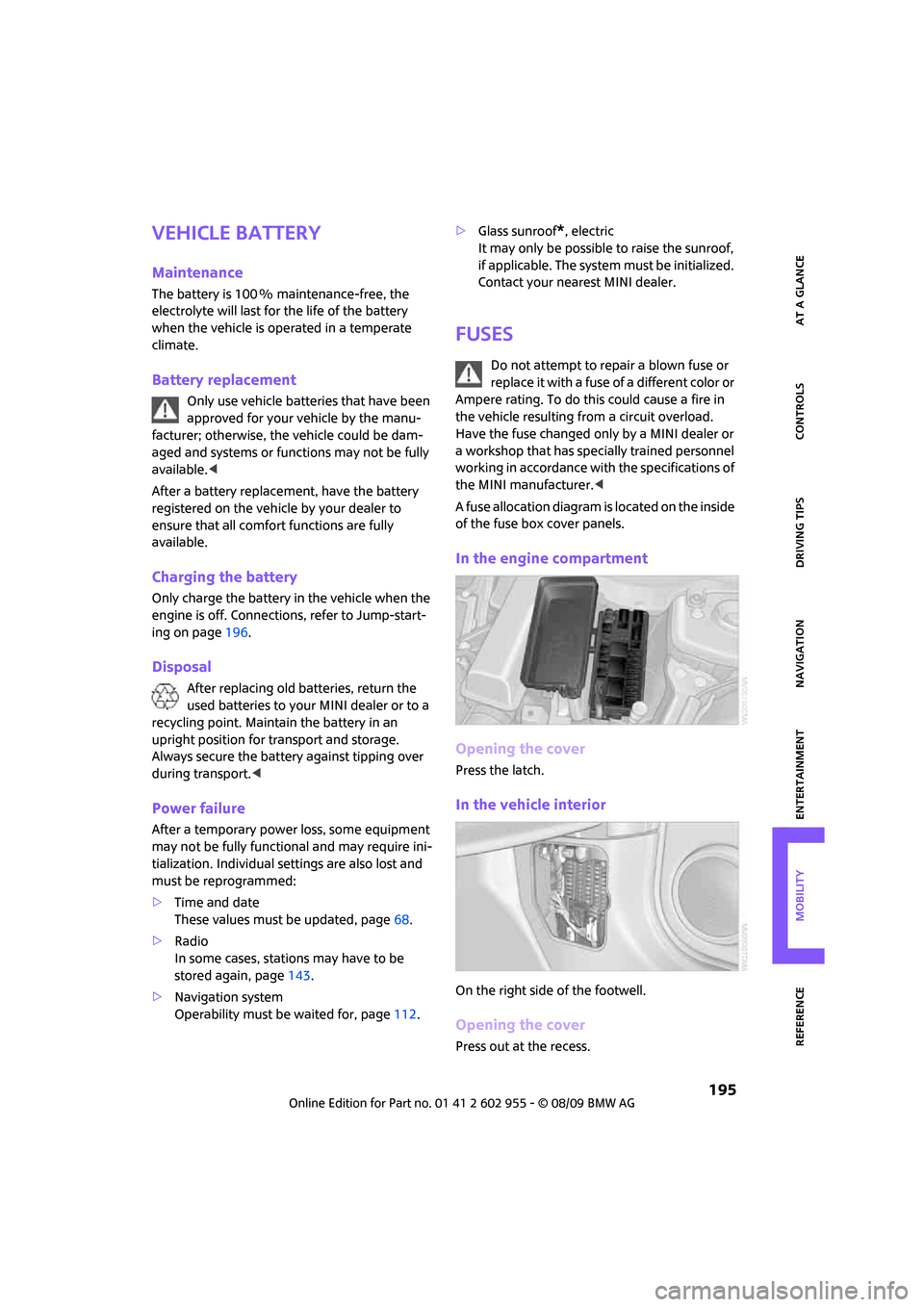
In the engine compartment
Opening the cover
Press the latch.
In the vehicle interior
On the right side of the footwell.
Opening the cover
Press out at the recess.
Page 212 of 230
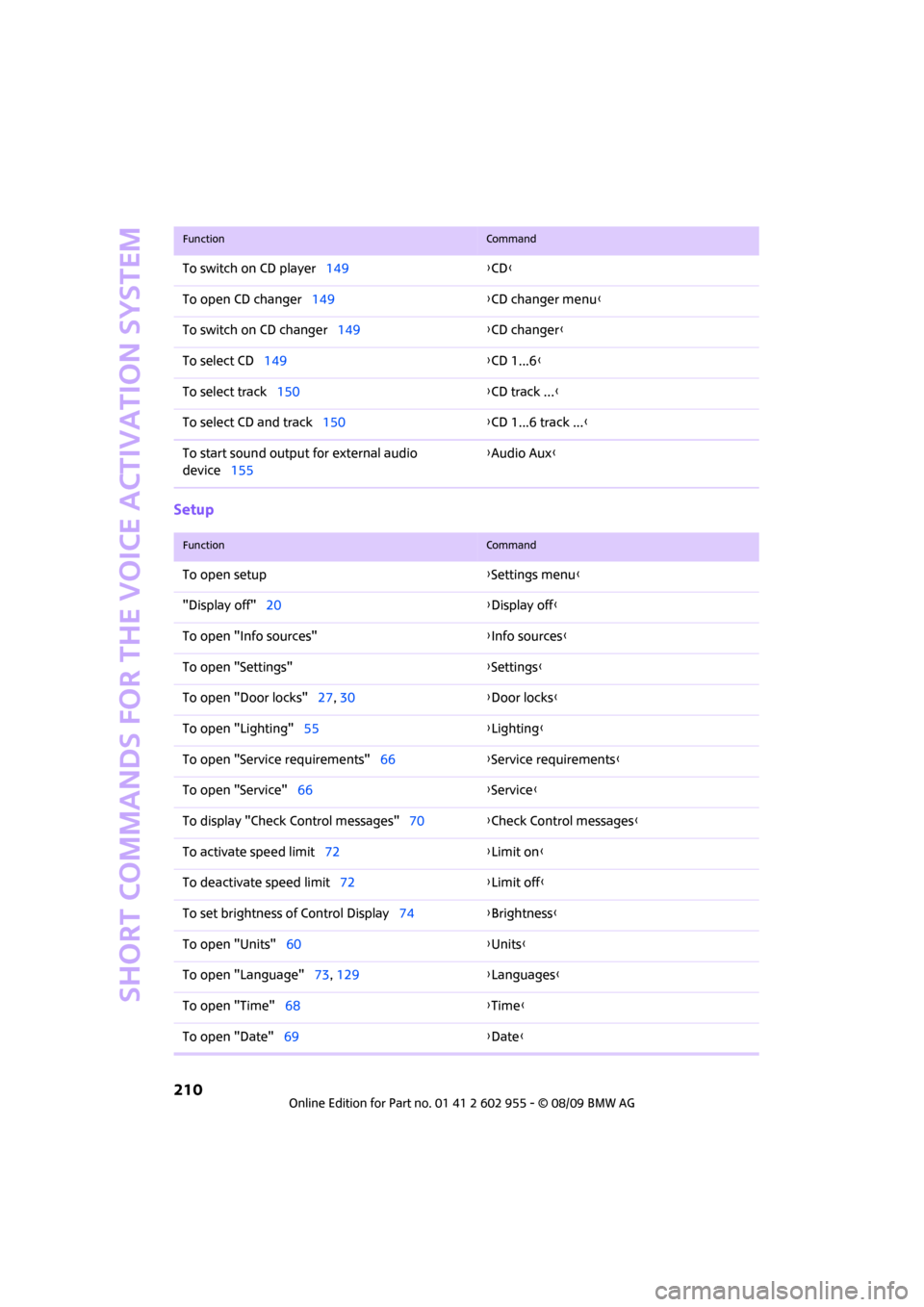
Short commands for the voice activation system
210
Setup
To switch on CD player149{CD}
To open CD changer149{CD changer menu}
To switch on CD changer149{CD changer}
To select CD149{CD 1...6}
To select track150{CD track ...}
To select CD and track150{CD 1...6 track ...}
To start sound output for external audio
device155{Audio Aux}
FunctionCommand
FunctionCommand
To open setup{Settings menu}
"Display off"20{Display off}
To open "Info sources"{Info sources}
To open "Settings"{Settings}
To open "Door locks"27, 30{Door locks}
To open "Lighting"55{Lighting}
To open "Service requirements"66{Service requirements}
To open "Service"66{Service}
To display "Check Control messages"70{Check Control messages}
To activate speed limit72{Limit on}
To deactivate speed limit72{Limit off}
To set brightness of Control Display74{Brightness}
To open "Units"60{Units}
To open "Language"73, 129{Languages}
To open "Time"68{Time}
To open "Date"69{Date}
Page 216 of 230
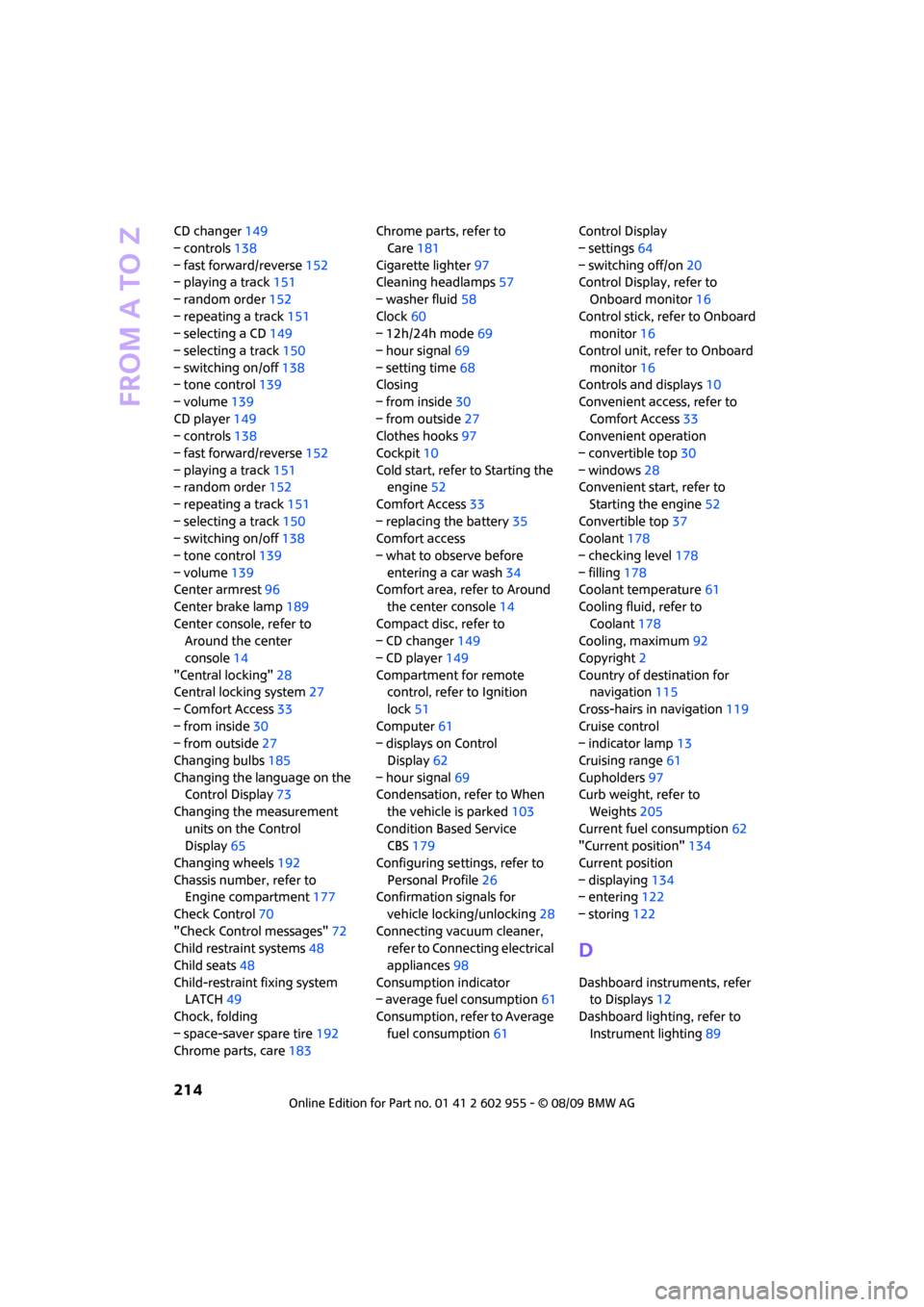
From A to Z
214
CD changer149
– controls138
– fast forward/reverse152
– playing a track151
– random order152
– repeating a track151
– selecting a CD149
– selecting a track150
– switching on/off138
– tone control139
– volume139
CD player149
– controls138
– fast forward/reverse152
– playing a track151
– random order152
– repeating a track151
– selecting a track150
– switching on/off138
– tone control139
– volume139
Center armrest96
Center brake lamp189
Center console, refer to
Around the center
console14
"Central locking"28
Central locking system27
– Comfort Access33
– from inside30
– from outside27
Changing bulbs185
Changing the language on the
Control Display73
Changing the measurement
units on the Control
Display65
Changing wheels192
Chassis number, refer to
Engine compartment177
Check Control70
"Check Control messages"72
Child restraint systems48
Child seats48
Child-restraint fixing system
LATCH49
Chock, folding
– space-saver spare tire192
Chrome parts, care183Chrome parts, refer to
Care181
Cigarette lighter97
Cleaning headlamps57
– washer fluid58
Clock60
– 12h/24h mode
69
– hour signal69
– setting time68
Closing
– from inside30
– from outside27
Clothes hooks97
Cockpit10
Cold start, refer to Starting the
engine52
Comfort Access33
– replacing the battery35
Comfort access
– what to observe before
entering a car wash34
Comfort area, refer to Around
the center console14
Compact disc, refer to
– CD changer149
– CD player149
Compartment for remote
control, refer to Ignition
lock51
Computer61
– displays on Control
Display62
– hour signal69
Condensation, refer to When
the vehicle is parked103
Condition Based Service
CBS179
Configuring settings, refer to
Personal Profile26
Confirmation signals for
vehicle locking/unlocking28
Connecting vacuum cleaner,
refer to Connecting electrical
appliances98
Consumption indicator
– average fuel consumption61
Consumption, refer to Average
fuel consumption61Control Display
– settings64
– switching off/on20
Control Display, refer to
Onboard monitor16
Control stick, refer to Onboard
monitor16
Control unit, refer to Onboard
monitor16
Controls and displays10
Convenient access, refer to
Comfort Access33
Convenient operation
– convertible top30
– windows28
Convenient start, refer to
Starting the engine52
Convertible top37
Coolant178
– checking level178
– filling178
Coolant temperature61
Cooling fluid, refer to
Coolant178
Cooling, maximum92
Copyright2
Country of destination for
navigation115
Cross-hairs in navigation119
Cruise control
– indicator lamp13
Cruising range61
Cupholders97
Curb weight, refer to
Weights205
Current fuel consumption62
"Current position"134
Current position
– displaying134
– entering122
– storing122
D
Dashboard instruments, refer
to Displays12
Dashboard lighting, refer to
Instrument lighting89
Page 223 of 230
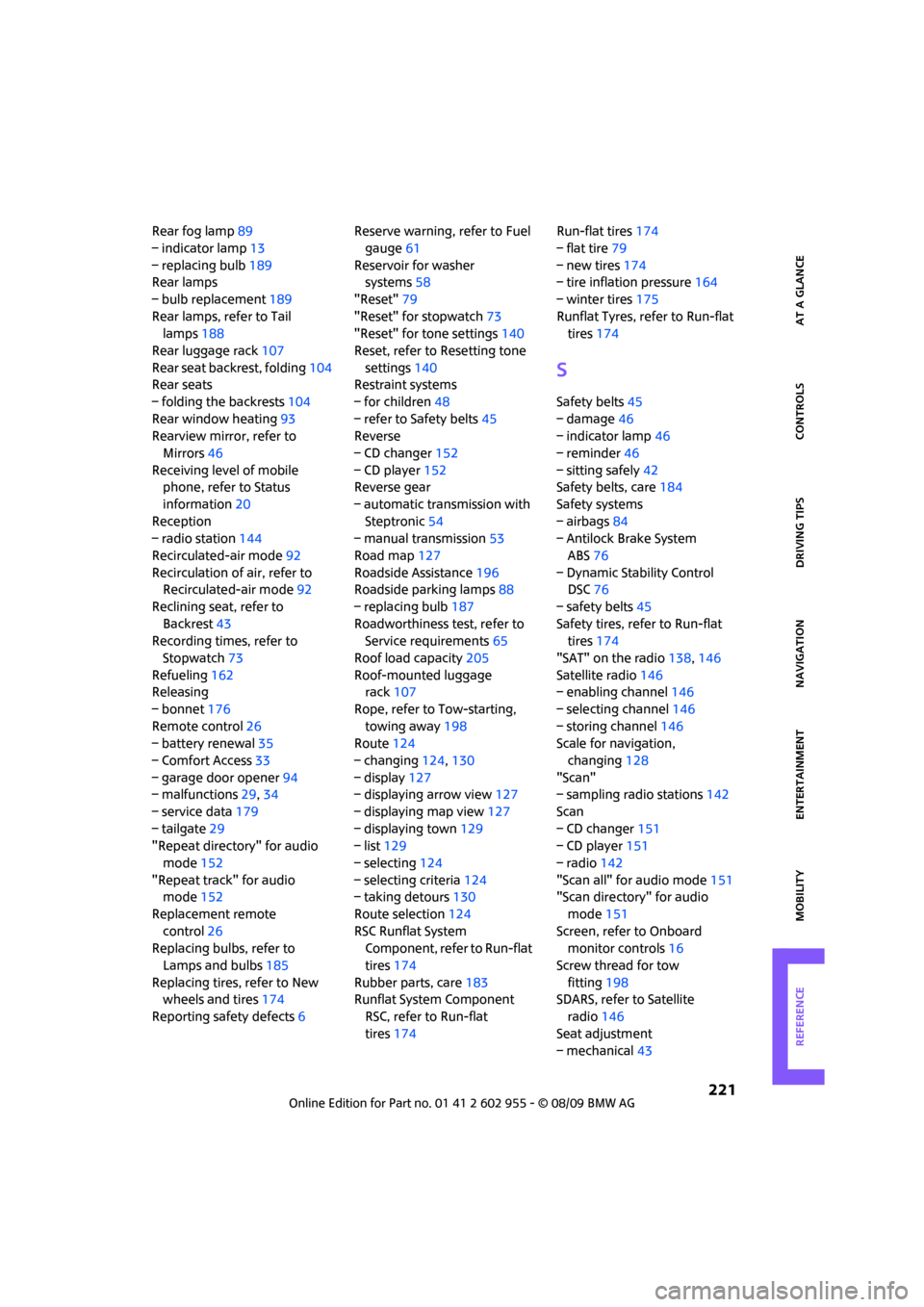
221
MOBILITYAT A GLANCE CONTROLS DRIVING TIPS ENTERTAINMENT NAVIGATION REFERENCE
Rear fog lamp89
– indicator lamp13
– replacing bulb189
Rear lamps
– bulb replacement189
Rear lamps, refer to Tail
lamps188
Rear luggage rack107
Rear seat backrest, folding104
Rear seats
– folding the backrests104
Rear window heating93
Rearview mirror, refer to
Mirrors46
Receiving level of mobile
phone, refer to Status
information20
Reception
– radio station144
Recirculated-air mode92
Recirculation of air, refer to
Recirculated-air mode92
Reclining seat, refer to
Backrest43
Recording times, refer to
Stopwatch73
Refueling162
Releasing
– bonnet176
Remote control26
– battery renewal35
– Comfort Access33
– garage door opener94
– malfunctions29,34
– service data179
– tailgate29
"Repeat directory" for audio
mode152
"Repeat track" for audio
mode152
Replacement remote
control26
Replacing bulbs, refer to
Lamps and bulbs185
Replacing tires, refer to New
wheels and tires174
Reporting safety defects6Reserve warning, refer to Fuel
gauge61
Reservoir for washer
systems58
"Reset"79
"Reset" for stopwatch73
"Reset" for tone settings140
Reset, refer to Resetting tone
settings140
Restraint systems
– for children48
– refer to Safety belts45
Reverse
– CD changer152
– CD player152
Reverse gear
– automatic transmission with
Steptronic54
– manual transmission53
Road map127
Roadside Assistance196
Roadside parking lamps88
– replacing bulb187
Roadworthiness test, refer to
Service requirements65
Roof load capacity205
Roof-mounted luggage
rack107
Rope, refer to Tow-starting,
towing away198
Route124
– changing124,130
– display127
– displaying arrow view127
– displaying map view127
– displaying town129
– list129
– selecting124
– selecting criteria124
– taking detours130
Route selection124
RSC Runflat System
Component, refer to Run-flat
tires174
Rubber parts, care183
Runflat System Component
RSC, refer to Run-flat
tires174Run-flat tires174
– flat tire79
– new tires174
– tire inflation pressure164
– winter tires175
Runflat Tyres, refer to Run-flat
tires174
S
Safety belts45
– damage46
– indicator lamp46
– reminder46
– sitting safely42
Safety belts, care184
Safety systems
– airbags84
– Antilock Brake System
ABS76
– Dynamic Stability Control
DSC76
– safety belts45
Safety tires, refer to Run-flat
tires174
"SAT" on the radio138,146
Satellite radio146
– enabling channel146
– selecting channel146
– storing channel146
Scale for navigation,
changing128
"Scan"
– sampling radio stations142
Scan
– CD changer151
– CD player151
– radio142
"Scan all" for audio mode151
"Scan directory" for audio
mode151
Screen, refer to Onboard
monitor controls16
Screw thread for tow
fitting198
SDARS, refer to Satellite
radio146
Seat adjustment
– mechanical43