service MINI Hardtop 2 Door 2010 (Mini Connected) Owner's Guide
[x] Cancel search | Manufacturer: MINI, Model Year: 2010, Model line: Hardtop 2 Door, Model: MINI Hardtop 2 Door 2010Pages: 230, PDF Size: 4.02 MB
Page 187 of 230
MOBILITYAT A GLANCE CONTROLS DRIVING TIPS ENTERTAINMENT
185
NAVIGATION REFERENCE
Replacing components
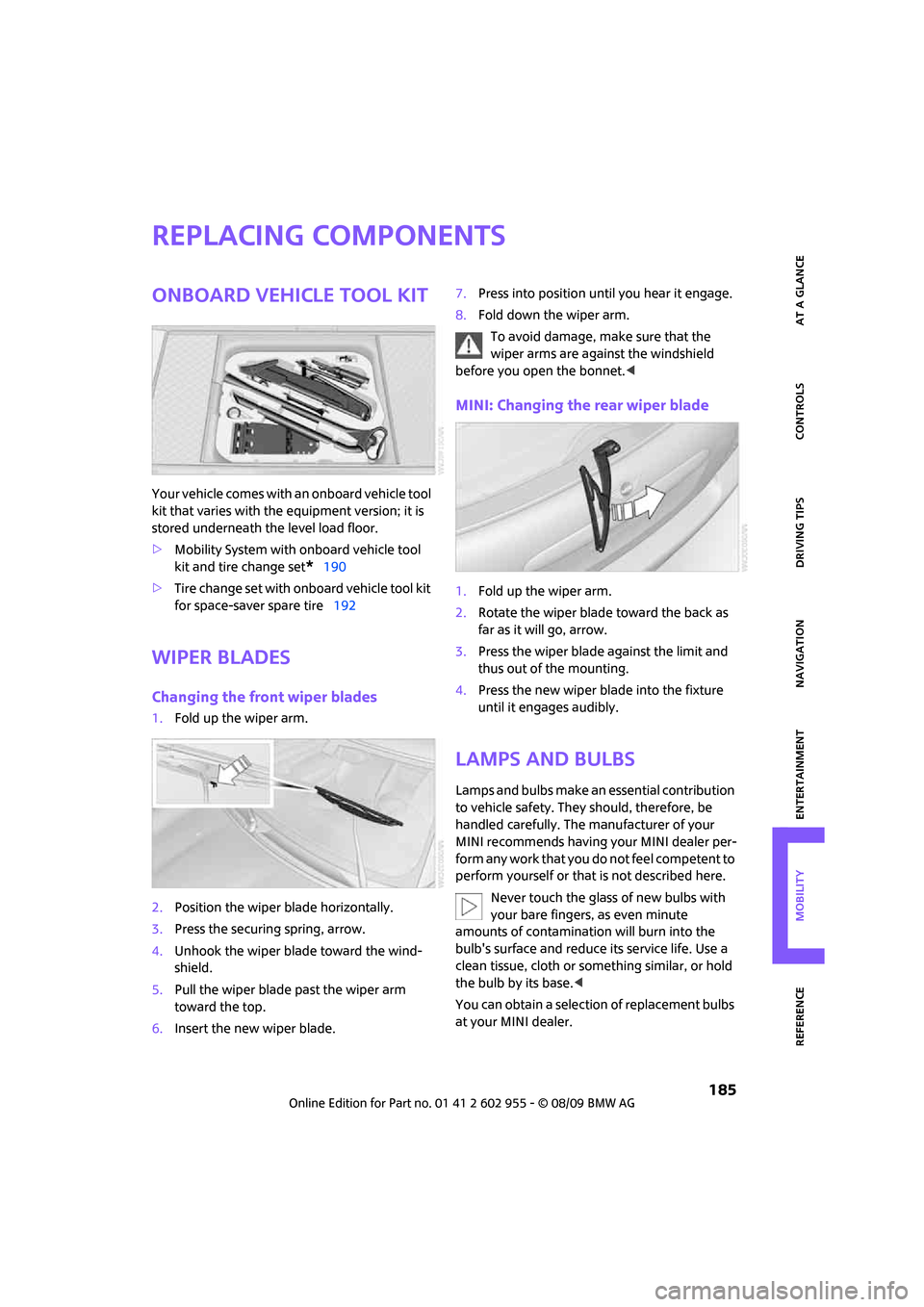
Onboard vehicle tool kit
Your vehicle comes with an onboard vehicle tool
kit that varies with the equipment version; it is
stored underneath the level load floor.
>Mobility System with onboard vehicle tool
kit and tire change set
*190
>Tire change set with onboard vehicle tool kit
for space-saver spare tire192
Wiper blades
Changing the front wiper blades
1.Fold up the wiper arm.
2.Position the wiper blade horizontally.
3.Press the securing spring, arrow.
4.Unhook the wiper blade toward the wind-
shield.
5.Pull the wiper blade past the wiper arm
toward the top.
6.Insert the new wiper blade.7.Press into position until you hear it engage.
8.Fold down the wiper arm.
To avoid damage, make sure that the
wiper arms are against the windshield
before you open the bonnet.<
MINI: Changing the rear wiper blade
1.Fold up the wiper arm.
2.Rotate the wiper blade toward the back as
far as it will go, arrow.
3.Press the wiper blade against the limit and
thus out of the mounting.
4.Press the new wiper blade into the fixture
until it engages audibly.
Lamps and bulbs
Lamps and bulbs make an essential contribution
to vehicle safety. They should, therefore, be
handled carefully. The manufacturer of your
MINI recommends having your MINI dealer per-
f o r m a n y w o r k t h a t y o u d o n o t f e e l c o m p e t e n t t o
perform yourself or that is not described here.
Never touch the glass of new bulbs with
your bare fingers, as even minute
amounts of contamination will burn into the
bulb's surface and reduce its service life. Use a
clean tissue, cloth or something similar, or hold
the bulb by its base.<
You can obtain a selection of replacement bulbs
at your MINI dealer.
Page 188 of 230

Replacing components
186
When working on electrical systems,
always begin by switching off the con-
sumer in question; otherwise, short circuits
could result. To avoid possible injury or equip-
ment damage when replacing bulbs, observe
any instructions provided by the bulb manufac-
turer.<
Caring for headlamps, refer to page182.
For any bulb replacement not described
below, contact a MINI dealer or a work-
shop that has specially trained personnel work-
ing in accordance with the specifications of the
MINI manufacturer.<
For checking and adjusting headlamp aim,
please contact your MINI dealer.<
Light-emitting diodes LEDs
Light-emitting diodes installed behind translu-
cent lenses serve as the light sources for many of
the controls and displays in your vehicle. These
light-emitting diodes are related to conven-
tional laser diodes, and legislation defines them
as Class 1 light-emitting diodes.
Do not remove the covers or expose the
eyes directly to the unfiltered light source
for several hours; otherwise, this could cause
irritation of the retina.<
Xenon lamps*
The service life of these bulbs is very long and
the probability of failure very low, provided that
they are not switched on and off an excessive
number of times. If a xenon lamp fails neverthe-
less, switch on the fog lamps and continue the
journey with great care, provided that local leg-
islation does not prohibit this.
Have any work on the xenon lamp system,
including bulb replacement, carried out
only by a MINI dealer or a workshop that has
specially trained personnel working in accor-
dance with the specifications of the MINI manu-
facturer. Due to high voltage, there is a risk of
fatal injury if work on the xenon lamps is carried
out improperly.<
Halogen low beams and high beams
H13 bulb, 60/55 watts
The H13 bulb is pressurized. Therefore,
wear safety glasses and protective gloves.
Otherwise, there is a risk of injury if the bulb is
damaged.<
Be careful when installing the cover; oth-
erwise, leaks could occur and cause dam-
age to the headlamp system.<
Accessing the lamp from the engine
compartment
The low-beam/high-beam bulb can be changed
from the engine compartment.
Removing the cover:
1.Press the tab.
2.Flip open the cover and take it out of the
holder.
Follow the same steps in reverse order to reat-
tach the cover.
Be careful when installing the cover; oth-
erwise, leaks could occur and cause dam-
age to the headlamp system.<
Page 198 of 230

Giving and receiving assistance
196
Giving and receiving assistance
Roadside Assistance
The Roadside Assistance service is there to assist
you around the clock in the event of a break-
down, including on weekends and public
holidays.
The phone numbers of the Roadside Assistance
in your home country can be found in the Con-
tact brochure.
First aid pouch*
Some of the articles contained in the first aid
pouch have a limited service life. Therefore,
check the expiration dates of the contents regu-
larly and replace any items in good time, if nec-
essary.
By way of example, the illustration shows the
cargo bay in the MINI.
The first aid pouch is located on the cargo bay
floor by the left side trim panel.
Warning triangle*
MINI
On the inside of the tailgate.
Press the tab to take it out.
MINI Convertible
The warning triangle is located at the bottom of
the luggage compartment floor.
Jump-starting
If the car's own battery is flat, your MINI's engine
can be started by connecting two jumper cables
to another vehicle's battery. You can also use
the same method to help start another vehicle.
Only use jumper cables with fully-insulated
clamp handles.
Do not touch any electrically live parts
when the engine is running, or a fatal acci-
dent may occur. Carefully adhere to the follow-
ing sequence, both to prevent damage to one or
both vehicles, and to guard against possible per-
sonal injuries.<
Preparation
1.Check whether the battery of the other vehi-
cle has a voltage of 12 volts and approxi-
mately the same capacitance in Ah. This
information can be found on the battery.
2.Switch off the engine of the support vehicle.
3.Switch off any consumers in both vehicles.
Page 212 of 230
Short commands for the voice activation system
210
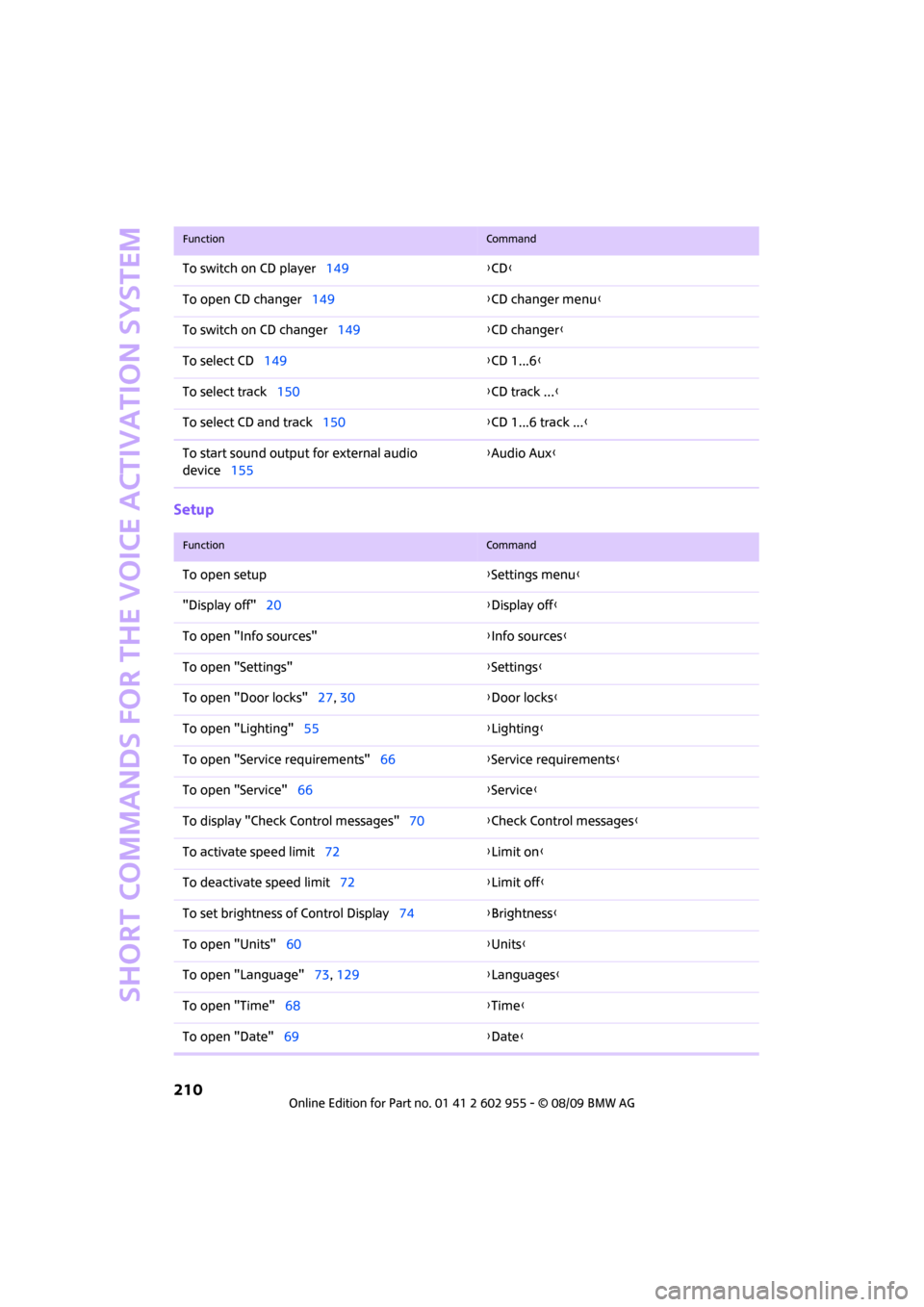
Setup
To switch on CD player149{CD}
To open CD changer149{CD changer menu}
To switch on CD changer149{CD changer}
To select CD149{CD 1...6}
To select track150{CD track ...}
To select CD and track150{CD 1...6 track ...}
To start sound output for external audio
device155{Audio Aux}
FunctionCommand
FunctionCommand
To open setup{Settings menu}
"Display off"20{Display off}
To open "Info sources"{Info sources}
To open "Settings"{Settings}
To open "Door locks"27, 30{Door locks}
To open "Lighting"55{Lighting}
To open "Service requirements"66{Service requirements}
To open "Service"66{Service}
To display "Check Control messages"70{Check Control messages}
To activate speed limit72{Limit on}
To deactivate speed limit72{Limit off}
To set brightness of Control Display74{Brightness}
To open "Units"60{Units}
To open "Language"73, 129{Languages}
To open "Time"68{Time}
To open "Date"69{Date}
Page 215 of 230
213
MOBILITYAT A GLANCE CONTROLS DRIVING TIPS ENTERTAINMENT NAVIGATION REFERENCE
"Avoid highways" in
navigation124
Avoid highways in
navigation124
"Avoid tollroads" in
navigation124
Axle loads, refer to
Weights205
B
Background lighting, refer to
Ambient lighting90
Backrests, refer to Seats42
Backup lamps
– replacing bulb188,189
Balance, tone control139
Band-aids, refer to First aid
pouch196
Bar, refer to Tow-starting,
towing away198
Bass sounds, refer to Tone
control139
Bass sounds, refer to Treble
and bass139
Bass, tone control139
Battery195
– charging195
– disposal35,195
– jump-starting196
– temporary power failure195
Battery renewal
– remote control35
Being towed198
Belt tensioner, refer to Safety
belts45
Belts, refer to Safety belts45
Beverage holders, refer to
Cupholders97
Blower, refer to Air flow rate92
Bonnet176
Bottle holders, refer to
Cupholders97
Brake Assist76
Brake fluid, refer to Service
requirements65Brake lamps
– replacing bulbs189
Brake pads, breaking in102
Brake rotors103
– brakes102
– breaking in102
Brake system102
– breaking in102
– disc brakes103
– MINI Maintenance
System179
Brakes
– ABS76
– breaking in102
– MINI Maintenance
System179
– parking brake52
– service requirements65
Brakes, refer to Braking
safely103
Breakdown service, refer to
Roadside Assistance196
Break-in period
102
Breaking in the clutch102
"Brightness"on the Control
Display74
Bulb changing, refer to Lamps
and bulbs185
Button for starting the
engine51
Buttons on the steering
wheel11
C
California Proposition 65
warning5
Can holders, refer to
Cupholders97
Capacities206
Car battery, refer to Vehicle
battery195
Car care181
"Car Data"63
Car key, refer to Keys/remote
controls26Car phone
– installation location, refer to
Center armrest96
– refer to separate Owner's
Manual
Car radio, refer to Radio141
Car wash, care181
Car washes181
Care181
– car washes181
– car-care products181
– CD/DVD drives184
– external181
– high-pressure washers182
– internal183
– leather183
– manual washing182
– upholstery and fabrics183
– windows182
– wiper blades182
Cargo area
– capacity205
Cargo bay104
– Comfort Access34
– cover104
– lamp89
– opening from outside31
Cargo bay, expanding104
Cargo bay lamp89
Cargo bay lid, refer to
Tailgate31
Cargo loading105
– securing cargo106
– stowing cargo106
– vehicle104
Cargo, securing106
Carpets, care183
Catalytic converter, refer to
Hot exhaust system102
"Categories"147
"CD"138,149
Page 216 of 230
From A to Z
214
CD changer149
– controls138
– fast forward/reverse152
– playing a track151
– random order152
– repeating a track151
– selecting a CD149
– selecting a track150
– switching on/off138
– tone control139
– volume139
CD player149
– controls138
– fast forward/reverse152
– playing a track151
– random order152
– repeating a track151
– selecting a track150
– switching on/off138
– tone control139
– volume139
Center armrest96
Center brake lamp189
Center console, refer to
Around the center
console14
"Central locking"28
Central locking system27
– Comfort Access33
– from inside30
– from outside27
Changing bulbs185
Changing the language on the
Control Display73
Changing the measurement
units on the Control
Display65
Changing wheels192
Chassis number, refer to
Engine compartment177
Check Control70
"Check Control messages"72
Child restraint systems48
Child seats48
Child-restraint fixing system
LATCH49
Chock, folding
– space-saver spare tire192
Chrome parts, care183Chrome parts, refer to
Care181
Cigarette lighter97
Cleaning headlamps57
– washer fluid58
Clock60
– 12h/24h mode
69
– hour signal69
– setting time68
Closing
– from inside30
– from outside27
Clothes hooks97
Cockpit10
Cold start, refer to Starting the
engine52
Comfort Access33
– replacing the battery35
Comfort access
– what to observe before
entering a car wash34
Comfort area, refer to Around
the center console14
Compact disc, refer to
– CD changer149
– CD player149
Compartment for remote
control, refer to Ignition
lock51
Computer61
– displays on Control
Display62
– hour signal69
Condensation, refer to When
the vehicle is parked103
Condition Based Service
CBS179
Configuring settings, refer to
Personal Profile26
Confirmation signals for
vehicle locking/unlocking28
Connecting vacuum cleaner,
refer to Connecting electrical
appliances98
Consumption indicator
– average fuel consumption61
Consumption, refer to Average
fuel consumption61Control Display
– settings64
– switching off/on20
Control Display, refer to
Onboard monitor16
Control stick, refer to Onboard
monitor16
Control unit, refer to Onboard
monitor16
Controls and displays10
Convenient access, refer to
Comfort Access33
Convenient operation
– convertible top30
– windows28
Convenient start, refer to
Starting the engine52
Convertible top37
Coolant178
– checking level178
– filling178
Coolant temperature61
Cooling fluid, refer to
Coolant178
Cooling, maximum92
Copyright2
Country of destination for
navigation115
Cross-hairs in navigation119
Cruise control
– indicator lamp13
Cruising range61
Cupholders97
Curb weight, refer to
Weights205
Current fuel consumption62
"Current position"134
Current position
– displaying134
– entering122
– storing122
D
Dashboard instruments, refer
to Displays12
Dashboard lighting, refer to
Instrument lighting89
Page 217 of 230
215
MOBILITYAT A GLANCE CONTROLS DRIVING TIPS ENTERTAINMENT NAVIGATION REFERENCE
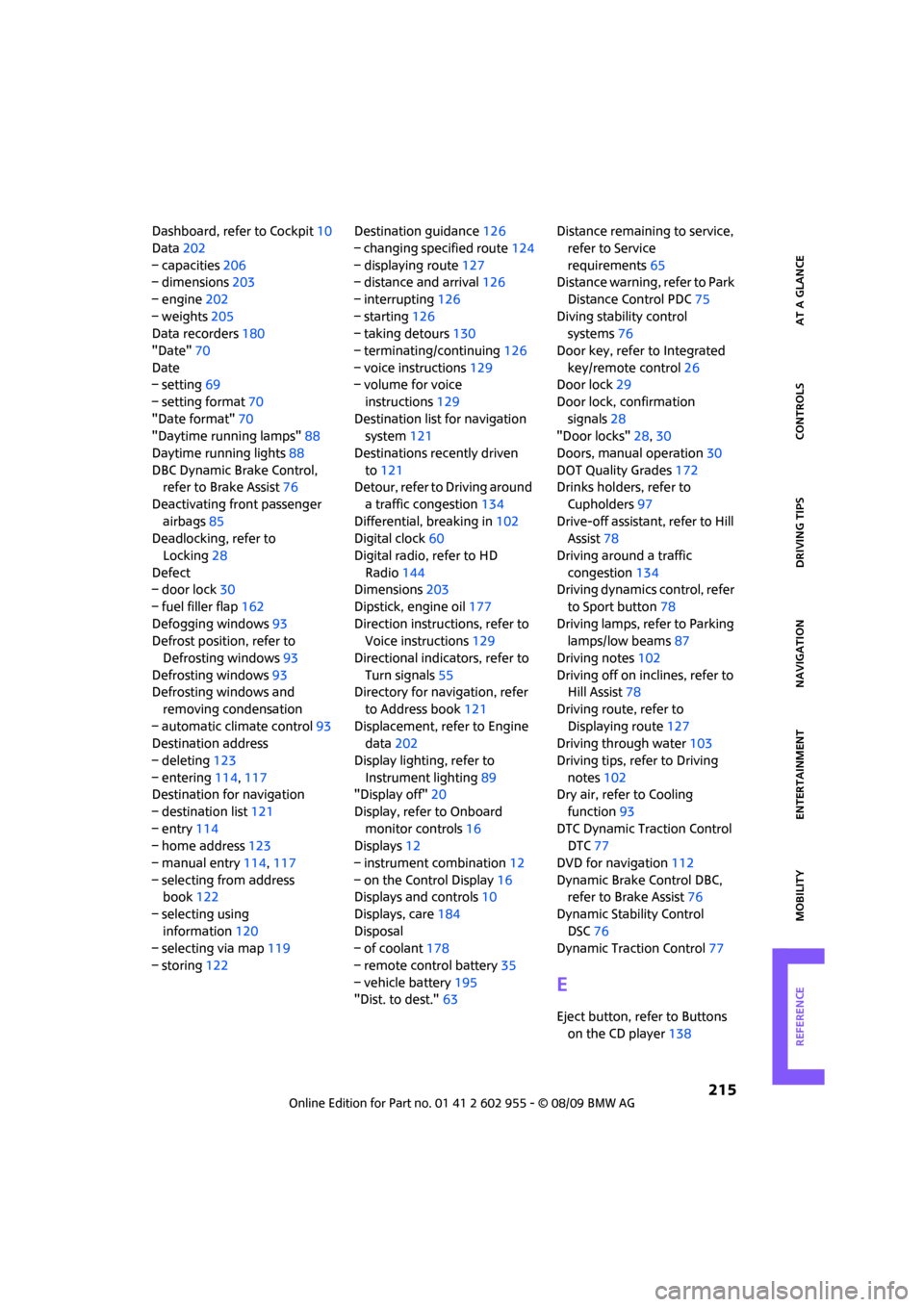
Dashboard, refer to Cockpit10
Data202
– capacities206
– dimensions203
– engine202
– weights205
Data recorders180
"Date"70
Date
– setting69
– setting format70
"Date format"70
"Daytime running lamps"88
Daytime running lights88
DBC Dynamic Brake Control,
refer to Brake Assist76
Deactivating front passenger
airbags85
Deadlocking, refer to
Locking28
Defect
– door lock30
– fuel filler flap162
Defogging windows93
Defrost position, refer to
Defrosting windows93
Defrosting windows93
Defrosting windows and
removing condensation
– automatic climate control93
Destination address
– deleting123
– entering114,117
Destination for navigation
– destination list121
– entry114
– home address123
– manual entry114,117
– selecting from address
book122
– selecting using
information120
– selecting via map119
– storing122Destination guidance126
– changing specified route124
– displaying route127
– distance and arrival126
– interrupting126
– starting126
– taking detours130
– terminating/continuing126
– voice instructions129
– volume for voice
instructions129
Destination list for navigation
system121
Destinations recently driven
to121
Detour, refer to Driving around
a traffic congestion134
Differential, breaking in102
Digital clock60
Digital radio, refer to HD
Radio144
Dimensions203
Dipstick, engine oil177
Direction instructions, refer to
Voice instructions129
Directional indicators, refer to
Turn signals55
Directory for navigation, refer
to Address book121
Displacement, refer to Engine
data202
Display lighting, refer to
Instrument lighting89
"Display off"20
Display, refer to Onboard
monitor controls16
Displays12
– instrument combination12
– on the Control Display16
Displays and controls10
Displays, care184
Disposal
– of coolant178
– remote control battery35
– vehicle battery195
"Dist. to dest."63Distance remaining to service,
refer to Service
requirements65
Distance warning, refer to Park
Distance Control PDC75
Diving stability control
systems76
Door key, refer to Integrated
key/remote control26
Door lock29
Door lock, confirmation
signals28
"Door locks"28,30
Doors, manual operation30
DOT Quality Grades172
Drinks holders, refer to
Cupholders97
Drive-off assistant, refer to Hill
Assist78
Driving around a traffic
congestion134
Driving dynamics control, refer
to Sport button78
Driving lamps, refer to Parking
lamps/low beams87
Driving notes102
Driving off on inclines, refer to
Hill Assist78
Driving route, refer to
Displaying route127
Driving through water103
Driving tips, refer to Driving
notes102
Dry air, refer to Cooling
function93
DTC Dynamic Traction Control
DTC77
DVD for navigation112
Dynamic Brake Control DBC,
refer to Brake Assist76
Dynamic Stability Control
DSC76
Dynamic Traction Control77
E
Eject button, refer to Buttons
on the CD player138
Page 218 of 230
From A to Z
216
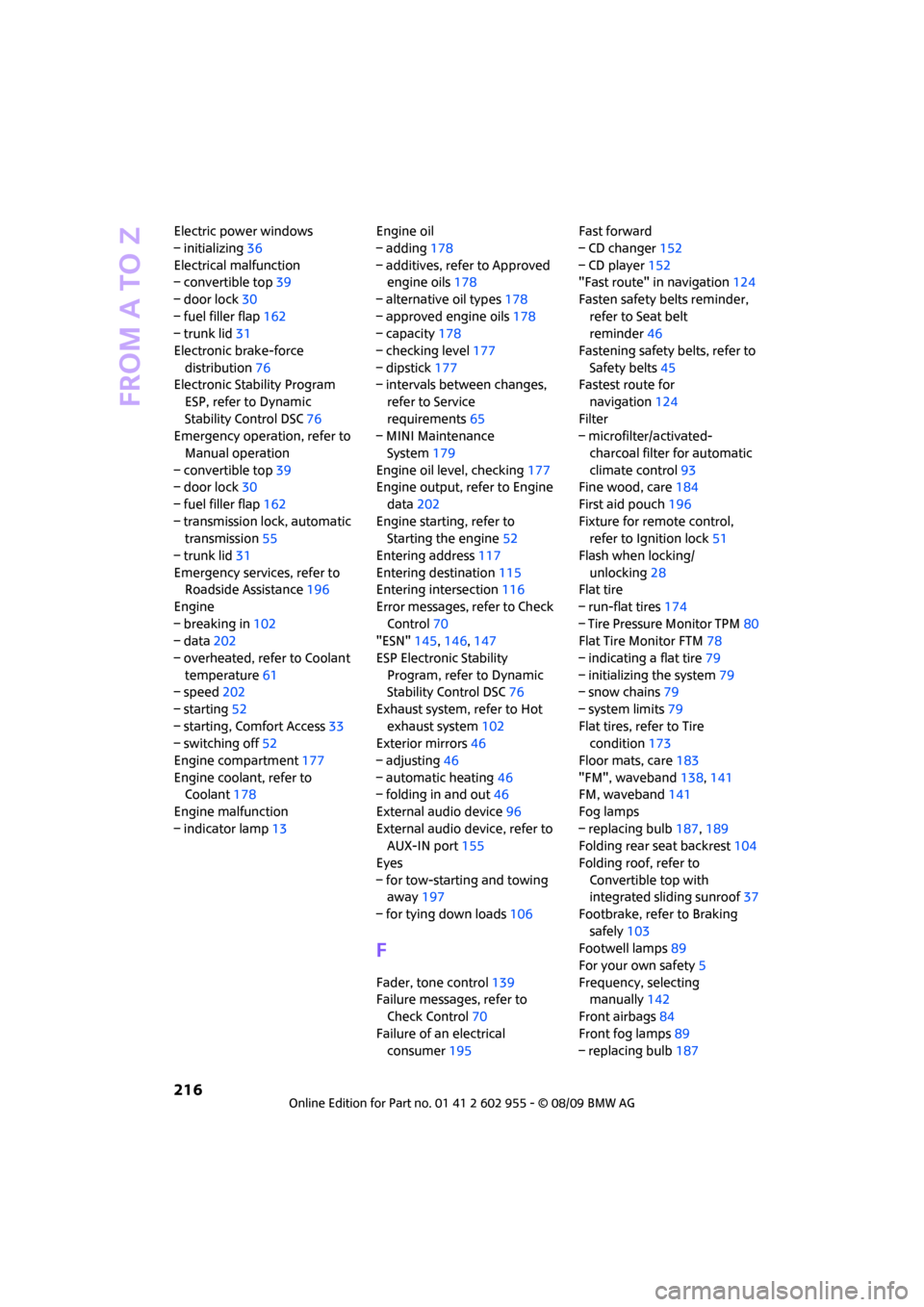
Electric power windows
– initializing36
Electrical malfunction
– convertible top39
– door lock30
– fuel filler flap162
– trunk lid31
Electronic brake-force
distribution76
Electronic Stability Program
ESP, refer to Dynamic
Stability Control DSC76
Emergency operation, refer to
Manual operation
– convertible top39
– door lock30
– fuel filler flap162
– transmission lock, automatic
transmission55
– trunk lid31
Emergency services, refer to
Roadside Assistance196
Engine
– breaking in102
– data202
– overheated, refer to Coolant
temperature61
– speed202
– starting52
– starting, Comfort Access33
– switching off52
Engine compartment177
Engine coolant, refer to
Coolant178
Engine malfunction
– indicator lamp13Engine oil
– adding178
– additives, refer to Approved
engine oils178
– alternative oil types178
– approved engine oils178
– capacity178
– checking level177
– dipstick177
– intervals between changes,
refer to Service
requirements65
– MINI Maintenance
System179
Engine oil level, checking177
Engine output, refer to Engine
data202
Engine starting, refer to
Starting the engine52
Entering address117
Entering destination115
Entering intersection116
Error messages, refer to Check
Control70
"ESN"145,146,147
ESP Electronic Stability
Program, refer to Dynamic
Stability Control DSC76
Exhaust system, refer to Hot
exhaust system102
Exterior mirrors46
– adjusting46
– automatic heating46
– folding in and out46
External audio device96
External audio device, refer to
AUX-IN port155
Eyes
– for tow-starting and towing
away197
– for tying down loads106
F
Fader, tone control139
Failure messages, refer to
Check Control70
Failure of an electrical
consumer195Fast forward
– CD changer152
– CD player152
"Fast route" in navigation124
Fasten safety belts reminder,
refer to Seat belt
reminder46
Fastening safety belts, refer to
Safety belts45
Fastest route for
navigation124
Filter
– microfilter/activated-
charcoal filter for automatic
climate control93
Fine wood, care184
First aid pouch196
Fixture for remote control,
refer to Ignition lock51
Flash when locking/
unlocking28
Flat tire
– run-flat tires174
– Tire Pressure Monitor TPM80
Flat Tire Monitor FTM78
– indicating a flat tire79
– initializing the system79
– snow chains79
– system limits79
Flat tires, refer to Tire
condition173
Floor mats, care183
"FM", waveband138,141
FM, waveband141
Fog lamps
– replacing bulb187,189
Folding rear seat backrest104
Folding roof, refer to
Convertible top with
integrated sliding sunroof37
Footbrake, refer to Braking
safely103
Footwell lamps89
For your own safety5
Frequency, selecting
manually142
Front airbags84
Front fog lamps89
– replacing bulb187
Page 221 of 230
219
MOBILITYAT A GLANCE CONTROLS DRIVING TIPS ENTERTAINMENT NAVIGATION REFERENCE
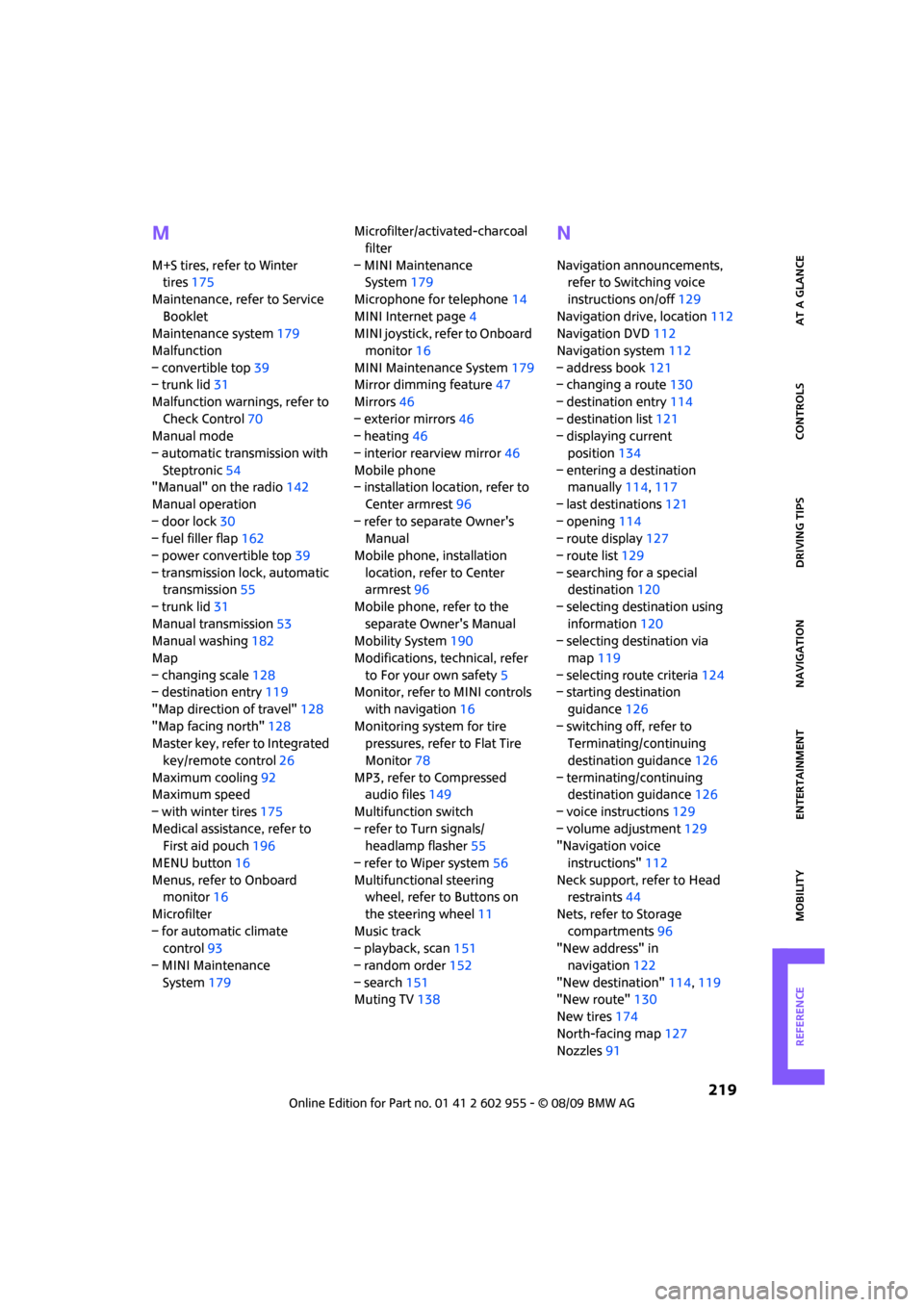
M
M+S tires, refer to Winter
tires175
Maintenance, refer to Service
Booklet
Maintenance system179
Malfunction
– convertible top39
– trunk lid31
Malfunction warnings, refer to
Check Control70
Manual mode
– automatic transmission with
Steptronic54
"Manual" on the radio142
Manual operation
– door lock30
– fuel filler flap162
– power convertible top39
– transmission lock, automatic
transmission55
– trunk lid31
Manual transmission53
Manual washing182
Map
– changing scale128
– destination entry119
"Map direction of travel"128
"Map facing north"128
Master key, refer to Integrated
key/remote control26
Maximum cooling92
Maximum speed
– with winter tires175
Medical assistance, refer to
First aid pouch196
MENU button16
Menus, refer to Onboard
monitor16
Microfilter
– for automatic climate
control93
– MINI Maintenance
System179Microfilter/activated-charcoal
filter
– MINI Maintenance
System179
Microphone for telephone14
MINI Internet page4
MINI joystick, refer to Onboard
monitor16
MINI Maintenance System179
Mirror dimming feature47
Mirrors46
– exterior mirrors46
– heating46
– interior rearview mirror46
Mobile phone
– installation location, refer to
Center armrest96
– refer to separate Owner's
Manual
Mobile phone, installation
location, refer to Center
armrest96
Mobile phone, refer to the
separate Owner's Manual
Mobility System190
Modifications, technical, refer
to For your own safety5
Monitor, refer to MINI controls
with navigation16
Monitoring system for tire
pressures, refer to Flat Tire
Monitor78
MP3, refer to Compressed
audio files149
Multifunction switch
– refer to Turn signals/
headlamp flasher55
– refer to Wiper system56
Multifunctional steering
wheel, refer to Buttons on
the steering wheel11
Music track
– playback, scan151
– random order152
– search151
Muting TV138
N
Navigation announcements,
refer to Switching voice
instructions on/off129
Navigation drive, location112
Navigation DVD112
Navigation system112
– address book121
– changing a route130
– destination entry114
– destination list121
– displaying current
position134
– entering a destination
manually114,117
– last destinations121
– opening114
– route display127
– route list129
– searching for a special
destination120
– selecting destination using
information120
– selecting destination via
map119
– selecting route criteria124
– starting destination
guidance126
– switching off, refer to
Terminating/continuing
destination guidance126
– terminating/continuing
destination guidance126
– voice instructions129
– volume adjustment129
"Navigation voice
instructions"112
Neck support, refer to Head
restraints44
Nets, refer to Storage
compartments96
"New address" in
navigation122
"New destination"114,119
"New route"130
New tires174
North-facing map127
Nozzles91
Page 223 of 230
221
MOBILITYAT A GLANCE CONTROLS DRIVING TIPS ENTERTAINMENT NAVIGATION REFERENCE
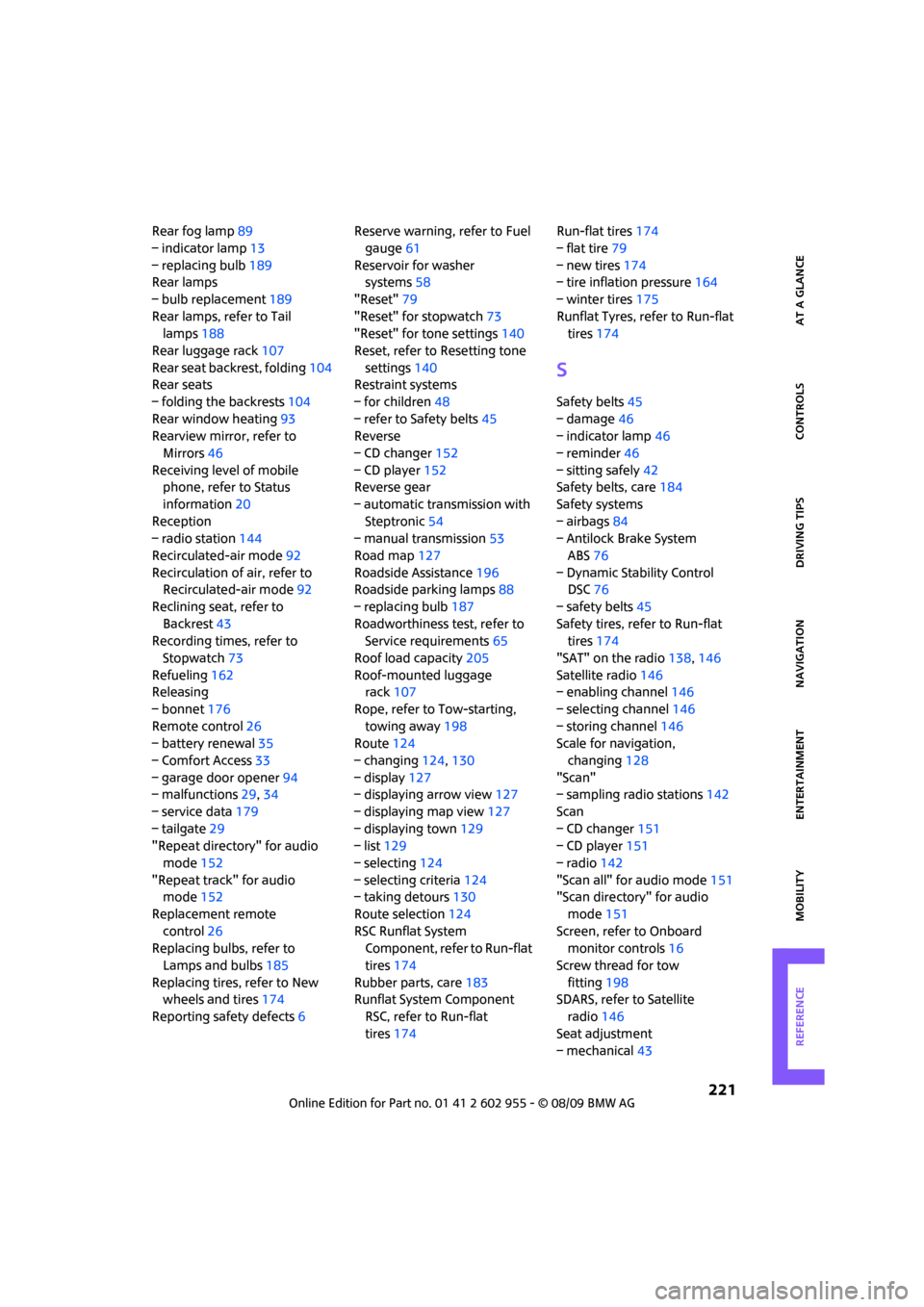
Rear fog lamp89
– indicator lamp13
– replacing bulb189
Rear lamps
– bulb replacement189
Rear lamps, refer to Tail
lamps188
Rear luggage rack107
Rear seat backrest, folding104
Rear seats
– folding the backrests104
Rear window heating93
Rearview mirror, refer to
Mirrors46
Receiving level of mobile
phone, refer to Status
information20
Reception
– radio station144
Recirculated-air mode92
Recirculation of air, refer to
Recirculated-air mode92
Reclining seat, refer to
Backrest43
Recording times, refer to
Stopwatch73
Refueling162
Releasing
– bonnet176
Remote control26
– battery renewal35
– Comfort Access33
– garage door opener94
– malfunctions29,34
– service data179
– tailgate29
"Repeat directory" for audio
mode152
"Repeat track" for audio
mode152
Replacement remote
control26
Replacing bulbs, refer to
Lamps and bulbs185
Replacing tires, refer to New
wheels and tires174
Reporting safety defects6Reserve warning, refer to Fuel
gauge61
Reservoir for washer
systems58
"Reset"79
"Reset" for stopwatch73
"Reset" for tone settings140
Reset, refer to Resetting tone
settings140
Restraint systems
– for children48
– refer to Safety belts45
Reverse
– CD changer152
– CD player152
Reverse gear
– automatic transmission with
Steptronic54
– manual transmission53
Road map127
Roadside Assistance196
Roadside parking lamps88
– replacing bulb187
Roadworthiness test, refer to
Service requirements65
Roof load capacity205
Roof-mounted luggage
rack107
Rope, refer to Tow-starting,
towing away198
Route124
– changing124,130
– display127
– displaying arrow view127
– displaying map view127
– displaying town129
– list129
– selecting124
– selecting criteria124
– taking detours130
Route selection124
RSC Runflat System
Component, refer to Run-flat
tires174
Rubber parts, care183
Runflat System Component
RSC, refer to Run-flat
tires174Run-flat tires174
– flat tire79
– new tires174
– tire inflation pressure164
– winter tires175
Runflat Tyres, refer to Run-flat
tires174
S
Safety belts45
– damage46
– indicator lamp46
– reminder46
– sitting safely42
Safety belts, care184
Safety systems
– airbags84
– Antilock Brake System
ABS76
– Dynamic Stability Control
DSC76
– safety belts45
Safety tires, refer to Run-flat
tires174
"SAT" on the radio138,146
Satellite radio146
– enabling channel146
– selecting channel146
– storing channel146
Scale for navigation,
changing128
"Scan"
– sampling radio stations142
Scan
– CD changer151
– CD player151
– radio142
"Scan all" for audio mode151
"Scan directory" for audio
mode151
Screen, refer to Onboard
monitor controls16
Screw thread for tow
fitting198
SDARS, refer to Satellite
radio146
Seat adjustment
– mechanical43