airbag MINI Hardtop 2 Door 2010 Owner's Manual (Mini Connected)
[x] Cancel search | Manufacturer: MINI, Model Year: 2010, Model line: Hardtop 2 Door, Model: MINI Hardtop 2 Door 2010Pages: 230, PDF Size: 4.02 MB
Page 17 of 230
MOBILITYAT A GLANCE CONTROLS DRIVING TIPS ENTERTAINMENT
15
NAVIGATION REFERENCE
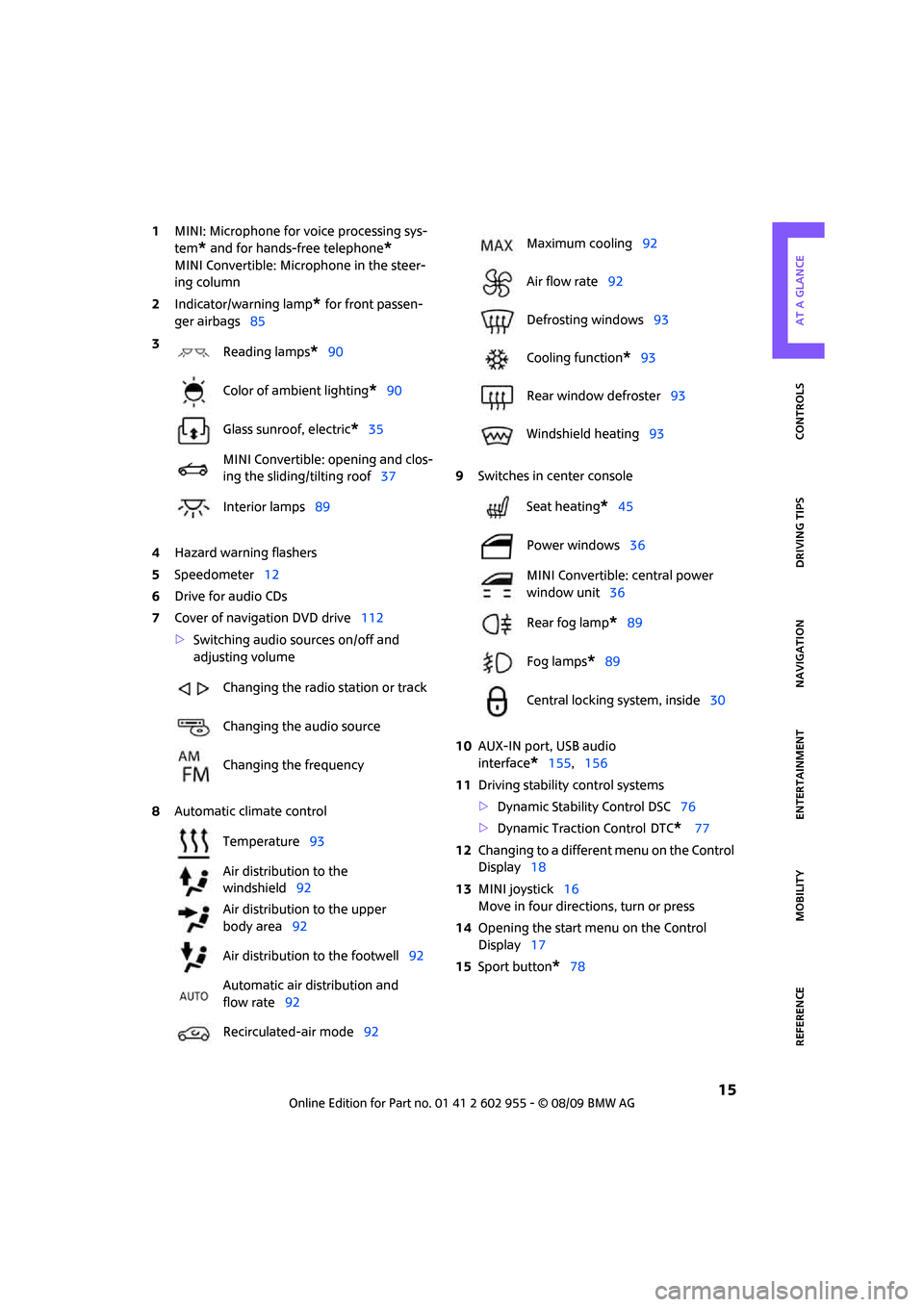
1MINI: Microphone for voice processing sys-
tem
* and for hands-free telephone*
MINI Convertible: Microphone in the steer-
ing column
2Indicator/warning lamp
* for front passen-
ger airbags85
4Hazard warning flashers
5Speedometer12
6Drive for audio CDs
7Cover of navigation DVD drive112
>Switching audio sources on/off and
adjusting volume
8Automatic climate control9Switches in center console
10AUX-IN port, USB audio
interface
*155,156
11Driving stability control systems
>Dynamic Stability Control DSC76
>Dynamic Traction Control
DTC* 77
12Changing to a different menu on the Control
Display18
13MINI joystick16
Move in four directions, turn or press
14Opening the start menu on the Control
Display17
15Sport button
*78 3
Reading lamps
*90
Color of ambient lighting
*90
Glass sunroof, electric
*35
MINI Convertible: opening and clos-
ing the sliding/tilting roof37
Interior lamps89
Changing the radio station or track
Changing the audio source
Changing the frequency
Temperature93
Air distribution to the
windshield92
Air distribution to the upper
body area92
Air distribution to the footwell92
Automatic air distribution and
flow rate92
Recirculated-air mode92
Maximum cooling92
Air flow rate92
Defrosting windows93
Cooling function
*93
Rear window defroster93
Windshield heating93
Seat heating
*45
Power windows36
MINI Convertible: central power
window unit36
Rear fog lamp
*89
Fog lamps
*89
Central locking system, inside30
Page 44 of 230
Adjustments
42
Adjustments
Sitting safely
The ideal sitting position can make a vital contri-
bution to relaxed, fatigue-free driving. In con-
junction with the safety belts, the head restraints
and the airbags, the seated position has a major
influence on your safety in the event of an acci-
dent. To ensure that the safety systems operate
with optimal efficiency, we strongly urge you to
observe the instructions contained in the follow-
ing section.
For additional information on transporting chil-
dren safely, refer to page48.
Airbags
Always maintain an adequate distance
between yourself and the airbags. Always
grip the steering wheel on the rim, with your
hands in the 3 o'clock and 9 o'clock positions, to
minimize the risk of injury to the hands or arms
in the event of the airbag being triggered off.
No one and nothing should come between the
airbags and the seat occupant.
Do not use the cover of the front airbag on the
front passenger side as a storage area. Ensure
that the front passenger is correctly seated, e.g.
that no feet or legs are propped against the
dashboard. Otherwise, leg injury could result if
the front airbag suddenly deployed.
Make sure that passengers keep their heads
away from the side airbag and do not lean
against the cover of the head airbag in the MINI;
otherwise, serious injuries can result if the airbag
deploys. <
Even if you follow all the instructions, injuries
resulting from contact with airbags cannot be
fully excluded, depending on the circumstances.
The ignition and inflation noise may provoke a
mild hearing loss in extremely sensitive individ-
uals. This effect is usually only temporary.
For airbag locations and additional information
on airbags, refer to page84.
Head restraint
A correctly adjusted head restraint reduces the
risk of neck injury in the event of an accident.
Adjust the head restraint in such a way
that its center is at approx. ear level. Oth-
erwise, there is an increased risk of injury in the
event of an accident.<
Head restraints, refer to page44.
Safety belt
Before every drive, make sure that all occupants
wear their safety belts. Airbags complement the
safety belt as an additional safety device, but
they do not represent a substitute.
Never allow more than one person
to wear a single safety belt. Never
allow infants or small children to ride in a pas-
senger's lap.
Make sure that the belt in the lap area sits low
across the hips and does not press against the
abdomen. The safety belt must not rest against
the throat, run across sharp edges, pass over
hard or fragile objects or be pinched. Fasten the
safety belt so that it is pulled taut across the lap
and shoulder, fitting the body snugly without
any twists. Otherwise, the belt could slide over
the hips in the event of a frontal collision and
injure the abdomen. Avoid wearing bulky cloth-
ing and regularly pull the belt in the upper-body
area taut; otherwise, its restraining effect could
be impaired.<
Safety belts, refer to page45.
Seats
Note before adjusting
Never attempt to adjust your seat while
the vehicle is moving. The seat could
respond with unexpected movement, and the
ensuing loss of vehicle control could lead to an
accident.
Page 47 of 230

MOBILITYAT A GLANCE CONTROLS DRIVING TIPS ENTERTAINMENT
45
NAVIGATION REFERENCE
3.Press button1 and pull the head restraint
out as far as it will go.
4.Additionally press button 2 and pull the
head restraint out completely.
5.Fold back the backrest.
Rear
1.Pull up as far as it will go.
2.Press button1 and pull the head restraint
out completely.
Seat heating*
Switching on
Press once for each temperature level.
Three LEDs indicate the highest temperature.
If you continue driving within the next 15 min-
utes, the seat heating is automatically activated
at the previously set temperature.
The temperature is lowered or the heating is
switched off entirely to save on battery power.
The LEDs stay lit.
Switching off
Press button longer.
Safety belts
Observe the instructions on page42 to
ensure the best possible personal pro-
tection.
safety belt as an additional safety device, but
they do not represent a substitute.
Front and rear seats
Closing
Make sure you hear the lock engage in the belt
buckle.
The upper belt anchor is suitable for adults of
any stature as long as the seat is adjusted prop-
erly, page42.
Opening
1.Grasp the belt firmly.
2.Press the red button in the buckle.
3.Guide the belt into its reel.
MINI Convertible: rear belt guide
Please ensure that the belt guide loop,
arrow, is locked when putting on the rear
seat belts.<
Page 50 of 230
Transporting children safely
48
Transporting children safely
The right place for
children
Do not leave children unattended in the
vehicle; otherwise, they could endanger
themselves and/or other persons by opening the
doors, for example.<
Children should always sit in the rear
Accident research has shown that the safest
place for children is on the rear seat.
Only transport children under the age of
13 or smaller than 5 ft/150 cm in the rear
in a child restraint system suitable for their age,
weight and size. Otherwise, there is an
increased risk of injury in the event of an
accident.<
Children 13 years of age or older must be buck-
led in with a safety belt as soon as there no
longer is any child restraint system that is appro-
priate for their age, size and weight.
Only install child seats in the rear when the
rear seat backrest is folded all the way
back and engaged. Otherwise, there is an
increased risk of injury in the event of an
accident.<
Exception for front passenger seat
Front passenger airbags
Should it be necessary to use a child
restraint system on the front passenger
seat, the front and side airbags must be deacti-
vated. Otherwise, there is an increased risk of
injury to the child if the airbags deploy, even if
the child is seated in a child restraint system.<
For more information on automatic deactivation
of the front passenger airbags, refer to page85.
Child restraint systems,
installation
Observe the child restraint system manu-
facturer's instructions when selecting,
installing and using child restraint systems. Oth-
erwise, the protective effect may be dimin-
ished.<
On the front passenger seat
After installing a child restraint system on
the front passenger seat, make sure that
the front and side airbags for the front passen-
ger are deactivated; otherwise, there is an
increased risk of injury if the airbags deploy.<
Seat position
Before installing a child restraint system, move
the front passenger seat as far back and up
*
as possible to obtain the best possible position
for the belt. Do not change the seat position
after this.
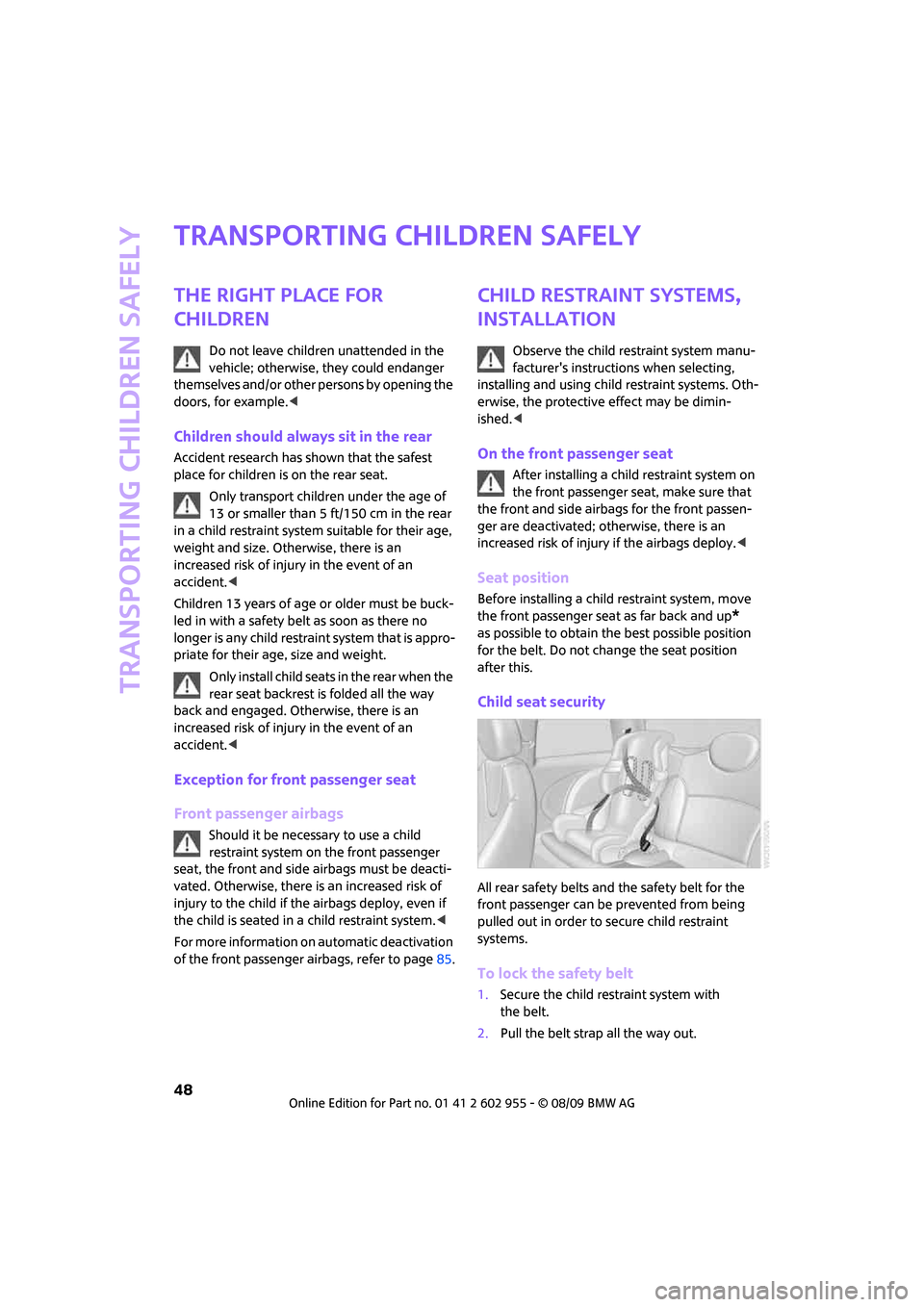
Child seat security
All rear safety belts and the safety belt for the
front passenger can be prevented from being
pulled out in order to secure child restraint
systems.
To lock the safety belt
1.Secure the child restraint system with
the belt.
2.Pull the belt strap all the way out.
Page 86 of 230

Technology for driving comfort and safety
84
Airbags
The following airbags are located under the
marked covers:
MINI:
1Front airbags
2Side airbags in backrests
3Head airbags at the front and rearMINI Convertible:
1Front airbags
2Side/head airbags in the backrests
Protective effect
Observe the instructions on page42 to
ensure the best possible personal pro-
tection.<
The front airbags help protect the driver and
front passenger by responding to frontal
impacts in which safety belts alone cannot pro-
vide adequate restraint. When needed, the head
and side airbags help provide protection in the
event of side impact. The relevant side airbag
supports the side upper body area. The head air
bag supports the head.
The side/head airbag in the MINI Convertible
protects the head during impact.
The airbags are designed to not be triggered in
every type of collision, e.g. not in minor acci-
dents, certain rollover situations or rear impacts.
Do not apply adhesive materials to the
cover panels of the airbags, cover them or
modify them in any other way.
Keep the dashboard and window on the passen-
ger side free from obstruction, i.e. do not cover it
with adhesive film or coverings, and do not affix
any holders such as for a navigation device or a
mobile phone.
Do not attach seat covers, cushions or other
objects not specifically approved for seats with
integral side airbags to the front seats. Do not hang items of clothing such as coats or jackets
over the backrests. Do not attempt to remove
the airbag retention system from the vehicle. Do
not modify the individual components of the
system or its wiring in any way. This includes the
upholstered covers on the steering wheel,
instrument panel, seats and roof posts, as well as
the sides of the roof lining. Do not attempt to
remove or dismantle the steering wheel.
Do not touch the individual components imme-
diately after the system has been triggered,
because there is a danger of burns.
In the event of malfunctions, deactivation, or
triggering of the airbag restraint system, have
the testing, repair, removal, and disposal of air-
bag generators executed only by a MINI dealer
or a workshop that works according to repair
procedures of the manufacturer of your MINI
with correspondingly trained personnel and has
the required explosives licenses. Otherwise,
unprofessional attempts to service the system
could lead to failure in an emergency or undes-
ired airbag activation, either of which could
result in personal injury.<
Warning notices and information about the air-
bags can also be found on the sun visors.
Page 87 of 230
MOBILITYAT A GLANCE CONTROLS DRIVING TIPS ENTERTAINMENT
85
NAVIGATION REFERENCE
Automatic deactivation of the front
passenger airbags
An analysis of the impression in the front pas-
senger seat cushion determines whether and
how the seat is occupied. The front and side air-
bags for the front passenger are activated or
deactivated by the system accordingly.
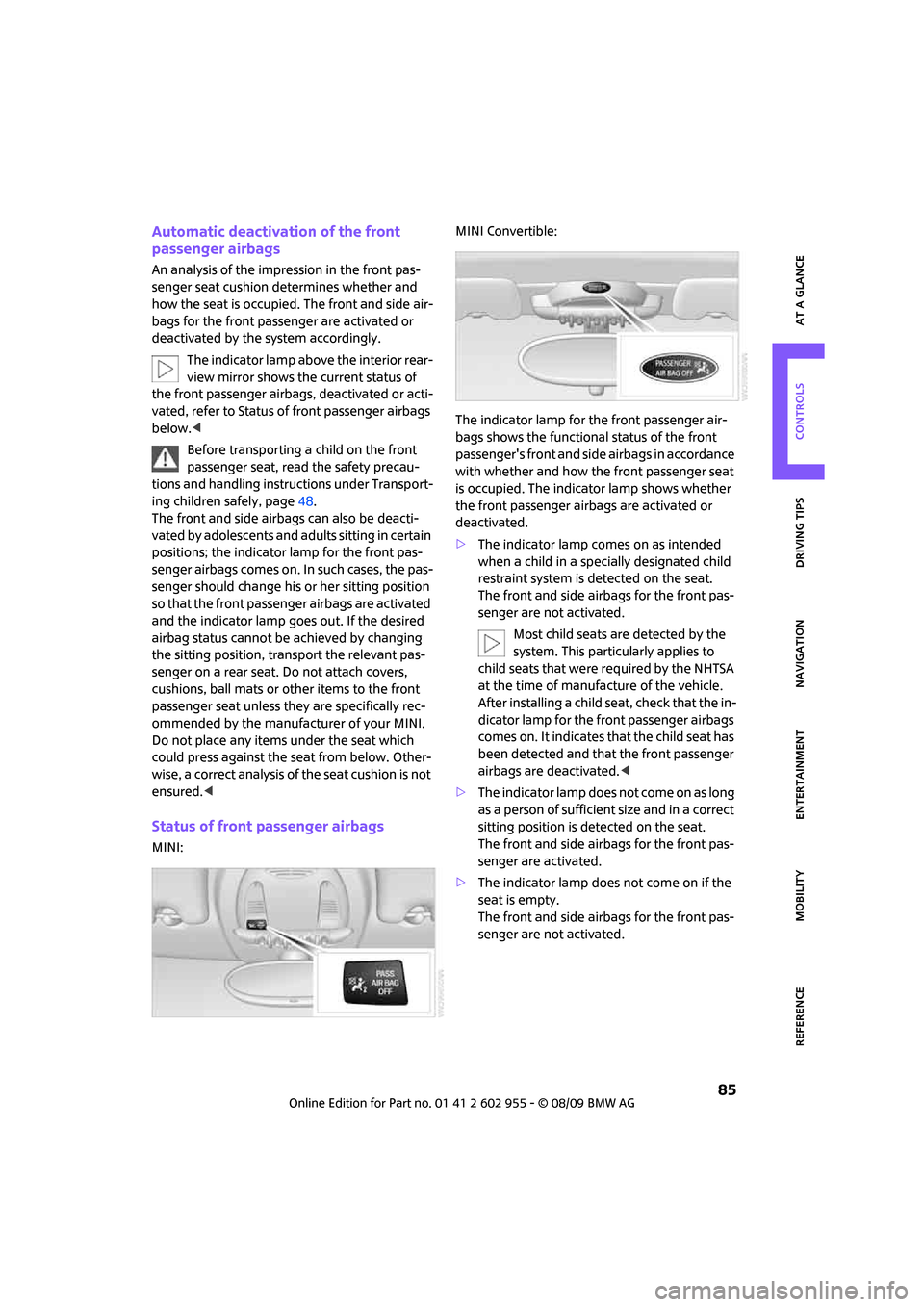
The indicator lamp above the interior rear-
view mirror shows the current status of
the front passenger airbags, deactivated or acti-
vated, refer to Status of front passenger airbags
below.<
Before transporting a child on the front
passenger seat, read the safety precau-
tions and handling instructions under Transport-
ing children safely, page48.
The front and side airbags can also be deacti-
vated by adolescents and adults sitting in certain
positions; the indicator lamp for the front pas-
senger airbags comes on. In such cases, the pas-
senger should change his or her sitting position
so that the front passenger airbags are activated
and the indicator lamp goes out. If the desired
airbag status cannot be achieved by changing
the sitting position, transport the relevant pas-
senger on a rear seat. Do not attach covers,
cushions, ball mats or other items to the front
passenger seat unless they are specifically rec-
ommended by the manufacturer of your MINI.
Do not place any items under the seat which
could press against the seat from below. Other-
wise, a correct analysis of the seat cushion is not
ensured.<
Status of front passenger airbags
MINI:MINI Convertible:
The indicator lamp for the front passenger air-
bags shows the functional status of the front
passenger's front and side airbags in accordance
with whether and how the front passenger seat
is occupied. The indicator lamp shows whether
the front passenger airbags are activated or
deactivated.
>The indicator lamp comes on as intended
when a child in a specially designated child
restraint system is detected on the seat.
The front and side airbags for the front pas-
senger are not activated.
Most child seats are detected by the
system. This particularly applies to
child seats that were required by the NHTSA
at the time of manufacture of the vehicle.
After installing a child seat, check that the in-
dicator lamp for the front passenger airbags
comes on. It indicates that the child seat has
been detected and that the front passenger
airbags are deactivated.<
>T h e i n d i c a t o r l a m p d o e s n o t c o m e o n a s l o n g
as a person of sufficient size and in a correct
sitting position is detected on the seat.
The front and side airbags for the front pas-
senger are activated.
>The indicator lamp does not come on if the
seat is empty.
The front and side airbags for the front pas-
senger are not activated.
Page 88 of 230

Technology for driving comfort and safety
86
Operational readiness of airbag system
As of radio readiness, page51, the warning
lamp comes on briefly to indicate that the entire
airbag system and the belt tensioners are oper-
ational.
Airbag system malfunction
>The warning lamp does not come on
when radio readiness or the ignition is
switched on.
>The warning lamp stays lit continuously.
In the event of a fault in the airbag system,
have it checked without delay; otherwise,
there is the risk that the system will not function
as intended even if a severe accident occurs.<
MINI Convertible:
Rollover protection
system
The rollover system is automatically activated
during an accident or dangerous driving situa-
tion, during extreme tilt of the longitudinal axis,
or during loss of ground contact. The roll bar
located behind the rear seat headrest is pro-
jected within a fraction of a second.
In addition to the reinforced windshield frame,
the rollover protection system ensures the nec-
essary head clearance for all occupants of the
vehicle.
Never block the travel path of the rollover
protection system with any objects.
Always wear your safety belt, it protects you in a
minor car accident and, depending on the
severity of the accident, the seat belt tensioner and the multilevel airbag system will
protect you.<
Lowering
If the rollover protection system releases acci-
dentally, have your MINI Service check it.
If the rollover protective system is
extended, do not operate the conver-
tible top.
Never attempt to modify the individual compo-
nents or the electrical wiring of the rollover pro-
tective system.
Have the necessary work on the rollover protec-
tion system of your MINI only carried out by an
authorized MINI dealer.
Faulty repair may lead to the failure of the sys-
tem or malfunctions.
Check the system regularly and in order to
ensure a long service life of all functions, it is
mandatory to maintain the service intervals,
refer to page65.<
Page 214 of 230
From A to Z
212
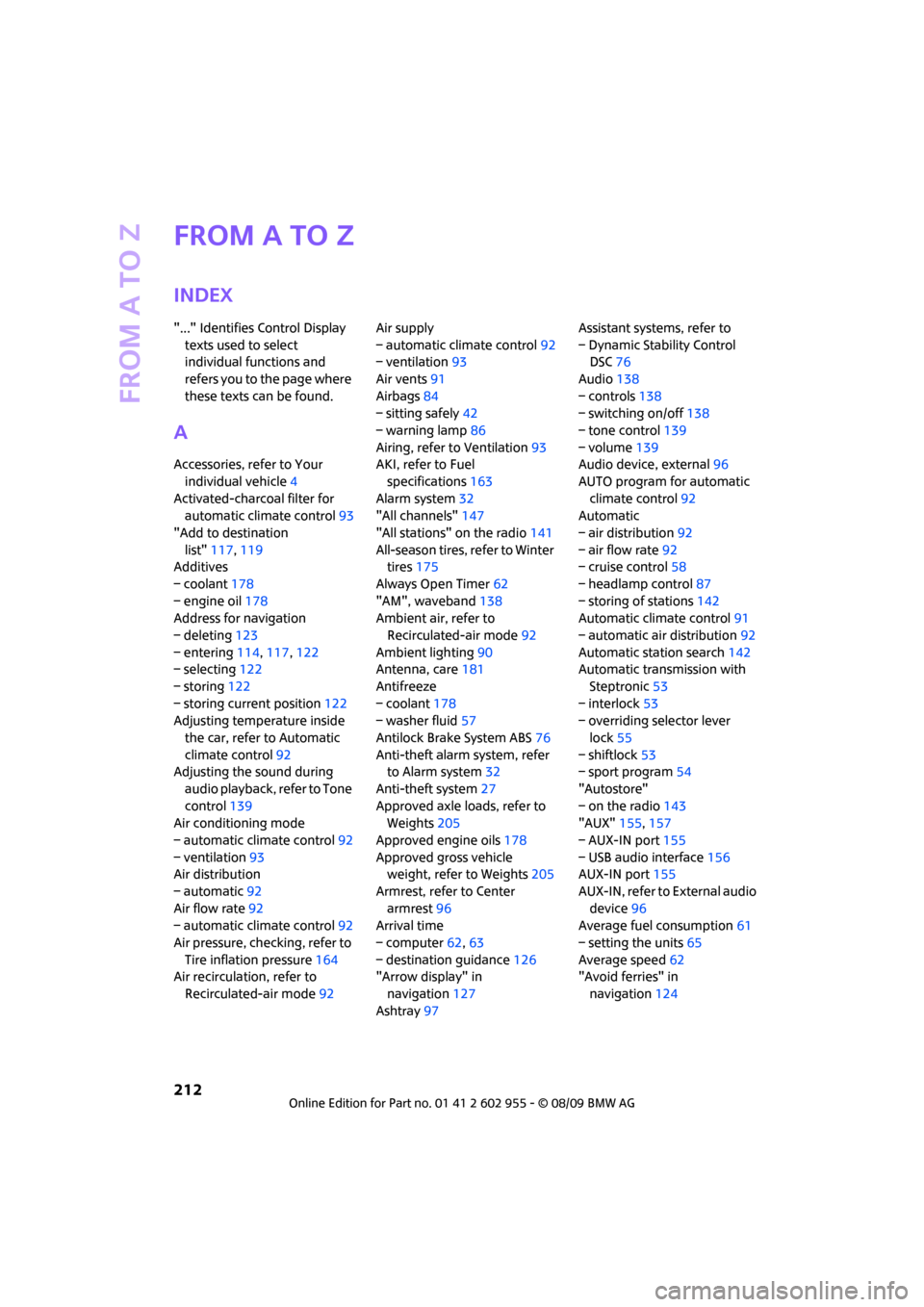
From A to Z
INDEX
"..." Identifies Control Display
texts used to select
individual functions and
refers you to the page where
these texts can be found.
A
Accessories, refer to Your
individual vehicle4
Activated-charcoal filter for
automatic climate control93
"Add to destination
list"117,119
Additives
– coolant178
– engine oil178
Address for navigation
– deleting123
– entering114,117,122
– selecting122
– storing122
– storing current position122
Adjusting temperature inside
the car, refer to Automatic
climate control92
Adjusting the sound during
audio playback, refer to Tone
control139
Air conditioning mode
– automatic climate control92
– ventilation93
Air distribution
– automatic92
Air flow rate92
– automatic climate control92
Air pressure, checking, refer to
Tire inflation pressure164
Air recirculation, refer to
Recirculated-air mode92Air supply
– automatic climate control92
– ventilation93
Air vents91
Airbags84
– sitting safely42
– warning lamp86
Airing, refer to Ventilation93
AKI, refer to Fuel
specifications163
Alarm system32
"All channels"147
"All stations" on the radio141
All-season tires, refer to Winter
tires175
Always Open Timer62
"AM", waveband138
Ambient air, refer to
Recirculated-air mode92
Ambient lighting90
Antenna, care181
Antifreeze
– coolant178
– washer fluid57
Antilock Brake System ABS76
Anti-theft alarm system, refer
to Alarm system
32
Anti-theft system27
Approved axle loads, refer to
Weights205
Approved engine oils178
Approved gross vehicle
weight, refer to Weights205
Armrest, refer to Center
armrest96
Arrival time
– computer62,63
– destination guidance126
"Arrow display" in
navigation127
Ashtray97Assistant systems, refer to
– Dynamic Stability Control
DSC76
Audio138
– controls138
– switching on/off138
– tone control139
– volume139
Audio device, external96
AUTO program for automatic
climate control92
Automatic
– air distribution92
– air flow rate92
– cruise control58
– headlamp control87
– storing of stations142
Automatic climate control91
– automatic air distribution92
Automatic station search142
Automatic transmission with
Steptronic53
– interlock53
– overriding selector lever
lock55
– shiftlock53
– sport program54
"Autostore"
– on the radio143
"AUX"155,157
– AUX-IN port155
– USB audio interface156
AUX-IN port155
AUX-IN, refer to External audio
device96
Average fuel consumption61
– setting the units65
Average speed62
"Avoid ferries" in
navigation124
Page 217 of 230
215
MOBILITYAT A GLANCE CONTROLS DRIVING TIPS ENTERTAINMENT NAVIGATION REFERENCE
Dashboard, refer to Cockpit10
Data202
– capacities206
– dimensions203
– engine202
– weights205
Data recorders180
"Date"70
Date
– setting69
– setting format70
"Date format"70
"Daytime running lamps"88
Daytime running lights88
DBC Dynamic Brake Control,
refer to Brake Assist76
Deactivating front passenger
airbags85
Deadlocking, refer to
Locking28
Defect
– door lock30
– fuel filler flap162
Defogging windows93
Defrost position, refer to
Defrosting windows93
Defrosting windows93
Defrosting windows and
removing condensation
– automatic climate control93
Destination address
– deleting123
– entering114,117
Destination for navigation
– destination list121
– entry114
– home address123
– manual entry114,117
– selecting from address
book122
– selecting using
information120
– selecting via map119
– storing122Destination guidance126
– changing specified route124
– displaying route127
– distance and arrival126
– interrupting126
– starting126
– taking detours130
– terminating/continuing126
– voice instructions129
– volume for voice
instructions129
Destination list for navigation
system121
Destinations recently driven
to121
Detour, refer to Driving around
a traffic congestion134
Differential, breaking in102
Digital clock60
Digital radio, refer to HD
Radio144
Dimensions203
Dipstick, engine oil177
Direction instructions, refer to
Voice instructions129
Directional indicators, refer to
Turn signals55
Directory for navigation, refer
to Address book121
Displacement, refer to Engine
data202
Display lighting, refer to
Instrument lighting89
"Display off"20
Display, refer to Onboard
monitor controls16
Displays12
– instrument combination12
– on the Control Display16
Displays and controls10
Displays, care184
Disposal
– of coolant178
– remote control battery35
– vehicle battery195
"Dist. to dest."63Distance remaining to service,
refer to Service
requirements65
Distance warning, refer to Park
Distance Control PDC75
Diving stability control
systems76
Door key, refer to Integrated
key/remote control26
Door lock29
Door lock, confirmation
signals28
"Door locks"28,30
Doors, manual operation30
DOT Quality Grades172
Drinks holders, refer to
Cupholders97
Drive-off assistant, refer to Hill
Assist78
Driving around a traffic
congestion134
Driving dynamics control, refer
to Sport button78
Driving lamps, refer to Parking
lamps/low beams87
Driving notes102
Driving off on inclines, refer to
Hill Assist78
Driving route, refer to
Displaying route127
Driving through water103
Driving tips, refer to Driving
notes102
Dry air, refer to Cooling
function93
DTC Dynamic Traction Control
DTC77
DVD for navigation112
Dynamic Brake Control DBC,
refer to Brake Assist76
Dynamic Stability Control
DSC76
Dynamic Traction Control77
E
Eject button, refer to Buttons
on the CD player138
Page 218 of 230
From A to Z
216
Electric power windows
– initializing36
Electrical malfunction
– convertible top39
– door lock30
– fuel filler flap162
– trunk lid31
Electronic brake-force
distribution76
Electronic Stability Program
ESP, refer to Dynamic
Stability Control DSC76
Emergency operation, refer to
Manual operation
– convertible top39
– door lock30
– fuel filler flap162
– transmission lock, automatic
transmission55
– trunk lid31
Emergency services, refer to
Roadside Assistance196
Engine
– breaking in102
– data202
– overheated, refer to Coolant
temperature61
– speed202
– starting52
– starting, Comfort Access33
– switching off52
Engine compartment177
Engine coolant, refer to
Coolant178
Engine malfunction
– indicator lamp13Engine oil
– adding178
– additives, refer to Approved
engine oils178
– alternative oil types178
– approved engine oils178
– capacity178
– checking level177
– dipstick177
– intervals between changes,
refer to Service
requirements65
– MINI Maintenance
System179
Engine oil level, checking177
Engine output, refer to Engine
data202
Engine starting, refer to
Starting the engine52
Entering address117
Entering destination115
Entering intersection116
Error messages, refer to Check
Control70
"ESN"145,146,147
ESP Electronic Stability
Program, refer to Dynamic
Stability Control DSC76
Exhaust system, refer to Hot
exhaust system102
Exterior mirrors46
– adjusting46
– automatic heating46
– folding in and out46
External audio device96
External audio device, refer to
AUX-IN port155
Eyes
– for tow-starting and towing
away197
– for tying down loads106
F
Fader, tone control139
Failure messages, refer to
Check Control70
Failure of an electrical
consumer195Fast forward
– CD changer152
– CD player152
"Fast route" in navigation124
Fasten safety belts reminder,
refer to Seat belt
reminder46
Fastening safety belts, refer to
Safety belts45
Fastest route for
navigation124
Filter
– microfilter/activated-
charcoal filter for automatic
climate control93
Fine wood, care184
First aid pouch196
Fixture for remote control,
refer to Ignition lock51
Flash when locking/
unlocking28
Flat tire
– run-flat tires174
– Tire Pressure Monitor TPM80
Flat Tire Monitor FTM78
– indicating a flat tire79
– initializing the system79
– snow chains79
– system limits79
Flat tires, refer to Tire
condition173
Floor mats, care183
"FM", waveband138,141
FM, waveband141
Fog lamps
– replacing bulb187,189
Folding rear seat backrest104
Folding roof, refer to
Convertible top with
integrated sliding sunroof37
Footbrake, refer to Braking
safely103
Footwell lamps89
For your own safety5
Frequency, selecting
manually142
Front airbags84
Front fog lamps89
– replacing bulb187