seats MINI Paceman 2013 User Guide
[x] Cancel search | Manufacturer: MINI, Model Year: 2013, Model line: Paceman, Model: MINI Paceman 2013Pages: 275, PDF Size: 4.23 MB
Page 99 of 275
CONTROLSPractical interior accessories
98
Center armrest front
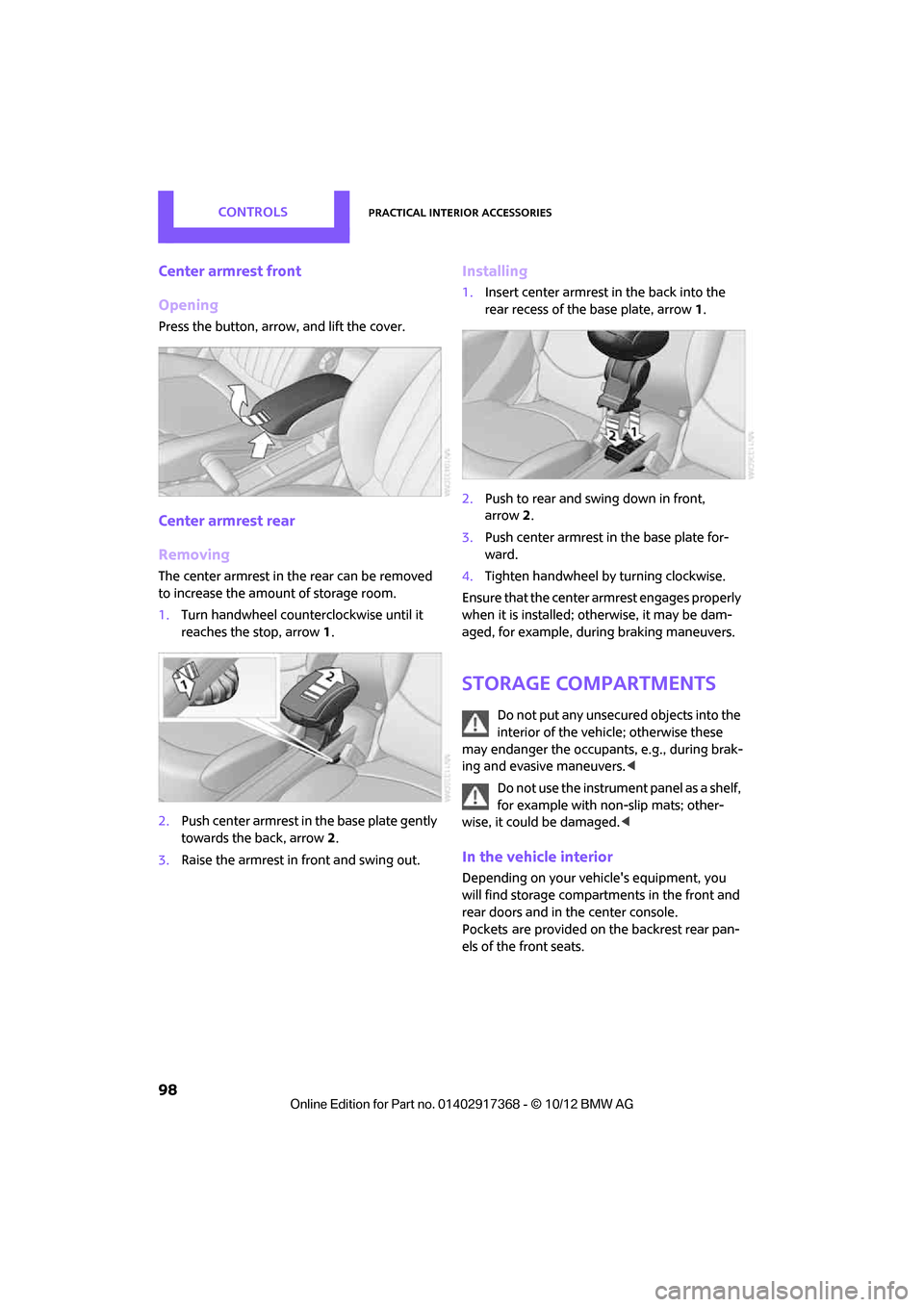
Opening
Press the button, arrow, and lift the cover.
Center armrest rear
Removing
The center armrest in the rear can be removed
to increase the amount of storage room.
1.Turn handwheel counterclockwise until it
reaches the stop, arrow 1.
2. Push center armrest in the base plate gently
towards the back, arrow 2.
3. Raise the armrest in front and swing out.
Installing
1.Insert center armrest in the back into the
rear recess of the base plate, arrow 1.
2. Push to rear and swing down in front,
arrow 2.
3. Push center armrest in the base plate for-
ward.
4. Tighten handwheel by turning clockwise.
Ensure that the center armrest engages properly
when it is installed; ot herwise, it may be dam-
aged, for example, during braking maneuvers.
Storage compartments
Do not put any unsecured objects into the
interior of the vehicle; otherwise these
may endanger the occupant s, e.g., during brak-
ing and evasive maneuvers. <
Do not use the instrument panel as a shelf,
for example with non-slip mats; other-
wise, it could be damaged. <
In the vehicle interior
Depending on your vehicle's equipment, you
will find storage compartments in the front and
rear doors and in the center console.
Pockets
are provided on the backrest rear pan-
els of the front seats.
00320051004F004C00510048000300280047004C0057004C005200510003
Page 100 of 275
Practical interior accessoriesCONTROLS
99
Center Rail
Various accessory parts can be attached to the
Center Rail and installe d in different positions.
Do not use accessory parts near the hand
brake; otherwise these could be damaged
when the hand brake lever is operated. <
Smartphone holder
The upper part of the smartphone holder can be
rotated by 360°.
When installing in the front of the rail, make sure
that there is sufficient space, e.g., away from the
seat; otherwise, damage may be caused when
rotating.
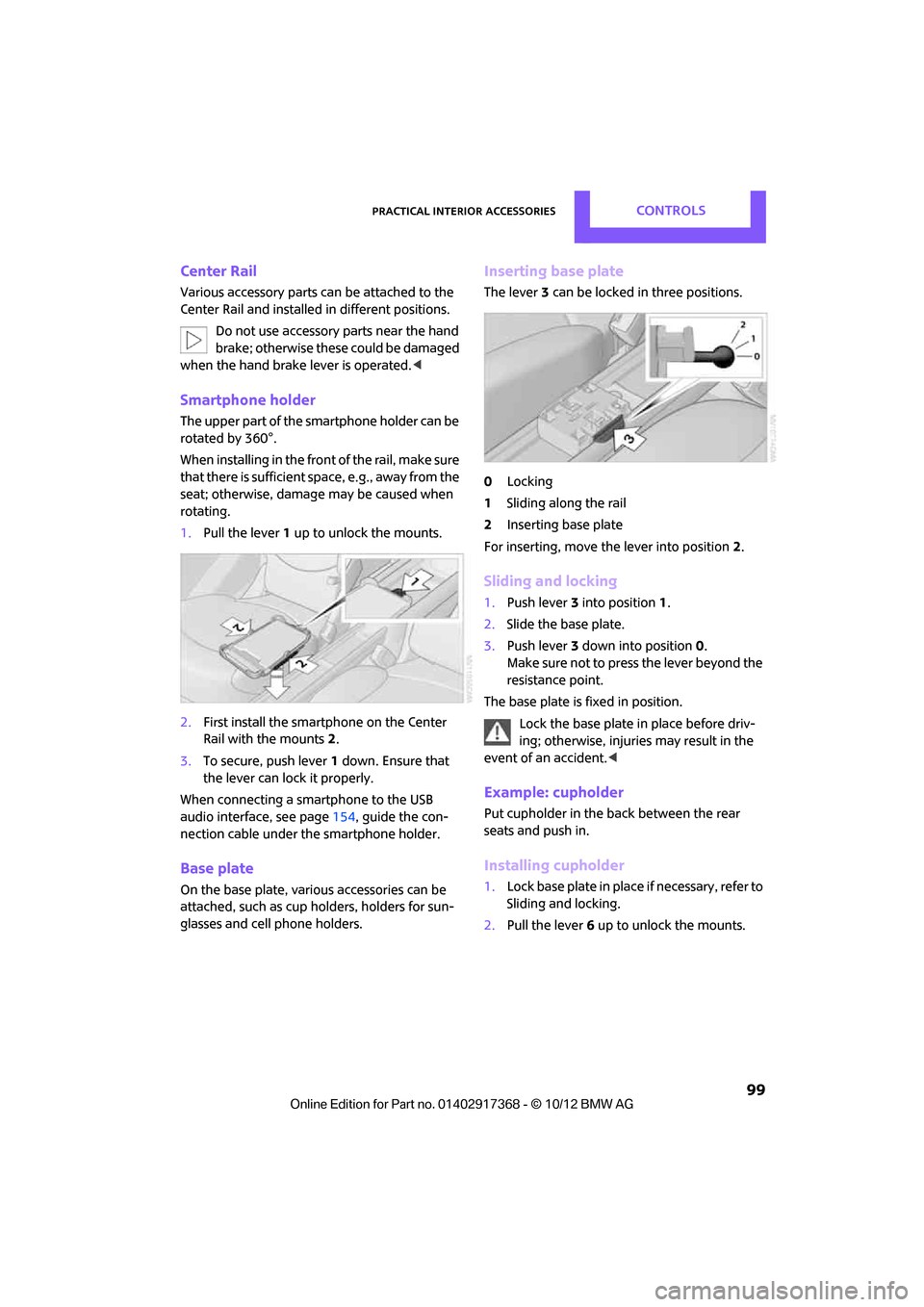
1. Pull the lever 1 up to unlock the mounts.
2. First install the smartp hone on the Center
Rail with the mounts 2.
3. To secure, push lever 1 down. Ensure that
the lever can lock it properly.
When connecting a smartphone to the USB
audio interface, see page 154, guide the con-
nection cable under the smartphone holder.
Base plate
On the base plate, vari ous accessories can be
attached, such as cup holders, holders for sun-
glasses and cell phone holders.
Inserting base plate
The lever 3 can be locked in three positions.
0 Locking
1 Sliding along the rail
2 Inserting base plate
For inserting, move th e lever into position2.
Sliding and locking
1. Push lever 3 into position 1.
2. Slide the base plate.
3. Push lever 3 down into position 0.
Make sure not to press the lever beyond the
resistance point.
The base plate is fixed in position.
Lock the base plate in place before driv-
ing; otherwise, injuries may result in the
event of an accident. <
Example: cupholder
Put cupholder in the back between the rear
seats and push in.
Installing cupholder
1.Lock base plate in plac e if necessary, refer to
Sliding and locking.
2. Pull the lever 6 up to unlock the mounts.
00320051004F004C00510048000300280047004C0057004C005200510003
Page 111 of 275

DRIVING TIPSThings to remember when driving
110
Installing behind the front seats
1.If necessary, remove the cargo area cover.
2. Fold down the rear seat backrests, refer to
Expanding cargo area.
3. Insert each cargo net mounting pin all the
way into its respective front mount in the
headliner, arrow 1, and push it forward.
4. Attach the hook, arrow 2, at the bottom of
each retaining strap to the respective eye on
the vehicle floor.
5. Lash the cargo net se curely. To do so,
tighten the retaining straps at the tensioning
buckles.
Removing
When removing and stowing the cargo net, pro-
ceed in the reverse sequence.
To fold closed, press the release button, arrow.
MINI Countryman: bag holders
Holders on the left and right side of the support
for the cargo area cover, arrow, e.g. for hanging
shopping bags or storage bags.
Only hang light shopping bags or suitable
items on the holders. Otherwise, this may
create a hazard due to flying objects, for exam-
ple in the event of braking and evasive maneu-
vers.
Transport heavy luggage only if it is appropri-
ately secured in the cargo area. <
Determining cargo limit
1.Locate the following statement on your
vehicle's placard:
The combined weight of occupants
and cargo should never exceed
XXX kg or YYY lbs. Otherwise, this could
damage the vehicle and produce unstable
vehicle operating conditions. <
2. Determine the combined weight of the
driver and passengers that will be riding in
your vehicle.
3. Subtract the combined weight of the driver
and passengers from XXX pounds or YYY
kilograms.
00320051004F004C00510048000300280047004C0057004C005200510003
Page 262 of 275
Everything from A to ZREFERENCE
261
B
Background lighting, refer to
Ambient lighting 87
Backrests, refer to Seats 39
Backup lamps
– replacing bulb 228
Band-aids, refer to First aid pouch 236
Bar, refer to Tow-starting,
towing away 239
Base plate for telephone or mobile phone
– refer to Snap-in adapter 185
Bass sounds, refer to Tone control 141
Battery 233
– disposal 35,234
– jump-starting 236
– temporary power failure 234
Battery renewal
– remote control 35
Being towed 238
Belts, refer to Safety belts 42
Belt tensioner, refer to Safety
belts 42
Beverage holders, refer to Cupholders 100
Black ice, refer to External temperature warning 61
Blower, refer to Air flow rate 88,90
Bluetooth, activating/
deactivating 165,175
Bluetooth audio 157
– device pairing 158
– disconnecting an audio connection 160
– playback 159
– unpairing device 160
– what to do if... 160
Bottle holders, refer to
Cupholders 100
Brake Assist 72
Brake fluid, refer to Service
requirements 64 Brake lamps
– replacing bulbs
228
Brake pads, breaking in 104
Brake rotors 106
– brakes 104
– breaking in 104
Brakes
– ABS 72
– breaking in 104
– MINI Maintenance
System 218
– parking brake 52
– service requirements 64
Brakes, refer to Braking safely 105
Br ake system
104
– breaki ng
in104
– disc brakes 106
– MINI Maintenance
System 218
Breakdown service, refer to Roadside Assistance 236
Breaking in the clutch 104
Break-in period 104
Brightness of Control
Display 70
Bulb changing, refer to Lamps and bulbs 224
Button for starting the engine 50
Buttons on the steering wheel 11
C
Calendar 191
– displaying appointment 191
– selecting calendar day 191
California Proposition 65
warning 5
Call
– ending 168,180
– muting the microphone 181
Calling, refer to Phone numbers, dialing 168,180
Can holders, refer to Cupholders 100 Capacities
251
Car battery, refer to Vehicle battery 233
Car care 220
Care 220
– car-care products 220
– car washes 220
– CD/DVD drives 223
– high-pressure washers 221
– leather 222
– manual washing 221
– upholstery and fabrics 222
– windows 221
– wiper blades 221
Cargo, securing 112
Cargo area 106
– capacity 249
– Comfort Access 34
– lamp 87
– opening from outside 31
– trunk lid, refer to Tailgate 31
Cargo area, expanding 106
Cargo area lamp 87
Cargo area lid, refer to Tailgate 31
Cargo area partition net, refer to Cargo net 109
Cargo loading 110
– securing cargo 112
– stowing cargo 111
– vehicle 106
Cargo net 109
Car key, refer to Keys/remote
controls 26
Carpets, care 222
Car phone
– installation location, refer to Center armrest 97
Car phone, refer to
Telephone 164,174
Car radio, refer to Radio 143
Car wash
– before driving in 52
Car wa sh, care
220
Car w a
shes220
Catalytic converter, refer to Hot exhaust system 105
00320051004F004C00510048000300280047004C0057004C005200510003
Page 263 of 275
REFERENCEEverything from A to Z
262
CD, audio playback151
CD player 151
– controls 140
– fast forward/reverse 152
– random order 152
– selecting a track 151
– switching on/off 140
– tone control 141
– volume 141
Center armrest 97
Center brake lamp 229
Center console, refer to Around the center
console 14
Center Rail 99
Center Rail, refer to Storage
compartments 98
Central locking system 27
– Comfort Access 33
– from inside 30
– from outside 27
– setting unlocking
behavior 27
Changing bulbs 224
Changing the language on the
Control Display 69
Changing the measurement units on the Control
Display 64
Changing wheels 232
Charging the battery 234
Chassis number, refer to Engine compartment 214
Check Control 67
Child restraint fixing system LATCH 47
Child restraint systems 46
Child-safety locks 49
Child seats 46
Chrome parts, care 222
Chrome parts, refer to Care 220
Cigarette lighter 100
Cleaning headlamps 57
– washer fluid 57 Clock
– setting time
66
– 12 h/24 h mode 66
Closing
– from inside 30
– from outside 27
Clothes hooks 100
Cockpit 10
Cold start, refer to Starting the engine 51
Comfort Access 33
– replacing the battery 35
– what to observe before
enteri ng a car wash
34
C o
mfort area, refer to Around
the center console 14
Compartment for remote control, refer to Ignition
lock 50
Compass 95
Computer 61
– displays on Control
Display 62
Condensation, refer to When the vehicle is parked 106
Condition Based Service CBS 218
Configuring settings, refer to
Personal Profile 26
Connecting vacuum cleaner,
refer to Connecting electrical
appliances 101
Consumption, refer to Average
fuel consumption 61
Contacts 171,188
– new contact 189
Continuing route guidance 129
Control Display
– adjusting brightness 70
Control Display, refer to iDrive
– switching on/off 16
Control Display, refer to Onboard computer 16
– adjusting brightness 70
Controls and displays 10Control stick, refer to Onboard
computer 16
Control unit, refer to Onboard computer 16
Convenience operation
– windows 28
Convenient access, refer to
Comfort Access 33
Convenient star t, refer to
Starting the engine 51
Coolant 217
– checking level 217
– filling 217
– temperature 217
Cooling, maximum 91
Cooling fluid, refer to
Coolant 217
Copyright 2
Cornering light, refer to
Adaptive Light Control 85
Criteria for route 129
Cruise control
– indicator lamp 13
Cruising range 61
Cupholders 100
Curb weight, refer to Weights 249
Current fuel consumption 62
Curren t playback
– external d
evices156
D
Dashboard, refer to Cockpit 10
Dashboard instruments, refer to Displays 12
Dashboard lighting, refer to Instrument lighting 86
Data 244
– capacities 251
– dimensions 246
– engine 244
– weights 249
Date
– setting 67
– setting format 67
Daytime running lights 85
00320051004F004C00510048000300280047004C0057004C005200510003
Page 266 of 275

Everything from A to ZREFERENCE
265
Gasoline display, refer to Fuel gauge 60
Gear indicator
– automatic transmission with
Steptronic 53
Gear shifting
– automatic transmission 53
– manual transmission 52
Gearshift lever
– automatic transmission with
Steptronic 53
– manual transmission 52
General driving notes 104
Glass roof, electric 35
– convenience operation 28
– opening, closing 35
– remote control 28
– tilting 35
Glove compartment 97
GPS navigation, refer to Navigation system 118
Gross vehicle weight, refer to
Weights 249
H
Halogen lamps
– replacing bulb 225
Handbrake, refer to Parking brake 52
Hands-free device Bluetooth 164
Hands-free
system 14,171 ,183
Hazard warning flashers 14
HD Radio 144
Head airbags 81
Headlamp control, automatic 84
Headlamp flasher 55
– indicator lamp 11,13,88,91
Headlamp glass lens 225
Headlamps
– replacing bulb 225
Headlamps, care 221
Head Light, refer to Adaptive Light Control 85 Head restraints
41
– sitting safely 38
Heated
– mirrors 45
– rear window 89,91
– seats 42
Heating
– mirrors 45
– rear window 89,91
– seats 42
Heavy loads, refer to Stowing cargo 111
Height, refer to
Dimensions 246
Height adjustment
– seats 39
– steering wheel 45
High beams 86
– headlamp flasher 86
– indicator lamp 13,88,91
– replacing bulb 225
High water, refer to Driving
through water 105
Highway, refer to Route criteria 129
Hill Assist 74
Hills 106
Holders for cups 100
Homepage 4
Hoo d
215
Horn 10
Hot exhaust sy
stem 105
Hydroplaning 105
I
IBOC, refer to HD Radio 144
Ice warning, refer to External temperature warning 61
Ignition 50
– switched off 51
– switched on 50
Ignition key, refer to Integrated key/remote
control 26
Ignition key position 1, refer to Radio readiness 50Ignition key position 2, refer to
Ignition on 50
Ignition lock 50
Imprint 2
Incoming call 167,179
Indicator and warning lamps 13
– Tire Pressure Monitor TPM 78
Indicator lighting, refer to Instrument lighting 86
Individual air distribution 89
Individual settings, refer to Personal Profile 26
Inflation pressure monitoring, refer to Tire Pressure Monitor
TPM 77
Information
– on another location 124
– on current position 124
– on destination location 124
Initializing
– Flat Tire Monitor FTM 75
– glass roof, electric 36
– radio, refer to Station, storing 144
Initializing the
– compass, see Calibration 96
Instructions for navigation
system, refer to Voice
instructions 133
Instrument lighting 86
Instrument pane l, refer to
Cockpit 10
Instrument pane l, refer to
Displays 12
Integrated key 26
Integrated universal remote control 93
Interactive map 126
Interesting destination for navigation 124
Interior lamps 87
– remote control 28
Interior rearview mirror 45
– automatic dimming
feature 45
Interlock 53
00320051004F004C00510048000300280047004C0057004C005200510003
Page 269 of 275
REFERENCEEverything from A to Z
268
P
Paintwork, care221
Park Distance Control PDC 71
Parking
– vehicle 51
Parking aid, refer to Park
Distance Control PDC 71
Parking brake 52
– indicator lamp 13
Parking lamps, replacing bulb 226
Parking lamps/low beams 84
Parts and accessories, see Vehicle equipment 4
Pathway lighting 85
Personal Profile 26
Phone numbers
– dialing 168,180
Pinch protection system
– windows 37
Plastic parts, care 223
Pollen
– refer to Microfilter/activated- charcoal filter for automatic
climate control 91
– refer to Microfilter for air conditioner 89
Power failure 234
Power window
– safety switch 37
Power windows 36
Power windows, refer to
Windows 36
Pressure, tires 203
Pressure moni toring, tires75
– Flat Tire Monitor 75
Pressure monitoring of tires, refer to Tire Pressure Monitor
TPM 77
Protective function, refer to Pinch protection system
– windows 37
Puncture
– Flat Tire Monitor 75
R
Radio
– controls140
– HD Radio 144
– satellite radio 145
– storing stations 144
– tone control 141
– volume 141
– waveband, selecting 143
Radio key, refer to Integrated key/remote control 26
Radio position, refer to Radio
readiness 50
Radio readiness 50
– switched off 51
– switched on 50
Rain sensor 56
Random play sequence
– external devices 156
Range, refer to Cruising range 61
Reading aloud 193
Reading lamps 87
Rear lamps
– bulb replacement 228
Rear lamps, refer to Tail lamps 228
Rear-mounted luggage rack 113
Rear seat back rest, folding106
Rear seats
– adjusting 40
– folding down the backrests 106
Rearview mirror
– compass 95
Rearview mirror, refer to Mirrors 44
Rear window
– windshield wiper 57
Rear window defroster 89,91
Rear window safety switch 37
Reception
– quality 144
– radio station 144 Recirculated-air mode
89,90
Recirculation of air, refer to Recirculated-air
mode 89,90
Reclining seat , refer to
Backrest 39
Refueling 200
Rejecting a call 168,180
Releasing
– hood 215
Reminders 192
Remote control 26
– battery renewal 35
– Comfort Access
33
– garage
door opener 93
– malfunctions 29,34
– service data 218
– tailgate 28
Replacement remote
control 26
Replacing bulbs, refer to Lamps and bulbs 224
Replacing tires, refer to New
wheels and tires 212
Reporting safety defects 7
Reserve warning, refer to Fuel gauge 60
Reservoir for washer
systems 57
Reset, refer to Resetting tone
settings 142
Restraint systems
– for children 46
– refer to Safety belts 42
Reverse
– CD player 152
Reverse gear
– automatic transmission with Steptronic 53
– manual transmission 52
Road map 131
Roadside Assistance 236
Roadside parking lamps 86
– replacing bulb 226
Road worthiness test, refer to
Service requirements 64
00320051004F004C00510048000300280047004C0057004C005200510003
Page 270 of 275

Everything from A to ZREFERENCE
269
Roof load capacity249
Roof-mounted luggage rack 112
Rope, refer to Tow-starting,
towing away 239
Route 129,130
– bypassing sections 130
– changing 129,130
– changing criteria 129
– displaying arrow view 130
– displaying map view 131
– displaying streets or towns/ cities 130
– selecting 129
Route guidance 129
– bypassing a route
section 130
– changing specified route 129
– distance and arrival 129
– voice instructions 133
– volume of voice instructions 133
Route section, changing 130
Route selection 129
RSC Run-flat System
Component, refer to Run-flat
tires 212
Rubber parts, care 222
Run-flat System Component RSC, refer to Run-flat
tires 212
Run-flat tires 212
– flat tire 76
– Flat Tire Monitor 76
– tire inflation pressure 203
– tire replacement 212
– winter tires 213
S
Safety belt
– number38
Safety Belt Reminder 44 Safety belts
42
– center belt 43
– damage 44
– indicator lamp 44
– reminder 44
– sitting safely 38
Safety belts, care 223
Safety systems
– airbags 81
– Antilock Brake System
ABS 72
– driving stability control systems 72
– Dynamic Stability Control DSC 72
– safety belts 42
Safety tires, refer to Run-flat tires 212
Satellite radio 145
– channel, activating or deactivating 146
– channel, selecting 146
– channel, storing 147
– favorites 148
– time shift 147
– Traffic Jump 149
Screen, refer to Onboard computer controls 16
Screw thread for tow fitting 238
SDARS, refer to Satellite radio 145
Seat adjustment
– mechanical 39
– rear 40
Seats 39
– adjusting the seats 39
– heating 42
– sitting safely 38
Securing the vehicle
– from inside 30
– from outside 27
Selecting navigation system 118
Selecting new scale for
navigation 132 Selector lever
– automatic transmission with
Steptronic 53
Selector lever lock
– automatic transmission with Steptronic, refer to
Shiftlock 53
– overriding manually 54
Selector lever positions
– automatic transmission with
Steptronic 53
Service, refer to Roadside Assistance 236
Service car, refer to Roadside Assi stance
236
Service data
in the remote
control 218
Service Interval Display, refer to Condition Based Service
CBS 218
Service requirement display, refer to Condition Based
Service CBS 218
Service requirements 64
Settings
– clock, 12 h/24 h mode 66
– date format 67
– language 69
Settings and information 62
Setting time and date 66
Setting time zone, time, and date 66
Shifting gears
– automatic transmission with Steptronic 54
– manual transmission 52
Shiftlock
– automatic transmission, refer to Changing selector lever
positions 53
Shift paddles 54
Short commands for the voice
activation system 252
Short route in navigation, refer to Selecting route 129
00320051004F004C00510048000300280047004C0057004C005200510003