inflation pressure MINI Paceman 2014 (Mini Connected) User Guide
[x] Cancel search | Manufacturer: MINI, Model Year: 2014, Model line: Paceman, Model: MINI Paceman 2014Pages: 282, PDF Size: 6.76 MB
Page 221 of 282
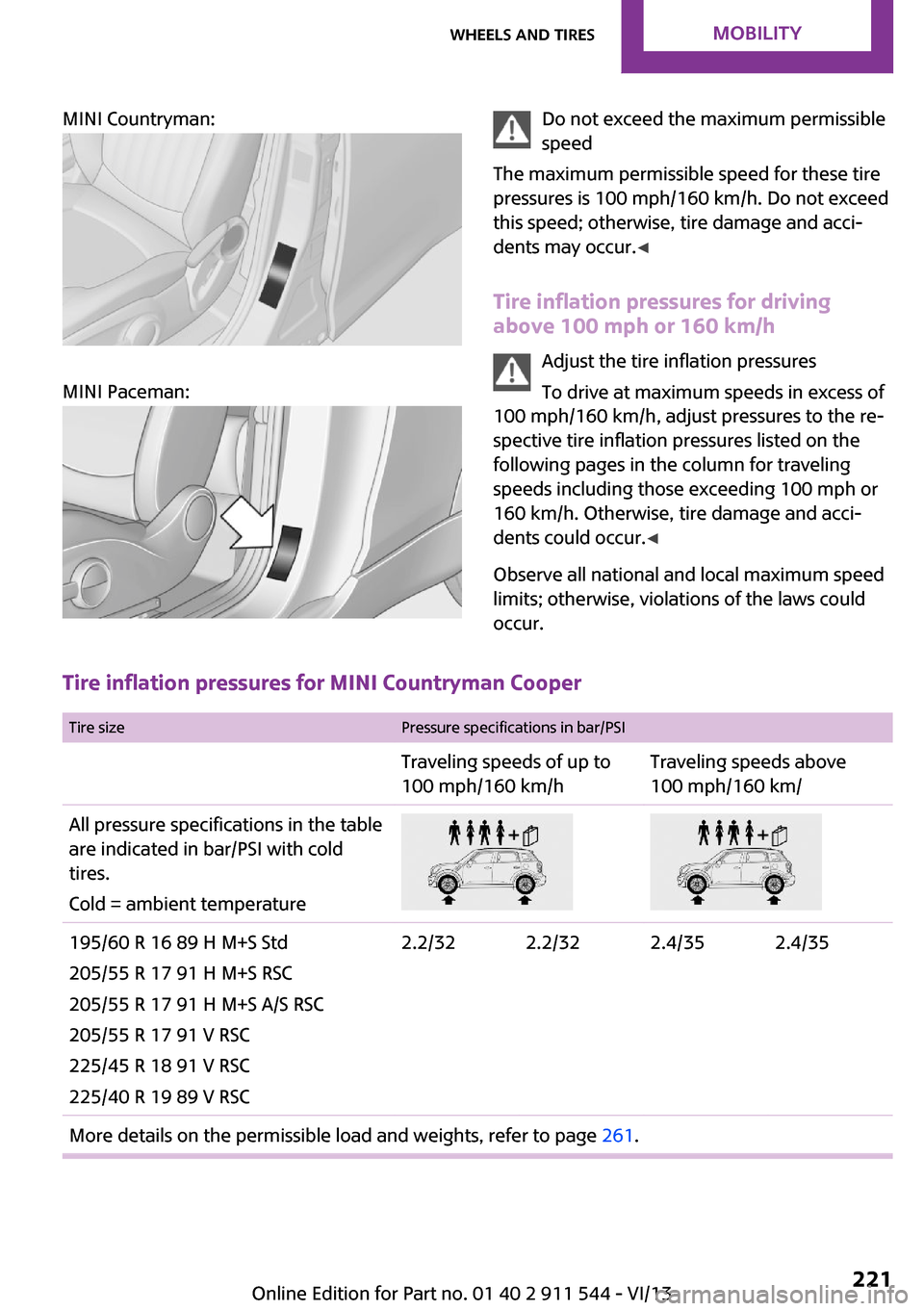
MINI Countryman:
MINI Paceman:
Do not exceed the maximum permissible
speed
The maximum permissible speed for these tire
pressures is 100 mph/160 km/h. Do not exceed
this speed; otherwise, tire damage and acci‐
dents may occur. ◀
Tire inflation pressures for driving
above 100 mph or 160 km/h
Adjust the tire inflation pressures
To drive at maximum speeds in excess of
100 mph/160 km/h, adjust pressures to the re‐
spective tire inflation pressures listed on the
following pages in the column for traveling
speeds including those exceeding 100 mph or
160 km/h. Otherwise, tire damage and acci‐
dents could occur. ◀
Observe all national and local maximum speed limits; otherwise, violations of the laws could
occur.
Tire inflation pressures for MINI Countryman Cooper
Tire sizePressure specifications in bar/PSITraveling speeds of up to
100 mph/160 km/hTraveling speeds above
100 mph/160 km/All pressure specifications in the table are indicated in bar/PSI with cold
tires.
Cold = ambient temperature195/60 R 16 89 H M+S Std
205/55 R 17 91 H M+S RSC
205/55 R 17 91 H M+S A/S RSC
205/55 R 17 91 V RSC
225/45 R 18 91 V RSC
225/40 R 19 89 V RSC2.2/322.2/322.4/352.4/35More details on the permissible load and weights, refer to page 261.Seite 221Wheels and tiresMobility221
Online Edition for Part no. 01 40 2 911 544 - VI/13
Page 222 of 282
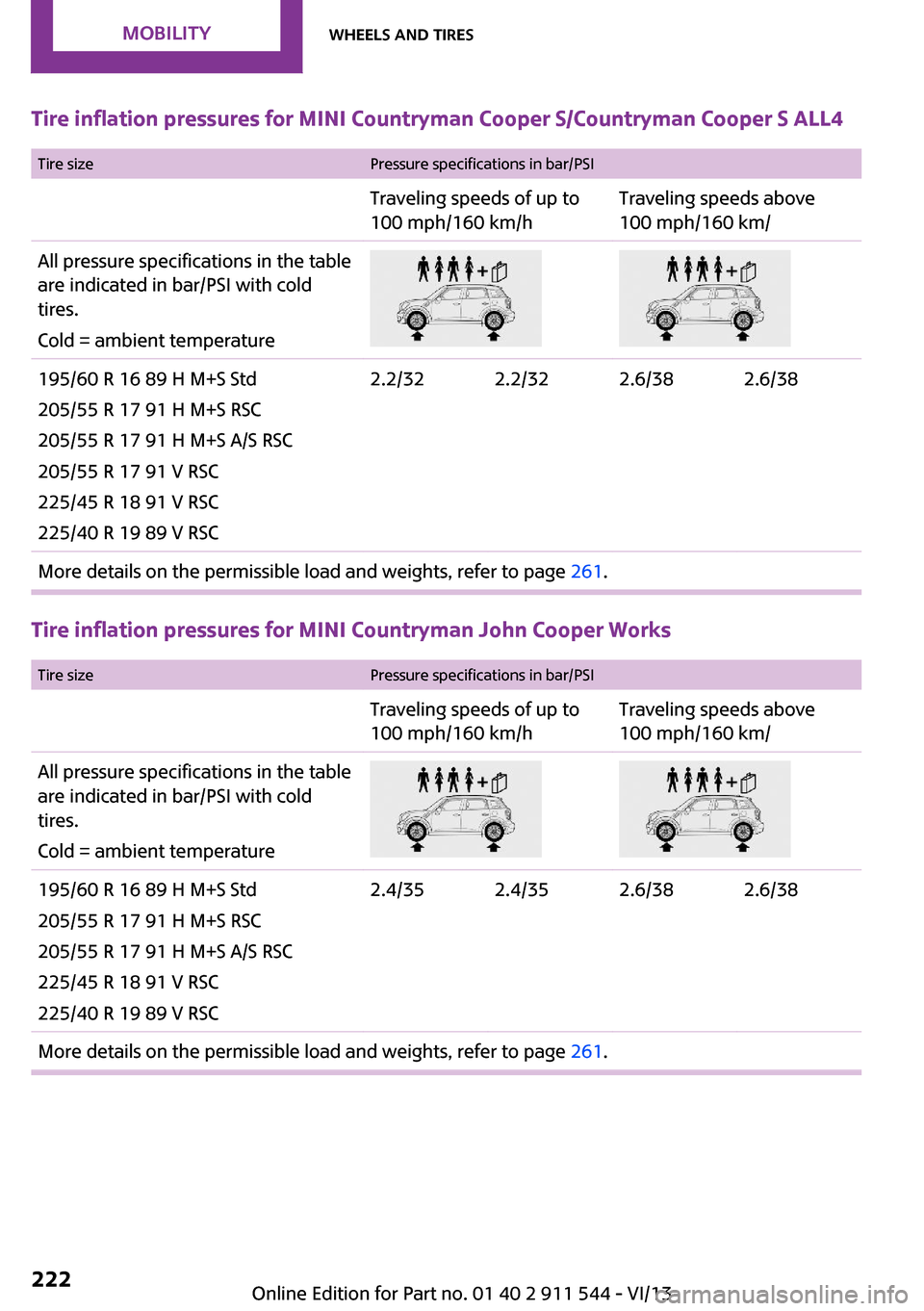
Tire inflation pressures for MINI Countryman Cooper S/Countryman Cooper S ALL4
Tire sizePressure specifications in bar/PSITraveling speeds of up to
100 mph/160 km/hTraveling speeds above
100 mph/160 km/All pressure specifications in the table are indicated in bar/PSI with cold
tires.
Cold = ambient temperature195/60 R 16 89 H M+S Std
205/55 R 17 91 H M+S RSC
205/55 R 17 91 H M+S A/S RSC
205/55 R 17 91 V RSC
225/45 R 18 91 V RSC
225/40 R 19 89 V RSC2.2/322.2/322.6/382.6/38More details on the permissible load and weights, refer to page 261.
Tire inflation pressures for MINI Countryman John Cooper Works
Tire sizePressure specifications in bar/PSITraveling speeds of up to
100 mph/160 km/hTraveling speeds above
100 mph/160 km/All pressure specifications in the table are indicated in bar/PSI with cold
tires.
Cold = ambient temperature195/60 R 16 89 H M+S Std
205/55 R 17 91 H M+S RSC
205/55 R 17 91 H M+S A/S RSC
225/45 R 18 91 V RSC
225/40 R 19 89 V RSC2.4/352.4/352.6/382.6/38More details on the permissible load and weights, refer to page 261.Seite 222MobilityWheels and tires222
Online Edition for Part no. 01 40 2 911 544 - VI/13
Page 223 of 282
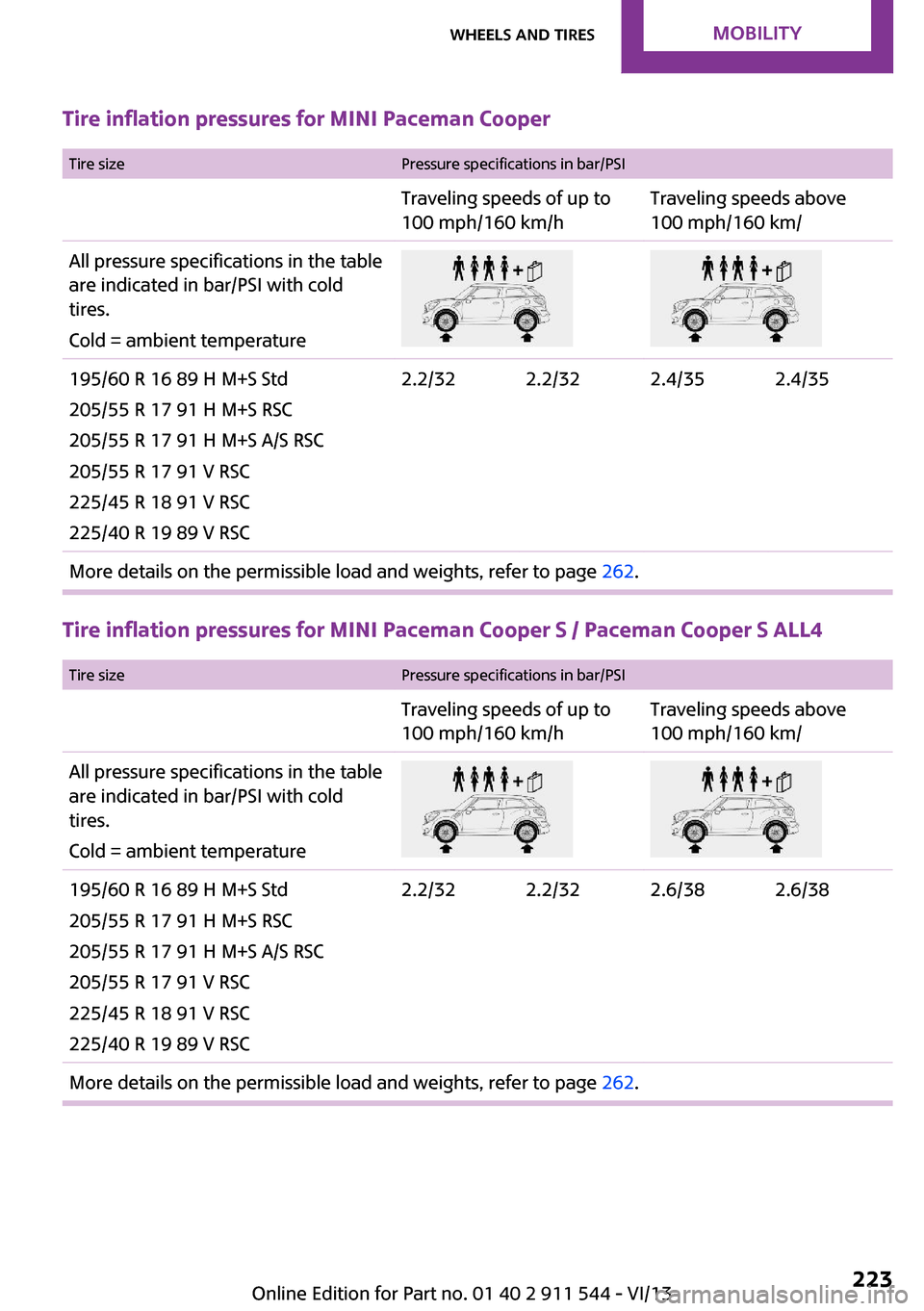
Tire inflation pressures for MINI Paceman Cooper
Tire sizePressure specifications in bar/PSITraveling speeds of up to
100 mph/160 km/hTraveling speeds above
100 mph/160 km/All pressure specifications in the table are indicated in bar/PSI with cold
tires.
Cold = ambient temperature195/60 R 16 89 H M+S Std
205/55 R 17 91 H M+S RSC
205/55 R 17 91 H M+S A/S RSC
205/55 R 17 91 V RSC
225/45 R 18 91 V RSC
225/40 R 19 89 V RSC2.2/322.2/322.4/352.4/35More details on the permissible load and weights, refer to page 262.
Tire inflation pressures for MINI Paceman Cooper S / Paceman Cooper S ALL4
Tire sizePressure specifications in bar/PSITraveling speeds of up to
100 mph/160 km/hTraveling speeds above
100 mph/160 km/All pressure specifications in the table are indicated in bar/PSI with cold
tires.
Cold = ambient temperature195/60 R 16 89 H M+S Std
205/55 R 17 91 H M+S RSC
205/55 R 17 91 H M+S A/S RSC
205/55 R 17 91 V RSC
225/45 R 18 91 V RSC
225/40 R 19 89 V RSC2.2/322.2/322.6/382.6/38More details on the permissible load and weights, refer to page 262.Seite 223Wheels and tiresMobility223
Online Edition for Part no. 01 40 2 911 544 - VI/13
Page 224 of 282
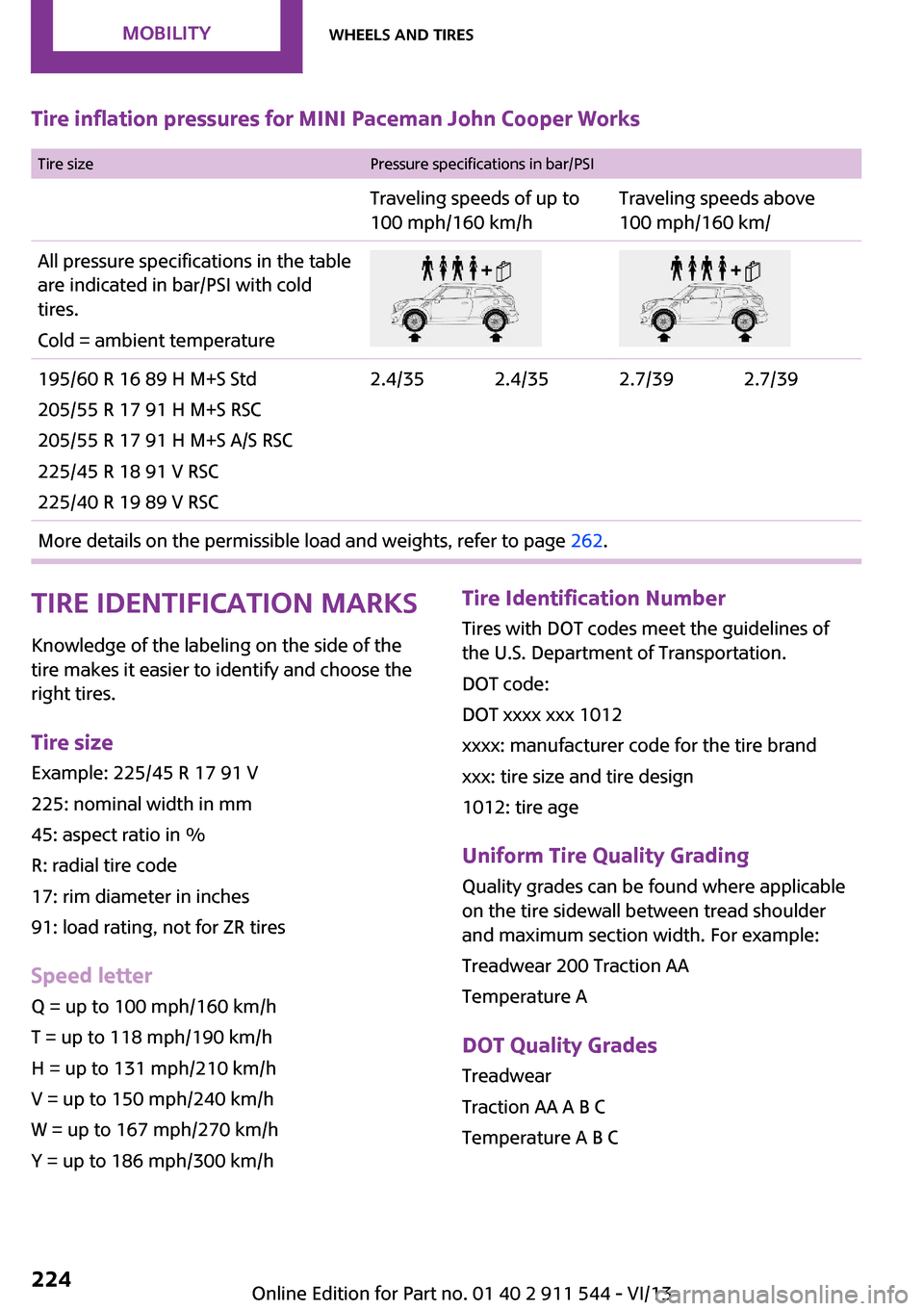
Tire inflation pressures for MINI Paceman John Cooper Works Tire sizePressure specifications in bar/PSITraveling speeds of up to
100 mph/160 km/hTraveling speeds above
100 mph/160 km/All pressure specifications in the table are indicated in bar/PSI with cold
tires.
Cold = ambient temperature195/60 R 16 89 H M+S Std
205/55 R 17 91 H M+S RSC
205/55 R 17 91 H M+S A/S RSC
225/45 R 18 91 V RSC
225/40 R 19 89 V RSC2.4/352.4/352.7/392.7/39More details on the permissible load and weights, refer to page 262.Tire identification marks
Knowledge of the labeling on the side of the tire makes it easier to identify and choose the
right tires.
Tire size Example: 225/45 R 17 91 V
225: nominal width in mm
45: aspect ratio in %
R: radial tire code
17: rim diameter in inches
91: load rating, not for ZR tires
Speed letter Q = up to 100 mph/160 km/h
T = up to 118 mph/190 km/h
H = up to 131 mph/210 km/h
V = up to 150 mph/240 km/h
W = up to 167 mph/270 km/h
Y = up to 186 mph/300 km/hTire Identification Number Tires with DOT codes meet the guidelines of
the U.S. Department of Transportation.
DOT code:
DOT xxxx xxx 1012
xxxx: manufacturer code for the tire brand
xxx: tire size and tire design
1012: tire age
Uniform Tire Quality Grading Quality grades can be found where applicable
on the tire sidewall between tread shoulder
and maximum section width. For example:
Treadwear 200 Traction AA
Temperature A
DOT Quality Grades
Treadwear
Traction AA A B C
Temperature A B CSeite 224MobilityWheels and tires224
Online Edition for Part no. 01 40 2 911 544 - VI/13
Page 228 of 282
Maximum speed of winter tires
If the maximum speed of the vehicle is higher
than the permissible speed for the winter tires,
then display a corresponding sign in the field of
vision. You can obtain this sign from the tire
specialist or from your service center.
Maximum speed for winter tires
Do not exceed the maximum speed for
the winter tires; otherwise, tire damage and ac‐
cidents can occur. ◀
Run-flat tires When mounting new tires or changing fromsummer to winter tires or vice versa, use run-
flat tires for your own safety. Also, a compact
wheel is not available in case of a flat tire. Your
service center will be glad to advise you.
Rotating wheels between axles
Different wear patterns occur on the front and
rear axles, depending on the individual condi‐
tions of use.
To ensure even wear on the tires, the wheels
can be rotated between the axles. Your service
center will be glad to advise you.
After changing the tires, check the tire inflation
pressure and correct it if necessary.
Storage Store wheels and tires in a cool, dry place with
as little exposure to light as possible.
Always protect tires against all contact with oil,
grease and fuels.
Do not exceed the maximum tire inflation pres‐
sure indicated on the side wall of the tire.Run-flat tires
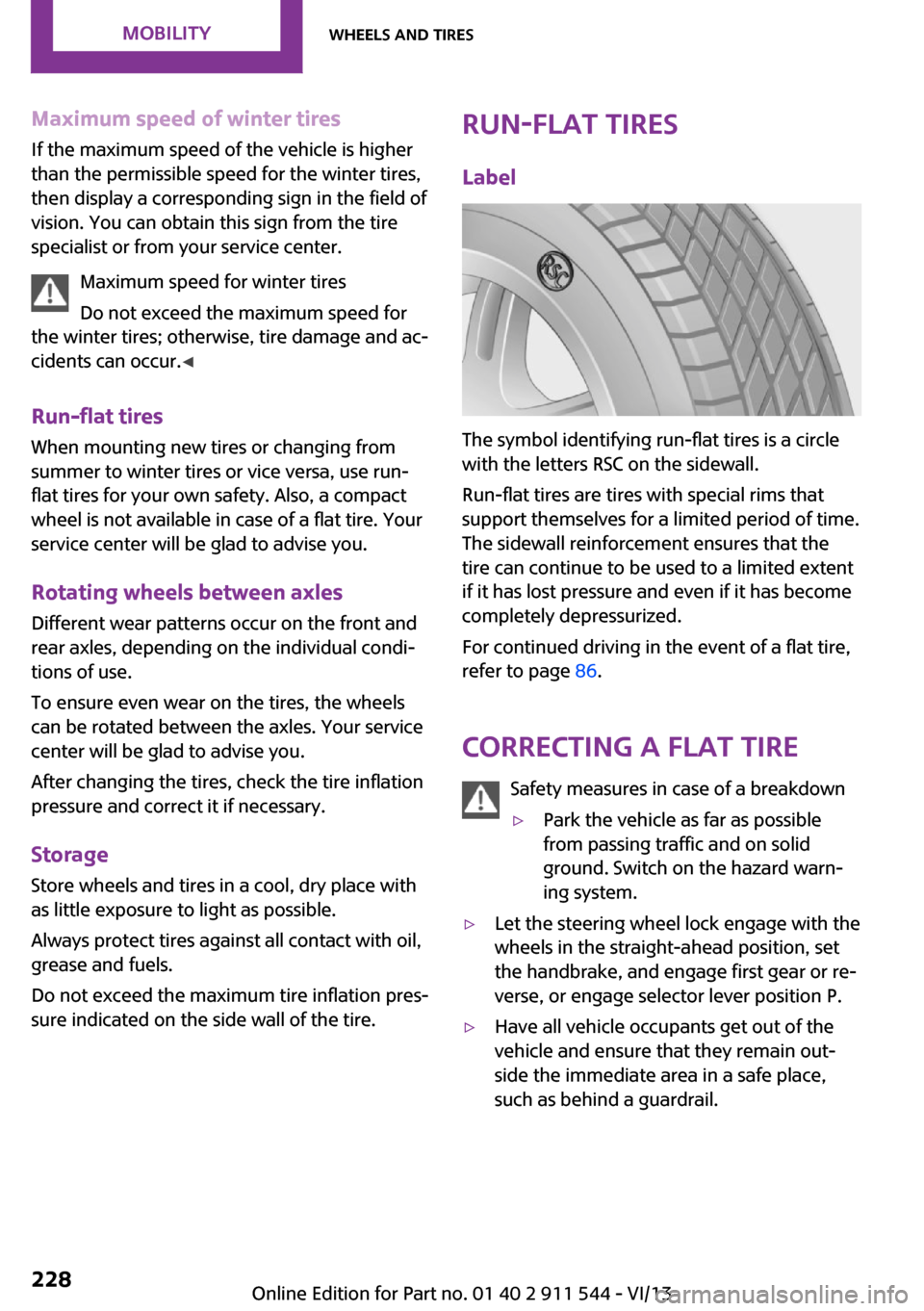
Label
The symbol identifying run-flat tires is a circle
with the letters RSC on the sidewall.
Run-flat tires are tires with special rims that
support themselves for a limited period of time.
The sidewall reinforcement ensures that the
tire can continue to be used to a limited extent
if it has lost pressure and even if it has become
completely depressurized.
For continued driving in the event of a flat tire,
refer to page 86.
Correcting a flat tire Safety measures in case of a breakdown
▷Park the vehicle as far as possible
from passing traffic and on solid
ground. Switch on the hazard warn‐
ing system.▷Let the steering wheel lock engage with the
wheels in the straight-ahead position, set
the handbrake, and engage first gear or re‐
verse, or engage selector lever position P.▷Have all vehicle occupants get out of the
vehicle and ensure that they remain out‐
side the immediate area in a safe place,
such as behind a guardrail.Seite 228MobilityWheels and tires228
Online Edition for Part no. 01 40 2 911 544 - VI/13
Page 229 of 282
▷If a warning triangle or portable hazard
warning lamp is required, set it up on the
roadside at an appropriate distance from
the rear of the vehicle. Comply with all
safety guidelines and regulations. ◀
The procedure to correct a flat tire depends on
the equipment in the vehicle:
▷Run-flat tires, refer to page 228.▷MINI Mobility System, refer to page 229.
MINI Mobility System
Notes
▷Follow the instructions on using the Mobi‐
lity System found on the compressor and
sealant bottle.▷Use of the Mobility System may be ineffec‐
tive if tire damage is greater than approx.
1/8 in/4 mm in size.▷Contact the nearest service center if the tire
cannot be made drivable.▷If possible, do not remove foreign bodies
that have penetrated the tire.▷Pull the speed limit sticker off the sealant
bottle and apply it to the steering wheel.
Sealant and compressor
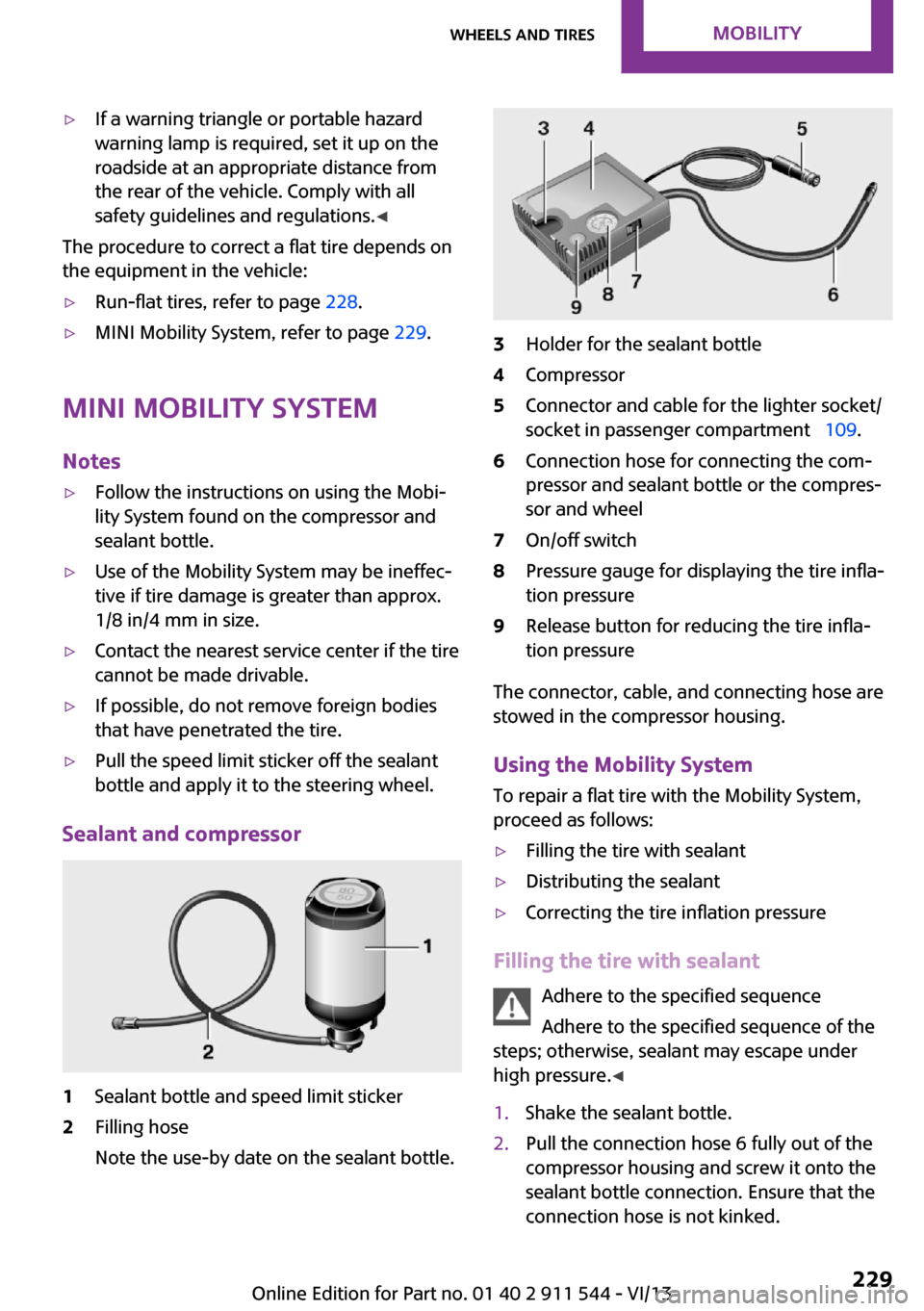
1Sealant bottle and speed limit sticker2Filling hose
Note the use-by date on the sealant bottle.3Holder for the sealant bottle4Compressor5Connector and cable for the lighter socket/
socket in passenger compartment 109.6Connection hose for connecting the com‐
pressor and sealant bottle or the compres‐
sor and wheel7On/off switch8Pressure gauge for displaying the tire infla‐
tion pressure9Release button for reducing the tire infla‐
tion pressure
The connector, cable, and connecting hose are
stowed in the compressor housing.
Using the Mobility System
To repair a flat tire with the Mobility System,
proceed as follows:
▷Filling the tire with sealant▷Distributing the sealant▷Correcting the tire inflation pressure
Filling the tire with sealant
Adhere to the specified sequence
Adhere to the specified sequence of the
steps; otherwise, sealant may escape under
high pressure. ◀
1.Shake the sealant bottle.2.Pull the connection hose 6 fully out of the
compressor housing and screw it onto the
sealant bottle connection. Ensure that the
connection hose is not kinked.Seite 229Wheels and tiresMobility229
Online Edition for Part no. 01 40 2 911 544 - VI/13
Page 230 of 282
3.Insert the sealant bottle into the compres‐
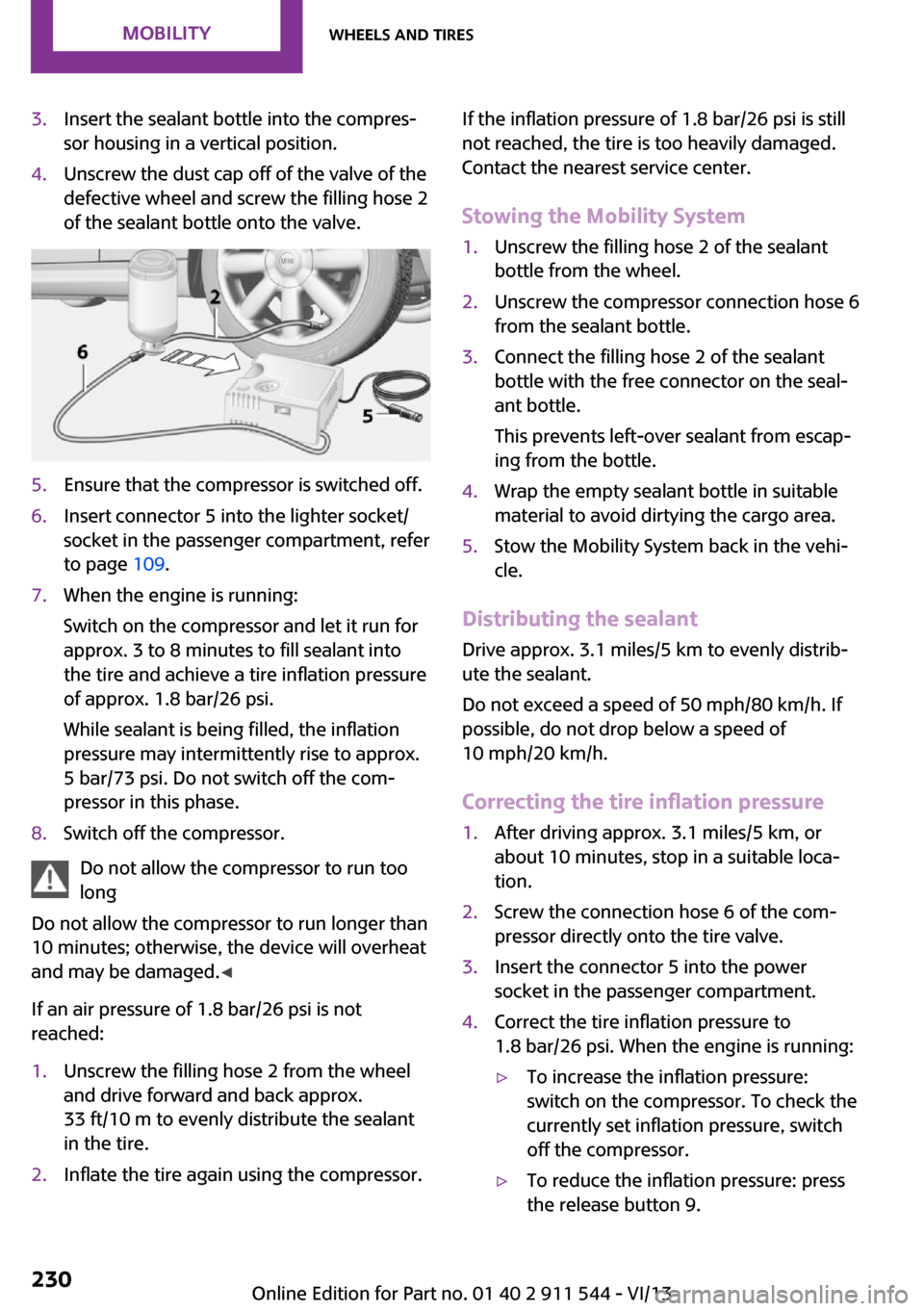
sor housing in a vertical position.4.Unscrew the dust cap off of the valve of the
defective wheel and screw the filling hose 2
of the sealant bottle onto the valve.5.Ensure that the compressor is switched off.6.Insert connector 5 into the lighter socket/
socket in the passenger compartment, refer
to page 109.7.When the engine is running:
Switch on the compressor and let it run for
approx. 3 to 8 minutes to fill sealant into
the tire and achieve a tire inflation pressure
of approx. 1.8 bar/26 psi.
While sealant is being filled, the inflation
pressure may intermittently rise to approx.
5 bar/73 psi. Do not switch off the com‐
pressor in this phase.8.Switch off the compressor.
Do not allow the compressor to run too
long
Do not allow the compressor to run longer than
10 minutes; otherwise, the device will overheat
and may be damaged. ◀
If an air pressure of 1.8 bar/26 psi is not
reached:
1.Unscrew the filling hose 2 from the wheel
and drive forward and back approx.
33 ft/10 m to evenly distribute the sealant
in the tire.2.Inflate the tire again using the compressor.If the inflation pressure of 1.8 bar/26 psi is still
not reached, the tire is too heavily damaged.
Contact the nearest service center.
Stowing the Mobility System1.Unscrew the filling hose 2 of the sealant
bottle from the wheel.2.Unscrew the compressor connection hose 6
from the sealant bottle.3.Connect the filling hose 2 of the sealant
bottle with the free connector on the seal‐
ant bottle.
This prevents left-over sealant from escap‐
ing from the bottle.4.Wrap the empty sealant bottle in suitable
material to avoid dirtying the cargo area.5.Stow the Mobility System back in the vehi‐
cle.
Distributing the sealant
Drive approx. 3.1 miles/5 km to evenly distrib‐
ute the sealant.
Do not exceed a speed of 50 mph/80 km/h. If
possible, do not drop below a speed of
10 mph/20 km/h.
Correcting the tire inflation pressure
1.After driving approx. 3.1 miles/5 km, or
about 10 minutes, stop in a suitable loca‐
tion.2.Screw the connection hose 6 of the com‐
pressor directly onto the tire valve.3.Insert the connector 5 into the power
socket in the passenger compartment.4.Correct the tire inflation pressure to
1.8 bar/26 psi. When the engine is running:▷To increase the inflation pressure:
switch on the compressor. To check the
currently set inflation pressure, switch
off the compressor.▷To reduce the inflation pressure: press
the release button 9.Seite 230MobilityWheels and tires230
Online Edition for Part no. 01 40 2 911 544 - VI/13
Page 231 of 282
Do not allow the compressor to run too
long
Do not allow the compressor to run longer than
10 minutes; otherwise, the device will overheat
and may be damaged. ◀
If the inflation pressure is not maintained, take
the vehicle on another drive, distributing the
sealant, refer to page 230. Then repeat steps
1 to 4 once.
If the inflation pressure of 1.8 bar/26 psi is still
not reached, the tire is too heavily damaged.
Contact the nearest service center.
Continuing the trip Note the maximum speed
Do not exceed the maximum speed of
50 mph/80 km/h; otherwise, accidents can oc‐
cur. ◀
Replace the defective tire as soon as possible
and have the wheel balanced.
Have the Mobility System refilled.
Snow chains
Only certain fine-link snow chains have been
tested by MINI, classified as safe for use, and
recommended. Consult your service center for more information.
Use only in pairs on the front wheels, equipped
with tires of the following size:
195/60 R 16 M+S
With ALL4 all-wheel drive: only mount snow
chains on the front wheels.
Observe the manufacturer's instructions when
mounting snow chains. Do not exceed a speed
of 30 mph or 50 km/h when using snow chains.
Do not initialize the Flat Tire Monitor if snow
chains are mounted; otherwise, the instrument
might issue an incorrect reading. When driving
with snow chains, it may be useful to tempora‐rily deactivate DSC or activate DTC, refer to
page 93.Seite 231Wheels and tiresMobility231
Online Edition for Part no. 01 40 2 911 544 - VI/13
Page 274 of 282
Gas station recommenda‐tion 147
Gear change– Automatic transmission with
Steptronic 65
Gear display, automatic trans‐
mission with Steptronic 65
Glass sunroof, electrical 41
Glass sunroof, electrical
– Convenient operation 34– Opening, closing 42– Raising 42– Remote control 34
GPS navigation, refer to Navi‐
gation system 134
H Halogen headlamps, bulb re‐ placement 241
Hand car wash, care 255
Hand-held transmitter, alter‐ nating code 105
Hands-free microphone 18
Hazard warning system 18
HD Radio 159
Head airbags 82
Headlamp control, auto‐ matic 78
Headlamp courtesy delay fea‐ ture 79
Headlamp flasher 61, 79
Headlamp flasher, indicator lamp 17
Headlamps 78
Headlamps, care 255
Headlamps, cleaning, washer fluid 64
Head restraints 50
Head restraints
– Adjusting the height 50– Removing 50
Heatable
– Windshield 103Heating– Rear window 100, 103– Seats 47– Windshield 103
Height adjustment
– Seats 45
High beams 79
High beams, bulb replace‐ ment 241
High beams, indicator lamp 17
Hill drive-off assistant 95
Hills 124
Holder for remote control, re‐ fer to Ignition lock 58
Homepage 6
Hood 232
Hood, closing 233
Hood, opening 233
Hood, unlocking 233
Horn 14
House number, entering for navigation 137
Hydraulic brake assistant 93
I
Ice warning, refer to External temperature warning 68
Icy roads, refer to External temperature warning 68
Identification marks, run-flat tires 228
Identification marks, tires 224
iDrive
– Changing settings 73– Changing the date and
time 72– Changing the language 73– Changing the units of meas‐
ure and display format 72– Setting the brightness 74
Ignition 58
Ignition key position 1, refer to Radio ready state 58
Ignition key position 2, refer to Ignition on 58
Ignition key, refer to Remote
control with integrated
key 32
Ignition lock 58
Ignition, switched off 59
Ignition, switched on 58
Indicator and warning lamps 17
Indicator and warning lamps– Tire Pressure Monitor
TPM 89
Individual air distribution 100
Inflation pressure monitor, re‐ fer to Flat Tire Monitor 85
Inflation pressure monitor, re‐ fer to Tire Pressure Monitor
TPM 87
Inflation pressure, refer to Tire inflation pressure 220
Information on the navigation data 134
Initializing
– Compass, refer to Calibrat‐
ing 107– Glass sunroof, electrical 42– Refer to Setting the time and
date 72
Initializing, Flat Tire Monitor
FTM 86
Instrument cluster, refer to Displays 16
Instrument lighting 80
Instruments, refer to Cock‐ pit 14
Integrated key 32
Interactive map 141
Interior equipment 104
Interior lamps 81
Interior lamps
– Remote control 35
Interior mirror 52
Interior rearview mirror, com‐ pass 106
Interior temperature, setting
– Air conditioner 99– Automatic climate con‐
trol 101Seite 274ReferenceEverything from A to Z274
Online Edition for Part no. 01 40 2 911 544 - VI/13
Page 277 of 282
Radio ready state, switchedoff 59
Radio ready state, switched on 58
Radio setting, refer to Radio ready state 58
Rain sensor 62
Random 167
Random playback 167
Range 70
RDS 159
Reading out loud 208
Rear 46
Rear fog lamp, bulb replace‐ ment 243
Rear fog lamps, indicator lamp 17
Rear lamps, refer to Tail lamps 243
Rear seat backrests, folda‐ ble 110 , 111
Rearview mirror, refer to Mir‐ rors 51
Rear window de‐ froster 100, 103
Rear window, washing 63
Rear window wiper 63
Recirculated air mode 100, 102
Recommended tire brands 227
Redialing 186, 198
Releasing, refer to Unlock‐ ing 39
Remaining range for service, refer to Service require‐
ments 74
Remaining range, refer to Range 70
Reminders 208
Remote control– Battery replacement 41– Comfort Access 38– Malfunctions 35, 40
Remote control, removing
from the ignition lock 58
Remote control, service
data 237
Remote control, univer‐ sal 104
Remote inquiry 185, 197
Replacement remote con‐ trol 32
Replacing wheels/tires 227
Reporting safety defects 9
Reserve warning, refer to Fuel gauge 69
Reservoir for washer fluid, re‐ fer to Washer fluid reser‐
voir 64
Restraining systems– Refer to Safety belts 47
Restraint systems for chil‐
dren 53
Retreaded tires 227
Reverse gear, manual trans‐ mission 65
Road, avoiding 145
Road detour 145
Roadside Assistance 248
Roadside parking lamp, bulb replacement 241
Roadside parking lamps 79
RON gasoline quality 218
RON, refer to Fuel quality 218
Route 146
Route criteria, route 145
Route, displaying 146
Route section, bypassing 146
RPM, refer to Engine data 260
Rubber seals, care 256
Run-flat tires 228
Run-flat tires
– Flat tire 86
Run-flat tires, tire inflation
pressure 220
Running lights, refer to Park‐ ing lamps/low beams 78
S Safe braking 123
Safety 7
Safety belts 47
Safety belts– Damage 50– Rear center safety belt 48
Safety belts, care 257
Safety belts, indicator/warning lamp 50
Safety belts, reminder 50
Safety systems
– Safety belts 47
Safety systems, airbags 82
Satellite radio 160
Saving fuel 130
Scale, changing during navi‐ gation 149
Screen, see Control Display 20
Seat adjustment 46
Seat adjustment
– Manual 45
Seat belts
– Refer to Safety belts 47
Seat heating 47
Seats
– Adjusting 45– Heating 47– Sitting safely 45
Selector lever, automatic
transmission with Step‐
tronic 65
Selector lever lock, overrid‐ ing 67
Selector lever lock, refer to Changing selector lever posi‐
tions, Shiftlock 65
Selector lever positions, auto‐ matic transmission with
Steptronic 65
Service and warranty 8
Service data in the remote control 237
Service interval display, refer to Condition Based Service
CBS 237
Service interval display, refer to Service requirements 74
Service requirements 74
Seite 277Everything from A to ZReference277
Online Edition for Part no. 01 40 2 911 544 - VI/13