brake light MINI Paceman 2014 User Guide
[x] Cancel search | Manufacturer: MINI, Model Year: 2014, Model line: Paceman, Model: MINI Paceman 2014Pages: 218, PDF Size: 5.5 MB
Page 112 of 218
Pulsation of the brake pedal and sounds from
the hydraulic circuits indicate that ABS is in its
active mode.
Do not let your foot rest on the brake
pedal
Do not drive with your foot resting on the brake
pedal. Even light but consistent pedal pressure
can lead to high temperatures, brake wear and
possibly even brake failure. ◀
Objects in the area around the pedals No objects in the area around the pedals
Keep floor mats, carpets, and any other
objects out of the area of motion of the pedals;
otherwise, the function of the pedals could be
impeded while driving
Do not place additional floor mats over existing
mats or other objects.
Only use floor mats that have been approved
for the vehicle and can be properly fixed in
place.
Ensure that the floor mats are securely fastened
again when they are returned after being re‐
moved, such as for cleaning. ◀
Driving in wet conditions
When roads are wet or there is heavy rain, briefly exert gentle pressure on the brake pedal
every few miles.
Ensure that this action does not endanger other
road users.
The heat generated in this process helps dry
the brake discs and pads.
In this way braking efficiency will be available
when you need it.
HillsDrive long or steep downhill gradients in the
gear in which the least braking is required. Oth‐
erwise, the brake system may overheat, result‐
ing in a reduction in the brake system effi‐
ciency.You can increase the engine's braking effect by
shifting down, going all the way to first gear, if
necessary.
Downshifting in manual mode of the automatic
transmission, refer to page 57.
Avoid load on the brakes
Avoid placing excessive load on the brake
system. Light but consistent brake pressure can
lead to high temperatures, brake wear and
possibly even brake failure. ◀
Do not drive in neutral
Never drive with the transmission in neu‐
tral, with the engine switched off or with the
clutch depressed; otherwise, you will have nei‐
ther the braking action of the engine or nor its
power assistance when braking or steering. ◀
Brake disc corrosion Corrosion on the brake discs and contamina‐
tion on the brake pads are furthered by:▷Low mileage.▷Extended periods when the vehicle is not
used at all.▷Infrequent use of the brakes.
Corrosion occurs when the minimum pressure
that must be exerted by the pads during brake
applications to clean the discs is not reached.
Should corrosion form on the brake discs, the
brakes will tend to respond with a pulsating ef‐
fect that generally cannot be corrected.
When the vehicle is parked
When using the automatic climate control, con‐
densation water develops that exits under‐
neath the vehicle.
Therefore, traces of condensed water under the
vehicle are normal.
After the engine is switched off, the coolant
pump may continue running for some time in
the MINI Cooper S. This causes noises in the en‐
gine compartment.
Seite 112Driving tipsThings to remember when driving112
Online Edition for Part no. 01 40 2 911 521 - VI/13
Page 160 of 218
Maximum speed of winter tires
If the maximum speed of the vehicle is higher
than the permissible speed for the winter tires,
then display a corresponding sign in the field of
vision. You can obtain this sign from the tire
specialist or from your service center.
Maximum speed for winter tires
Do not exceed the maximum speed for
the winter tires; otherwise, tire damage and ac‐
cidents can occur. ◀
Run-flat tires When mounting new tires or changing fromsummer to winter tires or vice versa, use run-
flat tires for your own safety. Also, a compact
wheel is not available in case of a flat tire. Your
service center will be glad to advise you.
Rotating wheels between axles
Different wear patterns occur on the front and
rear axles, depending on the individual condi‐
tions of use.
To ensure even wear on the tires, the wheels
can be rotated between the axles. Your service
center will be glad to advise you.
After changing the tires, check the tire inflation
pressure and correct it if necessary.
Storage Store wheels and tires in a cool, dry place with
as little exposure to light as possible.
Always protect tires against all contact with oil,
grease and fuels.
Do not exceed the maximum tire inflation pres‐
sure indicated on the side wall of the tire.Run-flat tires
Label
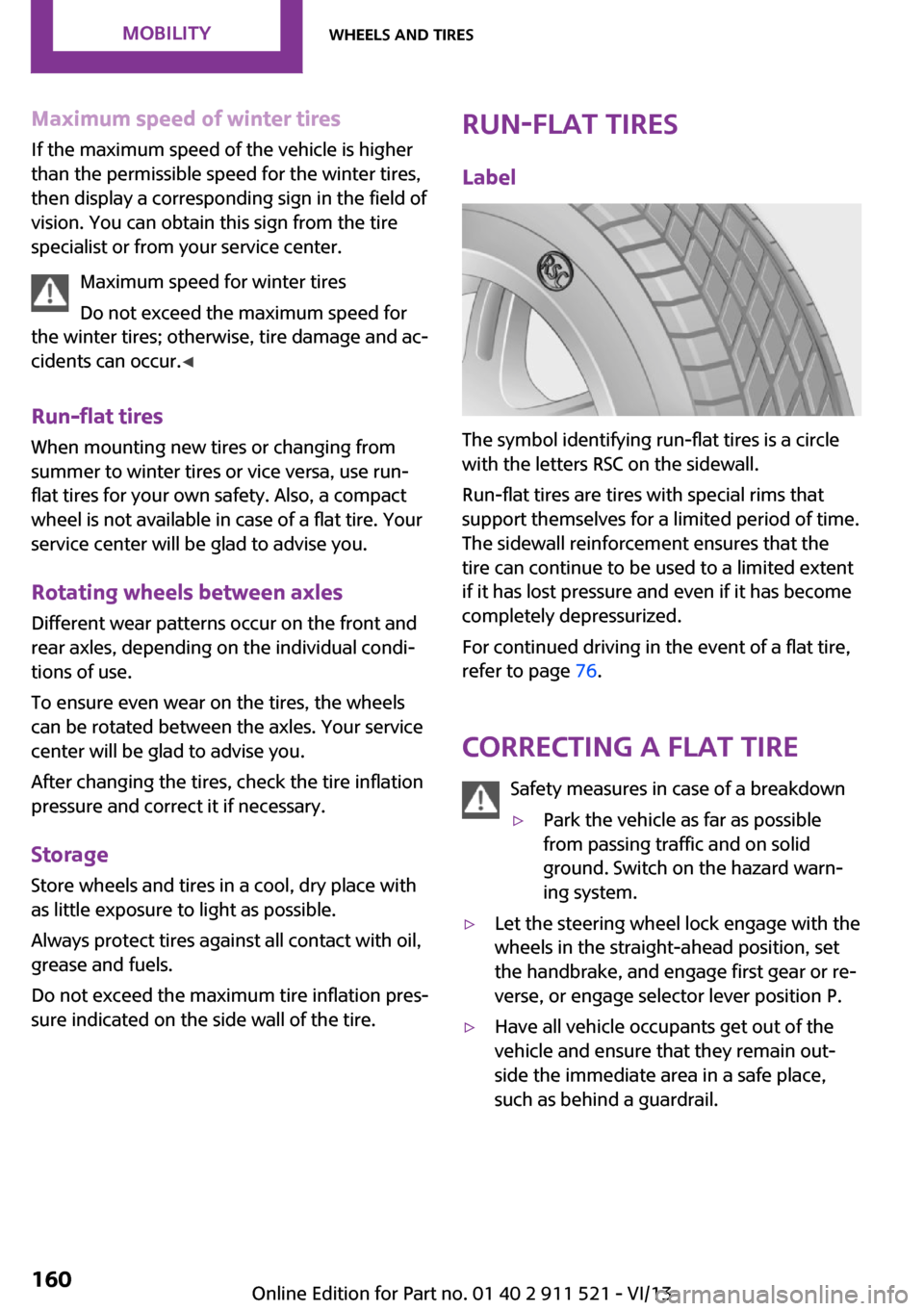
The symbol identifying run-flat tires is a circle
with the letters RSC on the sidewall.
Run-flat tires are tires with special rims that
support themselves for a limited period of time.
The sidewall reinforcement ensures that the
tire can continue to be used to a limited extent
if it has lost pressure and even if it has become
completely depressurized.
For continued driving in the event of a flat tire,
refer to page 76.
Correcting a flat tire Safety measures in case of a breakdown
▷Park the vehicle as far as possible
from passing traffic and on solid
ground. Switch on the hazard warn‐
ing system.▷Let the steering wheel lock engage with the
wheels in the straight-ahead position, set
the handbrake, and engage first gear or re‐
verse, or engage selector lever position P.▷Have all vehicle occupants get out of the
vehicle and ensure that they remain out‐
side the immediate area in a safe place,
such as behind a guardrail.Seite 160MobilityWheels and tires160
Online Edition for Part no. 01 40 2 911 521 - VI/13
Page 189 of 218
Chrome surfacesCarefully clean components such as the radia‐
tor grille or door handles with an ample supply
of water, possibly with shampoo added, partic‐
ularly when they have been exposed to road
salt. For additional treatment, use a chrome
polish.
Light-alloy wheels
When cleaning the wheels on the vehicle, only
use a neutral wheel rim cleaner with a pH value
of 5 to 9.
Do not use abrasive cleaners or a steam jet hot‐
ter than 140 ℉/60 ℃; otherwise, damage may
result. Adhere to the manufacturer instructions.
Aggressive, acidic, or alkaline cleaners may de‐
stroy the protective coating of neighboring
components such as the brake disc.
Exterior sensors The sensors on the outside of the vehicle, such
as for Park Distance Control, must be kept clean
and free of ice to ensure that they remain fully
functional.
Decorative trim Clean decorative trims and fine wood compo‐
nents with a moist cloth only. Then dry with a
soft cloth.
Safety belts Dirty belt straps impede the reeling action and
thus have a negative impact on safety.
No chemical cleaning
Do not clean chemically; this can destroy
the webbing. ◀
Carpets/floor mats No objects in the area around the pedals
Keep floor mats, carpets, and any other
objects out of the area of motion of the pedals;
otherwise, the function of the pedals could be
impeded while drivingDo not place additional floor mats over existing
mats or other objects.
Only use floor mats that have been approved
for the vehicle and can be properly fixed in
place.
Ensure that the floor mats are securely fastened
again when they are returned after being re‐
moved, such as for cleaning. ◀
Floor mats can be removed for cleaning.
If they are very dirty, clean with a microfiber
cloth and water or an interior cleaner. To pre‐
vent matting of the carpet, rub back and forth
in the direction of travel only.
Displays
To clean the displays, such as the radio or dis‐
play elements, use an antistatic microfiber
cloth.
Cleaning displays
Do not use chemical or household cleans‐
ers.
Keep all fluids and moisture away from the
unit.
Otherwise, they could affect or damage surfa‐
ces or electrical components.
Avoid pressing too hard when cleaning and do
not use abrasive materials; otherwise, damage
can result. ◀
CD/DVD drives No cleaning CD
Do not use cleaning CDs; otherwise, parts
of the drive may become damaged. ◀
Long-term vehicle storage
Your service center can advise you on what to
consider when storing the vehicle for longer
than three months.Seite 189CareMobility189
Online Edition for Part no. 01 40 2 911 521 - VI/13
Page 191 of 218
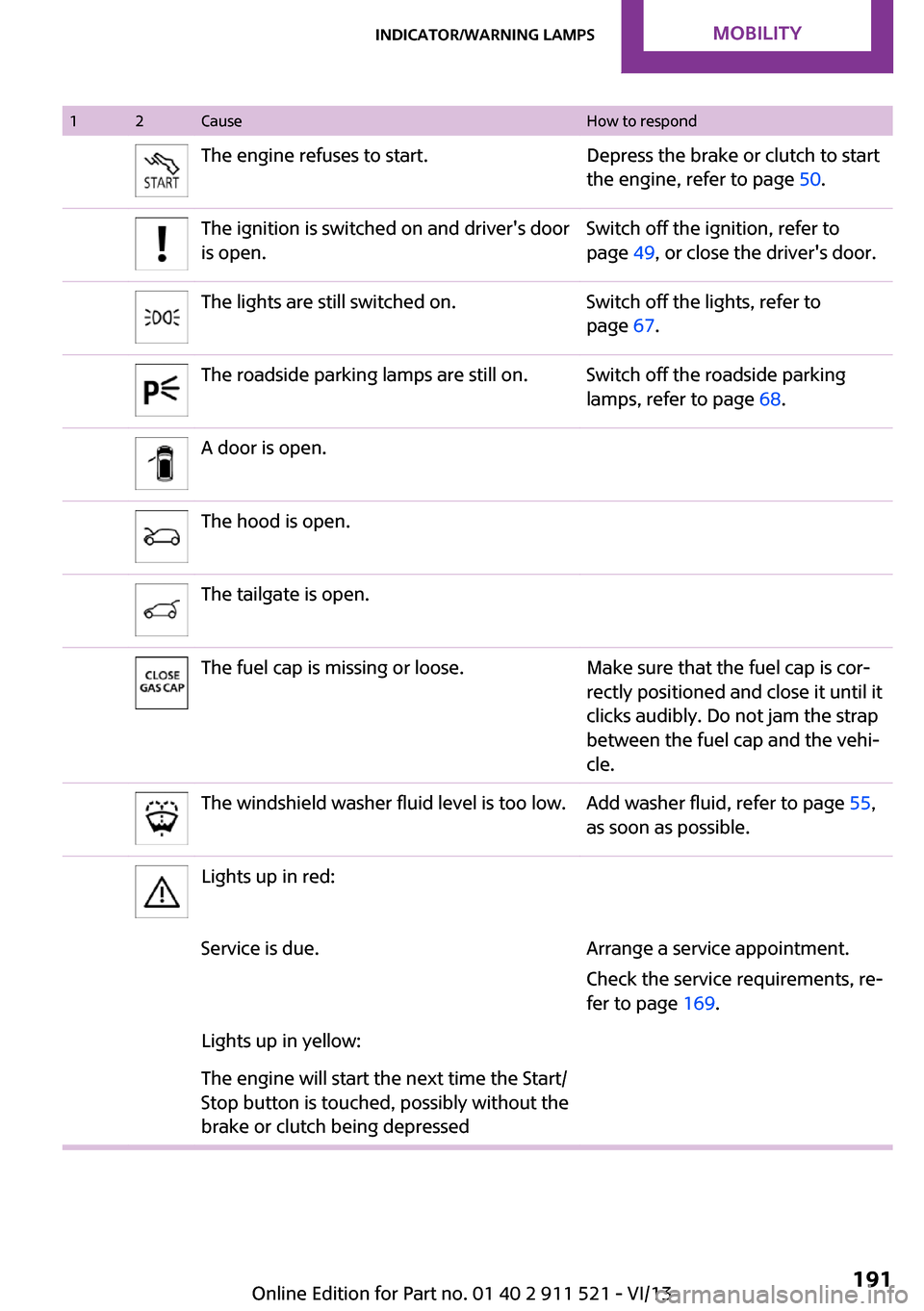
12CauseHow to respondThe engine refuses to start.Depress the brake or clutch to start
the engine, refer to page 50.The ignition is switched on and driver's door
is open.Switch off the ignition, refer to
page 49, or close the driver's door.The lights are still switched on.Switch off the lights, refer to
page 67.The roadside parking lamps are still on.Switch off the roadside parking
lamps, refer to page 68.A door is open.The hood is open.The tailgate is open.The fuel cap is missing or loose.Make sure that the fuel cap is cor‐
rectly positioned and close it until it
clicks audibly. Do not jam the strap
between the fuel cap and the vehi‐
cle.The windshield washer fluid level is too low.Add washer fluid, refer to page 55,
as soon as possible.Lights up in red:Service is due.Arrange a service appointment.
Check the service requirements, re‐
fer to page 169.Lights up in yellow:The engine will start the next time the Start/
Stop button is touched, possibly without the
brake or clutch being depressedSeite 191Indicator/warning lampsMobility191
Online Edition for Part no. 01 40 2 911 521 - VI/13
Page 193 of 218
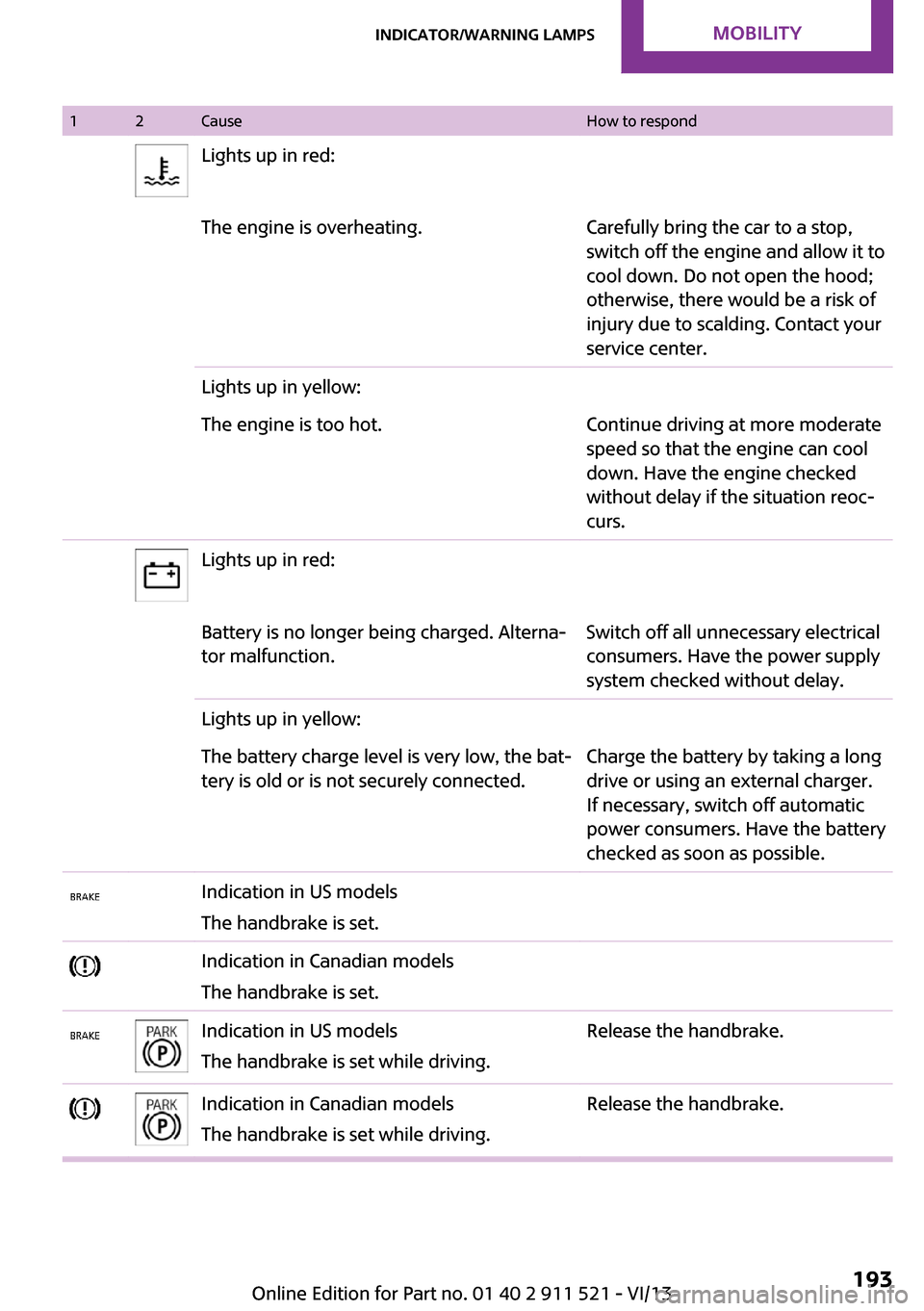
12CauseHow to respondLights up in red:The engine is overheating.Carefully bring the car to a stop,
switch off the engine and allow it to
cool down. Do not open the hood;
otherwise, there would be a risk of
injury due to scalding. Contact your
service center.Lights up in yellow:The engine is too hot.Continue driving at more moderate
speed so that the engine can cool
down. Have the engine checked
without delay if the situation reoc‐
curs.Lights up in red:Battery is no longer being charged. Alterna‐
tor malfunction.Switch off all unnecessary electrical
consumers. Have the power supply
system checked without delay.Lights up in yellow:The battery charge level is very low, the bat‐
tery is old or is not securely connected.Charge the battery by taking a long
drive or using an external charger.
If necessary, switch off automatic
power consumers. Have the battery
checked as soon as possible.Indication in US models
The handbrake is set.Indication in Canadian models
The handbrake is set.Indication in US models
The handbrake is set while driving.Release the handbrake.Indication in Canadian models
The handbrake is set while driving.Release the handbrake.Seite 193Indicator/warning lampsMobility193
Online Edition for Part no. 01 40 2 911 521 - VI/13
Page 194 of 218
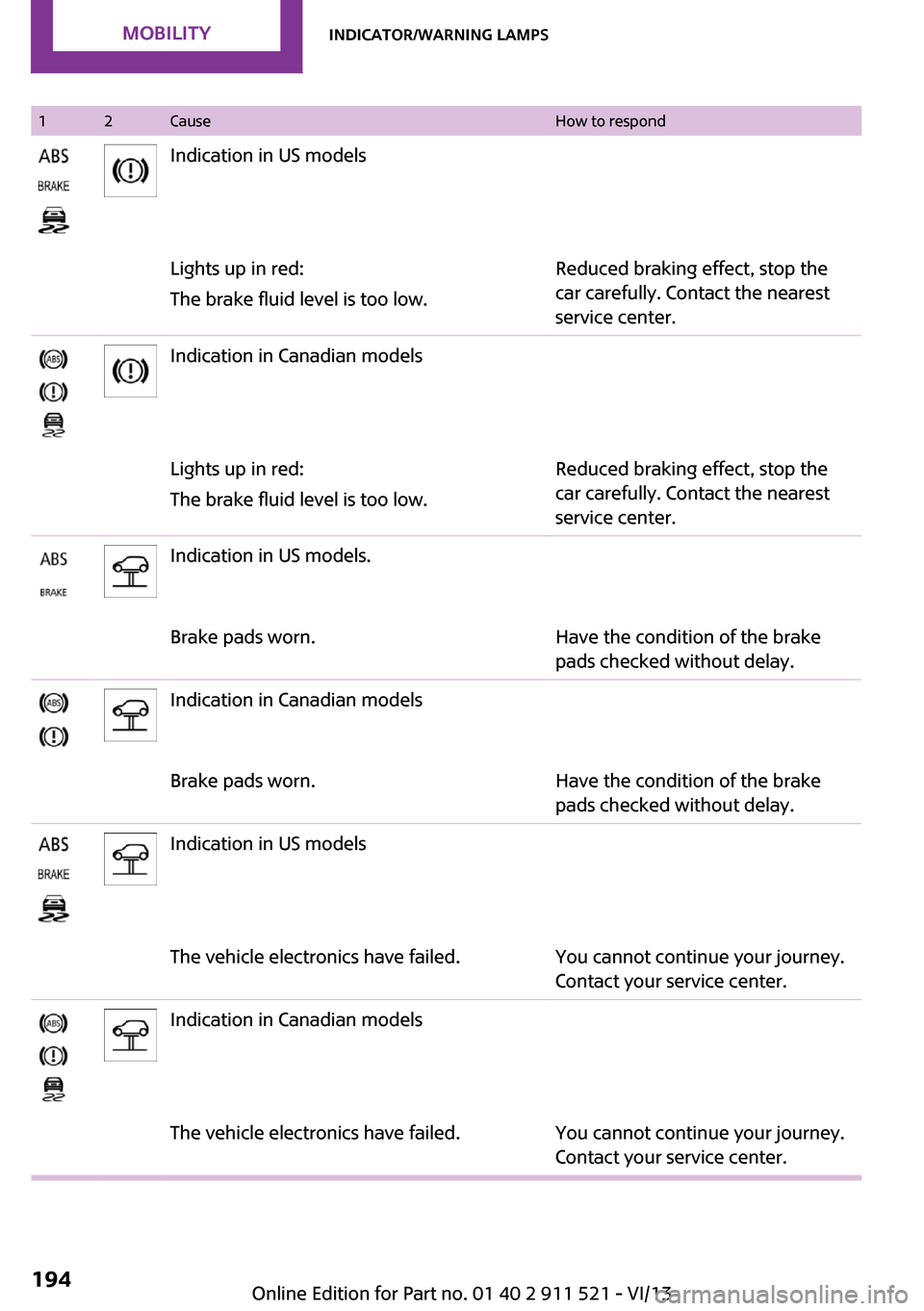
12CauseHow to respondIndication in US modelsLights up in red:
The brake fluid level is too low.Reduced braking effect, stop the
car carefully. Contact the nearest
service center.Indication in Canadian modelsLights up in red:
The brake fluid level is too low.Reduced braking effect, stop the
car carefully. Contact the nearest
service center.Indication in US models.Brake pads worn.Have the condition of the brake
pads checked without delay.Indication in Canadian modelsBrake pads worn.Have the condition of the brake
pads checked without delay.Indication in US modelsThe vehicle electronics have failed.You cannot continue your journey.
Contact your service center.Indication in Canadian modelsThe vehicle electronics have failed.You cannot continue your journey.
Contact your service center.Seite 194MobilityIndicator/warning lamps194
Online Edition for Part no. 01 40 2 911 521 - VI/13
Page 195 of 218
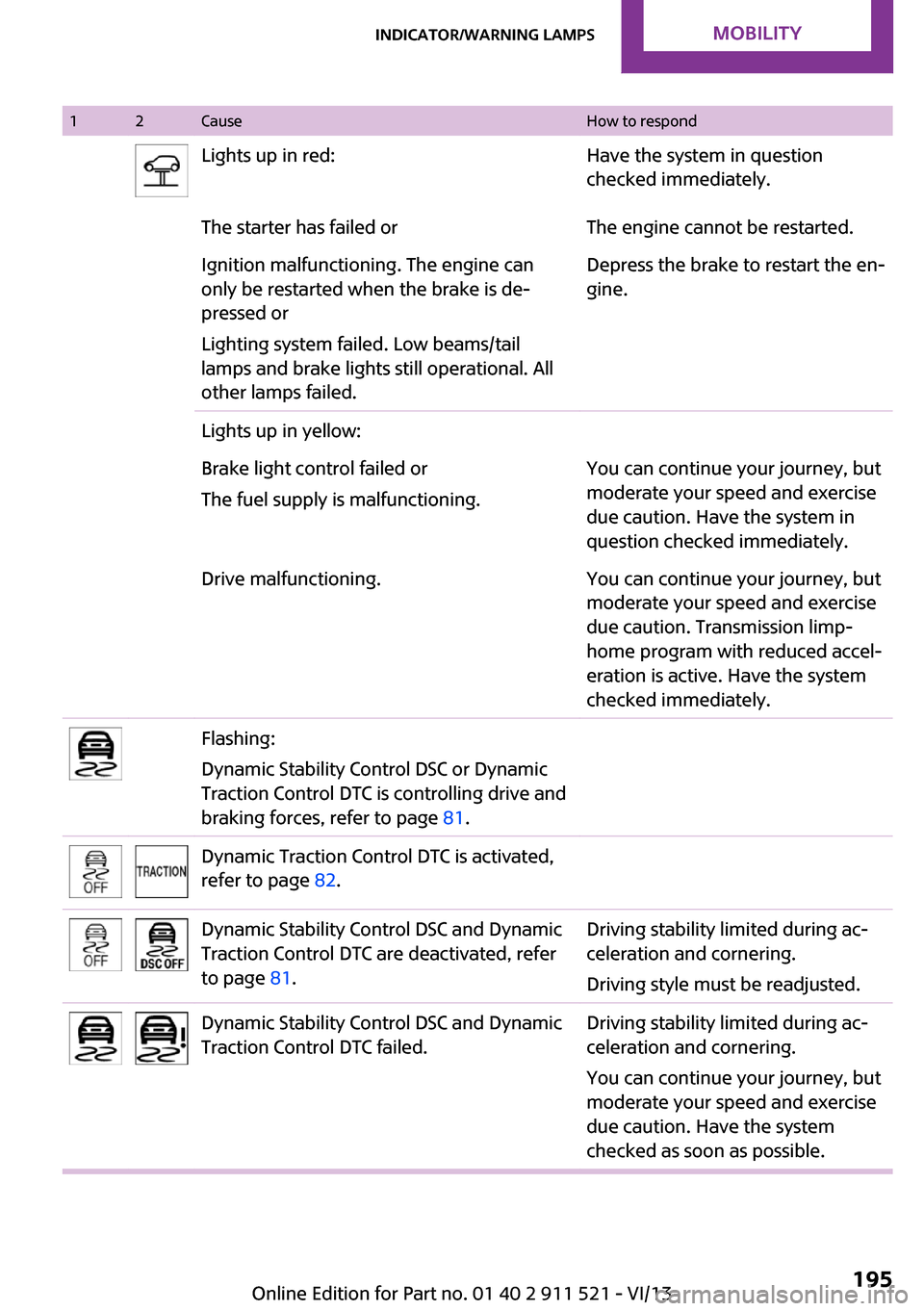
12CauseHow to respondLights up in red:Have the system in question
checked immediately.The starter has failed orThe engine cannot be restarted.Ignition malfunctioning. The engine can
only be restarted when the brake is de‐
pressed or
Lighting system failed. Low beams/tail
lamps and brake lights still operational. All
other lamps failed.Depress the brake to restart the en‐
gine.Lights up in yellow:Brake light control failed or
The fuel supply is malfunctioning.You can continue your journey, but
moderate your speed and exercise
due caution. Have the system in
question checked immediately.Drive malfunctioning.You can continue your journey, but
moderate your speed and exercise
due caution. Transmission limp-
home program with reduced accel‐
eration is active. Have the system
checked immediately.Flashing:
Dynamic Stability Control DSC or Dynamic
Traction Control DTC is controlling drive and
braking forces, refer to page 81.Dynamic Traction Control DTC is activated,
refer to page 82.Dynamic Stability Control DSC and Dynamic
Traction Control DTC are deactivated, refer
to page 81.Driving stability limited during ac‐
celeration and cornering.
Driving style must be readjusted.Dynamic Stability Control DSC and Dynamic
Traction Control DTC failed.Driving stability limited during ac‐
celeration and cornering.
You can continue your journey, but
moderate your speed and exercise
due caution. Have the system
checked as soon as possible.Seite 195Indicator/warning lampsMobility195
Online Edition for Part no. 01 40 2 911 521 - VI/13
Page 197 of 218
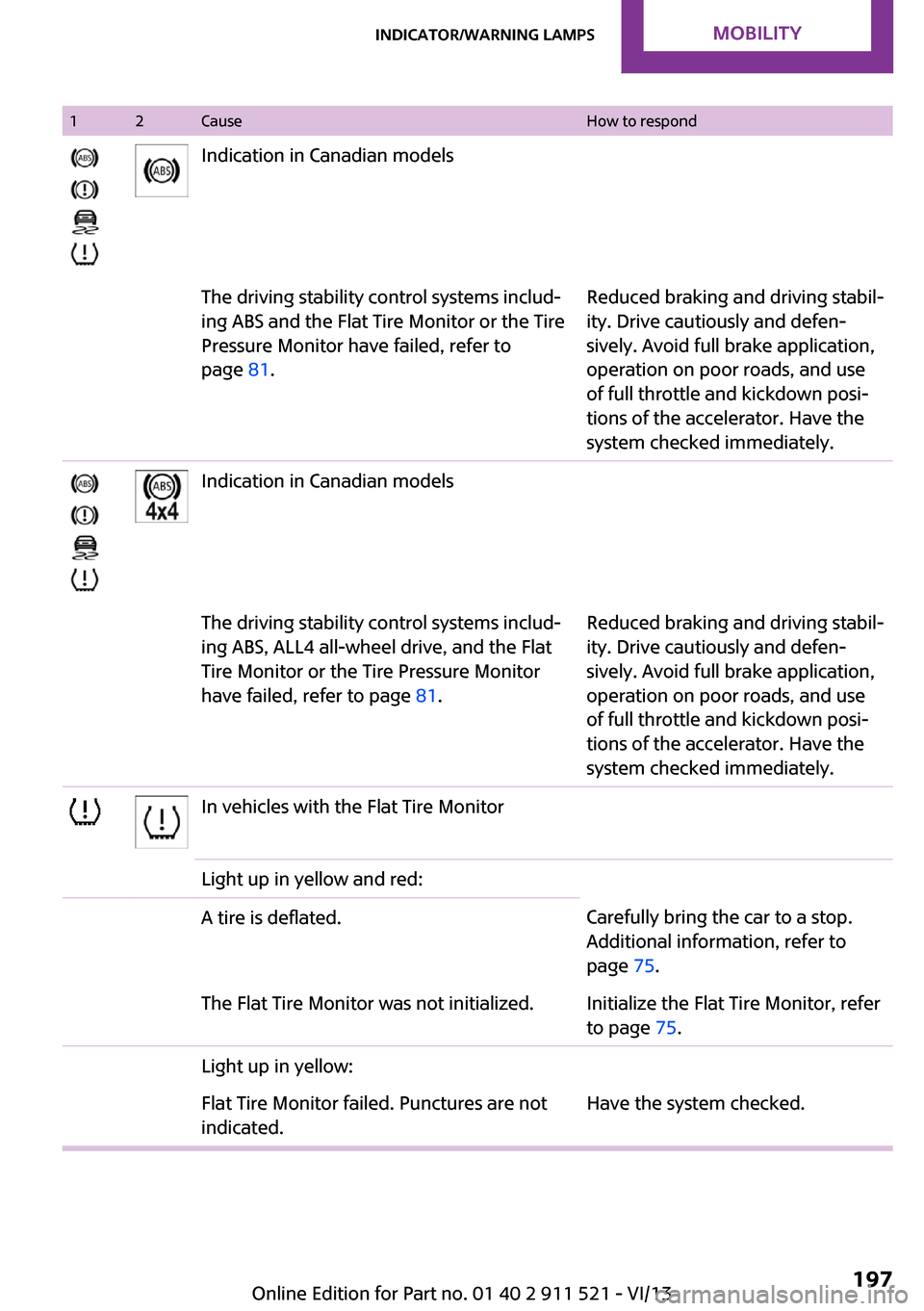
12CauseHow to respondIndication in Canadian modelsThe driving stability control systems includ‐
ing ABS and the Flat Tire Monitor or the Tire
Pressure Monitor have failed, refer to
page 81.Reduced braking and driving stabil‐
ity. Drive cautiously and defen‐
sively. Avoid full brake application,
operation on poor roads, and use
of full throttle and kickdown posi‐
tions of the accelerator. Have the
system checked immediately.Indication in Canadian modelsThe driving stability control systems includ‐
ing ABS, ALL4 all-wheel drive, and the Flat
Tire Monitor or the Tire Pressure Monitor
have failed, refer to page 81.Reduced braking and driving stabil‐
ity. Drive cautiously and defen‐
sively. Avoid full brake application,
operation on poor roads, and use
of full throttle and kickdown posi‐
tions of the accelerator. Have the
system checked immediately.In vehicles with the Flat Tire MonitorLight up in yellow and red:A tire is deflated.Carefully bring the car to a stop.
Additional information, refer to
page 75.The Flat Tire Monitor was not initialized.Initialize the Flat Tire Monitor, refer
to page 75.Light up in yellow:Flat Tire Monitor failed. Punctures are not
indicated.Have the system checked.Seite 197Indicator/warning lampsMobility197
Online Edition for Part no. 01 40 2 911 521 - VI/13
Page 199 of 218
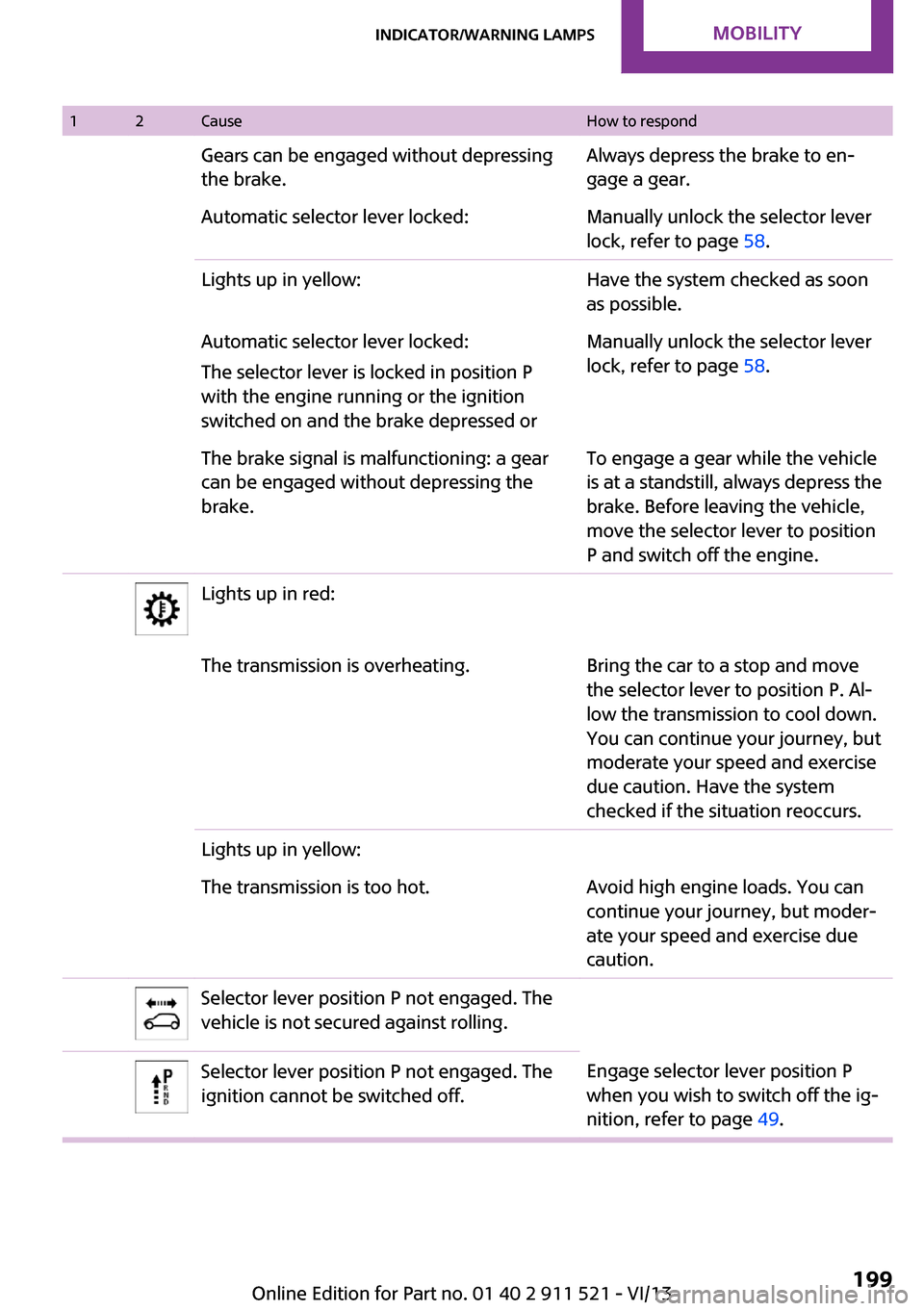
12CauseHow to respondGears can be engaged without depressing
the brake.Always depress the brake to en‐
gage a gear.Automatic selector lever locked:Manually unlock the selector lever
lock, refer to page 58.Lights up in yellow:Have the system checked as soon
as possible.Automatic selector lever locked:
The selector lever is locked in position P
with the engine running or the ignition
switched on and the brake depressed orManually unlock the selector lever
lock, refer to page 58.The brake signal is malfunctioning: a gear
can be engaged without depressing the
brake.To engage a gear while the vehicle
is at a standstill, always depress the
brake. Before leaving the vehicle,
move the selector lever to position
P and switch off the engine.Lights up in red:The transmission is overheating.Bring the car to a stop and move
the selector lever to position P. Al‐
low the transmission to cool down.
You can continue your journey, but
moderate your speed and exercise
due caution. Have the system
checked if the situation reoccurs.Lights up in yellow:The transmission is too hot.Avoid high engine loads. You can
continue your journey, but moder‐
ate your speed and exercise due
caution.Selector lever position P not engaged. The
vehicle is not secured against rolling.Selector lever position P not engaged. The
ignition cannot be switched off.Engage selector lever position P
when you wish to switch off the ig‐
nition, refer to page 49.Seite 199Indicator/warning lampsMobility199
Online Edition for Part no. 01 40 2 911 521 - VI/13
Page 208 of 218
Everything from A to ZIndexA
ABS, Antilock Brake Sys‐ tem 81
Acoustic signal, refer to Check Control 65
Activated charcoal filter with automatic climate con‐
trol 91
Adaptive Light Control 69
Additives, engine oil 167
Airbags 72
Airbags, indicator/warning light 75
Air circulation, refer to Recir‐ culated air mode 88, 90
Air conditioner 87
Air conditioning 87
Air conditioning mode– Air conditioner 87– Automatic climate con‐
trol 89
Air distribution
– Automatic 90– Individual 88– Manual 88, 90
Air drying, refer to Cooling
function 91
Air flow rate 87, 90
Air pressure, refer to Tire infla‐ tion pressure 152
Air supply
– Air conditioner 87– Automatic climate con‐
trol 89
Alarm system 32
Alarm system
– Avoiding unintentional
alarms 32– Interior motion sensor 32– Tilt alarm sensor 32
ALL4 all-wheel system 83
All-wheel drive, refer to
ALL4 83
Alternating-code hand-held transmitter 93
Ambient lighting 71
Antifreeze, washer fluid 55
Antilock Brake System, ABS 81
Anti-slip control, refer to Dy‐ namic Stability Control
DSC 81
Anti-theft protection 23
Approved engine oils 167
Ashtray 96
Assistance, roadside 180
Assistance when driving off, refer to Hill drive-off assis‐
tant 83
Assistance with starting en‐ gine, refer to Jump-start‐
ing 180
Automatic– Air distribution 90– Air flow rate 90
Automatic car wash 186
Automatic climate control
– Automatic air distribution 90
Automatic, cruise control 84
Automatic headlamp con‐ trol 67
Automatic transmission with
Steptronic
– Kickdown 57– Overriding selector lever
lock 58
AUTO program with auto‐
matic climate control 90
AUX-IN port 130
Average fuel consumption 61
Average fuel consumption
– Setting the units 62Average speed 61
Average speed, refer to Com‐ puter 60
B Backrest curvature, refer to Lumbar support 37
Backrests, refer to Seats 36
Backup lamps, bulb replace‐ ment 175
Battery– Disposal 32– Remote control 22
Battery, refer to Vehicle bat‐
tery 178
Battery replacement
– Remote control 32
Belts, refer to Safety belts 38
Belt tensioners, refer to Safety belts 38
Bi-xenon headlamps 172
Blower, refer to Air flow rate 87, 90
Brake assistant 81
Brake discs, breaking in 110
Brake fluid, refer to Service re‐ quirements 64
Brake force distribution, elec‐ tronic 81
Brake pads, breaking in 110
Brakes
– Handbrake 51
Brakes, MINI maintenance
system 169
Brakes, service require‐ ments 64
Brake system, MINI mainte‐ nance system 169
Braking, notes 111
Seite 208ReferenceEverything from A to Z208
Online Edition for Part no. 01 40 2 911 521 - VI/13