roof MINI Paceman 2015 User Guide
[x] Cancel search | Manufacturer: MINI, Model Year: 2015, Model line: Paceman, Model: MINI Paceman 2015Pages: 223, PDF Size: 5.51 MB
Page 118 of 223
Securing cargoLashing eyes in the cargo area
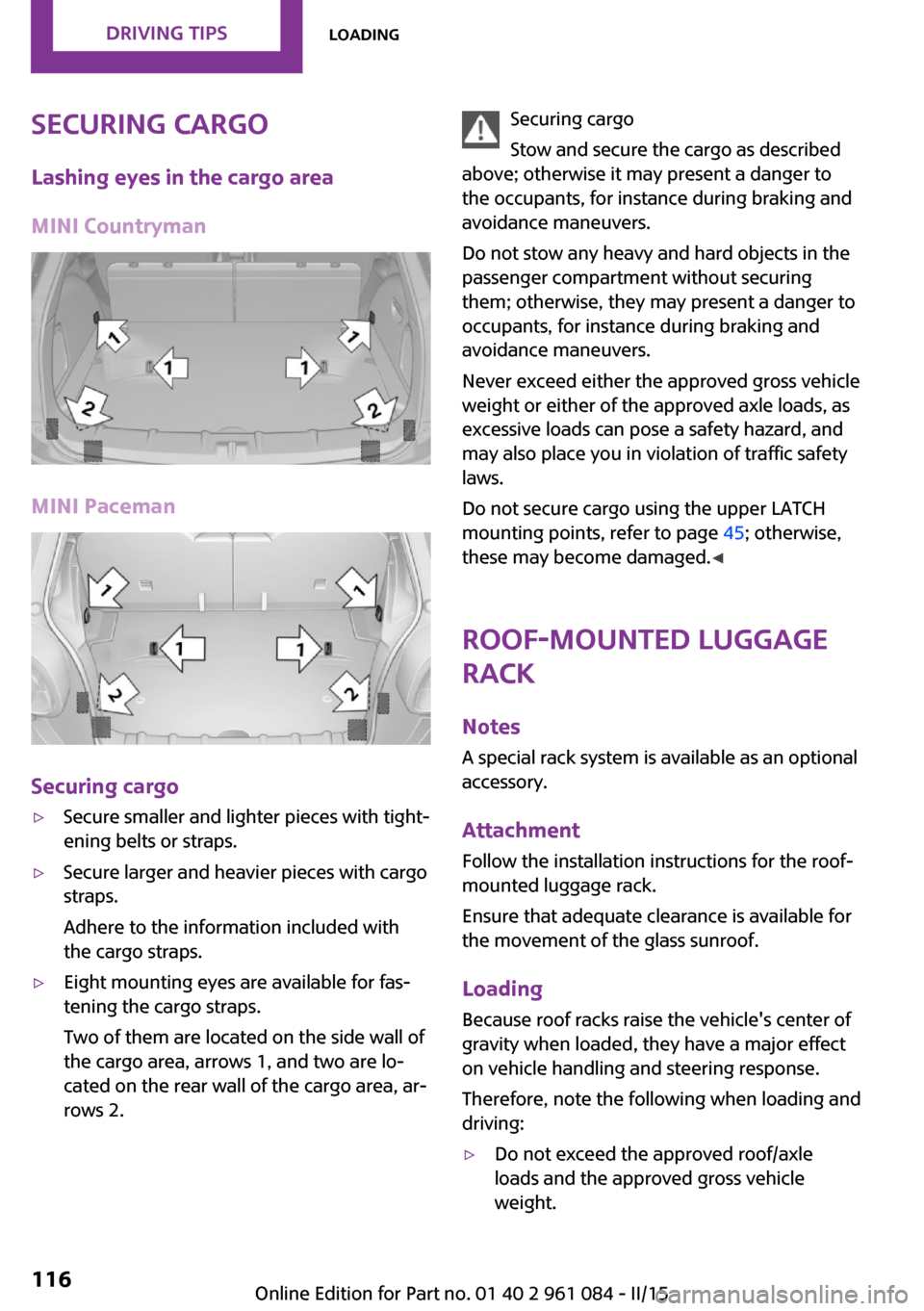
MINI Countryman
MINI Paceman
Securing cargo
▷Secure smaller and lighter pieces with tight‐
ening belts or straps.▷Secure larger and heavier pieces with cargo
straps.
Adhere to the information included with
the cargo straps.▷Eight mounting eyes are available for fas‐
tening the cargo straps.
Two of them are located on the side wall of
the cargo area, arrows 1, and two are lo‐
cated on the rear wall of the cargo area, ar‐
rows 2.Securing cargo
Stow and secure the cargo as described
above; otherwise it may present a danger to
the occupants, for instance during braking and
avoidance maneuvers.
Do not stow any heavy and hard objects in the
passenger compartment without securing
them; otherwise, they may present a danger to
occupants, for instance during braking and
avoidance maneuvers.
Never exceed either the approved gross vehicle
weight or either of the approved axle loads, as
excessive loads can pose a safety hazard, and
may also place you in violation of traffic safety
laws.
Do not secure cargo using the upper LATCH
mounting points, refer to page 45; otherwise,
these may become damaged. ◀
Roof-mounted luggage
rack
NotesA special rack system is available as an optionalaccessory.
Attachment Follow the installation instructions for the roof-
mounted luggage rack.
Ensure that adequate clearance is available for
the movement of the glass sunroof.
Loading Because roof racks raise the vehicle's center of
gravity when loaded, they have a major effect
on vehicle handling and steering response.
Therefore, note the following when loading and
driving:▷Do not exceed the approved roof/axle
loads and the approved gross vehicle
weight.Seite 116DRIVING TIPSLoading116
Online Edition for Part no. 01 40 2 961 084 - II/15
Page 119 of 223
▷Distribute the roof load uniformly.▷The roof load should not be too large in
area.▷Always load the heaviest pieces on the bot‐
tom.▷Fasten the roof-mounted luggage securely,
for instance using lashing straps.▷Do not let objects project into the opening
path of the tailgate.▷Drive smoothly. Avoid sudden acceleration
and braking maneuvers. Take corners gen‐
tly.
Rear luggage rack
Notes A special rear rack is available as an optional
accessory. It does not require a trailer hitch.
Follow the installation instructions for the rear
rack.
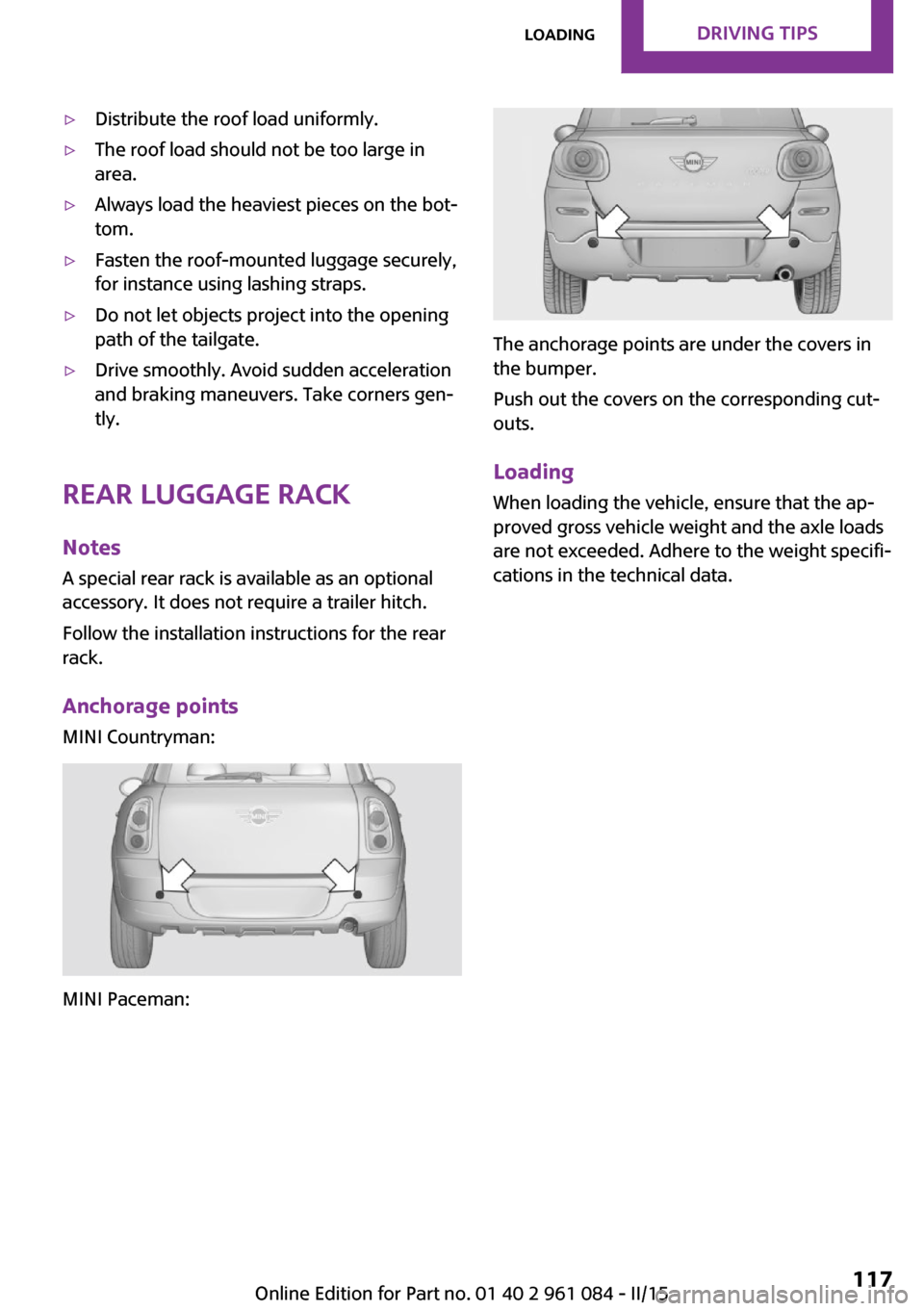
Anchorage points
MINI Countryman:
MINI Paceman:
The anchorage points are under the covers in
the bumper.
Push out the covers on the corresponding cut‐
outs.
Loading
When loading the vehicle, ensure that the ap‐
proved gross vehicle weight and the axle loads
are not exceeded. Adhere to the weight specifi‐
cations in the technical data.
Seite 117LoadingDRIVING TIPS117
Online Edition for Part no. 01 40 2 961 084 - II/15
Page 120 of 223
Saving fuelVehicle equipment
This chapter describes all series equipment as
well as country-specific and special equipment
offered for this model series. Therefore, it also
describes equipment that may not be found in
your vehicle, for instance due to the selected
special equipment or the country version. This
also applies to safety-related functions and sys‐
tems.
When using the features and systems described
here, adhere to local regulations.
General information
Your vehicle contains advanced technology for
the reduction of fuel consumption and emis‐
sions.
Fuel consumption depends on a number of dif‐
ferent factors. The implementation of certain measures, driving style and regular mainte‐nance can have an influence on fuel consump‐
tion and on the environmental impact.
Remove unnecessary cargo Additional weight increases fuel consumption.
Remove attached parts following use Remove unneeded auxiliary mirrors, roof or
rear luggage racks after use.
Attached parts on the vehicle impair the aero‐
dynamics and increase the fuel consumption.
Close both windows Open windows causes higher air resistance and
thus increases fuel consumption.Check the tire inflation pressure
regularly
Check and, if necessary, correct the tire infla‐
tion pressure, refer to page 152, at least twice
a month and before starting on a long trip.
Low tire inflation pressure increases rolling re‐
sistance and thus raises fuel consumption and
tire wear.
Drive away without delay
Do not wait for the engine to warm-up while
the vehicle remains stationary. Start driving
right away, but at moderate engine speeds.
This is the fastest way for the cold engine to
reach its operating temperature.
Look well ahead when drivingAvoid unnecessary acceleration and braking. To
achieve this, maintain a suitable distance to the
vehicle driving ahead of you.
Driving smoothly and looking ahead reduces
fuel consumption.
Avoid high engine speeds Use 1st gear to get the vehicle in motion. Be‐
ginning with 2nd gear, accelerate rapidly. When
accelerating, shift up before reaching high en‐
gine speeds.
When you reach the desired speed, shift into
the highest applicable gear and drive with the
engine speed as low as possible and at a con‐
stant speed.
As a rule: driving at low engine speeds lowers
fuel consumption and reduces wear.
Use coasting conditions
When approaching a red light, take your foot
off the accelerator and coast to a halt in the
highest applicable gear.Seite 118DRIVING TIPSSaving fuel118
Online Edition for Part no. 01 40 2 961 084 - II/15
Page 171 of 223
MaintenanceVehicle equipment
This chapter describes all series equipment as
well as country-specific and special equipment
offered for this model series. Therefore, it also
describes equipment that may not be found in
your vehicle, for instance due to the selected
special equipment or the country version. This
also applies to safety-related functions and sys‐
tems.
When using the features and systems described
here, adhere to local regulations.
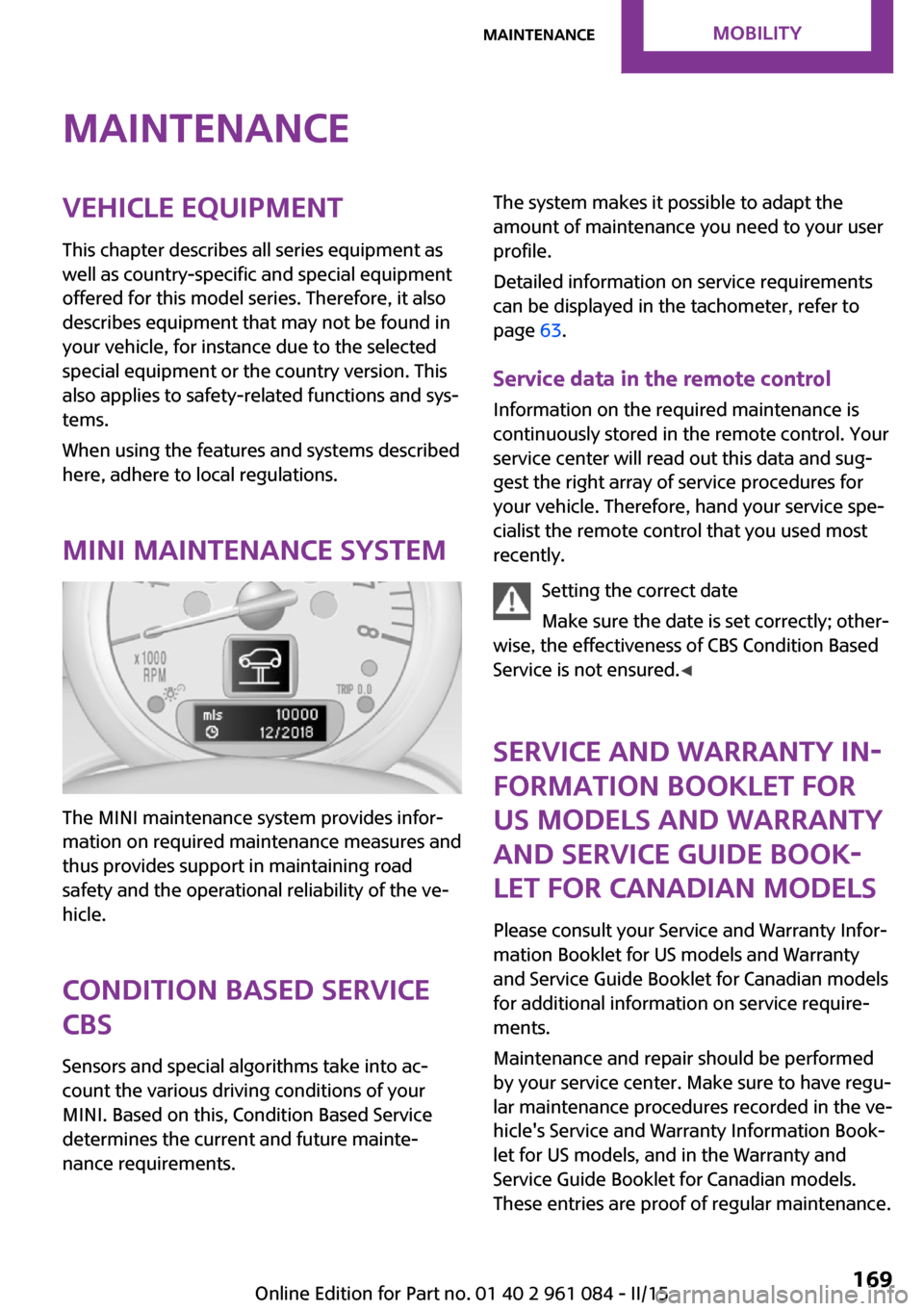
MINI maintenance system
The MINI maintenance system provides infor‐
mation on required maintenance measures and
thus provides support in maintaining road
safety and the operational reliability of the ve‐
hicle.
Condition Based Service
CBS
Sensors and special algorithms take into ac‐
count the various driving conditions of your
MINI. Based on this, Condition Based Service
determines the current and future mainte‐
nance requirements.
The system makes it possible to adapt the
amount of maintenance you need to your user
profile.
Detailed information on service requirements
can be displayed in the tachometer, refer to
page 63.
Service data in the remote control Information on the required maintenance is
continuously stored in the remote control. Your
service center will read out this data and sug‐
gest the right array of service procedures for
your vehicle. Therefore, hand your service spe‐
cialist the remote control that you used most
recently.
Setting the correct date
Make sure the date is set correctly; other‐
wise, the effectiveness of CBS Condition Based
Service is not ensured. ◀
Service and Warranty In‐
formation Booklet for
US models and Warranty
and Service Guide Book‐
let for Canadian models
Please consult your Service and Warranty Infor‐
mation Booklet for US models and Warranty
and Service Guide Booklet for Canadian models
for additional information on service require‐
ments.
Maintenance and repair should be performed
by your service center. Make sure to have regu‐
lar maintenance procedures recorded in the ve‐
hicle's Service and Warranty Information Book‐
let for US models, and in the Warranty and
Service Guide Booklet for Canadian models.
These entries are proof of regular maintenance.Seite 169MaintenanceMOBILITY169
Online Edition for Part no. 01 40 2 961 084 - II/15
Page 181 of 223
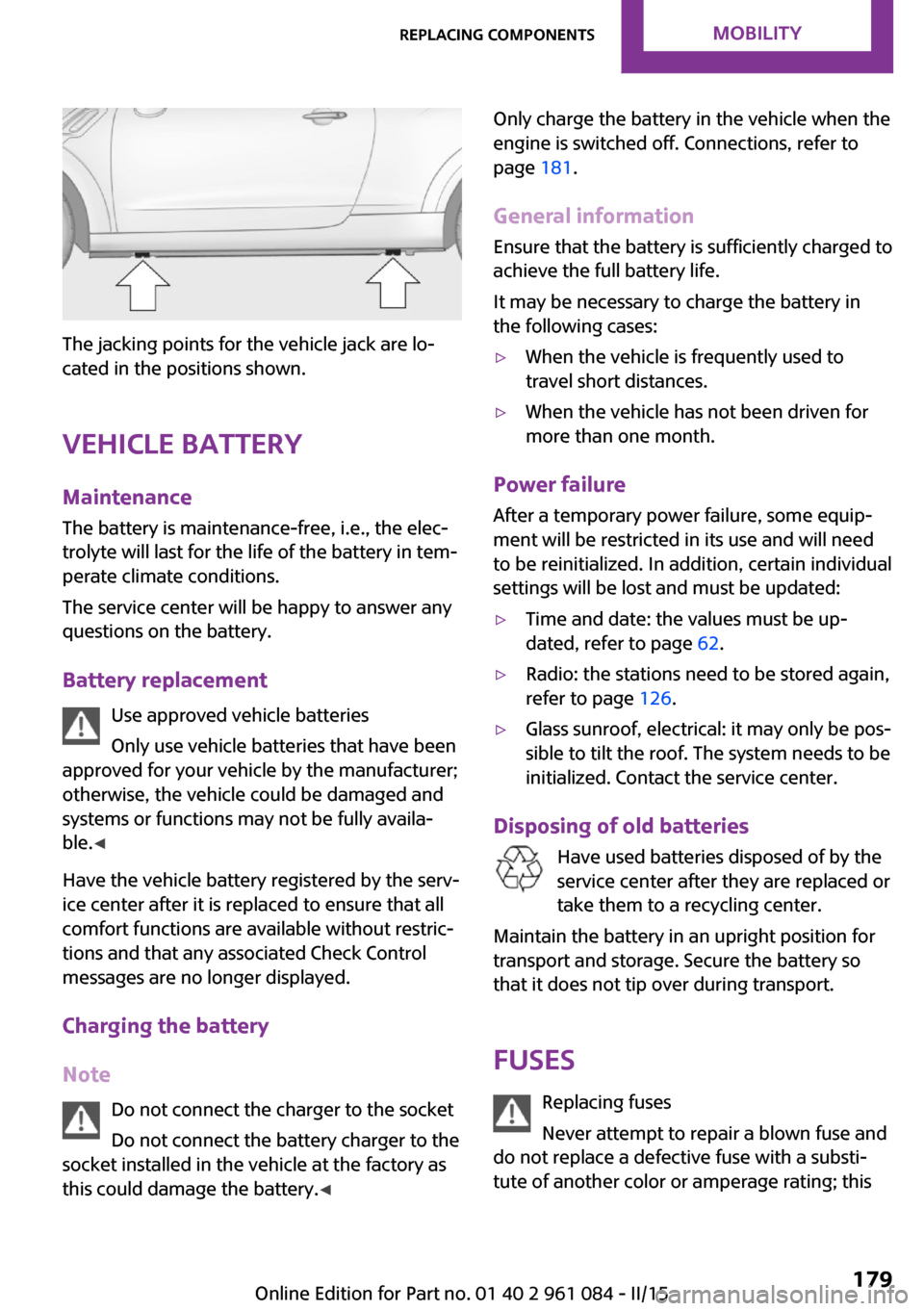
The jacking points for the vehicle jack are lo‐
cated in the positions shown.
Vehicle battery Maintenance
The battery is maintenance-free, i.e., the elec‐
trolyte will last for the life of the battery in tem‐
perate climate conditions.
The service center will be happy to answer any
questions on the battery.
Battery replacement Use approved vehicle batteries
Only use vehicle batteries that have been
approved for your vehicle by the manufacturer;
otherwise, the vehicle could be damaged and
systems or functions may not be fully availa‐
ble. ◀
Have the vehicle battery registered by the serv‐
ice center after it is replaced to ensure that all
comfort functions are available without restric‐
tions and that any associated Check Control
messages are no longer displayed.
Charging the battery
Note Do not connect the charger to the socket
Do not connect the battery charger to the
socket installed in the vehicle at the factory as this could damage the battery. ◀
Only charge the battery in the vehicle when the
engine is switched off. Connections, refer to
page 181.
General information Ensure that the battery is sufficiently charged to
achieve the full battery life.
It may be necessary to charge the battery in
the following cases:▷When the vehicle is frequently used to
travel short distances.▷When the vehicle has not been driven for
more than one month.
Power failure
After a temporary power failure, some equip‐
ment will be restricted in its use and will need
to be reinitialized. In addition, certain individual
settings will be lost and must be updated:
▷Time and date: the values must be up‐
dated, refer to page 62.▷Radio: the stations need to be stored again,
refer to page 126.▷Glass sunroof, electrical: it may only be pos‐
sible to tilt the roof. The system needs to be
initialized. Contact the service center.
Disposing of old batteries
Have used batteries disposed of by the
service center after they are replaced or
take them to a recycling center.
Maintain the battery in an upright position for
transport and storage. Secure the battery so
that it does not tip over during transport.
Fuses Replacing fuses
Never attempt to repair a blown fuse and
do not replace a defective fuse with a substi‐
tute of another color or amperage rating; this
Seite 179Replacing componentsMOBILITY179
Online Edition for Part no. 01 40 2 961 084 - II/15
Page 208 of 223
Technical dataVehicle equipment
This chapter describes all series equipment as
well as country-specific and special equipment
offered for this model series. Therefore, it also
describes equipment that may not be found in
your vehicle, for instance due to the selectedspecial equipment or the country version. This
also applies to safety-related functions and sys‐
tems.
When using the features and systems described
here, adhere to local regulations.
Note
The technical data and specifications in this
Owner's Manual are used as guidance values.
The vehicle-specific data can deviate from this,
for example, due to the selected special equip‐
ment, country version or country-specific
measurement method. Detailed values can befound in the approval documents, on informa‐
tion signs on the vehicle or can be obtained
from the service center.
The information in the vehicle documents al‐
ways has priority.
Dimensions
The dimensions can vary depending on the
model version, equipment or country-specific
measurement method.
The specified heights do not take into account
attached parts, for example, a roof antenna,roof racks or spoiler. The heights can deviate,
for example, due to the selected special equip‐
ment, tires, load and chassis version.
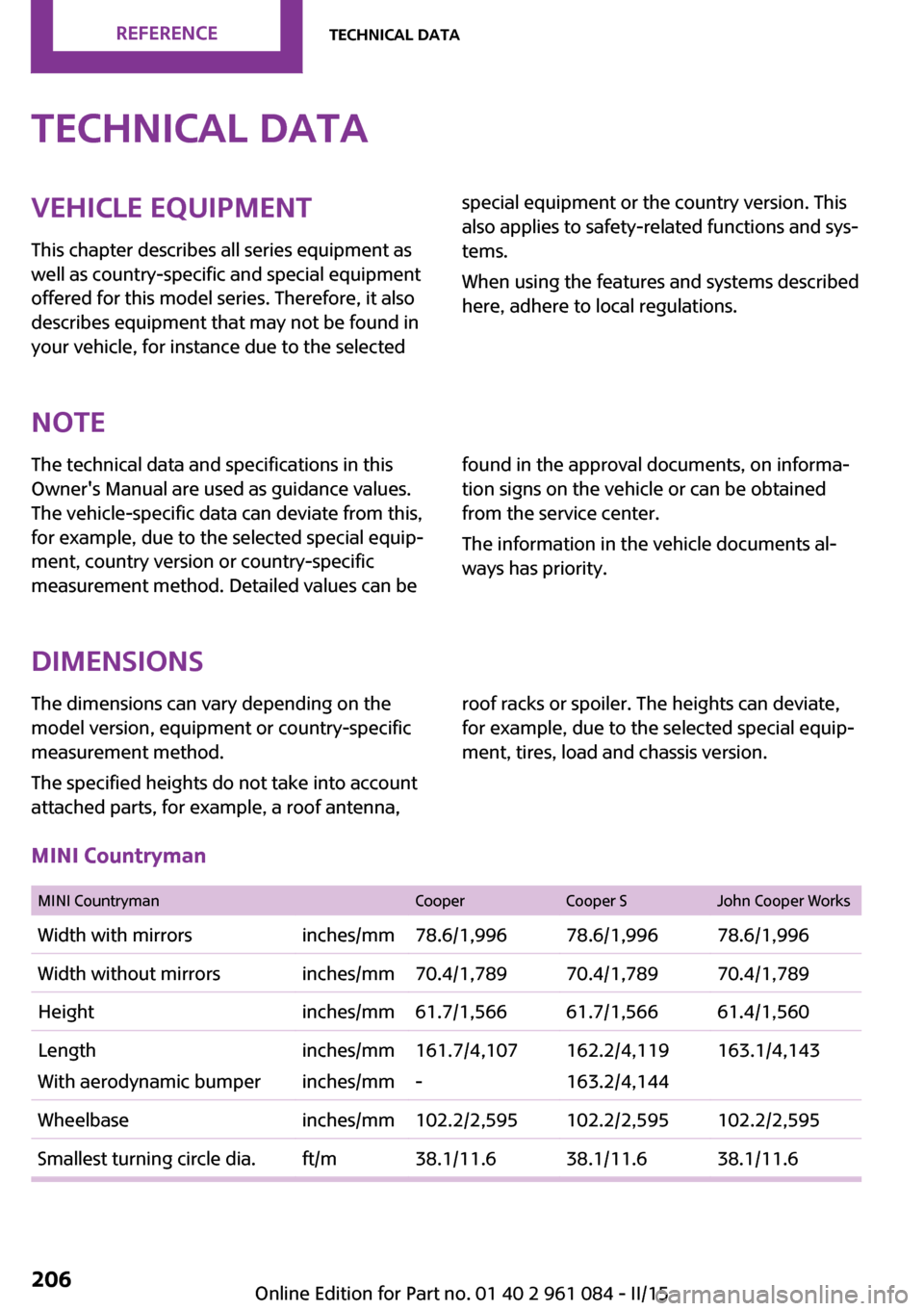
MINI Countryman
MINI CountrymanCooperCooper SJohn Cooper WorksWidth with mirrorsinches/mm78.6/1,99678.6/1,99678.6/1,996Width without mirrorsinches/mm70.4/1,78970.4/1,78970.4/1,789Heightinches/mm61.7/1,56661.7/1,56661.4/1,560Length
With aerodynamic bumperinches/mm
inches/mm161.7/4,107
-162.2/4,119
163.2/4,144163.1/4,143Wheelbaseinches/mm102.2/2,595102.2/2,595102.2/2,595Smallest turning circle dia.ft/m38.1/11.638.1/11.638.1/11.6Seite 206REFERENCETechnical data206
Online Edition for Part no. 01 40 2 961 084 - II/15
Page 209 of 223
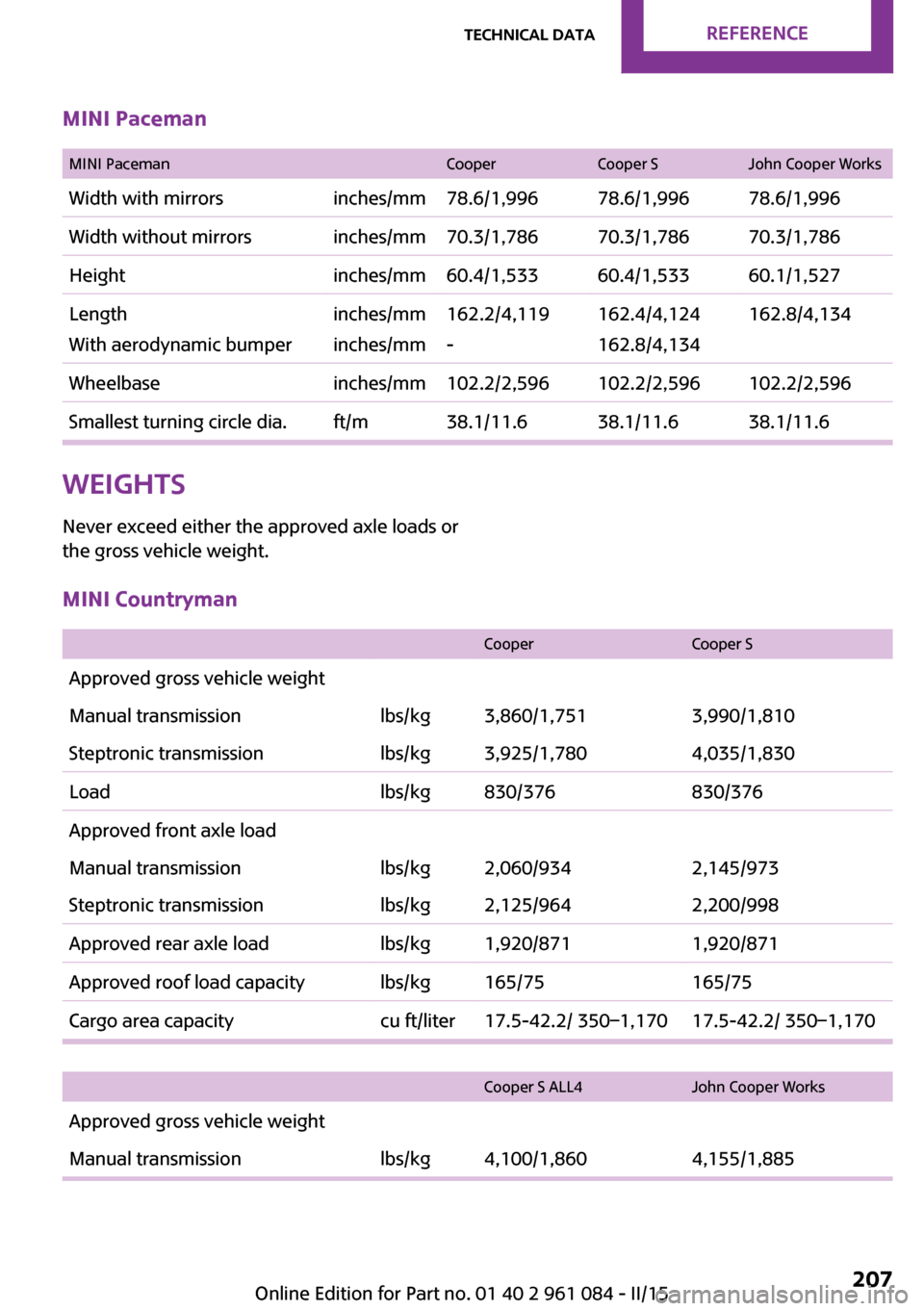
MINI Paceman
MINI PacemanCooperCooper SJohn Cooper WorksWidth with mirrorsinches/mm78.6/1,99678.6/1,99678.6/1,996Width without mirrorsinches/mm70.3/1,78670.3/1,78670.3/1,786Heightinches/mm60.4/1,53360.4/1,53360.1/1,527Length
With aerodynamic bumperinches/mm
inches/mm162.2/4,119
-162.4/4,124
162.8/4,134162.8/4,134Wheelbaseinches/mm102.2/2,596102.2/2,596102.2/2,596Smallest turning circle dia.ft/m38.1/11.638.1/11.638.1/11.6Weights
Never exceed either the approved axle loads or
the gross vehicle weight.MINI Countryman
CooperCooper SApproved gross vehicle weightManual transmissionlbs/kg3,860/1,7513,990/1,810Steptronic transmissionlbs/kg3,925/1,7804,035/1,830Loadlbs/kg830/376830/376Approved front axle loadManual transmissionlbs/kg2,060/9342,145/973Steptronic transmissionlbs/kg2,125/9642,200/998Approved rear axle loadlbs/kg1,920/8711,920/871Approved roof load capacitylbs/kg165/75165/75Cargo area capacitycu ft/liter17.5-42.2/ 350–1,17017.5-42.2/ 350–1,170
Cooper S ALL4John Cooper WorksApproved gross vehicle weightManual transmissionlbs/kg4,100/1,8604,155/1,885Seite 207Technical dataREFERENCE207
Online Edition for Part no. 01 40 2 961 084 - II/15
Page 210 of 223
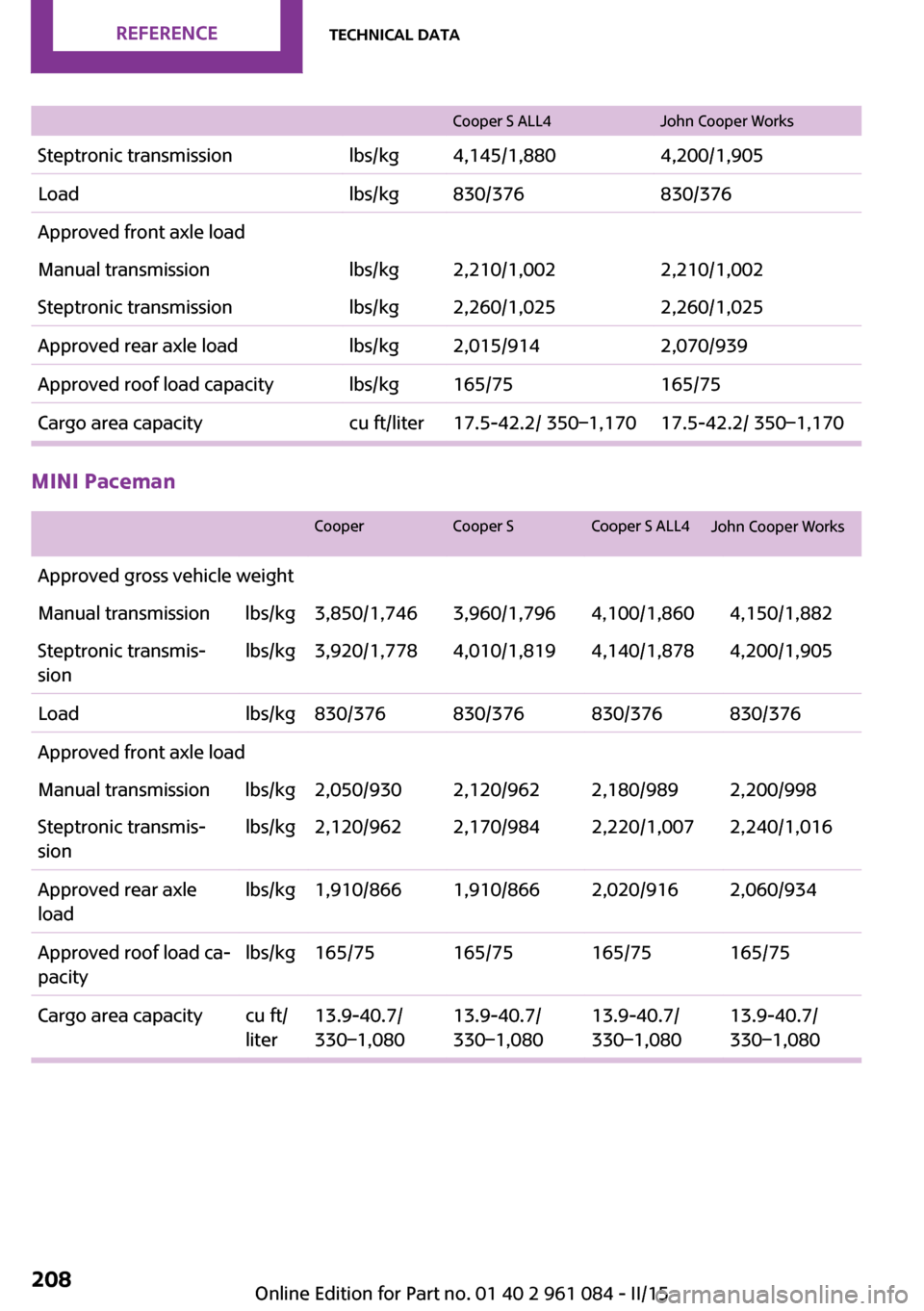
Cooper S ALL4
John Cooper Works
Steptronic transmission lbs/kg 4,145/1,8804,200/1,905
Load lbs/kg 830/376830/376
Approved front axle load
Manual transmission lbs/kg 2,210/1,0022,210/1,002
Steptronic transmission lbs/kg 2,260/1,0252,260/1,025
Approved rear axle load lbs/kg 2,015/9142,070/939
Approved roof load capacity lbs/kg 165/75 165/75
Cargo area capacity cu ft/liter 17.5-42.2/ 350–1,170 17.5-42.2/ 350–1,170MINI Paceman
Cooper
Cooper SCooper S ALL4 John Cooper Works
Approved gross vehicle weight
Manual transmission lbs/kg 3,850/1,746 3,960/1,796 4,100/1,860 4,150/1,882
Steptronic transmis‐
sion lbs/kg 3,920/1,778 4,010/1,819 4,140/1,878 4,200/1,905
Load lbs/kg 830/376 830/376 830/376 830/376
Approved front axle load
Manual transmission lbs/kg 2,050/930 2,120/962 2,180/989 2,200/998
Steptronic transmis‐
sion lbs/kg 2,120/962 2,170/984 2,220/1,007 2,240/1,016
Approved rear axle
load lbs/kg 1,910/866 1,910/866 2,020/916 2,060/934
Approved roof load ca‐
pacity lbs/kg 165/75 165/75 165/75 165/75
Cargo area capacity cu ft/ liter13.9-40.7/
330–1,080 13.9-40.7/
330–1,08013.9-40.7/
330–1,08013.9-40.7/
330–1,080
Seite 208
REFERENCE
Technical data
208 Online Edition for Part no. 01 40 2 961 084 - II/15
Page 215 of 223
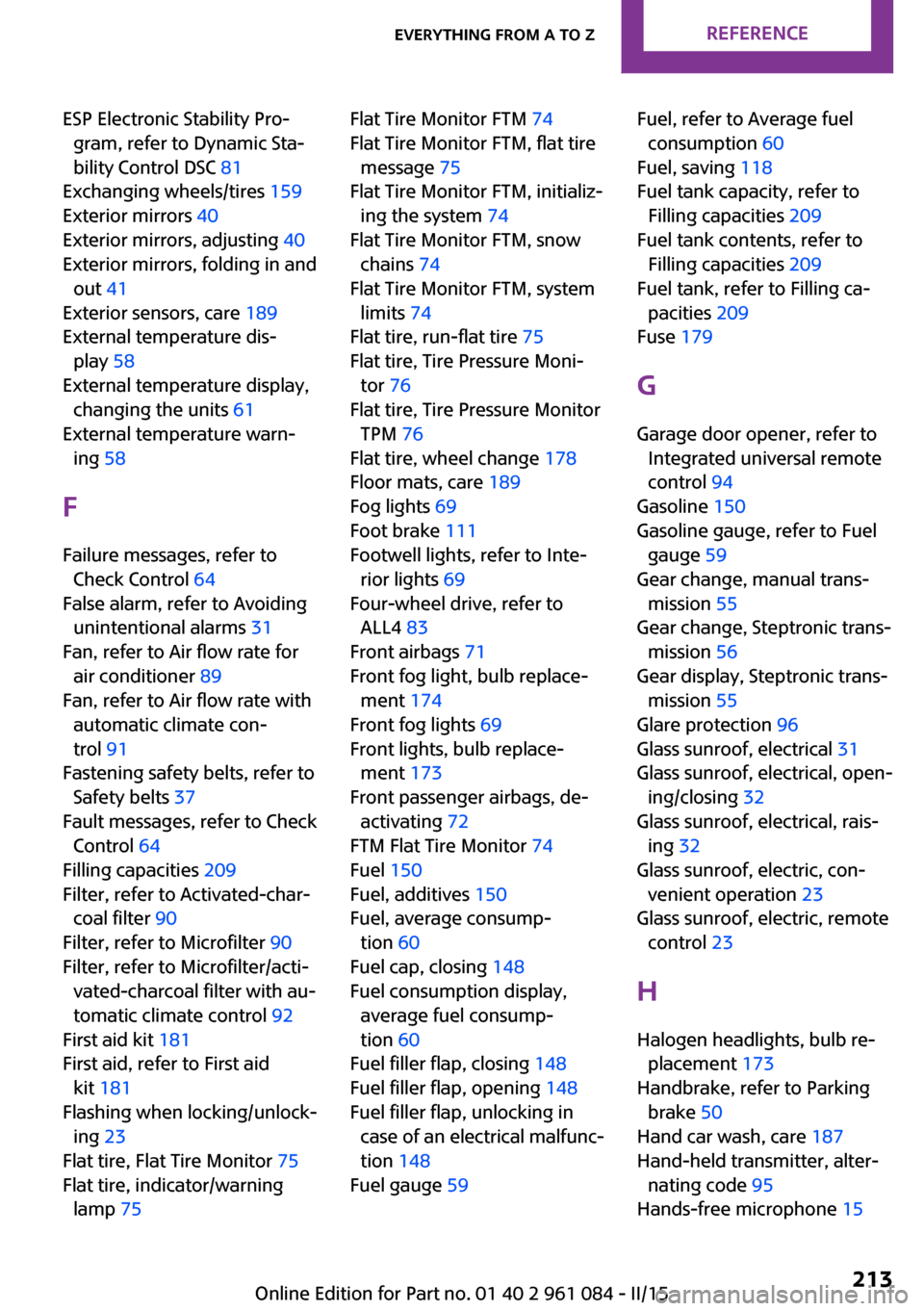
ESP Electronic Stability Pro‐gram, refer to Dynamic Sta‐
bility Control DSC 81
Exchanging wheels/tires 159
Exterior mirrors 40
Exterior mirrors, adjusting 40
Exterior mirrors, folding in and out 41
Exterior sensors, care 189
External temperature dis‐ play 58
External temperature display, changing the units 61
External temperature warn‐ ing 58
F Failure messages, refer to Check Control 64
False alarm, refer to Avoiding unintentional alarms 31
Fan, refer to Air flow rate for air conditioner 89
Fan, refer to Air flow rate with automatic climate con‐
trol 91
Fastening safety belts, refer to Safety belts 37
Fault messages, refer to Check Control 64
Filling capacities 209
Filter, refer to Activated-char‐ coal filter 90
Filter, refer to Microfilter 90
Filter, refer to Microfilter/acti‐ vated-charcoal filter with au‐
tomatic climate control 92
First aid kit 181
First aid, refer to First aid kit 181
Flashing when locking/unlock‐ ing 23
Flat tire, Flat Tire Monitor 75
Flat tire, indicator/warning lamp 75 Flat Tire Monitor FTM 74
Flat Tire Monitor FTM, flat tire message 75
Flat Tire Monitor FTM, initializ‐ ing the system 74
Flat Tire Monitor FTM, snow chains 74
Flat Tire Monitor FTM, system limits 74
Flat tire, run-flat tire 75
Flat tire, Tire Pressure Moni‐ tor 76
Flat tire, Tire Pressure Monitor TPM 76
Flat tire, wheel change 178
Floor mats, care 189
Fog lights 69
Foot brake 111
Footwell lights, refer to Inte‐ rior lights 69
Four-wheel drive, refer to ALL4 83
Front airbags 71
Front fog light, bulb replace‐ ment 174
Front fog lights 69
Front lights, bulb replace‐ ment 173
Front passenger airbags, de‐ activating 72
FTM Flat Tire Monitor 74
Fuel 150
Fuel, additives 150
Fuel, average consump‐ tion 60
Fuel cap, closing 148
Fuel consumption display, average fuel consump‐
tion 60
Fuel filler flap, closing 148
Fuel filler flap, opening 148
Fuel filler flap, unlocking in case of an electrical malfunc‐
tion 148
Fuel gauge 59 Fuel, refer to Average fuel
consumption 60
Fuel, saving 118
Fuel tank capacity, refer to Filling capacities 209
Fuel tank contents, refer to Filling capacities 209
Fuel tank, refer to Filling ca‐ pacities 209
Fuse 179
G Garage door opener, refer to Integrated universal remote
control 94
Gasoline 150
Gasoline gauge, refer to Fuel gauge 59
Gear change, manual trans‐ mission 55
Gear change, Steptronic trans‐ mission 56
Gear display, Steptronic trans‐ mission 55
Glare protection 96
Glass sunroof, electrical 31
Glass sunroof, electrical, open‐ ing/closing 32
Glass sunroof, electrical, rais‐ ing 32
Glass sunroof, electric, con‐ venient operation 23
Glass sunroof, electric, remote control 23
H Halogen headlights, bulb re‐ placement 173
Handbrake, refer to Parking brake 50
Hand car wash, care 187
Hand-held transmitter, alter‐ nating code 95
Hands-free microphone 15 Seite 213Everything from A to ZREFERENCE213
Online Edition for Part no. 01 40 2 961 084 - II/15
Page 216 of 223
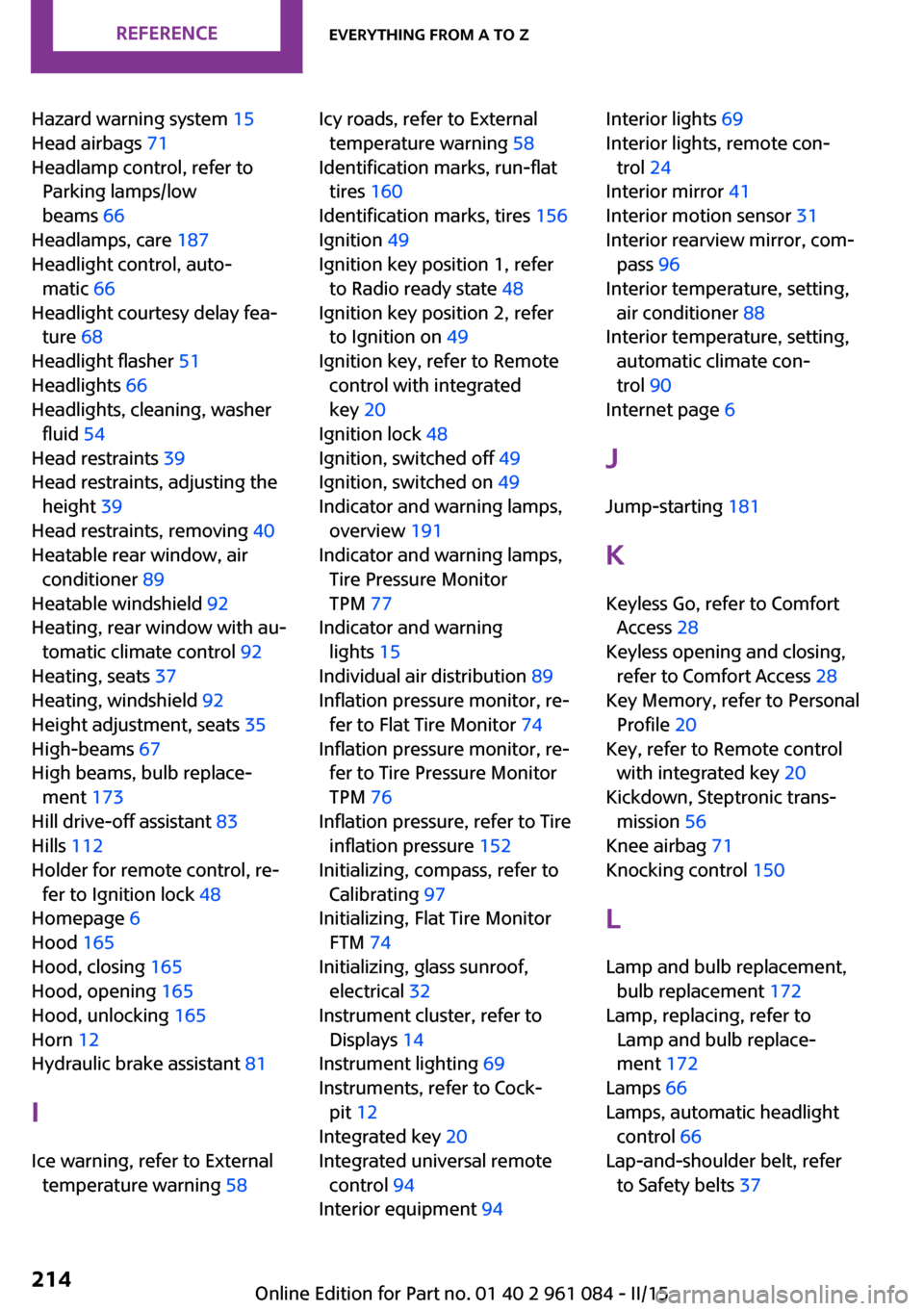
Hazard warning system 15
Head airbags 71
Headlamp control, refer to Parking lamps/low
beams 66
Headlamps, care 187
Headlight control, auto‐ matic 66
Headlight courtesy delay fea‐ ture 68
Headlight flasher 51
Headlights 66
Headlights, cleaning, washer fluid 54
Head restraints 39
Head restraints, adjusting the height 39
Head restraints, removing 40
Heatable rear window, air conditioner 89
Heatable windshield 92
Heating, rear window with au‐ tomatic climate control 92
Heating, seats 37
Heating, windshield 92
Height adjustment, seats 35
High-beams 67
High beams, bulb replace‐ ment 173
Hill drive-off assistant 83
Hills 112
Holder for remote control, re‐ fer to Ignition lock 48
Homepage 6
Hood 165
Hood, closing 165
Hood, opening 165
Hood, unlocking 165
Horn 12
Hydraulic brake assistant 81
I
Ice warning, refer to External temperature warning 58 Icy roads, refer to External
temperature warning 58
Identification marks, run-flat tires 160
Identification marks, tires 156
Ignition 49
Ignition key position 1, refer to Radio ready state 48
Ignition key position 2, refer to Ignition on 49
Ignition key, refer to Remote control with integrated
key 20
Ignition lock 48
Ignition, switched off 49
Ignition, switched on 49
Indicator and warning lamps, overview 191
Indicator and warning lamps, Tire Pressure Monitor
TPM 77
Indicator and warning lights 15
Individual air distribution 89
Inflation pressure monitor, re‐ fer to Flat Tire Monitor 74
Inflation pressure monitor, re‐ fer to Tire Pressure Monitor
TPM 76
Inflation pressure, refer to Tire inflation pressure 152
Initializing, compass, refer to Calibrating 97
Initializing, Flat Tire Monitor FTM 74
Initializing, glass sunroof, electrical 32
Instrument cluster, refer to Displays 14
Instrument lighting 69
Instruments, refer to Cock‐ pit 12
Integrated key 20
Integrated universal remote control 94
Interior equipment 94 Interior lights 69
Interior lights, remote con‐ trol 24
Interior mirror 41
Interior motion sensor 31
Interior rearview mirror, com‐ pass 96
Interior temperature, setting, air conditioner 88
Interior temperature, setting, automatic climate con‐
trol 90
Internet page 6
J Jump-starting 181
K
Keyless Go, refer to Comfort Access 28
Keyless opening and closing, refer to Comfort Access 28
Key Memory, refer to Personal Profile 20
Key, refer to Remote control with integrated key 20
Kickdown, Steptronic trans‐ mission 56
Knee airbag 71
Knocking control 150
L Lamp and bulb replacement, bulb replacement 172
Lamp, replacing, refer to Lamp and bulb replace‐
ment 172
Lamps 66
Lamps, automatic headlight control 66
Lap-and-shoulder belt, refer to Safety belts 37 Seite 214REFERENCEEverything from A to Z214
Online Edition for Part no. 01 40 2 961 084 - II/15