manual radio set MITSUBISHI 3000GT 1994 2.G User Guide
[x] Cancel search | Manufacturer: MITSUBISHI, Model Year: 1994, Model line: 3000GT, Model: MITSUBISHI 3000GT 1994 2.GPages: 738, PDF Size: 35.06 MB
Page 676 of 738
Downloaded from www.Manualslib.com manuals search engine CHASSIS ELECTRICAL - Radio and Taste Plaver
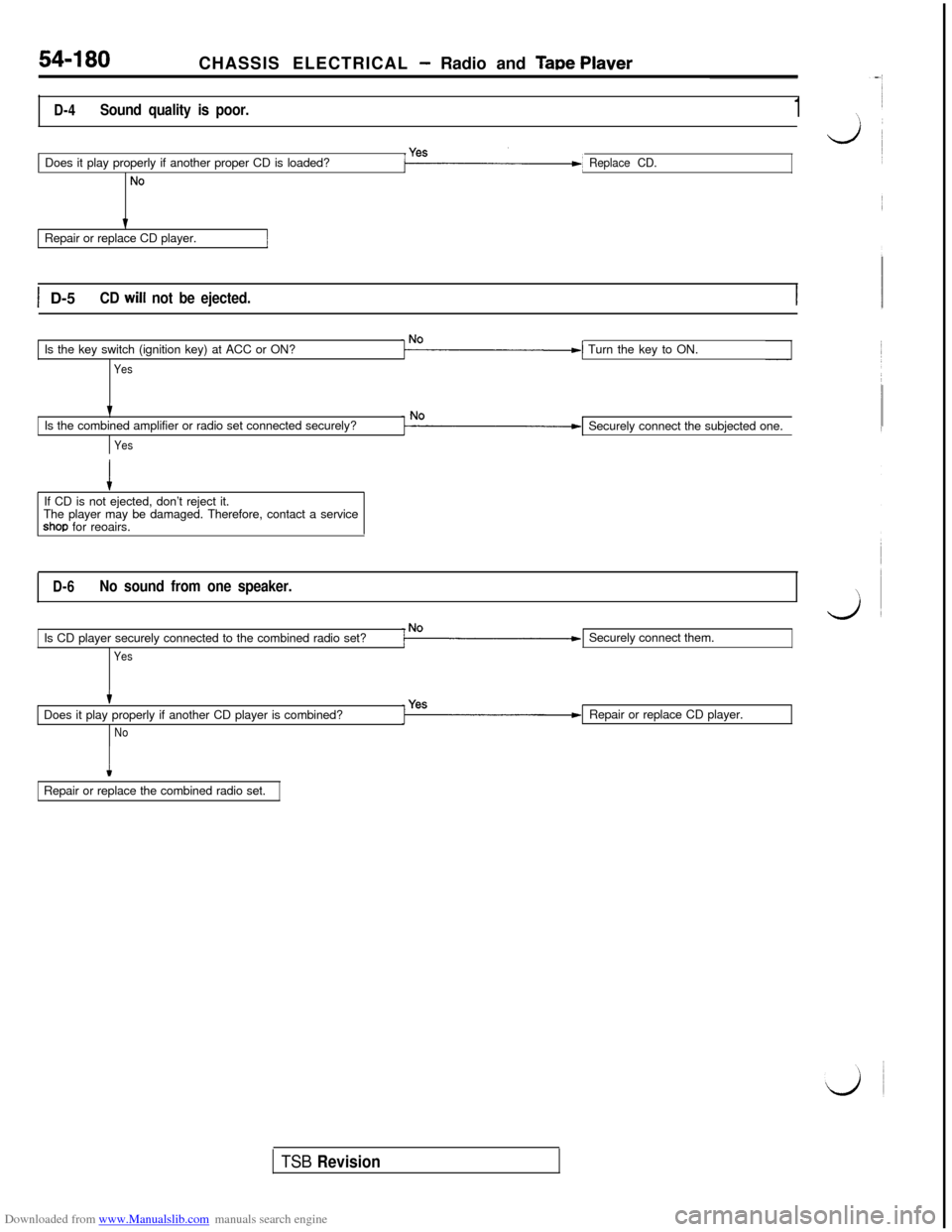
D-4Sound quality is poor.1Does it play properly if another proper CD is loaded?
No
Replace CD.Repair or replace CD player.
1 D-5CD will not be ejected.Is the key switch (ignition key) at ACC or ON?
YesTurn the key to ON.
tIs the combined amplifier or radio set connected securely?
YesSecurely connect the subjected one.
If CD is not ejected, don’t reject it.
The player may be damaged. Therefore, contact a service
shop for reoairs.
D-6No sound from one speaker.Is CD player securely connected to the combined radio set?
YesSecurely connect them.
Does it play properly if another CD player is combined?
NoRepair or replace CD player.
IRepair or replace the combined radio set.
TSB Revision
Page 680 of 738
Downloaded from www.Manualslib.com manuals search engine 54-184CHASSIS ELECTRICAL - Radio and Tape Plaver
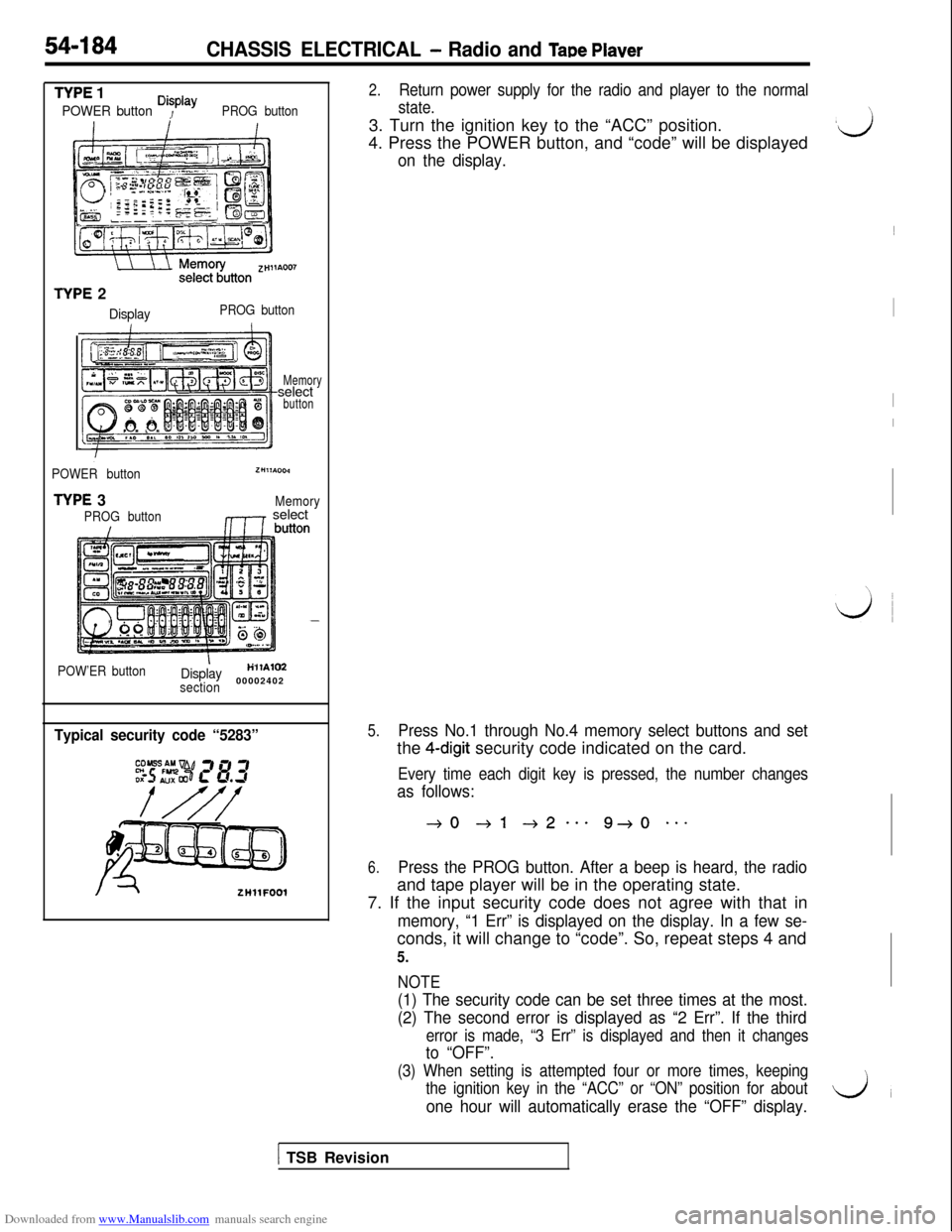
TYPE 1
POWER button Disp’ayPROG button
TYPE 2
DisplayPROG button
Memoryselect
button
POWER button
TYPE 3
PROG button
ZHllA004
Memory,1r select
POW’ER buttonIDisplayH’llAlM
section00002402
Typical security code “5283”
ZHllFOOl
2.Return power supply for the radio and player to the normal
state.3. Turn the ignition key to the “ACC” position.
4. Press the POWER button, and “code” will be displayed
on the display.
5.Press No.1 through No.4 memory select buttons and setthe
4-digit security code indicated on the card.
Every time each digit key is pressed, the number changes
as follows:
40 +l +2--e 9+0 **-
6.Press the PROG button. After a beep is heard, the radioand tape player will be in the operating state.
7. If the input security code does not agree with that in
memory, “1 Err” is displayed on the display. In a few se-conds, it will change to “code”. So, repeat steps 4 and
5.
NOTE
(1) The security code can be set three times at the most.
(2) The second error is displayed as “2 Err”. If the third
error is made, “3 Err” is displayed and then it changes
to “OFF”.
(3) When setting is attempted four or more times, keeping
the ignition key in the “ACC” or “ON” position for about
one hour will automatically erase the “OFF” display.
\
,ij~
I
I
I
\,
LJ
1 TSB Revision
Page 686 of 738
Downloaded from www.Manualslib.com manuals search engine CHASSIS ELECTRICAL - Radio and Tape Player
Ring nut
Tbothsideofrack cable
Rack cable
16LO42700002407,8Loa1
7
Tooth side of rack cable
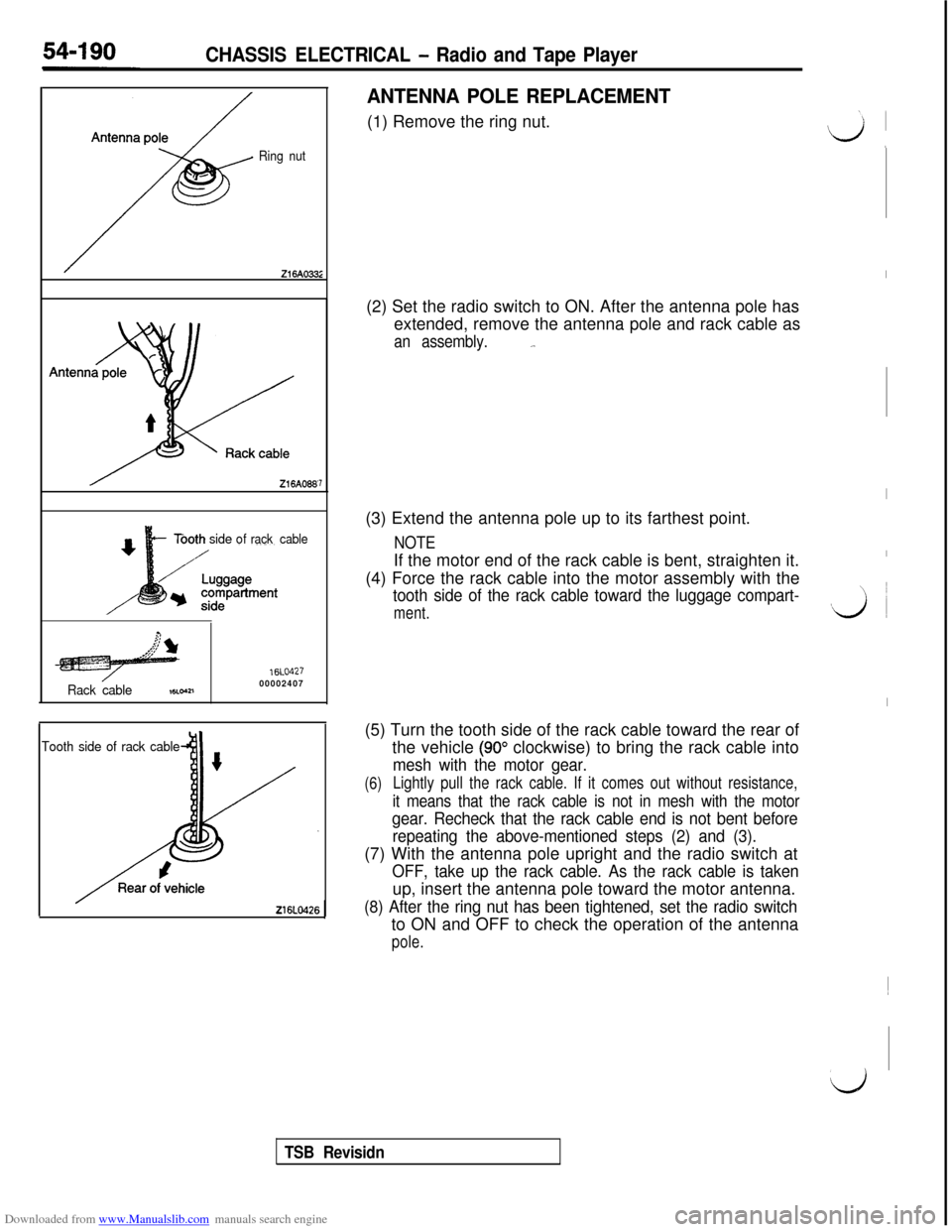
ANTENNA POLE REPLACEMENT(1) Remove the ring nut.
(2) Set the radio switch to ON. After the antenna pole has
extended, remove the antenna pole and rack cable as
an assembly._.(3) Extend the antenna pole up to its farthest point.
NOTEIf the motor end of the rack cable is bent, straighten it.
(4) Force the rack cable into the motor assembly with the
tooth side of the rack cable toward the luggage compart-
ment.(5) Turn the tooth side of the rack cable toward the rear of
the vehicle
(90” clockwise) to bring the rack cable into
mesh with the motor gear.
(6)Lightly pull the rack cable. If it comes out without resistance,
it means that the rack cable is not in mesh with the motor
gear. Recheck that the rack cable end is not bent before
repeating the above-mentioned steps (2) and (3).(7) With the antenna pole upright and the radio switch at
OFF, take up the rack cable. As the rack cable is takenup, insert the antenna pole toward the motor antenna.
(8) After the ring nut has been tightened, set the radio switchto ON and OFF to check the operation of the antenna
pole.
I
I
I
vi ~
I~
d
TSB Revisidn