ECO mode MITSUBISHI ASX 2009 1.G User Guide
[x] Cancel search | Manufacturer: MITSUBISHI, Model Year: 2009, Model line: ASX, Model: MITSUBISHI ASX 2009 1.GPages: 368, PDF Size: 8.13 MB
Page 37 of 368
NOTE
l When
the following operation is performed
with the operation mode in OFF, the steering
wheel is locked. • Open or close one of the doors (exceptthe tailgate).
• Lock all doors and the tailgate with the keyless entry system or the keyless opera-
tion function.
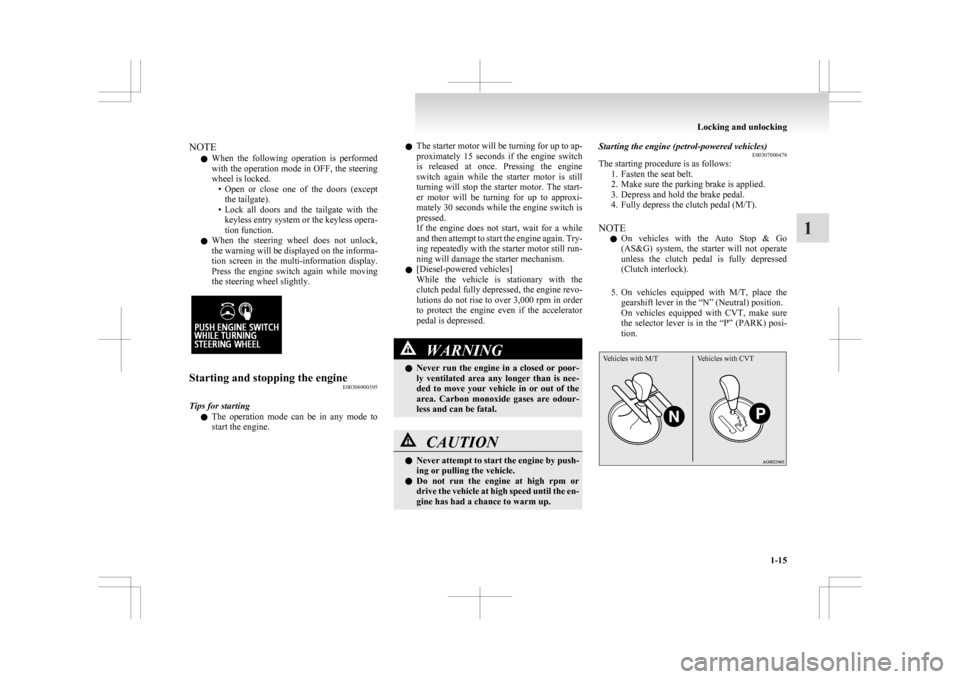
l When the steering wheel does not unlock,
the warning will be displayed on the informa-
tion screen in the multi-information display.
Press the engine switch again while moving
the steering wheel slightly. Starting and stopping the engine
E00306900395
Tips for starting l The
operation mode can be in any mode to
start the engine. l
The
starter motor will be turning for up to ap-
proximately 15 seconds if the engine switch
is released at once. Pressing the engine
switch again while the starter motor is still
turning will stop the starter motor. The start-
er motor will be turning for up to approxi-
mately 30 seconds while the engine switch is
pressed.
If the engine does not start, wait for a while
and then attempt to start the engine again. Try-
ing repeatedly with the starter motor still run-
ning will damage the starter mechanism.
l [Diesel-powered vehicles]
While the vehicle is stationary with the
clutch pedal fully depressed, the engine revo-
lutions do not rise to over 3,000 rpm in order
to protect the engine even if the accelerator
pedal is depressed. WARNING
l Never
run the engine in a closed or poor-
ly ventilated area any longer than is nee-
ded to move your vehicle in or out of the
area. Carbon monoxide gases are odour-
less and can be fatal. CAUTION
l
Never
attempt to start the engine by push-
ing or pulling the vehicle.
l Do not run the engine at high rpm or
drive the vehicle at high speed until the en-
gine has had a chance to warm up. Starting the engine (petrol-powered vehicles)
E00307000478
The starting procedure is as follows:
1.
Fasten the seat belt.
2. Make sure the parking brake is applied.
3. Depress and hold the brake pedal.
4. Fully depress the clutch pedal (M/T).
NOTE l On vehicles with the Auto Stop & Go
(AS&G) system, the starter will not operate
unless the clutch pedal is fully depressed
(Clutch interlock).
5. On vehicles equipped with M/T, place the gearshift lever in the “N” (Neutral) position.
On vehicles equipped with CVT, make sure
the selector lever is in the “P” (PARK) posi-
tion.
Vehicles with M/T Vehicles with CVT Locking and unlocking
1-15 1
Page 38 of 368
NOTE
l The
engine can only be started when the se-
lector lever is in the “P” (PARK) or “N”
(NEUTRAL) position (CVT).
For safety reasons, the engine should be star-
ted when the selector lever is in the “P”
(PARK) position in which the driving wheels
lock.
6. Press the engine switch.
7. Make sure that all warning lamps are func- tioning properly.
NOTE l Minor noises may be heard on engine start-
up. These will disappear as the engine warms
up.
Starting the engine (diesel-powered vehicles) E00308600051
1. Fasten the seat belt.
2.
Make sure the parking brake is applied.
3. Depress and hold the brake pedal.
4. Fully depress and hold the clutch pedal.
NOTE l On vehicles with the Auto Stop & Go
(AS&G) system, the starter will not operate
unless the clutch pedal is fully depressed
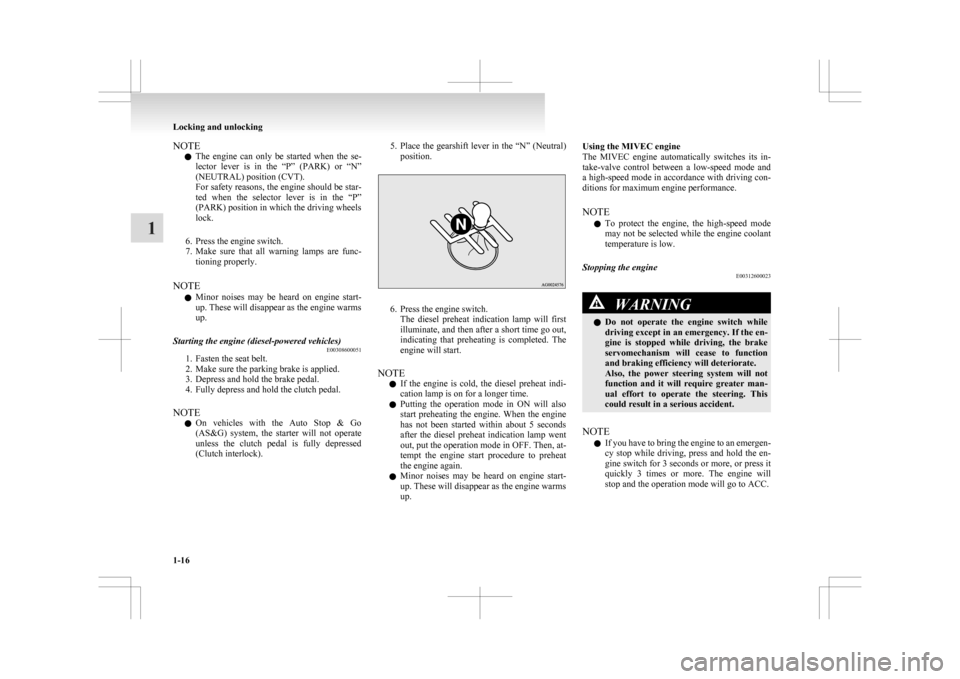
(Clutch interlock). 5. Place
the gearshift lever in the “N” (Neutral)
position. 6. Press the engine switch.
The
diesel preheat indication lamp will first
illuminate, and then after a short time go out,
indicating that preheating is completed. The
engine will start.
NOTE l If the engine is cold, the diesel preheat indi-
cation lamp is on for a longer time.
l Putting the operation mode in ON will also
start preheating the engine. When the engine
has not been started within about 5 seconds
after the diesel preheat indication lamp went
out, put the operation mode in OFF. Then, at-
tempt the engine start procedure to preheat
the engine again.
l Minor noises may be heard on engine start-
up. These will disappear as the engine warms
up. Using the MIVEC engine
The
MIVEC engine automatically switches its in-
take-valve control between a low-speed mode and
a high-speed mode in accordance with driving con-
ditions for maximum engine performance.
NOTE
l To protect the engine, the high-speed mode
may not be selected while the engine coolant
temperature is low.
Stopping the engine E00312600023 WARNING
l Do
not operate the engine switch while
driving except in an emergency. If the en-
gine is stopped while driving, the brake
servomechanism will cease to function
and braking efficiency will deteriorate.
Also, the power steering system will not
function and it will require greater man-
ual effort to operate the steering. This
could result in a serious accident.
NOTE l If
you have to bring the engine to an emergen-
cy stop while driving, press and hold the en-
gine switch for 3 seconds or more, or press it
quickly 3 times or more. The engine will
stop and the operation mode will go to ACC. Locking and unlocking
1-16
1
Page 39 of 368
l
Do not stop the engine with the selector lever
in
any position other than the “P” (PARK) po-
sition (CVT). If the engine is stopped with
the selector lever in any position other than
the “P” (PARK) position, the operation
mode will go to ACC rather than OFF.
Put the operation mode in OFF after placing
the selector lever in the “P” (PARK) position.
1. Stop the vehicle.
2. Fully engage the parking brake while depress-ing the brake pedal.
3. On vehicles with M/T, press the engine switch to stop the engine, move the gearshift
lever to the 1 st
(on a uphill) or “R” (Reverse)
(on a downhill) position.
On vehicles with CVT, move the selector lev-
er to the “P” (PARK) position, press the en-
gine switch to stop the engine.
If the keyless operation key is not oper-
ating properly E00312500035
Insert the keyless operation key into the key slot in
the
glove box. Starting the engine and changing the
operation mode should now be possible. Remove the keyless operation key from the key
slot
after starting the engine or changing the opera-
tion mode. NOTE
l Do
not insert into the key slot anything other
than the keyless operation key. This could
cause damage or a malfunction.
l Remove the object or additional key from the
the keyless operation key before inserting the
key into the key slot.
The vehicle may not be able to receive the
registered ID code from the registered key.
Therefore, the engine may not start and the
operation mode may not change.
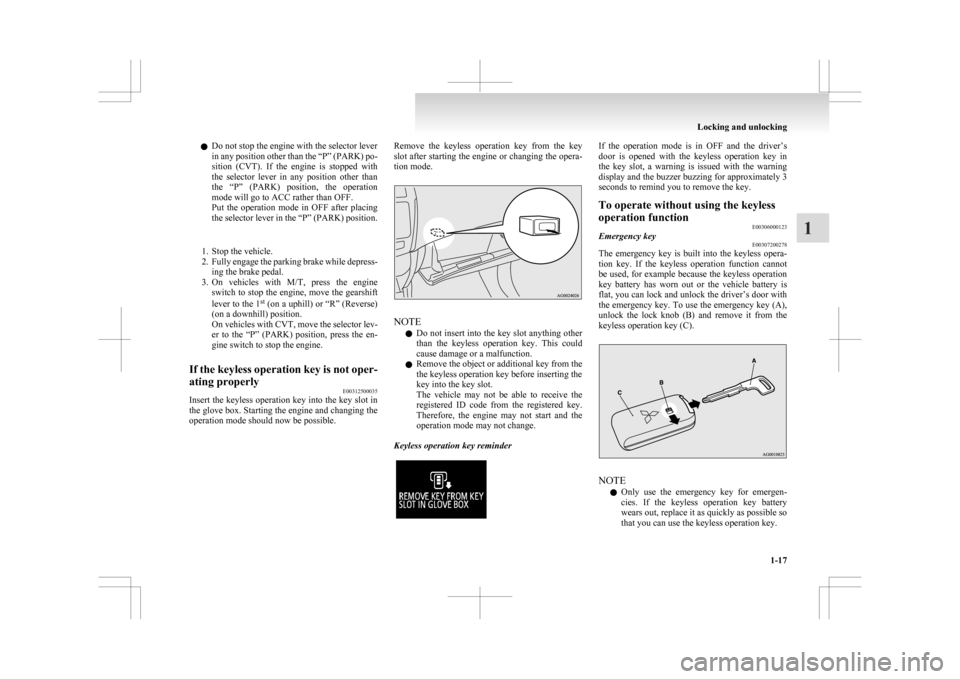
Keyless operation key reminder If the operation mode is in OFF and the driver’s
door
is opened with the keyless operation key in
the key slot, a warning is issued with the warning
display and the buzzer buzzing for approximately 3
seconds to remind you to remove the key.
To operate without using the keyless
operation function E00306000123
Emergency key E00307200278
The emergency key is built into the keyless opera-
tion
key. If the keyless operation function cannot
be used, for example because the keyless operation
key battery has worn out or the vehicle battery is
flat, you can lock and unlock the driver’s door with
the emergency key. To use the emergency key (A),
unlock the lock knob (B) and remove it from the
keyless operation key (C). NOTE
l Only
use the emergency key for emergen-
cies. If the keyless operation key battery
wears out, replace it as quickly as possible so
that you can use the keyless operation key. Locking and unlocking
1-17 1
Page 40 of 368
l
After using the emergency key, always re-
turn it into the keyless operation key.
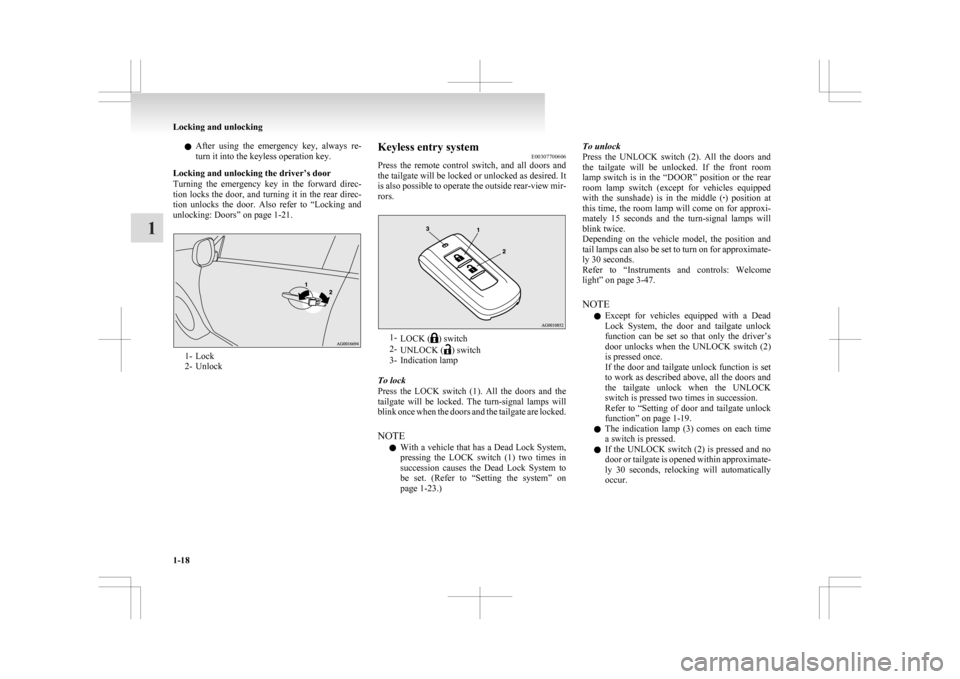
Locking and unlocking the driver’s door
Turning the emergency key in the forward direc-
tion locks the door, and turning it in the rear direc-
tion unlocks the door. Also refer to “Locking and
unlocking: Doors” on page 1-21. 1- Lock
2-
Unlock Keyless entry system
E00307700606
Press
the remote control switch, and all doors and
the tailgate will be locked or unlocked as desired. It
is also possible to operate the outside rear-view mir-
rors. 1-
LOCK ( ) switch
2- UNLOCK ( ) switch
3-
Indication lamp
To lock
Press the LOCK switch (1). All the doors and the
tailgate will be locked. The turn-signal lamps will
blink once when the doors and the tailgate are locked.
NOTE l With a vehicle that has a Dead Lock System,
pressing the LOCK switch (1) two times in
succession causes the Dead Lock System to
be set. (Refer to “Setting the system” on
page 1-23.) To unlock
Press
the UNLOCK switch (2). All the doors and
the tailgate will be unlocked. If the front room
lamp switch is in the “DOOR” position or the rear
room lamp switch (except for vehicles equipped
with the sunshade) is in the middle ( ·) position at
this time, the room lamp will come on for approxi-
mately 15 seconds and the turn-signal lamps will
blink twice.
Depending on the vehicle model, the position and
tail lamps can also be set to turn on for approximate-
ly 30 seconds.
Refer to “Instruments and controls: Welcome
light” on page 3-47.
NOTE
l Except for vehicles equipped with a Dead
Lock System, the door and tailgate unlock
function can be set so that only the driver’s
door unlocks when the UNLOCK switch (2)
is pressed once.
If the door and tailgate unlock function is set
to work as described above, all the doors and
the tailgate unlock when the UNLOCK
switch is pressed two times in succession.
Refer to “Setting of door and tailgate unlock
function” on page 1-19.
l The indication lamp (3) comes on each time
a switch is pressed.
l If the UNLOCK switch (2) is pressed and no
door or tailgate is opened within approximate-
ly 30 seconds, relocking will automatically
occur. Locking and unlocking
1-18
1
Page 42 of 368
Each time the door and tailgate unlock function is
set,
a chime will sound to tell you the condition of
the door and tailgate unlock function. Number of
chimes Condition
One chime All doors and the tailgate unlock
Two chimes Driver’s door unlock only 1. Put the operation mode in OFF.
2. Place
the combination headlamps and dipper
switch in the “OFF” position, and leave the
driver’s door open.
3. Press and hold the LOCK switch (1) for 4 to 10 seconds and then also press the UNLOCK
switch (2) during this time.
4. Release in sequence the LOCK and UN- LOCK switches within 10 seconds of press-
ing the LOCK switch in step 3.
NOTE l On vehicles equipped with MITSUBISHI
Multi-Communication System (MMCS),
screen operations can be used to make the ad-
justment. Refer to the separate owner’s man-
ual for details.
Procedure for replacing the remote control switch
battery E00309600061
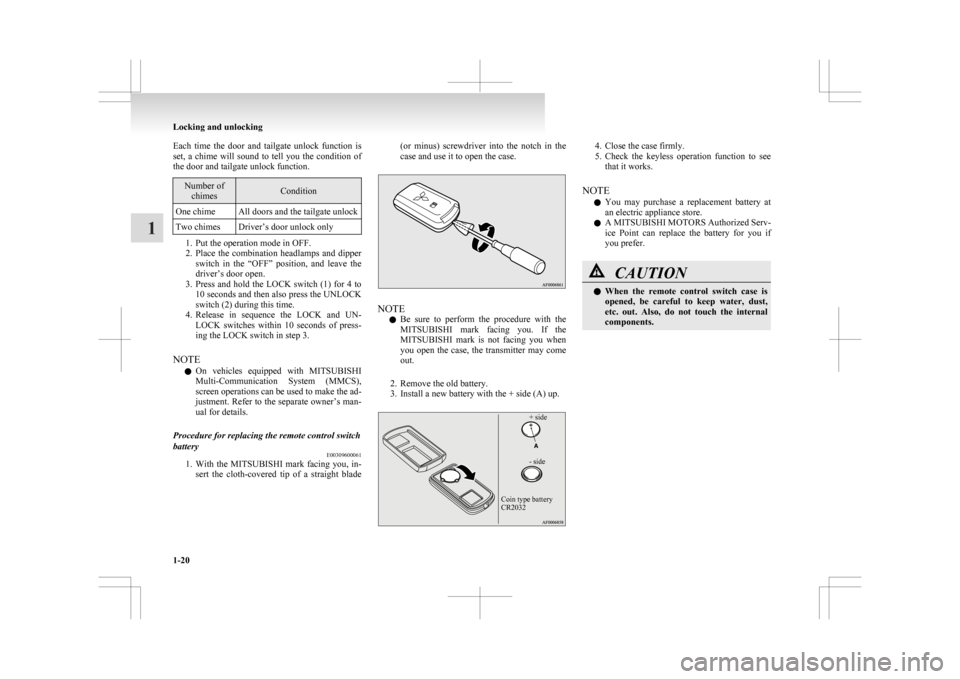
1. With
the MITSUBISHI mark facing you, in-
sert the cloth-covered tip of a straight blade (or minus) screwdriver into the notch in the
case and use it to open the case.
NOTE
l Be
sure to perform the procedure with the
MITSUBISHI mark facing you. If the
MITSUBISHI mark is not facing you when
you open the case, the transmitter may come
out.
2. Remove the old battery.
3. Install a new battery with the + side (A) up.
+ side
- side
Coin type battery
CR2032 4. Close the case firmly.
5. Check
the keyless operation function to see
that it works.
NOTE l You may purchase a replacement battery at
an electric appliance store.
l A MITSUBISHI MOTORS Authorized Serv-
ice Point can replace the battery for you if
you prefer. CAUTION
l
When
the remote control switch case is
opened, be careful to keep water, dust,
etc. out. Also, do not touch the internal
components. Locking and unlocking
1-20
1
Page 45 of 368
Using the ignition switch or the engine switch
All
doors and the tailgate will unlock whenever the
ignition switch is turned to the “LOCK” position or
the operation mode is put in OFF.
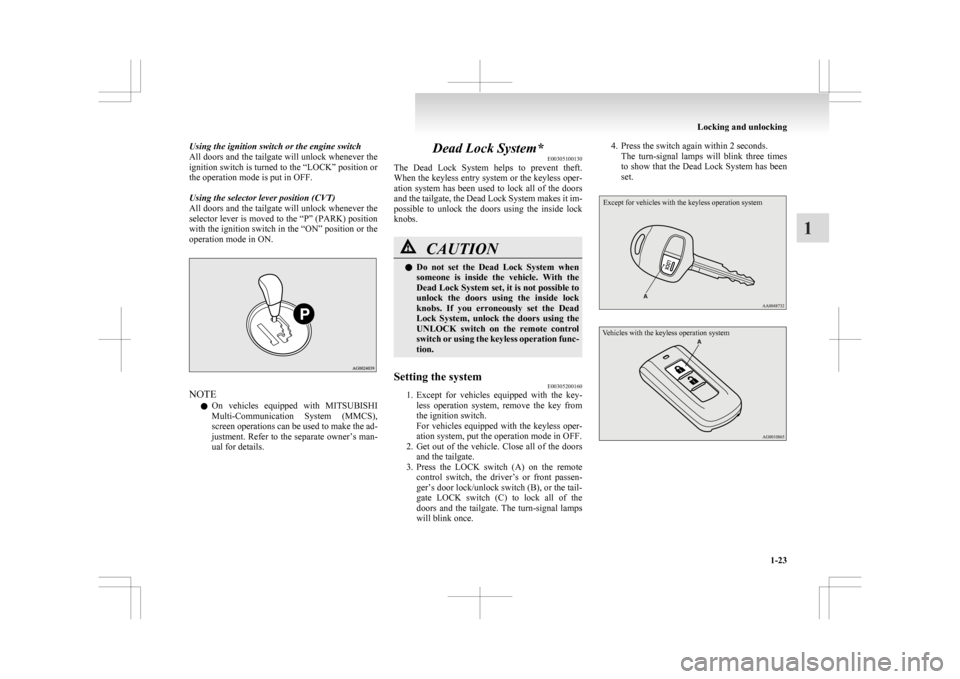
Using the selector lever position (CVT)
All doors and the tailgate will unlock whenever the
selector lever is moved to the “P” (PARK) position
with the ignition switch in the “ON” position or the
operation mode in ON. NOTE
l On
vehicles equipped with MITSUBISHI
Multi-Communication System (MMCS),
screen operations can be used to make the ad-
justment. Refer to the separate owner’s man-
ual for details. Dead Lock System*
E00305100130
The
Dead Lock System helps to prevent theft.
When the keyless entry system or the keyless oper-
ation system has been used to lock all of the doors
and the tailgate, the Dead Lock System makes it im-
possible to unlock the doors using the inside lock
knobs. CAUTION
l
Do
not set the Dead Lock System when
someone is inside the vehicle. With the
Dead Lock System set, it is not possible to
unlock the doors using the inside lock
knobs. If you erroneously set the Dead
Lock System, unlock the doors using the
UNLOCK switch on the remote control
switch or using the keyless operation func-
tion.
Setting the system E00305200160
1. Except
for vehicles equipped with the key-
less operation system, remove the key from
the ignition switch.
For vehicles equipped with the keyless oper-
ation system, put the operation mode in OFF.
2. Get out of the vehicle. Close all of the doors and the tailgate.
3. Press the LOCK switch (A) on the remote control switch, the driver’s or front passen-
ger’s door lock/unlock switch (B), or the tail-
gate LOCK switch (C) to lock all of the
doors and the tailgate. The turn-signal lamps
will blink once. 4. Press the switch again within 2 seconds.
The
turn-signal lamps will blink three times
to show that the Dead Lock System has been
set.
Except for vehicles with the keyless operation system
Vehicles with the keyless operation system Locking and unlocking
1-23 1
Page 50 of 368
Security alarm system*
E00301500569
The
security alarm system is for alerting the sur-
rounding area of suspicious behaviour to prevent un-
lawful entry into the vehicle by operating an alarm
if a door, the tailgate or the bonnet is opened when
the vehicle has not been unlocked using the keyless
entry system or the keyless operation function.
Also, the alarm will be activated if any of the fol-
lowing occur.
l Attempt an unlawful moving of the vehicle.
(the vehicle inclination detection function)
l Detect a motion in the vehicle. (the interior
intrusion detection function)
l Disconnect the battery terminal.
The security alarm system is set to “active”.
When making changes to the settings, please fol-
low the procedure listed in the section titled “Chang-
ing the security alarm settings” on page 1-29.
On vehicles equipped with MITSUBISHI Multi-
Communication System (MMCS), screen opera-
tions can be used to make the adjustment. Refer to
the separate owner’s manual for details. CAUTION
l
Do
not modify or add parts to the securi-
ty alarm system.
Doing so could cause the security alarm
to malfunction. NOTE
l The
alarm system will not be activated if the
doors and the tailgate have been locked using
a key, the inside lock knob or the central
door lock switch (instead of the keyless entry
system or the keyless operation function).
l If the turn-signal lamps do not blink after the
locking and unlocking operation using the
keyless entry system or the keyless operation
function, the security alarm system may be
malfunctioning.
Have the vehicle inspected at a
MITSUBISHI MOTORS Authorized Service
Point.
If the confirmation function (blinking of the
turn-signal lamps by locking and unlocking
the doors and the tailgate) is deactivated, the
turn-signal lamps do not blink after the lock-
ing and unlocking operation.
For information on the confirmation func-
tion, refer to “Keyless entry system” on pa-
ges 1-04, 1-18 and “To operate using the key-
less operation function” on page 1-09.
l The security alarm system could be activated
in the following situations.
• Using a car wash
• Taking the vehicle on a ferry
• Parking in an automated car park
• Leaving someone or a pet in the vehicle
• Leaving a window open
• Leaving an unstable object such as a stuf-fed toy or accessory in the vehicle
• Suffering a continuous impact or vibra- tion by hail, thunder, etc.
According to the situations, deactivate the ve-
hicle inclination detection function and the in-
terior intrusion detection function. Refer to “To
deactivate the vehicle inclina-
tion detection function and the interior intru-
sion detection function” on page 1-31.
l The sensitivity of the interior intrusion detec-
tion function can be adjusted. For details,
please contact a MITSUBISHI MOTORS Au-
thorized Service Point.
The security alarm has four modes:
System preparation mode (approx. 20 seconds)
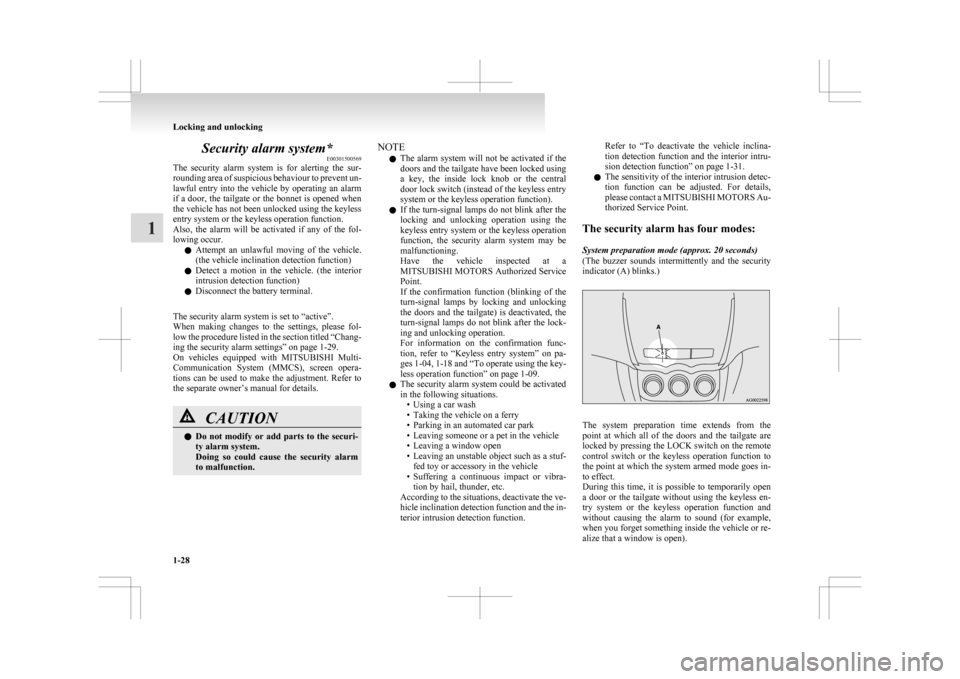
(The buzzer sounds intermittently and the security
indicator (A) blinks.) The system preparation time extends from the
point
at which all of the doors and the tailgate are
locked by pressing the LOCK switch on the remote
control switch or the keyless operation function to
the point at which the system armed mode goes in-
to effect.
During this time, it is possible to temporarily open
a door or the tailgate without using the keyless en-
try system or the keyless operation function and
without causing the alarm to sound (for example,
when you forget something inside the vehicle or re-
alize that a window is open). Locking and unlocking
1-28
1
Page 51 of 368
System armed mode
(The
security indicator continues to blink with the
indicator’s reduced lit-up duration time.)
Once the system preparation mode has ended, the
system armed mode starts.
If an unlawful opening of any of the doors, tailgate
or bonnet is detected during the system armed
mode, the alarm will be activated to warn people
around the vehicle of an abnormal condition.
Also, if unlawful moving of the vehicle is attemp-
ted or a vehicle intrusion is detected, the alarm will
be activated.
Alarm activation
The turn-signal lamps blink and the siren sounds
for approximately 30 seconds.
Refer to “Alarm activation” on page 1-32.
NOTE
l The alarm will resume if unlawful actions
are taken again, even if the alarm has stopped.
System cancellation
It is possible to cancel the system activation during
the system preparation mode or the system armed
mode.
In addition, it is possible to cancel the alarm once it
has been activated.
Refer to “Cancelling the system” on page 1-32,
“Cancelling the alarm” on page 1-33. NOTE
l When
lending the vehicle to another person
or allowing the vehicle to be driven by some-
one who is unfamiliar with the security
alarm system, be sure to give the person a
proper explanation of the security alarm sys-
tem.
If a person who is unfamiliar with the securi-
ty alarm system accidentally unlocked the ve-
hicle, causing the alarm to sound, the alarm
would be a nuisance to people nearby.
Changing the security alarm settings E00301600267
It is possible to set the security alarm to the “ac-
tive” mode or “inactive” mode.
Follow the procedure below.
1. Except
for vehicles equipped with the key-
less operation system, remove the key from
the ignition switch. For vehicles equipped
with the keyless operation system, put the op-
eration mode in OFF.
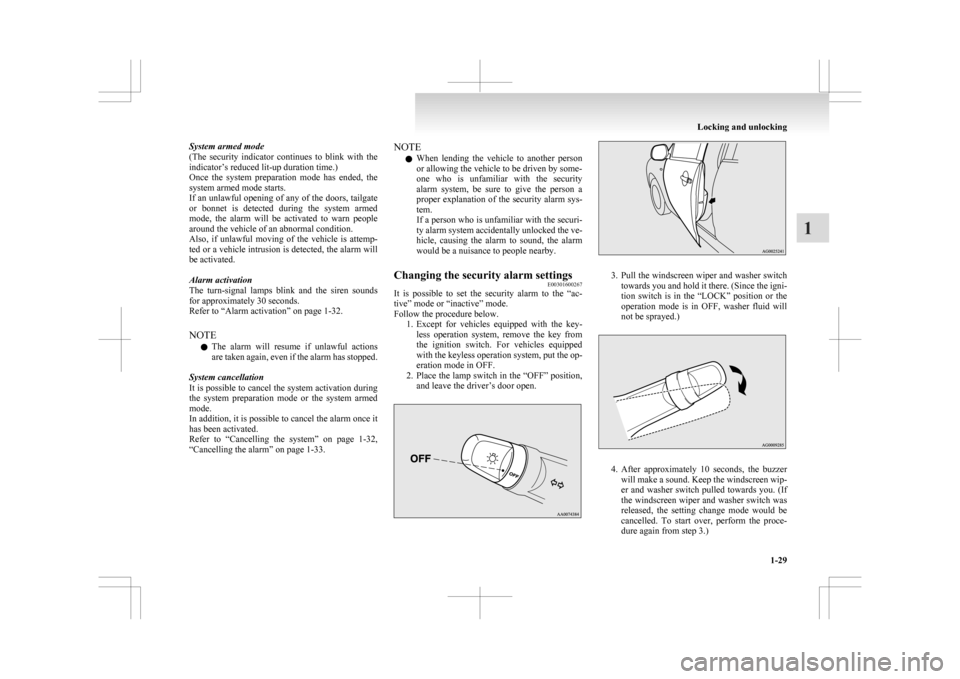
2. Place the lamp switch in the “OFF” position, and leave the driver’s door open. 3. Pull
the windscreen wiper and washer switch
towards you and hold it there. (Since the igni-
tion switch is in the “LOCK” position or the
operation mode is in OFF, washer fluid will
not be sprayed.) 4. After
approximately 10 seconds, the buzzer
will make a sound. Keep the windscreen wip-
er and washer switch pulled towards you. (If
the windscreen wiper and washer switch was
released, the setting change mode would be
cancelled. To start over, perform the proce-
dure again from step 3.) Locking and unlocking
1-29 1
Page 52 of 368
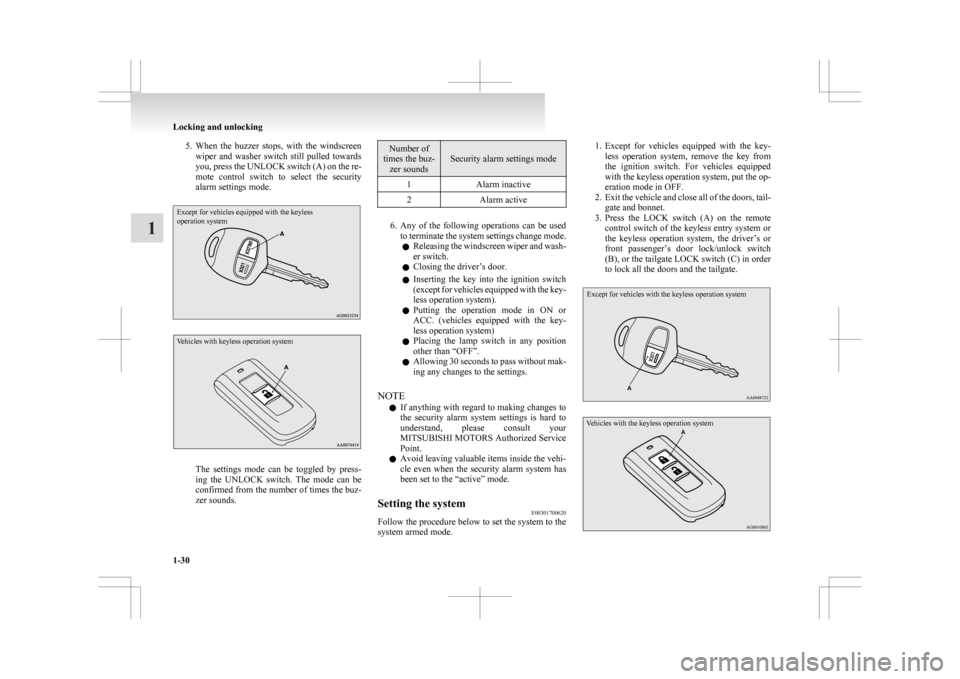
5. When the buzzer stops, with the windscreen
wiper and washer switch still pulled towards
you, press the UNLOCK switch (A) on the re-
mote control switch to select the security
alarm settings mode.
Except for vehicles equipped with the keyless
operation system
Vehicles with keyless operation system The settings mode can be toggled by press-
ing
the UNLOCK switch. The mode can be
confirmed from the number of times the buz-
zer sounds. Number of
times the buz- zer sounds Security alarm settings mode
1 Alarm inactive
2 Alarm active 6. Any
of the following operations can be used
to terminate the system settings change mode.
l Releasing the windscreen wiper and wash-
er switch.
l Closing the driver’s door.
l Inserting the key into the ignition switch
(except for vehicles equipped with the key-
less operation system).
l Putting the operation mode in ON or
ACC. (vehicles equipped with the key-
less operation system)
l Placing the lamp switch in any position
other than “OFF”.
l Allowing 30 seconds to pass without mak-
ing any changes to the settings.
NOTE l If anything with regard to making changes to
the security alarm system settings is hard to
understand, please consult your
MITSUBISHI MOTORS Authorized Service
Point.
l Avoid leaving valuable items inside the vehi-
cle even when the security alarm system has
been set to the “active” mode.
Setting the system E00301700620
Follow the procedure below to set the system to the
system armed mode. 1. Except
for vehicles equipped with the key-
less operation system, remove the key from
the ignition switch. For vehicles equipped
with the keyless operation system, put the op-
eration mode in OFF.
2. Exit the vehicle and close all of the doors, tail- gate and bonnet.
3. Press the LOCK switch (A) on the remote control switch of the keyless entry system or
the keyless operation system, the driver’s or
front passenger’s door lock/unlock switch
(B), or the tailgate LOCK switch (C) in order
to lock all the doors and the tailgate.
Except for vehicles with the keyless operation system
Vehicles with the keyless operation system Locking and unlocking
1-30
1
Page 53 of 368
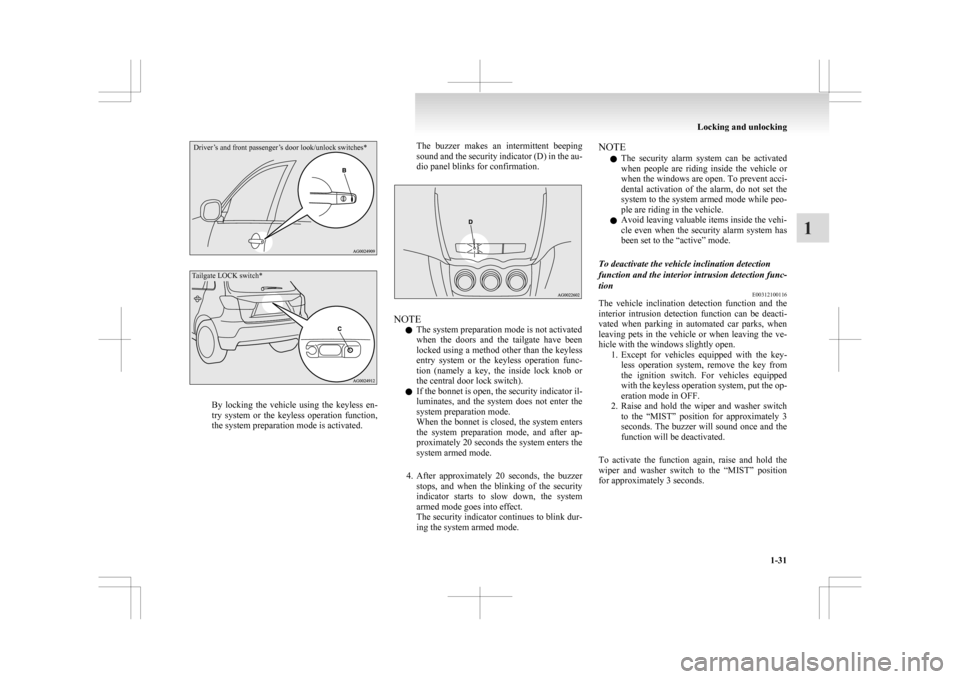
Driver’s and front passenger’s door look/unlock switches*
Tailgate LOCK switch*By locking the vehicle using the keyless en-
try
system or the keyless operation function,
the system preparation mode is activated. The buzzer makes an intermittent beeping
sound
and the security indicator (D) in the au-
dio panel blinks for confirmation. NOTE
l The system preparation mode is not activated
when
the doors and the tailgate have been
locked using a method other than the keyless
entry system or the keyless operation func-
tion (namely a key, the inside lock knob or
the central door lock switch).
l If the bonnet is open, the security indicator il-
luminates, and the system does not enter the
system preparation mode.
When the bonnet is closed, the system enters
the system preparation mode, and after ap-
proximately 20 seconds the system enters the
system armed mode.
4. After approximately 20 seconds, the buzzer stops, and when the blinking of the security
indicator starts to slow down, the system
armed mode goes into effect.
The security indicator continues to blink dur-
ing the system armed mode. NOTE
l The
security alarm system can be activated
when people are riding inside the vehicle or
when the windows are open. To prevent acci-
dental activation of the alarm, do not set the
system to the system armed mode while peo-
ple are riding in the vehicle.
l Avoid leaving valuable items inside the vehi-
cle even when the security alarm system has
been set to the “active” mode.
To deactivate the vehicle inclination detection
function and the interior intrusion detection func-
tion E00312100116
The vehicle inclination detection function and the
interior
intrusion detection function can be deacti-
vated when parking in automated car parks, when
leaving pets in the vehicle or when leaving the ve-
hicle with the windows slightly open. 1. Except for vehicles equipped with the key-less operation system, remove the key from
the ignition switch. For vehicles equipped
with the keyless operation system, put the op-
eration mode in OFF.
2. Raise and hold the wiper and washer switch to the “MIST” position for approximately 3
seconds. The buzzer will sound once and the
function will be deactivated.
To activate the function again, raise and hold the
wiper and washer switch to the “MIST” position
for approximately 3 seconds. Locking and unlocking
1-31 1