fuel type MITSUBISHI ASX 2009 1.G User Guide
[x] Cancel search | Manufacturer: MITSUBISHI, Model Year: 2009, Model line: ASX, Model: MITSUBISHI ASX 2009 1.GPages: 368, PDF Size: 8.13 MB
Page 113 of 368
l
When the engine switch or the operation
mode is in the following conditions, the aver-
age fuel consumption display and average
speed display are automatically reset.
[Except for vehicles equipped with keyless
operation system]
The ignition switch is in the “ACC” or
“LOCK” position for about 4 hours or longer.
[For vehicles equipped with keyless opera-
tion system]
The operation mode is in ACC or OFF for
about 4 hours or longer.
NOTE l The average fuel consumption display and
average speed display can be reset individual-
ly for the auto reset mode and manual reset
mode.
l The memory of the auto reset mode or man-
ual reset mode for the average fuel consump-
tion display and average speed display is
erased if the battery is disconnected.
l The initial (default) setting is “Auto reset
mode”.
Changing the fuel consumption display unit E00523000579
The display unit for fuel consumption can be switch-
ed.
The distance, speed, and amount units are also
switched to match the selected fuel consumption
unit. 1. Press and hold the multi-information meterswitch for about 2 seconds or more to switch
from the setting mode screen to the menu
screen.
Refer to “Changing the function settings
(when the ignition switch or the operation
mode is ON)” on page 3-17. 2. Lightly
press the multi-information meter
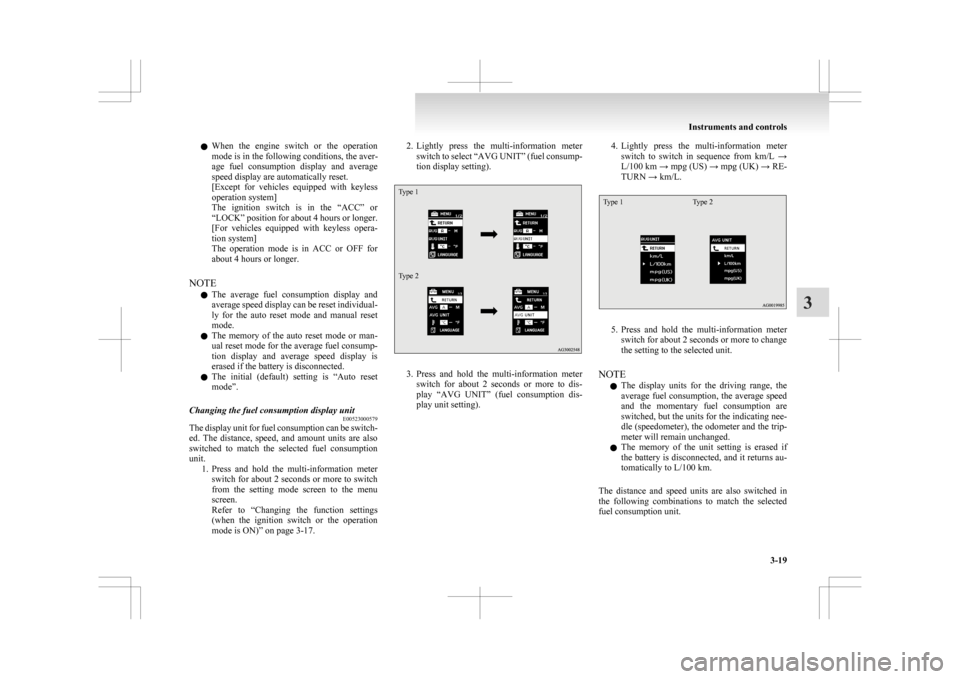
switch to select “AVG UNIT” (fuel consump-
tion display setting).
Type 1
Type 2 3. Press
and hold the multi-information meter
switch for about 2 seconds or more to dis-
play “AVG UNIT” (fuel consumption dis-
play unit setting). 4. Lightly
press the multi-information meter
switch to switch in sequence from km/L →
L/100 km → mpg (US) → mpg (UK) → RE-
TURN → km/L.
Type 1 Type 2 5. Press
and hold the multi-information meter
switch for about 2 seconds or more to change
the setting to the selected unit.
NOTE l The display units for the driving range, the
average fuel consumption, the average speed
and the momentary fuel consumption are
switched, but the units for the indicating nee-
dle (speedometer), the odometer and the trip-
meter will remain unchanged.
l The memory of the unit setting is erased if
the battery is disconnected, and it returns au-
tomatically to L/100 km.
The distance and speed units are also switched in
the following combinations to match the selected
fuel consumption unit. Instruments and controls
3-19 3
Page 114 of 368
Fuel consump-
tion Distance
(driving range) Speed
(average speed)
L/100 km km km/h
mpg (US) mile(s) mph
mpg (UK) mile(s) mph km/L kmkm/hChanging the temperature unit
E00523100466
The display unit for temperature can be switched.
1. Press and hold the multi-information meter
switch for about 2 seconds or more to switch
from the setting mode screen to the menu
screen.
Refer to “Changing the function settings
(when the ignition switch or the operation
mode is ON)” on page 3-17.
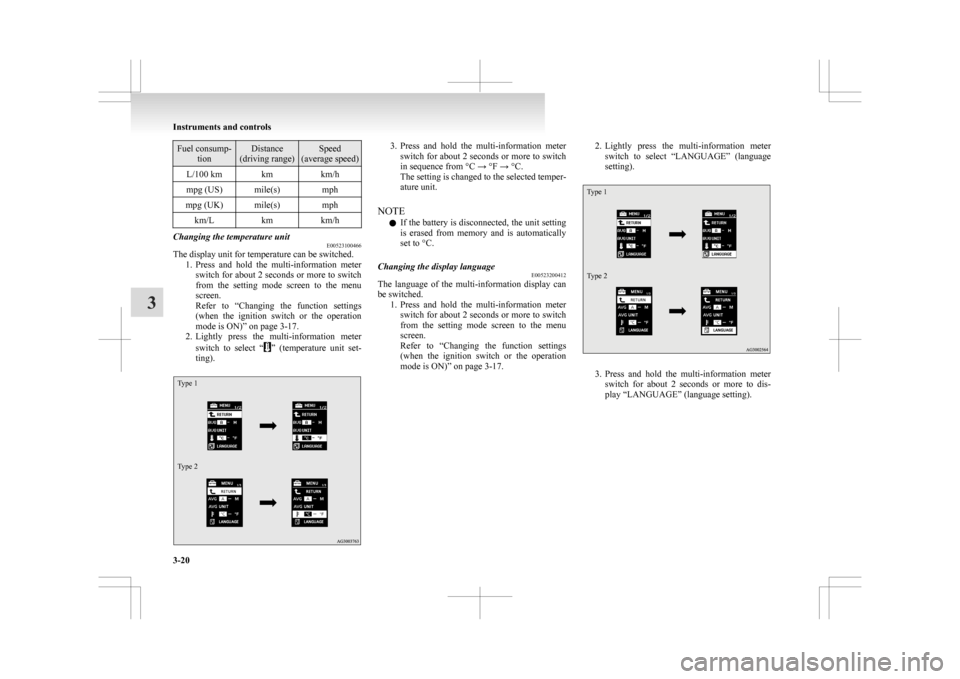
2. Lightly press the multi-information meter
switch to select “ ”
(temperature unit set-
ting).
Type 1
Type 2 3. Press
and hold the multi-information meter
switch for about 2 seconds or more to switch
in sequence from °C → °F → °C.
The setting is changed to the selected temper-
ature unit.
NOTE l If the battery is disconnected, the unit setting
is erased from memory and is automatically
set to °C.
Changing the display language E00523200412
The language of the multi-information display can
be switched.
1. Press
and hold the multi-information meter
switch for about 2 seconds or more to switch
from the setting mode screen to the menu
screen.
Refer to “Changing the function settings
(when the ignition switch or the operation
mode is ON)” on page 3-17. 2. Lightly
press the multi-information meter
switch to select “LANGUAGE” (language
setting).
Type 1
Type 2 3. Press
and hold the multi-information meter
switch for about 2 seconds or more to dis-
play “LANGUAGE” (language setting). Instruments and controls
3-20
3
Page 117 of 368
4. Lightly press the multi-information meter
switch to select the time until the display.
5. Press and hold the multi-information meter switch for about 2 seconds or more, the set-
ting is changed to the selected time.
NOTE l If the battery is disconnected, the unit setting
is erased from memory and is automatically
set to OFF.
l The drive time is reset when the ignition
switch is turned off or the operation mode is
put in OFF.
Changing the turn-signal sound E00529100211
It is possible to change the turn-signal sound.
1. Press
and hold the multi-information meter
switch for about 2 seconds or more to switch
from the setting mode screen to the menu
screen.
Refer to “Changing the function settings
(when the ignition switch or the operation
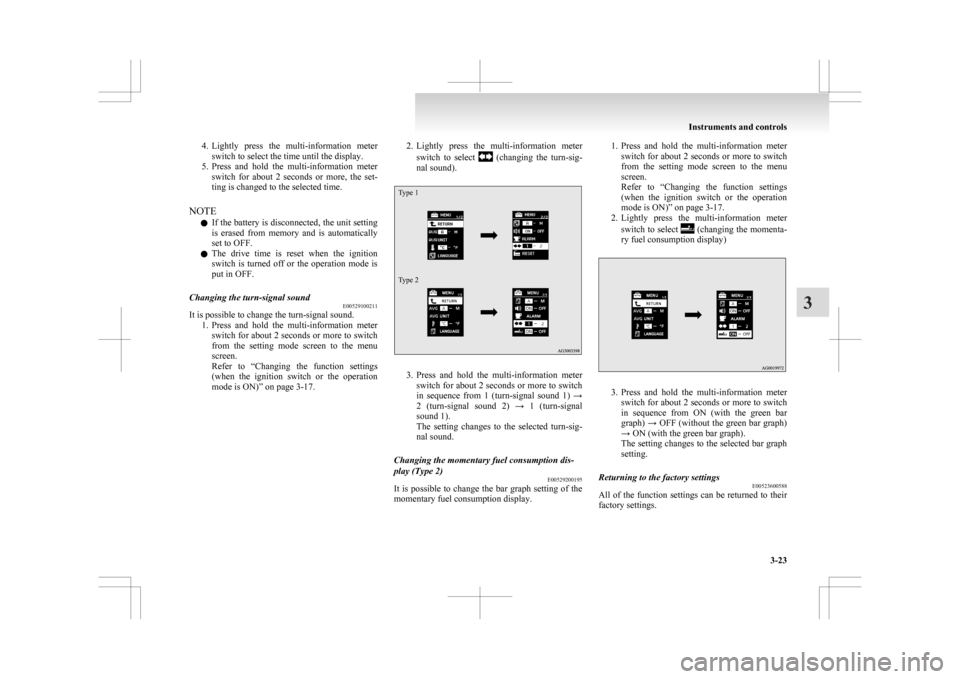
mode is ON)” on page 3-17. 2. Lightly
press the multi-information meter
switch to select (changing the turn-sig-
nal sound).
Type 1
Type 2 3. Press
and hold the multi-information meter
switch for about 2 seconds or more to switch
in sequence from 1 (turn-signal sound 1) →
2 (turn-signal sound 2) → 1 (turn-signal
sound 1).
The setting changes to the selected turn-sig-
nal sound.
Changing the momentary fuel consumption dis-
play (Type 2) E00529200195
It is possible to change the bar graph setting of the
momentary fuel consumption display. 1. Press
and hold the multi-information meter
switch for about 2 seconds or more to switch
from the setting mode screen to the menu
screen.
Refer to “Changing the function settings
(when the ignition switch or the operation
mode is ON)” on page 3-17.
2. Lightly press the multi-information meter
switch to select (changing the momenta-
ry fuel consumption display) 3. Press
and hold the multi-information meter
switch for about 2 seconds or more to switch
in sequence from ON (with the green bar
graph) → OFF (without the green bar graph)
→ ON (with the green bar graph).
The setting changes to the selected bar graph
setting.
Returning to the factory settings E00523600588
All of the function settings can be returned to their
factory settings. Instruments and controls
3-23 3
Page 118 of 368
1. Press and hold the multi-information meter
switch for about 2 seconds or more to switch
from the setting mode screen to the menu
screen.
Refer to “Changing the function settings
(when the ignition switch or the operation
mode is ON)” on page 3-17.
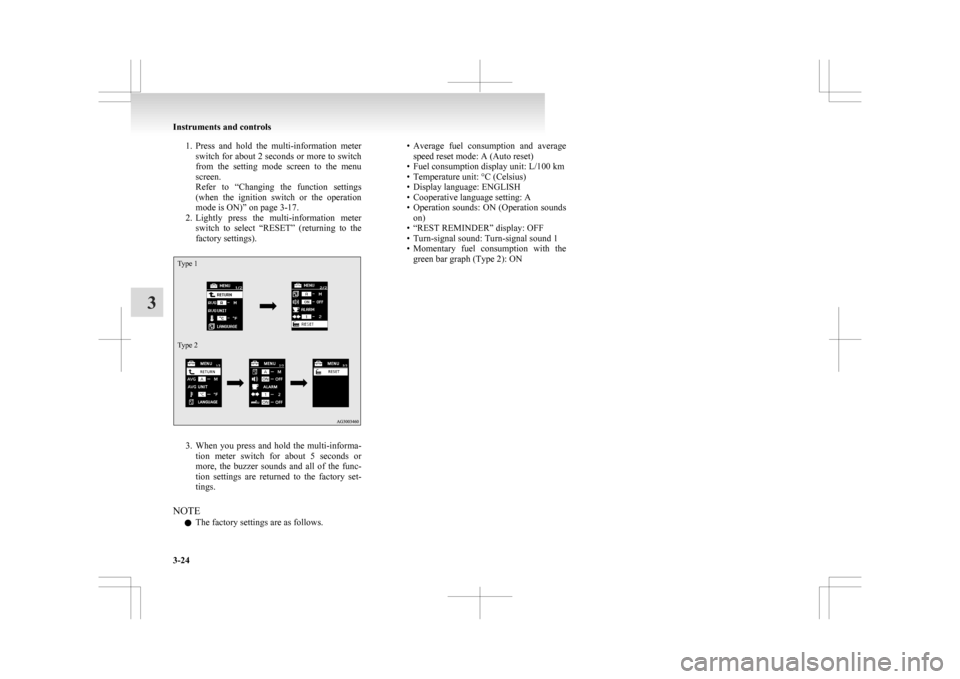
2. Lightly press the multi-information meter switch to select “RESET” (returning to the
factory settings).
Type 1
Type 2 3. When
you press and hold the multi-informa-
tion meter switch for about 5 seconds or
more, the buzzer sounds and all of the func-
tion settings are returned to the factory set-
tings.
NOTE l The factory settings are as follows. • Average
fuel consumption and average
speed reset mode: A (Auto reset)
• Fuel consumption display unit: L/100 km
• Temperature unit: °C (Celsius)
• Display language: ENGLISH
• Cooperative language setting: A
• Operation sounds: ON (Operation sounds on)
• “REST REMINDER” display: OFF
• Turn-signal sound: Turn-signal sound 1
• Momentary fuel consumption with the green bar graph (Type 2): ON Instruments and controls
3-24
3
Page 128 of 368
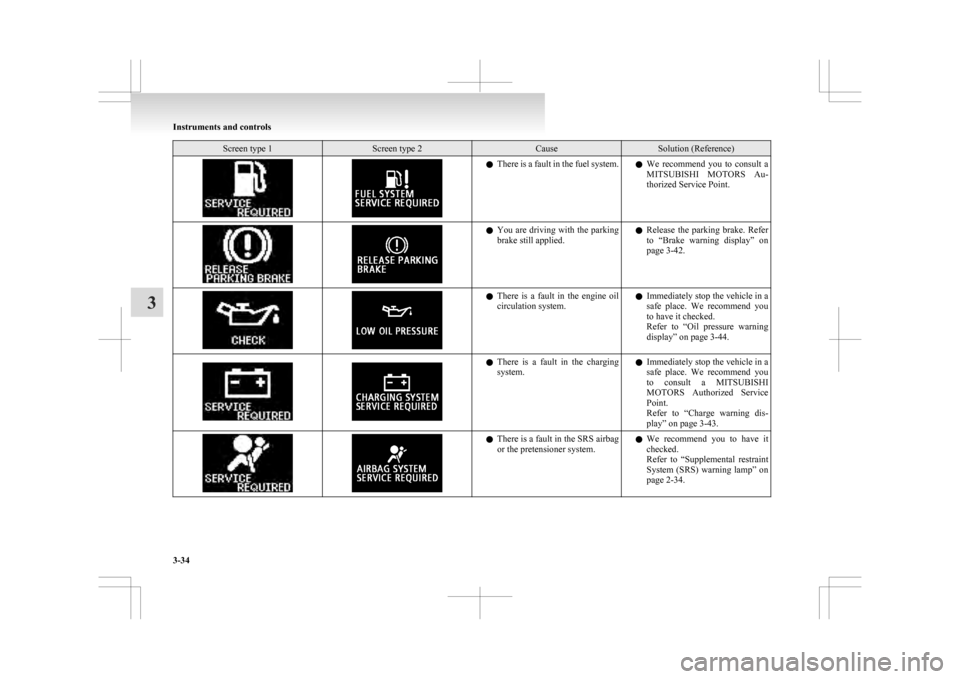
Screen type 1 Screen type 2 Cause Solution (Reference)
l
There is a fault in the fuel system.
lWe recommend you to consult a
MITSUBISHI MOTORS Au-
thorized Service Point. l
You
are driving with the parking
brake still applied. l
Release the parking brake. Refer
to “Brake warning display” on
page 3-42. l
There
is a fault in the engine oil
circulation system. l
Immediately stop the vehicle in a
safe place. We recommend you
to have it checked.
Refer to “Oil pressure warning
display” on page 3-44. l
There
is a fault in the charging
system. l
Immediately stop the vehicle in a
safe place. We recommend you
to consult a MITSUBISHI
MOTORS Authorized Service
Point.
Refer to “Charge warning dis-
play” on page 3-43. l
There
is a fault in the SRS airbag
or the pretensioner system. l
We recommend you to have it
checked.
Refer to “Supplemental restraint
System (SRS) warning lamp” on
page 2-34. Instruments and controls
3-34
3
Page 130 of 368
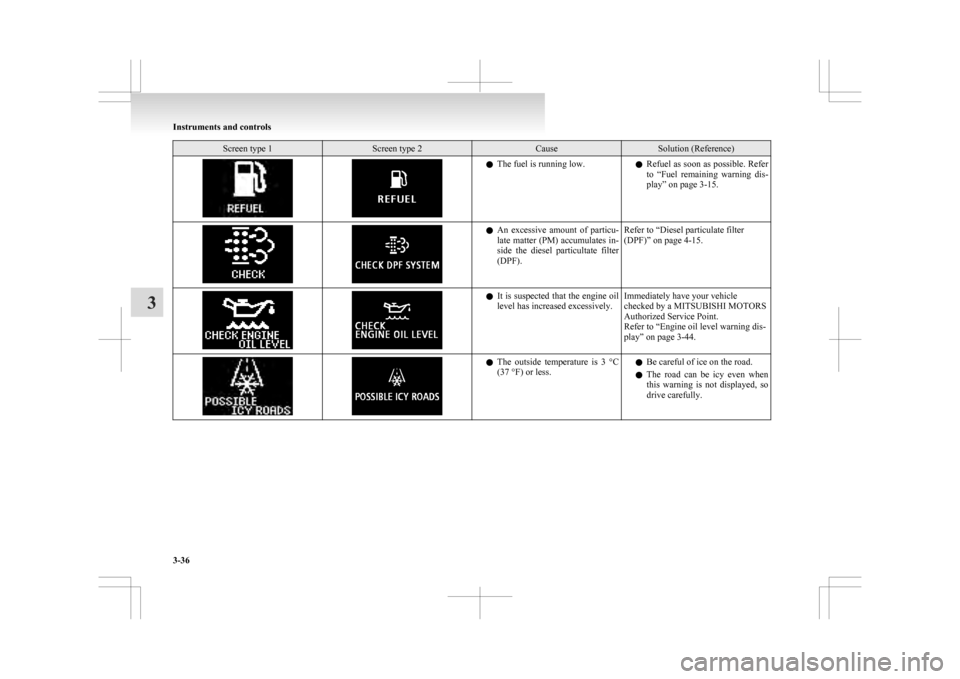
Screen type 1 Screen type 2 Cause Solution (Reference)
l
The fuel is running low.
lRefuel as soon as possible. Refer
to “Fuel remaining warning dis-
play” on page 3-15. l
An
excessive amount of particu-
late matter (PM) accumulates in-
side the diesel particultate filter
(DPF). Refer to “Diesel particulate filter
(DPF)” on page 4-15. l
It
is suspected that the engine oil
level has increased excessively. Immediately have your vehicle
checked by a MITSUBISHI MOTORS
Authorized Service Point.
Refer to “Engine oil level warning dis-
play” on page 3-44. l
The
outside temperature is 3 °C
(37 °F) or less. l
Be careful of ice on the road.
l The
road can be icy even when
this warning is not displayed, so
drive carefully. Instruments and controls
3-36
3
Page 167 of 368
Fuel injection amount learning proc-
ess (diesel-powered vehicles)
E00627900043
To
keep exhaust emissions and engine noise low,
the engine very occasionally performs a learning
process for the fuel injection amount.
The engine sounds slightly different from usual
while the learning process is taking place. The
change in the engine sound does not indicate a fault. Diesel particulate filter (DPF)*
E00619800199
The
diesel particulate filter (DPF) is a device that
captures most of the particulate matter (PM) in the
exhaust emissions of the diesel engine. The DPF au-
tomatically burns away trapped PM during vehicle
operation. Under certain driving conditions, howev-
er, the DPF is not able to burn away all of the trap-
ped PM and, as a result, an excessive amount of
PM accumulates inside it. WARNING
l The DPF reaches very high temperatures.
Do
not park your vehicle in areas where
combustible materials such as dry grass
or leaves can come in contact with a hot
exhaust system since a fire could occur. CAUTION
l
Do
not use any type of fuel or engine oil
that is not specified for your vehicle. Al-
so, do not use any moisture-removing
agent or other fuel additive. Such substan-
ces could have a detrimental effect on the
DPF.
Refer to “Fuel selection” on page 02 and
“Engine oil” on page 8-04.
NOTE l To
minimize the likelihood of excessive ac-
cumulation of PM, try to avoid driving for
long periods at low speeds and repeatedly
driving short distances. l
The
engine sounds slightly different than usu-
al while the DPF automatically burns away
trapped PM. The change in the engine sound
does not indicate a fault.
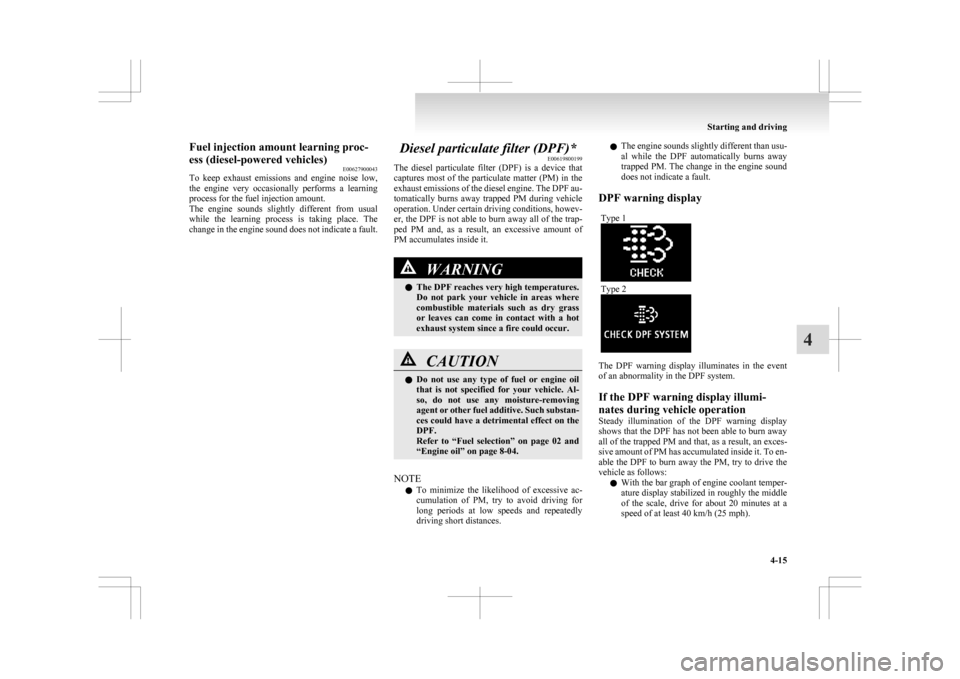
DPF warning display Type 1 Type 2
The DPF warning display illuminates in the event
of an abnormality in the DPF system.
If the DPF warning display illumi-
nates during vehicle operation
Steady
illumination of the DPF warning display
shows that the DPF has not been able to burn away
all of the trapped PM and that, as a result, an exces-
sive amount of PM has accumulated inside it. To en-
able the DPF to burn away the PM, try to drive the
vehicle as follows:
l With the bar graph of engine coolant temper-
ature display stabilized in roughly the middle
of the scale, drive for about 20 minutes at a
speed of at least 40 km/h (25 mph). Starting and driving
4-15 4
Page 181 of 368
Electronically controlled 4WD
system* E00604900280
The
electronically controlled 4WD system is a 4-
wheel drive system that allows one of three drive
modes to be selected with a dial, in accordance
with the driving conditions.
The following drive modes are available. Drive mode Function
2WD This mode is for economical
driving on normal dry roads
and motorway.
Driving in front-wheel drive.
4WD AUTO The default mode.
This mode is for automatical-
ly controlling the distribution
of driving torque to all four
wheels according to the driv-
ing conditions.
4WD LOCK This mode is for driving in
slippery conditions such as
on snow-covered roads or
sand.
The large amount of driving
torque that is applied to the
rear tyres enables getting out
of slippery areas and power-
ful driving is possible across
all ranges.4-wheel drive operation requires special driving
skills.
Carefully
read the “4-wheel drive operation” on
page 4-31 and take care to drive safely. Drive mode-selector
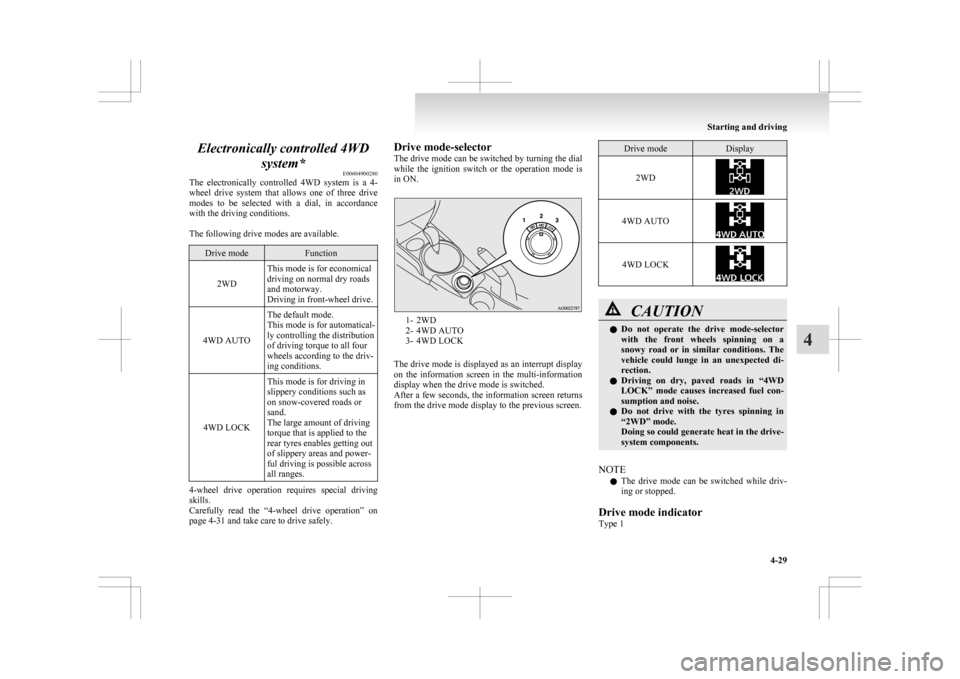
The
drive mode can be switched by turning the dial
while the ignition switch or the operation mode is
in ON. 1- 2WD
2-
4WD AUTO
3- 4WD LOCK
The drive mode is displayed as an interrupt display
on the information screen in the multi-information
display when the drive mode is switched.
After a few seconds, the information screen returns
from the drive mode display to the previous screen. Drive mode Display
2WD 4WD AUTO
4WD LOCK
CAUTION
l
Do not operate the drive mode-selector
with the front wheels spinning on a
snowy road or in similar conditions. The
vehicle could lunge in an unexpected di-
rection.
l Driving on dry, paved roads in “4WD
LOCK” mode causes increased fuel con-
sumption and noise.
l Do not drive with the tyres spinning in
“2WD” mode.
Doing so could generate heat in the drive-
system components.
NOTE l The
drive mode can be switched while driv-
ing or stopped.
Drive mode indicator
Type 1 Starting and driving
4-29 4
Page 308 of 368
Service precautions
E01000100878
Adequate
care of your vehicle at regular intervals
serves to preserve the value and appearance as long
as possible.
Maintenance items as described in this owner’s man-
ual can be performed by the owner.
We recommend you to have the periodic inspection
and maintenance performed by a MITSUBISHI
MOTORS Authorized Service Point or another spe-
cialist.
In the event a malfunction or a problem is discov-
ered, we recommend you to have it checked and re-
paired. This section contains information on inspec-
tion maintenance procedures that you can do your-
self. Follow the instructions and cautions for each
of the various procedures. WARNING
l When
checking or servicing the inside of
the engine compartment, make sure the
engine is switched off and has had a
chance to cool down.
l If it is necessary to do work in the engine
compartment with the engine running, be
especially careful that your clothing, hair,
etc., does not become caught by the fan,
drive belts, or other moving parts.
l The fan may turn on automatically even
if the engine is not running. Turn the igni-
tion switch to the “LOCK” position or
put the operation mode in OFF to be safe
while you work in the engine compart-
ment. WARNING
l Do
not smoke, cause sparks or allow open
flames around fuel or battery. The fumes
are flammable.
l Be extremely cautious when working
around the battery. It contains poisonous
and corrosive sulphuric acid.
l Do not get under your vehicle with just
the body jack supporting it. Always use
automotive jack stands.
l Improper handling of components and
materials used in the vehicle can endan-
ger your personal safety. We recommend
you to consult a specialist for necessary in-
formation. Catalytic converter
E01000200765
The
exhaust gas scavenging devices used with the
catalytic converter are extremely efficient for the re-
duction of noxious gases. The catalytic converter is
installed in the exhaust system.
It is important to keep the engine properly tuned to
ensure proper catalyst operation and prevent possi-
ble catalyst damage. WARNING
l As
with any vehicle, do not park or oper-
ate this vehicle in areas where combusti-
ble materials such as dry grass or leaves
can come in contact with a hot exhaust
since a fire could occur.
l Paint should not be applied to the catalyt-
ic converter.
NOTE l Use
fuel of the type recommended in “Fuel
selection” on page 02. Maintenance
8-02
8
Page 328 of 368
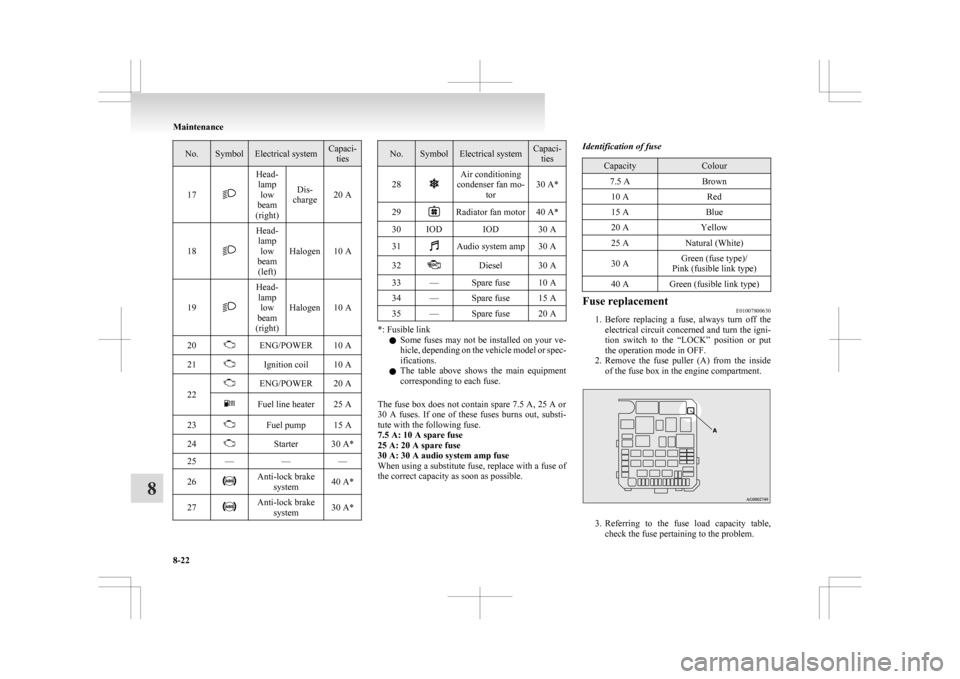
No. Symbol Electrical system Capaci-
ties
17 Head-
lamp low
beam
(right) Dis-
charge 20 A
18 Head-
lamp low
beam (left) Halogen 10 A
19 Head-
lamp low
beam
(right) Halogen 10 A
20 ENG/POWER 10 A
21 Ignition coil 10 A
22 ENG/POWER 20 A
Fuel line heater 25 A
23 Fuel pump 15 A
24 Starter 30 A*
25 — ——
26 Anti-lock brake
system 40 A*
27 Anti-lock brake
system 30 A* No. Symbol Electrical system Capaci-
ties
28 Air conditioning
condenser fan mo- tor 30 A*
29 Radiator fan motor 40 A*
30 IOD IOD 30 A
31 Audio system amp 30 A
32 Diesel 30 A
33 — Spare fuse 10 A
34 — Spare fuse 15 A
35 — Spare fuse 20 A *: Fusible link
l Some
fuses may not be installed on your ve-
hicle, depending on the vehicle model or spec-
ifications.
l The table above shows the main equipment
corresponding to each fuse.
The fuse box does not contain spare 7.5 A, 25 A or
30 A fuses. If one of these fuses burns out, substi-
tute with the following fuse.
7.5 A: 10 A spare fuse
25 A: 20 A spare fuse
30 A: 30 A audio system amp fuse
When using a substitute fuse, replace with a fuse of
the correct capacity as soon as possible. Identification of fuse Capacity Colour
7.5 A Brown
10 A Red
15 A Blue
20 A Yellow
25 A Natural (White)
30 A Green (fuse type)/
Pink (fusible link type)
40 A Green (fusible link type) Fuse replacement
E01007800630
1. Before replacing a fuse, always turn off the
electrical circuit concerned and turn the igni-
tion switch to the “LOCK” position or put
the operation mode in OFF.
2. Remove the fuse puller (A) from the inside of the fuse box in the engine compartment. 3. Referring
to the fuse load capacity table,
check the fuse pertaining to the problem. Maintenance
8-22
8