radio MITSUBISHI ASX 2009 1.G User Guide
[x] Cancel search | Manufacturer: MITSUBISHI, Model Year: 2009, Model line: ASX, Model: MITSUBISHI ASX 2009 1.GPages: 368, PDF Size: 8.13 MB
Page 222 of 368
RDS uses PI (program identification) signal and
AF
(alternative frequency) list transmitted in addi-
tion to the normal FM broadcasting programs, and
picks up the FM stations that are transmitting the
same program from the AF list and automatically
tunes to the station with the strongest signal intensi-
ty.
Therefore, you can continue listening to one pro-
gram in, for example, a long distance driving with-
out retuning to the other station transmitting the
same program when you are leaving the service
area of the currently receiving station.
The RDS radio also features the limited reception
of the program types, the break-in reception of the
traffic announcement to the EON (enhanced other
network) and emergency broadcast, and the limited/
unlimited reception of the regional programs.
AF (Alternative Frequencies) function E00720900162
The AF function finds a station broadcasting the
same
program and selects the station with the stron-
gest signal of AF lists.
The AF function is turned on at all times unless
you manually switch it off.
The AF function can be turned ON and OFF.
Refer to “Function setup mode” on page 5-16.
CT (Clock Time) function E00721000072
The clock can be set automatically by using the sig-
nal
from the local RDS stations. Refer to “Digital
clock” on page 5-39.
REG (Regional) function E00721100116
REG function limits to receive the stations broad-
casting regional programs. Regional programming and regional networks are
organized
differently depending on the country or
area (they may be changed according to the hour,
state, or broadcast area), so if you don’t want to re-
ceive the regional programs automatically, you can
set up REG ON not to receive regional programs.
The REG function can be turned ON and OFF.
Refer to “Function setup mode” on page 5-16.
PI (Program Identification) search function E00721200218
When travelling long distance and the recalled pre-
set
station is weak, the radio searches another fre-
quency broadcasting the same programming with
the same PI code in AF list.
If there are no frequencies broadcasting the same
programming, the radio searches a frequency broad-
casting the regional programming. The radio suc-
ceeds in searching the regional programming, then
the display shows the REG indicator.
If the radio does not succeed in searching the re-
gional programming, the radio returns to the recal-
led preset station.
The PI function can be turned ON and OFF on
some vehicles.
Refer to “Function setup mode” on page 5-16.
NOTE
l While searching, the audio system is muted.
The display shows “WAIT” or “SEARCH”.
PTY (Program type) E00721300323
RDS broadcasts are classified according to pro-
gram
type (PTY) as follows. Use the TUNE/SEEK
button (3 or 4) to select your desired PTY.
1. NEWS
2.
AFFAIRS (Current affairs)
3. INFO (Information)
4. SPORT
5. EDUCATE (Education)
6. DRAMA
7. CULTURE
8. SCIENCE
9. VARIED
10. POP M (Pop music)
11. ROCK M (Rock music)
12. EASY M (Easy music)
13. LIGHT M (Light classics)
14. CLASSICS
15. OTHER M (Other music)
16. WEATHER (Weather information)
17. FINANCE
18. CHILDREN
19. SOCIAL
20. RELIGION
21. PHONE IN
22. TRAVEL
23. LEISURE
24. JAZZ
25. COUNTRY
26. NATION M (National music)
27. OLDIES
28. FOLK M (Folk music)
29. DOCUMENT
To search for a broadcast of desired program type: 1. Press the PTY button.
2. Press the TUNE switch or press a memory se-lect button to select your desired PTY.
3. Two seconds after a desired PTY has been se- lected, the radio will begin to search for a
broadcast of your selected PTY. During
search, the selected PTY on the display blinks. For pleasant driving
5-14
5
Page 223 of 368
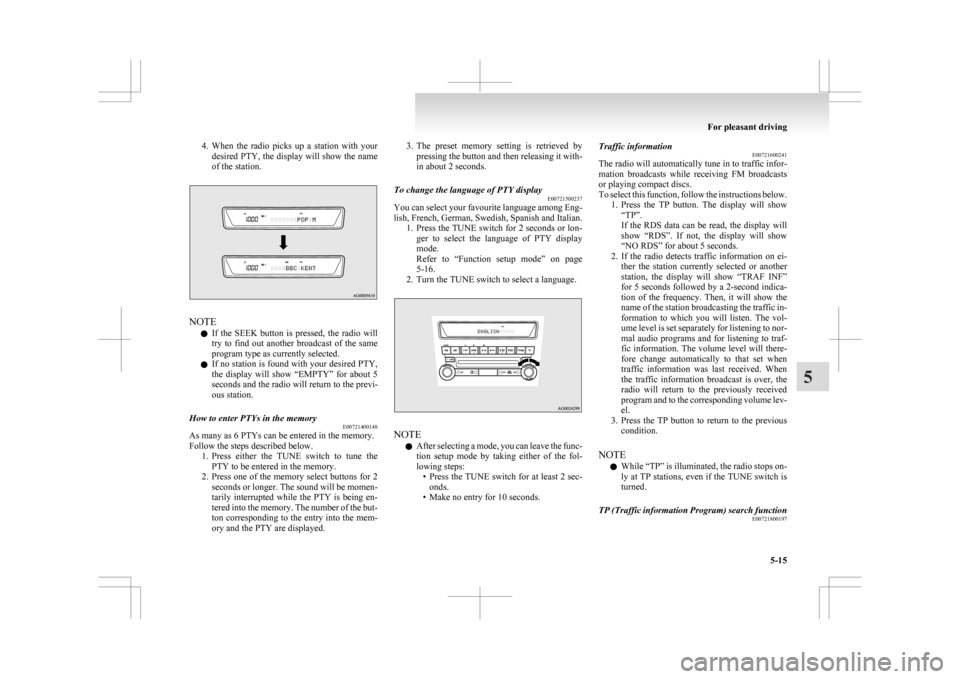
4. When the radio picks up a station with your
desired PTY, the display will show the name
of the station. NOTE
l If
the SEEK button is pressed, the radio will
try to find out another broadcast of the same
program type as currently selected.
l If no station is found with your desired PTY,
the display will show “EMPTY” for about 5
seconds and the radio will return to the previ-
ous station.
How to enter PTYs in the memory E00721400148
As many as 6 PTYs can be entered in the memory.
Follow the steps described below.
1. Press
either the TUNE switch to tune the
PTY to be entered in the memory.
2. Press one of the memory select buttons for 2 seconds or longer. The sound will be momen-
tarily interrupted while the PTY is being en-
tered into the memory. The number of the but-
ton corresponding to the entry into the mem-
ory and the PTY are displayed. 3. The
preset memory setting is retrieved by
pressing the button and then releasing it with-
in about 2 seconds.
To change the language of PTY display E00721500237
You can select your favourite language among Eng-
lish,
French, German, Swedish, Spanish and Italian.
1. Press the TUNE switch for 2 seconds or lon- ger to select the language of PTY display
mode.
Refer to “Function setup mode” on page
5-16.
2. Turn the TUNE switch to select a language. NOTE
l After
selecting a mode, you can leave the func-
tion setup mode by taking either of the fol-
lowing steps: • Press the TUNE switch for at least 2 sec-onds.
• Make no entry for 10 seconds. Traffic information
E00721600241
The
radio will automatically tune in to traffic infor-
mation broadcasts while receiving FM broadcasts
or playing compact discs.
To select this function, follow the instructions below. 1. Press the TP button. The display will show“TP”.
If the RDS data can be read, the display will
show “RDS”. If not, the display will show
“NO RDS” for about 5 seconds.
2. If the radio detects traffic information on ei- ther the station currently selected or another
station, the display will show “TRAF INF”
for 5 seconds followed by a 2-second indica-
tion of the frequency. Then, it will show the
name of the station broadcasting the traffic in-
formation to which you will listen. The vol-
ume level is set separately for listening to nor-
mal audio programs and for listening to traf-
fic information. The volume level will there-
fore change automatically to that set when
traffic information was last received. When
the traffic information broadcast is over, the
radio will return to the previously received
program and to the corresponding volume lev-
el.
3. Press the TP button to return to the previous condition.
NOTE l While “TP” is illuminated, the radio stops on-
ly at TP stations, even if the TUNE switch is
turned.
TP (Traffic information Program) search function E00721800197
For pleasant driving
5-15 5
Page 224 of 368
The traffic information program standby function
is
turned on (with the TP indicator shown on the dis-
play) and after about 45 seconds since the RDS in-
dicator turns off due to weak signal or the tuning
station is changed over from a TP station to a sta-
tion which does not broadcast traffic information,
the sound will beep 5 times and seeks out a TP sta-
tion in all frequencies automatically.
The TP search function can be turned ON and OFF.
Refer to “Function setup mode” on page 5-16.
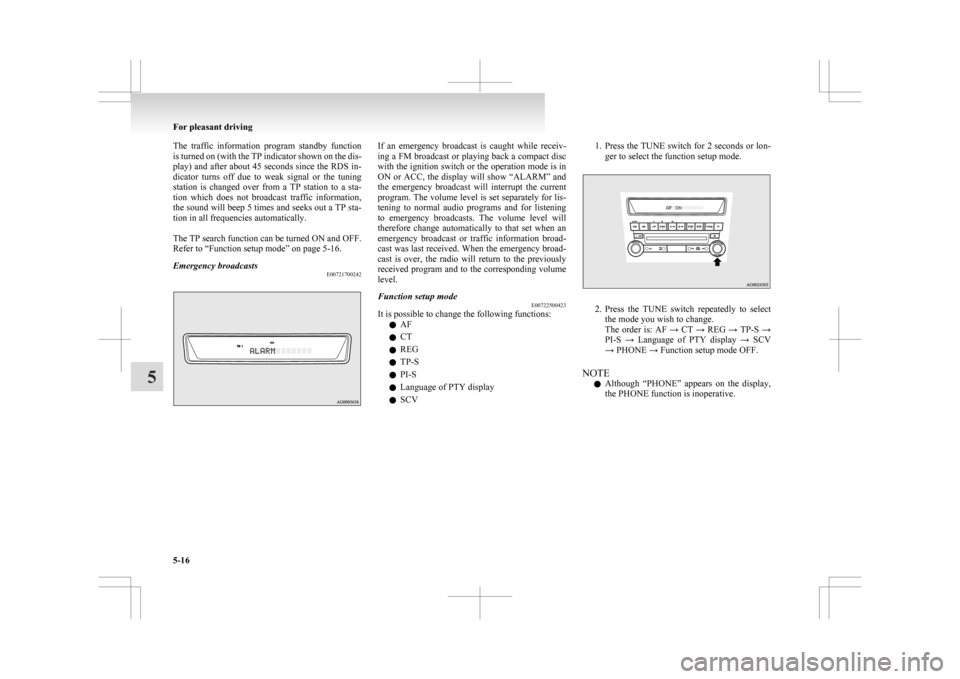
Emergency broadcasts E00721700242 If an emergency broadcast is caught while receiv-
ing
a FM broadcast or playing back a compact disc
with the ignition switch or the operation mode is in
ON or ACC, the display will show “ALARM” and
the emergency broadcast will interrupt the current
program. The volume level is set separately for lis-
tening to normal audio programs and for listening
to emergency broadcasts. The volume level will
therefore change automatically to that set when an
emergency broadcast or traffic information broad-
cast was last received. When the emergency broad-
cast is over, the radio will return to the previously
received program and to the corresponding volume
level.
Function setup mode E00722500423
It is possible to change the following functions:
l AF
l CT
l REG
l TP-S
l PI-S
l Language of PTY display
l SCV 1. Press the TUNE switch for 2 seconds or lon-
ger to select the function setup mode. 2. Press
the TUNE switch repeatedly to select
the mode you wish to change.
The order is: AF → CT → REG → TP-S →
PI-S → Language of PTY display → SCV
→ PHONE → Function setup mode OFF.
NOTE l Although “PHONE” appears on the display,
the PHONE function is inoperative. For pleasant driving
5-16
5
Page 225 of 368
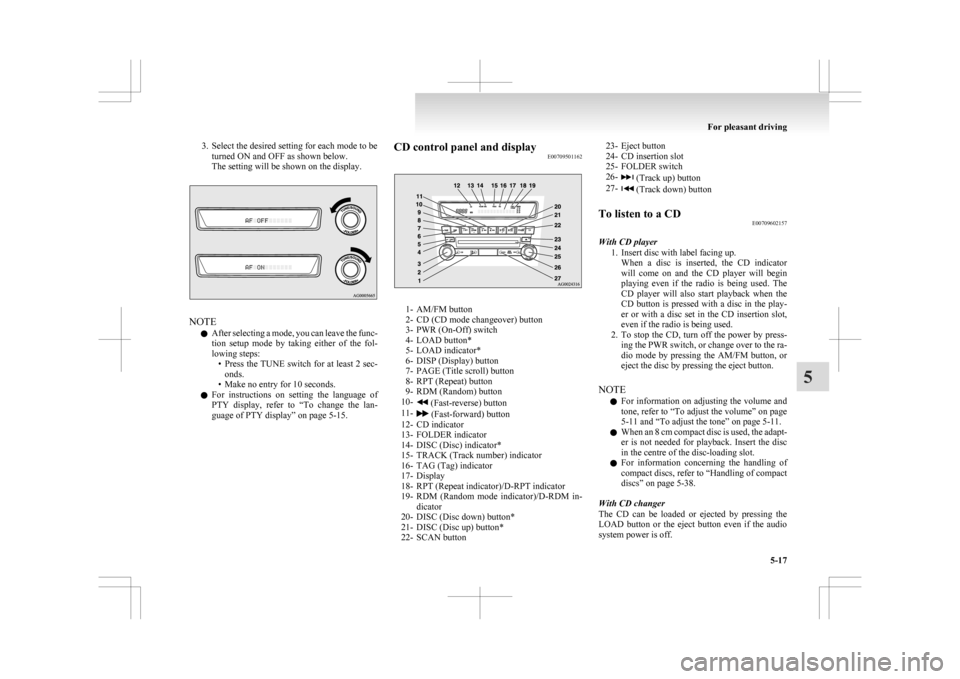
3. Select the desired setting for each mode to be
turned ON and OFF as shown below.
The setting will be shown on the display. NOTE
l After
selecting a mode, you can leave the func-
tion setup mode by taking either of the fol-
lowing steps: • Press the TUNE switch for at least 2 sec-onds.
• Make no entry for 10 seconds.
l For instructions on setting the language of
PTY display, refer to “To change the lan-
guage of PTY display” on page 5-15. CD control panel and display
E00709501162 1- AM/FM button
2-
CD (CD mode changeover) button
3- PWR (On-Off) switch
4- LOAD button*
5- LOAD indicator*
6- DISP (Display) button
7- PAGE (Title scroll) button
8- RPT (Repeat) button
9- RDM (Random) button
10- (Fast-reverse) button
11- (Fast-forward) button
12-
CD indicator
13- FOLDER indicator
14- DISC (Disc) indicator*
15- TRACK (Track number) indicator
16- TAG (Tag) indicator
17- Display
18- RPT (Repeat indicator)/D-RPT indicator
19- RDM (Random mode indicator)/D-RDM in- dicator
20- DISC (Disc down) button*
21- DISC (Disc up) button*
22- SCAN button 23- Eject button
24-
CD insertion slot
25- FOLDER switch
26- (Track up) button
27- (Track down) button
To listen to a CD E00709602157
With CD player 1.
Insert disc with label facing up.When a disc is inserted, the CD indicator
will come on and the CD player will begin
playing even if the radio is being used. The
CD player will also start playback when the
CD button is pressed with a disc in the play-
er or with a disc set in the CD insertion slot,
even if the radio is being used.
2. To stop the CD, turn off the power by press- ing the PWR switch, or change over to the ra-
dio mode by pressing the AM/FM button, or
eject the disc by pressing the eject button.
NOTE l For information on adjusting the volume and
tone, refer to “To adjust the volume” on page
5-11 and “To adjust the tone” on page 5-11.
l When an 8 cm compact disc is used, the adapt-
er is not needed for playback. Insert the disc
in the centre of the disc-loading slot.
l For information concerning the handling of
compact discs, refer to “Handling of compact
discs” on page 5-38.
With CD changer
The CD can be loaded or ejected by pressing the
LOAD button or the eject button even if the audio
system power is off. For pleasant driving
5-17 5
Page 229 of 368
Random playback for all folders on a disc (MP3
CDs only)
Press
the RDM button for 2 seconds or longer (un-
til you hear a beep). The D-RDM indicator will
come on and the tracks that are played will be selec-
ted at random from all folders on the disc currently
selected.
To exit this mode, press the button again.
NOTE
l In the all discs random mode, if an MP3 CD
has been loaded in the CD changer, the CD
changer will skip over it to the next music
CD.
l With a disc that contains both CD-DA and
MP3 files, the random mode causes only
files of the same format (CDDA only or
MP3 files only) to be played in a random se-
quence.
To find the start of each track on a disc for playback
Press the SCAN button. “SCAN” will appear on
the display and the audio system will play back the
first 10 seconds of each track on the selected disc.
The track number will blink while the scan mode is
selected.
To exit this mode, press the button again.
NOTE l Once all tracks on the disc have been scan-
ned, playback of the disc will restart from the
beginning of the track that was playing when
scanning started.
l The scan mode will be cancelled when radio
or CD operation is selected. l
With a disc that contains both CD-DA and
MP3 files, the scan mode causes only files of
the same format (CD-DA only or MP3 files
only) to be played.
To eject discs
When the eject button is pressed, the disc automati-
cally stops and is ejected. The system automatical-
ly switches to radio mode.
NOTE l If you do not remove an ejected disc before
15 seconds have elapsed, the disc will be re-
loaded.
To eject discs
To eject a single disc
Press the eject button briefly to eject the currently
selected disc.
NOTE l If you press the eject button while the dis-
play is showing “LOAD DISC No. (1-6)”,
the loading standby mode will be cancelled
and the next disc will be ejected.
l If you do not remove an ejected disc before
15 seconds have elapsed, the disc will be re-
loaded and the eject mode will be cancelled.
The reloaded disc will not be played.
To eject all the discs 1. Press the eject button for 2 seconds or longer(until you hear a beep).
2. The currently selected disc will be ejected. When you remove the ejected disc, the next
disc will automatically be ejected. 3. Repeat the above-described steps until all of
the discs have been ejected. The CD changer
will then enter loading standby mode.
NOTE l If you do not remove an ejected disc before
15 seconds have elapsed, the disc will be re-
loaded and the eject mode will be cancelled.
The reloaded disc will not be played.
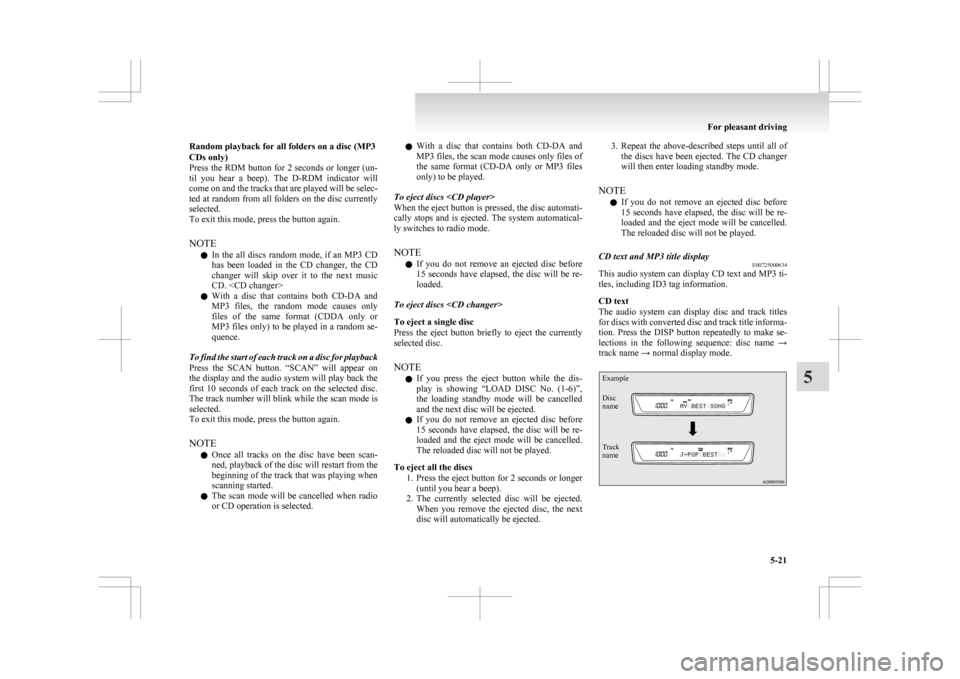
CD text and MP3 title display E00725000634
This audio system can display CD text and MP3 ti-
tles, including ID3 tag information.
CD text
The
audio system can display disc and track titles
for discs with converted disc and track title informa-
tion. Press the DISP button repeatedly to make se-
lections in the following sequence: disc name →
track name → normal display mode.
Example
Disc
name
Track
name For pleasant driving
5-21 5
Page 241 of 368
NOTE
l The
connected audio equipment cannot be op-
erated with the vehicle’s audio system.
l For information on how to connect and oper-
ate the audio equipment, refer to the owner’s
manual for the equipment. Steering wheel audio remote
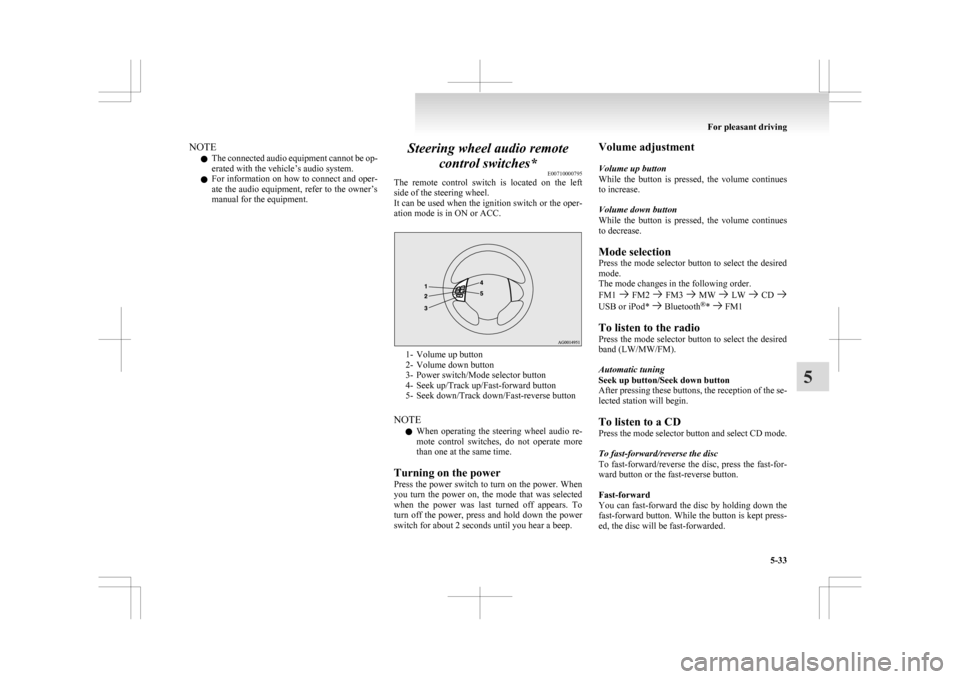
control switches* E00710000795
The
remote control switch is located on the left
side of the steering wheel.
It can be used when the ignition switch or the oper-
ation mode is in ON or ACC. 1- Volume up button
2-
Volume down button
3- Power switch/Mode selector button
4- Seek up/Track up/Fast-forward button
5- Seek down/Track down/Fast-reverse button
NOTE l When operating the steering wheel audio re-
mote control switches, do not operate more
than one at the same time.
Turning on the power
Press the power switch to turn on the power. When
you turn the power on, the mode that was selected
when the power was last turned off appears. To
turn off the power, press and hold down the power
switch for about 2 seconds until you hear a beep. Volume adjustment
Volume up button
While
the button is pressed, the volume continues
to increase.
Volume down button
While the button is pressed, the volume continues
to decrease.
Mode selection
Press the mode selector button to select the desired
mode.
The mode changes in the following order.
FM1 FM2 FM3 MW LW CD
USB or iPod* Bluetooth
®
* FM1
To listen to the radio
Press
the mode selector button to select the desired
band (LW/MW/FM).
Automatic tuning
Seek up button/Seek down button
After pressing these buttons, the reception of the se-
lected station will begin.
To listen to a CD
Press the mode selector button and select CD mode.
To fast-forward/reverse the disc
To fast-forward/reverse the disc, press the fast-for-
ward button or the fast-reverse button.
Fast-forward
You can fast-forward the disc by holding down the
fast-forward button. While the button is kept press-
ed, the disc will be fast-forwarded.
For pleasant driving
5-33 5
Page 243 of 368
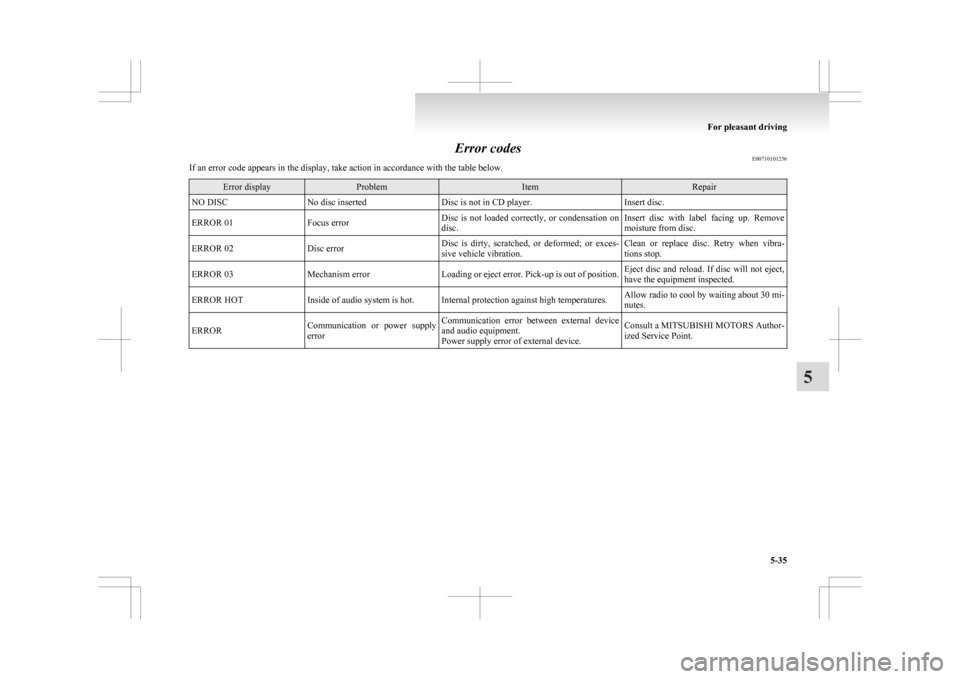
Error codes
E00710101256
If an error code appears in the display, take action in accordance with the table below. Error display Problem Item Repair
NO DISC No disc inserted Disc is not in CD player. Insert disc.
ERROR 01 Focus error Disc is not loaded correctly, or condensation on
disc. Insert disc with label facing up. Remove
moisture from disc.
ERROR 02 Disc error Disc is dirty, scratched, or deformed; or exces-
sive vehicle vibration. Clean or replace disc. Retry when vibra-
tions stop.
ERROR 03 Mechanism error Loading or eject error. Pick-up is out of position. Eject disc and reload. If disc will not eject,
have the equipment inspected.
ERROR HOT Inside of audio system is hot. Internal protection against high temperatures. Allow radio to cool by waiting about 30 mi-
nutes.
ERROR Communication or power supply
error Communication error between external device
and audio equipment.
Power supply error of external device. Consult a MITSUBISHI MOTORS Author-
ized Service Point. For pleasant driving
5-35 5
Page 248 of 368
(Refer to “Function setup mode” on page
5-16.) NOTE
l Although
“PHONE” appears on the display,
the PHONE function is inoperative.
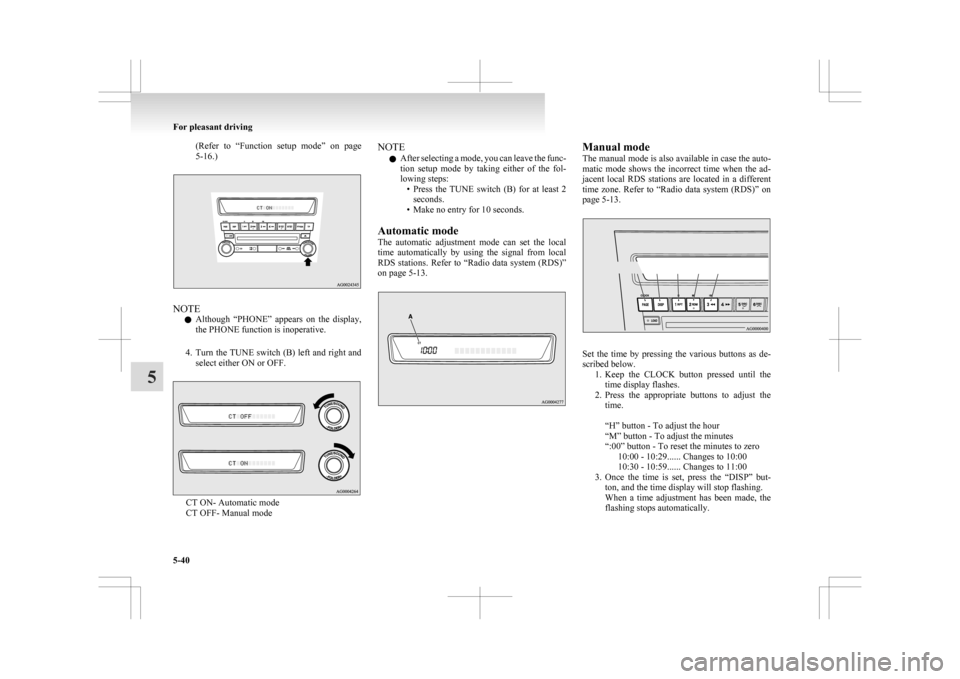
4. Turn the TUNE switch (B) left and right and select either ON or OFF. CT ON- Automatic mode
CT OFF- Manual mode NOTE
l After
selecting a mode, you can leave the func-
tion setup mode by taking either of the fol-
lowing steps: • Press the TUNE switch (B) for at least 2seconds.
• Make no entry for 10 seconds.
Automatic mode
The automatic adjustment mode can set the local
time automatically by using the signal from local
RDS stations. Refer to “Radio data system (RDS)”
on page 5-13. Manual mode
The
manual mode is also available in case the auto-
matic mode shows the incorrect time when the ad-
jacent local RDS stations are located in a different
time zone. Refer to “Radio data system (RDS)” on
page 5-13. Set the time by pressing the various buttons as de-
scribed below.
1. Keep
the CLOCK button pressed until the
time display flashes.
2. Press the appropriate buttons to adjust the time.
“H” button - To adjust the hour
“M” button - To adjust the minutes
“:00” button - To reset the minutes to zero 10:00 - 10:29...... Changes to 10:00
10:30 - 10:59...... Changes to 11:00
3. Once the time is set, press the “DISP” but- ton, and the time display will stop flashing.
When a time adjustment has been made, the
flashing stops automatically. For pleasant driving
5-40
5
Page 258 of 368
l
If the name you selected has matching data
in the mobile phone book but no telephone
number is registered under the selected loca-
tion, the voice guide will say “{home/work/
mobile/other} not found for
you like to try again?”
Answer “Yes,” and the system will return to
Step 3.
Answer “No,” and the call will be cancelled.
Start over again from Step 1.
6. The voice guide will say “Calling
telephone number.
NOTE l When the confirmation function is on, the sys-
tem will ask if the name and location of the
receiver are correct.
If the name is correct, answer “Yes.”
If you want to change the name or location to
call, answer “No.” The system will return to
Step 3.
Redialing
You can redial the last number called, based on the
history of dialed calls in the paired cellular phone.
Use the following procedure to redial. 1. Press the SPEECH button.
2. Say “Redial.”
SEND function E00761300035
During a call, press the SPEECH button to enter
voice
recognition mode, then say “
SEND” to generate DTMF tones. For example, if during a call you need to simulate
the
press of a phone button as a response to an auto-
mated system, press the SPEECH button and speak
“1 2 3 4 pound SEND” and the 1234# will be sent
on your cellular phone.
Receiving calls E00761600025
If an incoming phone call is received while the ig-
nition
switch or the operation mode is in ON or
ACC, the audio system will be automatically
turned on and switched to the incoming call, even
when the audio system was originally off.
The voice guide announcement for the incoming
call will be output from the front passenger’s seat
speaker.
If the CD player or radio was playing when the in-
coming call was received, the audio system will
mute the sound from the CD player or radio and out-
put only the incoming call.
To receive the call, press the PICK-UP button on
the steering wheel control switch.
When the call is over, the audio system will return
to its previous state.
MUTE function E00760300054
At any time during a call, you can mute the vehicle
microphone.
Pressing
the SPEECH button and then saying
“Mute” during a call will turn ON the MUTE func-
tion and mute the microphone.
Saying “Mute off” in the same way will turn off
the MUTE function and cancel the mute on the mi-
crophone. Switching between hands-free mode and private
mode
E00761400036
The
Bluetooth ®
2.0 interface can switch between
Hands-free mode (Hands-free calls) and private
mode (calls using cellular phone).
If you press the SPEECH button and say “Transfer
call” during a Hands-free call, you can stop the
Hands-free mode and talk in private mode.
To return to Hands-free mode, press the SPEECH
button again and say “Transfer call”.
Phone book function E00763700020
The Bluetooth ®
2.0 interface has 2 types of unique
phone books that are different from the phone book
stored in the cellular phone. They are the vehicle
phone book and the mobile phone book.
These phone books are used to register telephone
numbers and to make calls to desired numbers via
the voice recognition function.
NOTE
l Disconnecting the battery cable will not de-
lete information registered in the phone book.
Vehicle phone book E00763800050
This phone book is used when making calls with
the voice recognition function.
Up
to 32 names can be registered in the vehicle
phone book per language.
Also, each entry has 4 locations associated with:
home, work, mobile and other. You can register
one telephone number for each location.
You can register a desired name as a name for any
phone book entry registered in the vehicle phone
book. For pleasant driving
5-50
5
Page 327 of 368
No. Symbol Electrical system Capaci-
ties
7 Radio 15 A
8 Control unit relay 7.5 A
9 Interior lamps
(Room lamps) 15 A
10 Hazard warning
flasher 15 A
11 Rear window wiper 15 A
12 Instruments 7.5 A
13 Cigarette lighter/
Accessory socket 15 A
14 Ignition switch 10 A
15 Sunroof 20 A
16 Outside rear-view
mirrors 10 A
17 4-wheel drive sys-
tem 10 A
18 Reversing lamps
(Backup lamps) 7.5 A
19 Accessory socket 15 A
20 Electric window
control 30 A*
21 Rear window de-
mister 30 A*
22 Heated door mirror 7.5 A
23 AC power supply 15 A No. Symbol Electrical system Capaci-
ties
24 Power seats 25 (20) A
25 Heated seat 30 A
*: Fusible link
l Some
fuses may not be installed on your ve-
hicle, depending on the vehicle model or spec-
ifications.
l The table above shows the main equipment
corresponding to each fuse.
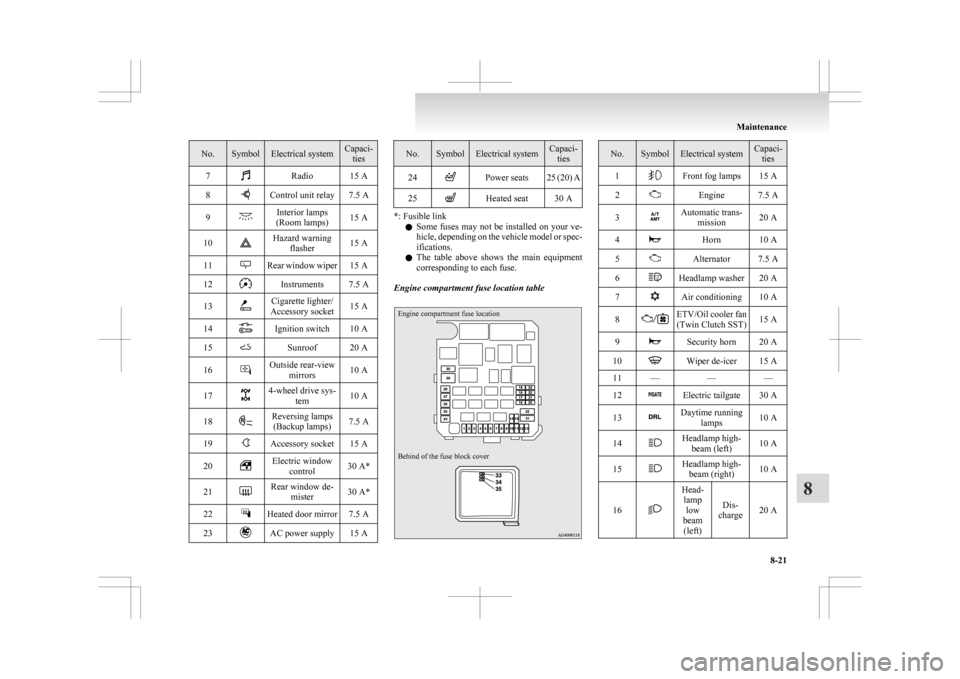
Engine compartment fuse location table
Engine compartment fuse location
Behind of the fuse block cover No. Symbol Electrical system Capaci-
ties
1 Front fog lamps 15 A
2 Engine 7.5 A
3 Automatic trans-
mission 20 A
4 Horn 10 A
5 Alternator 7.5 A
6 Headlamp washer 20 A
7 Air conditioning 10 A
8 ETV/Oil cooler fan
(Twin Clutch SST) 15 A
9 Security horn 20 A
10 Wiper de-icer 15 A
11 — ——
12 Electric tailgate 30 A
13 Daytime running
lamps 10 A
14 Headlamp high-
beam (left) 10 A
15 Headlamp high-
beam (right) 10 A
16 Head-
lamp low
beam (left) Dis-
charge 20 A Maintenance
8-21 8