keyless MITSUBISHI ASX 2009 1.G Owner's Guide
[x] Cancel search | Manufacturer: MITSUBISHI, Model Year: 2009, Model line: ASX, Model: MITSUBISHI ASX 2009 1.GPages: 368, PDF Size: 8.13 MB
Page 72 of 368
Pregnant women restraint
E00405600077WARNING
l Seat belts work for everyone, including
pregnant women. Pregnant women
should use the available seat belts. This
will reduce the likelihood of injury to
both the woman and the unborn child.
The lap belt should be worn across the
thighs and as snug against the hips as pos-
sible, but not across the waist. Consult
your doctor if you have any additional
questions or concerns. Seat belt pretensioner system and
force limiter system E00405700166
The
driver’s seat and front passenger’s seat each
have a seat belt equipped with a pretensioner system.
Pretensioner system E00405801135
When the ignition switch or the operation mode is
under
the following conditions, if there is a frontal
impact or a side impact (vehicles equipped with
SRS side airbags and SRS curtain airbags) severe
enough to injure the driver and/or front passenger,
the pretensioner system will retract their respective
seat belts instantaneously, thus maximizing the seat
belt’s effectiveness.
[Except for vehicles equipped with keyless opera-
tion system]
The ignition switch is in the “ON” or “START” po-
sition.
[Vehicles equipped with keyless operation system]
The operation mode is in ON. WARNING
l To
obtain the best results from your pre-
tensioner seat belt, make sure you have ad-
justed your seat correctly and wear your
seat belt properly. CAUTION
l
Installation
of audio equipment or re-
pairs in the vicinity of the pretensioner
seat belts or floor console must be per-
formed in line with MITSUBISHI
MOTORS guidelines. It is important to
do so because the work could affect the
pretensioner systems.
l If you need to scrap the vehicle, please con-
sult a MITSUBISHI MOTORS Author-
ized Service Point.
It is important to do so because unexpec-
ted activation of the pretensioner seat
belts could cause injuries.
NOTE l The
pretensioner seat belts will be activated
if the vehicle suffers a severe frontal impact
or a severe side impact (vehicles equipped
with SRS side airbags and SRS curtain air-
bags), even if the seat belts are not worn.
l The pretensioner seat belts are designed to
work only once. After the pretensioner seat
belts have been activated, we recommend
you have it replaced by a MITSUBISHI
MOTORS Authorized Service Point.
SRS warning E00405900243
The same warning lamp/display is shared by the
SRS airbags and the pretensioner seat belts.
Refer
to “SRS warning lamp/display” on page
2-34. Seat and seat belts
2-14
2
Page 83 of 368
How the Supplemental Restraint Sys-
tem works
E00407301554
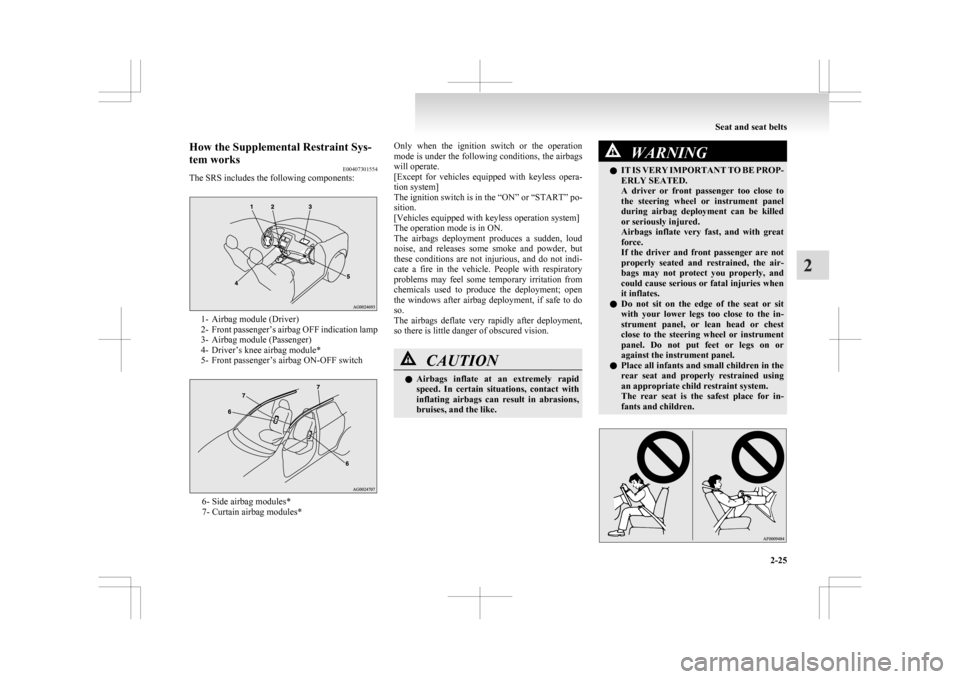
The SRS includes the following components: 1- Airbag module (Driver)
2- Front
passenger’s airbag OFF indication lamp
3- Airbag module (Passenger)
4- Driver’s knee airbag module*
5- Front passenger’s airbag ON-OFF switch 6- Side airbag modules*
7- Curtain airbag modules* Only when the ignition switch or the operation
mode
is under the following conditions, the airbags
will operate.
[Except for vehicles equipped with keyless opera-
tion system]
The ignition switch is in the “ON” or “START” po-
sition.
[Vehicles equipped with keyless operation system]
The operation mode is in ON.
The airbags deployment produces a sudden, loud
noise, and releases some smoke and powder, but
these conditions are not injurious, and do not indi-
cate a fire in the vehicle. People with respiratory
problems may feel some temporary irritation from
chemicals used to produce the deployment; open
the windows after airbag deployment, if safe to do
so.
The airbags deflate very rapidly after deployment,
so there is little danger of obscured vision. CAUTION
l
Airbags
inflate at an extremely rapid
speed. In certain situations, contact with
inflating airbags can result in abrasions,
bruises, and the like. WARNING
l IT
IS VERY IMPORTANT TO BE PROP-
ERLY SEATED.
A driver or front passenger too close to
the steering wheel or instrument panel
during airbag deployment can be killed
or seriously injured.
Airbags inflate very fast, and with great
force.
If the driver and front passenger are not
properly seated and restrained, the air-
bags may not protect you properly, and
could cause serious or fatal injuries when
it inflates.
l Do not sit on the edge of the seat or sit
with your lower legs too close to the in-
strument panel, or lean head or chest
close to the steering wheel or instrument
panel. Do not put feet or legs on or
against the instrument panel.
l Place all infants and small children in the
rear seat and properly restrained using
an appropriate child restraint system.
The rear seat is the safest place for in-
fants and children. Seat and seat belts
2-25 2
Page 105 of 368
Refuel as soon as possible.Type 1
Type 2NOTE
l The
driving range is determined based on the
fuel consumption data. This may vary depend-
ing on the driving conditions and habits.
Treat the distance displayed as just a rough
guideline.
l When you refuel, the driving range display is
updated.
However, if you only add a small amount of
fuel, the correct value will not be displayed.
Fill with a full tank whenever possible.
l On rare occasions, the value displayed for
the driving range may change if you are
parked on an extremely steep incline. This is
due to the movement of fuel in the tank and
does not indicate a malfunction. l
The
display setting can be changed to the pre-
ferred units (km or miles). Refer to “Chang-
ing the function settings (when the ignition
switch or the operation mode is ON)” on
page 3-17.
Average speed display E00521600656
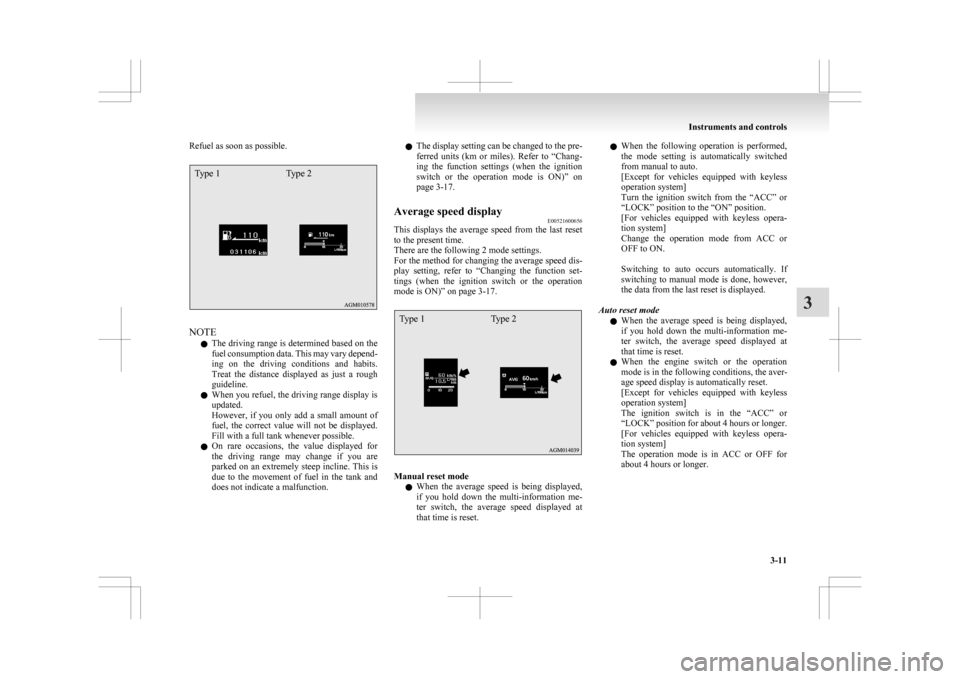
This displays the average speed from the last reset
to the present time.
There are the following 2 mode settings.
For
the method for changing the average speed dis-
play setting, refer to “Changing the function set-
tings (when the ignition switch or the operation
mode is ON)” on page 3-17.
Type 1 Type 2 Manual reset mode
l When
the average speed is being displayed,
if you hold down the multi-information me-
ter switch, the average speed displayed at
that time is reset. l
When
the following operation is performed,
the mode setting is automatically switched
from manual to auto.
[Except for vehicles equipped with keyless
operation system]
Turn the ignition switch from the “ACC” or
“LOCK” position to the “ON” position.
[For vehicles equipped with keyless opera-
tion system]
Change the operation mode from ACC or
OFF to ON.
Switching to auto occurs automatically. If
switching to manual mode is done, however,
the data from the last reset is displayed.
Auto reset mode l When the average speed is being displayed,
if you hold down the multi-information me-
ter switch, the average speed displayed at
that time is reset.
l When the engine switch or the operation
mode is in the following conditions, the aver-
age speed display is automatically reset.
[Except for vehicles equipped with keyless
operation system]
The ignition switch is in the “ACC” or
“LOCK” position for about 4 hours or longer.
[For vehicles equipped with keyless opera-
tion system]
The operation mode is in ACC or OFF for
about 4 hours or longer. Instruments and controls
3-11 3
Page 106 of 368
NOTE
l The
average speed display and the average
fuel consumption display can be reset individ-
ually for the auto reset mode and manual re-
set mode.
l “---” is displayed when the average speed can-
not be measured.
l The initial (default) setting is “Auto reset
mode”.
l The display setting can be changed to the pre-
ferred units (km/h or mph).
Refer to “Changing the function settings
(when the ignition switch or the operation
mode is ON)” on page 3-17.
l The memory of the auto reset mode or man-
ual reset mode for the average speed display
is erased if the battery is disconnected.
Average fuel consumption display E00521700628
This displays the average fuel consumption from
the last reset to the present time.
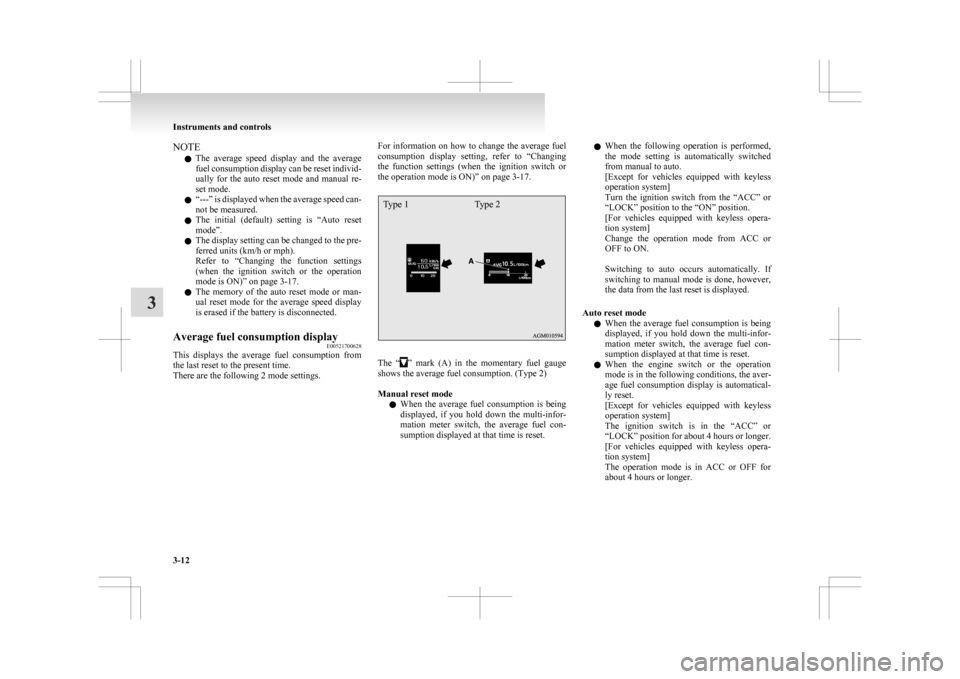
There are the following 2 mode settings. For information on how to change the average fuel
consumption
display setting, refer to “Changing
the function settings (when the ignition switch or
the operation mode is ON)” on page 3-17.
Type 1 Type 2 The “ ”
mark (A) in the momentary fuel gauge
shows the average fuel consumption. (Type 2)
Manual reset mode
l When the average fuel consumption is being
displayed, if you hold down the multi-infor-
mation meter switch, the average fuel con-
sumption displayed at that time is reset. l
When
the following operation is performed,
the mode setting is automatically switched
from manual to auto.
[Except for vehicles equipped with keyless
operation system]
Turn the ignition switch from the “ACC” or
“LOCK” position to the “ON” position.
[For vehicles equipped with keyless opera-
tion system]
Change the operation mode from ACC or
OFF to ON.
Switching to auto occurs automatically. If
switching to manual mode is done, however,
the data from the last reset is displayed.
Auto reset mode l When the average fuel consumption is being
displayed, if you hold down the multi-infor-
mation meter switch, the average fuel con-
sumption displayed at that time is reset.
l When the engine switch or the operation
mode is in the following conditions, the aver-
age fuel consumption display is automatical-
ly reset.
[Except for vehicles equipped with keyless
operation system]
The ignition switch is in the “ACC” or
“LOCK” position for about 4 hours or longer.
[For vehicles equipped with keyless opera-
tion system]
The operation mode is in ACC or OFF for
about 4 hours or longer. Instruments and controls
3-12
3
Page 112 of 368
4. Select the item to change on the menu screen
and change to the desired setting. Refer to
the following items for further details on the
operation methods.
Refer to “Changing the reset mode for aver-
age fuel consumption and average speed” on
page 3-18.
Refer to “Changing the fuel consumption dis-
play unit” on page 3-19.
Refer to “Changing the temperature unit” on
page 3-20.
Refer to “Changing the display language” on
page 3-20.
Refer to “Changing the language cooperative
control” on page 3-21.
Refer to “Operation sound setting” on page
3-21.
Refer to “Changing the time until “REST RE-
MINDER” is displayed” on page 3-22.
Refer to “Changing the turn-signal sound”
on page 3-23.
Refer to “Changing the momentary fuel con-
sumption display” on page 3-23.
Refer to “Returning to the factory settings”
on page 3-23.
Changing the reset mode for average fuel con-
sumption and average speed E00522900601
The mode conditions for the average fuel consump-
tion
and average speed display can be switched be-
tween “Auto reset” and “Manual reset”. 1. Press
and hold the multi-information meter
switch for about 2 seconds or more to switch
from the setting mode screen to the menu
screen.
Refer to “Changing the function settings
(when the ignition switch or the operation
mode is ON)” on page 3-17.
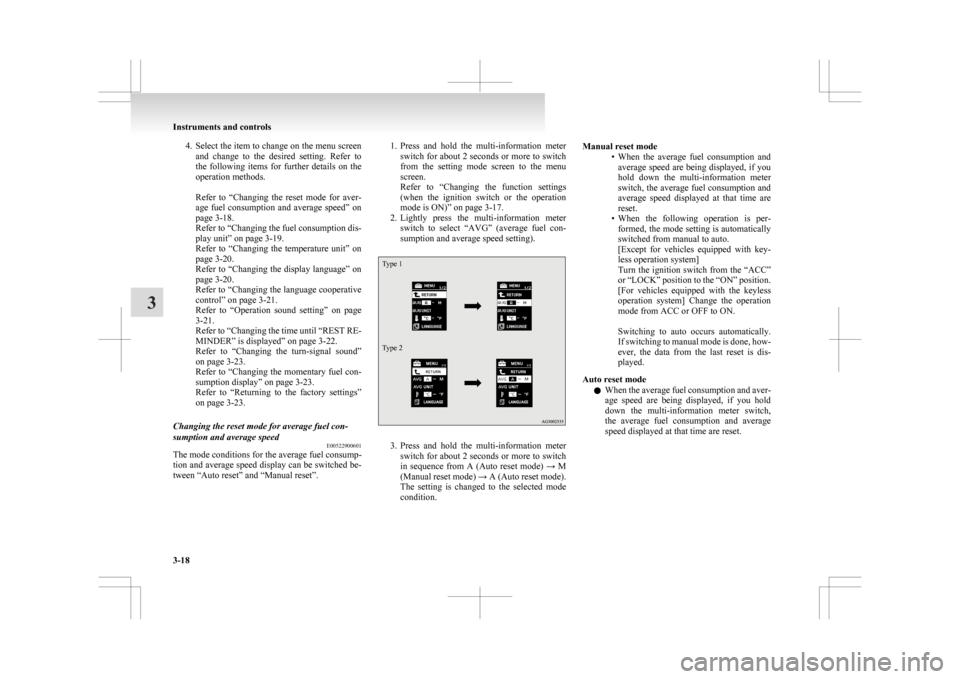
2. Lightly press the multi-information meter switch to select “AVG” (average fuel con-
sumption and average speed setting).
Type 1
Type 2 3. Press
and hold the multi-information meter
switch for about 2 seconds or more to switch
in sequence from A (Auto reset mode) → M
(Manual reset mode) → A (Auto reset mode).
The setting is changed to the selected mode
condition. Manual reset mode
• When
the average fuel consumption and
average speed are being displayed, if you
hold down the multi-information meter
switch, the average fuel consumption and
average speed displayed at that time are
reset.
• When the following operation is per- formed, the mode setting is automatically
switched from manual to auto.
[Except for vehicles equipped with key-
less operation system]
Turn the ignition switch from the “ACC”
or “LOCK” position to the “ON” position.
[For vehicles equipped with the keyless
operation system] Change the operation
mode from ACC or OFF to ON.
Switching to auto occurs automatically.
If switching to manual mode is done, how-
ever, the data from the last reset is dis-
played.
Auto reset mode l When the average fuel consumption and aver-
age speed are being displayed, if you hold
down the multi-information meter switch,
the average fuel consumption and average
speed displayed at that time are reset. Instruments and controls
3-18
3
Page 113 of 368
l
When the engine switch or the operation
mode is in the following conditions, the aver-
age fuel consumption display and average
speed display are automatically reset.
[Except for vehicles equipped with keyless
operation system]
The ignition switch is in the “ACC” or
“LOCK” position for about 4 hours or longer.
[For vehicles equipped with keyless opera-
tion system]
The operation mode is in ACC or OFF for
about 4 hours or longer.
NOTE l The average fuel consumption display and
average speed display can be reset individual-
ly for the auto reset mode and manual reset
mode.
l The memory of the auto reset mode or man-
ual reset mode for the average fuel consump-
tion display and average speed display is
erased if the battery is disconnected.
l The initial (default) setting is “Auto reset
mode”.
Changing the fuel consumption display unit E00523000579
The display unit for fuel consumption can be switch-
ed.
The distance, speed, and amount units are also
switched to match the selected fuel consumption
unit. 1. Press and hold the multi-information meterswitch for about 2 seconds or more to switch
from the setting mode screen to the menu
screen.
Refer to “Changing the function settings
(when the ignition switch or the operation
mode is ON)” on page 3-17. 2. Lightly
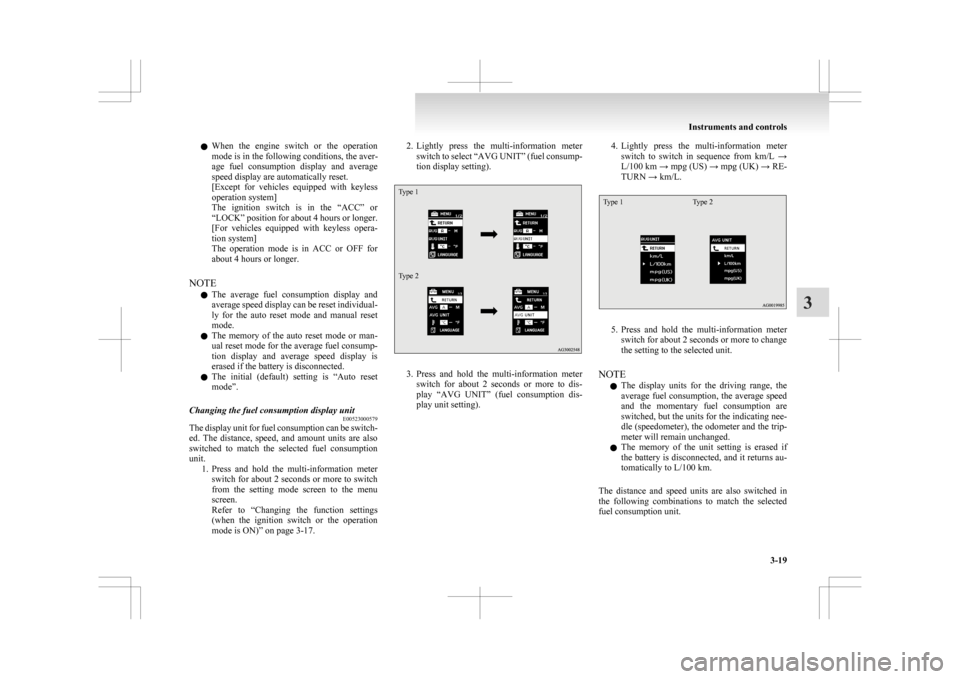
press the multi-information meter
switch to select “AVG UNIT” (fuel consump-
tion display setting).
Type 1
Type 2 3. Press
and hold the multi-information meter
switch for about 2 seconds or more to dis-
play “AVG UNIT” (fuel consumption dis-
play unit setting). 4. Lightly
press the multi-information meter
switch to switch in sequence from km/L →
L/100 km → mpg (US) → mpg (UK) → RE-
TURN → km/L.
Type 1 Type 2 5. Press
and hold the multi-information meter
switch for about 2 seconds or more to change
the setting to the selected unit.
NOTE l The display units for the driving range, the
average fuel consumption, the average speed
and the momentary fuel consumption are
switched, but the units for the indicating nee-
dle (speedometer), the odometer and the trip-
meter will remain unchanged.
l The memory of the unit setting is erased if
the battery is disconnected, and it returns au-
tomatically to L/100 km.
The distance and speed units are also switched in
the following combinations to match the selected
fuel consumption unit. Instruments and controls
3-19 3
Page 122 of 368
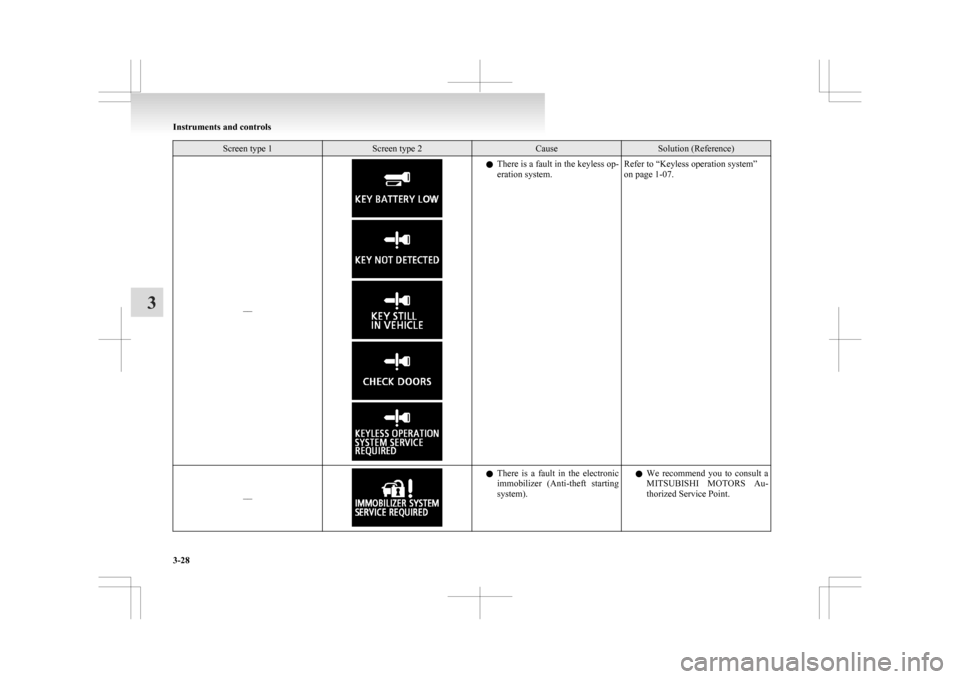
Screen type 1 Screen type 2 Cause Solution (Reference)
–– l
There is a fault in the keyless op-
eration system. Refer to “Keyless operation system”
on page 1-07.
–– l
There
is a fault in the electronic
immobilizer (Anti-theft starting
system). l
We recommend you to consult a
MITSUBISHI MOTORS Au-
thorized Service Point. Instruments and controls
3-28
3
Page 123 of 368
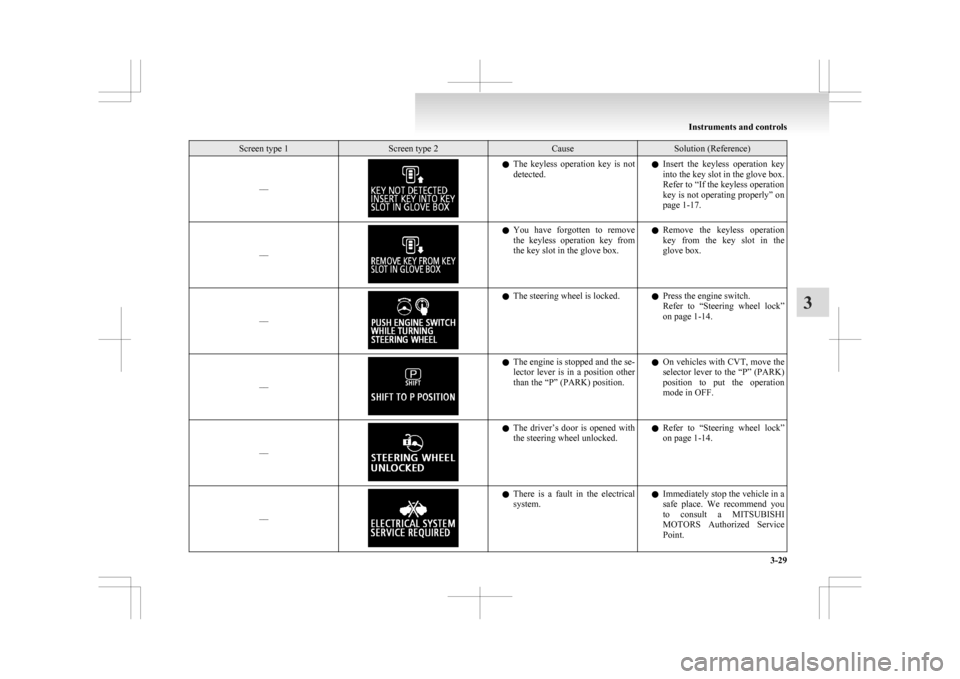
Screen type 1 Screen type 2 Cause Solution (Reference)
–– l
The keyless operation key is not
detected. l
Insert the keyless operation key
into the key slot in the glove box.
Refer to “If the keyless operation
key is not operating properly” on
page 1-17.
–– l
You
have forgotten to remove
the keyless operation key from
the key slot in the glove box. l
Remove the keyless operation
key from the key slot in the
glove box.
–– l
The steering wheel is locked.
lPress the engine switch.
Refer
to “Steering wheel lock”
on page 1-14.
–– l
The engine is stopped and the se-
lector
lever is in a position other
than the “P” (PARK) position. l
On vehicles with CVT, move the
selector lever to the “P” (PARK)
position to put the operation
mode in OFF.
–– l
The
driver’s door is opened with
the steering wheel unlocked. l
Refer to “Steering wheel lock”
on page 1-14.
–– l
There
is a fault in the electrical
system. l
Immediately stop the vehicle in a
safe place. We recommend you
to consult a MITSUBISHI
MOTORS Authorized Service
Point. Instruments and controls
3-29 3
Page 125 of 368
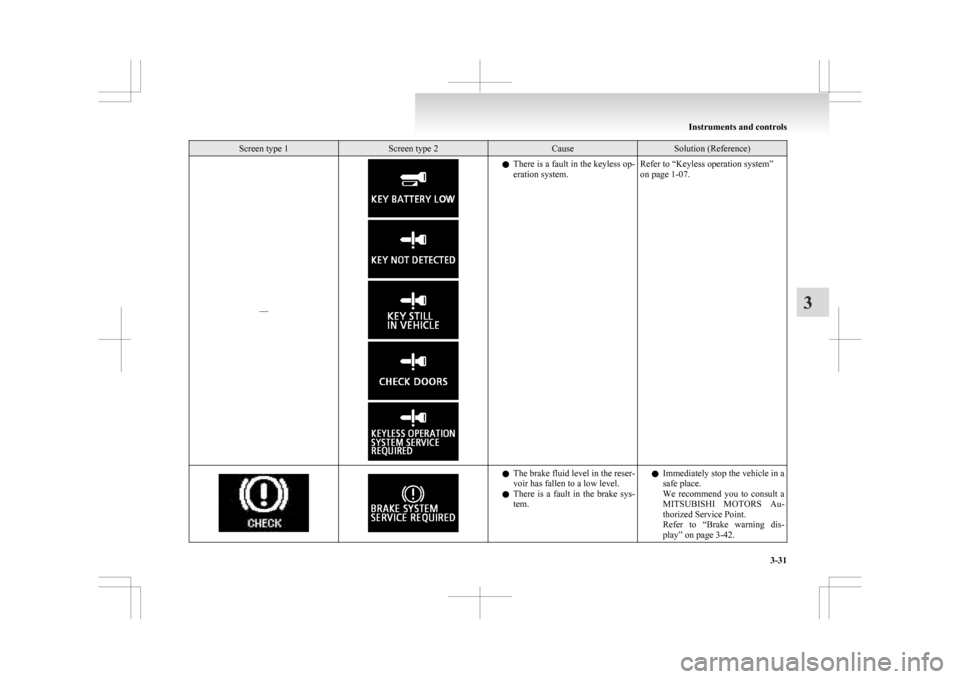
Screen type 1 Screen type 2 Cause Solution (Reference)
–– l
There is a fault in the keyless op-
eration system. Refer to “Keyless operation system”
on page 1-07. l
The
brake fluid level in the reser-
voir has fallen to a low level.
l There is a fault in the brake sys-
tem. l
Immediately stop the vehicle in a
safe place.
We recommend you to consult a
MITSUBISHI MOTORS Au-
thorized Service Point.
Refer to “Brake warning dis-
play” on page 3-42. Instruments and controls
3-31 3
Page 134 of 368
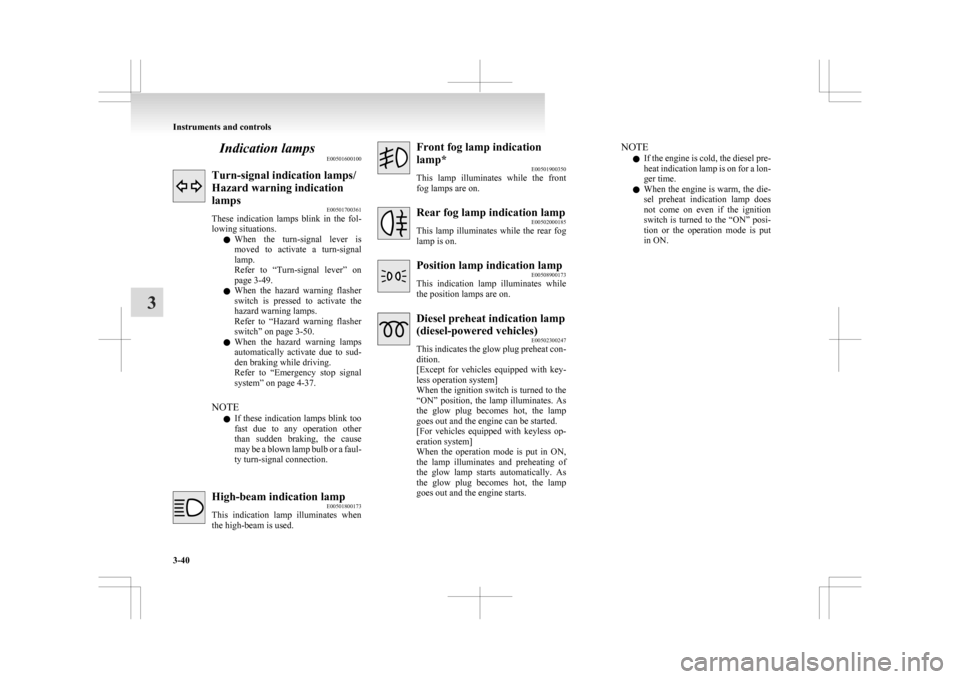
Indication lamps
E00501600100Turn-signal indication lamps/
Hazard warning indication
lamps
E00501700361
These
indication lamps blink in the fol-
lowing situations.
l When the turn-signal lever is
moved to activate a turn-signal
lamp.
Refer to “Turn-signal lever” on
page 3-49.
l When the hazard warning flasher
switch is pressed to activate the
hazard warning lamps.
Refer to “Hazard warning flasher
switch” on page 3-50.
l When the hazard warning lamps
automatically activate due to sud-
den braking while driving.
Refer to “Emergency stop signal
system” on page 4-37.
NOTE l If these indication lamps blink too
fast due to any operation other
than sudden braking, the cause
may be a blown lamp bulb or a faul-
ty turn-signal connection. High-beam indication lamp
E00501800173
This
indication lamp illuminates when
the high-beam is used. Front fog lamp indication
lamp*
E00501900350
This
lamp illuminates while the front
fog lamps are on. Rear fog lamp indication lamp
E00502000185
This
lamp illuminates while the rear fog
lamp is on. Position lamp indication lamp
E00508900173
This
indication lamp illuminates while
the position lamps are on. Diesel preheat indication lamp
(diesel-powered vehicles)
E00502300247
This
indicates the glow plug preheat con-
dition.
[Except for vehicles equipped with key-
less operation system]
When the ignition switch is turned to the
“ON” position, the lamp illuminates. As
the glow plug becomes hot, the lamp
goes out and the engine can be started.
[For vehicles equipped with keyless op-
eration system]
When the operation mode is put in ON,
the lamp illuminates and preheating of
the glow lamp starts automatically. As
the glow plug becomes hot, the lamp
goes out and the engine starts. NOTE
l If
the engine is cold, the diesel pre-
heat indication lamp is on for a lon-
ger time.
l When the engine is warm, the die-
sel preheat indication lamp does
not come on even if the ignition
switch is turned to the “ON” posi-
tion or the operation mode is put
in ON. Instruments and controls
3-40
3