wheel nut MITSUBISHI ASX 2009 1.G Owners Manual
[x] Cancel search | Manufacturer: MITSUBISHI, Model Year: 2009, Model line: ASX, Model: MITSUBISHI ASX 2009 1.GPages: 368, PDF Size: 8.13 MB
Page 34 of 368
CAUTION
l
The indication lamp (A) will flash orange
when there is a problem or malfunction
in the keyless operation system. Never
drive if the indication lamp on the engine
switch is flashing orange. Immediately
contact a MITSUBISHI MOTORS Au-
thorized Service Point.
l If the engine switch operation is not
smooth and feels like it is sticking, do not
operate the switch. Immediately contact a
MITSUBISHI MOTORS Authorized
Service Point.
NOTE l When
operating the engine switch, press the
switch all the way in. If the switch is not
fully pressed, the engine may not start or the
operation mode may not change. If the en-
gine switch is pressed correctly, there is no
need to hold the engine switch down.
Operation mode of the engine switch and its func-
tion
OFF
The indication lamp on the engine switch turns off.
The operation mode cannot be put in OFF when
the selector lever is in any position other than the
“P” (PARK) position (CVT).
ACC
The audio system and other electric devices can be
operated.
The indication lamp on the engine switch illumi-
nates orange. ON
All electric devices can be operated.
The
indication lamp on the engine switch illumi-
nates green.
The indication lamp turns off when the engine is
running.
NOTE
l Your vehicle is equipped with an electronic
immobilizer. To start the engine, the ID code
which the transponder inside the key sends
must match the one registered in the immobil-
izer computer.
(Refer to “Electronic immobilizer (Anti-theft
starting system)” on page 1-11.)
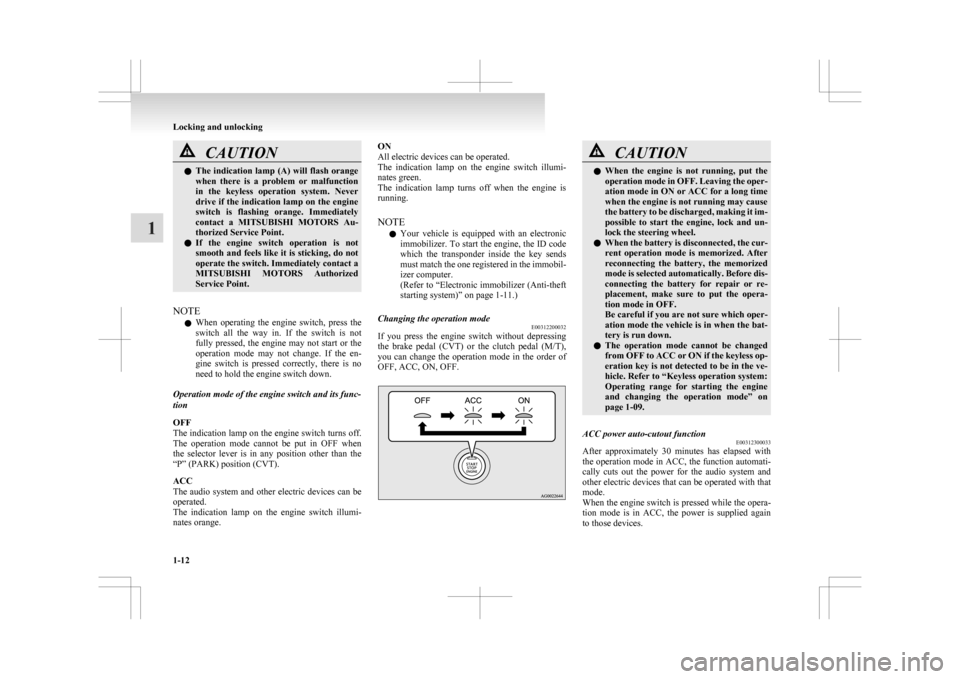
Changing the operation mode E00312200032
If you press the engine switch without depressing
the
brake pedal (CVT) or the clutch pedal (M/T),
you can change the operation mode in the order of
OFF, ACC, ON, OFF. CAUTION
l
When
the engine is not running, put the
operation mode in OFF. Leaving the oper-
ation mode in ON or ACC for a long time
when the engine is not running may cause
the battery to be discharged, making it im-
possible to start the engine, lock and un-
lock the steering wheel.
l When the battery is disconnected, the cur-
rent operation mode is memorized. After
reconnecting the battery, the memorized
mode is selected automatically. Before dis-
connecting the battery for repair or re-
placement, make sure to put the opera-
tion mode in OFF.
Be careful if you are not sure which oper-
ation mode the vehicle is in when the bat-
tery is run down.
l The operation mode cannot be changed
from OFF to ACC or ON if the keyless op-
eration key is not detected to be in the ve-
hicle. Refer to “Keyless operation system:
Operating range for starting the engine
and changing the operation mode” on
page 1-09.
ACC power auto-cutout function E00312300033
After approximately 30 minutes has elapsed with
the
operation mode in ACC, the function automati-
cally cuts out the power for the audio system and
other electric devices that can be operated with that
mode.
When the engine switch is pressed while the opera-
tion mode is in ACC, the power is supplied again
to those devices. Locking and unlocking
1-12
1
Page 151 of 368
Rear window demister switch
E00507901186
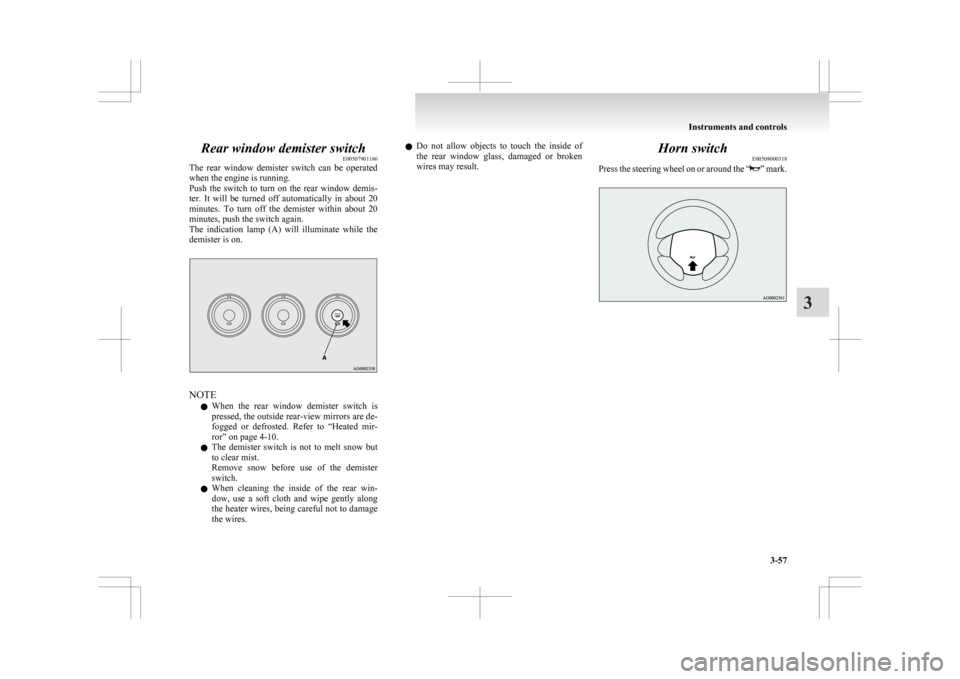
The
rear window demister switch can be operated
when the engine is running.
Push the switch to turn on the rear window demis-
ter. It will be turned off automatically in about 20
minutes. To turn off the demister within about 20
minutes, push the switch again.
The indication lamp (A) will illuminate while the
demister is on. NOTE
l When
the rear window demister switch is
pressed, the outside rear-view mirrors are de-
fogged or defrosted. Refer to “Heated mir-
ror” on page 4-10.
l The demister switch is not to melt snow but
to clear mist.
Remove snow before use of the demister
switch.
l When cleaning the inside of the rear win-
dow, use a soft cloth and wipe gently along
the heater wires, being careful not to damage
the wires. l
Do
not allow objects to touch the inside of
the rear window glass, damaged or broken
wires may result. Horn switch
E00508000318
Press
the steering wheel on or around the “ ”
mark.Instruments and controls
3-57 3
Page 163 of 368
![MITSUBISHI ASX 2009 1.G Owners Manual The heater will be turned off automatically in about
20 minutes.
Ignition switch
E00601401845
[For
vehicles equipped with keyless op-
eration system]
For information on operations for vehicles](/img/19/7566/w960_7566-162.png "MITSUBISHI ASX 2009 1.G Owners Manual The heater will be turned off automatically in about
20 minutes.
Ignition switch
E00601401845
[For
vehicles equipped with keyless op-
eration system]
For information on operations for vehicles")
The heater will be turned off automatically in about
20 minutes.
Ignition switch
E00601401845
[For
vehicles equipped with keyless op-
eration system]
For information on operations for vehicles equip-
ped with the keyless operation system, refer to
“Keyless operation system: Engine switch” on
page 1-11.
[Except for vehicles equipped with key-
less operation system] LOCK
The
engine is stopped and the steering wheel
locked. The key can only be inserted and removed
in this position.
ACC
The engine is stopped, but the audio system and oth-
er electric devices can be operated.
ON
The engine is running, and all the vehicle’s electri-
cal devices can be operated. START
The
starter motor operates. After the engine has star-
ted, release the key and it will automatically return
to the “ON” position.
NOTE
l Your vehicle is equipped with an electronic
immobilizer.
To start the engine, the ID code transmitted
by the transponder inside the key must match
the code registered in the immobilizer com-
puter.
Refer to “Electronic immobilizer (Anti-theft
starting system)” on page 1-03.
ACC power auto-cutout function E00620300165
After about 30 minutes has elapsed with the igni-
tion
switch in the “ACC” position, the function au-
tomatically cuts out the power for the audio system
and other electric devices that can be operated with
that position.
When the ignition switch is turned from the “ACC”
position, the power is supplied again to those devi-
ces.
NOTE
l It is possible to modify functions as follows:
• The time until the power cuts out can bechanged to about 60 minutes.
• The ACC power auto-cutout function can be deactivated.
For details, we recommend you to consult a
MITSUBISHI MOTORS Authorized Service
Point.
On vehicles equipped with MITSUBISHI
Multi-Communication System (MMCS), Starting and driving
4-11 4
Page 182 of 368
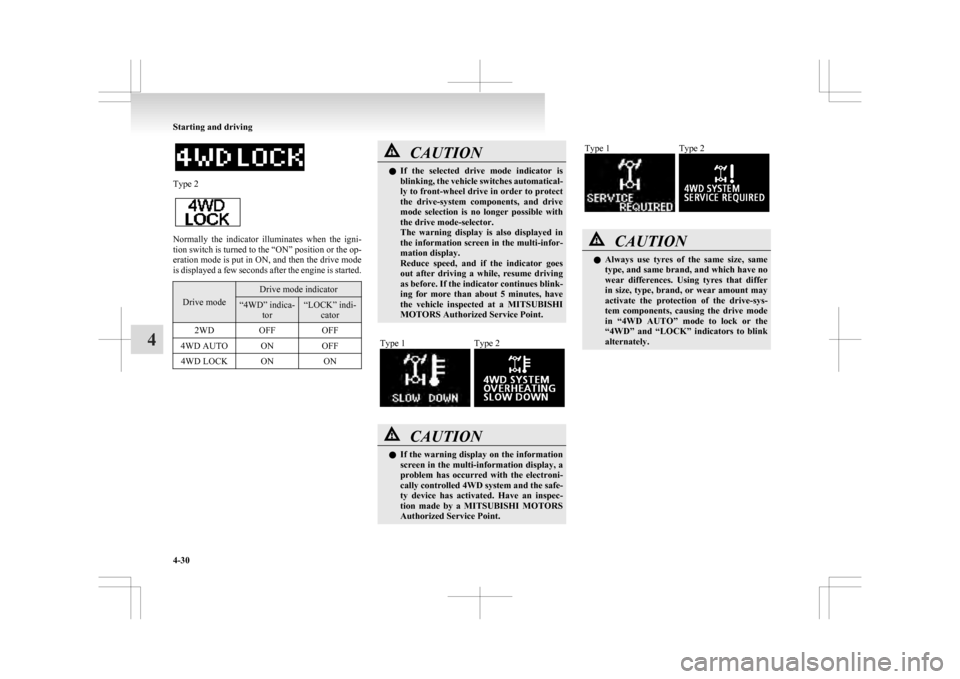
Type 2
Normally the indicator illuminates when the igni-
tion
switch is turned to the “ON” position or the op-
eration mode is put in ON, and then the drive mode
is displayed a few seconds after the engine is started. Drive mode Drive mode indicator
“4WD” indica-
tor “LOCK” indi-
cator
2WD OFF OFF
4WD AUTO ON OFF
4WD LOCK ON ON CAUTION
l
If
the selected drive mode indicator is
blinking, the vehicle switches automatical-
ly to front-wheel drive in order to protect
the drive-system components, and drive
mode selection is no longer possible with
the drive mode-selector.
The warning display is also displayed in
the information screen in the multi-infor-
mation display.
Reduce speed, and if the indicator goes
out after driving a while, resume driving
as before. If the indicator continues blink-
ing for more than about 5 minutes, have
the vehicle inspected at a MITSUBISHI
MOTORS Authorized Service Point.
Type 1 Type 2
CAUTION
l
If
the warning display on the information
screen in the multi-information display, a
problem has occurred with the electroni-
cally controlled 4WD system and the safe-
ty device has activated. Have an inspec-
tion made by a MITSUBISHI MOTORS
Authorized Service Point. Type 1 Type 2
CAUTION
l
Always
use tyres of the same size, same
type, and same brand, and which have no
wear differences. Using tyres that differ
in size, type, brand, or wear amount may
activate the protection of the drive-sys-
tem components, causing the drive mode
in “4WD AUTO” mode to lock or the
“4WD” and “LOCK” indicators to blink
alternately. Starting and driving
4-30
4
Page 191 of 368
CAUTION
ard brake system is working. (The stand-
ard
brake system is functioning normal-
ly.) If this happens, we recommend you to
have your vehicle inspected as soon as pos-
sible. • When the ignition switch is turned tothe “ON” position or the operation
mode is put in ON, the warning lamp
does not come on or it remains on and
does not go off.
• The warning lamp comes on while driv- ing
• The warning display appears while driving
If the warning lamp/display illuminate
while driving E00607301295
If only the ABS warning lamp/display illuminate
Avoid
hard braking and high-speed driving. Stop
the vehicle in a safe place.
Restart the engine and check to see whether the
lamp goes out after a few minutes driving; if it then
remains off during driving, there is no problem.
However, if the warning lamp/display do not disap-
pear, or if they come on again when the vehicle is
driven, we recommend you to have the vehicle
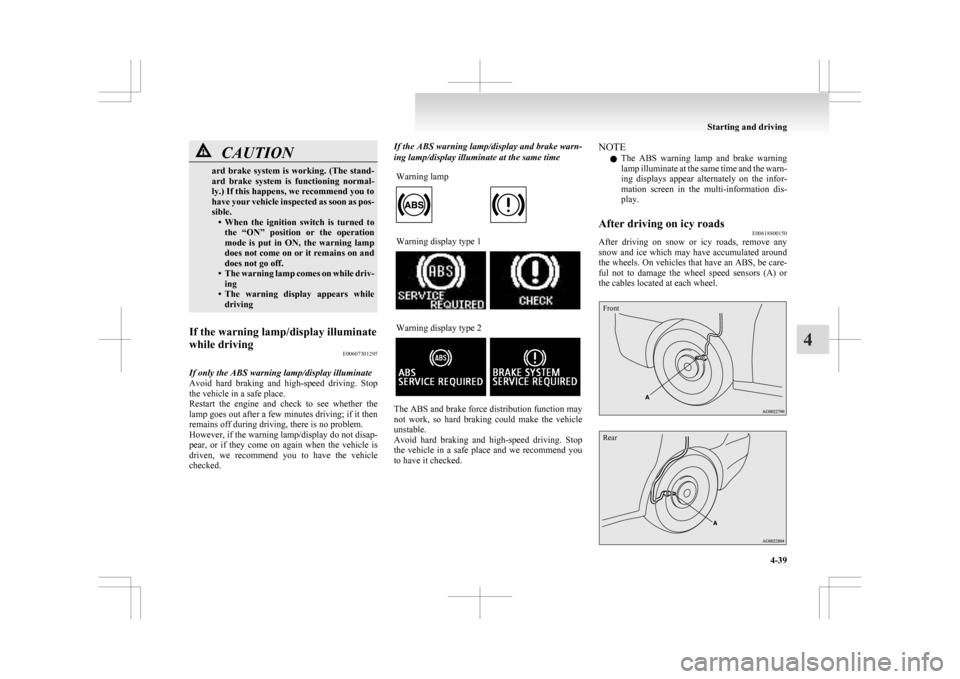
checked. If the ABS warning lamp/display and brake warn-
ing lamp/display illuminate at the same time
Warning lamp Warning display type 1
Warning display type 2
The ABS and brake force distribution function may
not
work, so hard braking could make the vehicle
unstable.
Avoid hard braking and high-speed driving. Stop
the vehicle in a safe place and we recommend you
to have it checked. NOTE
l The
ABS warning lamp and brake warning
lamp illuminate at the same time and the warn-
ing displays appear alternately on the infor-
mation screen in the multi-information dis-
play.
After driving on icy roads E00618800150
After driving on snow or icy roads, remove any
snow
and ice which may have accumulated around
the wheels. On vehicles that have an ABS, be care-
ful not to damage the wheel speed sensors (A) or
the cables located at each wheel.
Front
Rear Starting and driving
4-39 4
Page 284 of 368
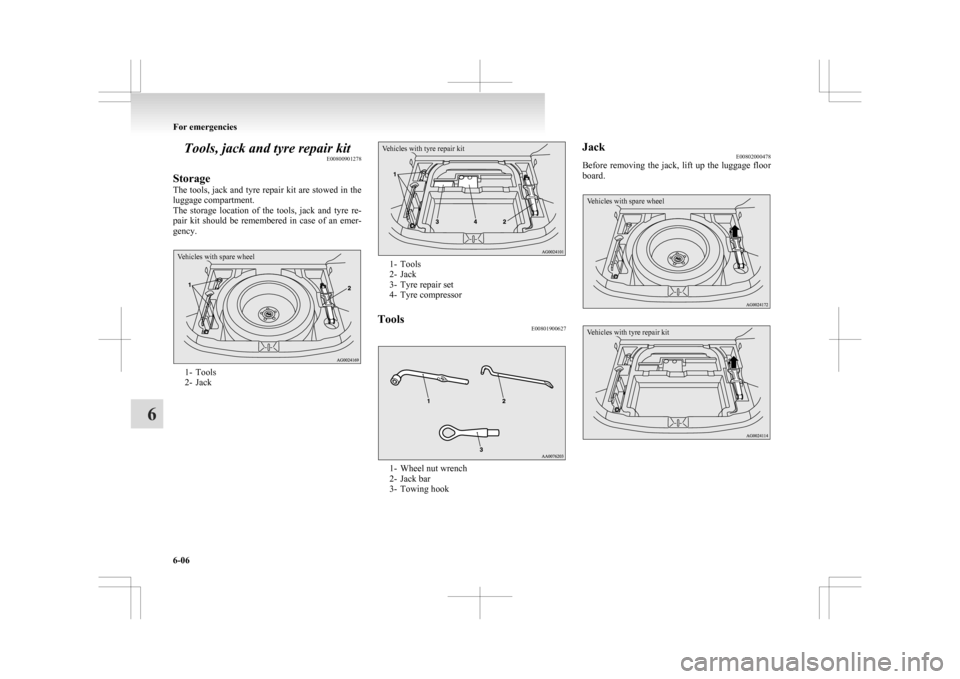
Tools, jack and tyre repair kit
E00800901278
Storage
The
tools, jack and tyre repair kit are stowed in the
luggage compartment.
The storage location of the tools, jack and tyre re-
pair kit should be remembered in case of an emer-
gency.
Vehicles with spare wheel 1- Tools
2-
Jack
Vehicles with tyre repair kit 1- Tools
2-
Jack
3- Tyre repair set
4- Tyre compressor
Tools E00801900627 1- Wheel nut wrench
2-
Jack bar
3- Towing hook Jack
E00802000478
Before
removing the jack, lift up the luggage floor
board.
Vehicles with spare wheel
Vehicles with tyre repair kit For emergencies
6-06
6
Page 288 of 368
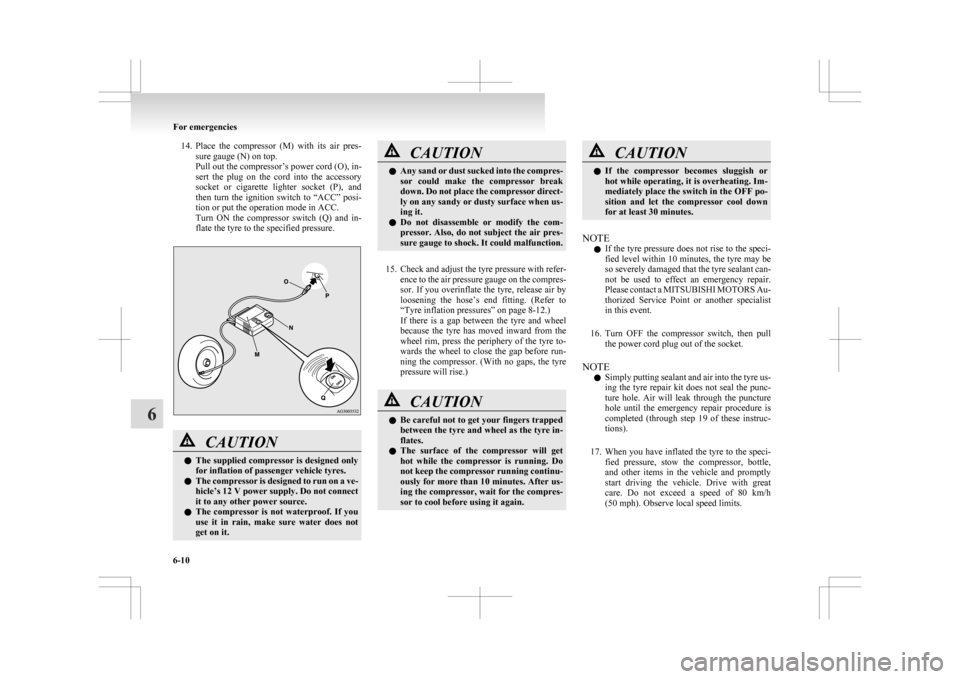
14. Place the compressor (M) with its air pres-
sure gauge (N) on top.
Pull out the compressor’s power cord (O), in-
sert the plug on the cord into the accessory
socket or cigarette lighter socket (P), and
then turn the ignition switch to “ACC” posi-
tion or put the operation mode in ACC.
Turn ON the compressor switch (Q) and in-
flate the tyre to the specified pressure. CAUTION
l
The
supplied compressor is designed only
for inflation of passenger vehicle tyres.
l The compressor is designed to run on a ve-
hicle’s 12 V power supply. Do not connect
it to any other power source.
l The compressor is not waterproof. If you
use it in rain, make sure water does not
get on it. CAUTION
l
Any
sand or dust sucked into the compres-
sor could make the compressor break
down. Do not place the compressor direct-
ly on any sandy or dusty surface when us-
ing it.
l Do not disassemble or modify the com-
pressor. Also, do not subject the air pres-
sure gauge to shock. It could malfunction.
15. Check
and adjust the tyre pressure with refer- ence to the air pressure gauge on the compres-
sor. If you overinflate the tyre, release air by
loosening the hose’s end fitting. (Refer to
“Tyre inflation pressures” on page 8-12.)
If there is a gap between the tyre and wheel
because the tyre has moved inward from the
wheel rim, press the periphery of the tyre to-
wards the wheel to close the gap before run-
ning the compressor. (With no gaps, the tyre
pressure will rise.) CAUTION
l
Be
careful not to get your fingers trapped
between the tyre and wheel as the tyre in-
flates.
l The surface of the compressor will get
hot while the compressor is running. Do
not keep the compressor running continu-
ously for more than 10 minutes. After us-
ing the compressor, wait for the compres-
sor to cool before using it again. CAUTION
l
If
the compressor becomes sluggish or
hot while operating, it is overheating. Im-
mediately place the switch in the OFF po-
sition and let the compressor cool down
for at least 30 minutes.
NOTE l If
the tyre pressure does not rise to the speci-
fied level within 10 minutes, the tyre may be
so severely damaged that the tyre sealant can-
not be used to effect an emergency repair.
Please contact a MITSUBISHI MOTORS Au-
thorized Service Point or another specialist
in this event.
16. Turn OFF the compressor switch, then pull the power cord plug out of the socket.
NOTE l Simply putting sealant and air into the tyre us-
ing the tyre repair kit does not seal the punc-
ture hole. Air will leak through the puncture
hole until the emergency repair procedure is
completed (through step 19 of these instruc-
tions).
17. When you have inflated the tyre to the speci- fied pressure, stow the compressor, bottle,
and other items in the vehicle and promptly
start driving the vehicle. Drive with great
care. Do not exceed a speed of 80 km/h
(50 mph). Observe local speed limits. For emergencies
6-10
6
Page 289 of 368
CAUTION
l
If you sense any abnormality while driv-
ing, stop the vehicle and contact a
MITSUBISHI MOTORS Authorized
Service Point or another specialist. Other-
wise the tyre pressure may drop before
the emergency repair procedure is com-
pleted, rendering the vehicle unsafe.
NOTE l Driving
faster than 80 km/h (50 mph) can
make the vehicle vibrate.
18. After driving for 10 minutes or 5 km (3 miles), check the tyre pressure using the
air pressure gauge on the compressor.
(Refer to “Tyre inflation pressures” on page
8-12.)
If the tyre pressure is not sufficient, inflate
the tyre to the specified pressure again and
drive the vehicle carefully without exceeding
a speed of 80 km/h (50 mph). CAUTION
l
If
the tyre pressure is lower than the min-
imum permitted pressure (1.3 bar
{130 kPa}), the tyre cannot successfully
be repaired with the tyre sealant. Do not
drive the vehicle any further. Contact a
MITSUBISHI MOTORS Authorized
Service Point or another specialist.
19. After
driving for 10 minutes or 5 km (3 miles), check the tyre pressure using the
air pressure gauge on the compressor. (Refer to “Tyre
inflation pressures” on page 8-12.)
If the tyre pressure has apparently not drop-
ped, the emergency repair procedure is com-
plete. You must still not exceed a speed of
80 km/h (50 mph). Observe local speed limits.
NOTE l If the tyre pressure has dropped below the
specified level when you check it at the end
of the repair procedure, do not drive the vehi-
cle any further. Contact a MITSUBISHI
MOTORS Authorized Service Point or anoth-
er specialist.
l In cold conditions (when the ambient temper-
ature is 0 °C or lower), the time and driving
distance necessary until completion of the re-
pair can be longer than in warmer conditions,
meaning that the tyre pressure can drop be-
low the specified level even when you have
inflated the tyre a second time and subsequent-
ly driven the vehicle. If this happens, inflate
the tyre to the specified pressure once more,
drive for about 10 minutes or 5 km (3 miles),
then check the tyre pressure again. If the tyre
pressure has again dropped below the speci-
fied level, stop driving the vehicle and con-
tact a MITSUBISHI MOTORS Authorized
Service Point or another specialist.
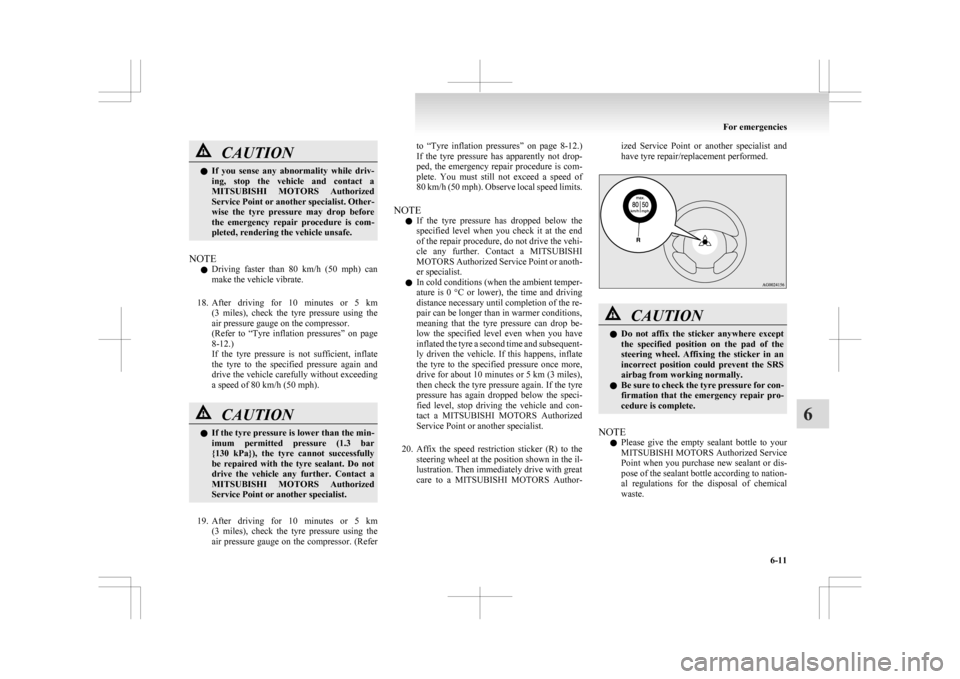
20. Affix the speed restriction sticker (R) to the steering wheel at the position shown in the il-
lustration. Then immediately drive with great
care to a MITSUBISHI MOTORS Author- ized Service Point or another specialist and
have tyre repair/replacement performed.
CAUTION
l
Do
not affix the sticker anywhere except
the specified position on the pad of the
steering wheel. Affixing the sticker in an
incorrect position could prevent the SRS
airbag from working normally.
l Be sure to check the tyre pressure for con-
firmation that the emergency repair pro-
cedure is complete.
NOTE l Please
give the empty sealant bottle to your
MITSUBISHI MOTORS Authorized Service
Point when you purchase new sealant or dis-
pose of the sealant bottle according to nation-
al regulations for the disposal of chemical
waste. For emergencies
6-11 6
Page 290 of 368
l
A tyre in which puncture sealant has been
used should ideally be replaced with a new
one. If you wish to have such a tyre properly
repaired for reuse, please contact a
MITSUBISHI MOTORS Authorized Service
Point or another specialist. Note that a proper
repair is impossible following an emergency
repair if the puncture hole cannot be located.
l Wipe away any sealant that gets on the
wheel. Provided the valve is replaced with a
new one, the wheel can be reused.
l The manufacturer is unable to guarantee that
all tyre punctures can be repaired with the
tyre repair kit, in particular cuts or perfora-
tions with a diameter of more than 4 mm or
away from the tyre’s tread. The manufacturer
is not liable for damage sustained through im-
proper use of the tyre repair kit.
l The manufacturer is not liable for damage sus-
tained through re-use of any tyre in which
tyre sealant has been used. How to change a tyre
E00801202637
Before
changing a tyre, first stop your vehicle in a
safe, flat location. 1. Park the vehicle on level and stable ground,free of loose pebbles, etc.
2. Set the parking brake firmly.
3. On vehicles with M/T, stop the engine and move the gearshift lever to the “R” (Reverse)
position.
On vehicles with CVT, move the selector lev-
er to the “P” (PARK) position and stop the en-
gine.
4. Turn on the hazard warning flashers and set up a warning triangle, flashing signal lamp,
etc., at an adequate distance from the vehi-
cle, and have all your passengers leave the ve-
hicle.
NOTE l The warning triangle and flashing signal
lamp do not come with your vehicle. It is rec-
ommended that you keep one in the vehicle
for use if needed.
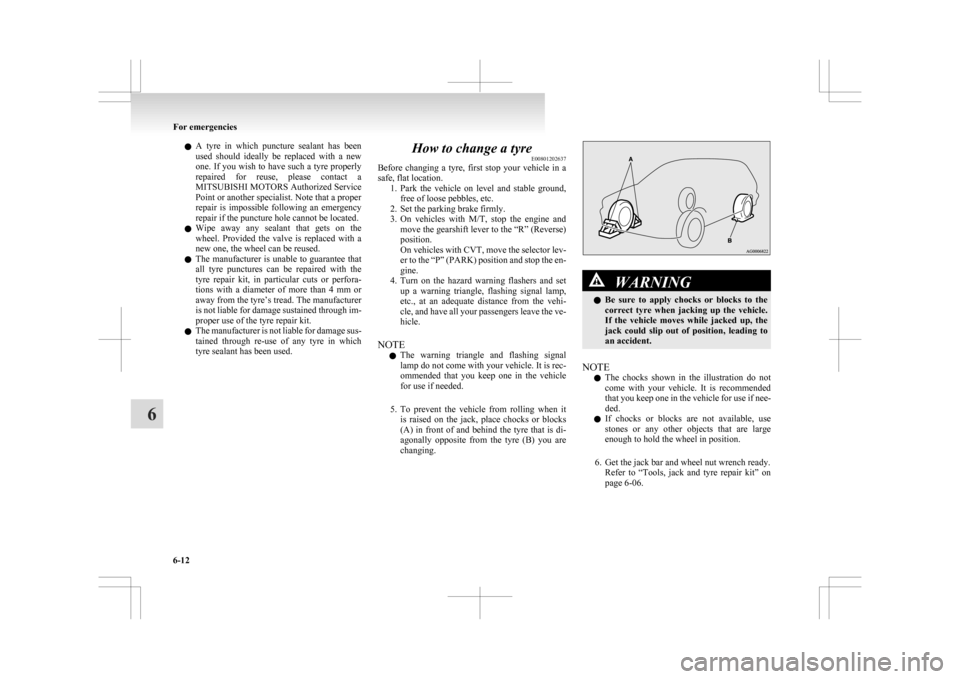
5. To prevent the vehicle from rolling when it is raised on the jack, place chocks or blocks
(A) in front of and behind the tyre that is di-
agonally opposite from the tyre (B) you are
changing. WARNING
l Be
sure to apply chocks or blocks to the
correct tyre when jacking up the vehicle.
If the vehicle moves while jacked up, the
jack could slip out of position, leading to
an accident.
NOTE l The
chocks shown in the illustration do not
come with your vehicle. It is recommended
that you keep one in the vehicle for use if nee-
ded.
l If chocks or blocks are not available, use
stones or any other objects that are large
enough to hold the wheel in position.
6. Get the jack bar and wheel nut wrench ready. Refer to “Tools, jack and tyre repair kit” on
page 6-06. For emergencies
6-12
6
Page 292 of 368
CAUTION
l
Do not install more than one temporary
spare wheel at the same time.
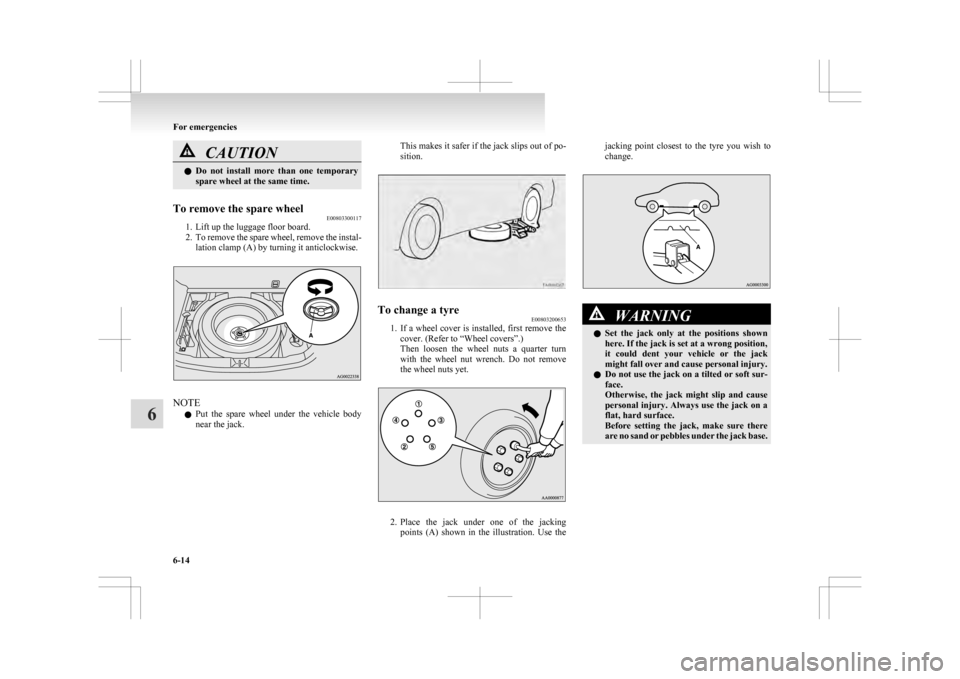
To remove the spare wheel E00803300117
1. Lift up the luggage floor board.
2. To
remove the spare wheel, remove the instal-
lation clamp (A) by turning it anticlockwise. NOTE
l Put
the spare wheel under the vehicle body
near the jack. This makes it safer if the jack slips out of po-
sition.
To change a tyre
E00803200653
1. If
a wheel cover is installed, first remove the
cover. (Refer to “Wheel covers”.)
Then loosen the wheel nuts a quarter turn
with the wheel nut wrench. Do not remove
the wheel nuts yet. 2. Place
the jack under one of the jacking
points (A) shown in the illustration. Use the jacking point closest to the tyre you wish to
change.
WARNING
l Set
the jack only at the positions shown
here. If the jack is set at a wrong position,
it could dent your vehicle or the jack
might fall over and cause personal injury.
l Do not use the jack on a tilted or soft sur-
face.
Otherwise, the jack might slip and cause
personal injury. Always use the jack on a
flat, hard surface.
Before setting the jack, make sure there
are no sand or pebbles under the jack base. For emergencies
6-14
6