display MITSUBISHI ASX 2012 (in English) Owners Manual
[x] Cancel search | Manufacturer: MITSUBISHI, Model Year: 2012, Model line: ASX, Model: MITSUBISHI ASX 2012Pages: 378, PDF Size: 18.2 MB
Page 234 of 378
NOTE
l The
display can show up to 12 characters. If
a disc name or track name has more than 12
characters, press the PAGE button to view
the next 12 characters.
l When there is no title information to be dis-
played, the display shows “NO TITLE”.
l Characters that the audio system cannot dis-
play are shown as “•”.
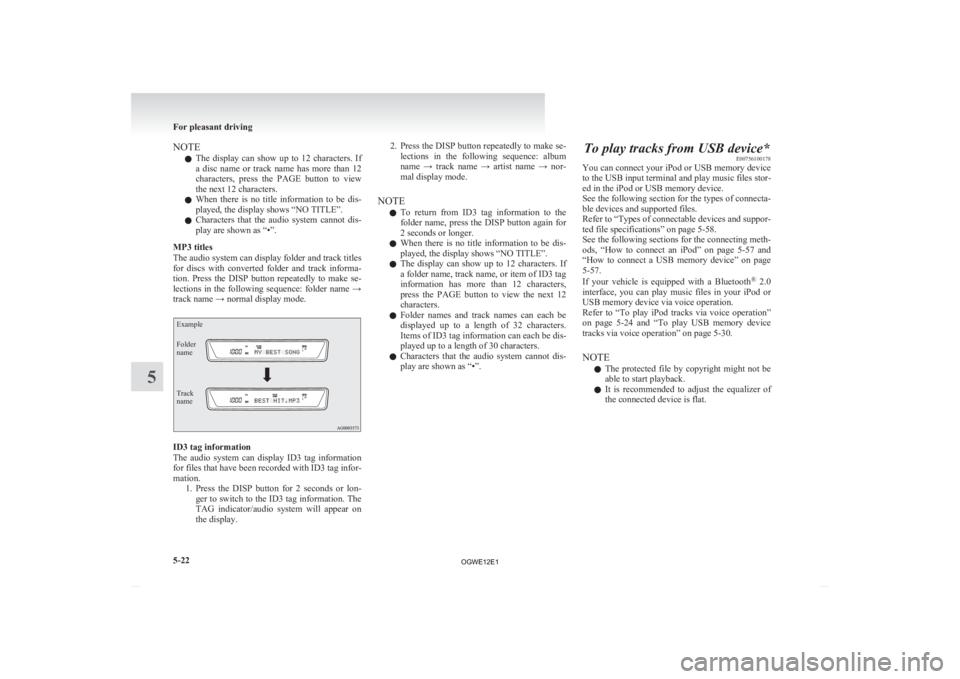
MP3 titles
The audio system can display folder and track titles
for discs with converted folder and track informa-
tion. Press the DISP button repeatedly to make se-
lections in the following sequence: folder name →
track name → normal display mode.
Example
Folder
name
Track
name ID3 tag information
The
audio system can display ID3 tag information
for files that have been recorded with ID3 tag infor-
mation. 1. Press the DISP button for 2 seconds or lon-ger to switch to the ID3 tag information. The
TAG indicator/audio system will appear on
the display. 2. Press
the DISP button repeatedly to make se-
lections in the following sequence: album
name → track name → artist name → nor-
mal display mode.
NOTE l To return from ID3 tag information to the
folder name, press the DISP button again for
2 seconds or longer.
l When there is no title information to be dis-
played, the display shows “NO TITLE”.
l The display can show up to 12 characters. If
a folder name, track name, or item of ID3 tag
information has more than 12 characters,
press the PAGE button to view the next 12
characters.
l Folder names and track names can each be
displayed up to a length of 32 characters.
Items of ID3 tag information can each be dis-
played up to a length of 30 characters.
l Characters that the audio system cannot dis-
play are shown as “•”. To play tracks from USB device*
E00756100178
You
can connect your iPod or USB memory device
to the USB input terminal and play music files stor-
ed in the iPod or USB memory device.
See the following section for the types of connecta-
ble devices and supported files.
Refer to “Types of connectable devices and suppor-
ted file specifications” on page 5-58.
See the following sections for the connecting meth-
ods, “How to connect an iPod” on page 5-57 and
“How to connect a USB memory device” on page
5-57.
If your vehicle is equipped with a Bluetooth ®
2.0
interface, you can play music files in your iPod or
USB memory device via voice operation.
Refer to “To play iPod tracks via voice operation”
on page 5-24 and “To play USB memory device
tracks via voice operation” on page 5-30.
NOTE
l The protected file by copyright might not be
able to start playback.
l It is recommended to adjust the equalizer of
the connected device is flat. For pleasant driving
5-22
5
OGWE12E1
Page 235 of 378
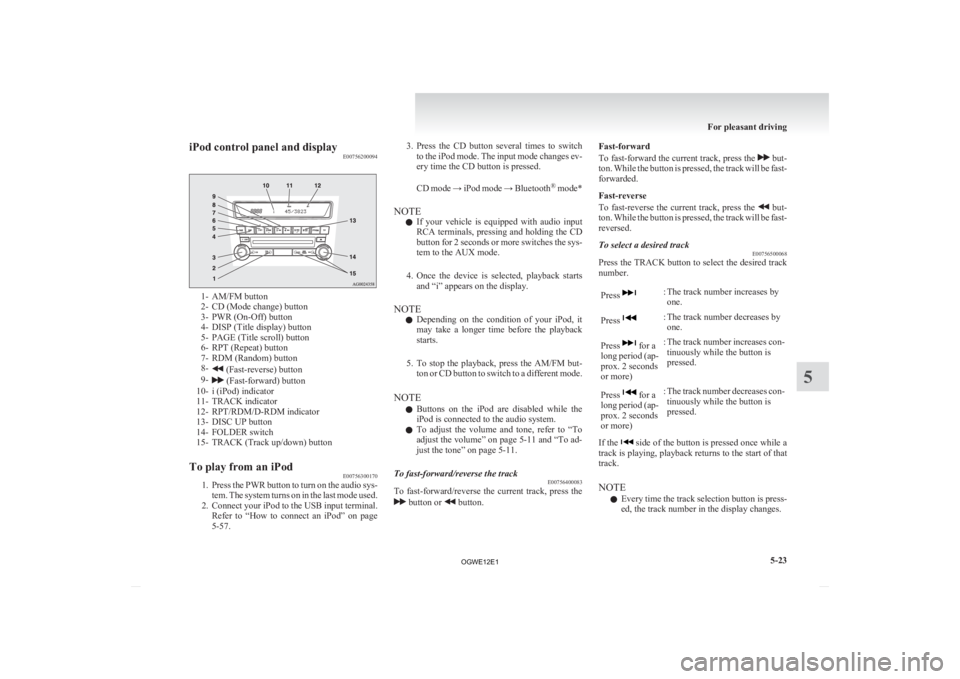
iPod control panel and display
E007562000941- AM/FM button
2-
CD (Mode change) button
3- PWR (On-Off) button
4- DISP (Title display) button
5- PAGE (Title scroll) button
6- RPT (Repeat) button
7- RDM (Random) button
8- (Fast-reverse) button
9- (Fast-forward) button
10-
i (iPod) indicator
11- TRACK indicator
12- RPT/RDM/D-RDM indicator
13- DISC UP button
14- FOLDER switch
15- TRACK (Track up/down) button
To play from an iPod E00756300170
1. Press
the PWR button to turn on the audio sys-
tem. The system turns on in the last mode used.
2. Connect your iPod to the USB input terminal. Refer to “How to connect an iPod” on page
5-57. 3. Press
the CD button several times to switch
to the iPod mode. The input mode changes ev-
ery time the CD button is pressed.
CD mode → iPod mode → Bluetooth ®
mode*
NOTE l If your vehicle is equipped with audio input
RCA terminals, pressing and holding the CD
button for 2 seconds or more switches the sys-
tem to the AUX mode.
4. Once the device is selected, playback starts and “i” appears on the display.
NOTE l Depending on the condition of your iPod, it
may take a longer time before the playback
starts.
5. To stop the playback, press the AM/FM but- ton or CD button to switch to a different mode.
NOTE l Buttons on the iPod are disabled while the
iPod is connected to the audio system.
l To adjust the volume and tone, refer to “To
adjust the volume” on page 5-11 and “To ad-
just the tone” on page 5-11.
To fast-forward/reverse the track E00756400083
To fast-forward/reverse the current track, press the button or button.Fast-forward
To
fast-forward the current track, press the but-
ton.
While the button is pressed, the track will be fast-
forwarded.
Fast-reverse
To fast-reverse the current track, press the but-
ton.
While the button is pressed, the track will be fast-
reversed.
To select a desired track E00756500068
Press the TRACK button to select the desired track
number.
Press : The track number increases by
one.
Press : The track number decreases by
one.
Press for a
long
period (ap-
prox. 2 seconds
or more) : The track number increases con-
tinuously while the button is
pressed.
Press for a
long
period (ap-
prox. 2 seconds
or more) : The track number decreases con-
tinuously while the button is
pressed.
If the side of the button is pressed once while a
track
is playing, playback returns to the start of that
track.
NOTE
l Every time the track selection button is press-
ed, the track number in the display changes. For pleasant driving
5-23 5
OGWE12E1
Page 236 of 378
To find a track from the iPod menu
E00756600102
You
can select desired tracks from the “Playlists”,
“Artists”, “Albums”, “Songs” or “Genre” (vehicles
with Bluetooth ®
2.0 interface) menus on your iPod.
Operate the following switch to select desired tracks.
The selected menu or category or track is shown in
the display.
Turn the
FOLDER
switch : To show the menu or category
or track.
Press the
FOLDER
switch : To select the menu or category
or track.
NOTE l To
cancel the selection, press the DISC UP
button to return to the previous step.
l If no operation is performed for 10 seconds
or more or other button is operated after the
FOLDER button has been pressed, searching
of the desired tracks is cancelled.
l If no operation is performed for 5 seconds or
more after the track is displayed, playback
starts.
To play the same track repeatedly E00756700060
Press the RPT button during playback to show
“RPT” in the display.
To exit this mode, press the button again.
To play tracks in random order E00756900062
Press the RDM button to show “RDM” in the dis-
play. The iPod randomly selects tracks from the current
category and plays the selected tracks.
To exit this mode, press the button again.
To play tracks in each album in random order
E00757000060
Press and hold the RDM button until you hear a
beep to show “D-RDM” in the display.
The
iPod randomly selects tracks in the album
from the current category and play the selected
tracks.
To exit this mode, press the button again.
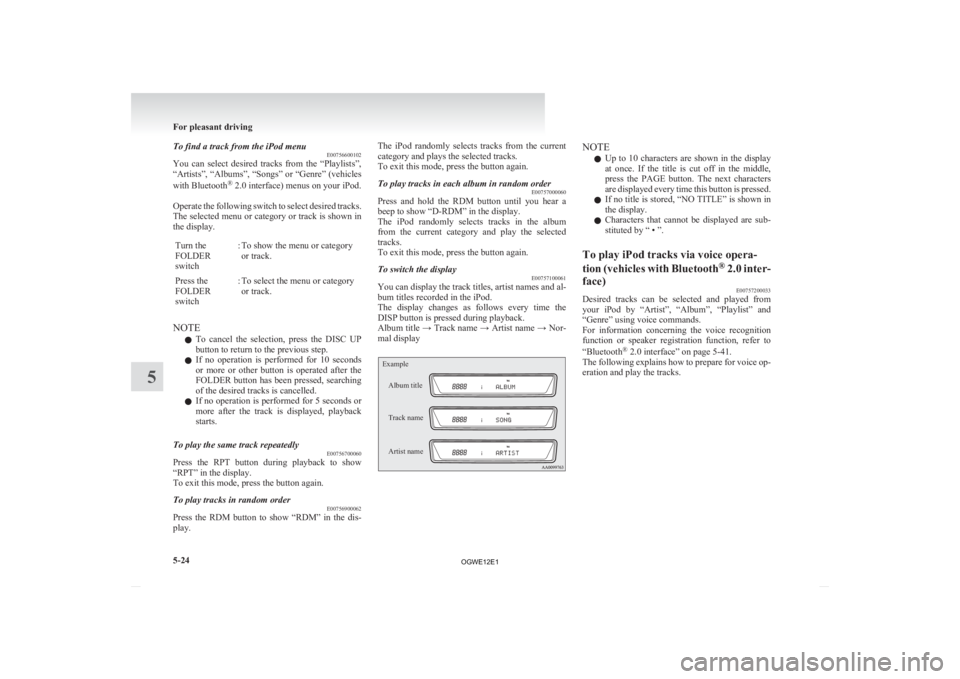
To switch the display E00757100061
You can display the track titles, artist names and al-
bum titles recorded in the iPod.
The
display changes as follows every time the
DISP button is pressed during playback.
Album title → Track name → Artist name → Nor-
mal display
Example
Album title
Track name
Artist name NOTE
l Up
to 10 characters are shown in the display
at once. If the title is cut off in the middle,
press the PAGE button. The next characters
are displayed every time this button is pressed.
l If no title is stored, “NO TITLE” is shown in
the display.
l Characters that cannot be displayed are sub-
stituted by “ • ”.
To play iPod tracks via voice opera-
tion
(vehicles with Bluetooth ®
2.0 inter-
face) E00757200033
Desired tracks can be selected and played from
your
iPod by “Artist”, “Album”, “Playlist” and
“Genre” using voice commands.
For information concerning the voice recognition
function or speaker registration function, refer to
“Bluetooth ®
2.0 interface” on page 5-41.
The following explains how to prepare for voice op-
eration and play the tracks. For pleasant driving
5-24
5
OGWE12E1
Page 239 of 378
NOTE
l If
the confirmation function is active, the
voice guide confirms if the genre is correct.
If the genre is correct, say “Yes”. If not, say
“No”. After the voice guide says “Genre not
found, please try again,” the system returns
to step 2.
Refer to “Confirmation function setting” on
page 5-44.
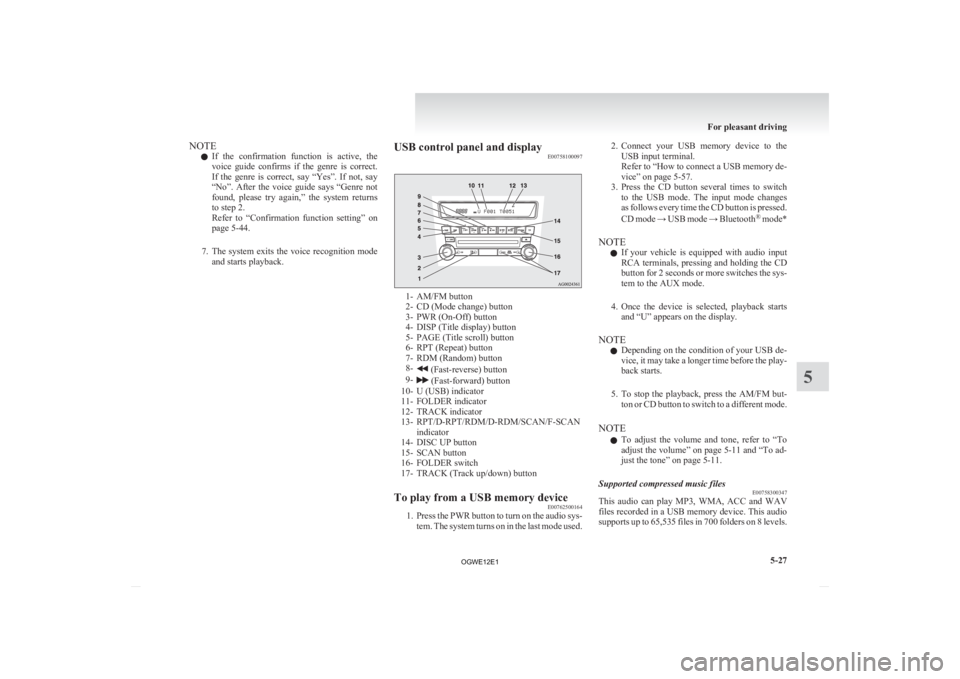
7. The system exits the voice recognition mode and starts playback. USB control panel and display
E00758100097 1- AM/FM button
2-
CD (Mode change) button
3- PWR (On-Off) button
4- DISP (Title display) button
5- PAGE (Title scroll) button
6- RPT (Repeat) button
7- RDM (Random) button
8- (Fast-reverse) button
9- (Fast-forward) button
10-
U (USB) indicator
11- FOLDER indicator
12- TRACK indicator
13- RPT/D-RPT/RDM/D-RDM/SCAN/F-SCAN indicator
14- DISC UP button
15- SCAN button
16- FOLDER switch
17- TRACK (Track up/down) button
To play from a USB memory device E00762500164
1. Press
the PWR button to turn on the audio sys-
tem. The system turns on in the last mode used. 2. Connect
your USB memory device to the
USB input terminal.
Refer to “How to connect a USB memory de-
vice” on page 5-57.
3. Press the CD button several times to switch to the USB mode. The input mode changes
as follows every time the CD button is pressed.
CD mode → USB mode → Bluetooth ®
mode*
NOTE l If your vehicle is equipped with audio input
RCA terminals, pressing and holding the CD
button for 2 seconds or more switches the sys-
tem to the AUX mode.
4. Once the device is selected, playback starts and “U” appears on the display.
NOTE l Depending on the condition of your USB de-
vice, it may take a longer time before the play-
back starts.
5. To stop the playback, press the AM/FM but- ton or CD button to switch to a different mode.
NOTE l To adjust the volume and tone, refer to “To
adjust the volume” on page 5-11 and “To ad-
just the tone” on page 5-11.
Supported compressed music files E00758300347
This audio can play MP3, WMA, ACC and WAV
files
recorded in a USB memory device. This audio
supports up to 65,535 files in 700 folders on 8 levels. For pleasant driving
5-27 5
OGWE12E1
Page 240 of 378
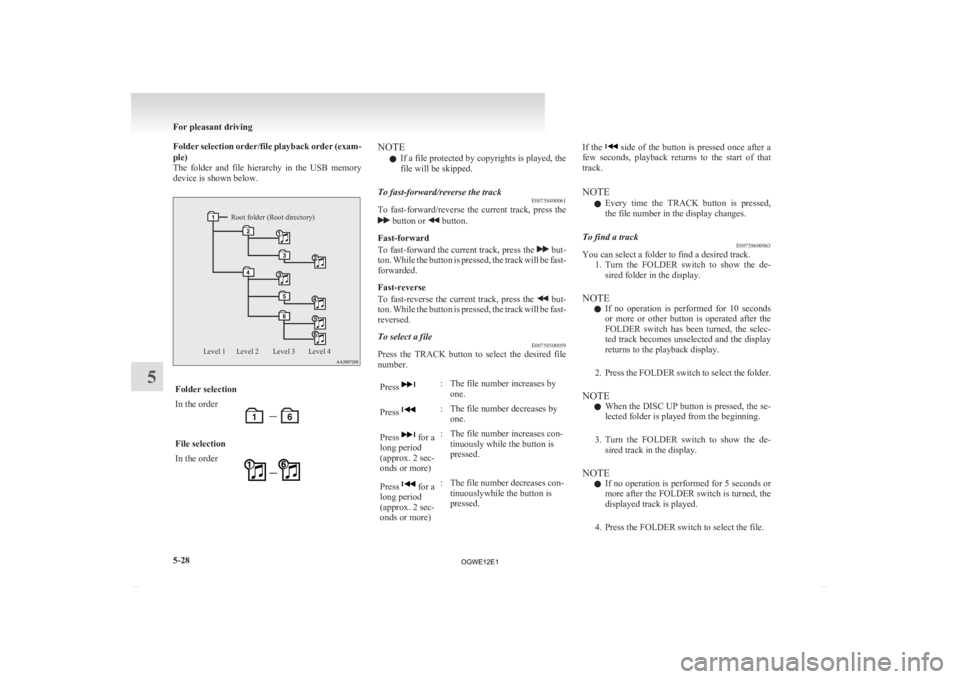
Folder selection order/file playback order (exam-
ple)
The
folder and file hierarchy in the USB memory
device is shown below.
Root folder (Root directory)
Level 4
Level 3
Level 2
Level 1 Folder selection
In the order
File selection
In the order NOTE
l If a file protected by copyrights is played, the
file will be skipped.
To fast-forward/reverse the track E00758400061
To fast-forward/reverse the current track, press the button or button.
Fast-forward
To
fast-forward the current track, press the but-
ton.
While the button is pressed, the track will be fast-
forwarded.
Fast-reverse
To fast-reverse the current track, press the but-
ton.
While the button is pressed, the track will be fast-
reversed.
To select a file E00758500059
Press the TRACK button to select the desired file
number.
Press : The file number increases by
one.
Press : The file number decreases by
one.
Press for a
long period
(approx. 2 sec-
onds or more) : The file number increases con-
tinuously while the button is
pressed.
Press for a
long period
(approx. 2 sec-
onds or more) : The file number decreases con-
tinuouslywhile the button is
pressed. If the side of the button is pressed once after a
few
seconds, playback returns to the start of that
track.
NOTE
l Every time the TRACK button is pressed,
the file number in the display changes.
To find a track E00758600063
You can select a folder to find a desired track.
1. Turn
the FOLDER switch to show the de-
sired folder in the display.
NOTE l If no operation is performed for 10 seconds
or more or other button is operated after the
FOLDER switch has been turned, the selec-
ted track becomes unselected and the display
returns to the playback display.
2. Press the FOLDER switch to select the folder.
NOTE l When the DISC UP button is pressed, the se-
lected folder is played from the beginning.
3. Turn the FOLDER switch to show the de- sired track in the display.
NOTE l If no operation is performed for 5 seconds or
more after the FOLDER switch is turned, the
displayed track is played.
4. Press the FOLDER switch to select the file. For pleasant driving
5-28
5
OGWE12E1
Page 241 of 378
To play the same file repeatedly
E00758700064
Press
the RPT button to show “RPT” in the dis-
play. To cancel this mode, press the button again.
To play the files in the same folder repeatedly E00758800065
Press and hold the RPT button until you hear a
beep to show “D-RPT” in the display.
All
tracks in the current folder are played repeatedly.
To exit this mode, press the button again.
To play a folder in random order E00758900066
Press the RDM button to show “RDM” in the dis-
play.
The
audio randomly selects tracks from the current
folder and plays the selected tracks.
To exit this mode, press the button again.
To play all folders in random order E00759000064
Press and hold the RDM button until you hear a
beep to show “D-RDM” in the display.
The
audio randomly selects tracks from all folders
and plays the selected tracks.
To exit this mode, press the button again.
To find the start of each track in a folder for play-
back (vehicles without Bluetooth ®
2.0 interface)
E00759100140
Press the SCAN button. “SCAN” is shown in the
display
and the tracks in the current folder are
played for several seconds from the beginning.
The file number will blink while the scan mode is
selected.
To exit this mode, press the button again. NOTE
l Once
all tracks in the folder have been cued
playback will restart from the beginning of
the track that was playing when cueing started.
To find the start of each track in all folders for
playback (vehicles with Bluetooth ®
2.0 interface)
E00765800054
Press the SCAN button. “SCAN” is shown in the
display
and all tracks in all folders are played for
several seconds from the beginning.
The file number will blink while the scan mode is
selected.
To exit this mode, press the button again.
To find the start of first tracks in all folders for
playback E00759200138
Press and hold the SCAN button until you hear a
beep to show “F-SCAN” in the display.
The
first tracks in all folders are played for several
seconds from the beginning.
Playback starts from the folder next to the one cur-
rently playing.
The folder number will blink while the scan mode
is selected.
To exit this mode, press the button again.
NOTE
l Once the cueing playback ends, playback
will start from the track at the beginning of
the folder next to the one that was playing
when the cueing started.
To switch the display E00759300184
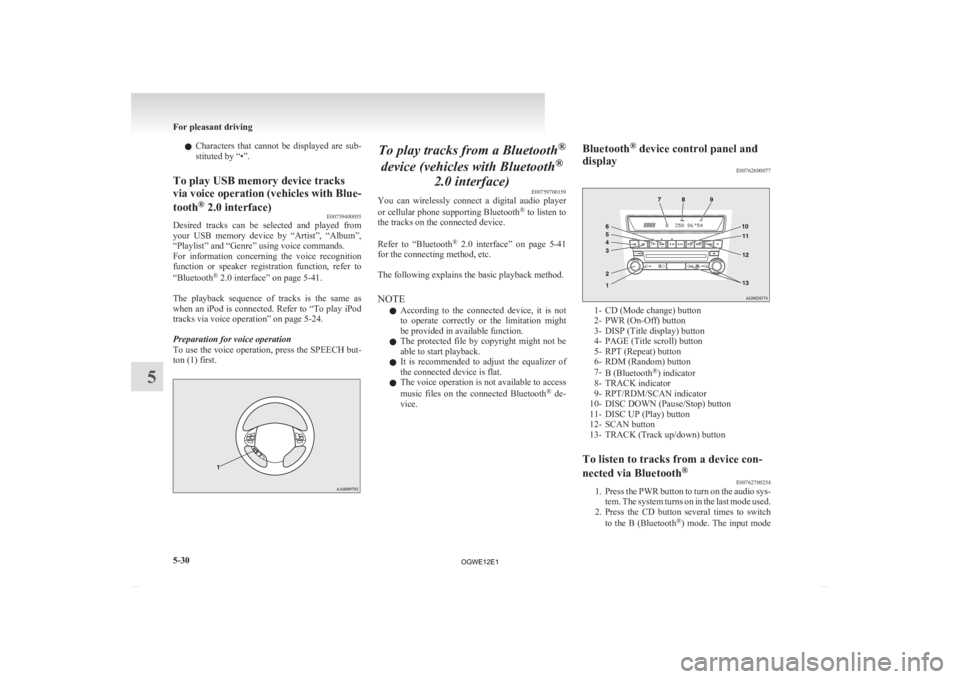
You can display titles with tag information. Folder title
The
display changes as follows every time the
DISP button is pressed during playback.
Folder title → File title → Normal display
Tag information
1. Press and hold the DISP button until youhear a beep to show “TAG” in the display.
2. The display changes as follows every time the DISP button is pressed briefly:
Album title → Track title → Artist name →
Genre (vehicles with Bluetooth ®
2.0 inter-
face) → Normal display
Example
Folder title
File title NOTE
l Press
and hold the DISP button again until
you hear a beep, and the tag information dis-
play returns to the folder title display.
l Up to 10 characters are shown in the display
at once. If the title is cut off in the middle,
press the PAGE button. The next characters
are displayed every time this button is pressed.
l If no title is stored, “NO TITLE” is shown in
the display. For pleasant driving
5-29 5
OGWE12E1
Page 242 of 378
l
Characters that cannot be displayed are sub-
stituted by “•”.
To play USB memory device tracks
via
voice operation (vehicles with Blue-
tooth ®
2.0 interface)
E00759400055
Desired tracks can be selected and played from
your
USB memory device by “Artist”, “Album”,
“Playlist” and “Genre” using voice commands.
For information concerning the voice recognition
function or speaker registration function, refer to
“Bluetooth ®
2.0 interface” on page 5-41.
The playback sequence of tracks is the same as
when an iPod is connected. Refer to “To play iPod
tracks via voice operation” on page 5-24.
Preparation for voice operation
To use the voice operation, press the SPEECH but-
ton (1) first. To play tracks from a Bluetooth
®
device (vehicles with Bluetooth ®
2.0 interface) E00759700159
You
can wirelessly connect a digital audio player
or cellular phone supporting Bluetooth ®
to listen to
the tracks on the connected device.
Refer to “Bluetooth ®
2.0 interface” on page 5-41
for the connecting method, etc.
The following explains the basic playback method.
NOTE
l According to the connected device, it is not
to operate correctly or the limitation might
be provided in available function.
l The protected file by copyright might not be
able to start playback.
l It is recommended to adjust the equalizer of
the connected device is flat.
l The voice operation is not available to access
music files on the connected Bluetooth ®
de-
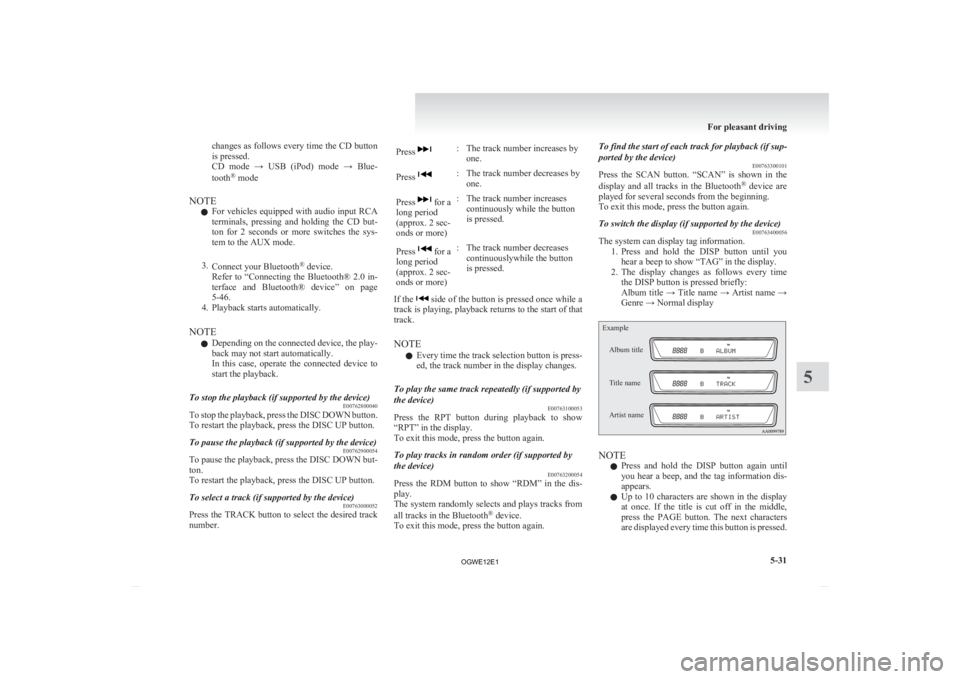
vice. Bluetooth
®
device control panel and
display E00762600077 1- CD (Mode change) button
2-
PWR (On-Off) button
3- DISP (Title display) button
4- PAGE (Title scroll) button
5- RPT (Repeat) button
6- RDM (Random) button
7- B (Bluetooth ®
) indicator
8- TRACK indicator
9- RPT/RDM/SCAN indicator
10- DISC DOWN (Pause/Stop) button
11- DISC UP (Play) button
12- SCAN button
13- TRACK (Track up/down) button
To listen to tracks from a device con-
nected via Bluetooth ®
E00762700254
1. Press
the PWR button to turn on the audio sys-
tem. The system turns on in the last mode used.
2. Press the CD button several times to switch
to the B (Bluetooth ®
) mode. The input mode For pleasant driving
5-30
5
OGWE12E1
Page 243 of 378
changes as follows every time the CD button
is pressed.
CD
mode → USB (iPod) mode → Blue-
tooth ®
mode
NOTE l For vehicles equipped with audio input RCA
terminals, pressing and holding the CD but-
ton for 2 seconds or more switches the sys-
tem to the AUX mode.
3. Connect your Bluetooth ®
device.
Refer to “Connecting the Bluetooth® 2.0 in-
terface and Bluetooth® device” on page
5-46.
4. Playback starts automatically.
NOTE l Depending on the connected device, the play-
back may not start automatically.
In this case, operate the connected device to
start the playback.
To stop the playback (if supported by the device) E00762800040
To stop the playback, press the DISC DOWN button.
To restart the playback, press the DISC UP button.
To pause the playback (if supported by the device) E00762900054
To pause the playback, press the DISC DOWN but-
ton.
To restart the playback, press the DISC UP button.
To select a track (if supported by the device) E00763000052
Press the TRACK button to select the desired track
number. Press : The track number increases by
one.
Press : The track number decreases by
one.
Press for a
long period
(approx. 2 sec-
onds or more) : The track number increases
continuously while the button
is pressed.
Press for a
long period
(approx. 2 sec-
onds or more) : The track number decreases
continuouslywhile the button
is pressed.
If the side of the button is pressed once while a
track
is playing, playback returns to the start of that
track.
NOTE
l Every time the track selection button is press-
ed, the track number in the display changes.
To play the same track repeatedly (if supported by
the device) E00763100053
Press the RPT button during playback to show
“RPT” in the display.
To exit this mode, press the button again.
To play tracks in random order (if supported by
the device) E00763200054
Press the RDM button to show “RDM” in the dis-
play.
The
system randomly selects and plays tracks from
all tracks in the Bluetooth ®
device.
To exit this mode, press the button again. To find the start of each track for playback (if sup-
ported by the device)
E00763300101
Press
the SCAN button. “SCAN” is shown in the
display and all tracks in the Bluetooth ®
device are
played for several seconds from the beginning.
To exit this mode, press the button again.
To switch the display (if supported by the device) E00763400056
The system can display tag information.
1. Press
and hold the DISP button until you
hear a beep to show “TAG” in the display.
2. The display changes as follows every time the DISP button is pressed briefly:
Album title → Title name → Artist name →
Genre → Normal display
Example
Album title
Title name
Artist name NOTE
l Press
and hold the DISP button again until
you hear a beep, and the tag information dis-
appears.
l Up to 10 characters are shown in the display
at once. If the title is cut off in the middle,
press the PAGE button. The next characters
are displayed every time this button is pressed. For pleasant driving
5-31 5
OGWE12E1
Page 244 of 378
l
If no title is stored, “NO TITLE” is shown in
the display.
l Characters that cannot be displayed are sub-
stituted by “ • ”. To use the external audio input
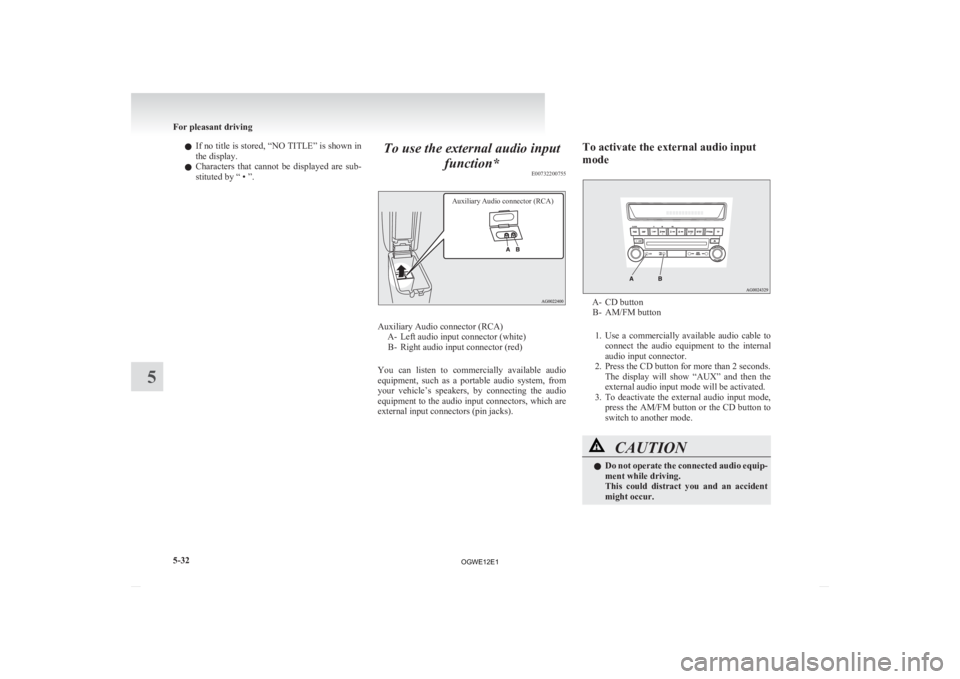
function* E00732200755
Auxiliary Audio connector (RCA) Auxiliary Audio connector (RCA)
A-
Left audio input connector (white)
B- Right audio input connector (red)
You can listen to commercially available audio
equipment, such as a portable audio system, from
your vehicle’s speakers, by connecting the audio
equipment to the audio input connectors, which are
external input connectors (pin jacks). To activate the external audio input
mode A- CD button
B-
AM/FM button
1. Use a commercially available audio cable to connect the audio equipment to the internal
audio input connector.
2. Press the CD button for more than 2 seconds. The display will show “AUX” and then the
external audio input mode will be activated.
3. To deactivate the external audio input mode, press the AM/FM button or the CD button to
switch to another mode. CAUTION
l
Do
not operate the connected audio equip-
ment while driving.
This could distract you and an accident
might occur. For pleasant driving
5-32
5
OGWE12E1
Page 247 of 378
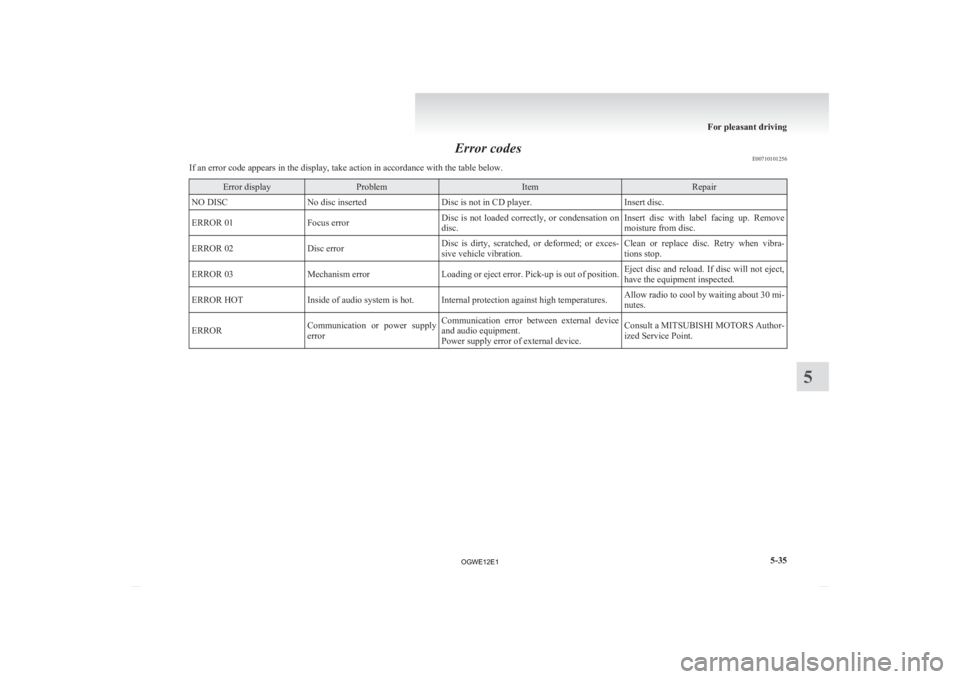
Error codes
E00710101256
If an error code appears in the display, take action in accordance with the table below. Error display Problem Item Repair
NO DISC No disc inserted Disc is not in CD player. Insert disc.
ERROR 01 Focus error Disc is not loaded correctly, or condensation on
disc. Insert disc with label facing up. Remove
moisture from disc.
ERROR 02 Disc error Disc is dirty, scratched, or deformed; or exces-
sive vehicle vibration. Clean or replace disc. Retry when vibra-
tions stop.
ERROR 03 Mechanism error Loading or eject error. Pick-up is out of position. Eject disc and reload. If disc will not eject,
have the equipment inspected.
ERROR HOT Inside of audio system is hot. Internal protection against high temperatures. Allow radio to cool by waiting about 30 mi-
nutes.
ERROR Communication or power supply
error Communication error between external device
and audio equipment.
Power supply error of external device. Consult a MITSUBISHI MOTORS Author-
ized Service Point. For pleasant driving
5-35 5
OGWE12E1