mirror MITSUBISHI ASX 2012 (in English) User Guide
[x] Cancel search | Manufacturer: MITSUBISHI, Model Year: 2012, Model line: ASX, Model: MITSUBISHI ASX 2012Pages: 378, PDF Size: 18.2 MB
Page 152 of 378
Precautions to observe when using wip-
ers and washers
E00510000070
l If
the moving wipers become blocked by ice
or other deposits on the glass, the motor may
burn out even if the wiper switch is turned to
OFF. If obstruction occurs, park your vehicle
in a safe place, turn off the engine, and clean
the deposits from the glass so that the wipers
operate smoothly.
l Do not use the wipers when the glass is dry.
They may scratch the glass surface and the
blades wear out prematurely.
l Before using the wipers in cold weather,
check that the wiper blades are not frozen on-
to the glass. The motor may burn out if the
wipers are used with the blades frozen onto
the glass.
l Avoid using the washer continuously for
more than 20 seconds. Do not operate the
washer when the fluid reservoir is empty.
Otherwise, the motor may burn out.
l Periodically check the level of washer fluid
in the reservoir and refill if required.
During cold weather, add a recommended
washer solution that will not freeze in the
washer reservoir. Failure to do so could re-
sult in loss of washer function and frost dam-
age to the system components. Rear window demister switch
E00507901186
The
rear window demister switch can be operated
when the engine is running.
Push the switch to turn on the rear window demis-
ter. It will be turned off automatically in about 20
minutes. To turn off the demister within about 20
minutes, push the switch again.
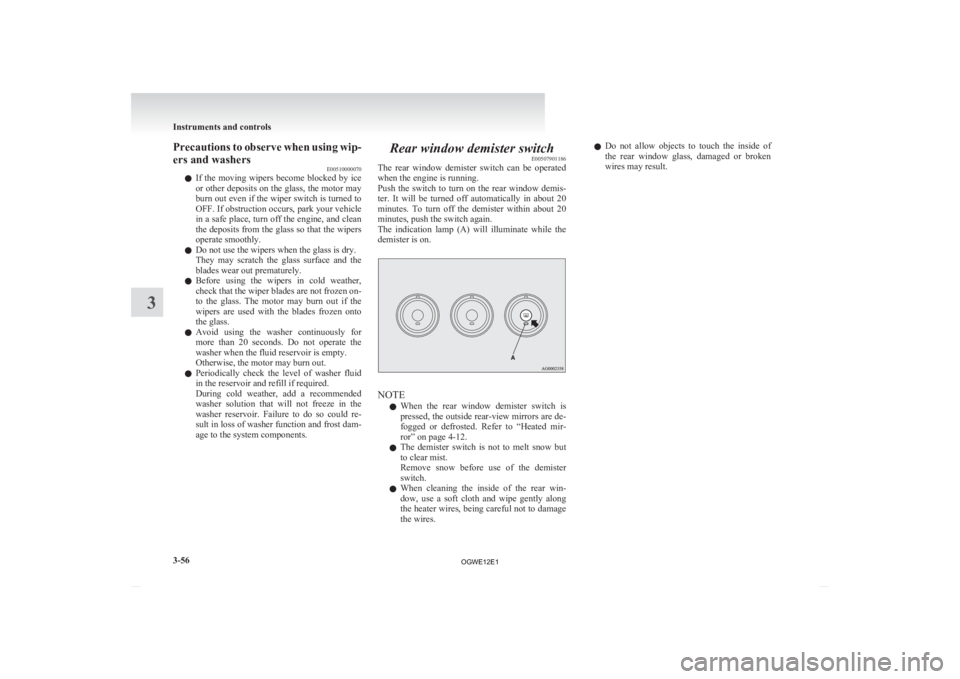
The indication lamp (A) will illuminate while the
demister is on. NOTE
l When
the rear window demister switch is
pressed, the outside rear-view mirrors are de-
fogged or defrosted. Refer to “Heated mir-
ror” on page 4-12.
l The demister switch is not to melt snow but
to clear mist.
Remove snow before use of the demister
switch.
l When cleaning the inside of the rear win-
dow, use a soft cloth and wipe gently along
the heater wires, being careful not to damage
the wires. l
Do
not allow objects to touch the inside of
the rear window glass, damaged or broken
wires may result. Instruments and controls
3-56
3
OGWE12E1
Page 155 of 378
Economical driving.......................................................................4-02
Driving, alcohol and drugs
........................................................... 4-02
Safe driving techniques ................................................................ 4-03
Running-in recommendations
.......................................................4-04
Parking brake................................................................................ 4-06
Parking.......................................................................................... 4-07
Steering wheel height and reach adjustment ................................4-08
Inside rear-view mirror ................................................................. 4-08
Outside rear-view mirrors ............................................................. 4-10
Ignition switch .............................................................................. 4-12
Steering wheel lock ...................................................................... 4-14
Starting..........................................................................................4-14
Diesel particulate filter (DPF)* .................................................... 4-16
Turbocharger operation* .............................................................. 4-18
Auto Stop & Go (AS&G) system*............................................... 4-18
Manual transmission* ................................................................... 4-22
Automatic transmission INVECS-III Sports Mode 6CVT (Intelligent & Innovative Vehicle Electronic
Control System III)*................................................................. 4-25
Electronically controlled 4WD system* .......................................4-30
4-wheel drive operation ................................................................ 4-32
Inspection and maintenance following rough road oper- ation.......................................................................................... 4-34
Cautions on handling of 4-wheel drive vehicles ..........................4-34
Braking......................................................................................... 4-35
Hill start assist* ............................................................................ 4-36
Brake assist system....................................................................... 4-37
Emergency stop signal system ...................................................... 4-38
Anti-lock brake system (ABS) ..................................................... 4-39
Electric power steering system (EPS) ..........................................4-41 Active stability control (ASC)*
.................................................... 4-42
Cruise control* ............................................................................. 4-44
Reversing sensor system*............................................................. 4-48
Rear-view camera* ....................................................................... 4-52
Cargo loads................................................................................... 4-55
Trailer towing ............................................................................... 4-56Starting and driving
4
OGWE12E1
Page 162 of 378
Steering wheel height and reach
adjustment E00600700512
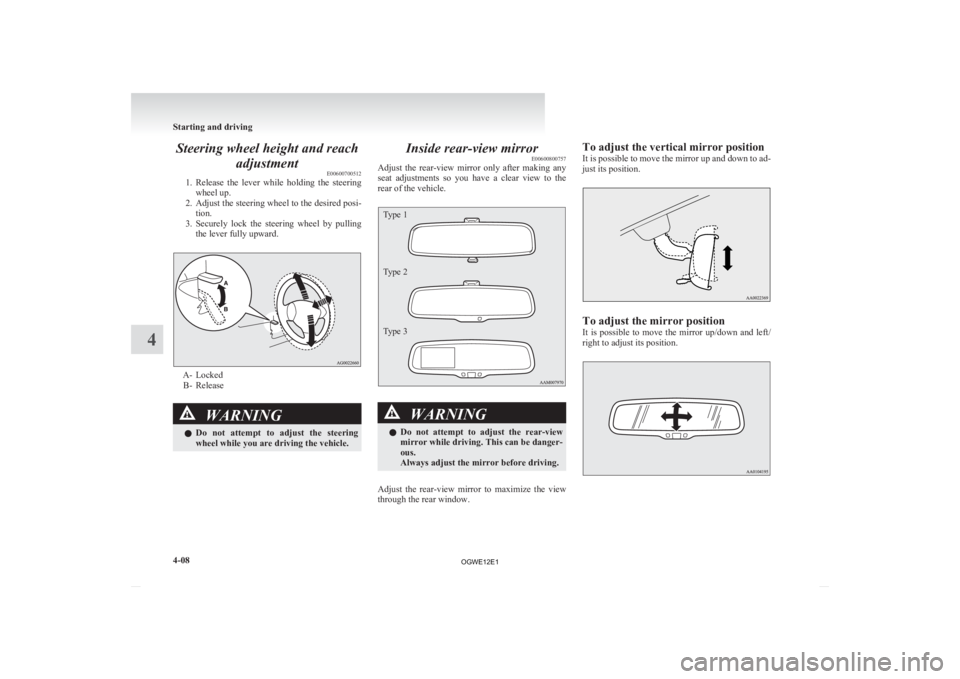
1. Release
the lever while holding the steering
wheel up.
2. Adjust the steering wheel to the desired posi- tion.
3. Securely lock the steering wheel by pulling the lever fully upward. A- Locked
B-
Release WARNING
l Do
not attempt to adjust the steering
wheel while you are driving the vehicle. Inside rear-view mirror
E00600800757
Adjust
the rear-view mirror only after making any
seat adjustments so you have a clear view to the
rear of the vehicle.
Type 1
Type 2
Type 3 WARNING
l Do
not attempt to adjust the rear-view
mirror while driving. This can be danger-
ous.
Always adjust the mirror before driving.
Adjust the rear-view mirror to maximize the view
through the rear window. To adjust the vertical mirror position
It
is possible to move the mirror up and down to ad-
just its position. To adjust the mirror position
It
is possible to move the mirror up/down and left/
right to adjust its position. Starting and driving
4-08
4
OGWE12E1
Page 163 of 378
To reduce the glare
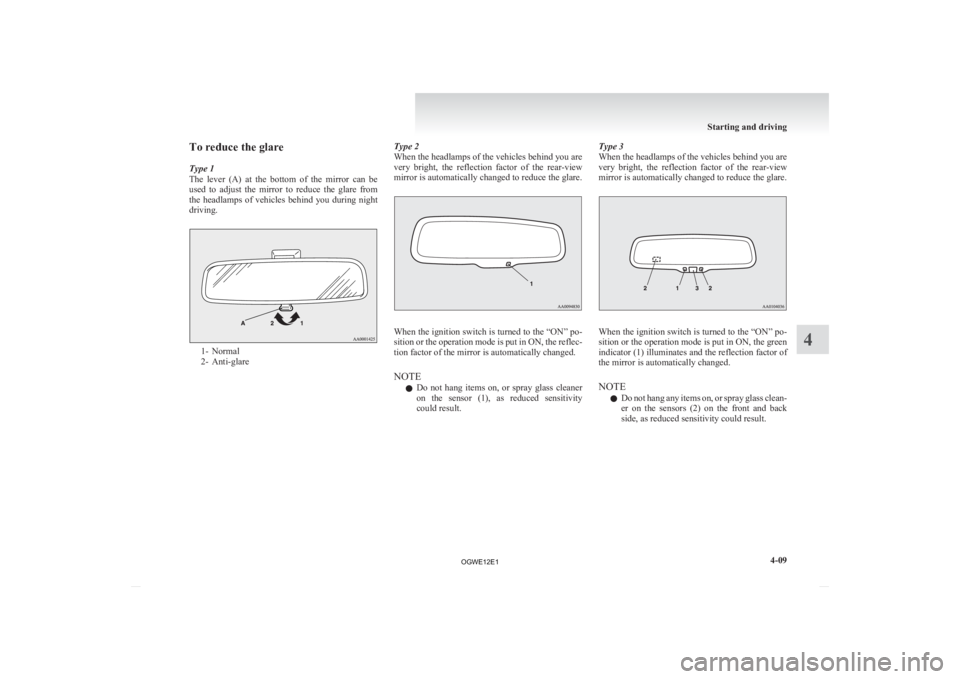
Type 1
The
lever (A) at the bottom of the mirror can be
used to adjust the mirror to reduce the glare from
the headlamps of vehicles behind you during night
driving. 1- Normal
2-
Anti-glare Type 2
When the headlamps of the vehicles behind you are
very
bright, the reflection factor of the rear-view
mirror is automatically changed to reduce the glare. When the ignition switch is turned to the “ON” po-
sition
or the operation mode is put in ON, the reflec-
tion factor of the mirror is automatically changed.
NOTE
l Do not hang items on, or spray glass cleaner
on the sensor (1), as reduced sensitivity
could result. Type 3
When the headlamps of the vehicles behind you are
very
bright, the reflection factor of the rear-view
mirror is automatically changed to reduce the glare. When the ignition switch is turned to the “ON” po-
sition
or the operation mode is put in ON, the green
indicator (1) illuminates and the reflection factor of
the mirror is automatically changed.
NOTE
l Do not hang any items on, or spray glass clean-
er on the sensors (2) on the front and back
side, as reduced sensitivity could result. Starting and driving
4-09 4
OGWE12E1
Page 164 of 378
l
If you want to stop automatic mode, press
the switch (3) and the indicator will go off.
To return to automatic mode, press the
switch again or perform the following opera-
tion.
[Except for vehicles equipped with keyless
operation system]
Turn the ignition switch to the “ON” posi-
tion after turning to the “LOCK” or “ACC”
position.
[For vehicles equipped with the keyless oper-
ation system] Put the operation mode in ON
after putting the operation mode in OFF. Outside rear-view mirrors
E00600900628
To adjust the mirror position E00601000642
The outside rear-view mirrors can be operated
when
the ignition switch or the operation mode is
in ON or ACC. WARNING
l Do
not attempt to adjust the rear-view
mirrors while driving. This can be danger-
ous.
Always adjust the mirrors before driving.
l Your vehicle is equipped with convex
type mirrors.
Please take into consideration, that ob-
jects you see in the mirror will look small-
er and farther away compared to a nor-
mal flat mirror.
Do not use this mirror to estimate dis-
tance of following vehicles when changing
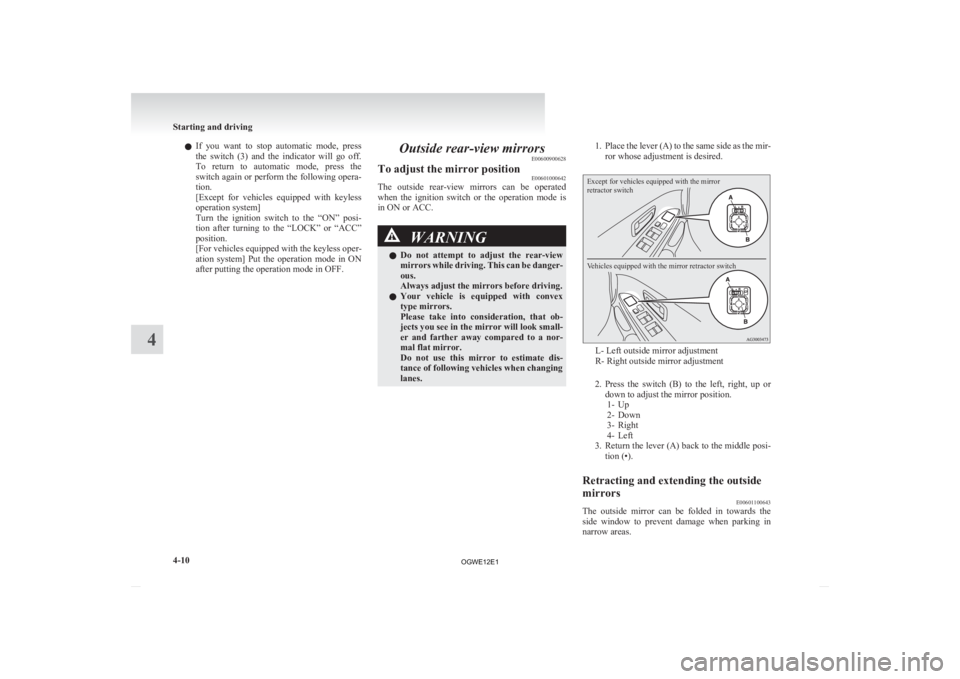
lanes. 1. Place
the lever (A) to the same side as the mir-
ror whose adjustment is desired.
Except for vehicles equipped with the mirror
retractor switch
Vehicles equipped with the mirror retractor switch L- Left outside mirror adjustment
R- Right outside mirror adjustment
2. Press
the switch (B) to the left, right, up or
down to adjust the mirror position. 1- Up
2- Down
3- Right
4- Left
3. Return the lever (A) back to the middle posi- tion (•).
Retracting and extending the outside
mirrors E00601100643
The outside mirror can be folded in towards the
side
window to prevent damage when parking in
narrow areas. Starting and driving
4-10
4
OGWE12E1
Page 165 of 378
CAUTION
l
Do not drive the vehicle with the mirror
folded in.
The lack of rearward visibility normally
provided by the mirror could lead to an
accident.
[Except
for vehicles equipped with the mirror re-
tractor switch]
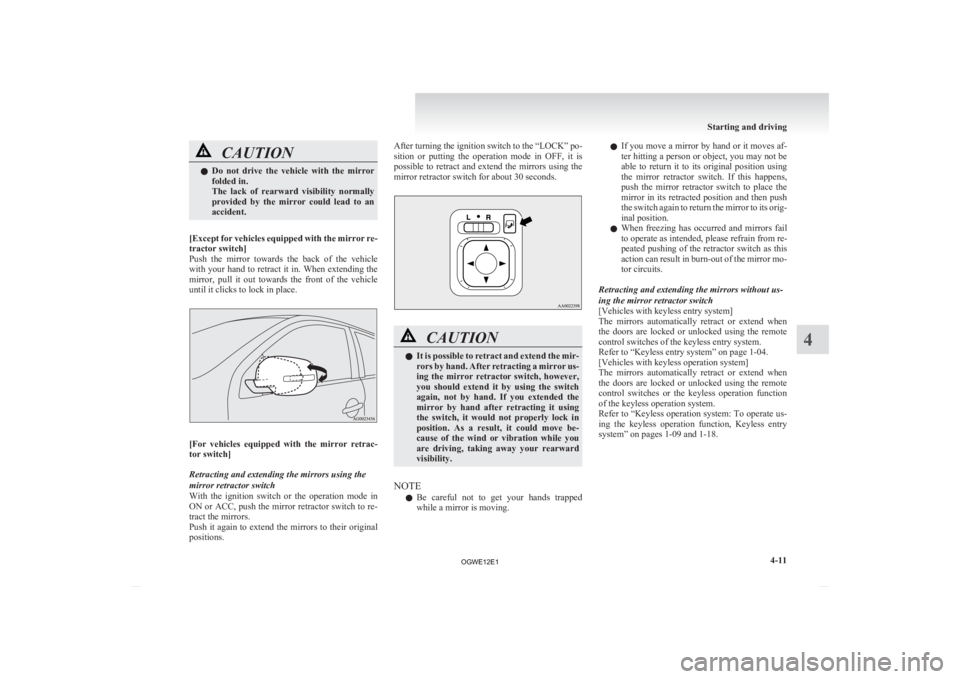
Push the mirror towards the back of the vehicle
with your hand to retract it in. When extending the
mirror, pull it out towards the front of the vehicle
until it clicks to lock in place. [For
vehicles equipped with the mirror retrac-
tor switch]
Retracting and extending the mirrors using the
mirror retractor switch
With the ignition switch or the operation mode in
ON or ACC, push the mirror retractor switch to re-
tract the mirrors.
Push it again to extend the mirrors to their original
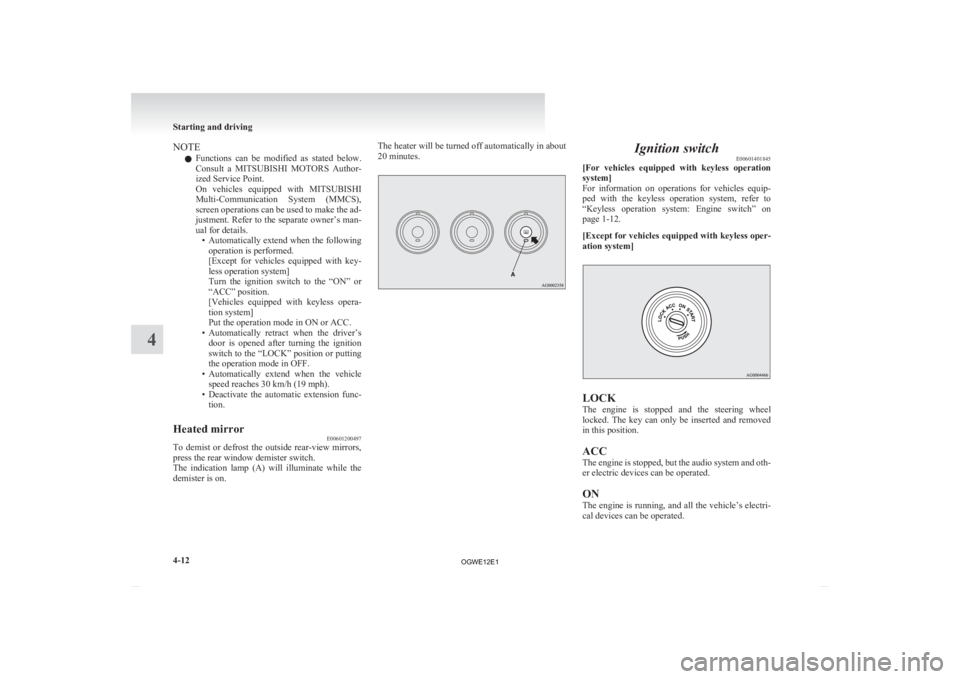
positions. After turning the ignition switch to the “LOCK” po-
sition
or putting the operation mode in OFF, it is
possible to retract and extend the mirrors using the
mirror retractor switch for about 30 seconds. CAUTION
l
It
is possible to retract and extend the mir-
rors by hand. After retracting a mirror us-
ing the mirror retractor switch, however,
you should extend it by using the switch
again, not by hand. If you extended the
mirror by hand after retracting it using
the switch, it would not properly lock in
position. As a result, it could move be-
cause of the wind or vibration while you
are driving, taking away your rearward
visibility.
NOTE l Be
careful not to get your hands trapped
while a mirror is moving. l
If
you move a mirror by hand or it moves af-
ter hitting a person or object, you may not be
able to return it to its original position using
the mirror retractor switch. If this happens,
push the mirror retractor switch to place the
mirror in its retracted position and then push
the switch again to return the mirror to its orig-
inal position.
l When freezing has occurred and mirrors fail
to operate as intended, please refrain from re-
peated pushing of the retractor switch as this
action can result in burn-out of the mirror mo-
tor circuits.
Retracting and extending the mirrors without us-
ing the mirror retractor switch
[Vehicles with keyless entry system]
The mirrors automatically retract or extend when
the doors are locked or unlocked using the remote
control switches of the keyless entry system.
Refer to “Keyless entry system” on page 1-04.
[Vehicles with keyless operation system]
The mirrors automatically retract or extend when
the doors are locked or unlocked using the remote
control switches or the keyless operation function
of the keyless operation system.
Refer to “Keyless operation system: To operate us-
ing the keyless operation function, Keyless entry
system” on pages 1-09 and 1-18. Starting and driving
4-11 4
OGWE12E1
Page 166 of 378
NOTE
l Functions
can be modified as stated below.
Consult a MITSUBISHI MOTORS Author-
ized Service Point.
On vehicles equipped with MITSUBISHI
Multi-Communication System (MMCS),
screen operations can be used to make the ad-
justment. Refer to the separate owner’s man-
ual for details. • Automatically extend when the followingoperation is performed.
[Except for vehicles equipped with key-
less operation system]
Turn the ignition switch to the “ON” or
“ACC” position.
[Vehicles equipped with keyless opera-
tion system]
Put the operation mode in ON or ACC.
• Automatically retract when the driver’s door is opened after turning the ignition
switch to the “LOCK” position or putting
the operation mode in OFF.
• Automatically extend when the vehicle speed reaches 30 km/h (19 mph).
• Deactivate the automatic extension func- tion.
Heated mirror E00601200497
To demist or defrost the outside rear-view mirrors,
press the rear window demister switch.
The
indication lamp (A) will illuminate while the
demister is on. The heater will be turned off automatically in about
20 minutes. Ignition switch
E00601401845
[For
vehicles equipped with keyless operation
system]
For information on operations for vehicles equip-
ped with the keyless operation system, refer to
“Keyless operation system: Engine switch” on
page 1-12.
[Except for vehicles equipped with keyless oper-
ation system] LOCK
The
engine is stopped and the steering wheel
locked. The key can only be inserted and removed
in this position.
ACC
The engine is stopped, but the audio system and oth-
er electric devices can be operated.
ON
The engine is running, and all the vehicle’s electri-
cal devices can be operated. Starting and driving
4-12
4
OGWE12E1
Page 206 of 378
Rear-view camera*
E00618400257
The
rear-view camera is a system that shows the
view behind the vehicle on the screen of the
MITSUBISHI Multi Communication System
(MMCS) or the inside rear-view mirror. CAUTION
l
The
rear-view camera is an assistance sys-
tem that enables the driver to check for
obstacles behind the vehicle. Its range of
view is limited, so you should not overly
depend on it. Please drive just as careful-
ly as you would if the vehicle did not have
the rear-view camera.
l Be sure to visually confirm safety around
the vehicle with your own eyes. Do not de-
pend entirely on the rear-view camera.
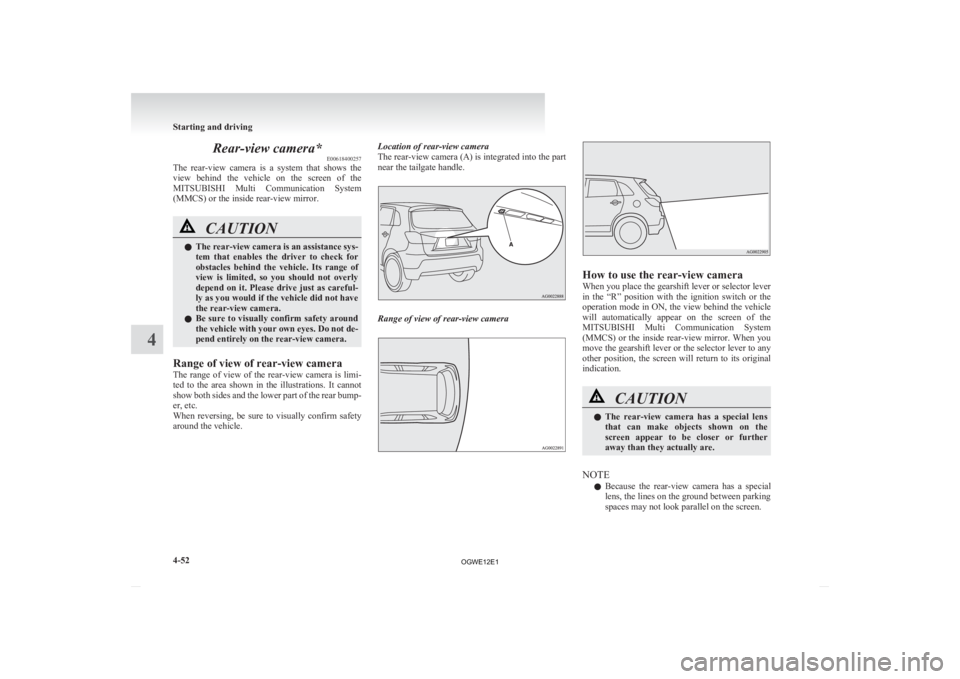
Range of view of rear-view camera
The
range of view of the rear-view camera is limi-
ted to the area shown in the illustrations. It cannot
show both sides and the lower part of the rear bump-
er, etc.
When reversing, be sure to visually confirm safety
around the vehicle. Location of rear-view camera
The rear-view camera (A) is integrated into the part
near the tailgate handle.
Range of view of rear-view camera How to use the rear-view camera
When you place the gearshift lever or selector lever
in
the “R” position with the ignition switch or the
operation mode in ON, the view behind the vehicle
will automatically appear on the screen of the
MITSUBISHI Multi Communication System
(MMCS) or the inside rear-view mirror. When you
move the gearshift lever or the selector lever to any
other position, the screen will return to its original
indication. CAUTION
l
The
rear-view camera has a special lens
that can make objects shown on the
screen appear to be closer or further
away than they actually are.
NOTE l Because
the rear-view camera has a special
lens, the lines on the ground between parking
spaces may not look parallel on the screen. Starting and driving
4-52
4
OGWE12E1
Page 207 of 378
l
In the following situations, the screen indica-
tion may be difficult to see. There is no ab-
normality. • Low light (nighttime)
• When the light of the sun or the lightfrom a vehicle’s headlamps shines direct-
ly into the lens
l If the camera is hot and is then cooled by
rain or a car wash, the lens can mist up. This
phenomenon does not indicate a malfunction.
l It is not possible to fully see obstacles when
the lens is dirty. If the lens becomes contami-
nated by water droplets, snow, mud or oil,
wipe off the contamination, taking care not
to scratch the lens.
l Please observe the following cautions. Ignor-
ing them could lead to a camera malfunction.
• Do not subject the camera to physicalshock.
• Do not apply wax to the camera.
• Do not splash the camera with boiling wa- ter.
• Do not disassemble the camera.
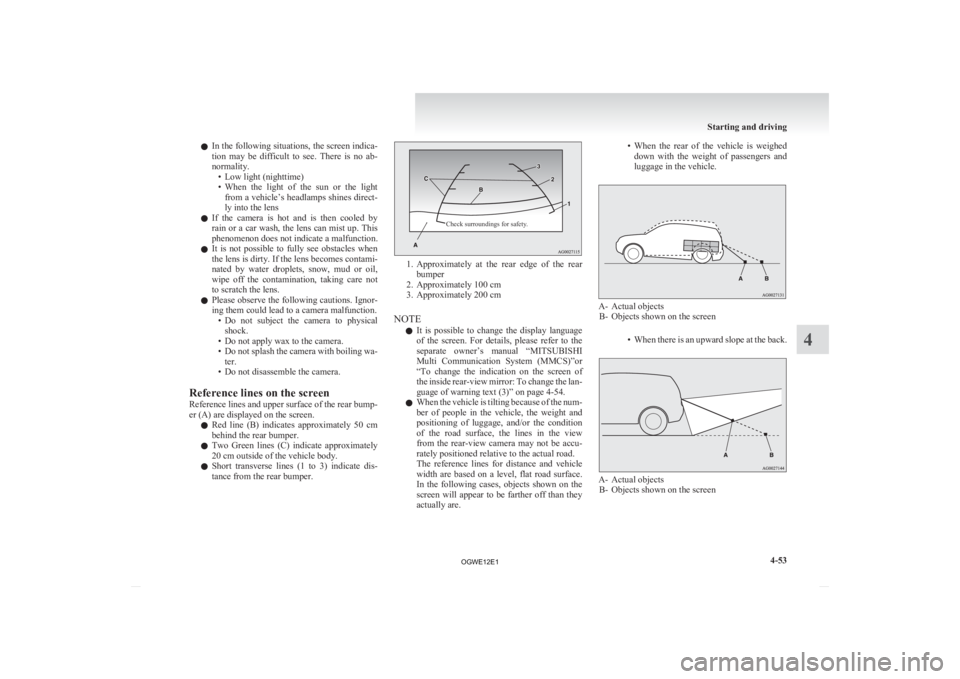
Reference lines on the screen
Reference lines and upper surface of the rear bump-
er (A) are displayed on the screen. l Red line (B) indicates approximately 50 cm
behind the rear bumper.
l Two Green lines (C) indicate approximately
20 cm outside of the vehicle body.
l Short transverse lines (1 to 3) indicate dis-
tance from the rear bumper.
Check surroundings for safety. 1. Approximately
at the rear edge of the rear
bumper
2. Approximately 100 cm
3. Approximately 200 cm
NOTE l It is possible to change the display language
of the screen. For details, please refer to the
separate owner’s manual “MITSUBISHI
Multi Communication System (MMCS)”or
“To change the indication on the screen of
the inside rear-view mirror: To change the lan-
guage of warning text (3)” on page 4-54.
l When the vehicle is tilting because of the num-
ber of people in the vehicle, the weight and
positioning of luggage, and/or the condition
of the road surface, the lines in the view
from the rear-view camera may not be accu-
rately positioned relative to the actual road.
The reference lines for distance and vehicle
width are based on a level, flat road surface.
In the following cases, objects shown on the
screen will appear to be farther off than they
actually are. • When
the rear of the vehicle is weighed
down with the weight of passengers and
luggage in the vehicle. A- Actual objects
B-
Objects shown on the screen
• When there is an upward slope at the back. A- Actual objects
B-
Objects shown on the screen
Starting and driving
4-53 4
OGWE12E1
Page 208 of 378
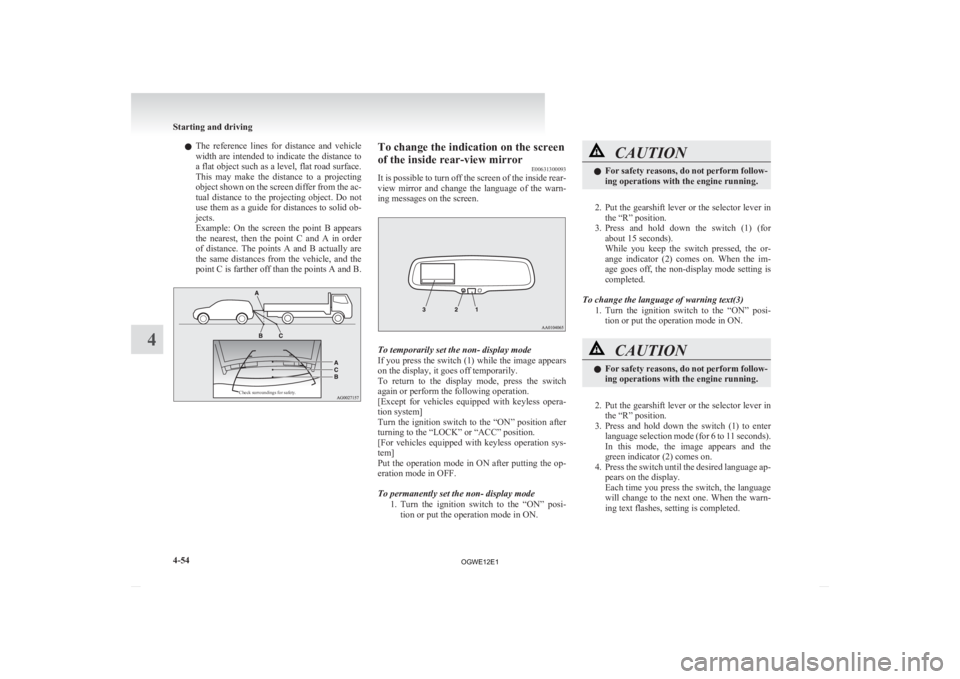
l
The reference lines for distance and vehicle
width are intended to indicate the distance to
a flat object such as a level, flat road surface.
This may make the distance to a projecting
object shown on the screen differ from the ac-
tual distance to the projecting object. Do not
use them as a guide for distances to solid ob-
jects.
Example: On the screen the point B appears
the nearest, then the point C and A in order
of distance. The points A and B actually are
the same distances from the vehicle, and the
point C is farther off than the points A and B.
Check surroundings for safety. To change the indication on the screen
of the inside rear-view mirror
E00631300093
It
is possible to turn off the screen of the inside rear-
view mirror and change the language of the warn-
ing messages on the screen. To temporarily set the non- display mode
If
you press the switch (1) while the image appears
on the display, it goes off temporarily.
To return to the display mode, press the switch
again or perform the following operation.
[Except for vehicles equipped with keyless opera-
tion system]
Turn the ignition switch to the “ON” position after
turning to the “LOCK” or “ACC” position.
[For vehicles equipped with keyless operation sys-
tem]
Put the operation mode in ON after putting the op-
eration mode in OFF.
To permanently set the non- display mode
1. Turn the ignition switch to the “ON” posi-tion or put the operation mode in ON. CAUTION
l
For
safety reasons, do not perform follow-
ing operations with the engine running.
2. Put
the gearshift lever or the selector lever in the “R” position.
3. Press and hold down the switch (1) (for about 15 seconds).
While you keep the switch pressed, the or-
ange indicator (2) comes on. When the im-
age goes off, the non-display mode setting is
completed.
To change the language of warning text(3) 1. Turn the ignition switch to the “ON” posi-tion or put the operation mode in ON. CAUTION
l
For
safety reasons, do not perform follow-
ing operations with the engine running.
2. Put
the gearshift lever or the selector lever in the “R” position.
3. Press and hold down the switch (1) to enter language selection mode (for 6 to 11 seconds).
In this mode, the image appears and the
green indicator (2) comes on.
4. Press the switch until the desired language ap- pears on the display.
Each time you press the switch, the language
will change to the next one. When the warn-
ing text flashes, setting is completed. Starting and driving
4-54
4
OGWE12E1