change time MITSUBISHI ASX 2012 (in English) Owner's Guide
[x] Cancel search | Manufacturer: MITSUBISHI, Model Year: 2012, Model line: ASX, Model: MITSUBISHI ASX 2012Pages: 378, PDF Size: 18.2 MB
Page 114 of 378
1. Press and hold the multi-information meter
switch for about 2 seconds or more to switch
from the setting mode screen to the menu
screen.
Refer to “Changing the function settings
(when the ignition switch or the operation
mode is ON)” on page 3-17.
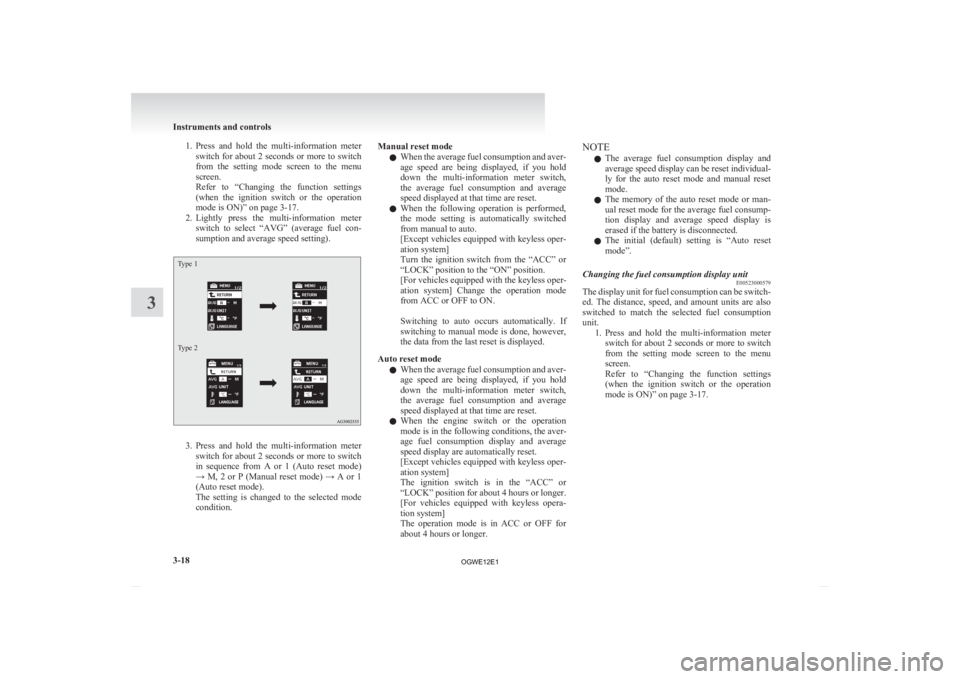
2. Lightly press the multi-information meter switch to select “AVG” (average fuel con-
sumption and average speed setting).
Type 1
Type 2 3. Press
and hold the multi-information meter
switch for about 2 seconds or more to switch
in sequence from A or 1 (Auto reset mode)
→ M, 2 or P (Manual reset mode) → A or 1
(Auto reset mode).
The setting is changed to the selected mode
condition. Manual reset mode
l When
the average fuel consumption and aver-
age speed are being displayed, if you hold
down the multi-information meter switch,
the average fuel consumption and average
speed displayed at that time are reset.
l When the following operation is performed,
the mode setting is automatically switched
from manual to auto.
[Except vehicles equipped with keyless oper-
ation system]
Turn the ignition switch from the “ACC” or
“LOCK” position to the “ON” position.
[For vehicles equipped with the keyless oper-
ation system] Change the operation mode
from ACC or OFF to ON.
Switching to auto occurs automatically. If
switching to manual mode is done, however,
the data from the last reset is displayed.
Auto reset mode l When the average fuel consumption and aver-
age speed are being displayed, if you hold
down the multi-information meter switch,
the average fuel consumption and average
speed displayed at that time are reset.
l When the engine switch or the operation
mode is in the following conditions, the aver-
age fuel consumption display and average
speed display are automatically reset.
[Except vehicles equipped with keyless oper-
ation system]
The ignition switch is in the “ACC” or
“LOCK” position for about 4 hours or longer.
[For vehicles equipped with keyless opera-
tion system]
The operation mode is in ACC or OFF for
about 4 hours or longer. NOTE
l The
average fuel consumption display and
average speed display can be reset individual-
ly for the auto reset mode and manual reset
mode.
l The memory of the auto reset mode or man-
ual reset mode for the average fuel consump-
tion display and average speed display is
erased if the battery is disconnected.
l The initial (default) setting is “Auto reset
mode”.
Changing the fuel consumption display unit E00523000579
The display unit for fuel consumption can be switch-
ed.
The distance, speed, and amount units are also
switched to match the selected fuel consumption
unit. 1. Press and hold the multi-information meterswitch for about 2 seconds or more to switch
from the setting mode screen to the menu
screen.
Refer to “Changing the function settings
(when the ignition switch or the operation
mode is ON)” on page 3-17. Instruments and controls
3-18
3
OGWE12E1
Page 117 of 378
3. Press and hold the multi-information meter
switch to switch in sequence from A or 1 (lan-
guage cooperation enabled) → M, 2 or P (lan-
guage cooperation disabled) → A or 1 (lan-
guage cooperation enabled).
The setting is changed to the selected condi-
tion.
NOTE l The memory of the language cooperative con-
trol is erased if the battery is disconnected,
and it returns automatically to A or 1 (lan-
guage cooperation enabled).
l The language display modified with the lan-
guage setting can be switched in the follow-
ing manner.
• When A or 1 (language cooperation ena-bled) has been selected with the language
cooperative control, the language for
MITSUBISHI Multi-Communication
System (MMCS) (if so equipped) or the
Bluetooth ®
2.0 interface (if so equipped)
is automatically changed to the language
selected for the multi-information display.
• When M, 2 or P (language cooperation dis- abled) has been selected with the lan-
guage cooperative control, the language
for MITSUBISHI Multi-Communication
System (MMCS) (if so equipped) or the
Bluetooth ®
2.0 interface (if so equipped)
is not automatically changed to the lan-
guage selected for the multi-information
display.
Operation sound setting E00523400498
You can turn off the operation sounds of the multi-
information
meter switch and daytime dipper button. 1. Press
and hold the multi-information meter
switch for about 2 seconds or more to switch
from the setting mode screen to the menu
screen.
Refer to “Changing the function settings
(when the ignition switch or the operation
mode is ON)” on page 3-17.
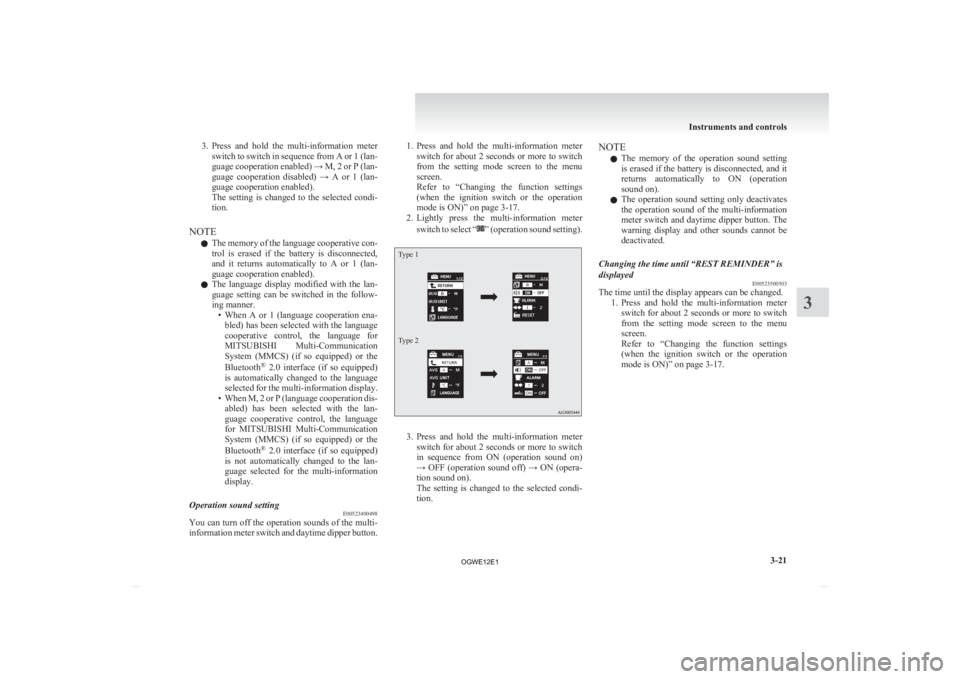
2. Lightly press the multi-information meter
switch to select “ ”
(operation sound setting).
Type 1
Type 2
3. Press
and hold the multi-information meter
switch for about 2 seconds or more to switch
in sequence from ON (operation sound on)
→ OFF (operation sound off) → ON (opera-
tion sound on).
The setting is changed to the selected condi-
tion. NOTE
l The
memory of the operation sound setting
is erased if the battery is disconnected, and it
returns automatically to ON (operation
sound on).
l The operation sound setting only deactivates
the operation sound of the multi-information
meter switch and daytime dipper button. The
warning display and other sounds cannot be
deactivated.
Changing the time until “REST REMINDER” is
displayed E00523500503
The time until the display appears can be changed.
1. Press
and hold the multi-information meter
switch for about 2 seconds or more to switch
from the setting mode screen to the menu
screen.
Refer to “Changing the function settings
(when the ignition switch or the operation
mode is ON)” on page 3-17. Instruments and controls
3-21 3
OGWE12E1
Page 118 of 378
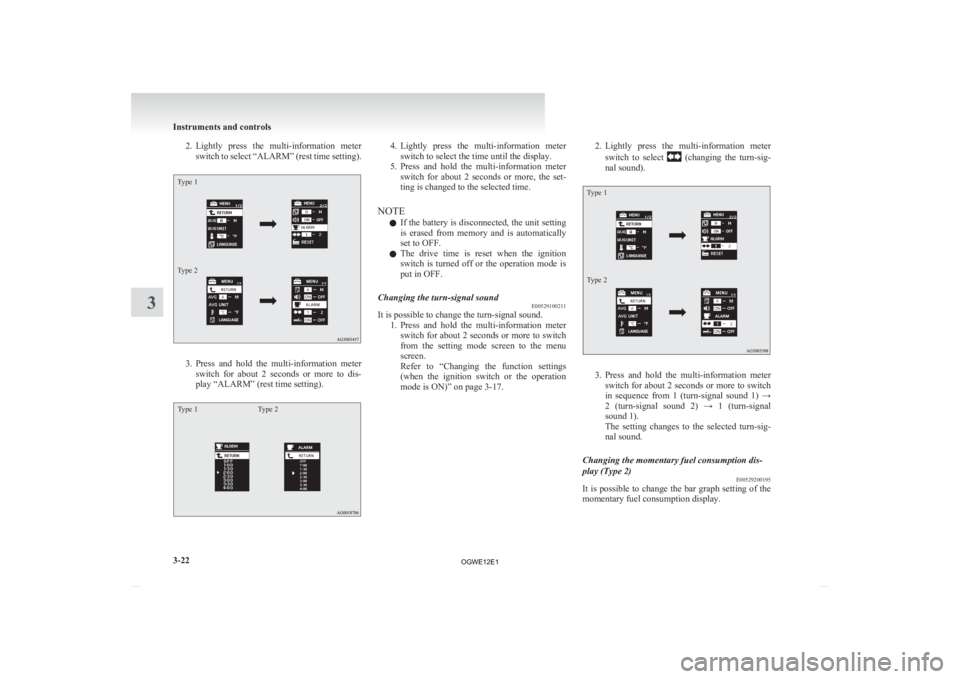
2. Lightly press the multi-information meter
switch to select “ALARM” (rest time setting).
Type 1
Type 2 3. Press
and hold the multi-information meter
switch for about 2 seconds or more to dis-
play “ALARM” (rest time setting).
Type 1 Type 2 4. Lightly
press the multi-information meter
switch to select the time until the display.
5. Press and hold the multi-information meter switch for about 2 seconds or more, the set-
ting is changed to the selected time.
NOTE l If the battery is disconnected, the unit setting
is erased from memory and is automatically
set to OFF.
l The drive time is reset when the ignition
switch is turned off or the operation mode is
put in OFF.
Changing the turn-signal sound E00529100211
It is possible to change the turn-signal sound.
1. Press
and hold the multi-information meter
switch for about 2 seconds or more to switch
from the setting mode screen to the menu
screen.
Refer to “Changing the function settings
(when the ignition switch or the operation
mode is ON)” on page 3-17. 2. Lightly
press the multi-information meter
switch to select (changing the turn-sig-
nal sound).
Type 1
Type 2 3. Press
and hold the multi-information meter
switch for about 2 seconds or more to switch
in sequence from 1 (turn-signal sound 1) →
2 (turn-signal sound 2) → 1 (turn-signal
sound 1).
The setting changes to the selected turn-sig-
nal sound.
Changing the momentary fuel consumption dis-
play (Type 2) E00529200195
It is possible to change the bar graph setting of the
momentary fuel consumption display. Instruments and controls
3-22
3
OGWE12E1
Page 134 of 378
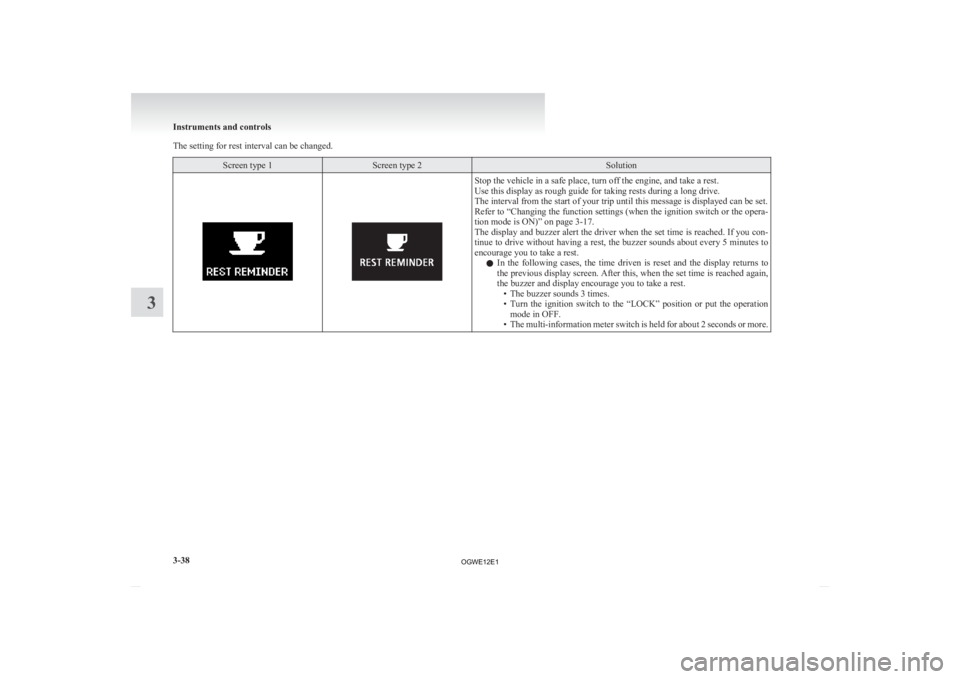
The setting for rest interval can be changed.
Screen type 1 Screen type 2 Solution
Stop the vehicle in a safe place, turn off the engine, and take a rest.
Use this display as rough guide for taking rests during a long drive.
The interval from the start of your trip until this message is displayed can be set.
Refer
to “Changing the function settings (when the ignition switch or the opera-
tion mode is ON)” on page 3-17.
The display and buzzer alert the driver when the set time is reached. If you con-
tinue to drive without having a rest, the buzzer sounds about every 5 minutes to
encourage you to take a rest.
l In the following cases, the time driven is reset and the display returns to
the previous display screen. After this, when the set time is reached again,
the buzzer and display encourage you to take a rest.
• The buzzer sounds 3 times.
• Turn the ignition switch to the “LOCK” position or put the operationmode in OFF.
• The multi-information meter switch is held for about 2 seconds or more. Instruments and controls
3-38
3
OGWE12E1
Page 142 of 378
• Turn the lamp switch to the “OFF” posi-
tion.
• Close the driver’s door.
l When the engine was started using the key-
less operation function, if the driver’s door is
opened and the operation mode is put in
OFF, the lamp monitor buzzer sounds at a
high pitch intermittently.
The buzzer stops when the driver’s door is
closed. (The warning is also displayed on the
multi-information display.)
The buzzer stops in the following manner.
• Turn the lamp switch to the “OFF” posi-tion.
• Close the driver’s door.
Lamp monitor buzzer E00506100559
[When the engine was started using the key]
If
the driver’s door is opened when the key is in the
“LOCK” or “ACC” position or removed from the
ignition switch while the lamps are on, a buzzer
will sound to remind the driver to turn off the lamps.
[When the engine was started using the keyless op-
eration function]
If the driver’s door is opened when the operation
mode is in ACC or OFF with the lamps illumina-
ted, a buzzer will sound to remind the driver to turn
off the lamps.
In both cases, the buzzer will automatically stop if
the auto-cutoff function is activated, the lamp
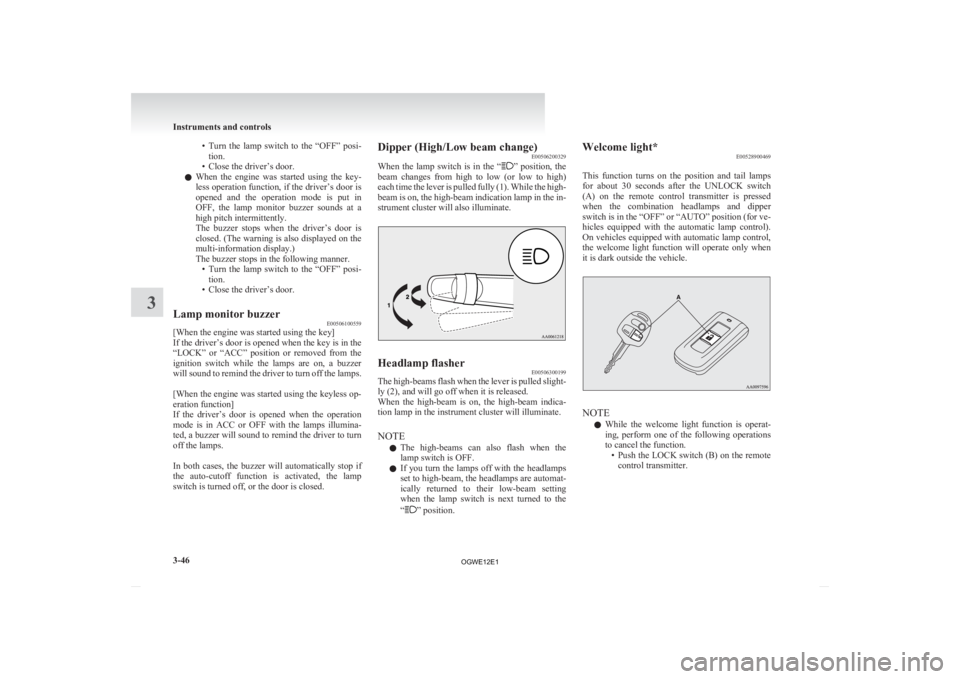
switch is turned off, or the door is closed. Dipper (High/Low beam change)
E00506200329
When
the lamp switch is in the “ ”
position, the
beam changes from high to low (or low to high)
each time the lever is pulled fully (1). While the high-
beam is on, the high-beam indication lamp in the in-
strument cluster will also illuminate. Headlamp flasher
E00506300199
The high-beams flash when the lever is pulled slight-
ly (2), and will go off when it is released.
When
the high-beam is on, the high-beam indica-
tion lamp in the instrument cluster will illuminate.
NOTE
l The high-beams can also flash when the
lamp switch is OFF.
l If you turn the lamps off with the headlamps
set to high-beam, the headlamps are automat-
ically returned to their low-beam setting
when the lamp switch is next turned to the
“ ” position.Welcome light*
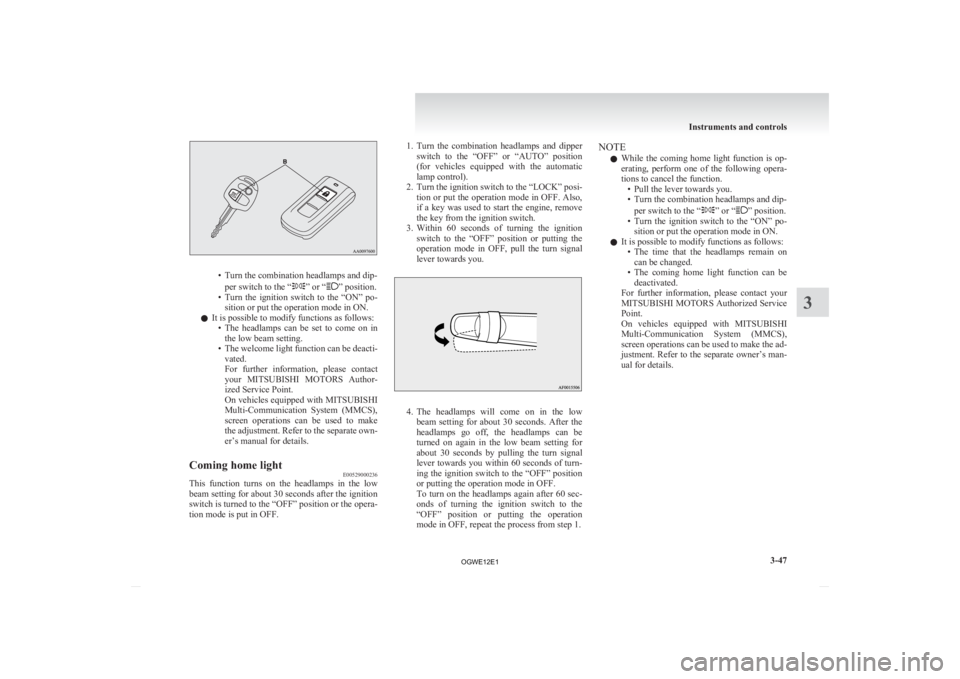
E00528900469
This
function turns on the position and tail lamps
for about 30 seconds after the UNLOCK switch
(A) on the remote control transmitter is pressed
when the combination headlamps and dipper
switch is in the “OFF” or “AUTO” position (for ve-
hicles equipped with the automatic lamp control).
On vehicles equipped with automatic lamp control,
the welcome light function will operate only when
it is dark outside the vehicle. NOTE
l While
the welcome light function is operat-
ing, perform one of the following operations
to cancel the function. • Push the LOCK switch (B) on the remotecontrol transmitter. Instruments and controls
3-46
3
OGWE12E1
Page 143 of 378
• Turn the combination headlamps and dip-
per switch to the “ ” or “ ” position.
• Turn
the ignition switch to the “ON” po-
sition or put the operation mode in ON.
l It is possible to modify functions as follows:
• The headlamps can be set to come on inthe low beam setting.
• The welcome light function can be deacti- vated.
For further information, please contact
your MITSUBISHI MOTORS Author-
ized Service Point.
On vehicles equipped with MITSUBISHI
Multi-Communication System (MMCS),
screen operations can be used to make
the adjustment. Refer to the separate own-
er’s manual for details.
Coming home light E00529000236
This function turns on the headlamps in the low
beam
setting for about 30 seconds after the ignition
switch is turned to the “OFF” position or the opera-
tion mode is put in OFF. 1. Turn
the combination headlamps and dipper
switch to the “OFF” or “AUTO” position
(for vehicles equipped with the automatic
lamp control).
2. Turn the ignition switch to the “LOCK” posi- tion or put the operation mode in OFF. Also,
if a key was used to start the engine, remove
the key from the ignition switch.
3. Within 60 seconds of turning the ignition switch to the “OFF” position or putting the
operation mode in OFF, pull the turn signal
lever towards you. 4. The
headlamps will come on in the low
beam setting for about 30 seconds. After the
headlamps go off, the headlamps can be
turned on again in the low beam setting for
about 30 seconds by pulling the turn signal
lever towards you within 60 seconds of turn-
ing the ignition switch to the “OFF” position
or putting the operation mode in OFF.
To turn on the headlamps again after 60 sec-
onds of turning the ignition switch to the
“OFF” position or putting the operation
mode in OFF, repeat the process from step 1. NOTE
l While
the coming home light function is op-
erating, perform one of the following opera-
tions to cancel the function. • Pull the lever towards you.
• Turn the combination headlamps and dip-
per switch to the “ ” or “ ” position.
• Turn
the ignition switch to the “ON” po-
sition or put the operation mode in ON.
l It is possible to modify functions as follows:
• The time that the headlamps remain oncan be changed.
• The coming home light function can be deactivated.
For further information, please contact your
MITSUBISHI MOTORS Authorized Service
Point.
On vehicles equipped with MITSUBISHI
Multi-Communication System (MMCS),
screen operations can be used to make the ad-
justment. Refer to the separate owner’s man-
ual for details. Instruments and controls
3-47 3
OGWE12E1
Page 145 of 378
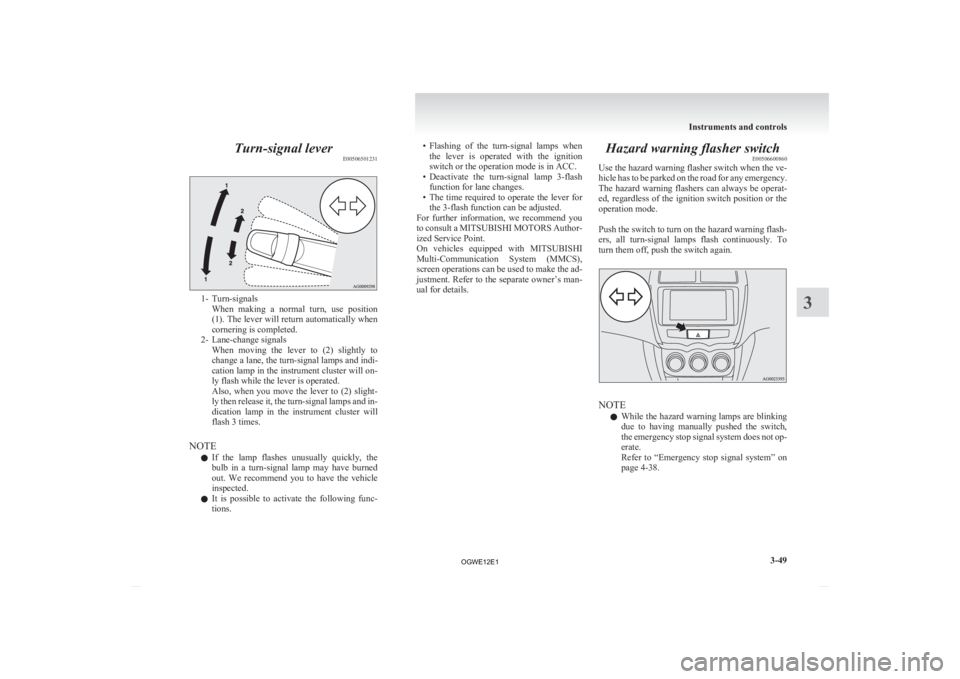
Turn-signal lever
E005065012311- Turn-signals
When making a normal turn, use position
(1). The lever will return automatically when
cornering is completed.
2- Lane-change signals When moving the lever to (2) slightly to
change a lane, the turn-signal lamps and indi-
cation lamp in the instrument cluster will on-
ly flash while the lever is operated.
Also, when you move the lever to (2) slight-
ly then release it, the turn-signal lamps and in-
dication lamp in the instrument cluster will
flash 3 times.
NOTE l If the lamp flashes unusually quickly, the
bulb in a turn-signal lamp may have burned
out. We recommend you to have the vehicle
inspected.
l It is possible to activate the following func-
tions. • Flashing
of the turn-signal lamps when
the lever is operated with the ignition
switch or the operation mode is in ACC.
• Deactivate the turn-signal lamp 3-flash function for lane changes.
• The time required to operate the lever for the 3-flash function can be adjusted.
For further information, we recommend you
to consult a MITSUBISHI MOTORS Author-
ized Service Point.
On vehicles equipped with MITSUBISHI
Multi-Communication System (MMCS),
screen operations can be used to make the ad-
justment. Refer to the separate owner’s man-
ual for details. Hazard warning flasher switch
E00506600860
Use
the hazard warning flasher switch when the ve-
hicle has to be parked on the road for any emergency.
The hazard warning flashers can always be operat-
ed, regardless of the ignition switch position or the
operation mode.
Push the switch to turn on the hazard warning flash-
ers, all turn-signal lamps flash continuously. To
turn them off, push the switch again. NOTE
l While
the hazard warning lamps are blinking
due to having manually pushed the switch,
the emergency stop signal system does not op-
erate.
Refer to “Emergency stop signal system” on
page 4-38. Instruments and controls
3-49 3
OGWE12E1
Page 167 of 378
START
The
starter motor operates. After the engine has star-
ted, release the key and it will automatically return
to the “ON” position.
NOTE
l Your vehicle is equipped with an electronic
immobilizer.
To start the engine, the ID code transmitted
by the transponder inside the key must match
the code registered in the immobilizer com-
puter.
Refer to “Electronic immobilizer (Anti-theft
starting system)” on page 1-03.
ACC power auto-cutout function E00620300165
After about 30 minutes has elapsed with the igni-
tion
switch in the “ACC” position, the function au-
tomatically cuts out the power for the audio system
and other electric devices that can be operated with
that position.
When the ignition switch is turned from the “ACC”
position, the power is supplied again to those devi-
ces.
NOTE
l It is possible to modify functions as follows:
• The time until the power cuts out can bechanged to about 60 minutes. • The
ACC power auto-cutout function can
be deactivated.
For details, we recommend you to con-
sult a MITSUBISHI MOTORS Author-
ized Service Point.
On vehicles equipped with MITSUBISHI
Multi-Communication System (MMCS),
screen operations can be used to make
the adjustment.
Refer to the separate owner’s manual for
details.
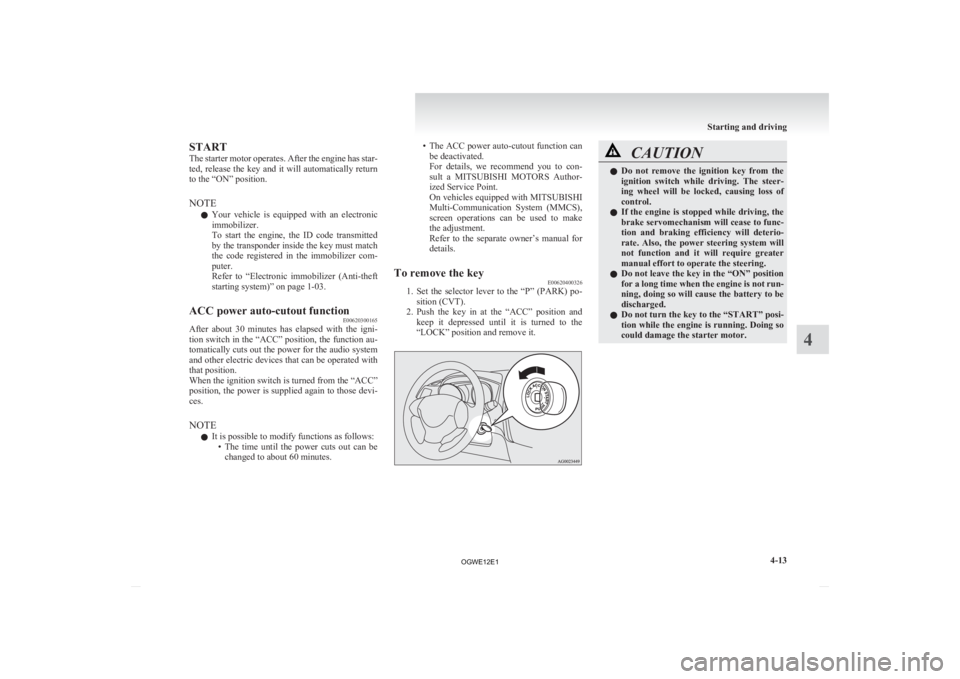
To remove the key E00620400326
1. Set
the selector lever to the “P” (PARK) po-
sition (CVT).
2. Push the key in at the “ACC” position and keep it depressed until it is turned to the
“LOCK” position and remove it. CAUTION
l
Do
not remove the ignition key from the
ignition switch while driving. The steer-
ing wheel will be locked, causing loss of
control.
l If the engine is stopped while driving, the
brake servomechanism will cease to func-
tion and braking efficiency will deterio-
rate. Also, the power steering system will
not function and it will require greater
manual effort to operate the steering.
l Do not leave the key in the “ON” position
for a long time when the engine is not run-
ning, doing so will cause the battery to be
discharged.
l Do not turn the key to the “START” posi-
tion while the engine is running. Doing so
could damage the starter motor. Starting and driving
4-13 4
OGWE12E1
Page 170 of 378
NOTE
l If
the engine is cold, the diesel preheat indi-
cation lamp is on for a longer time.
l When the engine has not been started within
about 5 seconds after the diesel preheat indi-
cation lamp went out, return the ignition key
to the “LOCK” position. Then, turn the key
to the “ON” position to preheat the engine
again.
l When the engine is warm, the diesel preheat
indication lamp does not come on even if the
ignition key is placed in the “ON” position.
Start the engine by turning the ignition key
right to the “START” position.
7. Turn the ignition key to the “START” posi- tion without depressing the accelerator pedal,
and release it when the engine starts.
NOTE l Minor noises may be heard on engine start-
up. These will disappear as the engine warms
up.
Using the MIVEC engine*
The MIVEC engine automatically switches its in-
take-valve control between a low-speed mode and
a high-speed mode in accordance with driving con-
ditions for maximum engine performance.
NOTE l To protect the engine, the high-speed mode
may not be selected while the engine coolant
temperature is low. Fuel injection amount learning proc-
ess (diesel-powered vehicles)
E00627900043
To
keep exhaust emissions and engine noise low,
the engine very occasionally performs a learning
process for the fuel injection amount.
The engine sounds slightly different from usual
while the learning process is taking place. The
change in the engine sound does not indicate a fault. Diesel particulate filter (DPF)*
E00619800245
The
diesel particulate filter (DPF) is a device that
captures most of the particulate matter (PM) in the
exhaust emissions of the diesel engine. The DPF au-
tomatically burns away trapped PM during vehicle
operation. Under certain driving conditions, howev-
er, the DPF is not able to burn away all of the trap-
ped PM and, as a result, an excessive amount of
PM accumulates inside it. WARNING
l The DPF reaches very high temperatures.
Do
not park your vehicle in areas where
combustible materials such as dry grass
or leaves can come in contact with a hot
exhaust system since a fire could occur. CAUTION
l
Do
not use any type of fuel or engine oil
that is not specified for your vehicle. Al-
so, do not use any moisture-removing
agent or other fuel additive. Such substan-
ces could have a detrimental effect on the
DPF.
Refer to “Fuel selection” on page 02 and
“Engine oil” on page 8-04.
NOTE l To
minimize the likelihood of excessive ac-
cumulation of PM, try to avoid driving for
long periods at low speeds and repeatedly
driving short distances. Starting and driving
4-16
4
OGWE12E1
Page 171 of 378
l
The engine sounds slightly different from usu-
al while the DPF automatically burns away
trapped PM. The change in the engine sound
does not indicate a fault.
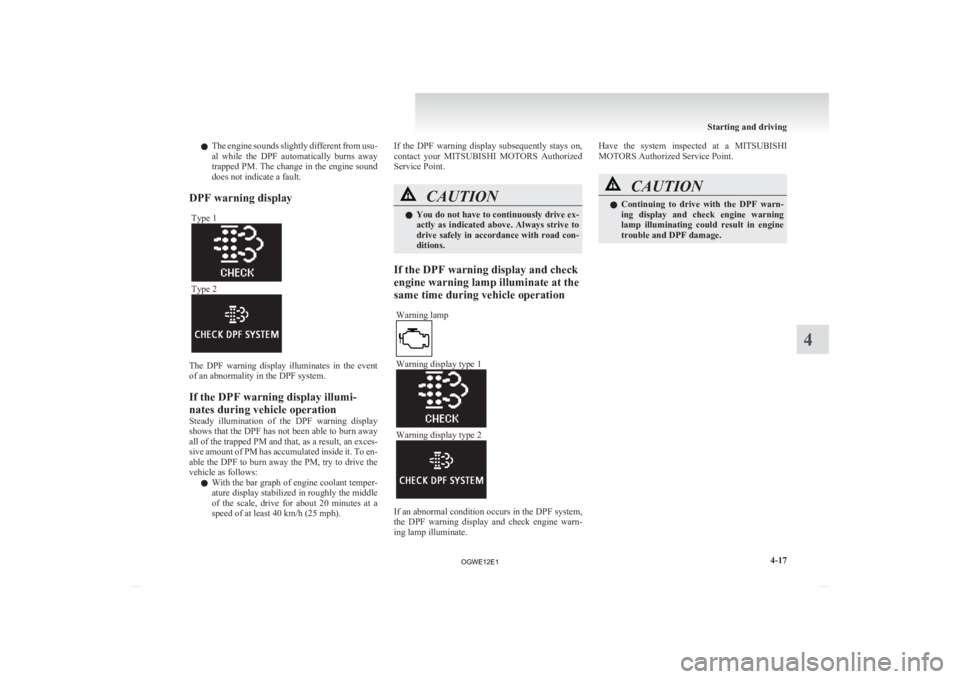
DPF warning display Type 1 Type 2
The DPF warning display illuminates in the event
of an abnormality in the DPF system.
If the DPF warning display illumi-
nates during vehicle operation
Steady
illumination of the DPF warning display
shows that the DPF has not been able to burn away
all of the trapped PM and that, as a result, an exces-
sive amount of PM has accumulated inside it. To en-
able the DPF to burn away the PM, try to drive the
vehicle as follows:
l With the bar graph of engine coolant temper-
ature display stabilized in roughly the middle
of the scale, drive for about 20 minutes at a
speed of at least 40 km/h (25 mph). If the DPF warning display subsequently stays on,
contact
your MITSUBISHI MOTORS Authorized
Service Point. CAUTION
l
You
do not have to continuously drive ex-
actly as indicated above. Always strive to
drive safely in accordance with road con-
ditions.
If the DPF warning display and check
engine warning lamp illuminate at the
same time during vehicle operation Warning lamp Warning display type 1
Warning display type 2
If an abnormal condition occurs in the DPF system,
the
DPF warning display and check engine warn-
ing lamp illuminate. Have the system inspected at a MITSUBISHI
MOTORS Authorized Service Point.
CAUTION
l
Continuing
to drive with the DPF warn-
ing display and check engine warning
lamp illuminating could result in engine
trouble and DPF damage. Starting and driving
4-17 4
OGWE12E1