ignition MITSUBISHI ASX 2012 (in English) Owner's Guide
[x] Cancel search | Manufacturer: MITSUBISHI, Model Year: 2012, Model line: ASX, Model: MITSUBISHI ASX 2012Pages: 378, PDF Size: 18.2 MB
Page 96 of 378
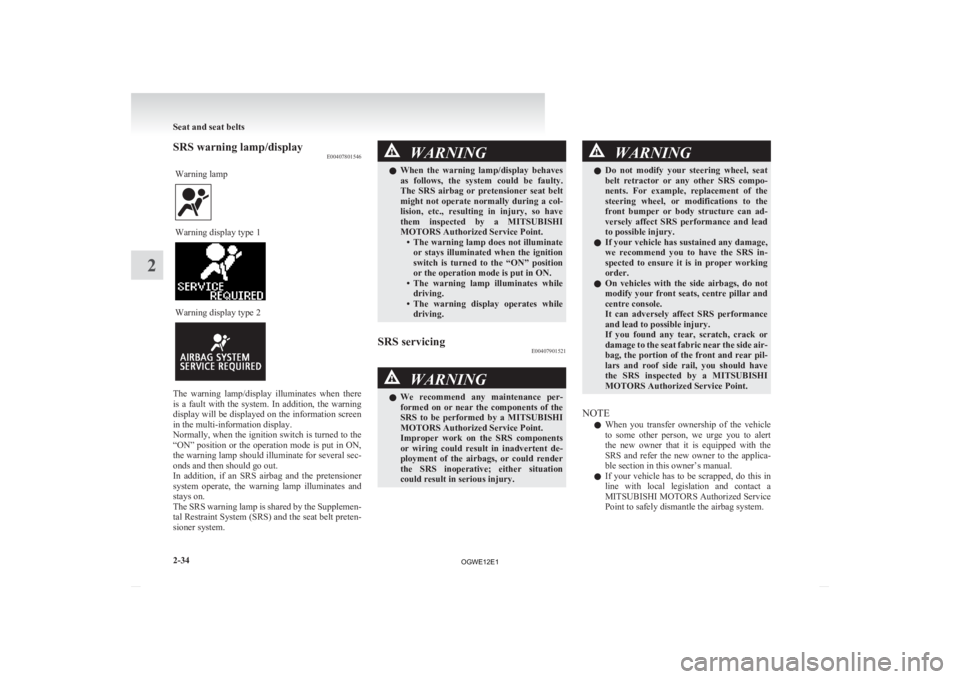
SRS warning lamp/display
E00407801546
Warning lamp Warning display type 1
Warning display type 2
The warning lamp/display illuminates when there
is
a fault with the system. In addition, the warning
display will be displayed on the information screen
in the multi-information display.
Normally, when the ignition switch is turned to the
“ON” position or the operation mode is put in ON,
the warning lamp should illuminate for several sec-
onds and then should go out.
In addition, if an SRS airbag and the pretensioner
system operate, the warning lamp illuminates and
stays on.
The SRS warning lamp is shared by the Supplemen-
tal Restraint System (SRS) and the seat belt preten-
sioner system. WARNING
l When
the warning lamp/display behaves
as follows, the system could be faulty.
The SRS airbag or pretensioner seat belt
might not operate normally during a col-
lision, etc., resulting in injury, so have
them inspected by a MITSUBISHI
MOTORS Authorized Service Point. • The warning lamp does not illuminateor stays illuminated when the ignition
switch is turned to the “ON” position
or the operation mode is put in ON.
• The warning lamp illuminates while driving.
• The warning display operates while driving.
SRS servicing E00407901521 WARNING
l We
recommend any maintenance per-
formed on or near the components of the
SRS to be performed by a MITSUBISHI
MOTORS Authorized Service Point.
Improper work on the SRS components
or wiring could result in inadvertent de-
ployment of the airbags, or could render
the SRS inoperative; either situation
could result in serious injury. WARNING
l Do
not modify your steering wheel, seat
belt retractor or any other SRS compo-
nents. For example, replacement of the
steering wheel, or modifications to the
front bumper or body structure can ad-
versely affect SRS performance and lead
to possible injury.
l If your vehicle has sustained any damage,
we recommend you to have the SRS in-
spected to ensure it is in proper working
order.
l On vehicles with the side airbags, do not
modify your front seats, centre pillar and
centre console.
It can adversely affect SRS performance
and lead to possible injury.
If you found any tear, scratch, crack or
damage to the seat fabric near the side air-
bag, the portion of the front and rear pil-
lars and roof side rail, you should have
the SRS inspected by a MITSUBISHI
MOTORS Authorized Service Point.
NOTE l When
you transfer ownership of the vehicle
to some other person, we urge you to alert
the new owner that it is equipped with the
SRS and refer the new owner to the applica-
ble section in this owner’s manual.
l If your vehicle has to be scrapped, do this in
line with local legislation and contact a
MITSUBISHI MOTORS Authorized Service
Point to safely dismantle the airbag system. Seat and seat belts
2-34
2
OGWE12E1
Page 98 of 378
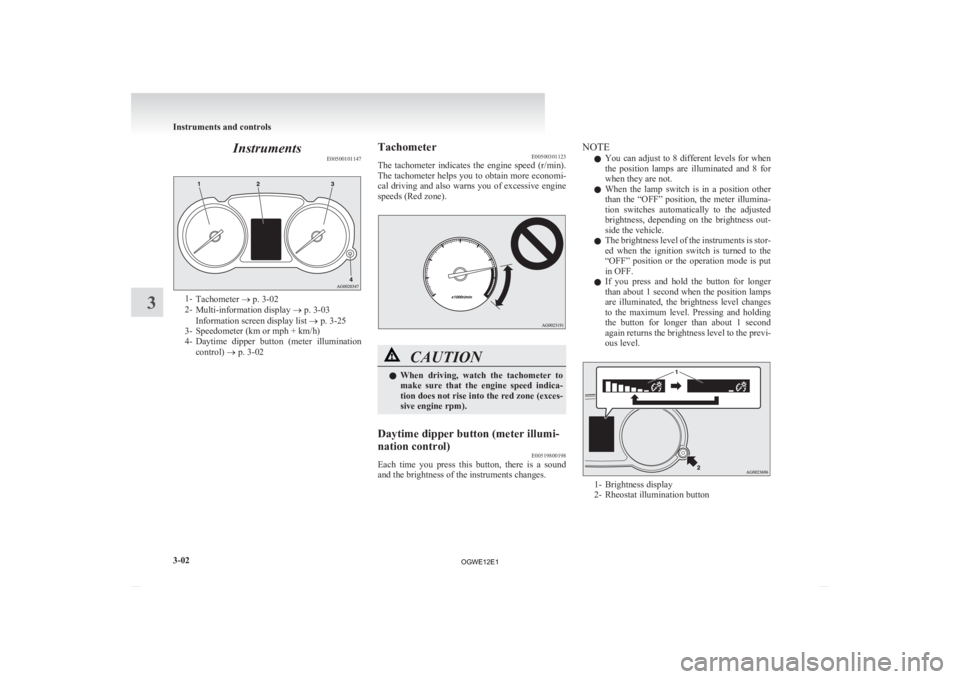
Instruments
E005001011471-
Tachometer ® p. 3-02
2- Multi-information display ® p. 3-03
Information screen display list ® p. 3-25
3- Speedometer (km or mph + km/h)
4- Daytime dipper button (meter illumination
control) ® p. 3-02 Tachometer
E00500301123
The
tachometer indicates the engine speed (r/min).
The tachometer helps you to obtain more economi-
cal driving and also warns you of excessive engine
speeds (Red zone). CAUTION
l
When
driving, watch the tachometer to
make sure that the engine speed indica-
tion does not rise into the red zone (exces-
sive engine rpm).
Daytime dipper button (meter illumi-
nation control) E00519800198
Each time you press this button, there is a sound
and the brightness of the instruments changes. NOTE
l You
can adjust to 8 different levels for when
the position lamps are illuminated and 8 for
when they are not.
l When the lamp switch is in a position other
than the “OFF” position, the meter illumina-
tion switches automatically to the adjusted
brightness, depending on the brightness out-
side the vehicle.
l The brightness level of the instruments is stor-
ed when the ignition switch is turned to the
“OFF” position or the operation mode is put
in OFF.
l If you press and hold the button for longer
than about 1 second when the position lamps
are illuminated, the brightness level changes
to the maximum level. Pressing and holding
the button for longer than about 1 second
again returns the brightness level to the previ-
ous level. 1- Brightness display
2-
Rheostat illumination button Instruments and controls
3-02
3
OGWE12E1
Page 99 of 378
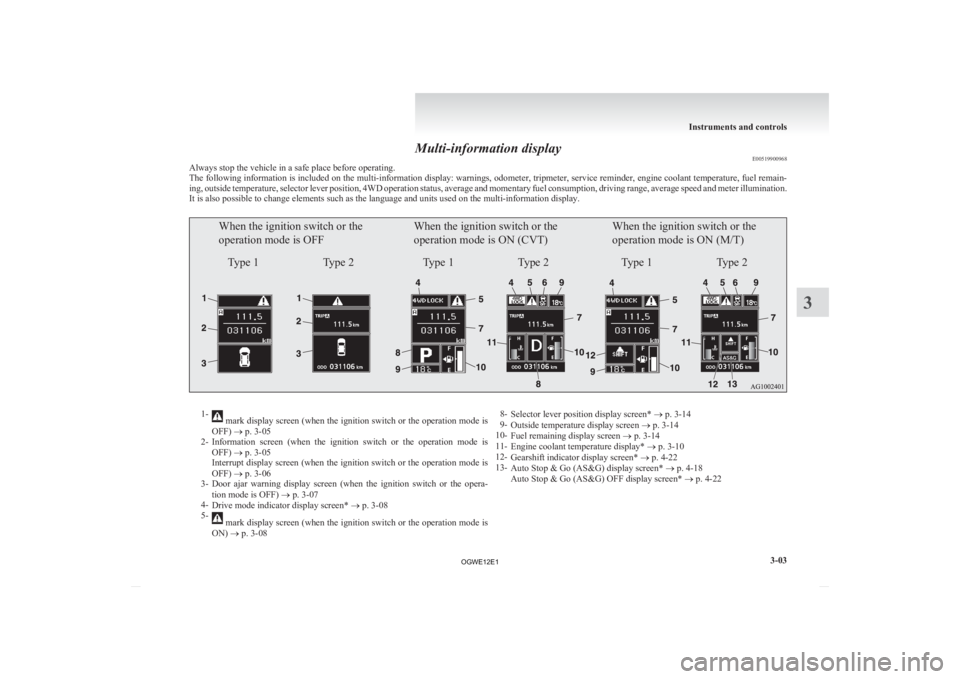
Multi-information display
E00519900968
Always stop the vehicle in a safe place before operating.
The
following information is included on the multi-information display: warnings, odometer, tripmeter, service reminder, engine coolant temperature, fuel remain-
ing, outside temperature, selector lever position, 4WD operation status, average and momentary fuel consumption, driving range, average speed and meter illumination.
It is also possible to change elements such as the language and units used on the multi-information display.
When the ignition switch or the
operation mode is OFF
Type 1 Type 2When the ignition switch or the
operation mode is ON (CVT)
Type 1 Type 2When the ignition switch or the
operation mode is ON (M/T)
Type 1 Type 21-
mark display screen (when the ignition switch or the operation mode is
OFF) ® p. 3-05
2- Information
screen (when the ignition switch or the operation mode is
OFF) ® p. 3-05
Interrupt display screen (when the ignition switch or the operation mode is
OFF) ® p. 3-06
3- Door ajar warning display screen (when the ignition switch or the opera-
tion mode is OFF) ® p. 3-07
4- Drive mode indicator display screen* ® p. 3-08
5- mark display screen (when the ignition switch or the operation mode is
ON) ® p. 3-08 8-
Selector lever position display screen* ® p. 3-14
9- Outside temperature display screen ® p. 3-14
10- Fuel remaining display screen ® p. 3-14
11- Engine coolant temperature display* ® p. 3-10
12- Gearshift indicator display screen* ® p. 4-22
13- Auto Stop & Go (AS&G) display screen* ® p. 4-18
Auto Stop & Go (AS&G) OFF display screen* ® p. 4-22 Instruments and controls
3-03 3
OGWE12E1
Page 100 of 378
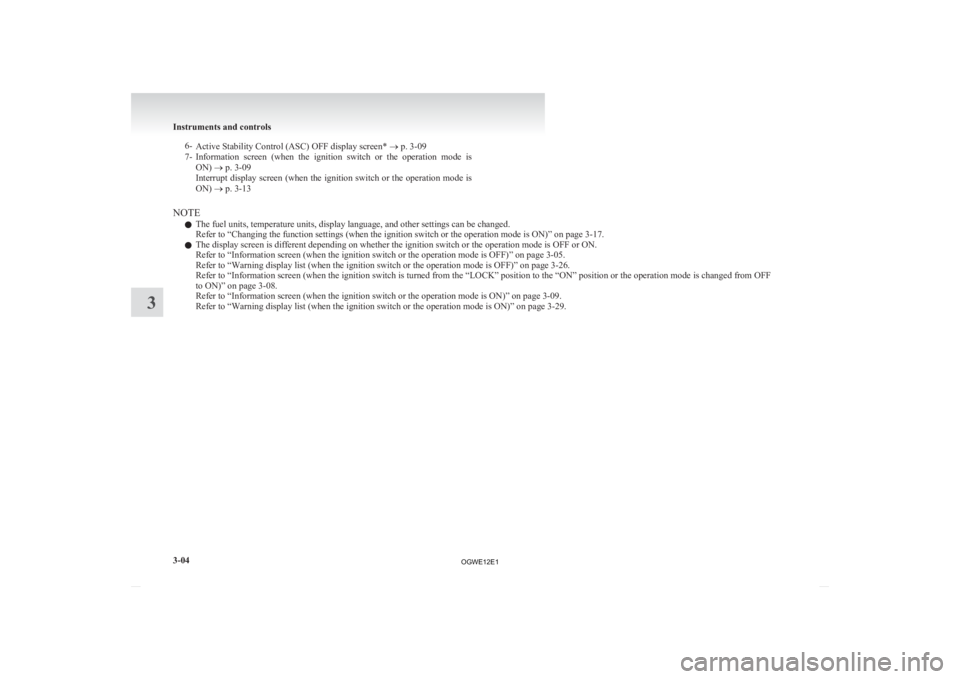
6-
Active Stability Control (ASC) OFF display screen* ® p. 3-09
7- Information screen (when the ignition switch or the operation mode is
ON) ® p. 3-09
Interrupt display screen (when the ignition switch or the operation mode is
ON) ® p. 3-13
NOTE l The fuel units, temperature units, display language, and other settings can be changed.
Refer to “Changing the function settings (when the ignition switch or the operation mode is ON)” on page
3-17.
l The display screen is different depending on whether the ignition switch or the operation mode is OFF or ON.
Refer to “Information screen (when the ignition switch or the operation mode is OFF)” on page
3-05.
Refer to “Warning display list (when the ignition switch or the operation mode is OFF)” on page 3-26.
Refer to “Information screen (when the ignition switch is turned from the “LOCK” position to the “ON” position or the operation mode is changed from OFF
to ON)” on page 3-08.
Refer to “Information screen (when the ignition switch or the operation mode is ON)” on page 3-09.
Refer to “Warning display list (when the ignition switch or the operation mode is ON)” on page 3-29.Instruments and controls
3-04
3
OGWE12E1
Page 101 of 378
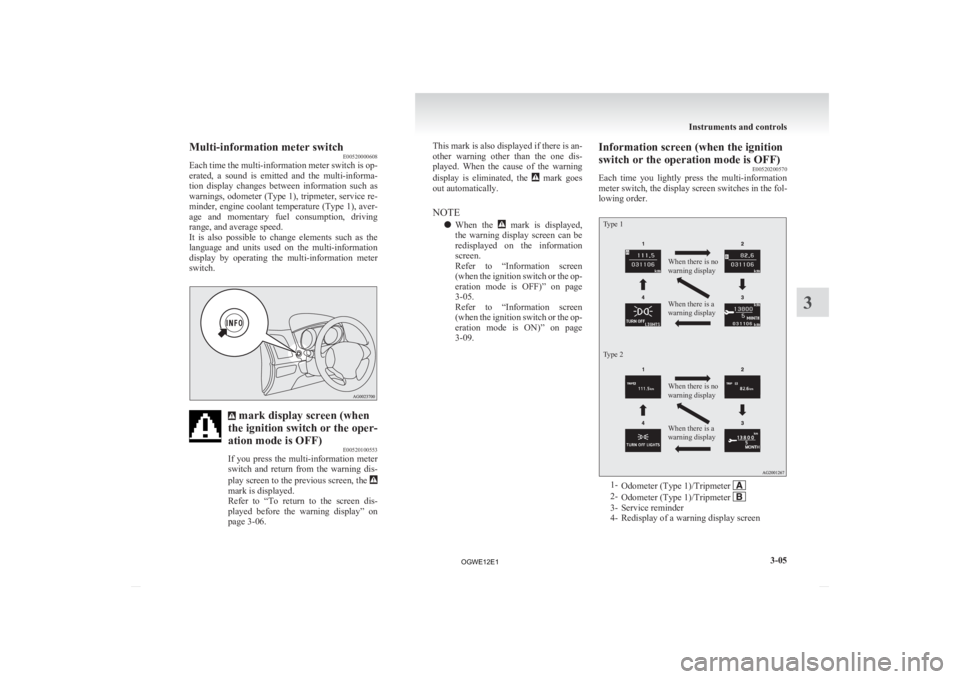
Multi-information meter switch
E00520000608
Each
time the multi-information meter switch is op-
erated, a sound is emitted and the multi-informa-
tion display changes between information such as
warnings, odometer (Type 1), tripmeter, service re-
minder, engine coolant temperature (Type 1), aver-
age and momentary fuel consumption, driving
range, and average speed.
It is also possible to change elements such as the
language and units used on the multi-information
display by operating the multi-information meter
switch. mark display screen (when
the ignition switch or the oper-
ation mode is OFF) E00520100553
If
you press the multi-information meter
switch and return from the warning dis-
play screen to the previous screen, the mark is displayed.
Refer
to “To return to the screen dis-
played before the warning display” on
page 3-06. This mark is also displayed if there is an-
other
warning other than the one dis-
played. When the cause of the warning
display is eliminated, the mark goes
out automatically.
NOTE
l When
the mark is displayed,
the
warning display screen can be
redisplayed on the information
screen.
Refer to “Information screen
(when the ignition switch or the op-
eration mode is OFF)” on page
3-05.
Refer to “Information screen
(when the ignition switch or the op-
eration mode is ON)” on page
3-09. Information screen (when the ignition
switch or the operation mode is OFF)
E00520200570
Each
time you lightly press the multi-information
meter switch, the display screen switches in the fol-
lowing order.
Type 1
Type 2 When there is no
warning display
When there is a
warning display
When there is no
warning display
When there is a
warning display
1-
Odometer (Type 1)/Tripmeter 2-
Odometer (Type 1)/Tripmeter 3- Service reminder
4-
Redisplay of a warning display screen Instruments and controls
3-05 3
OGWE12E1
Page 103 of 378
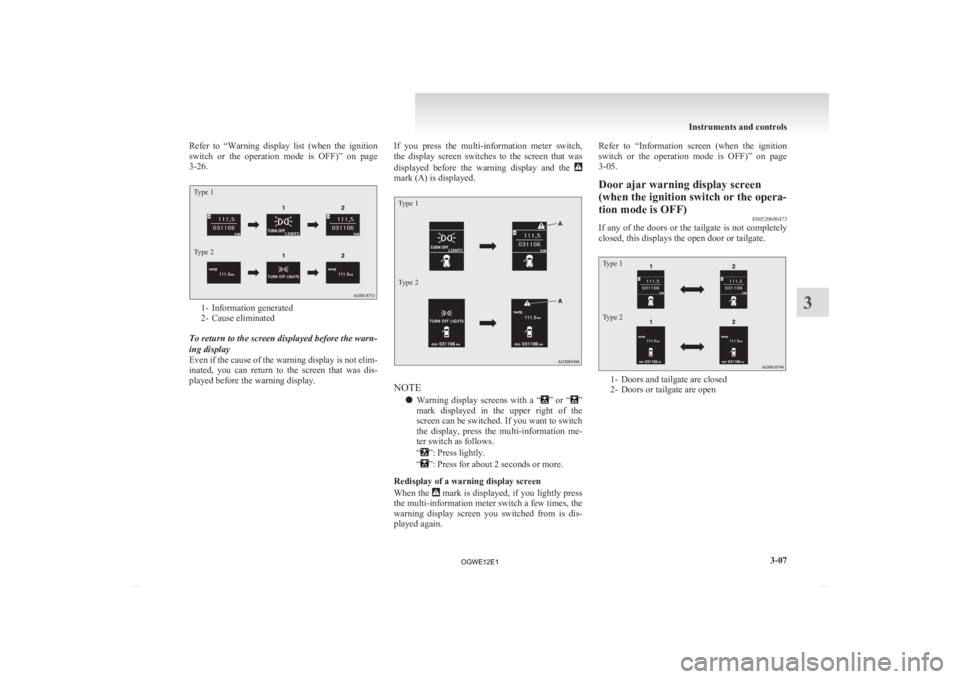
Refer to “Warning
display list (when the ignition
switch or the operation mode is OFF)” on page
3-26.
Type 1
Type 2 1- Information generated
2-
Cause eliminated
To return to the screen displayed before the warn-
ing display
Even if the cause of the warning display is not elim-
inated, you can return to the screen that was dis-
played before the warning display. If you press the multi-information meter switch,
the
display screen switches to the screen that was
displayed before the warning display and the mark (A) is displayed.
Type 1
Type 2
NOTE
l Warning
display screens with a “ ”
or “ ”
mark
displayed in the upper right of the
screen can be switched. If you want to switch
the display, press the multi-information me-
ter switch as follows.
“ ”: Press lightly.
“ ”: Press for about 2 seconds or more.
Redisplay of a warning display screen
When
the mark is displayed, if you lightly press
the
multi-information meter switch a few times, the
warning display screen you switched from is dis-
played again. Refer to “Information
screen (when the ignition
switch or the operation mode is OFF)” on page
3-05.
Door ajar warning display screen
(when the ignition switch or the opera-
tion mode is OFF) E00520600473
If any of the doors or the tailgate is not completely
closed, this displays the open door or tailgate.
Type 1
Type 2 1- Doors and tailgate are closed
2-
Doors or tailgate are open Instruments and controls
3-07 3
OGWE12E1
Page 104 of 378
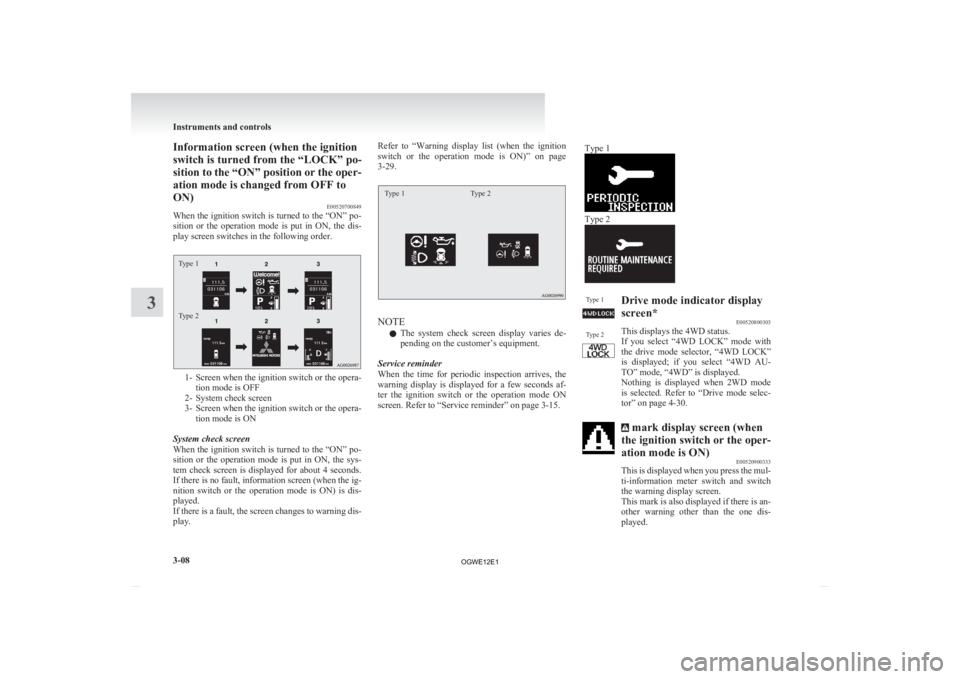
Information screen (when the ignition
switch is turned from the “LOCK” po-
sition
to the “ON” position or the oper-
ation mode is changed from OFF to
ON) E00520700849
When the ignition switch is turned to the “ON” po-
sition or the operation mode is put in ON, the dis-
play screen switches in the following order.
Type 1
Type 2 1- Screen when the ignition switch or the opera-
tion mode is OFF
2-
System check screen
3- Screen when the ignition switch or the opera- tion mode is ON
System check screen
When the ignition switch is turned to the “ON” po-
sition or the operation mode is put in ON, the sys-
tem check screen is displayed for about 4 seconds.
If there is no fault, information screen (when the ig-
nition switch or the operation mode is ON) is dis-
played.
If there is a fault, the screen changes to warning dis-
play. Refer to “Warning
display list (when the ignition
switch or the operation mode is ON)” on page
3-29.
Type 1 Type 2 NOTE
l The
system check screen display varies de-
pending on the customer’s equipment.
Service reminder
When the time for periodic inspection arrives, the
warning display is displayed for a few seconds af-
ter the ignition switch or the operation mode ON
screen. Refer to “Service reminder” on page 3-15. Type 1 Type 2
Type 1
Type 2 Drive mode indicator display
screen*
E00520800303
This displays the 4WD status.
If
you select “4WD LOCK” mode with
the drive mode selector, “4WD LOCK”
is displayed; if you select “4WD AU-
TO” mode, “4WD” is displayed.
Nothing is displayed when 2WD mode
is selected. Refer to “Drive mode selec-
tor” on page 4-30. mark display screen (when
the ignition switch or the oper-
ation mode is ON) E00520900333
This
is displayed when you press the mul-
ti-information meter switch and switch
the warning display screen.
This mark is also displayed if there is an-
other warning other than the one dis-
played. Instruments and controls
3-08
3
OGWE12E1
Page 105 of 378
When the cause of the warning display
is
eliminated, the mark goes out auto-
matically.
NOTE
l When
the mark is displayed,
the
warning display screen can be
redisplayed on the information
screen.
Refer to “Information screen
(when the ignition switch or the op-
eration mode is OFF)” on page
3-05.
Refer to “Information screen
(when the ignition switch or the op-
eration mode is ON)” on page
3-09. Active Stability Control (ASC)
OFF display screen*
E00521000373
This
is displayed when the Active Stabil-
ity Control (ASC) is turned off with the
ASC OFF switch.
If there is a fault with the ASC, the ASC
OFF display is shown.
Refer to ““ASC OFF” switch” on page
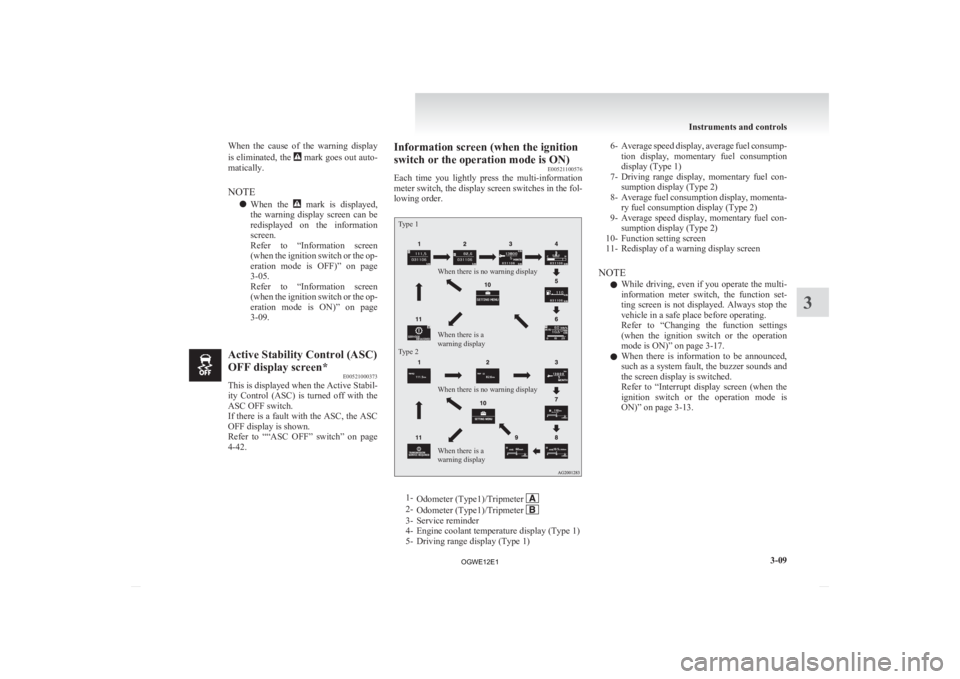
4-42. Information screen (when the ignition
switch or the operation mode is ON)
E00521100576
Each
time you lightly press the multi-information
meter switch, the display screen switches in the fol-
lowing order.
Type 1
Type 2 When there is no warning display
When there is no warning display
When there is a
warning display When there is a
warning display
1-
Odometer (Type1)/Tripmeter 2-
Odometer (Type1)/Tripmeter 3- Service reminder
4-
Engine coolant temperature display (Type 1)
5- Driving range display (Type 1) 6- Average
speed display, average fuel consump-
tion display, momentary fuel consumption
display (Type 1)
7- Driving range display, momentary fuel con- sumption display (Type 2)
8- Average fuel consumption display, momenta- ry fuel consumption display (Type 2)
9- Average speed display, momentary fuel con- sumption display (Type 2)
10- Function setting screen
11- Redisplay of a warning display screen
NOTE l While driving, even if you operate the multi-
information meter switch, the function set-
ting screen is not displayed. Always stop the
vehicle in a safe place before operating.
Refer to “Changing the function settings
(when the ignition switch or the operation
mode is ON)” on page 3-17.
l When there is information to be announced,
such as a system fault, the buzzer sounds and
the screen display is switched.
Refer to “Interrupt display screen (when the
ignition switch or the operation mode is
ON)” on page 3-13. Instruments and controls
3-09 3
OGWE12E1
Page 107 of 378
l
The display setting can be changed to the pre-
ferred units (km or miles). Refer to “Chang-
ing the function settings (when the ignition
switch or the operation mode is ON)” on
page 3-17.
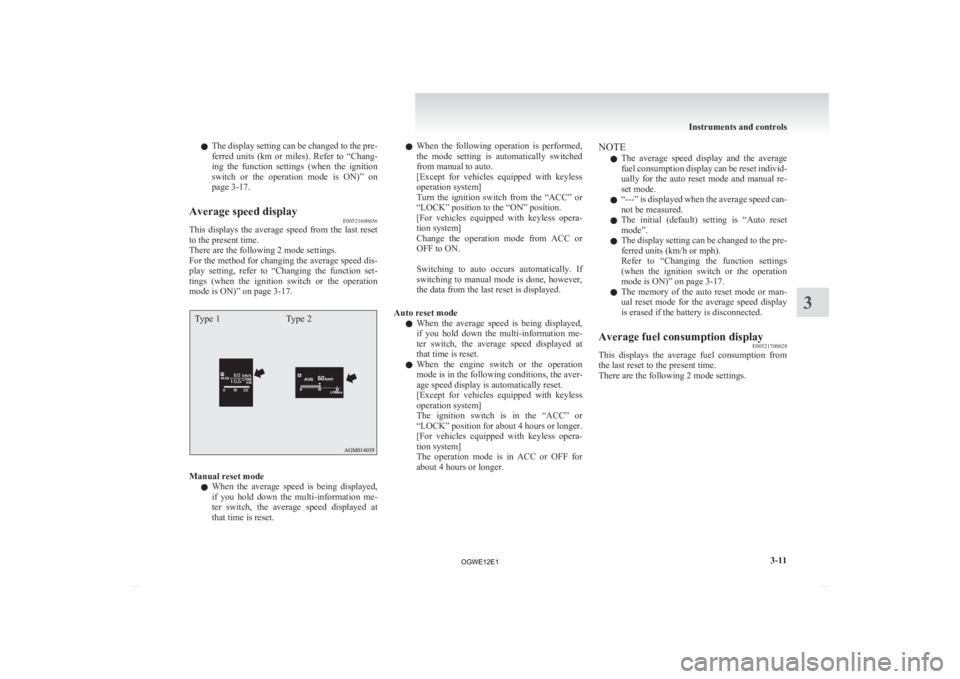
Average speed display E00521600656
This displays the average speed from the last reset
to the present time.
There are the following 2 mode settings.
For
the method for changing the average speed dis-
play setting, refer to “Changing the function set-
tings (when the ignition switch or the operation
mode is ON)” on page 3-17.
Type 1 Type 2Manual reset mode
l When
the average speed is being displayed,
if you hold down the multi-information me-
ter switch, the average speed displayed at
that time is reset. l
When
the following operation is performed,
the mode setting is automatically switched
from manual to auto.
[Except for vehicles equipped with keyless
operation system]
Turn the ignition switch from the “ACC” or
“LOCK” position to the “ON” position.
[For vehicles equipped with keyless opera-
tion system]
Change the operation mode from ACC or
OFF to ON.
Switching to auto occurs automatically. If
switching to manual mode is done, however,
the data from the last reset is displayed.
Auto reset mode l When the average speed is being displayed,
if you hold down the multi-information me-
ter switch, the average speed displayed at
that time is reset.
l When the engine switch or the operation
mode is in the following conditions, the aver-
age speed display is automatically reset.
[Except for vehicles equipped with keyless
operation system]
The ignition switch is in the “ACC” or
“LOCK” position for about 4 hours or longer.
[For vehicles equipped with keyless opera-
tion system]
The operation mode is in ACC or OFF for
about 4 hours or longer. NOTE
l The
average speed display and the average
fuel consumption display can be reset individ-
ually for the auto reset mode and manual re-
set mode.
l “---” is displayed when the average speed can-
not be measured.
l The initial (default) setting is “Auto reset
mode”.
l The display setting can be changed to the pre-
ferred units (km/h or mph).
Refer to “Changing the function settings
(when the ignition switch or the operation
mode is ON)” on page 3-17.
l The memory of the auto reset mode or man-
ual reset mode for the average speed display
is erased if the battery is disconnected.
Average fuel consumption display E00521700628
This displays the average fuel consumption from
the last reset to the present time.
There are the following 2 mode settings. Instruments and controls
3-11 3
OGWE12E1
Page 108 of 378
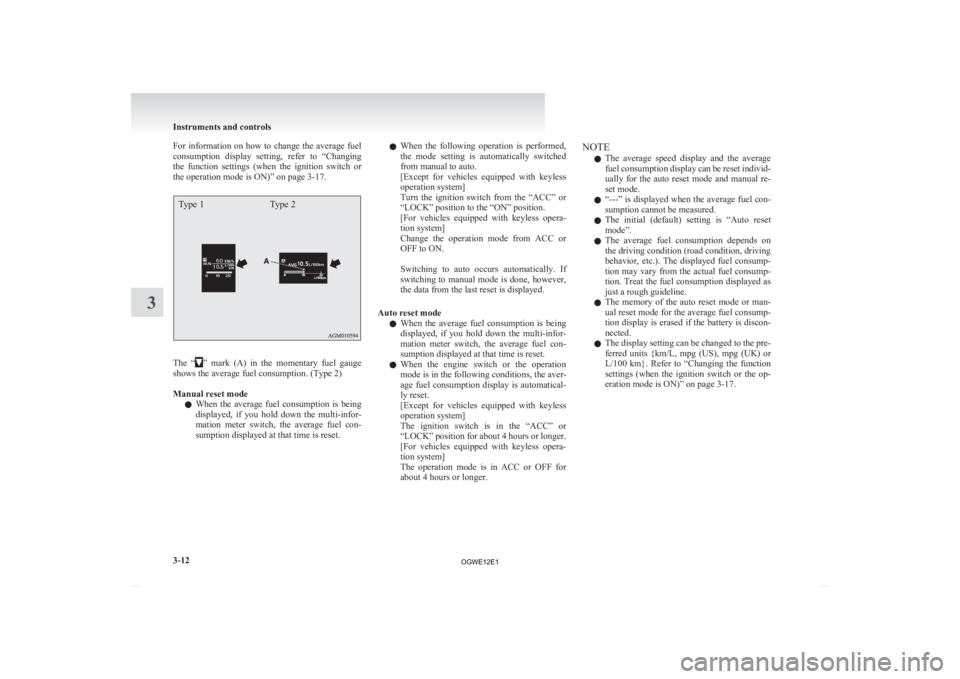
For information on how to change the average fuel
consumption
display setting, refer to “Changing
the function settings (when the ignition switch or
the operation mode is ON)” on page 3-17.
Type 1 Type 2The “ ”
mark (A) in the momentary fuel gauge
shows the average fuel consumption. (Type 2)
Manual reset mode
l When the average fuel consumption is being
displayed, if you hold down the multi-infor-
mation meter switch, the average fuel con-
sumption displayed at that time is reset. l
When
the following operation is performed,
the mode setting is automatically switched
from manual to auto.
[Except for vehicles equipped with keyless
operation system]
Turn the ignition switch from the “ACC” or
“LOCK” position to the “ON” position.
[For vehicles equipped with keyless opera-
tion system]
Change the operation mode from ACC or
OFF to ON.
Switching to auto occurs automatically. If
switching to manual mode is done, however,
the data from the last reset is displayed.
Auto reset mode l When the average fuel consumption is being
displayed, if you hold down the multi-infor-
mation meter switch, the average fuel con-
sumption displayed at that time is reset.
l When the engine switch or the operation
mode is in the following conditions, the aver-
age fuel consumption display is automatical-
ly reset.
[Except for vehicles equipped with keyless
operation system]
The ignition switch is in the “ACC” or
“LOCK” position for about 4 hours or longer.
[For vehicles equipped with keyless opera-
tion system]
The operation mode is in ACC or OFF for
about 4 hours or longer. NOTE
l The
average speed display and the average
fuel consumption display can be reset individ-
ually for the auto reset mode and manual re-
set mode.
l “---” is displayed when the average fuel con-
sumption cannot be measured.
l The initial (default) setting is “Auto reset
mode”.
l The average fuel consumption depends on
the driving condition (road condition, driving
behavior, etc.). The displayed fuel consump-
tion may vary from the actual fuel consump-
tion. Treat the fuel consumption displayed as
just a rough guideline.
l The memory of the auto reset mode or man-
ual reset mode for the average fuel consump-
tion display is erased if the battery is discon-
nected.
l The display setting can be changed to the pre-
ferred units {km/L, mpg (US), mpg (UK) or
L/100 km}. Refer to “Changing the function
settings (when the ignition switch or the op-
eration mode is ON)” on page 3-17. Instruments and controls
3-12
3
OGWE12E1