engine MITSUBISHI ASX 2012 (in English) Owner's Guide
[x] Cancel search | Manufacturer: MITSUBISHI, Model Year: 2012, Model line: ASX, Model: MITSUBISHI ASX 2012Pages: 378, PDF Size: 18.2 MB
Page 105 of 378
When the cause of the warning display
is
eliminated, the mark goes out auto-
matically.
NOTE
l When
the mark is displayed,
the
warning display screen can be
redisplayed on the information
screen.
Refer to “Information screen
(when the ignition switch or the op-
eration mode is OFF)” on page
3-05.
Refer to “Information screen
(when the ignition switch or the op-
eration mode is ON)” on page
3-09. Active Stability Control (ASC)
OFF display screen*
E00521000373
This
is displayed when the Active Stabil-
ity Control (ASC) is turned off with the
ASC OFF switch.
If there is a fault with the ASC, the ASC
OFF display is shown.
Refer to ““ASC OFF” switch” on page
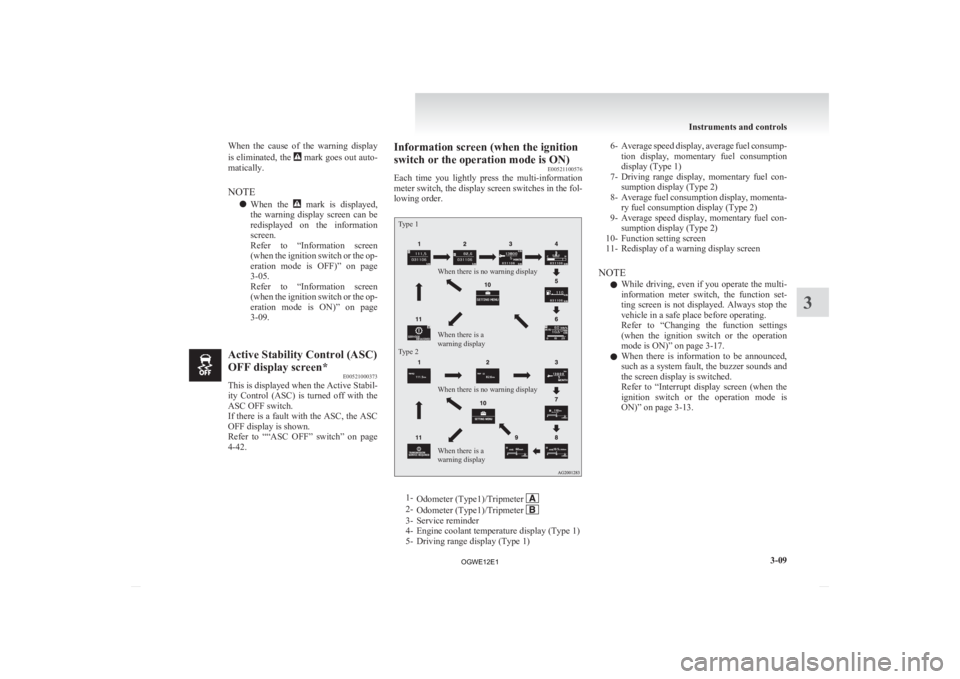
4-42. Information screen (when the ignition
switch or the operation mode is ON)
E00521100576
Each
time you lightly press the multi-information
meter switch, the display screen switches in the fol-
lowing order.
Type 1
Type 2 When there is no warning display
When there is no warning display
When there is a
warning display When there is a
warning display
1-
Odometer (Type1)/Tripmeter 2-
Odometer (Type1)/Tripmeter 3- Service reminder
4-
Engine coolant temperature display (Type 1)
5- Driving range display (Type 1) 6- Average
speed display, average fuel consump-
tion display, momentary fuel consumption
display (Type 1)
7- Driving range display, momentary fuel con- sumption display (Type 2)
8- Average fuel consumption display, momenta- ry fuel consumption display (Type 2)
9- Average speed display, momentary fuel con- sumption display (Type 2)
10- Function setting screen
11- Redisplay of a warning display screen
NOTE l While driving, even if you operate the multi-
information meter switch, the function set-
ting screen is not displayed. Always stop the
vehicle in a safe place before operating.
Refer to “Changing the function settings
(when the ignition switch or the operation
mode is ON)” on page 3-17.
l When there is information to be announced,
such as a system fault, the buzzer sounds and
the screen display is switched.
Refer to “Interrupt display screen (when the
ignition switch or the operation mode is
ON)” on page 3-13. Instruments and controls
3-09 3
OGWE12E1
Page 106 of 378
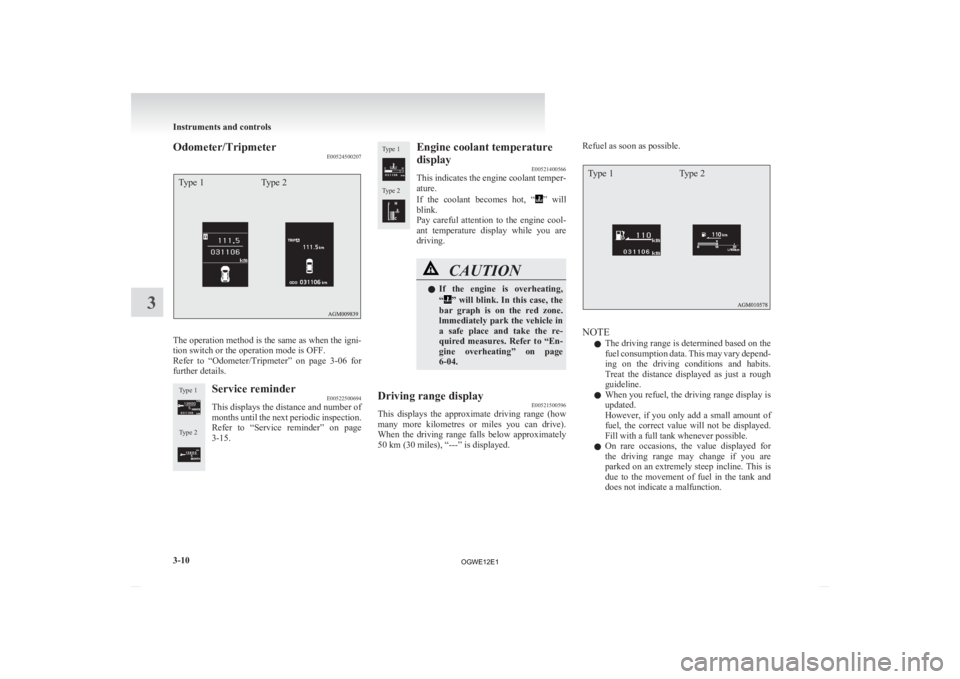
Odometer/Tripmeter
E00524500207Type 1Type 2The operation method is the same as when the igni-
tion switch or the operation mode is OFF.
Refer
to “Odometer/Tripmeter” on page 3-06 for
further details.
Type 1
Type 2 Service reminder
E00522500694
This displays the distance and number of
months
until the next periodic inspection.
Refer to “Service reminder” on page
3-15.
Type 1
Type 2 Engine coolant temperature
display
E00521400566
This
indicates the engine coolant temper-
ature.
If the coolant becomes hot, “ ”
will
blink.
Pay careful attention to the engine cool-
ant temperature display while you are
driving. CAUTION
l
If
the engine is overheating,
“ ” will blink. In this case, the
bar graph is on the red zone.
lmmediately park the vehicle in
a safe place and take the re-
quired measures. Refer to “En-
gine overheating” on page
6-04.
Driving range display E00521500596
This displays the approximate driving range (how
many
more kilometres or miles you can drive).
When the driving range falls below approximately
50 km (30 miles), “---” is displayed. Refuel as soon as possible.
Type 1
Type 2 NOTE
l The
driving range is determined based on the
fuel consumption data. This may vary depend-
ing on the driving conditions and habits.
Treat the distance displayed as just a rough
guideline.
l When you refuel, the driving range display is
updated.
However, if you only add a small amount of
fuel, the correct value will not be displayed.
Fill with a full tank whenever possible.
l On rare occasions, the value displayed for
the driving range may change if you are
parked on an extremely steep incline. This is
due to the movement of fuel in the tank and
does not indicate a malfunction. Instruments and controls
3-10
3
OGWE12E1
Page 107 of 378
l
The display setting can be changed to the pre-
ferred units (km or miles). Refer to “Chang-
ing the function settings (when the ignition
switch or the operation mode is ON)” on
page 3-17.
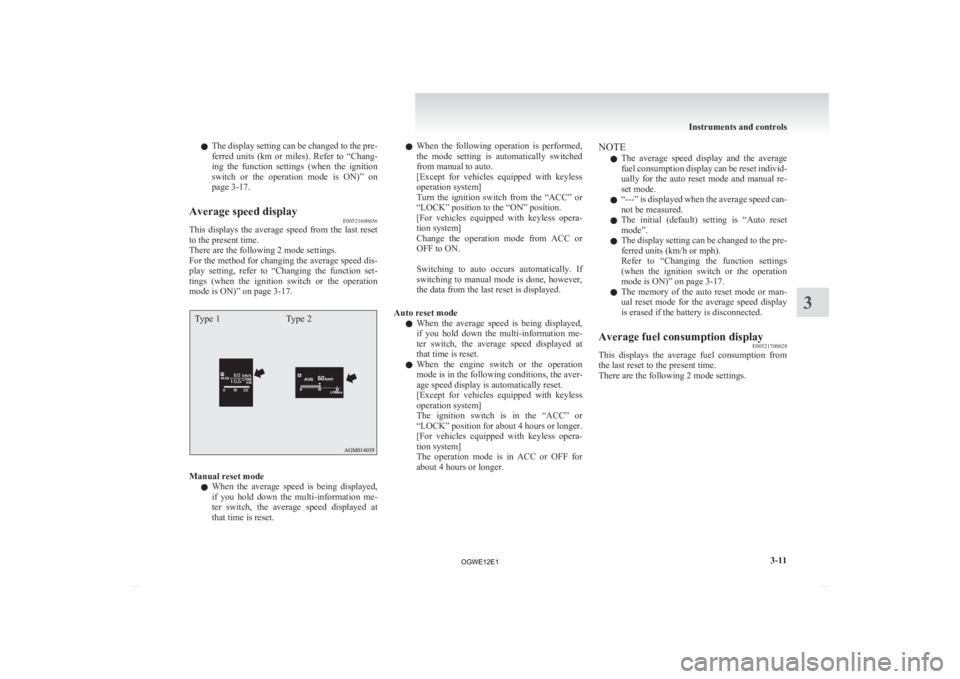
Average speed display E00521600656
This displays the average speed from the last reset
to the present time.
There are the following 2 mode settings.
For
the method for changing the average speed dis-
play setting, refer to “Changing the function set-
tings (when the ignition switch or the operation
mode is ON)” on page 3-17.
Type 1 Type 2Manual reset mode
l When
the average speed is being displayed,
if you hold down the multi-information me-
ter switch, the average speed displayed at
that time is reset. l
When
the following operation is performed,
the mode setting is automatically switched
from manual to auto.
[Except for vehicles equipped with keyless
operation system]
Turn the ignition switch from the “ACC” or
“LOCK” position to the “ON” position.
[For vehicles equipped with keyless opera-
tion system]
Change the operation mode from ACC or
OFF to ON.
Switching to auto occurs automatically. If
switching to manual mode is done, however,
the data from the last reset is displayed.
Auto reset mode l When the average speed is being displayed,
if you hold down the multi-information me-
ter switch, the average speed displayed at
that time is reset.
l When the engine switch or the operation
mode is in the following conditions, the aver-
age speed display is automatically reset.
[Except for vehicles equipped with keyless
operation system]
The ignition switch is in the “ACC” or
“LOCK” position for about 4 hours or longer.
[For vehicles equipped with keyless opera-
tion system]
The operation mode is in ACC or OFF for
about 4 hours or longer. NOTE
l The
average speed display and the average
fuel consumption display can be reset individ-
ually for the auto reset mode and manual re-
set mode.
l “---” is displayed when the average speed can-
not be measured.
l The initial (default) setting is “Auto reset
mode”.
l The display setting can be changed to the pre-
ferred units (km/h or mph).
Refer to “Changing the function settings
(when the ignition switch or the operation
mode is ON)” on page 3-17.
l The memory of the auto reset mode or man-
ual reset mode for the average speed display
is erased if the battery is disconnected.
Average fuel consumption display E00521700628
This displays the average fuel consumption from
the last reset to the present time.
There are the following 2 mode settings. Instruments and controls
3-11 3
OGWE12E1
Page 108 of 378
For information on how to change the average fuel
consumption
display setting, refer to “Changing
the function settings (when the ignition switch or
the operation mode is ON)” on page 3-17.
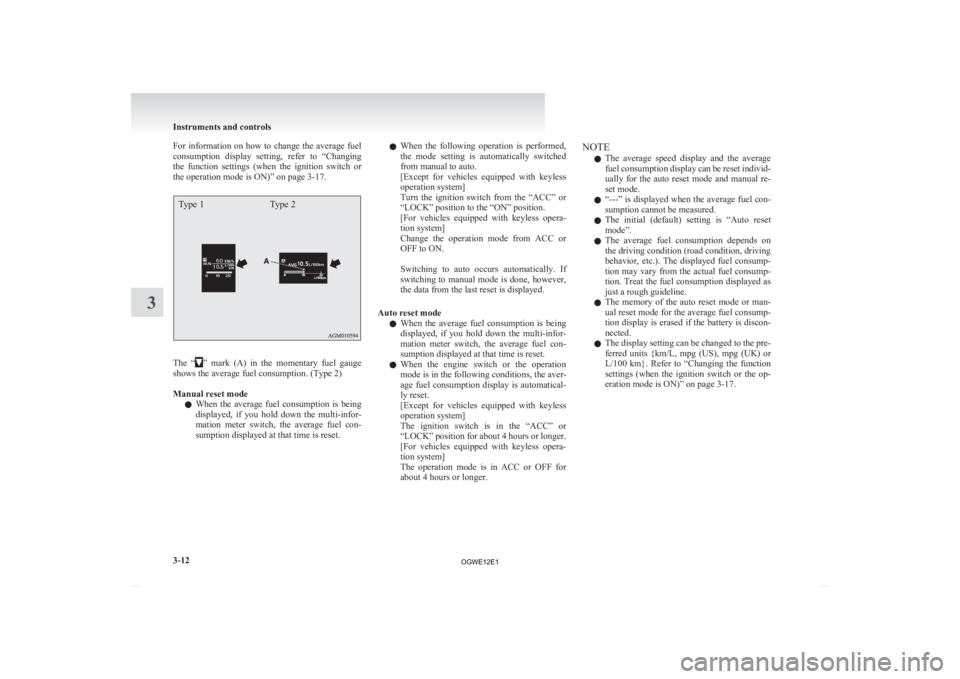
Type 1 Type 2The “ ”
mark (A) in the momentary fuel gauge
shows the average fuel consumption. (Type 2)
Manual reset mode
l When the average fuel consumption is being
displayed, if you hold down the multi-infor-
mation meter switch, the average fuel con-
sumption displayed at that time is reset. l
When
the following operation is performed,
the mode setting is automatically switched
from manual to auto.
[Except for vehicles equipped with keyless
operation system]
Turn the ignition switch from the “ACC” or
“LOCK” position to the “ON” position.
[For vehicles equipped with keyless opera-
tion system]
Change the operation mode from ACC or
OFF to ON.
Switching to auto occurs automatically. If
switching to manual mode is done, however,
the data from the last reset is displayed.
Auto reset mode l When the average fuel consumption is being
displayed, if you hold down the multi-infor-
mation meter switch, the average fuel con-
sumption displayed at that time is reset.
l When the engine switch or the operation
mode is in the following conditions, the aver-
age fuel consumption display is automatical-
ly reset.
[Except for vehicles equipped with keyless
operation system]
The ignition switch is in the “ACC” or
“LOCK” position for about 4 hours or longer.
[For vehicles equipped with keyless opera-
tion system]
The operation mode is in ACC or OFF for
about 4 hours or longer. NOTE
l The
average speed display and the average
fuel consumption display can be reset individ-
ually for the auto reset mode and manual re-
set mode.
l “---” is displayed when the average fuel con-
sumption cannot be measured.
l The initial (default) setting is “Auto reset
mode”.
l The average fuel consumption depends on
the driving condition (road condition, driving
behavior, etc.). The displayed fuel consump-
tion may vary from the actual fuel consump-
tion. Treat the fuel consumption displayed as
just a rough guideline.
l The memory of the auto reset mode or man-
ual reset mode for the average fuel consump-
tion display is erased if the battery is discon-
nected.
l The display setting can be changed to the pre-
ferred units {km/L, mpg (US), mpg (UK) or
L/100 km}. Refer to “Changing the function
settings (when the ignition switch or the op-
eration mode is ON)” on page 3-17. Instruments and controls
3-12
3
OGWE12E1
Page 114 of 378
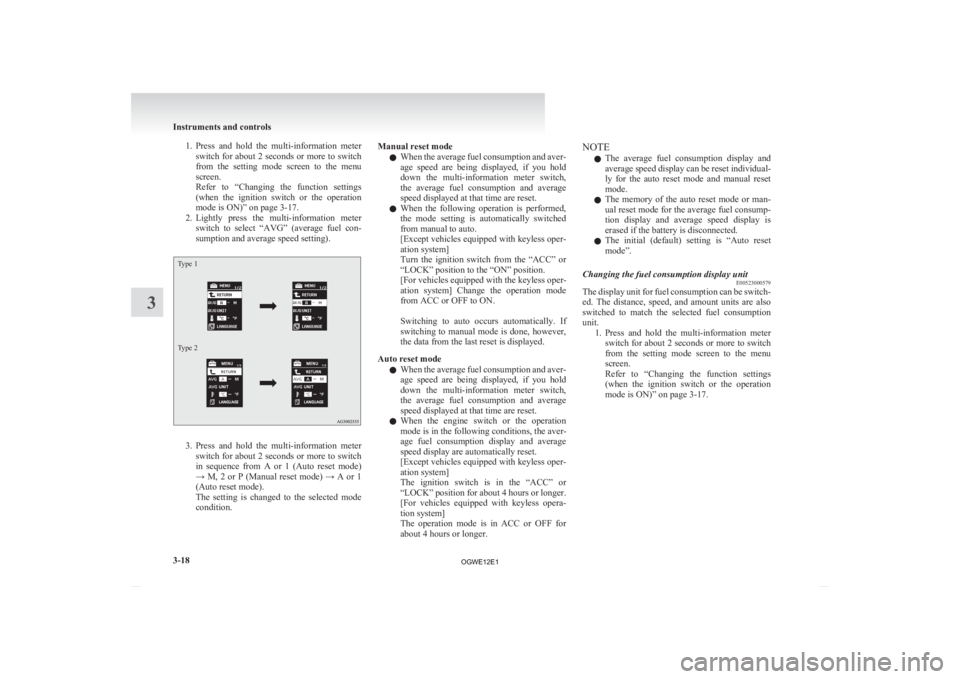
1. Press and hold the multi-information meter
switch for about 2 seconds or more to switch
from the setting mode screen to the menu
screen.
Refer to “Changing the function settings
(when the ignition switch or the operation
mode is ON)” on page 3-17.
2. Lightly press the multi-information meter switch to select “AVG” (average fuel con-
sumption and average speed setting).
Type 1
Type 2 3. Press
and hold the multi-information meter
switch for about 2 seconds or more to switch
in sequence from A or 1 (Auto reset mode)
→ M, 2 or P (Manual reset mode) → A or 1
(Auto reset mode).
The setting is changed to the selected mode
condition. Manual reset mode
l When
the average fuel consumption and aver-
age speed are being displayed, if you hold
down the multi-information meter switch,
the average fuel consumption and average
speed displayed at that time are reset.
l When the following operation is performed,
the mode setting is automatically switched
from manual to auto.
[Except vehicles equipped with keyless oper-
ation system]
Turn the ignition switch from the “ACC” or
“LOCK” position to the “ON” position.
[For vehicles equipped with the keyless oper-
ation system] Change the operation mode
from ACC or OFF to ON.
Switching to auto occurs automatically. If
switching to manual mode is done, however,
the data from the last reset is displayed.
Auto reset mode l When the average fuel consumption and aver-
age speed are being displayed, if you hold
down the multi-information meter switch,
the average fuel consumption and average
speed displayed at that time are reset.
l When the engine switch or the operation
mode is in the following conditions, the aver-
age fuel consumption display and average
speed display are automatically reset.
[Except vehicles equipped with keyless oper-
ation system]
The ignition switch is in the “ACC” or
“LOCK” position for about 4 hours or longer.
[For vehicles equipped with keyless opera-
tion system]
The operation mode is in ACC or OFF for
about 4 hours or longer. NOTE
l The
average fuel consumption display and
average speed display can be reset individual-
ly for the auto reset mode and manual reset
mode.
l The memory of the auto reset mode or man-
ual reset mode for the average fuel consump-
tion display and average speed display is
erased if the battery is disconnected.
l The initial (default) setting is “Auto reset
mode”.
Changing the fuel consumption display unit E00523000579
The display unit for fuel consumption can be switch-
ed.
The distance, speed, and amount units are also
switched to match the selected fuel consumption
unit. 1. Press and hold the multi-information meterswitch for about 2 seconds or more to switch
from the setting mode screen to the menu
screen.
Refer to “Changing the function settings
(when the ignition switch or the operation
mode is ON)” on page 3-17. Instruments and controls
3-18
3
OGWE12E1
Page 120 of 378
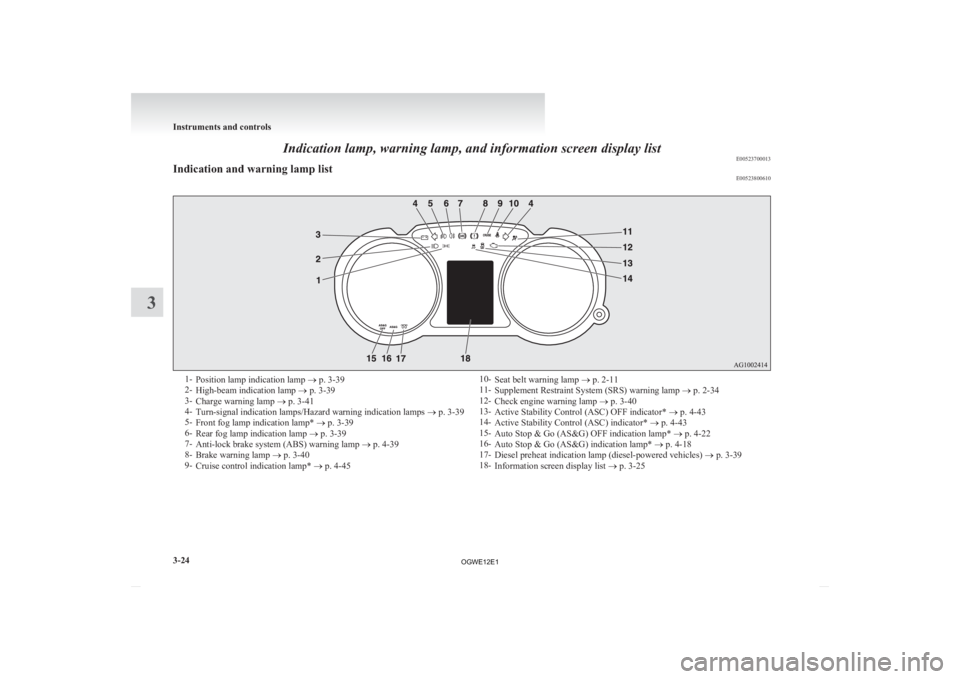
Indication lamp, warning lamp, and information screen display list
E00523700013
Indication and warning lamp list E005238006101-
Position lamp indication lamp ® p. 3-39
2- High-beam indication lamp ® p. 3-39
3- Charge warning lamp ® p. 3-41
4- Turn-signal indication lamps/Hazard warning indication lamps ® p. 3-39
5- Front fog lamp indication lamp* ® p. 3-39
6- Rear fog lamp indication lamp ® p. 3-39
7- Anti-lock brake system (ABS) warning lamp ® p. 4-39
8- Brake warning lamp ® p. 3-40
9- Cruise control indication lamp* ® p. 4-45 10-
Seat belt warning lamp ® p. 2-11
11- Supplement Restraint System (SRS) warning lamp ® p. 2-34
12- Check engine warning lamp ® p. 3-40
13- Active Stability Control (ASC) OFF indicator* ® p. 4-43
14- Active Stability Control (ASC) indicator* ® p. 4-43
15- Auto Stop & Go (AS&G) OFF indication lamp* ® p. 4-22
16- Auto Stop & Go (AS&G) indication lamp* ® p. 4-18
17- Diesel preheat indication lamp (diesel-powered vehicles) ® p. 3-39
18- Information screen display list ® p. 3-25Instruments and controls
3-24
3
OGWE12E1
Page 124 of 378
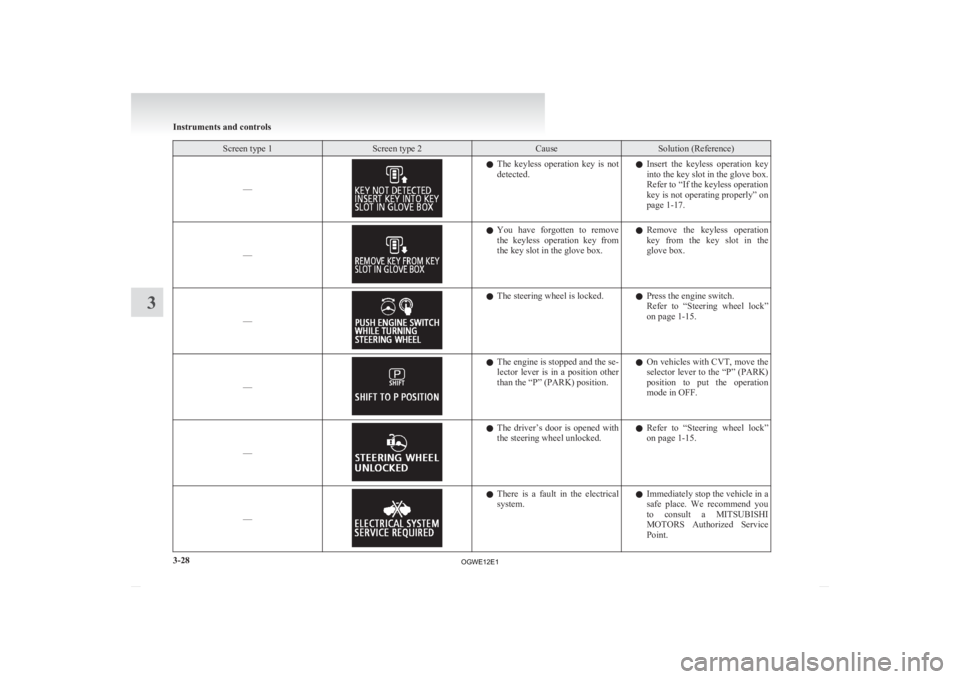
Screen type 1 Screen type 2 Cause Solution (Reference)
–– l
The keyless operation key is not
detected. l
Insert the keyless operation key
into the key slot in the glove box.
Refer to “If the keyless operation
key is not operating properly” on
page 1-17.
–– l
You
have forgotten to remove
the keyless operation key from
the key slot in the glove box. l
Remove the keyless operation
key from the key slot in the
glove box.
–– l
The steering wheel is locked.
lPress the engine switch.
Refer
to “Steering wheel lock”
on page 1-15.
–– l
The engine is stopped and the se-
lector
lever is in a position other
than the “P” (PARK) position. l
On vehicles with CVT, move the
selector lever to the “P” (PARK)
position to put the operation
mode in OFF.
–– l
The
driver’s door is opened with
the steering wheel unlocked. l
Refer to “Steering wheel lock”
on page 1-15.
–– l
There
is a fault in the electrical
system. l
Immediately stop the vehicle in a
safe place. We recommend you
to consult a MITSUBISHI
MOTORS Authorized Service
Point. Instruments and controls
3-28
3
OGWE12E1
Page 127 of 378
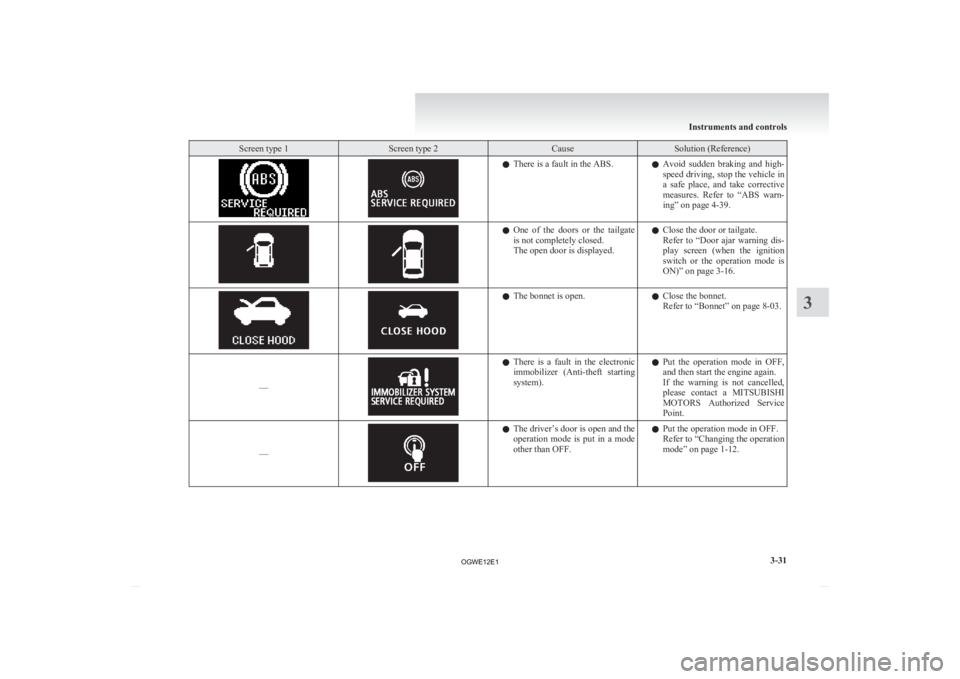
Screen type 1 Screen type 2 Cause Solution (Reference)
l
There is a fault in the ABS.
lAvoid sudden braking and high-
speed driving, stop the vehicle in
a safe place, and take corrective
measures. Refer to “ABS warn-
ing” on page 4-39. l
One
of the doors or the tailgate
is not completely closed.
The open door is displayed. l
Close the door or tailgate.
Refer
to “Door ajar warning dis-
play screen (when the ignition
switch or the operation mode is
ON)” on page 3-16. l
The bonnet is open.
lClose the bonnet.
Refer to “Bonnet” on page
8-03.
–– l
There
is a fault in the electronic
immobilizer (Anti-theft starting
system). l
Put the operation mode in OFF,
and then start the engine again.
If the warning is not cancelled,
please contact a MITSUBISHI
MOTORS Authorized Service
Point.
–– l
The
driver’s door is open and the
operation mode is put in a mode
other than OFF. l
Put the operation mode in OFF.
Refer to
“Changing the operation
mode” on page 1-12. Instruments and controls
3-31 3
OGWE12E1
Page 128 of 378
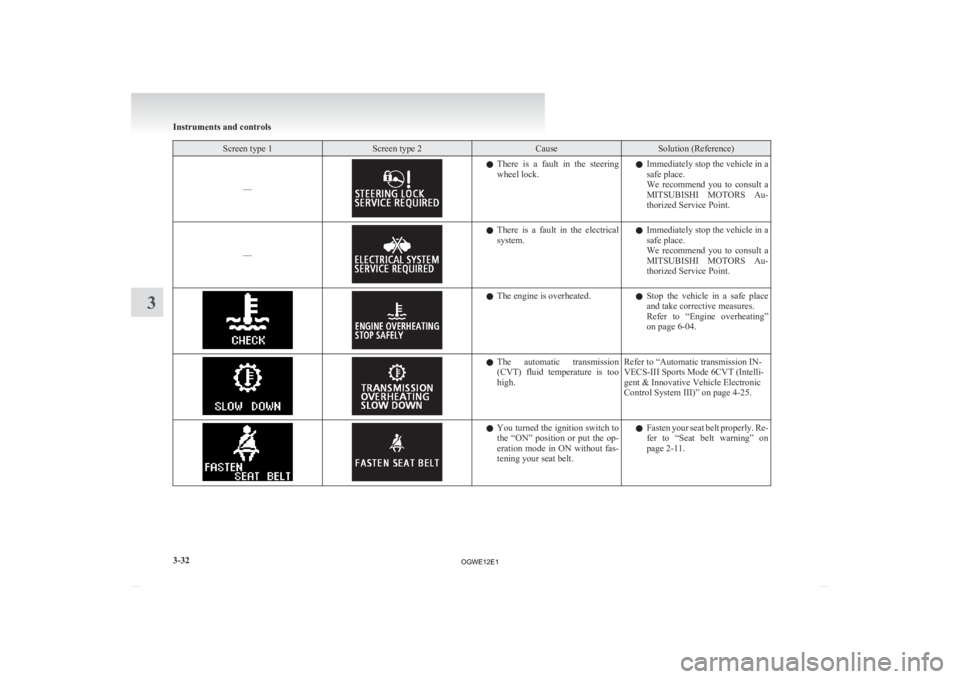
Screen type 1 Screen type 2 Cause Solution (Reference)
–– l
There is a fault in the steering
wheel lock. l
Immediately stop the vehicle in a
safe place.
We recommend you to consult a
MITSUBISHI MOTORS Au-
thorized Service Point.
–– l
There
is a fault in the electrical
system. l
Immediately stop the vehicle in a
safe place.
We recommend you to consult a
MITSUBISHI MOTORS Au-
thorized Service Point. l
The engine is overheated.
lStop
the vehicle in a safe place
and take corrective measures.
Refer to “Engine overheating”
on page 6-04. l
The
automatic transmission
(CVT) fluid temperature is too
high. Refer to “Automatic transmission IN-
VECS-III Sports Mode 6CVT (Intelli-
gent & Innovative Vehicle Electronic
Control System III)” on page 4-25. l
You
turned the ignition switch to
the “ON” position or put the op-
eration mode in ON without fas-
tening your seat belt. l
Fasten your seat belt properly. Re-
fer to “Seat belt warning” on
page 2-11. Instruments and controls
3-32
3
OGWE12E1
Page 129 of 378
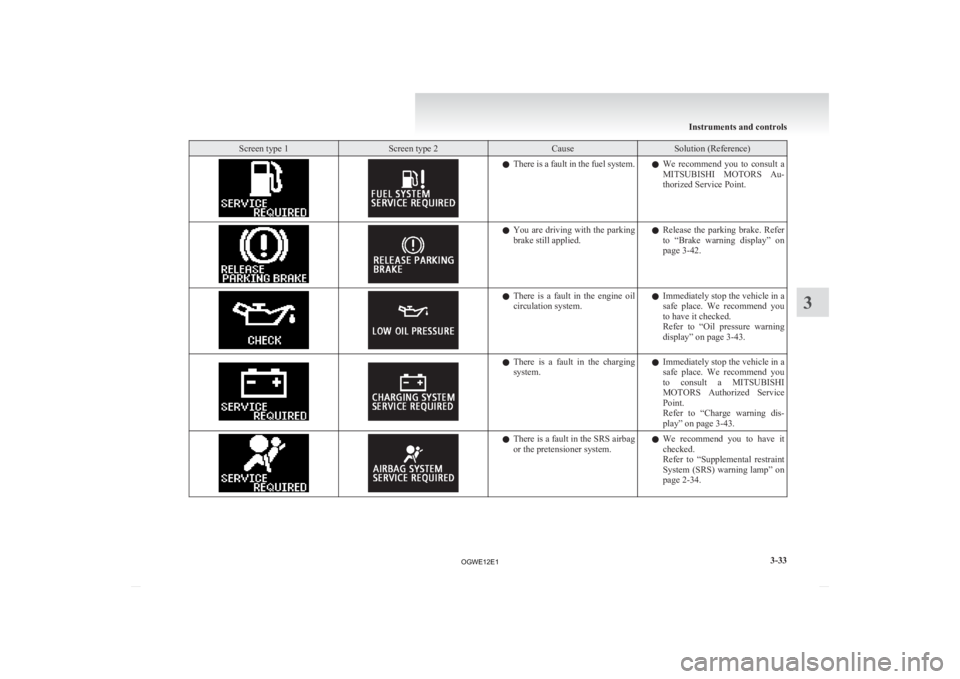
Screen type 1 Screen type 2 Cause Solution (Reference)
l
There is a fault in the fuel system.
lWe recommend you to consult a
MITSUBISHI MOTORS Au-
thorized Service Point. l
You
are driving with the parking
brake still applied. l
Release the parking brake. Refer
to “Brake warning display” on
page 3-42. l
There
is a fault in the engine oil
circulation system. l
Immediately stop the vehicle in a
safe place. We recommend you
to have it checked.
Refer to “Oil pressure warning
display” on page 3-43. l
There
is a fault in the charging
system. l
Immediately stop the vehicle in a
safe place. We recommend you
to consult a MITSUBISHI
MOTORS Authorized Service
Point.
Refer to “Charge warning dis-
play” on page 3-43. l
There
is a fault in the SRS airbag
or the pretensioner system. l
We recommend you to have it
checked.
Refer to “Supplemental restraint
System (SRS) warning lamp” on
page 2-34. Instruments and controls
3-33 3
OGWE12E1