keyless MITSUBISHI ASX 2012 (in English) Service Manual
[x] Cancel search | Manufacturer: MITSUBISHI, Model Year: 2012, Model line: ASX, Model: MITSUBISHI ASX 2012Pages: 378, PDF Size: 18.2 MB
Page 142 of 378
• Turn the lamp switch to the “OFF” posi-
tion.
• Close the driver’s door.
l When the engine was started using the key-
less operation function, if the driver’s door is
opened and the operation mode is put in
OFF, the lamp monitor buzzer sounds at a
high pitch intermittently.
The buzzer stops when the driver’s door is
closed. (The warning is also displayed on the
multi-information display.)
The buzzer stops in the following manner.
• Turn the lamp switch to the “OFF” posi-tion.
• Close the driver’s door.
Lamp monitor buzzer E00506100559
[When the engine was started using the key]
If
the driver’s door is opened when the key is in the
“LOCK” or “ACC” position or removed from the
ignition switch while the lamps are on, a buzzer
will sound to remind the driver to turn off the lamps.
[When the engine was started using the keyless op-
eration function]
If the driver’s door is opened when the operation
mode is in ACC or OFF with the lamps illumina-
ted, a buzzer will sound to remind the driver to turn
off the lamps.
In both cases, the buzzer will automatically stop if
the auto-cutoff function is activated, the lamp
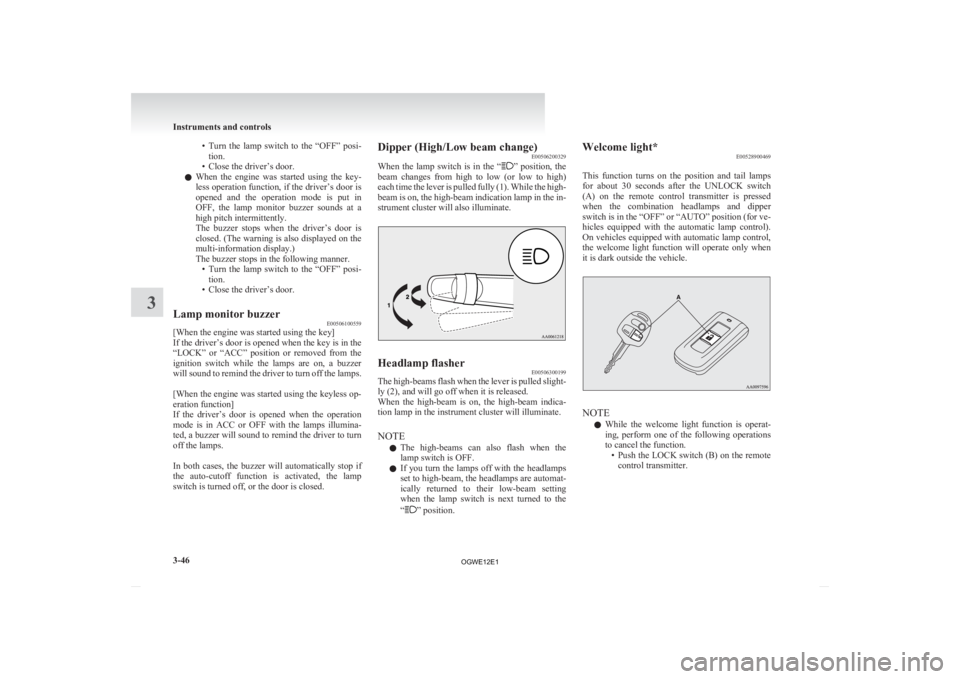
switch is turned off, or the door is closed. Dipper (High/Low beam change)
E00506200329
When
the lamp switch is in the “ ”
position, the
beam changes from high to low (or low to high)
each time the lever is pulled fully (1). While the high-
beam is on, the high-beam indication lamp in the in-
strument cluster will also illuminate. Headlamp flasher
E00506300199
The high-beams flash when the lever is pulled slight-
ly (2), and will go off when it is released.
When
the high-beam is on, the high-beam indica-
tion lamp in the instrument cluster will illuminate.
NOTE
l The high-beams can also flash when the
lamp switch is OFF.
l If you turn the lamps off with the headlamps
set to high-beam, the headlamps are automat-
ically returned to their low-beam setting
when the lamp switch is next turned to the
“ ” position.Welcome light*
E00528900469
This
function turns on the position and tail lamps
for about 30 seconds after the UNLOCK switch
(A) on the remote control transmitter is pressed
when the combination headlamps and dipper
switch is in the “OFF” or “AUTO” position (for ve-
hicles equipped with the automatic lamp control).
On vehicles equipped with automatic lamp control,
the welcome light function will operate only when
it is dark outside the vehicle. NOTE
l While
the welcome light function is operat-
ing, perform one of the following operations
to cancel the function. • Push the LOCK switch (B) on the remotecontrol transmitter. Instruments and controls
3-46
3
OGWE12E1
Page 164 of 378
l
If you want to stop automatic mode, press
the switch (3) and the indicator will go off.
To return to automatic mode, press the
switch again or perform the following opera-
tion.
[Except for vehicles equipped with keyless
operation system]
Turn the ignition switch to the “ON” posi-
tion after turning to the “LOCK” or “ACC”
position.
[For vehicles equipped with the keyless oper-
ation system] Put the operation mode in ON
after putting the operation mode in OFF. Outside rear-view mirrors
E00600900628
To adjust the mirror position E00601000642
The outside rear-view mirrors can be operated
when
the ignition switch or the operation mode is
in ON or ACC. WARNING
l Do
not attempt to adjust the rear-view
mirrors while driving. This can be danger-
ous.
Always adjust the mirrors before driving.
l Your vehicle is equipped with convex
type mirrors.
Please take into consideration, that ob-
jects you see in the mirror will look small-
er and farther away compared to a nor-
mal flat mirror.
Do not use this mirror to estimate dis-
tance of following vehicles when changing
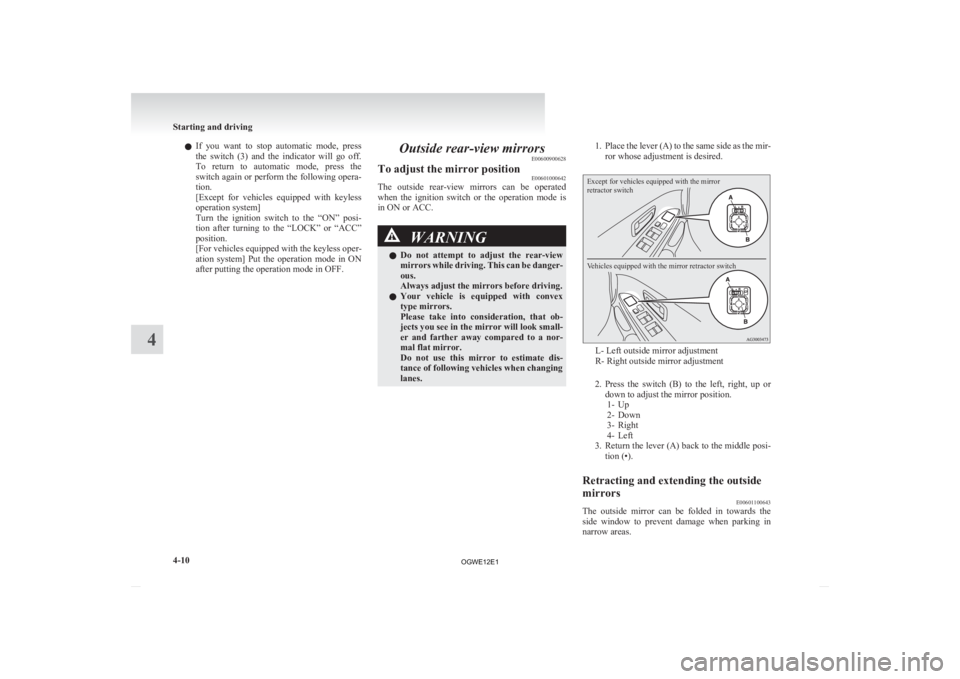
lanes. 1. Place
the lever (A) to the same side as the mir-
ror whose adjustment is desired.
Except for vehicles equipped with the mirror
retractor switch
Vehicles equipped with the mirror retractor switch L- Left outside mirror adjustment
R- Right outside mirror adjustment
2. Press
the switch (B) to the left, right, up or
down to adjust the mirror position. 1- Up
2- Down
3- Right
4- Left
3. Return the lever (A) back to the middle posi- tion (•).
Retracting and extending the outside
mirrors E00601100643
The outside mirror can be folded in towards the
side
window to prevent damage when parking in
narrow areas. Starting and driving
4-10
4
OGWE12E1
Page 165 of 378
CAUTION
l
Do not drive the vehicle with the mirror
folded in.
The lack of rearward visibility normally
provided by the mirror could lead to an
accident.
[Except
for vehicles equipped with the mirror re-
tractor switch]
Push the mirror towards the back of the vehicle
with your hand to retract it in. When extending the
mirror, pull it out towards the front of the vehicle
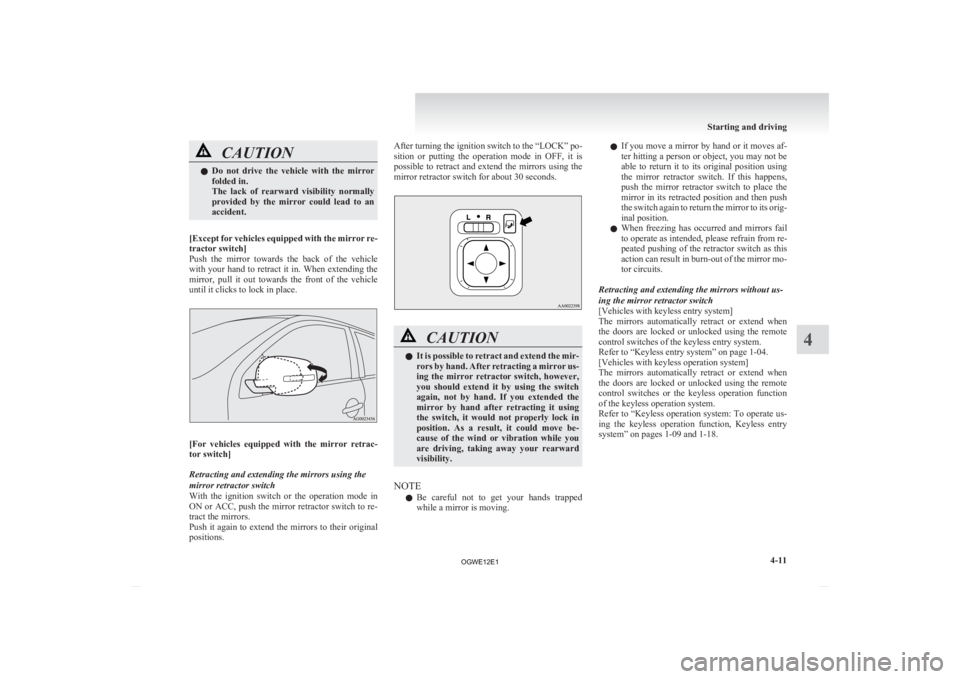
until it clicks to lock in place. [For
vehicles equipped with the mirror retrac-
tor switch]
Retracting and extending the mirrors using the
mirror retractor switch
With the ignition switch or the operation mode in
ON or ACC, push the mirror retractor switch to re-
tract the mirrors.
Push it again to extend the mirrors to their original
positions. After turning the ignition switch to the “LOCK” po-
sition
or putting the operation mode in OFF, it is
possible to retract and extend the mirrors using the
mirror retractor switch for about 30 seconds. CAUTION
l
It
is possible to retract and extend the mir-
rors by hand. After retracting a mirror us-
ing the mirror retractor switch, however,
you should extend it by using the switch
again, not by hand. If you extended the
mirror by hand after retracting it using
the switch, it would not properly lock in
position. As a result, it could move be-
cause of the wind or vibration while you
are driving, taking away your rearward
visibility.
NOTE l Be
careful not to get your hands trapped
while a mirror is moving. l
If
you move a mirror by hand or it moves af-
ter hitting a person or object, you may not be
able to return it to its original position using
the mirror retractor switch. If this happens,
push the mirror retractor switch to place the
mirror in its retracted position and then push
the switch again to return the mirror to its orig-
inal position.
l When freezing has occurred and mirrors fail
to operate as intended, please refrain from re-
peated pushing of the retractor switch as this
action can result in burn-out of the mirror mo-
tor circuits.
Retracting and extending the mirrors without us-
ing the mirror retractor switch
[Vehicles with keyless entry system]
The mirrors automatically retract or extend when
the doors are locked or unlocked using the remote
control switches of the keyless entry system.
Refer to “Keyless entry system” on page 1-04.
[Vehicles with keyless operation system]
The mirrors automatically retract or extend when
the doors are locked or unlocked using the remote
control switches or the keyless operation function
of the keyless operation system.
Refer to “Keyless operation system: To operate us-
ing the keyless operation function, Keyless entry
system” on pages 1-09 and 1-18. Starting and driving
4-11 4
OGWE12E1
Page 166 of 378
NOTE
l Functions
can be modified as stated below.
Consult a MITSUBISHI MOTORS Author-
ized Service Point.
On vehicles equipped with MITSUBISHI
Multi-Communication System (MMCS),
screen operations can be used to make the ad-
justment. Refer to the separate owner’s man-
ual for details. • Automatically extend when the followingoperation is performed.
[Except for vehicles equipped with key-
less operation system]
Turn the ignition switch to the “ON” or
“ACC” position.
[Vehicles equipped with keyless opera-
tion system]
Put the operation mode in ON or ACC.
• Automatically retract when the driver’s door is opened after turning the ignition
switch to the “LOCK” position or putting
the operation mode in OFF.
• Automatically extend when the vehicle speed reaches 30 km/h (19 mph).
• Deactivate the automatic extension func- tion.
Heated mirror E00601200497
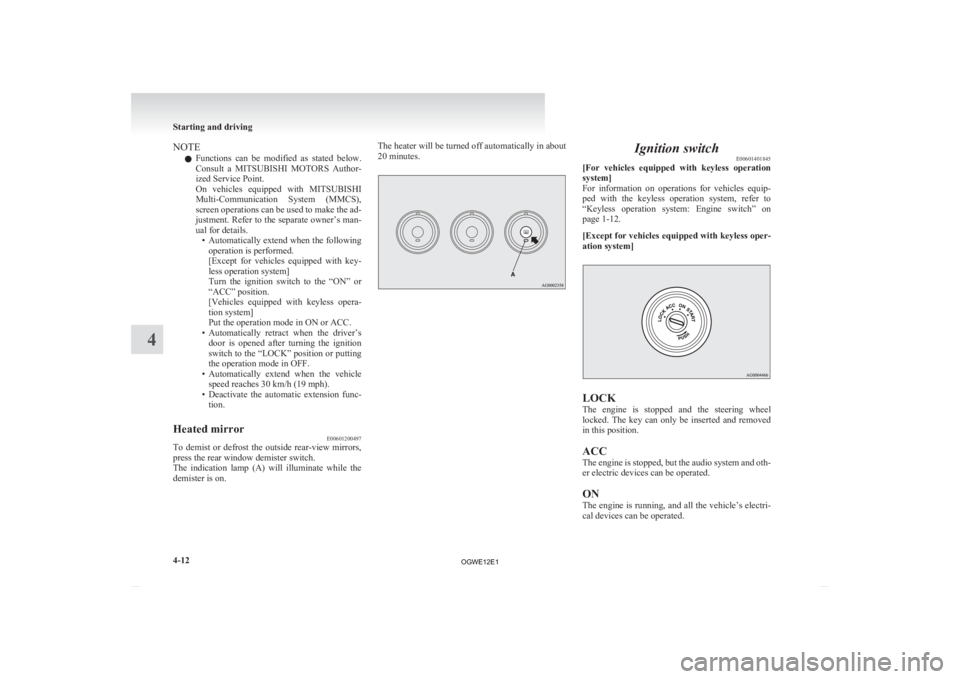
To demist or defrost the outside rear-view mirrors,
press the rear window demister switch.
The
indication lamp (A) will illuminate while the
demister is on. The heater will be turned off automatically in about
20 minutes. Ignition switch
E00601401845
[For
vehicles equipped with keyless operation
system]
For information on operations for vehicles equip-
ped with the keyless operation system, refer to
“Keyless operation system: Engine switch” on
page 1-12.
[Except for vehicles equipped with keyless oper-
ation system] LOCK
The
engine is stopped and the steering wheel
locked. The key can only be inserted and removed
in this position.
ACC
The engine is stopped, but the audio system and oth-
er electric devices can be operated.
ON
The engine is running, and all the vehicle’s electri-
cal devices can be operated. Starting and driving
4-12
4
OGWE12E1
Page 168 of 378
![MITSUBISHI ASX 2012 (in English) Service Manual Steering wheel lock
E00601500676
[For
vehicles equipped with keyless operation
system]
For information on operations for vehicles equip-
ped with the keyless operation system, refer](/img/19/34862/w960_34862-167.png "MITSUBISHI ASX 2012 (in English) Service Manual Steering wheel lock
E00601500676
[For
vehicles equipped with keyless operation
system]
For information on operations for vehicles equip-
ped with the keyless operation system, refer")
Steering wheel lock
E00601500676
[For
vehicles equipped with keyless operation
system]
For information on operations for vehicles equip-
ped with the keyless operation system, refer to
“Keyless operation system: Steering wheel lock”
on page 1-15.
[Except for vehicles equipped with keyless oper-
ation system]
To lock
Remove the key at the “LOCK” position.
Turn the steering wheel until it is locked.
To unlock
Turn the key to the “ACC” position while moving
the steering wheel slightly right and left. CAUTION
l
Remove the key when leaving the vehicle.
In some countries, it is prohibited to leave
the key in the vehicle when parked. Starting
E00620600214
Tips for starting l Do
not operate the starter motor continuous-
ly longer than 10 seconds; doing so could
run down the battery. If the engine does not
start, turn the ignition switch back to
“LOCK”, wait a few seconds, and then try
again. Trying repeatedly with the starter mo-
tor still turning will damage the starter mech-
anism.
l [For diesel-powered vehicles]
While the vehicle is stationary with the
clutch pedal fully depressed, the engine revo-
lutions do not rise to over 3,000 rpm in order
to protect the engine even if the accelerator
pedal is depressed. WARNING
l Never
run the engine in a closed or poor-
ly ventilated area any longer than is nee-
ded to move your vehicle in or out of the
area. Carbon monoxide gases are odour-
less and can be fatal. CAUTION
l
Never
attempt to start the engine by push-
ing or pulling the vehicle.
l Do not run the engine at high rpm or
drive the vehicle at high speed until the en-
gine has had a chance to warm up. Starting and driving
4-14
4
OGWE12E1
Page 169 of 378
CAUTION
l
Release the ignition key as soon as the en-
gine starts to avoid damaging the starter
motor.
Starting the engine (petrol-powered ve-
hicles) E00620700303
[For
vehicles equipped with keyless operation
system]
For information on operations for vehicles equip-
ped with the keyless operation system, refer to
“Keyless operation system: Starting” on page 1-16.
[Except vehicles equipped with keyless opera-
tion system]
The starting procedure is as follows:
1. Insert the ignition key and fasten the seat belt.
2. Make sure the parking brake is applied.
3. Depress and hold the brake pedal.
4. Fully depress the clutch pedal (M/T).
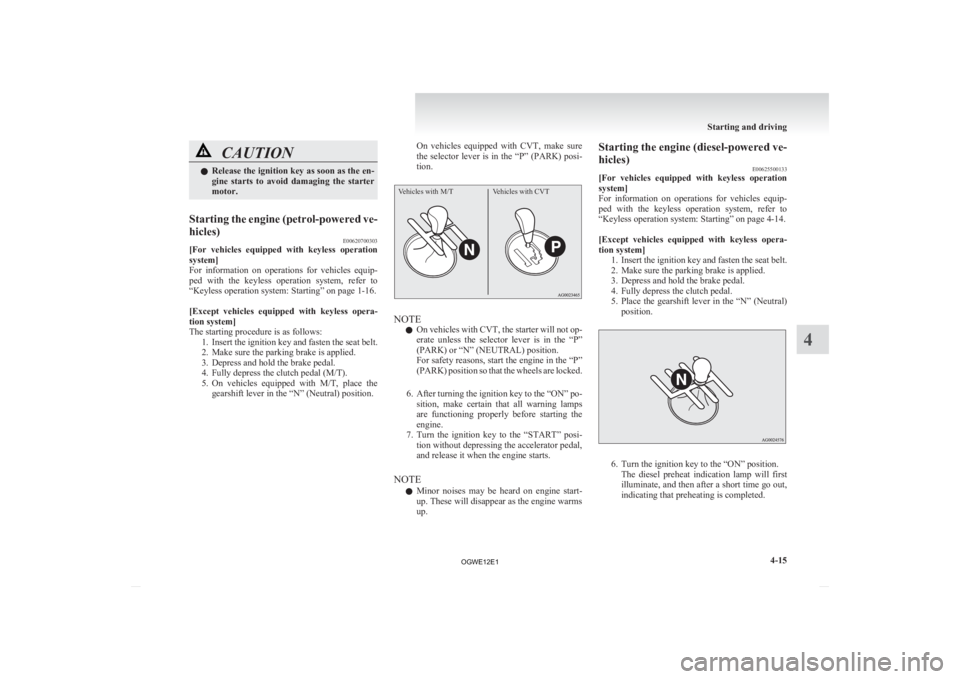
5. On vehicles equipped with M/T, place thegearshift lever in the “N” (Neutral) position. On vehicles equipped with CVT, make sure
the
selector lever is in the “P” (PARK) posi-
tion.
Vehicles with M/T Vehicles with CVT NOTE
l On
vehicles with CVT, the starter will not op-
erate unless the selector lever is in the “P”
(PARK) or “N” (NEUTRAL) position.
For safety reasons, start the engine in the “P”
(PARK) position so that the wheels are locked.
6. After turning the ignition key to the “ON” po- sition, make certain that all warning lamps
are functioning properly before starting the
engine.
7. Turn the ignition key to the “START” posi- tion without depressing the accelerator pedal,
and release it when the engine starts.
NOTE l Minor noises may be heard on engine start-
up. These will disappear as the engine warms
up. Starting the engine (diesel-powered ve-
hicles)
E00625500133
[For
vehicles equipped with keyless operation
system]
For information on operations for vehicles equip-
ped with the keyless operation system, refer to
“Keyless operation system: Starting” on page 4-14.
[Except vehicles equipped with keyless opera-
tion system] 1. Insert the ignition key and fasten the seat belt.
2. Make sure the parking brake is applied.
3. Depress and hold the brake pedal.
4. Fully depress the clutch pedal.
5. Place the gearshift lever in the “N” (Neutral)position. 6. Turn the ignition key to the “ON” position.
The
diesel preheat indication lamp will first
illuminate, and then after a short time go out,
indicating that preheating is completed. Starting and driving
4-15 4
OGWE12E1
Page 190 of 378
WARNING
l Do not leave any objects near the brake
pedal or let a floor mat slide under it; do-
ing so could prevent the full pedal stroke
that would be necessary in an emergency.
Make sure that the pedal can be operated
freely at all times. Make sure the floor
mat is securely held in place.
Brake pad l Avoid hard braking situations.
New
brakes need to be broken-in by moder-
ate use for the first 200 km (124 miles).
l The disc brakes are provided with a warning
device which emits a shrieking metallic
sound while braking if the brake pads have
reached their wear limit. If you hear this
sound, have the brake pads replaced immedi-
ately. WARNING
l Driving
with worn brake pads will make
it harder to stop, and can cause an acci-
dent. Hill start assist*
E00628000155
The
hill start assist makes it easy to start off on a
steep uphill slope by preventing the vehicle from
moving backwards. It keeps the braking force for
about 2 seconds when you move your foot from the
brake pedal to the accelerator pedal. CAUTION
l
Do
not overly rely on the hill start assist
to prevent backwards movement of the ve-
hicle. Under certain circumstances, even
when hill start assist is activated, the vehi-
cle may move backwards if the brake ped-
al is not sufficiently depressed, if the vehi-
cle is heavily loaded, or if the road is very
steep or slippery.
l The hill start assist is not designed to
keep the vehicle stopped in place on up-
hill slopes for more than 2 seconds.
l When facing uphill, do not rely on using
the hill start assist to maintain a stopped
position as an alternative to depressing
the brake pedal.
Doing so could result in an accident.
l Do not perform the following operation
while the hill start assist is operating.
[Except for vehicles equipped with key-
less operation system]
Turn the ignition switch to the “LOCK”
or “ACC” position.
[Vehicles equipped with keyless operation
system]
Put the operation mode in OFF or ACC.
The hill start assist could stop operating,
which could result in an accident. To operate
E00628100172
1. Stop
the vehicle completely using the brake
pedal.
2. On vehicles equipped with M/T, place the
gearshift lever into the 1 st
position.
On vehicles equipped with CVT, place the se-
lector lever into the “D” position.
NOTE l When reversing on an uphill slope, place the
gearshift lever or the selector lever into the
“R” position.
3. Release the brake pedal and the hill start as- sist will maintain the braking force applied
while stopping for approximately 2 seconds.
4. Depress the accelerator pedal and the hill start assist gradually will decrease the brak-
ing force as the vehicle starts moving.
NOTE l The hill start assist is activated when all of
the following conditions are met.
• The engine is running.(The hill start assist will not be activated
while the engine is starting or immediate-
ly after the engine is started.) Starting and driving
4-36
4
OGWE12E1
Page 199 of 378
To activate
E00609300957
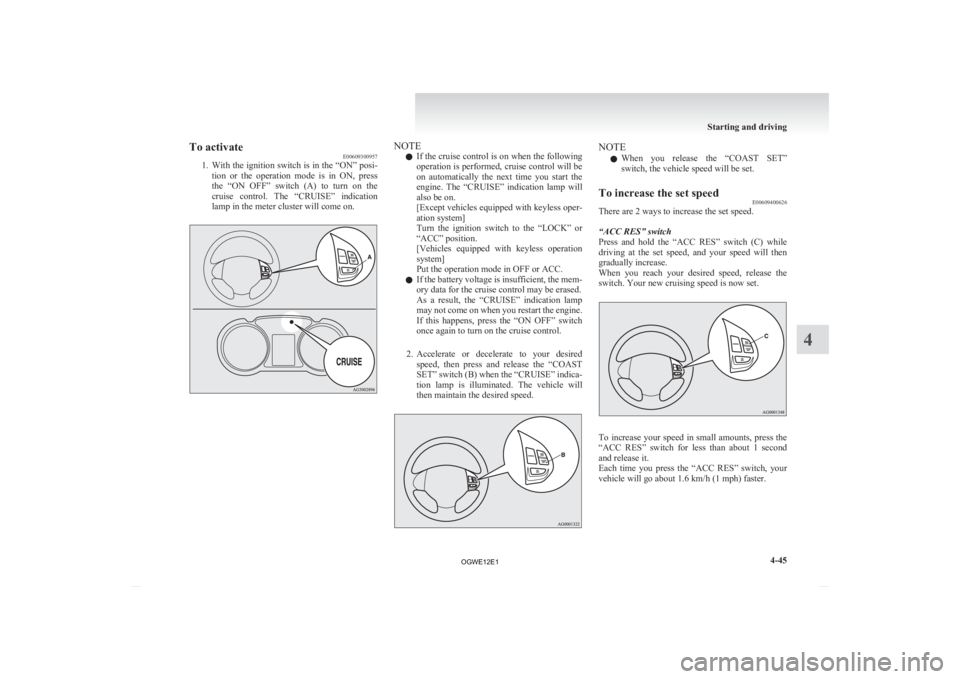
1. With
the ignition switch is in the “ON” posi-
tion or the operation mode is in ON, press
the “ON OFF” switch (A) to turn on the
cruise control. The “CRUISE” indication
lamp in the meter cluster will come on. NOTE
l If
the cruise control is on when the following
operation is performed, cruise control will be
on automatically the next time you start the
engine. The “CRUISE” indication lamp will
also be on.
[Except vehicles equipped with keyless oper-
ation system]
Turn the ignition switch to the “LOCK” or
“ACC” position.
[Vehicles equipped with keyless operation
system]
Put the operation mode in OFF or ACC.
l If the battery voltage is insufficient, the mem-
ory data for the cruise control may be erased.
As a result, the “CRUISE” indication lamp
may not come on when you restart the engine.
If this happens, press the “ON OFF” switch
once again to turn on the cruise control.
2. Accelerate or decelerate to your desired speed, then press and release the “COAST
SET” switch (B) when the “CRUISE” indica-
tion lamp is illuminated. The vehicle will
then maintain the desired speed. NOTE
l When
you release the “COAST SET”
switch, the vehicle speed will be set.
To increase the set speed E00609400626
There are 2 ways to increase the set speed.
“ACC RES” switch
Press
and hold the “ACC RES” switch (C) while
driving at the set speed, and your speed will then
gradually increase.
When you reach your desired speed, release the
switch. Your new cruising speed is now set. To increase your speed in small amounts, press the
“ACC
RES” switch for less than about 1 second
and release it.
Each time you press the “ACC RES” switch, your
vehicle will go about 1.6 km/h (1 mph) faster. Starting and driving
4-45 4
OGWE12E1
Page 202 of 378
CAUTION
l
When the set speed driving is deactivated
automatically in any situation other than
those listed above, there may be a system
malfunction.
Press the “ON-OFF” switch to turn off
the cruise control and have your vehicle
inspected by a MITSUBISHI MOTORS
Authorized Service Point.
To resume the set speed E00609800617
If the set speed driving is deactivated by the condi-
tion
described in “To deactivate” on page 4-47,
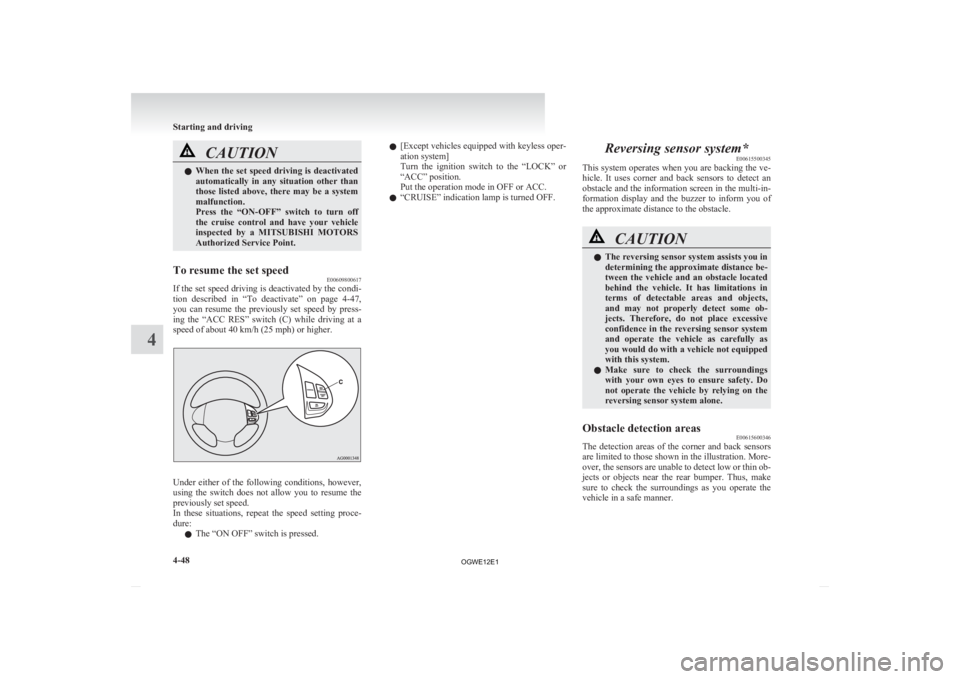
you can resume the previously set speed by press-
ing the “ACC RES” switch (C) while driving at a
speed of about 40 km/h (25 mph) or higher. Under either of the following conditions, however,
using
the switch does not allow you to resume the
previously set speed.
In these situations, repeat the speed setting proce-
dure:
l The “ON OFF” switch is pressed. l
[Except
vehicles equipped with keyless oper-
ation system]
Turn the ignition switch to the “LOCK” or
“ACC” position.
Put the operation mode in OFF or ACC.
l “CRUISE” indication lamp is turned OFF. Reversing sensor system*
E00615500345
This
system operates when you are backing the ve-
hicle. It uses corner and back sensors to detect an
obstacle and the information screen in the multi-in-
formation display and the buzzer to inform you of
the approximate distance to the obstacle. CAUTION
l
The reversing sensor system assists you in
determining the approximate distance be-
tween
the vehicle and an obstacle located
behind the vehicle. It has limitations in
terms of detectable areas and objects,
and may not properly detect some ob-
jects. Therefore, do not place excessive
confidence in the reversing sensor system
and operate the vehicle as carefully as
you would do with a vehicle not equipped
with this system.
l Make sure to check the surroundings
with your own eyes to ensure safety. Do
not operate the vehicle by relying on the
reversing sensor system alone.
Obstacle detection areas E00615600346
The detection areas of the corner and back sensors
are
limited to those shown in the illustration. More-
over, the sensors are unable to detect low or thin ob-
jects or objects near the rear bumper. Thus, make
sure to check the surroundings as you operate the
vehicle in a safe manner. Starting and driving
4-48
4
OGWE12E1
Page 208 of 378
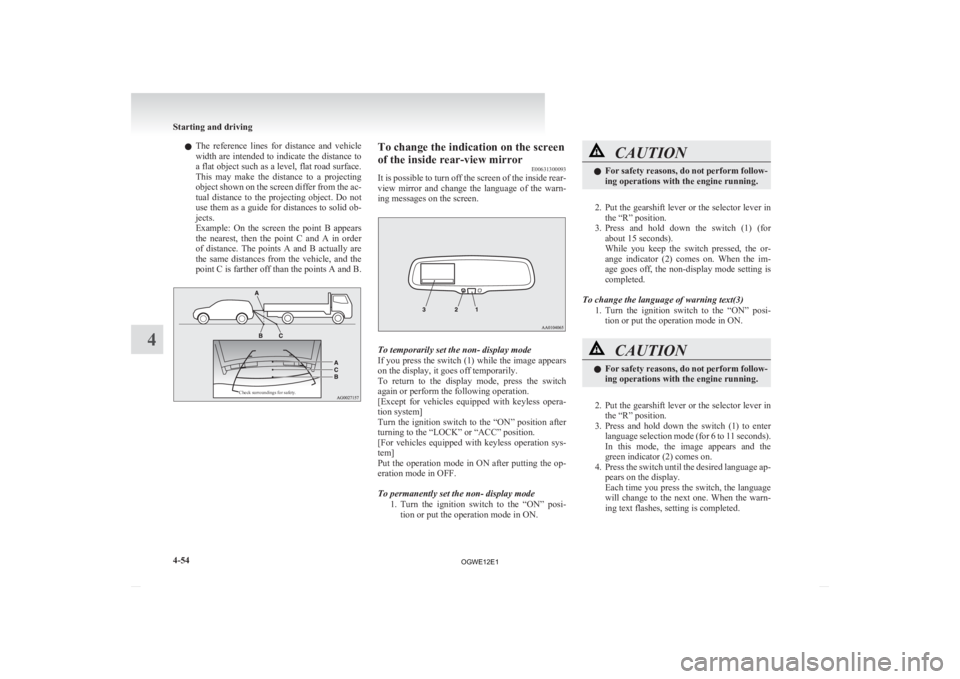
l
The reference lines for distance and vehicle
width are intended to indicate the distance to
a flat object such as a level, flat road surface.
This may make the distance to a projecting
object shown on the screen differ from the ac-
tual distance to the projecting object. Do not
use them as a guide for distances to solid ob-
jects.
Example: On the screen the point B appears
the nearest, then the point C and A in order
of distance. The points A and B actually are
the same distances from the vehicle, and the
point C is farther off than the points A and B.
Check surroundings for safety. To change the indication on the screen
of the inside rear-view mirror
E00631300093
It
is possible to turn off the screen of the inside rear-
view mirror and change the language of the warn-
ing messages on the screen. To temporarily set the non- display mode
If
you press the switch (1) while the image appears
on the display, it goes off temporarily.
To return to the display mode, press the switch
again or perform the following operation.
[Except for vehicles equipped with keyless opera-
tion system]
Turn the ignition switch to the “ON” position after
turning to the “LOCK” or “ACC” position.
[For vehicles equipped with keyless operation sys-
tem]
Put the operation mode in ON after putting the op-
eration mode in OFF.
To permanently set the non- display mode
1. Turn the ignition switch to the “ON” posi-tion or put the operation mode in ON. CAUTION
l
For
safety reasons, do not perform follow-
ing operations with the engine running.
2. Put
the gearshift lever or the selector lever in the “R” position.
3. Press and hold down the switch (1) (for about 15 seconds).
While you keep the switch pressed, the or-
ange indicator (2) comes on. When the im-
age goes off, the non-display mode setting is
completed.
To change the language of warning text(3) 1. Turn the ignition switch to the “ON” posi-tion or put the operation mode in ON. CAUTION
l
For
safety reasons, do not perform follow-
ing operations with the engine running.
2. Put
the gearshift lever or the selector lever in the “R” position.
3. Press and hold down the switch (1) to enter language selection mode (for 6 to 11 seconds).
In this mode, the image appears and the
green indicator (2) comes on.
4. Press the switch until the desired language ap- pears on the display.
Each time you press the switch, the language
will change to the next one. When the warn-
ing text flashes, setting is completed. Starting and driving
4-54
4
OGWE12E1