fuel type MITSUBISHI ASX 2014 (in English) User Guide
[x] Cancel search | Manufacturer: MITSUBISHI, Model Year: 2014, Model line: ASX, Model: MITSUBISHI ASX 2014Pages: 418, PDF Size: 14.02 MB
Page 120 of 418
CAUTIONlFor petrol-powered vehicles, do not run out
of fuel, or the catalytic converter may be ad-versely affected.
If the warning display appears, refuel as
soon as possible.
l For diesel-powered vehicles, do not drive
with an extremely low fuel level; running out of fuel could cause damage to the fuel
system.NOTEl It may take several seconds to stabilise the
display after refilling the tank.
l If fuel is added with the ignition switch or
the operation mode is in ON, the fuel gauge may incorrectly indicate the fuel level.Fuel lid mark
E00522300070
The arrow (A) indicates that the fuel tank fill-
er is located on the left side of the body.
Fuel remaining warning display
E00522401791
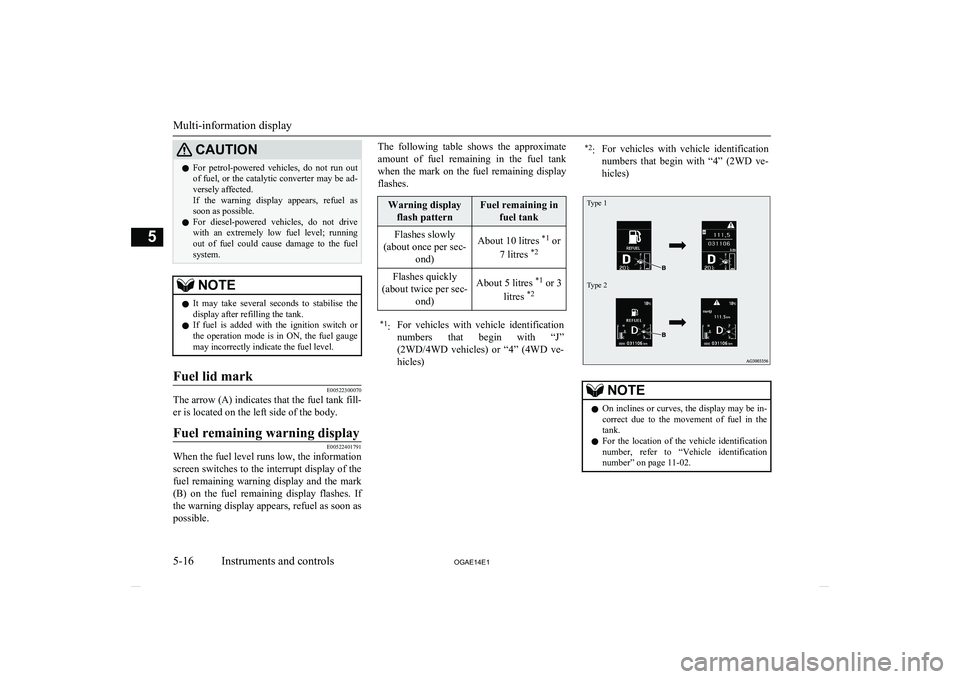
When the fuel level runs low, the informationscreen switches to the interrupt display of the
fuel remaining warning display and the mark (B) on the fuel remaining display flashes. If
the warning display appears, refuel as soon as possible.
The following table shows the approximate
amount of fuel remaining in the fuel tank
when the mark on the fuel remaining display flashes.Warning display flash patternFuel remaining in fuel tankFlashes slowly
(about once per sec- ond)About 10 litres *1
or
7 litres *2Flashes quickly
(about twice per sec- ond)About 5 litres *1
or 3
litres *2*1
:For vehicles with vehicle identification
numbers that begin with “J”
(2WD/4WD vehicles) or “4” (4WD ve-
hicles)*2 :For vehicles with vehicle identification
numbers that begin with “4” (2WD ve-hicles)Type 1Type 2
NOTEl On inclines or curves, the display may be in-
correct due to the movement of fuel in the
tank.
l For the location of the vehicle identification
number, refer to “Vehicle identification
number” on page 11-02.
Multi-information display
5-16 OGAE14E1Instruments and controls5
Page 125 of 418
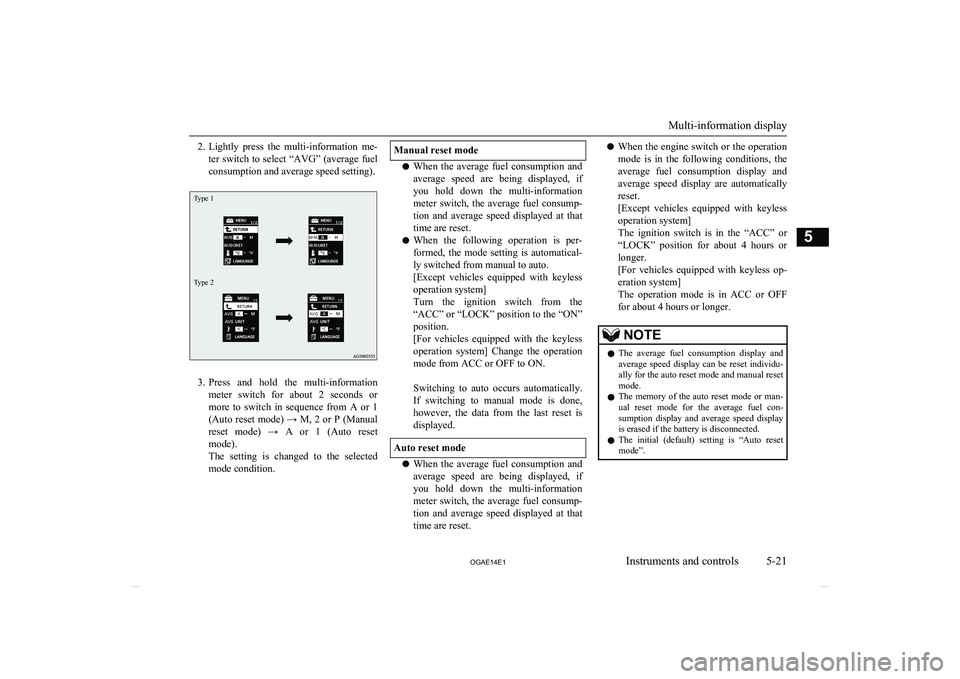
2.Lightly press the multi-information me-
ter switch to select “AVG” (average fuel
consumption and average speed setting).Type 1Type 2
3. Press and hold the multi-information
meter switch for about 2 seconds or more to switch in sequence from A or 1 (Auto reset mode) → M, 2 or P (Manual
reset mode) → A or 1 (Auto reset mode).
The setting is changed to the selected
mode condition.
Manual reset mode
l When the average fuel consumption and
average speed are being displayed, if
you hold down the multi-information
meter switch, the average fuel consump- tion and average speed displayed at that time are reset.
l When the following operation is per-
formed, the mode setting is automatical- ly switched from manual to auto.
[Except vehicles equipped with keyless
operation system]
Turn the ignition switch from the
“ACC” or “LOCK” position to the “ON” position.
[For vehicles equipped with the keyless
operation system] Change the operation
mode from ACC or OFF to ON.
Switching to auto occurs automatically. If switching to manual mode is done,
however, the data from the last reset is
displayed.
Auto reset mode
l When the average fuel consumption and
average speed are being displayed, if
you hold down the multi-information meter switch, the average fuel consump-tion and average speed displayed at that
time are reset.
l When the engine switch or the operation
mode is in the following conditions, the
average fuel consumption display and
average speed display are automatically
reset.
[Except vehicles equipped with keyless
operation system]
The ignition switch is in the “ACC” or “LOCK” position for about 4 hours or
longer.
[For vehicles equipped with keyless op- eration system]
The operation mode is in ACC or OFF
for about 4 hours or longer.NOTEl The average fuel consumption display and
average speed display can be reset individu- ally for the auto reset mode and manual reset
mode.
l The memory of the auto reset mode or man-
ual reset mode for the average fuel con-sumption display and average speed display
is erased if the battery is disconnected.
l The initial (default) setting is “Auto reset
mode”.
Multi-information display
5-21
OGAE14E1Instruments and controls5
Page 126 of 418
Changing the fuel consumptiondisplay unit
E00523000579
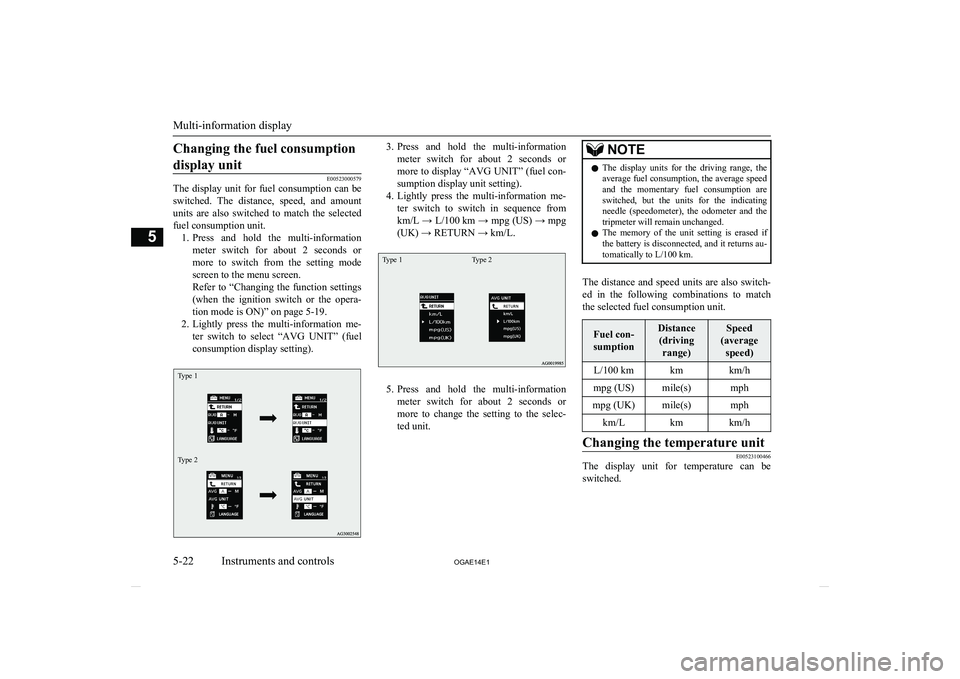
The display unit for fuel consumption can be
switched. The distance, speed, and amount units are also switched to match the selected
fuel consumption unit. 1. Press and hold the multi-information
meter switch for about 2 seconds or more to switch from the setting mode
screen to the menu screen.
Refer to “Changing the function settings (when the ignition switch or the opera-
tion mode is ON)” on page 5-19.
2. Lightly press the multi-information me-
ter switch to select “AVG UNIT” (fuelconsumption display setting).
Type 1Type 23. Press and hold the multi-information
meter switch for about 2 seconds or more to display “AVG UNIT” (fuel con-
sumption display unit setting).
4. Lightly press the multi-information me-
ter switch to switch in sequence from
km/L → L/100 km → mpg (US) → mpg
(UK) → RETURN → km/L.Type 1Type 2
5. Press and hold the multi-information
meter switch for about 2 seconds or more to change the setting to the selec-
ted unit.
NOTEl The display units for the driving range, the
average fuel consumption, the average speed and the momentary fuel consumption areswitched, but the units for the indicating
needle (speedometer), the odometer and the tripmeter will remain unchanged.
l The memory of the unit setting is erased if
the battery is disconnected, and it returns au- tomatically to L/100 km.
The distance and speed units are also switch-
ed in the following combinations to match the selected fuel consumption unit.
Fuel con-
sumptionDistance (driving range)Speed
(average speed)L/100 kmkmkm/hmpg (US)mile(s)mphmpg (UK)mile(s)mphkm/Lkmkm/hChanging the temperature unit
E00523100466
The display unit for temperature can beswitched.
Multi-information display
5-22 OGAE14E1Instruments and controls5
Page 130 of 418
3.Press and hold the multi-information
meter switch for about 2 seconds or more to switch in sequence from 1 (turn- signal sound 1) → 2 (turn-signal sound
2) → 1 (turn-signal sound 1).
The setting changes to the selected turn- signal sound.Changing the momentary fuel
consumption display (Type 2)
E00529200195
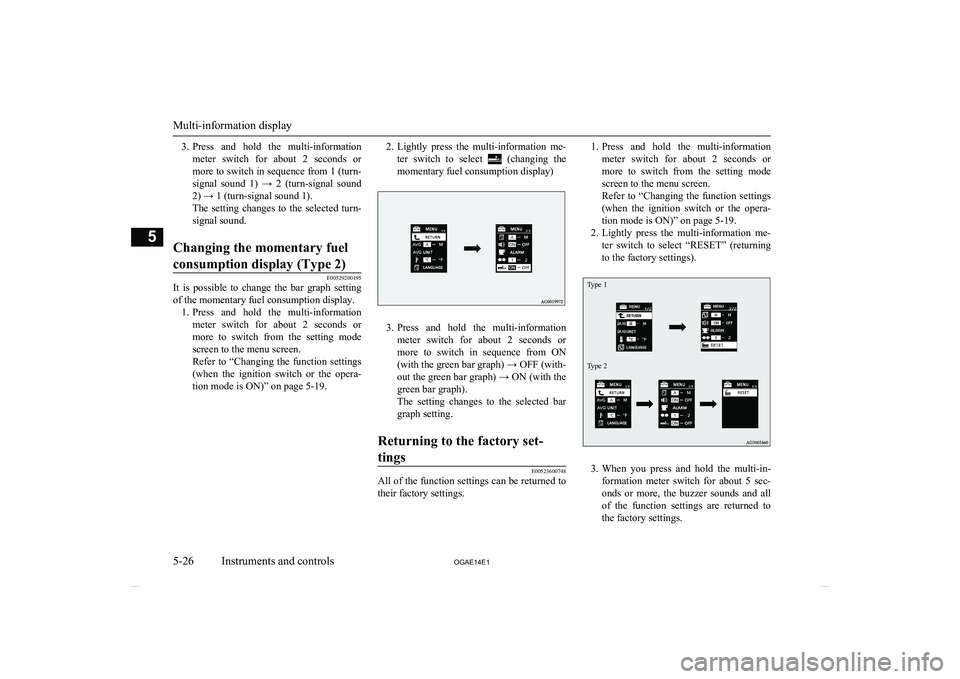
It is possible to change the bar graph setting of the momentary fuel consumption display. 1. Press and hold the multi-information
meter switch for about 2 seconds ormore to switch from the setting mode
screen to the menu screen.
Refer to “Changing the function settings (when the ignition switch or the opera-
tion mode is ON)” on page 5-19.
2. Lightly press the multi-information me-
ter switch to select
(changing the
momentary fuel consumption display)
3. Press and hold the multi-information
meter switch for about 2 seconds or more to switch in sequence from ON(with the green bar graph) → OFF (with-
out the green bar graph) → ON (with the green bar graph).
The setting changes to the selected bar
graph setting.
Returning to the factory set-
tings
E00523600748
All of the function settings can be returned to their factory settings.
1. Press and hold the multi-information
meter switch for about 2 seconds or more to switch from the setting mode
screen to the menu screen.
Refer to “Changing the function settings (when the ignition switch or the opera-
tion mode is ON)” on page 5-19.
2. Lightly press the multi-information me-
ter switch to select “RESET” (returning
to the factory settings).Type 1Type 2
3. When you press and hold the multi-in-
formation meter switch for about 5 sec-
onds or more, the buzzer sounds and all of the function settings are returned to
the factory settings.
Multi-information display
5-26 OGAE14E1Instruments and controls5
Page 131 of 418
NOTElThe factory settings are as follows.
• Average fuel consumption and average
speed reset mode: A (Auto reset)
• Fuel consumption display unit: L/100 km
• Temperature unit: °C (Celsius)NOTE•Display language: ENGLISH or RUSSI-
AN
• Cooperative language setting: A
• Operation sounds: ON (Operation sounds
on)NOTE• “REST REMINDER” display: OFF
• Turn-signal sound: Turn-signal sound 1
• Momentary fuel consumption with the
green bar graph (Type 2): ONIndication lamp, warning lamp, and information screen display list
E00523700013
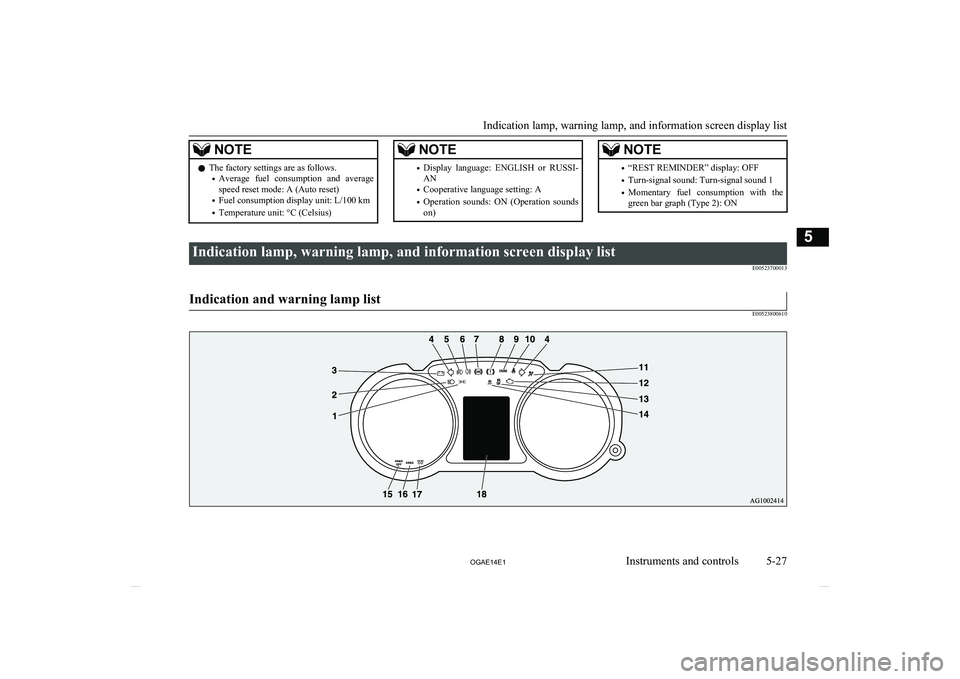
Indication and warning lamp list
E00523800610
Indication lamp, warning lamp, and information screen display list
5-27
OGAE14E1Instruments and controls5
Page 140 of 418
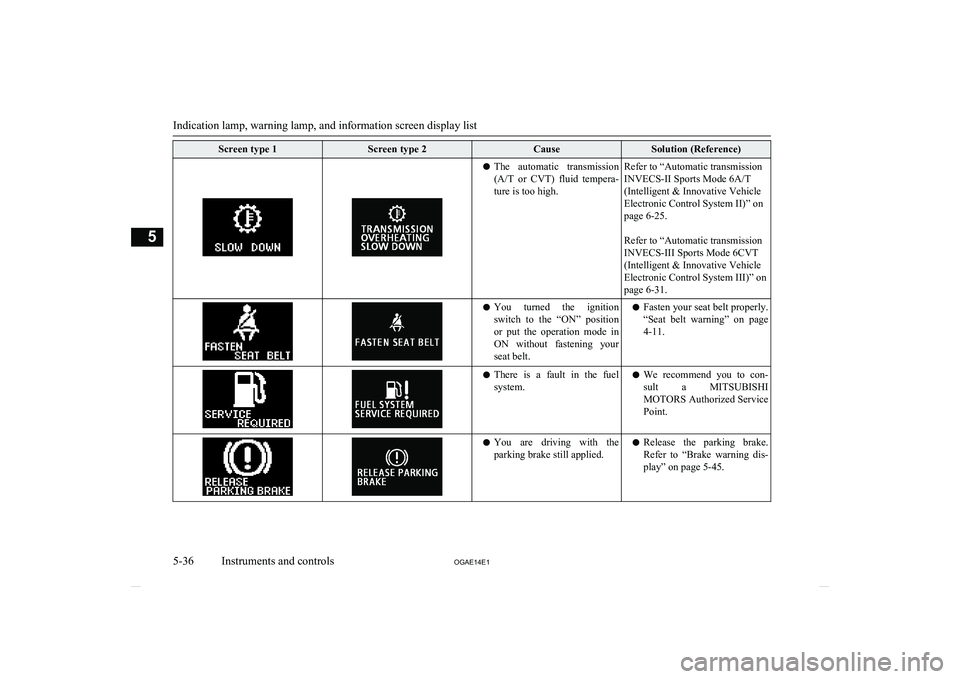
Screen type 1Screen type 2CauseSolution (Reference)lThe automatic transmission
(A/T or CVT) fluid tempera-
ture is too high.Refer to “Automatic transmission
INVECS-II Sports Mode 6A/T
(Intelligent & Innovative Vehicle
Electronic Control System II)” on
page 6-25.
Refer to “Automatic transmission
INVECS-III Sports Mode 6CVT
(Intelligent & Innovative Vehicle
Electronic Control System III)” on
page 6-31.l You turned the ignition
switch to the “ON” positionor put the operation mode in
ON without fastening your
seat belt.l Fasten your seat belt properly.
“Seat belt warning” on page
4-11.l There is a fault in the fuel
system.l We recommend you to con-
sult a MITSUBISHI
MOTORS Authorized Service
Point.l You are driving with the
parking brake still applied.l Release the parking brake.
Refer to “Brake warning dis- play” on page 5-45.
Indication lamp, warning lamp, and information screen display list
5-36 OGAE14E1Instruments and controls5
Page 143 of 418
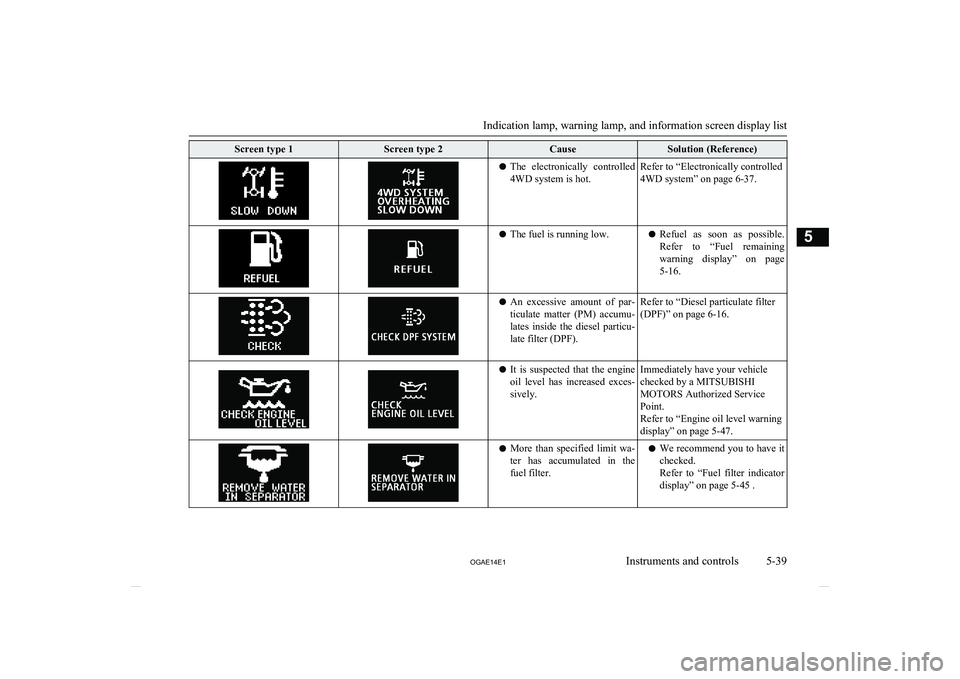
Screen type 1Screen type 2CauseSolution (Reference)lThe electronically controlled
4WD system is hot.Refer to “Electronically controlled
4WD system” on page 6-37.l The fuel is running low.lRefuel as soon as possible.
Refer to “Fuel remaining
warning display” on page 5-16.l An excessive amount of par-
ticulate matter (PM) accumu- lates inside the diesel particu-
late filter (DPF).Refer to “Diesel particulate filter
(DPF)” on page 6-16.l It is suspected that the engine
oil level has increased exces- sively.Immediately have your vehicle
checked by a MITSUBISHI
MOTORS Authorized Service
Point.
Refer to “Engine oil level warning
display” on page 5-47.l More than specified limit wa-
ter has accumulated in the fuel filter.l We recommend you to have it
checked.
Refer to “Fuel filter indicator display” on page 5-45 .
Indication lamp, warning lamp, and information screen display list
5-39
OGAE14E1Instruments and controls5
Page 149 of 418
CAUTIONlIf the lamp illuminates while the engine is
running, avoid driving at high speeds and have the system inspected by a
MITSUBISHI MOTORS Authorized Serv-
ice Point as soon as possible.
Accelerator pedal and brake pedal response may be negatively influenced under these
conditions.NOTEl The engine electronic control module ac-
commodating the onboard diagnostic system has various fault data (especially about the
exhaust emission) stored.Charge warning lamp
E00502701192
This lamp illuminates when
the ignition switch is turned“ON” or the operation mode
is put in ON, and goes off af-
ter the engine has started.
A warning is also displayed
on the multi-information display.
CAUTIONl If it illuminates while the engine is running,
there is a problem in the charging system.
Immediately park your vehicle in a safe place and we recommend you to have it
checked.Information screen display
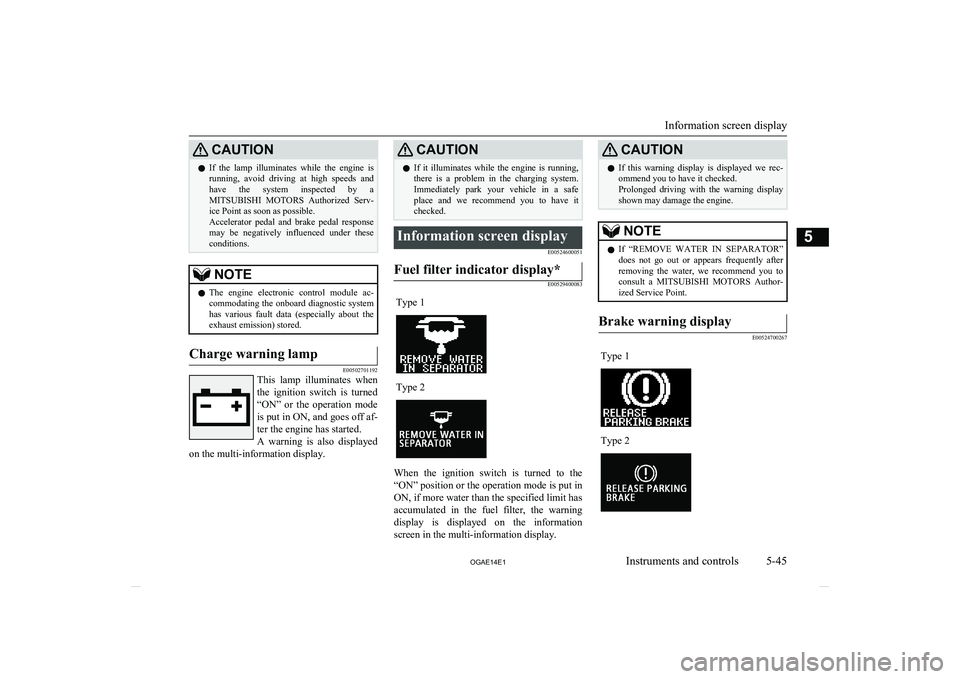
E00524600051Fuel filter indicator display*
E00529400083
Type 1Type 2
When the ignition switch is turned to the
“ON” position or the operation mode is put in
ON, if more water than the specified limit has
accumulated in the fuel filter, the warning display is displayed on the information
screen in the multi-information display.
CAUTIONl If this warning display is displayed we rec-
ommend you to have it checked.
Prolonged driving with the warning display
shown may damage the engine.NOTEl If “REMOVE WATER IN SEPARATOR”
does not go out or appears frequently after
removing the water, we recommend you to consult a MITSUBISHI MOTORS Author-
ized Service Point.Brake warning display
E00524700267
Type 1Type 2
Information screen display
5-45
OGAE14E1Instruments and controls5
Page 182 of 418
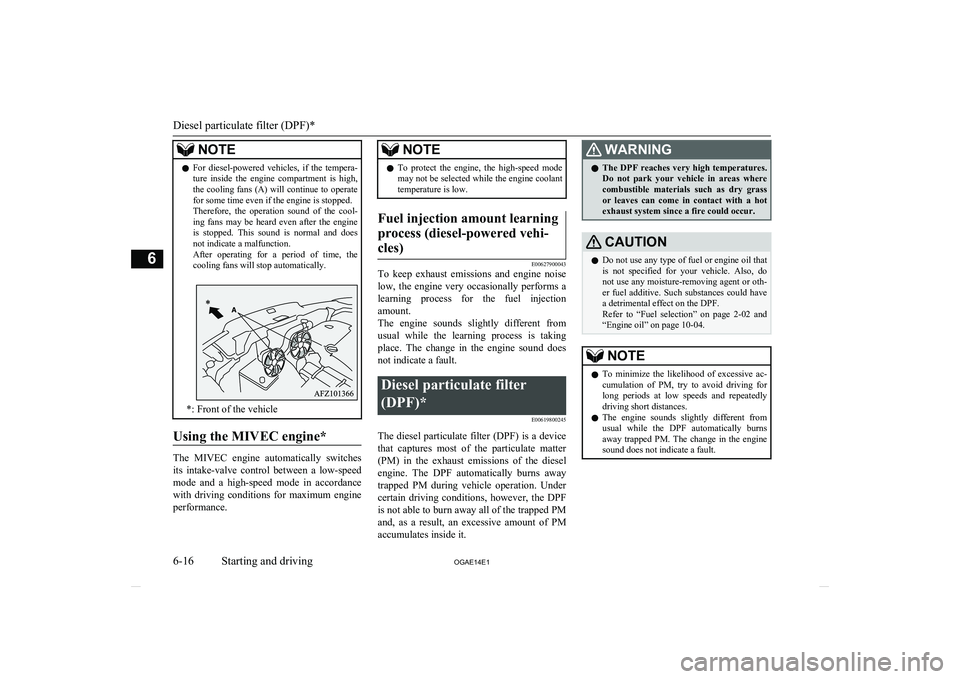
NOTElFor diesel-powered vehicles, if the tempera-
ture inside the engine compartment is high,
the cooling fans (A) will continue to operate for some time even if the engine is stopped.
Therefore, the operation sound of the cool-
ing fans may be heard even after the engine is stopped. This sound is normal and does
not indicate a malfunction.
After operating for a period of time, the cooling fans will stop automatically.
*: Front of the vehicle
Using the MIVEC engine*
The MIVEC engine automatically switches
its intake-valve control between a low-speed mode and a high-speed mode in accordancewith driving conditions for maximum engine
performance.
NOTEl To protect the engine, the high-speed mode
may not be selected while the engine coolanttemperature is low.Fuel injection amount learning
process (diesel-powered vehi- cles)
E00627900043
To keep exhaust emissions and engine noise low, the engine very occasionally performs a
learning process for the fuel injection
amount.
The engine sounds slightly different from
usual while the learning process is taking place. The change in the engine sound does
not indicate a fault.
Diesel particulate filter
(DPF)* E00619800245
The diesel particulate filter (DPF) is a devicethat captures most of the particulate matter
(PM) in the exhaust emissions of the diesel engine. The DPF automatically burns away trapped PM during vehicle operation. Under
certain driving conditions, however, the DPF is not able to burn away all of the trapped PM
and, as a result, an excessive amount of PM accumulates inside it.
WARNINGl The DPF reaches very high temperatures.
Do not park your vehicle in areas where
combustible materials such as dry grass
or leaves can come in contact with a hot exhaust system since a fire could occur.CAUTIONl Do not use any type of fuel or engine oil that
is not specified for your vehicle. Also, do not use any moisture-removing agent or oth-
er fuel additive. Such substances could have a detrimental effect on the DPF.
Refer to “Fuel selection” on page 2-02 and
“Engine oil” on page 10-04.NOTEl To minimize the likelihood of excessive ac-
cumulation of PM, try to avoid driving for long periods at low speeds and repeatedly
driving short distances.
l The engine sounds slightly different from
usual while the DPF automatically burns
away trapped PM. The change in the engine
sound does not indicate a fault.
Diesel particulate filter (DPF)*
6-16 OGAE14E1Starting and driving6
Page 189 of 418
NOTElDuring cold weather, shifting may be diffi-
cult until the transmission lubricant has
warmed up. This is normal and not harmful
to the transmission.
l If it is hard to shift into 1 st
, depress the
clutch pedal again; the shift will then be eas-
ier to make.
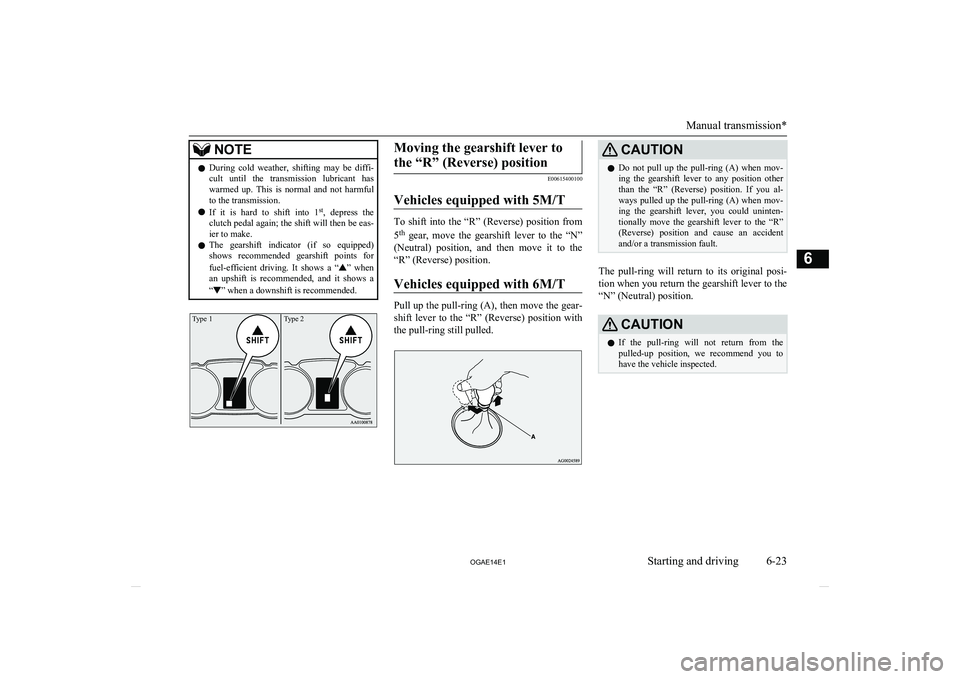
l The gearshift indicator (if so equipped)
shows recommended gearshift points for
fuel-efficient driving. It shows a “
” when
an upshift is recommended, and it shows a
“
” when a downshift is recommended.
Type 2Type 1Moving the gearshift lever to
the “R” (Reverse) position
E00615400100
Vehicles equipped with 5M/T
To shift into the “R” (Reverse) position from
5 th
gear, move the gearshift lever to the “N”
(Neutral) position, and then move it to the “R” (Reverse) position.
Vehicles equipped with 6M/T
Pull up the pull-ring (A), then move the gear-
shift lever to the “R” (Reverse) position with the pull-ring still pulled.
CAUTIONl Do not pull up the pull-ring (A) when mov-
ing the gearshift lever to any position other than the “R” (Reverse) position. If you al-
ways pulled up the pull-ring (A) when mov- ing the gearshift lever, you could uninten- tionally move the gearshift lever to the “R”
(Reverse) position and cause an accident and/or a transmission fault.
The pull-ring will return to its original posi-
tion when you return the gearshift lever to the“N” (Neutral) position.
CAUTIONl If the pull-ring will not return from the
pulled-up position, we recommend you to
have the vehicle inspected.
Manual transmission*
6-23
OGAE14E1Starting and driving6