light MITSUBISHI ASX 2014 (in English) Owner's Guide
[x] Cancel search | Manufacturer: MITSUBISHI, Model Year: 2014, Model line: ASX, Model: MITSUBISHI ASX 2014Pages: 418, PDF Size: 14.02 MB
Page 126 of 418
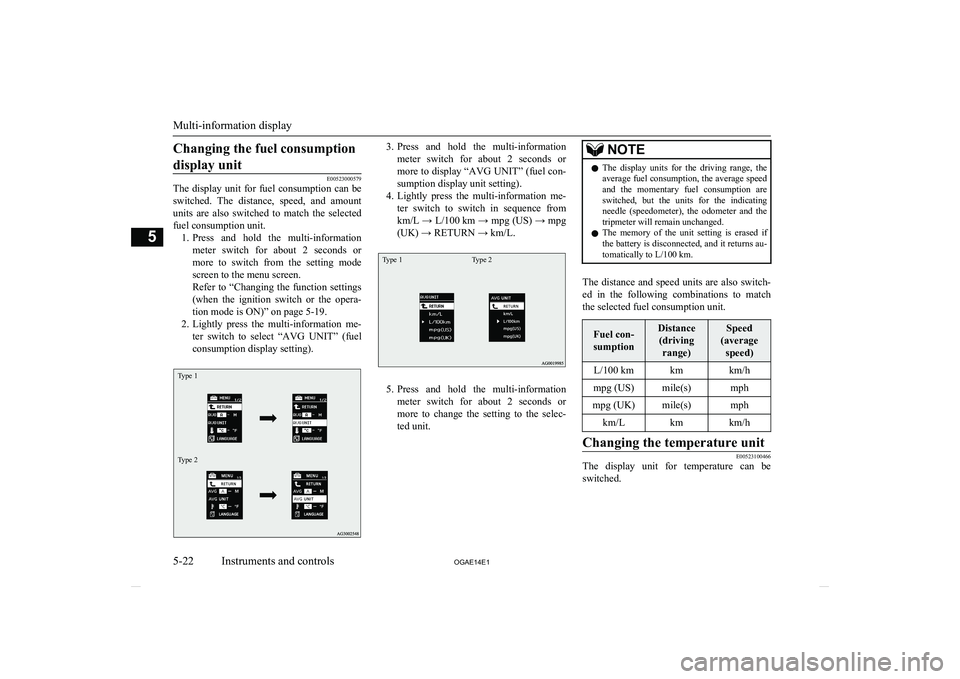
Changing the fuel consumptiondisplay unit
E00523000579
The display unit for fuel consumption can be
switched. The distance, speed, and amount units are also switched to match the selected
fuel consumption unit. 1. Press and hold the multi-information
meter switch for about 2 seconds or more to switch from the setting mode
screen to the menu screen.
Refer to “Changing the function settings (when the ignition switch or the opera-
tion mode is ON)” on page 5-19.
2. Lightly press the multi-information me-
ter switch to select “AVG UNIT” (fuelconsumption display setting).
Type 1Type 23. Press and hold the multi-information
meter switch for about 2 seconds or more to display “AVG UNIT” (fuel con-
sumption display unit setting).
4. Lightly press the multi-information me-
ter switch to switch in sequence from
km/L → L/100 km → mpg (US) → mpg
(UK) → RETURN → km/L.Type 1Type 2
5. Press and hold the multi-information
meter switch for about 2 seconds or more to change the setting to the selec-
ted unit.
NOTEl The display units for the driving range, the
average fuel consumption, the average speed and the momentary fuel consumption areswitched, but the units for the indicating
needle (speedometer), the odometer and the tripmeter will remain unchanged.
l The memory of the unit setting is erased if
the battery is disconnected, and it returns au- tomatically to L/100 km.
The distance and speed units are also switch-
ed in the following combinations to match the selected fuel consumption unit.
Fuel con-
sumptionDistance (driving range)Speed
(average speed)L/100 kmkmkm/hmpg (US)mile(s)mphmpg (UK)mile(s)mphkm/Lkmkm/hChanging the temperature unit
E00523100466
The display unit for temperature can beswitched.
Multi-information display
5-22 OGAE14E1Instruments and controls5
Page 127 of 418
1.Press and hold the multi-information
meter switch for about 2 seconds or more to switch from the setting mode
screen to the menu screen.
Refer to “Changing the function settings (when the ignition switch or the opera-
tion mode is ON)” on page 5-19.
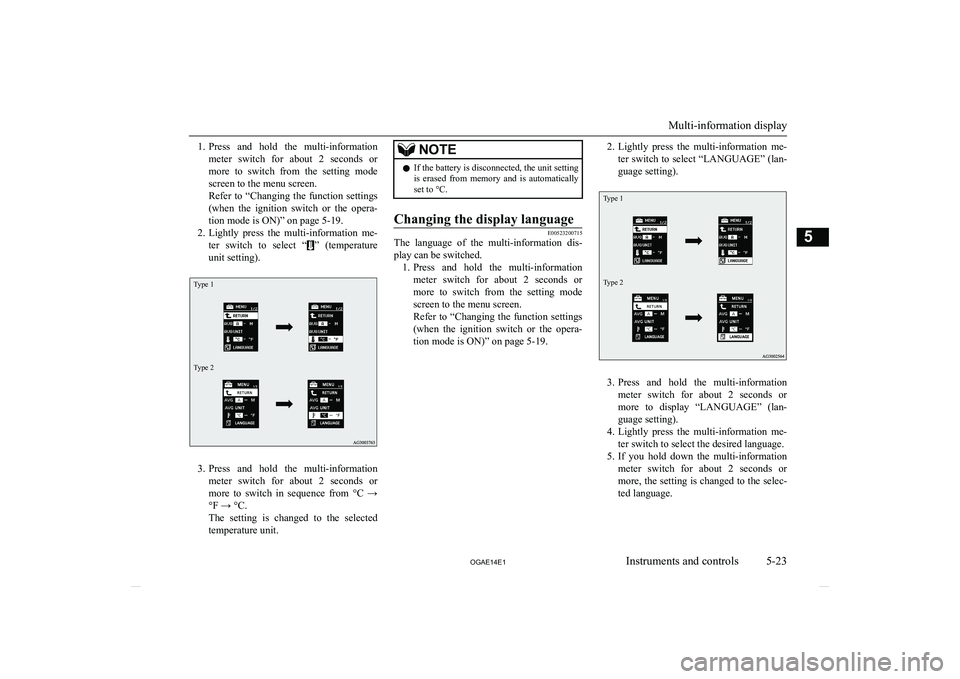
2. Lightly press the multi-information me-
ter switch to select “
” (temperature
unit setting).
Type 1Type 2
3. Press and hold the multi-information
meter switch for about 2 seconds or more to switch in sequence from °C →
°F → °C.
The setting is changed to the selected
temperature unit.
NOTEl If the battery is disconnected, the unit setting
is erased from memory and is automatically
set to °C.Changing the display language
E00523200715
The language of the multi-information dis-
play can be switched. 1. Press and hold the multi-information
meter switch for about 2 seconds or more to switch from the setting mode
screen to the menu screen.
Refer to “Changing the function settings (when the ignition switch or the opera-
tion mode is ON)” on page 5-19.
2. Lightly press the multi-information me-
ter switch to select “LANGUAGE” (lan-guage setting).Type 1Type 2
3. Press and hold the multi-information
meter switch for about 2 seconds or more to display “LANGUAGE” (lan-
guage setting).
4. Lightly press the multi-information me-
ter switch to select the desired language.
5. If you hold down the multi-information
meter switch for about 2 seconds or more, the setting is changed to the selec- ted language.
Multi-information display
5-23
OGAE14E1Instruments and controls5
Page 128 of 418
NOTElThe memory of the language setting is
erased if the battery is disconnected, and it returns automatically to ENGLISH or RUS-
SIAN.
l If “---” is selected in the language setting, a
warning message is not displayed when there is a warning display or interrupt dis-
play.Operation sound setting
E00523400498
You can turn off the operation sounds of the
multi-information meter switch and daytime
dipper button. 1. Press and hold the multi-information
meter switch for about 2 seconds or more to switch from the setting mode screen to the menu screen.
Refer to “Changing the function settings
(when the ignition switch or the opera- tion mode is ON)” on page 5-19.
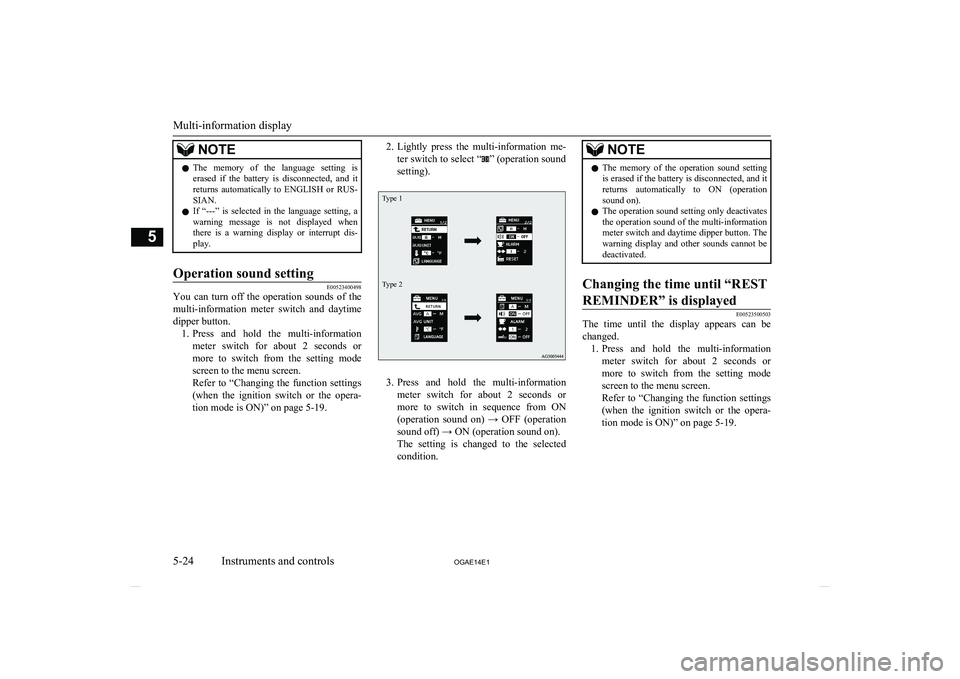
2. Lightly press the multi-information me-
ter switch to select “
” (operation sound
setting).
Type 1Type 2
3. Press and hold the multi-information
meter switch for about 2 seconds or more to switch in sequence from ON(operation sound on) → OFF (operation
sound off) → ON (operation sound on).
The setting is changed to the selected condition.
NOTEl The memory of the operation sound setting
is erased if the battery is disconnected, and it returns automatically to ON (operationsound on).
l The operation sound setting only deactivates
the operation sound of the multi-information meter switch and daytime dipper button. The
warning display and other sounds cannot be deactivated.Changing the time until “REST
REMINDER” is displayed
E00523500503
The time until the display appears can be changed. 1. Press and hold the multi-information
meter switch for about 2 seconds or more to switch from the setting mode
screen to the menu screen.
Refer to “Changing the function settings (when the ignition switch or the opera-
tion mode is ON)” on page 5-19.
Multi-information display
5-24 OGAE14E1Instruments and controls5
Page 129 of 418
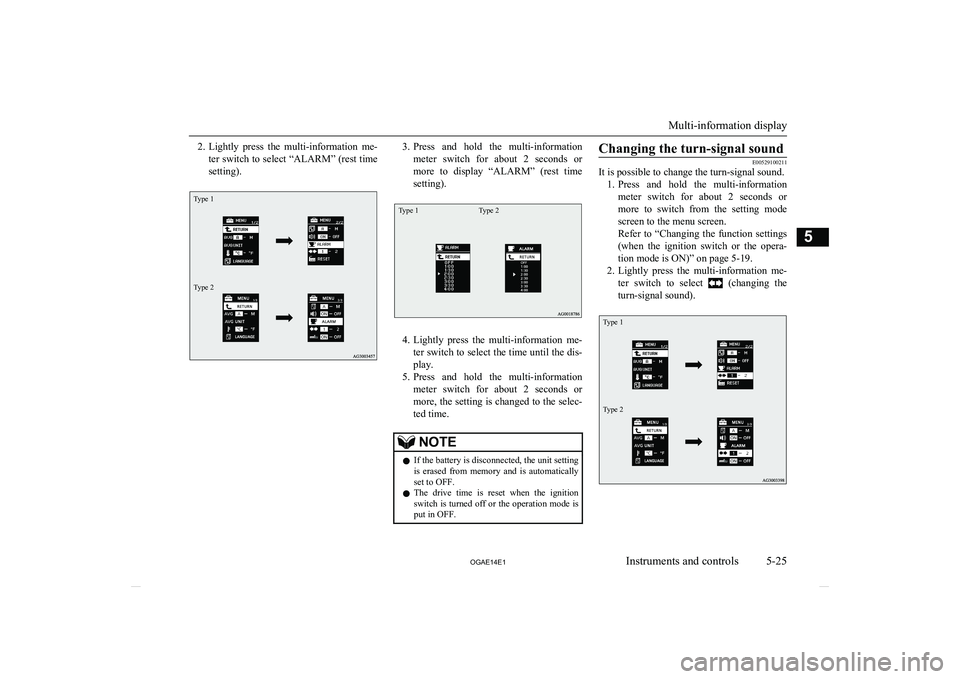
2.Lightly press the multi-information me-
ter switch to select “ALARM” (rest time
setting).Type 1Type 23. Press and hold the multi-information
meter switch for about 2 seconds or more to display “ALARM” (rest time
setting).Type 1Type 2
4. Lightly press the multi-information me-
ter switch to select the time until the dis- play.
5. Press and hold the multi-information
meter switch for about 2 seconds or more, the setting is changed to the selec- ted time.
NOTEl If the battery is disconnected, the unit setting
is erased from memory and is automatically
set to OFF.
l The drive time is reset when the ignition
switch is turned off or the operation mode is
put in OFF.Changing the turn-signal sound
E00529100211
It is possible to change the turn-signal sound.
1. Press and hold the multi-information
meter switch for about 2 seconds or more to switch from the setting mode
screen to the menu screen.
Refer to “Changing the function settings (when the ignition switch or the opera- tion mode is ON)” on page 5-19.
2. Lightly press the multi-information me-
ter switch to select
(changing the
turn-signal sound).
Type 1Type 2
Multi-information display
5-25
OGAE14E1Instruments and controls5
Page 130 of 418
3.Press and hold the multi-information
meter switch for about 2 seconds or more to switch in sequence from 1 (turn- signal sound 1) → 2 (turn-signal sound
2) → 1 (turn-signal sound 1).
The setting changes to the selected turn- signal sound.Changing the momentary fuel
consumption display (Type 2)
E00529200195
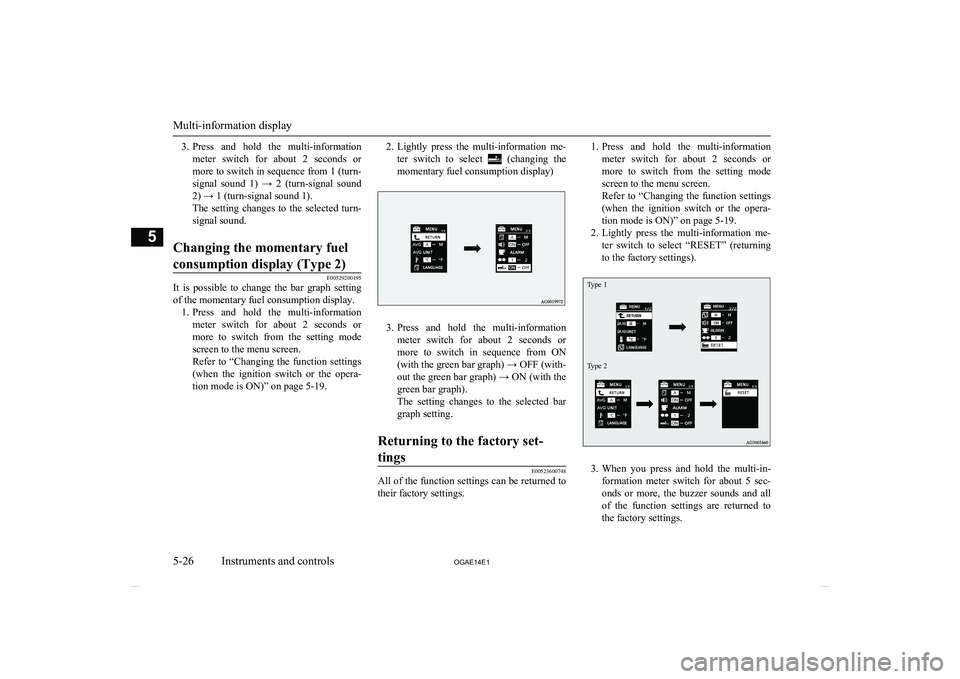
It is possible to change the bar graph setting of the momentary fuel consumption display. 1. Press and hold the multi-information
meter switch for about 2 seconds ormore to switch from the setting mode
screen to the menu screen.
Refer to “Changing the function settings (when the ignition switch or the opera-
tion mode is ON)” on page 5-19.
2. Lightly press the multi-information me-
ter switch to select
(changing the
momentary fuel consumption display)
3. Press and hold the multi-information
meter switch for about 2 seconds or more to switch in sequence from ON(with the green bar graph) → OFF (with-
out the green bar graph) → ON (with the green bar graph).
The setting changes to the selected bar
graph setting.
Returning to the factory set-
tings
E00523600748
All of the function settings can be returned to their factory settings.
1. Press and hold the multi-information
meter switch for about 2 seconds or more to switch from the setting mode
screen to the menu screen.
Refer to “Changing the function settings (when the ignition switch or the opera-
tion mode is ON)” on page 5-19.
2. Lightly press the multi-information me-
ter switch to select “RESET” (returning
to the factory settings).Type 1Type 2
3. When you press and hold the multi-in-
formation meter switch for about 5 sec-
onds or more, the buzzer sounds and all of the function settings are returned to
the factory settings.
Multi-information display
5-26 OGAE14E1Instruments and controls5
Page 151 of 418
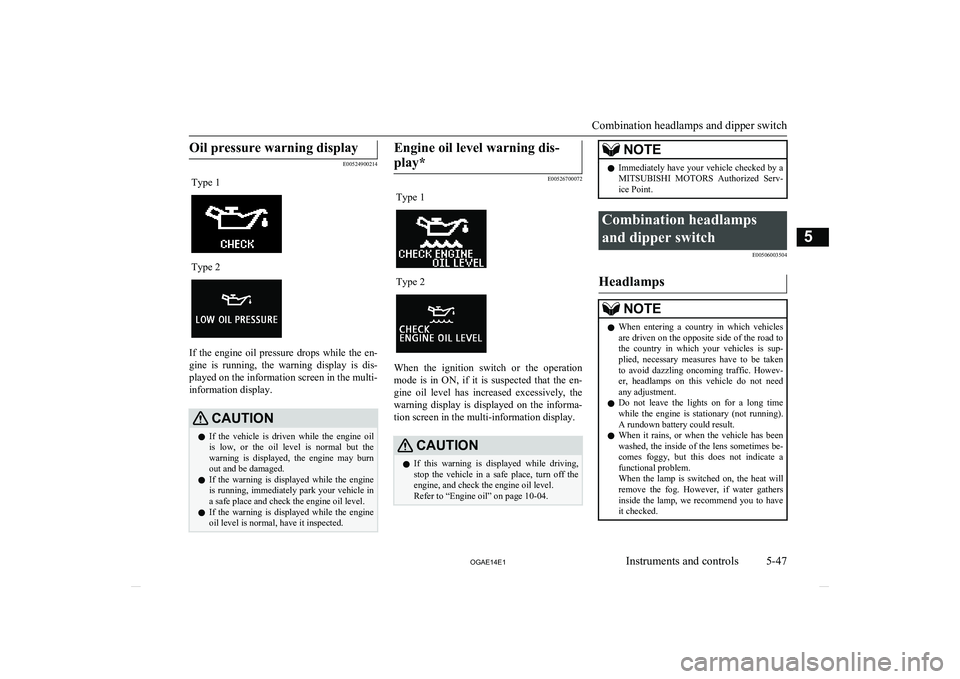
Oil pressure warning display
E00524900214
Type 1Type 2
If the engine oil pressure drops while the en-gine is running, the warning display is dis-
played on the information screen in the multi- information display.
CAUTIONl If the vehicle is driven while the engine oil
is low, or the oil level is normal but the
warning is displayed, the engine may burn out and be damaged.
l If the warning is displayed while the engine
is running, immediately park your vehicle in
a safe place and check the engine oil level.
l If the warning is displayed while the engine
oil level is normal, have it inspected.Engine oil level warning dis-
play*
E00526700072
Type 1Type 2
When the ignition switch or the operation mode is in ON, if it is suspected that the en-
gine oil level has increased excessively, the warning display is displayed on the informa-
tion screen in the multi-information display.
CAUTIONl If this warning is displayed while driving,
stop the vehicle in a safe place, turn off the engine, and check the engine oil level.
Refer to “Engine oil” on page 10-04.NOTEl Immediately have your vehicle checked by a
MITSUBISHI MOTORS Authorized Serv-
ice Point.Combination headlamps
and dipper switch E00506003504
Headlamps
NOTElWhen entering a country in which vehicles
are driven on the opposite side of the road tothe country in which your vehicles is sup- plied, necessary measures have to be takento avoid dazzling oncoming traffic. Howev-
er, headlamps on this vehicle do not need any adjustment.
l Do not leave the lights on for a long time
while the engine is stationary (not running).A rundown battery could result.
l When it rains, or when the vehicle has been
washed, the inside of the lens sometimes be-
comes foggy, but this does not indicate a functional problem.
When the lamp is switched on, the heat will
remove the fog. However, if water gathers
inside the lamp, we recommend you to have it checked.
Combination headlamps and dipper switch
5-47
OGAE14E1Instruments and controls5
Page 152 of 418
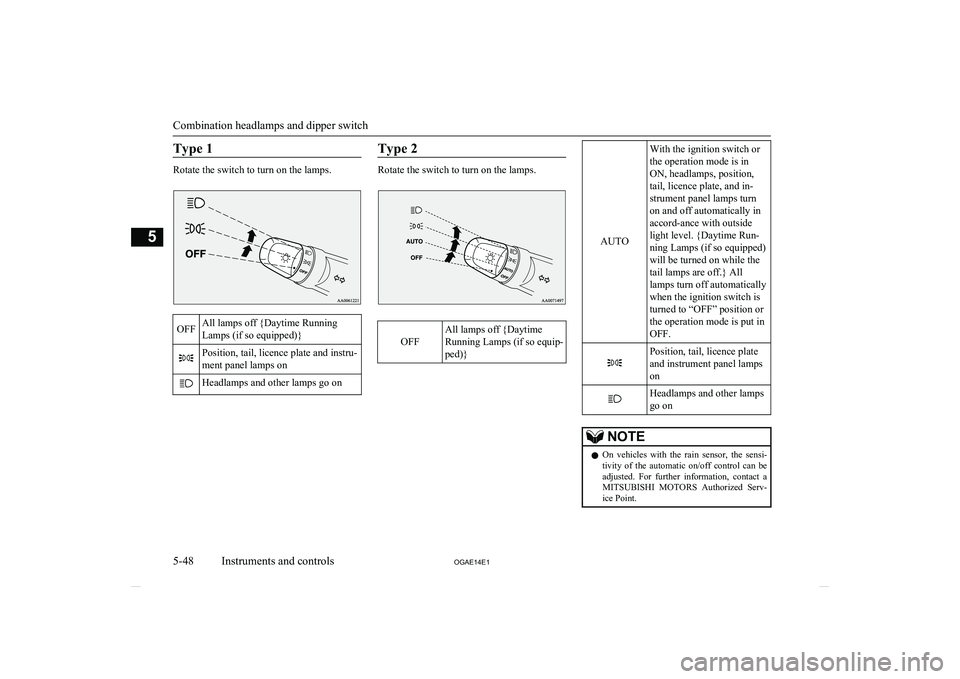
Type 1
Rotate the switch to turn on the lamps.
OFFAll lamps off {Daytime Running
Lamps (if so equipped)}Position, tail, licence plate and instru-
ment panel lamps onHeadlamps and other lamps go onType 2
Rotate the switch to turn on the lamps.OFF
All lamps off {Daytime
Running Lamps (if so equip-
ped)}
AUTO
With the ignition switch or
the operation mode is in
ON, headlamps, position,
tail, licence plate, and in-
strument panel lamps turn
on and off automatically in
accord-ance with outside
light level. {Daytime Run-
ning Lamps (if so equipped)
will be turned on while the
tail lamps are off.} All
lamps turn off automatically
when the ignition switch is
turned to “OFF” position or
the operation mode is put in
OFF.Position, tail, licence plate
and instrument panel lamps
onHeadlamps and other lamps
go onNOTEl On vehicles with the rain sensor, the sensi-
tivity of the automatic on/off control can beadjusted. For further information, contact a MITSUBISHI MOTORS Authorized Serv-
ice Point.
Combination headlamps and dipper switch
5-48 OGAE14E1Instruments and controls5
Page 153 of 418
NOTElWhen the headlamps are turned off by the
automatic on/off control with the ignition
switch in the “ON” position, the front fog lamps (if so equipped) and rear fog lamps al-
so go off. When the headlamps are subse- quently turned back on by the automatic
on/off control, the front fog lamps also come on but the rear fog lamp stays off. If you wish to turn the rear fog lamp back on, oper- ate the switch again.
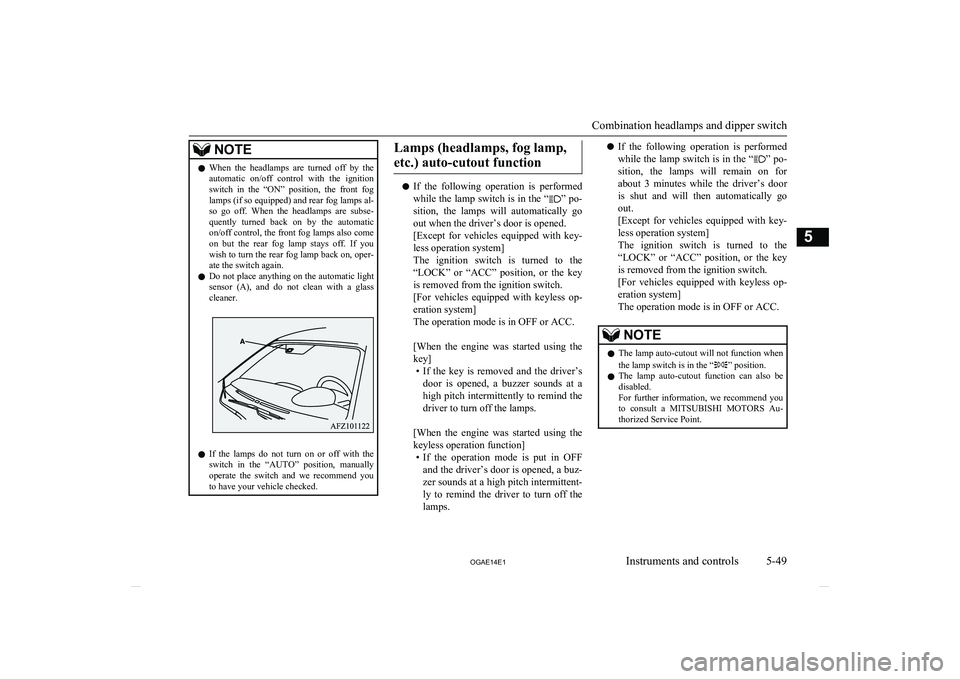
l Do not place anything on the automatic light
sensor (A), and do not clean with a glass
cleaner.
l If the lamps do not turn on or off with the
switch in the “AUTO” position, manually
operate the switch and we recommend you
to have your vehicle checked.
Lamps (headlamps, fog lamp,
etc.) auto-cutout function
l If the following operation is performed
while the lamp switch is in the “” po-
sition, the lamps will automatically go
out when the driver’s door is opened.
[Except for vehicles equipped with key-
less operation system]
The ignition switch is turned to the
“LOCK” or “ACC” position, or the key is removed from the ignition switch.
[For vehicles equipped with keyless op- eration system]
The operation mode is in OFF or ACC.
[When the engine was started using the
key] • If the key is removed and the driver’s
door is opened, a buzzer sounds at a high pitch intermittently to remind the driver to turn off the lamps.
[When the engine was started using the
keyless operation function] • If the operation mode is put in OFF
and the driver’s door is opened, a buz- zer sounds at a high pitch intermittent-
ly to remind the driver to turn off the lamps.
l If the following operation is performed
while the lamp switch is in the “” po-
sition, the lamps will remain on for
about 3 minutes while the driver’s door
is shut and will then automatically go out.
[Except for vehicles equipped with key-
less operation system]
The ignition switch is turned to the
“LOCK” or “ACC” position, or the key is removed from the ignition switch.
[For vehicles equipped with keyless op- eration system]
The operation mode is in OFF or ACC.NOTEl The lamp auto-cutout will not function when
the lamp switch is in the “” position.
l The lamp auto-cutout function can also be
disabled.
For further information, we recommend you
to consult a MITSUBISHI MOTORS Au-
thorized Service Point.
Combination headlamps and dipper switch
5-49
OGAE14E1Instruments and controls5
Page 154 of 418
![MITSUBISHI ASX 2014 (in English) Owners Guide When you want to keep thelamps on:
1. In the following cases, turn the lamp
switch to the “OFF” position.
[Except for vehicles equipped with key-
less operation system]
The ignition swi](/img/19/34863/w960_34863-153.png "MITSUBISHI ASX 2014 (in English) Owners Guide When you want to keep thelamps on:
1. In the following cases, turn the lamp
switch to the “OFF” position.
[Except for vehicles equipped with key-
less operation system]
The ignition swi")
When you want to keep thelamps on:
1. In the following cases, turn the lamp
switch to the “OFF” position.
[Except for vehicles equipped with key-
less operation system]
The ignition switch is in the “LOCK” or
“ACC” position.
[For vehicles equipped with keyless op- eration system]
The operation mode is in OFF or ACC.
2. Turn on the lamps with the switch in the
“
” or “” position again, then the
lamps will remain on.
NOTEl When the engine was started using the key,
if the driver’s door is opened and the key is
removed, the lamp monitor buzzer sounds at a high pitch intermittently.
The buzzer stops when the driver’s door is closed. (The warning is also displayed on the
multi-information display.)
The buzzer stops in the following manner.
• Turn the lamp switch to the “OFF” posi-
tion.
• Close the driver’s door.
l When the engine was started using the key-
less operation function, if the driver’s door is
opened and the operation mode is put inNOTEOFF, the lamp monitor buzzer sounds at a high pitch intermittently.
The buzzer stops when the driver’s door is closed. (The warning is also displayed on the
multi-information display.)
The buzzer stops in the following manner.
• Turn the lamp switch to the “OFF” posi-
tion.
• Close the driver’s door.Lamp monitor buzzer
E00506100559
[When the engine was started using the key]
If the driver’s door is opened when the key is
in the “LOCK” or “ACC” position or re-
moved from the ignition switch while the
lamps are on, a buzzer will sound to remind the driver to turn off the lamps.
[When the engine was started using the key-
less operation function]
If the driver’s door is opened when the opera- tion mode is in ACC or OFF with the lamps
illuminated, a buzzer will sound to remind the driver to turn off the lamps.
In both cases, the buzzer will automatically
stop if the auto-cutoff function is activated, the lamp switch is turned off, or the door is
closed.
Dipper (High/Low beam
change)
E00506200329
When the lamp switch is in the “” posi-
tion, the beam changes from high to low (or
low to high) each time the lever is pulled fully (1). While the high-beam is on, the
high-beam indication lamp in the instrument
cluster will also illuminate.
Headlamp flasher
E00506300199
The high-beams flash when the lever is pulled slightly (2), and will go off when it is
released.
When the high-beam is on, the high-beam in- dication lamp in the instrument cluster will il-
luminate.
Combination headlamps and dipper switch
5-50 OGAE14E1Instruments and controls5
Page 155 of 418
NOTElThe high-beams can also flash when the
lamp switch is OFF.
l If you turn the lamps off with the headlamps
set to high-beam, the headlamps are auto- matically returned to their low-beam setting
when the lamp switch is next turned to the
“
” position.
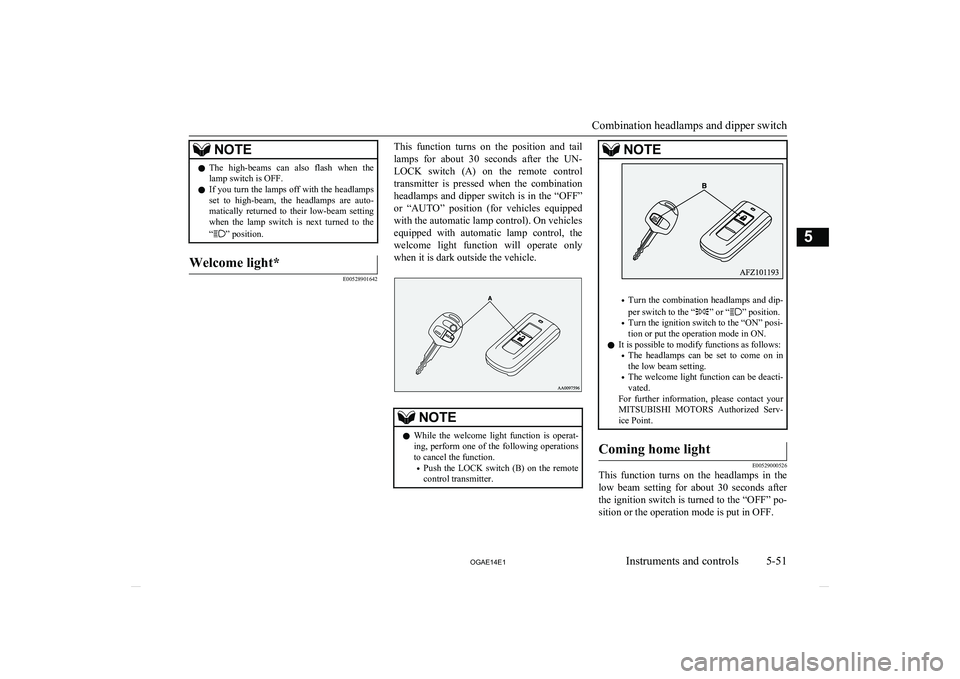
Welcome light*
E00528901642
This function turns on the position and tail
lamps for about 30 seconds after the UN- LOCK switch (A) on the remote control
transmitter is pressed when the combination
headlamps and dipper switch is in the “OFF”
or “AUTO” position (for vehicles equipped with the automatic lamp control). On vehicles
equipped with automatic lamp control, the welcome light function will operate only
when it is dark outside the vehicle.NOTEl While the welcome light function is operat-
ing, perform one of the following operations to cancel the function.
• Push the LOCK switch (B) on the remote
control transmitter.NOTE
• Turn the combination headlamps and dip-
per switch to the “” or “” position.
• Turn the ignition switch to the “ON” posi-
tion or put the operation mode in ON.
l It is possible to modify functions as follows:
• The headlamps can be set to come on in
the low beam setting.
• The welcome light function can be deacti-
vated.
For further information, please contact your MITSUBISHI MOTORS Authorized Serv-
ice Point.
Coming home light
E00529000526
This function turns on the headlamps in the
low beam setting for about 30 seconds after the ignition switch is turned to the “OFF” po- sition or the operation mode is put in OFF.
Combination headlamps and dipper switch
5-51
OGAE14E1Instruments and controls5