lock MITSUBISHI ASX 2014 (in English) Repair Manual
[x] Cancel search | Manufacturer: MITSUBISHI, Model Year: 2014, Model line: ASX, Model: MITSUBISHI ASX 2014Pages: 418, PDF Size: 14.02 MB
Page 113 of 418
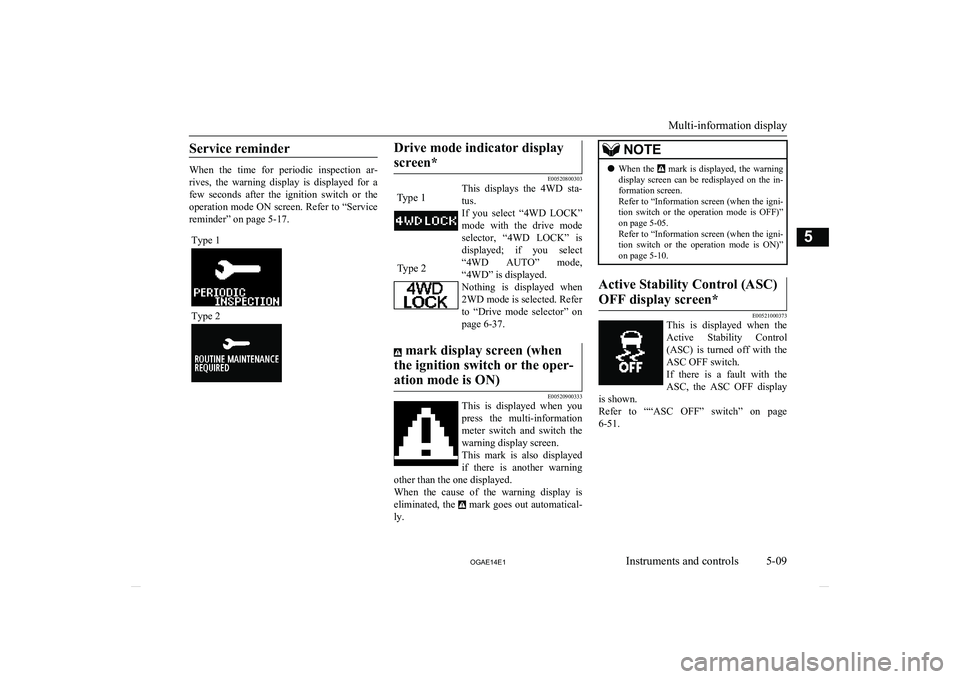
Service reminder
When the time for periodic inspection ar-rives, the warning display is displayed for a
few seconds after the ignition switch or the operation mode ON screen. Refer to “Service
reminder” on page 5-17.
Type 1
Type 2
Drive mode indicator display
screen*
E00520800303
This displays the 4WD sta-
tus.
If you select “4WD LOCK” mode with the drive mode
selector, “4WD LOCK” is
displayed; if you select
“4WD AUTO” mode, “4WD” is displayed.
Nothing is displayed when
2WD mode is selected. Refer
to “Drive mode selector” on page 6-37.
mark display screen (when
the ignition switch or the oper- ation mode is ON)
E00520900333
This is displayed when you press the multi-information
meter switch and switch the
warning display screen. This mark is also displayed
if there is another warning
other than the one displayed.
When the cause of the warning display is eliminated, the
mark goes out automatical-
ly.
NOTEl When the mark is displayed, the warning
display screen can be redisplayed on the in- formation screen.
Refer to “Information screen (when the igni-
tion switch or the operation mode is OFF)” on page 5-05.
Refer to “Information screen (when the igni- tion switch or the operation mode is ON)”
on page 5-10.Active Stability Control (ASC)
OFF display screen*
E00521000373
This is displayed when the Active Stability Control(ASC) is turned off with the
ASC OFF switch.
If there is a fault with the ASC, the ASC OFF display
is shown.
Refer to ““ASC OFF” switch” on page 6-51.
Multi-information display
5-09
OGAE14E1Instruments and controls5 Type 1Type 2
Page 116 of 418
NOTElThe display setting can be changed to the
preferred units (km or miles).
Refer to “Changing the function settings (when the ignition switch or the operationmode is ON)” on page 5-19.
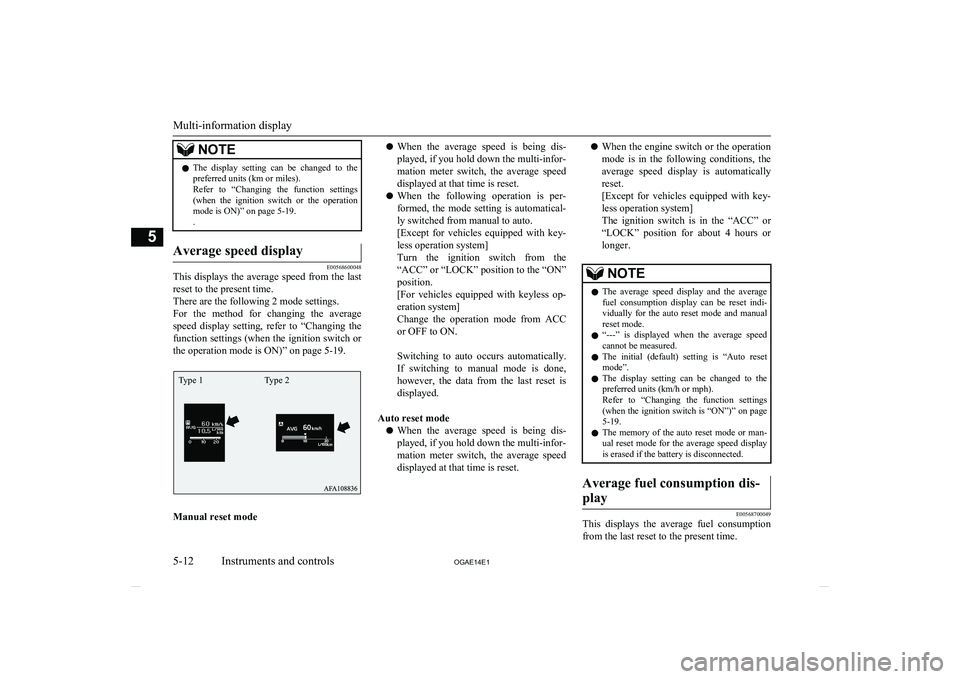
.Average speed display
E00568600048
This displays the average speed from the last
reset to the present time.
There are the following 2 mode settings.
For the method for changing the average speed display setting, refer to “Changing the
function settings (when the ignition switch or
the operation mode is ON)” on page 5-19.
Manual reset mode
l When the average speed is being dis-
played, if you hold down the multi-infor-
mation meter switch, the average speed
displayed at that time is reset.
l When the following operation is per-
formed, the mode setting is automatical-
ly switched from manual to auto.
[Except for vehicles equipped with key-
less operation system]
Turn the ignition switch from the
“ACC” or “LOCK” position to the “ON” position.
[For vehicles equipped with keyless op-
eration system]
Change the operation mode from ACC or OFF to ON.
Switching to auto occurs automatically.
If switching to manual mode is done,
however, the data from the last reset is
displayed.
Auto reset mode l When the average speed is being dis-
played, if you hold down the multi-infor-
mation meter switch, the average speed displayed at that time is reset.l When the engine switch or the operation
mode is in the following conditions, the
average speed display is automatically
reset.
[Except for vehicles equipped with key-
less operation system]
The ignition switch is in the “ACC” or “LOCK” position for about 4 hours or
longer.NOTEl The average speed display and the average
fuel consumption display can be reset indi-vidually for the auto reset mode and manual
reset mode.
l “---” is displayed when the average speed
cannot be measured.
l The initial (default) setting is “Auto reset
mode”.
l The display setting can be changed to the
preferred units (km/h or mph).
Refer to “Changing the function settings (when the ignition switch is “ON”)” on page
5-19.
l The memory of the auto reset mode or man-
ual reset mode for the average speed display is erased if the battery is disconnected.Average fuel consumption dis-
play
E00568700049
This displays the average fuel consumption from the last reset to the present time.
Multi-information display
5-12 OGAE14E1Instruments and controls5 Type 1 Type 2
Page 117 of 418
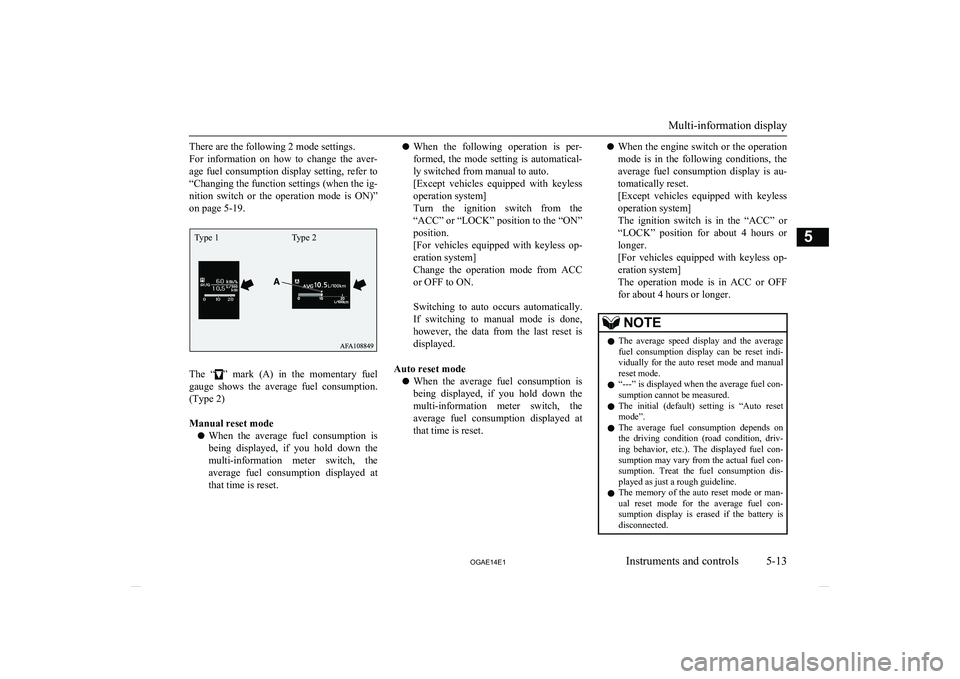
There are the following 2 mode settings.
For information on how to change the aver- age fuel consumption display setting, refer to
“Changing the function settings (when the ig- nition switch or the operation mode is ON)”
on page 5-19.
The “” mark (A) in the momentary fuel
gauge shows the average fuel consumption. (Type 2)
Manual reset mode
l When the average fuel consumption is
being displayed, if you hold down the multi-information meter switch, the average fuel consumption displayed at
that time is reset.
l When the following operation is per-
formed, the mode setting is automatical- ly switched from manual to auto.
[Except vehicles equipped with keyless
operation system]
Turn the ignition switch from the
“ACC” or “LOCK” position to the “ON” position.
[For vehicles equipped with keyless op- eration system]
Change the operation mode from ACC
or OFF to ON.
Switching to auto occurs automatically. If switching to manual mode is done,
however, the data from the last reset is
displayed.
Auto reset mode l When the average fuel consumption is
being displayed, if you hold down the multi-information meter switch, the average fuel consumption displayed at
that time is reset.l When the engine switch or the operation
mode is in the following conditions, the
average fuel consumption display is au-
tomatically reset.
[Except vehicles equipped with keyless
operation system]
The ignition switch is in the “ACC” or
“LOCK” position for about 4 hours or longer.
[For vehicles equipped with keyless op- eration system]
The operation mode is in ACC or OFF
for about 4 hours or longer.NOTEl The average speed display and the average
fuel consumption display can be reset indi-vidually for the auto reset mode and manual
reset mode.
l “---” is displayed when the average fuel con-
sumption cannot be measured.
l The initial (default) setting is “Auto reset
mode”.
l The average fuel consumption depends on
the driving condition (road condition, driv- ing behavior, etc.). The displayed fuel con-
sumption may vary from the actual fuel con- sumption. Treat the fuel consumption dis-played as just a rough guideline.
l The memory of the auto reset mode or man-
ual reset mode for the average fuel con-sumption display is erased if the battery isdisconnected.
Multi-information display
5-13
OGAE14E1Instruments and controls5Type 1 Type 2
Page 121 of 418
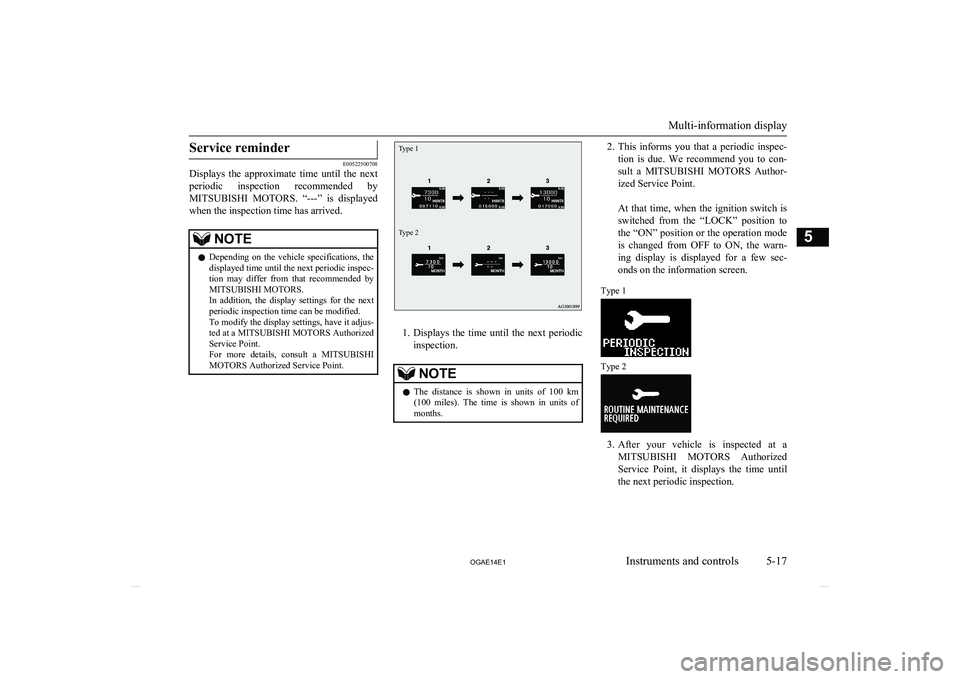
Service reminder
E00522500708
Displays the approximate time until the next
periodic inspection recommended by MITSUBISHI MOTORS . “---” is displayed
when the inspection time has arrived.
NOTEl Depending on the vehicle specifications, the
displayed time until the next periodic inspec-
tion may differ from that recommended by
MITSUBISHI MOTORS.
In addition, the display settings for the next periodic inspection time can be modified.
To modify the display settings, have it adjus-
ted at a MITSUBISHI MOTORS Authorized
Service Point.
For more details, consult a MITSUBISHI
MOTORS Authorized Service Point.Type 1Type 2
1. Displays the time until the next periodic
inspection.
NOTEl The distance is shown in units of 100 km
(100 miles). The time is shown in units of months.2. This informs you that a periodic inspec-
tion is due. We recommend you to con-
sult a MITSUBISHI MOTORS Author-
ized Service Point.
At that time, when the ignition switch is switched from the “LOCK” position to
the “ON” position or the operation mode is changed from OFF to ON, the warn-
ing display is displayed for a few sec- onds on the information screen.Type 1
Type 2
3. After your vehicle is inspected at a
MITSUBISHI MOTORS Authorized
Service Point, it displays the time until
the next periodic inspection.
Multi-information display
5-17
OGAE14E1Instruments and controls5
Page 122 of 418
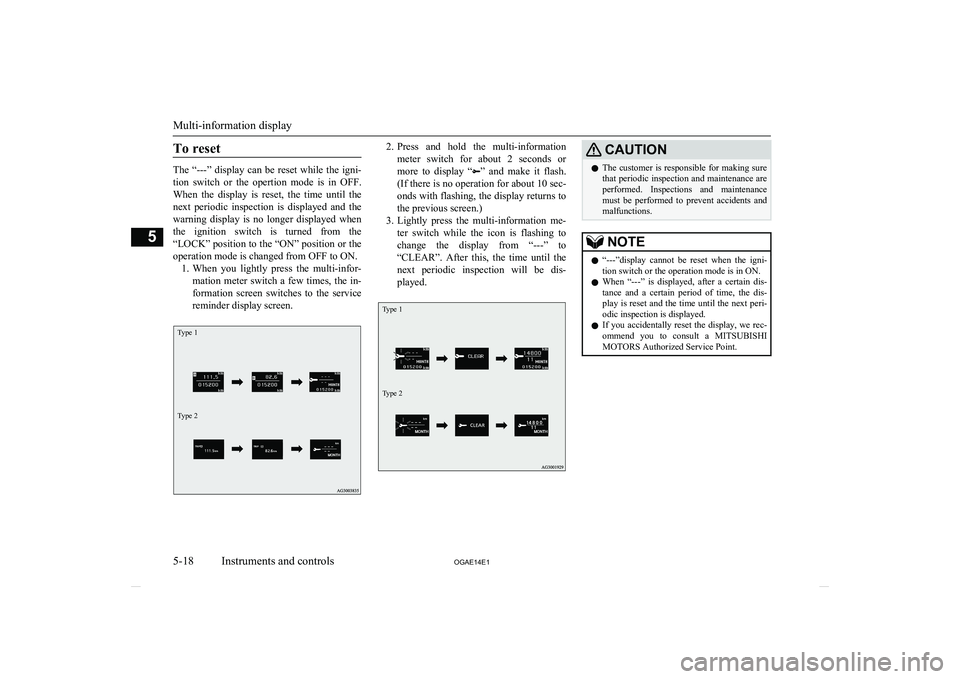
To reset
The “---” display can be reset while the igni-tion switch or the opertion mode is in OFF.When the display is reset, the time until the
next periodic inspection is displayed and the warning display is no longer displayed when
the ignition switch is turned from the
“LOCK” position to the “ON” position or the operation mode is changed from OFF to ON. 1. When you lightly press the multi-infor-
mation meter switch a few times, the in-
formation screen switches to the service
reminder display screen.
Type 1Type 22. Press and hold the multi-information
meter switch for about 2 seconds or more to display “
” and make it flash.
(If there is no operation for about 10 sec-
onds with flashing, the display returns to the previous screen.)
3. Lightly press the multi-information me-
ter switch while the icon is flashing to
change the display from “---” to “CLEAR”. After this, the time until the
next periodic inspection will be dis- played.
Type 1Type 2
CAUTIONl The customer is responsible for making sure
that periodic inspection and maintenance are
performed. Inspections and maintenance must be performed to prevent accidents and malfunctions.NOTEl “---”display cannot be reset when the igni-
tion switch or the operation mode is in ON.
l When “---” is displayed, after a certain dis-
tance and a certain period of time, the dis-
play is reset and the time until the next peri-
odic inspection is displayed.
l If you accidentally reset the display, we rec-
ommend you to consult a MITSUBISHI
MOTORS Authorized Service Point.
Multi-information display
5-18 OGAE14E1Instruments and controls5
Page 125 of 418
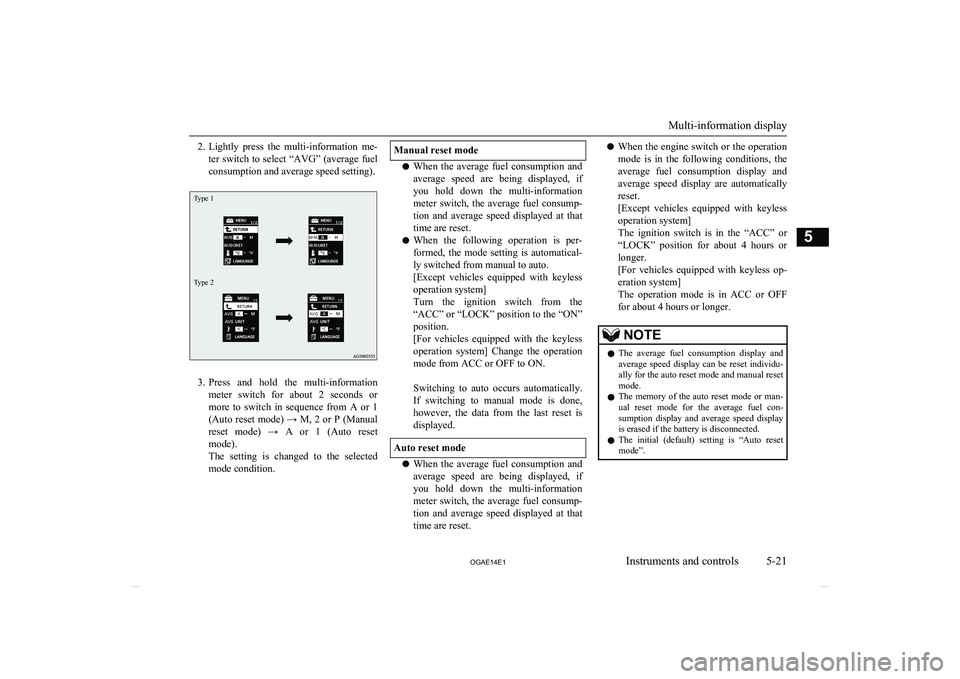
2.Lightly press the multi-information me-
ter switch to select “AVG” (average fuel
consumption and average speed setting).Type 1Type 2
3. Press and hold the multi-information
meter switch for about 2 seconds or more to switch in sequence from A or 1 (Auto reset mode) → M, 2 or P (Manual
reset mode) → A or 1 (Auto reset mode).
The setting is changed to the selected
mode condition.
Manual reset mode
l When the average fuel consumption and
average speed are being displayed, if
you hold down the multi-information
meter switch, the average fuel consump- tion and average speed displayed at that time are reset.
l When the following operation is per-
formed, the mode setting is automatical- ly switched from manual to auto.
[Except vehicles equipped with keyless
operation system]
Turn the ignition switch from the
“ACC” or “LOCK” position to the “ON” position.
[For vehicles equipped with the keyless
operation system] Change the operation
mode from ACC or OFF to ON.
Switching to auto occurs automatically. If switching to manual mode is done,
however, the data from the last reset is
displayed.
Auto reset mode
l When the average fuel consumption and
average speed are being displayed, if
you hold down the multi-information meter switch, the average fuel consump-tion and average speed displayed at that
time are reset.
l When the engine switch or the operation
mode is in the following conditions, the
average fuel consumption display and
average speed display are automatically
reset.
[Except vehicles equipped with keyless
operation system]
The ignition switch is in the “ACC” or “LOCK” position for about 4 hours or
longer.
[For vehicles equipped with keyless op- eration system]
The operation mode is in ACC or OFF
for about 4 hours or longer.NOTEl The average fuel consumption display and
average speed display can be reset individu- ally for the auto reset mode and manual reset
mode.
l The memory of the auto reset mode or man-
ual reset mode for the average fuel con-sumption display and average speed display
is erased if the battery is disconnected.
l The initial (default) setting is “Auto reset
mode”.
Multi-information display
5-21
OGAE14E1Instruments and controls5
Page 132 of 418
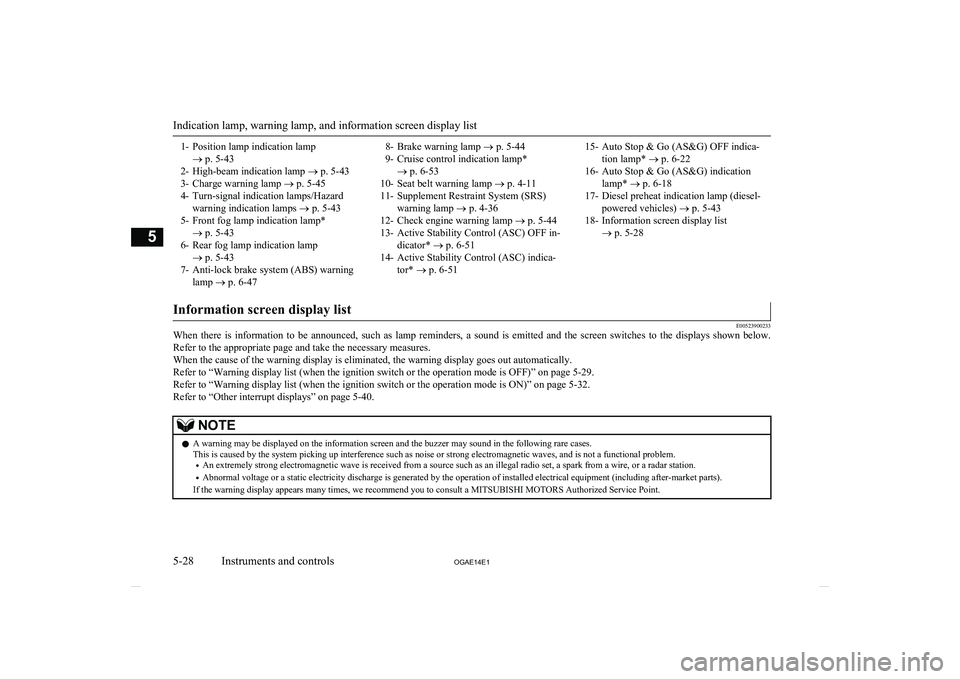
1- Position lamp indication lamp® p. 5-43
2- High-beam indication lamp ® p. 5-43
3- Charge warning lamp ® p. 5-45
4- Turn-signal indication lamps/Hazard warning indication lamps ® p. 5-43
5- Front fog lamp indication lamp* ® p. 5-43
6- Rear fog lamp indication lamp ® p. 5-43
7- Anti-lock brake system (ABS) warning lamp ® p. 6-478- Brake warning lamp ® p. 5-44
9- Cruise control indication lamp* ® p. 6-53
10- Seat belt warning lamp ® p. 4-11
11- Supplement Restraint System (SRS) warning lamp ® p. 4-36
12- Check engine warning lamp ® p. 5-44
13- Active Stability Control (ASC) OFF in- dicator* ® p. 6-51
14- Active Stability Control (ASC) indica- tor* ® p. 6-5115- Auto Stop & Go (AS&G) OFF indica-
tion lamp* ® p. 6-22
16- Auto Stop & Go (AS&G) indication lamp* ® p. 6-18
17- Diesel preheat indication lamp (diesel- powered vehicles) ® p. 5-43
18- Information screen display list ® p. 5-28
Information screen display list
E00523900233
When there is information to be announced, such as lamp reminders, a sound is emitted and the screen switches to the displays shown below.
Refer to the appropriate page and take the necessary measures.When the cause of the warning display is eliminated, the warning display goes out automatically.Refer to “Warning display list (when the ignition switch or the operation mode is OFF)” on page 5-29.
Refer to “Warning display list (when the ignition switch or the operation mode is ON)” on page 5-32.
Refer to “Other interrupt displays” on page 5-40.
NOTEl A warning may be displayed on the information screen and the buzzer may sound in the following rare cases.
This is caused by the system picking up interference such as noise or strong electromagnetic waves, and is not a functional problem.
• An extremely strong electromagnetic wave is received from a source such as an illegal radio set, a spark from a wire, or a radar station.
• Abnormal voltage or a static electricity discharge is generated by the operation of installed electrical equipment (including after-market parts).
If the warning display appears many times, we recommend you to consult a MITSUBISHI MOTORS Authorized Service Point.
Indication lamp, warning lamp, and information screen display list
5-28 OGAE14E1Instruments and controls5
Page 135 of 418
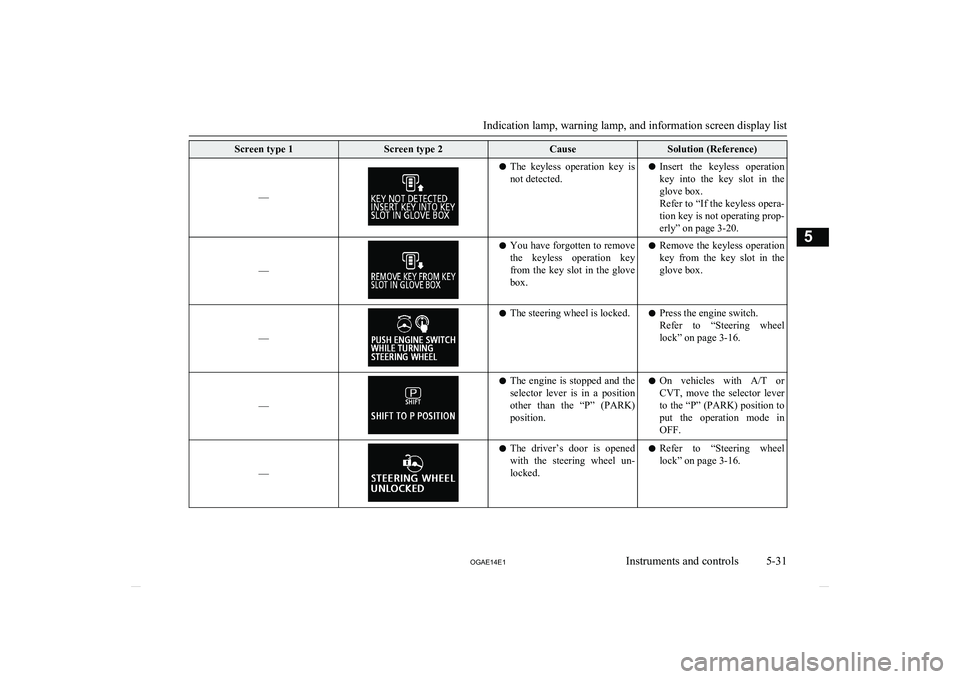
Screen type 1Screen type 2CauseSolution (Reference)
––
lThe keyless operation key is
not detected.l Insert the keyless operation
key into the key slot in the
glove box.
Refer to “If the keyless opera-
tion key is not operating prop- erly” on page 3-20.
––
l You have forgotten to remove
the keyless operation key
from the key slot in the glove box.l Remove the keyless operation
key from the key slot in the glove box.
––
l The steering wheel is locked.l Press the engine switch.
Refer to “Steering wheel
lock” on page 3-16.
––
l The engine is stopped and the
selector lever is in a position
other than the “P” (PARK)
position.l On vehicles with
A/T or
CVT, move the selector lever
to the “P” (PARK) position to
put the operation mode in
OFF.
––
l The driver’s door is opened
with the steering wheel un- locked.l Refer to “Steering wheel
lock” on page 3-16.
Indication lamp, warning lamp, and information screen display list
5-31
OGAE14E1Instruments and controls5
Page 139 of 418
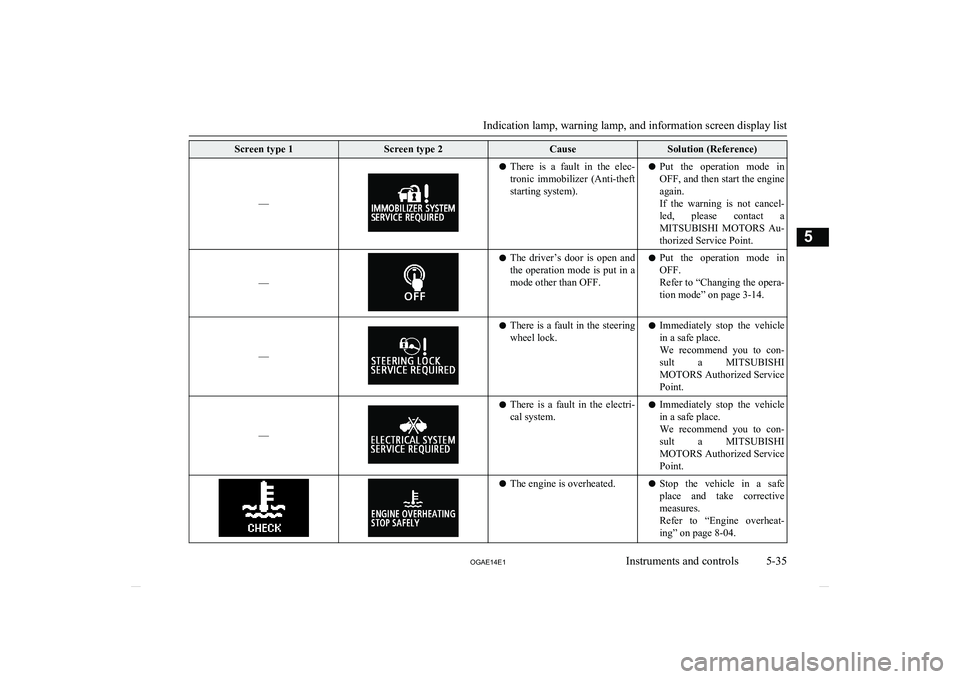
Screen type 1Screen type 2CauseSolution (Reference)
––
lThere is a fault in the elec-
tronic immobilizer (Anti-theft
starting system).l Put the operation mode in
OFF, and then start the engine again.
If the warning is not cancel-
led, please contact a
MITSUBISHI MOTORS Au-
thorized Service Point.
––
l The driver’s door is open and
the operation mode is put in a
mode other than OFF.l Put the operation mode in
OFF.
Refer to “Changing the opera- tion mode” on page 3-14.
––
l There is a fault in the steering
wheel lock.l Immediately stop the vehicle
in a safe place.
We recommend you to con-
sult a MITSUBISHI
MOTORS Authorized Service
Point.
––
l There is a fault in the electri-
cal system.l Immediately stop the vehicle
in a safe place.
We recommend you to con-
sult a MITSUBISHI
MOTORS Authorized Service
Point.l The engine is overheated.lStop the vehicle in a safe
place and take corrective measures.
Refer to “Engine overheat-
ing” on page 8-04.
Indication lamp, warning lamp, and information screen display list
5-35
OGAE14E1Instruments and controls5
Page 145 of 418
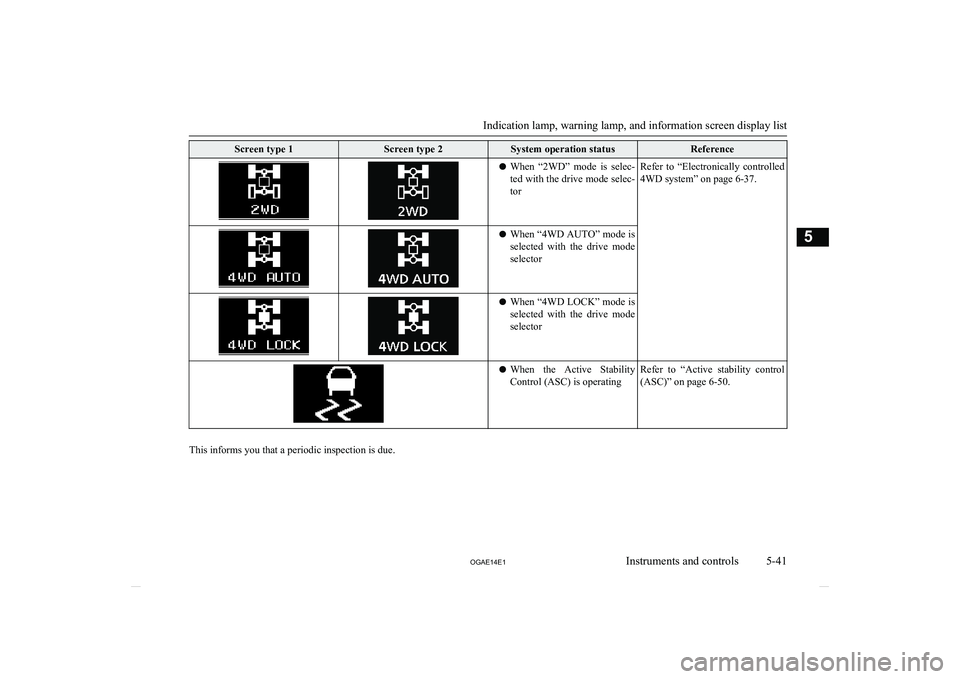
Screen type 1Screen type 2System operation statusReferencelWhen “2WD” mode is selec-
ted with the drive mode selec-torRefer to “Electronically controlled
4WD system” on page 6-37.l When “4WD AUTO” mode is
selected with the drive mode selectorl When “4WD LOCK” mode is
selected with the drive mode selectorl When the Active Stability
Control (ASC) is operatingRefer to “Active stability control (ASC)” on page 6-50.
This informs you that a periodic inspection is due.
Indication lamp, warning lamp, and information screen display list
5-41
OGAE14E1Instruments and controls5