brake light MITSUBISHI ASX 2014 Owner's Manual (in English)
[x] Cancel search | Manufacturer: MITSUBISHI, Model Year: 2014, Model line: ASX, Model: MITSUBISHI ASX 2014Pages: 418, PDF Size: 14.02 MB
Page 6 of 418
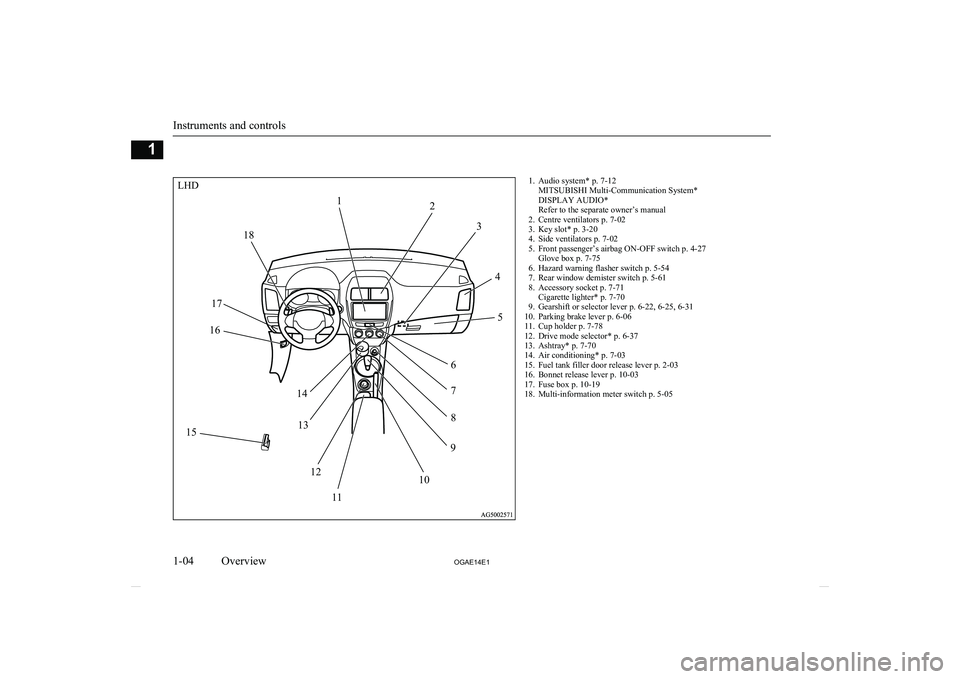
1. Audio system* p. 7-12MITSUBISHI Multi-Communication System*
DISPLAY AUDIO*
Refer to the separate owner’s manual
2. Centre ventilators p. 7-02
3. Key slot* p. 3-20
4. Side ventilators p. 7-02
5. Front passenger’s airbag ON-OFF switch p. 4-27 Glove box p. 7-75
6. Hazard warning flasher switch p. 5-54
7. Rear window demister switch p. 5-61
8. Accessory socket p. 7-71 Cigarette lighter* p. 7-70
9. Gearshift or selector lever p. 6-22, 6-25, 6-31
10. Parking brake lever p. 6-06
11. Cup holder p. 7-78
12. Drive mode selector* p. 6-37
13. Ashtray* p. 7-70
14. Air conditioning* p. 7-03
15. Fuel tank filler door release lever p. 2-03
16. Bonnet release lever p. 10-03
17. Fuse box p. 10-19
18. Multi-information meter switch p. 5-05
Instruments and controls
1-04 OGAE14E1Overview1LHD12
3
45
6 7
8
9
10
11
12
13
14
15 16
17 18
Page 41 of 418
NOTElWhen the following operation is performed
with the operation mode in OFF, the steering wheel is locked.
• Open or close one of the doors (except the
tailgate).
• Lock all doors and the tailgate with the
keyless entry system or the keyless opera- tion function.
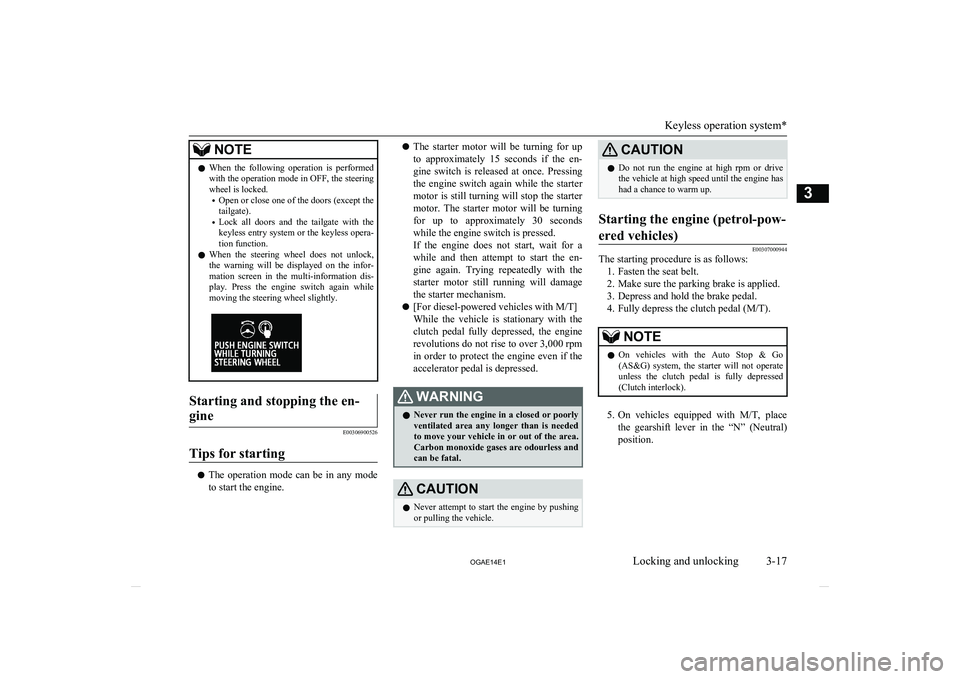
l When the steering wheel does not unlock,
the warning will be displayed on the infor-
mation screen in the multi-information dis-
play. Press the engine switch again while moving the steering wheel slightly.Starting and stopping the en-
gine
E00306900526
Tips for starting
l The operation mode can be in any mode
to start the engine.
l The starter motor will be turning for up
to approximately 15 seconds if the en-
gine switch is released at once. Pressing the engine switch again while the starter
motor is still turning will stop the starter motor. The starter motor will be turningfor up to approximately 30 seconds while the engine switch is pressed.
If the engine does not start, wait for a
while and then attempt to start the en- gine again. Trying repeatedly with the
starter motor still running will damage the starter mechanism.
l [For diesel-powered vehicles with M/T]
While the vehicle is stationary with the
clutch pedal fully depressed, the engine revolutions do not rise to over 3,000 rpm
in order to protect the engine even if the accelerator pedal is depressed.WARNINGl Never run the engine in a closed or poorly
ventilated area any longer than is needed to move your vehicle in or out of the area.Carbon monoxide gases are odourless and can be fatal.CAUTIONl Never attempt to start the engine by pushing
or pulling the vehicle.CAUTIONl Do not run the engine at high rpm or drive
the vehicle at high speed until the engine hashad a chance to warm up.Starting the engine (petrol-pow-
ered vehicles)
E00307000944
The starting procedure is as follows: 1. Fasten the seat belt.
2. Make sure the parking brake is applied.
3. Depress and hold the brake pedal.
4. Fully depress the clutch pedal (M/T).
NOTEl On vehicles with the Auto Stop & Go
(AS&G) system, the starter will not operate
unless the clutch pedal is fully depressed
(Clutch interlock).
5. On vehicles equipped with M/T, place
the gearshift lever in the “N” (Neutral) position.
Keyless operation system*
3-17
OGAE14E1Locking and unlocking3
Page 123 of 418
Door ajar warning displayscreen (when the ignition switch or the operation mode isON)
E00522600565
Type 1
Type 2
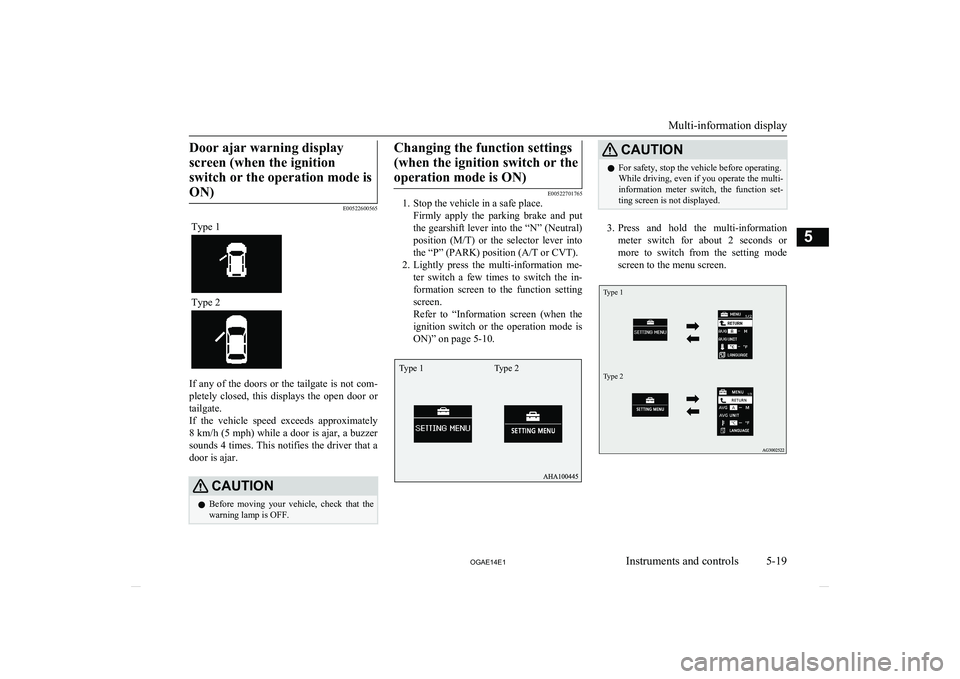
If any of the doors or the tailgate is not com-
pletely closed, this displays the open door or
tailgate.
If the vehicle speed exceeds approximately 8 km/h (5 mph) while a door is ajar, a buzzer
sounds 4 times. This notifies the driver that a
door is ajar.
CAUTIONl Before moving your vehicle, check that the
warning lamp is OFF.Changing the function settings
(when the ignition switch or theoperation mode is ON)
E00522701765
1. Stop the vehicle in a safe place.
Firmly apply the parking brake and put
the gearshift lever into the “N” (Neutral) position ( M/T) or the selector lever into
the “P” (PARK) position (A/T or CVT).
2. Lightly press the multi-information me-
ter switch a few times to switch the in-
formation screen to the function setting screen.
Refer to “Information screen (when the
ignition switch or the operation mode is ON)” on page 5-10.
CAUTIONl For safety, stop the vehicle before operating.
While driving, even if you operate the multi- information meter switch, the function set- ting screen is not displayed.
3. Press and hold the multi-information
meter switch for about 2 seconds or more to switch from the setting mode
screen to the menu screen.
Type 1Type 2
Multi-information display
5-19
OGAE14E1Instruments and controls5 Type 1 Type 2
Page 168 of 418
Economical drivingE00600101076
For economical driving, there are some tech- nical requirements that have to be met. Theprerequisite for low fuel consumption is a
properly adjusted engine. In order to achieve longer life of the vehicle and the most eco- nomical operation, we recommend you tohave the vehicle checked at regular intervals in accordance with the service standards.
Fuel economy and generation of exhaust gas
and noise are highly influenced by personal
driving habits as well as the particular operat- ing conditions. The following points shouldbe observed in order to minimize wear of
brakes, tyres and engine as well as to reduce
environmental pollution.
Starting the engine
Avoid sudden acceleration and sudden starts,
as they will increase fuel consumption.
Shifting
Shift only at an appropriate speed and engine speed. Always use the highest shift position
possible.
Selecting the 4WD drive mode
(4WD vehicles)
The drive mode-selector should be set to
“2WD” when driving on normal roads and
express ways to obtain best possible fuel
economy.
City traffic
Frequent starting and stopping increases the
average fuel consumption. Use roads with smooth traffic flow whenever possible. When driving on congested roads, avoid use of a
low shift position at high engine speeds.
Idling
The vehicle consumes fuel even during
idling. Avoid extended idling whenever pos- sible.
Speed
At higher vehicle speed, more fuel is con- sumed. Avoid driving at full speed. Even a
slight release of the accelerator pedal will save a significant amount of fuel.
Tyre inflation pressure
Check the tyre inflation pressures at regular
intervals. Low tyre inflation pressure increa-ses road resistance and fuel consumption. In addition, low tyre pressures adversely affect
tyre wear and driving stability.
Cargo loads
Do not drive with unnecessary articles in the
luggage compartment. Especially during city
driving where frequent starting and stopping is necessary, the increased weight of the ve-
hicle will greatly affect fuel consumption. Al-
so avoid driving with unnecessary luggage or carriers, etc., on the roof; the increased air re- sistance will increase fuel consumption.
Cold engine starting
Starting of a cold engine consumes more fuel.
Unnecessary fuel consumption is also caused by keeping a hot engine running. After the
engine is started, commence driving as soon
as possible.
Air conditioning
The use of the air conditioning will increase the fuel consumption.
Economical driving
6-02 OGAE14E1Starting and driving6
Page 172 of 418
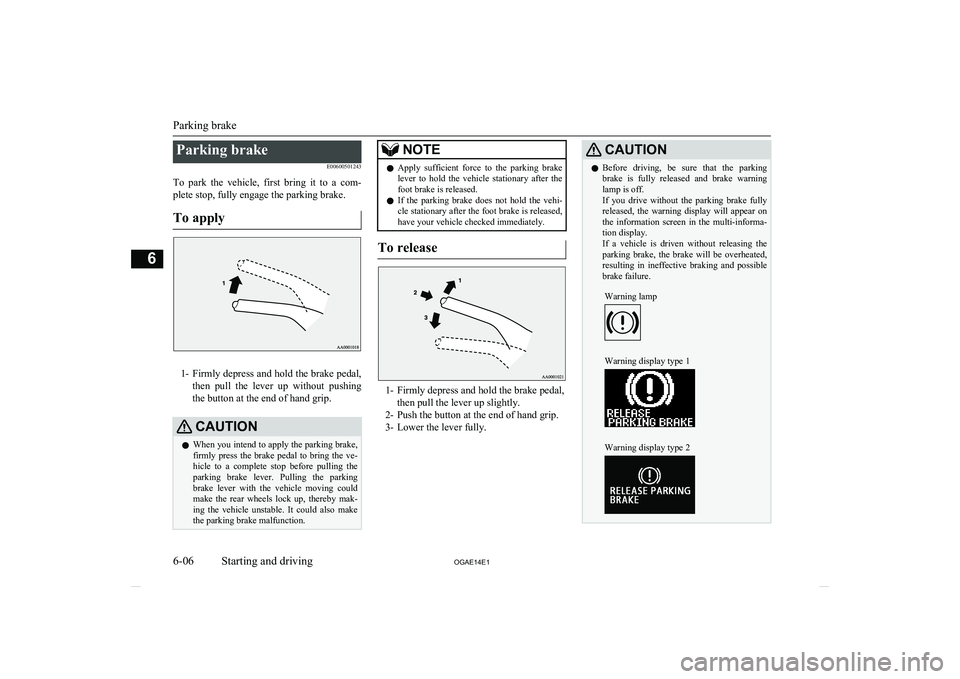
Parking brakeE00600501243
To park the vehicle, first bring it to a com- plete stop, fully engage the parking brake.
To apply
1- Firmly depress and hold the brake pedal,
then pull the lever up without pushing
the button at the end of hand grip.
CAUTIONl When you intend to apply the parking brake,
firmly press the brake pedal to bring the ve-hicle to a complete stop before pulling theparking brake lever. Pulling the parking brake lever with the vehicle moving could
make the rear wheels lock up, thereby mak- ing the vehicle unstable. It could also make
the parking brake malfunction.NOTEl Apply sufficient force to the parking brake
lever to hold the vehicle stationary after the foot brake is released.
l If the parking brake does not hold the vehi-
cle stationary after the foot brake is released,
have your vehicle checked immediately.
To release
1- Firmly depress and hold the brake pedal,
then pull the lever up slightly.
2- Push the button at the end of hand grip.
3- Lower the lever fully.
CAUTIONl Before driving, be sure that the parking
brake is fully released and brake warning lamp is off.
If you drive without the parking brake fully
released, the warning display will appear on the information screen in the multi-informa-tion display.
If a vehicle is driven without releasing the
parking brake, the brake will be overheated, resulting in ineffective braking and possible
brake failure.Warning lampWarning display type 1Warning display type 2
Parking brake
6-06 OGAE14E1Starting and driving6
Page 179 of 418
CAUTIONlDo not remove the ignition key from the ig-
nition switch while driving. The steeringwheel will be locked, causing loss of con-
trol.
l If the engine is stopped while driving, the
brake servomechanism will cease to function and braking efficiency will deteriorate. Also,
the power steering system will not function
and it will require greater manual effort to
operate the steering.
l Do not leave the key in the “ON” position
for a long time when the engine is not run-
ning, doing so will cause the battery to be discharged.
l Do not turn the key to the “START” position
while the engine is running. Doing so could damage the starter motor.Steering wheel lock
E00601500676
[For vehicles equipped with keyless opera-tion system]
For information on operations for vehicles equipped with the keyless operation system,
refer to “Keyless operation system: Steering
wheel lock” on page 3-16.
[Except for vehicles equipped with keyless operation system]
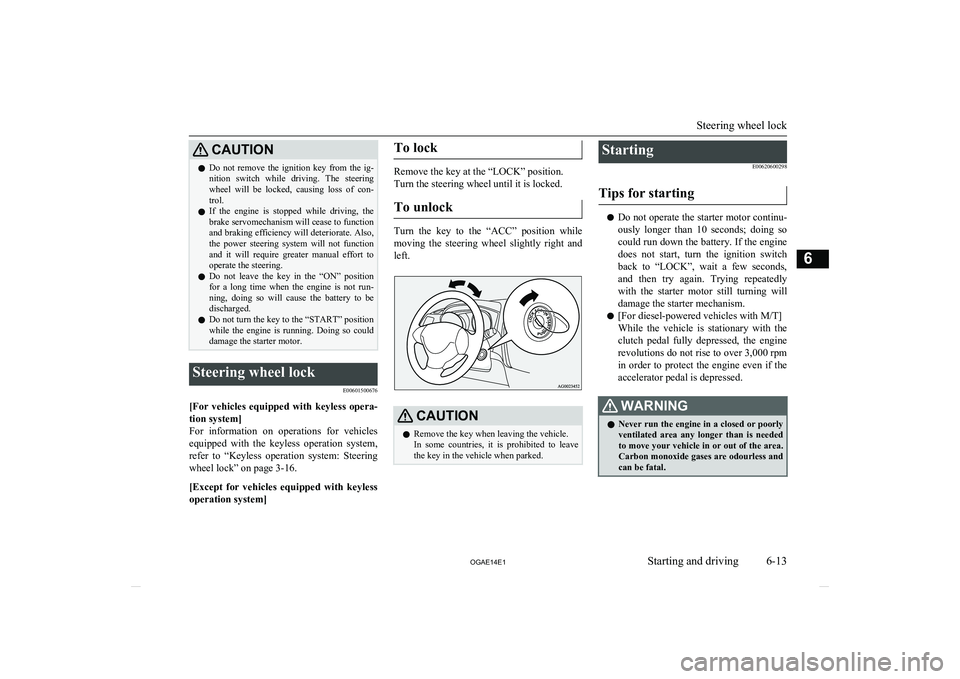
To lock
Remove the key at the “LOCK” position.
Turn the steering wheel until it is locked.
To unlock
Turn the key to the “ACC” position while
moving the steering wheel slightly right and left.
CAUTIONl Remove the key when leaving the vehicle.
In some countries, it is prohibited to leave the key in the vehicle when parked.Starting
E00620600298
Tips for starting
l Do not operate the starter motor continu-
ously longer than 10 seconds; doing so
could run down the battery. If the engine
does not start, turn the ignition switch
back to “LOCK”, wait a few seconds,
and then try again. Trying repeatedly with the starter motor still turning will damage the starter mechanism.
l [For diesel-powered vehicles with M/T]
While the vehicle is stationary with the
clutch pedal fully depressed, the engine revolutions do not rise to over 3,000 rpm
in order to protect the engine even if the accelerator pedal is depressed.
WARNINGl Never run the engine in a closed or poorly
ventilated area any longer than is needed
to move your vehicle in or out of the area. Carbon monoxide gases are odourless and can be fatal.
Steering wheel lock
6-13
OGAE14E1Starting and driving6
Page 184 of 418
CAUTIONlContinuing to drive with the DPF warning
display and check engine warning lamp illu- minating could result in engine trouble and
DPF damage.Turbocharger operation*
E00611200083CAUTIONlDo not run the engine at high speeds (for ex-
ample, by revving it or by accelerating rap-
idly) immediately after starting it.
l Do not stop the engine immediately after
high-speed or uphill driving. First allow the
engine to idle to give the turbocharger a
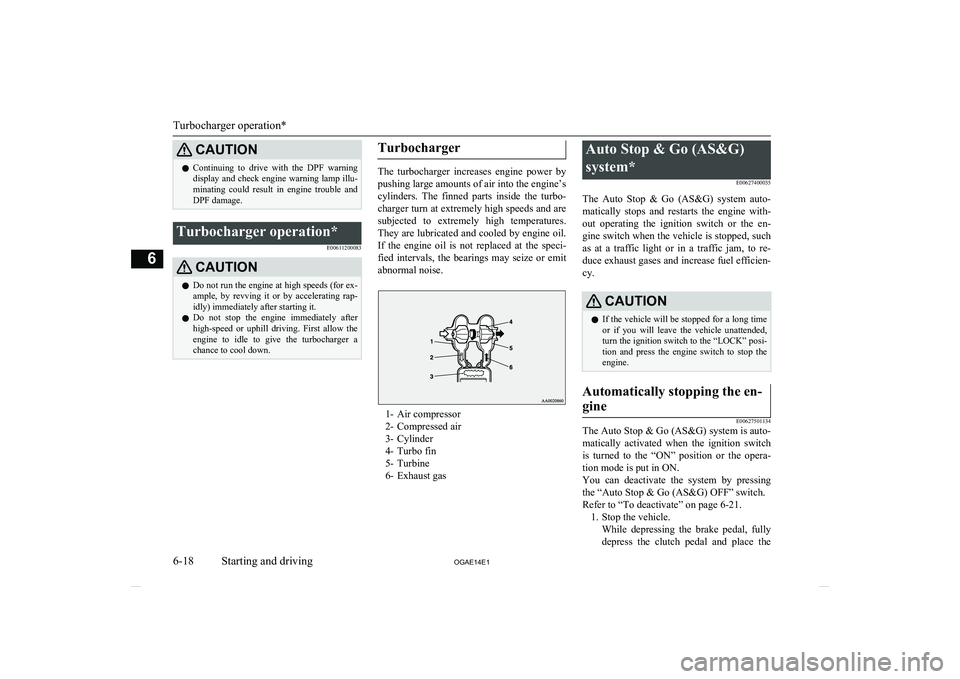
chance to cool down.Turbocharger
The turbocharger increases engine power by
pushing large amounts of air into the engine’s
cylinders. The finned parts inside the turbo- charger turn at extremely high speeds and aresubjected to extremely high temperatures.
They are lubricated and cooled by engine oil.
If the engine oil is not replaced at the speci- fied intervals, the bearings may seize or emit
abnormal noise.
1- Air compressor
2- Compressed air
3- Cylinder
4- Turbo fin
5- Turbine
6- Exhaust gas
Auto Stop & Go (AS&G)
system* E00627400035
The Auto Stop & Go (AS&G) system auto- matically stops and restarts the engine with- out operating the ignition switch or the en-gine switch when the vehicle is stopped, such
as at a traffic light or in a traffic jam, to re- duce exhaust gases and increase fuel efficien- cy.CAUTIONl If the vehicle will be stopped for a long time
or if you will leave the vehicle unattended,
turn the ignition switch to the “LOCK” posi-
tion and press the engine switch to stop the
engine.Automatically stopping the en-
gine
E00627501134
The Auto Stop & Go (AS&G) system is auto- matically activated when the ignition switch is turned to the “ON” position or the opera-
tion mode is put in ON.
You can deactivate the system by pressing the “Auto Stop & Go (AS&G) OFF” switch.
Refer to “To deactivate” on page 6-21. 1. Stop the vehicle. While depressing the brake pedal, fullydepress the clutch pedal and place the
Turbocharger operation*
6-18 OGAE14E1Starting and driving6
Page 206 of 418
WARNINGlImproperly operating this vehicle on or
off-paved roads can cause an accident or
rollover in which you and your passengers
could be seriously injured or killed.
• Follow all instructions and guidelines in
the owner’s manual.
• Keep your speed low and do not drive
faster than conditions allow you to.NOTEl Driving on rough roads can be hard on a ve-
hicle. Before you leave paved roads, be sure all scheduled maintenance and service has
been done, and that you have inspected your vehicle. Pay special attention to the condi- tion of the tyres, and check the tyre pres-
sures.
l MITSUBISHI
MOTORS is not responsible
to the operator for any damage or injury caused or liability incurred by improper and
negligent operation of a vehicle. All techni- ques of vehicle operation depend on the skill and experience of the operator and other par-
ticipating parties. Any deviation from the recommended operating instructions above
is at their own risk.
l Note that the stopping distance required of a
4-wheel drive vehicle differs very little from
that of a 2-wheel drive vehicle. When driv-
ing on a snow-covered road or a slippery, muddy surface, make sure that you keep a
sufficient distance between your vehicle and the one ahead of you.NOTEl The driving posture should be more upright;
adjust the seat to a good position for easy
steering and pedal operation. Be sure to wear
the seat belt.
l After driving on rough roads, check each
part of the vehicle and wash it thoroughlywith water. Refer to the “Inspection andmaintenance following rough road opera-
tion” section and “Maintenance” section.CAUTIONl Setting the drive mode-selector to “4WD
LOCK” to drive on dry paved road will in-
crease fuel consumption, with possible noise generation.
Turning sharp corners
When turning a sharp corner in “4WD
LOCK” position at low speed, a slight differ- ence in steering may be experienced similar
to as if the brakes were applied. This is called tight corner braking and results from each of
the 4 tyres being at a different distance from
the corner. The phenomenon is typical of 4- wheel drive vehicles. If this occurs, either
straighten out the steering wheel, or change to “2WD” or “4WD AUTO” mode.
On snowy or icy roads
Set the drive mode-selector to “4WD AUTO”
or “4WD LOCK” in accordance with the road conditions, and then gradually depress the accelerator pedal for a smooth start.
NOTEl The use of snow tyres is recommended.
l Maintain a safe distance between vehicles,
avoid sudden braking, and use engine brak- ing (downshifting).CAUTIONl Avoid sudden braking, sudden acceleration
and sharp turning. Skidding occurs and con-
trol of the vehicle could be lost.
Driving on sandy or muddy
roads
Set the drive mode-selector to “4WD LOCK”
and then gradually depress the accelerator pedal for a smooth start. Keep the pressure on
the accelerator pedal as constant as possible,
and drive at low speed.
4-wheel drive operation
6-40 OGAE14E1Starting and driving6
Page 207 of 418
CAUTIONlDo not force the vehicle or drive recklessly
on sandy surfaces. In comparison with nor-
mal road surfaces, the engine and other
drive-system components are put under ex- cessive strain when driving on such a sur-
face. This could lead to accidents.
l If the engine coolant temperature display
flashes on the information screen in the mul-
ti-information display or the engine power
drops suddenly while the vehicle is being driven, park your vehicle immediately in asafe place.
Refer to “Engine overheating” on page
8-04 for details and take the required meas-
ures.
WARNINGl When attempting to rock your vehicle out
of a stuck position, be sure that the area
around the vehicle is clear of people and physical objects. The rocking motion may
cause the vehicle to suddenly launch for- ward or backward, causing injury or damage to nearby people or objects.NOTEl Avoid sudden braking, sudden acceleration
and sharp turning; such operations could re-
sult in the vehicle becoming stuck.NOTEl If the vehicle becomes stuck in sandy or
muddy roads, it can often be moved with a
rocking motion. Move the gearshift lever al-
ternately between the 1 st
and “R” (Reverse)
positions ( M/T), the “D” (DRIVE) and “R”
(REVERSE) positions ( A/T or CVT), while
pressing lightly on the accelerator pedal.
l Driving on rough roads can cause rust on the
vehicle; wash the vehicle thoroughly as soon as possible after such use.
Climbing/descending sharp
grades
Your vehicle may not provide sufficient hill
climbing ability and engine braking on steep slopes. Avoid driving on steep slopes even
though the vehicle is a 4-wheel drive vehicle.
Driving through water
E00618900106
If the electrical circuits become wet, further
operation of the vehicle will be impossible;
therefore, avoid driving through water unless absolutely necessary. If driving through wa-ter is unavoidable, use the following proce-
dure:
Check the depth of the water and the terrain before attempting to drive through it. Driveslowly to avoid creating excessive water
splashing.
CAUTIONl Never drive through water that is deep
enough to cover wheel hubs, axles or ex-
haust pipe. Do not change the gearshift lever position ( M/T) or the selector lever position
(A/T or CVT) while driving through water.
Frequent driving through water can adverse-
ly affect the life span of the vehicle; we rec- ommend you to take the necessary measuresto prepare, inspect, and repair the vehicle.
l After driving through water, apply the
brakes to be sure they are functioning prop- erly. If the brakes are wet and not function-
ing properly, dry them out by driving slowly
while lightly depressing the brake pedal. In- spect each part of the vehicle carefully.Inspection and maintenance
following rough roadoperation E00606700338
After operating the vehicle in rough road
conditions, be sure to perform the following inspection and maintenance procedures:
l Check that the vehicle has not been dam-
aged by rocks, gravel, etc.
Inspection and maintenance following rough road operation
6-41
OGAE14E1Starting and driving6
Page 208 of 418
lCarefully wash the vehicle with water.
Drive the vehicle slowly while lightly depressing the brake pedal in order to
dry out the brakes. If the brakes still do not function properly, we recommend
you to have the brakes checked as soon as possible.
l Remove the insects, dried grass, etc.
clogging the radiator core.
l After driving through water, check the
engine, transmission and differential oil. If the oil or grease is milky or cloudy be-
cause of water contamination, it must be
replaced with new oil or grease.
l Check the inside of the vehicle. If water
entry is found, dry the carpet etc.
l Inspect the headlamps, If the headlamp
bulb is flooded with water, we recom-
mend you to have it drained.Cautions on handling of 4-
wheel drive vehicles E00606800818
Tyres and wheels
Since the driving torque can be applied to the
4 wheels, the driving performance of the ve- hicle when operating in 4-wheel drive is
greatly affected by the condition of the tyres.
Pay close attention to the tyres.
l Install only the specified tyres on all
wheels. Refer to “Tyres and wheels” on page 11-12.
l Be sure all 4 tyres and wheels are the
same size and type.
When it is necessary to replace any of
the tyres or wheels, replace all 4 tyres.
l All tyres should be rotated before the
wear difference between the front and
rear tyres is recognizable.
Good vehicle performance cannot be expec- ted if there is a difference in wear between tyres. Refer to “Tyre rotation” on page 10-14.
l Check the tyre inflation pressure regular-
ly.CAUTIONl Always use tyres of the same size, same
type, and same brand, and which have no wear differences. Using tyres of differentsize, type, brands or degree of wear, will in-
crease the differential oil temperature, result-
ing in possible damage to the driving sys-
tem. Further, the drive train will be subjec- ted to excessive loading possibly leading tooil leakage, component seizure, or other seri-
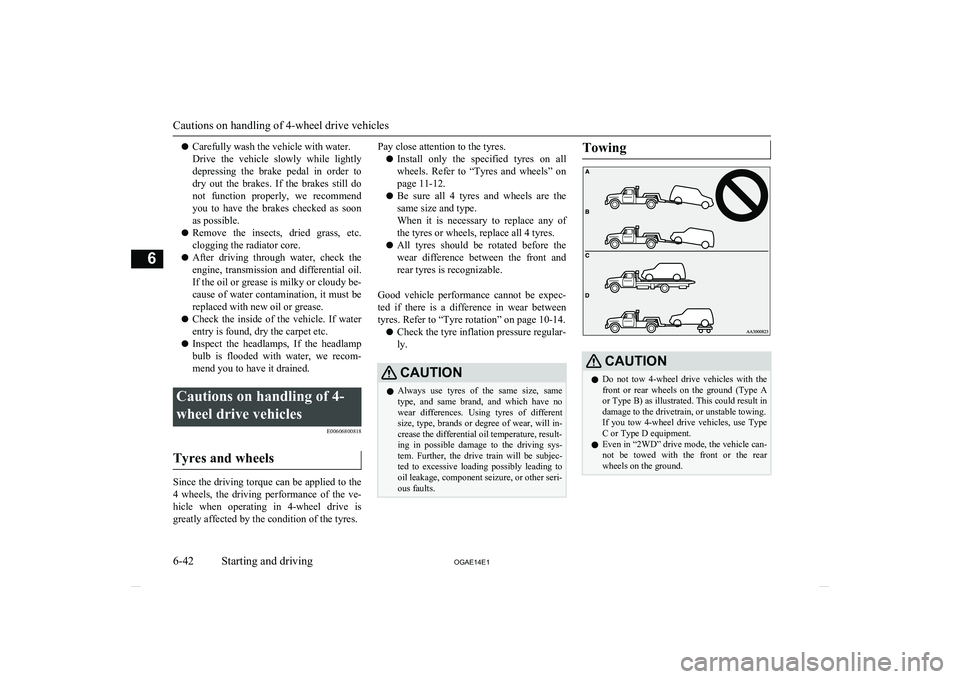
ous faults.TowingCAUTIONl Do not tow 4-wheel drive vehicles with the
front or rear wheels on the ground (Type Aor Type B) as illustrated. This could result in
damage to the drivetrain, or unstable towing.
If you tow 4-wheel drive vehicles, use Type C or Type D equipment.
l Even in “2WD” drive mode, the vehicle can-
not be towed with the front or the rear wheels on the ground.
Cautions on handling of 4-wheel drive vehicles
6-42 OGAE14E1Starting and driving6