coolant MITSUBISHI ASX 2014 Owner's Manual (in English)
[x] Cancel search | Manufacturer: MITSUBISHI, Model Year: 2014, Model line: ASX, Model: MITSUBISHI ASX 2014Pages: 418, PDF Size: 14.02 MB
Page 43 of 418
NOTElOn vehicles with the Auto Stop & Go
(AS&G) system, the starter will not operate
unless the clutch pedal is fully depressed
(Clutch interlock).
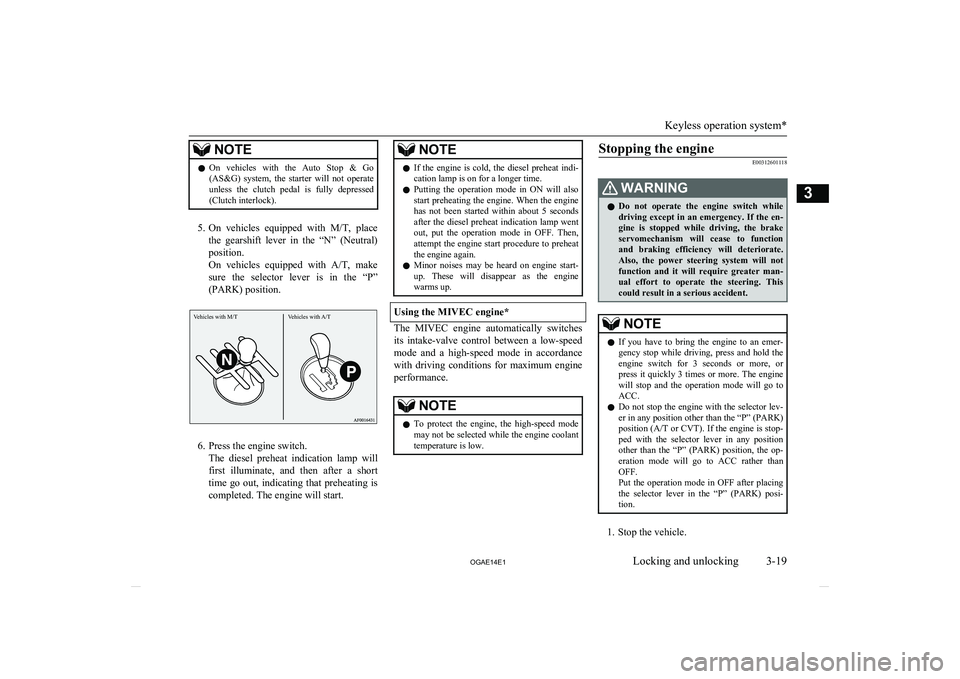
5. On vehicles equipped with M/T, place
the gearshift lever in the “N” (Neutral) position.
On vehicles equipped with A/T, make
sure the selector lever is in the “P”
(PARK) position.
6. Press the engine switch. The diesel preheat indication lamp willfirst illuminate, and then after a short
time go out, indicating that preheating is completed. The engine will start.
NOTEl If the engine is cold, the diesel preheat indi-
cation lamp is on for a longer time.
l Putting the operation mode in ON will also
start preheating the engine. When the engine
has not been started within about 5 seconds after the diesel preheat indication lamp went
out, put the operation mode in OFF. Then, attempt the engine start procedure to preheatthe engine again.
l Minor noises may be heard on engine start-
up. These will disappear as the engine
warms up.
Using the MIVEC engine*
The MIVEC engine automatically switches
its intake-valve control between a low-speed mode and a high-speed mode in accordancewith driving conditions for maximum engine
performance.
NOTEl To protect the engine, the high-speed mode
may not be selected while the engine coolanttemperature is low.Stopping the engine
E00312601118WARNINGl Do not operate the engine switch while
driving except in an emergency. If the en-
gine is stopped while driving, the brake servomechanism will cease to function
and braking efficiency will deteriorate. Also, the power steering system will notfunction and it will require greater man-
ual effort to operate the steering. This
could result in a serious accident.NOTEl If you have to bring the engine to an emer-
gency stop while driving, press and hold the engine switch for 3 seconds or more, or
press it quickly 3 times or more. The engine will stop and the operation mode will go to ACC.
l Do not stop the engine with the selector lev-
er in any position other than the “P” (PARK) position (A/T or CVT ). If the engine is stop-
ped with the selector lever in any position
other than the “P” (PARK) position, the op- eration mode will go to ACC rather thanOFF.
Put the operation mode in OFF after placing the selector lever in the “P” (PARK) posi-
tion.
1. Stop the vehicle.
Keyless operation system*
3-19
OGAE14E1Locking and unlocking3 Vehicles with M/T Vehicles with A/T
Page 107 of 418
Multi-information displayE00519901141
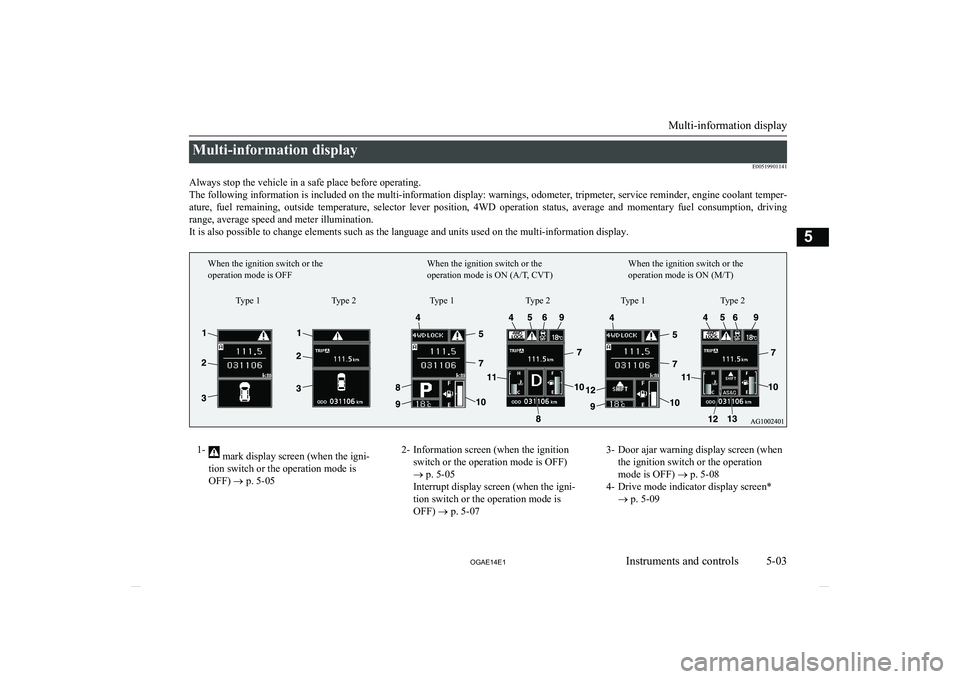
Always stop the vehicle in a safe place before operating. The following information is included on the multi-information display: warnings, odometer, tripmeter, service reminder, engine coolant temper- ature, fuel remaining, outside temperature, selector lever position, 4WD operation status, average and momentary fuel consumption, driving
range, average speed and meter illumination. It is also possible to change elements such as the language and units used on the multi-information display.1- mark display screen (when the igni-
tion switch or the operation mode is
OFF) ® p. 5-052- Information screen (when the ignition
switch or the operation mode is OFF)
® p. 5-05
Interrupt display screen (when the igni-
tion switch or the operation mode is OFF) ® p. 5-073- Door ajar warning display screen (when
the ignition switch or the operation
mode is OFF) ® p. 5-08
4- Drive mode indicator display screen* ® p. 5-09
Multi-information display
5-03
OGAE14E1Instruments and controls5Type 1
When the ignition switch or the
operation mode is OFF
When the ignition switch or the
operation mode is ON (A/T, CVT)When the ignition switch or the
operation mode is ON (M/T)
Type 2 Type 1 Type 2 Type 1 Type 2
Page 108 of 418
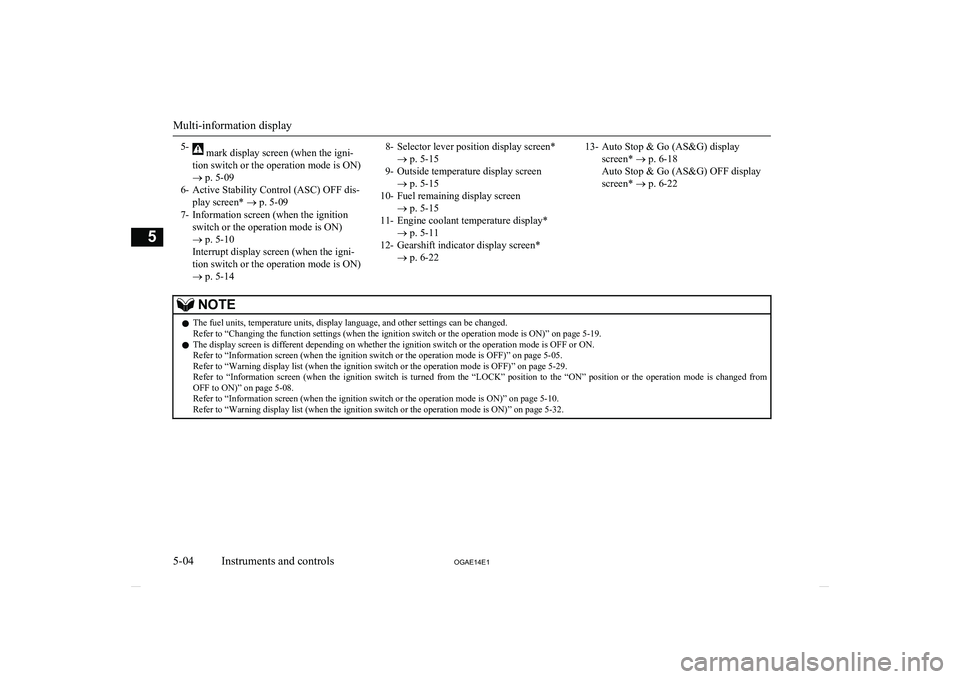
5- mark display screen (when the igni-
tion switch or the operation mode is ON)
® p. 5-09
6- Active Stability Control (ASC) OFF dis- play screen* ® p. 5-09
7- Information screen (when the ignition switch or the operation mode is ON)
® p. 5-10
Interrupt display screen (when the igni-
tion switch or the operation mode is ON)
® p. 5-148- Selector lever position display screen*
® p. 5-15
9- Outside temperature display screen ® p. 5-15
10- Fuel remaining display screen ® p. 5-15
11- Engine coolant temperature display* ® p. 5-11
12- Gearshift indicator display screen* ® p. 6-2213- Auto Stop & Go (AS&G) display
screen* ® p. 6-18
Auto Stop & Go (AS&G) OFF display screen* ® p. 6-22NOTEl The fuel units, temperature units, display language, and other settings can be changed.
Refer to “Changing the function settings (when the ignition switch or the operation mode is ON)” on page 5-19.
l The display screen is different depending on whether the ignition switch or the operation mode is OFF or ON.
Refer to “Information screen (when the ignition switch or the operation mode is OFF)” on page 5-05.
Refer to “Warning display list (when the ignition switch or the operation mode is OFF)” on page 5-29.
Refer to “Information screen (when the ignition switch is turned from the “LOCK” position to the “ON” position or the operation mode is changed from OFF to ON)” on page 5-08.
Refer to “Information screen (when the ignition switch or the operation mode is ON)” on page 5-10.
Refer to “Warning display list (when the ignition switch or the operation mode is ON)” on page 5-32.
Multi-information display
5-04 OGAE14E1Instruments and controls5
Page 109 of 418
Multi-information meterswitch
E00520000608
Each time the multi-information meter switch
is operated, a sound is emitted and the multi-
information display changes between infor- mation such as warnings, odometer (Type 1),
tripmeter, service reminder, engine coolant temperature (Type 1), average and momenta-
ry fuel consumption, driving range, and aver-
age speed.
It is also possible to change elements such as the language and units used on the multi-in-formation display by operating the multi-in-
formation meter switch.
mark display screen (when
the ignition switch or the oper- ation mode is OFF)
E00520100553
If you press the multi-infor-
mation meter switch and re-turn from the warning dis-
play screen to the previous screen, the
mark is dis-
played.
Refer to “To return to the screen displayed before the warning display” on page 5-07.
This mark is also displayed if there is another
warning other than the one displayed. When
the cause of the warning display is elimina- ted, the
mark goes out automatically.
NOTEl When the mark is displayed, the warning
display screen can be redisplayed on the in- formation screen.
Refer to “Information screen (when the igni-
tion switch or the operation mode is OFF)” on page 5-05.
Refer to “Information screen (when the igni- tion switch or the operation mode is ON)”
on page 5-10.Information screen (when the
ignition switch or the operation mode is OFF)
E00520200570
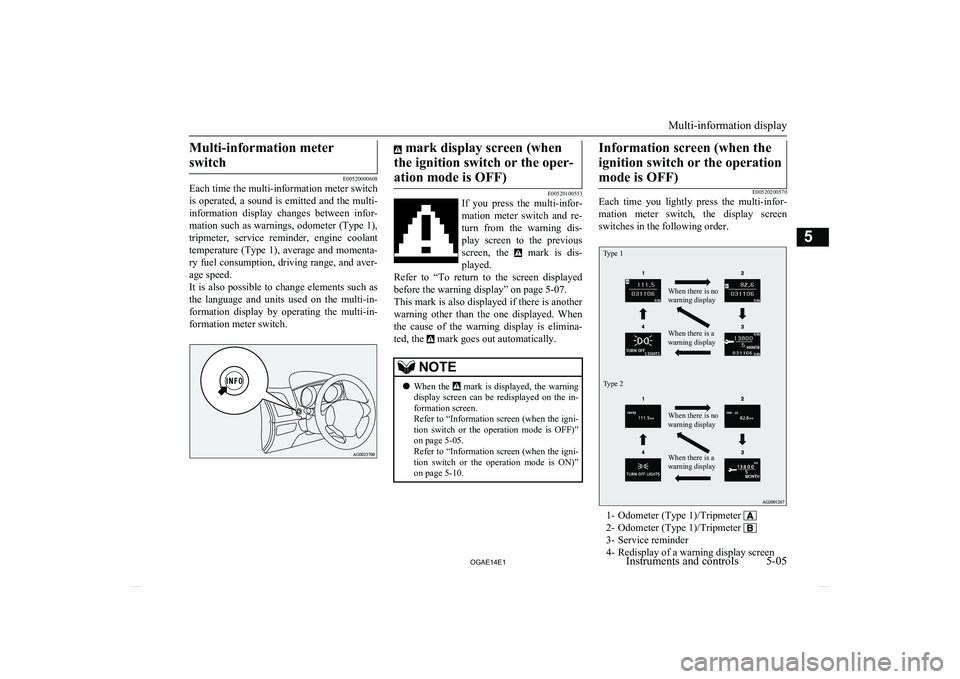
Each time you lightly press the multi-infor-
mation meter switch, the display screenswitches in the following order.
Type 1Type 2When there is no
warning displayWhen there is a
warning displayWhen there is no
warning displayWhen there is a
warning display
1- Odometer (Type 1)/Tripmeter
2- Odometer (Type 1)/Tripmeter
3- Service reminder
4- Redisplay of a warning display screen
Multi-information display
5-05
OGAE14E1Instruments and controls5
Page 114 of 418
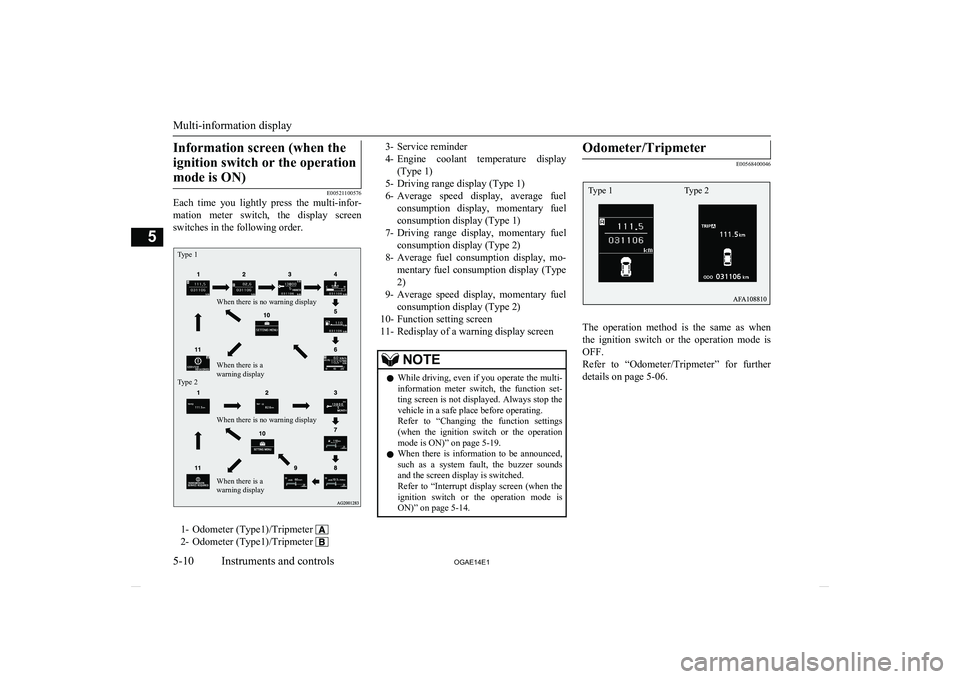
Information screen (when theignition switch or the operation mode is ON)
E00521100576
Each time you lightly press the multi-infor-
mation meter switch, the display screenswitches in the following order.
Type 1Type 2When there is no warning displayWhen there is no warning displayWhen there is a
warning displayWhen there is a
warning display
1- Odometer (Type1)/Tripmeter
2- Odometer (Type1)/Tripmeter
3- Service reminder
4- Engine coolant temperature display
(Type 1)
5- Driving range display (Type 1)
6- Average speed display, average fuel
consumption display, momentary fuel
consumption display (Type 1)
7- Driving range display, momentary fuel
consumption display (Type 2)
8- Average fuel consumption display, mo-
mentary fuel consumption display (Type 2)
9- Average speed display, momentary fuel
consumption display (Type 2)
10- Function setting screen
11- Redisplay of a warning display screenNOTEl While driving, even if you operate the multi-
information meter switch, the function set- ting screen is not displayed. Always stop thevehicle in a safe place before operating.
Refer to “Changing the function settings
(when the ignition switch or the operation mode is ON)” on page 5-19.
l When there is information to be announced,
such as a system fault, the buzzer soundsand the screen display is switched.
Refer to “Interrupt display screen (when the
ignition switch or the operation mode is ON)” on page 5-14.Odometer/Tripmeter
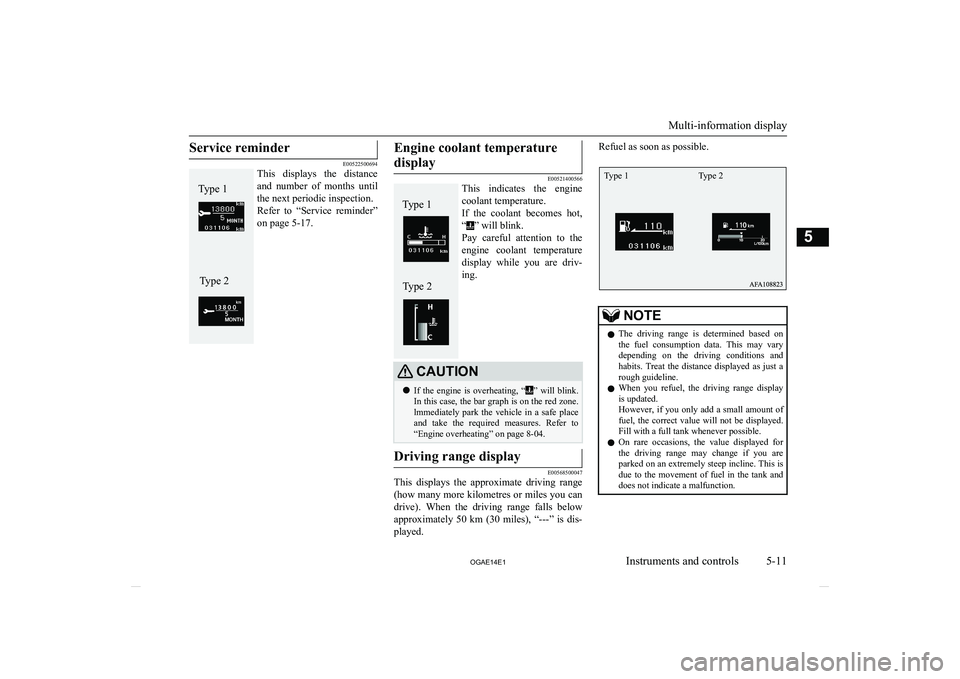
E00568400046
The operation method is the same as when
the ignition switch or the operation mode is OFF.
Refer to “Odometer/Tripmeter” for further details on page 5-06.
Multi-information display
5-10 OGAE14E1Instruments and controls5 Type 1 Type 2
Page 115 of 418
Service reminder
E00522500694
This displays the distance
and number of months until
the next periodic inspection. Refer to “Service reminder” on page 5-17.
Engine coolant temperature
display
E00521400566
This indicates the engine
coolant temperature.
If the coolant becomes hot, “
” will blink.
Pay careful attention to the engine coolant temperature
display while you are driv-
ing.
CAUTIONl If the engine is overheating, “” will blink.
In this case, the bar graph is on the red zone.
lmmediately park the vehicle in a safe place
and take the required measures. Refer to “Engine overheating” on page 8-04.Driving range display
E00568500047
This displays the approximate driving range
(how many more kilometres or miles you can drive). When the driving range falls below
approximately 50 km (30 miles), “---” is dis-
played.
Refuel as soon as possible.NOTEl The driving range is determined based on
the fuel consumption data. This may vary depending on the driving conditions and habits. Treat the distance displayed as just a
rough guideline.
l When you refuel, the driving range display
is updated.
However, if you only add a small amount of
fuel, the correct value will not be displayed.
Fill with a full tank whenever possible.
l On rare occasions, the value displayed for
the driving range may change if you areparked on an extremely steep incline. This is
due to the movement of fuel in the tank and
does not indicate a malfunction.
Multi-information display
5-11
OGAE14E1Instruments and controls5Type 1Type 2 Type 1Type 2 Type 1 Type 2
Page 182 of 418
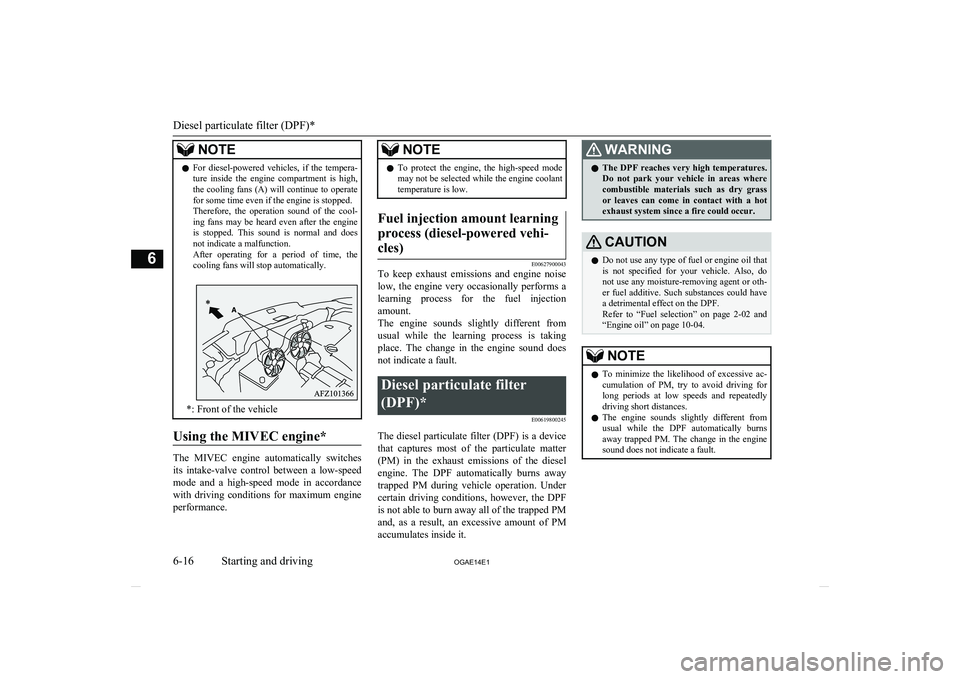
NOTElFor diesel-powered vehicles, if the tempera-
ture inside the engine compartment is high,
the cooling fans (A) will continue to operate for some time even if the engine is stopped.
Therefore, the operation sound of the cool-
ing fans may be heard even after the engine is stopped. This sound is normal and does
not indicate a malfunction.
After operating for a period of time, the cooling fans will stop automatically.
*: Front of the vehicle
Using the MIVEC engine*
The MIVEC engine automatically switches
its intake-valve control between a low-speed mode and a high-speed mode in accordancewith driving conditions for maximum engine
performance.
NOTEl To protect the engine, the high-speed mode
may not be selected while the engine coolanttemperature is low.Fuel injection amount learning
process (diesel-powered vehi- cles)
E00627900043
To keep exhaust emissions and engine noise low, the engine very occasionally performs a
learning process for the fuel injection
amount.
The engine sounds slightly different from
usual while the learning process is taking place. The change in the engine sound does
not indicate a fault.
Diesel particulate filter
(DPF)* E00619800245
The diesel particulate filter (DPF) is a devicethat captures most of the particulate matter
(PM) in the exhaust emissions of the diesel engine. The DPF automatically burns away trapped PM during vehicle operation. Under
certain driving conditions, however, the DPF is not able to burn away all of the trapped PM
and, as a result, an excessive amount of PM accumulates inside it.
WARNINGl The DPF reaches very high temperatures.
Do not park your vehicle in areas where
combustible materials such as dry grass
or leaves can come in contact with a hot exhaust system since a fire could occur.CAUTIONl Do not use any type of fuel or engine oil that
is not specified for your vehicle. Also, do not use any moisture-removing agent or oth-
er fuel additive. Such substances could have a detrimental effect on the DPF.
Refer to “Fuel selection” on page 2-02 and
“Engine oil” on page 10-04.NOTEl To minimize the likelihood of excessive ac-
cumulation of PM, try to avoid driving for long periods at low speeds and repeatedly
driving short distances.
l The engine sounds slightly different from
usual while the DPF automatically burns
away trapped PM. The change in the engine
sound does not indicate a fault.
Diesel particulate filter (DPF)*
6-16 OGAE14E1Starting and driving6
Page 183 of 418
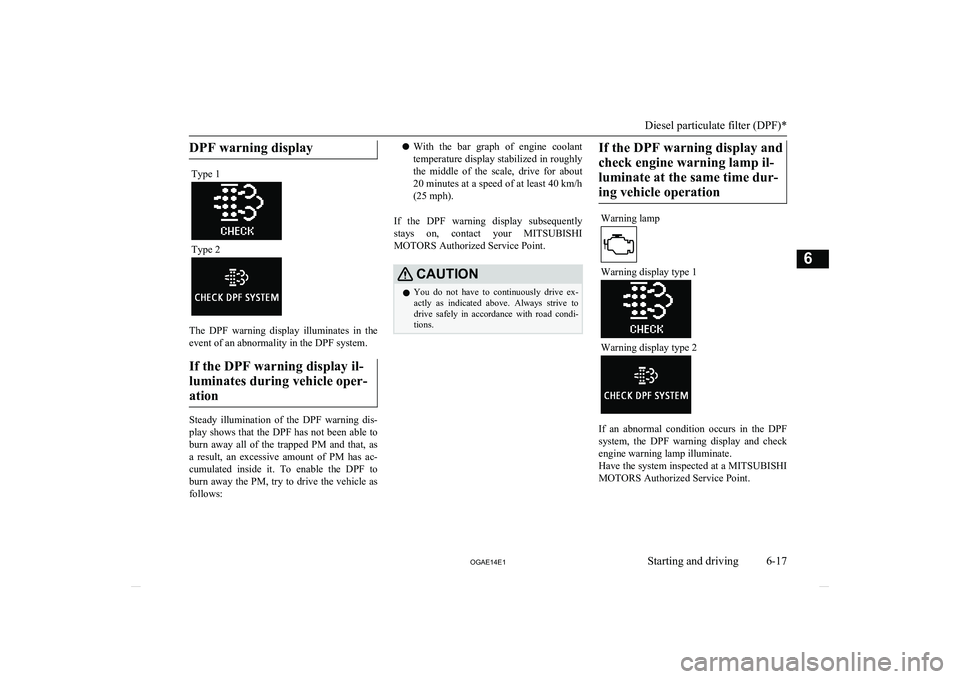
DPF warning displayType 1
Type 2
The DPF warning display illuminates in the
event of an abnormality in the DPF system.
If the DPF warning display il-luminates during vehicle oper-ation
Steady illumination of the DPF warning dis- play shows that the DPF has not been able to
burn away all of the trapped PM and that, as
a result, an excessive amount of PM has ac- cumulated inside it. To enable the DPF toburn away the PM, try to drive the vehicle as
follows:
l With the bar graph of engine coolant
temperature display stabilized in roughly
the middle of the scale, drive for about 20 minutes at a speed of at least 40 km/h
(25 mph).
If the DPF warning display subsequently stays on, contact your MITSUBISHI
MOTORS Authorized Service Point.CAUTIONl You do not have to continuously drive ex-
actly as indicated above. Always strive to drive safely in accordance with road condi- tions.If the DPF warning display and
check engine warning lamp il-luminate at the same time dur-ing vehicle operationWarning lamp
Warning display type 1
Warning display type 2
If an abnormal condition occurs in the DPF system, the DPF warning display and check
engine warning lamp illuminate.
Have the system inspected at a MITSUBISHI
MOTORS Authorized Service Point.
Diesel particulate filter (DPF)*
6-17
OGAE14E1Starting and driving6
Page 186 of 418
NOTEgine will not stop automatically even if thevehicle is stopped.
• Driver’s seat belt is not fastened
• Bonnet is open
• After the engine restarts automatically,
the vehicle speed has not exceeded ap- proximately 5 km/h (3 mph)
• Brake booster vacuum pressure is low be-
cause the brake pedal is depressed repeat-
edly or depressed harder than usual
• After the ignition switch is turned from
the “ON” position to the “START” posi-
tion, approximately 30 seconds or more
have not elapsed.
• After the engine restarts automatically
and the vehicle stops again within 10 sec- onds.
• After presing the engine switch to start
the engine from the operation mode is in ON, approximately 30 seconds or morehave not elapsed
• Engine coolant temperature is low
• Ambient temperature is lower than ap-
proximately 3 °C
• Air conditioning is operating and passen-
ger compartment has not sufficiently cooled
• Mode selection dial is set to the demister
position.
Refer to “Demisting of the windscreen
and door windows: For quick demisting”
on page 7-09.NOTE• When the air conditioning is operated in
AUTO mode where the temperature con- trol dial is set to the max. hot or the max.
cool position (for vehicles with automatic air conditioning).
• Electric power consumption is high, such
as when the rear window demister or oth- er electrical components are operating or
the blower speed is set to a high setting.
• Battery voltage or battery performance is
low
• Check engine warning lamp is illuminated
or the “
” display/indicator is blinking
l If the Auto Stop & Go (AS&G) system oper-
ates while the air conditioning is operating, both the engine and the air conditioning
compressor will stop. Therefore, the wind- screen and door windows may mist up be-
cause only the blower will operate.
If the windscreen and door windows mist up,
set the mode selection dial to “
” to restart
the engine.
→ “Mode selection dial” on page 7-03
l If the windscreen and door windows mist up
every time the engine stops, it is recommen-
ded to deactivate the Auto Stop & Go
(AS&G) system by pressing the “Auto Stop & Go (AS&G) OFF” switch.
→ “To deactivate” on page 6-21
l If the air conditioning is operating, set the
temperature control dial higher to lengthen
the time that the engine is stopped automati- cally.
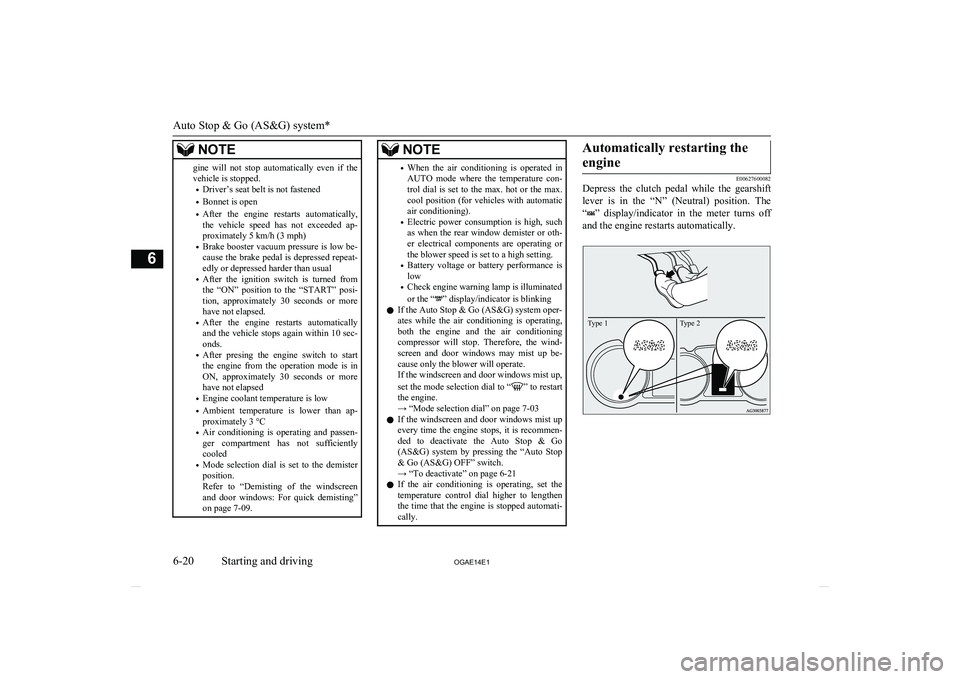
Automatically restarting the
engine
E00627600082
Depress the clutch pedal while the gearshift
lever is in the “N” (Neutral) position. The
“
” display/indicator in the meter turns off
and the engine restarts automatically.
Type 2Type 1
Auto Stop & Go (AS&G) system*
6-20 OGAE14E1Starting and driving6
Page 187 of 418
NOTElIf the engine does not restart automatically
or if the engine stalls, the oil pressure warn- ing lamp, charge warning lamp, and check
engine warning lamp will illuminate.
If this occurs, the engine will not restart even if the clutch pedal is depressed again. While depressing the brake pedal, fully de-
press the clutch pedal and turn the ignition switch to the “START” position to start theengine.
For details, refer to “Starting and stopping
the engine” on page 3-17 or “Starting” on
page 6-13.CAUTIONl In the following cases, the engine will restart
automatically even if the engine was stopped
by the Auto Stop & Go (AS&G) system. Pay attention, otherwise an unexpected accidentmight occur when the engine restarts.
• Vehicle speed is 3 km/h (2 mph) or higher
when coasting down a slope
• Brake booster vacuum pressure is low be-
cause the brake pedal is depressed repeat-
edly or depressed harder than usual
• Engine coolant temperature is low
• When the air conditioning is operated by
pressing the air conditioning switch.
• When the preset temperature of the air
conditioning is changed significantly.CAUTION• When the air conditioning is operated in
AUTO mode where the temperature con- trol dial is set to the max. hot or the max.
cool position (for vehicles with automatic air conditioning).
• When the air conditioning is ON, the pas-
senger compartment temperature rises and
the air conditioning compressor operates to lower the temperature.
• Mode selection dial is set to the demister
position.
Refer to “Demisting of the windscreen and door windows: For quick demisting”
on page 7-09
• Electric power consumption is high, such
as when the rear window demister or oth- er electrical components are operating or
the blower speed is set to a high setting.NOTEl If the “Auto Stop & Go (AS&G) OFF”
switch is pressed to deactivate the Auto Stop
& Go (AS&G) system while the engine is
stopped automatically, the engine will not restart automatically even if the clutch pedal
is depressed.
l When the engine restarts automatically, the
audio volume may temporarily decrease. This does not indicate a malfunction.NOTEl When the engine is stopped automatically,
the air conditioning may temporarily change
the air volume.
This does not indicate a malfunction.To deactivate
E00627700096
The Auto Stop & Go (AS&G) system is auto-
matically activated when the ignition switch is turned to the “ON” position. You can deac-
tivate the system by pressing the “Auto Stop & Go (AS&G) OFF” switch.
When the Auto Stop & Go (AS&G) system is deactivated, the “
” display/indicator will
turn on.
Auto Stop & Go (AS&G) system*
6-21
OGAE14E1Starting and driving6