light MITSUBISHI CARISMA 2000 1.G Owner's Manual
[x] Cancel search | Manufacturer: MITSUBISHI, Model Year: 2000, Model line: CARISMA, Model: MITSUBISHI CARISMA 2000 1.GPages: 280, PDF Size: 2.32 MB
Page 129 of 280
STARTING AND DRIVING
5–29
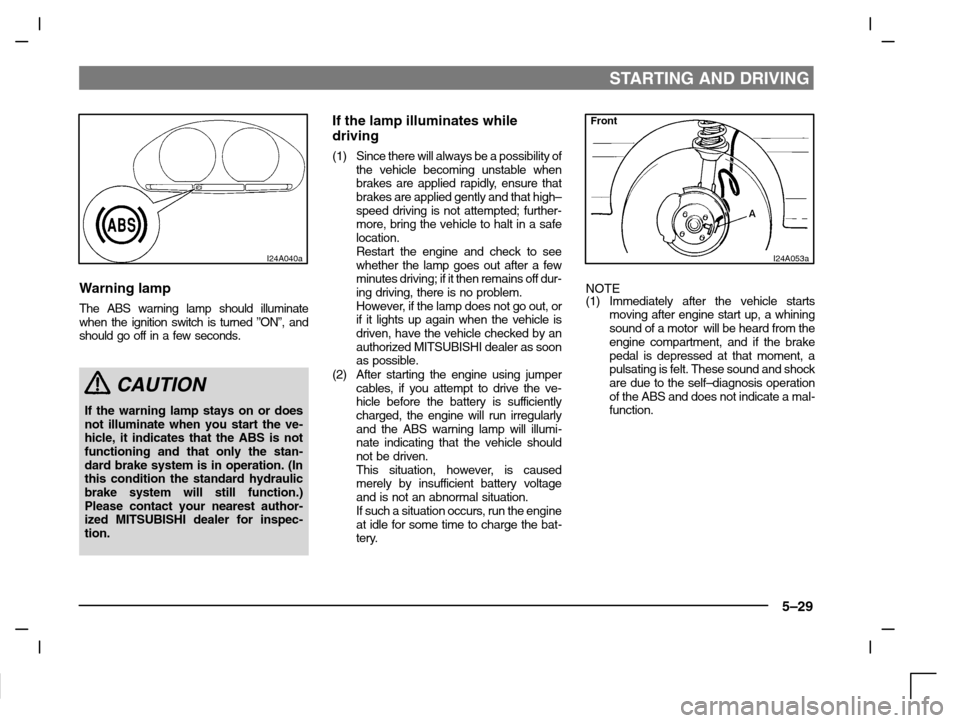
I24A040a
Warning lamp
The ABS warning lamp should illuminate
when the ignition switch is turned ”ON”, and
should go off in a few seconds.
CAUTION
If the warning lamp stays on or does
not illuminate when you start the ve-
hicle, it indicates that the ABS is not
functioning and that only the stan-
dard brake system is in operation. (In
this condition the standard hydraulic
brake system will still function.)
Please contact your nearest author-
ized MITSUBISHI dealer for inspec-
tion.
If the lamp illuminates while
driving
(1) Since there will always be a possibility of
the vehicle becoming unstable when
brakes are applied rapidly, ensure that
brakes are applied gently and that high–
speed driving is not attempted; further-
more, bring the vehicle to halt in a safe
location.
Restart the engine and check to see
whether the lamp goes out after a few
minutes driving; if it then remains off dur-
ing driving, there is no problem.
However, if the lamp does not go out, or
if it lights up again when the vehicle is
driven, have the vehicle checked by an
authorized MITSUBISHI dealer as soon
as possible.
(2) After starting the engine using jumper
cables, if you attempt to drive the ve-
hicle before the battery is sufficiently
charged, the engine will run irregularly
and the ABS warning lamp will illumi-
nate indicating that the vehicle should
not be driven.
This situation, however, is caused
merely by insufficient battery voltage
and is not an abnormal situation.
If such a situation occurs, run the engine
at idle for some time to charge the bat-
tery.
Front
I24A053a
NOTE
(1) Immediately after the vehicle starts
moving after engine start up, a whining
sound of a motor will be heard from the
engine compartment, and if the brake
pedal is depressed at that moment, a
pulsating is felt. These sound and shock
are due to the self–diagnosis operation
of the ABS and does not indicate a mal-
function.
Page 139 of 280
STARTING AND DRIVING
5–39
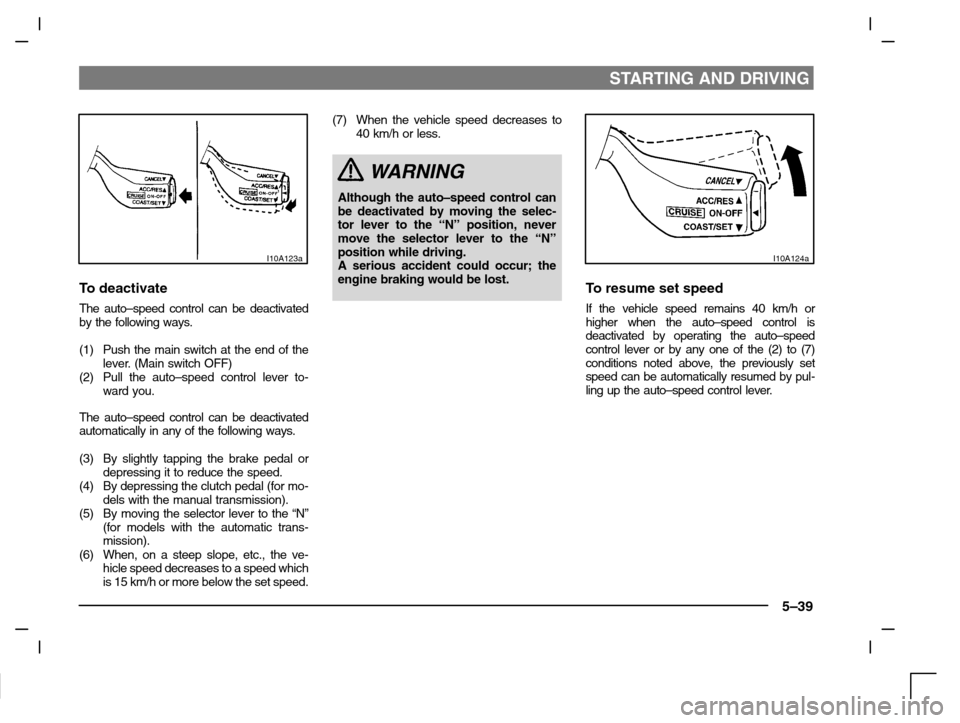
I10A123a
To deactivate
The auto–speed control can be deactivated
by the following ways.
(1) Push the main switch at the end of the
lever. (Main switch OFF)
(2) Pull the auto–speed control lever to-
ward you.
The auto–speed control can be deactivated
automatically in any of the following ways.
(3) By slightly tapping the brake pedal or
depressing it to reduce the speed.
(4) By depressing the clutch pedal (for mo-
dels with the manual transmission).
(5) By moving the selector lever to the “N”
(for models with the automatic trans-
mission).
(6) When, on a steep slope, etc., the ve-
hicle speed decreases to a speed which
is 15 km/h or more below the set speed.(7) When the vehicle speed decreases to
40 km/h or less.
WARNING
Although the auto–speed control can
be deactivated by moving the selec-
tor lever to the “N” position, never
move the selector lever to the “N”
position while driving.
A serious accident could occur; the
engine braking would be lost.
I10A124a
To resume set speed
If the vehicle speed remains 40 km/h or
higher when the auto–speed control is
deactivated by operating the auto–speed
control lever or by any one of the (2) to (7)
conditions noted above, the previously set
speed can be automatically resumed by pul-
ling up the auto–speed control lever.
Page 141 of 280
For pleasant driving
UKW/MW/LW electronic tuning radio with
tape player* 6–2. . . . . . . . . . . . . . . . . . . . . . . . . . . . . .
UKW/MW/LW electronic tuning radio with
CD player* 6–15. . . . . . . . . . . . . . . . . . . . . . . . . . . . . . .
Audio system anti-theft feature 6–26. . . . . . . . . . . .
Roof antenna 6–29. . . . . . . . . . . . . . . . . . . . . . . . . . . .
Ventilators 6–29. . . . . . . . . . . . . . . . . . . . . . . . . . . . . . .
Heater/Manual air conditioning* 6–30. . . . . . . . . . . .
Automatic air conditioning* 6–36. . . . . . . . . . . . . . .
Sun visors 6–44. . . . . . . . . . . . . . . . . . . . . . . . . . . . . .
Vanity mirror 6–45. . . . . . . . . . . . . . . . . . . . . . . . . . . . .
Cigarette lighter 6–45. . . . . . . . . . . . . . . . . . . . . . . . . .
Ashtray 6–46. . . . . . . . . . . . . . . . . . . . . . . . . . . . . . . . .
Accessory boxes 6–47. . . . . . . . . . . . . . . . . . . . . . . .
Sunglasses pocket 6–48. . . . . . . . . . . . . . . . . . . . . . .
Rear shelf panel (Hatchback) 6–49. . . . . . . . . . . . . .
Installation position for first–aid kit 6–50. . . . . . . . .
Cargo net* 6–51. . . . . . . . . . . . . . . . . . . . . . . . . . . . . . .
Page 147 of 280
FOR PLEASANT DRIVING
6–7
AF (Alternative Frequencies) functionThe AF function finds a station broadcasting
the same program, and selects the station
with the strongest signal of AF lists.
The AF function is tuned on (with the AF indi-
cator (13) shown on the display) at all times
unless you manually switch it off.
To turn the function off, at first, switch off the
power from UKW mode, and while pressing
the No.5 of the memory select buttons (7),
press the PWR switch (1) until it beeps. The
AF indicator (13) on the display will turn off.
To turn the function on, use the same pro-
cedure.
REG (Regional) functionREG function limits to receive the stations
broadcasting regional programs.
Regional programming and regional net-
works are organized differently depending
on the country or area (they may be changed
according to the hour, state, or broadcast
area), so if you don’t want to receive the re-
gional programs automatically, you can set
up REG ON not to receive regional pro-
grams.
To turn the function on, switch off the power
from UKW mode, and while pressing the V
side of the TUNE/SEEK button (5), press the
PWR switch (1) until it beeps. The ”REG ON”
will be shown on the display.To turn the function off, use the same pro-
cedure.
PI (Program Identification) search
function
When traveling long distance and the re-
called preset station is weak, radio searches
another frequency broadcasting the same
programming with the same PI code in AF
list.
If there are no frequencies broadcasting the
same programming, the radio searches a
frequency broadcasting the regional pro-
gramming. The radio succeeds in searching
the regional programming, then the display
shows the REG indicator (10).
If the radio does not succeed in searching
the regional programming, the radio returns
to the recalled preset station.
PTY (Program type)RDS broadcasts are classified according to
program type (PTY) as follows. Use the
TUNE/SEEK button (5 or 6) to select your
desired PTY.1. NEWS
2. AFFAIRS (Current affairs)
3. INFO (Information)
4. SPORT
5. EDUCATE (Education)
6. DRAMA
7. CULTURE
8. SCIENCE
9. VARIED
10. POP M (Pop music)
11.ROCK M (Rock music)
12. EASY M (Easy music)
13. LIGHT M (Light classics)
14. CLASSICS
15. OTHER M (Other music)
16. WEATHER (Weather information)
17. FINANCE
18. CHILDREN
19. SOCIAL
20. RELIGION
21. PHONE IN
22. TRAVEL
23. LEISURE
24. JAZZ
25. COUNTRY
26. NATION M (National music)
27. OLDIES
28. FOLK M (Folk music)
29. DOCUMENT
Page 152 of 280
FOR PLEASANT DRIVING
6–12
1. After checking to be sure the tape in
the cassette is wound tightly, push a
cassette straight into the slot; the tape
player will automatically start playing.
When a cassette is inserted, the tape
player will begin playing even if the
radio is being used. The tape player
will also start playing when the TAPE
button (2) is pressed with a tape cas-
sette in the player even if the radio is
being used.
2. Press the
(Dolby noise reduction)
button (7) when playing Dolby NR en-
coded tapes. The Dolby noise reduc-
tion circuitry reduces tape hiss. The
indicator illuminates when the circuit is
activated. Pressing the
(Dolby
noise reduction) button a second time
will switch off the Dolby system.
NOTE
Dolby noise reduction is manufactured
under licence from Dolby Laboratories
Licensing Corporation.
“DOLBY” and the Double-D symbol
are
trademarks of Dolby Laboratories Licensing
Corporation.
3. When listening to a metal or chrome
tape, press the MTL button (6).
The indicator will illuminate when the
button is pressed.NOTE
Use this button only when listening to a metal
or chrome tape.
4. To adjust the volume and tone, refer to
the section “How to adjust the vo-
lume”, and “How to adjust the tone”
on
page 6–5.
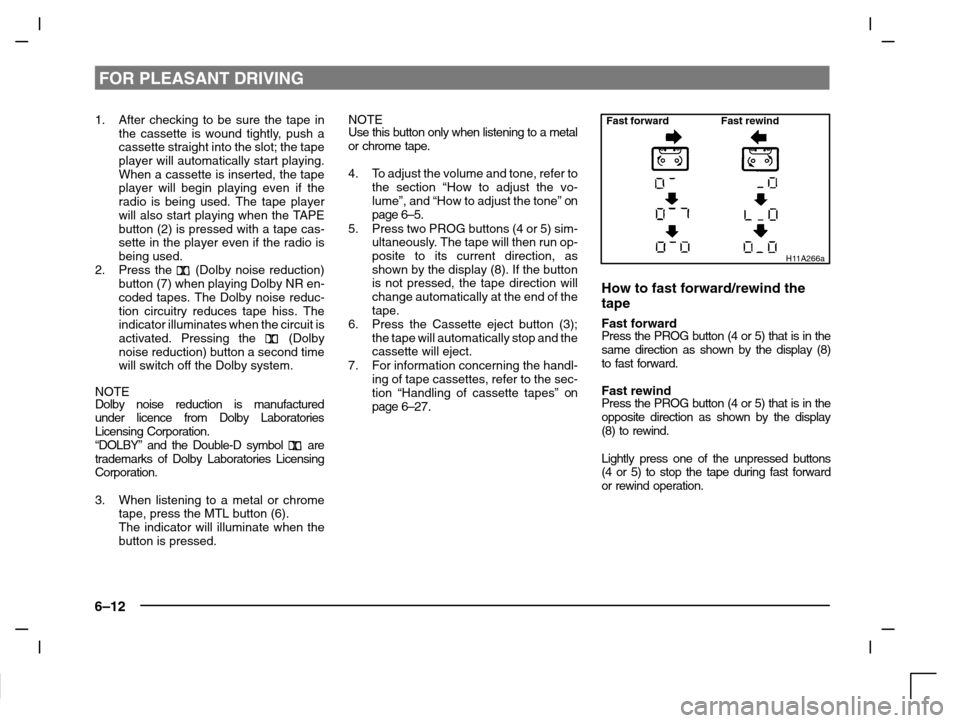
5. Press two PROG buttons (4 or 5) sim-
ultaneously. The tape will then run op-
posite to its current direction, as
shown by the display (8). If the button
is not pressed, the tape direction will
change automatically at the end of the
tape.
6. Press the Cassette eject button (3);
the tape will automatically stop and the
cassette will eject.
7. For information concerning the handl-
ing of tape cassettes, refer to the sec-
tion “Handling of cassette tapes”
on
page 6–27.
Fast forward Fast rewind
H11A266a
How to fast forward/rewind the
tape
Fast forwardPress the PROG button (4 or 5) that is in the
same direction as shown by the display (8)
to fast forward.
Fast rewindPress the PROG button (4 or 5) that is in the
opposite direction as shown by the display
(8) to rewind.
Lightly press one of the unpressed buttons
(4 or 5) to stop the tape during fast forward
or rewind operation.
Page 160 of 280
FOR PLEASANT DRIVING
6–20
AF (Alternative Frequencies) functionThe AF function finds a station broadcasting
the same program, and selects the station
with the strongest signal of AF lists.
The AF function is tuned on (with the AF indi-
cator (13) shown on the display) at all times
unless you manually switch it off.
To turn the function off, at first, switch off the
power from UKW mode, and while pressing
the No.5 of the memory select buttons (7),
press the PWR switch (1) until it beeps. The
AF indicator (13) on the display will turn off.
To turn the function on, use the same pro-
cedure.
REG (Regional) functionREG function limits to receive the stations
broadcasting regional programs.
Regional programming and regional net-
works are organized differently depending
on the country or area (they may be changed
according to the hour, state, or broadcast
area), so if you don’t want to receive the re-
gional programs automatically, you can set
up REG ON not to receive regional pro-
grams.
To turn the function on, switch off the power
from UKW mode, and while pressing the V
side of the TUNE/SEEK button (5), press the
PWR switch (1) until it beeps. The ”REG ON”
will be shown on the display.To turn the function off, use the same pro-
cedure.
PI (Program Identification) search
function
When traveling long distance and the re-
called preset station is weak, radio searches
another frequency broadcasting the same
programming with the same PI code in AF
list.
If there are no frequencies broadcasting the
same programming, the radio searches a
frequency broadcasting the regional pro-
gramming. The radio succeeds in searching
the regional programming, then the display
shows the REG indicator (10).
If the radio does not succeed in searching
the regional programming, the radio returns
to the recalled preset station.
PTY (Program type)RDS broadcasts are classified according to
program type (PTY) as follows. Use the
TUNE/SEEK button (5 or 6) to select your
desired PTY.1. NEWS
2. AFFAIRS (Current affairs)
3. INFO (Information)
4. SPORT
5. EDUCATE (Education)
6. DRAMA
7. CULTURE
8. SCIENCE
9. VARIED
10. POP M (Pop music)
11.ROCK M (Rock music)
12. EASY M (Easy music)
13. LIGHT M (Light classics)
14. CLASSICS
15. OTHER M (Other music)
16. WEATHER (Weather information)
17. FINANCE
18. CHILDREN
19. SOCIAL
20. RELIGION
21. PHONE IN
22. TRAVEL
23. LEISURE
24. JAZZ
25. COUNTRY
26. NATION M (National music)
27. OLDIES
28. FOLK M (Folk music)
29. DOCUMENT
Page 167 of 280
FOR PLEASANT DRIVING
6–27
Handling of cassette tapesEH02B-Ad
CAUTION
To maintain the cassette tape player
in good condition, observe the follow-
ing precautions.
(1) Do not use cassette tapes longer
than C-90, otherwise sound qual-
ity and tape durability will be
greatly diminished.
(2) Keep the cassette tape in its case
to protect it from tape looseness
and dust when it is not used.
(3) Keep the cassette tape away from
direct sunlight, heat and magnet-
ic fields such as the radio
speakers.
(4) Before inserting the cassette,
make sure that the label is ad-
hered securely to the cassette.
(5) A loose tape should be corrected
before use.
CAUTION
(6) Do not oil any part of the player
and do not insert any object other
than tape cassettes into the slot,
or the tape player may be dam-
aged. Also, avoid inserting your
fingers into the slot. There is a
danger of being burned by the hot
internal parts.
H12F004a
Handling of compact discsEH12E-Ah
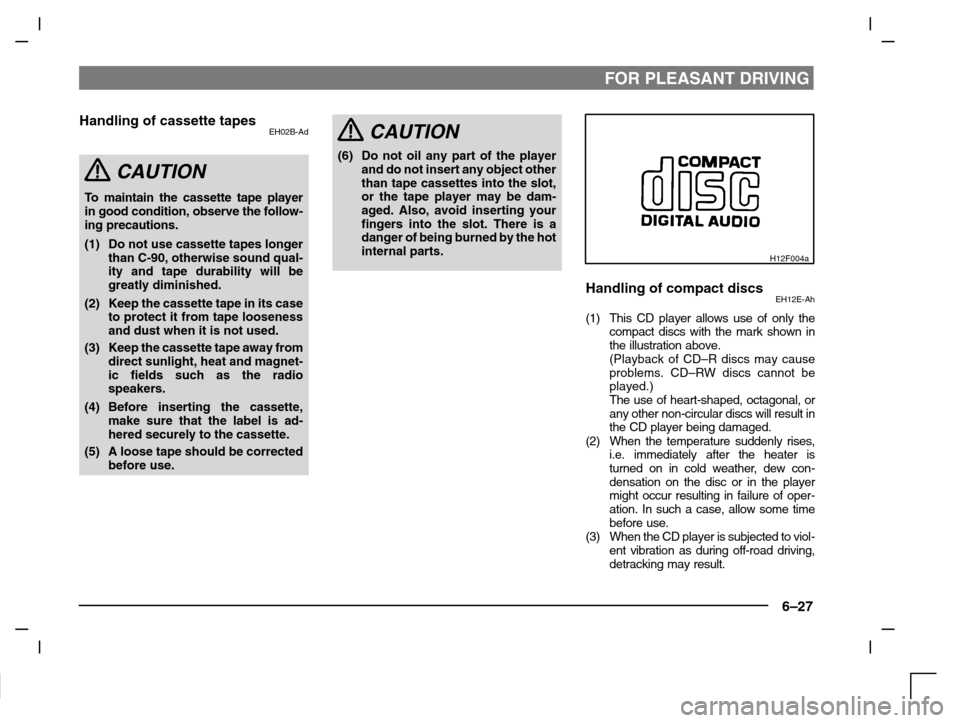
(1) This CD player allows use of only the
compact discs with the mark shown in
the illustration above.
(Playback of CD–R discs may cause
problems. CD–RW discs cannot be
played.)
The use of heart-shaped, octagonal, or
any other non-circular discs will result in
the CD player being damaged.
(2) When the temperature suddenly rises,
i.e. immediately after the heater is
turned on in cold weather, dew con-
densation on the disc or in the player
might occur resulting in failure of oper-
ation. In such a case, allow some time
before use.
(3) When the CD player is subjected to viol-
ent vibration as during off-road driving,
detracking may result.
Page 168 of 280
FOR PLEASANT DRIVING
6–28
(4) When storing compact discs, always
store them in their individual cases.
Never place compact discs in direct
sunlight, or in any place where the tem-
perature or humidity is high.
H12F003a
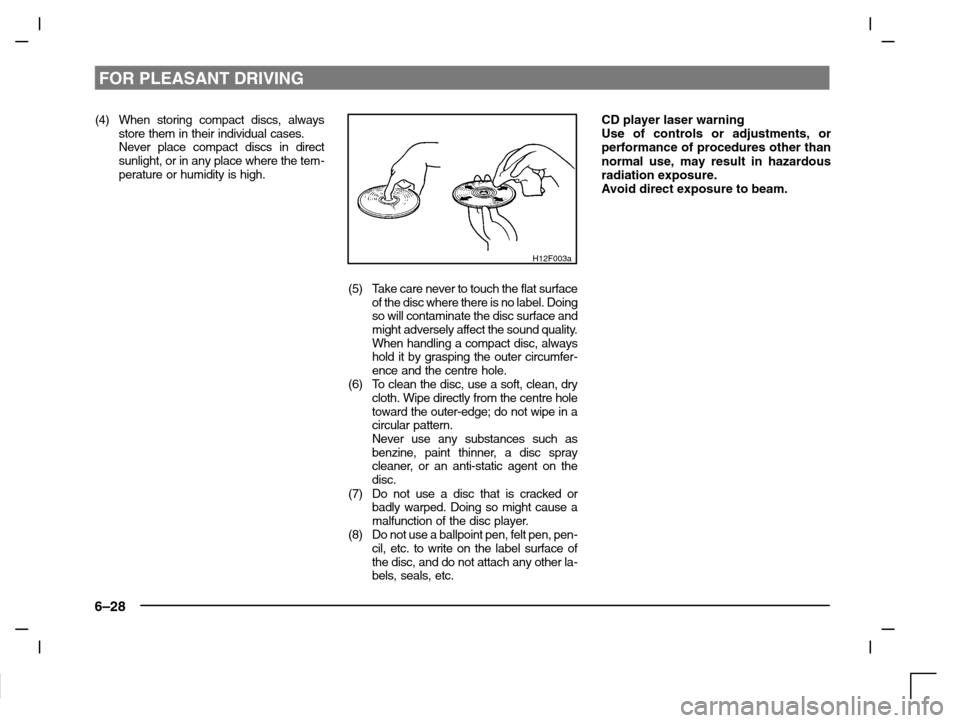
(5) Take care never to touch the flat surface
of the disc where there is no label. Doing
so will contaminate the disc surface and
might adversely affect the sound quality.
When handling a compact disc, always
hold it by grasping the outer circumfer-
ence and the centre hole.
(6) To clean the disc, use a soft, clean, dry
cloth. Wipe directly from the centre hole
toward the outer-edge; do not wipe in a
circular pattern.
Never use any substances such as
benzine, paint thinner, a disc spray
cleaner, or an anti-static agent on the
disc.
(7) Do not use a disc that is cracked or
badly warped. Doing so might cause a
malfunction of the disc player.
(8) Do not use a ballpoint pen, felt pen, pen-
cil, etc. to write on the label surface of
the disc, and do not attach any other la-
bels, seals, etc.
CD player laser warning
Use of controls or adjustments, or
performance of procedures other than
normal use, may result in hazardous
radiation exposure.
Avoid direct exposure to beam.
Page 170 of 280
FOR PLEASANT DRIVING
6–30
Side
H16A063a
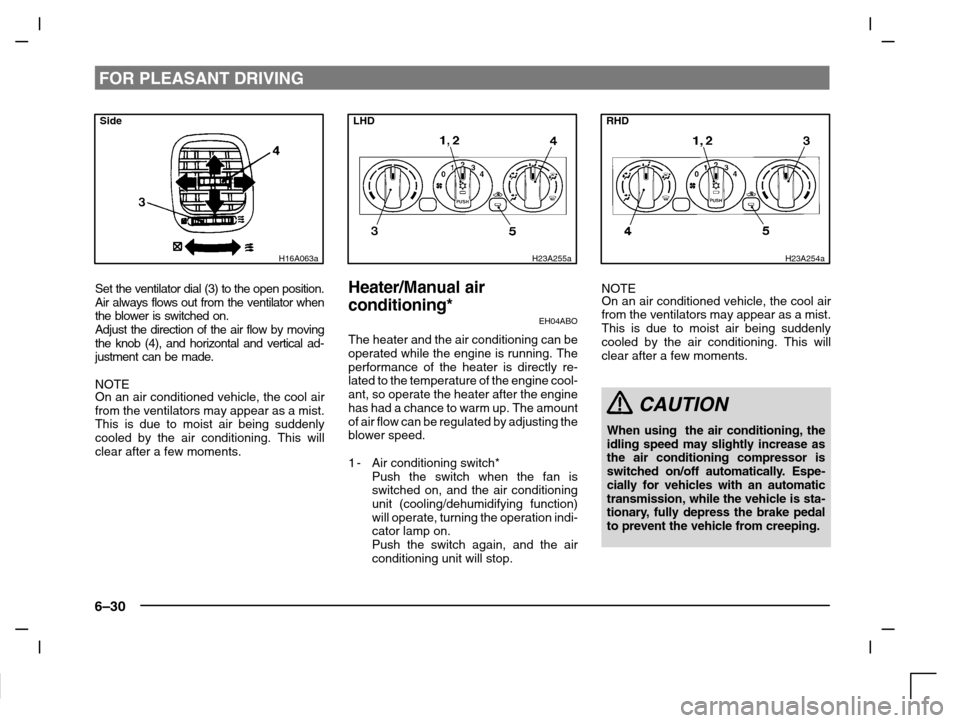
Set the ventilator dial (3) to the open position.
Air always flows out from the ventilator when
the blower is switched on.
Adjust the direction of the air flow by moving
the knob (4), and horizontal and vertical ad-
justment can be made.
NOTE
On an air conditioned vehicle, the cool air
from the ventilators may appear as a mist.
This is due to moist air being suddenly
cooled by the air conditioning. This will
clear after a few moments.
LHD
H23A255a
Heater/Manual air
conditioning*
EH04ABO
The heater and the air conditioning can be
operated while the engine is running. The
performance of the heater is directly re-
lated to the temperature of the engine cool-
ant, so operate the heater after the engine
has had a chance to warm up. The amount
of air flow can be regulated by adjusting the
blower speed.
1-Air conditioning switch*
Push the switch when the fan is
switched on, and the air conditioning
unit (cooling/dehumidifying function)
will operate, turning the operation indi-
cator lamp on.
Push the switch again, and the air
conditioning unit will stop.
RHD
H23A254a
NOTE
On an air conditioned vehicle, the cool air
from the ventilators may appear as a mist.
This is due to moist air being suddenly
cooled by the air conditioning. This will
clear after a few moments.
CAUTION
When using the air conditioning, the
idling speed may slightly increase as
the air conditioning compressor is
switched on/off automatically. Espe-
cially for vehicles with an automatic
transmission, while the vehicle is sta-
tionary, fully depress the brake pedal
to prevent the vehicle from creeping.
Page 173 of 280
FOR PLEASANT DRIVING
6–33
LHD
H03C076a
Combination of unheated air and
heated air
EH03C-Qb
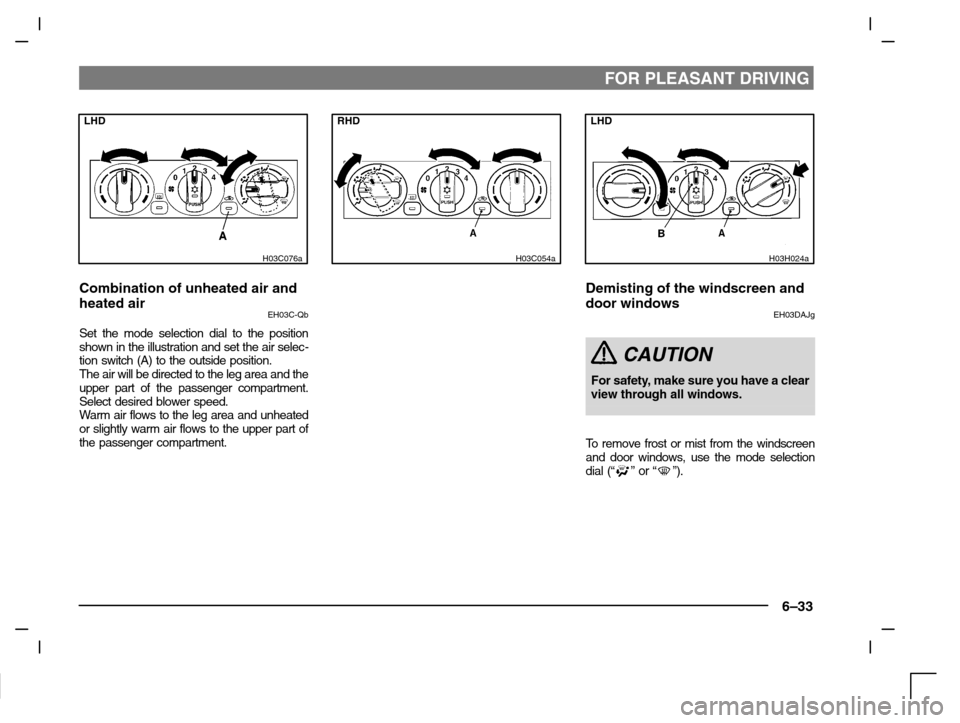
Set the mode selection dial to the position
shown in the illustration and set the air selec-
tion switch (A) to the outside position.
The air will be directed to the leg area and the
upper part of the passenger compartment.
Select desired blower speed.
Warm air flows to the leg area and unheated
or slightly warm air flows to the upper part of
the passenger compartment.
RHD
H03C054a
LHD
H03H024a
Demisting of the windscreen and
door windows
EH03DAJg
CAUTION
For safety, make sure you have a clear
view through all windows.
To remove frost or mist from the windscreen
and door windows, use the mode selection
dial
(“” or “”).