door lock MITSUBISHI COLT 2009 10.G Owner's Manual
[x] Cancel search | Manufacturer: MITSUBISHI, Model Year: 2009, Model line: COLT, Model: MITSUBISHI COLT 2009 10.GPages: 273, PDF Size: 17.28 MB
Page 47 of 273
Downloaded from www.Manualslib.com manuals search engine Making a luggage areaE00403400244WARNINGlIf required, always operate the seating be-
fore the vehicle is in motion.
l After seat operations are made, ensure
the seating is locked in position by attempt-
ing to move the seat and seatback for-
ward and rearward without using the ad-
justing mechanism.
l The luggage area in the rear of the vehi-
cle should never be used as a play area by
children. Children should be seated with
seat belts fastened when the vehicle is in
motion. Be sure that the rear seatbacks
are returned to their fully upright posi-
tion and locked in place.CAUTIONl Do not stack luggage above the seatback
height.
Secure the luggage firmly.
Otherwise, serious accidents could result
due to restricted rear vision or unrestrain-
ed objects entering the passenger compart-
ment during sudden braking.
l Make sure that the seat is operated by an
adult. If it is operated by a child, an unex-
pected accident might occur.
l When folding the seat be sure not to
catch your hand or leg.Folding the seatback forward (5-door
models except for vehicles with turbo-
charger) E00414500014
Front seat
To fold
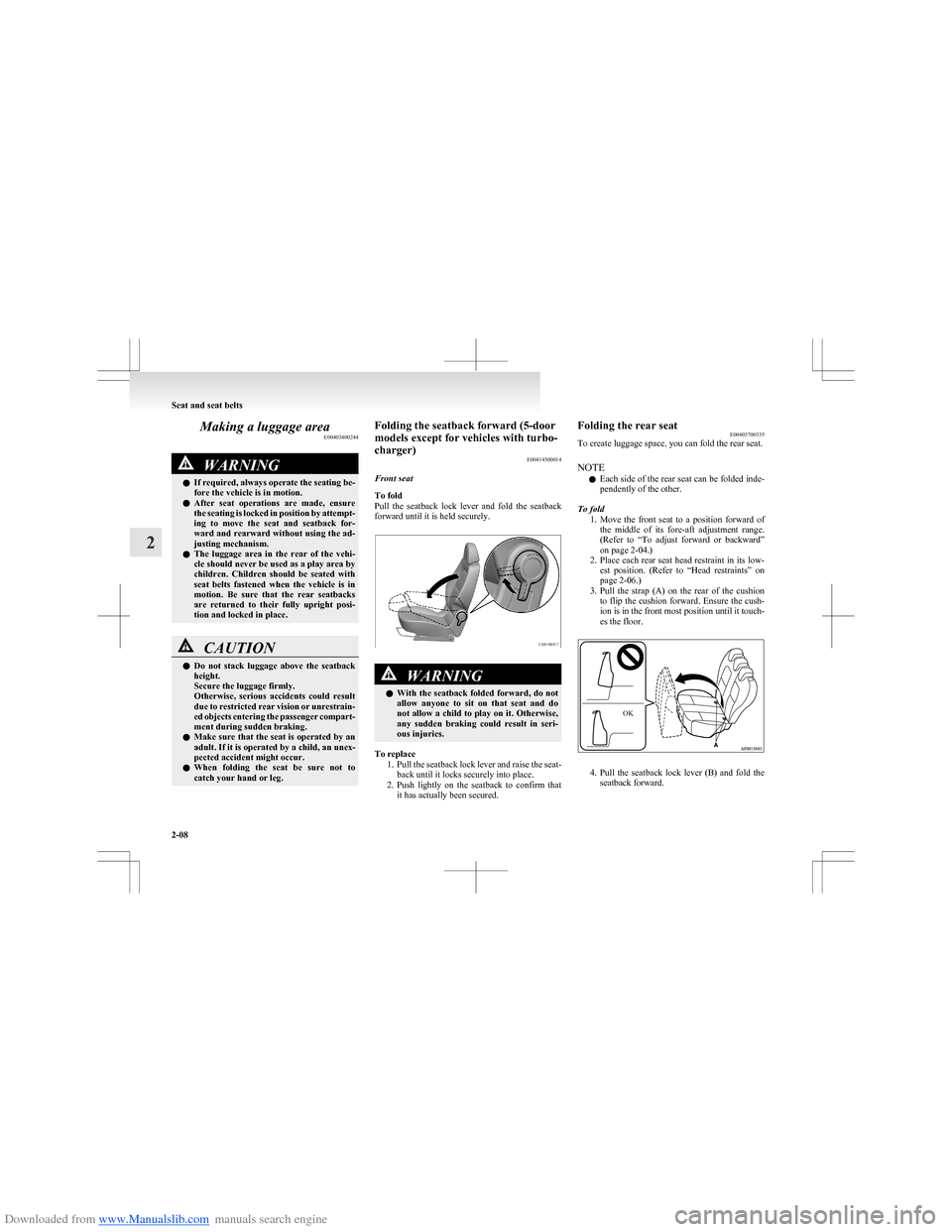
Pull the seatback lock lever and fold the seatback
forward until it is held securely.WARNINGl With the seatback folded forward, do not
allow anyone to sit on that seat and do
not allow a child to play on it. Otherwise,
any sudden braking could result in seri-
ous injuries.
To replace
1.Pull the seatback lock lever and raise the seat-
back until it locks securely into place.
2. Push lightly on the seatback to confirm that
it has actually been secured.
Folding the rear seat E00403700335
To create luggage space, you can fold the rear seat.
NOTE l Each side of the rear seat can be folded inde-
pendently of the other.
To fold 1.Move the front seat to a position forward of
the middle of its fore-aft adjustment range.
(Refer to “To adjust forward or backward”
on page 2-04.)
2. Place each rear seat head restraint in its low-
est position. (Refer to “Head restraints” on
page 2-06.)
3. Pull the strap (A) on the rear of the cushion
to flip the cushion forward. Ensure the cush-
ion is in the front most position until it touch-
es the floor.
4. Pull the seatback lock lever (B) and fold the
seatback forward.
Seat and seat belts
2-08
2 OK
Page 89 of 273
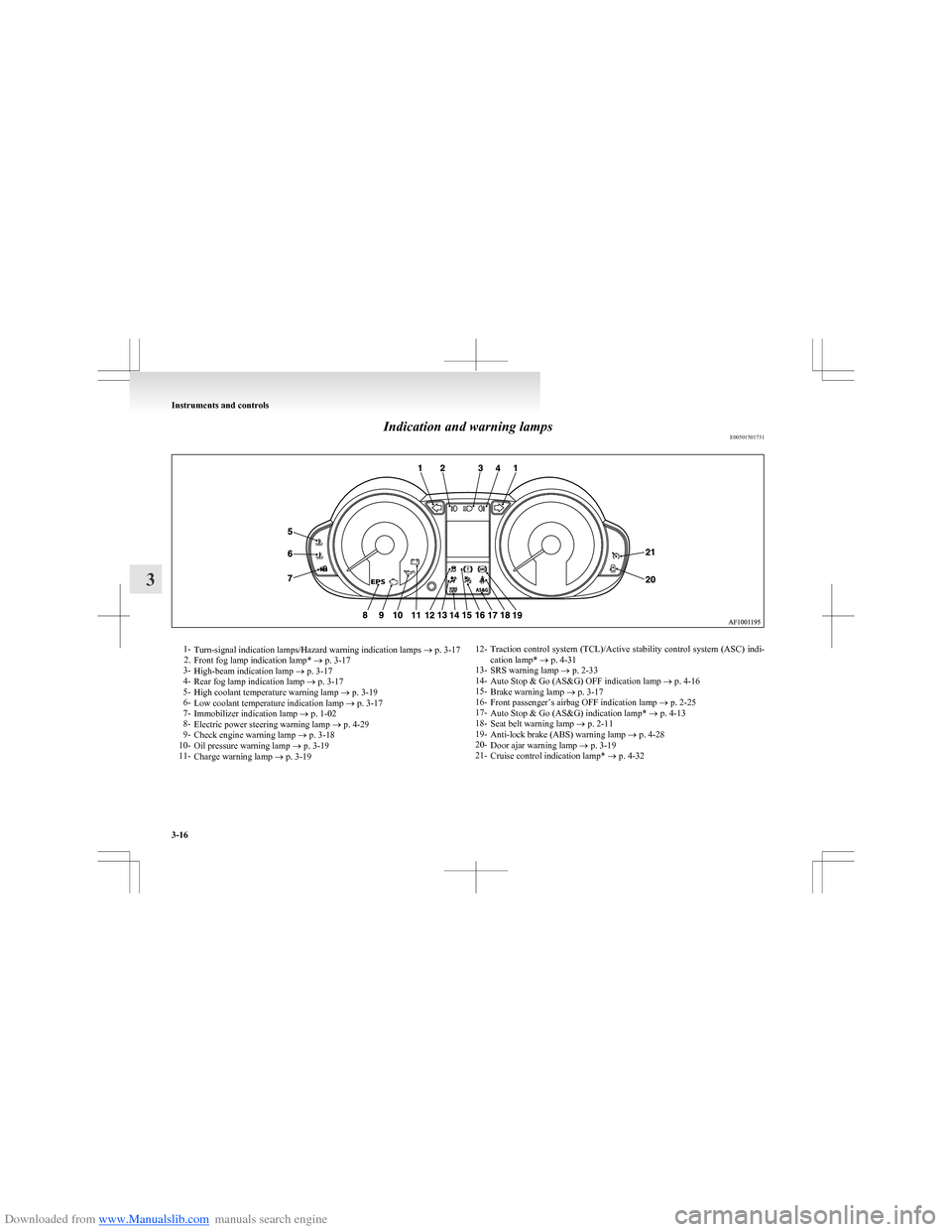
Downloaded from www.Manualslib.com manuals search engine Indication and warning lampsE005015017311-Turn-signal indication lamps/Hazard warning indication lamps ® p. 3-17
2. Front fog lamp indication lamp* ® p. 3-17
3- High-beam indication lamp ® p. 3-17
4- Rear fog lamp indication lamp ® p. 3-17
5- High coolant temperature warning lamp ® p. 3-19
6- Low coolant temperature indication lamp ® p. 3-17
7- Immobilizer indication lamp ® p. 1-02
8- Electric power steering warning lamp ® p. 4-29
9- Check engine warning lamp ® p. 3-18
10- Oil pressure warning lamp ® p. 3-19
11- Charge warning lamp ® p. 3-1912- Traction control system (TCL)/Active stability control system (ASC) indi-
cation lamp* ® p. 4-31
13- SRS warning lamp ® p. 2-33
14- Auto Stop & Go (AS&G) OFF indication lamp ® p. 4-16
15- Brake warning lamp ® p. 3-17
16- Front passenger’s airbag OFF indication lamp ® p. 2-25
17- Auto Stop & Go (AS&G) indication lamp* ® p. 4-13
18- Seat belt warning lamp ® p. 2-11
19- Anti-lock brake (ABS) warning lamp ® p. 4-28
20- Door ajar warning lamp ® p. 3-19
21- Cruise control indication lamp* ® p. 4-32
Instruments and controls
3-16
3
Page 94 of 273
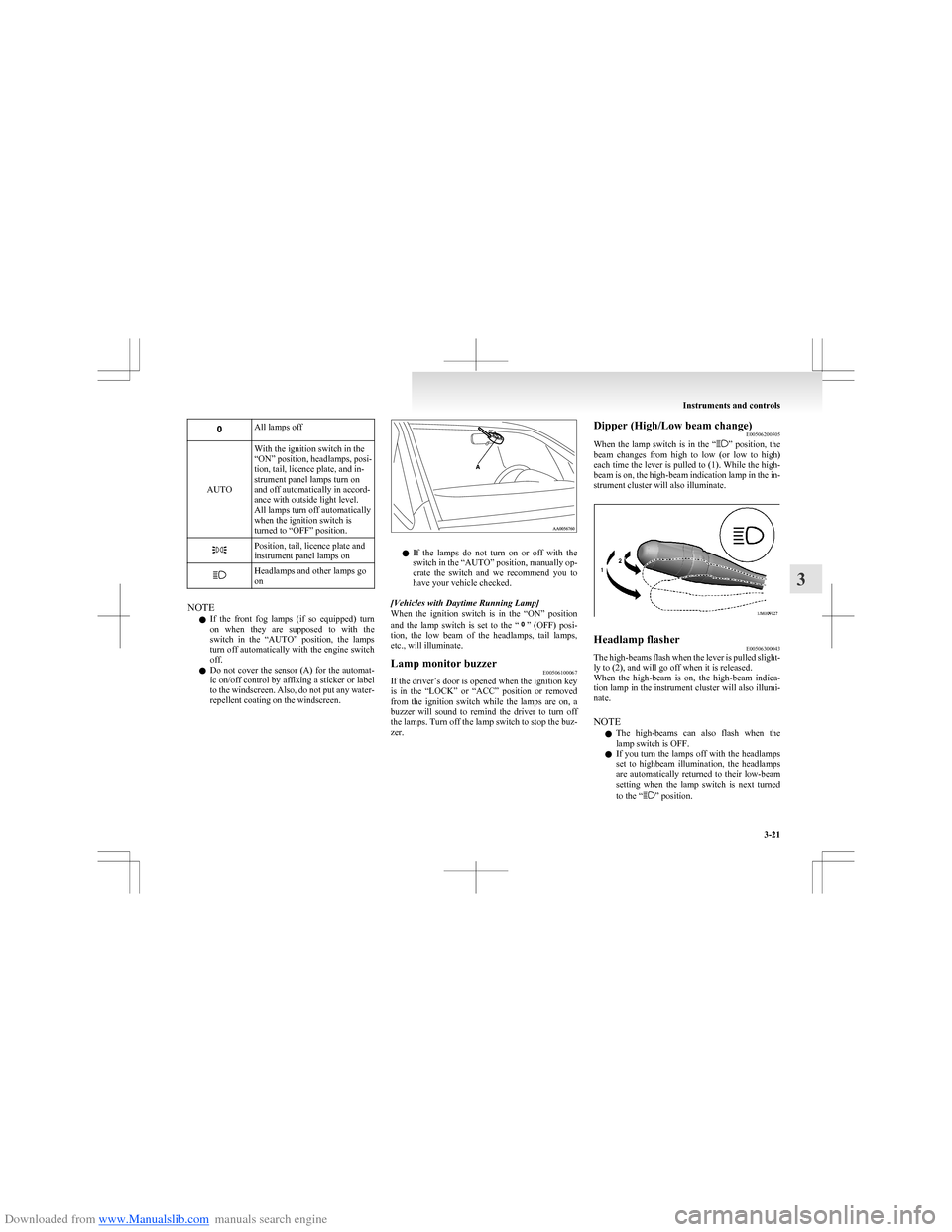
Downloaded from www.Manualslib.com manuals search engine All lamps off
AUTO
With the ignition switch in the
“ON” position, headlamps, posi-
tion, tail, licence plate, and in-
strument panel lamps turn on
and off automatically in accord-
ance with outside light level.
All lamps turn off automatically
when the ignition switch is
turned to “OFF” position.Position, tail, licence plate and
instrument panel lamps onHeadlamps and other lamps go
on
NOTE
l If the front fog lamps (if so equipped) turn
on when they are supposed to with the
switch in the “AUTO” position, the lamps
turn off automatically with the engine switch
off.
l Do not cover the sensor (A) for the automat-
ic on/off control by affixing a sticker or label
to the windscreen. Also, do not put any water-
repellent coating on the windscreen.
l If the lamps do not turn on or off with the
switch in the “AUTO” position, manually op-
erate the switch and we recommend you to
have your vehicle checked.
[Vehicles with Daytime Running Lamp]
When the ignition switch is in the “ON” position
and the lamp switch is set to the “
” (OFF) posi-
tion, the low beam of the headlamps, tail lamps,
etc., will illuminate.
Lamp monitor buzzer E00506100067
If the driver’s door is opened when the ignition key
is in the “LOCK” or “ACC” position or removed
from the ignition switch while the lamps are on, a
buzzer will sound to remind the driver to turn off
the lamps. Turn off the lamp switch to stop the buz-
zer.
Dipper (High/Low beam change) E00506200505
When the lamp switch is in the “
” position, the
beam changes from high to low (or low to high)
each time the lever is pulled to (1). While the high-
beam is on, the high-beam indication lamp in the in-
strument cluster will also illuminate.
Headlamp flasher E00506300043
The high-beams flash when the lever is pulled slight-
ly to (2), and will go off when it is released.
When the high-beam is on, the high-beam indica-
tion lamp in the instrument cluster will also illumi-
nate.
NOTE l The high-beams can also flash when the
lamp switch is OFF.
l If you turn the lamps off with the headlamps
set to highbeam illumination, the headlamps
are automatically returned to their low-beam
setting when the lamp switch is next turned
to the “
” position.
Instruments and controls
3-21
3
Page 110 of 273
Downloaded from www.Manualslib.com manuals search engine ParkingE00600601521
Parking on a hill
To prevent the vehicle from rolling, follow these
procedures:
Parking on a downhill slope
Turn the front wheels towards the kerb and move
the vehicle forward until the kerb side wheel gently
touches the kerb.
Apply the parking brake and place the gearshift lev-
er into the “R” (Reverse) position (with manual
transmission) or the allshift lever into the “R” (Re-
verse) position (with automated manual transmis-
sion).
If necessary, apply chocks to wheels.
Parking on an uphill slope
Turn the front wheels away from the kerb and
move the vehicle back until the kerb side wheel gen-
tly touches the kerb.
Apply the parking brake and place the gearshift lev-
er into the 1 st
position (with manual transmission)
or the allshift lever into the “S” (Stand by) position
(with automated manual transmission).
If necessary, apply chocks to wheels.
NOTE l If your vehicle has an automated manual trans-
mission, place the allshift lever in the “S”
(Stand by) position or “R” (Reverse) position
before stopping the engine.
If you move the allshift lever after stopping
the engine, a gearshift will not take place.Parking with the engine running
Never leave the engine running while you take a
short sleep/rest. Also, never leave the engine run-
ning in a closed or poorly ventilated place.WARNINGl Leaving the engine running risks injury
or death from accidentally moving the
gearshift lever (manual transmission) or
the allshift lever (automated manual trans-
mission) or the accumulation of toxic ex-
haust fumes on the passenger compart-
ment.
Where you park
Your front bumper can be damaged if you scrape it
over kerbs or parking stop blocks. Be careful when
travelling up or down steep slopes where your bump-
er can scrape the road.
WARNINGl Do not park your vehicle in areas where
combustible materials such as dry grass
or leaves can come in contact with a hot
exhaust, since a fire could occur.
When leaving the vehicle
Always remove the key from the ignition switch
and lock all doors and the tailgate when leaving the
vehicle unattended.
Always try to park your vehicle in a well lit area.
Steering wheel height adjustment E00600700466
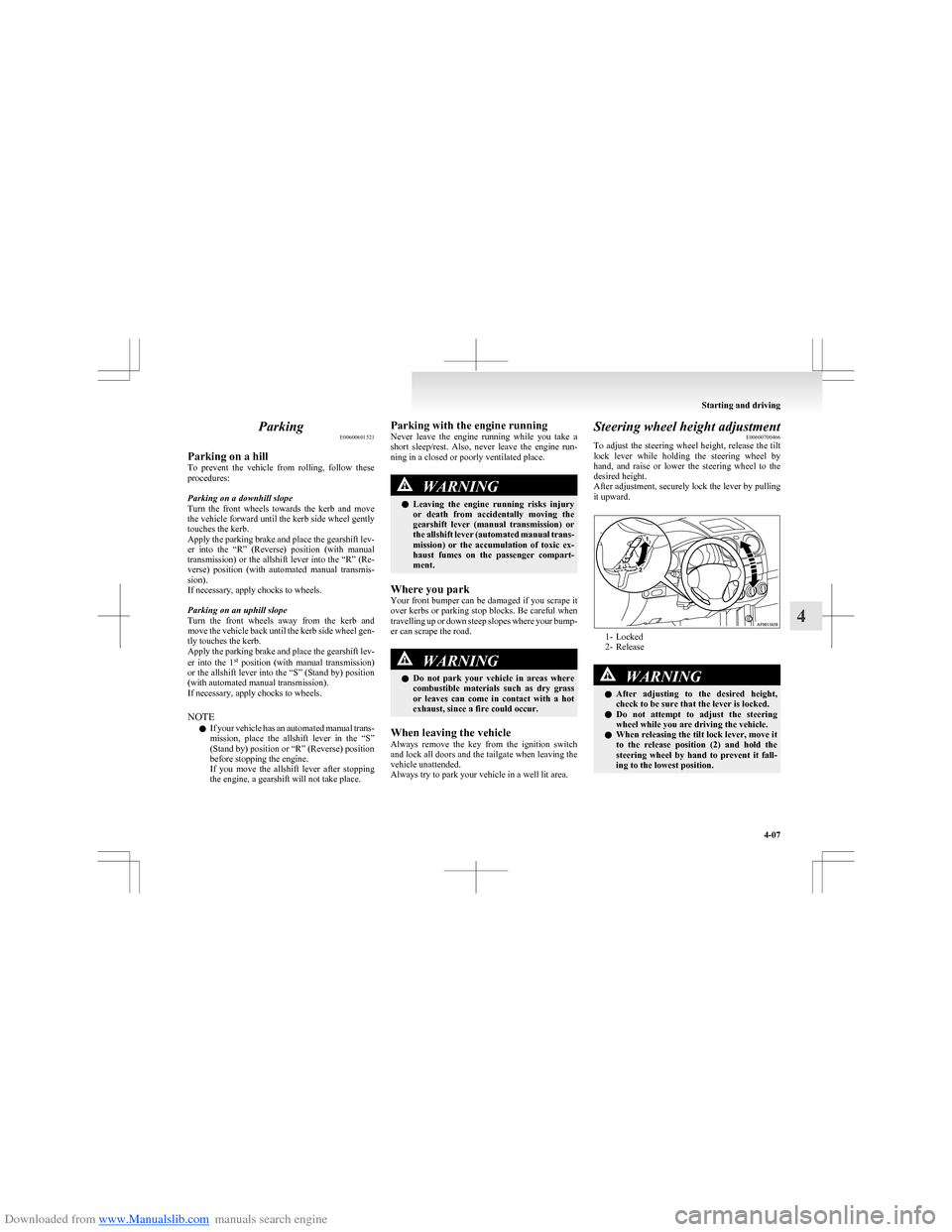
To adjust the steering wheel height, release the tilt
lock lever while holding the steering wheel by
hand, and raise or lower the steering wheel to the
desired height.
After adjustment, securely lock the lever by pulling
it upward.
1- Locked
2- Release
WARNINGl After adjusting to the desired height,
check to be sure that the lever is locked.
l Do not attempt to adjust the steering
wheel while you are driving the vehicle.
l When releasing the tilt lock lever, move it
to the release position (2) and hold the
steering wheel by hand to prevent it fall-
ing to the lowest position.
Starting and driving
4-07
4
Page 145 of 273
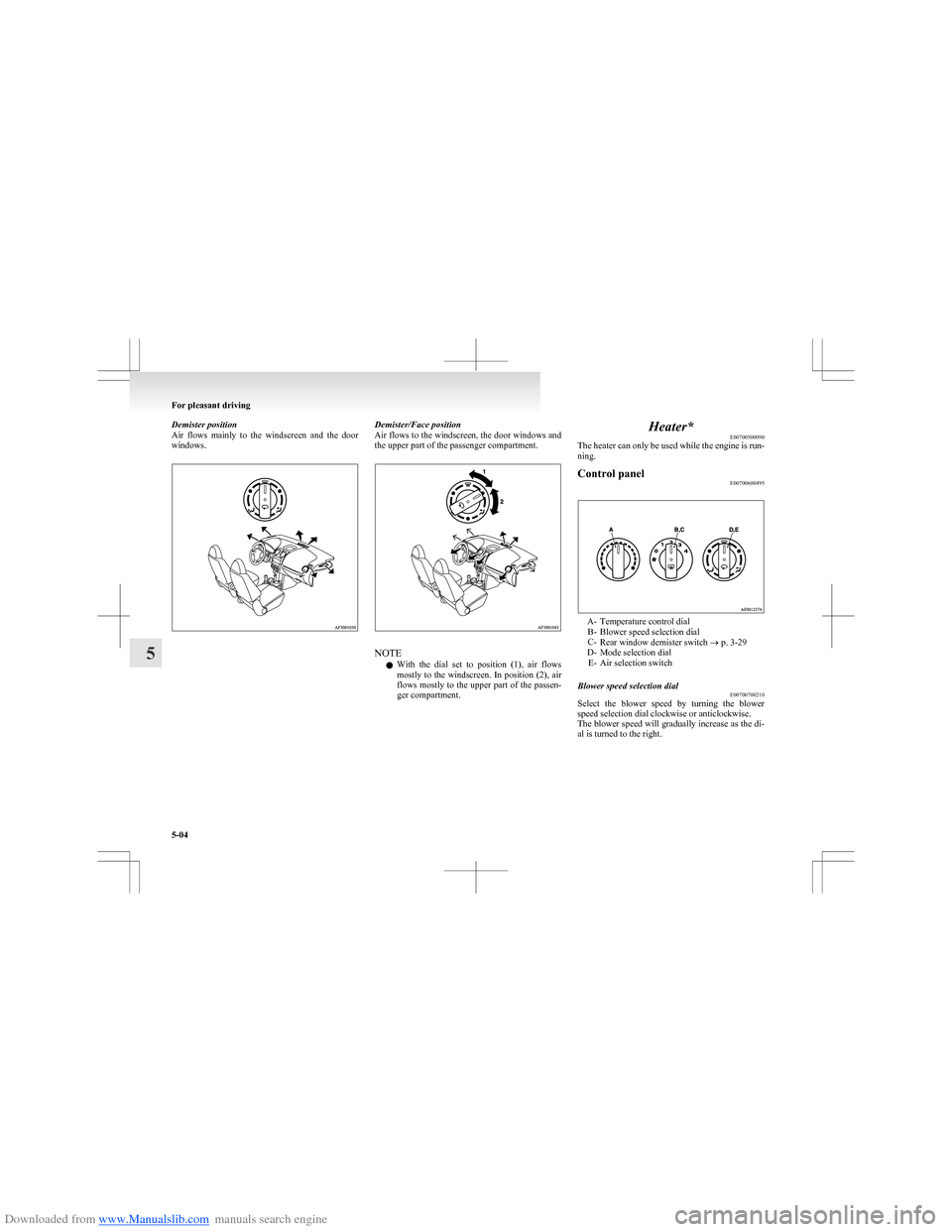
Downloaded from www.Manualslib.com manuals search engine Demister position
Air flows mainly to the windscreen and the door
windows.Demister/Face position
Air flows to the windscreen, the door windows and
the upper part of the passenger compartment.
NOTE
l With the dial set to position (1), air flows
mostly to the windscreen. In position (2), air
flows mostly to the upper part of the passen-
ger compartment.
Heater* E00700500090
The heater can only be used while the engine is run-
ning.Control panel E00700600495
A- Temperature control dial
B- Blower speed selection dial
C- Rear window demister switch ® p. 3-29
D- Mode selection dial E- Air selection switch
Blower speed selection dial E00700700210
Select the blower speed by turning the blower
speed selection dial clockwise or anticlockwise.
The blower speed will gradually increase as the di-
al is turned to the right.
For pleasant driving
5-04
5
Page 147 of 273
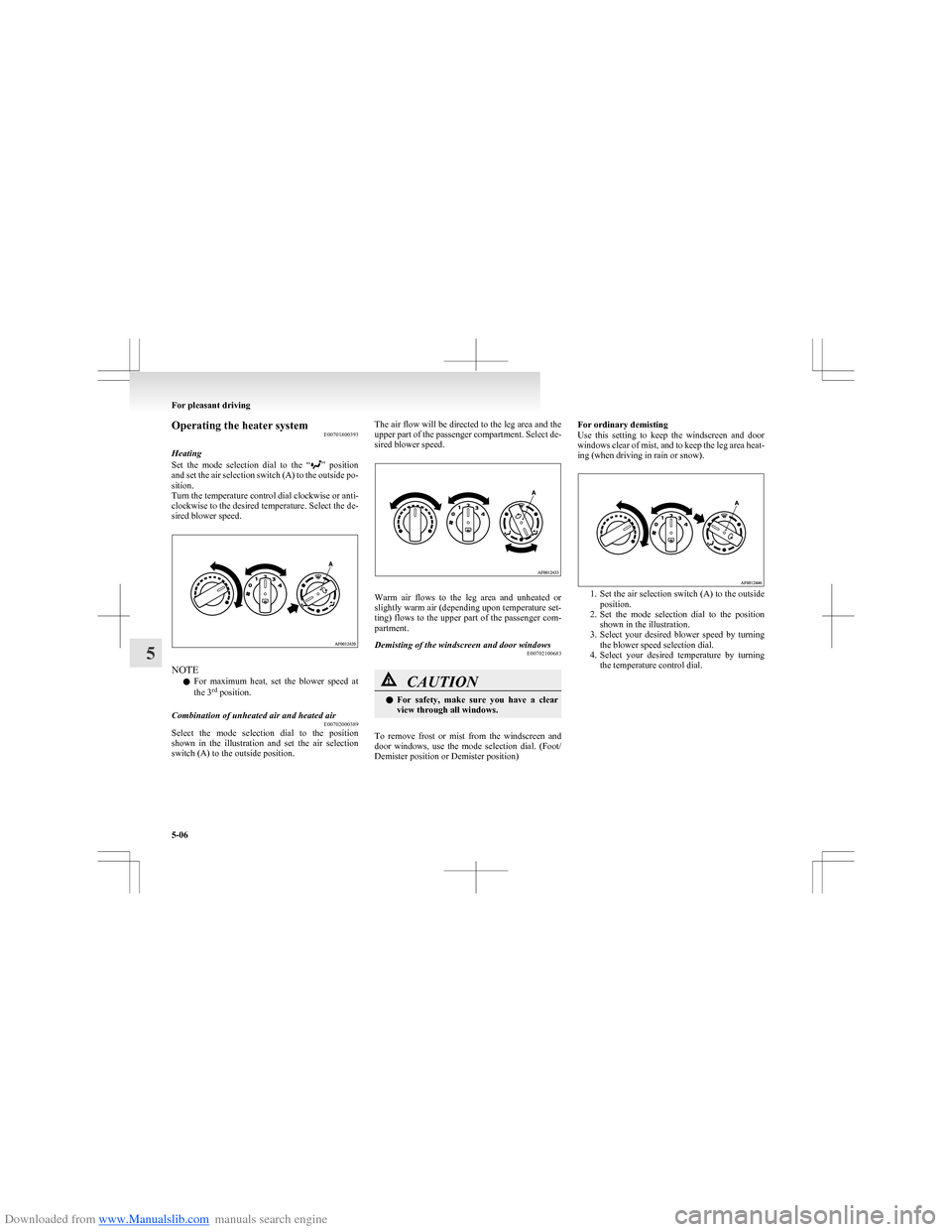
Downloaded from www.Manualslib.com manuals search engine Operating the heater systemE00701800393
Heating
Set the mode selection dial to the “
” position
and set the air selection switch (A) to the outside po-
sition.
Turn the temperature control dial clockwise or anti-
clockwise to the desired temperature. Select the de-
sired blower speed.
NOTE
l For maximum heat, set the blower speed at
the 3 rd
position.
Combination of unheated air and heated air
E00702000389
Select the mode selection dial to the position
shown in the illustration and set the air selection
switch (A) to the outside position.
The air flow will be directed to the leg area and the
upper part of the passenger compartment. Select de-
sired blower speed.
Warm air flows to the leg area and unheated or
slightly warm air (depending upon temperature set-
ting) flows to the upper part of the passenger com-
partment.
Demisting of the windscreen and door windows E00702100683CAUTIONlFor safety, make sure you have a clear
view through all windows.
To remove frost or mist from the windscreen and
door windows, use the mode selection dial. (Foot/
Demister position or Demister position)
For ordinary demisting
Use this setting to keep the windscreen and door
windows clear of mist, and to keep the leg area heat-
ing (when driving in rain or snow).
1. Set the air selection switch (A) to the outside
position.
2. Set the mode selection dial to the position
shown in the illustration.
3. Select your desired blower speed by turning
the blower speed selection dial.
4. Select your desired temperature by turning
the temperature control dial.
For pleasant driving
5-06
5
Page 148 of 273
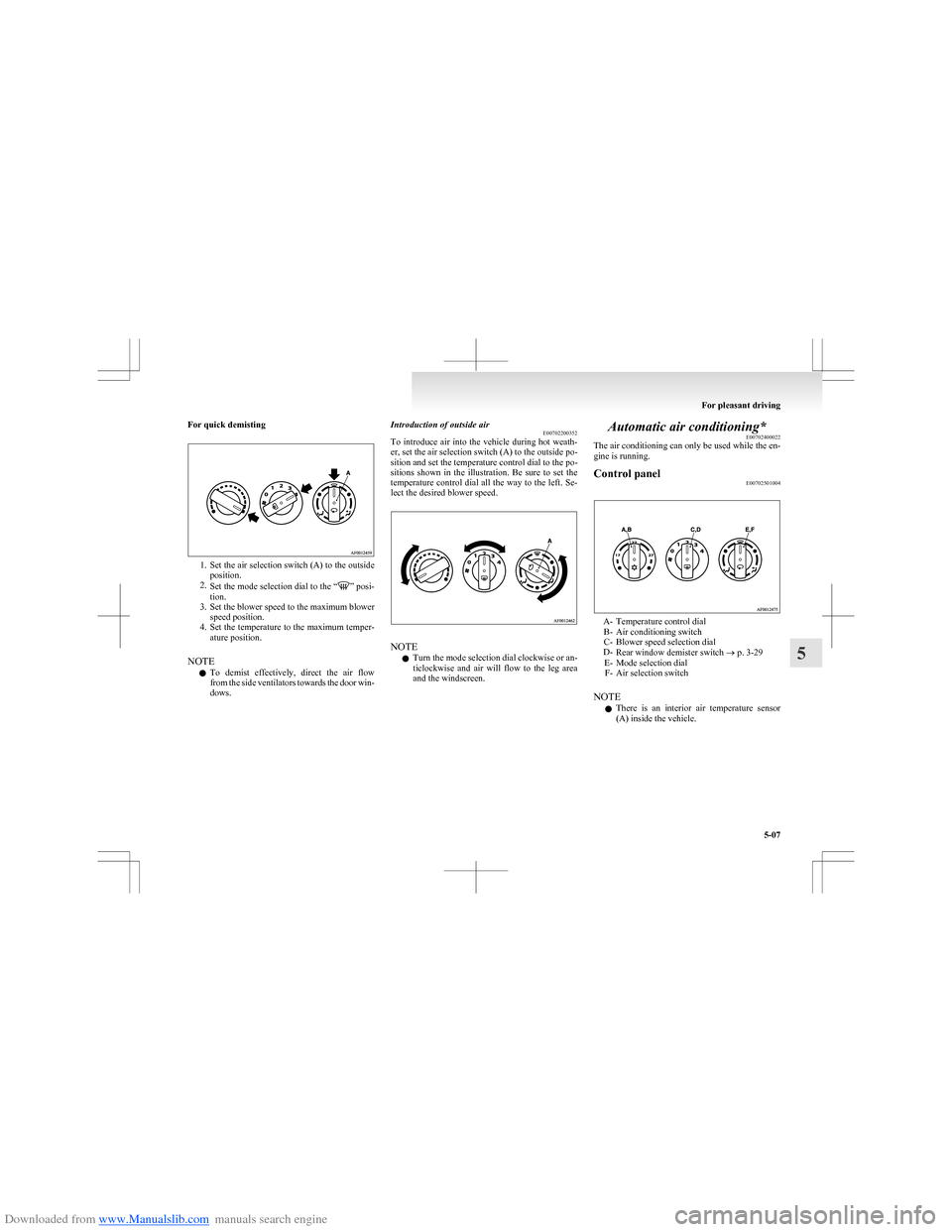
Downloaded from www.Manualslib.com manuals search engine For quick demisting
1.Set the air selection switch (A) to the outside
position.
2. Set the mode selection dial to the “
” posi-
tion.
3. Set the blower speed to the maximum blower
speed position.
4. Set the temperature to the maximum temper-
ature position.
NOTE l To demist effectively, direct the air flow
from the side ventilators towards the door win-
dows.
Introduction of outside air E00702200352
To introduce air into the vehicle during hot weath-
er, set the air selection switch (A) to the outside po-
sition and set the temperature control dial to the po-
sitions shown in the illustration. Be sure to set the
temperature control dial all the way to the left. Se-
lect the desired blower speed.
NOTE
l Turn the mode selection dial clockwise or an-
ticlockwise and air will flow to the leg area
and the windscreen.
Automatic air conditioning* E00702400022
The air conditioning can only be used while the en-
gine is running.Control panel E00702501004
A- Temperature control dial
B- Air conditioning switch
C- Blower speed selection dial
D- Rear window demister switch ® p. 3-29
E- Mode selection dial F- Air selection switch
NOTE l There is an interior air temperature sensor
(A) inside the vehicle.
For pleasant driving
5-07
5
Page 151 of 273
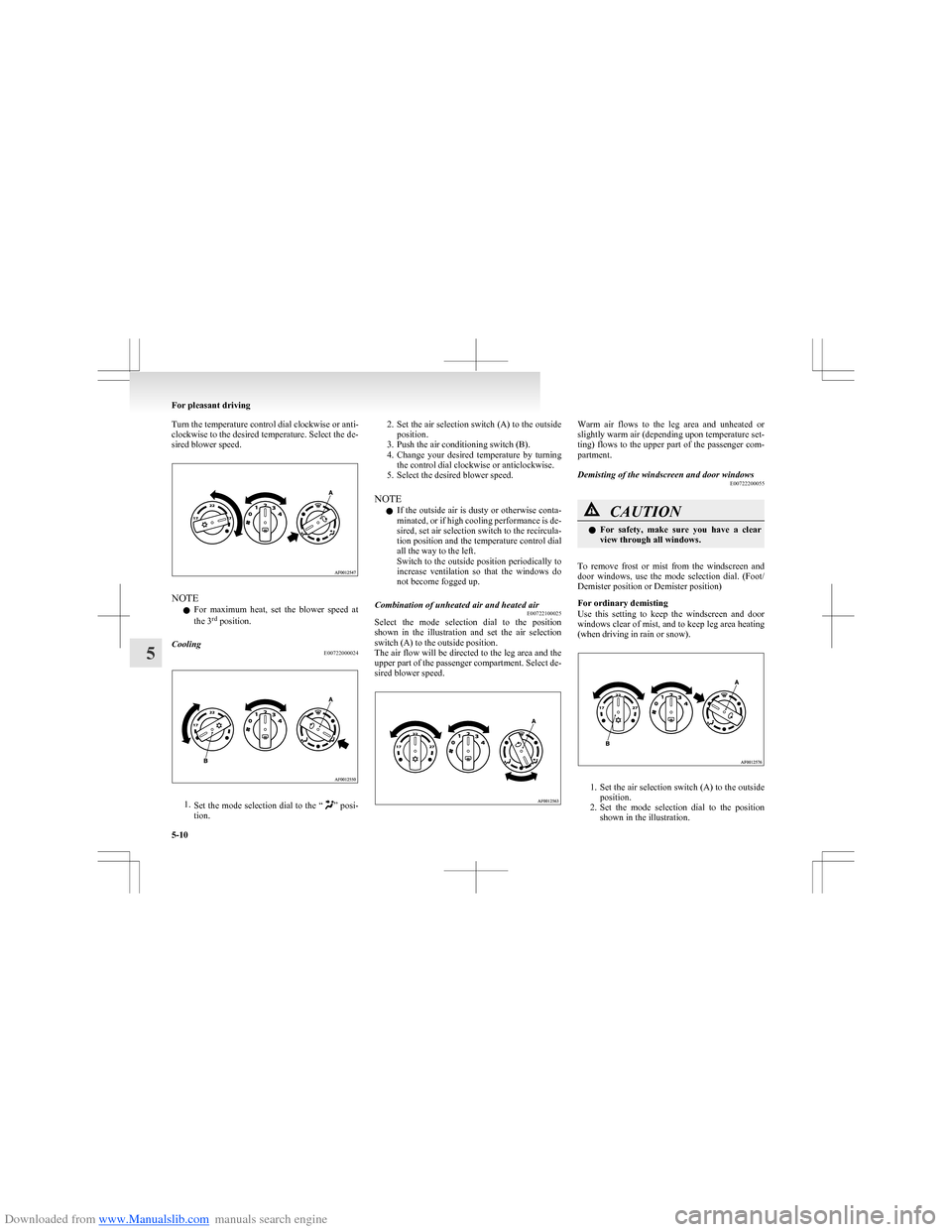
Downloaded from www.Manualslib.com manuals search engine Turn the temperature control dial clockwise or anti-
clockwise to the desired temperature. Select the de-
sired blower speed.
NOTE
l For maximum heat, set the blower speed at
the 3 rd
position.
Cooling
E00722000024
1.Set the mode selection dial to the “” posi-
tion.
2. Set the air selection switch (A) to the outside
position.
3. Push the air conditioning switch (B).
4. Change your desired temperature by turning
the control dial clockwise or anticlockwise.
5. Select the desired blower speed.
NOTE l If the outside air is dusty or otherwise conta-
minated, or if high cooling performance is de-
sired, set air selection switch to the recircula-
tion position and the temperature control dial
all the way to the left.
Switch to the outside position periodically to
increase ventilation so that the windows do
not become fogged up.Combination of unheated air and heated air E00722100025
Select the mode selection dial to the position
shown in the illustration and set the air selection
switch (A) to the outside position.
The air flow will be directed to the leg area and the
upper part of the passenger compartment. Select de-
sired blower speed.
Warm air flows to the leg area and unheated or
slightly warm air (depending upon temperature set-
ting) flows to the upper part of the passenger com-
partment.Demisting of the windscreen and door windows E00722200055CAUTIONlFor safety, make sure you have a clear
view through all windows.
To remove frost or mist from the windscreen and
door windows, use the mode selection dial. (Foot/
Demister position or Demister position)
For ordinary demisting
Use this setting to keep the windscreen and door
windows clear of mist, and to keep leg area heating
(when driving in rain or snow).
1. Set the air selection switch (A) to the outside
position.
2. Set the mode selection dial to the position
shown in the illustration.
For pleasant driving
5-10
5
Page 179 of 273
Downloaded from www.Manualslib.com manuals search engine Interior lampsE00712000799
The interior lamps go on when a door or tailgate is
opened.
When all doors and tailgate are closed, the interior
lamps are illuminated and dimmed gradually for 15
seconds then go out.
However, the interior lamps go out immediately
without being dimmed in the following cases:
l The ignition switch is turned “ON”.
l All doors and tailgate are locked using the
key mechanism of the driver’s door, the lock
knob of the driver’s door, or the remote con-
trol switch of the keyless entry system.
NOTE l The dimming period is adjustable.
For further information, we recommend you
to consult a MITSUBISHI MOTORS Author-
ized Service Point.
l If you leave the lamps on without running
the engine, you will run down the battery. Be-
fore you leave the vehicle, make sure that all
the lamps are off.Room lamp with map lamps E00724300018
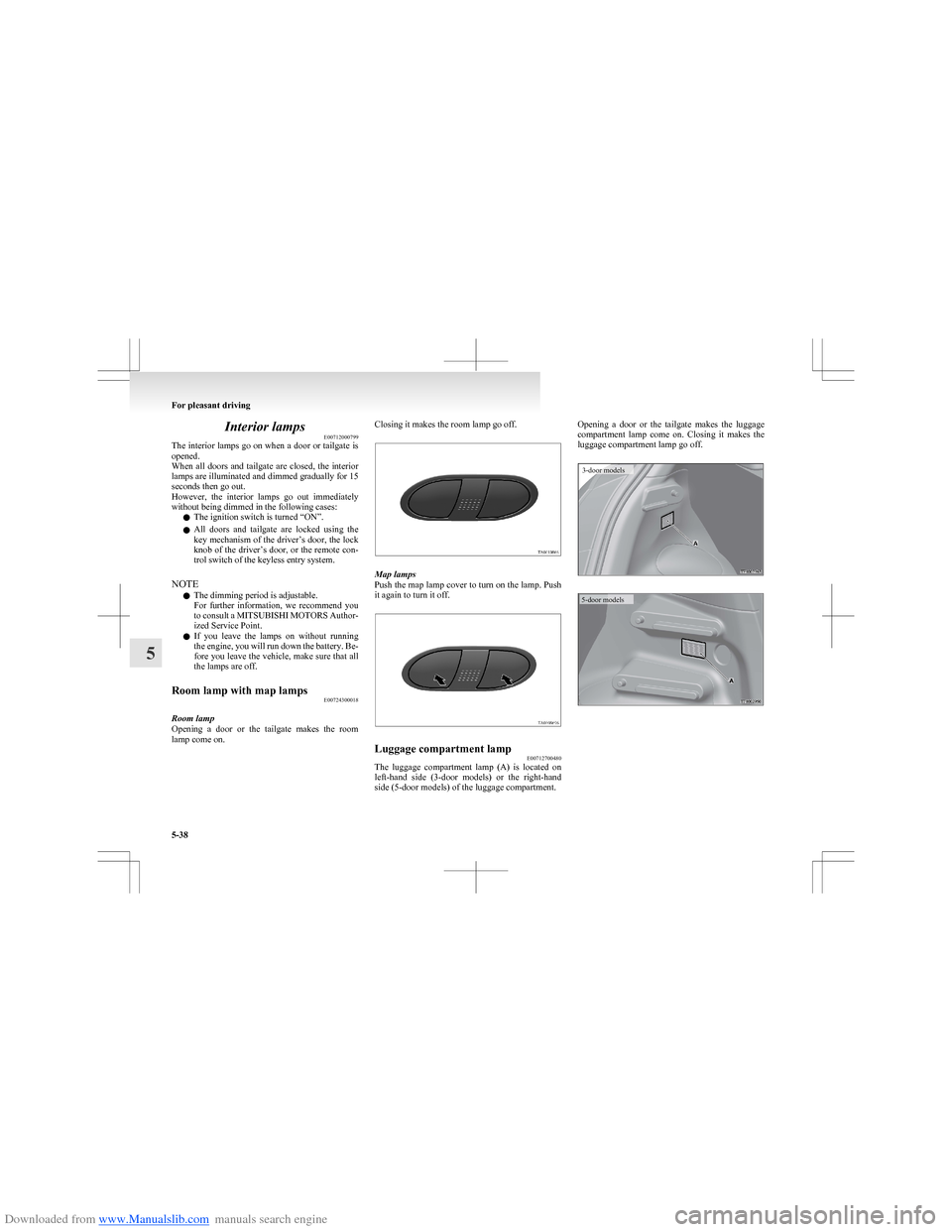
Room lamp
Opening a door or the tailgate makes the room
lamp come on.
Closing it makes the room lamp go off.
Map lamps
Push the map lamp cover to turn on the lamp. Push
it again to turn it off.
Luggage compartment lamp E00712700480
The luggage compartment lamp (A) is located on
left-hand side (3-door models) or the right-hand
side (5-door models) of the luggage compartment.
Opening a door or the tailgate makes the luggage
compartment lamp come on. Closing it makes the
luggage compartment lamp go off.3-door models5-door models
For pleasant driving
5-38
5
Page 184 of 273
Downloaded from www.Manualslib.com manuals search engine NOTEl Do not place heavy luggage (more than
about 1 kg) on the rear shelf panel.
5-door models
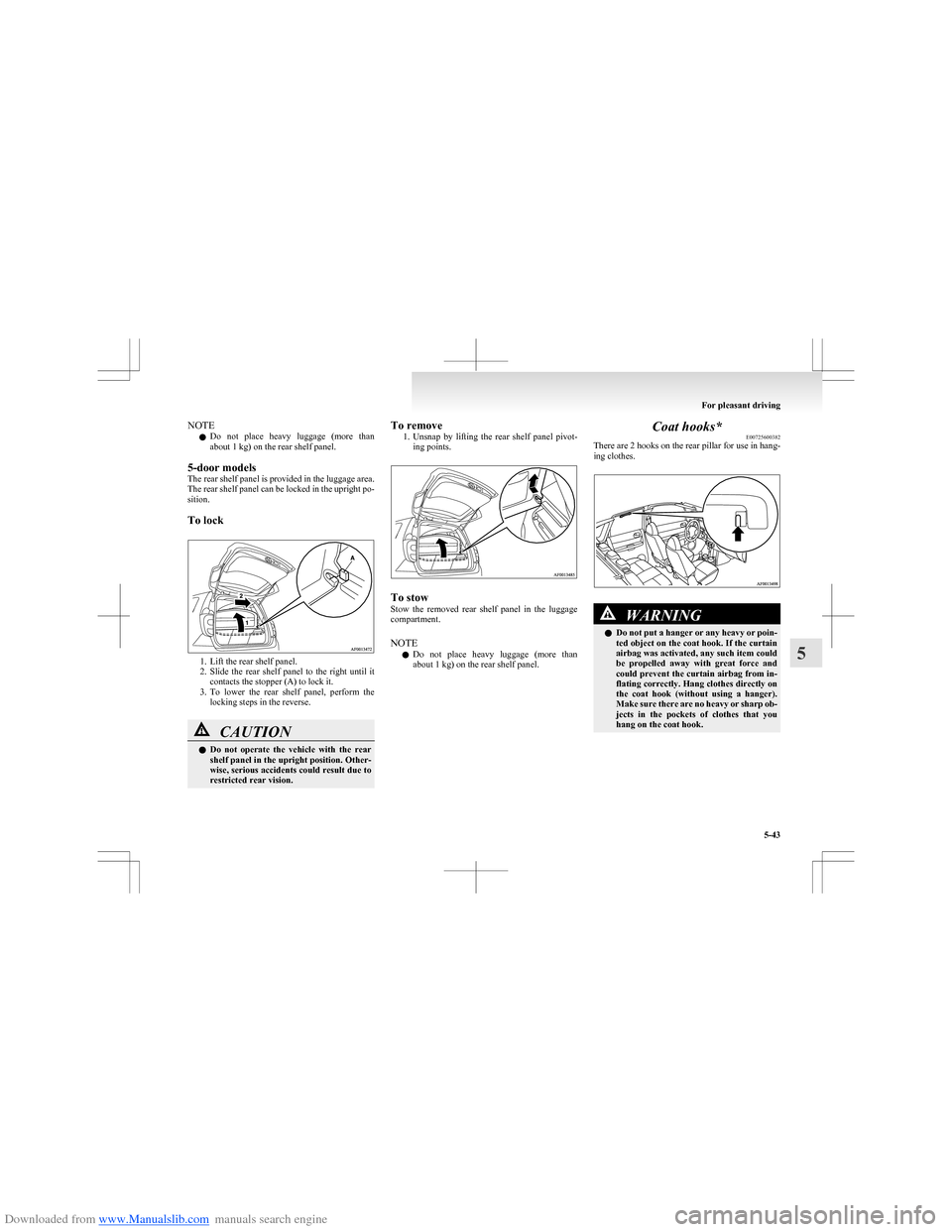
The rear shelf panel is provided in the luggage area.
The rear shelf panel can be locked in the upright po-
sition.
To lock
1. Lift the rear shelf panel.
2. Slide the rear shelf panel to the right until it
contacts the stopper (A) to lock it.
3. To lower the rear shelf panel, perform the
locking steps in the reverse.
CAUTIONl Do not operate the vehicle with the rear
shelf panel in the upright position. Other-
wise, serious accidents could result due to
restricted rear vision.To remove
1.Unsnap by lifting the rear shelf panel pivot-
ing points.
To stow
Stow the removed rear shelf panel in the luggage
compartment.
NOTE l Do not place heavy luggage (more than
about 1 kg) on the rear shelf panel.
Coat hooks* E00725600382
There are 2 hooks on the rear pillar for use in hang-
ing clothes.WARNINGl Do not put a hanger or any heavy or poin-
ted object on the coat hook. If the curtain
airbag was activated, any such item could
be propelled away with great force and
could prevent the curtain airbag from in-
flating correctly. Hang clothes directly on
the coat hook (without using a hanger).
Make sure there are no heavy or sharp ob-
jects in the pockets of clothes that you
hang on the coat hook.
For pleasant driving
5-43
5