change time MITSUBISHI GALANT 2011 9.G MMCS Manual
[x] Cancel search | Manufacturer: MITSUBISHI, Model Year: 2011, Model line: GALANT, Model: MITSUBISHI GALANT 2011 9.GPages: 101, PDF Size: 8.77 MB
Page 31 of 101
![MITSUBISHI GALANT 2011 9.G MMCS Manual Setup 2-18Windshield WipersSettings related to the windshield wipers can be
performed.
eng_331
Speed-sensitive Operation
[On]
The speed of the windshield wipers
changes according to the vehicle
s](/img/19/7443/w960_7443-30.png "MITSUBISHI GALANT 2011 9.G MMCS Manual Setup 2-18Windshield WipersSettings related to the windshield wipers can be
performed.
eng_331
Speed-sensitive Operation
[On]
The speed of the windshield wipers
changes according to the vehicle
s")
Setup 2-18Windshield WipersSettings related to the windshield wipers can be
performed.
eng_331
Speed-sensitive Operation
[On]
The speed of the windshield wipers
changes according to the vehicle
speed.
[Off]
The speed of the windshield wipers
does not change according to the
vehicle speed.
Rear Wiper
Intermittent
Interval[2sec]: The interval is 2 seconds.
[4sec]: The interval is 4 seconds.
[8sec]: The interval is 8 seconds.
[16sec]: The interval is 16 seconds.
Continuous
Operation[On]: The windshield wipers
operate continuously.
[Off]: The windshield wipers do not
operate continuously.
Exterior Lights / Interior LightsSettings related to the exterior lights/interior lights
can be performed.
eng_329
Headlight Auto-cutout Function
[On] Turns off the headlights automatically.
[Off]
Does not turn off the headlights automatically.
Headlight On Condition
[Before
Ignition Off]Goes off when the ignition switch is
turned OFF.
[Anytime]Stays on even when the ignition
switch is turned OFF.Interior Light Auto-cutout Time
[3 min] Goes off after 3 minutes.
[30 min] Goes off after 30 minutes.
[60 min] Goes off after 60 minutes.
[Not-
operated]Does not go off automatically.Duration Dome Light Remains On after Door is Closed[180 sec] Goes off after 180 seconds.
[120 sec] Goes off after 120 seconds.
[60 sec] Goes off after 60 seconds.
[30 sec] Goes off after 30 seconds.
[15 sec] Goes off after 15 seconds.
[0 sec] Goes off when the door is closed.
Door-ajar Warning / Turn SignalSettings related to the door-ajar warning/turn signal
can be performed.
eng_327
Door - ajar Warning Chime
[On] Warning chimes when the door is ajar.
[Off] Warning does not chime when the door
is ajar.Turn Signal Audible
[On] The turn signal sound is on.
[Off] The turn signal sound is off.
Page 33 of 101
![MITSUBISHI GALANT 2011 9.G MMCS Manual Maintenance 2-20
Maintenance
Maintenance timing alerts can be set, such
as for the engine oil and oil filter.
1 Display the Main Menu
2 Touch [Maintenance]
eng_507
eng_490
The maintenance list](/img/19/7443/w960_7443-32.png "MITSUBISHI GALANT 2011 9.G MMCS Manual Maintenance 2-20
Maintenance
Maintenance timing alerts can be set, such
as for the engine oil and oil filter.
1 Display the Main Menu
2 Touch [Maintenance]
eng_507
eng_490
The maintenance list")
Maintenance 2-20
Maintenance
Maintenance timing alerts can be set, such
as for the engine oil and oil filter.
1 Display the Main Menu
2 Touch [Maintenance]
eng_507
eng_490
The maintenance list screen is displayed.NOTE Items that have reached the maintenance timing
are displayed in yellow.
Setting the Maintenance Timing
An item can be selected to set the
maintenance timing.
1 On the maintenance list screen,
touch the item to be set
eng_490
The maintenance information screen of the
selected item is displayed. 2 Touch [Setup]
eng_550
The maintenance setting screen is displayed.
NOTE “Date” displays the date on which the maintenance
was performed. “Changed at Odometer” displays the odometer
value at the time of maintenance.
“Remaining Distance” displays the distance that
remains until the next maintenance.
Touch [ ] or [ ] of “Page” to scroll through
the pages to different items. 3 Touch [ - ] or [ + ] of “Distance
Setting” or “Date Setting” to set the
distance to or the date of the next
maintenance.
eng_475
NOTE Touch [Default] to return to the factory settings.
“Distance Setting” is used to set the distance
from the performance of maintenance to the
time of the next maintenance.
“Date Setting” is used to set the number of
months from the performance of maintenance to
the time of the next maintenance. 4 Touch [Back]
The maintenance timing settings are completed.
Page 45 of 101
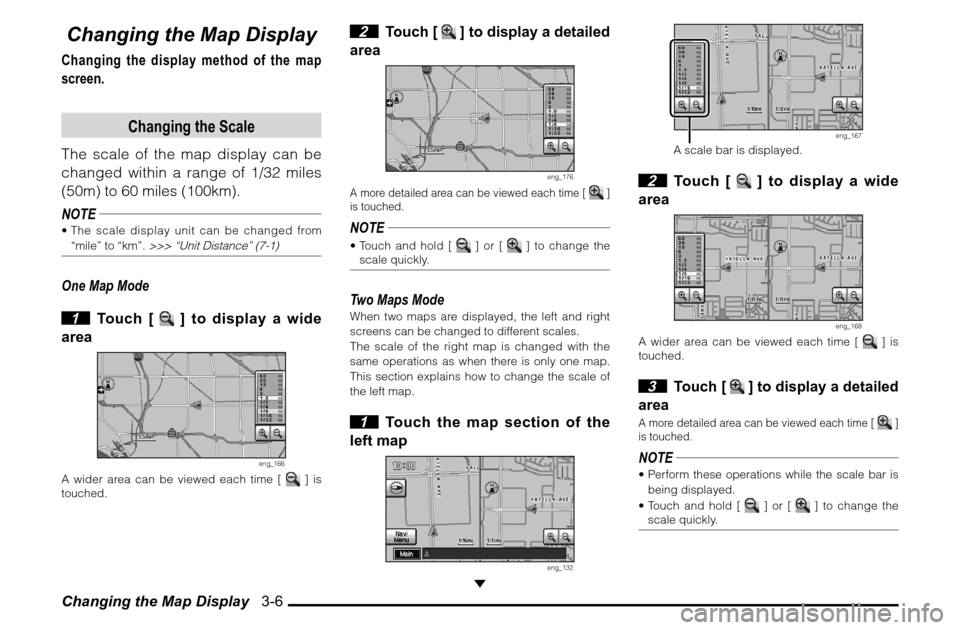
Changing the Map Display 3-6Changing the Map DisplayChanging the display method of the map
screen.
Changing the Scale
The scale of the map display can be
changed within a range of 1/32 miles
(50m) to 60 miles (100km).
NOTE The scale display unit can be changed from
“mile” to “km”.
>>> “Unit Distance” (7-1)
One Map Mode
1 Touch [
] to display a wide
area
eng_166
A wider area can be viewed each time [
] is
touched.
2
Touch [
] to display a detailed
area
eng_176
A more detailed area can be viewed each time [
]
is touched.
NOTE Touch and hold [
] or [
] to change the
scale quickly.
Two Maps ModeWhen two maps are displayed, the left and right
screens can be changed to different scales.
The scale of the right map is changed with the
same operations as when there is only one map.
This section explains how to change the scale of
the left map. 1 Touch the map section of the
left map
eng_132
eng_167
A scale bar is displayed. 2 Touch [
] to display a wide
area
eng_168
A wider area can be viewed each time [
] is
touched.
3
Touch [
] to display a detailed
area
A more detailed area can be viewed each time [
]
is touched.
NOTE Perform these operations while the scale bar is
being displayed.
Touch and hold [
] or [
] to change the
scale quickly.
Page 46 of 101
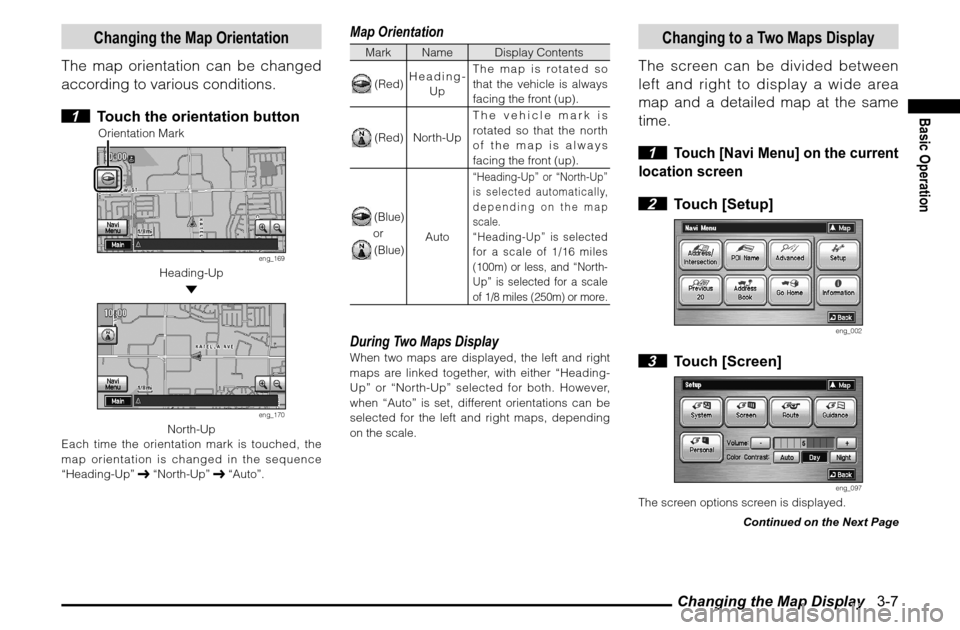
Changing the Map Display 3-7
Basic Operation
Changing the Map Orientation
The map orientation can be changed
according to various conditions.
1 Touch the orientation button
Orientation Mark
eng_169
Heading-Up
eng_170
North-Up
Each time the orientation mark is touched, the
map orientation is changed in the sequence
“Heading-Up” “North-Up” “Auto”.
Map OrientationMark Name Display Contents (Red)Heading-
UpThe map is rotated so
that the vehicle is always
facing the front (up). (Red) North-UpThe vehicle mark is
rotated so that the north
of the map is always
facing the front (up). (Blue)or (Blue)
Auto
“Heading-Up” or “North-Up”
is selected automatically,
depending on the map
scale.“Heading-Up” is selected
for a scale of 1/16 miles
(100m) or less, and “North-
Up” is selected for a scale
of 1/8 miles (250m) or more.
During Two Maps DisplayWhen two maps are displayed, the left and right
maps are linked together, with either “Heading-
Up” or “North-Up” selected for both. However,
when “Auto” is set, different orientations can be
selected for the left and right maps, depending
on the scale.
Changing to a Two Maps Display
The screen can be divided between
left and right to display a wide area
map and a detailed map at the same
time.
1
Touch [Navi Menu] on the current
location screen
2 Touch [Setup]
eng_002
3 Touch [Screen]
eng_097
The screen options screen is displayed.
Continued on the Next Page
Page 76 of 101
![MITSUBISHI GALANT 2011 9.G MMCS Manual Editing the Route (Itinerary) 5-7
Routes
Adding a Way Point
A way point can be added to the
current route.
1 Touch [Add] in the itinerary list
screen
(5-5)
The destination search screen is disp](/img/19/7443/w960_7443-75.png "MITSUBISHI GALANT 2011 9.G MMCS Manual Editing the Route (Itinerary) 5-7
Routes
Adding a Way Point
A way point can be added to the
current route.
1 Touch [Add] in the itinerary list
screen
(5-5)
The destination search screen is disp")
Editing the Route (Itinerary) 5-7
Routes
Adding a Way Point
A way point can be added to the
current route.
1 Touch [Add] in the itinerary list
screen
(5-5)
The destination search screen is displayed. 2
Touch one of the search methods
to search for the location
eng_079
Refer to the following pages to search for the
location.>>> [Address/Intersection] (4-3)
>>> [Point of Interest (POI) Name] (4-6)
>>> [Advanced] (4-8)
>>> [Previous 20] (4-7)
>>> [Address Book] (4-2)
3 Touch [Itinerary List]
eng_080
4
Touch [Add] in the sequence
position in which it is to be visited
eng_081
The searched location is added to the route as a
way point. 5 Touch [Start]
eng_082
Guidance starts for the changed route.
Deleting
A destination or way point can be
deleted.
1 Touch [Delete] in the itinerary
list screen
(5-5)
The delete itinerary screen is displayed. 2 Touch the location to delete
eng_083
NOTE The locations targeted for deletion are displayed
with a black highlight. Touch a location again to
remove it from the deletion target.
Multiple locations can be selected at the same
time.
Touch [All] to delete all locations at the same
time.
Continued on the Next Page
Page 84 of 101
![MITSUBISHI GALANT 2011 9.G MMCS Manual Editing a Location 6-5
Address Book
5 Touch [Done]
eng_103
The information change is completed.
Deleting
Deleting a stored location.
1 Touch [Delete] of “Address
Book” in the personal settin](/img/19/7443/w960_7443-83.png "MITSUBISHI GALANT 2011 9.G MMCS Manual Editing a Location 6-5
Address Book
5 Touch [Done]
eng_103
The information change is completed.
Deleting
Deleting a stored location.
1 Touch [Delete] of “Address
Book” in the personal settin")
Editing a Location 6-5
Address Book
5 Touch [Done]
eng_103
The information change is completed.
Deleting
Deleting a stored location.
1 Touch [Delete] of “Address
Book” in the personal settings
screen
(6-4)
2 Touch the stored location to
delete
eng_104
NOTE The stored locations targeted for deletion are
displayed with a black highlight.
Touch a location again to remove it from the
deletion target.
Multiple locations can be selected at the same
time.
Touch [All] to delete all stored locations at the
same time. 3 Touch [Done]
eng_105
4 Touch [Yes]
eng_106
The selected stored locations are deleted.
Page 87 of 101
![MITSUBISHI GALANT 2011 9.G MMCS Manual System Options 7-2
Time Zone
Changing the time zone.
1 Touch [Change]
2 Touch the desired zone
eng_127
3 Touch [On] or [Off] for “Daylight
Saving Time”
4 Touch [Done]
eng_128
The time zon](/img/19/7443/w960_7443-86.png "MITSUBISHI GALANT 2011 9.G MMCS Manual System Options 7-2
Time Zone
Changing the time zone.
1 Touch [Change]
2 Touch the desired zone
eng_127
3 Touch [On] or [Off] for “Daylight
Saving Time”
4 Touch [Done]
eng_128
The time zon")
System Options 7-2
Time Zone
Changing the time zone.
1 Touch [Change]
2 Touch the desired zone
eng_127
3 Touch [On] or [Off] for “Daylight
Saving Time”
4 Touch [Done]
eng_128
The time zone settings are completed, and the
display returns to the system options screen.
List Orientation
Changing the list orientation.[Down] The list is displayed with the current
location at the top.
[Up]The list is displayed with the
destination at the top.NOTEChanges to the list orientation apply to the
following screens.
Turn List Screen
(3-11)
FWY Area List Screen
(4-11)
Route Outline Screen
(5-2)
Avoid Street Screen
(5-3)
Keyboard Layout
Changing the layout of the keyboard.[Alphabet]
eng_124
[PC]
eng_129
Page 89 of 101
![MITSUBISHI GALANT 2011 9.G MMCS Manual Screen Options 7-4
POI Icons on Map
Setting whether or not to display the
POI icons on the map.
Individual settings for whether or not
to display can also be made for each
POI.[Show All] Displays](/img/19/7443/w960_7443-88.png "MITSUBISHI GALANT 2011 9.G MMCS Manual Screen Options 7-4
POI Icons on Map
Setting whether or not to display the
POI icons on the map.
Individual settings for whether or not
to display can also be made for each
POI.[Show All] Displays")
Screen Options 7-4
POI Icons on Map
Setting whether or not to display the
POI icons on the map.
Individual settings for whether or not
to display can also be made for each
POI.[Show All] Displays all icons on the map.
[Hide All] Hides all icons from the map.
[Select] Only the icons selected in advance
are shown on the map.Select IconsSetting speci c POI icons to be displayed on the
map. 1 Touch [Select]
2 Touch [
] of “POI Icons on
Map”
3 Touch a checkbox to select a
POI to display
eng_133
NOTE
is displayed,
is not displayed.
The screen changes between
and
each
time it is touched.
Touch [Default] to return to the factory settings.
4 Touch [Done]
eng_134
The display returns to the Screen Options screen,
and the setting of specific POI icons to be
displayed on the map is completed.
POI IconsThe 43 POI icon types are shown below.
POI Icons are color coded based on their
category type.
A (Green) Shopping, Money & Business
B (Dark Blue) Car & Travel
C (Brown) Public Places & Emergency
D (Orange) Restaurant
E (Blue) Recreation & Attraction
Icons/Name Category
AIRPORT BAMUSEMENT PARK EAT M AAUTOMOBILE CLUB BBANK ABUS STATION BCAR RENTAL BCASINO ECITY CENTER CCITY HALL CCIVIC / COMMUNITY CENTER CCOMMUTER RAIL STATION BCONVENTION / EXHIBITION
CENTERCCOURT HOUSE CFERRY TERMINAL B
Page 91 of 101
![MITSUBISHI GALANT 2011 9.G MMCS Manual Route Options 7-6
Route Options
Setting the route search conditions.
1 Display the Navi Menu and
touch [Setup].
eng_002
2 Touch [Route]
eng_097
eng_136
The route options screen is displayed. 3](/img/19/7443/w960_7443-90.png "MITSUBISHI GALANT 2011 9.G MMCS Manual Route Options 7-6
Route Options
Setting the route search conditions.
1 Display the Navi Menu and
touch [Setup].
eng_002
2 Touch [Route]
eng_097
eng_136
The route options screen is displayed. 3")
Route Options 7-6
Route Options
Setting the route search conditions.
1 Display the Navi Menu and
touch [Setup].
eng_002
2 Touch [Route]
eng_097
eng_136
The route options screen is displayed. 3 Touch each item to change the
setting
4 Touch [Done]
eng_137
The setting change is completed.NOTE Touch [Default] to return to the factory settings.
Route Priority
Setting the route search priority.[Fast] Searches for a short route in terms
of time (arriving quickly at the
destination), using freeways and
major roads.
[Short]Searches for the route on the map
with the shortest distance.
[Easy] Search for a route that is easy to
drive, with few left or right turns (in
particular left turns).
Minimize Freeways
Setting the conditions for using
freeways.[Yes] Calculates a route that uses
freeways as little as possible.
[No]Calculates a route that uses
freeways.
Page 97 of 101
![MITSUBISHI GALANT 2011 9.G MMCS Manual Personal Settings 7-12 3 Touch one of the items to edit
eng_152
NOTE Touch [Adjust] to change the position or
change the range in the same way as step 4 of “Registering” (7-10)
.
Touch the](/img/19/7443/w960_7443-96.png "MITSUBISHI GALANT 2011 9.G MMCS Manual Personal Settings 7-12 3 Touch one of the items to edit
eng_152
NOTE Touch [Adjust] to change the position or
change the range in the same way as step 4 of “Registering” (7-10)
.
Touch the")
Personal Settings 7-12 3 Touch one of the items to edit
eng_152
NOTE Touch [Adjust] to change the position or
change the range in the same way as step 4 of “Registering” (7-10)
.
Touch the “Name” button to change the name
of the avoid area in the same way as step 5 of
“Registering” (7-10)
.
4 Touch [Done]
5 Touch [Done]
eng_153
The editing of the avoid area is completed.
DeletingDeleting a stored avoid area. 1 Touch [Delete]
2 Touch the avoid area to delete
eng_154
NOTE The avoid areas targeted for deletion are
displayed with a black highlight. Touch a
location again to remove it from the deletion list.
Multiple locations can be selected at the same
time.
Touch [All] to delete all avoid areas at the same
time.
Touch [Info] to
display the map
of the avoid area vicinity.
eng_155
3 Touch [Done]
eng_156
4 Touch [Yes]
eng_157
The deletion of the selected avoid areas is
completed.