remote start MITSUBISHI iMiEV 2016 1.G Owners Manual
[x] Cancel search | Manufacturer: MITSUBISHI, Model Year: 2016, Model line: iMiEV, Model: MITSUBISHI iMiEV 2016 1.GPages: 296, PDF Size: 7.79 MB
Page 46 of 296
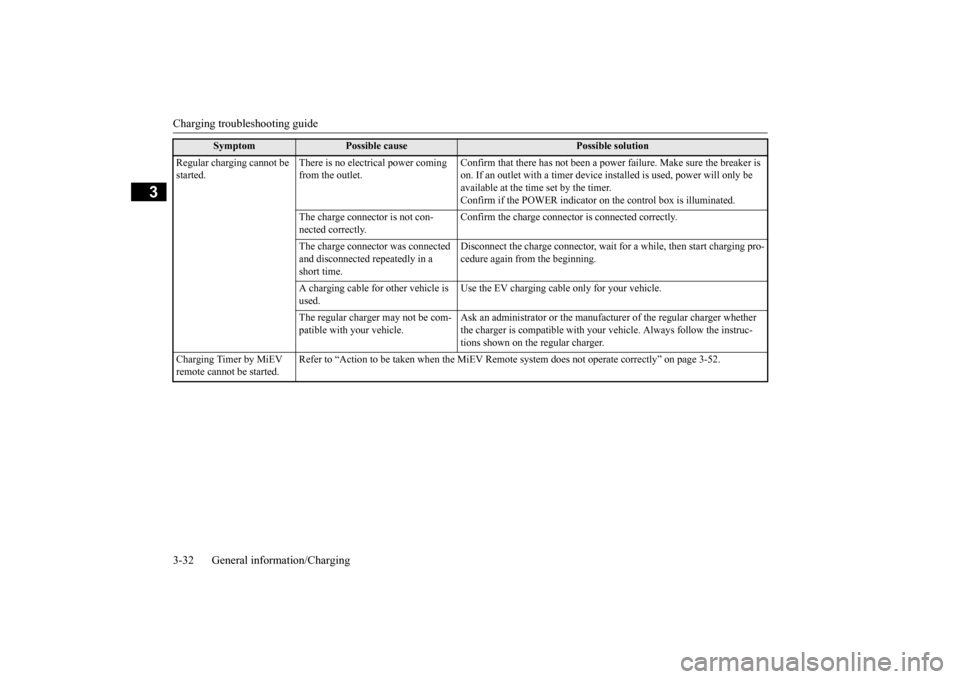
Charging troubleshooting guide 3-32 General information/Charging
3
Regular charging cannot be started.
There is no electrical power coming from the outlet.
Confirm that there has not been a power
failure. Make sure the breaker is
on. If an outlet with a timer device
installed is used,
power will only be
available at the time set by the timer. Confirm if the POWER indicator on
the control box
is illuminated.
The charge connector is not con- nected correctly.
Confirm the charge connector is connected correctly.
The charge connector was connected and disconnected repeatedly in a short time.
Disconnect the charge conne
ctor, wait for a while, then start charging pro-
cedure again from the beginning.
A charging cable for other vehicle is used.
Use the EV charging cable only for your vehicle.
The regular charger may not be com- patible with your vehicle.
Ask an administrator or the manufacturer of the regular charger whether the charger is compatible with your
vehicle. Al
ways follow the instruc-
tions shown on the regular charger.
Charging Timer by MiEV remote cannot be started.
Refer to “Action to be taken when the MiEV Remo
te system does not operate correctly” on page 3-52.
Symptom
Possible cause
Possible solution
BK0220401US.book 32 ページ 2015年6月3日 水曜日 午前7時42分
Page 55 of 296
MiEV Remote System
General information/Charging 3-41
3
N01203701020
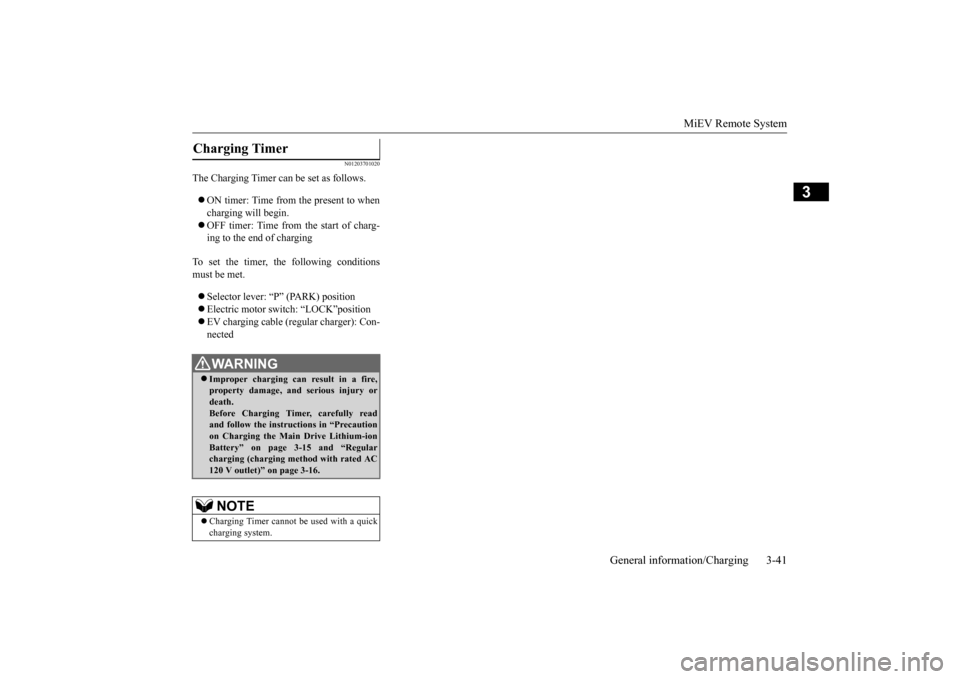
The Charging Timer can be set as follows. ON timer: Time from the present to when charging will begin. OFF timer: Time from the start of charg- ing to the end of charging
To set the timer, th
e following conditions
must be met. Selector lever: “P Electric motor switch: “LOCK”position EV charging cable (regular charger): Con- nected
Charging Timer
WA R N I N G Improper charging can result in a fire, property damage, and serious injury or death.Before Charging Timer, carefully read and follow the instructions in “Precaution on Charging the Main Drive Lithium-ionBattery” on page 3-15 and “Regular charging (charging method with rated AC 120 V outlet)” on page 3-16.NOTE
Charging Timer cannot be
used with a quick
charging system.
BK0220401US.book 41 ページ 2015年6月3日 水曜日 午前7時42分
Page 56 of 296
MiEV Remote System 3-42 General information/Charging
3
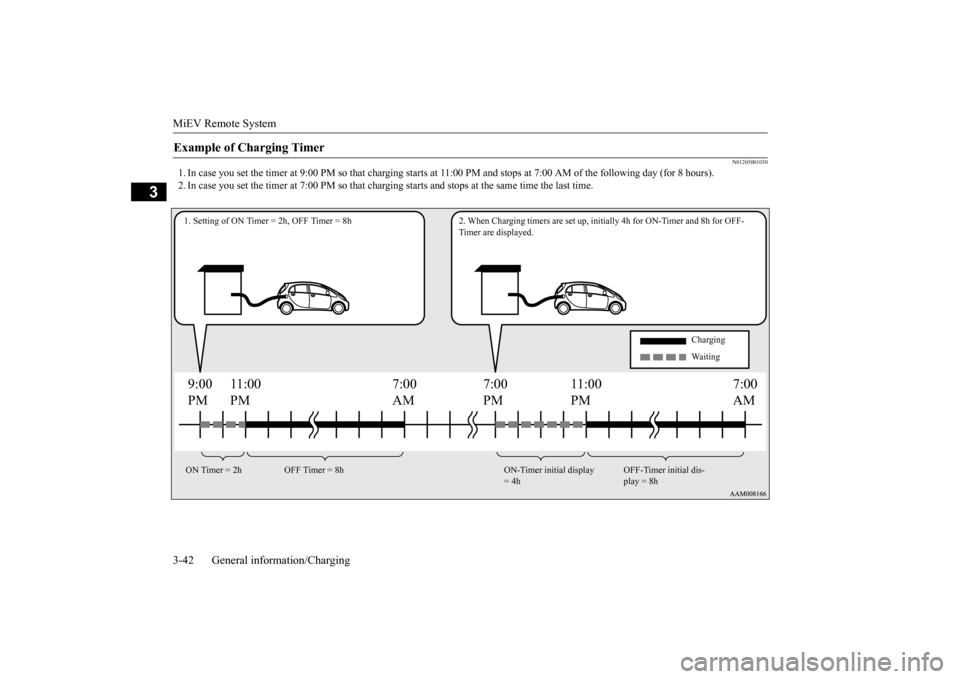
N01205001030
1. In case you set the timer at 9:00 PM so
that charging starts at 11:0
0 PM and stops at 7:00 AM of the following day (for 8 hou
rs).
2. In case you set the timer at 7:00 PM so that char
ging starts and stops at th
e same time the last time.
Example of Charging Timer
9:00 PM
7:00 PM
7:00 AM
11:00 PM
11:00 PM
7:00AM
1. Setting of ON Timer = 2h, OFF Timer = 8h 2. When Charging
timers are set up, initially 4h
for ON-Timer and 8h for OFF-
Timer are displayed.
Charging Waiting
ON Timer = 2h OFF Timer = 8h ON-Timer initial display
= 4h
OFF-Timer initial dis- play = 8h
BK0220401US.book 42 ページ 2015年6月3日 水曜日 午前7時42分
Page 57 of 296
MiEV Remote System
General information/Charging 3-43
3
N01205100018
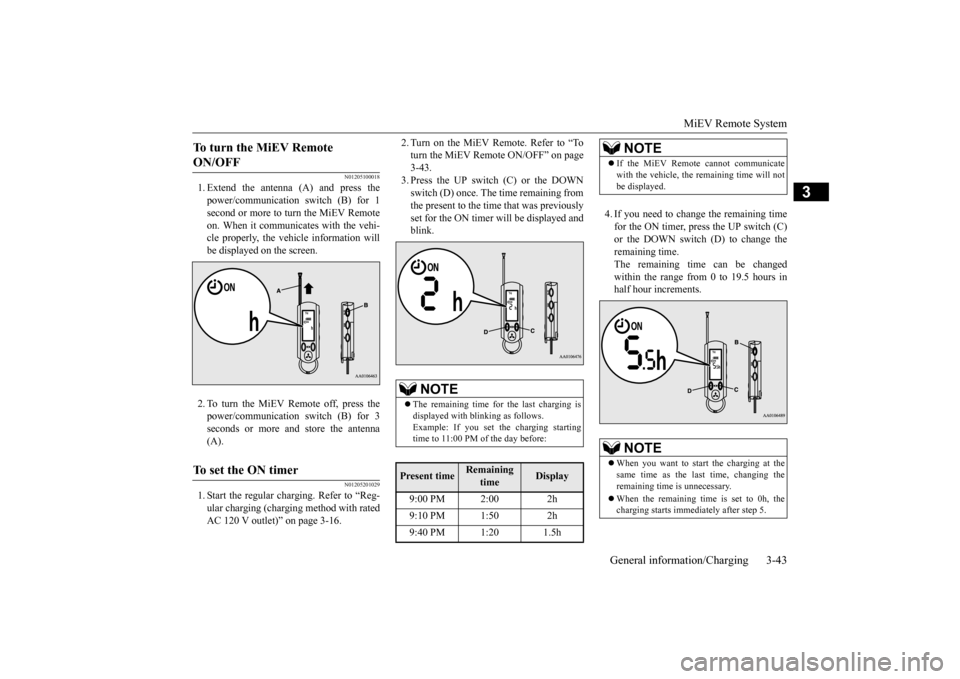
1. Extend the antenna (A) and press the power/communication switch (B) for 1 second or more to turn the MiEV Remote on. When it communicates with the vehi-cle properly, the vehi
cle information will
be displayed on the screen. 2. To turn the MiEV Remote off, press the power/communication switch (B) for 3 seconds or more and store the antenna (A).
N01205201029
1. Start the regular charging. Refer to “Reg-ular charging (charging method with ratedAC 120 V outlet)” on page 3-16.
2. Turn on the MiEV Remote. Refer to “To turn the MiEV Remote ON/OFF” on page3-43. 3. Press the UP switch (C) or the DOWN switch (D) once. The time remaining fromthe present to the time that was previously set for the ON timer will be displayed and blink.
4. If you need to change the remaining time for the ON timer, press the UP switch (C) or the DOWN switch (D) to change the remaining time.The remaining time can be changed within the range from 0 to 19.5 hours in half hour increments.
To turn the MiEV Remote ON/OFF To set the ON timer
NOTE
The remaining time for the last charging is displayed with bli
nking as follows.
Example: If you set the charging starting time to 11:00 PM of the day before:
Present time
Remaining
time
Display
9:00 PM 2:00 2h 9:10 PM 1:50 2h 9:40 PM 1:20 1.5h
NOTE
If the MiEV Remote cannot communicate with the vehicle, the
remaining time will not
be displayed.NOTE
When you want to start the charging at the same time as the last time, changing the remaining time is unnecessary. When the remaining time is set to 0h, the charging starts immedi
ately after step 5.
BK0220401US.book 43 ページ 2015年6月3日 水曜日 午前7時42分
Page 58 of 296
MiEV Remote System 3-44 General information/Charging
3
5. Press the power/communication switch (B) for less than 1 second to send the set-ting data to the vehicle. The MiEV Remote will sound melodies on transmission and reception. 6. To turn off the MiEV Remote, refer to “To turn the MiEV Remote ON/OFF” on page 3-43.
N01206000014
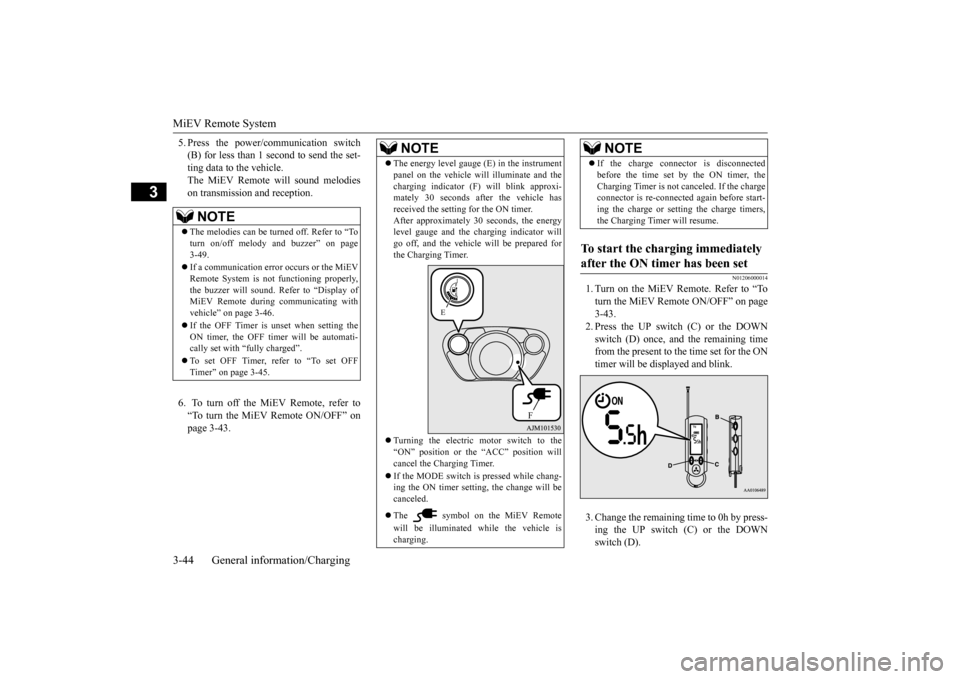
1. Turn on the MiEV Remote. Refer to “Toturn the MiEV Remote ON/OFF” on page3-43. 2. Press the UP switch (C) or the DOWN switch (D) once, and the remaining timefrom the present to the time set for the ON timer will be disp
layed and blink.
3. Change the remainin
g time to 0h by press-
ing the UP switch (C) or the DOWN switch (D).
NOTE
The melodies can be turned off. Refer to “To turn on/off melody
and buzzer” on page
3-49. If a communication error occurs or the MiEV Remote System is not
functioning properly,
the buzzer will sound. Refer to “Display of MiEV Remote during communicating with vehicle” on page 3-46. If the OFF Timer is unset when setting the ON timer, the OFF timer will be automati-cally set with “f
ully charged”.
To set OFF Timer, refer to “To set OFF Timer” on page 3-45.
NOTE
The energy level gauge (E) in the instrument panel on the vehicle wi
ll illuminate and the
charging indicator (F
) will blink approxi-
mately 30 seconds af
ter the vehicle has
received the setting for the ON timer. After approximately 30 seconds, the energylevel gauge and the charging indicator will go off, and the vehicle will be prepared for the Charging Timer. Turning the electric motor switch to the “ON” position or th
e “ACC” position will
cancel the Charging Timer. If the MODE switch is pressed while chang- ing the ON timer setting,
the change will be
canceled. The symbol on the MiEV Remote will be illuminated while the vehicle is charging.
E
F
If the charge connect
or is disconnected
before the time set by the ON timer, theCharging Timer is not canceled. If the chargeconnector is re-connected
again before start-
ing the charge or setting the charge timers, the Charging Timer will resume.
To start the charging immediately after the ON timer has been set
NOTE
BK0220401US.book 44 ページ 2015年6月3日 水曜日 午前7時42分
Page 59 of 296
MiEV Remote System
General information/Charging 3-45
3
4. Press the power/c
ommunication switch
(B) for less than 1 second to send the set-ting data to the vehicle. The MiEV Remote will sound melodies on transmis- sion and reception. The charging willstart. Refer to “Regular charging (charging method with rated AC 120 V outlet)” onpage 3-16. 5. Turn off the MiEV Remote. Refer to “To turn the MiEV Remote ON/OFF” on page 3-43.
N01205301033
The OFF timer can be
set during the regular
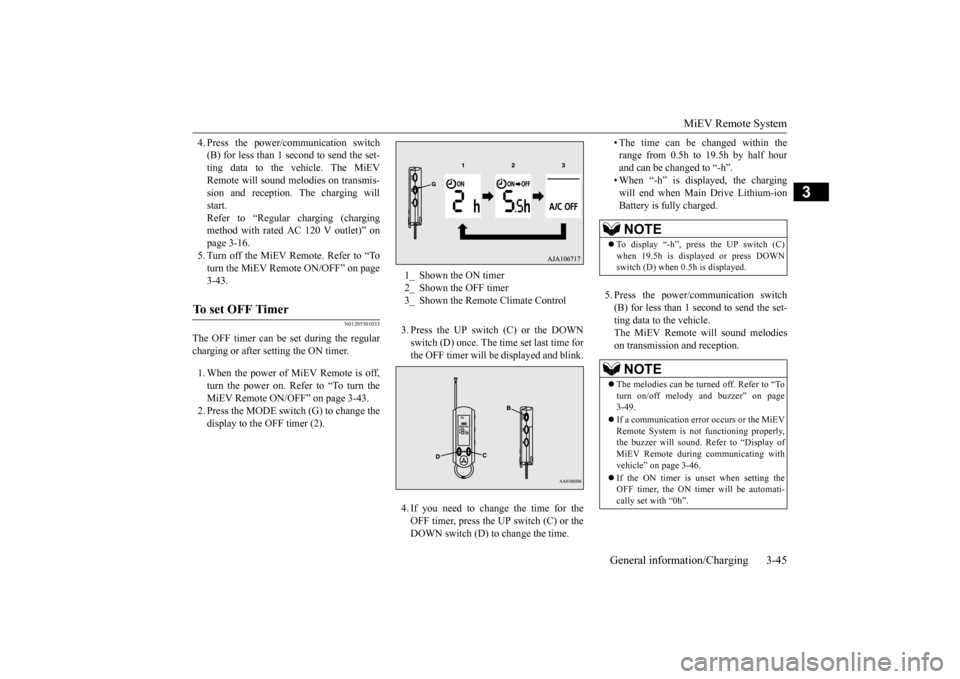
charging or after setting the ON timer. 1. When the power of MiEV Remote is off, turn the power on. Refer to “To turn theMiEV Remote ON/OFF” on page 3-43. 2. Press the MODE switc
h (G) to change the
display to the OFF timer (2).
3. Press the UP switch (C) or the DOWN switch (D) once. The time set last time for the OFF timer will be
displayed and blink.
4. If you need to change the time for the OFF timer, press the UP switch (C) or the DOWN switch (D) to change the time.
• The time can be changed within the range from 0.5h to 19.5h by half hourand can be changed to “-h”. • When “-h” is displayed, the charging will end when Main Drive Lithium-ionBattery is fully charged.
5. Press the power/c
ommunication switch
(B) for less than 1 second to send the set- ting data to the vehicle.The MiEV Remote
will sound melodies
on transmission and reception.
To set OFF Timer
1_ Shown the ON timer 2_ Shown the OFF timer 3_ Shown the Remote Climate Control
NOTE
To display “-h”, press the UP switch (C) when 19.5h is displayed or press DOWN switch (D) when 0.5h is displayed.NOTE
The melodies can be turned off. Refer to “To turn on/off melody and buzzer” on page 3-49. If a communication error occurs or the MiEV Remote System is not
functioning properly,
the buzzer will sound. Refer to “Display ofMiEV Remote during
communicating with
vehicle” on page 3-46. If the ON timer is unset when setting the OFF timer, the ON timer will be automati- cally set with “0h”.
BK0220401US.book 45 ページ 2015年6月3日 水曜日 午前7時42分
Page 60 of 296
MiEV Remote System 3-46 General information/Charging
3
6. Turn off the MiEV Remote. Refer to “To turn the MiEV Remote ON/OFF” on page3-43.
N01203801021
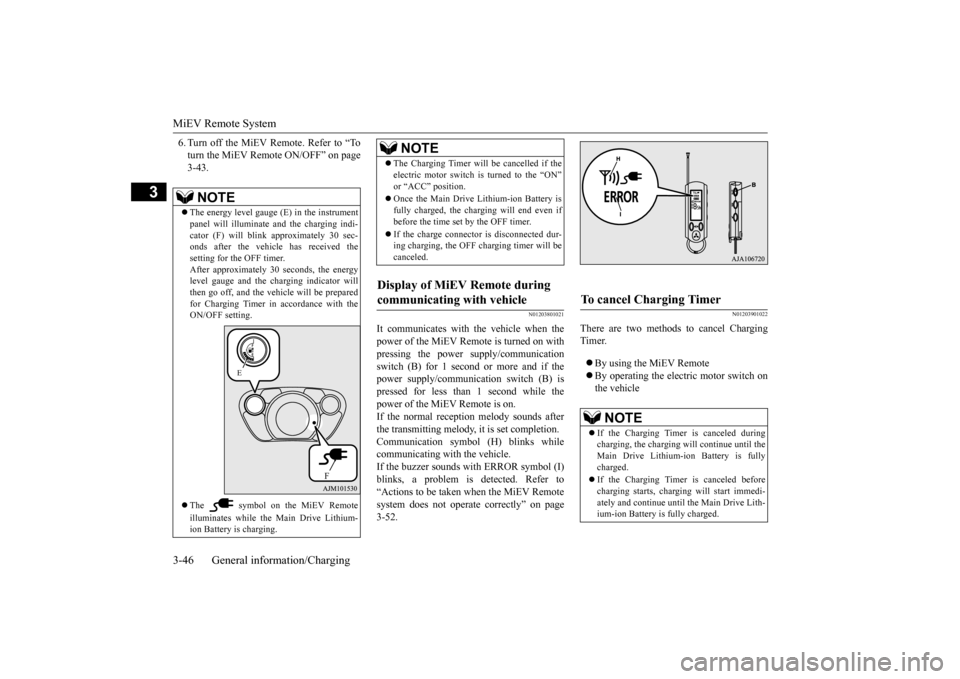
It communicates with the vehicle when thepower of the MiEV Remote is turned on with pressing the power
supply/communication
switch (B) for 1 second or more and if thepower supply/communication switch (B) is pressed for less than 1 second while the power of the MiEV Remote is on.If the normal reception
melody sounds after
the transmitting melody, it is set completion. Communication symbol (H) blinks whilecommunicating with the vehicle. If the buzzer sounds with ERROR symbol (I) blinks, a problem is detected. Refer to“Actions to be taken when the MiEV Remote system does not operate correctly” on page 3-52.
N01203901022
There are two methods to cancel ChargingTimer. By using the MiEV Remote By operating the electric motor switch on the vehicle
NOTE
The energy level gauge (E) in the instrument panel will illuminate
and the charging indi-
cator (F) will blink
approximately 30 sec-
onds after the vehicl
e has received the
setting for the OFF timer.After approximately 30 seconds, the energy level gauge and the ch
arging indicator will
then go off, and the vehicle will be preparedfor Charging Timer in accordance with the ON/OFF setting. The symbol on the MiEV Remote illuminates while the Main Drive Lithium- ion Battery is charging.
E
F
The Charging Timer will be cancelled if the electric motor switch is turned to the “ON” Once the Main Drive Lithium-ion Battery is fully charged, the charging will end even ifbefore the time set by the OFF timer. If the charge connector is disconnected dur- ing charging, the OFF charging timer will be canceled.
Display of MiEV Remote during communicating with vehicle
NOTE
To cancel Charging Timer
NOTE
If the Charging Timer is canceled during charging, the charging will continue until the Main Drive Lithium-ion Battery is fullycharged. If the Charging Timer is canceled before charging starts, charging
will start immedi-
ately and continue until the Main Drive Lith- ium-ion Battery is fully charged.
BK0220401US.book 46 ページ 2015年6月3日 水曜日 午前7時42分
Page 62 of 296
MiEV Remote System 3-48 General information/Charging
3
N01204301036
The following conditi
ons must be met to
operate the Remote Climate Control. Selector lever:
P (PARK) position.
Electric motor switch: LOCK position. EV charging cable (regular charger): Con- nected. Quick charging: Not used. Main Drive Lithium-ion Battery Level Indicator: Shows one bar or more. Refer to “Main Drive Lithium-ion Battery LevelIndicator” on page 3-50. All doors and the liftgate: Closed. 1. Start charging. Refer to “Regular charging (charging method with rated AC 120 V outlet)” on page 3-16.
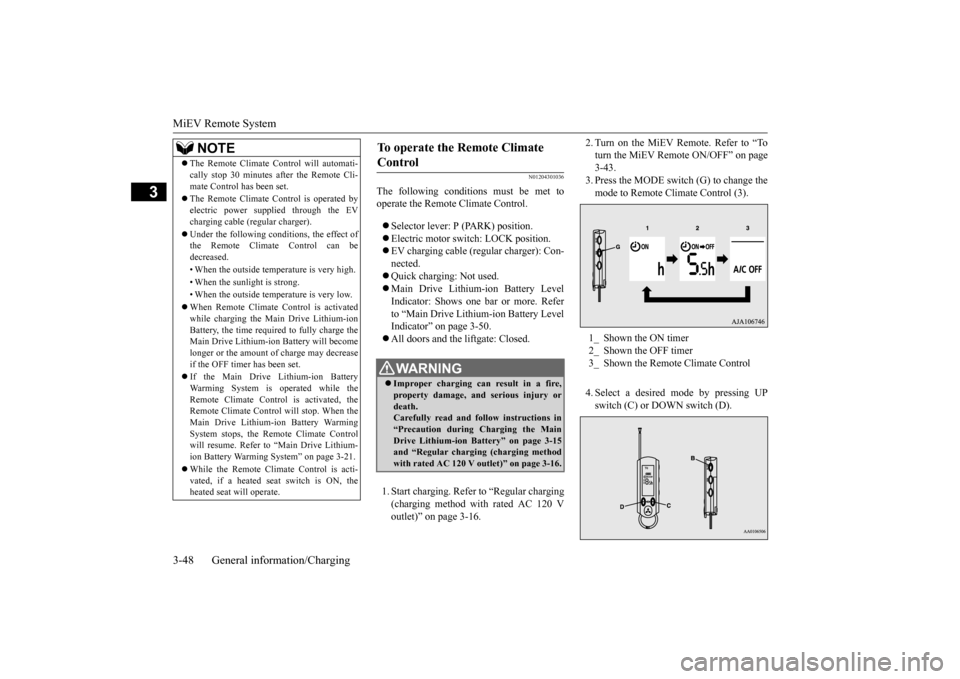
2. Turn on the MiEV Remote. Refer to “To turn the MiEV Remote ON/OFF” on page3-43. 3. Press the MODE switch (G) to change the mode to Remote Climate Control (3). 4. Select a desired
mode by pressing UP
switch (C) or DOWN switch (D).
The Remote Climate Control will automati- cally stop 30 minutes after the Remote Cli-mate Control has been set. The Remote Climate Control is operated by electric power s
upplied through the EV
charging cable (regular charger). Under the following conditions, the effect of the Remote Climate Control can be decreased. • When the outside temp
erature is very high.
• When the sunlight is strong.• When the outside temperature is very low. When Remote Climate Control is activated while charging the Main Drive Lithium-ion Battery, the time required to fully charge theMain Drive Lithium-ion Battery will become longer or the amount of charge may decrease if the OFF timer has been set. If the Main Drive Lithium-ion Battery Warming System is operated while theRemote Climate Control is activated, the Remote Climate Control
will stop. When the
Main Drive Lithium-ion Battery WarmingSystem stops, the Remote Climate Control will resume. Refer to “Main Drive Lithium- ion Battery Warming System” on page 3-21. While the Remote Climate Control is acti- vated, if a heated seat switch is ON, theheated seat
will operate.
NOTE
To operate the Remote Climate Control
WA R N I N G Improper charging ca
n result in a fire,
property damage, and serious injury ordeath. Carefully read and follow instructions in “Precaution during Charging the MainDrive Lithium-ion Battery” on page 3-15 and “Regular chargi
ng (charging method
with rated AC 120 V outlet)” on page 3-16.
1_ Shown the ON timer 2_ Shown the OFF timer3_ Shown the Remote Climate Control
BK0220401US.book 48 ページ 2015年6月3日 水曜日 午前7時42分
Page 63 of 296
MiEV Remote System
General information/Charging 3-49
3
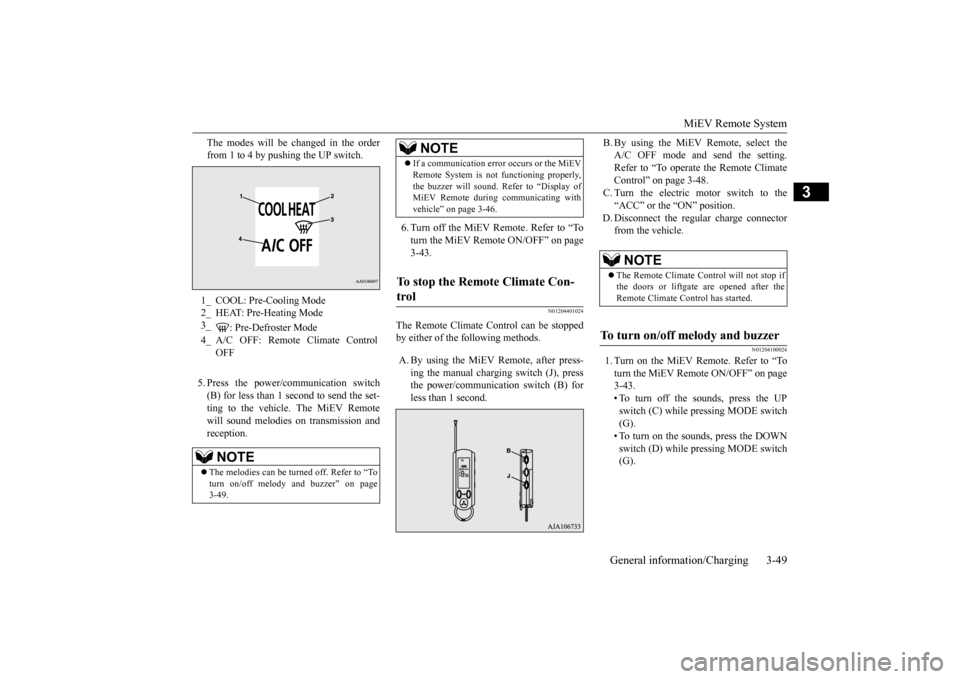
The modes will be changed in the order from 1 to 4 by pushing the UP switch. 5. Press the power/c
ommunication switch
(B) for less than 1 second to send the set- ting to the vehicle. The MiEV Remotewill sound melodies
on transmission and
reception.
6. Turn off the MiEV Remote. Refer to “To turn the MiEV Remote ON/OFF” on page 3-43.
N01204401024
The Remote Climate C
ontrol can be stopped
by either of the following methods. A. By using the MiEV Remote, after press-
ing the manual charging switch (J), press the power/communication switch (B) forless than 1 second.
B. By using the MiEV Remote, select the A/C OFF mode and send the setting.Refer to “To operate the Remote Climate Control” on page 3-48. C. Turn the electric motor switch to the“ACC” or the “ON” position.
D. Disconnect the regular charge connector
from the vehicle.
N01204100024
1. Turn on the MiEV Remote. Refer to “Toturn the MiEV Remote ON/OFF” on page3-43. • To turn off the sounds, press the UP switch (C) while pressing MODE switch(G). • To turn on the sounds, press the DOWN switch (D) while pressing MODE switch(G).
1_ COOL: Pre-Cooling Mode 2_ HEAT: Pre-Heating Mode3_
: Pre-Defroster Mode
4_ A/C OFF: Remote Climate Control
OFFNOTE
The melodies can be turned off. Refer to “To turn on/off melody and buzzer” on page 3-49.
If a communication error occurs or the MiEV Remote System is not
functioning properly,
the buzzer will sound. Refer to “Display ofMiEV Remote during communicating with vehicle” on page 3-46.
To stop the Remote Climate Con- trol
NOTE
NOTE
The Remote Climate Control will not stop if the doors or liftgate are opened after the Remote Climate Control has started.
To turn on/off melody and buzzer
BK0220401US.book 49 ページ 2015年6月3日 水曜日 午前7時42分
Page 66 of 296
MiEV Remote System 3-52 General information/Charging
3
N01204901032
Take the following actions when the system does not operate correctly. If the system still does not operate correctly after the
action(s) have been
taken, a system component may not be wo
rking properly. Please consult with a
certified i-MiEV de
aler to check it.
Actions to be taken when the MiEV Remo
te system does not operate correctly
Phenomena
Cause
Remedy
Charging does not start when regular charge connector is inserted.
“ON” timer has been set. Cancel the “ON” timer. The regular charge connector is not locked completely.
Lock the regular charge connector securely.
A household electrical
outlet, which the
EV charging cable is connected to, is shut down.(e.g. disconnected plug)
Turn on the household elec
trical outlet and make
sure the plug is securely connected.
MiEV Remote does not operate normally.
MiEV Remote is not powered on.
Batteries in the MiEV Remote are defec- tive or the batteries are discharged.
Replace the batteries in the MiEV Remote. Refer to “Replacement of batteries for the MiEV Remote” on page 3-51.
No indicator lights come on when the remote is turned on. Melody or buzzer does not sound.
Melody or buzzer has been disabl
ed. Enable the melody or buzzer.
Refer to “To turn on/off melody and buzzer” on page 3-49.
BK0220401US.book 52 ページ 2015年6月3日 水曜日 午前7時42分