ESP MITSUBISHI iMiEV 2017 1.G User Guide
[x] Cancel search | Manufacturer: MITSUBISHI, Model Year: 2017, Model line: iMiEV, Model: MITSUBISHI iMiEV 2017 1.GPages: 296, PDF Size: 7.79 MB
Page 123 of 296
Power window control
Features and controls 5-15
5
N00548700127
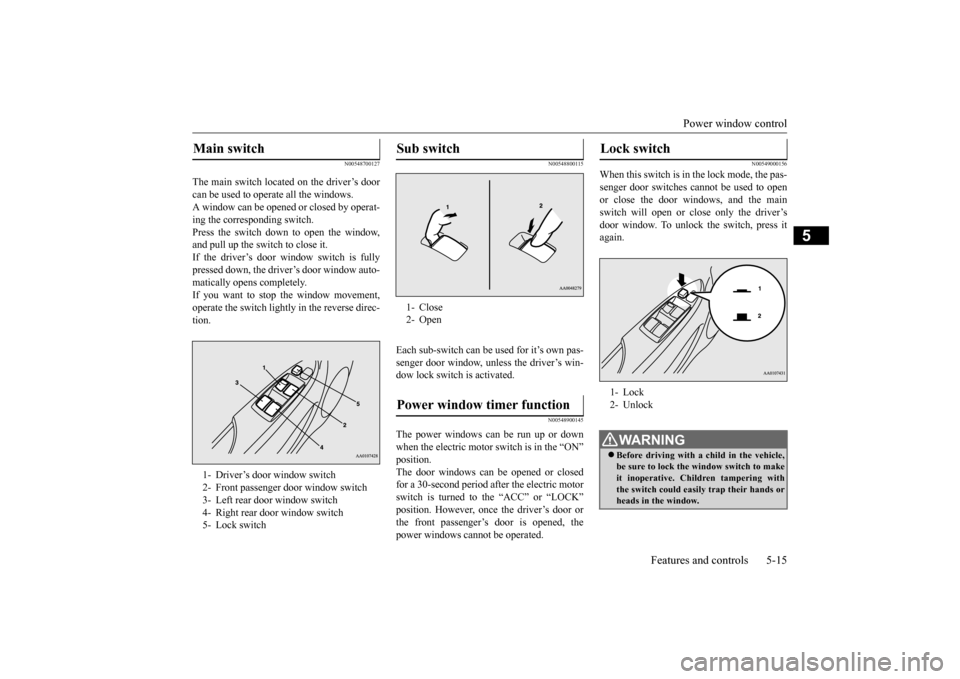
The main switch located on the driver’s door can be used to opera
te all the windows.
A window can be opened
or closed by operat-
ing the corresponding switch. Press the switch down to open the window,and pull up the switch to close it. If the driver’s door window switch is fully pressed down, the driver’s door window auto- matically opens completely. If you want to stop the window movement,operate the switch lightly in the reverse direc- tion.
N00548800115
Each sub-switch can be
used for it’s own pas-
senger door window, unless the driver’s win-dow lock switch is activated.
N00548900145
The power windows can be run up or downwhen the electric motor switch is in the “ON” The door windows can be opened or closedfor a 30-second period after the electric motor switch is turned to the “ACC” or “LOCK” position. However, once the driver’s door orthe front passenger’s door is opened, the power windows cannot be operated.
N00549000156
When this switch is in the lock mode, the pas-senger door switches cannot be used to open or close the door windows, and the mainswitch will open or close only the driver’s door window. To unlock the switch, press it again.
Main switch 1- Driver’s door window switch2- Front passenger door window switch3- Left rear door window switch 4- Right rear door window switch 5- Lock switch
Sub switch 1- Close2- OpenPower window timer function
Lock switch 1- Lock 2- UnlockWA R N I N G Before driving with a child in the vehicle, be sure to lock the window switch to make it inoperative. Children tampering withthe switch could easily trap their hands or heads in the window.
BK0220401US.book 15 ページ 2015年6月3日 水曜日 午前7時42分
Page 132 of 296
Service brake 5-24 Features and controls
5
When the vehicle sp
eed is approximately
2-22 mph (3-35 km/h).
The system will not operate under the follow- ing conditions: When the vehicle sp
eed is approximately
2 mph (3 km/h) or less and the brake pedal is depressed. When the vehicle sp
eed is approximately
22 mph (35 km/h) or more. When the selector lever is in the “P”
Under normal conditions, the indicator light in the instrument cluster illuminates when theelectric motor switch is turned to the “ON”
few seconds later.
Always confirm the indicator light goes offbefore driving.
N00517500305
Overuse of the brake can cause poor brakeresponse and premature wear of the brakepads.
N00517600423
Your vehicle is equipped with power brakesfor more braking force with reduced brakepedal effort. Your brakes are designed to operate at full capacity, even if the power assist is lost.If the power assist is lost, the effort needed to press the brake pedal is greater. If you should lose the power assist for somereason, the brakes will still work. If the power brake unit or either of the two brake hydraulic systems stop working prop-
WA R N I N G Always pay special attention to pedestri- ans. Even if the acou
stic vehicle alerting
system (AVAS) sounds, pedestrians may not notice your vehicle.
NOTE
If the indicator light blinks, turn the electric motor switch back to the “LOCK” positionand again turn the switch to the “ON” posi- tion. It is not a malfunction if the indicator lightgoes off. If the indica
tor light blinks again,
however, have the vehicl
e inspected at a cer-
tified i-MiEV dealer as soon as possible.
Service brake Brake pedal
WA R N I N G Do not leave any obje
cts near the brake
pedal or let a floor
mat slide under it;
doing so could prevent the full pedalstroke that would be necessary in an emergency. Make sure that the pedal can be operated freely at
all times. Make sure
the floor mat is securely held in place.CAUTION It is important not to drive the vehicle with your foot resting on the brake pedal when braking is not required.
This practice can
result in very high brake temperatures, pre- mature pad wear, and pos
sible damage to the
brakes.
Power brakes
BK0220401US.book 24 ページ 2015年6月3日 水曜日 午前7時42分
Page 134 of 296
Anti-lock braking system 5-26 Features and controls
5
When using the anti-lock brakes (sudden braking), steering is
slightly different
from normal driving conditions. Use the steering wheel carefully. Always keep a safe distance from the vehicle in front of you. Even if your vehi- cle is equipped with
the anti-lock braking
system, leave a greater braking distance when: • Driving on gravel or snow-covered roads. • Driving on uneven road surfaces. Operation of anti-lock braking system is not restricted to situations where brakes are applied suddenly. This system mayalso prevent the wheels from locking when you drive over manholes, steel roadwork plates, road markings, or anyuneven road surface. When the anti-lock braking system is in use, you may feel the brake pedal vibrat-ing and hear a unique sound. You may also feel as if the pedal resists being pressed.In this situation, simply hold the brake pedal down firmly. Do not pump the brake, which will result in reducedbraking performance.
An operation noise may be emitted from under the hood in the following situations.The sound is associated with checking the operations of the anti-lock braking sys- tem.At this time, you may feel a shock from the brake pedal if you depress it. These do not indicate a malfunction.• When the electric motor switch is set to the “ON” position. • When the vehicle is driven for a while after the electric motor is turned on.
The ABS can be used after the vehicle has reached a speed over approximately 6 mph (10 km/h). It stops working when the vehicle slows below approximately 3 mph(5 km/h).
N00531600661
This light comes on in the event of a malfunc-tion in the anti-lock braking system. It willalso come on as a self-check for a few sec- onds when the electric motor switch is turned to the “ON” position.
Always make sure that
the light goes out befo
re beginning to drive.
Driving hints
CAUTIONThe anti-lock braking system cannot prevent accidents. It is your
responsibility to take
safety precautions and to drive carefully. Be sure to use the spec
ified type and size of
tire on all four wheels. Otherwise, the ABS may not work properly. Do not install any aftermarket limited slip differential (LSD) on your vehicle. The ABSmay stop functioning properly.
Anti-lock braking system warn- ing light
CAUTION If the anti-lock braking system warning light comes on and stays on af
ter starting the elec-
tric motor unit or while driving, it means that the anti-lock braking system is not workingand that only the standard brake system is available. (The standard brake system will still work properly.) If this happens, takeyour vehicle to a certif
ied i-MiEV dealer as
soon as possible.
BK0220401US.book 26 ページ 2015年6月3日 水曜日 午前7時42分
Page 136 of 296
Active stability control (ASC)
5
N00574400024
If there is a malfunction in the system, the warning light will come on.Under normal conditions
, the warning light
comes on when the electric motor switch is turned to the “ON” position and goes off afew seconds later.
N00559100163
The active stability c
ontrol (ASC) takes over-
all control of the anti-lock braking system, traction control function and skid controlfunction to help maintain the vehicle’s con- trol. Also refer to the following pages on the anti-lock braking system, traction controlfunction and skid control function. Anti-lock braking system (ABS)
P.5-25
Traction control function
P.5-29
Skid control function
P.5-29
WA R N I N GDo not turn the key from the ON position while the vehicle is moving. Stopping theelectric motor unit would make the steer-ing wheel extremely hard to turn, possibly resulting in an accident.NOTE
During repeated full-lock turning of the steering wheel (for example, while you aremaneuvering the vehicle into a parking space), a protection
function may be acti-
vated to prevent overheating of the powersteering system. This f
unction will make the
steering wheel gradually harder to turn. In this event, limit your turning of the steeringwheel for a while. When the system has cooled down, the steering effort will return to normal. If you turn the steering wheel while the vehi- cle is stationary with
the headlights on, the
headlights may become
dim. This behavior
is not abnormal. The headlights will return to their original brightne
ss after a short while.
Electric power steering system warning light
CAUTION If the warning light a
ppears while the elec-
tric motor unit is running, have the vehicle inspected at a certified i-MiEV dealer as soon as possible. It may become harder toturn the steering wheel.
Active stability control (ASC)
CAUTION Do not over-rely on the ASC. Even the ASC cannot prevent the natural laws of physics from acting on the vehicle. This system, like any other system, has li
mits and cannot help
you to maintain traction and control of the vehicle in all circumstances. Reckless driv- ing can lead to accident
s. It is the driver’s
responsibility to drive carefully. This means taking into account the tr
affic, road and envi-
ronmental conditions. Be sure to use the specified type and size of tire on all four wheels
. Otherwise, the ASC
may not work properly. Do not install any aftermarket limited slip differential (LSD) on
your vehicle. The ASC
may stop functioning properly.
BK0220401US.book 28 ページ 2015年6月3日 水曜日 午前7時42分
Page 140 of 296
Tire pressure monitoring system 5-32 Features and controls
5
Driving on a significantly under-inflated tire causes the tire to overheat and can lead to tirefailure. Under-inflation also re
duces alternative fuel
efficiency and tire tread life, and may affectthe vehicle’s handling and stopping ability. Please note that the TP
MS is not a substitute
for proper tire mainte
nance, and it is the
driver’s responsibility to maintain correct tire pressure, even if under-inflation has not reached the level to tri
gger illumination of the
TPMS low tire pressure telltale. Your vehicle has also been equipped with a TPMS malfunction indicator to indicate whenthe system is not operating properly. The TPMS malfunction indicator is combined with the low tire pressure telltale.When the system detects a malfunction, the telltale will flash for
approximately one min-
ute and then remain continuously illuminated.This sequence will continue upon subsequent vehicle start-ups as
long as the malfunction
exists.When the malfunction indicator is illumi- nated, the system may not
be able to detect or
signal low tire pressure as intended.TPMS malfunctions may
occur for a variety
of reasons, including the installation of replacement or alternate tires or wheels on thevehicle that prevent the TPMS from function- ing properly. Always check the TPMS mal- function telltale after replacing one or more
tires or wheels on your vehicle to ensure that the replacement or alternate tires and wheelsallow the TPMS to continue to function prop- erly.
N00532800484
1. If the low tire pressure monitoring system warning light illumi
nates, avoid hard
braking, sharp steering maneuvers and high speeds. You should stop and adjustthe tires to the proper inflation pressure as soon as possible. Refer to “Tires” on page 9-10.
2. If the tire pressure monitoring system warning light remains illuminated afteryou have been driving for about 20 min- utes after you adjust the tire inflation pres- sure, one or more of
the tires may have a
puncture. Inspect the tire and if it has a puncture, have it repaired by a certified i- MiEV dealer as soon as possible.
If the warning light illuminates while driving
NOTE
When inspecting or adjusting the tire pres- sure, to avoid breakage, do not apply exces-sive force to the valve stem. After inspecting or adju
sting the tire pres-
sure, always reinstall the valve cap on the valve stem. Without the valve cap, dirt or moisture couldget into the valve, resulting in damage to the tire inflation pressure sensor. Do not use metal valve caps, which may cause a metal reaction, resulting in corrosion and damage of the tire
inflation pressure sen-
sors. Once adjustments have
been made, the warn-
ing light will go off after a few minutes of driving.
WA R N I N G If the tire pressure monitoring system warning light illumi
nates while you are
driving, avoid hard br
aking, sharp steer-
ing maneuvers and high speeds. Drivingwith an under-inflated tire adversely affects vehicle performance and can result in an accident.CAUTION The tire pressure monitoring system warning light may not illuminate
immediately in the
event of a tire blowout or rapid leak.NOTE
To avoid the risk of damage to the tire infla- tion pressure sensors, have any punctured tire repaired by a cert
ified i-MiEV dealer. If
the tire repair is not done by a certified i- MiEV dealer, it is not
covered by your war-
ranty.
BK0220401US.book 32 ページ 2015年6月3日 水曜日 午前7時42分
Page 148 of 296
Instrument cluster 5-40 Features and controls
5
N00572600019
Each time you press the
dash lights illumina-
tion button (B), the brightness of the instru- ments changes.
N00572700036
This displays the approximate cruising range(how many more miles
or kilometres you can
drive). When the cruising range becomes short, the indicatio
n changes to “---”.
CAUTIONThe customer is responsible for making sure that regular inspections
and maintenance are
performed.Inspections and mainte
nance must be per-
formed to prevent accidents and malfunc- tions.NOTE
It is not possible to re
set the “------” indica-
tion (B) with the electric motor switch in the “ON” position. When a certain distance has been driven and a certain period has elapsed after appearance of the “------” indicati
on (B), the indication
is automatically re
set and the number of
months until the next
periodic inspection is
shown. If you accidentally reset
the display, consult
a certified i-MiEV dealer for assistance.
Dash lights brightness indicator
A- Brightness display B- Dash lights illumination button
NOTE
You can adjust to 4 different levels for when the parking lights or
headlights are illumi-
nated and 4 for when they are not. If you press and hold the button for longer than about 1 second, the brightness automati- cally scrolls through its different levels, andstops scrolling when you release the button. Select your desired
level of brightness.
When the combination headlights and dim- mer switch is in the “AUTO” position, the meter illumination switches automatically tothe adjusted brightne
ss, depending on the
brightness outsi
de the vehicle.
Bright Dim
The brightness level
of the instruments is
stored when the electric motor switch isturned off. If the 12V starter battery is disconnected for a long time, these level of brightness will bereset.
Cruising range indicator
NOTE
The cruising range is displayed based on the past drive data. It ma
y vary depending on the
driving condition (road condition, driving situation, etc.) and
air conditioning operation
status.For example, the cruising range can be short- ened by driving on congested roads, by driv- ing uphill, by repeated ha
rd acceleration, and
by use of the air cond
itioner and heater.
When the 12V starter battery terminal is dis- connected, the power consumption data of the main drive lithium-ion battery in the pastis deleted. A differen
t value from before may
be displayed. Be sure
to use the display only
for reference.NOTE
BK0220401US.book 40 ページ 2015年6月3日 水曜日 午前7時42分
Page 167 of 296

Bluetooth® 2.0 interface (if so equipped)
Features and controls 5-59
5
5. The voice guide will prompt for phrase 1. Repeat the correspondi
ng phrase listed in
table “Enrollment commands” on page 5-73. The system will register your voice andthen move on to the registration of the next command. Continue the process until all phrases have been registered. 6. When all enrollment commands have been read out, the voice guide will say “Speaker enrollment is complete.” The system will then end the speaker enroll-ment process and return to the main menu.
N00564901108
You can turn a voice model registered with the speaker enrollment function on and off whenever you want. You can also retrain the system.Use the following procedure to perform these actions. 1. Press the PICK-UP button. 2. Say “Voice training.” 3. If you have completed a speaker enroll- ment process once already, the voiceguide will say eith
er “Enrollment is
enabled. Would you like to disable or retrain?” or “Enrol
lment is disabled.
Would you like to enable or retrain?” 4. When enrollment is
“enabled,” the voice
model is on; when enrollment is “dis-abled,” the voice model is off. Say the command that fits your needs. Say “Retrain” to start the speaker enroll-ment process and recreate a new voice model. (Refer to “Speaker enrollment” on page 5-58.
)
N00565001278
Before you can make
or receive hands-free
calls or play music using the Bluetooth
® 2.0
interface function, you must pair the Blue- tooth
® device and Bluetooth
® 2.0 interface.
Up to 7 Bluetooth
® devices can be paired
with the Bluetooth
® 2.0 interface.
If multiple paired Bluetooth
® devices are
available in the vehicl
e, the cellular phone or
music player most recent
ly connected is auto-
matically connected
to the Bluetooth
® 2.0
interface. You can also change a Bluetooth
® device to
be connected.
NOTE
To repeat the most recent voice training com- mand, press and release the SPEECH button. If you press the HANG-UP button anytime during the process, the
system will beep and
stop the speaker enrollment process.NOTE
Completing the speaker enrollment process will turn on the voice
model automatically.
The commands “Help” a
nd “Cancel” will not
work in this mode.
Enabling and disabling the voice model and retraining
Connecting the Bluetooth
® 2.0
interface and Bluetooth
® device
NOTE
Pairing is required only when the device is used for the first time. Once the device has been paired with
the Bluetooth
® 2.0 inter-
face, all you need is to
bring the device into
the vehicle next time
and the device will
connect to the Bluetooth
® 2.0 interface auto-
matically (if supported by the device).
BK0220401US.book 59 ページ 2015年6月3日 水曜日 午前7時42分
Page 169 of 296

Bluetooth® 2.0 interface (if so equipped)
Features and controls 5-61
5
8. The voice guide will
say “Please say the
name of the device after the beep.” Youcan assign a desired name for the Blue- tooth
® device and register it as a device
tag. Say the name you want to registerafter the beep. 9. The voice guide will say “Pairing com- plete,” and the pair
ing process will end.
N00565101123
If multiple paired Bluetooth
® devices are
available in the vehicle, the cellular phone or music player most recent
ly connected is auto-
matically connected
to the Bluetooth
® 2.0
interface.You can connect to the other cellular phone or music player by follow
ing setting change pro-
cedures. 1. Press the PICK-UP button. 2. Say “Setup.” 3. Say “Select phone.” 4. After the voice guide says “Please say,” device tags of corresponding cellularphones will be read out in order, starting with the cellular phone that has been most recently connected.Say the number of the cellular phone that you want to connect to. When the confirmation function is on, thesystem will ask you again whether the phone that you want to connect to is cor- rect. Answer “Yes” to
continue and con-
nect to the cellular phone. Answer “No,” and the voice guide will say “Please say.” Say the number of thephone that you want to connect to.
5. The selected phone will be connected to the Bluetooth
® 2.0 interface. The voice
guide will say “
main menu. 1. Press the PICK-UP button. 2. Say “Setup.”3. Say “Select music player.”
says “Please say,”
device tags of corresponding music play- ers will be read out in order, starting with the music player that has been mostrecently connected. Say the number of the music player that you want to connect to.When the confirmation function is on, the system will ask you again whether the music player that you want to connect tois correct. Answer “Yes” to continue and connect to the music player.
If you enter the wrong number, the voice guide will say “Pairing
failed” and the pair-
ing process will be cancelled.Confirm the number is right, and try pairing it again.NOTE
When the confirmation function is on, after repeating the device
tag you have said, the
voice guide will ask “Is this correct?”Answer “Yes.”
tag, answer “No” and
then say the device tag again.
Selecting a device
NOTE
To select a cellular phone
NOTE
You can connect to a
phone at any time by
pressing the SPEECH button and saying thenumber, even before all of the paired num-bers and device tags
of corresponding cellu-
lar phones are read out by the system.
To s e l e c t a
music player
BK0220401US.book 61 ページ 2015年6月3日 水曜日 午前7時42分
Page 170 of 296

Bluetooth® 2.0 interface (if so equipped) 5-62 Features and controls
5
Answer “No,” and the voice guide will say “Please say.” Say the number of themusic player that you want to connect to. 5. The selected music player will be con- nected to the Bluetooth
® 2.0 interface.
The voice guide will
say “
selected” and then the system will returnto the main menu.
Use the following procedure to delete a paired Bluetooth
® device from the Blue-
tooth
® 2.0 interface.
1. Press the PICK-UP button. 2. Say “Setup.” 3. Say “Pairing Options.” 4. The voice guide will say “Select one ofthe following: pair, edit, delete, or list.”
says “Please say,”
tags of corresponding
devices will be read
out in order, starting with the device that has been most recently connected. After itcompletes reading all pairs, the voice guide will say “or all.” Say the number of the device that youwant to delete from the system. If you want to delete all paired phones from the system, say “All.” guide will say “Deleting
say “Deleted,” and
then the system will end the device dele- tion process.
N00565201065
You can check a paired Bluetooth
® device by
following the steps below. 1. Press the PICK-UP button. 2. Say “Setup.” 3. Say “Pairing Options.”4. The voice guide will say “Select one of the following: pair, edit, delete, or list.”
read out device tags
of corresponding devices in order, starting with the Bluetooth
® device that has been
most recently connected. 6. After the device tags
of all paired Blue-
tooth
® devices have been read, the system
will say “End of li
st, would you like to
start from the beginning?”To hear the list again from the beginning, answer “Yes.” When you are done, answer “No” toreturn to the main menu.
NOTE
You can connect to a music player at any time by pressing the SPEECH button and saying the number, even before all of the paired numbers and de
vice tags of corre-
sponding music players are read out by the system.
Deleting a device
NOTE
If the device deletion
process fails for some
reason, the voice guide will say “Delete failed” and then the system will cancel delet- ing the device.
To check a paired Bluetooth
®
device
BK0220401US.book 62 ページ 2015年6月3日 水曜日 午前7時42分
Page 171 of 296

Bluetooth® 2.0 interface (if so equipped)
Features and controls 5-63
5
N00565301066
You can change the device tag of a paired cel- lular phone or music player. Follow the steps below to change a device tag. 1. Press the PICK-UP button. 2. Say “Setup.” 3. Say “Pairing Options.”
4. The voice guide will say “Select one of the following: pair, edit, delete, or list.” 5. The voice guide will
say “Please say,” and
read out the numbers of the Bluetooth
®
devices and device tags of corresponding devices in order, starting with the Blue- tooth
® that has been most recently con-
nected. After all paired devi
ce tags have been
read, the voice guide will say “Which device, please?” Say the number of the device tag you want to change. 6. The voice guide will say “New name, please.” Say the name
you want to regis-
ter as a new device tag. When the confirmation function is on, thevoice guide will say
“
Is this correct?” Answer “Yes.”tag you want to register again. 7. The device tag is changed.
When the change is complete, the voice guide will say “New
name saved” and
then the system will return to the main menu.
N00565400028
For the operation of a music player connected via Bluetooth
®, refer to “To play iPod/USB
memory device tracks
via voice operation” on
page 7-20.
N00565500061
You can make or re
ceive hands-free calls
using a Bluetooth
® compatible cellular phone
connected to the Bluetooth
® 2.0 interface.
You can also use the phonebooks in the Blue- tooth
® 2.0 interface to make calls without
dialling tele
phone numbers.
To make a call P.5-64 Send function P.5-65Receiving calls P.5-65 Mute function P.5-65 Switching between ha
nds-free mode and pri-
vate mode P.5-66
NOTE
If you press and release the SPEECH button and say “Continue” or
“Previous” while the
list is being read, the system will advance orrewind the list. Say “Continue” to proceed to the device with the next highest number or “Previous” toreturn to the phone with the previous num- ber. You can change the device tag by pressing and releasing the SPEECH button and then saying “Edit” while the
list is being read.
You can change the
phone to be connected
by pressing and releasing the SPEECH but-ton and then saying “S
elect phone” while the
list is being read. You can change the music player to be con- nected by pressing
and releasing the
SPEECH button and th
en saying “Select
music player” while the list is being read.
Changing a device tag
NOTE
You can press and release the SPEECH but- ton while the list is
being read, and immedi-
ately say the number of the device tag you want to change.
Operating a music player con- nected via Bluetooth
®
How to make or receive hands-free calls
BK0220401US.book 63 ページ 2015年6月3日 水曜日 午前7時42分