remote control MITSUBISHI iMiEV 2017 1.G User Guide
[x] Cancel search | Manufacturer: MITSUBISHI, Model Year: 2017, Model line: iMiEV, Model: MITSUBISHI iMiEV 2017 1.GPages: 296, PDF Size: 7.79 MB
Page 61 of 296
MiEV Remote System
General information/Charging 3-47
3
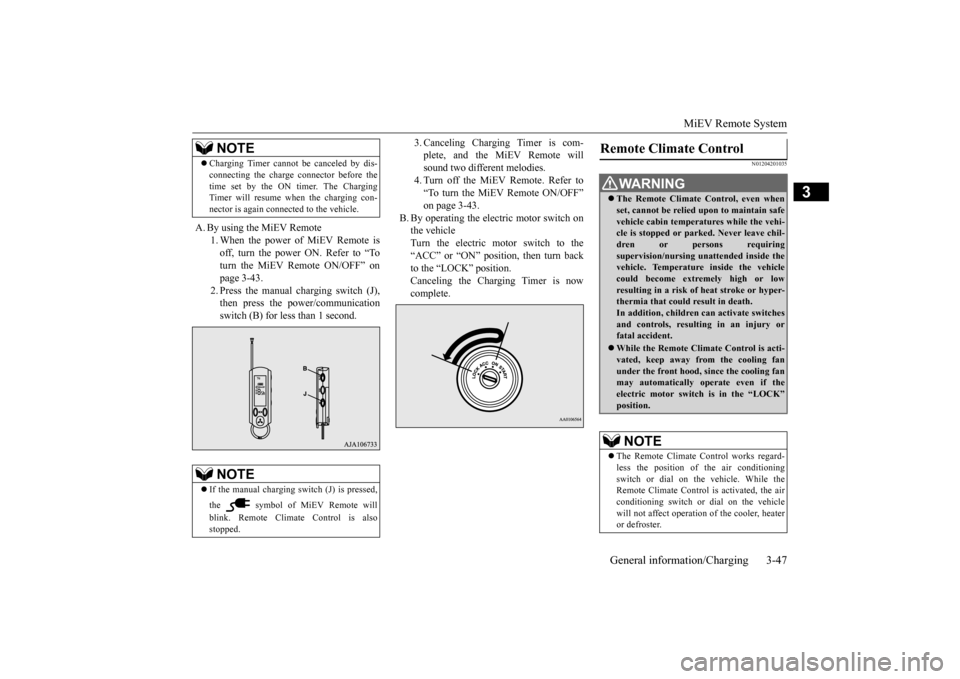
A. By using the MiEV Remote
1. When the power of MiEV Remote is off, turn the power ON. Refer to “To turn the MiEV Remote ON/OFF” onpage 3-43. 2. Press the manual charging switch (J), then press the power/communicationswitch (B) for less than 1 second.
3. Canceling Charging Timer is com- plete, and the MiEV Remote willsound two different melodies. 4. Turn off the MiEV Remote. Refer to “To turn the MiEV Remote ON/OFF”on page 3-43.
B. By operating the electric motor switch on the vehicleTurn the electric motor switch to the “ACC” or “ON” position, then turn back to the “LOCK” position. Canceling the Charging Timer is now complete.
N01204201035
Charging Timer cannot be canceled by dis- connecting the charge
connector before the
time set by the ON timer. The ChargingTimer will resume when the charging con- nector is again connected to the vehicle.NOTE
If the manual charging sw
itch (J) is pressed,
the symbol of MiEV Remote will blink. Remote Climate Control is also stopped.NOTE
Remote Climate Control
WA R N I N G The Remote Climate Control, even when set, cannot be relied upon to maintain safevehicle cabin temperatures while the vehi- cle is stopped or park
ed. Never leave chil-
dren or persons requiringsupervision/nursing unattended inside the vehicle. Temperature inside the vehicle could become extremely high or lowresulting in a risk of
heat stroke or hyper-
thermia that could
result in death.
In addition, children
can activate switches
and controls, resulting in an injury or fatal accident. While the Remote Climate Control is acti- vated, keep away from
the cooling fan
under the front hood,
since the cooling fan
may automatically operate even if the electric motor switch is in the “LOCK” position.NOTE
The Remote Climate Control works regard- less the position of the air conditioningswitch or dial on the vehicle. While the Remote Climate Control is activated, the air conditioning switch or
dial on the vehicle
will not affect operation
of the cooler, heater
or defroster.
BK0220401US.book 47 ページ 2015年6月3日 水曜日 午前7時42分
Page 62 of 296
MiEV Remote System 3-48 General information/Charging
3
N01204301036
The following conditi
ons must be met to
operate the Remote Climate Control. Selector lever:
P (PARK) position.
Electric motor switch: LOCK position. EV charging cable (regular charger): Con- nected. Quick charging: Not used. Main Drive Lithium-ion Battery Level Indicator: Shows one bar or more. Refer to “Main Drive Lithium-ion Battery LevelIndicator” on page 3-50. All doors and the liftgate: Closed. 1. Start charging. Refer to “Regular charging (charging method with rated AC 120 V outlet)” on page 3-16.
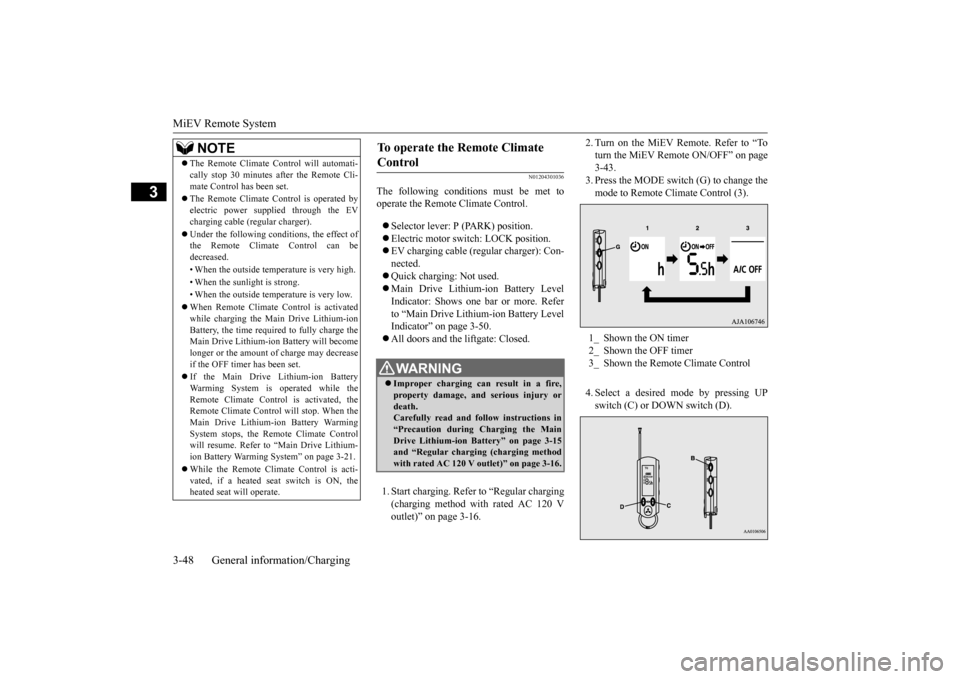
2. Turn on the MiEV Remote. Refer to “To turn the MiEV Remote ON/OFF” on page3-43. 3. Press the MODE switch (G) to change the mode to Remote Climate Control (3). 4. Select a desired
mode by pressing UP
switch (C) or DOWN switch (D).
The Remote Climate Control will automati- cally stop 30 minutes after the Remote Cli-mate Control has been set. The Remote Climate Control is operated by electric power s
upplied through the EV
charging cable (regular charger). Under the following conditions, the effect of the Remote Climate Control can be decreased. • When the outside temp
erature is very high.
• When the sunlight is strong.• When the outside temperature is very low. When Remote Climate Control is activated while charging the Main Drive Lithium-ion Battery, the time required to fully charge theMain Drive Lithium-ion Battery will become longer or the amount of charge may decrease if the OFF timer has been set. If the Main Drive Lithium-ion Battery Warming System is operated while theRemote Climate Control is activated, the Remote Climate Control
will stop. When the
Main Drive Lithium-ion Battery WarmingSystem stops, the Remote Climate Control will resume. Refer to “Main Drive Lithium- ion Battery Warming System” on page 3-21. While the Remote Climate Control is acti- vated, if a heated seat switch is ON, theheated seat
will operate.
NOTE
To operate the Remote Climate Control
WA R N I N G Improper charging ca
n result in a fire,
property damage, and serious injury ordeath. Carefully read and follow instructions in “Precaution during Charging the MainDrive Lithium-ion Battery” on page 3-15 and “Regular chargi
ng (charging method
with rated AC 120 V outlet)” on page 3-16.
1_ Shown the ON timer 2_ Shown the OFF timer3_ Shown the Remote Climate Control
BK0220401US.book 48 ページ 2015年6月3日 水曜日 午前7時42分
Page 63 of 296
MiEV Remote System
General information/Charging 3-49
3
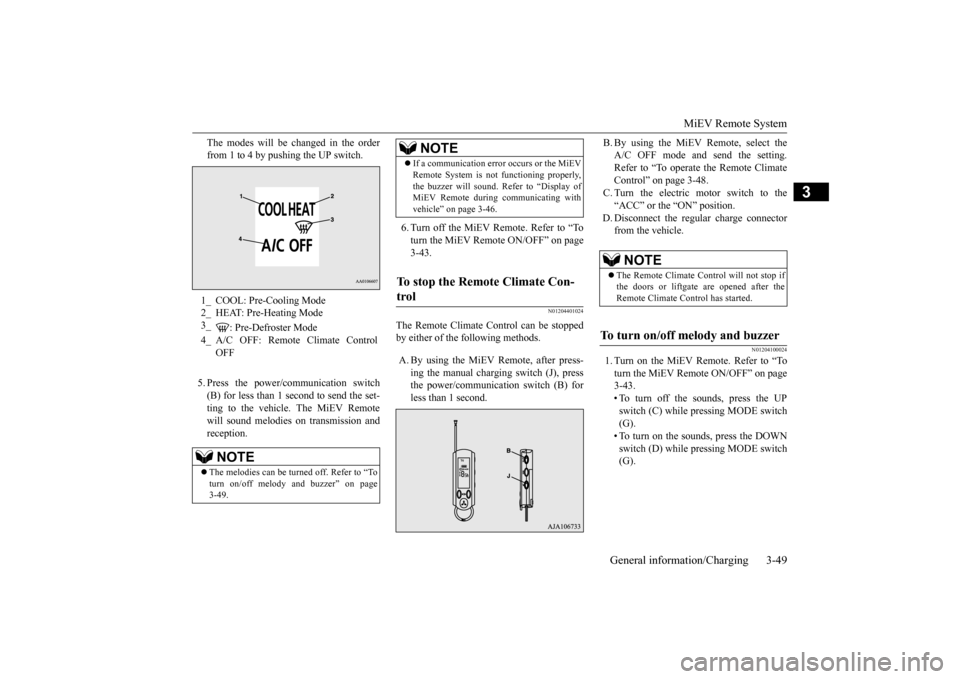
The modes will be changed in the order from 1 to 4 by pushing the UP switch. 5. Press the power/c
ommunication switch
(B) for less than 1 second to send the set- ting to the vehicle. The MiEV Remotewill sound melodies
on transmission and
reception.
6. Turn off the MiEV Remote. Refer to “To turn the MiEV Remote ON/OFF” on page 3-43.
N01204401024
The Remote Climate C
ontrol can be stopped
by either of the following methods. A. By using the MiEV Remote, after press-
ing the manual charging switch (J), press the power/communication switch (B) forless than 1 second.
B. By using the MiEV Remote, select the A/C OFF mode and send the setting.Refer to “To operate the Remote Climate Control” on page 3-48. C. Turn the electric motor switch to the“ACC” or the “ON” position.
D. Disconnect the regular charge connector
from the vehicle.
N01204100024
1. Turn on the MiEV Remote. Refer to “Toturn the MiEV Remote ON/OFF” on page3-43. • To turn off the sounds, press the UP switch (C) while pressing MODE switch(G). • To turn on the sounds, press the DOWN switch (D) while pressing MODE switch(G).
1_ COOL: Pre-Cooling Mode 2_ HEAT: Pre-Heating Mode3_
: Pre-Defroster Mode
4_ A/C OFF: Remote Climate Control
OFFNOTE
The melodies can be turned off. Refer to “To turn on/off melody and buzzer” on page 3-49.
If a communication error occurs or the MiEV Remote System is not
functioning properly,
the buzzer will sound. Refer to “Display ofMiEV Remote during communicating with vehicle” on page 3-46.
To stop the Remote Climate Con- trol
NOTE
NOTE
The Remote Climate Control will not stop if the doors or liftgate are opened after the Remote Climate Control has started.
To turn on/off melody and buzzer
BK0220401US.book 49 ページ 2015年6月3日 水曜日 午前7時42分
Page 64 of 296
MiEV Remote System 3-50 General information/Charging
3
2. Turn off the MiEV Remote. Refer to “To turn the MiEV Remote ON/OFF” on page3-43.
N01204500015
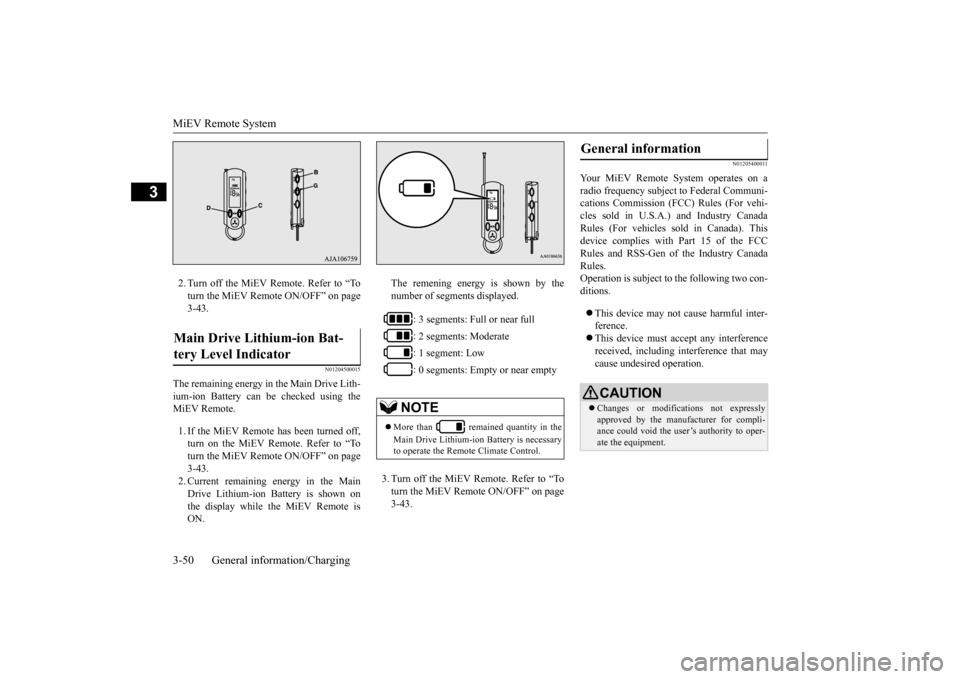
The remaining energy in the Main Drive Lith- ium-ion Battery can be checked using the MiEV Remote. 1. If the MiEV Remote has been turned off, turn on the MiEV Remote. Refer to “To turn the MiEV Remote ON/OFF” on page 3-43.2. Current remaining energy in the Main Drive Lithium-ion Battery is shown on the display while the MiEV Remote isON.
The remening energy is shown by the number of segments displayed. 3. Turn off the MiEV Remote. Refer to “To turn the MiEV Remote ON/OFF” on page 3-43.
N01205400011
Your MiEV Remote
System operates on a
radio frequency subject
to Federal Communi-
cations Commission (FCC) Rules (For vehi-cles sold in U.S.A.) and Industry Canada Rules (For vehicles so
ld in Canada). This
device complies with
Part 15 of the FCC
Rules and RSS-Gen of the Industry Canada Rules. Operation is subject to
the following two con-
ditions. This device may not
cause harmful inter-
ference. This device must ac
cept any interference
received, including interference that may cause undesired operation.
Main Drive Lithium-ion Bat- tery Level Indicator
: 3 segments: Full or near full : 2 segments: Moderate : 1 segment: Low : 0 segments: Empty or near empty
NOTE
More than remained quantity in the Main Drive Lithium-ion Battery is necessary to operate the Remote Climate Control.
General information
CAUTION Changes or modifica
tions not expressly
approved by the manufacturer for compli- ance could void the user’s authority to oper-ate the equipment.
BK0220401US.book 50 ページ 2015年6月3日 水曜日 午前7時42分
Page 69 of 296
MiEV Remote System
General information/Charging 3-55
3
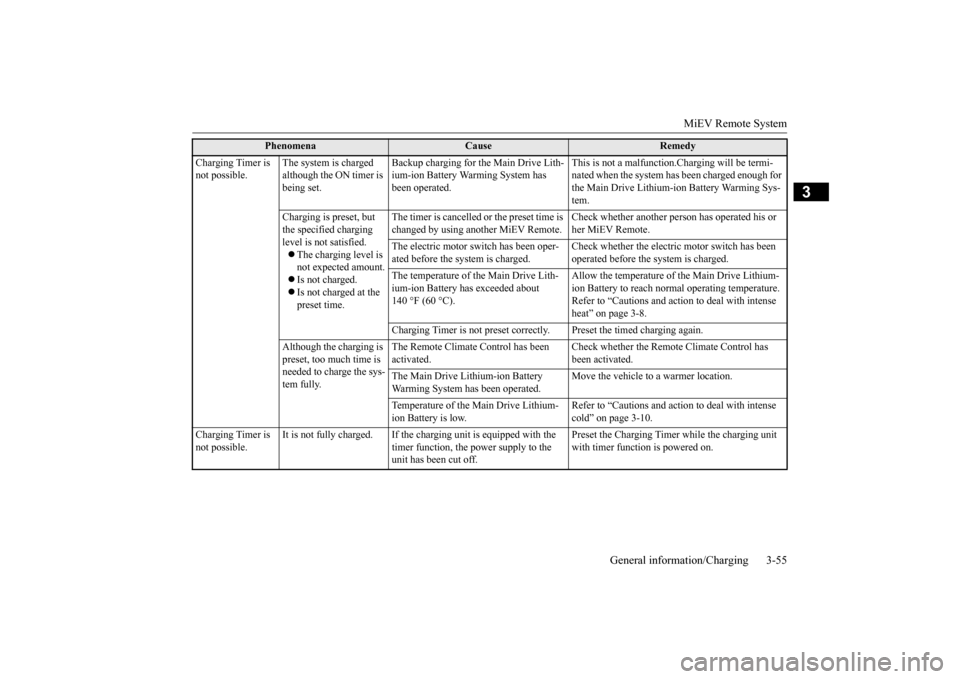
Charging Timer is not possible.
The system is charged although the ON timer is being set.
Backup charging for the Main Drive Lith- ium-ion Battery Wa
rming System has
been operated.
This is not a malfunction.Charging will be termi- nated when the system has been charged enough for the Main Drive Lithium-ion Battery Warming Sys- tem.
Charging is preset, but the specified charging level is not satisfied. The charging level is not expected amount. Is not charged. Is not charged at the preset time.
The timer is cancelled or the preset time is changed by using anot
her MiEV Remote.
Check whether another person has operated his or her MiEV Remote.
The electric motor switch has been oper- ated before the system is charged.
Check whether the electric motor switch has been operated before the system is charged.
The temperature of the Main Drive Lith- ium-ion Battery has exceeded about 140 °F (60 °C).
Allow the temperature of the Main Drive Lithium- ion Battery to reach norm
al operating temperature.
Refer to “Cautions and acti
on to deal with intense
heat” on page 3-8.
Charging Timer is not preset correct
ly. Preset the timed charging again.
Although the charging is preset, too much time is needed to charge the sys- tem fully.
The Remote Climate Control has been activated.
Check whether the Remote Climate Control has been activated.
The Main Drive Lithium-ion Battery Warming System ha
s been operated.
Move the vehicle to a warmer location.
Temperature of the Main Drive Lithium- ion Battery is low.
Refer to “Cautions and acti
on to deal with intense
cold” on page 3-10.
Charging Timer is not possible.
It is not fully charged. If the charging unit is equipped with the
timer function, the power supply to the unit has been cut off.
Preset the Charging Timer while the charging unit with timer function is powered on.
Phenomena
Cause
Remedy
BK0220401US.book 55 ページ 2015年6月3日 水曜日 午前7時42分
Page 70 of 296
MiEV Remote System 3-56 General information/Charging
3
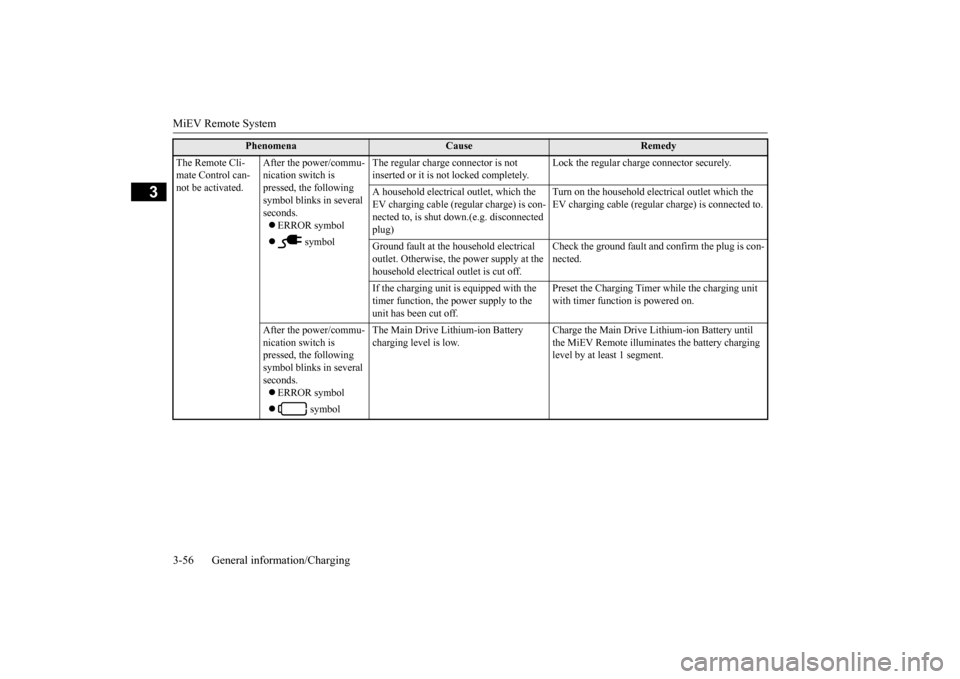
The Remote Cli- mate Control can-not be activated.
After the power/commu- nication switch is pressed, the following symbol blinks in several seconds. ERROR symbol
symbol
The regular charge connector is not inserted or it is not locked completely.
Lock the regular charge connector securely.
A household electrical
outlet, which the
EV charging cable (regu
lar charge) is con-
nected to, is shut down.(e.g. disconnected plug)
Turn on the household electrical outlet which the EV charging cable (regular charge) is connected to.
Ground fault at the h
ousehold electrical
outlet. Otherwise, the power supply at the household electrical
outlet is cut off.
Check the ground fault and confirm the plug is con- nected.
If the charging unit is
equipped with the
timer function, the power supply to the unit has been cut off.
Preset the Charging Timer while the charging unit with timer function is powered on.
After the power/commu- nication switch is pressed, the following symbol blinks in several seconds. ERROR symbol
symbol
The Main Drive Lithium-ion Battery charging level is low.
Charge the Main Drive Lithium-ion Battery until the MiEV Remote illuminates the battery charging level by at least 1 segment.
Phenomena
Cause
Remedy
BK0220401US.book 56 ページ 2015年6月3日 水曜日 午前7時42分
Page 71 of 296
MiEV Remote System
General information/Charging 3-57
3
N01203600019
1. Gently wipe with gauze or a
nother soft cloth soaked with a mild soap and water solution.
2. Wipe off all the detergent with a soft clot
h dipped in fresh water and thoroughly wrung out.
3. Wipe all moisture off and dry in
a shaded, well-ventilated area.
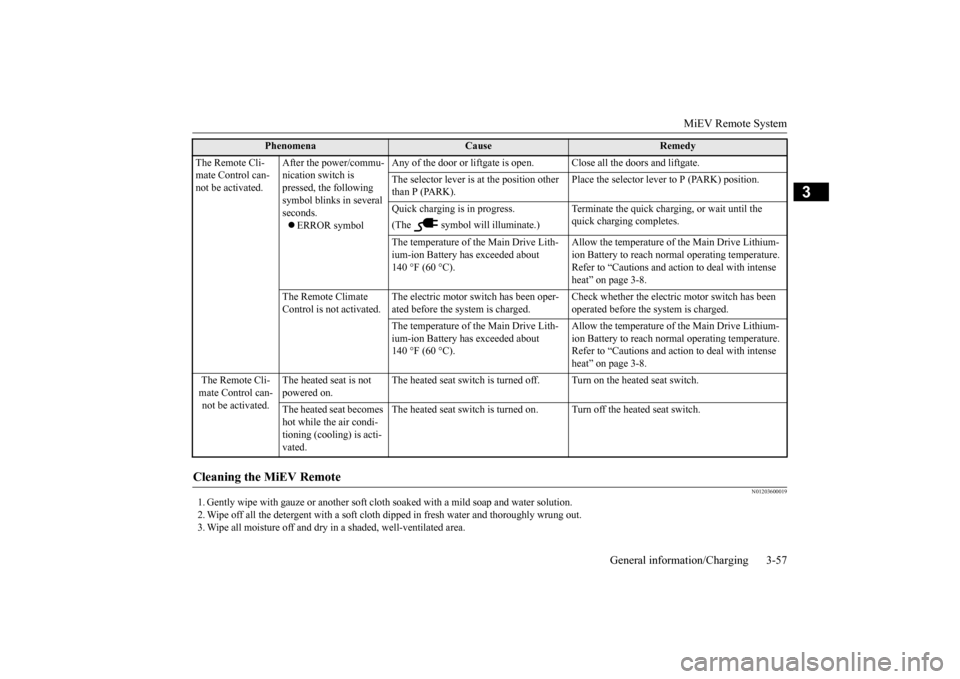
The Remote Cli- mate Control can-not be activated.
After the power/commu- nication switch is pressed, the following symbol blinks in several seconds. ERROR symbol
Any of the door or liftgate is ope
n. Close all the door
s and liftgate.
The selector lever is
at the position other
than P (PARK).
Place the selector lever to P (PARK) position.
Quick charging is in progress. (The symbol will illuminate.)
quick charging completes.
The temperature of the Main Drive Lith- ium-ion Battery has exceeded about 140 °F (60 °C).
Allow the temperature of the Main Drive Lithium- ion Battery to reach norm
al operating temperature.
Refer to “Cautions and acti
on to deal with intense
heat” on page 3-8.
The Remote Climate Control is not activated.
The electric motor switch has been oper- ated before the system is charged.
Check whether the electric motor switch has been operated before the system is charged.
The temperature of the Main Drive Lith- ium-ion Battery has exceeded about 140 °F (60 °C).
Allow the temperature of the Main Drive Lithium- ion Battery to reach norm
al operating temperature.
Refer to “Cautions and acti
on to deal with intense
heat” on page 3-8.
The Remote Cli- mate Control can- not be activated.
The heated seat is not powered on.
The heated seat switch is turned off. Turn on the heated seat switch.
The heated seat becomes hot while the air condi- tioning (cooling) is acti- vated.
The heated seat switch is turned on. Turn off the heated seat switch.
Cleaning the MiEV Remote
Phenomena
Cause
Remedy
BK0220401US.book 57 ページ 2015年6月3日 水曜日 午前7時42分
Page 77 of 296
Rear seats
Seat and restraint systems 4-5
4
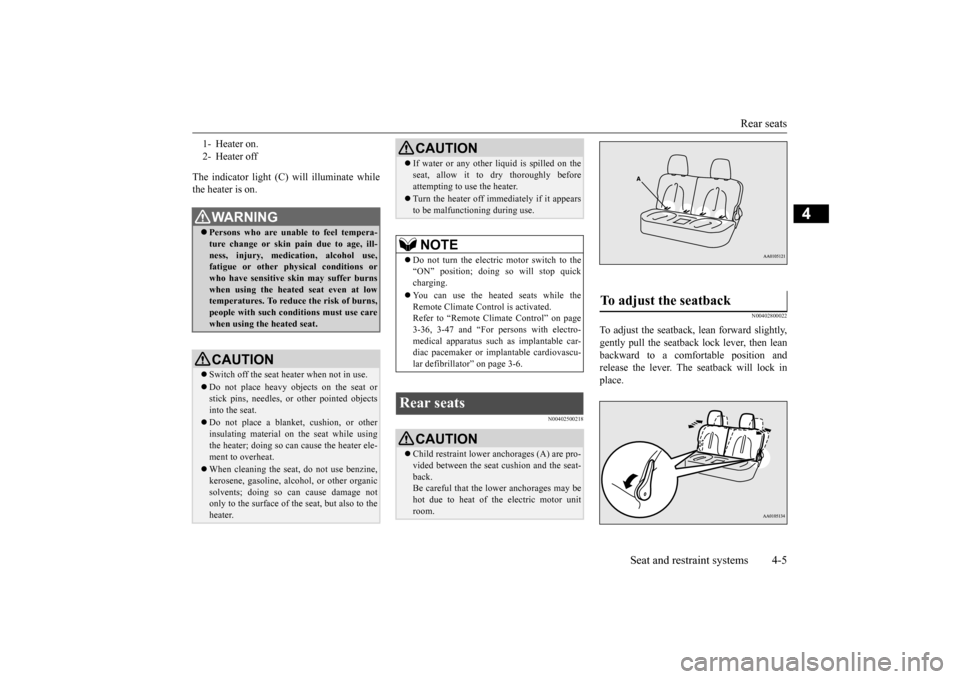
The indicator light (C) will illuminate while the heater is on.
N00402500218
N00402800022
To adjust the seatback,
lean forward slightly,
gently pull the seatback lock lever, then lean backward to a comfortable position and release the lever. The seatback will lock inplace.
1- Heater on. 2- Heater offWA R N I N G Persons who are unable to feel tempera- ture change or skin
pain due to age, ill-
ness, injury, medication, alcohol use, fatigue or other phys
ical conditions or
who have sensitive sk
in may suffer burns
when using the heated seat even at low temperatures. To reduce the risk of burns,people with such conditions must use care when using the heated seat.CAUTION Switch off the seat heater when not in use.Do not place heavy objects on the seat or stick pins, needles, or
other pointed objects
into the seat. Do not place a blanket,
cushion, or other
insulating material on the seat while usingthe heater; doing so can
cause the heater ele-
ment to overheat. When cleaning the seat, do not use benzine, kerosene, gasoli
ne, alcohol, or other organic
solvents; doing so can cause damage not only to the surface of the seat, but also to theheater.
If water or any other li
quid is spilled on the
seat, allow it to dry thoroughly beforeattempting to use the heater. Turn the heater off immediately if it appears to be malfunctioning during use.NOTE
Do not turn the electric motor switch to the “ON” position; doing
so will stop quick
charging. You can use the heated seats while the Remote Climate Control is activated. Refer to “Remote Climate Control” on page 3-36, 3-47 and “For persons with electro-medical apparatus such
as implantable car-
diac pacemaker or im
plantable cardiovascu-
lar defibrillator” on page 3-6.
Rear seats
CAUTION Child restraint lower anchorages (A) are pro- vided between the seat
cushion and the seat-
back. Be careful that the lower anchorages may be hot due to heat of th
e electric motor unit
room.CAUTION
To adjust the seatback
BK0220401US.book 5 ページ 2015年6月3日 水曜日 午前7時42分
Page 110 of 296
Break-in recommendations 5-2 Features and controls
5
N00508700343
Advanced automobile manufacturing tech- niques permit you to operate your new vehi- cle without requiring
a long break-in period
of low-speed driving. However, you can add to the future perfor- mance and economy of your vehicle byobserving the followi
ng precautions during
the first 300 miles (500 km). Drive your vehicle at moderate speeds during the break-in period. Do not overload the ve
hicle. Observe the
seating capacity (See “Cargo load precau-tions” on page 6-10). Do not use this vehi
cle for trailer towing.
N00508800618
Two keys are provided. The keys fit all locks. Keep one in a safe place as a spare key.
N00509101846
The electronic immobilize
r is designed to sig-
nificantly reduce the
possibility of vehicle
theft. The purpose of the system is to immo-bilize the vehicle if
an invalid start is
attempted. A valid st
art attempt can only be
achieved (subject to ce
rtain conditions), using
a key “registered” to the immobilizer system. All of the keys provided with your new vehi- cle have been program
med to the vehicle’s
electronics.
Break-in recommendations Keys
NOTE
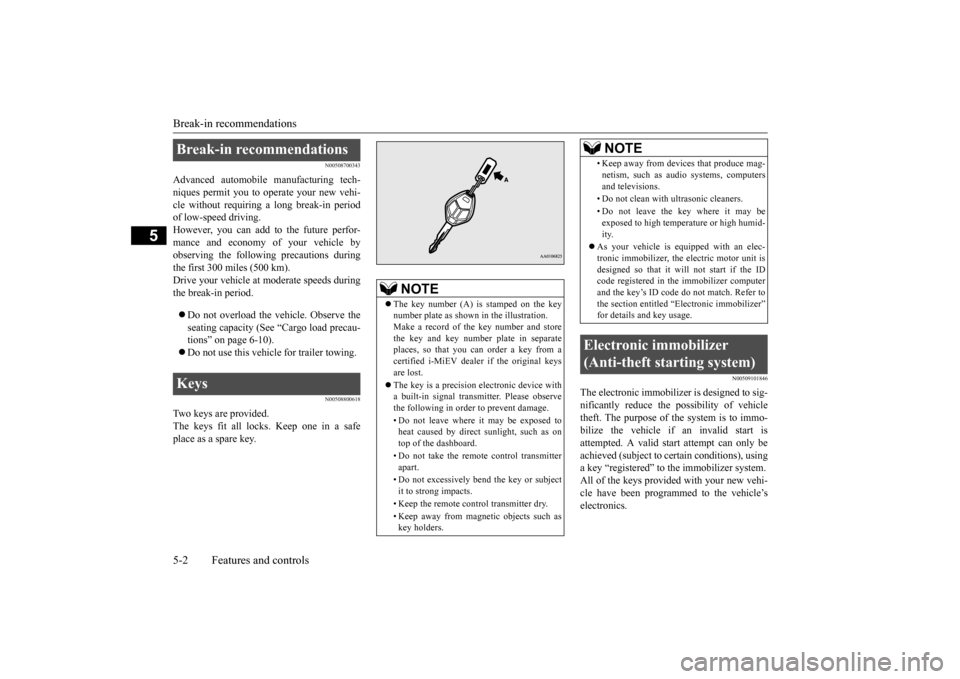
The key number (A) is stamped on the key number plate as shown
in the illustration.
Make a record of th
e key number and store
the key and key number plate in separate places, so that you can order a key from acertified i-MiEV dealer if the original keys are lost. The key is a precision
electronic device with
a built-in signal transm
itter. Please observe
the following in order to prevent damage. • Do not leave where it may be exposed to heat caused by direct sunlight, such as ontop of the dashboard. • Do not take the remote
control transmitter
apart. • Do not excessively bend the key or subject it to strong impacts. • Keep the remote control transmitter dry.• Keep away from magne
tic objects such as
key holders.
• Keep away from devi
ces that produce mag-
netism, such as audio systems, computersand televisions. • Do not clean with
ultrasonic cleaners.
• Do not leave the key where it may be exposed to high temperature or high humid- ity.
As your vehicle is equipped with an elec- tronic immobilizer, the electric motor unit isdesigned so that it wi
ll not start if the ID
code registered in the immobilizer computer and the key’s ID code
do not match. Refer to
the section entitled “E
lectronic immobilizer”
for details and key usage.
Electronic immobilizer (Anti-theft starting system)
NOTE
BK0220401US.book 2 ページ 2015年6月3日 水曜日 午前7時42分
Page 111 of 296
Electronic immobilizer (Ant
i-theft starting system)
Features and controls 5-3
5
Only keys that have been programmed to the vehicle electronics can be used to start the vehicle. If you lose a key, you can order a key from a certified i-MiEV dealer by referring to the key number. To prevent vehicle theft, the ID code for thevehicle keys must be changed. Take your vehicle and al
l remaining keys to a
certified i-MiEV dealer
to have your ID code
changed. To add a key, you need to register the ID code to the vehicle. Registering the ID code can be done by a cer- tified i-MiEV dealer.
Or it can be done by
yourself (except for vehi
cles sold in Canada).
To register the ID code yourself, follow the “Customer key programming” procedurebelow.
NOTE
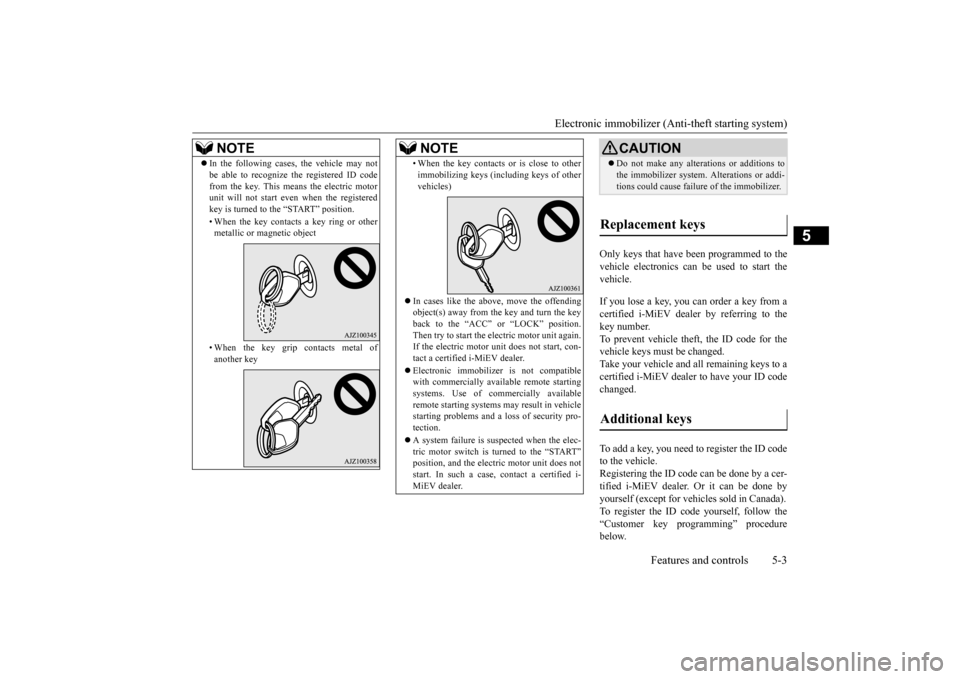
In the following cases, the vehicle may not be able to recognize
the registered ID code
from the key. This means the electric motorunit will not start even when the registered key is turned to the “START” position. • When the key contacts
a key ring or other
metallic or magnetic object • When the key grip
contacts metal of
another key
• When the key contacts
or is close to other
immobilizing keys (inc
luding keys of other
vehicles)
In cases like the above, move the offending object(s) away from the key and turn the key back to the “ACC” or “LOCK” position.Then try to start the electric motor unit again. If the electric motor unit does not start, con- tact a certified i-MiEV dealer. Electronic immobilize
r is not compatible
with commercially available remote startingsystems. Use of commercially available remote starting systems may result in vehicle starting problems
and a loss of security pro-
tection. A system failure is suspected when the elec- tric motor switch is turned to the “START”
tric motor unit does not
start. In such a case, contact a certified i-MiEV dealer.NOTE
CAUTION Do not make any altera
tions or additions to
the immobilizer system.
Alterations or addi-
tions could cause failur
e of the immobilizer.
Replacement keys Additional keys
BK0220401US.book 3 ページ 2015年6月3日 水曜日 午前7時42分