radio MITSUBISHI iMiEV 2017 1.G Owner's Manual
[x] Cancel search | Manufacturer: MITSUBISHI, Model Year: 2017, Model line: iMiEV, Model: MITSUBISHI iMiEV 2017 1.GPages: 296, PDF Size: 7.79 MB
Page 220 of 296
AM/FM electronically tuned radio with CD player (if so equipped) 7-18 Comfort controls
7
N00771500013
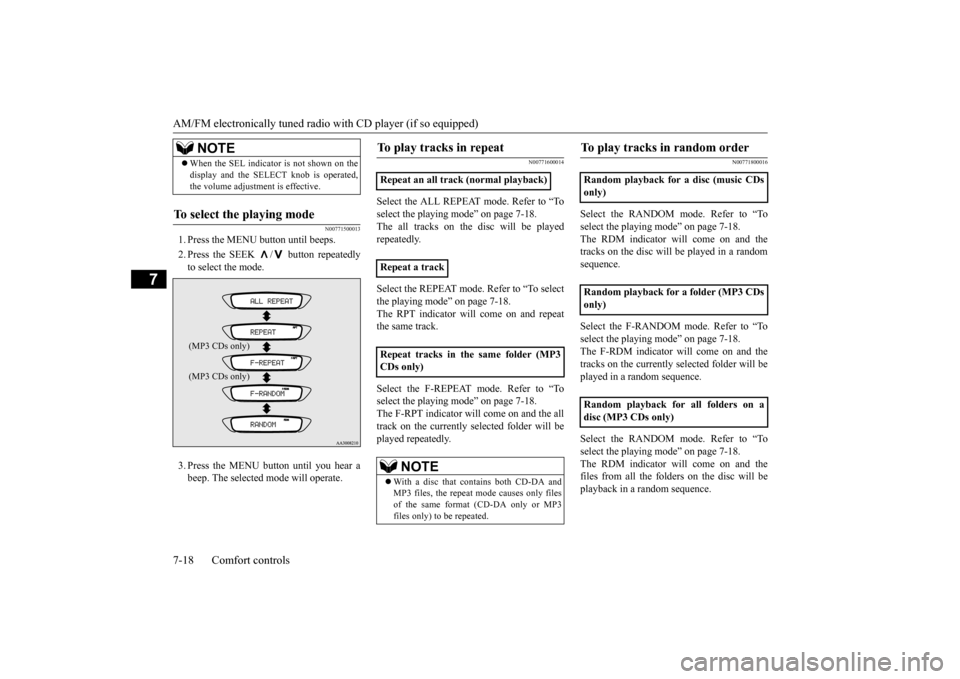
1. Press the MENU button until beeps. 2. Press the SEEK / button repeatedly to select the mode. 3. Press the MENU button until you hear a beep. The selected mode will operate.
N00771600014
Select the ALL REPEAT mode. Refer to “Toselect the playing
mode” on page 7-18.
The all tracks on the
disc will be played
repeatedly. Select the REPEAT mode. Refer to “To select the playing mode” on page 7-18. The RPT indicator will come on and repeatthe same track. Select the F-REPEAT mode. Refer to “To select the playing
mode” on page 7-18.
The F-RPT indicator will come on and the all track on the currently selected folder will be played repeatedly.
N00771800016
Select the RANDOM m
ode. Refer to “To
select the playing mode” on page 7-18. The RDM indicator will come on and thetracks on the disc will be played in a random sequence. Select the F-RANDOM mode. Refer to “To select the playing mode” on page 7-18. The F-RDM indicator will come on and thetracks on the currently selected folder will be played in a random sequence. Select the RANDOM m
ode. Refer to “To
select the playing mode” on page 7-18. The RDM indicator will come on and the files from all the folders on the disc will beplayback in a random sequence.
When the SEL indicato
r is not shown on the
display and the SELECT knob is operated,the volume adjustment is effective.
To select the playing mode
NOTE(MP3 CDs only)
Repeat an all track (normal playback) Repeat a track Repeat tracks in th
e same folder (MP3
CDs only)
NOTE
With a disc that contains both CD-DA and MP3 files, the repeat
mode causes only files
of the same format (CD-DA only or MP3files only) to be repeated.
To play tracks in random order
Random playback for a disc (music CDs only) Random playback for a folder (MP3 CDs only) Random playback for all folders on a disc (MP3 CDs only)
BK0220401US.book 18 ページ 2015年6月3日 水曜日 午前7時42分
Page 221 of 296

AM/FM electronically tuned radio with CD player (if so equipped)
Comfort controls 7-19
7
N00771900017
Press the SCAN button.
“SCAN” will appear
on the display and the CD player will playback the first 10 second
s of each track on the
selected disc (music
CDs only) or the cur-
rently selected folder (MP3 CDs only).The track number will blink while the scan mode is selected. To stop the scan mode, press the SCAN button again.
N00752100166
This audio system can
display CD text and
MP3 titles including ID3 tag information. The audio system can di
splay disc and track
titles for discs with converted disc and track title information. Press the DISP button repeatedly to make selections in the following sequence: disc name
track name
normal
display mode. The audio system can display folder and track titles for discs wi
th converted folder and track
information. Press the DISP button repeat- edly to make selections in the followingsequence: folder name
track name
nor-
mal display mode.
The audio system can
display ID3 tag infor-
mation for files that ha
ve been recorded with
ID3 tag information. 1. Press the DISP button for 2 seconds or longer to switch to the ID3 tag informa- tion. “TAG” will appear on the display.2. Press the DISP button repeatedly to make selections in th
e following sequence:
album name
track name
artist name
normal display mode.
NOTE
With a disc that contains both CD-DA and MP3 files, the random
mode causes only
files of the same format (CD-DA only orMP3 files only) to be repeated.
To find the start of each track on a disc for playback
NOTE
Once all tracks on the
disc (music CDs only)
or the currently selected folder (MP3 CDs only) have been scanne
d, playback of the
disc will restart from
the beginning of the
track that was play
ing when scanning
started. With a disc that contains both CD-DA and MP3 files, the scan m
ode causes only files of
the same format (CD-DA only or MP3 filesonly) to be played.
CD text and MP3 title display
CD text
NOTE
The display can show up to 11 characters. If a disc name or track
name has more than 11
characters, press the PAGE button to viewthe next 11 characters. When there is no title information to be dis- played, the display shows “NO TITLE”. Characters that the a
udio system cannot dis-
play are shown as “ ”.
ID3 tag information
NOTE
To return from ID3 tag information to the folder name, press the DISP button again for2 seconds or longer. When there is no title information to be dis- played, the display
shows “NO TITLE”.
a folder name, track name
, or item of ID3 tag
information has more than 11 characters, press the PAGE button to view the next 11characters. Folder names, trac
k names and ID3 tag
information can each be displayed up to a length of 32 characters. Characters that the a
udio system cannot dis-
play are shown as “ ”.
BK0220401US.book 19 ページ 2015年6月3日 水曜日 午前7時42分
Page 225 of 296
Steering wheel audio remote control switch (if so equipped)
Comfort controls 7-23
7
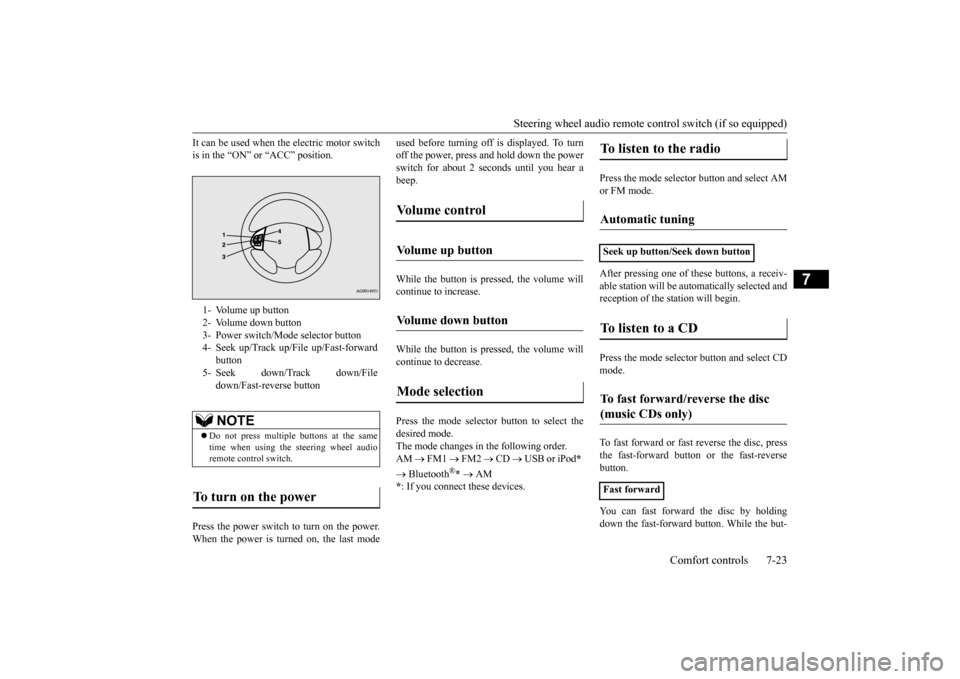
It can be used when the electric motor switch is in the “ON” or “ACC” position. Press the power switch to turn on the power. When the power is turned on, the last mode
used before turning off is displayed. To turn off the power, press and hold down the powerswitch for about 2 seconds until you hear a beep. While the button is pressed, the volume will continue to increase. While the button is pressed, the volume will continue to decrease. Press the mode selector button to select the desired mode.The mode changes in the following order. AM
FM1
FM2
CD
USB or iPod
*
Bluetooth
®* AM
* : If you connect these devices.
Press the mode selector button and select AM or FM mode. After pressing one of
these buttons, a receiv-
able station will be automatically selected and reception of the st
ation will begin.
Press the mode selector
button and select CD
mode. To fast forward or fast
reverse the disc, press
the fast-forward button or the fast-reverse button. You can fast forward the disc by holding down the fast-forward button. While the but-
1- Volume up button 2- Volume down button 3- Power switch/Mode selector button4- Seek up/Track up/File up/Fast-forward
button
5- Seek down/Track down/File
down/Fast-reverse buttonNOTE
Do not press multiple buttons at the same time when using the steering wheel audioremote control switch.
To turn on the power
Vo l u m e c o n t r o l
Volume up button
Volume down button
Mode selection
To listen to the radio
Automatic tuning
Seek up button/Seek down buttonTo listen to a CD
To fast forward/reverse the disc (music CDs only)
Fast forward
BK0220401US.book 23 ページ 2015年6月3日 水曜日 午前7時42分
Page 227 of 296
Handling of compact discs Comfort controls 7-25
7
N00734100340
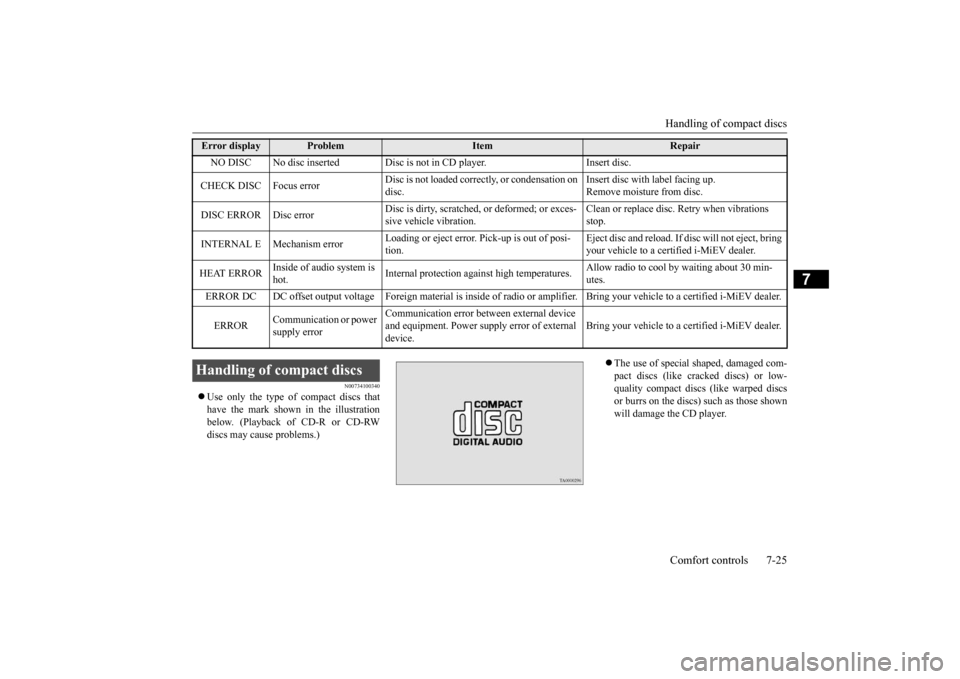
Use only the type of compact discs that have the mark shown in the illustration below. (Playback of CD-R or CD-RW discs may cause problems.)
The use of special shaped, damaged com- pact discs (like cracked discs) or low- quality compact discs (like warped discsor burrs on the discs)
such as those shown
will damage the CD player.
Error display
Problem
Item
Repair
NO DISC No disc inserted Disc is
not in CD player. Insert disc.
CHECK DISC Focus error
Disc is not loaded correctly, or condensation on disc.
Insert disc with label facing up. Remove moisture from disc.
DISC ERROR Disc error
Disc is dirty, scratched,
or deformed; or exces-
sive vehicle vibration.
Clean or replace disc.
Retry when vibrations
stop.
INTERNAL E Mechanism error
Loading or eject error. Pick-up is out of posi- tion.
Eject disc and reload. If di
sc will not eject, bring
your vehicle to a certified i-MiEV dealer.
HEAT ERROR
Inside of audio system is hot.
Internal protection agai
nst high temperatures.
Allow radio to cool
by waiting about 30 min-
utes.
ERROR DC DC offset output voltage Foreign materi
al is inside of radio or amplifier. Bri
ng your vehicle to a certified i-MiEV deale
r.
ERROR
Communication or power supply error
Communication error betw
een external device
and equipment. Power supply error of external device.
Bring your vehicle to a certified i-MiEV dealer.
Handling of compact discs
BK0220401US.book 25 ページ 2015年6月3日 水曜日 午前7時42分
Page 230 of 296
General information about your radio 7-28 Comfort controls
7
4. When the time is set, press the clock but- ton to stop the clock display from flash-ing.
N00733900439
Your vehicle’s radio receives both AM andFM stations. The quality of your reception is affected by distance, obstacles, an
d signal interference.
This radio complies with Part 15 of Federal Communications Commission (FCC) Rules (for vehicles sold in U.S.A.). Operation is subject to the following conditions: The device may not cause harmful inter- ference. This device must ac
cept any interference
recieved, including interference that maycause undesirable operation.
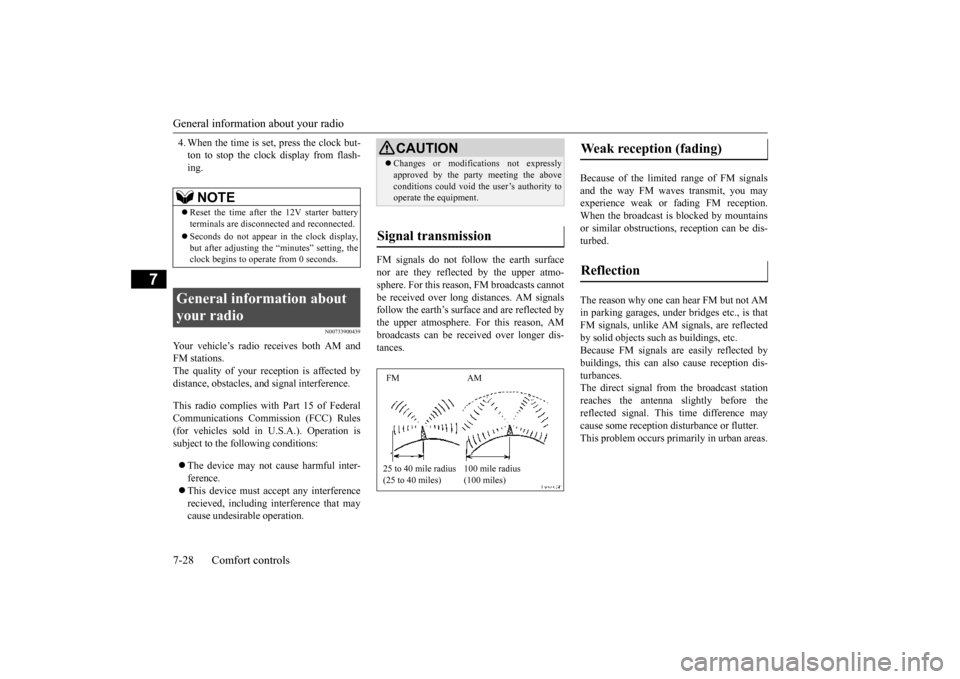
FM signals do not follow the earth surface nor are they reflected by the upper atmo-sphere. For this reason,
FM broadcasts cannot
be received over long distances. AM signals follow the earth’s surface and are reflected bythe upper atmosphere. For this reason, AM broadcasts can be received over longer dis- tances.
Because of the limite
d range of FM signals
and the way FM waves transmit, you may experience weak or fading FM reception.When the broadcast is blocked by mountains or similar obstructions,
reception ca
n be dis-
turbed. The reason why one can hear FM but not AM in parking garages, unde
r bridges etc., is that
FM signals, unlike AM
signals, are reflected
by solid objects such
as buildings, etc.
Because FM signals are easily reflected by buildings, this can also
cause reception dis-
turbances.The direct signal from
the broadcast station
reaches the antenna slightly before the reflected signal. This
time difference may
cause some reception di
sturbance or flutter.
This problem occurs primarily in urban areas.
NOTE
Reset the time after the 12V starter battery terminals are disconnect
ed and reconnected.
Seconds do not appear
in the clock display,
but after adjusting the
“minutes” setting, the
clock begins to opera
te from 0 seconds.
General information about your radio
CAUTION Changes or modifica
tions not expressly
approved by the party meeting the aboveconditions could void th
e user’s authority to
operate the equipment.
Signal transmission FM AM 25 to 40 mile radius (25 to 40 miles)
100 mile radius (100 miles)
Weak reception (fading) Reflection
BK0220401US.book 28 ページ 2015年6月3日 水曜日 午前7時42分
Page 231 of 296
General information about your radio
Comfort controls 7-29
7
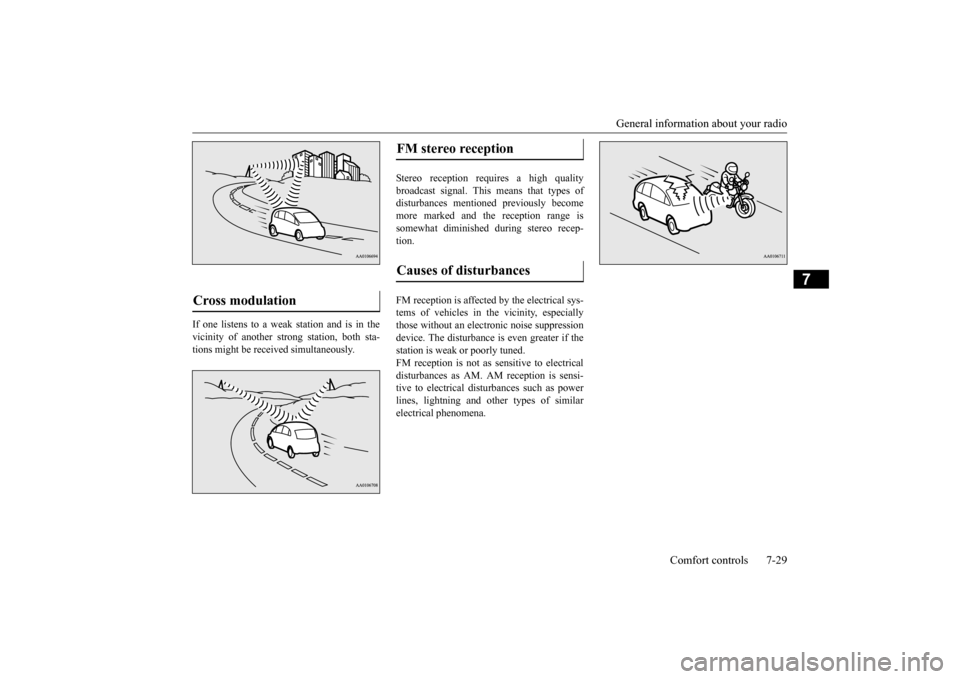
If one listens to a weak station and is in the vicinity of another st
rong station, both sta-
tions might be received simultaneously.
Stereo reception requires a high quality broadcast signal. This means that types of disturbances mentioned previously becomemore marked and the reception range is somewhat diminished during stereo recep- tion. FM reception is affected by the electrical sys- tems of vehicles in the vicinity, especially those without an electr
onic noise suppression
device. The disturbance is even greater if thestation is weak or poorly tuned. FM reception is not as sensitive to electrical disturbances as AM. AM
reception is sensi-
tive to electrical dist
urbances such as power
lines, lightning and ot
her types of similar
electrical phenomena.
Cross modulation
FM stereo reception Causes of disturbances
BK0220401US.book 29 ページ 2015年6月3日 水曜日 午前7時42分
Page 266 of 296
Fuses 9-20 Vehicle care and maintenance
9
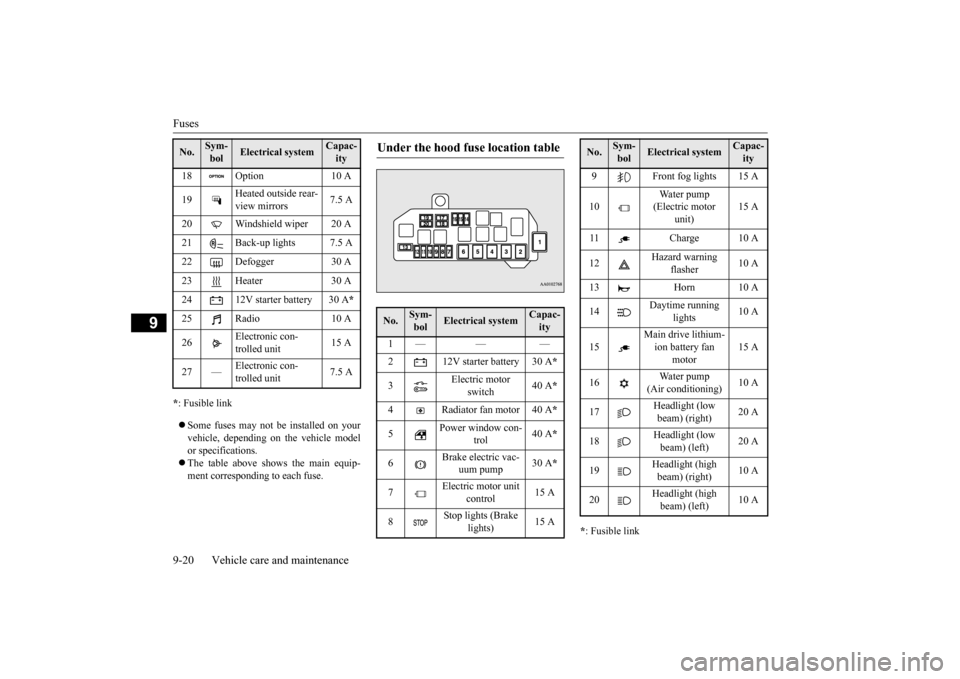
* : Fusible link Some fuses may not be installed on your vehicle, depending on the vehicle model or specifications. The table above shows the main equip- ment corresponding to each fuse.
* : Fusible link
18 Option 10 A 19
Heated outside rear- view mirrors
7.5 A
20 Windshield wiper 20 A 21 Back-up lights 7.5 A 22 Defogger 30 A23 Heater 30 A24 12V starter battery 30 A
*
25 Radio 10 A 26
Electronic con- trolled unit
15 A
27 —
trolled unit
7.5 A
No.
Sym- bol
Electrical system
Capac-ity
Under the hood fuse location table No.
Sym- bol
Electrical system
Capac-ity
1— — — 2 12V starter battery 30 A
*
3
Electric motor
switch
40 A
*
4 Radiator fan motor 40 A
*
5
Power window con-
trol
40 A
*
6
Brake electric vac-
uum pump
30 A
*
7
Electric motor unit
control
15 A
8
Stop lights (Brake
lights)
15 A
9 Front fog lights 15 A 10
Water pump (Electric motor
unit)
15 A
11 Charge 10 A 12
Hazard warning
flasher
10 A
13 Horn 10 A 14
Daytime running
lights
10 A
15
Main drive lithium- ion battery fan
motor
15 A
16
Water pump
(Air conditioning)
10 A
17
Headlight (low beam) (right)
20 A
18
Headlight (low beam) (left)
20 A
19
Headlight (high beam) (right)
10 A
20
Headlight (high beam) (left)
10 A
No.
Sym- bol
Electrical system
Capac-ity
BK0220401US.book 20 ページ 2015年6月3日 水曜日 午前7時42分
Page 291 of 296
Alphabetical index
12-1
12
Numerics
12V power outlet
................................
5-76
12V starter battery
................................
9-7
Specification
..................................
11-6
12V starter battery charging system warning light
.................................................
5-45
A
Accessory (installation)
.........................
3-7
Acoustic vehicle alerting system (AVAS)
....
5-23 Active stability control
........................
5-28
ASC indicator
.................................
5-30
ASC OFF indicator
.........................
5-30
ASC OFF switch
............................
5-29
Skid control function
.......................
5-29
Traction control function
.................
5-29
Air conditioning
...................................
7-4
Important air condi
tioning operating tips
..
7-10
Air purifier
.........................................
7-11
Aluminum wheels
...............................
9-32
Antenna
.............................................
7-27
Anti-lock braking system
.....................
5-25
Warning light
........................
5-26
, 5-27
ASC
..................................................
5-28
ASC indicator
.....................................
5-30
ASC OFF indicator
.............................
5-30
ASC OFF switch
................................
5-29
Assist grip
.........................................
5-81
Audio
AM/FM electronicall
y tuned radio with
CD player
....................................
7-11
Error codes
....................................
7-24
Handling of compact discs
..............
7-25
Steering wheel audio re
mote control switch
7-22
B
Back up lights
Bulb capacity
.................................
9-22
Replacement
..................................
9-25
Ball joint, steering li
nkage seals and drive
shaft boots
.......................................
9-17
Battery
12V starter battery charging system warn- ing light
.......................................
5-45
Disconnection and connection
...........
9-9
During cold weather
.........................
9-9
Main drive lithium-ion battery
...........
3-3
Bluetooth® 2.0 interface
.....................
5-53
Brake
Anti-lock braking system
................
5-25
Braking
...........................................
6-5
Fluid
.......................................
9-7
, 11-7
Hose
.............................................
9-17
Parking brake
.................................
5-16
Parking brake lever stroke
...............
9-16
Pedal
.............................................
5-24
Pedal free play
................................
9-16
Power brakes
..................................
5-24
Service brake
..................................
5-24
Warning light
.................................
5-44
Brake assist system
.............................
5-25
Break-in recommendations
....................
5-2
Bulb capacity
......................................
9-22
C
California Perchl
orate Materials
Requirements
.....................................
3-8
Capacities
..........................................
11-7
Card holder
...............................
5-76
, 5-80
Cargo loads
........................................
6-10
Certification label
...............................
11-3
Charging
Quick charging
...............................
3-27
Regular charging
...................
3-16
, 3-26
Charging indicator
..............................
5-44
Charging Timer
..................................
3-41
Charging troubleshooting guide
............
3-31
Chassis number
...................................
11-2
Child restraint
.....................................
4-13
Child safety locks for rear door
............
5-10
Cleaning
BK0220401US.book 1 ページ 2015年6月3日 水曜日 午前7時42分
Page 294 of 296
Alphabetical index 12-4
12
Operation under adverse driving conditions
...
8-13 Outside rearview mirrors
.....................
5-17
Outside temperature display
........
5-37
, 5-41
P
Parking
................................................
6-6
Parking brake
.................................
5-16
Parking brake lever stroke
...............
9-16
Parking lights
Bulb capacity
.................................
9-22
Polishing
............................................
9-31
Power brakes
......................................
5-24
Power door locks
..................................
5-9
Power down warning light
...................
5-46
Power outlet
.......................................
5-76
Power windows
..................................
5-14
Precautions during Charging the Main Drive Lithium-ion Battery
..........................
3-15
Q
Quick charging
...................................
3-27
R
Radio
General information about your radio 7-28
Ready indicator
..................................
5-44
Rear combination lights
Bulb capacity
..................................
9-22
Replacement
...................................
9-25
Rear side-marker lights
Bulb capacity
..................................
9-22
Replacement
...................................
9-26
Rear turn signal lights
Bulb capacity
..................................
9-22
Replacement
...................................
9-25
Rear window defogger switch
..............
5-52
Rear-view camera
...............................
5-34
Rearview mirror
Inside
.............................................
5-16
Outside
..........................................
5-17
Refill capacities
..................................
11-7
Regenerative brake system indicator
.....
5-44
Regenerative braking
............................
3-3
Regular charging
........................
3-16
, 3-26
Remote Climate Control
....
3-36
, 3-47
, 7-11
Replacement of light bulbs
...................
9-21
Replacing tires and wheels
...................
9-14
Reporting Safety Defects
.....................
10-2
Reservoir cap
.......................................
9-6
S
Safe driving techniques
.........................
6-4
Seat
....................................................
4-2
Front seats
.......................................
4-3
Heated seat
......................................
4-4
Rear seats
........................................
4-5
Seats and restraint systems
................
4-2
Seat belt
...............................................
4-8
Adjustable seat belt shoulder anchor
.4-11
Child restraint
................................
4-13
Driver’s seat belt
reminder/warning light
..
4-10 Force limiter
..................................
4-13
Front passenger seat belt warning light
.....
4-11 Maintenance and inspection
.............
4-20
Pre-tensioner
..................................
4-12
Seat belt extender
...........................
4-12
Seat belt
instructions
.........................
4-9
Seat belt use
during pregnancy
.........
4-12
Selector lever
.....................................
5-21
Selector lever operation
...................
5-21
Selector lever po
sition indicator
.......
5-21
Selector le
ver positions
...................
5-22
Service brake
......................................
5-24
Service precautions
...............................
9-2
Service reminder
........................
5-37
, 5-38
Skid control function
...........................
5-29
Snow tires
..........................................
9-15
Speedometer
......................................
5-36
Steering
Wheel lock
.....................................
5-20
Stop lights
BK0220401US.book 4 ページ 2015年6月3日 水曜日 午前7時42分