lock MITSUBISHI iMiEV 2017 1.G Repair Manual
[x] Cancel search | Manufacturer: MITSUBISHI, Model Year: 2017, Model line: iMiEV, Model: MITSUBISHI iMiEV 2017 1.GPages: 296, PDF Size: 7.79 MB
Page 146 of 296
Instrument cluster 5-38 Features and controls
5
N00572300016
The odometer indicates the total distance the vehicle has traveled.
N00572400020
The trip odometer shows the distance traveledsince the last time it was reset. There are two trip odometer displays: and
.
Trip odometer can be used to measure the distance traveled since the current trip began. At the same time, Trip odometer can be used to measure the distance from a secondlocation. To zero the counter, press and hold the reset button for more than 1 second. Only the cur-rently displayed va
lue will be reset.
If trip odometer is displayed, for exam-ple, only trip odometer
will be reset.
N00572500021
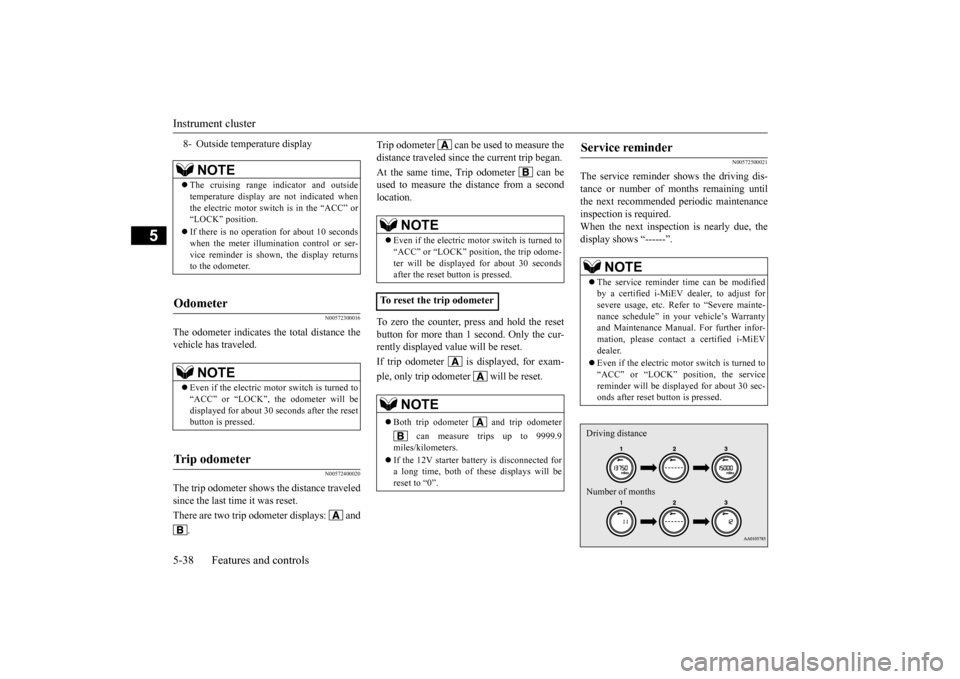
The service reminder s
hows the driving dis-
tance or number of m
onths remaining until
the next recommended
periodic maintenance
inspection is required. When the next inspection is nearly due, the display shows “------”.
8- Outside temperature display
NOTE
The cruising range indicator and outside temperature display are not indicated whenthe electric motor switch is in the “ACC” or “LOCK” position. If there is no operation for about 10 seconds when the meter illumination control or ser- vice reminder is shown, the display returnsto the odometer.
Odometer
NOTE
Even if the electric mo
tor switch is turned to
“ACC” or “LOCK”, the odometer will be displayed for about 30 se
conds after the reset
button is pressed.
Tr i p o d o m e t e r
NOTE
Even if the electric motor switch is turned to “ACC” or “LOCK” position, the trip odome-ter will be displayed for about 30 seconds after the reset button is pressed.
To reset the trip odometer
NOTE
Both trip odometer and trip odometer
can measure trips up to 9999.9
miles/kilometers. If the 12V starter battery is disconnected for a long time, both of th
ese displays will be
reset to “0”.
Service reminder
NOTE
The service reminder time can be modified by a certified i-MiEV dealer, to adjust for severe usage, etc. Refer to “Severe mainte- nance schedule” in your vehicle’s Warrantyand Maintenance Manual. For further infor- mation, please contac
t a certified i-MiEV
dealer. Even if the electric mo
tor switch is turned to
“ACC” or “LOCK” position, the servicereminder will be disp
layed for about 30 sec-
onds after reset button is pressed.Driving distance Number of months
BK0220401US.book 38 ページ 2015年6月3日 水曜日 午前7時42分
Page 147 of 296
Instrument cluster
Features and controls 5-39
5
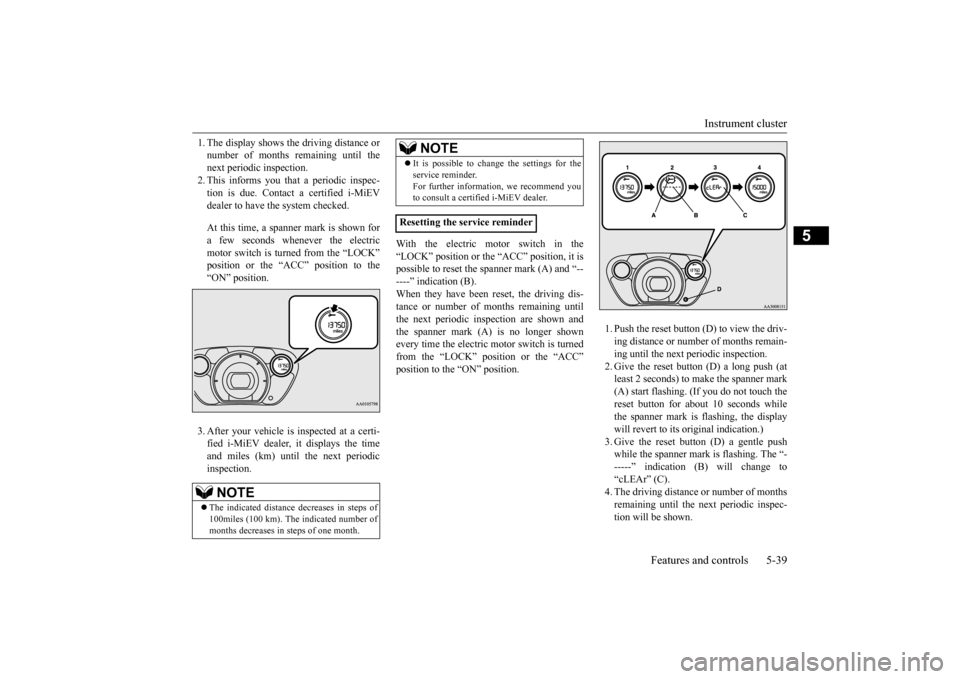
1. The display shows the driving distance or number of months remaining until thenext periodic inspection. 2. This informs you that a periodic inspec- tion is due. Contact a certified i-MiEVdealer to have the system checked. At this time, a spanner mark is shown for a few seconds whenever the electric motor switch is turned from the “LOCK”position or the “ACC” position to the “ON” position. 3. After your vehicle is
inspected at a certi-
fied i-MiEV dealer, it displays the time and miles (km) until
the next periodic
inspection.
With the electric motor switch in the “LOCK” position or the “ACC” position, it is possible to reset the spanner mark (A) and “------” indication (B). When they have been
reset, the driving dis-
tance or number of m
onths remaining until
the next periodic inspection are shown and the spanner mark (A) is no longer shown every time the electric motor switch is turnedfrom the “LOCK” position or the “ACC” position to the “ON” position.
1. Push the reset button (D) to view the driv- ing distance or number of months remain-ing until the next periodic inspection. 2. Give the reset button (D) a long push (at least 2 seconds) to ma
ke the spanner mark
(A) start flashing. (If you do not touch the reset button for about
10 seconds while
the spanner mark is
flashing, the display
will revert to its original indication.) 3. Give the reset button (D) a gentle push while the spanner mark is flashing. The “------” indication (B
) will change to
“cLEAr” (C). 4. The driving distance or number of monthsremaining until the next periodic inspec- tion will be shown.
NOTE
The indicated distance decreases in steps of 100miles (100 km). The indicated number ofmonths decreases in steps of one month.
It is possible to change the settings for the service reminder.For further information, we recommend youto consult a certified i-MiEV dealer.
Resetting the service reminder
NOTE
BK0220401US.book 39 ページ 2015年6月3日 水曜日 午前7時42分
Page 151 of 296
Indicator and warning light package
Features and controls 5-43
5
N00519801888
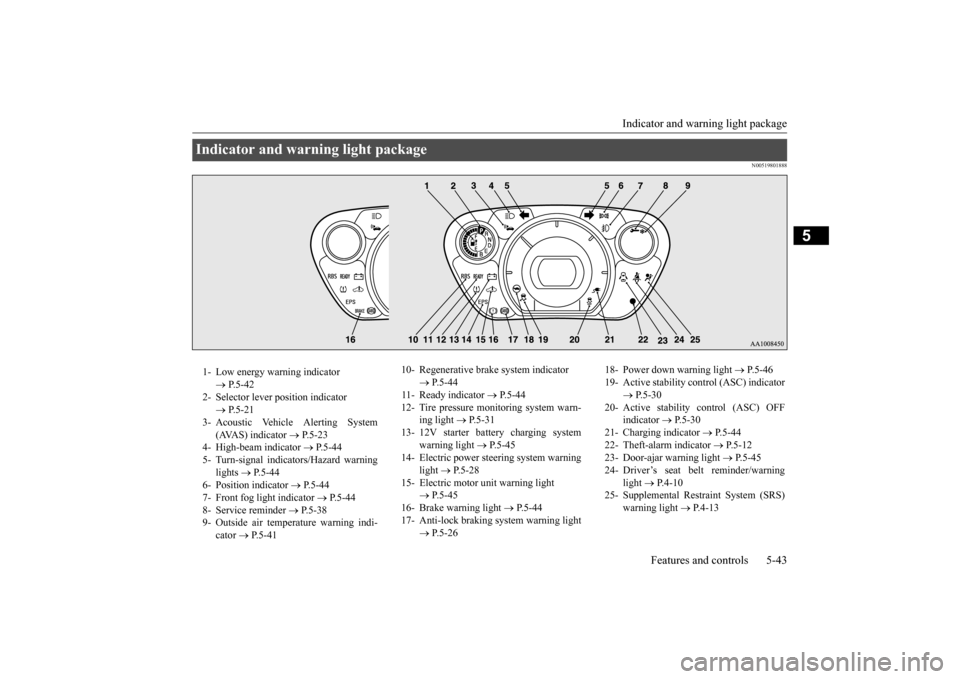
Indicator and warning light package 1- Low energy warning indicator
P.5-42
2- Selector lever
position indicator
P.5-21
3- Acoustic Vehicle Alerting System
( AVA S ) i n d i c a t o r
P.5-23
4- High-beam indicator
P.5-44
5- Turn-signal indicators/Hazard warning
lights
P.5-44
6- Position indicator
P.5-44
7- Front fog light indicator
P.5-44
8- Service reminder
P. 5 - 3 8
9- Outside air temperature warning indi-
cator
P. 5 - 4 1
10- Regenerative brake system indicator
P.5-44
11- Ready indicator
P.5-44
12- Tire pressure moni
toring system warn-
ing light
P.5-31
13- 12V starter battery charging system
warning light
P.5-45
14- Electric power steering system warning
light
P.5-28
15- Electric motor unit warning light
P.5-45
16- Brake warning light
P. 5 - 4 4
17- Anti-lock braking system warning light
P.5-26
18- Power down warning light
P.5-46
19- Active stability control (ASC) indicator
P.5-30
20- Active stability control (ASC) OFF
indicator
P. 5 - 3 0
21- Charging indicator
P.5-44
22- Theft-alarm indicator
P.5-12
23- Door-ajar warning light
P.5-45
24- Driver’s seat belt reminder/warning
light
P. 4 - 1 0
25- Supplemental Restra
int System (SRS)
warning light
P.4-13
BK0220401US.book 43 ページ 2015年6月3日 水曜日 午前7時42分
Page 155 of 296
Combination headlights and dimmer switch
Features and controls 5-47
5
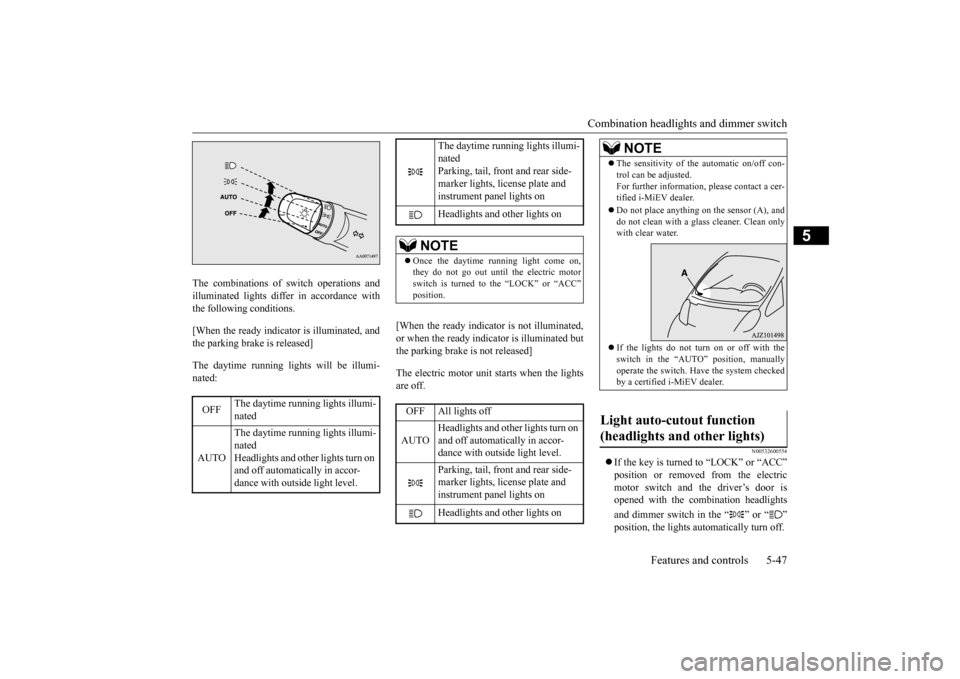
The combinations of switch operations and illuminated lights differ in accordance withthe following conditions. [When the ready indicato
r is illuminated, and
the parking brake is released] The daytime running light
s will be illumi-
nated:
[When the ready indicator is not illuminated, or when the ready indicator is illuminated but the parking brake is not released] The electric motor unit starts when the lights are off.
N00532600554
If the key is turned to “LOCK” or “ACC”
from the electric
motor switch and the driver’s door is opened with the combination headlights and dimmer switch in the “ ” or “ ”
OFF
The daytime running lights illumi- nated
AUTO
The daytime running lights illumi- nated Headlights and other lights turn on and off automatically in accor-dance with outsi
de light level.
The daytime running lights illumi- nated Parking, tail, front and rear side- marker lights, license plate and instrument panel lights on Headlights and other lights on
NOTE
Once the daytime running light come on, they do not go out until the electric motorswitch is turned to the “LOCK” or “ACC”OFF All lights off AUTO
Headlights and other lights turn on and off automatically in accor-dance with outside light level. Parking, tail, front and rear side- marker lights, license plate and instrument panel lights on Headlights and other lights on
NOTE
The sensitivity of the automatic on/off con- trol can be adjusted.For further information,
please contact a cer-
tified i-MiEV dealer. Do not place anything on
the sensor (A), and
do not clean with a glas
s cleaner. Clean only
with clear water. If the lights do not turn on or off with the switch in the “AUTO” operate the switch. Have
the system checked
by a certified i-MiEV dealer.
Light auto-cutout function (headlights and other lights)
BK0220401US.book 47 ページ 2015年6月3日 水曜日 午前7時42分
Page 156 of 296
Combination headlights and dimmer switch 5-48 Features and controls
5
• If the driver’s door is opened after the key is removed from the electric motorswitch, a buzzer will sound to remind you to turn off the lights. • If the driver’s door is opened with thekey in the electric motor switch, a buzzer will sound intermittently to remind you to remove the key.
If the key is turned to “LOCK” or “ACC” position with the driver’s door closed and the combination headlights and dimmer switch in the “ ” or “ ” position, the lights will stay on for about 3 minutes and then turn off automatically.
If the combination headlights and dimmer switch is turned to the “ ” or “ ” posi- tion again after the electric motor switch is turned to “LOCK” or “ACC” position, the auto-cutout function de
scribed above will not
work. The lights (the pa
rking lights, tail lights
and license plate lights)
will stay on and will
not turn off automatically.
N00549800213
If the driver’s door is opened with the key removed from the electric motor switch while the lights are on, the buzzer will sound toremind you to turn off the lights. The lights and buzzer will turn off automati- cally.Or you can turn the combination headlights and dimmer switch to the “OFF” position to stop the buzzer.
N00549900155
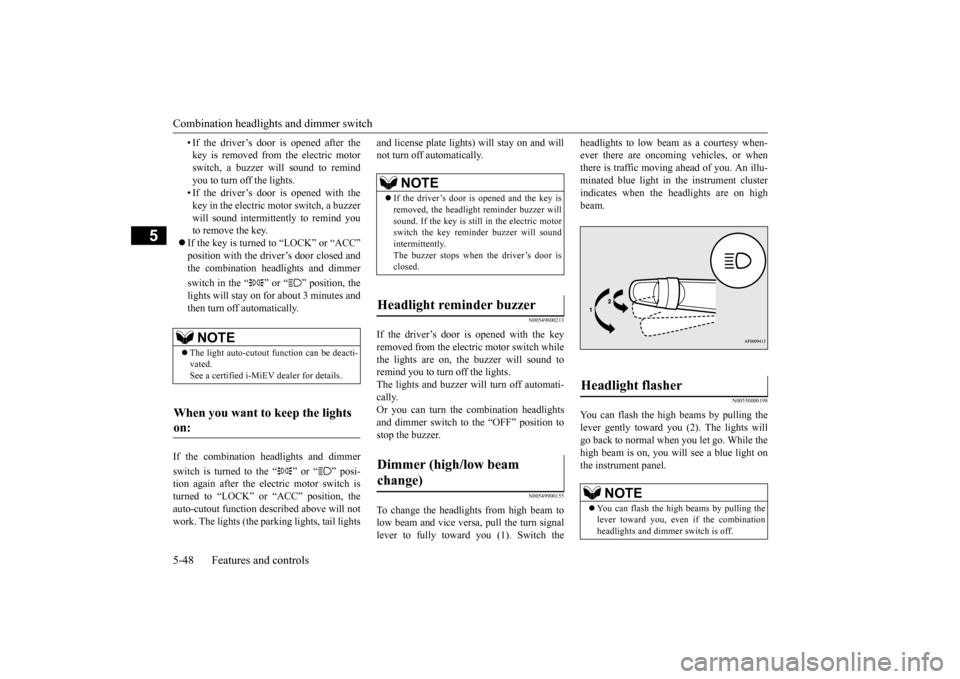
To change the headlights from high beam tolow beam and vice vers
a, pull the turn signal
lever to fully toward you (1). Switch the
headlights to low beam as a courtesy when- ever there are oncoming vehicles, or whenthere is traffic moving ahead of you. An illu- minated blue light in
the instrument cluster
indicates when the headlights are on highbeam.
N00550000198
You can flash the high beams by pulling thelever gently toward you (2). The lights willgo back to normal when you let go. While the high beam is on, you will
see a blue light on
the instrument panel.
NOTE
The light auto-cutout
function can be deacti-
vated. See a certified i-MiEV dealer for details.
When you want to keep the lights on:
NOTE
If the driver’s door is opened and the key is removed, the headlight
reminder buzzer will
sound. If the key is still in the electric motor switch the key reminder buzzer will soundintermittently. The buzzer stops when the driver’s door is closed.
Headlight reminder buzzer Dimmer (high/low beam change)
Headlight flasher
NOTE
You can flash the high beams by pulling the lever toward you, even if the combination headlights and dimmer switch is off.
BK0220401US.book 48 ページ 2015年6月3日 水曜日 午前7時42分
Page 160 of 296
Electric rear window defogger switch 5-52 Features and controls
5
N00523500241
N00523701455
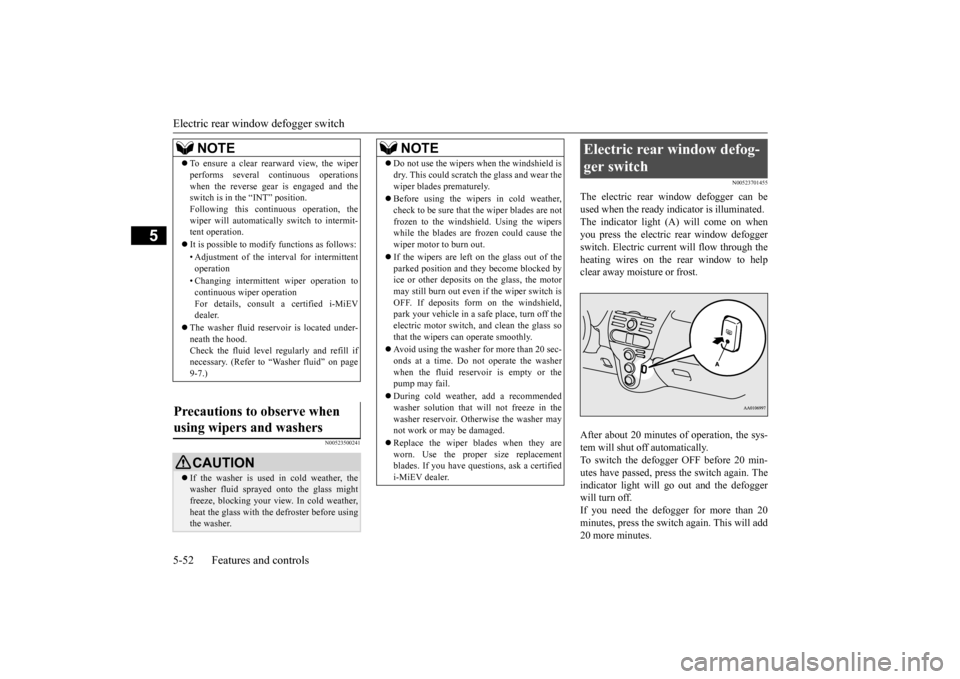
The electric rear window defogger can be used when the ready i
ndicator is illuminated.
The indicator light (A) will come on whenyou press the electric rear window defogger switch. Electric current will flow through the heating wires on the rear window to helpclear away moisture or frost. After about 20 minutes of operation, the sys- tem will shut off automatically. To switch the defogger OFF before 20 min-utes have passed, press the switch again. The indicator light will go
out and the defogger
will turn off. If you need the defogger for more than 20 minutes, press th
e switch again. This will add
20 more minutes.
NOTE
To ensure a clear rearward view, the wiper performs several continuous operationswhen the reverse gear is engaged and theswitch is in the “INT” position. Following this continuous operation, the wiper will automatically switch to intermit-tent operation. It is possible to modify functions as follows: • Adjustment of the interval for intermittent operation • Changing intermittent
wiper operation to
continuous wi
per operation
For details, consult a certified i-MiEV dealer.
The washer fluid rese
rvoir is located under-
neath the hood. Check the fluid level regularly and refill ifnecessary. (Refer to
“Washer fluid” on page
9-7.)
using wipers and washers
CAUTION If the washer is used in cold weather, the washer fluid spraye
d onto the glass might
freeze, blocking your view. In cold weather, heat the glass with the
defroster before using
the washer.
NOTE
Do not use the wipers when the windshield is dry. This could scratch the glass and wear thewiper blades prematurely. Before using the wipe
rs in cold weather,
check to be sure that the wiper blades are notfrozen to the windshield. Using the wipers while the blades are frozen could cause the wiper motor to burn out. If the wipers are left on the glass out of the parked position and they become blocked byice or other deposits on the glass, the motor may still burn out even
if the wiper switch is
OFF. If deposits form on the windshield,park your vehicle in a safe place, turn off the electric motor switch, and clean the glass so that the wipers ca
n operate smoothly.
Avoid using the washer for more than 20 sec- onds at a time. Do not operate the washerwhen the fluid reservoir is empty or the pump may fail. During cold weather, add a recommended washer solution that will not freeze in the washer reservoir. Otherwise the washer maynot work or may be damaged. Replace the wiper blades when they are worn. Use the proper size replacement blades. If you have questions, ask a certified i-MiEV dealer.
Electric rear window defog- ger switch
BK0220401US.book 52 ページ 2015年6月3日 水曜日 午前7時42分
Page 165 of 296

Bluetooth® 2.0 interface (if so equipped)
Features and controls 5-57
5
N00564400018
There are 2 cancel functions. If you are at the main menu, say “Cancel” to exit from the Bluetooth
® 2.0 interface.
If you are anywhere else within the system, say “Cancel” to return to the main menu.
N00564501061
The Bluetooth
® 2.0 interface is equipped
with a confirmation function.With the confirmation function activated, you are given more opportunities than normal to confirm a command when making various settings to the Bluetooth
® 2.0 interface. This
allows you to decrease
the possibility that a
setting is accident
ally changed.
The confirmation function can be turned on or off by following the steps below. 1. Press the PICK-UP button. 2. Say “Setup.”3. Say “Confirmation prompts.” 4. The voice guide will say “Confirmation prompts are
5. The voice guide will say “Confirmation prompts are
N00564601163
It is possible to use a passcode as a securityfunction by setting a passcode of your choice for the Bluetooth
® 2.0 interface.
When the security function is turned on, it is necessary to make a vo
ice input of a 4-digit
passcode in order to use all functions of the Bluetooth
® 2.0 interface, except for recep-
tion. Use the following procedure to turn on the security function by setting a passcode. 1. Press the PICK-UP button. 2. Say “Setup.” 3. Say “Passcode.”4. The voice guide will
say “Passcode is dis-
abled. Would you like to enable it?” Answer “Yes.” passcode and return to the main menu. 5. The voice guide will say “Please say a 4-digit passcode. Remember this passcode. It will be required to use this system.”
Say a 4-digit number which you want to set as a passcode.6. For confirmation purposes, the voice guide will say “Pa
sscode <4-digit pass-
code>. Is this correct?” Answer “Yes.” input in Step 5. 7. When the registration of the passcode iscompleted, the voice
guide will say “Pass-
code is enabled” and the system will return to the main menu.
If a passcode has been
set and the security
function is enabled, the voice guide will say“Hands-free system is
locked. State the pass-
code to continue” wh
en the PICK-UP button
is pressed to enter
voice recognition mode.
Canceling
Confirmation function setting
Security function
Setting the passcode
NOTE
Passcode will be requi
red to access the sys-
tem after restarting the electric motor unit. It is required for a little time after the ready indicator has turned of
f that the entered pass-
code is actually recorded in the system. If the electric motor switch is made to “ACC” or“ON” or the electric motor is started immedi- ately after the ready indicator has turned off, there is a case when the entered passcode isnot recorded in the system. At this time, please try to enter the passcode again.
Entering the passcode
BK0220401US.book 57 ページ 2015年6月3日 水曜日 午前7時42分
Page 181 of 296
USB input terminal (if so equipped)
Features and controls 5-73
5
N00566401080
N00566701041
You can connect your USB memory device or iPod
* to play music files stored in the USB
memory device or iPod. The following explains how to connect and remove a USB memory device or iPod. * : “iPod” is a registered trademark of Apple Inc. in the United Stat
es and other countries.
N00566800087
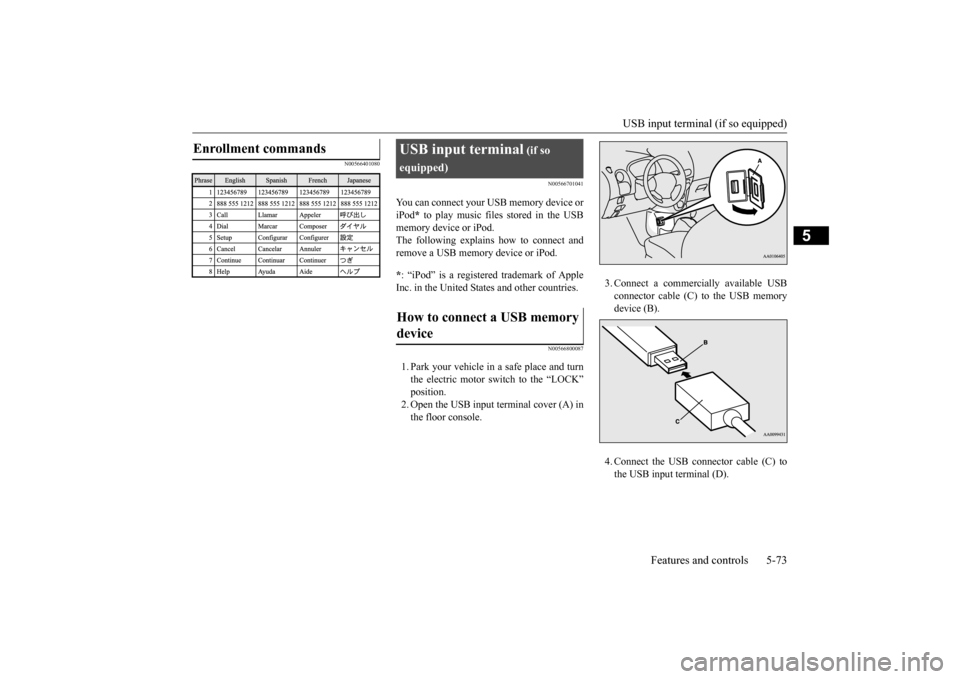
1. Park your vehicle in a safe place and turn the electric motor switch to the “LOCK” position. 2. Open the USB input terminal cover (A) inthe floor console.
3. Connect a commercia
lly available USB
connector cable (C) to the USB memorydevice (B). 4. Connect the USB connector cable (C) to the USB input terminal (D).
Enrollment commands
USB input terminal
(if so
equipped) device
BK0220401US.book 73 ページ 2015年6月3日 水曜日 午前7時42分
Page 182 of 296
USB input terminal (if so equipped) 5-74 Features and controls
5
5. To remove the USB connector cable, turn the electric motor switch to the “LOCK” position first and perform the installation steps in reverse.
N00566900075
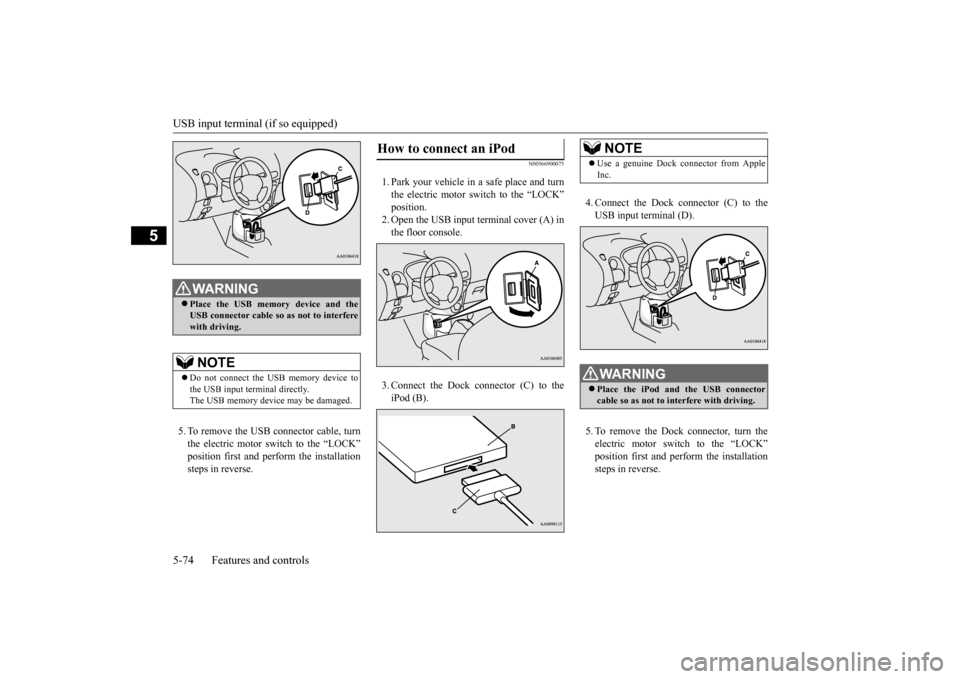
1. Park your vehicle in
a safe place and turn
the electric motor switch to the “LOCK”position. 2. Open the USB input terminal cover (A) in the floor console. 3. Connect the Dock connector (C) to the iPod (B).
WA R N I N G Place the USB memory
device and the
USB connector cable so as not to interferewith driving.NOTE
Do not connect the US
B memory device to
the USB input term
inal directly.
The USB memory devi
ce may be damaged.
How to connect an iPod
4. Connect the Dock connector (C) to the USB input terminal (D). 5. To remove the Dock connector, turn the electric motor switch to the “LOCK” position first and perform the installation steps in reverse.NOTE
Use a genuine Dock connector from Apple Inc.WA R N I N G Place the iPod and
the USB connector
cable so as not to interfere with driving.
BK0220401US.book 74 ページ 2015年6月3日 水曜日 午前7時42分
Page 183 of 296
USB input terminal (if so equipped)
Features and controls 5-75
5
N00567000031 N00567101169
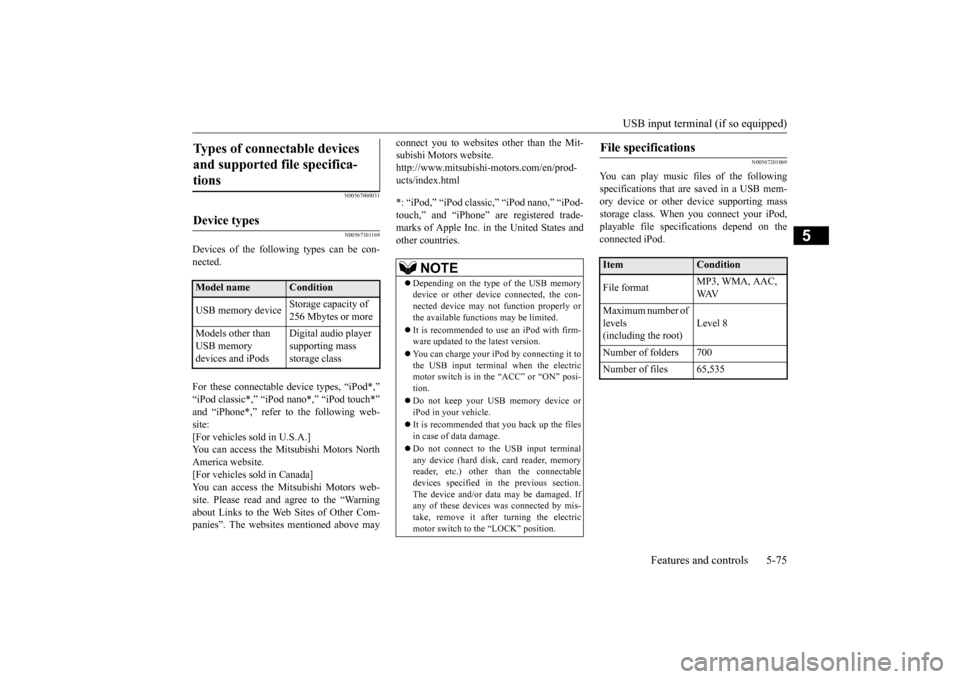
Devices of the following types can be con- nected. For these connectable
device types, “iPod*,”
“iPod classic*,”
“iPod nano*,” “iPod touch*”
site: [For vehicles sold in U.S.A.]You can access the Mitsubishi Motors North America website. [For vehicles sold in Canada]You can access the Mitsubishi Motors web- site. Please read and agree to the “Warning about Links to the Web Sites of Other Com-panies”. The websites
mentioned above may
connect you to websites
other than the Mit-
subishi Motors website.http://www.mitsubishi-
motors.com/en/prod-
ucts/index.html *: “iPod,” “iPod classi
c,” “iPod nano,” “iPod-
touch,” and “iPhone” marks of Apple Inc. in the United States and other countries.
N00567201069
You can play music files of the followingspecifications that are saved in a USB mem- ory device or other
device supporting mass
storage class. When
you connect your iPod,
playable file specif
ications depend on the
connected iPod.
Types of connectable devices and supported file specifica-tions
Device types
Model name
Condition
USB memory device
Storage capacity of 256 Mbytes or more
Models other than USB memory devices and iPods
Digital audio player supporting mass storage class
NOTE
Depending on the type of the USB memory device or other devi
ce connected, the con-
nected device may not
function properly or
the available functi
ons may be limited.
It is recommended to use an iPod with firm- ware updated to th
e latest version.
You can charge your
iPod by connecting it to
the USB input terminal when the electric motor switch is in the “ACC” or “ON” posi- tion. Do not keep your US
B memory device or
iPod in your vehicle. It is recommended that you back up the files in case of
data damage.
Do not connect to th
e USB input terminal
any device (hard disk, card reader, memoryreader, etc.) other than the connectable devices specified in the previous section. The device and/or data
may be damaged. If
any of these devices
was connected by mis-
take, remove it after turning the electric motor switch to the “LOCK” position.
File specifications
Item
Condition
File format
MP3, WMA, AAC, WAV
Maximum number of levels(including the root)
Level 8
Number of folders 700 Number of files 65,535
BK0220401US.book 75 ページ 2015年6月3日 水曜日 午前7時42分