change MITSUBISHI L200 2010 4.G Owner's Manual
[x] Cancel search | Manufacturer: MITSUBISHI, Model Year: 2010, Model line: L200, Model: MITSUBISHI L200 2010 4.GPages: 369, PDF Size: 30.72 MB
Page 111 of 369
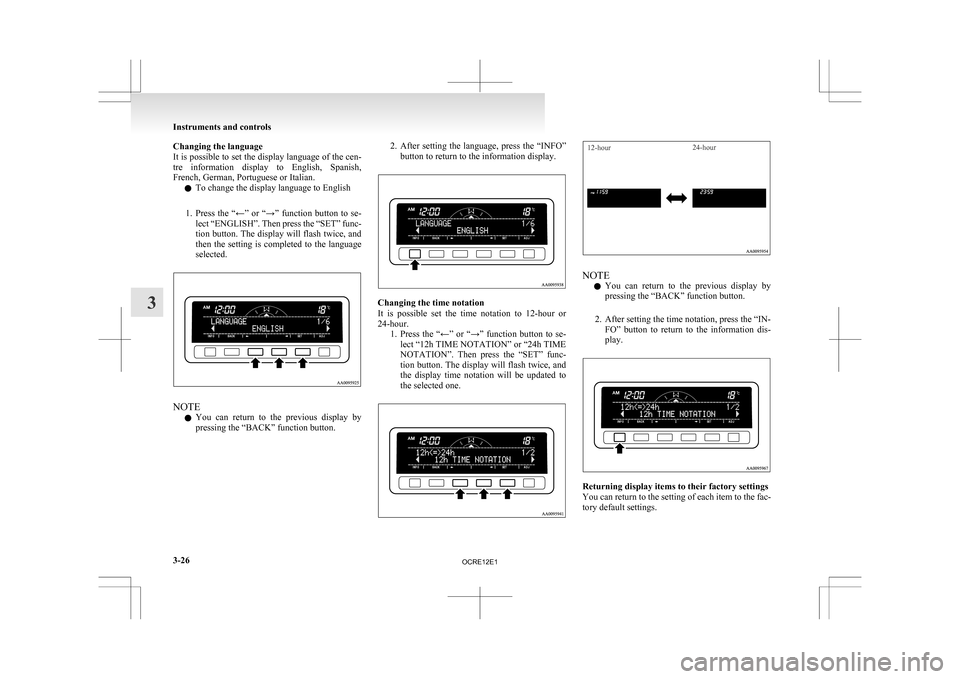
Changing the language
It
is possible to set the display language of the cen-
tre information display to English, Spanish,
French, German, Portuguese or Italian.
l To change the display language to English
1. Press the “←” or “→” function button to se- lect “ENGLISH”. Then press the “SET” func-
tion button. The display will flash twice, and
then the setting is completed to the language
selected. NOTE
l You
can return to the previous display by
pressing the “BACK” function button. 2. After
setting the language, press the “INFO”
button to return to the information display. Changing the time notation
It
is possible set the time notation to 12-hour or
24-hour. 1. Press the “←” or “→” function button to se-lect “12h TIME NOTATION” or “24h TIME
NOTATION”. Then press the “SET” func-
tion button. The display will flash twice, and
the display time notation will be updated to
the selected one.
12-hour 24-hour NOTE
l You
can return to the previous display by
pressing the “BACK” function button.
2. After setting the time notation, press the “IN- FO” button to return to the information dis-
play. Returning display items to their factory settings
You
can return to the setting of each item to the fac-
tory default settings. Instruments and controls
3-26
3
OCRE12E1
Page 114 of 369
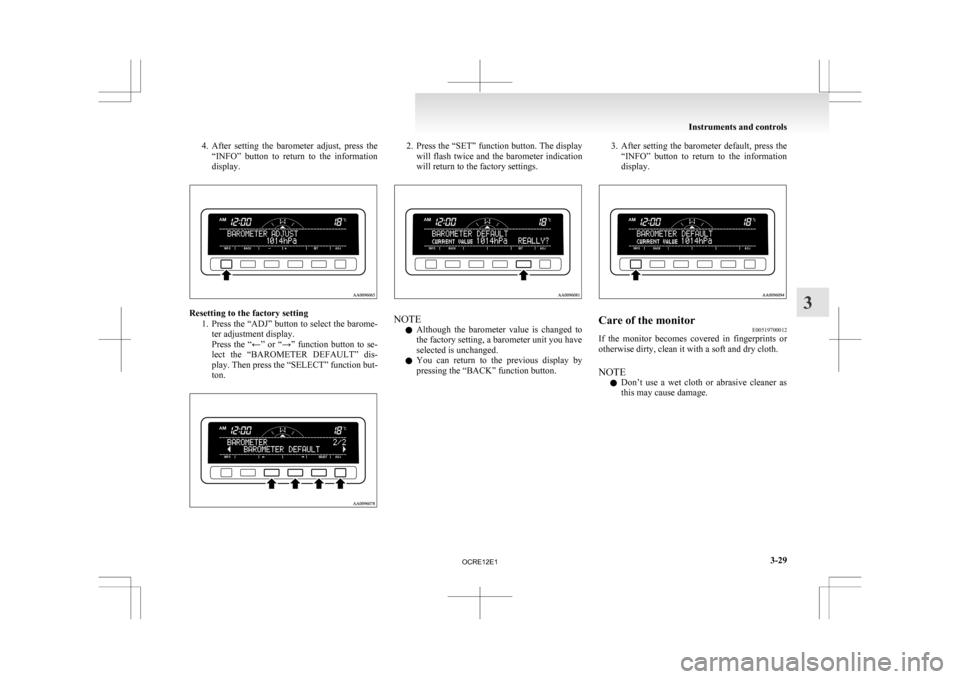
4. After setting the barometer adjust, press the
“INFO” button to return to the information
display. Resetting to the factory setting
1. Press
the “ADJ” button to select the barome-
ter adjustment display.
Press the “←” or “→” function button to se-
lect the “BAROMETER DEFAULT” dis-
play. Then press the “SELECT” function but-
ton. 2. Press
the “SET” function button. The display
will flash twice and the barometer indication
will return to the factory settings. NOTE
l Although
the barometer value is changed to
the factory setting, a barometer unit you have
selected is unchanged.
l You can return to the previous display by
pressing the “BACK” function button. 3. After
setting the barometer default, press the
“INFO” button to return to the information
display. Care of the monitor
E00519700012
If the monitor becomes covered in fingerprints or
otherwise dirty, clean it with a soft and dry cloth.
NOTE
l Don’t
use a wet cloth or abrasive cleaner as
this may cause damage. Instruments and controls
3-29 3
OCRE12E1
Page 116 of 369
l
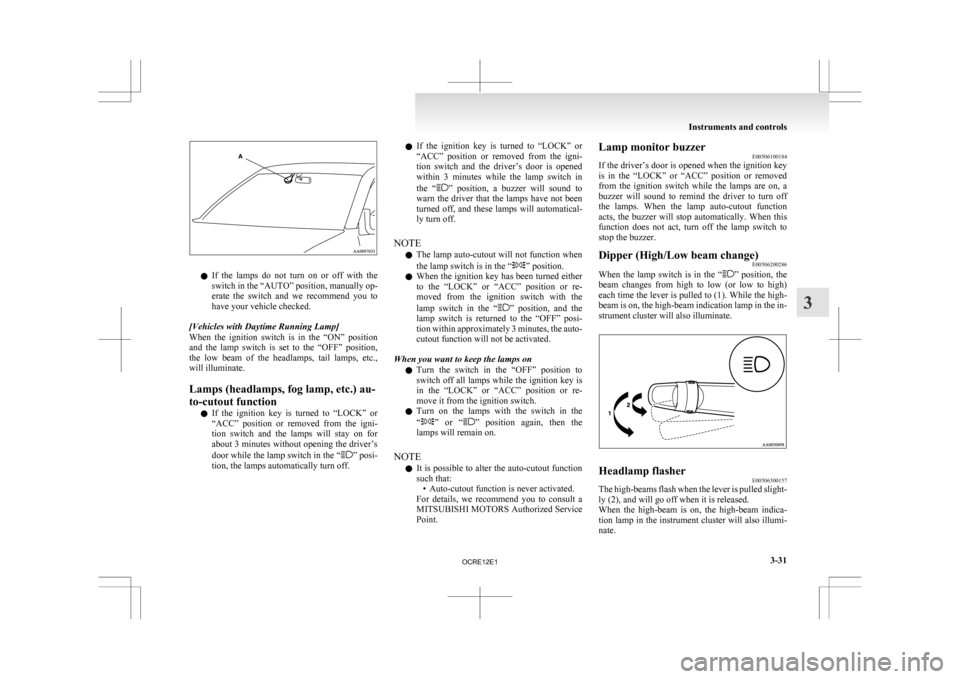
If the lamps do not turn on or off with the
switch in the “AUTO” position, manually op-
erate the switch and we recommend you to
have your vehicle checked.
[Vehicles with Daytime Running Lamp]
When the ignition switch is in the “ON” position
and the lamp switch is set to the “OFF” position,
the low beam of the headlamps, tail lamps, etc.,
will illuminate.
Lamps (headlamps, fog lamp, etc.) au-
to-cutout function l If the ignition key is turned to “LOCK” or
“ACC” position or removed from the igni-
tion switch and the lamps will stay on for
about 3 minutes without opening the driver’s
door while the lamp switch in the “ ” posi-
tion, the lamps automatically turn off. l
If
the ignition key is turned to “LOCK” or
“ACC” position or removed from the igni-
tion switch and the driver’s door is opened
within 3 minutes while the lamp switch in
the “ ”
position, a buzzer will sound to
warn the driver that the lamps have not been
turned off, and these lamps will automatical-
ly turn off.
NOTE l The lamp auto-cutout will not function when
the lamp switch is in the “ ” position.
l When
the ignition key has been turned either
to the “LOCK” or “ACC” position or re-
moved from the ignition switch with the
lamp switch in the “ ”
position, and the
lamp switch is returned to the “OFF” posi-
tion within approximately 3 minutes, the auto-
cutout function will not be activated.
When you want to keep the lamps on l Turn the switch in the “OFF” position to
switch off all lamps while the ignition key is
in the “LOCK” or “ACC” position or re-
move it from the ignition switch.
l Turn on the lamps with the switch in the
“ ”
or “ ” position again, then the
lamps will remain on.
NOTE l It is possible to alter the auto-cutout function
such that:
• Auto-cutout function is never activated.
For details, we recommend you to consult a
MITSUBISHI MOTORS Authorized Service
Point. Lamp monitor buzzer
E00506100184
If
the driver’s door is opened when the ignition key
is in the “LOCK” or “ACC” position or removed
from the ignition switch while the lamps are on, a
buzzer will sound to remind the driver to turn off
the lamps. When the lamp auto-cutout function
acts, the buzzer will stop automatically. When this
function does not act, turn off the lamp switch to
stop the buzzer.
Dipper (High/Low beam change) E00506200286
When the lamp switch is in the “ ”
position, the
beam changes from high to low (or low to high)
each time the lever is pulled to (1). While the high-
beam is on, the high-beam indication lamp in the in-
strument cluster will also illuminate. Headlamp flasher
E00506300157
The high-beams flash when the lever is pulled slight-
ly (2), and will go off when it is released.
When
the high-beam is on, the high-beam indica-
tion lamp in the instrument cluster will also illumi-
nate. Instruments and controls
3-31 3
OCRE12E1
Page 118 of 369
Switch position 0- Driver only
Switch position 3- Driver + Full luggage load-
ing
{Vehicles
with heavy duty
suspension}
Switch position 4- Driver + Full luggage load- ing
{Vehicles
without heavy du-
ty suspension}
Double cab Vehicle condi-
tion Switch position “0”
“2” or “3” or
“4” ●: 1 person
: Full luggage loading Switch position 0- Driver only
Switch position 2- Driver + Full luggage load-
ing
{Vehicles
with heavy duty
suspension for Russia, Ka-
zakhstan and Ukraine}
Switch position 3- Driver + Full luggage load- ing
{Vehicles
with heavy duty
suspension except for Rus-
sia, Kazakhstan and Uk-
raine}
{Vehicles without heavy du-
ty suspension for Russia,
Kazakhstan and Ukraine}
Switch position 4- Driver + Full luggage load- ing
{Vehicles
without heavy du-
ty suspension except for
Russia, Kazakhstan and Uk-
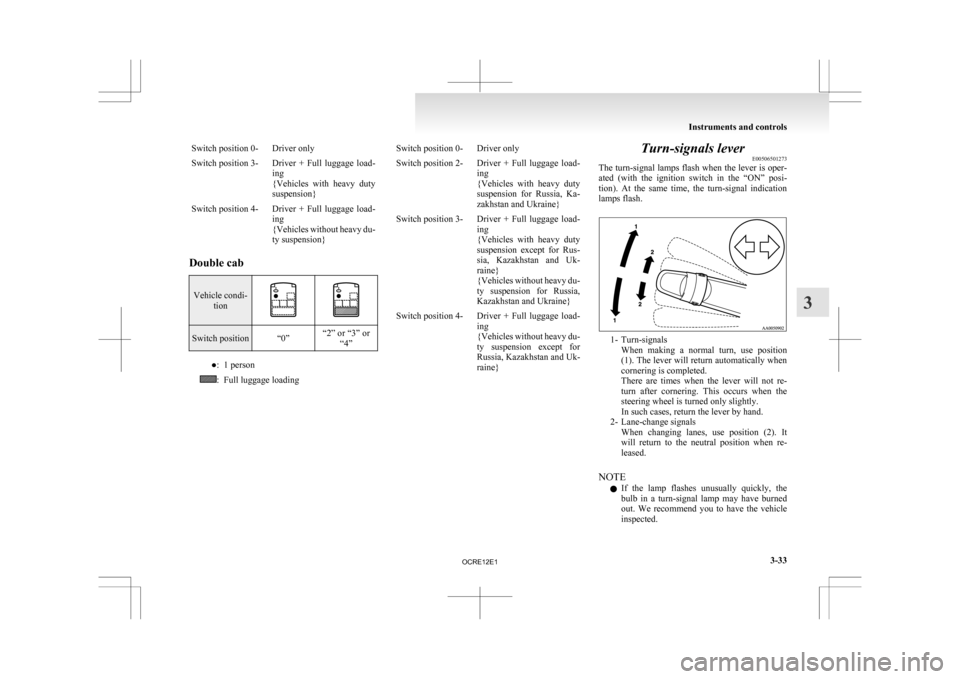
raine} Turn-signals lever
E00506501273
The
turn-signal lamps flash when the lever is oper-
ated (with the ignition switch in the “ON” posi-
tion). At the same time, the turn-signal indication
lamps flash. 1- Turn-signals
When
making a normal turn, use position
(1). The lever will return automatically when
cornering is completed.
There are times when the lever will not re-
turn after cornering. This occurs when the
steering wheel is turned only slightly.
In such cases, return the lever by hand.
2- Lane-change signals When changing lanes, use position (2). It
will return to the neutral position when re-
leased.
NOTE l If the lamp flashes unusually quickly, the
bulb in a turn-signal lamp may have burned
out. We recommend you to have the vehicle
inspected. Instruments and controls
3-33 3
OCRE12E1
Page 123 of 369
Have the vehicle inspected at a
MITSUBISHI
MOTORS Authorized Service
Point. • When the wipers operate at a constant in-terval despite changes in the extent of rain.
• When the wipers do not operate even though it is raining.
l The wipers may automatically operate when
things such as insects or foreign objects are
affixed to the windscreen on top of the rain
sensor or when the windscreen is frozen. Ob-
jects affixed to the windscreen will stop the
wipers when the wipers cannot remove them.
To make the wipers operate again, place the
lever in the “LO” or “HI” position.
Also, the wipers may operate automatically
due to strong direct sunlight or electromag-
netic wave. To stop the wipers, place the lev-
er in the “OFF” position.
l Contact a MITSUBISHI MOTORS Author-
ized Service Point when replacing the wind-
screen or reinforcing the glass around the sen-
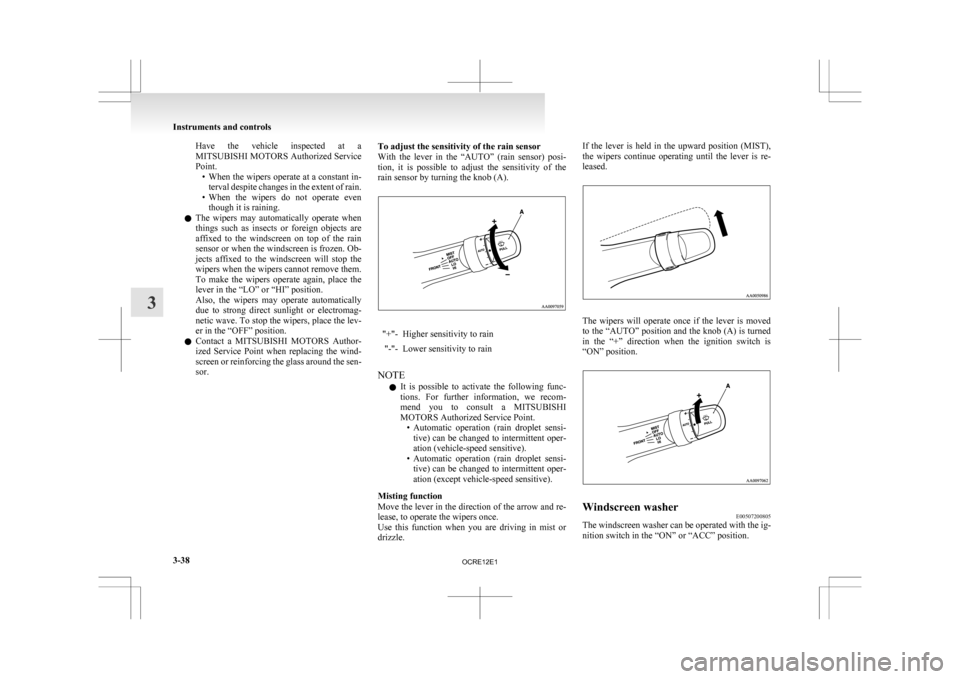
sor. To adjust the sensitivity of the rain sensor
With
the lever in the “AUTO” (rain sensor) posi-
tion, it is possible to adjust the sensitivity of the
rain sensor by turning the knob (A). "+"- Higher sensitivity to rain
"-"- Lower sensitivity to rain
NOTE l It
is possible to activate the following func-
tions. For further information, we recom-
mend you to consult a MITSUBISHI
MOTORS Authorized Service Point. • Automatic operation (rain droplet sensi-tive) can be changed to intermittent oper-
ation (vehicle-speed sensitive).
• Automatic operation (rain droplet sensi- tive) can be changed to intermittent oper-
ation (except vehicle-speed sensitive).
Misting function
Move the lever in the direction of the arrow and re-
lease, to operate the wipers once.
Use this function when you are driving in mist or
drizzle. If the lever is held in the upward position (MIST),
the
wipers continue operating until the lever is re-
leased. The wipers will operate once if the lever is moved
to
the “AUTO” position and the knob (A) is turned
in the “+” direction when the ignition switch is
“ON” position. Windscreen washer
E00507200805
The windscreen washer can be operated with the ig-
nition switch in the “ON” or “ACC” position. Instruments and controls
3-38
3
OCRE12E1
Page 139 of 369
l
When the engine has not been started within
about 5 seconds after the diesel preheat indi-
cation lamp went out, return the ignition key
to the “LOCK” position. Then, turn the key
to the “ON” position to preheat the engine
again.
l When the engine is warm, the diesel preheat
indication lamp does not come on even if the
ignition key is placed in the “ON” position.
Start the engine by turning the ignition key
right to the “START” position.
6. Operate the accelerator pedal as described be- low in accordance with the atmospheric tem-
perature and/or engine condition and then
start the engine.
l When the atmospheric temperature is
moderate or the engine is warm, start the
engine without depressing the accelerator
pedal.
l When the atmospheric temperature is low
and the engine is cold, start the engine
while depressing the accelerator pedal.
Fuel injection amount learning process E00616000028
To keep exhaust emissions and engine noise low,
the
engine very occasionally performs a learning
process for the fuel injection amount.
The engine sounds slightly different from usual
while the learning process is taking place. The
change in the engine sound does not indicate a fault. Diesel particulate filter (DPF)*
E00619800232
The
diesel particulate filter (DPF) is a device that
captures most of the particulate matter (PM) in the
exhaust emissions of the diesel engine. The DPF au-
tomatically burns away trapped PM during vehicle
operation. Under certain driving conditions, howev-
er, the DPF is not able to burn away all of the trap-
ped PM and, as a result, an excessive amount of
PM accumulates inside it. WARNING
l The DPF reaches very high temperatures.
Do
not park your vehicle in areas where
combustible materials such as dry grass
or leaves can come in contact with a hot
exhaust system since a fire could occur. CAUTION
l
Do
not use any type of fuel or engine oil
that is not specified for your vehicle. Al-
so, do not use any moisture-removing
agent or other fuel additive. Such substan-
ces could have a detrimental effect on the
DPF.
Refer to “Fuel selection” on page 02 and
“Engine oil” on page 8-04.
NOTE l To
minimize the likelihood of excessive ac-
cumulation of PM, try to avoid driving for
long periods at low speeds and repeatedly
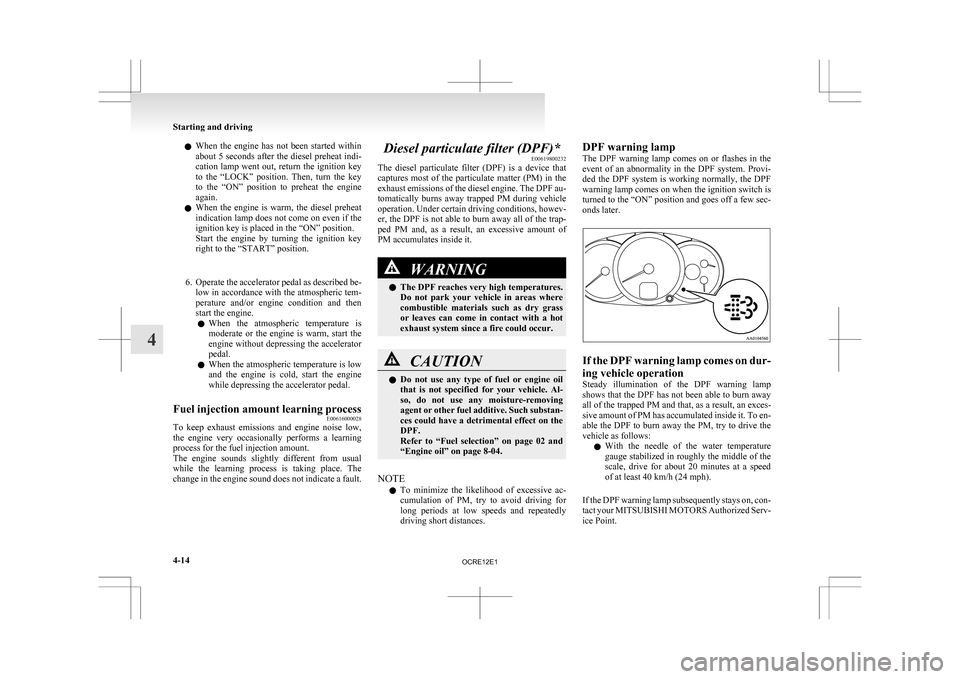
driving short distances. DPF warning lamp
The
DPF warning lamp comes on or flashes in the
event of an abnormality in the DPF system. Provi-
ded the DPF system is working normally, the DPF
warning lamp comes on when the ignition switch is
turned to the “ON” position and goes off a few sec-
onds later. If the DPF warning lamp comes on dur-
ing vehicle operation
Steady
illumination of the DPF warning lamp
shows that the DPF has not been able to burn away
all of the trapped PM and that, as a result, an exces-
sive amount of PM has accumulated inside it. To en-
able the DPF to burn away the PM, try to drive the
vehicle as follows:
l With the needle of the water temperature
gauge stabilized in roughly the middle of the
scale, drive for about 20 minutes at a speed
of at least 40 km/h (24 mph).
If the DPF warning lamp subsequently stays on, con-
tact your MITSUBISHI MOTORS Authorized Serv-
ice Point. Starting and driving
4-14
4
OCRE12E1
Page 140 of 369
CAUTION
l
You do not have to continuously drive ex-
actly as indicated above. Always strive to
drive safely in accordance with road con-
ditions.
If the DPF warning lamp flashes dur-
ing vehicle operation
Flashing
of the DPF warning lamp indicates an ab-
normality in the DPF system. Have the system in-
spected at a MITSUBISHI MOTORS Authorized
Service Point. CAUTION
l
Continuing
to drive with the DPF warn-
ing lamp flashing could result in engine
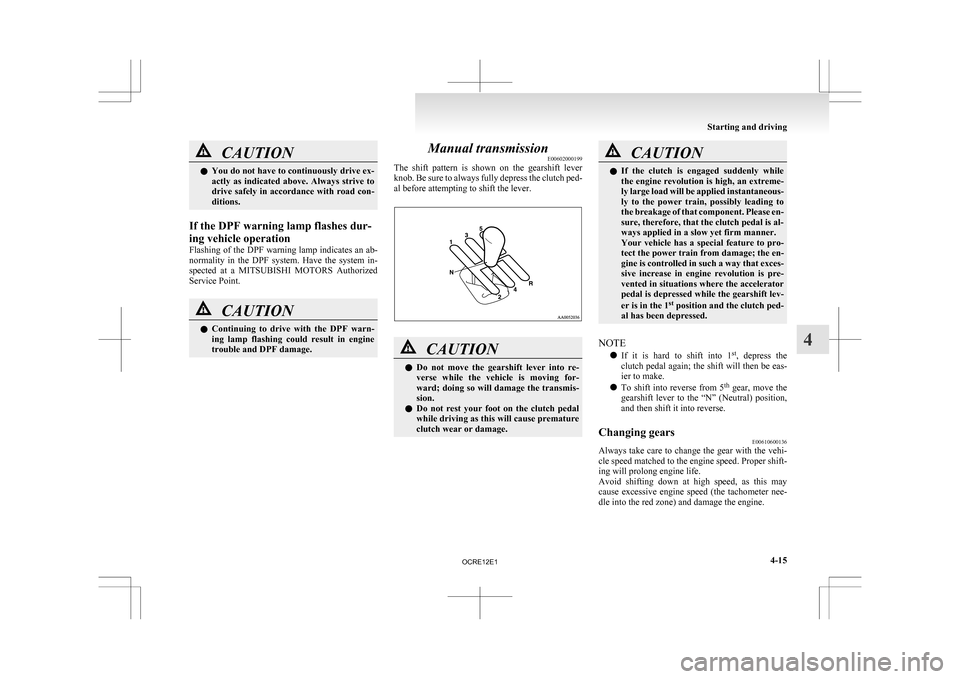
trouble and DPF damage. Manual transmission
E00602000199
The
shift pattern is shown on the gearshift lever
knob. Be sure to always fully depress the clutch ped-
al before attempting to shift the lever. CAUTION
l
Do
not move the gearshift lever into re-
verse while the vehicle is moving for-
ward; doing so will damage the transmis-
sion.
l Do not rest your foot on the clutch pedal
while driving as this will cause premature
clutch wear or damage. CAUTION
l
If
the clutch is engaged suddenly while
the engine revolution is high, an extreme-
ly large load will be applied instantaneous-
ly to the power train, possibly leading to
the breakage of that component. Please en-
sure, therefore, that the clutch pedal is al-
ways applied in a slow yet firm manner.
Your vehicle has a special feature to pro-
tect the power train from damage; the en-
gine is controlled in such a way that exces-
sive increase in engine revolution is pre-
vented in situations where the accelerator
pedal is depressed while the gearshift lev-
er is in the 1 st
position and the clutch ped-
al has been depressed.
NOTE l If
it is hard to shift into 1 st
, depress the
clutch pedal again; the shift will then be eas-
ier to make.
l To shift into reverse from 5 th
gear, move the
gearshift lever to the “N” (Neutral) position,
and then shift it into reverse.
Changing gears E00610600136
Always take care to change the gear with the vehi-
cle
speed matched to the engine speed. Proper shift-
ing will prolong engine life.
Avoid shifting down at high speed, as this may
cause excessive engine speed (the tachometer nee-
dle into the red zone) and damage the engine. Starting and driving
4-15 4
OCRE12E1
Page 146 of 369
When the automatic transmission makes no speed
change
E00604800478
If
the transmission does not change speeds while
driving, or your vehicle does not pick up enough
speed when starting on an uphill slope, it may be
that there is something unusual happening in the
transmission, causing a safety device to activate.
We recommend you to have your checked as soon
as possible.
NOTE
l When the selector lever position indicator in
the instrument panel blinks, it means that
there is an abnormal condition in the trans-
mission. Refer to “When the selector lever po-
sition indicator blinks” on page 4-19. Automatic transmission Sports
Mode 5A/T E00603200576
NOTE l During
running-in period or immediately af-
ter reconnection of the battery cable, there
may be a case where gear shifts are not made
smoothly. This does not indicate a faulty trans-
mission.
Gear shifts will become smooth after the trans-
mission has been shifted several times by the
electronic control system.
Selector lever operation E00603300867
The transmission has 5 forward gears and 1 reverse
gear.
The
individual gears are selected automatically, de-
pending on the position of the gear selector lever,
the speed of the vehicle and the position of the ac-
celerator pedal.
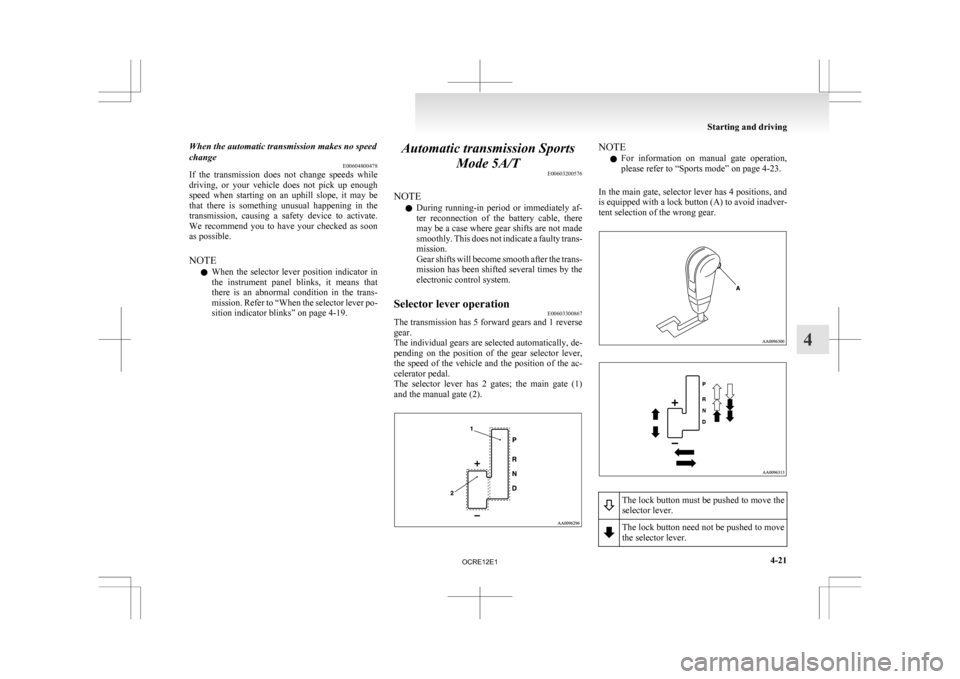
The selector lever has 2 gates; the main gate (1)
and the manual gate (2). NOTE
l For
information on manual gate operation,
please refer to “Sports mode” on page 4-23.
In the main gate, selector lever has 4 positions, and
is equipped with a lock button (A) to avoid inadver-
tent selection of the wrong gear. The lock button must be pushed to move the
selector lever.
The lock button need not be pushed to move
the selector lever. Starting and driving
4-21 4
OCRE12E1
Page 150 of 369
CAUTION
l
Operating the accelerator pedal while the
other foot is resting on the brake pedal
will affect braking efficiency and may
cause premature wear of brake pads.
l Use the selector lever in the correct shift
position in accordance with driving condi-
tions.
Never coast downhill backward with the
driving shift position {“D” (DRIVE) or
sports mode} or coast forward with the
“R” (REVERSE) position.
The engine stops and the brake pedal ef-
fort or the steering wheel handling weight
increasing could lead to an accident.
l Do not race the engine with brake pedal
pressed when the vehicle is stationary.
This can damage the automatic transmis-
sion.
Passing acceleration E00604500329
To gain extra acceleration in “D” (DRIVE) posi-
tion,
push the accelerator to the floor. The automat-
ic transmission will automatically downshift.
NOTE
l In “Sports mode”, downshifts do not take
place when the accelerator is depressed all
the way to the floor.
Waiting E00604600304
For short waiting periods, such as at traffic signals,
the
vehicle can be left in gear and held stationary
with the service brake. For longer waiting periods with the engine running,
place
the selector lever in the “N” (NEUTRAL) po-
sition.. CAUTION
l
Never
hold the vehicle stationary on a hill
using the accelerator pedal (without us-
ing the brake pedal). Always apply the
parking brake and/or service brakes.
l Unexpected acceleration may occur if the
selector lever is in a position other than
“P” (PARK) or “N” (NEUTRAL). Prior
to moving off after having stopped the ve-
hicle, make sure that the selector lever is
in the “D” (DRIVE) position.
Parking E00604700262
To park the vehicle, first bring it to a complete
stop,
fully engage the parking brake, and then
move the selector lever to the “P” (PARK) position.
If you are going to leave the vehicle unattended, al-
ways switch off the engine and remove the ignition
key. NOTE
l On
a slope, be sure to apply the parking
brake before moving the selector lever to the
“P” (PARK) position. If you move the selec-
tor lever to the “P” (PARK) position before
applying the parking brake, it may be diffi-
cult to disengage the selector lever from the
“P” (PARK) position when next you drive
the vehicle, requiring application of a strong
force to the selector lever to move from the
“P” (PARK) position.
When the automatic transmission makes no speed
change E00604800683
If the transmission does not change speeds while
driving,
or your vehicle does not pick up enough
speed when starting on an uphill slope, it may be
that there is something unusual happening in the
transmission, causing a safety device to activate.
We recommend you to have your checked as soon
as possible. 1. If your vehicle has difficulty moving uphill,
shift the selector lever into 2 nd
gear of the
“Sports mode”.
This method might not work depending on
the type of transmission malfunction.
2. Once the vehicle is moving on a level road, move the selector lever back to “D” (DRIVE).
NOTE l When the selector lever position indicator in
the instrument panel blinks, it means that
there is an abnormal condition in the trans-
mission. Refer to “When the selector lever po-
sition indicator blinks” on page 4-19. Starting and driving
4-25 4
OCRE12E1
Page 159 of 369
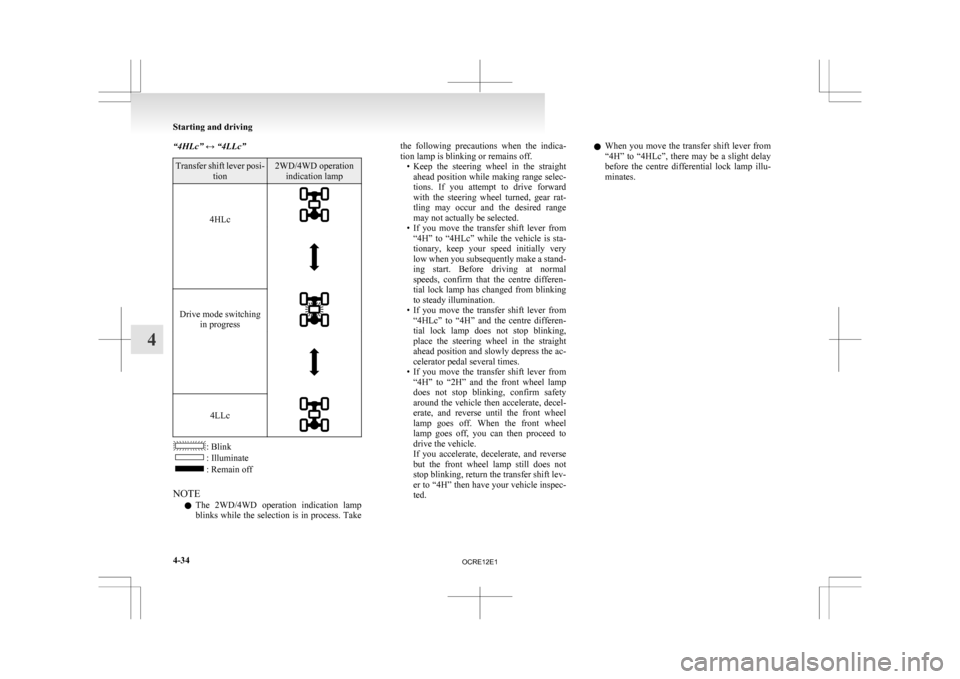
“4HLc” ↔ “4LLc”
Transfer shift lever posi-
tion 2WD/4WD operation
indication lamp
4HLc
Drive mode switching
in progress
4LLc
: Blink
: Illuminate
: Remain off
NOTE l The
2WD/4WD operation indication lamp
blinks while the selection is in process. Take the following precautions when the indica-
tion lamp is blinking or remains off.
• Keep
the steering wheel in the straight
ahead position while making range selec-
tions. If you attempt to drive forward
with the steering wheel turned, gear rat-
tling may occur and the desired range
may not actually be selected.
• If you move the transfer shift lever from “4H” to “4HLc” while the vehicle is sta-
tionary, keep your speed initially very
low when you subsequently make a stand-
ing start. Before driving at normal
speeds, confirm that the centre differen-
tial lock lamp has changed from blinking
to steady illumination.
• If you move the transfer shift lever from “4HLc” to “4H” and the centre differen-
tial lock lamp does not stop blinking,
place the steering wheel in the straight
ahead position and slowly depress the ac-
celerator pedal several times.
• If you move the transfer shift lever from “4H” to “2H” and the front wheel lamp
does not stop blinking, confirm safety
around the vehicle then accelerate, decel-
erate, and reverse until the front wheel
lamp goes off. When the front wheel
lamp goes off, you can then proceed to
drive the vehicle.
If you accelerate, decelerate, and reverse
but the front wheel lamp still does not
stop blinking, return the transfer shift lev-
er to “4H” then have your vehicle inspec-
ted. l
When you move the transfer shift lever from
“4H” to “4HLc”, there may be a slight delay
before the centre differential lock lamp illu-
minates. Starting and driving
4-34
4
OCRE12E1