door lock MITSUBISHI L200 2012 (in English) User Guide
[x] Cancel search | Manufacturer: MITSUBISHI, Model Year: 2012, Model line: L200, Model: MITSUBISHI L200 2012Pages: 370, PDF Size: 23.14 MB
Page 38 of 370
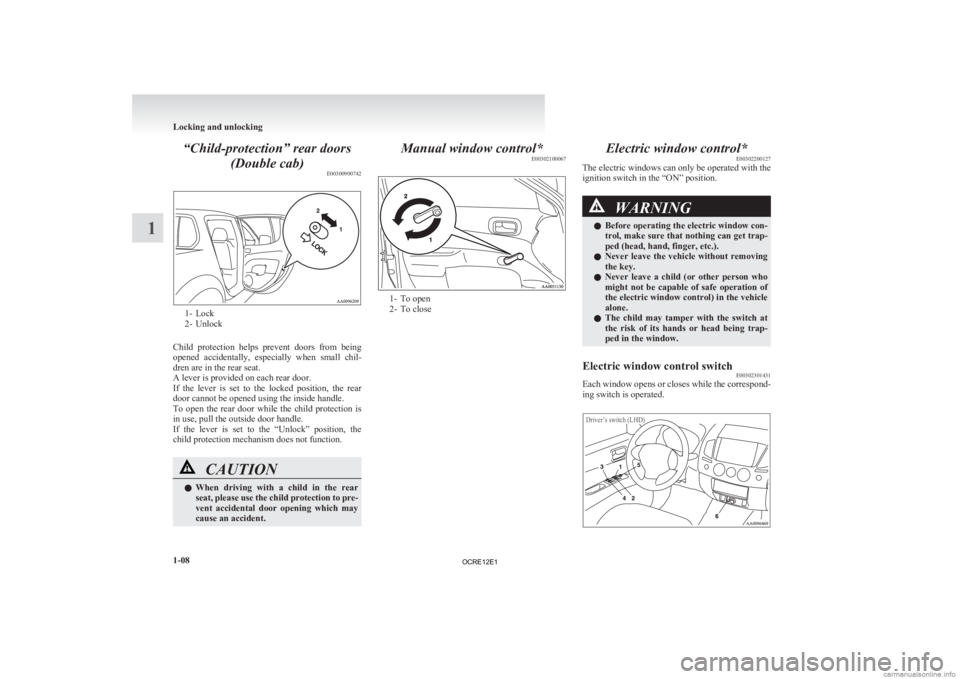
“Child-protection” rear doors
(Double cab) E003009007421- Lock
2-
Unlock
Child protection helps prevent doors from being
opened accidentally, especially when small chil-
dren are in the rear seat.
A lever is provided on each rear door.
If the lever is set to the locked position, the rear
door cannot be opened using the inside handle.
To open the rear door while the child protection is
in use, pull the outside door handle.
If the lever is set to the “Unlock” position, the
child protection mechanism does not function. CAUTION
l
When
driving with a child in the rear
seat, please use the child protection to pre-
vent accidental door opening which may
cause an accident. Manual window control*
E00302100067 1- To open
2-
To close Electric window control*
E00302200127
The electric windows can only be operated with the
ignition switch in the “ON” position. WARNING
l Before
operating the electric window con-
trol, make sure that nothing can get trap-
ped (head, hand, finger, etc.).
l Never leave the vehicle without removing
the key.
l Never leave a child (or other person who
might not be capable of safe operation of
the electric window control) in the vehicle
alone.
l The child may tamper with the switch at
the risk of its hands or head being trap-
ped in the window.
Electric window control switch E00302301431
Each window opens or closes while the correspond-
ing switch is operated.
Driver’s switch (LHD) Locking and unlocking
1-08
1
OCRE12E1
Page 39 of 370
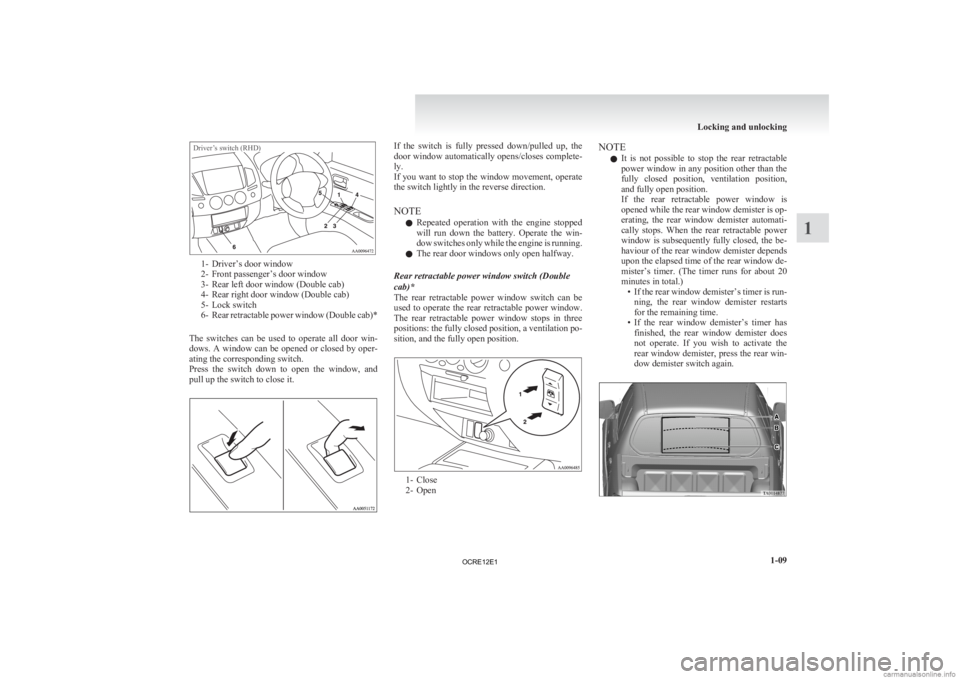
Driver’s switch (RHD)1- Driver’s door window
2-
Front passenger’s door window
3- Rear left door window (Double cab)
4- Rear right door window (Double cab)
5- Lock switch
6- Rear retractable power window (Double cab)*
The switches can be used to operate all door win-
dows. A window can be opened or closed by oper-
ating the corresponding switch.
Press the switch down to open the window, and
pull up the switch to close it. If the switch is fully pressed down/pulled up, the
door
window automatically opens/closes complete-
ly.
If you want to stop the window movement, operate
the switch lightly in the reverse direction.
NOTE
l Repeated operation with the engine stopped
will run down the battery. Operate the win-
dow switches only while the engine is running.
l The rear door windows only open halfway.
Rear retractable power window switch (Double
cab)*
The rear retractable power window switch can be
used to operate the rear retractable power window.
The rear retractable power window stops in three
positions: the fully closed position, a ventilation po-
sition, and the fully open position. 1- Close
2-
Open NOTE
l It
is not possible to stop the rear retractable
power window in any position other than the
fully closed position, ventilation position,
and fully open position.
If the rear retractable power window is
opened while the rear window demister is op-
erating, the rear window demister automati-
cally stops. When the rear retractable power
window is subsequently fully closed, the be-
haviour of the rear window demister depends
upon the elapsed time of the rear window de-
mister’s timer. (The timer runs for about 20
minutes in total.) • If the rear window demister’s timer is run-ning, the rear window demister restarts
for the remaining time.
• If the rear window demister’s timer has finished, the rear window demister does
not operate. If you wish to activate the
rear window demister, press the rear win-
dow demister switch again. Locking and unlocking
1-09 1
OCRE12E1
Page 40 of 370
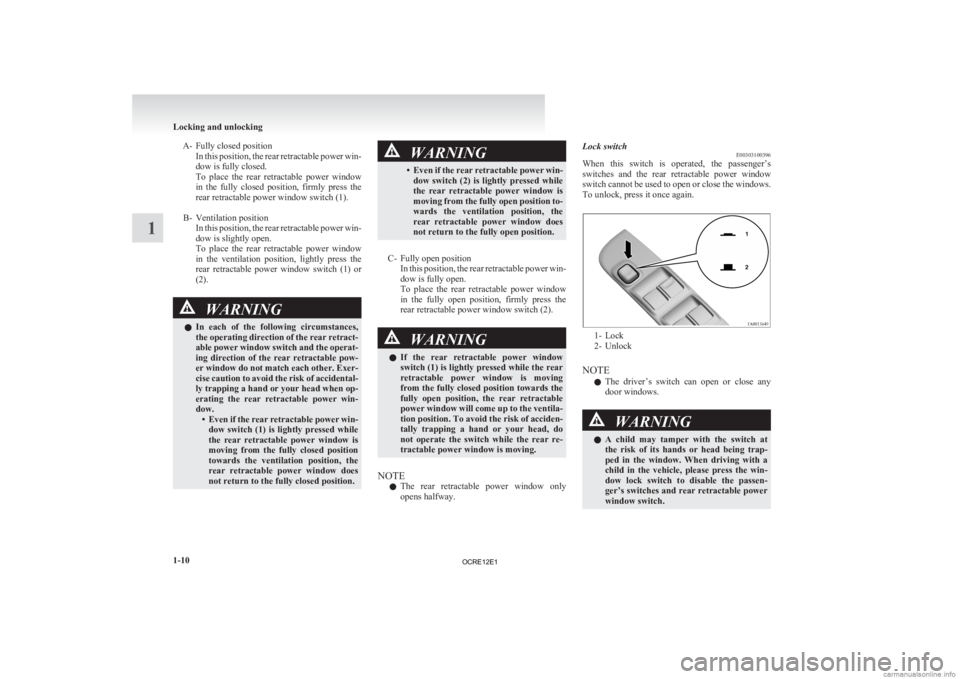
A- Fully closed position
In this position, the rear retractable power win-
dow is fully closed.
To place the rear retractable power window
in the fully closed position, firmly press the
rear retractable power window switch (1).
B- Ventilation position In this position, the rear retractable power win-
dow is slightly open.
To place the rear retractable power window
in the ventilation position, lightly press the
rear retractable power window switch (1) or
(2). WARNING
l In
each of the following circumstances,
the operating direction of the rear retract-
able power window switch and the operat-
ing direction of the rear retractable pow-
er window do not match each other. Exer-
cise caution to avoid the risk of accidental-
ly trapping a hand or your head when op-
erating the rear retractable power win-
dow. • Even if the rear retractable power win-dow switch (1) is lightly pressed while
the rear retractable power window is
moving from the fully closed position
towards the ventilation position, the
rear retractable power window does
not return to the fully closed position. WARNING
• Even
if the rear retractable power win- dow switch (2) is lightly pressed while
the rear retractable power window is
moving from the fully open position to-
wards the ventilation position, the
rear retractable power window does
not return to the fully open position.
C- Fully open position In
this position, the rear retractable power win-
dow is fully open.
To place the rear retractable power window
in the fully open position, firmly press the
rear retractable power window switch (2). WARNING
l If
the rear retractable power window
switch (1) is lightly pressed while the rear
retractable power window is moving
from the fully closed position towards the
fully open position, the rear retractable
power window will come up to the ventila-
tion position. To avoid the risk of acciden-
tally trapping a hand or your head, do
not operate the switch while the rear re-
tractable power window is moving.
NOTE l The
rear retractable power window only
opens halfway. Lock switch
E00303100396
When
this switch is operated, the passenger’s
switches and the rear retractable power window
switch cannot be used to open or close the windows.
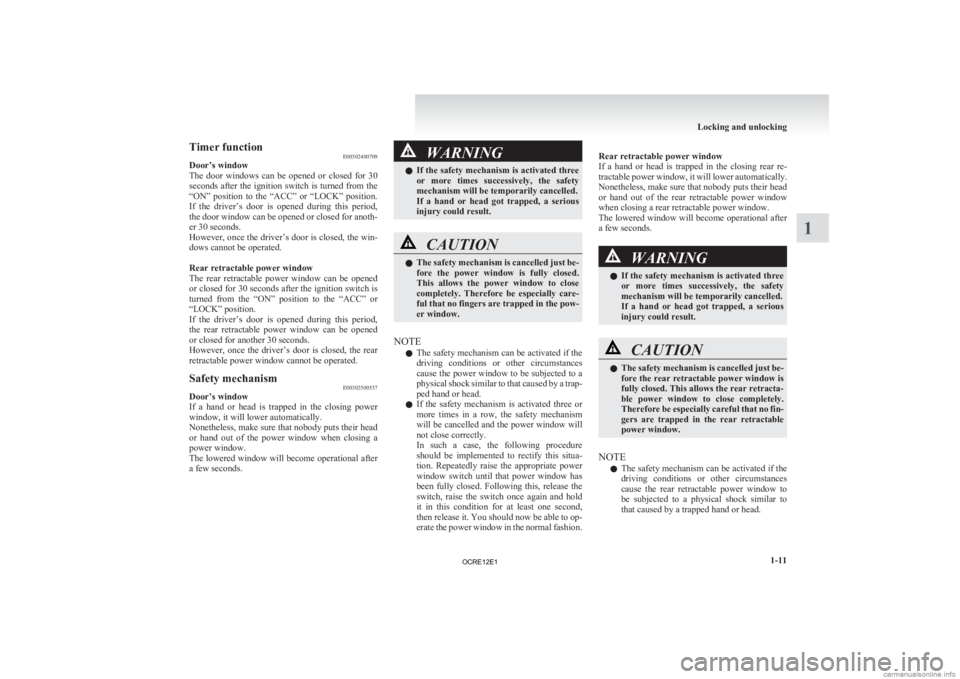
To unlock, press it once again. 1- Lock
2-
Unlock
NOTE l The driver’s switch can open or close any
door windows. WARNING
l A
child may tamper with the switch at
the risk of its hands or head being trap-
ped in the window. When driving with a
child in the vehicle, please press the win-
dow lock switch to disable the passen-
ger’s switches and rear retractable power
window switch. Locking and unlocking
1-10
1
OCRE12E1
Page 41 of 370
Timer function
E00302400709
Door’s window
The
door windows can be opened or closed for 30
seconds after the ignition switch is turned from the
“ON” position to the “ACC” or “LOCK” position.
If the driver’s door is opened during this period,
the door window can be opened or closed for anoth-
er 30 seconds.
However, once the driver’s door is closed, the win-
dows cannot be operated.
Rear retractable power window
The rear retractable power window can be opened
or closed for 30 seconds after the ignition switch is
turned from the “ON” position to the “ACC” or
“LOCK” position.
If the driver’s door is opened during this period,
the rear retractable power window can be opened
or closed for another 30 seconds.
However, once the driver’s door is closed, the rear
retractable power window cannot be operated.
Safety mechanism E00302500537
Door’s window
If
a hand or head is trapped in the closing power
window, it will lower automatically.
Nonetheless, make sure that nobody puts their head
or hand out of the power window when closing a
power window.
The lowered window will become operational after
a few seconds. WARNING
l If
the safety mechanism is activated three
or more times successively, the safety
mechanism will be temporarily cancelled.
If a hand or head got trapped, a serious
injury could result. CAUTION
l
The
safety mechanism is cancelled just be-
fore the power window is fully closed.
This allows the power window to close
completely. Therefore be especially care-
ful that no fingers are trapped in the pow-
er window.
NOTE l The
safety mechanism can be activated if the
driving conditions or other circumstances
cause the power window to be subjected to a
physical shock similar to that caused by a trap-
ped hand or head.
l If the safety mechanism is activated three or
more times in a row, the safety mechanism
will be cancelled and the power window will
not close correctly.
In such a case, the following procedure
should be implemented to rectify this situa-
tion. Repeatedly raise the appropriate power
window switch until that power window has
been fully closed. Following this, release the
switch, raise the switch once again and hold
it in this condition for at least one second,
then release it. You should now be able to op-
erate the power window in the normal fashion.
Rear retractable power window
If
a hand or head is trapped in the closing rear re-
tractable power window, it will lower automatically.
Nonetheless, make sure that nobody puts their head
or hand out of the rear retractable power window
when closing a rear retractable power window.
The lowered window will become operational after
a few seconds. WARNING
l If
the safety mechanism is activated three
or more times successively, the safety
mechanism will be temporarily cancelled.
If a hand or head got trapped, a serious
injury could result. CAUTION
l
The
safety mechanism is cancelled just be-
fore the rear retractable power window is
fully closed. This allows the rear retracta-
ble power window to close completely.
Therefore be especially careful that no fin-
gers are trapped in the rear retractable
power window.
NOTE l The
safety mechanism can be activated if the
driving conditions or other circumstances
cause the rear retractable power window to
be subjected to a physical shock similar to
that caused by a trapped hand or head. Locking and unlocking
1-11 1
OCRE12E1
Page 92 of 370
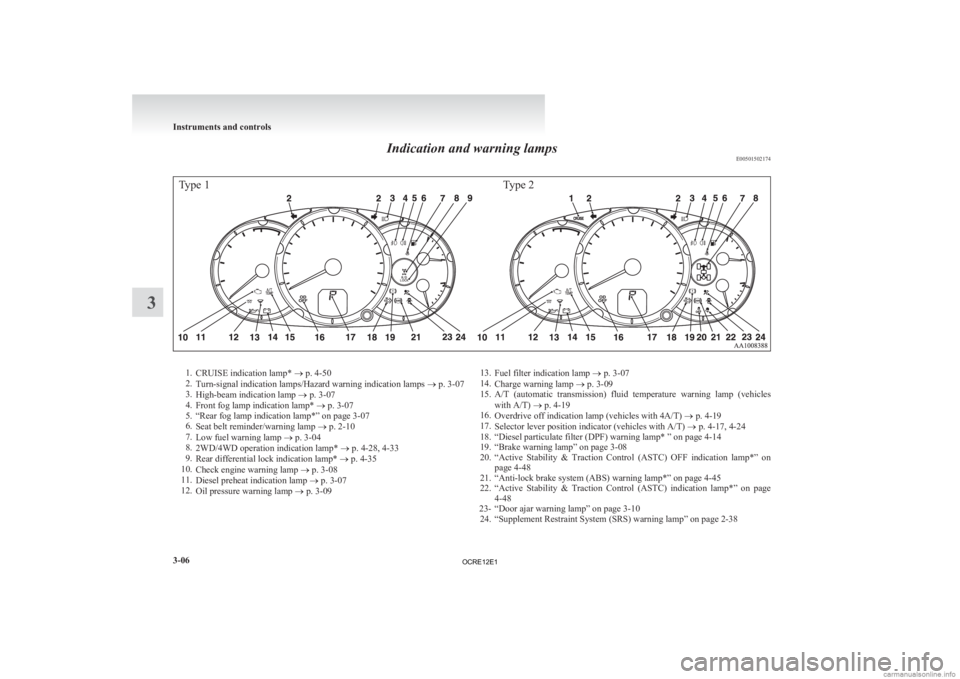
Indication and warning lamps
E00501502174Type 1Type 21.
CRUISE indication lamp*
® p. 4-50
2. Turn-signal indication lamps/Hazard warning indication lamps ® p. 3-07
3. High-beam indication lamp ® p. 3-07
4. Front fog lamp indication lamp* ® p. 3-07
5. “Rear fog lamp indication lamp*” on page 3-07
6. Seat belt reminder/warning lamp ® p. 2-10
7. Low fuel warning lamp ® p. 3-04
8. 2WD/4WD operation indication lamp* ® p. 4-28, 4-33
9. Rear differential lock indication lamp* ® p. 4-35
10. Check engine warning lamp ® p. 3-08
11. Diesel preheat indication lamp ® p. 3-07
12. Oil pressure warning lamp ® p. 3-09 13.
Fuel filter indication lamp ® p. 3-07
14. Charge warning lamp ® p. 3-09
15. A/T (automatic transmission) fluid temperature warning lamp (vehicles
with A/T) ® p. 4-19
16. Overdrive off indication lamp (vehicles with 4A/T) ® p. 4-19
17. Selector lever position indicator (vehicles with A/T) ® p. 4-17, 4-24
18. “Diesel particulate filter (DPF) warning lamp* ” on page 4-14
19. “Brake warning lamp” on page 3-08
20. “Active Stability & Traction Control (ASTC) OFF indication lamp*” on page 4-48
21. “Anti-lock brake system (ABS) warning lamp*” on page 4-45
22. “Active Stability & Traction Control (ASTC) indication lamp*” on page 4-48
23- “Door ajar warning lamp” on page 3-10 24. “Supplement Restraint System (SRS) warning lamp” on page 2-38 Instruments and controls
3-06
3
OCRE12E1
Page 117 of 370
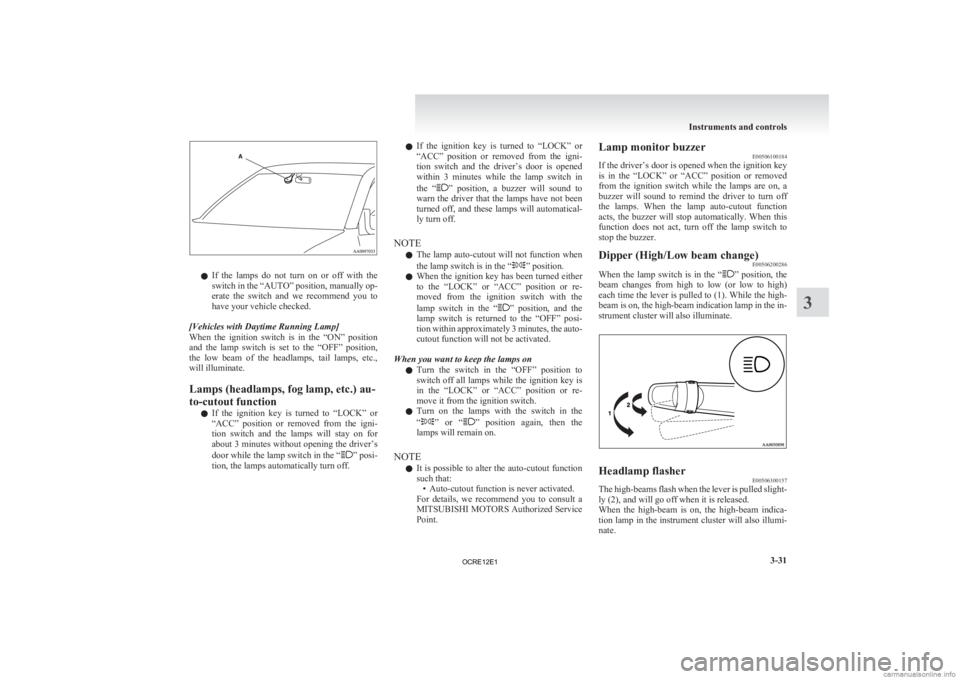
l
If the lamps do not turn on or off with the
switch in the “AUTO” position, manually op-
erate the switch and we recommend you to
have your vehicle checked.
[Vehicles with Daytime Running Lamp]
When the ignition switch is in the “ON” position
and the lamp switch is set to the “OFF” position,
the low beam of the headlamps, tail lamps, etc.,
will illuminate.
Lamps (headlamps, fog lamp, etc.) au-
to-cutout function l If the ignition key is turned to “LOCK” or
“ACC” position or removed from the igni-
tion switch and the lamps will stay on for
about 3 minutes without opening the driver’s
door while the lamp switch in the “ ” posi-
tion, the lamps automatically turn off. l
If
the ignition key is turned to “LOCK” or
“ACC” position or removed from the igni-
tion switch and the driver’s door is opened
within 3 minutes while the lamp switch in
the “ ”
position, a buzzer will sound to
warn the driver that the lamps have not been
turned off, and these lamps will automatical-
ly turn off.
NOTE l The lamp auto-cutout will not function when
the lamp switch is in the “ ” position.
l When
the ignition key has been turned either
to the “LOCK” or “ACC” position or re-
moved from the ignition switch with the
lamp switch in the “ ”
position, and the
lamp switch is returned to the “OFF” posi-
tion within approximately 3 minutes, the auto-
cutout function will not be activated.
When you want to keep the lamps on l Turn the switch in the “OFF” position to
switch off all lamps while the ignition key is
in the “LOCK” or “ACC” position or re-
move it from the ignition switch.
l Turn on the lamps with the switch in the
“ ”
or “ ” position again, then the
lamps will remain on.
NOTE l It is possible to alter the auto-cutout function
such that:
• Auto-cutout function is never activated.
For details, we recommend you to consult a
MITSUBISHI MOTORS Authorized Service
Point. Lamp monitor buzzer
E00506100184
If
the driver’s door is opened when the ignition key
is in the “LOCK” or “ACC” position or removed
from the ignition switch while the lamps are on, a
buzzer will sound to remind the driver to turn off
the lamps. When the lamp auto-cutout function
acts, the buzzer will stop automatically. When this
function does not act, turn off the lamp switch to
stop the buzzer.
Dipper (High/Low beam change) E00506200286
When the lamp switch is in the “ ”
position, the
beam changes from high to low (or low to high)
each time the lever is pulled to (1). While the high-
beam is on, the high-beam indication lamp in the in-
strument cluster will also illuminate. Headlamp flasher
E00506300157
The high-beams flash when the lever is pulled slight-
ly (2), and will go off when it is released.
When
the high-beam is on, the high-beam indica-
tion lamp in the instrument cluster will also illumi-
nate. Instruments and controls
3-31 3
OCRE12E1
Page 134 of 370
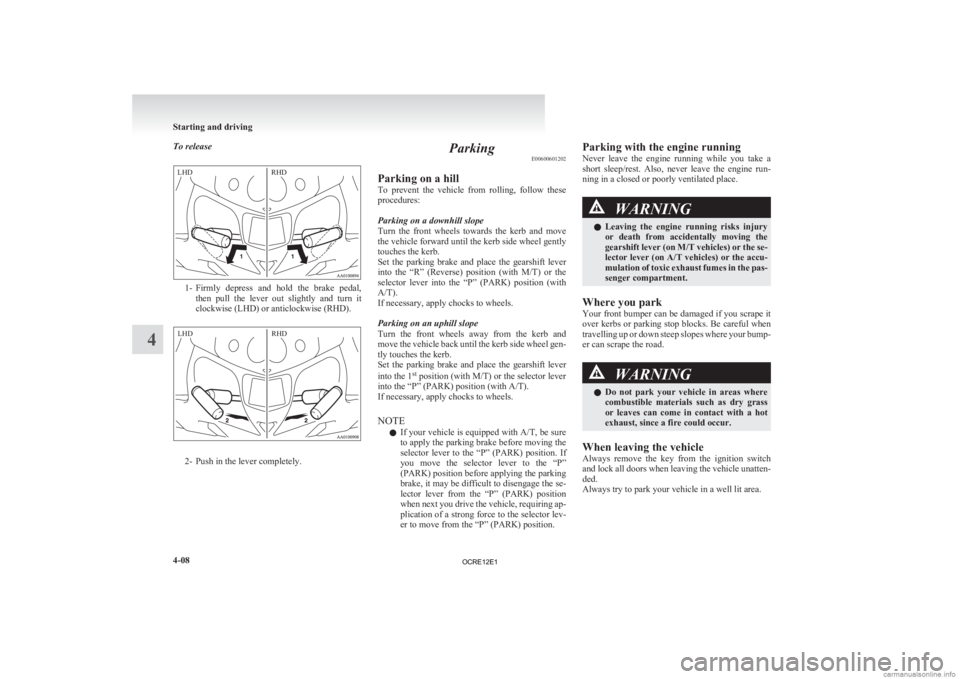
To release
1- Firmly depress and hold the brake pedal,
then pull the lever out slightly and turn it
clockwise (LHD) or anticlockwise (RHD). 2- Push in the lever completely. Parking
E00600601202
Parking on a hill
To
prevent the vehicle from rolling, follow these
procedures:
Parking on a downhill slope
Turn the front wheels towards the kerb and move
the vehicle forward until the kerb side wheel gently
touches the kerb.
Set the parking brake and place the gearshift lever
into the “R” (Reverse) position (with M/T) or the
selector lever into the “P” (PARK) position (with
A/T).
If necessary, apply chocks to wheels.
Parking on an uphill slope
Turn the front wheels away from the kerb and
move the vehicle back until the kerb side wheel gen-
tly touches the kerb.
Set the parking brake and place the gearshift lever
into the 1 st
position (with M/T) or the selector lever
into the “P” (PARK) position (with A/T).
If necessary, apply chocks to wheels.
NOTE
l If your vehicle is equipped with A/T, be sure
to apply the parking brake before moving the
selector lever to the “P” (PARK) position. If
you move the selector lever to the “P”
(PARK) position before applying the parking
brake, it may be difficult to disengage the se-
lector lever from the “P” (PARK) position
when next you drive the vehicle, requiring ap-
plication of a strong force to the selector lev-
er to move from the “P” (PARK) position. Parking with the engine running
Never
leave the engine running while you take a
short sleep/rest. Also, never leave the engine run-
ning in a closed or poorly ventilated place. WARNING
l Leaving
the engine running risks injury
or death from accidentally moving the
gearshift lever (on M/T vehicles) or the se-
lector lever (on A/T vehicles) or the accu-
mulation of toxic exhaust fumes in the pas-
senger compartment.
Where you park
Your
front bumper can be damaged if you scrape it
over kerbs or parking stop blocks. Be careful when
travelling up or down steep slopes where your bump-
er can scrape the road. WARNING
l Do
not park your vehicle in areas where
combustible materials such as dry grass
or leaves can come in contact with a hot
exhaust, since a fire could occur.
When leaving the vehicle
Always
remove the key from the ignition switch
and lock all doors when leaving the vehicle unatten-
ded.
Always try to park your vehicle in a well lit area. Starting and driving
4-08
4LHD RHD LHD RHD
OCRE12E1
Page 190 of 370
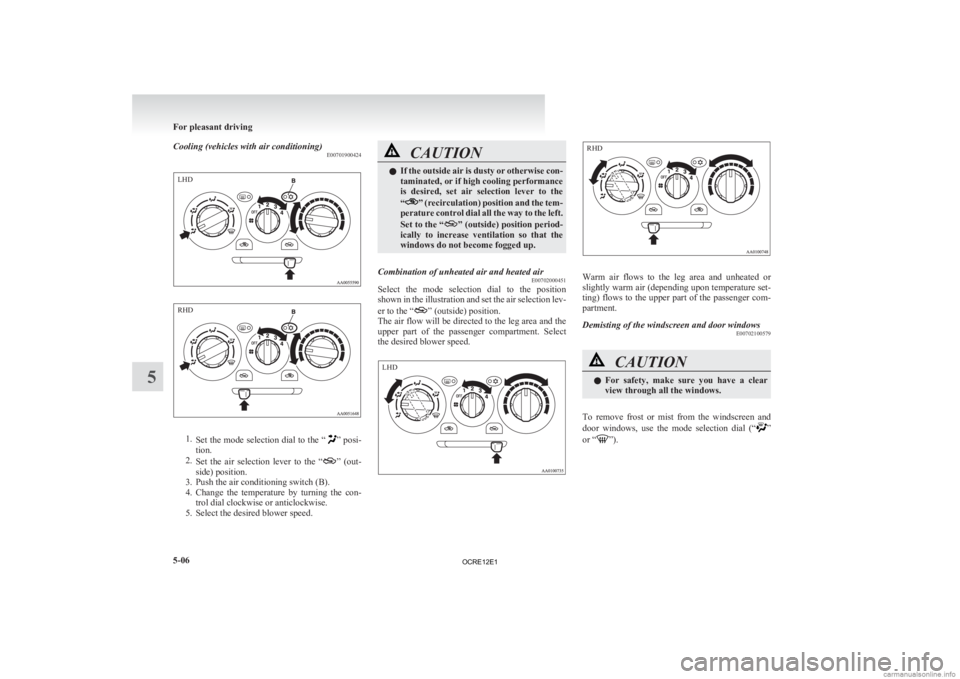
Cooling (vehicles with air conditioning)
E007019004241.
Set the mode selection dial to the “ ” posi-
tion.
2. Set the air selection lever to the “ ”
(out-
side) position.
3. Push the air conditioning switch (B).
4. Change the temperature by turning the con- trol dial clockwise or anticlockwise.
5. Select the desired blower speed. CAUTION
l
If
the outside air is dusty or otherwise con-
taminated, or if high cooling performance
is desired, set air selection lever to the
“ ”
(recirculation) position and the tem-
perature control dial all the way to the left.
Set to the “ ”
(outside) position period-
ically to increase ventilation so that the
windows do not become fogged up.
Combination of unheated air and heated air E00702000451
Select the mode selection dial to the position
shown
in the illustration and set the air selection lev-
er to the “ ” (outside) position.
The
air flow will be directed to the leg area and the
upper part of the passenger compartment. Select
the desired blower speed. Warm air flows to the leg area and unheated or
slightly
warm air (depending upon temperature set-
ting) flows to the upper part of the passenger com-
partment.
Demisting of the windscreen and door windows E00702100579 CAUTION
l
For
safety, make sure you have a clear
view through all the windows.
To remove frost or mist from the windscreen and
door
windows, use the mode selection dial (“ ”
or “ ”).For pleasant driving
5-06
5LHD RHD LHD RHD
OCRE12E1
Page 257 of 370
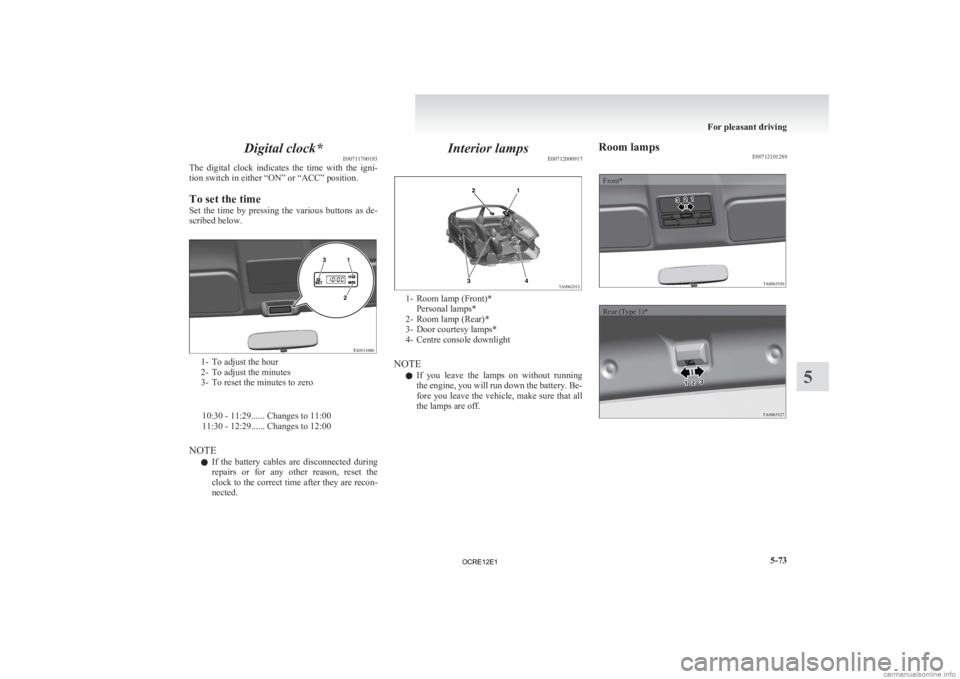
Digital clock*
E00711700193
The
digital clock indicates the time with the igni-
tion switch in either “ON” or “ACC” position.
To set the time
Set the time by pressing the various buttons as de-
scribed below. 1- To adjust the hour
2-
To adjust the minutes
3- To reset the minutes to zero
10:30 - 11:29...... Changes to 11:00
11:30 - 12:29...... Changes to 12:00
NOTE l If the battery cables are disconnected during
repairs or for any other reason, reset the
clock to the correct time after they are recon-
nected. Interior lamps
E00712000917 1- Room lamp (Front)*
Personal lamps*
2-
Room lamp (Rear)*
3- Door courtesy lamps*
4- Centre console downlight
NOTE l If you leave the lamps on without running
the engine, you will run down the battery. Be-
fore you leave the vehicle, make sure that all
the lamps are off. Room lamps
E00712101289
Front*
Rear (Type 1)* For pleasant driving
5-73 5
OCRE12E1
Page 258 of 370
![MITSUBISHI L200 2012 (in English) User Guide Rear (Type 2)*1
(ON/
) - The lamp illuminates.
2
( ) -
[Vehicles without central door locks
system]
The room lamp goes on when a door
is opened. When all doors are
closed, the room lamp is ill](/img/19/34874/w960_34874-257.png "MITSUBISHI L200 2012 (in English) User Guide Rear (Type 2)*1
(ON/
) - The lamp illuminates.
2
( ) -
[Vehicles without central door locks
system]
The room lamp goes on when a door
is opened. When all doors are
closed, the room lamp is ill")
Rear (Type 2)*1
(ON/
) - The lamp illuminates.
2
( ) -
[Vehicles without central door locks
system]
The room lamp goes on when a door
is opened. When all doors are
closed, the room lamp is illuminated
and dimmed gradually for 7 seconds
then goes out.
However, the lamp goes out immedi-
ately without being dimmed when
the ignition switch is turned to the
“ON” position.
[Vehicles with central door locks sys-
tem]
The room lamp goes on when a door
is opened. When all doors are
closed, the room lamp is illuminated
and dimmed gradually for 15 sec-
onds then goes out.
However, the lamp goes out immedi-
ately without being dimmed in case
of the followings:
l All doors are closed and the ig-
nition switch is turned to the
“ON” position.
l All doors are locked using the
key mechanism of the driver’s
door, the lock knob of the driv-
er’s door, or the remote con-
trol switch of the keyless entry
system (if so equipped).
NOTE
l On
vehicles with keyless entry
system, when the ignition key
is removed with the doors
closed, the lamp is illuminated
and after about 15 seconds it
goes off.
The dimming period is also ad-
justable.
For further information, we
recommend you to consult a
MITSUBISHI MOTORS Au-
thorized Service Point.
3
(OFF/ ) - The lamp goes off.
Personal lamps* E00712500156
Push the switch (A) to turn on the lamp. Push it
again to turn it off. For pleasant driving
5-74
5
OCRE12E1