set clock MITSUBISHI L200 2013 (in English) User Guide
[x] Cancel search | Manufacturer: MITSUBISHI, Model Year: 2013, Model line: L200, Model: MITSUBISHI L200 2013Pages: 362, PDF Size: 21.07 MB
Page 195 of 362
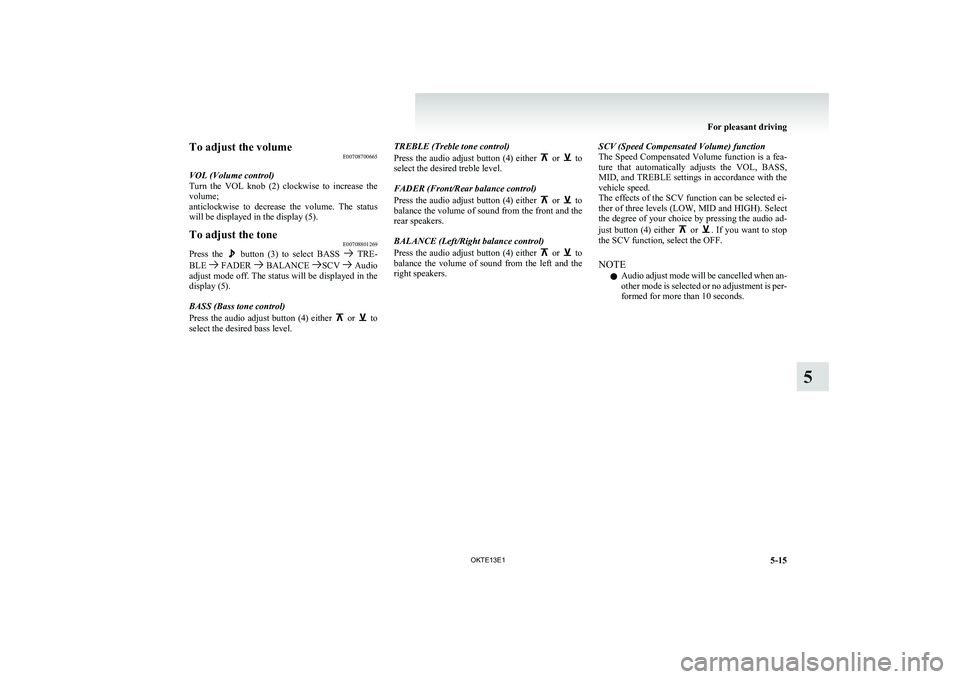
To adjust the volumeE00708700665
VOL (Volume control)
Turn the VOL knob (2) clockwise to increase the
volume;
anticlockwise to decrease the volume. The status
will be displayed in the display (5).To adjust the tone E00708801269
Press the button (3) to select BASS TRE-
BLE FADER BALANCE SCV Audio
adjust mode off. The status will be displayed in the
display (5).
BASS (Bass tone control)
Press the audio adjust button (4) either
or to
select the desired bass level.
TREBLE (Treble tone control)
Press the audio adjust button (4) either
or to
select the desired treble level.
FADER (Front/Rear balance control)
Press the audio adjust button (4) either
or to
balance the volume of sound from the front and the
rear speakers.
BALANCE (Left/Right balance control)
Press the audio adjust button (4) either
or to
balance the volume of sound from the left and the
right speakers.
SCV (Speed Compensated Volume) function
The Speed Compensated Volume function is a fea-
ture that automatically adjusts the VOL, BASS,
MID, and TREBLE settings in accordance with the
vehicle speed.
The effects of the SCV function can be selected ei-
ther of three levels (LOW, MID and HIGH). Select
the degree of your choice by pressing the audio ad-
just button (4) either
or . If you want to stop
the SCV function, select the OFF.
NOTE l Audio adjust mode will be cancelled when an-
other mode is selected or no adjustment is per-
formed for more than 10 seconds.
For pleasant driving
5-15
OKTE13E1
5
Page 199 of 362
AF (Alternative Frequencies) functionE00720900061
The AF function finds a station broadcasting the
same program and selects the station with the stron-
gest signal of AF lists.
The AF function is turned on (with the AF indica-
tor (12) shown on the display) at all times unless
you manually switch it off.
The AF function can be turned ON and OFF.
Refer to “Function setup mode” on page 5-21.CT (Clock Time) function E00721000131
The clock can be set automatically by using the sig-
nal from the local RDS stations. Refer to “Adjust-
ing the time” on page 3-12.
REG (Regional) function E00721100057
REG function limits to receive the stations broad-
casting regional programs.
Regional programming and regional networks are
organized differently depending on the country or
area (they may be changed according to the hour,
state, or broadcast area), so if you don’t want to re-
ceive the regional programs automatically, you can
set up REG ON not to receive regional programs.
The REG function can be turned ON and OFF.
Refer to “Function setup mode” on page 5-21.
PI (Program Identification) search function E00721200221
When travelling long distance and the recalled pre-
set station is weak, the radio searches another fre-
quency broadcasting the same programming with
the same PI code in AF list.
If there are no frequencies broadcasting the same
programming, the radio searches a frequency broad-
casting the regional programming. The radio suc-
ceeds in searching the regional programming, then
the display shows the REG indicator (11).
If the radio does not succeed in searching the re-
gional programming, the radio returns to the recal-
led preset station.
The PI function can be turned ON and OFF.
Refer to “Function setup mode” on page 5-21.
NOTE l While searching, the audio system is muted.
The display shows “WAIT” or “SEARCH”.PTY (Program type) E00721300349
RDS broadcasts are classified according to pro-
gram type (PTY) as follows. Use the TUNE/SEEK
button (3 or 4) to select your desired PTY.
1. NEWS
2. AFFAIRS (Current affairs)
3. INFO (Information)
4. SPORT
5. EDUCATE (Education)
6. DRAMA
7. CULTURE
8. SCIENCE
9. VARIED
10. POP M (Pop music)
11. ROCK M (Rock music)
12. EASY M (Easy music)
13. LIGHT M (Light classics)
14. CLASSICS
15. OTHER M (Other music)
16. WEATHER (Weather information)
17. FINANCE
18. CHILDREN
19. SOCIAL
20. RELIGION
21. PHONE IN
22. TRAVEL
23. LEISURE
24. JAZZ
25. COUNTRY
26. NATION M (National music)
27. OLDIES
28. FOLK M (Folk music)
29. DOCUMENT
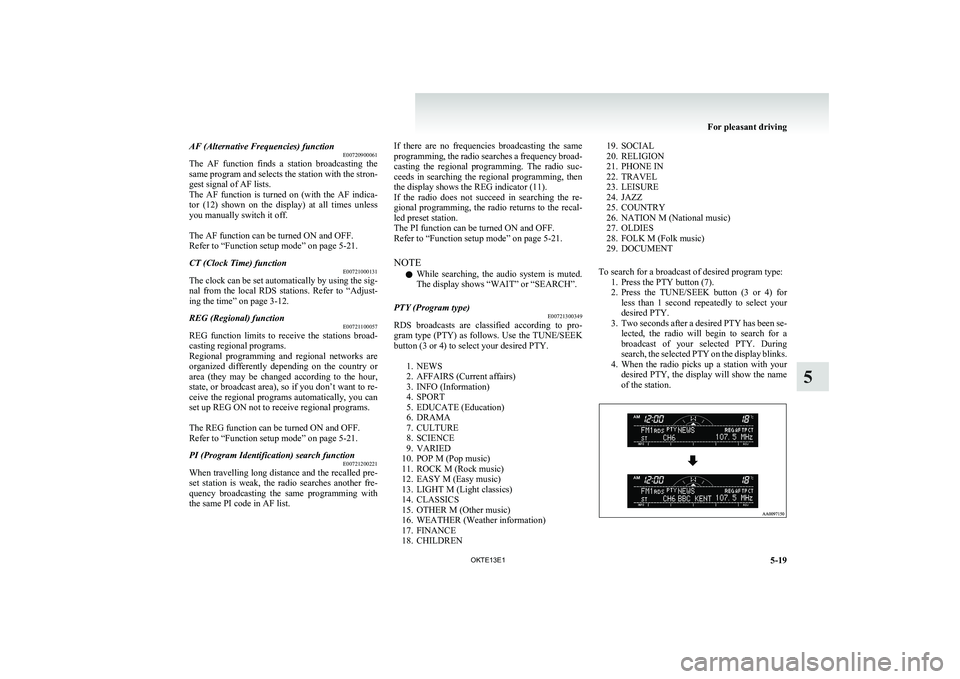
To search for a broadcast of desired program type: 1. Press the PTY button (7).
2. Press the TUNE/SEEK button (3 or 4) for
less than 1 second repeatedly to select your
desired PTY.
3. Two seconds after a desired PTY has been se-
lected, the radio will begin to search for a
broadcast of your selected PTY. During
search, the selected PTY on the display blinks.
4. When the radio picks up a station with your
desired PTY, the display will show the name
of the station.
For pleasant driving
5-19
OKTE13E1
5
Page 253 of 362
Digital clock*E00711700193
The digital clock indicates the time with the igni-
tion switch in either “ON” or “ACC” position.
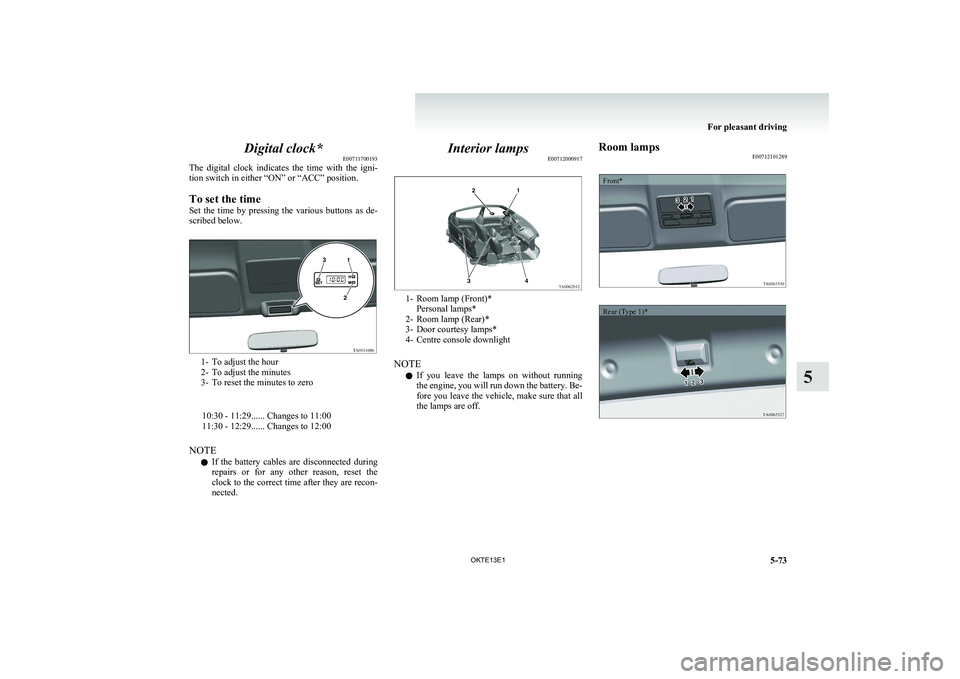
To set the time
Set the time by pressing the various buttons as de-
scribed below.
1- To adjust the hour
2- To adjust the minutes
3- To reset the minutes to zero
10:30 - 11:29...... Changes to 11:00
11:30 - 12:29...... Changes to 12:00
NOTE l If the battery cables are disconnected during
repairs or for any other reason, reset the
clock to the correct time after they are recon-
nected.
Interior lamps E00712000917
1- Room lamp (Front)*
Personal lamps*
2- Room lamp (Rear)*
3- Door courtesy lamps*
4- Centre console downlight
NOTE l If you leave the lamps on without running
the engine, you will run down the battery. Be-
fore you leave the vehicle, make sure that all
the lamps are off.
Room lamps E00712101289Front*Rear (Type 1)*
For pleasant driving
5-73
OKTE13E1
5
Page 274 of 362
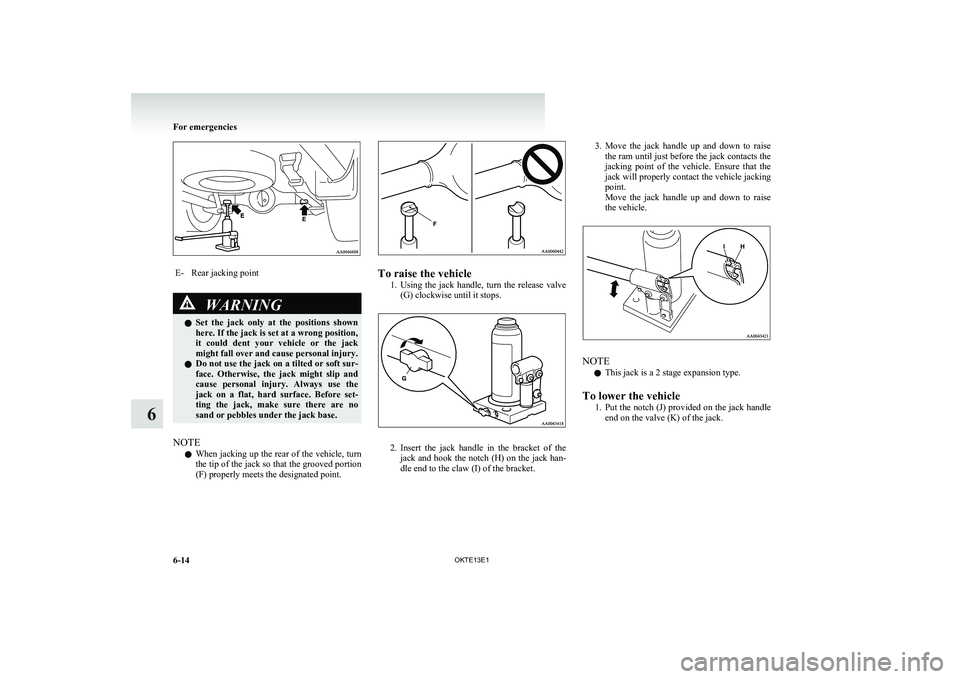
E-Rear jacking pointWARNINGlSet the jack only at the positions shown
here. If the jack is set at a wrong position,
it could dent your vehicle or the jack
might fall over and cause personal injury.
l Do not use the jack on a tilted or soft sur-
face. Otherwise, the jack might slip and
cause personal injury. Always use the
jack on a flat, hard surface. Before set-
ting the jack, make sure there are no
sand or pebbles under the jack base.
NOTE
l When jacking up the rear of the vehicle, turn
the tip of the jack so that the grooved portion
(F) properly meets the designated point.
To raise the vehicle
1.Using the jack handle, turn the release valve
(G) clockwise until it stops.
2. Insert the jack handle in the bracket of the
jack and hook the notch (H) on the jack han-
dle end to the claw (I) of the bracket.
3. Move the jack handle up and down to raise
the ram until just before the jack contacts the
jacking point of the vehicle. Ensure that the
jack will properly contact the vehicle jacking
point.
Move the jack handle up and down to raise
the vehicle.
NOTE
l This jack is a 2 stage expansion type.
To lower the vehicle 1.Put the notch (J) provided on the jack handle
end on the valve (K) of the jack.
For emergencies
6-14 OKTE13E1
6
Page 276 of 362
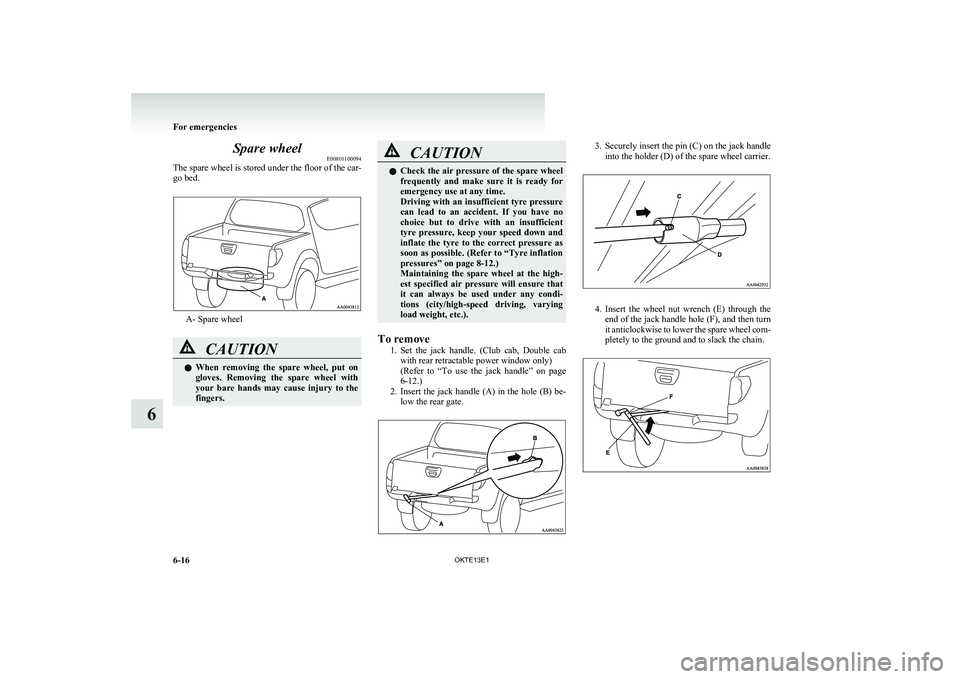
Spare wheelE00801100094
The spare wheel is stored under the floor of the car-
go bed.
A- Spare wheel
CAUTIONl When removing the spare wheel, put on
gloves. Removing the spare wheel with
your bare hands may cause injury to the
fingers.CAUTIONl Check the air pressure of the spare wheel
frequently and make sure it is ready for
emergency use at any time.
Driving with an insufficient tyre pressure
can lead to an accident. If you have no
choice but to drive with an insufficient
tyre pressure, keep your speed down and
inflate the tyre to the correct pressure as
soon as possible. (Refer to “Tyre inflation
pressures” on page 8-12.)
Maintaining the spare wheel at the high-
est specified air pressure will ensure that
it can always be used under any condi-
tions (city/high-speed driving, varying
load weight, etc.).
To remove
1.Set the jack handle. (Club cab, Double cab
with rear retractable power window only)
( Refer to “To use the jack handle” on page
6-12.)
2. Insert the jack handle (A) in the hole (B) be-
low the rear gate.
3. Securely insert the pin (C) on the jack handle
into the holder (D) of the spare wheel carrier.
4. Insert the wheel nut wrench (E) through the
end of the jack handle hole (F), and then turn
it anticlockwise to lower the spare wheel com-
pletely to the ground and to slack the chain.
For emergencies
6-16 OKTE13E1
6
Page 277 of 362
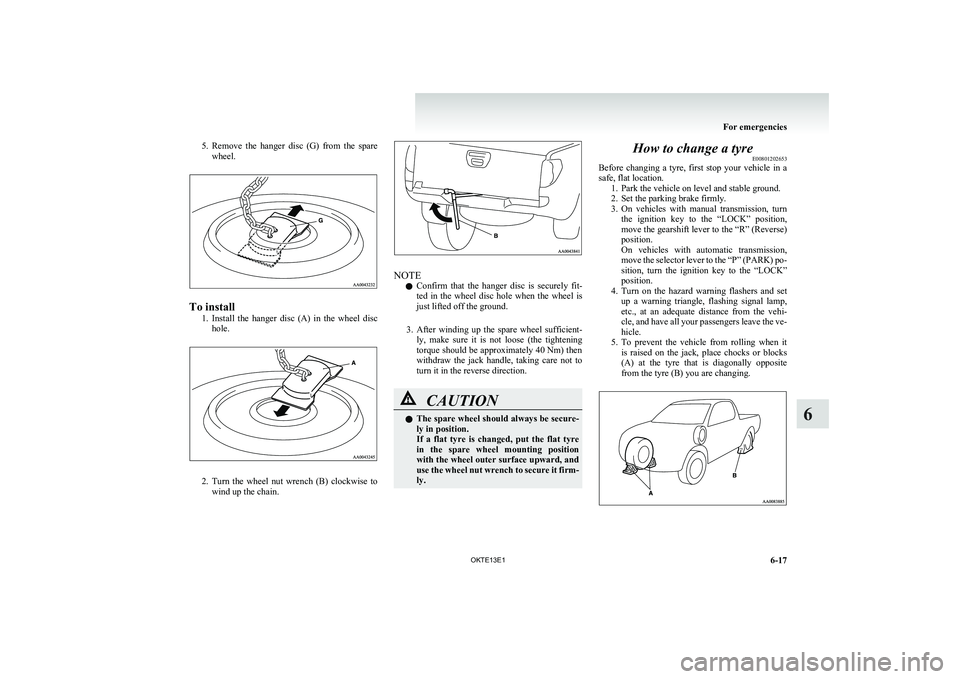
5.Remove the hanger disc (G) from the spare
wheel.
To install
1.Install the hanger disc (A) in the wheel disc
hole.
2. Turn the wheel nut wrench (B) clockwise to
wind up the chain.
NOTE
l Confirm that the hanger disc is securely fit-
ted in the wheel disc hole when the wheel is
just lifted off the ground.
3. After winding up the spare wheel sufficient-
ly, make sure it is not loose (the tightening
torque should be approximately 40 Nm) then
withdraw the jack handle, taking care not to
turn it in the reverse direction.
CAUTIONl The spare wheel should always be secure-
ly in position.
If a flat tyre is changed, put the flat tyre
in the spare wheel mounting position
with the wheel outer surface upward, and
use the wheel nut wrench to secure it firm-
ly.How to change a tyre E00801202653
Before changing a tyre, first stop your vehicle in a
safe, flat location. 1. Park the vehicle on level and stable ground.
2. Set the parking brake firmly.
3. On vehicles with manual transmission, turn
the ignition key to the “LOCK” position,
move the gearshift lever to the “R” (Reverse)
position.
On vehicles with automatic transmission,
move the selector lever to the “P” (PARK) po-
sition, turn the ignition key to the “LOCK”
position.
4. Turn on the hazard warning flashers and set
up a warning triangle, flashing signal lamp,
etc., at an adequate distance from the vehi-
cle, and have all your passengers leave the ve-
hicle.
5. To prevent the vehicle from rolling when it
is raised on the jack, place chocks or blocks
(A) at the tyre that is diagonally opposite
from the tyre (B) you are changing.
For emergencies
6-17
OKTE13E1
6