heater MITSUBISHI LANCER 2014 8.G User Guide
[x] Cancel search | Manufacturer: MITSUBISHI, Model Year: 2014, Model line: LANCER, Model: MITSUBISHI LANCER 2014 8.GPages: 434, PDF Size: 57.5 MB
Page 293 of 434
Automatic air conditioning with
Fahrenheit scale (if so equipped)
7-18 Comfort controls
7
N00736900094
When the ignition switch is in the “ON” posi- tion, select the blower speed by turning the blower speed selection dial. Turning the dial clockwise will increase theblower speed; turning the dial counterclock- wise will decrease it. When the dial is set to the “OFF” position, all fan-driven airflowwill stop.
N00737000265
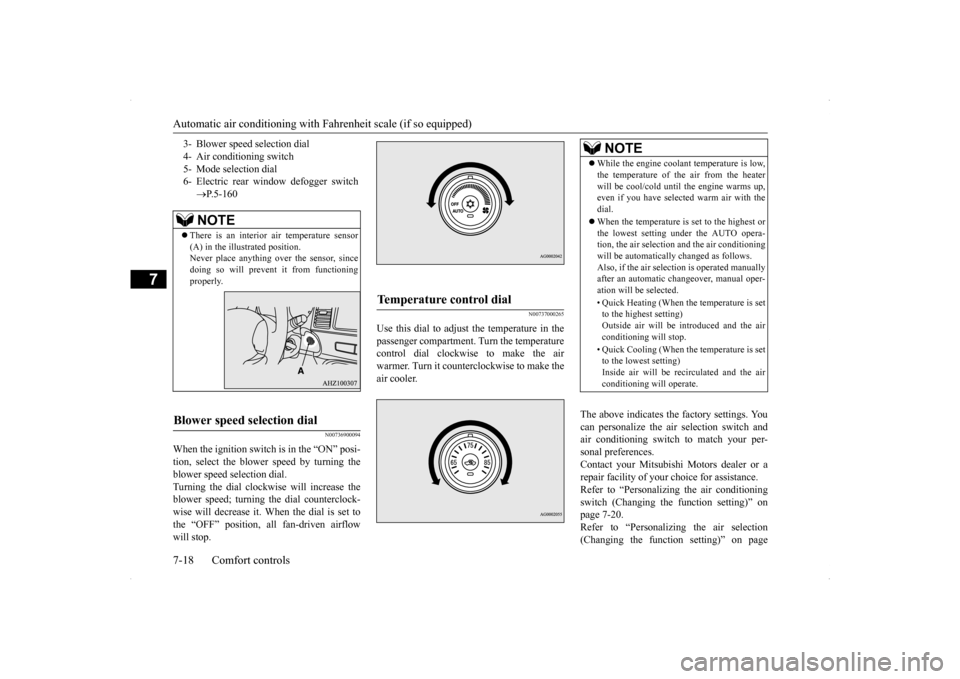
Use this dial to adjust the temperature in thepassenger compartment. Turn the temperaturecontrol dial clockwise to make the air warmer. Turn it counterclockwise to make the air cooler.
The above indicates the factory settings. You can personalize the air selection switch and air conditioning switch to match your per-sonal preferences. Contact your Mitsubishi Motors dealer or a repair facility of your choice for assistance.Refer to “Personalizing the air conditioning switch (Changing the function setting)” on page 7-20.Refer to “Personalizing the air selection (Changing the function setting)” on page
3- Blower speed selection dial 4- Air conditioning switch5- Mode selection dial 6- Electric rear window defogger switch
P.5-160NOTE
There is an interior air temperature sensor (A) in the illustrated position.Never place anything over the sensor, since doing so will prevent it from functioning properly.
Blower speed selection dial
Temperature control dial
NOTE
While the engine coolant temperature is low, the temperature of the air from the heater will be cool/cold until the engine warms up, even if you have selected warm air with the dial. When the temperature is set to the highest or the lowest setting under the AUTO opera-tion, the air selection and the air conditioning will be automatically changed as follows. Also, if the air selection is operated manuallyafter an automatic changeover, manual oper- ation will be selected. • Quick Heating (When the temperature is set to the highest setting) Outside air will be introduced and the airconditioning will stop. • Quick Cooling (When the temperature is set to the lowest setting) Inside air will be recirculated and the air conditioning will operate.
Page 296 of 434
Automatic air conditioning with
Fahrenheit scale (if so equipped)
Comfort controls 7-21
7
Enable automatic air conditioning control: When the mode selection dial or blower speed selection dial has been set to the “AUTO” position or when the tempera-ture control dial has been set to the mini- mum temperature, the air conditioning switch is automatically controlled. Disable automatic air conditioning con- trol: The air conditioning switch is not auto- matically controlled, unless the air condi-tioning switch is used. Changing the settings: Press the air conditioning switch for about 10 seconds or longer. When the setting has changed, the systemwill beep and the indicator light will flash. • When the setting has changed from enabled to disabled,the system will beep three times and the indicator will flash three times. • When the setting has changed from dis-abled to enabled, the system will beep two times and the indicator light will flash three times.
N00731700345
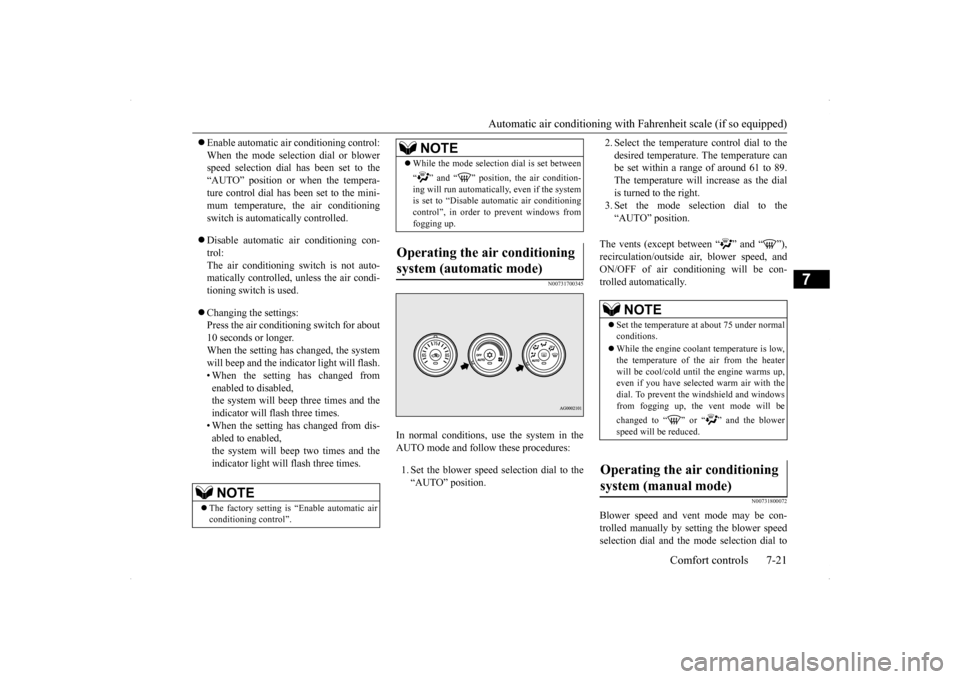
In normal conditions, use the system in the AUTO mode and follow these procedures: 1. Set the blower speed selection dial to the “AUTO” position.
2. Select the temperature control dial to the desired temperature. The temperature can be set within a range of around 61 to 89. The temperature will increase as the dialis turned to the right. 3. Set the mode selection dial to the “AUTO” position.
The vents (except between “ ” and “ ”), recirculation/outside air, blower speed, andON/OFF of air conditioning will be con-trolled automatically.
N00731800072
Blower speed and vent mode may be con- trolled manually by setting the blower speed selection dial and the mode selection dial to
NOTE
The factory setting is “Enable automatic air conditioning control”.
While the mode selection dial is set between “ ” and “ ” position, the air condition- ing will run automatically, even if the system is set to “Disable automatic air conditioningcontrol”, in order to prevent windows from fogging up.
Operating the air conditioning system (automatic mode)
NOTE
NOTE
Set the temperature at about 75 under normal conditions. While the engine coolant temperature is low, the temperature of the air from the heater will be cool/cold until the engine warms up, even if you have selected warm air with thedial. To prevent the windshield and windows from fogging up, the vent mode will be changed to “ ” or “ ” and the blower speed will be reduced.
Operating the air conditioning system (manual mode)
Page 299 of 434
Automatic air conditioning with
Celsius scale (if so equipped)
7-24 Comfort controls
7
The above indicates the factory settings. You can personalize the air selection switch and air conditioning switch to match your per-sonal preferences. Contact your Mitsubishi Motors dealer or a repair facility of your choice for assistance.Refer to “Personalizing the air conditioning switch (Changing the function setting)” on page 7-26.Refer to “Personalizing the air selection (Changing the function setting)” on page
7-25.
N00737100136
To change the amount of
air flowing from the
vents, turn the mode selection dial. Refer to“Changing the mode selection” on page 7-2.
N00737200241
Normally, use the outside air position to keepthe windshield and side windows clear and toquickly remove fog or frost from the wind- shield. To change the air selection, simply press the air selection switch. A sound will be madeevery time you press the switch.
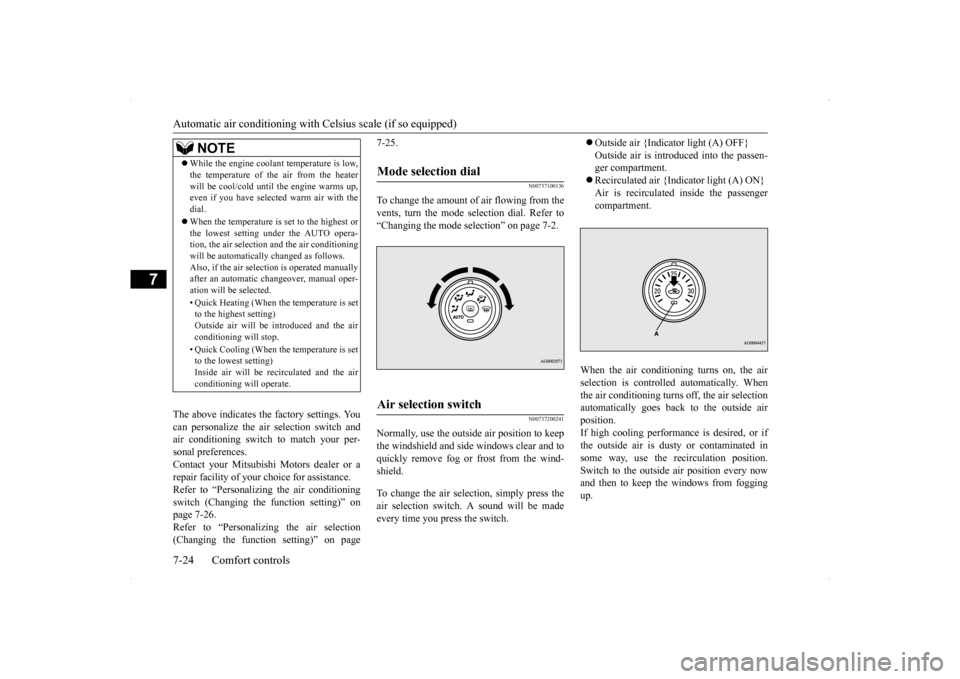
Outside air {Indicator light (A) OFF} Outside air is introduced into the passen- ger compartment. Recirculated air {Indicator light (A) ON} Air is recirculated inside the passenger compartment.
When the air conditioning turns on, the air selection is controll
ed automatically. When
the air conditioning turns off, the air selection automatically goes back to the outside air position.If high cooling performance is desired, or if the outside air is dusty or contaminated in some way, use the recirculation position.Switch to the outside air position every now and then to keep the windows from fogging up.
NOTE
While the engine coolant temperature is low, the temperature of the air from the heater will be cool/cold until the engine warms up, even if you have selected warm air with the dial. When the temperature is set to the highest or the lowest setting under the AUTO opera-tion, the air selection and the air conditioning will be automatically changed as follows. Also, if the air selection is operated manuallyafter an automatic changeover, manual oper- ation will be selected. • Quick Heating (When the temperature is set to the highest setting) Outside air will be introduced and the airconditioning will stop. • Quick Cooling (When the temperature is set to the lowest setting) Inside air will be recirculated and the air conditioning will operate.
Mode selection dial
Air selection switch
Page 302 of 434
Automatic air conditioning with
Celsius scale (if so equipped)
Comfort controls 7-27
7
2. Select the temperature control dial to the desired temperature. The temperature can be set within a range of around 18 to 32. The temperature will increase as the dialis turned to the right. 3. Set the mode selection dial to the “AUTO” position.
The vents (except “ ”), recirculation/out- side air, blower speed, and ON/OFF of airconditioning will be controlled automatically.
N00731800098
Blower speed and vent mode may be con-trolled manually by setting the blower speed selection dial and the mode selection dial to the desired positions. To return to automatic
operation, set the dials to the “AUTO” posi- tion.
N00732400440
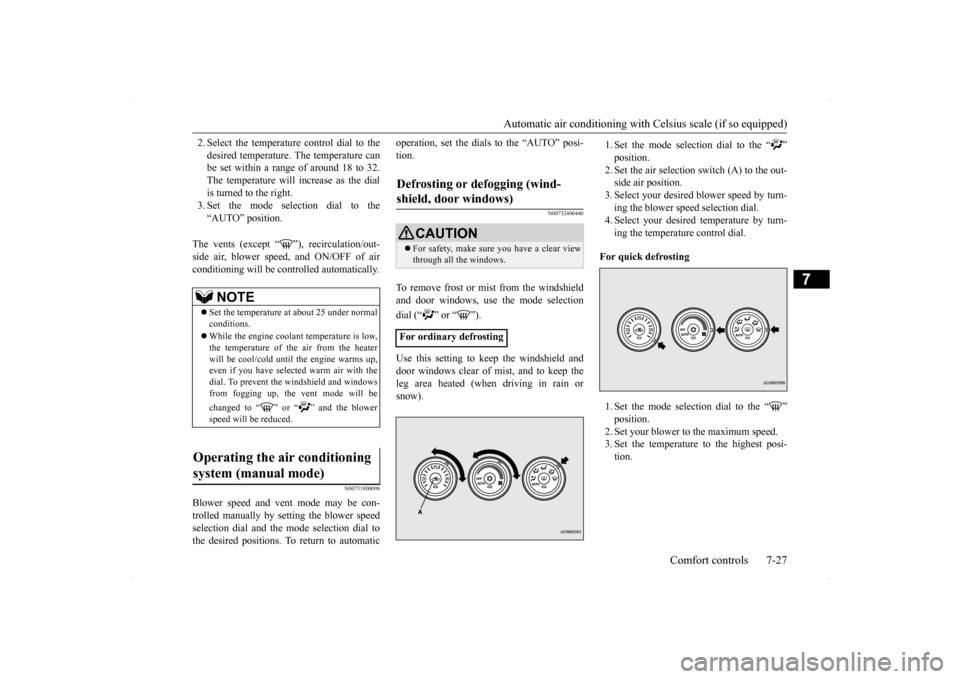
To remove frost or mist from the windshield and door windows, use the mode selection dial (“ ” or “ ”). Use this setting to keep the windshield and door windows clear of mist, and to keep the leg area heated (when driving in rain or snow).
1. Set the mode selection dial to the “ ” position.2. Set the air selection switch (A) to the out- side air position. 3. Select your desired blower speed by turn-ing the blower speed selection dial. 4. Select your desired temperature by turn- ing the temperature control dial.
For quick defrosting 1. Set the mode selection dial to the “ ” position.2. Set your blower to the maximum speed. 3. Set the temperature to the highest posi- tion.
NOTE
Set the temperature at about 25 under normal conditions. While the engine coolant temperature is low, the temperature of the air from the heater will be cool/cold until the engine warms up,even if you have selected warm air with the dial. To prevent the windshield and windows from fogging up, the vent mode will be changed to “ ” or “ ” and the blower speed will be reduced.
Operating the air conditioning system (manual mode)
Defrosting or defogging (wind- shield, door windows)
CAUTION For safety, make sure you have a clear view through all the windows.
For ordinary defrosting
Page 308 of 434
Handling of Discs
Comfort controls 7-33
7
Fingerprints or other marks on the read surface of the disc may result in its con- tent being more difficult to read. When holding the disc, grip both edges, or oneedge and the center hole, in order that the read surface is not touched. Do not affix paper or stickers, or other- wise damage the disc. Do not forcefully insert a disc if another is already within the device. This can resultin damage to discs, or malfunction. Periodically clean the read surface of the disc. When cleaning, do not wipe in a cir- cular motion. Instead, wipe gently out- wards from the center of the disc to theouter edge. New discs may have burring around the outer edge or in the hole in the center.Ensure you check for these. If there are burrs, these may lead to faulty operation, therefore ensure these are removed. When not using discs, ensure these are kept in cases, and stored out of direct sun- light.
If discs are not going to be used for a long period of time, remove these from the product.
In cold environments such as in mid-winter when the interior of the vehicle is cold, turn-ing the heater on and immediately trying to use the product may cause condensation (water droplets) to form on the disc and inter-nal optical components, and this may preventthe product from operating correctly. In these conditions, remove the disc, and wait a short time before use. Actions such as unauthorized reproduction, broadcast, public performance, or rental of discs that comprise other than personal use are prohibited by law.
N00715500026
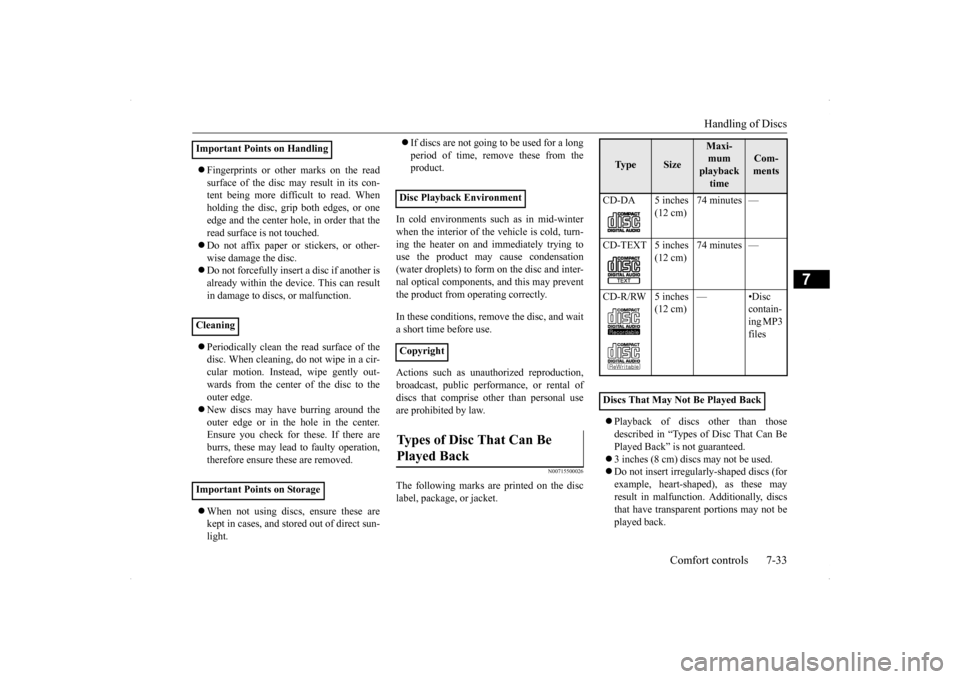
The following marks are printed on the disclabel, package, or jacket.
Playback of discs other than those described in “Types of Disc That Can Be Played Back” is not guaranteed. 3 inches (8 cm) discs may not be used. Do not insert irregularly-shaped discs (for example, heart-shaped), as these may result in malfunction. Additionally, discsthat have transparent portions may not be played back.
Important Points on Handling Cleaning Important Points on Storage
Disc Playback Environment CopyrightTypes of Disc That Can Be Played Back
Ty p e
Size
Maxi- mum playback time
Com-ments
CD-DA 5 inches
(12 cm)
74 minutes —
CD-TEXT 5 inches
(12 cm)
74 minutes —
CD-R/RW 5 inches
(12 cm)
—•Disc
contain- ing MP3 files
Discs That May Not Be Played Back
Page 343 of 434
If the vehicle breaks down 8-2 For emergencies
8
N00836300161
If your vehicle breaks down on the road, move to the shoulder and turn on the hazardwarning flashers. If there is no shoulder, or the shoulder is not safe, drive in the right lane slowly, with the hazard lights flashing, untilyou come to a safe stopping place. Keep the flashers flashing. If the engine stops, there will be no power assist to the steering and brakes, making these difficult to use. The brake booster will not work, so the brakes will not grip well. The brake pedalwill be harder to press than usual. Since there is no power steering assist, the steering wheel will be hard to turn.
Get help from your passengers, bystanders, etc. to push the vehicl
e and move it to a safe
zone.
N00836400713
If the engine cannot be started because the battery is weak or dead, you can start it withthe battery from another vehicle using jumper cables. 1. Take off any metal jewelry such as watch bands or bracelets that might make an accidental electrical contact.
2. Position the vehicles close enough together so that the jumper cables can reach, but be sure the vehicles aren’t touching each other. 3. You could be injured if the vehicles move. Set the parking brake firmly on each vehi- cle. Put an automatic transaxle, CVT or Twin Clutch SST in “P” (PARK) or amanual transaxle in “N” (Neutral). Turn the ignition key to the “LOCK” position.
If the vehicle breaks down If the engine stops/fails When the engine fails at the intersection
Jump-starting the engine
WA R N I N G When using jumper cables to start a vehi- cle, follow the procedures and be very cau- tious. CAUTION Do not try to start your vehicle by pushing or towing. Vehicles with continuously variable transmission (CVT) or Twin Clutch SST cannot be started this way. Pushing or towinga vehicle that has a manual transaxle may overheat and damage the catalytic converter. Also, there is more ri
sk of an accident when
a vehicle is being pushed or towed.
CAUTION Check the other vehicle. It must have a 12- volt battery. If the other system isn’t 12-volt, both systems can be damaged.WA R N I N G Turn the ignition key to the “LOCK” posi- tion on both vehicles. Make sure that the cables or your clothes cannot be caught by the fan or drive belt. Personal injurycould result. NOTE
Turn off all lights, heater, and other electrical loads. This will avoid sparks and help save both batteries.
Page 389 of 434
Fuses 9-30 Vehicle care and maintenance
9
* - Fusible link Some fuses may not be installed on your vehicle, depending on the vehicle model or specifications. The table above shows the main equip- ment corresponding to each fuse.
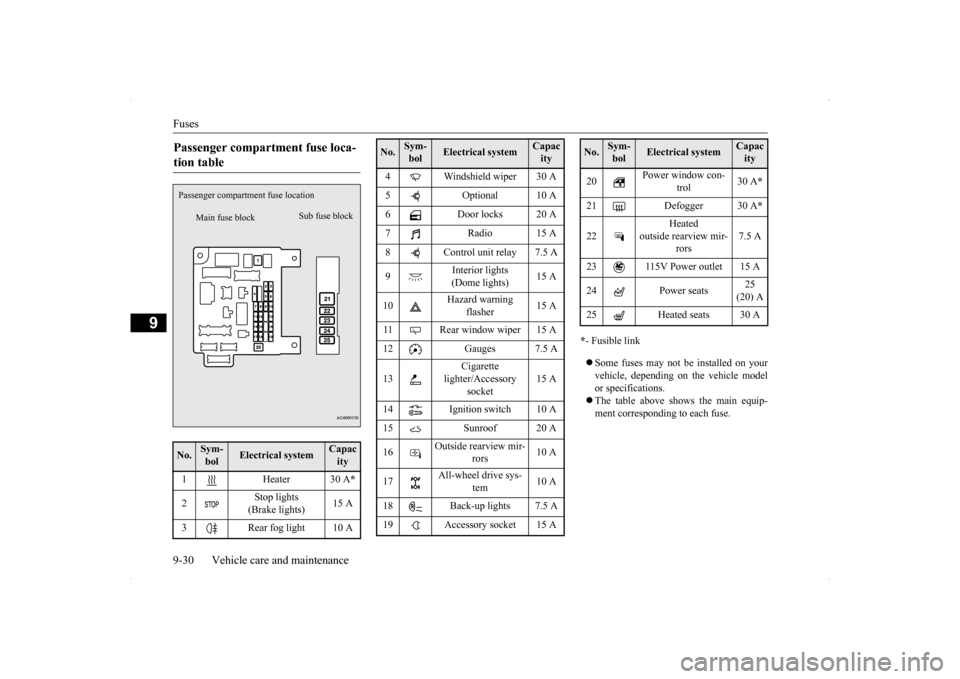
Passenger compartment fuse loca- tion table No.
Sym- bol
Electrical system
Capacity
1 Heater 30 A
*
2
Stop lights (Brake lights)
15 A
3 Rear fog light 10 A
Main fuse block
Sub fuse block
Passenger compartme
nt fuse location
4 Windshield wiper 30 A 5 Optional 10 A 6 Door locks 20 A 7 Radio 15 A8 Control unit relay 7.5 A 9
Interior lights (Dome lights)
15 A
10
Hazard warning
flasher
15 A
11 Rear window wiper 15 A 12 Gauges 7.5 A 13
Cigarette
lighter/Accessory
socket
15 A
14 Ignition switch 10 A 15 Sunroof 20 A 16
Outside rearview mir-
rors
10 A
17
All-wheel drive sys-
tem
10 A
18 Back-up lights 7.5 A 19 Accessory socket 15 ANo.
Sym- bol
Electrical system
Capacity
20
Power window con-
trol
30 A
*
21 Defogger 30 A
*
22
Heated
outside rearview mir-
rors
7.5 A
23 115V Power outlet 15 A 24 Power seats
25 (20) A
25 Heated seats 30 ANo.
Sym- bol
Electrical system
Capacity
Page 391 of 434
Fuses 9-32 Vehicle care and maintenance
9
* - Fusible link Some fuses may not be installed on your vehicle, depending on the vehicle modelor specifications. The table above shows the main equip- ment corresponding to each fuse.
There are no 7.5 A, 25 A or 30 A spare fuses. If a fuse of one of these capacities blows,replace it temporarily by borrowing one of the fuses indicated below. 7.5 A: 10 A spare fuse25 A: 20 A spare fuse 30 A: 30 A audio amplifier fuse
Replace the borrowed fuse with a fuse that has the correct capacity as soon as possible.
N00954900027
1. Before replacing a fuse, always turn offthe electrical item connected to the fuseand turn the ignition switch to the“LOCK” position.
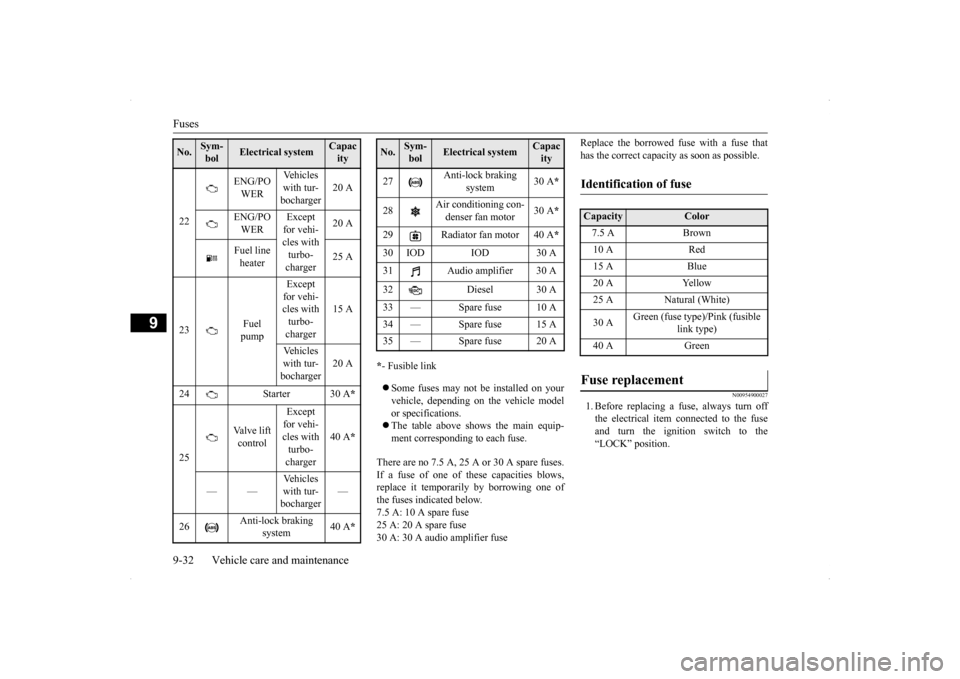
22
ENG/PO WER
Vehicles with tur-bocharger
20 A
ENG/PO WER
Except for vehi- cles with turbo- charger
20 A
Fuel line heater
25 A
23
Fuel pump
Except for vehi-cles with turbo- charger
15 A
Vehicles with tur- bocharger
20 A
24 Starter 30 A
*
25
Valve lift control
Except for vehi- cles with turbo- charger
40 A
*
——
Vehicles with tur-bocharger
—
26
Anti-lock braking
system
40 A
*
No.
Sym- bol
Electrical system
Capacity
27
Anti-lock braking
system
30 A
*
28
Air conditioning con- denser fan motor
30 A
*
29 Radiator fan motor 40 A
*
30 IOD IOD 30 A31 Audio amplifier 30 A 32 Diesel 30 A 33 — Spare fuse 10 A 34 — Spare fuse 15 A35 — Spare fuse 20 ANo.
Sym- bol
Electrical system
Capacity
Identification of fuse Capacity
Color
7.5 A Brown10 A Red15 A Blue20 A Yellow25 A Natural (White) 30 A
Green (fuse type)/Pink (fusible
link type)
40 A Green
Fuse replacement
Page 428 of 434
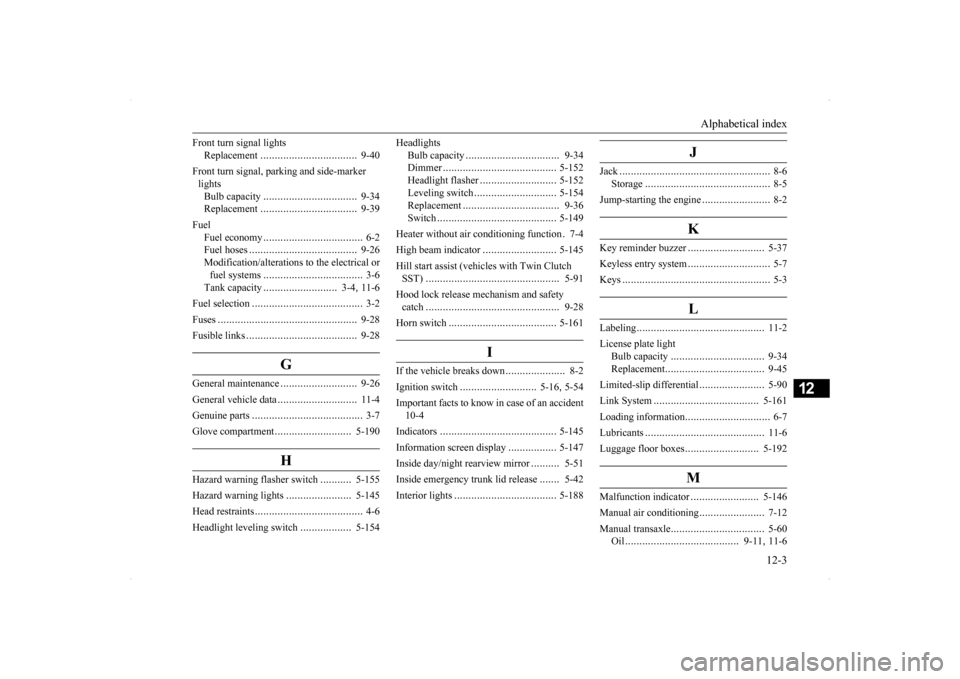
Alphabetical index
12-3
12
Front turn signal lights
Replacement
.................
.................
9-40
Front turn signal, parking and side-marker lightsBulb capacity
................
.................
9-34
Replacement
.................
.................
9-39
Fuel
Fuel economy
...................
................
6-2
Fuel hoses
.....................
.................
9-26
Modification/alterations to the electrical orfuel systems
...................
................
3-6
Tank capacity
..........................
3-4
, 11-6
Fuel selection
....................
...................
3-2
Fuses
.........................
........................
9-28
Fusible links
..................
.....................
9-28
G
General maintenance
...........................
9-26
General vehicle data
............................
11-4
Genuine parts
....................
...................
3-7
Glove compartment
...........................
5-190
H
Hazard warning flasher switch
...........
5-155
Hazard warning lights
.......................
5-145
Head restraints
...................
...................
4-6
Headlight leveling switch
..................
5-154
Headlights
Bulb capacity
..................
...............
9-34
Dimmer
...................
.....................
5-152
Headlight flasher
...........................
5-152
Leveling switch
.............................
5-154
Replacement
...................
...............
9-36
Switch
.....................
.....................
5-149
Heater without air conditioning function
.7-4
High beam indicator
..........................
5-145
Hill start assist (vehicles with Twin Clutch SST)
.........................
......................
5-91
Hood lock release mechanism and safety catch
.........................
......................
9-28
Horn switch
.....................
.................
5-161
I
If the vehicle breaks down
.....................
8-2
Ignition switch
...........................
5-16
, 5-54
Important facts to know in case of an accident 10-4 Indicators
....................
.....................
5-145
Information screen display
.................
5-147
Inside day/night rearview mirror
..........
5-51
Inside emergency trunk lid release
.......
5-42
Interior lights
...................
.................
5-188
J
Jack
...........................
..........................
8-6
Storage
.........................
...................
8-5
Jump-starting the engine
........................
8-2
K
Key reminder buzzer
...........................
5-37
Keyless entry system
.............................
5-7
Keys
..........................
..........................
5-3
L
Labeling
........................
.....................
11-2
License plate light
Bulb capacity
................
.................
9-34
Replacement
..................
.................
9-45
Limited-slip differential
.......................
5-90
Link System
..................
...................
5-161
Loading information
..............................
6-7
Lubricants
.....................
.....................
11-6
Luggage floor boxes
..........................
5-192
M
Malfunction indicator
........................
5-146
Manual air conditioning
.......................
7-12
Manual transaxle
................
.................
5-60
Oil
.....................
...................
9-11
, 11-6