speed meter MITSUBISHI LANCER 2014 8.G User Guide
[x] Cancel search | Manufacturer: MITSUBISHI, Model Year: 2014, Model line: LANCER, Model: MITSUBISHI LANCER 2014 8.GPages: 434, PDF Size: 57.5 MB
Page 188 of 434

Multi-information display
Features and controls 5-121
5
While driving, the momentary fuel consump- tion is shown with a bar graph.
When the momentary fuel consumption sur- passes the average fuel consumption, the momentary fuel consumption is displayed with a green bar graph. (Type 2)Be conscious of maintaining the momentary fuel consumption above the average fuel con- sumption, it can help you drive with the betterfuel consumption. The “Display language”, “Temperature unit”, “Fuel consumption unit”, and “Average fuel consumption and speed reset method” set-tings can be modified as desired. For further details, refer to “Changing the function settings (With ignition switch in the“ON” position)” on page 5-126.
N00556300135
When there is information to be announced, such as a system fault, a tone sounds and the information screen is switched to the warningdisplay screen.Refer to the warning list and take the neces- sary measures. Refer to “Warning display list (With ignition switch in the “ON” position)”on page 5-137. When the cause of the warning display is eliminated, the warning display goes outautomatically. Even if the cause of the warning display is not eliminated, you can return to the screenthat was displayed before the warning dis- play. If you press the multi-information meter switch, the display screen switches to thescreen display from before the warning and the warning (A) is displayed.
NOTE
The average speed display and the average fuel consumption display can be reset sepa- rately in both auto reset mode and manual reset mode. “---” is displayed when the average fuel con- sumption cannot be measured. The initial (default) setting is “Auto reset mode”. Average fuel consumption may vary depend on the driving conditions (road conditions, how you drive, etc.) The actual fuel con-sumption may differ from the fuel consump- tion displayed, so treat the fuel consumption displayed as just a rough guideline. The average fuel consumption display mem- ories for auto reset mode and manual resetmode are erased if the battery is discon- nected. The display setting can be changed to the preferred units {mpg (US), mpg (UK), L/100 km or km/L}.Refer to “Changing the function settings (With ignition switch in the “ON” position)” on page 5-126.
Momentary fuel consumption dis- play
NOTE
When the momentary fuel consumption can- not be measured, a ba
r graph is not shown.
The display setting can be changed to the preferred units {mpg (US), mpg (UK), L/100 km or km/L}.Refer to “Changing the function settings (With ignition switch in the “ON” position)” on page 5-126. It is possible to cancel the green bar graph. Refer to “Changing the function settings(With ignition switch in the “ON” position)” on page 5-126.
Function setting screen
Interrupt display screen (With ignition switch in the “ON” position) Warning display Returning to the display screen from before the warning display
Page 192 of 434
Multi-information display
Features and controls 5-125
5
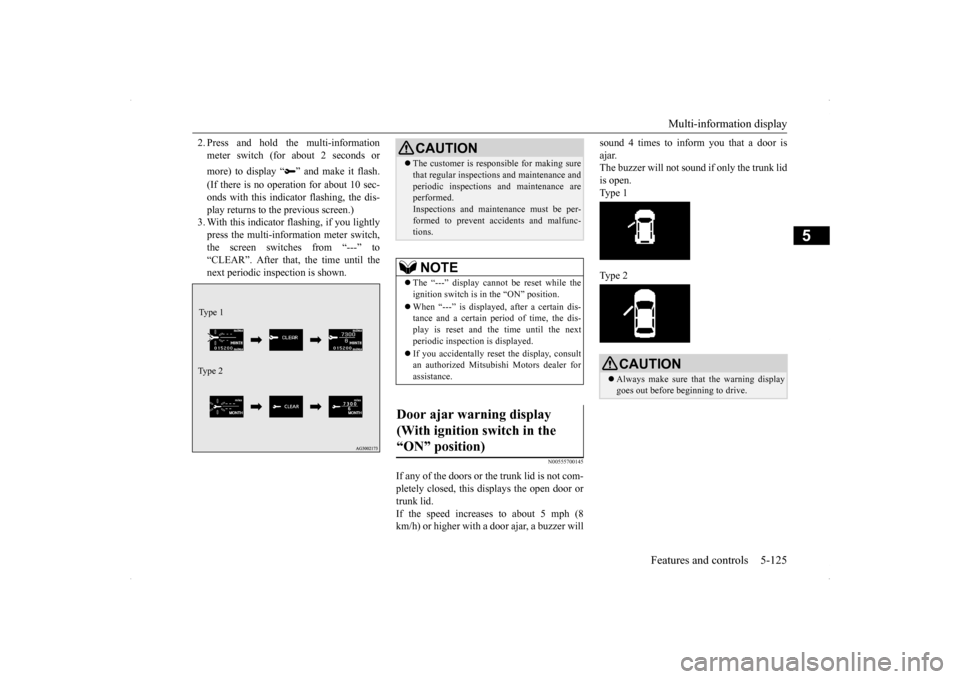
2. Press and hold the multi-information meter switch (for about 2 seconds or more) to display “ ” and make it flash. (If there is no operation for about 10 sec- onds with this indicator flashing, the dis-play returns to the previous screen.) 3. With this indicator flashing, if you lightly press the multi-information meter switch,the screen switches from “---” to “CLEAR”. After that, the time until the next periodic inspection is shown.
N00555700145
If any of the doors or the trunk lid is not com- pletely closed, this displays the open door or trunk lid.If the speed increases to about 5 mph (8 km/h) or higher with a door ajar, a buzzer will
sound 4 times to inform you that a door is ajar. The buzzer will not sound if only the trunk lid is open. Type 1 Type 2
Type 1 Ty p e 2
CAUTION The customer is responsible for making sure that regular inspections and maintenance and periodic inspections and maintenance are performed. Inspections and maintenance must be per-formed to prevent accidents and malfunc- tions.NOTE
The “---” display cannot be reset while the ignition switch is in the “ON” position. When “---” is displayed, after a certain dis- tance and a certain period of time, the dis- play is reset and the time until the next periodic inspection is displayed. If you accidentally reset the display, consult an authorized Mitsubishi Motors dealer forassistance.
Door ajar warning display (With ignition switch in the “ON” position)
CAUTION Always make sure that the warning display goes out before beginning to drive.
Page 193 of 434
Multi-information display 5-126 Features and controls
5
N00556801153
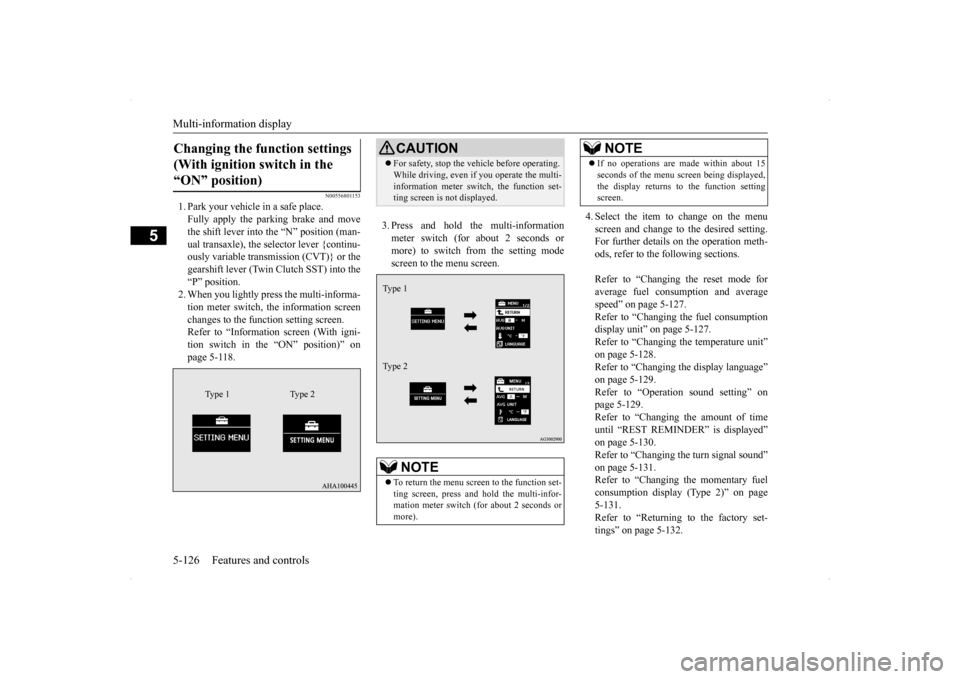
1. Park your vehicle in a safe place. Fully apply the parking brake and move the shift lever into the “N” position (man-ual transaxle), the selector lever {continu- ously variable transmission (CVT)} or the gearshift lever (Twin Clutch SST) into the“P” position.2. When you lightly press the multi-informa- tion meter switch, the information screen changes to the function setting screen.Refer to “Information screen (With igni- tion switch in the “ON” position)” on page 5-118.
3. Press and hold the multi-information meter switch (for about 2 seconds or more) to switch from the setting modescreen to the menu screen.
4. Select the item to change on the menu screen and change to the desired setting. For further details on the operation meth- ods, refer to the following sections. Refer to “Changing the reset mode for average fuel consumption and average speed” on page 5-127.Refer to “Changing the fuel consumption display unit” on page 5-127. Refer to “Changing the temperature unit”on page 5-128. Refer to “Changing the display language” on page 5-129.Refer to “Operation sound setting” on page 5-129. Refer to “Changing the amount of timeuntil “REST REMINDER” is displayed” on page 5-130. Refer to “Changing the turn signal sound”on page 5-131. Refer to “Changing the momentary fuel consumption display (Type 2)” on page5-131. Refer to “Returning to the factory set- tings” on page 5-132.
Changing the function settings (With ignition switch in the “ON” position)
Type 1 Type 2
CAUTION For safety, stop the vehicle before operating. While driving, even if you operate the multi- information meter switch, the function set- ting screen is not displayed.NOTE
To return the menu screen to the function set- ting screen, press and hold the multi-infor-mation meter switch (for about 2 seconds or more).Type 1 Type 2
If no operations are made within about 15 seconds of the menu screen being displayed, the display returns to the function setting screen.NOTE
Page 194 of 434
Multi-information display
Features and controls 5-127
5
N00557000184
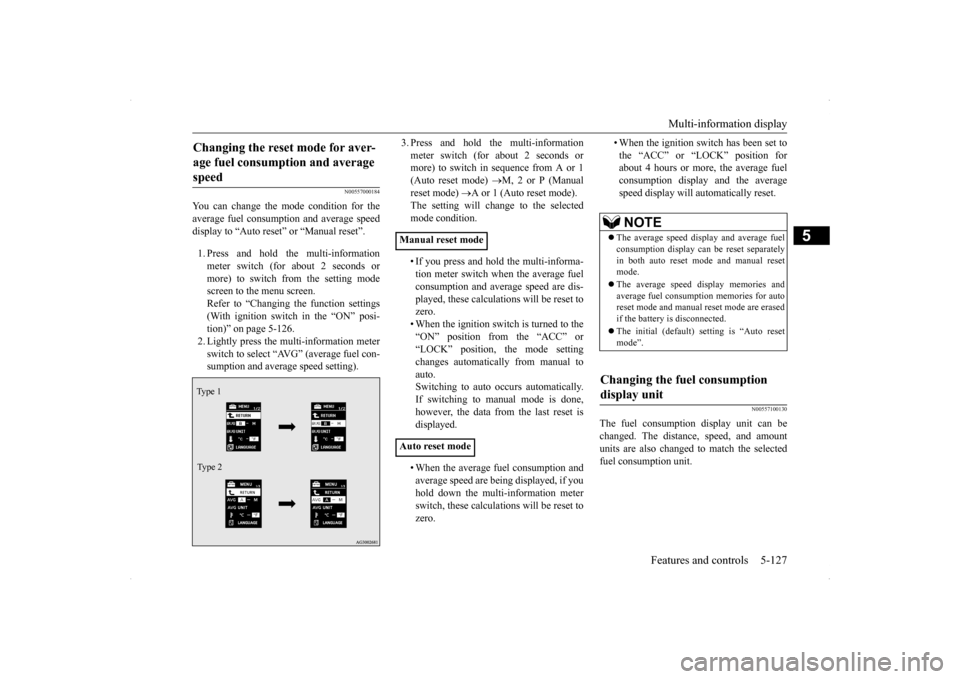
You can change the mode condition for the average fuel consumption and average speed display to “Auto reset” or “Manual reset”. 1. Press and hold the multi-information meter switch (for about 2 seconds ormore) to switch from the setting modescreen to the menu screen. Refer to “Changing the function settings (With ignition switch in the “ON” posi-tion)” on page 5-126. 2. Lightly press the multi-information meter switch to select “AVG” (average fuel con-sumption and average speed setting).
3. Press and hold the multi-information meter switch (for about 2 seconds or more) to switch in sequence from A or 1 (Auto reset mode)
M, 2 or P (Manual
reset mode)
A or 1 (Auto reset mode).
The setting will change to the selected mode condition. • If you press and hold the multi-informa- tion meter switch when the average fuel consumption and average speed are dis- played, these calculations will be reset tozero. • When the ignition switch is turned to the “ON” position from the “ACC” or“LOCK” position, the mode setting changes automatically from manual to auto.Switching to auto occurs automatically. If switching to manual mode is done, however, the data from the last reset isdisplayed. • When the average fuel consumption and average speed are being displayed, if youhold down the multi-information meter switch, these calculations will be reset to zero.
• When the ignition switch has been set to the “ACC” or “LOCK” position for about 4 hours or more, the average fuel consumption display and the averagespeed display will automatically reset.
N00557100130
The fuel consumption display unit can bechanged. The distance, speed, and amountunits are also changed to match the selected fuel consumption unit.
Changing the reset mode for aver- age fuel consumption and average speed Type 1 Type 2
Manual reset mode Auto reset mode
NOTE
The average speed display and average fuel consumption display can be reset separately in both auto reset mode and manual resetmode. The average speed display memories and average fuel consumption memories for auto reset mode and manual reset mode are erased if the battery is disconnected. The initial (default) setting is “Auto reset mode”.
Changing the fuel consumption display unit
Page 195 of 434
Multi-information display 5-128 Features and controls
5
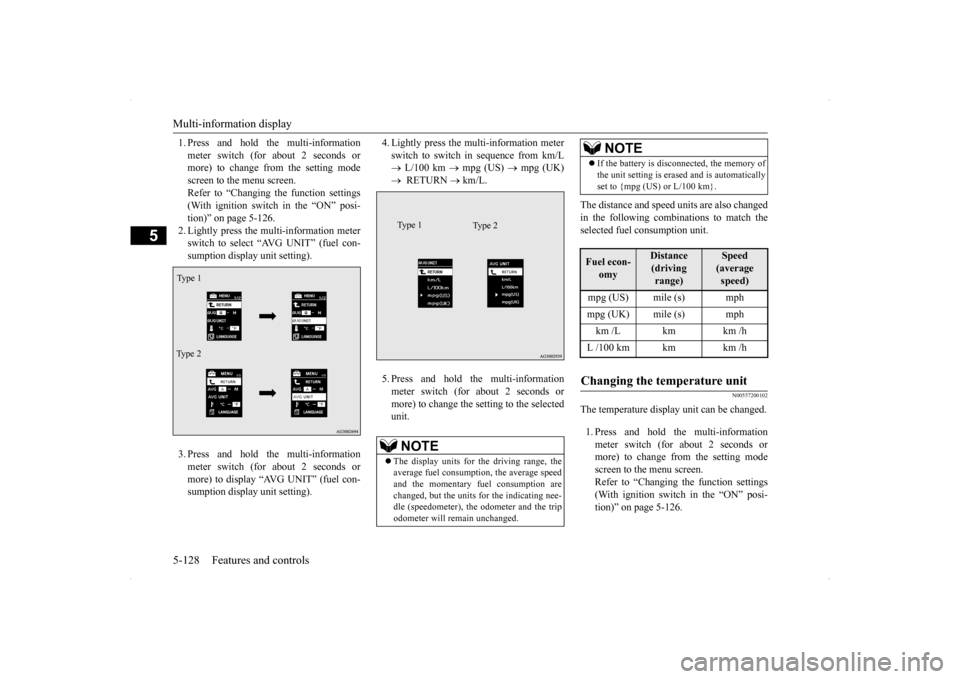
1. Press and hold the multi-information meter switch (for about 2 seconds or more) to change from the setting mode screen to the menu screen.Refer to “Changing the function settings (With ignition switch in the “ON” posi- tion)” on page 5-126.2. Lightly press the multi-information meter switch to select “AVG UNIT” (fuel con- sumption display unit setting). 3. Press and hold the multi-information meter switch (for about 2 seconds ormore) to display “AVG UNIT” (fuel con- sumption display unit setting).
4. Lightly press the multi-information meter switch to switch in sequence from km/L L/100 km
mpg (US)
mpg (UK)
RETURN
km/L.
5. Press and hold the multi-information meter switch (for about 2 seconds ormore) to change the setting to the selected unit.
The distance and speed units are also changed in the following combinations to match the selected fuel consumption unit.
N00557200102
The temperature display unit can be changed. 1. Press and hold the multi-information meter switch (for about 2 seconds ormore) to change from the setting mode screen to the menu screen. Refer to “Changing the function settings(With ignition switch in the “ON” posi- tion)” on page 5-126.
Ty p e 1 Type 2
NOTE
The display units for the driving range, the average fuel consumption, the average speed and the momentary fuel consumption are changed, but the units for the indicating nee-dle (speedometer), the odometer and the trip odometer will remain unchanged.
Type 2
Type 1
If the battery is disconnected, the memory of the unit setting is erased and is automatically set to {mpg (US) or L/100 km}.
Fuel econ-
omy
Distance (driving range)
Speed (average speed)
mpg (US) mile (s) mphmpg (UK) mile (s) mphkm /L km km /hL /100 km km km /hChanging the temperature unit
NOTE
Page 199 of 434
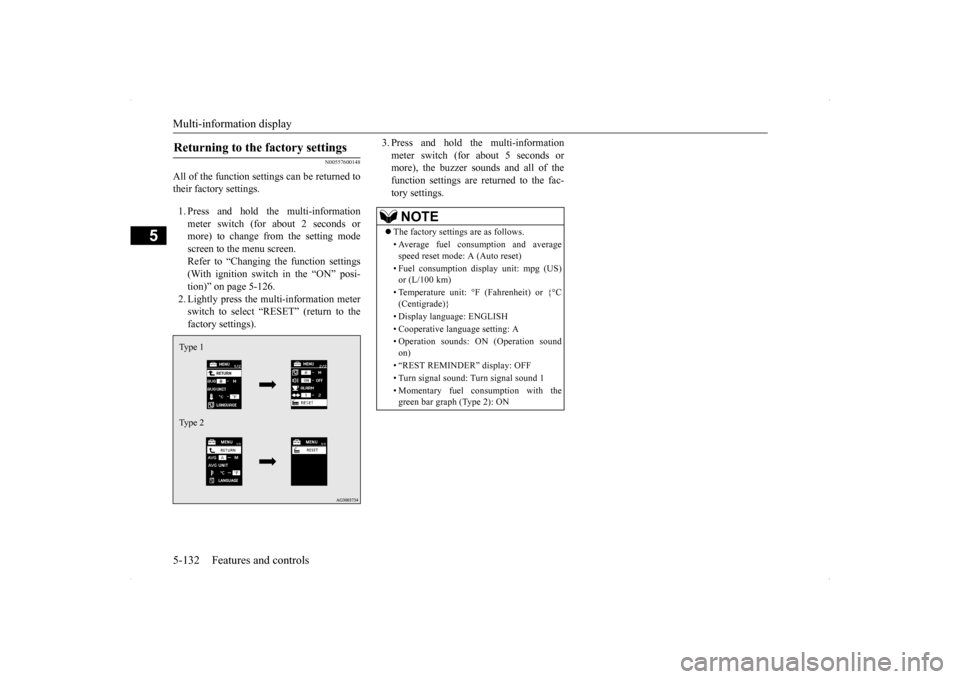
Multi-information display 5-132 Features and controls
5
N00557600148
All of the function settings can be returned to their factory settings. 1. Press and hold the multi-information meter switch (for about 2 seconds or more) to change from the setting mode screen to the menu screen.Refer to “Changing the function settings (With ignition switch in the “ON” posi- tion)” on page 5-126.2. Lightly press the multi-information meterswitch to select “RESET” (return to the factory settings).
3. Press and hold the multi-information meter switch (for about 5 seconds or more), the buzzer sounds and all of the function settings are returned to the fac-tory settings.
Returning to the factory settings Type 1 Type 2
NOTE
The factory settings are as follows. • Average fuel consumption and average speed reset mode: A (Auto reset) • Fuel consumption display unit: mpg (US) or (L/100 km) • Temperature unit: °F (Fahrenheit) or {°C (Centigrade)} • Display language: ENGLISH • Cooperative language setting: A• Operation sounds: ON (Operation sound on) • “REST REMINDER” display: OFF • Turn signal sound: Turn signal sound 1 • Momentary fuel consumption with the green bar graph (Type 2): ON