air condition MITSUBISHI LANCER 2014 8.G Owner's Manual
[x] Cancel search | Manufacturer: MITSUBISHI, Model Year: 2014, Model line: LANCER, Model: MITSUBISHI LANCER 2014 8.GPages: 434, PDF Size: 57.5 MB
Page 225 of 434
Wiper and washer switch 5-158 Features and controls
5
Keep the lever in the “OFF” position if the windshield is dirty and the weather is dry. Wiper operation under these conditions can scratch the windshield and damage the wip-ers.
N00569601038
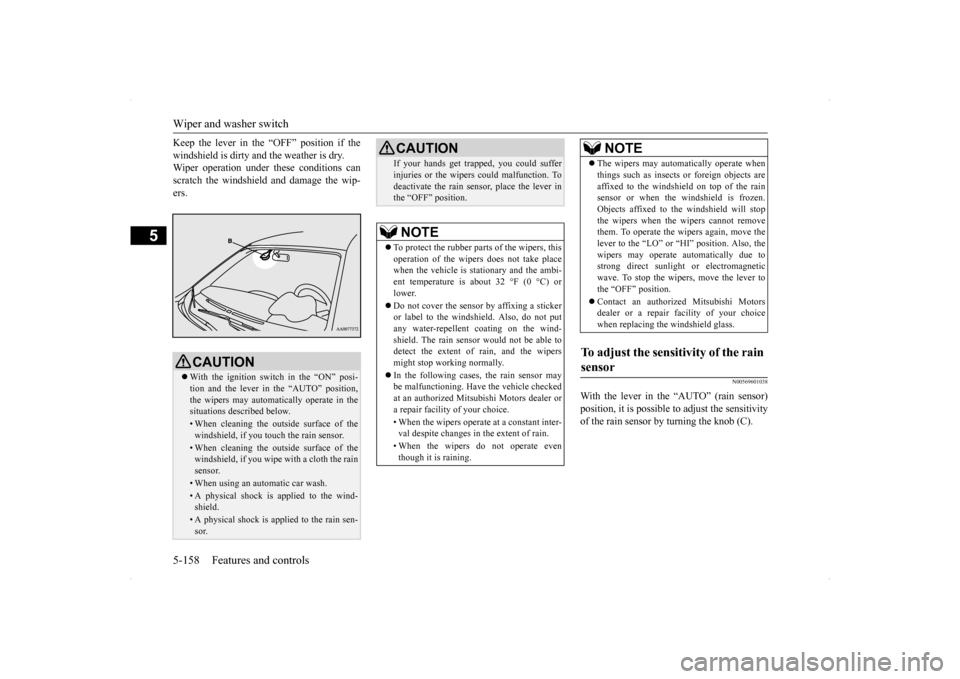
With the lever in the “AUTO” (rain sensor)position, it is possible to adjust the sensitivityof the rain sensor by turning the knob (C).
CAUTION With the ignition switch in the “ON” posi- tion and the lever in the “AUTO” position, the wipers may automatically operate in thesituations described below.• When cleaning the outside surface of thewindshield, if you touch the rain sensor.• When cleaning the outside surface of thewindshield, if you wipe with a cloth the rain sensor.• When using an automatic car wash.• A physical shock is applied to the wind- shield.• A physical shock is applied to the rain sen-sor.
If your hands get trapped, you could suffer injuries or the wipers could malfunction. To deactivate the rain sensor, place the lever in the “OFF” position.NOTE
To protect the rubber parts of the wipers, this operation of the wipers does not take placewhen the vehicle is stationary and the ambi- ent temperature is about 32 °F (0 °C) or lower. Do not cover the sensor by affixing a sticker or label to the windshield. Also, do not putany water-repellent coating on the wind- shield. The rain sensor would not be able to detect the extent of rain, and the wipersmight stop working normally. In the following cases, the rain sensor may be malfunctioning. Have the vehicle checked at an authorized Mitsubishi Motors dealer or a repair facility of your choice. • When the wipers operate at a constant inter- val despite changes in the extent of rain. • When the wipers do not operate even though it is raining.CAUTION
The wipers may automatically operate when things such as insects or foreign objects are affixed to the windshield on top of the rain sensor or when the windshield is frozen. Objects affixed to the windshield will stopthe wipers when the wipers cannot remove them. To operate the wipers again, move the lever to the “LO” or “HI” position. Also, thewipers may operate automatically due to strong direct sunlight or electromagnetic wave. To stop the wipers, move the lever tothe “OFF” position. Contact an authorized Mitsubishi Motors dealer or a repair
facility of your choice
when replacing the windshield glass.
To adjust the sensitivity of the rain sensor
NOTE
Page 263 of 434
Fuel economy 6-2 Driving safety
6
N00628800165
Fuel economy is dependent on many factors. Your personal driving habits can have a sig-nificant effect on your fuel use. Several rec- ommendations for achieving the greatest fuel economy are listed below. Whenever accelerating from a stop, always accelerate slowly and smoothly. When parked for even a short period, do not idle the engine. Shut it off. Plan your trips to avoid unnecessary stops. Keep your tires inflated to the recom- mended pressures. When you drive on highways or dry improved roads, set the drive mode-selec- tor “2WD” or “4WD AUTO” position (ifso equipped). For freeway driving, maintain a speed of approximately 50 mph (80 km/h) whentraffic, roadway and weather conditions safely permit. Keep your air filter clean and your vehicle lubricated according to the recommenda- tions in this manual. Always keep your vehicle well main- tained. A poorly maintained engine wastes fuel and costs money. Do not overload your vehicle.
N00628900052
Drunk driving is one of the most frequent causes of accidents.Your driving ability can be seriously impaired even with blood alcohol levels far below the legal minimum. If you have been drinking,don’t drive. Ride with a designated non- drinking driver, call a cab or a friend, or use public transportation. Drinking coffee or tak-ing a cold shower will not make you sober.Similarly, prescription and nonprescription drugs affect your alertness, perception and reaction time. Consult with your doctor orpharmacist before driving while under the influence of any of these medications.
N00628600017
The original equipment floor mat providedwith your vehicle was specifically designed for your vehicle. Always properly positionthe floor mat and assure it does not interfere with operation of the pedals. Always use the
retaining clip on the driver’s floorboard to secure the floor mat. When used, this clip will help prevent the floor mat from moving for- ward and possibly interfering with the opera-tion of the pedals. To prevent the floor mat from moving forward and possibly interfering with the operation of the pedals, Mitsubishigenuine floor mats are recommended.
N00628700050
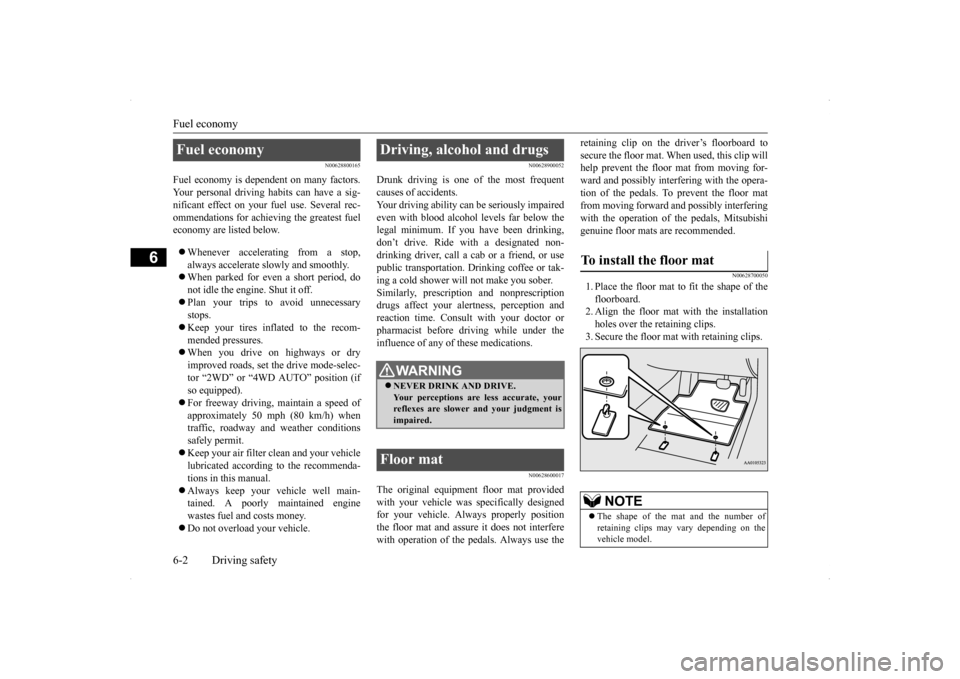
1. Place the floor mat to fit the shape of thefloorboard.2. Align the floor mat with the installation holes over the retaining clips. 3. Secure the floor mat with retaining clips.
Fuel economy
Driving, alcohol and drugs
WA R N I N G NEVER DRINK AND DRIVE. Your perceptions are less accurate, yourreflexes are slower and your judgment is impaired.
Floor mat
To install the floor mat
NOTE
The shape of the mat and the number of retaining clips may vary depending on the vehicle model.
Page 264 of 434
Vehicle preparation before driving
Driving safety 6-3
6
N00629000337
For a safer and more enjoyable trip, always observe the following: Before starting the vehicle, make certain that you and all passengers are seated and wearing their seat belts properly (with children in the rear seat, in appropriaterestraints), and that all the doors are locked.
Move the driver’s seat as far backward as possible, while still keeping good visibil- ity, and good control of the steering wheel, brakes, accelerator, and controls.Check the instrument panel indicators and multi-information display for any possible problem. Move the front passenger seat as far back as possible. Make sure that infants and small children are properly restrained in accordance withall laws and regulations.
Check these by selecting the defroster mode, and set the blower switch on high. You should be able to feel the air blowing against the windshield. (Refer to “Defrosting or defogging the wind- shield and door windows” on page 7-6, 7-12, 7-17, 7-22, 7-27.) Check all the tires for heavy tread wear or uneven wear patterns. Look for stones, nails,glass, or other objects stuck in the tread. Look for any tread cuts or sidewall cracks. Check the wheel nuts for tightness, and the tires(including spare tire) for proper pressures.
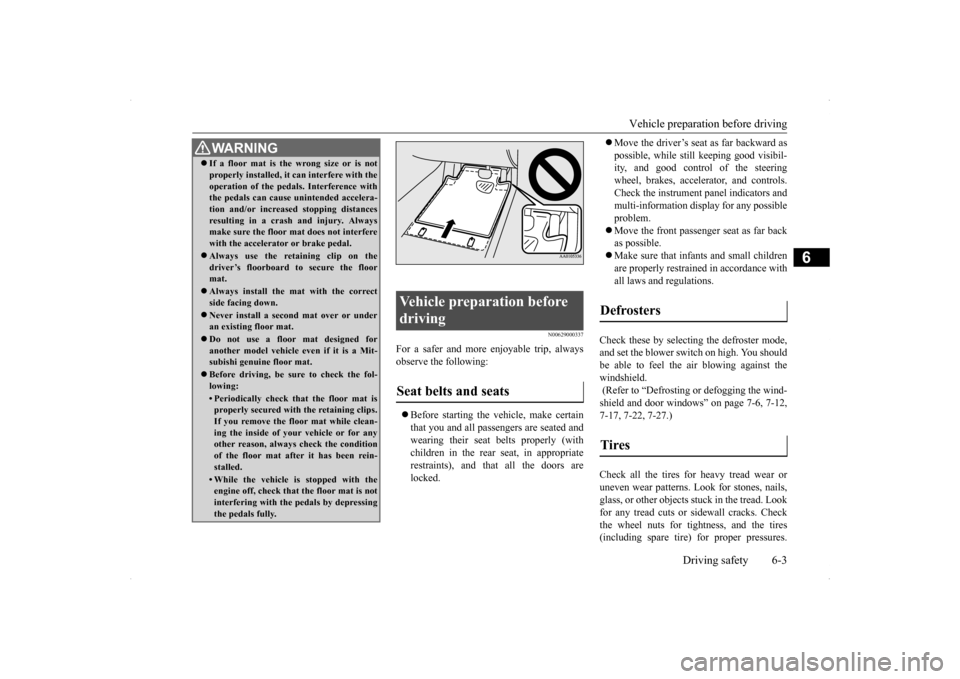
WA R N I N G If a floor mat is the wrong size or is not properly installed, it can interfere with the operation of the pedals. Interference with the pedals can cause unintended accelera- tion and/or increased stopping distancesresulting in a crash and injury. Always make sure the floor mat does not interfere with the accelerator or brake pedal. Always use the retaining clip on the driver’s floorboard to secure the floormat. Always install the mat with the correct side facing down. Never install a second mat over or under an existing floor mat. Do not use a floor mat designed for another model vehicle ev
en if it is a Mit-
subishi genuine floor mat. Before driving, be sure to check the fol- lowing:• Periodically check that the floor mat isproperly secured with the retaining clips. If you remove the floor mat while clean-ing the inside of your vehicle or for any other reason, always check the condition of the floor mat after it has been rein-stalled.• While the vehicle is stopped with the engine off, check that the floor mat is not interfering with the pedals by depressingthe pedals fully.
Vehicle preparation before driving Seat belts and seats
Defrosters Tires
Page 266 of 434
Braking
Driving safety 6-5
6
Stay at low speeds at first so that the transaxle, transfer case and rear axle oil have time to spread to all the lubrication points. Manual transaxle can be harder to shift in cold weather conditions. This is normal and shifting will get easier as the transaxlewarms up. Check the engine antifreeze. If there is not enough coolant because of aleak or from engine overheating, add Mit-subishi Motors Genuine Super Long Life Coolant Premium or equivalent. Please read this section in conjunctionwith the “Engine coolant” on page 9-8.
[For RALLIART vehicles sold in U.S.A.] Mitsubishi Motors recommends that the standard equipment tires be replaced with winter tires when the vehicle is going to be used in winter.The standard equipment tires provided with this vehicle are summer tires and use a high-grip compound that provides supe-rior grip. The road grip, however, is reduced in win- ter.When replacing the standard equipmenttires with winter tires, all four tires must be replaced using radial identicalsize win- ter tires.
N00629500446
All the parts of the brake system are criticalto safety. Have the vehicle serviced by anauthorized Mitsubishi Motors dealer or a repair facility of your choice at regular inter- vals according to the “WARRANTY ANDMAINTENANCE MANUAL”. Check the brake system while driving at a low speed immediately after starting, espe-cially when the brakes are wet, to confirm they work normally. A film of water can be formed on the brakediscs or brake drums and prevent normal braking after driving in heavy rain or through large puddles, or after the vehicle is washed.If this occurs, dry the brakes out by driving slowly while lightly depressing the brake pedal. On snowy roads, ice can form on the braking system, making the brakes less effective.While driving in such conditions, pay close attention to preceding and following vehicles and to the condition of
the road surface. From
WA R N I N GNever open the radiator cap when the radiator is hot. You could be seriously burned.
NOTE
As your vehicle is equipped with a tire pres- sure monitoring system, there is a risk of damage to the tire inflation pressure sensorswhen the tire is replaced on the rim. Tire replacement should, therefore, be performed only by an authorized Mitsubishi Motorsdealer. If you use new wheels w
ith new tire inflation
pressure sensors, their ID codes must be pro- grammed into the tire pressure monitoringsystem. Refer to “Whenever the tires and wheels are replaced with new ones” on page 5-108.
Braking When brakes are wet When driving in cold weather
Page 276 of 434
7
Comfort controlsVents ..........................................
.......................................................7-2
Heater without air conditioning function (if so equipped) ...............7-4 Manual air conditioning with MAX A/C mode (if so equipped) .....7-7 Manual air conditioning without MAX A/C mode (if so equipped)...................................................................
..................................7-12
Automatic air conditioning with Fahr
enheit scale (if so equipped)7-17
Automatic air conditioning with Cels
ius scale (if so equipped) .....7-23
Important air conditioning op
erating tips .......................................7-28
Air purifier .......................
...............................................................7-28
AM/FM radio/CD player (if so equipped) .....................................7-29Handling of Discs .
.................................................
........................7-32
Audio Files (MP3/WMA/
AAC) ....................................................7-34
Important Points on Safety fo
r the Customer ................................7-38
Operation Keys ...............
...............................................................7-39
Listen to Radio ......
.................................................
........................7-42
Listen to Satellite Radio (if so equipped) .......................................7-43Listen to CDs ..................
...............................................................7-45
Listen to MP3s ......
.................................................
........................7-46
Listen to an iPod ...
.................................................
........................7-47
Listen to Audio Files on
a USB Device .........................................7-49
Listen to Bluetooth Audio (i
f so equipped) ....................................7-52
Use AUX (if so equippe
d) ..............................................................7-53
Display Indicator ..
.................................................
........................7-55
Audio Quality and Volume Balance Adjustment ...........................7-56 System Settings .....
.................................................
........................7-57
Troubleshooting ...............
...............................................................7-60
Antenna ................................................
...........................................7-62
General information about
your radio ............................................7-63
Page 277 of 434
Vents 7-2 Comfort controls
7
N00729900210 N00730200301
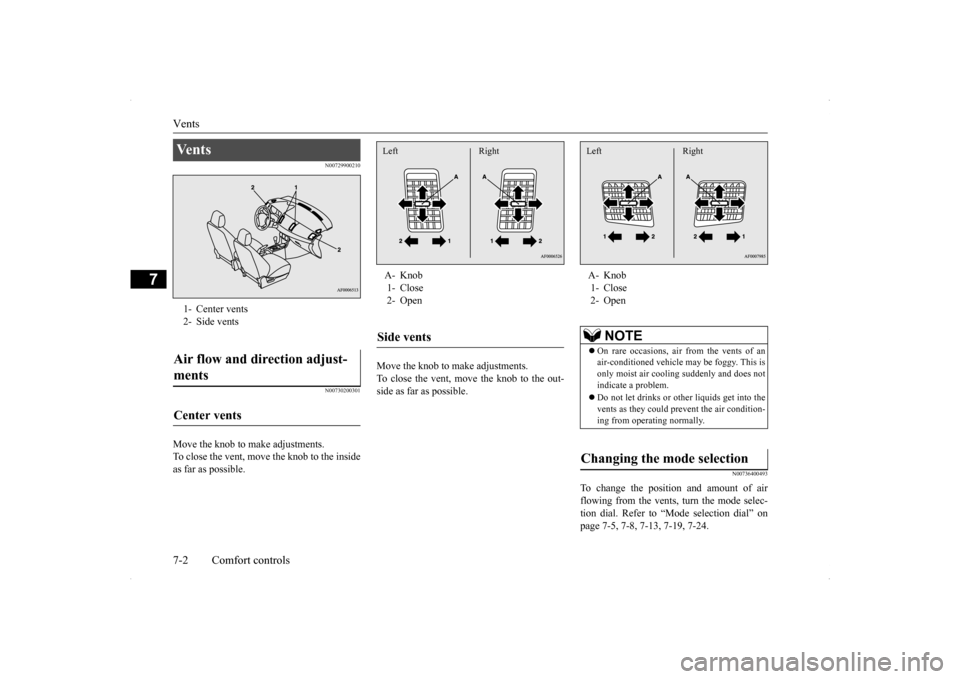
Move the knob to make adjustments. To close the vent, move the knob to the inside as far as possible.
Move the knob to make adjustments. To close the vent, move the knob to the out-side as far as possible.
N00736400493
To change the position and amount of airflowing from the vents, turn the mode selec- tion dial. Refer to “Mode selection dial” on page 7-5, 7-8, 7-13, 7-19, 7-24.
Ve n t s 1- Center vents2- Side ventsAir flow and direction adjust- ments Center vents
A- Knob 1- Close 2- OpenSide vents Left Right
A- Knob 1- Close 2- Open
NOTE
On rare occasions, air from the vents of an air-conditioned vehicle may be foggy. This isonly moist air cooling suddenly and does not indicate a problem. Do not let drinks or ot
her liquids get into the
vents as they could prevent the air condition- ing from operating normally.
Changing the mode selection Left Right
Page 279 of 434
Heater without air conditioni
ng function (if so equipped)
7-4 Comfort controls
7
Air flows mainly to the windshield and the door windows.
N00737700031
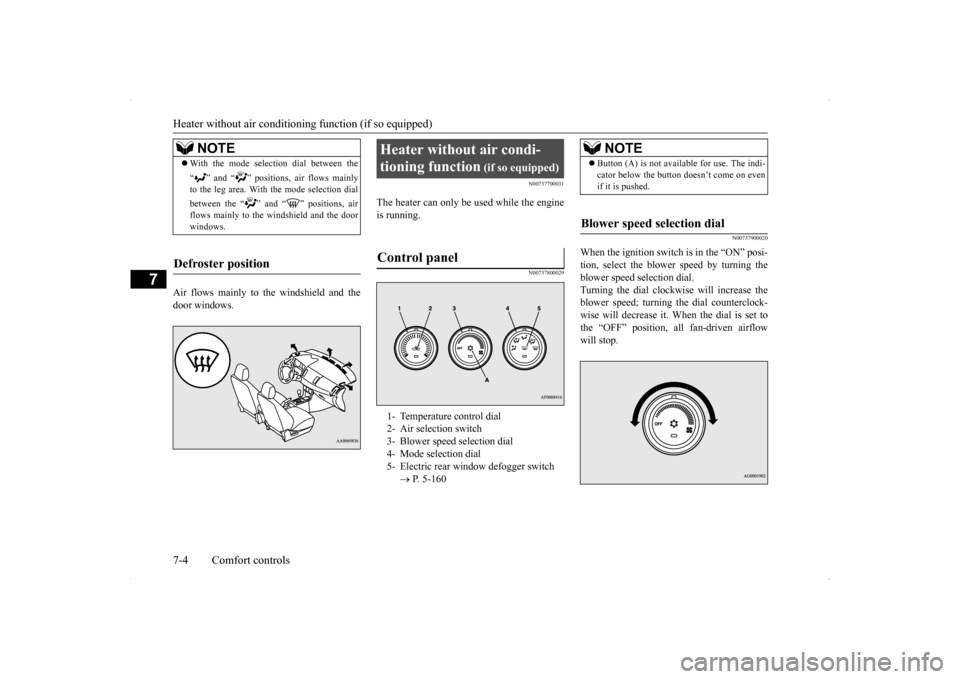
The heater can only be used while the engineis running.
N00737800029
N00737900020
When the ignition switch is in the “ON” posi- tion, select the blower speed by turning theblower speed selection dial. Turning the dial clockwise will increase the blower speed; turning the dial counterclock-wise will decrease it. When the dial is set to the “OFF” position, all fan-driven airflow will stop.
NOTE
With the mode selection dial between the “ ” and “ ” positions, air flows mainly to the leg area. With the mode selection dial between the “ ” and “ ” positions, air flows mainly to the windshield and the doorwindows.
Defroster position
Heater without air condi- tioning function
(if so equipped)
Control panel
1- Temperature control dial 2- Air selection switch 3- Blower speed selection dial 4- Mode selection dial5- Electric rear window defogger switch
P. 5-160
NOTE
Button (A) is not available for use. The indi- cator below the button doesn’t come on even if it is pushed.
Blower speed selection dial
Page 280 of 434
Heater without air conditioni
ng function (if so equipped) Comfort controls 7-5
7
N00738000044
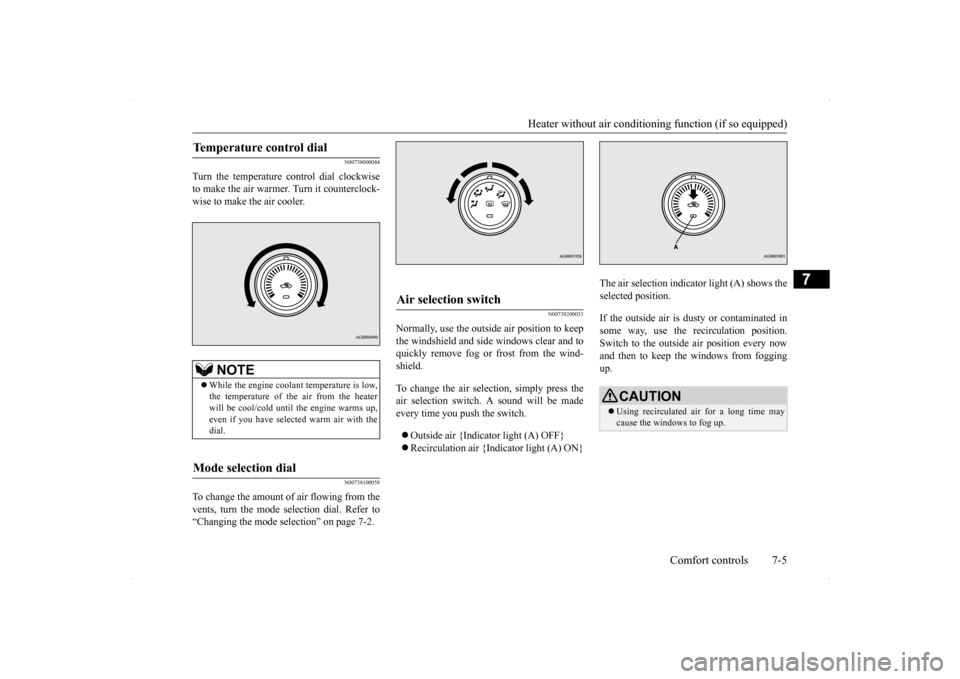
Turn the temperature control dial clockwise to make the air warmer. Turn it counterclock-wise to make the air cooler.
N00738100058
To change the amount of air flowing from thevents, turn the mode selection dial. Refer to“Changing the mode selection” on page 7-2.
N00738200033
Normally, use the outside air position to keepthe windshield and side windows clear and toquickly remove fog or frost from the wind- shield. To change the air selection, simply press the air selection switch. A sound will be made every time you push the switch. Outside air {Indicator light (A) OFF} Recirculation air {Indicator light (A) ON}
The air selection indicator light (A) shows the selected position. If the outside air is dusty or contaminated in some way, use the recirculation position.Switch to the outside air position every now and then to keep th
e windows from fogging
up.
Temperature control dial
NOTE
While the engine coolant temperature is low, the temperature of the air from the heater will be cool/cold until the engine warms up, even if you have selected warm air with thedial.
Mode selection dial
Air selection switch
CAUTION Using recirculated air for a long time may cause the windows to fog up.
Page 281 of 434
Heater without air conditioni
ng function (if so equipped)
7-6 Comfort controls
7
N00738300034
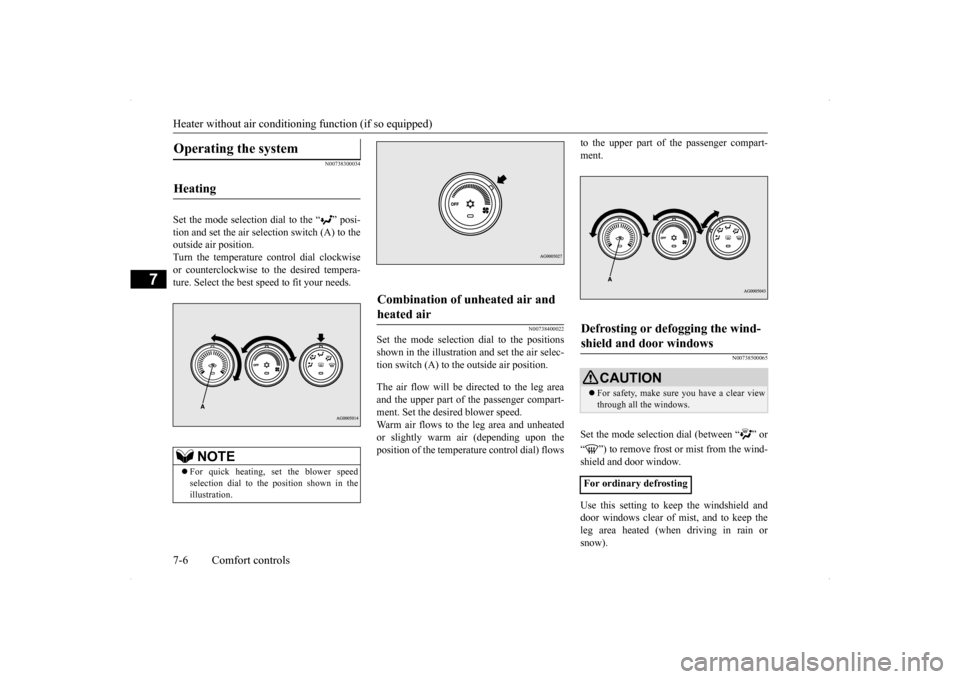
Set the mode selection dial to the “ ” posi- tion and set the air selection switch (A) to the outside air position.Turn the temperature control dial clockwiseor counterclockwise to the desired tempera- ture. Select the best speed to fit your needs.
N00738400022
Set the mode selection dial to the positionsshown in the illustration and set the air selec- tion switch (A) to the outside air position. The air flow will be di
rected to the leg area
and the upper part of the passenger compart-ment. Set the desired blower speed. Warm air flows to the leg area and unheated or slightly warm air (depending upon theposition of the temperat
ure control dial) flows
to the upper part of the passenger compart- ment.
N00738500065
Set the mode selection dial (between “ ” or “ ”) to remove frost or mist from the wind- shield and door window. Use this setting to keep the windshield and door windows clear of mist, and to keep the leg area heated (when driving in rain orsnow).
Operating the system
Heating
NOTE
For quick heating, set the blower speed selection dial to the position shown in the illustration.
Combination of unheated air and heated air
Defrosting or defogging the wind-shield and door windows
CAUTION For safety, make sure you have a clear view through all the windows.
For ordinary defrosting
Page 282 of 434
Manual air conditioning with
MAX A/C mode (if so equipped)
Comfort controls 7-7
7
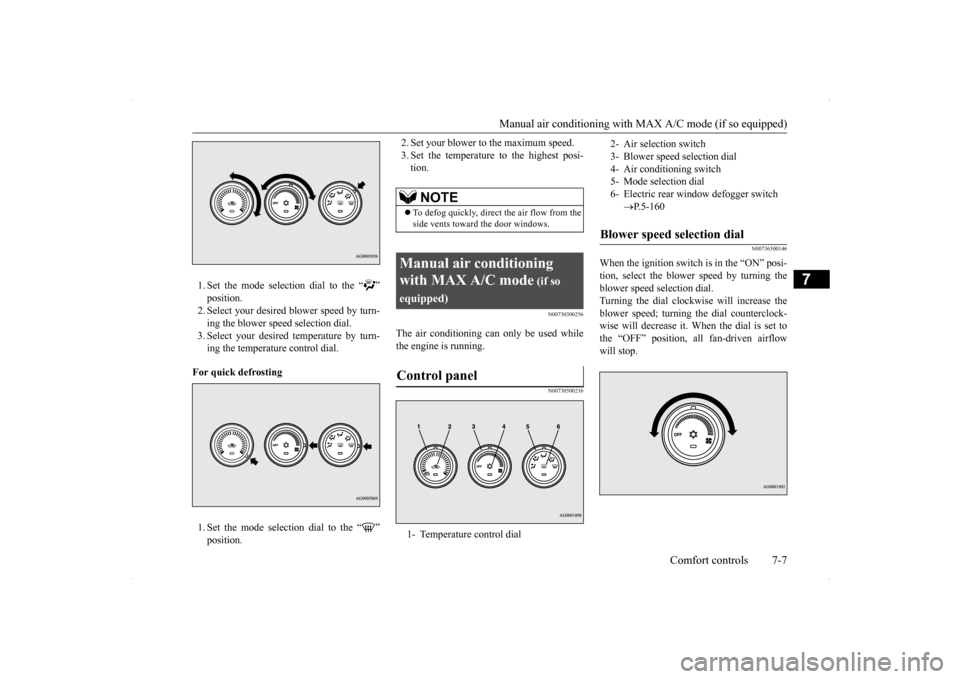
1. Set the mode selection dial to the “ ” position. 2. Select your desired blower speed by turn- ing the blower speed selection dial.3. Select your desired temperature by turn- ing the temperature control dial.
For quick defrosting 1. Set the mode selection dial to the “ ” position.
2. Set your blower to the maximum speed. 3. Set the temperature to the highest posi- tion.
N00730300256
The air conditioning can only be used while the engine is running.
N00730500216
N00736500146
When the ignition switch is in the “ON” posi- tion, select the blower speed by turning the blower speed selection dial. Turning the dial clockwise will increase theblower speed; turning the dial counterclock- wise will decrease it. When the dial is set to the “OFF” position, all fan-driven airflowwill stop.
NOTE
To defog quickly, direct
the air flow from the
side vents toward the door windows.
Manual air conditioning with MAX A/C mode
(if so
equipped)Control panel
1- Temperature control dial
2- Air selection switch 3- Blower speed selection dial4- Air conditioning switch 5- Mode selection dial 6- Electric rear window defogger switch
P.5-160
Blower speed selection dial