service MITSUBISHI LANCER 2014 8.G Owner's Manual
[x] Cancel search | Manufacturer: MITSUBISHI, Model Year: 2014, Model line: LANCER, Model: MITSUBISHI LANCER 2014 8.GPages: 434, PDF Size: 57.5 MB
Page 186 of 434
Multi-information display
Features and controls 5-119
5
The operation method is the same as when the ignition switch is in the “OFF” position.For further details, refer to “Odometer/Trip odometer” on page 5-114.
Shows the distance and number of months until the next periodic inspection.Refer to “Service reminder” on page 5-123. Shows the engine coolant temperature. If the coolant becomes hot, “ ” will blink. Pay careful attention to the engine coolant temperature display while you are driving. Shows the approximate driving range (how many more miles or kilometers you can drive) with the current fuel level. When thisdriving range falls below 30 miles (50 km), “- --” is displayed. Refuel as soon as possible.
This displays the average speed from the last reset to the present.There are 2 types of mode settings as follows. For details on how to change the average speed display setting, refer to “Changing thefunction settings (With ignition switch in the “ON” position)” on page 5-126.
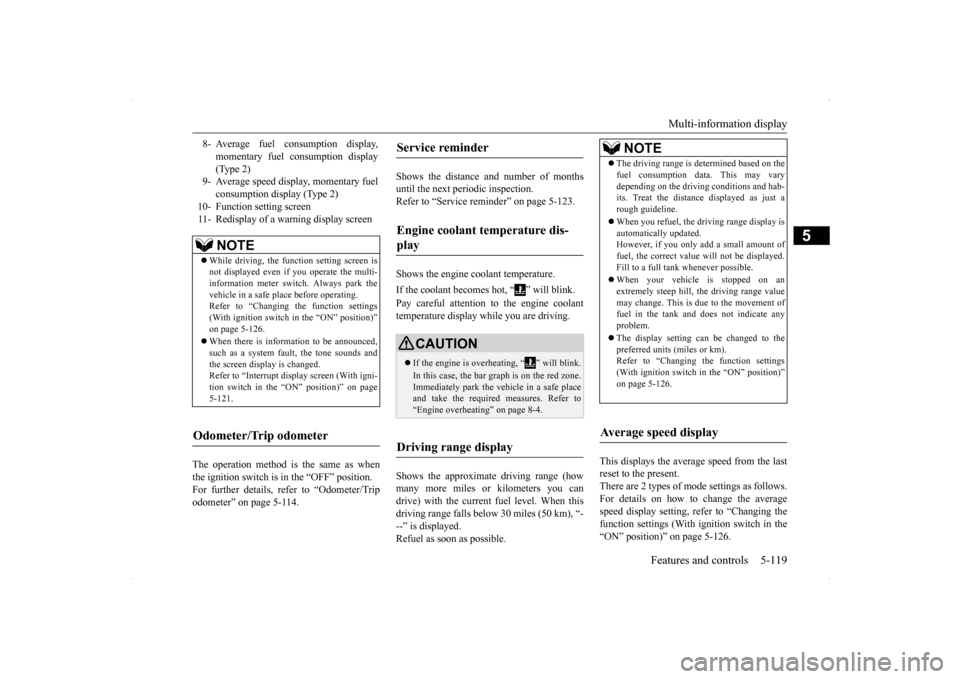
8- Average fuel consumption display,
momentary fuel consumption display(Type 2)
9- Average speed display, momentary fuel
consumption display (Type 2)
10- Function setting screen 11- Redisplay of a warning display screen
NOTE
While driving, the function setting screen is not displayed even if you operate the multi- information meter switch. Always park the vehicle in a safe place before operating.Refer to “Changing the function settings (With ignition switch in the “ON” position)” on page 5-126. When there is information to be announced, such as a system fault, the tone sounds andthe screen display is changed. Refer to “Interrupt display screen (With igni- tion switch in the “ON” position)” on page5-121.
Odometer/Trip odometer
Service reminder Engine coolant temperature dis- play
CAUTION If the engine is overheating, “ ” will blink. In this case, the bar graph is on the red zone. Immediately park the vehicle in a safe placeand take the required measures. Refer to “Engine overheating” on page 8-4.
Driving range display
NOTE
The driving range is determined based on the fuel consumption data. This may vary depending on the driving conditions and hab- its. Treat the distance displayed as just a rough guideline. When you refuel, the driving range display is automatically updated.However, if you only add a small amount of fuel, the correct value will not be displayed. Fill to a full tank whenever possible. When your vehicle is stopped on an extremely steep hill, the driving range valuemay change. This is due to the movement of fuel in the tank and does not indicate any problem. The display setting can be changed to the preferred units (miles or km).Refer to “Changing the function settings (With ignition switch in the “ON” position)” on page 5-126.
Average speed display
Page 190 of 434
Multi-information display
Features and controls 5-123
5
Refer to “ACD control mode” on page 5-83.
N00568700019
This indicator will be displayed when fuel- efficient driving is achieved.
N00556600125
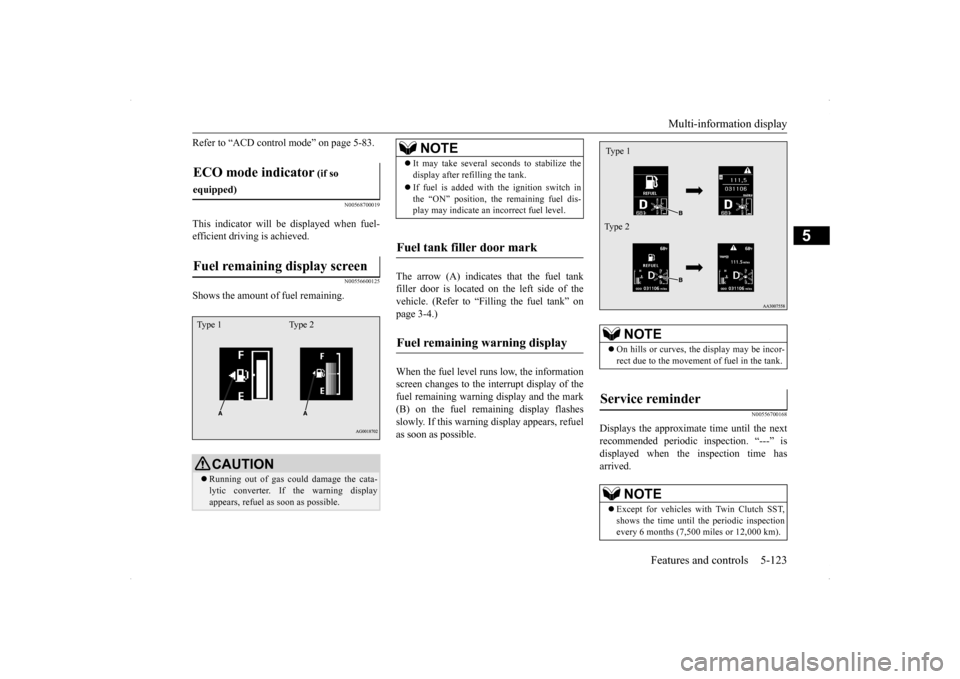
Shows the amount of fuel remaining.
The arrow (A) indicates that the fuel tank filler door is located on the left side of thevehicle. (Refer to “Filling the fuel tank” on page 3-4.) When the fuel level runs low, the information screen changes to the interrupt display of the fuel remaining warning display and the mark(B) on the fuel remaining display flashes slowly. If this warning display appears, refuel as soon as possible.
N00556700168
Displays the approximate time until the nextrecommended periodic inspection. “---” isdisplayed when the inspection time has arrived.
ECO mode indicator
(if so
equipped)Fuel remaining display screen
CAUTION Running out of gas could damage the cata- lytic converter. If the warning display appears, refuel as soon as possible.
Type 1 Type 2
NOTE
It may take several seconds to stabilize the display after refilling the tank. If fuel is added with the ignition switch in the “ON” position, the remaining fuel dis-play may indicate an incorrect fuel level.
Fuel tank filler door mark Fuel remaining warning display
NOTE
On hills or curves, the display may be incor- rect due to the movement of fuel in the tank.
Service reminder
NOTE
Except for vehicles with Twin Clutch SST, shows the time until the periodic inspection every 6 months (7,500 miles or 12,000 km).Type 1 Type 2
Page 191 of 434
Multi-information display 5-124 Features and controls
5
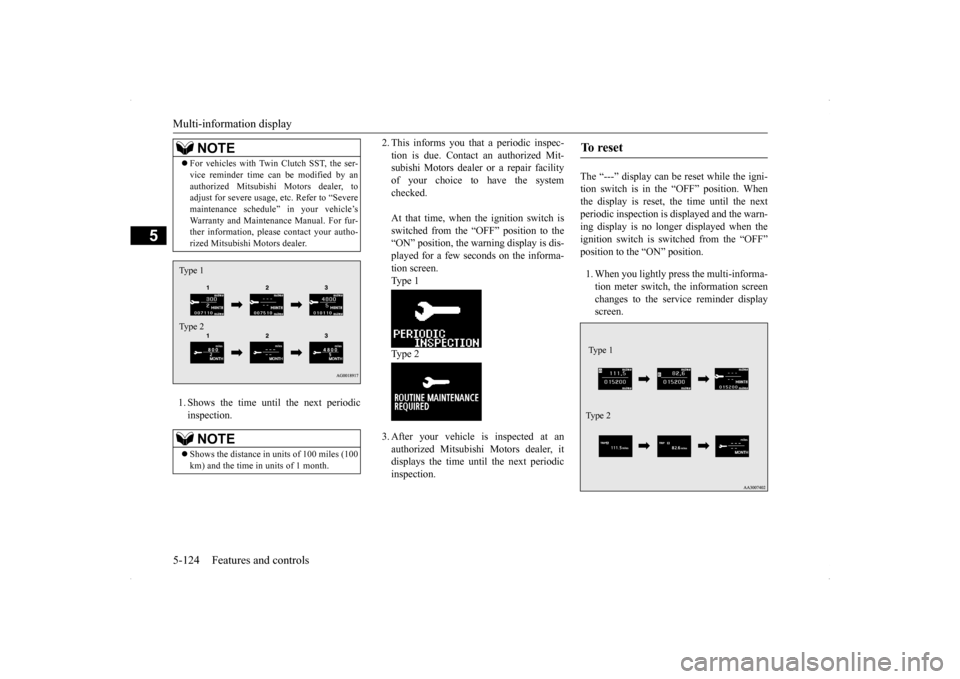
1. Shows the time until the next periodic inspection.
2. This informs you that a periodic inspec- tion is due. Contact an authorized Mit- subishi Motors dealer or a repair facility of your choice to have the systemchecked. At that time, when the ignition switch is switched from the “OFF” position to the “ON” position, the warning display is dis- played for a few seconds on the informa-tion screen.Type 1 Type 2 3. After your vehicle is inspected at an authorized Mitsubishi Motors dealer, itdisplays the time until the next periodicinspection.
The “---” display can be reset while the igni- tion switch is in the “OFF” position. Whenthe display is reset, the time until the next periodic inspection is displayed and the warn- ing display is no longer displayed when theignition switch is switched from the “OFF” position to the “ON” position. 1. When you lightly press the multi-informa- tion meter switch, the information screen changes to the service reminder displayscreen.
For vehicles with Twin Clutch SST, the ser- vice reminder time can be modified by an authorized Mitsubishi Motors dealer, to adjust for severe usage, etc. Refer to “Severe maintenance schedule” in your vehicle’sWarranty and Maintenance Manual. For fur- ther information, please contact your autho- rized Mitsubishi Motors dealer.NOTE
Shows the distance in uni
ts of 100 miles (100
km) and the time in units of 1 month.NOTE
Type 1 Type 2
To r e s e t Type 1 Ty p e 2
Page 211 of 434
Indicator light, warning light, an
d information screen display list
5-144 Features and controls
5
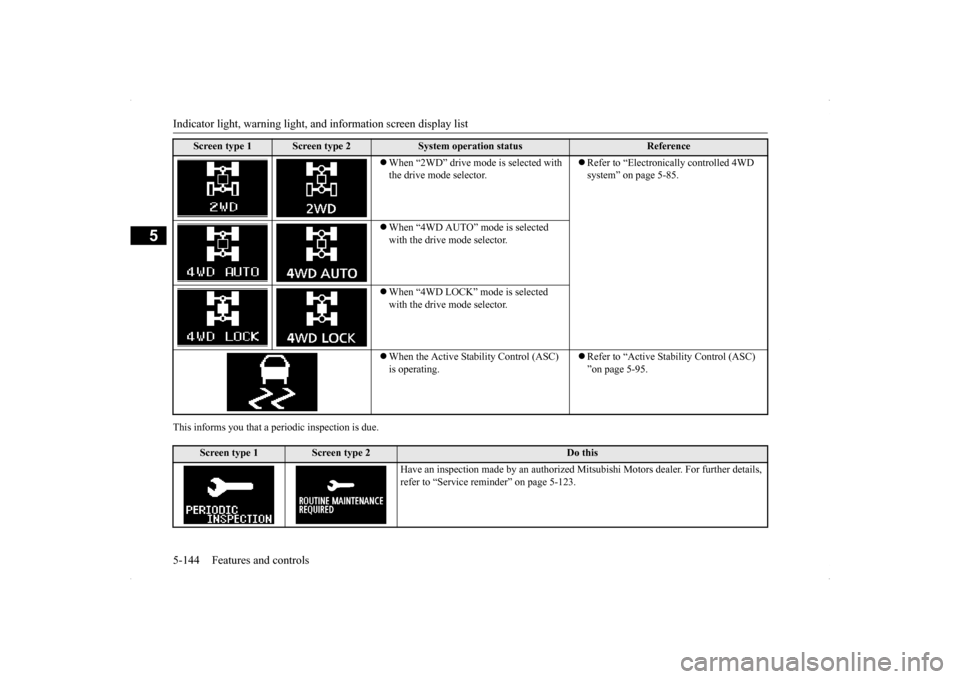
This informs you that a periodic inspection is due.
Screen type 1
Screen type 2
System operation status
Reference
When “2WD” drive mode is selected with the drive mode selector.
Refer to “Electronically controlled 4WD system” on page 5-85.
When “4WD AUTO” mode is selected with the drive mode selector. When “4WD LOCK” mode is selected with the drive mode selector. When the Active Stability Control (ASC) is operating.
Refer to “Active Stability Control (ASC) ”on page 5-95.
Screen type 1
Screen type 2
Do this
Have an inspection made by an authorized M
itsubishi Motors dealer. For further details,
refer to “Service reminder” on page 5-123.
Page 213 of 434
Warning lights 5-146 Features and controls
5
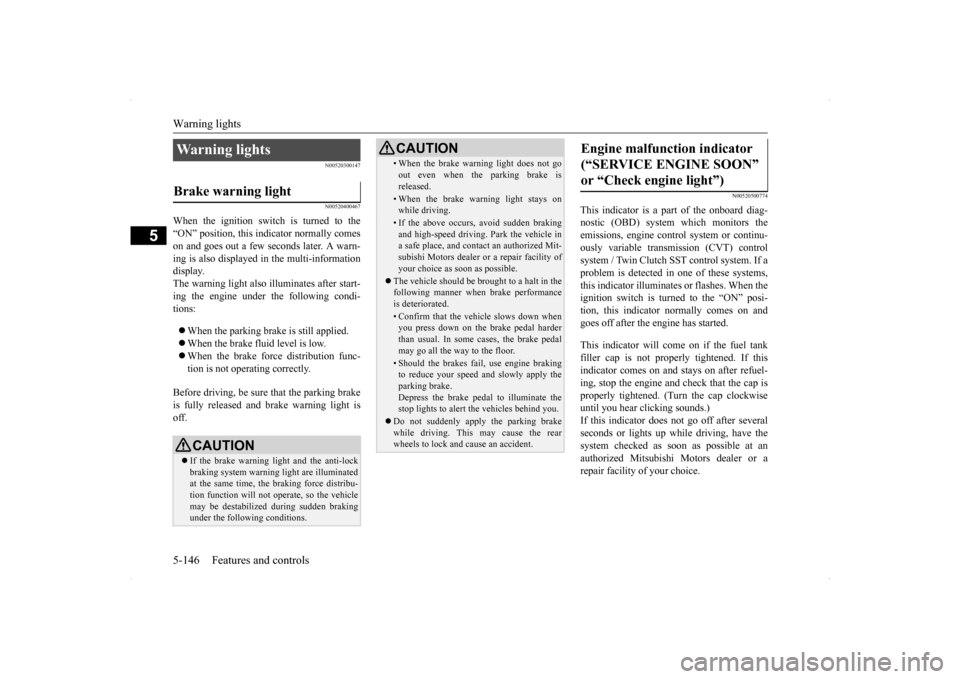
N00520300147 N00520400467
When the ignition switch is turned to the “ON” position, this indicator normally comeson and goes out a few seconds later. A warn- ing is also displayed in the multi-information display.The warning light also illuminates after start-ing the engine under the following condi- tions: When the parking brake is still applied. When the brake fluid level is low. When the brake force distribution func- tion is not operating correctly.
Before driving, be sure that the parking brake is fully released and brake warning light isoff.
N00520500774
This indicator is a part of the onboard diag- nostic (OBD) system which monitors the emissions, engine contro
l system or continu-
ously variable transmission (CVT) control system / Twin Clutch SST control system. If a problem is detected in one of these systems,this indicator illuminates or flashes. When theignition switch is turned to the “ON” posi- tion, this indicator normally comes on and goes off after the engine has started. This indicator will come on if the fuel tank filler cap is not properly tightened. If this indicator comes on and stays on after refuel- ing, stop the engine and check that the cap isproperly tightened. (Turn the cap clockwise until you hear clicking sounds.) If this indicator does not go off after severalseconds or lights up while driving, have the system checked as soon as possible at an authorized Mitsubishi Motors dealer or arepair facility of your choice.
Warning lights Brake warning light
CAUTION If the brake warning light and the anti-lock braking system warning light are illuminated at the same time, the braking force distribu-tion function will not operate, so the vehicle may be destabilized during sudden braking under the following conditions.
• When the brake warning light does not go out even when the parking brake is released.• When the brake warning light stays onwhile driving.• If the above occurs, avoid sudden brakingand high-speed driving. Park the vehicle in a safe place, and contact an authorized Mit- subishi Motors dealer or a repair facility ofyour choice as soon as possible.
The vehicle should be brought to a halt in the following manner when brake performance is deteriorated.• Confirm that the vehicle slows down whenyou press down on the brake pedal harder than usual. In some cases, the brake pedalmay go all the way to the floor.• Should the brakes fail, use engine brakingto reduce your speed and slowly apply the parking brake. Depress the brake pedal to illuminate thestop lights to alert the vehicles behind you.
Do not suddenly apply the parking brake while driving. This may cause the rear wheels to lock and cause an accident.CAUTION
Engine malfunction indicator (“SERVICE ENGINE SOON” or “Check engine light”)
Page 214 of 434
Information screen display
Features and controls 5-147
5
N00520600296
This light comes on in the event of a malfunc- tion in the charging system or when the igni- tion switch is turned to the “ON” position (engine off). A warning is also displayed inthe multi-information display. When the engine is started,
the light should go out.
Check to make sure that the light has goneout before driving.
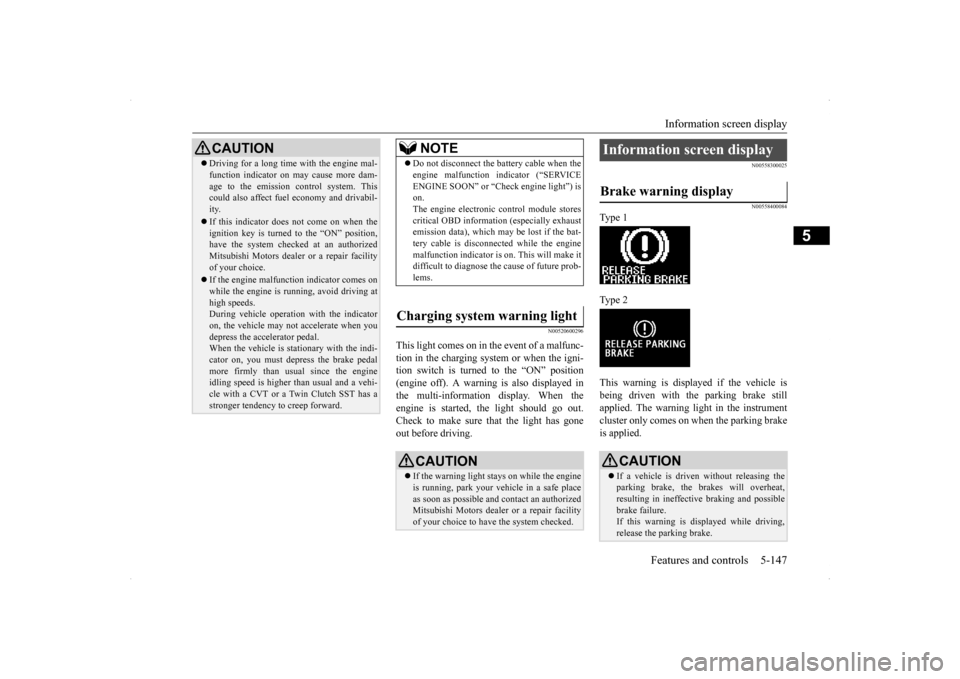
N00558300025 N00558400084
Type 1 Type 2 This warning is displayed if the vehicle is being driven with the parking brake still applied. The warning light in the instrumentcluster only comes on when the parking brake is applied.
CAUTION Driving for a long time with the engine mal- function indicator on may cause more dam- age to the emission control system. This could also affect fuel economy and drivabil- ity. If this indicator does not come on when the ignition key is turned to the “ON” position,have the system checked at an authorized Mitsubishi Motors dealer or a repair facility of your choice. If the engine malfunction indicator comes on while the engine is running, avoid driving athigh speeds. During vehicle operation with the indicator on, the vehicle may not accelerate when youdepress the accelerator pedal. When the vehicle is stationary with the indi- cator on, you must depress the brake pedalmore firmly than usual since the engine idling speed is higher than usual and a vehi- cle with a CVT or a Twin Clutch SST has astronger tendency to creep forward.
NOTE
Do not disconnect the battery cable when the engine malfunction indicator (“SERVICE ENGINE SOON” or “Check engine light”) is on. The engine electronic control module storescritical OBD information (especially exhaust emission data), which may be lost if the bat- tery cable is disconnected while the enginemalfunction indicator is on. This will make it difficult to diagnose the cause of future prob- lems.
Charging system warning light
CAUTION If the warning light stays on while the engine is running, park your vehicle in a safe place as soon as possible and contact an authorizedMitsubishi Motors dealer or a repair facility of your choice to have the system checked.
Information screen display Brake warning display
CAUTION If a vehicle is driven without releasing the parking brake, the brakes will overheat, resulting in ineffective braking and possible brake failure.If this warning is displayed while driving, release the parking brake.
Page 229 of 434
Bluetooth® 2.0 interface (if so equipped) 5-162 Features and controls
5
The system is equipped with a voice recogni- tion function, which allows you to make hands-free calls by simple switch operations and voice command operations using adefined voice tree. The Bluetooth
® 2.0 interface can be used
when the ignition switch is in the “ON” or “ACC” position. Before you can use the Bluetooth
® 2.0 inter-
face, you must pair the Bluetooth
® device
and Bluetooth
® 2.0 interface. Refer to “Con-
necting the Bluetooth
® 2.0 interface and
Bluetooth
® device” on page 5-169.
Bluetooth
® is a registered trademark of
BLUETOOTH SIG, INC.
Steering control switch and microphone
P.5-163Voice recognition function
P.5-165
Useful voice commands
P.5-165
Speaker enrollment function
P.5-167
Connecting the Bluetooth
® 2.0 interface and
the Bluetooth
® device
P.5-169
Operating a music player connected via Blue- tooth
® P.5-173
How to make or receive hands-free calls
P.5-173 Phonebook function
P.5-176
WA R N I N GAlthough the Bluetooth
® 2.0 interface
allows you to make hands-free calls, if you choose to use the cellular phone whiledriving, you must not allow yourself to be distracted from the safe operation of your vehicle. Anything, including cellularphone usage, that di
stracts you from the
safe operation of your vehicle increases your risk of an accident. Refer to and comply with all state and local laws in your area regarding cellularphone usage while driving.
NOTE
If the ignition switch is left in the “ACC” position, the accessory power will automati- cally turn off after a
certain period of time
and you will no longer be able to use the Bluetooth
® 2.0 interface. The accessory
power comes on again if the ignition switch is turned from the “ACC” position. Refer to “ACC power auto-cutout function” on page5-55. The Bluetooth
® 2.0 interface cannot be used
if the Bluetooth
® device has a dead battery
or the device power is turned off. Hands-free calls will not be possible if your phone does not have service available. Some Bluetooth
® devices are not compatible
with the Bluetooth
® 2.0 interface.
You can confirm the Link System software version by pressing the HANG-UP button 3 times (press and hold 2 times and then press briefly) within 10 seconds.
For detail of the Bluetooth
® 2.0 interface,
refer to the following web site:[For vehicles sold in U.S.A.] You can see to access the MITSUBISHI MOTORS NORTH AMERICA web site.[For vehicles sold in Canada and Mexico] You can see to access via the MITSUBISHI MOTORS web site.Please read and agree the “Warning about Links to the Web Site
s of Other Companies”
because it connects other than MITSUBISHIMOTORS web site. http://www.mitsubishi-motors.com/en/prod- ucts/index.html Software updates by cellular phone/digital audio device manufacturers maychange/alter device connectivity.NOTE
Page 231 of 434

Bluetooth® 2.0 interface (if so equipped) 5-164 Features and controls
5
Press this button when an incoming call is received to answer the telephone. When another call is received during a call, press this button to put the first calleron hold and talk to the new caller. • In such circumstances, you can press the button briefly to switch between callers.You will switch to the first caller and the other caller will be put on hold. • To establish a three-way call in such situ-ations, press the SPEECH button to enter voice recognition mode and then say “Join calls.”
Press this button when an incoming call is received to refuse the call.
Press this button during a call to end the current call. When another call is on hold, you will switch to that call. If this button is pressed in the voice recog- nition mode, the voice recognition mode will be deactivated.
N00575800025
Your voice will be recognized by a micro-phone in the overhead console, allowing you
to make hands-free calls with voice com- mands.
PICK-UP button
NOTE
On a vehicle equipped with a Mitsubishi Multi-Communication System, pressing the PICK-UP button except when an incomingcall is received to answer the telephone will activate the voice recognition of the Blue- tooth
® 2.0 interface.
HANG-UP button
NOTE
When you press the SPEECH button (except for vehicles with Mitsubishi Multi-Commu-nication System) or PICK-UP button (for vehicles with Mitsubishi Multi-Communica- tion System) to enter voice recognition modewith a cellular phone paired to the system, current information on the cellular phone, such as “remaining battery life,” “signalstrength” or “roaming,” will be displayed on the audio display.
*
* : Some cellular phones will not send this information to the Bluetooth
® 2.0 interface.
Call waiting and three-way calls can be used by the Bluetooth
® 2.0 interface, only if it is
possible to use those services with your cel-lular phone.
Microphone
NOTE
If a cellular phone is within close proximity of the microphone, it may distort the sound quality. In this case, place the cellular phoneas far as possible from the microphone.
Page 266 of 434
Braking
Driving safety 6-5
6
Stay at low speeds at first so that the transaxle, transfer case and rear axle oil have time to spread to all the lubrication points. Manual transaxle can be harder to shift in cold weather conditions. This is normal and shifting will get easier as the transaxlewarms up. Check the engine antifreeze. If there is not enough coolant because of aleak or from engine overheating, add Mit-subishi Motors Genuine Super Long Life Coolant Premium or equivalent. Please read this section in conjunctionwith the “Engine coolant” on page 9-8.
[For RALLIART vehicles sold in U.S.A.] Mitsubishi Motors recommends that the standard equipment tires be replaced with winter tires when the vehicle is going to be used in winter.The standard equipment tires provided with this vehicle are summer tires and use a high-grip compound that provides supe-rior grip. The road grip, however, is reduced in win- ter.When replacing the standard equipmenttires with winter tires, all four tires must be replaced using radial identicalsize win- ter tires.
N00629500446
All the parts of the brake system are criticalto safety. Have the vehicle serviced by anauthorized Mitsubishi Motors dealer or a repair facility of your choice at regular inter- vals according to the “WARRANTY ANDMAINTENANCE MANUAL”. Check the brake system while driving at a low speed immediately after starting, espe-cially when the brakes are wet, to confirm they work normally. A film of water can be formed on the brakediscs or brake drums and prevent normal braking after driving in heavy rain or through large puddles, or after the vehicle is washed.If this occurs, dry the brakes out by driving slowly while lightly depressing the brake pedal. On snowy roads, ice can form on the braking system, making the brakes less effective.While driving in such conditions, pay close attention to preceding and following vehicles and to the condition of
the road surface. From
WA R N I N GNever open the radiator cap when the radiator is hot. You could be seriously burned.
NOTE
As your vehicle is equipped with a tire pres- sure monitoring system, there is a risk of damage to the tire inflation pressure sensorswhen the tire is replaced on the rim. Tire replacement should, therefore, be performed only by an authorized Mitsubishi Motorsdealer. If you use new wheels w
ith new tire inflation
pressure sensors, their ID codes must be pro- grammed into the tire pressure monitoringsystem. Refer to “Whenever the tires and wheels are replaced with new ones” on page 5-108.
Braking When brakes are wet When driving in cold weather
Page 357 of 434
Operation under adverse driving conditions 8-16 For emergencies
8
the engine idle for a few minutes to cool the transaxle before trying again. If your vehicle is still stuck after several rock- ing attempts, call for a commercial tow truckservice.
When driving on a road covered with snow or ice, use snow tires. Tire chains cannot be used on your vehicle. There may be state or local regulations aboutusing snow tires. Always check the regu- lations in your local area before using them. Refer to the section entitled “Snowtires” on page 9-24 and “Tire chains” on page 9-24. Drive slowly. Do not make sudden starts or stops, sharp turns, or slam on the brakes. Allow extra distance between your vehi- cle and the vehicle in front of you, and avoid sudden braking. If a skid occurs when the accelerator pedal is depressed, take your foot off the pedal. Steer gently in the direction of the skid.
Your vehicle is equipped with an anti-lock braking system (ABS), hold the brake pedal down firmly and keep it depressed. Do not pump the brake pedal which willresult in reduced braking performance. After parking on snowy or icy road, it may be difficult to move your vehicle dueto freeze-up of the brake. Depress the accelerator pedal little by little to move the vehicle after confirming safety of thevehicle. Drive as slow as possible when driving on bumpy or rutted roads or over potholes etc.
WA R N I N G When trying to rock your vehicle out of a stuck position, make sure that there are no people nearby. The rocking motion canmake your vehicle suddenly lurch forward or backward, and injure any bystanders.
On wet roads
CAUTION Avoid flooded roads. Water is often deeper than it looks, and you could be seriously hurt by driving into flood water. When driving in rain, on water-covered roads, or through a car wash, water could get into the brake discs and make them fail tem-porarily. In such cases, lightly press the brake pedal to see if they are working prop- erly. If they are not, press the pedal lightly several times while driving to dry the brake pads or linings, then check them again.
When driving in rain, a layer of water may form between the tires and the road surface (aquaplaning). This loosens your tires’ grip on the road, making it difficult to steer or brake properly. When driving on a wet road:• Drive your vehicle at a safe speed.• Do not drive on worn tires.• Always keep the tires at the correct infla-tion pressures.
On snowy or icy roads
CAUTION
CAUTION Do not depress the accelerator pedal rapidly. The vehicle could start moving when it breaks free from the ice, possibly resulting inan accident.
On a bumpy or rutted road
CAUTION Driving on bumpy, rutted roads or over pot- holes can damage the tires and wheels.Wheels with low-profiles tires or under- inflated tires are especially at risk for dam- age.