trunk MITSUBISHI LANCER 2014 8.G Owner's Manual
[x] Cancel search | Manufacturer: MITSUBISHI, Model Year: 2014, Model line: LANCER, Model: MITSUBISHI LANCER 2014 8.GPages: 434, PDF Size: 57.5 MB
Page 111 of 434
Theft-alarm system 5-44 Features and controls
5
One of the doors is opened without using the remote control transmitter or the F. A . S . T. - k e y. The engine hood or the trunk lid is opened.
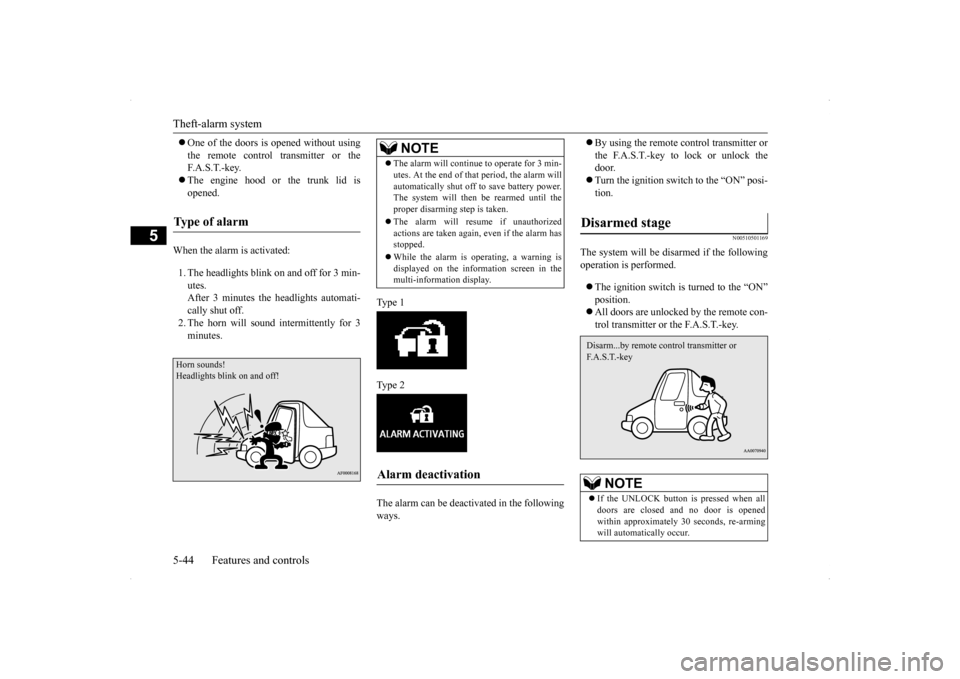
When the alarm is activated: 1. The headlights blink on and off for 3 min- utes.After 3 minutes the headlights automati- cally shut off. 2. The horn will sound intermittently for 3minutes.
Ty p e 1 Ty p e 2 The alarm can be deactivated in the following ways.
By using the remote control transmitter or the F.A.S.T.-key to lock or unlock the door. Turn the ignition switch to the “ON” posi- tion.
N00510501169
The system will be disarmed if the followingoperation is performed. The ignition switch is turned to the “ON” position. All doors are unlocked by the remote con- trol transmitter or the F.A.S.T.-key.
Type of alarm Horn sounds! Headlights blink on and off!
NOTE
The alarm will continue to operate for 3 min- utes. At the end of that period, the alarm will automatically shut off to save battery power. The system will then be rearmed until the proper disarming step is taken. The alarm will resume if unauthorized actions are taken again, even if the alarm hasstopped. While the alarm is operating, a warning is displayed on the information screen in the multi-information display.
Alarm deactivation
Disarmed stage
NOTE
If the UNLOCK button is pressed when all doors are closed and no door is openedwithin approximately 30 seconds, re-arming will automatically occur.Disarm...by remote control transmitter or F. A . S . T. - k e y
Page 175 of 434
Rear-view camera (if so equipped) 5-108 Features and controls
5
N00532900179
If new wheels with new tire inflation pressure sensors are installed, their ID codes must be programmed into the tire pressure monitoring system. Have tire and wheel replacement per-formed by an authorized Mitsubishi Motors dealer to avoid the risk of damaging the tire inflation pressure sensors. If the wheelreplacement is not done by an authorizedMitsubishi Motors dealer, it is not covered by your warranty.
N00533001259
Your tire pressure monitoring system oper-ates on a radio frequency subject to Federal Communications Commission (FCC) Rules(For vehicles sold in U.S.A.) and Industry Canada Rules (For vehicles sold in Canada). This device complies with Part 15 of FCCRules and Industry Canada licence-exempt RSS standard(s).
Operation is subject to the following two con- ditions. This device may not cause harmful inter- ference. This device must accept any interference received, including interference that may cause undesired operation.
N00546201154
When the gearshift lever or the selector leveris in the “R” (REVERSE) position with the ignition switch in the “ON” position, the rear-view image will be displayed on the screen of the Mitsubishi Multi-Communication Sys- tem or the DISPLAY AUDIO in the centerpanel. When the gearshift lever or the selector lever is shifted out of the “R” (REVERSE) posi-tion, the rear-view image will go off.
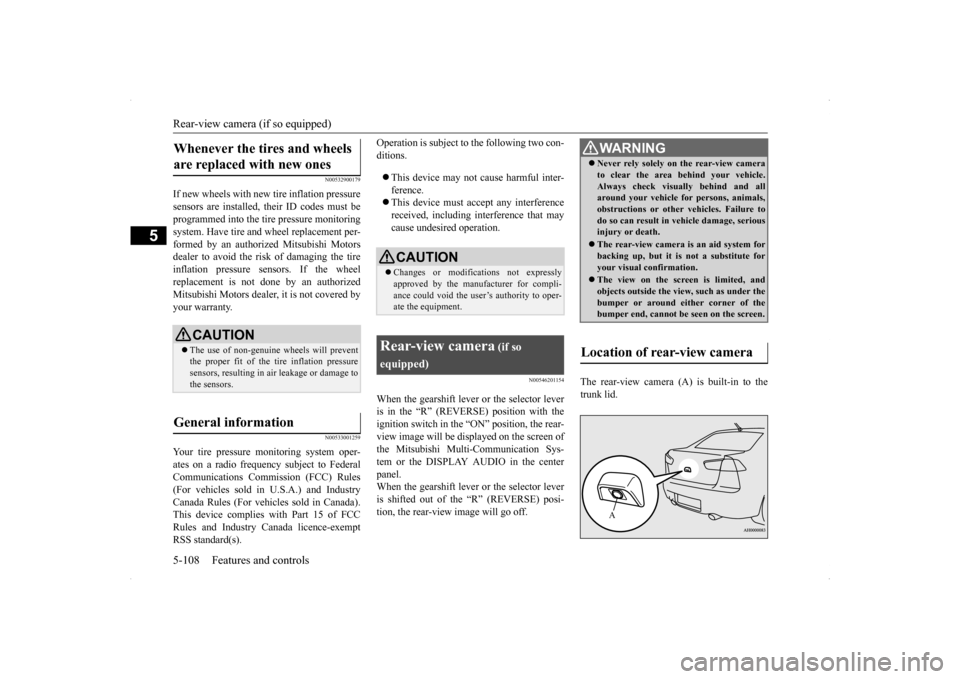
The rear-view camera (A) is built-in to the trunk lid.
Whenever the tires and wheels are replaced with new ones
CAUTION The use of non-genuine wheels will prevent the proper fit of the tire inflation pressuresensors, resulting in air leakage or damage to the sensors.
General information
CAUTION Changes or modifications not expressly approved by the manufacturer for compli- ance could void the user’s authority to oper- ate the equipment.
Rear-view camera
(if so
equipped)
WA R N I N G Never rely solely on the rear-view camera to clear the area behind your vehicle. Always check visually behind and all around your vehicle for persons, animals, obstructions or other vehicles. Failure todo so can result in vehicle damage, serious injury or death. The rear-view camera is an aid system for backing up, but it is not a substitute for your visual confirmation. The view on the screen is limited, and objects outside the vi
ew, such as under the
bumper or around either corner of the bumper end, cannot be seen on the screen.
Location of rear-view camera
A
Page 176 of 434
Rear-view camera (if so equipped)
Features and controls 5-109
5
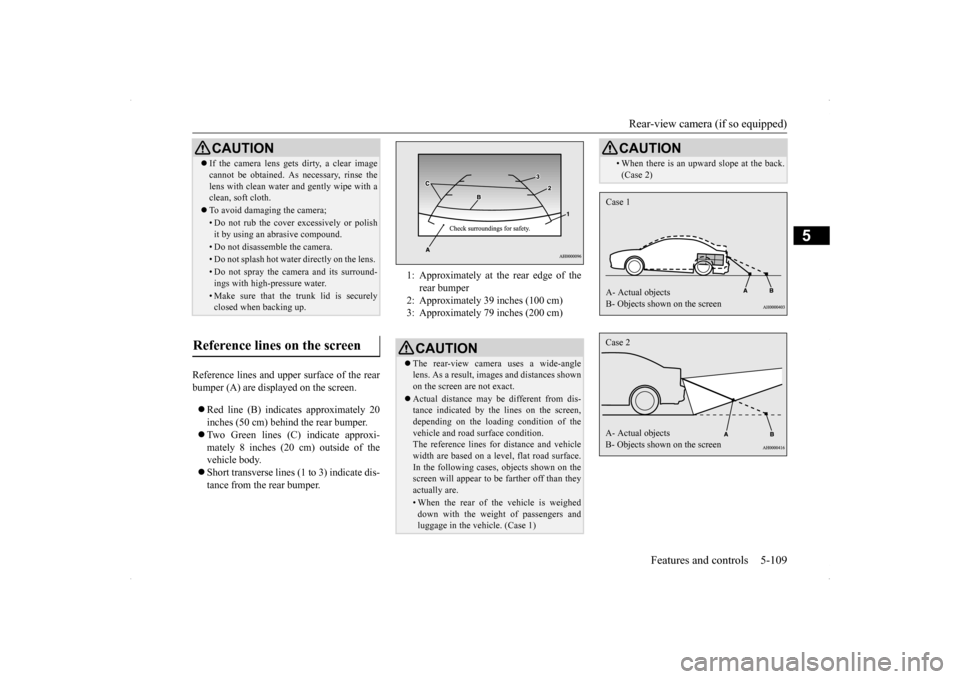
Reference lines and upper surface of the rear bumper (A) are displayed on the screen. Red line (B) indicates approximately 20 inches (50 cm) behind the rear bumper. Two Green lines (C) indicate approxi- mately 8 inches (20 cm) outside of the vehicle body. Short transverse lines (1 to 3) indicate dis- tance from the rear bumper.CAUTION If the camera lens gets dirty, a clear image cannot be obtained. As necessary, rinse the lens with clean water and gently wipe with a clean, soft cloth. To avoid damaging the camera;• Do not rub the cover excessively or polish it by using an abrasive compound. • Do not disassemble the camera.• Do not splash hot water directly on the lens. • Do not spray the camera and its surround- ings with high-pressure water.• Make sure that the trunk lid is securelyclosed when backing up.
Reference lines on the screen
1: Approximately at the rear edge of the
rear bumper
2: Approximately 39 inches (100 cm) 3: Approximately 79 inches (200 cm) CAUTION The rear-view camera uses a wide-angle lens. As a result, images and distances shownon the screen are not exact. Actual distance may be different from dis- tance indicated by the lines on the screen, depending on the loading condition of the vehicle and road surface condition.The reference lines for distance and vehicle width are based on a level, flat road surface. In the following cases, objects shown on thescreen will appear to be farther off than they actually are.• When the rear of the vehicle is weigheddown with the weight of passengers and luggage in the vehicle. (Case 1)
• When there is an upward slope at the back. (Case 2)CAUTION
Case 1 A- Actual objects B- Objects shown on the screenCase 2 A- Actual objects B- Objects shown on the screen
Page 183 of 434
Multi-information display 5-116 Features and controls
5
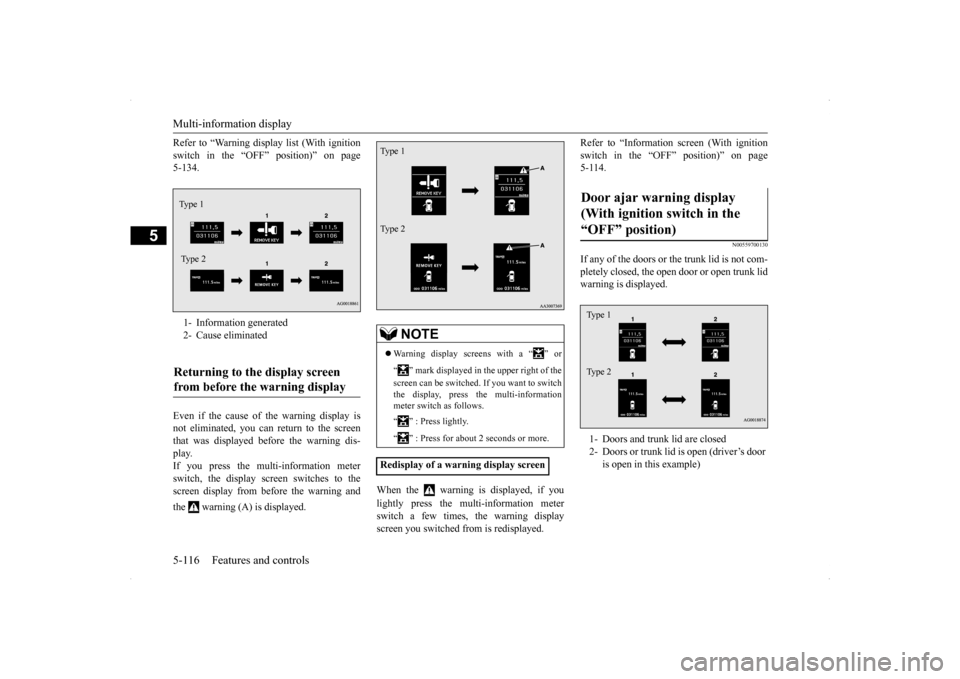
Refer to “Warning display list (With ignition switch in the “OFF” position)” on page 5-134. Even if the cause of the warning display is not eliminated, you can return to the screen that was displayed before the warning dis-play. If you press the multi-information meter switch, the display screen switches to thescreen display from before the warning and the warning (A) is displayed.
When the warning is displayed, if you lightly press the multi-information meter switch a few times, the warning displayscreen you switched from is redisplayed.
Refer to “Information screen (With ignition switch in the “OFF” position)” on page 5-114.
N00559700130
If any of the doors or the trunk lid is not com- pletely closed, the open door or open trunk lidwarning is displayed.
1- Information generated 2- Cause eliminatedReturning to the display screen from before the warning display Type 1 Ty p e 2
NOTE
Warning display screens with a “ ” or “ ” mark displayed in the upper right of the screen can be switched. If you want to switch the display, press the multi-information meter switch as follows. “ ” : Press lightly. “ ” : Press for about 2 seconds or more.
Redisplay of a warning display screenType 1 Type 2
Door ajar warning display (With ignition switch in the “OFF” position) 1- Doors and trunk lid are closed 2- Doors or trunk lid is open (driver’s door
is open in this example)
Type 1 Type 2
Page 192 of 434
Multi-information display
Features and controls 5-125
5
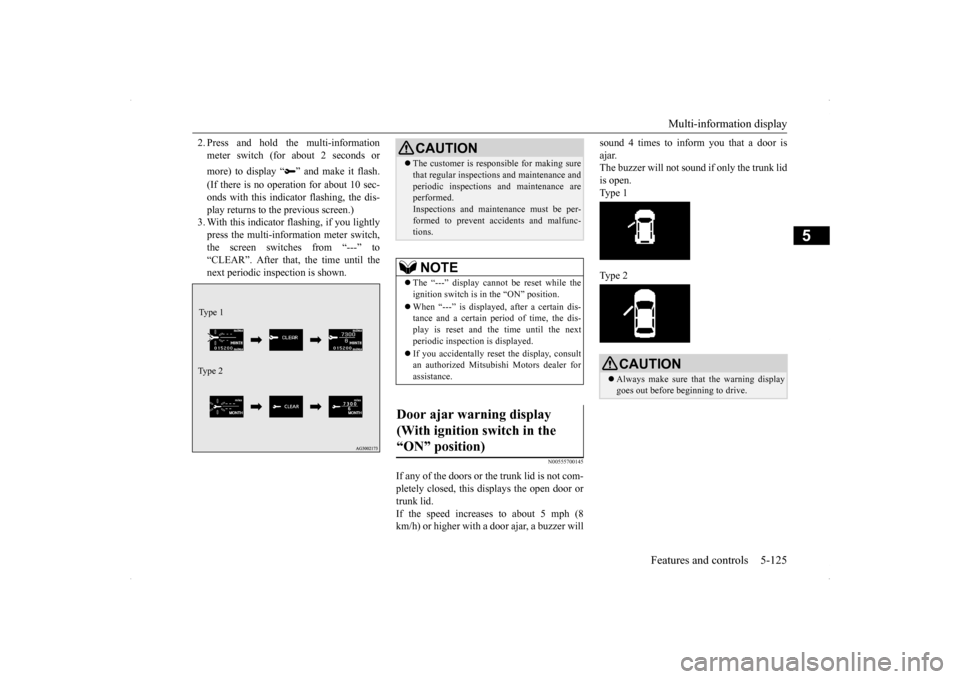
2. Press and hold the multi-information meter switch (for about 2 seconds or more) to display “ ” and make it flash. (If there is no operation for about 10 sec- onds with this indicator flashing, the dis-play returns to the previous screen.) 3. With this indicator flashing, if you lightly press the multi-information meter switch,the screen switches from “---” to “CLEAR”. After that, the time until the next periodic inspection is shown.
N00555700145
If any of the doors or the trunk lid is not com- pletely closed, this displays the open door or trunk lid.If the speed increases to about 5 mph (8 km/h) or higher with a door ajar, a buzzer will
sound 4 times to inform you that a door is ajar. The buzzer will not sound if only the trunk lid is open. Type 1 Type 2
Type 1 Ty p e 2
CAUTION The customer is responsible for making sure that regular inspections and maintenance and periodic inspections and maintenance are performed. Inspections and maintenance must be per-formed to prevent accidents and malfunc- tions.NOTE
The “---” display cannot be reset while the ignition switch is in the “ON” position. When “---” is displayed, after a certain dis- tance and a certain period of time, the dis- play is reset and the time until the next periodic inspection is displayed. If you accidentally reset the display, consult an authorized Mitsubishi Motors dealer forassistance.
Door ajar warning display (With ignition switch in the “ON” position)
CAUTION Always make sure that the warning display goes out before beginning to drive.
Page 202 of 434
Indicator light, warning light, an
d information screen display list Features and controls 5-135
5
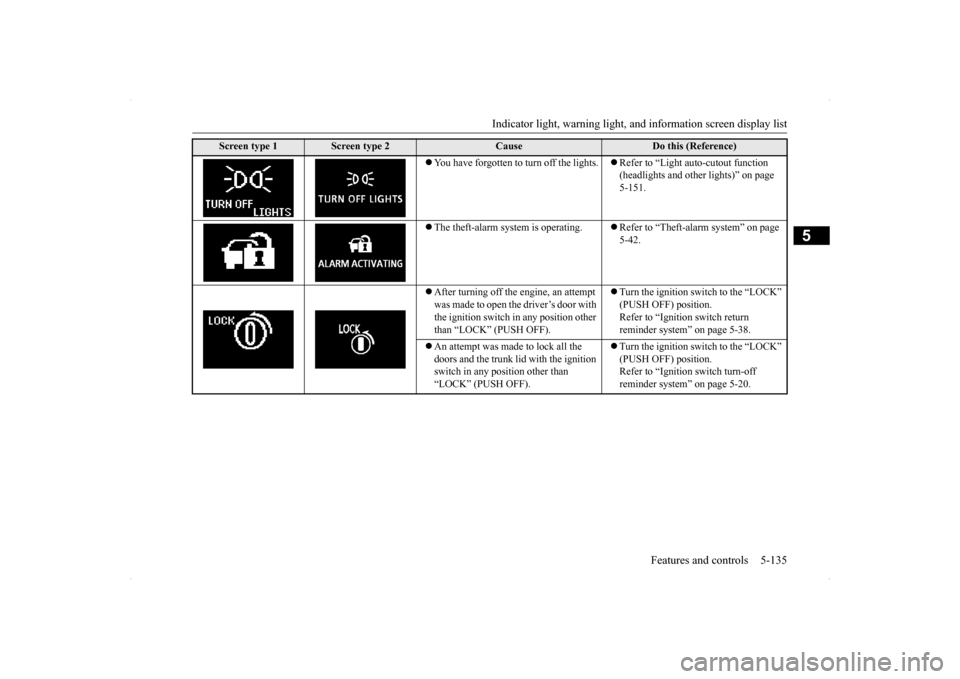
You have forgotten to turn off the lights.
Refer to “Light auto-cutout function (headlights and other lights)” on page 5-151.
The theft-alarm system is operating.
Refer to “Theft-alarm system” on page 5-42.
After turning off the engine, an attempt was made to open the driver’s door with the ignition switch in any position other than “LOCK” (PUSH OFF).
Turn the ignition switch to the “LOCK” (PUSH OFF) position. Refer to “Ignition switch return reminder system” on page 5-38.
An attempt was made to lock all the doors and the trunk lid with the ignition switch in any position other than “LOCK” (PUSH OFF).
Turn the ignition switch to the “LOCK” (PUSH OFF) position.Refer to “Ignition switch turn-off reminder system” on page 5-20.
Screen type 1
Screen type 2
Cause
Do this (Reference)
Page 206 of 434
Indicator light, warning light, an
d information screen display list Features and controls 5-139
5
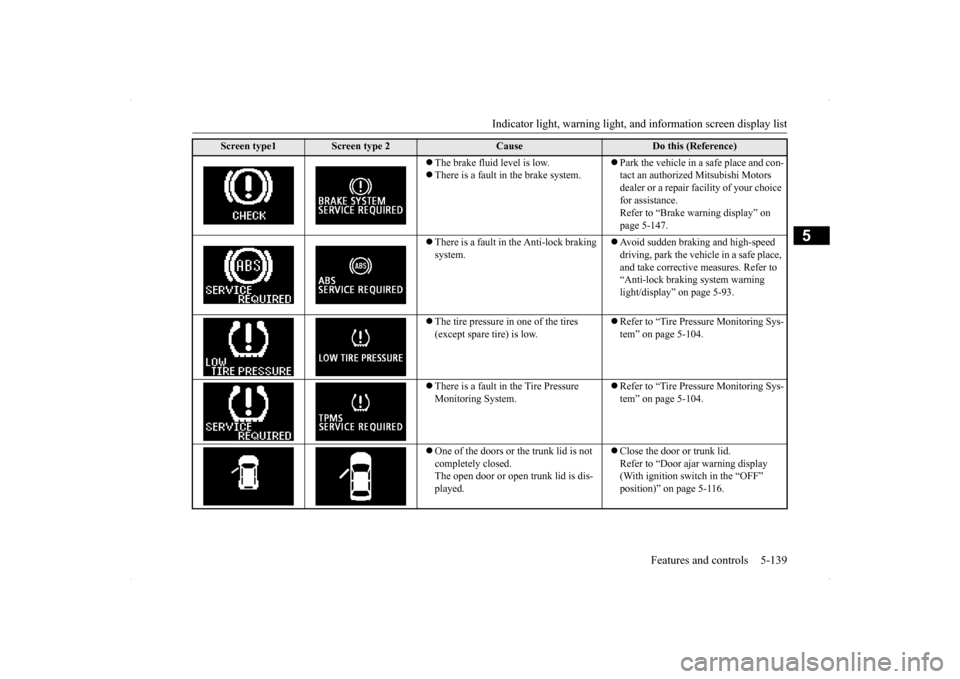
The brake fluid level is low. There is a fault in the brake system.
Park the vehicle in a safe place and con- tact an authorized Mitsubishi Motors dealer or a repair facility of your choice for assistance. Refer to “Brake warning display” on page 5-147.
There is a fault in the Anti-lock braking system.
Avoid sudden braking and high-speed driving, park the vehicle in a safe place, and take corrective measures. Refer to “Anti-lock braking system warning light/display” on page 5-93.
The tire pressure in one of the tires (except spare tire) is low.
Refer to “Tire Pressure Monitoring Sys- tem” on page 5-104.
There is a fault in the Tire Pressure Monitoring System.
Refer to “Tire Pressure Monitoring Sys- tem” on page 5-104.
One of the doors or the trunk lid is not completely closed. The open door or open trunk lid is dis- played.
Close the door or trunk lid. Refer to “Door ajar warning display (With ignition switch in the “OFF” position)” on page 5-116.
Screen type1
Screen type 2
Cause
Do this (Reference)
Page 257 of 434
Storage spaces 5-190 Features and controls
5
The lights come on again if the ignition switch is turned to the “ON” or “ACC” posi- tion, any door or the trunk lid is opened and closed, or the keyless entry system orF.A.S.T.-key is operated.
N00526400485
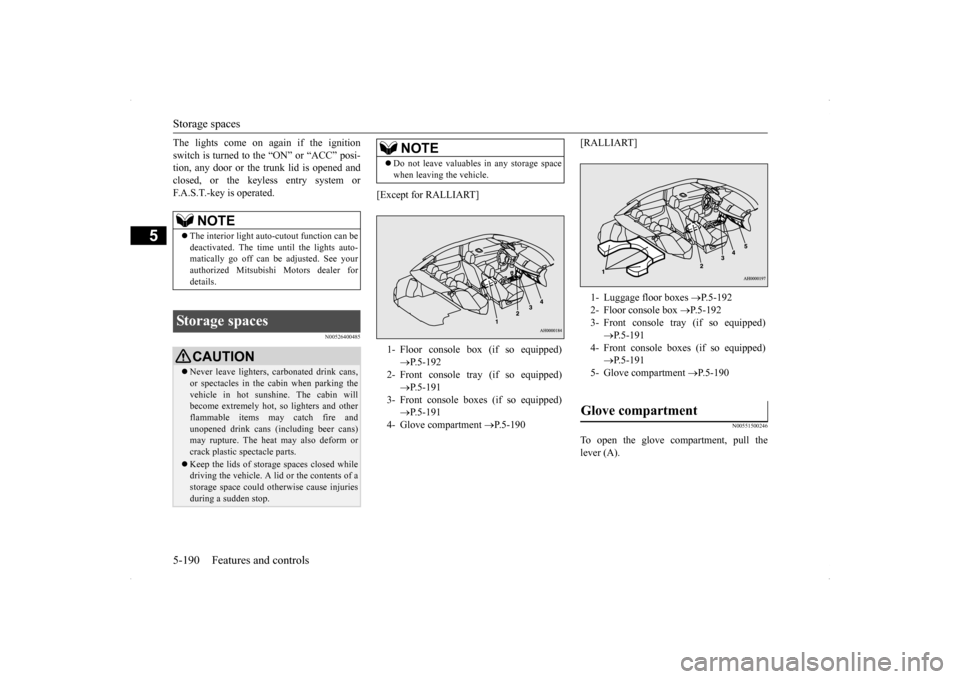
[Except for RALLIART]
[RALLIART]
N00551500246
To open the glove compartment, pull the lever (A).
NOTE
The interior light auto-cutout function can be deactivated. The time until the lights auto- matically go off can be adjusted. See yourauthorized Mitsubishi Motors dealer for details.
Storage spaces
CAUTION Never leave lighters, carbonated drink cans, or spectacles in the cabin when parking the vehicle in hot sunshine. The cabin will become extremely hot, so lighters and otherflammable items may catch fire and unopened drink cans (including beer cans) may rupture. The heat may also deform or crack plastic spectacle parts. Keep the lids of storage spaces closed while driving the vehicle. A lid or the contents of a storage space could otherwise cause injuriesduring a sudden stop.
NOTE
Do not leave valuables in any storage space when leaving the vehicle.1- Floor console box (if so equipped)
P.5-192
2- Front console tray (if so equipped)
P.5-191
3- Front console boxes (if so equipped)
P.5-191
4- Glove compartment
P.5-190
1- Luggage floor boxes
P.5-192
2- Floor console box
P.5-192
3- Front console tray (if so equipped)
P.5-191
4- Front console boxes (if so equipped)
P.5-191
5- Glove compartment
P.5-190
Glove compartment
Page 346 of 434
Tools and jack
For emergencies 8-5
8
5. If you do not see steam or spray coming from under the hood, leave the engine on until the bar graph for the engine coolant temperature warning display on the multi-information display goes down. When it is in the middle of the normal zone, you can start driving again. If the bar graphstays in the red zone, turn off the engine. 6. When you do not see any more steam or spray, open the hood. Look for obvious leaks, such as a split radiator hose. Be careful as components will be hot. Anyleak source must be repaired. 7. If there is no obvious leak source, check the coolant level in the reserve tank. Ifthere is none, or if it is too low, slowly add coolant.
8. If the reserve tank needs coolant, you will probably also need to add coolant to the radiator. Do not loosen or remove the radiator cap until the engine has cooleddown. 9. Start the engine, and slowly add coolant, up to the bottom of the filler neck. Useplain water if you have to (and replace it with the right coolant as soon as possible).
10. Replace the radiator cap and tighten it
fully. Check the engine coolant tempera- ture display on the multi-information dis- play. You can start driving again when thebar graph for the engine coolant tempera- ture display returns to the normal zone.
11. Have your vehicle checked by your autho-
rized Mitsubishi Motors dealer or a repair facility of your choice.
N00836600265
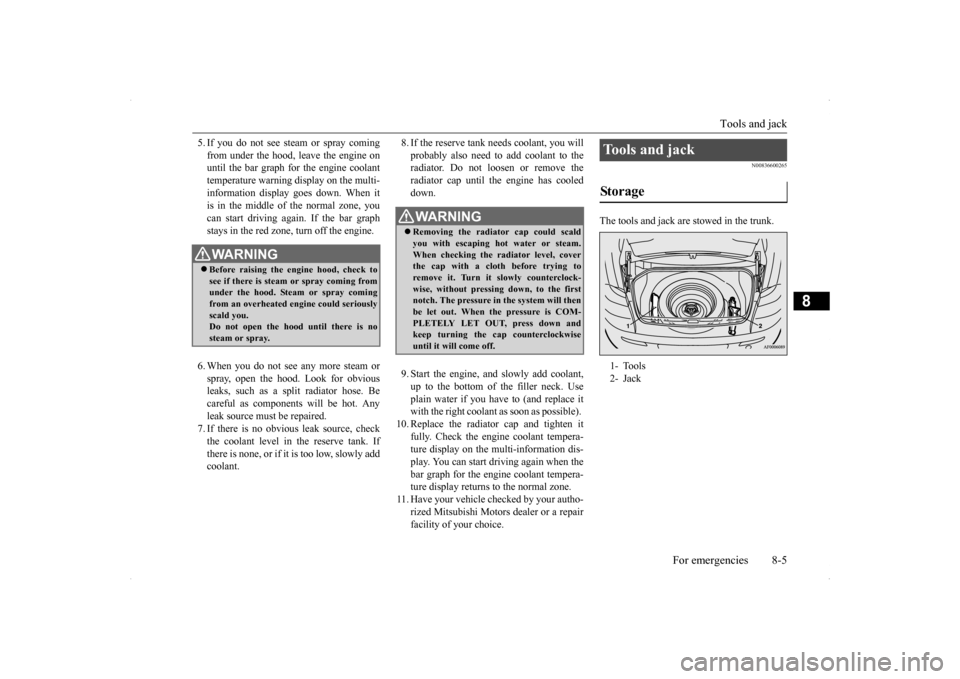
The tools and jack are stowed in the trunk.
WA R N I N G Before raising the engine hood, check to see if there is steam or spray coming fromunder the hood. Steam or spray coming from an overheated engine could seriously scald you.Do not open the hood until there is no steam or spray.
WA R N I N G Removing the radiator cap could scald you with escaping hot water or steam.When checking the radiator level, cover the cap with a cloth before trying to remove it. Turn it slowly counterclock-wise, without pressing down, to the first notch. The pressure in the system will then be let out. When the pressure is COM-PLETELY LET OUT, press down and keep turning the cap counterclockwise until it will come off.
Tools and jack Storage 1- Tools 2- Jack
Page 348 of 434
How to change a tire
For emergencies 8-7
8
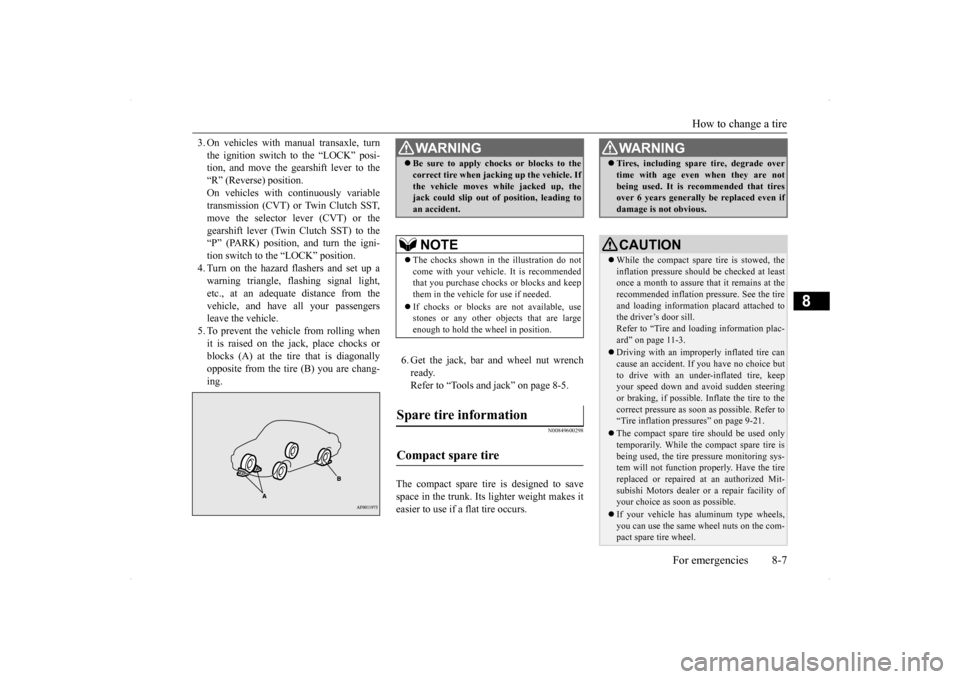
3. On vehicles with manual transaxle, turn the ignition switch to the “LOCK” posi- tion, and move the gearshift lever to the “R” (Reverse) position.On vehicles with continuously variable transmission (CVT) or Twin Clutch SST, move the selector lever (CVT) or thegearshift lever (Twin Clutch SST) to the “P” (PARK) position, and turn the igni- tion switch to the “LOCK” position.4. Turn on the hazard flashers and set up awarning triangle, flashing signal light, etc., at an adequate distance from the vehicle, and have all your passengersleave the vehicle. 5. To prevent the vehicle from rolling when it is raised on the jack, place chocks orblocks (A) at the tire that is diagonally opposite from the tire (B) you are chang- ing.
6. Get the jack, bar and wheel nut wrench ready.Refer to “Tools and jack” on page 8-5.
N00849600298
The compact spare tire is designed to savespace in the trunk. Its lighter weight makes it easier to use if a flat tire occurs.
WA R N I N G Be sure to apply chocks or blocks to the correct tire when jacking up the vehicle. If the vehicle moves while jacked up, the jack could slip out of position, leading to an accident.NOTE
The chocks shown in the illustration do not come with your vehicle. It is recommended that you purchase chocks or blocks and keepthem in the vehicle for use if needed. If chocks or blocks are not available, use stones or any other objects that are large enough to hold the wheel in position.
Spare tire information Compact spare tire
WA R N I N G Tires, including spare tire, degrade over time with age even when they are not being used. It is recommended that tires over 6 years generally be replaced even if damage is not obvious.CAUTION While the compact spare tire is stowed, the inflation pressure should be checked at least once a month to assure that it remains at therecommended inflation pressure. See the tire and loading information placard attached to the driver’s door sill.Refer to “Tire and loading information plac- ard” on page 11-3. Driving with an improperly inflated tire can cause an accident. If you have no choice but to drive with an under-inflated tire, keepyour speed down and avoid sudden steering or braking, if possible. Inflate the tire to the correct pressure as soon as possible. Refer to“Tire inflation pressures” on page 9-21. The compact spare tire should be used only temporarily. While the compact spare tire is being used, the tire pressure monitoring sys- tem will not function properly. Have the tire replaced or repaired at an authorized Mit- subishi Motors dealer or a repair facility ofyour choice as soon as possible. If your vehicle has aluminum type wheels, you can use the same wheel nuts on the com- pact spare tire wheel.